fuel FIAT BRAVO 2014 2.G Owners Manual
[x] Cancel search | Manufacturer: FIAT, Model Year: 2014, Model line: BRAVO, Model: FIAT BRAVO 2014 2.GPages: 275, PDF Size: 3.95 MB
Page 6 of 275
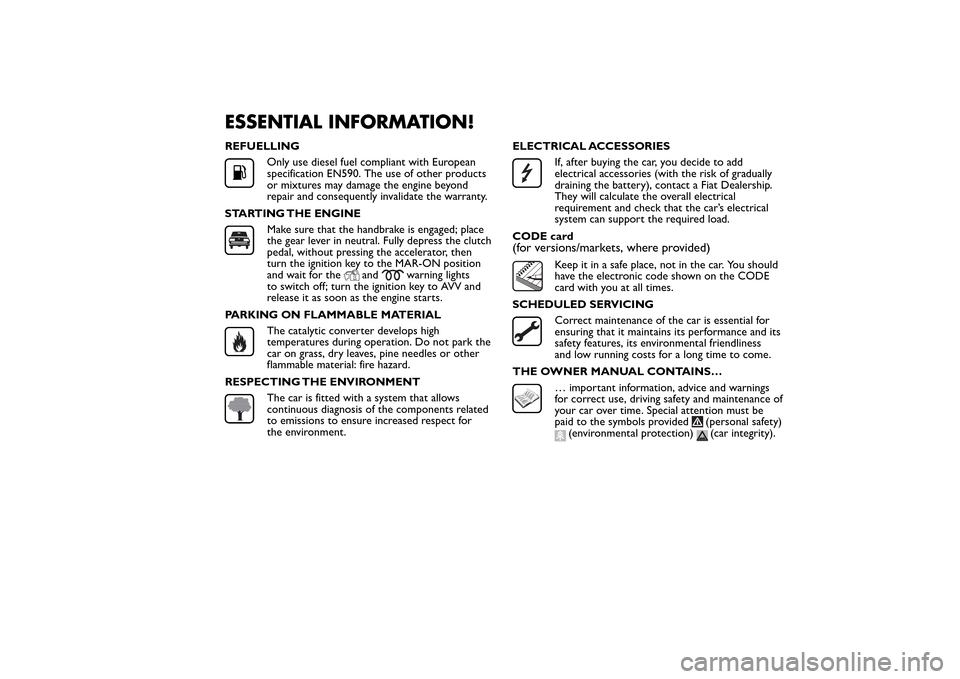
ESSENTIAL INFORMATION!REFUELLING
Only use diesel fuel compliant with European
specification EN590. The use of other products
or mixtures may damage the engine beyond
repair and consequently invalidate the warranty.
STARTING THE ENGINEMake sure that the handbrake is engaged; place
the gear lever in neutral. Fully depress the clutch
pedal, without pressing the accelerator, then
turn the ignition key to the MAR-ON position
and wait for the
and
warning lights
to switch off; turn the ignition key to AVV and
release it as soon as the engine starts.
PARKING ON FLAMMABLE MATERIAL
The catalytic converter develops high
temperatures during operation. Do not park the
car on grass, dry leaves, pine needles or other
flammable material: fire hazard.
RESPECTING THE ENVIRONMENTThe car is fitted with a system that allows
continuous diagnosis of the components related
to emissions to ensure increased respect for
the environment.ELECTRICAL ACCESSORIES
If, after buying the car, you decide to add
electrical accessories (with the risk of gradually
draining the battery), contact a Fiat Dealership.
They will calculate the overall electrical
requirement and check that the car’s electrical
system can support the required load.
CODE card
(for versions/markets, where provided)
Keep it in a safe place, not in the car. You should
have the electronic code shown on the CODE
card with you at all times.
SCHEDULED SERVICINGCorrect maintenance of the car is essential for
ensuring that it maintains its performance and its
safety features, its environmental friendliness
and low running costs for a long time to come.
THE OWNER MANUAL CONTAINS…… important information, advice and warnings
for correct use, driving safety and maintenance of
your car over time. Special attention must be
paid to the symbols provided
(personal safety)
(environmental protection)
(car integrity).
Page 8 of 275
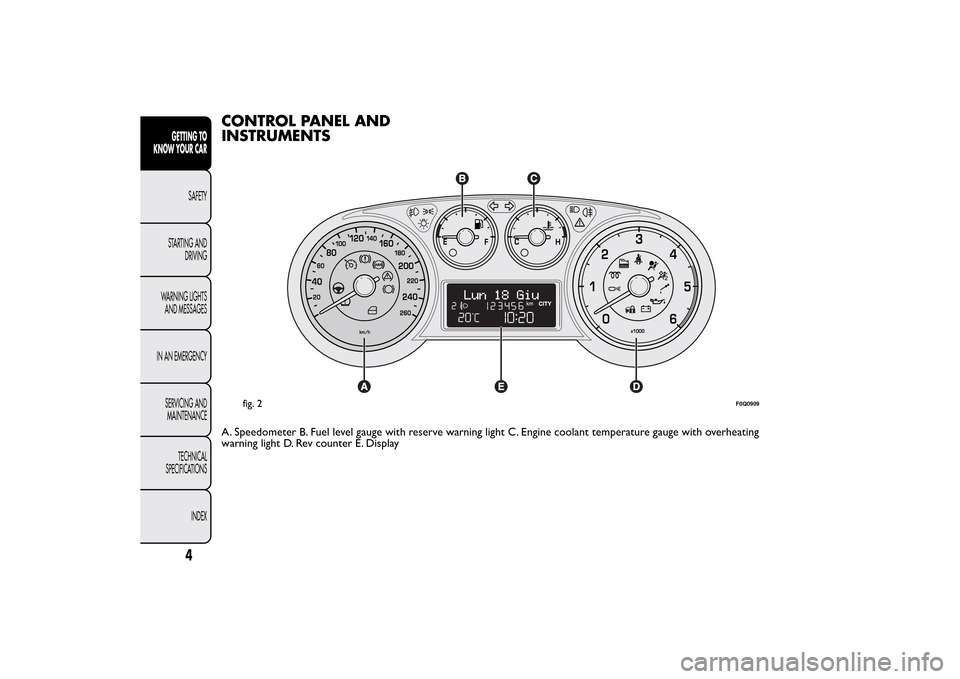
CONTROL PANEL AND
INSTRUMENTSA. Speedometer B. Fuel level gauge with reserve warning light C. Engine coolant temperature gauge with overheating
warning light D. Rev counter E. Display
fig. 2
F0Q0909
4
GETTING TO
KNOW YOUR CAR
SAFETY
STARTING AND
DRIVING
WARNING LIGHTS
AND MESSAGES
IN AN EMERGENCY
SERVICING AND
MAINTENANCE
TECHNICAL
SPECIFICATIONS
INDEX
Page 9 of 275
SPEEDOMETER
Shows the car speed (speedometer).
REV COUNTER
This indicates the engine rpm.
When the engine is idling, the rev counter may
indicate a gradual or sudden increase of the speed.
This behaviour is standard as it takes place during the
activation of the climate control system or the fan.
It should not be considered as a fault. In these cases,
a slow change in revs is used to protect the battery
charge.
IMPORTANT The electronic injection control system
gradually shuts off the flow of fuel when the engine
is “over-revving” resulting in a gradual loss of engine
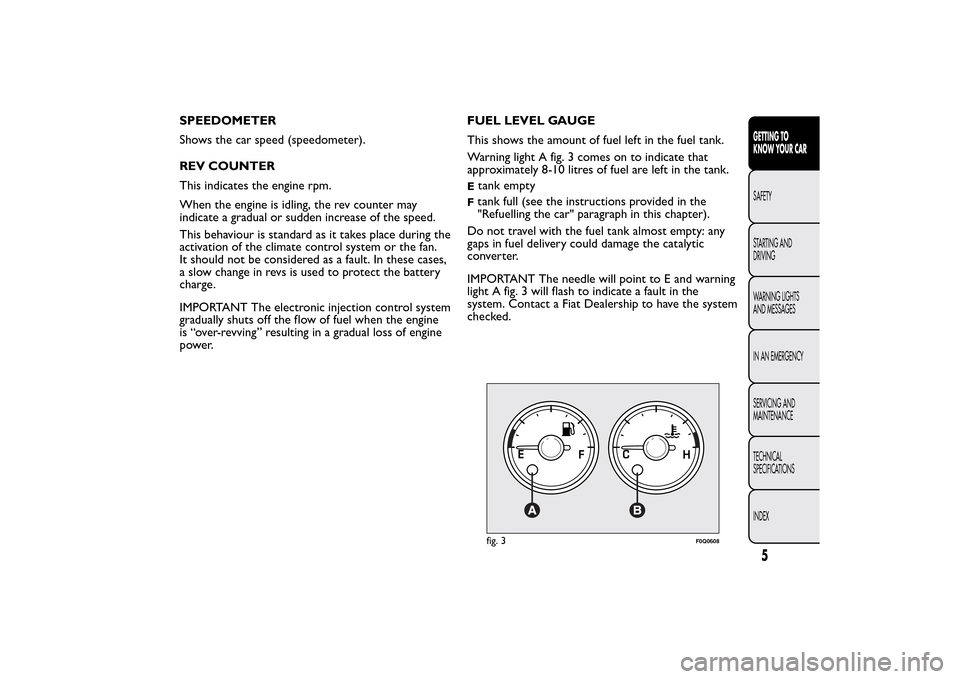
power.FUEL LEVEL GAUGE
This shows the amount of fuel left in the fuel tank.
Warning light A fig. 3 comes on to indicate that
approximately 8-10 litres of fuel are left in the tank.
Etank emptyFtank full (see the instructions provided in the
"Refuelling the car" paragraph in this chapter).
Do not travel with the fuel tank almost empty: any
gaps in fuel delivery could damage the catalytic
converter.
IMPORTANT The needle will point to E and warning
light A fig. 3 will flash to indicate a fault in the
system. Contact a Fiat Dealership to have the system
checked.fig. 3
F0Q0608
5GETTING TO
KNOW YOUR CARSAFETY
STARTING AND
DRIVING
WARNING LIGHTS
AND MESSAGES
IN AN EMERGENCY
SERVICING AND
MAINTENANCE
TECHNICAL
SPECIFICATIONS
INDEX
Page 12 of 275
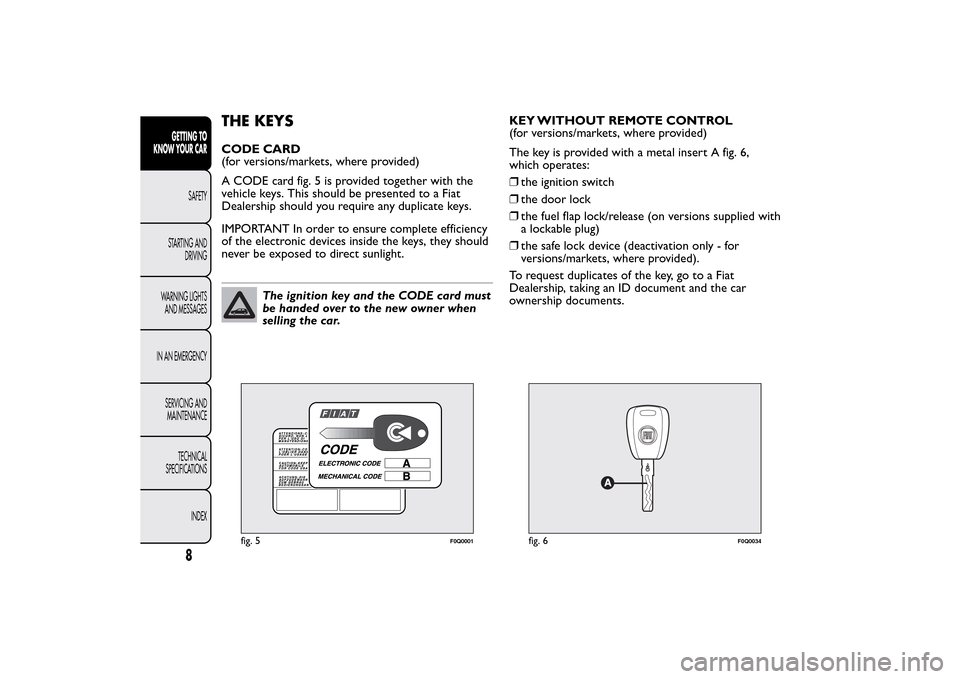
THE KEYSCODE CARD
(for versions/markets, where provided)
A CODE card fig. 5 is provided together with the
vehicle keys. This should be presented to a Fiat
Dealership should you require any duplicate keys.
IMPORTANT In order to ensure complete efficiency
of the electronic devices inside the keys, they should
never be exposed to direct sunlight.
The ignition key and the CODE card must
be handed over to the new owner when
selling the car.KEY WITHOUT REMOTE CONTROL
(for versions/markets, where provided)
The key is provided with a metal insert A fig. 6,
which operates:
❒the ignition switch
❒the door lock
❒the fuel flap lock/release (on versions supplied with
a lockable plug)
❒the safe lock device (deactivation only - for
versions/markets, where provided).
To request duplicates of the key, go to a Fiat
Dealership, taking an ID document and the car
ownership documents.
fig. 5
F0Q0001
fig. 6
F0Q0034
8
GETTING TO
KNOW YOUR CAR
SAFETY
STARTING AND
DRIVING
WARNING LIGHTS
AND MESSAGES
IN AN EMERGENCY
SERVICING AND
MAINTENANCE
TECHNICAL
SPECIFICATIONS
INDEX
Page 13 of 275
KEY WITH REMOTE CONTROL
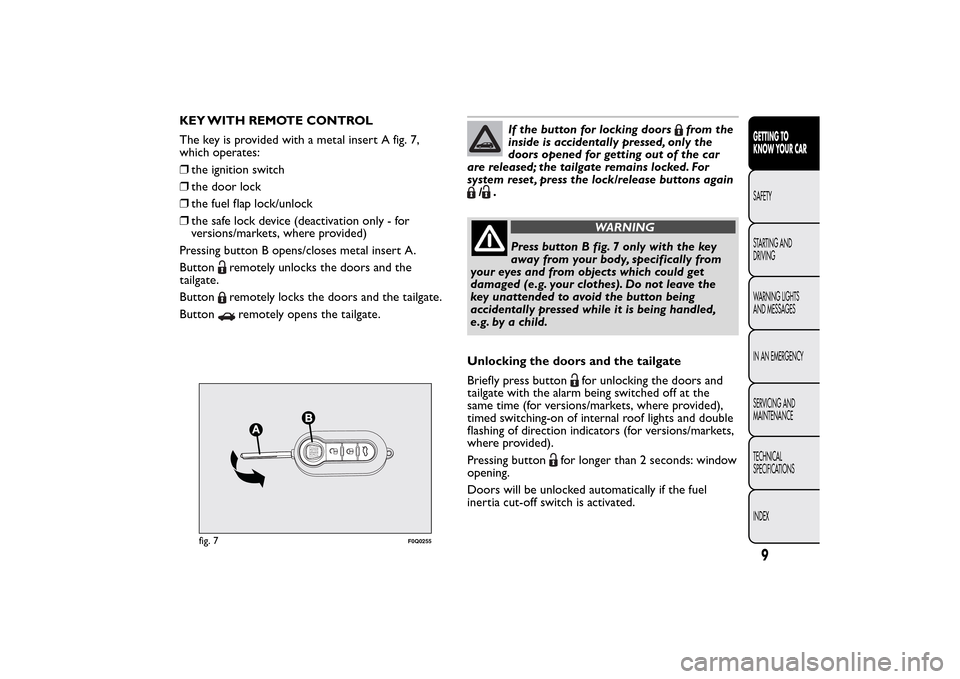
The key is provided with a metal insert A fig. 7,
which operates:
❒the ignition switch
❒the door lock
❒the fuel flap lock/unlock
❒the safe lock device (deactivation only - for
versions/markets, where provided)
Pressing button B opens/closes metal insert A.
Button
remotely unlocks the doors and the
tailgate.
Buttonremotely locks the doors and the tailgate.
Buttonremotely opens the tailgate.
If the button for locking doors
from the
inside is accidentally pressed, only the
doors opened for getting out of the car
are released; the tailgate remains locked. For
system reset , press the lock/release buttons again
/
.
WARNING
Press button B fig. 7 only with the key
away from your body, specifically from
your eyes and from objects which could get
damaged (e.g. your clothes). Do not leave the
key unattended to avoid the button being
accidentally pressed while it is being handled,
e.g. by a child.
Unlocking the doors and the tailgate
Briefly press button
for unlocking the doors and
tailgate with the alarm being switched off at the
same time (for versions/markets, where provided),
timed switching-on of internal roof lights and double
flashing of direction indicators (for versions/markets,
where provided).
Pressing button
for longer than 2 seconds: window
opening.
Doors will be unlocked automatically if the fuel
inertia cut-off switch is activated.
fig. 7
F0Q0255
9GETTING TO
KNOW YOUR CARSAFETY
STARTING AND
DRIVING
WARNING LIGHTS
AND MESSAGES
IN AN EMERGENCY
SERVICING AND
MAINTENANCE
TECHNICAL
SPECIFICATIONS
INDEX
Page 29 of 275
❒press
or
to make your choice;
❒when you select the “Consumption” submenu,
pressing the MODE button makes "km/l", "l/100
km" or "mpg" appear on the display depending on
the previous setting;
If the set distance unit is "km", the fuel consumption
unit will be displayed in km/l or l/100 km.
If the set distance unit is “mi” the fuel consumption
unit will be displayed in “mpg”.
❒press
or
to make your choice;
❒when you enter the “Temperature” submenu,
briefly pressing the MODE button makes "°C" or
"°F" appear on the display depending on the
previous setting;
❒press
or
to make your choice;
When you have made the adjustment, briefly press
the MODE button to go back to the submenu screen
or hold the button down to go back to the main
menu screen without storing.
Hold down the MODE button again to return to the
standard screen or to the main menu according to
where you are in the menu.Language (Language selection)
Display messages can be shown in different
languages: Italian, German, English, Spanish, French,
Portuguese and Dutch.
To set the desired language, proceed as follows:
❒briefly press the MODE button: the previously set
language starts flashing on the display;
❒press
or
to make your choice;
❒briefly press the MODE button to return to the
menu screen or hold the button down to return
to the standard screen without storing.
Warnings volume (Adjusting the failure/
warning acoustic signal volume)
With this function the volume of the buzzer which
accompanies the display of any failure/warning can be
adjusted to 8 levels.
To set the desired volume, proceed as follows:
❒press the MODE button briefly, making the display
flash the previously set volume "level";
❒press theor
button to make the adjustment;
❒briefly press the MODE button to return to the
menu screen or hold the button down to return
to the standard screen without storing.
25GETTING TO
KNOW YOUR CARSAFETY
STARTING AND
DRIVING
WARNING LIGHTS
AND MESSAGES
IN AN EMERGENCY
SERVICING AND
MAINTENANCE
TECHNICAL
SPECIFICATIONS
INDEX
Page 32 of 275
TRIP COMPUTERGeneral information
The Trip computer is used to display information on
car operation when the key is turned to MAR-ON.
Two separate trips, called “Trip A” and “Trip B”,
are provided to monitor the entire mission (journey)
in a reciprocally independent manner.
Both functions can be reset (reset - start of a new
journey).
“Trip A” is used to display the figures relating to:
❒Range
❒Distance covered
❒Average consumption
❒Instantaneous consumption
❒Average speed
❒Trip time (driving time).
“Trip B” is used to display the figures relating to:
❒Distance travelled B
❒Average consumption B
❒Average speed B
❒Trip time B (driving time).
NoteThe “Trip B” function may be disabled (see
“Activating Trip B”). The “Range” and “Instant
consumption" parameters cannot be reset.Values displayed
Range
This indicates the approximate distance which can be
travelled with the amount of fuel present in the
tank.“----”will appear on the display in the
following cases:
❒range value lower than 50 km (or 30 mi)
❒car parked with engine running for an extended
period.
IMPORTANT The range value variation can be
affected by several factors: driving style, type of route
(motorway, urban, mountain roads, etc.), conditions
of use (load, tyre pressures, etc.). Trip planning
must therefore take the above into account.
Distance covered
Shows the distance covered since the start of the
new journey.
Average consumption
Shows the approximate average fuel consumption
since the start of the new journey.
Instantaneous consumption
This indicates the fuel consumption. The value is
constantly updated. The display will show “----”if
the car is parked with the engine running.
28GETTING TO
KNOW YOUR CAR
SAFETY
STARTING AND
DRIVING
WARNING LIGHTS
AND MESSAGES
IN AN EMERGENCY
SERVICING AND
MAINTENANCE
TECHNICAL
SPECIFICATIONS
INDEX
Page 66 of 275
Timing when getting out of the car
After removing the key from the ignition switch, the
roof lights switch on as follows:
❒within 2 minutes of the engine being switched off
for a period of around 10 seconds;
❒when one of the side doors is opened for a period
of around 3 minutes;
❒when one of the doors is closed for a period of
about 10 seconds.
❒if the fuel cut-off switch operates, they are on for
about 15 minutes, then they switch off
automatically.
Door locking switches the lights off immediately
(unless the fuel cut-off switch is operating).
REAR ROOF LIGHT
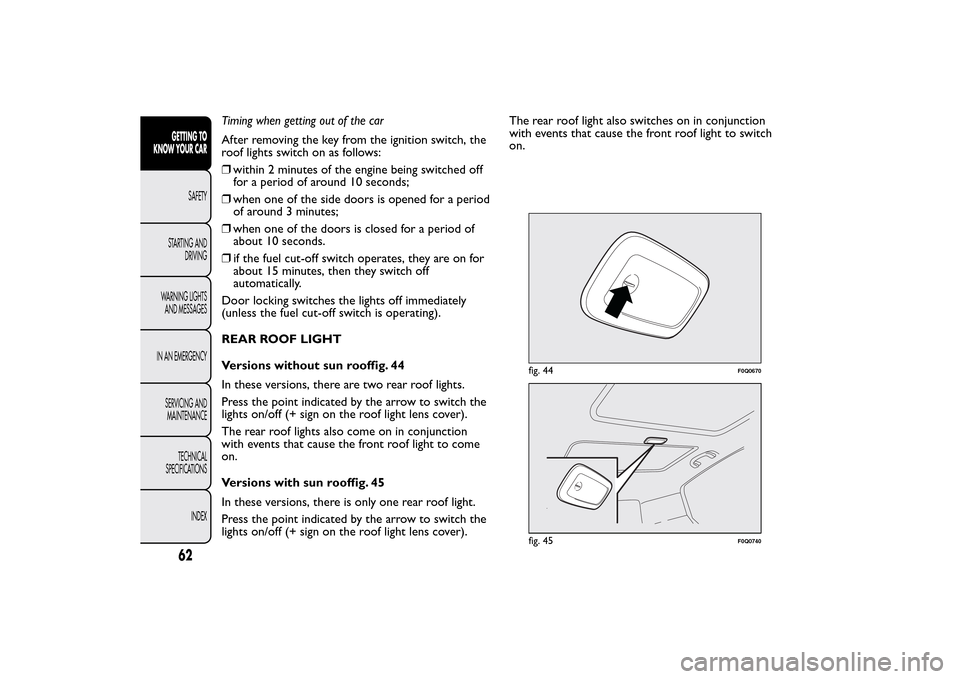
Versions without sun rooffig. 44
In these versions, there are two rear roof lights.
Press the point indicated by the arrow to switch the
lights on/off (+ sign on the roof light lens cover).
The rear roof lights also come on in conjunction
with events that cause the front roof light to come
on.
Versions with sun rooffig. 45
In these versions, there is only one rear roof light.
Press the point indicated by the arrow to switch the
lights on/off (+ sign on the roof light lens cover).The rear roof light also switches on in conjunction
with events that cause the front roof light to switch
on.
fig. 44
F0Q0670
fig. 45
F0Q0740
62GETTING TO
KNOW YOUR CAR
SAFETY
STARTING AND
DRIVING
WARNING LIGHTS
AND MESSAGES
IN AN EMERGENCY
SERVICING AND
MAINTENANCE
TECHNICAL
SPECIFICATIONS
INDEX
Page 68 of 275
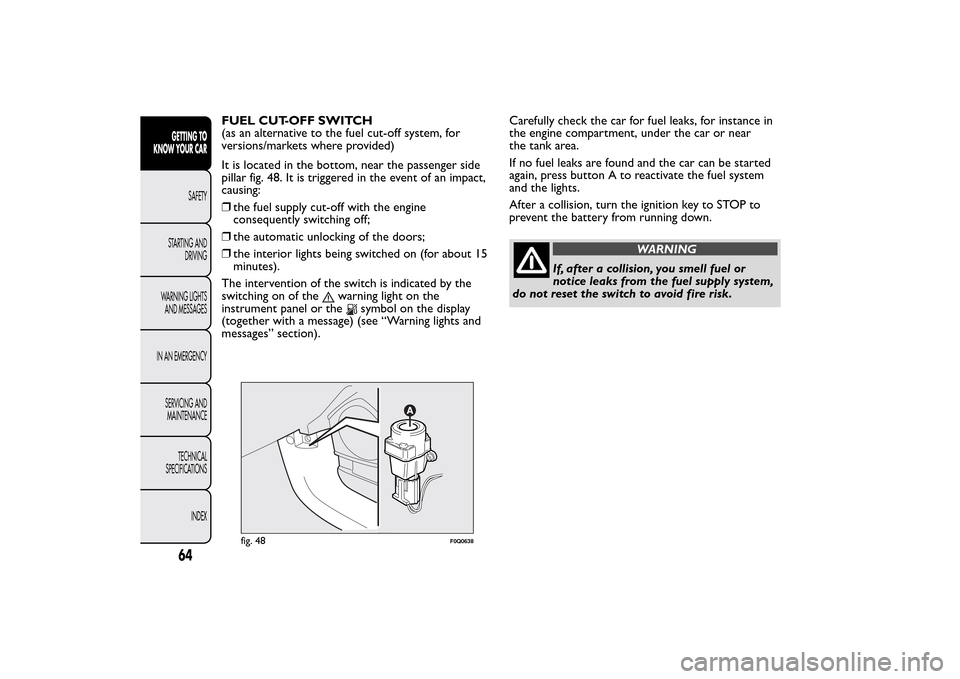
FUEL CUT-OFF SWITCH
(as an alternative to the fuel cut-off system, for
versions/markets where provided)
It is located in the bottom, near the passenger side
pillar fig. 48. It is triggered in the event of an impact,
causing:
❒the fuel supply cut-off with the engine
consequently switching off;
❒the automatic unlocking of the doors;
❒the interior lights being switched on (for about 15
minutes).
The intervention of the switch is indicated by the
switching on of the
warning light on the
instrument panel or the
symbol on the display
(together with a message) (see “Warning lights and
messages” section).Carefully check the car for fuel leaks, for instance in
the engine compartment, under the car or near
the tank area.
If no fuel leaks are found and the car can be started
again, press button A to reactivate the fuel system
and the lights.
After a collision, turn the ignition key to STOP to
prevent the battery from running down.
WARNING
If, after a collision, you smell fuel or
notice leaks from the fuel supply system,
do not reset the switch to avoid fire risk.
fig. 48
F0Q0638
64GETTING TO
KNOW YOUR CAR
SAFETY
STARTING AND
DRIVING
WARNING LIGHTS
AND MESSAGES
IN AN EMERGENCY
SERVICING AND
MAINTENANCE
TECHNICAL
SPECIFICATIONS
INDEX
Page 69 of 275
FUEL CUT-OFF SYSTEM
(as an alternative to the fuel cut-off switch, for
versions/markets where provided)
It is triggered in the event of a collision, causing:
❒the fuel supply cut-off with the engine
consequently switching off;
❒the automatic unlocking of the doors;
❒the interior lights being switched on.
The intervention of the system is indicated by a
message shown on the display.
Carefully check the car for fuel leaks, for instance in
the engine compartment, under the car or near
the tank area.
After a collision, turn the ignition key to STOP to
prevent the battery from running down.The following procedure should be carried out to
restore the correct operation of the vehicle:
❒turn the ignition key to the MAR-ON position;
❒turn on the right direction indicator;
❒turn off the right direction indicator;
❒turn on the left direction indicator;
❒turn off the left direction indicator;
❒turn on the right direction indicator;
❒turn off the right direction indicator;
❒turn on the left direction indicator;
❒turn off the left direction indicator;
❒turn the ignition key to the OFF position;
❒turn the ignition key to the MAR-ON position.
WARNING
If, after an impact , you smell fuel or
notice leaks from the fuel supply system,
do not reactivate the system to avoid the risk of
fire.
65GETTING TO
KNOW YOUR CARSAFETY
STARTING AND
DRIVING
WARNING LIGHTS
AND MESSAGES
IN AN EMERGENCY
SERVICING AND
MAINTENANCE
TECHNICAL
SPECIFICATIONS
INDEX