Connect FIAT CROMA 2005 2.G Connect NavPlus Manual
[x] Cancel search | Manufacturer: FIAT, Model Year: 2005, Model line: CROMA, Model: FIAT CROMA 2005 2.GPages: 164, PDF Size: 5.39 MB
Page 132 of 164

132
CONNECT NAV+
EXAMPLES (voice commands)
Tuning a radio frequency
Pronouncing 1st level keyword “Ra-
dio” and then the 2nd level one “Fre-
quency”, opens a dialogue enabling the
following keywords:
– [0..9]
– Point
– Cancel
– Delete
– Abort
– Repeat
– Send.First example:
User: Radio - Frequency
CONNECT: The frequency, please
User: 1-0-5-Point-5
CONNECT: 1-0-5-Point-5
User: Send
CONNECT: The frequency is
being tuned.
Second example:
User: Radio - Frequency
CONNECT: The frequency, please
User: 9-6
CONNECT: 9-6
User: Point-5-0
CONNECT: Point-5-0
User: Send
CONNECT: The frequency is
being tuned.Third example:
User: Radio - Frequency
CONNECT: The frequency, please
User: 1-0-6
CONNECT: 1-0-6
User: Point-7
CONNECT: Point-7
User: Delete
CONNECT: 1-0-6
User: Point-6
CONNECT: Point-6
User: Repeat
CONNECT: 1-0-6-Point-6
User: Send
CONNECT: The frequency is
being tuned.
Page 133 of 164
![FIAT CROMA 2005 2.G Connect NavPlus Manual 133
CONNECT NAV+
Dialling a telephone number
Pronouncing 1st level keyword “Di-
al” opens a dialogue enabling the fol-
lowing keywords:
– [0..9]
– Plus (+)
– Cancel
– Delete
– Abort
–](/img/10/4547/w960_4547-132.png "FIAT CROMA 2005 2.G Connect NavPlus Manual 133
CONNECT NAV+
Dialling a telephone number
Pronouncing 1st level keyword “Di-
al” opens a dialogue enabling the fol-
lowing keywords:
– [0..9]
– Plus (+)
– Cancel
– Delete
– Abort
–")
133
CONNECT NAV+
Dialling a telephone number
Pronouncing 1st level keyword “Di-
al” opens a dialogue enabling the fol-
lowing keywords:
– [0..9]
– Plus (+)
– Cancel
– Delete
– Abort
– Repeat
– Send.First example:
User: Dial
CONNECT: The number, please
User: 0-1-1
CONNECT: 0-1-1
User: 1-2-3
CONNECT: 1-2-3
User: 4-5-6
CONNECT: 4-5-6
User: 7-8
CONNECT: 7-8
User: Send
CONNECT: The number is being
dialled.
Second example:
User: Dial
CONNECT: The number, please
User: 0-1-1-1-2-3
CONNECT: 0-1-1-1-2-3
User: 4-5-6-7-8
CONNECT: 4-5-6-7-8
User: Repeat
CONNECT: 0-1-1-1-2-3-4-5-6-7-8
User: Send
CONNECT: The number is
being dialled.Third example:
User: Dial
CONNECT: The number, please
User: 0-1-1-1-2-3
CONNECT: 0-1-1-1-2-3
User: 4-5-6-7-8
CONNECT: 4-5-6-7-7
User: Repeat
CONNECT: 0-1-1-1-2-3-4-5-6-7-7
User: Delete
CONNECT: 0-1-1-1-2-3
User: 4-5-6-7-8
CONNECT: 4-5-6-7-8
User: Send
CONNECT: The number is being
dialled.
Page 134 of 164
![FIAT CROMA 2005 2.G Connect NavPlus Manual 134
CONNECT NAV+
Enter PIN code
Pronouncing 1st level keyword “PIN
code”, opens a dialogue enabling the
following keywords:
– [0..9]
– Cancel
– Delete
– Abort
– Repeat
– Send.First ex](/img/10/4547/w960_4547-133.png "FIAT CROMA 2005 2.G Connect NavPlus Manual 134
CONNECT NAV+
Enter PIN code
Pronouncing 1st level keyword “PIN
code”, opens a dialogue enabling the
following keywords:
– [0..9]
– Cancel
– Delete
– Abort
– Repeat
– Send.First ex")
134
CONNECT NAV+
Enter PIN code
Pronouncing 1st level keyword “PIN
code”, opens a dialogue enabling the
following keywords:
– [0..9]
– Cancel
– Delete
– Abort
– Repeat
– Send.First example:
User: PIN code
CONNECT: The PIN code, please
User: 1-2-3-4
CONNECT: 1-2-3-4
User: Send
CONNECT: The PIN code is
being dialled.
Second example:
User: PIN code
CONNECT: The PIN code, please
User: 1-2
CONNECT: 1-2
User: 3-4
CONNECT: 3-4
User: Send
CONNECT: The PIN code is
being dialled.Third example:
User: PIN code
CONNECT: The PIN code,
please
User: 1-2
CONNECT: 1-2
User: 3-4
CONNECT: 3-8
User: Delete
CONNECT: 1-2
User: 3-4
CONNECT: 3-4
User: Repeat
CONNECT: 1-2-3-4
User: Send
CONNECT: The PIN code is
being dialled.
Page 135 of 164

135
CONNECT NAV+
Storing an entry in the address
book with voice identification
The user can insert into the tele-
phone book a voice sample associat-
ed to a number (only with “voice
identification” mode).
Recording stage cannot be per-
formed through voice commands (for
further details see section “Cellular
telephone with voice commands” at
paragraph “Directory function – Voice
recognition”).
User can stop the operation only by
pressing the front panel key }
1-fig. 1:
First example:
CONNECT: The name, please
User: Barbara
CONNECT: Please, repeat
the name
User: Barbara
CONNECT: The name has been
stored.Second example:
CONNECT: The name, please
User: Francesca
CONNECT: Please, repeat the
name
User: Maria
CONNECT: The name has not
been stored.
The name, please
User: Francesca
CONNECT: Please, repeat
the name
User: Francesca
CONNECT: The name has been
stored.Calling an entry from the
address book with voice
recognition
Pronouncing 1st level keyword
“Call”, opens a dialogue enabling the
following keywords:
– Cancel
– Delete
– Abort
– Repeat
– Send.
First example:
User: Call
CONNECT: The name, please
User: Paola
CONNECT: Paola
User: Send
CONNECT: The number is
being dialled.
Second example:
User: Call
CONNECT: The address book is
empty.
Page 136 of 164

136
CONNECT NAV+
Third example:
User: Call
CONNECT: The name, please
User: Paoletta
CONNECT: Please repeat
User: Paola
CONNECT: Paola
User: Send
CONNECT: The number is
being dialled.
Fourth example:
User: Call
CONNECT: The name, please
User: Anna
CONNECT: Vanna
User: Repeat
CONNECT: Vanna
User: Cancel
CONNECT: The name, please
User: Anna
CONNECT: Anna
User: Send
CONNECT: The number is
being dialled.Deleting a name from the
address book
Pronouncing 1st level keyword
“Address book” and then “Delete”
and “Name”, will open a dialogue
enabling the following keywords:
– Yes
– No
– Cancel
– Delete
– Abort
– Repeat.
First example:
User: Address book -
Delete - Name
CONNECT: The name, please
User: Barbara
CONNECT: Do you wish to
delete (Barbara)?
User: Yes
CONNECT: The name has been
deleted.Second example:
User: Address book -
Delete - Name
CONNECT: The name, please
User: Vanna
CONNECT: Do you wish to
delete (Anna)?
User: Repeat
CONNECT: Do you wish to
delete (Anna)?
User: No
CONNECT: Abort.
Third example:
User:Address book -
Delete - Name
CONNECT: The address book
is empty.
Page 137 of 164

137
CONNECT NAV+
Fourth example:
User: Address book -
Delete - Name
CONNECT: The name, please
User: Paola
CONNECT: Do you wish to
delete (Paola)?
User: Cancel
CONNECT: The name, please
User: Elena
CONNECT: Do you wish to
delete (Elena)?
User: Yes
CONNECT: The name has been
deleted.Storing a destination
in the list of destinations with
voice recognition
The user can insert into the naviga-
tor directory a voice sample associ-
ated to a stored address.
This function cannot be activated by
voice command.
User can stop the dialogue only
pressing front panel key }1-fig. 1:
First example:
CONNECT: The destination,
please?
User: Home.
CONNECT Please, repeat
the destination.
User: Home.
CONNECT: The destination has
been stored.Second example:
CONNECT: The destination,
please?
User: Office Milano.
CONNECT Please, repeat
the destination.
User: Milano Office.
CONNECT: The destination has
not been stored.
The destination,
please.
User: Office Milano.
CONNECT: Please, repeat
the destination.
User: Office Milano.
CONNECT: The destination has
been stored.
Page 138 of 164

138
CONNECT NAV+
Calling a destination from the
list of destinations
with voice recognition
Pronouncing 1st level keyword
“Navigator” and then the 2nd level
one “Destination” opens a dialogue
enabling the following keywords:
– Cancel
– Delete
– Abort
– Repeat
– Send.First example:
User: Navigator -
Destination
CONNECT: The destination,
please?
User: Office
CONNECT: Office
User: Send
CONNECT: The destination
is being entered.
Second example:
User: Navigator -
Destination
CONNECT: The list of
destinations is emp-
ty.
Third example:
User: Navigator -
Destination
CONNECT: The destination,
please?
User: Office Milano
CONNECT: Please repeat
User: Milano Office
CONNECT: Milano Office
User: Send
CONNECT: The destination
is being entered.Fourth example:
User: Navigator -
Destination
CONNECT: The destination,
please?
User: Anna’s house
CONNECT: Vanna’s house
User: Repeat
CONNECT: Vanna’s house
User: Delete
CONNECT: The destination,
please?
User: Anna’s house
CONNECT: Anna’s house
User: Send
CONNECT: The destination
is being entered.
Page 139 of 164

139
CONNECT NAV+
Deleting a destination from
the list of destinations
Pronouncing 1st level keyword
“Navigator” and then “List of desti-
nations, Delete, Destination” will open
a dialogue enabling the following key-
words:
– Yes
– No
– Cancel
– Delete
– Abort
– Repeat.First example:
User: Navigator -
List of destinations -
Delete -
Destination.
CONNECT: The destination,
please?
User: Home
CONNECT: Do you wish to
delete (Home)?
User: Yes
CONNECT: The destination has
been deleted.Second example:
User: Navigator -
List of destinations -
Delete -
Destination.
CONNECT: The destination,
please?
User: Torino
CONNECT: Do you wish to
delete (Toirano)?
User: Repeat
CONNECT: Do you wish to
delete (Toirano)?
User: No
CONNECT: Abort.
Third example:
User: Navigator -
List of destinations -
Delete -
Destination.
CONNECT: The list
of destinations is
empty.
Page 140 of 164

First example:
CONNECT: The destination,
please?
User: Office
CONNECT: Office
User: Abort
CONNECT Abort.
140
CONNECT NAV+
Fourth example:
User: Navigator -
List of destinations -
Delete -
Destination.
CONNECT: The destination,
please?
User: Office Milano
CONNECT: Do you wish to
delete (Office Mi-
lano)?
User: Cancel
CONNECT: The destination,
please?
User: Paola’s house
CONNECT: Do you wish to
delete (Paola’s
house)?
User: Yes
CONNECT: The destination has
been deleted.Stopping the dialogue
To stop a dialogue, pronounce
“Abort” keyword. Keywords entered
before pronouncing “Abort”, are
deleted.
“Abort” is recognized by the system
only in “voice recognition without
voice identification” mode.
Page 141 of 164
141
CONNECT NAV+
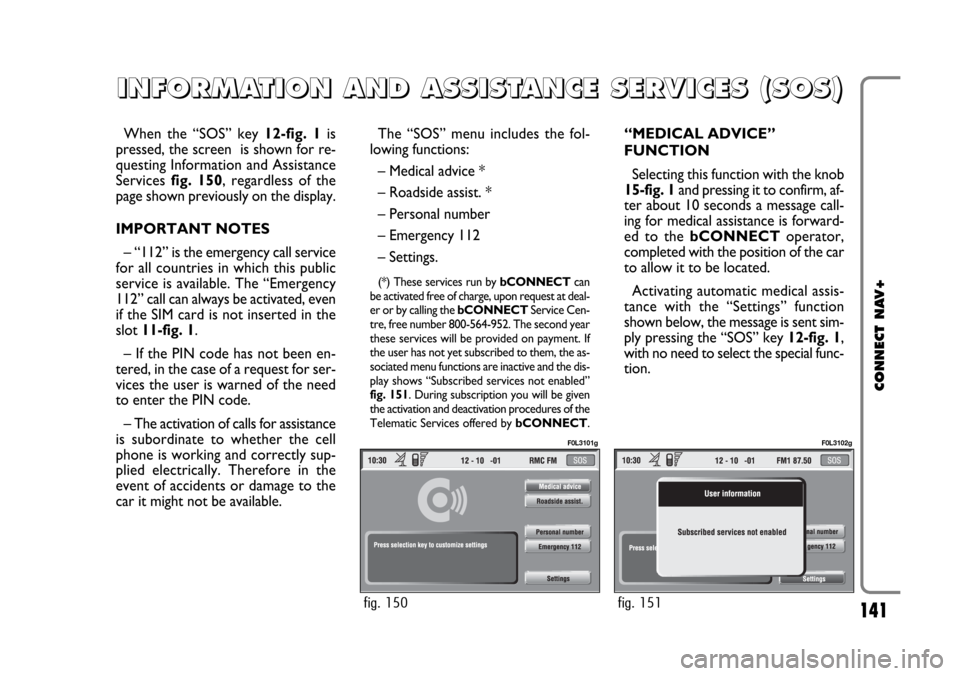
When the “SOS” key 12-fig. 1is
pressed, the screen is shown for re-
questing Information and Assistance
Services fig. 150, regardless of the
page shown previously on the display.
IMPORTANT NOTES
– “112” is the emergency call service
for all countries in which this public
service is available. The “Emergency
112” call can always be activated, even
if the SIM card is not inserted in the
slot 11-fig. 1.
– If the PIN code has not been en-
tered, in the case of a request for ser-
vices the user is warned of the need
to enter the PIN code.
– The activation of calls for assistance
is subordinate to whether the cell
phone is working and correctly sup-
plied electrically. Therefore in the
event of accidents or damage to the
car it might not be available.The “SOS” menu includes the fol-
lowing functions:
– Medical advice *
– Roadside assist. *
– Personal number
– Emergency 112
– Settings.
(*) These services run by bCONNECTcan
be activated free of charge, upon request at deal-
er or by calling the bCONNECTService Cen-
tre, free number 800-564-952. The second year
these services will be provided on payment. If
the user has not yet subscribed to them, the as-
sociated menu functions are inactive and the dis-
play shows “Subscribed services not enabled”
fig. 151. During subscription you will be given
the activation and deactivation procedures of the
Telematic Services offered by bCONNECT.
“MEDICAL ADVICE”
FUNCTION
Selecting this function with the knob
15-fig. 1and pressing it to confirm, af-
ter about 10 seconds a message call-
ing for medical assistance is forward-
ed to the bCONNECToperator,
completed with the position of the car
to allow it to be located.
Activating automatic medical assis-
tance with the “Settings” function
shown below, the message is sent sim-
ply pressing the “SOS” key 12-fig. 1,
with no need to select the special func-
tion.
I I
N N
F F
O O
R R
M M
A A
T T
I I
O O
N N
A A
N N
D D
A A
S S
S S
I I
S S
T T
A A
N N
C C
E E
S S
E E
R R
V V
I I
C C
E E
S S
( (
S S
O O
S S
) )
fig. 150
F0L3101g
fig. 151
F0L3102g