display FIAT CROMA 2006 2.G User Guide
[x] Cancel search | Manufacturer: FIAT, Model Year: 2006, Model line: CROMA, Model: FIAT CROMA 2006 2.GPages: 240, PDF Size: 7.41 MB
Page 23 of 240

23
SAFETY
DEVICES
CORRECT USE
OF THE CAR
WARNING
LIGHTS AND
MESSAGES
IN AN
EMERGENCY
CAR
MAINTENANCE
TECHNICAL
SPECIFICATIONS
INDEX
DASHBOARD
AND CONTROLS
Indication of speed limit exceeded
(Speed beep)
With this function it is possible to set the
car speed limit (km/h or mph); when this
limit is exceeded the driver is immediate-
ly alerted (see section “Warning lights and
messages”).
To set the speed limit, proceed as follows:
– briefly press button MODE: (Off) will
flash on the display;
– press button +: (On) will flash on the
display;
– briefly press button MODEthen, use
buttons +or –to set the required speed
(during setting the value will flash).
NoteThe possible setting is between 30
and 250 km/h, or between 20 and 155 mph
depending on the unit set previously (see
“Distance unit (Dist. Unit)” paragraph de-
scribed later. Every press on button +/ –in-
creases/decreases by 5 units. Keeping the
button +/ –pressed obtains the automatic
fast increase or decrease. When you are
near the required setting complete adjust-
ment by single presses.
– briefly press button MODEto go back
to the menu screen or press the button
for long to go back to the standard screen
without storing settings.To abort the setting, proceed as follows:
– briefly press button MODE: (On) will
flash on the display;
– press button –: (Off) will flash on the dis-
play;
– briefly press button MODEto go back
to the menu screen or press the button
for long to go back to the standard screen
without storing settings.
Automatic headlight daylight
sensor (Headl. sensor)
(where provided)
With this function it is possible to adjust
the light sensor sensitivity according to 3
levels (level 1 = min. level, level 2 = av-
erage level, level 3 = max. level); the high-
er the sensitivity is, the lower is the ex-
ternal light intensity required to switch on
the lights. The car is delivered with sen-
sitivity level “2”. To set the light level re-
quired, proceed as follows:
– briefly press button MODE, the previ-
ously set level will flash on the display;
– press button +or –to select the re-
quired level;– briefly press button MODEto go back
to the menu screen or press the button
for long to go back to the standard screen
without storing settings.
Trip B On/Off (Trip B data)
Through this option it is possible to acti-
vate (On) or deactivate (Off) the Trip B
(partial trip).
For further information see “Trip com-
puter”.
For activation / deactivation, proceed as
follows:
– briefly press button MODE: (On) or
(Off) will flash on the display (according to
previous setting);
– press button +or –for setting;
– briefly press button MODEto go back
to the menu screen or press the button
for long to go back to the standard screen
without storing settings.
001-030 Croma TRW GB 20-11-2006 14:58 Pagina 23
Page 24 of 240
24
SAFETY
DEVICES
CORRECT USE
OF THE CAR
WARNING
LIGHTS AND
MESSAGES
IN AN
EMERGENCY
CAR
MAINTENANCE
TECHNICAL
SPECIFICATIONS
INDEX
DASHBOARD
AND CONTROLS
Setting the clock (Set Time)
This function enables to set the clock in
the 12h or 24h.
To set the clock (hours - minutes) pro-
ceed as follows:
– briefly press button MODE: “hours”
will flash on the display;
– press button +or –for setting;
– briefly press button MODE: “minutes”
will flash on the display;
– press button +or –for setting.
NoteEvery press on the button +or –
increases/decreases by one unit. Keeping
the button pressed obtains automatic fast
increase/decrease. When you are near the
required setting complete adjustment by
single presses.
– briefly press button MODEto go back
to the menu screen or press the button
for long to go back to the standard screen
without storing settings.To set the clock in 12h or 24h mode, pro-
ceed as follows:
– briefly press button MODE: 12h or 24h
will flash on the display (according to pre-
vious setting);
– press button +or –for setting;
– briefly press button MODEto go back
to the menu screen or press the button
for long to go back to the standard screen
without storing settings.Setting the date (Set Date)
This function enables to update the date
(year - month - day).
To correct the date proceed as follows:
– briefly press button MODE: “year” will
flash on the display;
– press button +or –for setting;
– briefly press button MODE: “month”
will flash on the display;
– press button +or –for setting;
– briefly press button MODE: “day” will
flash on the display;
– press button +or –for setting.
NoteEvery press on button +or – in-
creases/decreases by 1 unit. Keeping the
button pressed obtains automatic fast in-
crease or decrease. When you are near
the required setting complete adjustment
by single presses.
– briefly press button MODEto go back
to the menu screen or press the button
for long to go back to the standard screen
without storing settings.
001-030 Croma TRW GB 20-11-2006 14:58 Pagina 24
Page 25 of 240

25
SAFETY
DEVICES
CORRECT USE
OF THE CAR
WARNING
LIGHTS AND
MESSAGES
IN AN
EMERGENCY
CAR
MAINTENANCE
TECHNICAL
SPECIFICATIONS
INDEX
DASHBOARD
AND CONTROLS
Audio info repetition (See Radio)
With this function the display repeats in-
formation relevant to the sound system.
– Radio: selected radio station frequency
or RDS message, automatic tuning acti-
vation or AutoSTore;
– audio CD, MP3 CD: track number;
– CD Changer: CD number and track
number;
– Tape: operating mode.
To activate (On) or to deactivate (Off)
sound system info displaying proceed as
follows:
– briefly press button MODE: (On) or
(Off)will flash on the display (according to
previous setting);
– press button +or –for setting;
– briefly press button MODEto go back
to the menu screen or press the button
for long to go back to the standard screen
without storing settings.Selecting door unlocking
With this function it is possible to decide
the door opening mode by selecting one
of the following options:
– open doors: to unlock all doors, except
the tailgate
– open driver’s door (op. drv. door): to
unlock just the driver’s door (where pro-
vided)
– open all: to unlock every door includ-
ing the tailgate
The car is delivered with this function in
“Open all” mode.
Proceed as follows:
– briefly press button MODE, the previ-
ous setting will flash on the display;
– press button +or –for setting;
– briefly press button MODEto go back
to the menu screen or press the button
for long to go back to the standard screen
without storing settings.Automatic central door locking
when travelling (Autoclose)
When activated (On), this function locks
automatically the doors when the car
speed exceeds 20 km/h.
To activate (On) or to deactivate (Off) this
function proceed as follows:
– briefly press button MODE: On or Off
will flash on the display (according to pre-
vious setting);
– press button +or –for setting;
– briefly press button MODEto go back
to the menu screen or press the button
for long to go back to the standard screen
without storing settings.
Units - “Distances” and
“Consumption”
With this function it is possible to set the
units for distance covered (km or mi).
To set the required unit proceed as fol-
lows:
– briefly press button MODE: km or mi
will flash on the display (according to pre-
vious setting);
001-030 Croma TRW GB 20-11-2006 14:58 Pagina 25
Page 26 of 240
26
SAFETY
DEVICES
CORRECT USE
OF THE CAR
WARNING
LIGHTS AND
MESSAGES
IN AN
EMERGENCY
CAR
MAINTENANCE
TECHNICAL
SPECIFICATIONS
INDEX
DASHBOARD
AND CONTROLS
– press button +or –for setting;
– briefly press button MODEto go back
to the menu screen or press the button
for long to go back to the standard screen
without storing settings.
If the distance unit set is km (see previous
paragraph) fuel consumption will be dis-
played in km/l or l/100km.
If the distance unit set is mi (see previous
paragraph) fuel consumption will be dis-
played in mpg.To set the required unit proceed as fol-
lows:
– briefly press button MODE: km/l or
l/100km will flash on the display (accord-
ing to previous setting);
– press button +or –for setting;
– briefly press button MODEto go back
to the menu screen or press the button
for long to go back to the standard screen
without storing settings.Selecting the language (Language)
Display messages can be shown in differ-
ent languages: Italian, English, German,
Portuguese, Spanish, French, Polish and
Dutch.
To set the required language proceed as
follows:
– briefly press button MODE: the previ-
ously set “language” will flash on the dis-
play;
– press button +or –for setting;
– briefly press button MODEto go back
to the menu screen or press the button
for long to go back to the standard screen
without storing settings.
001-030 Croma TRW GB 20-11-2006 14:58 Pagina 26
Page 27 of 240

27
SAFETY
DEVICES
CORRECT USE
OF THE CAR
WARNING
LIGHTS AND
MESSAGES
IN AN
EMERGENCY
CAR
MAINTENANCE
TECHNICAL
SPECIFICATIONS
INDEX
DASHBOARD
AND CONTROLS
Setting the buzzer volume
(Buzzer Volume)
With this function the volume of the
buzzer accompanying any failure/warning
indication can be adjusted according to 8
levels.
To set the required the volume proceed
as follows:
– briefly press button MODE: the previ-
ously set volume “level” will flash on the
display;
– press button +or –for setting;
– briefly press button MODEto go back
to the menu screen or press the button
for long to go back to the standard screen
without storing settings.Adjusting the button volume
(Button Vol.)
With this function the volume of the
roger-beep accompanying the activation
of buttons MODE, +and –can be ad-
justed according to 8 levels.
To set the required the volume proceed
as follows:
– briefly press button MODE: the previ-
ously set volume “level” will flash on the
display;
– press button +or –for setting;
– briefly press button MODEto go back
to the menu screen or press the button
for long to go back to the standard screen
without storing settings.Scheduled Servicing (Service)
Through this function it is possible to dis-
play information connected to proper car
servicing.
To display scheduled servicing info pro-
ceed as follows:
– briefly press button MODE: service in
km or mi, according to previous setting,
will be displayed (see paragraph “Distance
unit”);
– press button +or –to select displaying
in days;
– briefly press button MODEto go back
to the menu screen or press the button
for long to go back to the standard screen
without storing settings.
NoteThe “Service schedule” includes car
maintenance every 30,000 km (or 18,000
mi); this is shown automatically, with the
ignition key at ON, starting from 2,000 km
(or 1,240 mi) from this deadline and it is
shown again every 200 km (or 124 mi).
When a scheduled service interval
(“coupon”) is near to come, turning the
ignition key to ON, will display the mes-
sage “Service” followed by the number of
km to go before car servicing and symbol
õ. “Service” message is displayed in kilo-
metres (km) or miles (mi), according to
the setting chosen previously. Contact Fi-
001-030 Croma TRW GB 20-11-2006 14:58 Pagina 27
Page 28 of 240
28
SAFETY
DEVICES
CORRECT USE
OF THE CAR
WARNING
LIGHTS AND
MESSAGES
IN AN
EMERGENCY
CAR
MAINTENANCE
TECHNICAL
SPECIFICATIONS
INDEX
DASHBOARD
AND CONTROLS
at Dealership to carry out any service op-
eration provided by the “Service sched-
ule” or “Annual inspection plan”, and to
reset the display.
Exit Menu
This is the last function that closes the cir-
cular setting cycle listed in the initial menu
screen.
Briefly press button MODEto go back to
the standard screen without storing set-
tings.
Press button –to return to the first menu
option (Speed Lim.).Both functions are resettable (reset - start
of new mission).
“General Trip” displays the figures relat-
ing to:
– Range
– Trip distance
– Average consumption
– Instant consumption
– Average speed
– Travel time (driving time).
“Trip B” (only available on reconfigurable
multifunction display), displays the figures
relating to:
– Trip distance B
– Average consumption B
– Average speed B
– Travel time B (driving time).
NoteThe “Trip B” function can be ex-
cluded (see paragraph “Trip B On/Off”).
“Range” cannot be reset.TRIP COMPUTER
(where provided)
General features
The “Trip computer” is provided on cars
fitted with multifunction display or re-
configurable multifunction display. The
“Trip computer” displays information
(with ignition key at ON), relating to the
operating status of the car. This function
comprises the “General trip” concerning
the “complete mission” of the car (jour-
ney) and “Trip B”, (only available on re-
configurable multifunction display), con-
cerning the partial mission of the car; this
latter function(as shown in fig. 26) is “con-
tained” within the complete mission.
001-030 Croma TRW GB 20-11-2006 14:58 Pagina 28
Page 29 of 240

29
SAFETY
DEVICES
CORRECT USE
OF THE CAR
WARNING
LIGHTS AND
MESSAGES
IN AN
EMERGENCY
CAR
MAINTENANCE
TECHNICAL
SPECIFICATIONS
INDEX
DASHBOARD
AND CONTROLS
Values displayed
Range
This value shows the distance in km (or
mi) that the car can still cover before
needing fuel, assuming that driving condi-
tions are kept unvaried. The display will
show “----” in the following cases:
– value lower than 50 km (or 30 mi)
– car left parked with engine running for
long.
Trip distance
This value shows the distance covered
from the start of the new mission.
Average consumption
This value shows the average consump-
tion from the start of the new mission.
Instant consumption
This value shows instant fuel consumption
(this value is updated second by second).
If parking the car with engine on,
the display will show “----”.Average speed
This value shows the car average speed as
a function of the overall time elapsed since
the start of the new mission.
Travel time
This value shows the time elapsed since
the start of the new mission.
IMPORTANT Lacking information, Trip
computer values are displayed with “----”.
When normal operating condition is re-
set, calculation of different units will
restart regularly. Values displayed before
the failure will not be reset.TRIP button fig. 25
Button TRIP, set on the top of the right
steering column stalk, shall be used (with
ignition key at ON) to display and to re-
set the previously described values to start
a new mission:
– short push to display the different val-
ues
– long push to reset and then start a new
mission.
New mission
New mission starts after:
– “manual” resetting by the user, by press-
ing the relevant button;
– “automatic” resetting, when the “Trip dis-
tance” reaches 9999.9 km or when the
“Travel time” reaches 99.59 (99 hours and
59 minutes);
– after disconnecting/reconnecting the
battery.
001-030 Croma TRW GB 20-11-2006 14:58 Pagina 29
Page 45 of 240
45
SAFETY
DEVICES
CORRECT USE
OF THE CAR
WARNING
LIGHTS AND
MESSAGES
IN AN
EMERGENCY
CAR
MAINTENANCE
TECHNICAL
SPECIFICATIONS
INDEX
DASHBOARD
AND CONTROLS
The climate control system automatically
controls and adjusts the following para-
meters and functions:
❒air temperature at driver/front pas-
senger/rear passenger vents;
❒air distribution at driver/front passen-
ger vents;
❒fan speed (continuous air flow varia-
tion);
❒compressor activation (to cool/dehu-
midify air);
❒air recirculation.All the above functions can be changed
manually by selecting the required func-
tion/s and by changing the set parameters.
In this way the automatic control is de-
activated; the system will resume auto-
matic control only for safety reasons (e.g.
risk of window misting up).
Manual selections prevail over automatic
ones and remain in storage until the user
decides to resume automatic control by
pressing the proper button, except when
the system cuts in for particular safety
conditions.
The control of functions not changed man-
ually remains automatic.
The amount of air admitted to the pas-
senger compartment does not depend on
the car speed, since it is electronically con-
trolled by the fan.The temperature of the air admitted to
the passenger compartment is always con-
trolled automatically according to the tem-
peratures set on the driver’s and front
passenger’s display (except when the sys-
tem is off or under certain conditions
when the compressor is off).
The following parameters and functions
can be set or changed manually:
❒air temperatures on driver/front pas-
senger side;
❒fan speed (continuous variation);
❒air distribution on seven levels (dri-
ver/front passenger side);
❒climate control compressor on/off;
❒monozone/two-zone distribution pri-
ority;
❒fast demisting/defrosting;
❒air recirculation;
❒rear heated window.
Page 46 of 240
46
SAFETY
DEVICES
CORRECT USE
OF THE CAR
WARNING
LIGHTS AND
MESSAGES
IN AN
EMERGENCY
CAR
MAINTENANCE
TECHNICAL
SPECIFICATIONS
INDEX
DASHBOARD
AND CONTROLS
SWITCHING THE CLIMATE
CONTROL SYSTEM ON
The system can be started in different
ways, but it is advisable to press one of the
AUTObuttons and then to turn the
knobs to set the temperatures required
on the display.
Since the system controls two zone of the
passenger’s compartment, the driver and
the front passenger can select different
temperatures.This way the system will start working
completely automatically to reach the
comfort temperatures as quickly as pos-
sible. The system will set air temperature,
quantity and distribution and it will con-
trol the air recirculation function and the
activation of conditioner compressor.
F0L0020mfig. 47
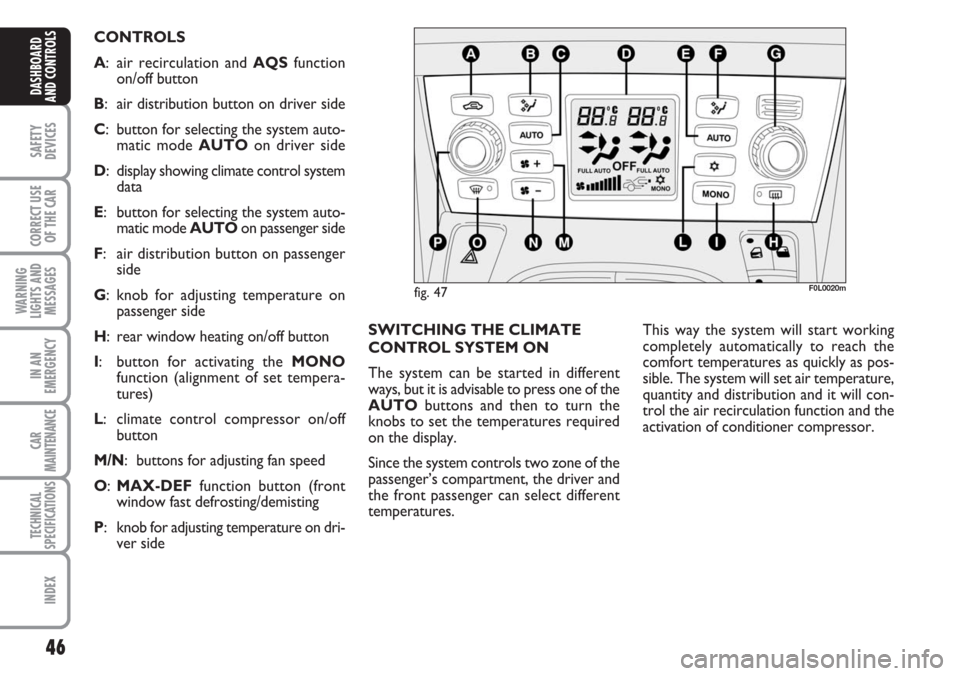
CONTROLS
A: air recirculation and AQS function
on/off button
B: air distribution button on driver side
C: button for selecting the system auto-
matic mode AUTO on driver side
D: display showing climate control system
data
E: button for selecting the system auto-
matic mode AUTO on passenger side
F: air distribution button on passenger
side
G: knob for adjusting temperature on
passenger side
H: rear window heating on/off button
I: button for activating the MONO
function (alignment of set tempera-
tures)
L: climate control compressor on/off
button
M/N: buttons for adjusting fan speed
O:MAX-DEF function button (front
window fast defrosting/demisting
P: knob for adjusting temperature on dri-
ver side
Page 47 of 240
47
SAFETY
DEVICES
CORRECT USE
OF THE CAR
WARNING
LIGHTS AND
MESSAGES
IN AN
EMERGENCY
CAR
MAINTENANCE
TECHNICAL
SPECIFICATIONS
INDEX
DASHBOARD
AND CONTROLS
During fully automatic operation, the on-
ly manual settings required are the fol-
lowing:
❒MONO, to align the air temperature
and distribution set on the passenger’s
side (front or rear) with that on the
driver’s side;
❒…, air recirculation, to keep it al-
ways on or off;
❒-, to speed up demisting/defrosting
of windscreen, front side windows,
rear window and door mirrors;
❒(, to demist/defrost heated rear win-
dow and door mirrors.During full automatic system operation,
you can change at any time set tempera-
tures, air distribution and fan speed by us-
ing the relevant buttons or knobs: the sys-
tem will automatically change its settings
to adjust to the new requirements. Dur-
ing FULL AUTOoperation, changing air
distribution and/or flow and/or compres-
sor activation and/or air recirculation will
make the FULLwording disappear. In this
way functions will pass from automatic
control to manual control until pressing
again the AUTObutton. Fan speed is the
same for every area of the passenger com-
partment.
With one or more functions engaged man-
ually, the adjustment of the temperature
of the air admitted to the passenger com-
partment continues to be controlled au-
tomatically by the system, except with the
climate control compressor off: under this
condition in fact, the temperature of the
air admitted to the passenger compart-
ment cannot be lower than outside air
temperature.CONTROLS
Air temperature adjusting
knobs P-G
Turning the knobs clockwise or counter-
clockwise, respectively highers or lowers
the temperature of the air required re-
spectively in the front left zone (knob P)
or in the right zone (knob G) of the pas-
senger compartment.
Since the system controls two zones of
the passenger compartment, it is possi-
ble to personalise required temperatures
(driver and passenger).
The temperatures set are shown on the
displays near the relevant knobs.
Pressing button I (MONO) automatical-
ly aligns the temperature on the passen-
ger’s side with that on the driver’s side;
you can therefore set the same tempera-
ture for both zones by turning knob P on
driver side.
Separate operation of air temperatures
and distribution is restored by turning
knobs or pressing again button I
(MONO) when the button led is on.