display FIAT CROMA 2006 2.G Owners Manual
[x] Cancel search | Manufacturer: FIAT, Model Year: 2006, Model line: CROMA, Model: FIAT CROMA 2006 2.GPages: 240, PDF Size: 7.41 MB
Page 6 of 240
6
SAFETY
DEVICES
CORRECT USE
OF THE CAR
WARNING
LIGHTS AND
MESSAGES
IN AN
EMERGENCY
CAR
MAINTENANCE
TECHNICAL
SPECIFICATIONS
INDEX
DASHBOARD
AND CONTROLS
F0L0182m
F0L0140m
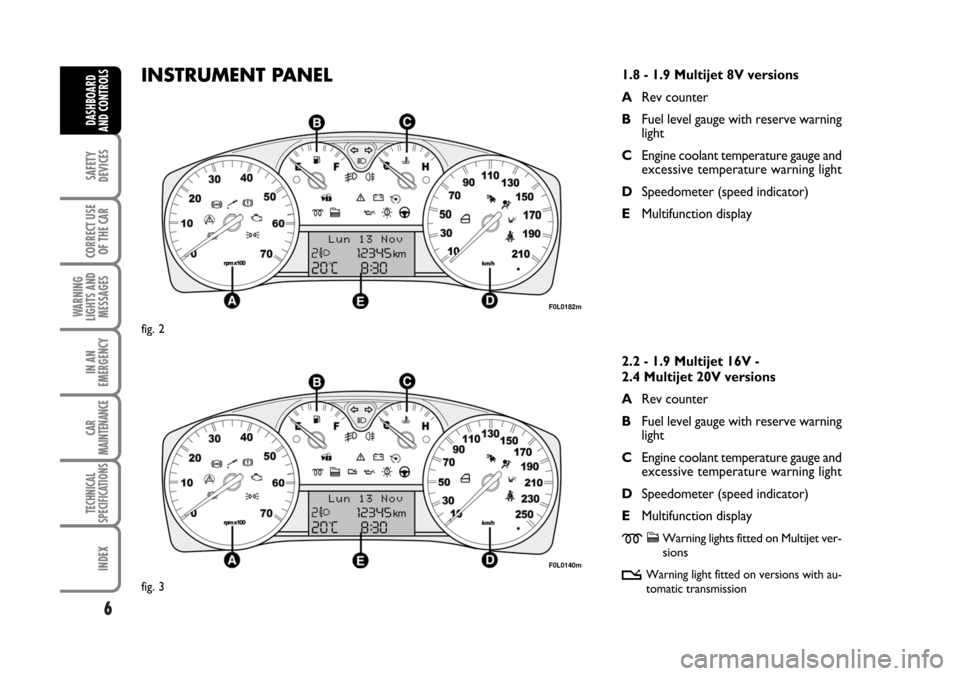
INSTRUMENT PANEL
fig. 3 fig. 2
1.8 - 1.9 Multijet 8V versions
ARev counter
BFuel level gauge with reserve warning
light
CEngine coolant temperature gauge and
excessive temperature warning light
DSpeedometer (speed indicator)
EMultifunction display
2.2 - 1.9 Multijet 16V -
2.4 Multijet 20V versions
ARev counter
BFuel level gauge with reserve warning
light
CEngine coolant temperature gauge and
excessive temperature warning light
DSpeedometer (speed indicator)
EMultifunction display
mcWarning lights fitted on Multijet ver-
sions
t
Warning light fitted on versions with au-
tomatic transmission
001-030 Croma TRW GB 20-11-2006 14:58 Pagina 6
Page 7 of 240
THE FIAT CODE SYSTEM
To further protect your car from theft, it
has been fitted with an engine immobilising
system. This system is automatically acti-
vated when the ignition key is removed.
An electronic device, in fact, is fitted in each
ignition key grip. The device transmits a ra-
dio-frequency signal when the engine is
started through a special aerial built into the
ignition switch. The modulate signal, which
changes each time the engine is started, is
the “password”, by means of which the
control unit recognises the key and enables
to start the engine.
OPERATION
Each time the key is fitted into the ignition
switch, the Fiat CODE system control unit
sends a recognition code to the engine con-
trol unit to deactivate the inhibitor.
The code is sent only if the Fiat CODE sys-
tem control unit has recognised the code
transmitted from the key.
Each time the ignition key is removed, the
Fiat CODE system deactivates the func-
tions of the engine electronic control unit.
If the code has not been recognised cor-
rectly, the warning light
Yturns on ac-
companied by the related message on the
display (see chapter “Warning lights and
messages”).
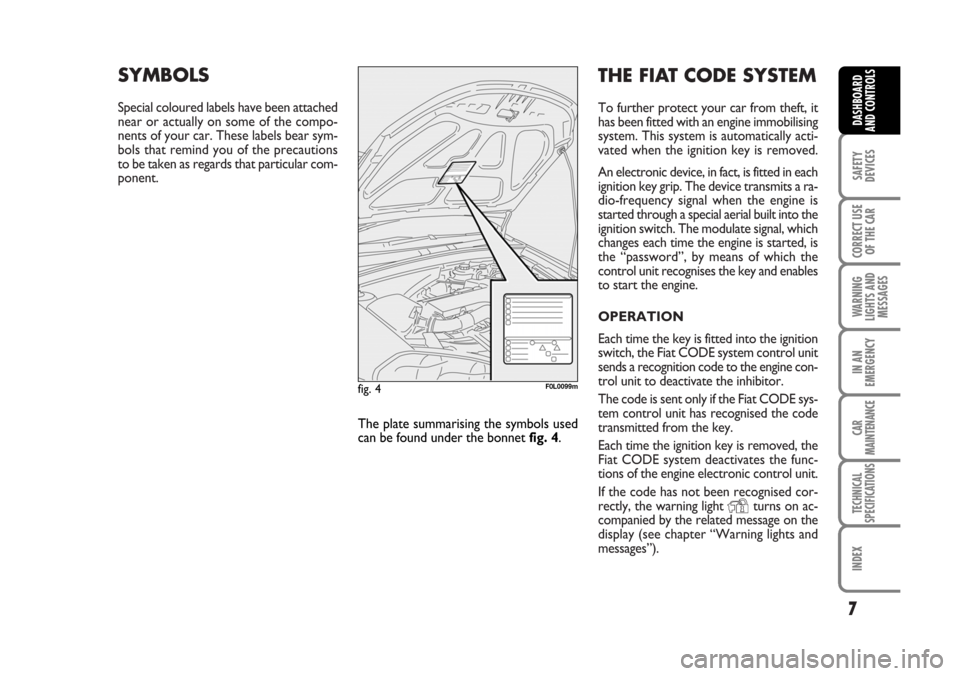
SYMBOLS
Special coloured labels have been attached
near or actually on some of the compo-
nents of your car. These labels bear sym-
bols that remind you of the precautions
to be taken as regards that particular com-
ponent.
7
SAFETY
DEVICES
CORRECT USE
OF THE CAR
WARNING
LIGHTS AND
MESSAGES
IN AN
EMERGENCY
CAR
MAINTENANCE
TECHNICAL
SPECIFICATIONS
INDEX
DASHBOARD
AND CONTROLS
The plate summarising the symbols used
can be found under the bonnet fig. 4.
fig. 4F0L0099m
001-030 Croma TRW GB 20-11-2006 14:58 Pagina 7
Page 9 of 240
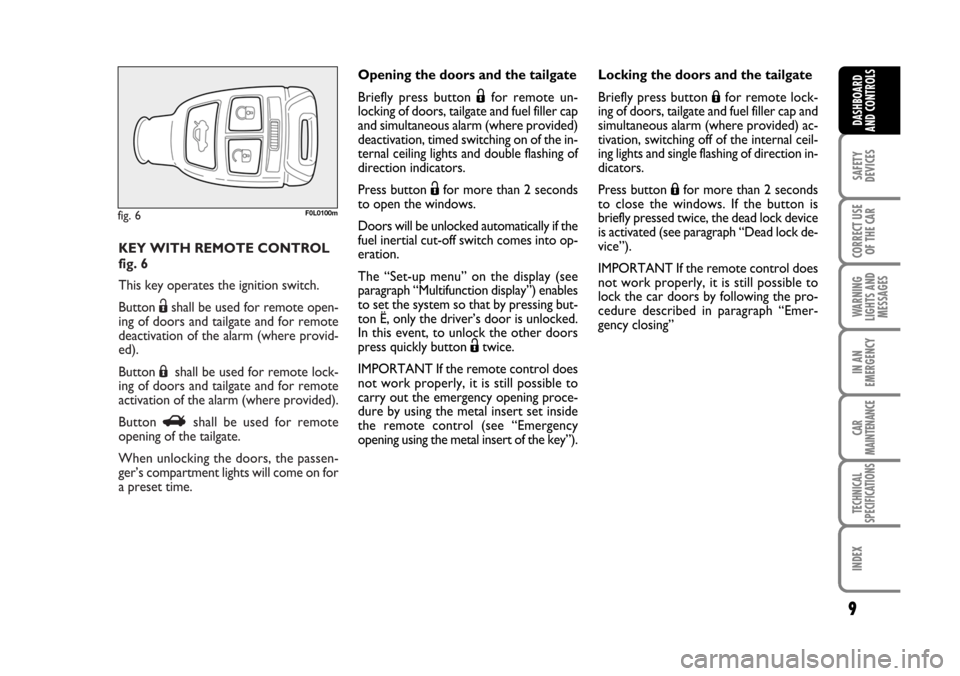
KEY WITH REMOTE CONTROL
fig. 6
This key operates the ignition switch.
Button Ëshall be used for remote open-
ing of doors and tailgate and for remote
deactivation of the alarm (where provid-
ed).
Button Áshall be used for remote lock-
ing of doors and tailgate and for remote
activation of the alarm (where provided).
Button Rshall be used for remote
opening of the tailgate.
When unlocking the doors, the passen-
ger’s compartment lights will come on for
a preset time.
fig. 6F0L0100m
9
SAFETY
DEVICES
CORRECT USE
OF THE CAR
WARNING
LIGHTS AND
MESSAGES
IN AN
EMERGENCY
CAR
MAINTENANCE
TECHNICAL
SPECIFICATIONS
INDEX
DASHBOARD
AND CONTROLS
Opening the doors and the tailgate
Briefly press button Ëfor remote un-
locking of doors, tailgate and fuel filler cap
and simultaneous alarm (where provided)
deactivation, timed switching on of the in-
ternal ceiling lights and double flashing of
direction indicators.
Press button Ëfor more than 2 seconds
to open the windows.
Doors will be unlocked automatically if the
fuel inertial cut-off switch comes into op-
eration.
The “Set-up menu” on the display (see
paragraph “Multifunction display”) enables
to set the system so that by pressing but-
ton Ë, only the driver’s door is unlocked.
In this event, to unlock the other doors
press quickly button Ëtwice.
IMPORTANT If the remote control does
not work properly, it is still possible to
carry out the emergency opening proce-
dure by using the metal insert set inside
the remote control (see “Emergency
opening using the metal insert of the key”).Locking the doors and the tailgate
Briefly press button Áfor remote lock-
ing of doors, tailgate and fuel filler cap and
simultaneous alarm (where provided) ac-
tivation, switching off of the internal ceil-
ing lights and single flashing of direction in-
dicators.
Press button Áfor more than 2 seconds
to close the windows. If the button is
briefly pressed twice, the dead lock device
is activated (see paragraph “Dead lock de-
vice”).
IMPORTANT If the remote control does
not work properly, it is still possible to
lock the car doors by following the pro-
cedure described in paragraph “Emer-
gency closing”
001-030 Croma TRW GB 20-11-2006 14:58 Pagina 9
Page 11 of 240
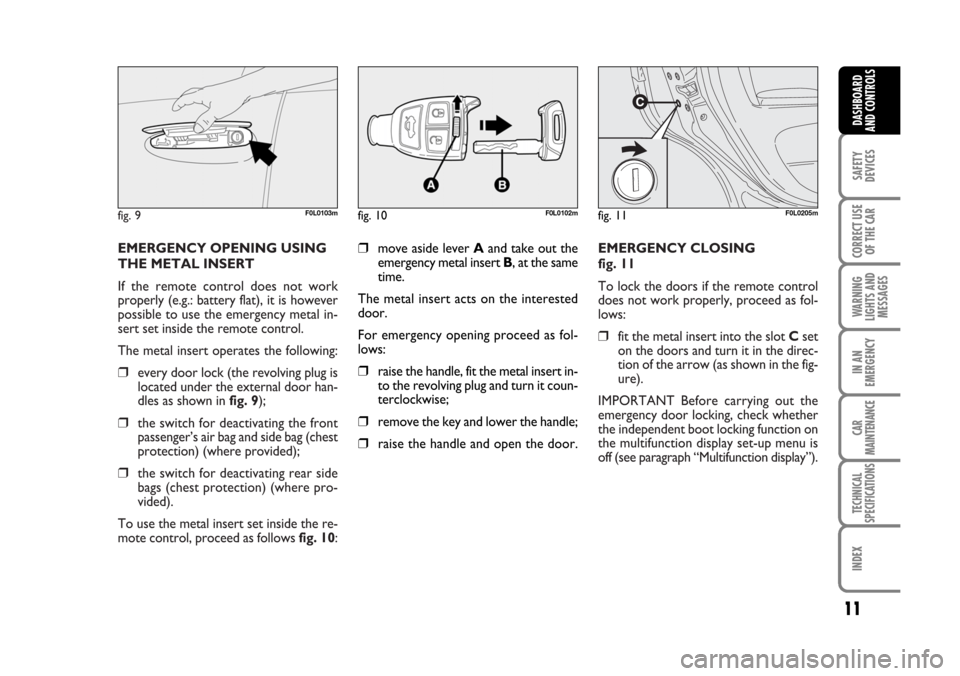
EMERGENCY CLOSING
fig. 11
To lock the doors if the remote control
does not work properly, proceed as fol-
lows:
❒fit the metal insert into the slot Cset
on the doors and turn it in the direc-
tion of the arrow (as shown in the fig-
ure).
IMPORTANT Before carrying out the
emergency door locking, check whether
the independent boot locking function on
the multifunction display set-up menu is
off (see paragraph “Multifunction display”). EMERGENCY OPENING USING
THE METAL INSERT
If the remote control does not work
properly (e.g.: battery flat), it is however
possible to use the emergency metal in-
sert set inside the remote control.
The metal insert operates the following:
❒every door lock (the revolving plug is
located under the external door han-
dles as shown in fig. 9);
❒the switch for deactivating the front
passenger’s air bag and side bag (chest
protection) (where provided);
❒the switch for deactivating rear side
bags (chest protection) (where pro-
vided).
To use the metal insert set inside the re-
mote control, proceed as follows fig. 10:
fig. 9F0L0103mfig. 10F0L0102mfig. 11F0L0205m
11
SAFETY
DEVICES
CORRECT USE
OF THE CAR
WARNING
LIGHTS AND
MESSAGES
IN AN
EMERGENCY
CAR
MAINTENANCE
TECHNICAL
SPECIFICATIONS
INDEX
DASHBOARD
AND CONTROLS
❒move aside lever Aand take out the
emergency metal insert B, at the same
time.
The metal insert acts on the interested
door.
For emergency opening proceed as fol-
lows:
❒raise the handle, fit the metal insert in-
to the revolving plug and turn it coun-
terclockwise;
❒remove the key and lower the handle;
❒raise the handle and open the door.
001-030 Croma TRW GB 20-11-2006 14:58 Pagina 11
Page 12 of 240
ALARM
(where provided)
WHEN THE ALARM
IS TRIGGERED
The alarm comes into action in the fol-
lowing cases:
❒unlawful opening of one of the doors,
bonnet or boot (perimetral protec-
tion);
❒attempt to start the engine with unau-
thorised key;
❒battery cable cutting;
❒presence of moving bodies in the pas-
senger’s compartment (volumetric
protection);
❒abnormal raising/sloping of the car.
Depending on the markets, the cutting in
of the alarm causes operation of the siren
and direction indicators (for about 26 sec-
onds). The ways of operating and the num-
ber of cycles may vary depending on the
markets.
A maximum number of sound/sight cycles
is however envisaged.
12
SAFETY
DEVICES
CORRECT USE
OF THE CAR
WARNING
LIGHTS AND
MESSAGES
IN AN
EMERGENCY
CAR
MAINTENANCE
TECHNICAL
SPECIFICATIONS
INDEX
DASHBOARD
AND CONTROLS
Volumetric and anti-raising protections
can be cut off by operating the front ceil-
ing light controls (see paragraphs “Volu-
metric protection sensors” and “Anti-rais-
ing sensor” on the following pages).
IMPORTANT The engine immobiliser
function is guaranteed by the Fiat CODE
system, which is automatically activated
when the ignition key is removed.
HOW TO ACTIVATE
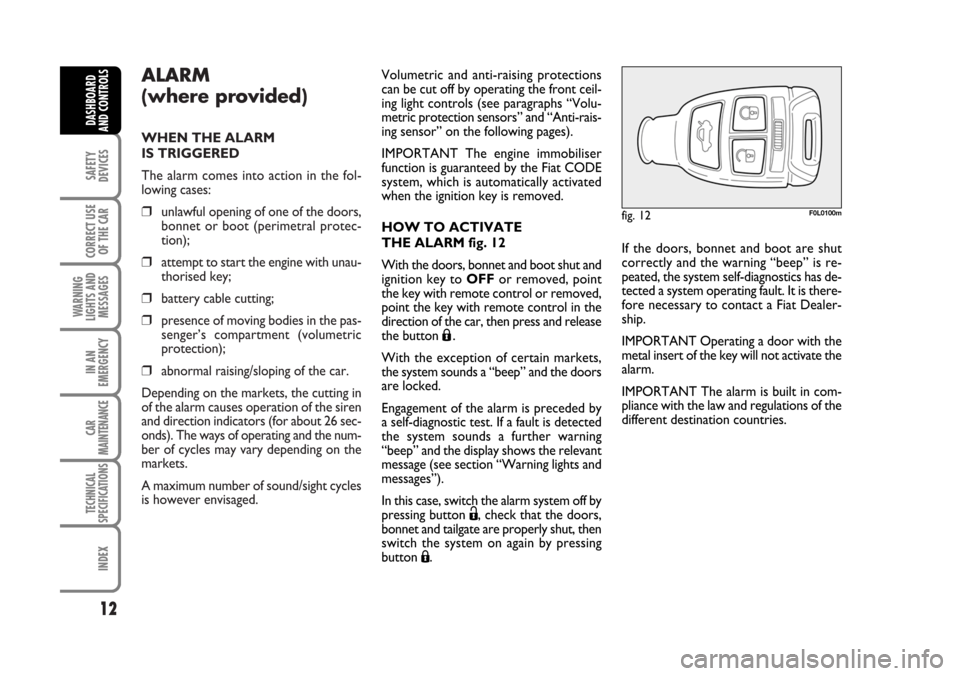
THE ALARM fig. 12
With the doors, bonnet and boot shut and
ignition key to OFFor removed, point
the key with remote control or removed,
point the key with remote control in the
direction of the car, then press and release
the button
Á.
With the exception of certain markets,
the system sounds a “beep” and the doors
are locked.
Engagement of the alarm is preceded by
a self-diagnostic test. If a fault is detected
the system sounds a further warning
“beep” and the display shows the relevant
message (see section “Warning lights and
messages”).
In this case, switch the alarm system off by
pressing button Ë, check that the doors,
bonnet and tailgate are properly shut, then
switch the system on again by pressing
button Á.
fig. 12F0L0100m
If the doors, bonnet and boot are shut
correctly and the warning “beep” is re-
peated, the system self-diagnostics has de-
tected a system operating fault. It is there-
fore necessary to contact a Fiat Dealer-
ship.
IMPORTANT Operating a door with the
metal insert of the key will not activate the
alarm.
IMPORTANT The alarm is built in com-
pliance with the law and regulations of the
different destination countries.
001-030 Croma TRW GB 20-11-2006 14:58 Pagina 12
Page 14 of 240
Once the dead lock device
has been actuated, doors
cannot be opened from inside the car
in any way whatsoever. For this rea-
son, make sure there are no persons
left inside the car.
14
SAFETY
DEVICES
CORRECT USE
OF THE CAR
WARNING
LIGHTS AND
MESSAGES
IN AN
EMERGENCY
CAR
MAINTENANCE
TECHNICAL
SPECIFICATIONS
INDEX
DASHBOARD
AND CONTROLS
INDICATIONS OF ATTEMPTS
TO BREAK IN
Any attempt to break in is indicated by
turning on of warning light
Y(if pro-
vided) on the instrument panel with the
relevant message on the display (see sec-
tion “Warning lights and messages”).
HOW TO CUT OFF THE ALARM
SYSTEM
To deactivate the alarm system com-
pletely (for instance during prolonged in-
activity of the car) simply lock the car us-
ing the emergency locking.
IMPORTANT To cut-out the alarm if re-
mote control batteries are down or the
system is failing, fit the key into the igni-
tion switch and turn it to ON.
DEAD LOCK DEVICE
(where provided)
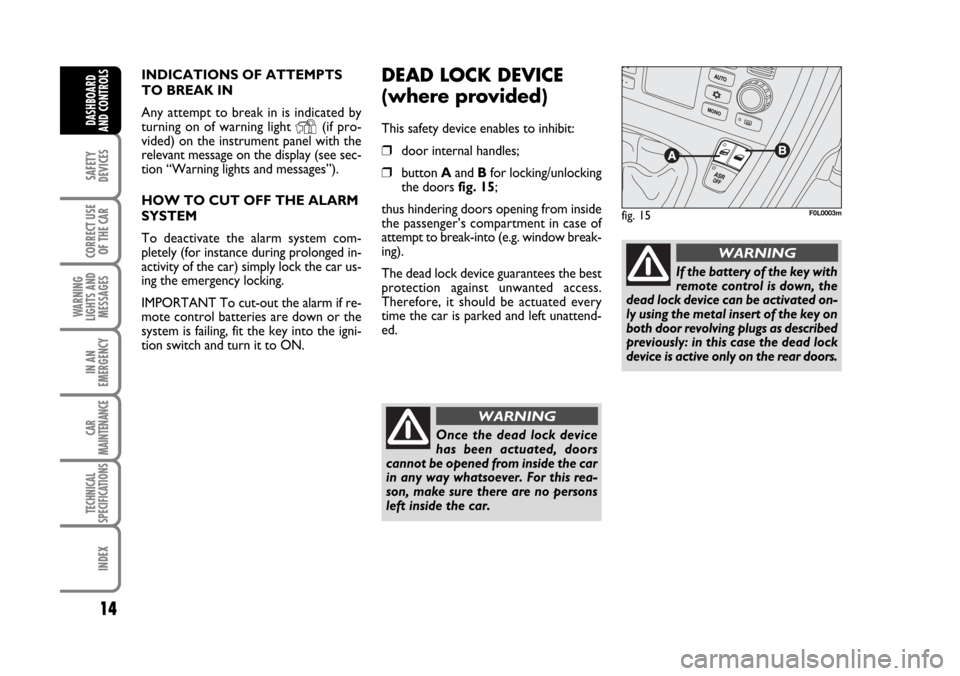
This safety device enables to inhibit:
❒door internal handles;
❒button Aand Bfor locking/unlocking
the doors fig. 15;
thus hindering doors opening from inside
the passenger’s compartment in case of
attempt to break-into (e.g. window break-
ing).
The dead lock device guarantees the best
protection against unwanted access.
Therefore, it should be actuated every
time the car is parked and left unattend-
ed.
fig. 15F0L0003m
WARNING
If the battery of the key with
remote control is down, the
dead lock device can be activated on-
ly using the metal insert of the key on
both door revolving plugs as described
previously: in this case the dead lock
device is active only on the rear doors.
WARNING
001-030 Croma TRW GB 20-11-2006 14:58 Pagina 14
Page 17 of 240
17
SAFETY
DEVICES
CORRECT USE
OF THE CAR
WARNING
LIGHTS AND
MESSAGES
IN AN
EMERGENCY
CAR
MAINTENANCE
TECHNICAL
SPECIFICATIONS
INDEX
DASHBOARD
AND CONTROLS
IGNITION SWITCH
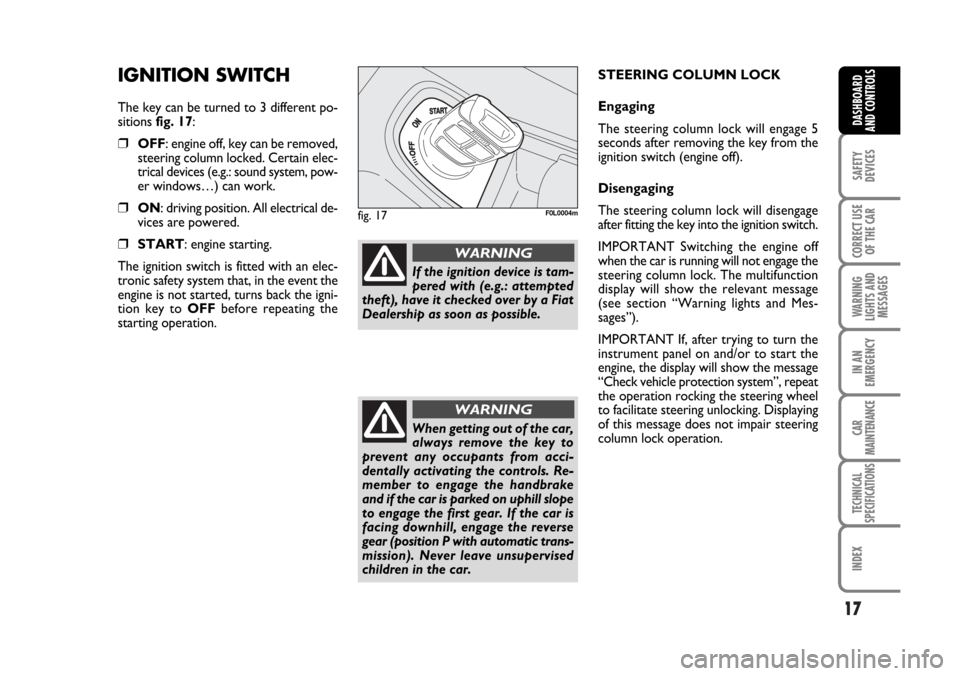
The key can be turned to 3 different po-
sitions fig. 17:
❒OFF: engine off, key can be removed,
steering column locked. Certain elec-
trical devices (e.g.: sound system, pow-
er windows…) can work.
❒ON: driving position. All electrical de-
vices are powered.
❒START: engine starting.
The ignition switch is fitted with an elec-
tronic safety system that, in the event the
engine is not started, turns back the igni-
tion key to OFFbefore repeating the
starting operation.
fig. 17F0L0004m
If the ignition device is tam-
pered with (e.g.: attempted
theft), have it checked over by a Fiat
Dealership as soon as possible.
WARNING
When getting out of the car,
always remove the key to
prevent any occupants from acci-
dentally activating the controls. Re-
member to engage the handbrake
and if the car is parked on uphill slope
to engage the first gear. If the car is
facing downhill, engage the reverse
gear (position P with automatic trans-
mission). Never leave unsupervised
children in the car.
WARNING
STEERING COLUMN LOCK
Engaging
The steering column lock will engage 5
seconds after removing the key from the
ignition switch (engine off).
Disengaging
The steering column lock will disengage
after fitting the key into the ignition switch.
IMPORTANT Switching the engine off
when the car is running will not engage the
steering column lock. The multifunction
display will show the relevant message
(see section “Warning lights and Mes-
sages”).
IMPORTANT If, after trying to turn the
instrument panel on and/or to start the
engine, the display will show the message
“Check vehicle protection system”, repeat
the operation rocking the steering wheel
to facilitate steering unlocking. Displaying
of this message does not impair steering
column lock operation.
001-030 Croma TRW GB 20-11-2006 14:58 Pagina 17
Page 20 of 240
20
SAFETY
DEVICES
CORRECT USE
OF THE CAR
WARNING
LIGHTS AND
MESSAGES
IN AN
EMERGENCY
CAR
MAINTENANCE
TECHNICAL
SPECIFICATIONS
INDEX
DASHBOARD
AND CONTROLS
RECONFIGURABLE
MULTIFUNCTION
DISPLAY
(where provided)
The car can be provided with the recon-
figurable multifunction display that shows
useful information, according to the pre-
vious settings made, necessary when dri-
ving.
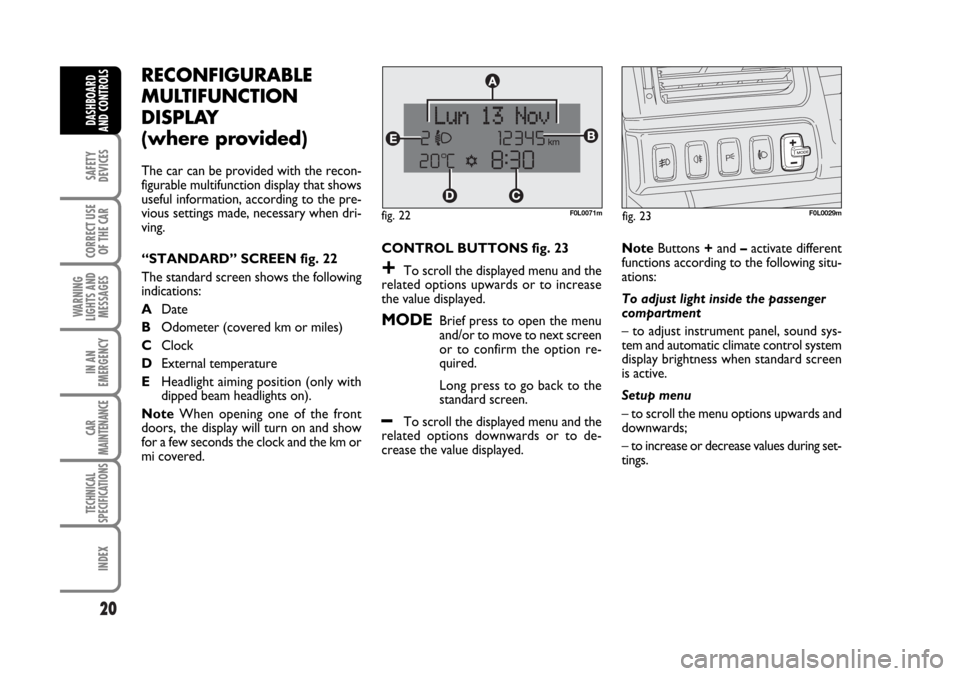
“STANDARD” SCREEN fig. 22
The standard screen shows the following
indications:
ADate
BOdometer (covered km or miles)
CClock
DExternal temperature
EHeadlight aiming position (only with
dipped beam headlights on).
NoteWhen opening one of the front
doors, the display will turn on and show
for a few seconds the clock and the km or
mi covered.CONTROL BUTTONS fig. 23
+To scroll the displayed menu and the
related options upwards or to increase
the value displayed.
MODEBrief press to open the menu
and/or to move to next screen
or to confirm the option re-
quired.
Long press to go back to the
standard screen.
–To scroll the displayed menu and the
related options downwards or to de-
crease the value displayed.NoteButtons +and –activate different
functions according to the following situ-
ations:
To adjust light inside the passenger
compartment
– to adjust instrument panel, sound sys-
tem and automatic climate control system
display brightness when standard screen
is active.
Setup menu
– to scroll the menu options upwards and
downwards;
– to increase or decrease values during set-
tings.
F0L0029mfig. 23 fig. 22F0L0071m
001-030 Croma TRW GB 20-11-2006 14:58 Pagina 20
Page 21 of 240

21
SAFETY
DEVICES
CORRECT USE
OF THE CAR
WARNING
LIGHTS AND
MESSAGES
IN AN
EMERGENCY
CAR
MAINTENANCE
TECHNICAL
SPECIFICATIONS
INDEX
DASHBOARD
AND CONTROLS
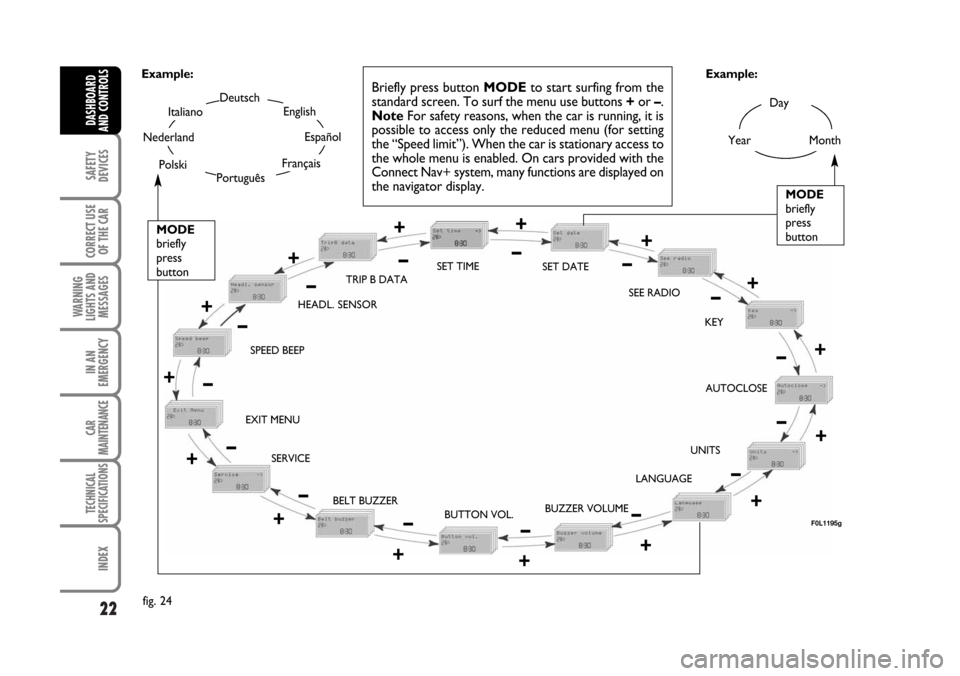
SETUP MENU fig. 24
The menu comprises a series of functions
arranged in a “circular fashion” which can
be selected through buttons +and –to
access the different select operations and
settings (setup) given in the following para-
graphs.
The setup menu can be activated by press-
ing briefly button MODE, only with the
car turned on (with car off, only the re-
duced menu can be displayed).
Single presses on buttons +or –will scroll
the setup menu options.
Handling modes differ with each other ac-
cording to the characteristic of the option
selected.
NOTE If the car is equipped with the Ra-
dionavigation System, the only functions
that can be adjusted/set through the in-
strument panel display are the following:
“Speed limit”, “Automatic headlight day-
light sensor” (where provided) and “S.B.R.
(Seat Belt Reminder) buzzer reactivation”
(where provided). The other functions are
displayed by and can be adjusted/set
through the Radionavigation System dis-
play.Selecting a menu option
– press briefly button MODEto select
the menu option to set;
– press buttons +or –(by single press-
es) to select the new setting;
– press briefly button MODEto store the
new setting and to go back to the previ-
ously selected menu option.
Selecting “Date” and “Set Clock”:
– briefly press button MODEto select
the first value to change (e.g. hours /min-
utes or year / month / day);
– press buttons +or –(by single press-
es) to select the new setting;
– briefly press button MODEto store the
new setting and to go to the next setup
menu option, if this is the last one you will
go back to the previously selected option of
the main menu.Press button MODE for long:
– to quit the setup menu and to save on-
ly the settings stored yet by the user (and
confirmed by pressing briefly button
MODE).
The setup menu displaying is timed; when
quitting the menu due to timing expiry,
only settings stored yet by the user (and
confirmed by pressing briefly button
MODE) will be saved.
001-030 Croma TRW GB 20-11-2006 14:58 Pagina 21
Page 22 of 240
22
SAFETY
DEVICES
CORRECT USE
OF THE CAR
WARNING
LIGHTS AND
MESSAGES
IN AN
EMERGENCY
CAR
MAINTENANCE
TECHNICAL
SPECIFICATIONS
INDEX
DASHBOARD
AND CONTROLS
Day
Year
MODE
briefly
press
button
Month
Deutsch
Português
English
Español
Français
Italiano
Nederland
Polski
Example:
BELT BUZZER SPEED BEEPHEADL. SENSORSET TIME
SET DATE
SEE RADIO
KEY
AUTOCLOSE
UNITS
LANGUAGE
BUZZER VOLUME
BUTTON VOL. EXIT MENU
SERVICETRIP B DATA
fig. 24Example:
+
– +
–
– +
+
–
–
+
+–
–
–
+
+++
–––
+ +
– –+ +
–MODE
briefly
press
button
Briefly press button MODEto start surfing from the
standard screen. To surf the menu use buttons +or –.
NoteFor safety reasons, when the car is running, it is
possible to access only the reduced menu (for setting
the “Speed limit”). When the car is stationary access to
the whole menu is enabled. On cars provided with the
Connect Nav+ system, many functions are displayed on
the navigator display.
F0L1195g
–+
001-030 Croma TRW GB 20-11-2006 14:58 Pagina 22