Rear FIAT DUCATO 2008 3.G Owner's Manual
[x] Cancel search | Manufacturer: FIAT, Model Year: 2008, Model line: DUCATO, Model: FIAT DUCATO 2008 3.GPages: 282, PDF Size: 4.55 MB
Page 89 of 282
88
SAFETY
DEVICES
CORRECT USE
OF THE
VEHICLE
WARNING
LIGHTS AND
MESSAGES
IN AN
EMERGENCY
VEHICLE
MAINTENANCE
TECHNICAL
SPECIFICATIONS
INDEX
DASHBOARD
AND CONTROLS
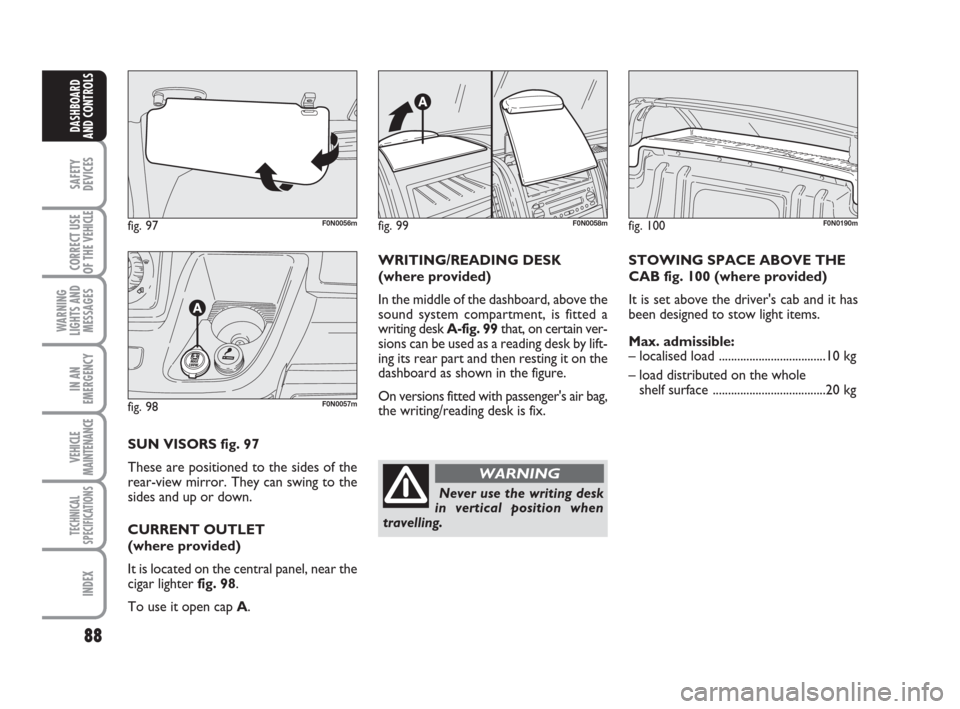
fig. 97F0N0056m
fig. 98F0N0057m
SUN VISORS fig. 97
These are positioned to the sides of the
rear-view mirror. They can swing to the
sides and up or down.
CURRENT OUTLET
(where provided)
It is located on the central panel, near the
cigar lighter fig. 98.
To use it open cap A.WRITING/READING DESK
(where provided)
In the middle of the dashboard, above the
sound system compartment, is fitted a
writing desk A-fig. 99that, on certain ver-
sions can be used as a reading desk by lift-
ing its rear part and then resting it on the
dashboard as shown in the figure.
On versions fitted with passenger's air bag,
the writing/reading desk is fix.STOWING SPACE ABOVE THE
CAB fig. 100 (where provided)
It is set above the driver's cab and it has
been designed to stow light items.
Max. admissible:
– localised load ...................................10 kg
– load distributed on the whole
shelf surface .....................................20 kg
fig. 99F0N0058mfig. 100F0N0190m
Never use the writing desk
in vertical position when
travelling.
WARNING
Page 90 of 282
89
SAFETY
DEVICES
CORRECT USE
OF THE
VEHICLE
WARNING
LIGHTS AND
MESSAGES
IN AN
EMERGENCY
VEHICLE
MAINTENANCE
TECHNICAL
SPECIFICATIONS
INDEX
DASHBOARD
AND CONTROLS
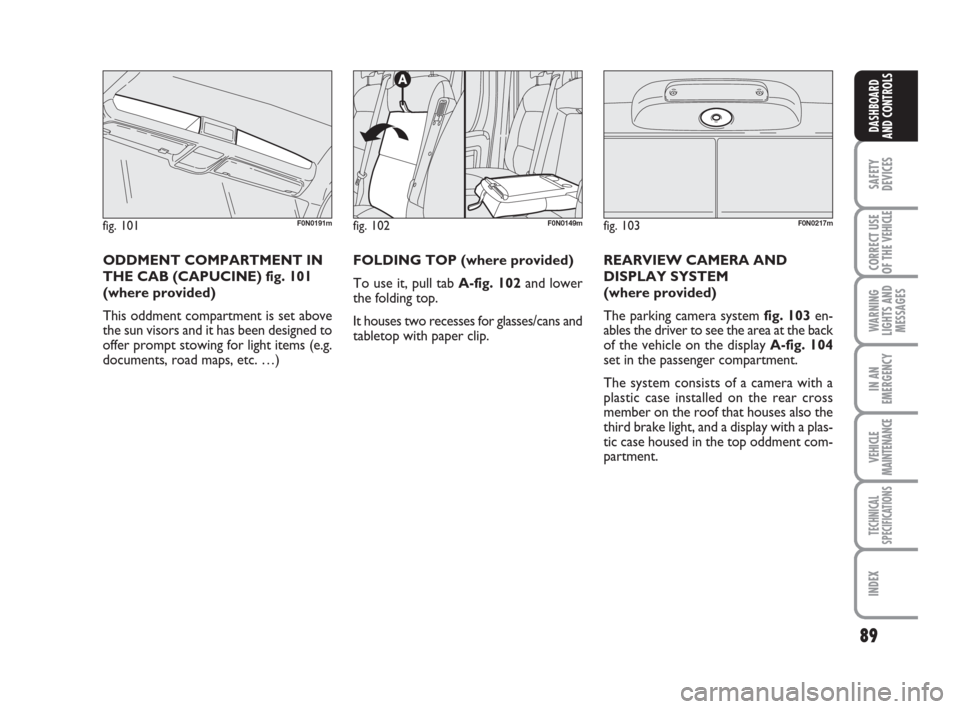
fig. 102F0N0149m
FOLDING TOP (where provided)
To use it, pull tab A-fig. 102 and lower
the folding top.
It houses two recesses for glasses/cans and
tabletop with paper clip.
fig. 101F0N0191m
ODDMENT COMPARTMENT IN
THE CAB (CAPUCINE) fig. 101
(where provided)
This oddment compartment is set above
the sun visors and it has been designed to
offer prompt stowing for light items (e.g.
documents, road maps, etc. …)REARVIEW CAMERA AND
DISPLAY SYSTEM
(where provided)
The parking camera system fig. 103en-
ables the driver to see the area at the back
of the vehicle on the display A-fig. 104
set in the passenger compartment.
The system consists of a camera with a
plastic case installed on the rear cross
member on the roof that houses also the
third brake light, and a display with a plas-
tic case housed in the top oddment com-
partment.
fig. 103F0N0217m
Page 91 of 282
90
SAFETY
DEVICES
CORRECT USE
OF THE
VEHICLE
WARNING
LIGHTS AND
MESSAGES
IN AN
EMERGENCY
VEHICLE
MAINTENANCE
TECHNICAL
SPECIFICATIONS
INDEX
DASHBOARD
AND CONTROLS
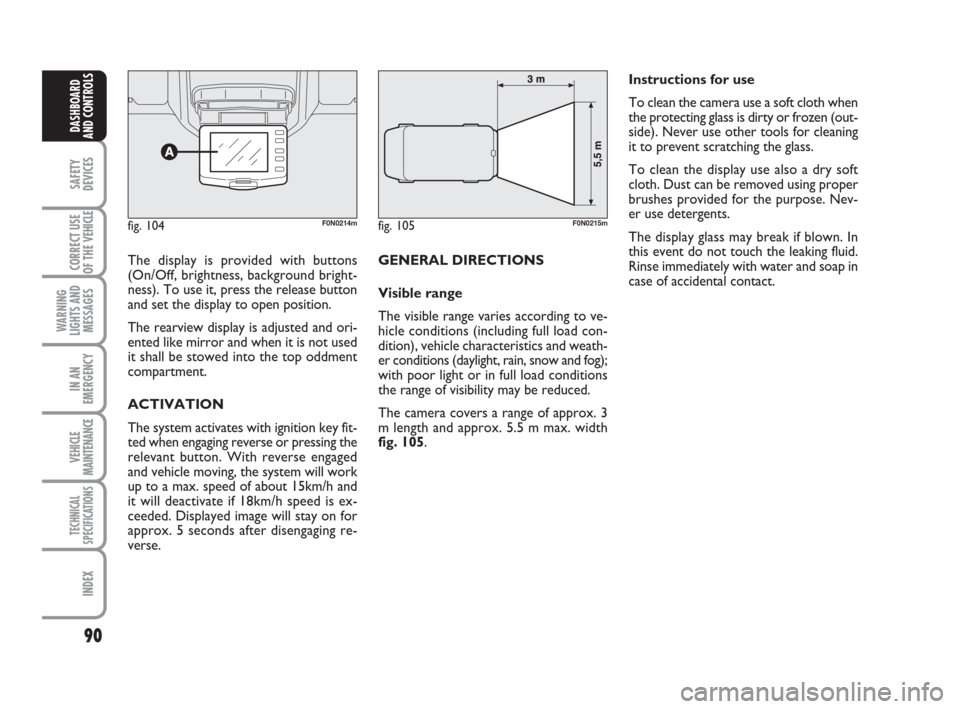
The display is provided with buttons
(On/Off, brightness, background bright-
ness). To use it, press the release button
and set the display to open position.
The rearview display is adjusted and ori-
ented like mirror and when it is not used
it shall be stowed into the top oddment
compartment.
ACTIVATION
The system activates with ignition key fit-
ted when engaging reverse or pressing the
relevant button. With reverse engaged
and vehicle moving, the system will work
up to a max. speed of about 15km/h and
it will deactivate if 18km/h speed is ex-
ceeded. Displayed image will stay on for
approx. 5 seconds after disengaging re-
verse. GENERAL DIRECTIONS
Visible range
The visible range varies according to ve-
hicle conditions (including full load con-
dition), vehicle characteristics and weath-
er conditions (daylight, rain, snow and fog);
with poor light or in full load conditions
the range of visibility may be reduced.
The camera covers a range of approx. 3
m length and approx. 5.5 m max. width
fig. 105.Instructions for use
To clean the camera use a soft cloth when
the protecting glass is dirty or frozen (out-
side). Never use other tools for cleaning
it to prevent scratching the glass.
To clean the display use also a dry soft
cloth. Dust can be removed using proper
brushes provided for the purpose. Nev-
er use detergents.
The display glass may break if blown. In
this event do not touch the leaking fluid.
Rinse immediately with water and soap in
case of accidental contact.
fig. 104F0N0214mfig. 105F0N0215m
Page 94 of 282
93
SAFETY
DEVICES
CORRECT USE
OF THE
VEHICLE
WARNING
LIGHTS AND
MESSAGES
IN AN
EMERGENCY
VEHICLE
MAINTENANCE
TECHNICAL
SPECIFICATIONS
INDEX
DASHBOARD
AND CONTROLS
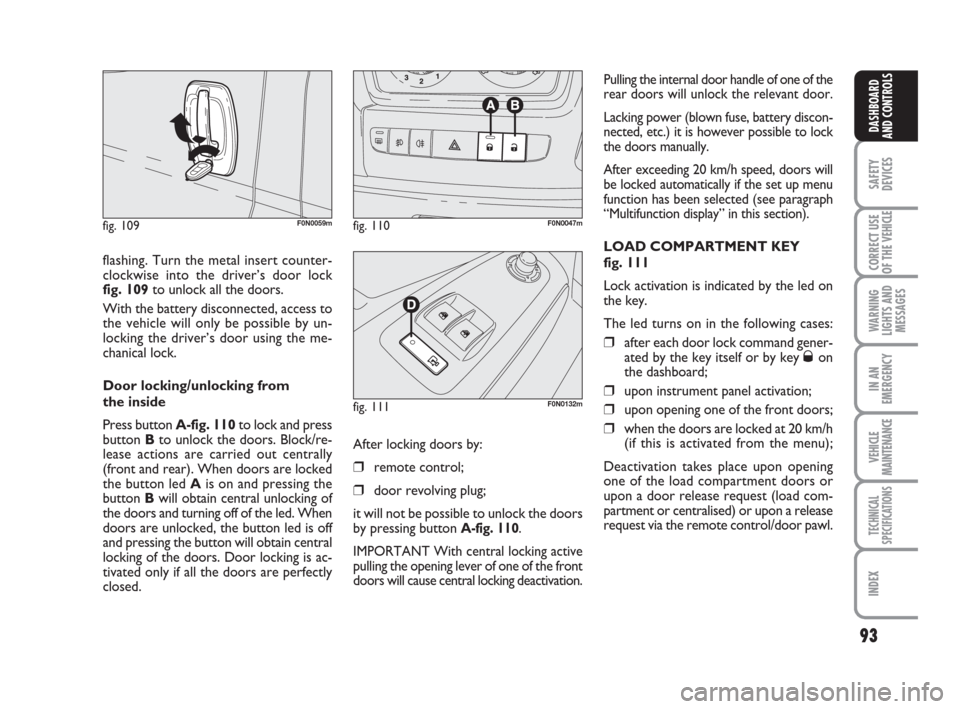
flashing. Turn the metal insert counter-
clockwise into the driver’s door lock
fig. 109to unlock all the doors.
With the battery disconnected, access to
the vehicle will only be possible by un-
locking the driver’s door using the me-
chanical lock.
Door locking/unlocking from
the inside
Press button A-fig. 110to lock and press
button Bto unlock the doors. Block/re-
lease actions are carried out centrally
(front and rear). When doors are locked
the button led Ais on and pressing the
button Bwill obtain central unlocking of
the doors and turning off of the led. When
doors are unlocked, the button led is off
and pressing the button will obtain central
locking of the doors. Door locking is ac-
tivated only if all the doors are perfectly
closed.
fig. 109F0N0059mfig. 110F0N0047m
fig. 111F0N0132m
Pulling the internal door handle of one of the
rear doors will unlock the relevant door.
Lacking power (blown fuse, battery discon-
nected, etc.) it is however possible to lock
the doors manually.
After exceeding 20 km/h speed, doors will
be locked automatically if the set up menu
function has been selected (see paragraph
“Multifunction display” in this section).
LOAD COMPARTMENT KEY
fig. 111
Lock activation is indicated by the led on
the key.
The led turns on in the following cases:
❒after each door lock command gener-
ated by the key itself or by key Øon
the dashboard;
❒upon instrument panel activation;
❒upon opening one of the front doors;
❒when the doors are locked at 20 km/h
(if this is activated from the menu);
Deactivation takes place upon opening
one of the load compartment doors or
upon a door release request (load com-
partment or centralised) or upon a release
request via the remote control/door pawl. After locking doors by:
❒remote control;
❒door revolving plug;
it will not be possible to unlock the doors
by pressing button
A-fig. 110.
IMPORTANT With central locking active
pulling the opening lever of one of the front
doors will cause central locking deactivation.
Page 95 of 282
94
SAFETY
DEVICES
CORRECT USE
OF THE
VEHICLE
WARNING
LIGHTS AND
MESSAGES
IN AN
EMERGENCY
VEHICLE
MAINTENANCE
TECHNICAL
SPECIFICATIONS
INDEX
DASHBOARD
AND CONTROLS
DEAD LOCK DEVICE
(where provided)
This safety device enables to inhibit:
❒door internal handles;
❒locking/unlocking buttons A-B fig. 110;
thus hindering doors opening from inside
the passenger’s compartment in case of at-
tempt to break-into (e.g.: window breaking).
The dead lock device guarantees the best
protection against unwanted access.
Therefore, it should be actuated every
time the vehicle is parked and left unat-
tended.
Once the dead lock device
has been actuated, doors
cannot be opened from the passen-
ger’s compartment in any way what-
soever. For this reason, make sure
there are no person left inside the ve-
hicle. If the battery of the key with
remote control is down, the dead lock
device can be deactivated only by fit-
ting the metal insert of the key in
both front door revolving plugs as de-
scribed previously: in this case the
dead lock device will stay engaged
only on the rear doors.
WARNINGDevice activation
The dead lock device is automatically ac-
tivated on every door when pressing twice
briefly the remote control button
Ø, fig.
107.
Device activation is indicated by 3 flashing
of direction indicators and flashing of the
button led A-fig. 110.
If one of the doors is not perfectly closed,
the dead lock device will not activate, thus
preventing that a person getting into the ve-
hicle from the open door remains blocked
inside the passenger’s compartment when
she/he closes the door.
Device deactivation
The device is deactivated automatically on
every door in the following cases:
❒when opening the driver’s door using
the key without remote control;
❒when unlocking doors using the re-
mote control;
❒turning the ignition key to MAR.
Page 96 of 282
95
SAFETY
DEVICES
CORRECT USE
OF THE
VEHICLE
WARNING
LIGHTS AND
MESSAGES
IN AN
EMERGENCY
VEHICLE
MAINTENANCE
TECHNICAL
SPECIFICATIONS
INDEX
DASHBOARD
AND CONTROLS
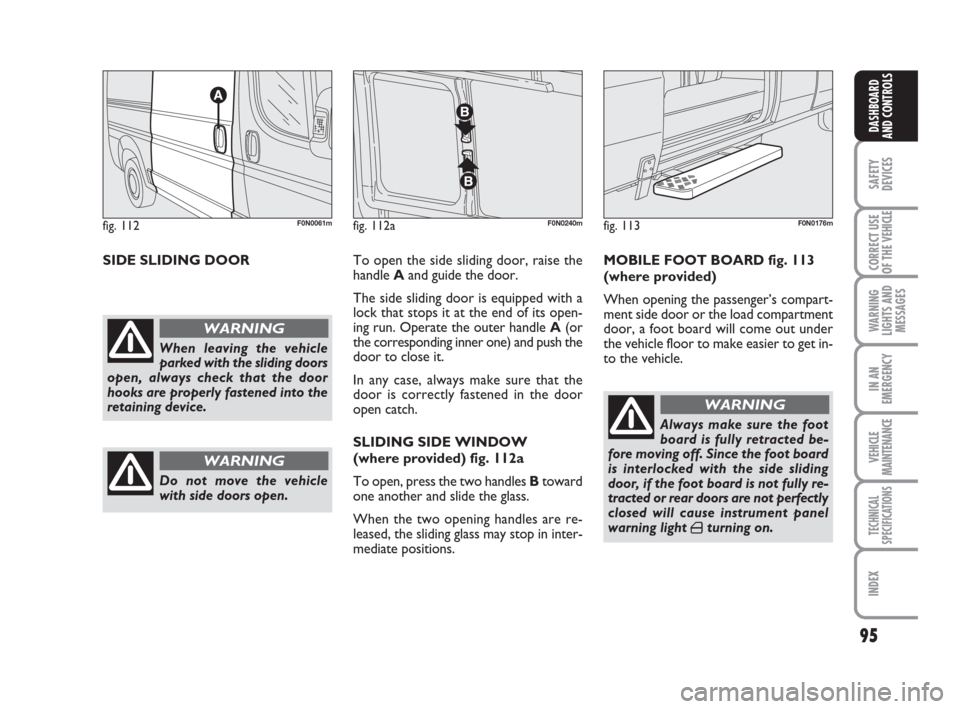
SIDE SLIDING DOORTo open the side sliding door, raise the
handle Aand guide the door.
The side sliding door is equipped with a
lock that stops it at the end of its open-
ing run. Operate the outer handle A(or
the corresponding inner one) and push the
door to close it.
In any case, always make sure that the
door is correctly fastened in the door
open catch.
SLIDING SIDE WINDOW
(where provided) fig. 112a
To open, press the two handles Btoward
one another and slide the glass.
When the two opening handles are re-
leased, the sliding glass may stop in inter-
mediate positions.MOBILE FOOT BOARD fig. 113
(where provided)
When opening the passenger’s compart-
ment side door or the load compartment
door, a foot board will come out under
the vehicle floor to make easier to get in-
to the vehicle.
fig. 112F0N0061m
When leaving the vehicle
parked with the sliding doors
open, always check that the door
hooks are properly fastened into the
retaining device.
WARNING
Do not move the vehicle
with side doors open.
WARNING
Always make sure the foot
board is fully retracted be-
fore moving off. Since the foot board
is interlocked with the side sliding
door, if the foot board is not fully re-
tracted or rear doors are not perfectly
closed will cause instrument panel
warning light
´turning on.
WARNING
fig. 113F0N0176mfig. 112aF0N0240m
Page 97 of 282
96
SAFETY
DEVICES
CORRECT USE
OF THE
VEHICLE
WARNING
LIGHTS AND
MESSAGES
IN AN
EMERGENCY
VEHICLE
MAINTENANCE
TECHNICAL
SPECIFICATIONS
INDEX
DASHBOARD
AND CONTROLS
fig. 114F0N0129mfig. 115F0N0130mfig. 116F0N0131m
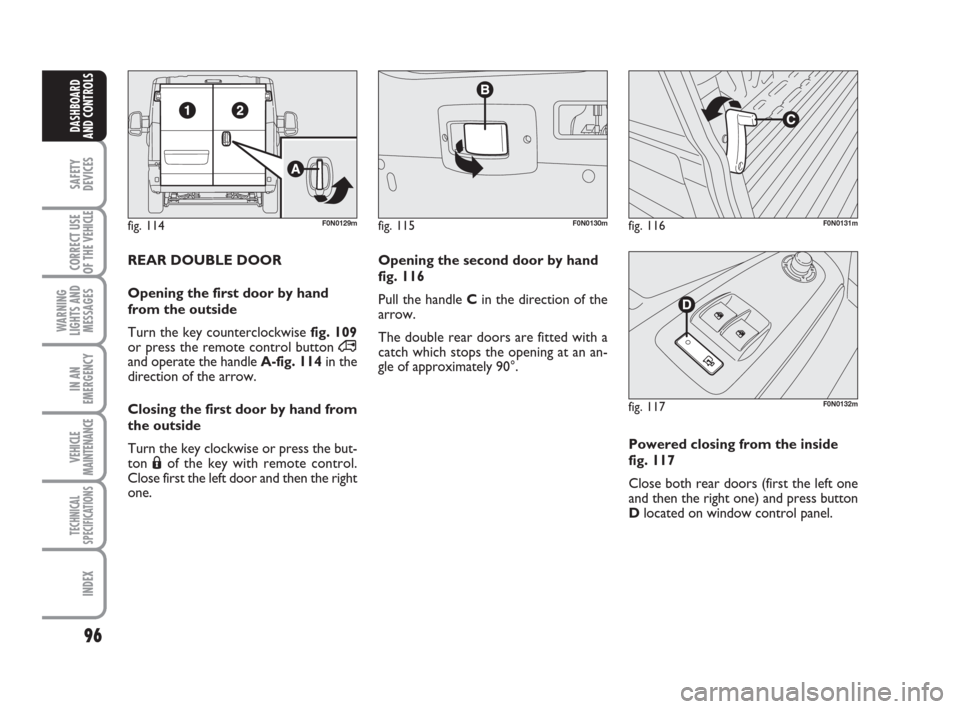
REAR DOUBLE DOOR
Opening the first door by hand
from the outside
Turn the key counterclockwise fig. 109
or press the remote control button ∞
and operate the handleA-fig. 114in the
direction of the arrow.
Closing the first door by hand from
the outside
Turn the key clockwise or press the but-
ton Áof the key with remote control.
Close first the left door and then the right
one. Opening the second door by hand
fig. 116
Pull the handle Cin the direction of the
arrow.
The double rear doors are fitted with a
catch which stops the opening at an an-
gle of approximately 90°.
Powered closing from the inside
fig. 117
Close both rear doors (first the left one
and then the right one) and press button
Dlocated on window control panel.
fig. 117F0N0132m
Page 103 of 282
102
SAFETY
DEVICES
CORRECT USE
OF THE
VEHICLE
WARNING
LIGHTS AND
MESSAGES
IN AN
EMERGENCY
VEHICLE
MAINTENANCE
TECHNICAL
SPECIFICATIONS
INDEX
DASHBOARD
AND CONTROLS
ABS SYSTEM INTERVENTION
The driver can tell the ABS system has
come into action because the brake pedal
pulsates slightly and the system gets noisi-
er: it means that the vehicle speed should
be altered to fit the type of road surface.
If the ABS system cuts in, it
is a sign that the grip be-
tween tyre and the road surface has
reached the limit: you must slow
down to match the speed to the road
grip available.
WARNING
ABS SYSTEM
If you have never driven a vehicle with ABS
before, you should practice using the sys-
tem on slippery terrain, obviously with the
necessary safety precautions and keeping
to the Highway Code of the country you
are in. It is also a good idea to read the fol-
lowing information carefully.
The ABS system, integral with the braking
system, prevents the wheels from locking
when braking, makes the most of road grip
and gives the best control when emergency
braking under difficult road conditions.
System is completed by EBD (Electronic
Braking force Distribution), which dis-
tributes the braking action between front
and rear wheels.
IMPORTANT To have the maximum ef-
ficiency of the braking system, it is neces-
sary a setting period of about 500 km
(with new vehicle after replacing brake
pads/discs): during this period it is better
to avoid sharp, repeated and prolonged
brakes.The ABS exploits the tyre-
road grip at the best, but it
cannot improve it; you should there-
fore take every care when driving on
slippery surfaces without taking un-
necessary risks.
WARNINGFAILURE INDICATIONS
ABS failure
ABS failure is indicated by the turning on
of warning light
>on the instrument pan-
el together with the dedicated message on
the multifunction display (where provid-
ed), (see section “Warning lights and mes-
sages”).
In this case the braking system is still effi-
cient, though without the aid of the ABS
system. Drive carefully to the closest Fiat
Dealership to have the system checked.
Page 104 of 282
103
SAFETY
DEVICES
CORRECT USE
OF THE
VEHICLE
WARNING
LIGHTS AND
MESSAGES
IN AN
EMERGENCY
VEHICLE
MAINTENANCE
TECHNICAL
SPECIFICATIONS
INDEX
DASHBOARD
AND CONTROLS
BRAKE ASSIST
(emergency braking assistance
integral with ESP) (where provided)
The system, which cannot be cut out, rec-
ognizes emergency braking (on the ground
of the brake pedal operation speed) and
considerably increases the pressure in the
brake circuit.
Brake Assist is deactivated on the versions
equipped with ESP, in the event of ESP sys-
tem failure (indicated by warning light
áswitching on together with the message
on the multifunction display, where pro-
vided).
ESP SYSTEM
(Electronic Stability
Program)
(where provided)
The ESP system is an electronic system
controlling the vehicle stability in the event
of tyre grip loss.
The ESP system is therefore particularly
useful when grip conditions of the road sur-
faces changes.
In addition to the ESP system, ASR system
and Hill Holder, (where provided) also the
MSR system (adjusting the engine braking
torque) and the HBA system (improving
the braking force during emergency brak-
ing) are provided.
ESP SYSTEM INTERVENTION
It is signalled by the blinking of the warn-
ing light áon the instrument panel, to in-
form the driver that the vehicle is in crit-
ical stability and grip conditions.
When the ABS cuts in, and
you feel the brake pedal pul-
sating, do not remove your foot, but
keep it pressed; in doing so you will
stop in the shortest amount of space
possible under the current road con-
ditions.
WARNING
EBD failure
EBD failure is indicated by the turning on
of warning lights
>and xon the in-
strument panel together with the dedi-
cated message on the multifunction dis-
play (where provided), (see section
“Warning lights and messages”).
In this case with sharp braking the rear
wheels might lock too early, with the pos-
sibility of skidding. Drive extremely care-
fully to the nearest Fiat Dealership to have
the system checked.
If warning light xalone
comes on (together with the
message on the multifunction display,
where provided), stop the vehicle im-
mediately and contact the nearest Fi-
at Dealership. Fluid leaks from the hy-
draulic system, in fact, can compro-
mise the braking system, both tradi-
tional systems and systems with ABS.
WARNING
Page 108 of 282
107
SAFETY
DEVICES
CORRECT USE
OF THE
VEHICLE
WARNING
LIGHTS AND
MESSAGES
IN AN
EMERGENCY
VEHICLE
MAINTENANCE
TECHNICAL
SPECIFICATIONS
INDEX
DASHBOARD
AND CONTROLS
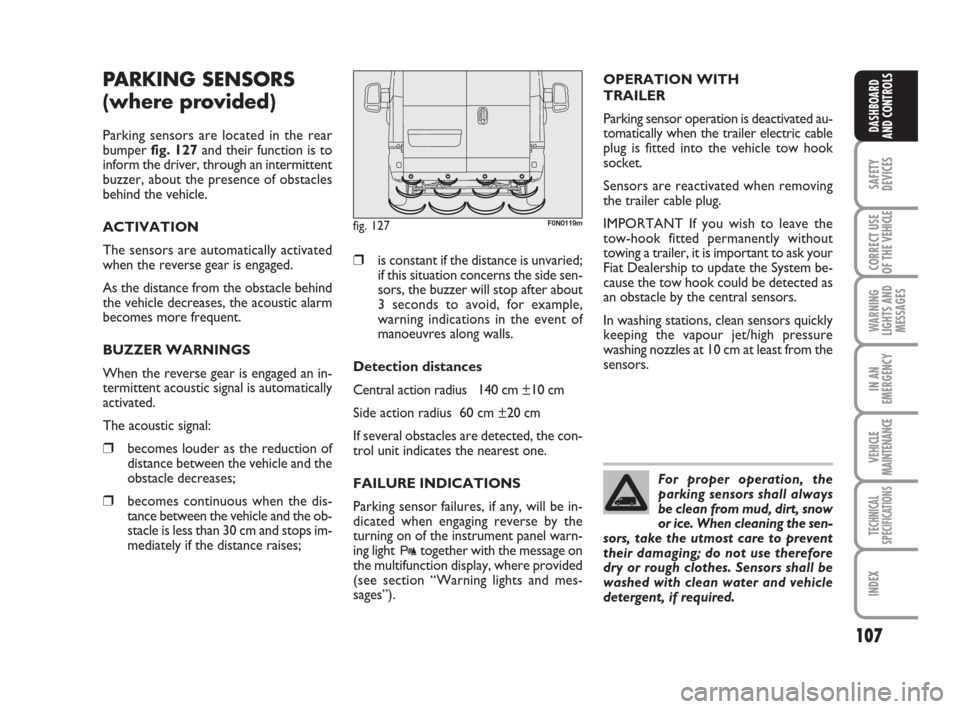
PARKING SENSORS
(where provided)
Parking sensors are located in the rear
bumper fig. 127and their function is to
inform the driver, through an intermittent
buzzer, about the presence of obstacles
behind the vehicle.
ACTIVATION
The sensors are automatically activated
when the reverse gear is engaged.
As the distance from the obstacle behind
the vehicle decreases, the acoustic alarm
becomes more frequent.
BUZZER WARNINGS
When the reverse gear is engaged an in-
termittent acoustic signal is automatically
activated.
The acoustic signal:
❒becomes louder as the reduction of
distance between the vehicle and the
obstacle decreases;
❒becomes continuous when the dis-
tance between the vehicle and the ob-
stacle is less than 30 cm and stops im-
mediately if the distance raises;
❒is constant if the distance is unvaried;
if this situation concerns the side sen-
sors, the buzzer will stop after about
3 seconds to avoid, for example,
warning indications in the event of
manoeuvres along walls.
Detection distances
Central action radius 140 cm ±10 cm
Side action radius 60 cm ±20 cm
If several obstacles are detected, the con-
trol unit indicates the nearest one.
FAILURE INDICATIONS
Parking sensor failures, if any, will be in-
dicated when engaging reverse by the
turning on of the instrument panel warn-
ing light
ttogether with the message on
the multifunction display, where provided
(see section “Warning lights and mes-
sages”).
fig. 127F0N0119m
For proper operation, the
parking sensors shall always
be clean from mud, dirt, snow
or ice. When cleaning the sen-
sors, take the utmost care to prevent
their damaging; do not use therefore
dry or rough clothes. Sensors shall be
washed with clean water and vehicle
detergent, if required.
OPERATION WITH
TRAILER
Parking sensor operation is deactivated au-
tomatically when the trailer electric cable
plug is fitted into the vehicle tow hook
socket.
Sensors are reactivated when removing
the trailer cable plug.
IMPORTANT If you wish to leave the
tow-hook fitted permanently without
towing a trailer, it is important to ask your
Fiat Dealership to update the System be-
cause the tow hook could be detected as
an obstacle by the central sensors.
In washing stations, clean sensors quickly
keeping the vapour jet/high pressure
washing nozzles at 10 cm at least from the
sensors.