Main FIAT DUCATO 2017 Owner handbook (in English)
[x] Cancel search | Manufacturer: FIAT, Model Year: 2017, Model line: DUCATO, Model: FIAT DUCATO 2017Pages: 296, PDF Size: 14.44 MB
Page 41 of 296
Heating turned on immediately
To switch the system on manually,
press the button 6 of the timer: the
display and warning light 9 will light up
and remain on the entire time the
system is working.
Switching on time will disappear after
10 seconds.
Programmed activation of heating
Before programming system activation,
it is essential to set the time.
Programming the switching on time
To program the activation time:
press button 4: the symbol 10 or the
time set previously and the number 5
corresponding to the preselection
recalled will light up in the display for 10
seconds.
IMPORTANT If you wish to recall other
preselected times, press button 4
from time to time within 10 seconds.
– within 10 seconds, press the buttons
3 or 8 to select the desired switching
on time.
IMPORTANT The confirmation that the
time has been memorised is given by:
the disappearance of the switching
on time;
the presence of the preselection
number 5;
the lighting of the display.
IMPORTANT When the boiler comes
on:
the flame warning light 9 switches
on in the display;
the preselection number 5 goes out.
Standard settings:
Preselected time 1: 6:00
Preselected time 2: 16:00
Preselected time 3: 22:00
IMPORTANT Factory pre-settings are
cancelled with a new setting.
Preselected times are stored until the
following change. If the clock is
detached from the on-board network
(e.g. if the battery is disconnected), the
factory pre-settings are restored.
Deactivation of the programmed
switching on time
To delete the programmed activation
time, press button 4 briefly: the display
lighting will go off and the number 5
relating to the preselected time will
disappear.
Recalling one of the preselected
switching on times
Operate button 4 within 10 seconds
until the program number with the
desired preselected time is displayed.The preselected time you have chosen
to set is automatically activated after
about 10 seconds without the need for
any further confirmation with another
button.
Activate the preselected time taking
into account the safety instructions for
the operation of the independent
heating (for this purpose consult the
Owner's Manual for use of independent
heating).
IMPORTANT Independent heating
switches on at the preselected time,
both with vehicle parked and while
driving.
IMPORTANT The programmed
switching on time can be altered or
cancelled by following the instructions
given previously.
Switching the heating system off
Deactivation of the system, depending
on the type of activation (automatic
or manual), may be:
automaticwhen the programmed
duration is over; when the set time is
over, the display switches off.
manualpressing the “immediate
heating” button on the timer again
(flame button 6).
39
Page 42 of 296
In both cases, the heating warning light,
the display lighting and the passenger
compartment heater fan go off and
burning stops.
The fluid circulation pump continues to
work for around two minutes to
dissipate as much heat as possible; the
heater can be turned back on during
this stage.
IMPORTANT The parking heater goes
off when battery voltage is low to allow
the vehicle to be started.
IMPORTANT Before turning on the
device, ensure that the fuel level is
above the reserve. Otherwise the
device could lock and require
the assistance of a Fiat Dealership.
Always turn off the heater when
refuelling and near service stations to
avoid the risk of explosion or fire
hazards.
Do not park the vehicle on
inflammable material such as paper,
grass or dry leaves: fire hazard!
The temperature near the heater
should not exceed 120°C (e.g. during
oven painting in a body shop). The
electronic control unit components may
be damaged at higher temperatures.
Whilst the heater is operating with
the engine switched off, it absorbs
energy from the battery; the engine
should therefore be left running for
a while to make sure that the battery is
properly recharged.
To check the coolant level, follow the
instructions in the "Vehicle
maintenance" chapter, "Engine coolant
system fluid" paragraph. The water in
the heating circuit must contain a
minimum percentage of 10% antifreeze.
For maintenance and repairs,
consult only a Fiat Dealership and use
only original parts.
MAINTENANCE
Have the additional heater checked
regularly at a Fiat Dealership (and
always at the start of every winter). This
will guarantee safe and economic
operation of the heater as well as a long
duration.
ADDITIONAL REAR
HEATING (Panorama and
Combinato)
(for versions/markets, where provided)
The Panorama and Combi versions
are equipped with a main heating
system plus an additional system
(available on request) with controls in
the roof panel trim above the second
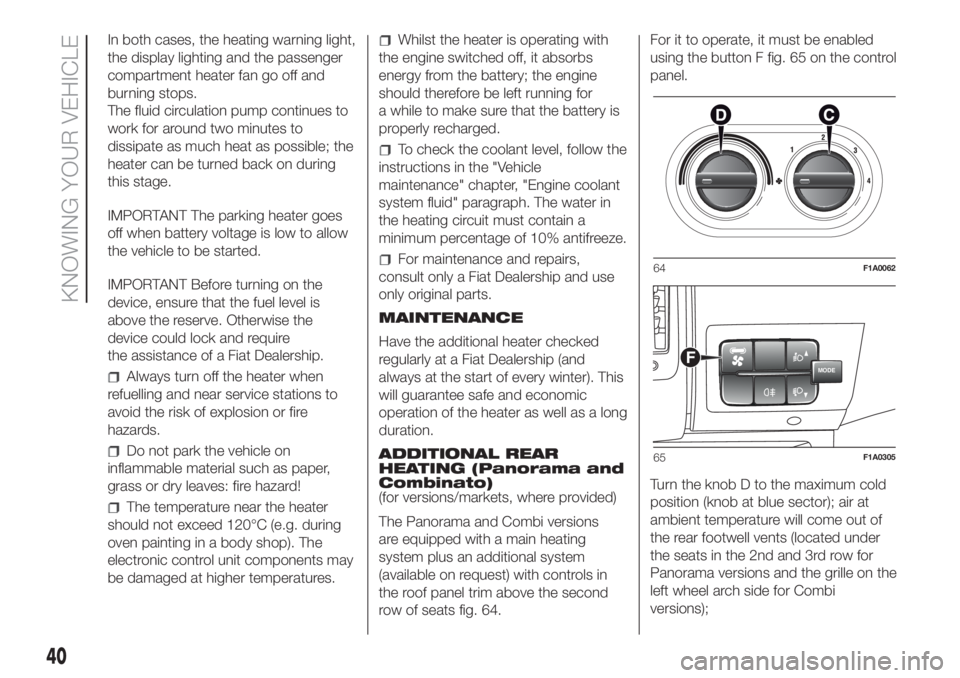
row of seats fig. 64.For it to operate, it must be enabled
using the button F fig. 65 on the control
panel.
Turn the knob D to the maximum cold
position (knob at blue sector); air at
ambient temperature will come out of
the rear footwell vents (located under
the seats in the 2nd and 3rd row for
Panorama versions and the grille on the
left wheel arch side for Combi
versions);64F1A0062
MODEF
65F1A0305
40
KNOWING YOUR VEHICLE
Page 43 of 296
Turn the knob D to the maximum
heating position (knob at red
sector);warm air will emerge (with the
engine warmed up), from the rear
footwell outlets (located under the seats
in the 2nd and 3rd row for Panorama
versions and the grille on the left wheel
arch side for Combi versions).
ADDITIONAL REAR
CLIMATE CONTROL
(Panorama and Combi)
(for versions/markets, where provided)
The Panorama and Combi versions
are equipped with a main heating/air
conditioning system plus an additional
system (available on request) with
controls in the roof panel trim above the
second row of seats fig. 64. Button F
fig. 65 on the control panel must be
enabled for operation; the air
conditioning only works if the main air
conditioner is on.
When the knob D is placed in the
fully cold position (control in blue sector)
cold air comes out the vents in the
ceiling.
Turn the knob D to the maximum
heating position (knob at red
sector);warm air will emerge (with the
engine warmed up), from the rear
footwell outlets (located under the seats
in the 2nd and 3rd row for Panorama
versions and the grille on the left wheel
arch side for Combi versions).
If the selector knob D is placed in
the intermediate positions, the air
will be distributed between the vents in
the ceiling and the rear footwell vents,
varying the temperature.
IMPORTANT If the compressor on the
main air conditioner control is turned on
(operation of button E), even if the
additional air conditioner fan is in
position 0, the 1st speed will
automatically be activated to prevent
ice formation, with possible damage to
the component.
WARNING
34)The heater burns fuel in the same way
as the engine, though to a lesser extent. To
prevent poisoning and asphyxiation, the
supplementary heater must never be
turned on, not even for short periods, in
closed environments such as a garage or
workshops without extraction fans for
the exhaust gases.
ELECTRIC WINDOWS
ELECTRIC
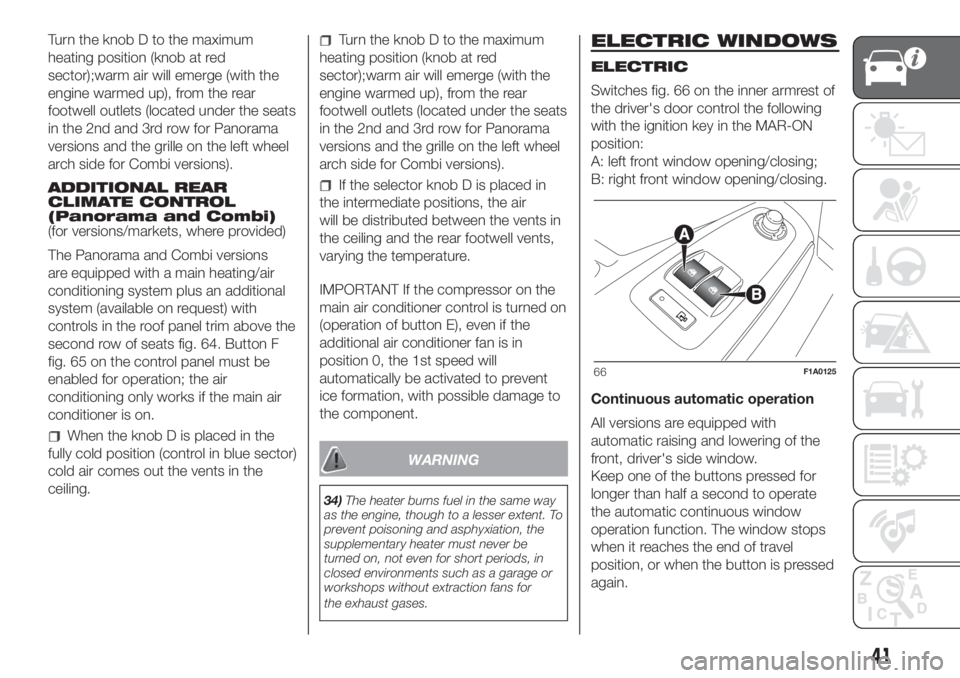
Switches fig. 66 on the inner armrest of
the driver's door control the following
with the ignition key in the MAR-ON
position:
A: left front window opening/closing;
B: right front window opening/closing.
Continuous automatic operation
All versions are equipped with
automatic raising and lowering of the
front, driver's side window.
Keep one of the buttons pressed for
longer than half a second to operate
the automatic continuous window
operation function. The window stops
when it reaches the end of travel
position, or when the button is pressed
again.
66F1A0125
41
Page 44 of 296
IMPORTANT With the ignition key in the
STOP position or extracted, the
electric windows remain activated for
about 3 minutes and are deactivated
immediately when one of the doors
is opened.
Front passenger side door
A dedicated switch for operating the
window is located on the inner armrest
of the passenger side front door.
35)
WARNING
35)Incorrect use of the electric windows
may be dangerous. Before and during
operation, always check that nobody
is exposed to the risk of being injured
either directly by the moving window or
through objects getting caught or by being
hit. When leaving the vehicle, always
remove the key from the ignition switch to
avoid the risk of injury to anyone remaining
in the car due to accidental operation of
the electric windows.
BONNET
OPENING
Proceed as follows:
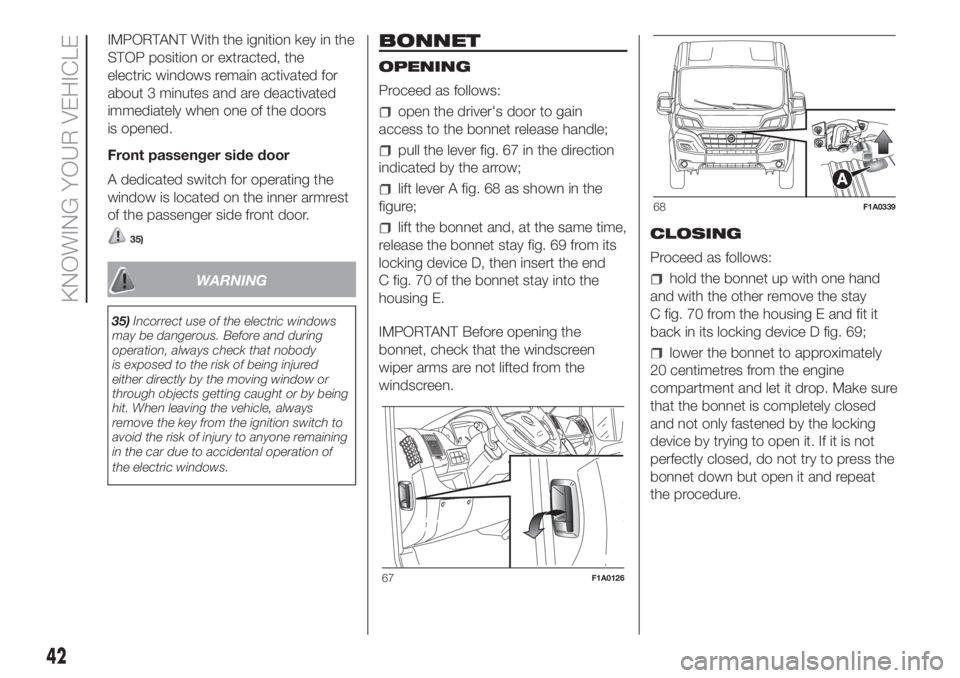
open the driver's door to gain
access to the bonnet release handle;
pull the lever fig. 67 in the direction
indicated by the arrow;
lift lever A fig. 68 as shown in the
figure;
lift the bonnet and, at the same time,
release the bonnet stay fig. 69 from its
locking device D, then insert the end
C fig. 70 of the bonnet stay into the
housing E.
IMPORTANT Before opening the
bonnet, check that the windscreen
wiper arms are not lifted from the
windscreen.CLOSING
Proceed as follows:
hold the bonnet up with one hand
and with the other remove the stay
C fig. 70 from the housing E and fit it
back in its locking device D fig. 69;
lower the bonnet to approximately
20 centimetres from the engine
compartment and let it drop. Make sure
that the bonnet is completely closed
and not only fastened by the locking
device by trying to open it. If it is not
perfectly closed, do not try to press the
bonnet down but open it and repeat
the procedure.
67F1A0126
68F1A0339
42
KNOWING YOUR VEHICLE
Page 47 of 296
TACHOGRAPH
For tachograph operation and use,
consult the owner handbook supplied
by the device manufacturer. The
tachograph must be installed on the
vehicle when the vehicle weight (with or
without trailer) exceeds 3.5 tons.
IMPORTANT Anyone making changes
to the monitoring device or signal
transmission system that affects
recording by the monitoring instrument,
particularly if this is done for purposes
of fraud, may be in breach of criminal or
administrative state regulations.
IMPORTANT If a tachograph is fitted, if
the vehicle is parked for more than 5
days, it is advisable to disconnect
the negative battery terminal to
maintain its charge.
IMPORTANT INFORMATION
Do not use abrasive detergents or
solvents to clean the device. To clean
the outside of the device, use a damp
cloth or special products for the care of
synthetic materials.The tachograph is installed and sealed
by authorised personnel: do not try
and access the device or the supply
and recording leads in any way. It is the
responsibility of the owner of the vehicle
on which the tachograph is installed to
check the device regularly.
The check must be carried out at least
every two years and a test must be
carried out to ensure that it is working
properly. Ensure that the data label
is renewed after every check and that
the label contains the specified data.
SELF-LEVELLING AIR
SUSPENSION
GENERAL INFORMATION
The system only acts on the rear
wheels.
The system maintains the rear ride
setting for the vehicle constant in any
loading condition, while ensuring a
greater driving comfort.
HEIGHT ADJUSTMENT
There are 7 pre-defined levels for the
free height from the ground: from “ride
-3” to “ride 0” till “ride +3”.
Automatic adjustment
When moving, the system automatically
shows that the vehicle is in 'ride setting
0' and keeps it constant.
While adjusting, the LED located on the
button (A or B fig. 74) corresponding
to the direction of travel, flashes.
Manual adjustment
5)
With the vehicle stationary and the
engine on or off, the desired height level
can be set.
45
Page 48 of 296
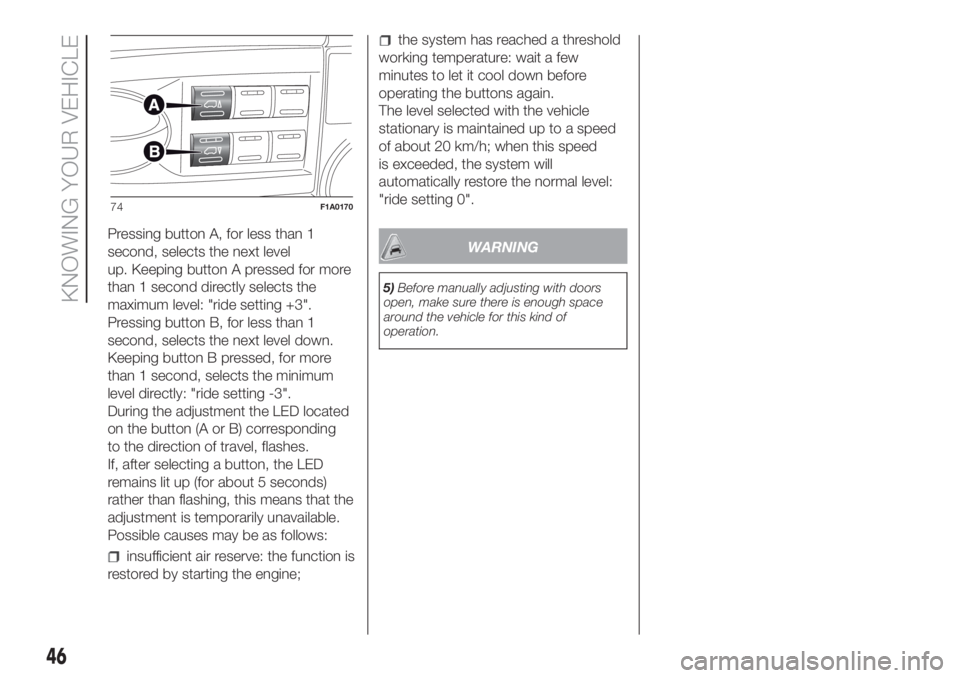
Pressing button A, for less than 1
second, selects the next level
up. Keeping button A pressed for more
than 1 second directly selects the
maximum level: "ride setting +3".
Pressing button B, for less than 1
second, selects the next level down.
Keeping button B pressed, for more
than 1 second, selects the minimum
level directly: "ride setting -3".
During the adjustment the LED located
on the button (A or B) corresponding
to the direction of travel, flashes.
If, after selecting a button, the LED
remains lit up (for about 5 seconds)
rather than flashing, this means that the
adjustment is temporarily unavailable.
Possible causes may be as follows:
insufficient air reserve: the function is
restored by starting the engine;
the system has reached a threshold
working temperature: wait a few
minutes to let it cool down before
operating the buttons again.
The level selected with the vehicle
stationary is maintained up to a speed
of about 20 km/h; when this speed
is exceeded, the system will
automatically restore the normal level:
"ride setting 0".
WARNING
5)Before manually adjusting with doors
open, make sure there is enough space
around the vehicle for this kind of
operation.
74F1A0170
46
KNOWING YOUR VEHICLE
Page 49 of 296
KNOWING THE INSTRUMENT PANEL
This section of the booklet gives you all
the information you need to
understand, interpret and use the
instrument panel correctly.EOBD SYSTEM............................... 49
CONTROL PANEL AND
ON-BOARD INSTRUMENTS ........... 50
DISPLAY ........................................ 52
TRIP COMPUTER ........................... 54
WARNING LIGHTS AND
MESSAGES .................................... 56
- LOW BRAKE FLUID/HANDBRAKE
APPLIED ............................................ 56
- EBD FAILURE .................................. 57
- AIR BAG FAILURE ............................ 57
- SEAT BELTS REMINDER .................. 57
- ENGINE COOLANT TEMPERATURE
TOO HIGH .......................................... 58
- LOW BATTERY CHARGE ................. 59
- LOW ENGINE OIL PRESSURE ......... 60
-ENGINE OIL DETERIORATED ........... 60
-INCOMPLETE DOOR/LOAD
COMPARTMENT CLOSURE ............... 61
-POWER STEERING FAILURE ............ 61
- SELF-LEVELLING SUSPENSION
FAILURE ............................................. 61
- EOBD/INJECTION SYSTEM
FAILURE ............................................. 63
-UREA INJECTION SYSTEM FAILURE
............................................................ 64
-ABS FAILURE .................................... 64
- FUEL RESERVE ............................... 64
-GLOW PLUG PREHEATING / GLOW
PLUG PREHEATING FAILURE ............ 65
-LOW DIESEL EMISSIONS ADDITIVE
(UREA) LEVEL WARNING ................... 65
-VEHICLE PROTECTION SYSTEM
FAILURE - FIAT CODE ........................ 66
-REAR FOG LIGHTS ........................... 66
- GENERAL FAILURE WARNING ........ 67-DPF (PARTICULATE FILTER)
CLEANING UNDERWAY ..................... 68
- BRAKE PAD WEAR .......................... 68
-DRIVING ADVISOR ........................... 69
- TPMS ............................................... 70
-DIPPED BEAM HEADLIGHTS ........... 71
-FOLLOW ME HOME ......................... 71
- LEFT DIRECTION INDICATOR .......... 71
- RIGHT DIRECTION INDICATOR ....... 71
- FOG LIGHTS .................................... 72
- CRUISE CONTROL .......................... 72
- SPEED LIMITER ............................... 72
- AUTOMATIC MAIN BEAM
HEADLIGHTS ..................................... 72
- MAIN BEAM HEADLIGHTS .............. 72
-"UP" FUNCTION ............................... 73
-EXTERIOR LIGHTS FAILURE ............. 74
-LOW ENGINE OIL PRESSURE
WARNING LIGHT FAILURE ................. 74
-BRAKE LIGHTS FAILURE .................. 74
-MAIN BEAM AUTOMATISM FAULT ... 74
-POSSIBLE ICE ON ROAD ................. 75
-SPEED LIMIT EXCEEDED ................. 75
-SCHEDULED SERVICING ................. 75
-FUEL CUT-OFF DEVICE INERTIA
SWITCH TRIPPED .............................. 76
-COMFORT-MATIC SYSTEM FAILURE
INDICATION ........................................ 76
-PARKING SENSOR FAILURE ............ 76
-DRIVING ADVISOR SYSTEM
FAILURE ............................................. 76
-TRAFFIC SIGN RECOGNITION
FAILURE ............................................. 76
-LIMITED RANGE ............................... 76
-START&STOP SYSTEM
ACTIVATION/DEACTIVATION .............. 77
-START&STOP FAILURE .................... 77
47
Page 54 of 296
DISPLAY
(for versions/markets, where provided)
The vehicle may be equipped with a
multifunction display or with a
reconfigurable multifunction display,
able to display information that is useful
and necessary when driving.
MULTIFUNCTION
DISPLAY "STANDARD"
SCREEN
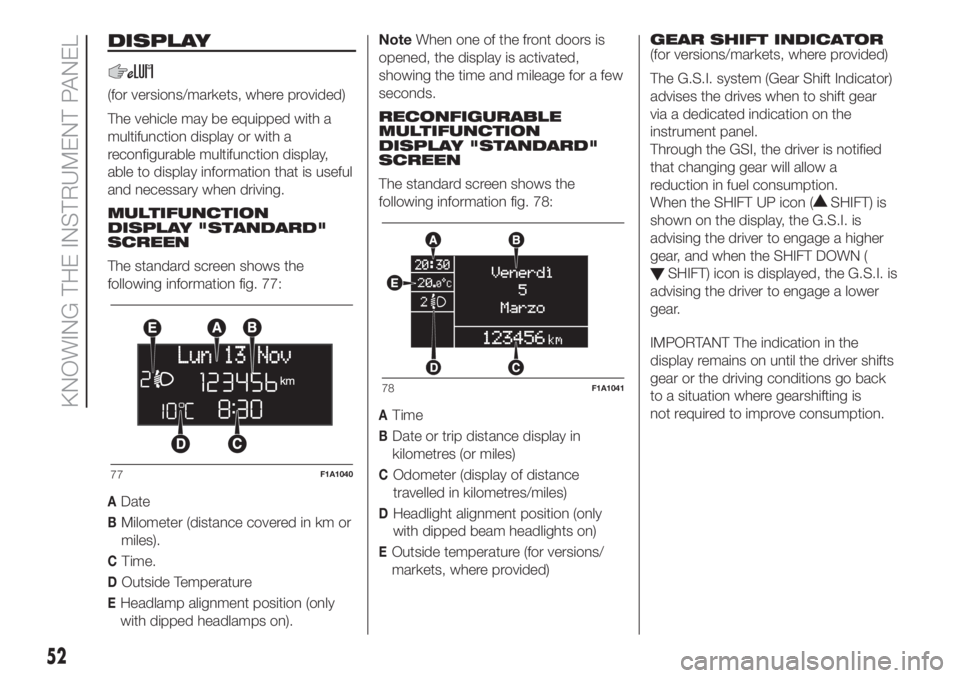
The standard screen shows the
following information fig. 77:
ADate
BMilometer (distance covered in km or
miles).
CTime.
DOutside Temperature
EHeadlamp alignment position (only
with dipped headlamps on).NoteWhen one of the front doors is
opened, the display is activated,
showing the time and mileage for a few
seconds.
RECONFIGURABLE
MULTIFUNCTION
DISPLAY "STANDARD"
SCREEN
The standard screen shows the
following information fig. 78:
ATime
BDate or trip distance display in
kilometres (or miles)
COdometer (display of distance
travelled in kilometres/miles)
DHeadlight alignment position (only
with dipped beam headlights on)
EOutside temperature (for versions/
markets, where provided)GEAR SHIFT INDICATOR
(for versions/markets, where provided)
The G.S.I. system (Gear Shift Indicator)
advises the drives when to shift gear
via a dedicated indication on the
instrument panel.
Through the GSI, the driver is notified
that changing gear will allow a
reduction in fuel consumption.
When the SHIFT UP icon (
SHIFT) is
shown on the display, the G.S.I. is
advising the driver to engage a higher
gear, and when the SHIFT DOWN (
SHIFT) icon is displayed, the G.S.I. is
advising the driver to engage a lower
gear.
IMPORTANT The indication in the
display remains on until the driver shifts
gear or the driving conditions go back
to a situation where gearshifting is
not required to improve consumption.
77F1A1040
78F1A1041
52
KNOWING THE INSTRUMENT PANEL
Page 55 of 296
ENGINE OIL LEVEL
GAUGE
(for versions/markets, where provided)
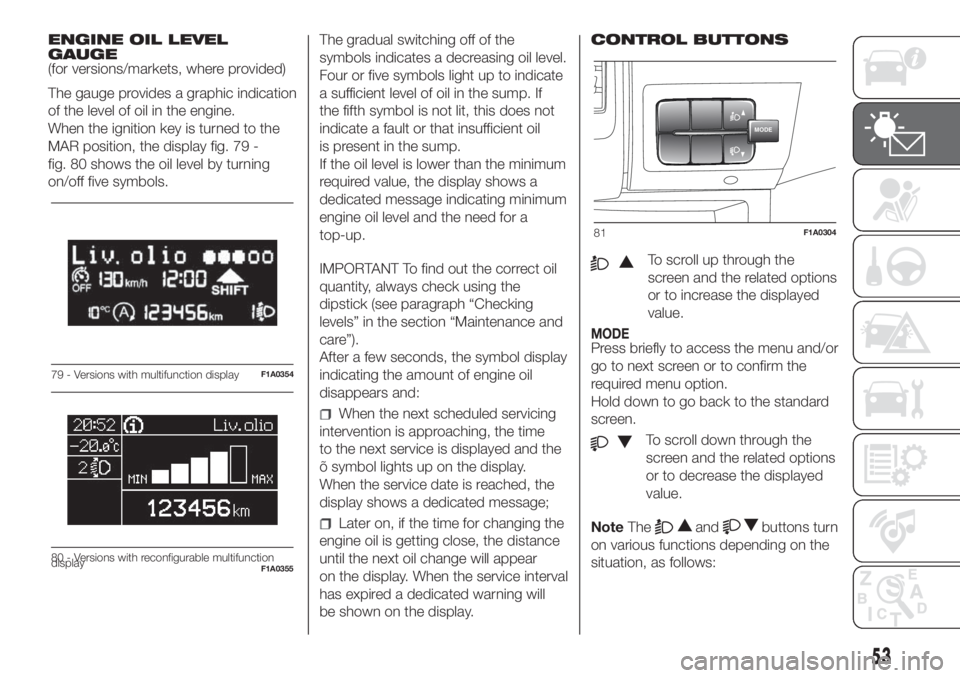
The gauge provides a graphic indication
of the level of oil in the engine.
When the ignition key is turned to the
MAR position, the display fig. 79 -
fig. 80 shows the oil level by turning
on/off five symbols.The gradual switching off of the
symbols indicates a decreasing oil level.
Four or five symbols light up to indicate
a sufficient level of oil in the sump. If
the fifth symbol is not lit, this does not
indicate a fault or that insufficient oil
is present in the sump.
If the oil level is lower than the minimum
required value, the display shows a
dedicated message indicating minimum
engine oil level and the need for a
top-up.
IMPORTANT To find out the correct oil
quantity, always check using the
dipstick (see paragraph “Checking
levels” in the section “Maintenance and
care”).
After a few seconds, the symbol display
indicating the amount of engine oil
disappears and:
When the next scheduled servicing
intervention is approaching, the time
to the next service is displayed and the
õ symbol lights up on the display.
When the service date is reached, the
display shows a dedicated message;
Later on, if the time for changing the
engine oil is getting close, the distance
until the next oil change will appear
on the display. When the service interval
has expired a dedicated warning will
be shown on the display.CONTROL BUTTONS
To scroll up through the
screen and the related options
or to increase the displayed
value.
MODEPress briefly to access the menu and/or
go to next screen or to confirm the
required menu option.
Hold down to go back to the standard
screen.
To scroll down through the
screen and the related options
or to decrease the displayed
value.
NoteThe
andbuttons turn
on various functions depending on the
situation, as follows:
79 - Versions with multifunction displayF1A0354
Liv.olio
MAX MIN
80 - Versions with reconfigurable multifunction
displayF1A0355
MODE
81F1A0304
53
Page 56 of 296
Adjusting the vehicle interior
lighting
- with the side lights on and standard
screen active, it is possible to adjust the
brightness inside the vehicle.
Setup menu
- within the menu, they allow you to
scroll up and down;
- during setting operations they allow
an increase or decrease.
SETUP MENU
Setup menu functions
The setup menu can be activated by
pressing the MODE button briefly.
The menu comprises the following
functions:
Menu
On
Headlight alignment corrector
Speed warning
Headlight sensor
Cornering lights
Rain sensor
Trip B activation
Traffic sign
Set time
Set date
Autoclose
Units
Language
Warning volume
Service
Passenger's airbag
Daytime running lights
Automatic main beam headlights
Exit menu
Press the
orbuttons to
navigate within the menu
buttons
once to scroll through the setup menu
list.
Operating modes are different
according to the characteristics of the
option selected.
TRIP COMPUTER
IN BRIEF
The Trip computer is used to display
information on vehicle operation
when the ignition key is turned to
MAR. This function allows you to
define two separate trips, called "Trip
A" and "Trip B", for monitoring the
"complete mission" (journey) of
the vehicle in a reciprocally
independent manner. Both functions
can be reset (reset means start of
a new journey).
"Trip A" can be used to display the
values relating to:
Outside Temperature
Range
Distance travelled A
Average consumption A
Instant consumption
Average speed A
Trip time A (driving time)
Reset Trip A
54
KNOWING THE INSTRUMENT PANEL