phone FIAT DUCATO 244 2002 3.G Connect NavPlus Manual
[x] Cancel search | Manufacturer: FIAT, Model Year: 2002, Model line: DUCATO 244, Model: FIAT DUCATO 244 2002 3.GPages: 246, PDF Size: 3.39 MB
Page 6 of 246
CONNECT Nav
5
Playing the PLAYLIST ........................................................ 56
Playing MP3 CD .................................................................. 56
Define PLAYLIST ............................................................... 57
PLAYLIST ............................................................................. 57
View PLAYLIST .................................................................. 58
CELLULAR TELEPHONE (TEL)......................... 59
GENERAL INFORMATION ........................................... 59
PRELIMINARY OPERATIONS ....................................... 60
Entering and exiting the telephone mode ................... 60
Inserting the telephone card ........................................... 62
Entering the PIN code ...................................................... 63
Incoming calls ...................................................................... 63
Outgoing calls ..................................................................... 64
Dialling a service number ................................................. 64
Frequent numbers function ............................................. 65
Last calls received function .............................................. 67
Last numbers called function .......................................... 67
Directory function ............................................................. 68
Select ..................................................................................... 68
Add ........................................................................................ 71Play voice directory ........................................................... 74
Delete voice directory ..................................................... 74
WAP function ..................................................................... 74
VOICE MEMO function ................................................... 80
MESSAGES SMS - (Short Message Service) ................. 82
Dial ........................................................................................ 82
Select ..................................................................................... 84
Center number ................................................................... 85
Phone option function ...................................................... 86
Phone settings function .................................................... 88
NAVIGATOR (NAV) .................................................. 90
GENERAL INFORMATION ........................................... 90
NAVIGATION CD ROM PLAYER ............................... 92
MAIN NAVIGATION SCREEN ..................................... 93
SELECT POINT .................................................................. 94
Address ................................................................................ 95
Points of interest ................................................................ 98
Last destinations ................................................................. 100
Directory ............................................................................. 101
RDS-TMC ............................................................................ 102
Page 12 of 246
CONNECT Nav
11
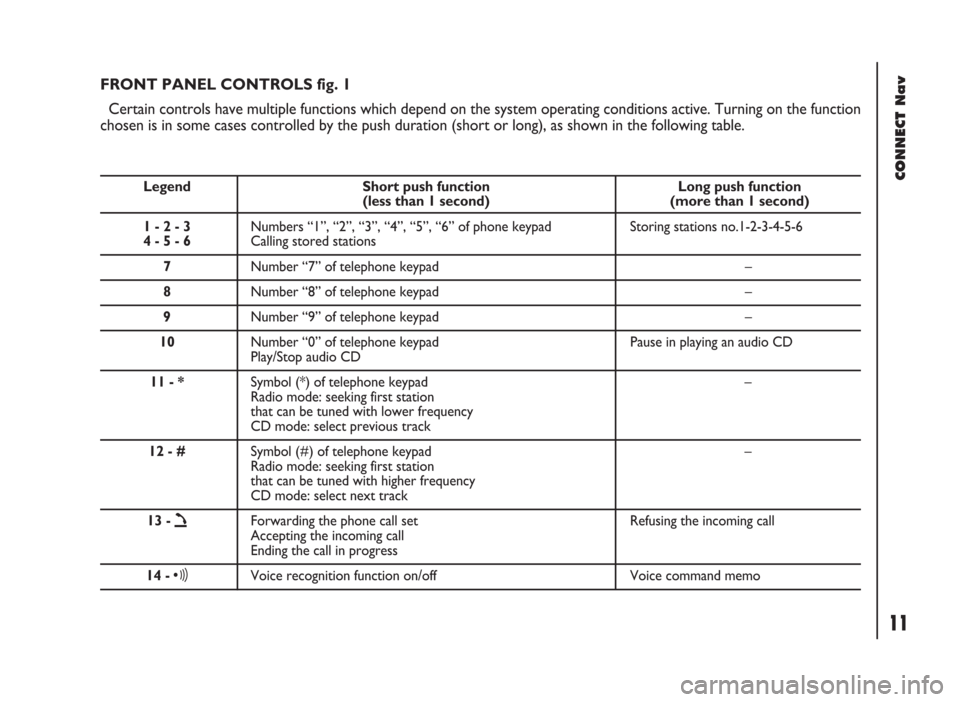
FRONT PANEL CONTROLS fig. 1
Certain controls have multiple functions which depend on the system operating conditions active. Turning on the function
chosen is in some cases controlled by the push duration (short or long), as shown in the following table.
Legend Short push function Long push function (less than 1 second) (more than 1 second)
1 - 2 - 3 Numbers “1”, “2”, “3”, “4”, “5”, “6” of phone keypad Storing stations no.1-2-3-4-5-6
4 - 5 - 6Calling stored stations
7Number “7” of telephone keypad –
8Number “8” of telephone keypad –
9Number “9” of telephone keypad –
10Number “0” of telephone keypad Pause in playing an audio CD
Play/Stop audio CD
11 - *Symbol (*) of telephone keypad –
Radio mode: seeking first station
that can be tuned with lower frequency
CD mode: select previous track
12 - #Symbol (#) of telephone keypad –
Radio mode: seeking first station
that can be tuned with higher frequency
CD mode: select next track
13 -
òForwarding the phone call set Refusing the incoming call
Accepting the incoming call
Ending the call in progress
14 -ôVoice recognition function on/off Voice command memo
Page 13 of 246
CONNECT Nav
12
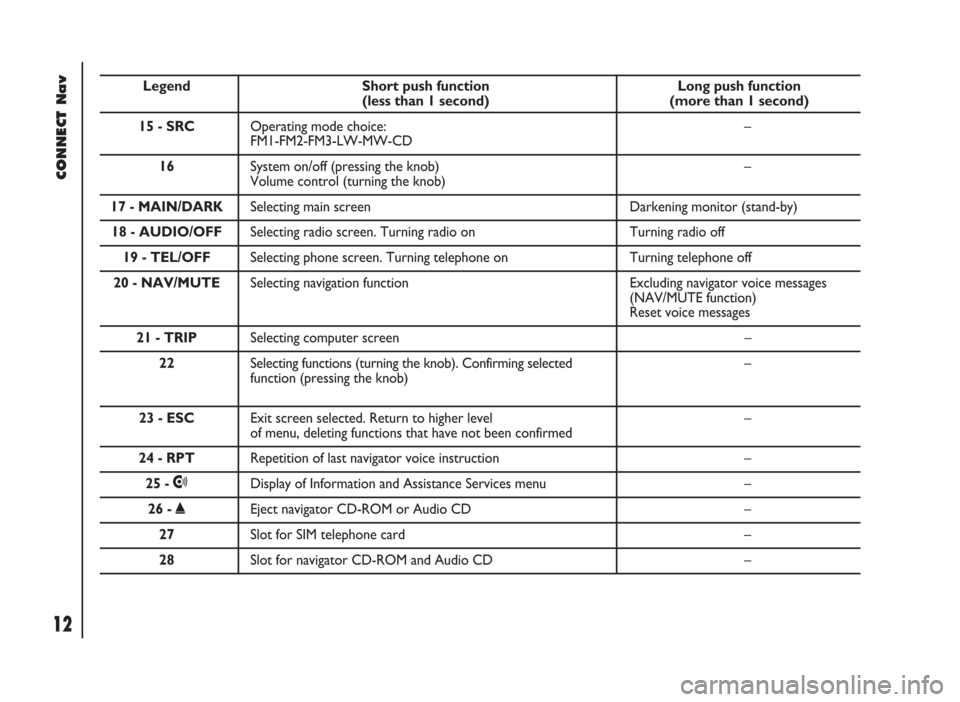
Legend Short push function Long push function (less than 1 second) (more than 1 second)
15 - SRCOperating mode choice: –
FM1-FM2-FM3-LW-MW-CD
16 System on/off (pressing the knob) –
Volume control (turning the knob)
17 - MAIN/DARKSelecting main screen Darkening monitor (stand-by)
18 - AUDIO/OFFSelecting radio screen. Turning radio on Turning radio off
19 - TEL/OFFSelecting phone screen. Turning telephone on Turning telephone off
20 - NAV/MUTESelecting navigation function Excluding navigator voice messages
(NAV/MUTE function)
Reset voice messages
21 - TRIPSelecting computer screen –
22 Selecting functions (turning the knob). Confirming selected –
function (pressing the knob)
23 - ESCExit screen selected. Return to higher level –of menu, deleting functions that have not been confirmed
24 - RPTRepetition of last navigator voice instruction –
25 -•Display of Information and Assistance Services menu –
26 -˚Eject navigator CD-ROM or Audio CD –
27Slot for SIM telephone card –
28Slot for navigator CD-ROM and Audio CD –
Page 14 of 246
CONNECT Nav
13
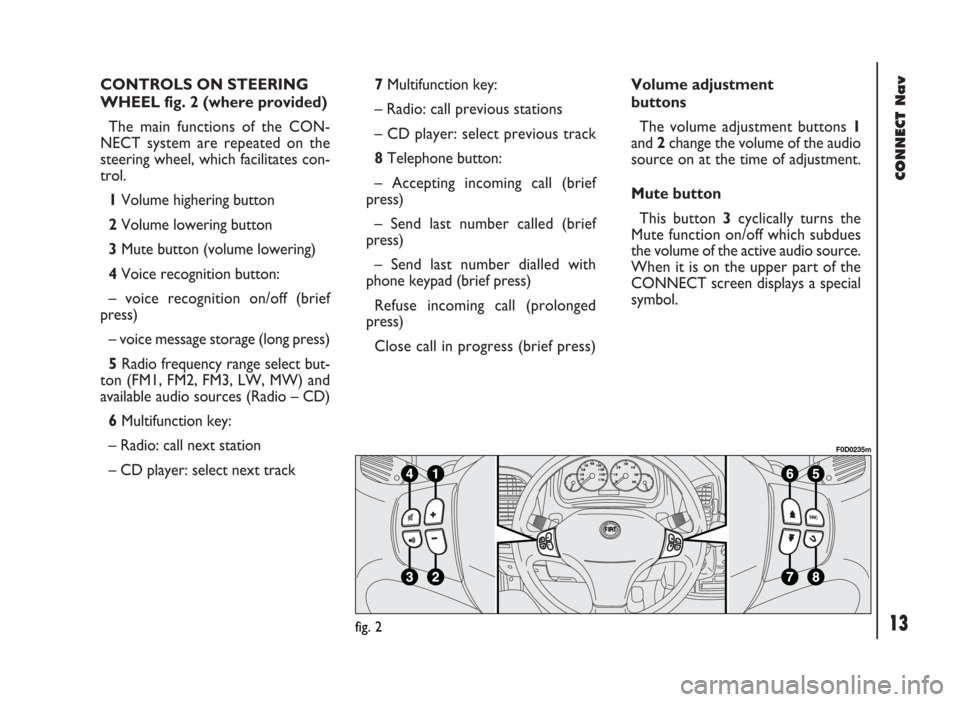
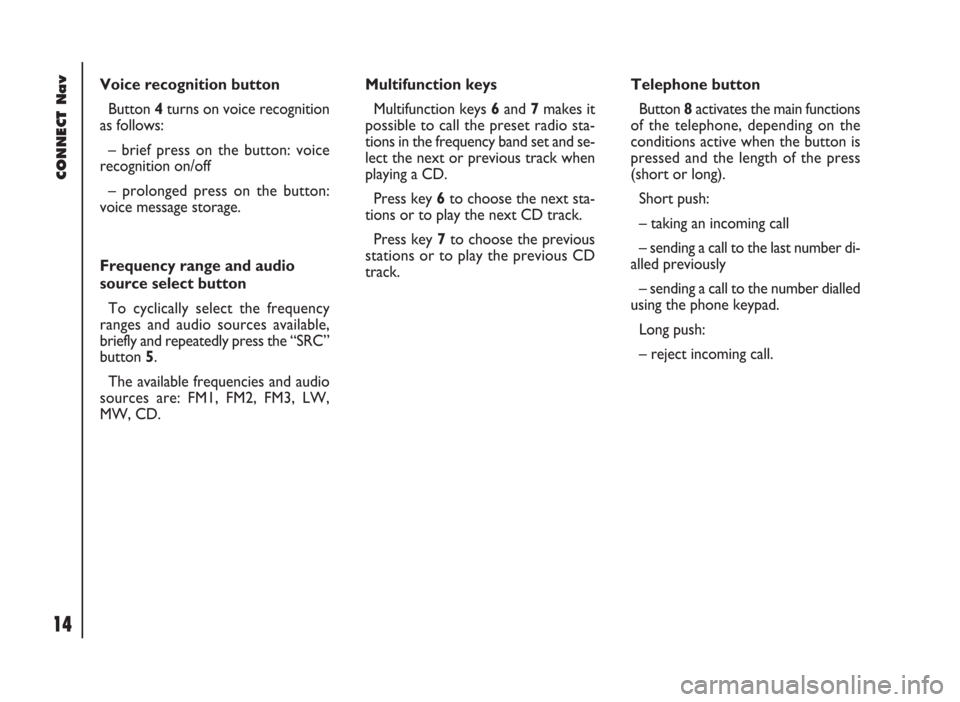
CONTROLS ON STEERING
WHEEL fig. 2 (where provided)
The main functions of the CON-
NECT system are repeated on the
steering wheel, which facilitates con-
trol.
1Volume highering button
2Volume lowering button
3Mute button (volume lowering)
4Voice recognition button:
– voice recognition on/off (brief
press)
– voice message storage (long press)
5Radio frequency range select but-
ton (FM1, FM2, FM3, LW, MW) and
available audio sources (Radio – CD)
6Multifunction key:
– Radio: call next station
– CD player: select next track 7Multifunction key:
– Radio: call previous stations
– CD player: select previous track
8Telephone button:
– Accepting incoming call (brief
press)
– Send last number called (brief
press)
– Send last number dialled with
phone keypad (brief press)
Refuse incoming call (prolonged
press)
Close call in progress (brief press)Volume adjustment
buttons
The volume adjustment buttons 1
and 2change the volume of the audio
source on at the time of adjustment.
Mute button
This button 3cyclically turns the
Mute function on/off which subdues
the volume of the active audio source.
When it is on the upper part of the
CONNECT screen displays a special
symbol.
fig. 2
F0D0235m
Page 15 of 246
CONNECT Nav
14
Voice recognition button
Button 4turns on voice recognition
as follows:
– brief press on the button: voice
recognition on/off
– prolonged press on the button:
voice message storage.
Frequency range and audio
source select button
To cyclically select the frequency
ranges and audio sources available,
briefly and repeatedly press the “SRC”
button 5.
The available frequencies and audio
sources are: FM1, FM2, FM3, LW,
MW, CD.Multifunction keys
Multifunction keys 6and 7makes it
possible to call the preset radio sta-
tions in the frequency band set and se-
lect the next or previous track when
playing a CD.
Press key 6to choose the next sta-
tions or to play the next CD track.
Press key 7to choose the previous
stations or to play the previous CD
track.Telephone button
Button 8activates the main functions
of the telephone, depending on the
conditions active when the button is
pressed and the length of the press
(short or long).
Short push:
– taking an incoming call
– sending a call to the last number di-
alled previously
– sending a call to the number dialled
using the phone keypad.
Long push:
– reject incoming call.
Page 16 of 246
CONNECT Nav
15
GENERAL
INFORMATION
IMPORTANT NOTES FOR
USE AND ROAD SAFETY
The CONNECT system makes it
possible to easily control the main
functions of the vehicle.
To avoid creating dangerous situa-
tions for yourself and others in use of
the system, please pay attention to the
following points:
– the system must be used keeping
full control of the vehicle; in the case
of doubt in the use of the functions,
it is necessary to stop before per-
forming the various operations;
– use of the cell phone is prohibited
near explosive substances.
The navigation system allows you to
reach your destination, indicating each
route change stored on the navigation
CD-ROM. In fact, in calculating the
route, the system takes into account
of all the information stored concern-
ing the roads, advising the best route.
However it cannot take account of the
traffic, sudden interruptions or any
other inconvenience.In carrying out any manoeuvre it is
always necessary to follow the rules of
the road, regardless of the advice giv-
en by the navigation system. If you
leave the suggested route, the naviga-
tion system will calculate a new one
and suggest it to you.SYSTEM POWER ON
The system can be switched on ac-
cording to two different methods:
automatic switching onwith ig-
nition key to MAR;
manual switching on:
– by pressing knob 16-fig. 1;
– with direct access to SOS menu by
pressing button
•25-fig. 1.
Automatic switching on
Turning the ignition key to MARwill
turn the system on automatically, thus
activating or making available all the
functions described in this manual.
The navigation system
helps the driver while dri-
ving by suggesting, vocally and
graphically, the best route to be fol-
lowed to reach the preset destina-
tion. The suggestions given by the
navigation system do not exempt
the driver from full responsibility
due to driving behaviour and com-
pliance with road and other traffic
regulations. The responsibility for
road safety always and anyway lies
with the vehicle’s driver.
WARNING
Page 17 of 246
CONNECT Nav
16
Manual switching on
With ignition key at STOPpress
knob 16-fig. 1, to switch the system
on, thus making available the following
modules:
– MAIN,
– AUDIO,
– NAV,
– TEL,
– Targasys
•.
IMPORTANTIn this mode, the
SETUP and TRIP modules can be ac-
tivated; however, it will not be possi-
ble to validate any operation con-
cerning parameter change, language
change, units change and any other
type of adjustment provided by the
system. These limitations are normal
when switching the system on manu-
ally by the knob 16-fig. 1, since with
engine off (key at STOP) the vehicle
data transmission devices are not op-
erating.
Turning the ignition key to MAR, will
make all system functions active.SYSTEM POWER OFF
The CONNECT system can be
switched off according to two differ-
ent modes:
– deactivation independentof ig-
nition key
– deactivation dependenton ig-
nition key
To choose the power-off mode, see
the Power OFF submenu in the SET-
UP menu.
Deactivation independent
of ignition key
With this mode active, the system
can be turned off by pressing the knob
16-fig. 1.
The display will show the message
“PLEASE WAIT WHILE SYSTEM
TURNS OFF”.
IMPORTANTWith ignition key at
STOP, deactivation is delayed and will
take place after 20 minutes if the sys-
tem has a destination set or a phone
call is in progress.Deactivation dependent
on ignition key
With this mode active, the system
can be switched off by turning the ig-
nition key to STOPor pressing the
knob 16-fig. 1.
IMPORTANTDeactivation with
ignition key to STOPis delayed and
will take place after 20 minutes if the
system has a destination set or a
phone call is in progress.
Page 19 of 246
CONNECT Nav
18
MAIN MODE
The MAIN mode is activated by
pushing the “MAIN” button 17-fig. 1
on the front panel.
It is possible to access the Set-up
menu from the MAIN mode.
To access the Set-up menu, display
the page MAIN then push on knob 22-
fig.1. Set-up functions will be ac-
cessed (refer to the SET-UP chapter).
Depress several times “ESC” 23-
fig.1 for returning to the display of
MAIN.STANDARD INFORMATION
The display shows information rele-
vant to the main system modules:
– AUDIO
– TELEPHONE
– NAVIGATOR
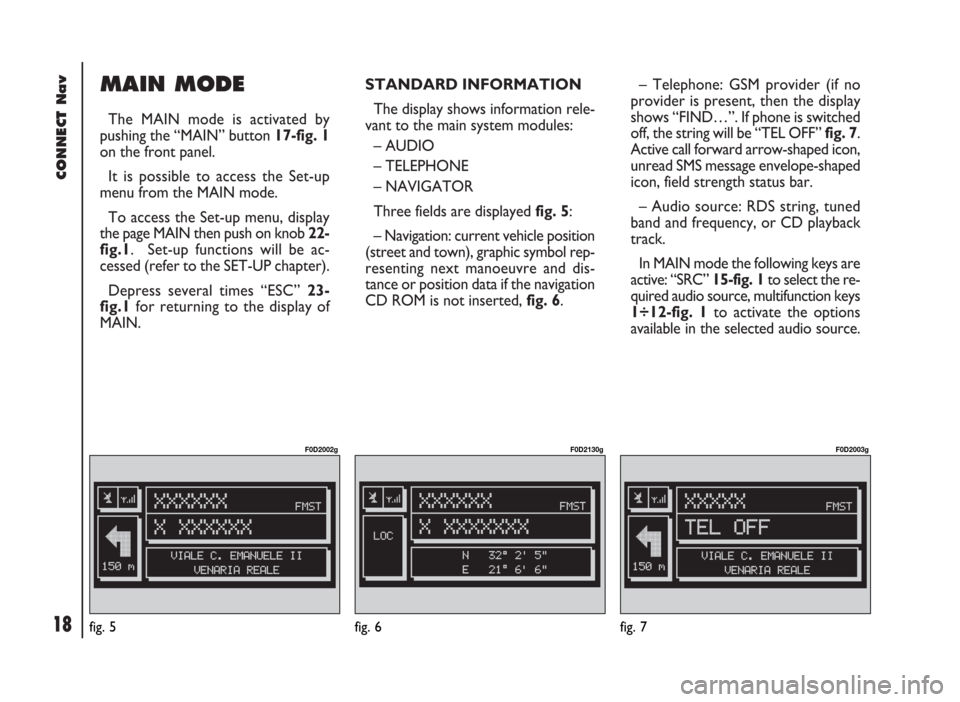
Three fields are displayed fig. 5:
– Navigation: current vehicle position
(street and town), graphic symbol rep-
resenting next manoeuvre and dis-
tance or position data if the navigation
CD ROM is not inserted, fig. 6.– Telephone: GSM provider (if no
provider is present, then the display
shows “FIND…”. If phone is switched
off, the string will be “TEL OFF” fig. 7.
Active call forward arrow-shaped icon,
unread SMS message envelope-shaped
icon, field strength status bar.
– Audio source: RDS string, tuned
band and frequency, or CD playback
track.
In MAIN mode the following keys are
active: “SRC” 15-fig. 1to select the re-
quired audio source, multifunction keys
1÷12-fig. 1to activate the options
available in the selected audio source.
fig. 5
F0D2002g
fig. 6
F0D2130g
fig. 7
F0D2003g
Page 23 of 246
CONNECT Nav
22
SERIAL - MODEM
(data interface)
This function enables to connect an
external device (e.g.: portable com-
puter) to the CONNECT Nav system
that in this case will act as a modem.
To implement such configuration the
link between the external device and
the CONNECT Nav system connec-
tion (to be found in central position
under the dashboard) shall be per-
formed using the cable provided with
the system.
The max. data transmission speed is
that provided for the cellular tele-
phone mode (TEL) and is equal to 9.6
Kbps, as established by the commu-
nication with GSM cell network.
During data transmission (modem
function on), the CONNECT Nav
condition is the following:
– telephone mode off (TEL-OFF);
– incoming calls blocked;– call forwarding blocked;
– navigator (NAV) function can be
activated; if navigation is on data trans-
mission can be slow;
– all audio functions (radio, CD) can
be activated
– emergency call can be forwarded
by pressing •25-fig. 1.
IMPORTANTThe modem func-
tion cannot be activated during a call.IMPORTANTPress button •to
abort the modem function; the system
will restore the GSM telephone mode
for the selected function and will re-
quest to enter the PIN code; data ex-
changed during transmission will be
lost (unless data back-up have been
performed by user’s computer appli-
cations).
The modem function will not be re-
stored automatically by the system
when the emergency or service call is
over. To restore it repeat the proce-
dure from the beginning.
Page 25 of 246
CONNECT Nav
24
Once the modem has been proper-
ly installed, the portable computer can
use all the applications provided for
telematic connections to data base -
external servers, etc.; more particu-
larly the following can be used:
– Hiper Terminal;
– Microsoft Explorer or Netscape
for Internet and its applications (pro-
vided the user has an “Internet
provider”);
– Microsoft Mail or Groupwise (for
e-mail address).To activate the Modem function,
proceed as follows:
– press the “MAIN” button 17-fig. 1
to display the main screen;
– press the knob 22-fig. 1and turn
it to select “CONNECT” then press
the knob to confirm; the display will
show the “CONNECT” menu;
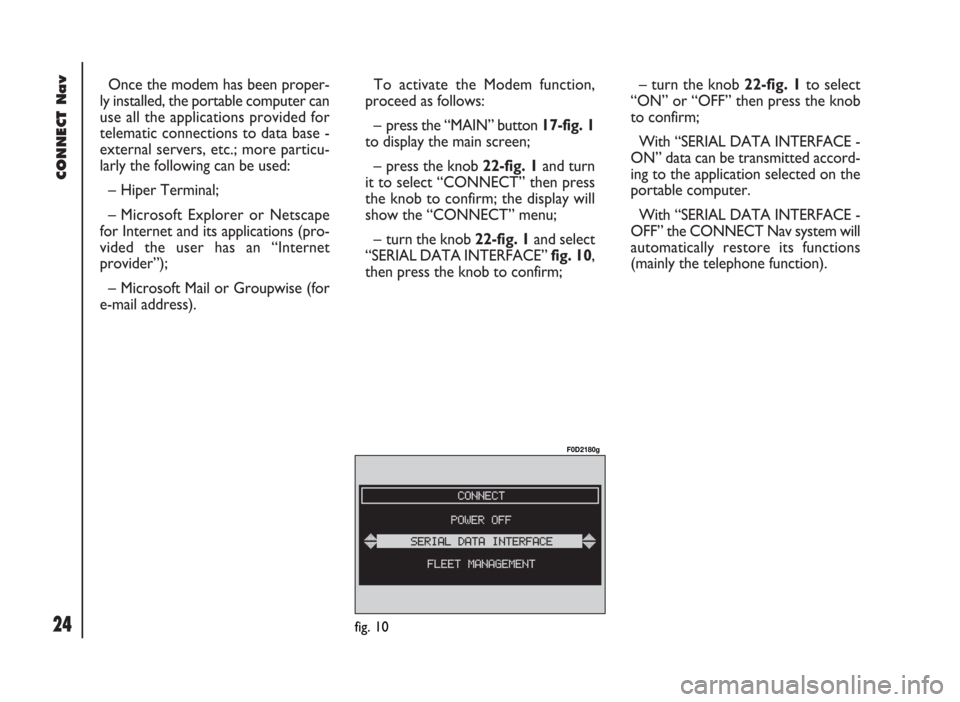
– turn the knob 22-fig. 1and select
“SERIAL DATA INTERFACE” fig. 10,
then press the knob to confirm;– turn the knob 22-fig. 1to select
“ON” or “OFF” then press the knob
to confirm;
With “SERIAL DATA INTERFACE -
ON” data can be transmitted accord-
ing to the application selected on the
portable computer.
With “SERIAL DATA INTERFACE -
OFF” the CONNECT Nav system will
automatically restore its functions
(mainly the telephone function).
fig. 10
F0D2180g