tow FIAT FREEMONT 2016 1.G User Guide
[x] Cancel search | Manufacturer: FIAT, Model Year: 2016, Model line: FREEMONT, Model: FIAT FREEMONT 2016 1.GPages: 412, PDF Size: 3.36 MB
Page 141 of 412
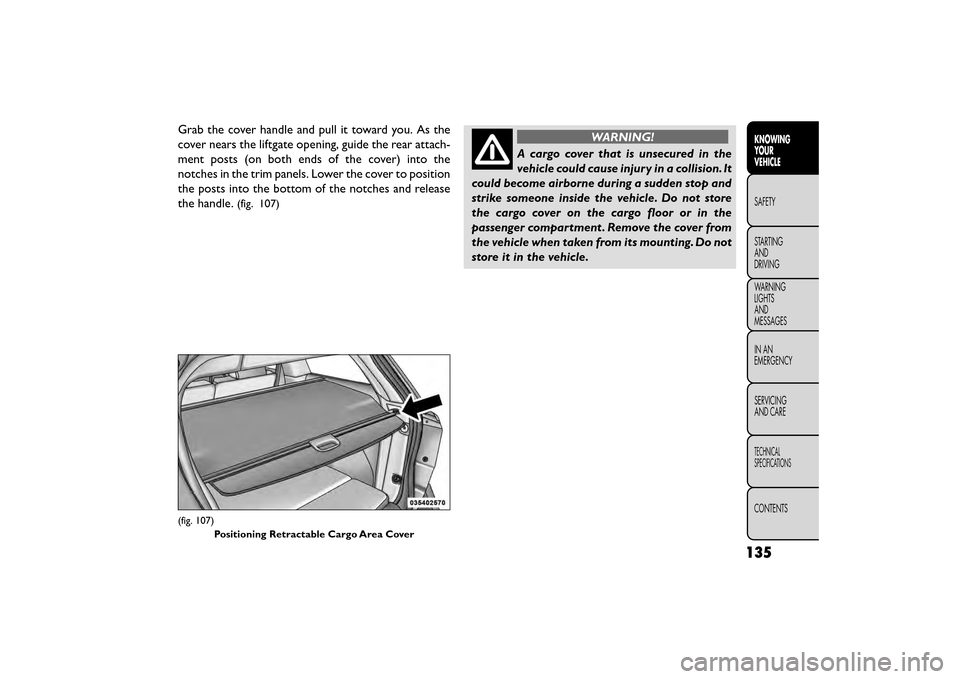
Grab the cover handle and pull it toward you. As the
cover nears the liftgate opening, guide the rear attach-
ment posts (on both ends of the cover) into the
notches in the trim panels. Lower the cover to position
the posts into the bottom of the notches and release
the handle.
(fig. 107)
WARNING!
A cargo cover that is unsecured in the
vehi cle
could cause injury in a collision. It
could become airborne during a sudden stop and
strike someone inside the vehicle. Do not store
the cargo cover on the cargo floor or in the
passenger compartment . Remove the cover from
the vehicle when taken from its mounting. Do not
store it in the vehicle.
(fig. 107)
Positioning Retractable Cargo Area Cover
135
KNOWING
YOUR
VEHICLE
SAFETY
STAR
TING
AND
DRIVING
WARNING
LIGHTS
AND
MESSAGES
IN AN
EMERGENCY
SERVICING
AND CARE
TECHNICAL
SPECIFICATIONS
CONTENTS
Page 154 of 412
HSA Activation Criteria
The following criteria must be met in order for HSA to
activate:
• Vehicle must be stopped.
• Vehicle must be on a 6% (approximate) grade orgreater hill.
• Gear selection matches vehicle uphill direction (i.e., vehicle facing uphill is in forward gear; vehicle backing
uphill is in REVERSE gear).
WARNING!
There may be situations on minor hills
wit h
a loaded vehicle, or while pulling a
trailer where the system will not activate and
slight rolling may occur, which could cause a
collision with another vehicle or object . Always
remember the driver is responsible for braking
the vehicle.
HSA will work in REVERSE and all forward gears when
the activation criteria have been met. The system will
not activate if the vehicle is placed in NEUTRAL or
PARK.
Towing With HSA
HSA will provide assistance when starting on a grade
when pulling a trailer.
WARNING!
• If you use a trailer brake controller
wi t
h your trailer, your trailer brakes may
be activated and deactivated with the brake
switch. If so, when the brake pedal is released,
there may not be enough brake pressure to hold
the vehicle and trailer on a hill and this could
cause a collision with another vehicle or object
behind you. In order to avoid rolling down the hill
while resuming acceleration, manually activate
the trailer brake prior to releasing the brake
pedal. Always remember the driver is responsible
for braking the vehicle.
• HSA is not a parking brake. If you stop the
vehicle on a hill without putting the transmission
in PARK and using the parking brake, it will roll
down the hill and could cause a collision with
another vehicle or object . Always remember to
use the parking brake while parking on a hill, and
that the driver is responsible for braking the
vehicle.
HSA Off
If you wish to turn off the HSA system, it can be done
using the Customer Programmable Features in the
Electronic Vehicle Information Center (EVIC). Refer to
“Electronic Vehicle Information Center (EVIC)” in
“Knowing your vehicle” for further information.
148
KNOWING YOUR
VEHICLE
SAFETY
STAR
TINGAND
DRIVING
WARNING LIGHTSAND
MESSAGES
IN AN
EMERGENCY
SERVICINGAND CARE
TECHNICAL
SPECIFICATIONS
CONTENTS
Page 155 of 412
TRAILER SWAY CONTROL (TSC)
TSC uses sensors in the vehicle to recognize an exces-
sively swaying trailer. TSC activates automatically once
the excessively swaying trailer is recognized. When
TSC is functioning, the “ESC Activation/Malfunction
Indicator Light” will flash, the engine power will be
reduced, and you will feel the brake being applied to
individual wheels in an attempt to stop the trailer from
swaying.
NOTE:The TSC is disabled when the ESC system is in
the “Partial Off ” mode.
WARNING!
• TSC cannot stop all trailers from
s w
aying. Always use caution when tow-
ing a trailer and follow the tongue weight recom-
mendations. Refer to “Trailer Towing” in “Starting
and Driving” for further information.
• If TSC activates while towing a trailer, stop the
vehicle at the nearest safe location and adjust
the trailer load to eliminate the trailer sway.
• Failure to follow these warnings can result in an
accident or serious personal injury.
ONBOARD DIAGNOSTIC SYSTEM —
OBD II
Your vehicle is equipped with a sophisticated onboard
diagnostic system called OBD II. This system monitors
the performance of the emissions, engine, and auto-
matic transmission control systems. When these sys-
tems are operating properly, your vehicle will provide
excellent performance and fuel economy, as well as
engine emissions well within current government regu-
lations.
If any of these systems require service, the OBD II
system will turn on the “Malfunction Indicator Light”
(MIL). It will also store diagnostic codes and other
information to assist your service technician in making
repairs. Although your vehicle will usually be drivable
and not need towing, see your authorized dealer for
service as soon as possible.
• Prolonged driving with the MIL on
could cause further damage to the emis-
sion control system. It could also affect
fuel economy and driveability.The vehicle must be
serviced before any emissions tests can be per-
formed.
• If the MIL is flashing while the engine is running,
severe catalytic converter damage and power loss
will soon occur. Immediate service is required.
149
KNOWING
YOUR
VEHICLE
SAFETY
STAR
TING
AND
DRIVING
WARNING
LIGHTS
AND
MESSAGES
IN AN
EMERGENCY
SERVICING
AND CARE
TECHNICAL
SPECIFICATIONS
CONTENTS
Page 170 of 412
•Park Assist is only a parking aid and it is
unable to recognize every obstacle, in-
cluding small obstacles. Parking curbs
might be temporarily detected or not detected at
all. Obstacles located above or below the sensors
will not be detected when they are in close prox-
imity.
• The vehicle must be driven slowly when using
Park Assist in order to be able to stop in time when
an obstacle is detected. It is recommended that
the driver looks over his/her shoulder when using
Park Assist .
WARNING!
• Drivers must be careful when backing
up e
ven when using Park Assist . Always
check carefully behind your vehicle, look behind
you, and be sure to check for pedestrians, ani-
mals, other vehicles, obstructions, and blind spots
before backing up.You are responsible for safety
and must continue to pay attention to your sur-
roundings. Failure to do so can result in serious
injury or death.
(Continued)
WARNING! (Continued)
• Before using Park Assist , it is strongly recom-
mended that the ball mount and hitch ball as-
sembly is disconnected from the vehicle when the
vehicle is not used for towing. Failure to do so can
result in injury or damage to vehicles or obstacles
because the hitch ball will be much closer to the
obstacle than the rear fascia when the loud-
speaker sounds the continuous tone. Also, the
sensors could detect the ball mount and hitch ball
assembly, depending on its size and shape, giving
a false indication that an obstacle is behind the
vehicle.
164
KNOWING YOUR
VEHICLE
SAFETY
STAR
TINGAND
DRIVING
WARNING LIGHTSAND
MESSAGES
IN AN
EMERGENCY
SERVICINGAND CARE
TECHNICAL
SPECIFICATIONS
CONTENTS
Page 184 of 412
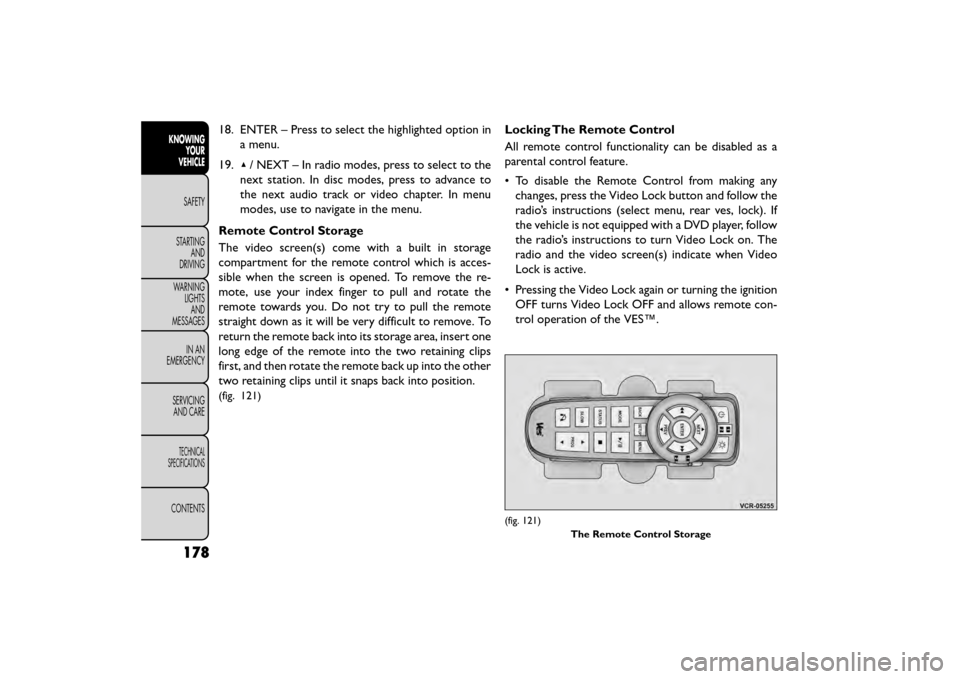
18. ENTER – Press to select the highlighted option ina menu.
19. ▴/ NEXT – In radio modes, press to select to the
next station. In disc modes, press to advance to
the next audio track or video chapter. In menu
modes, use to navigate in the menu.
Remote Control Storage
The video screen(s) come with a built in storage
compartment for the remote control which is acces-
sible when the screen is opened. To remove the re-
mote, use your index finger to pull and rotate the
remote towards you. Do not try to pull the remote
straight down as it will be very difficult to remove. To
return the remote back into its storage area, insert one
long edge of the remote into the two retaining clips
first, and then rotate the remote back up into the other
two retaining clips until it snaps back into position.
(fig. 121)
Locking The Remote Control
All remote control functionality can be disabled as a
parental control feature.
• To disable the Remote Control from making any changes, press the Video Lock button and follow the
radio’s instructions (select menu, rear ves, lock). If
the vehicle is not equipped with a DVD player, follow
the radio’s instructions to turn Video Lock on. The
radio and the video screen(s) indicate when Video
Lock is active.
• Pressing the Video Lock again or turning the ignition OFF turns Video Lock OFF and allows remote con-
trol operation of the VES™.
(fig. 121)
The Remote Control Storage
178
KNOWINGYOUR
VEHICLE
SAFETY
STAR
TINGAND
DRIVING
WARNING LIGHTSAND
MESSAGES
IN AN
EMERGENCY
SERVICINGAND CARE
TECHNICAL
SPECIFICATIONS
CONTENTS
Page 200 of 412
The BeltAlert warning sequence begins after the ve-
hicle speed is over 8 km/h by blinking the Seat Belt
Reminder Light and sounding an intermittent chime.
Once the sequence starts, it will continue for the
entire duration or until the respective seat belts are
buckled. After the sequence completes, the Seat Belt
Reminder Light remains illuminated until the respective
seat belts are buckled. The driver should instruct all
other occupants to buckle their seat belts. If an out-
board front seat belt is unbuckled while traveling at
speeds greater than 8 km/h, BeltAlert will provide both
audio and visual notification.
The outboard front passenger seat BeltAlert is not
active when the outboard front passenger seat is un-
occupied. BeltAlert may be triggered when an animal
or heavy object is on the outboard front passenger seat
or when the seat is folded flat (if equipped). It is
recommended that pets be restrained in the rear seat
(if equipped) in pet harnesses or pet carriers that are
secured by seat belts, and cargo is properly stowed.
BeltAlert can be activated or deactivated by your
authorized dealer. Fiat Group does not recommend
deactivating BeltAlert.NOTE:
If BeltAlert has been deactivated, the Seat Belt
Reminder Light will continue to illuminate while the
driver’s or outboard front passenger’s (if equipped with
BeltAlert) seat belt remains unbuckled.
LAP/SHOULDER BELTS
All seating positions in your vehicle are equipped with
lap/shoulder belts.
The seat belt webbing retractor will lock only during
very sudden stops or collisions. This feature allows the
shoulder part of the seat belt to move freely with you
under normal conditions. However, in a collision the
seat belt will lock and reduce your risk of striking the
inside of the vehicle or being thrown out of the vehicle.
WARNING!
• Relying on the air bags alone could
lead to
more severe injuries in a collision.
The air bags work with your seat belt to restrain
you properly. In some collisions, the air bags
won’t deploy at all. Always wear your seat belt
even though you have air bags.
(Continued)
194
KNOWINGYOUR
VEHICLE
SAFETY
STARTING AND
DRIVING
WARNING LIGHTSAND
MESSAGES
IN
AN
EMERGENCY
SERVICINGAND CARE
TECHNICAL
SPECIFICATIONS
CONTENTS
Page 203 of 412
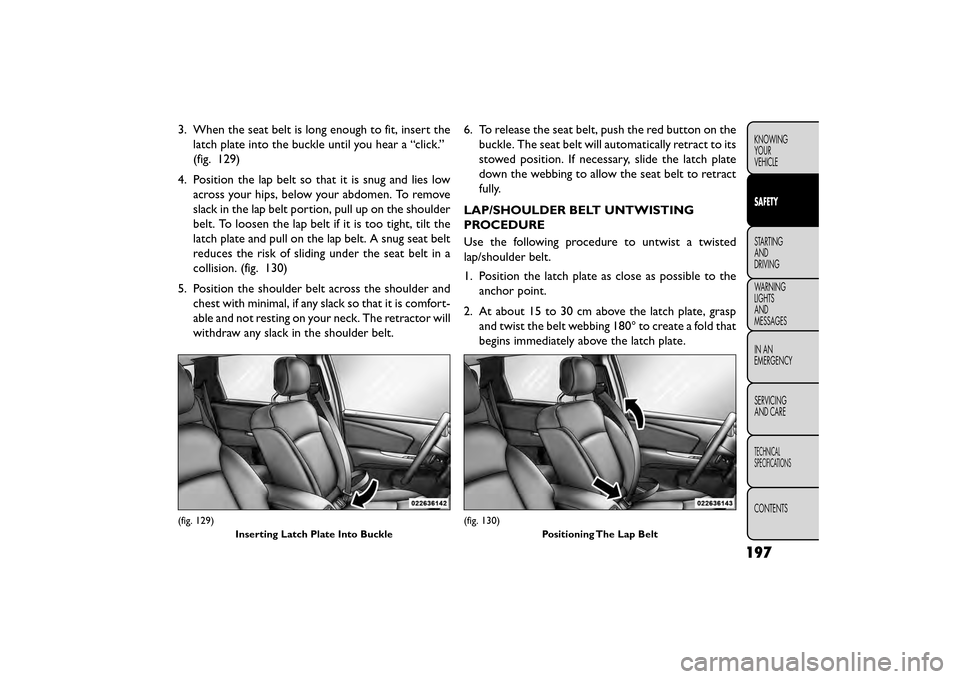
3. When the seat belt is long enough to fit, insert thelatch plate into the buckle until you hear a “click.”
(fig. 129)
4. Position the lap belt so that it is snug and lies low across your hips, below your abdomen. To remove
slack in the lap belt portion, pull up on the shoulder
belt. To loosen the lap belt if it is too tight, tilt the
latch plate and pull on the lap belt. A snug seat belt
reduces the risk of sliding under the seat belt in a
collision. (fig. 130)
5. Position the shoulder belt across the shoulder and chest with minimal, if any slack so that it is comfort-
able and not resting on your neck. The retractor will
withdraw any slack in the shoulder belt. 6. To release the seat belt, push the red button on the
buckle. The seat belt will automatically retract to its
stowed position. If necessary, slide the latch plate
down the webbing to allow the seat belt to retract
fully.
LAP/SHOULDER BELT UNTWISTING
PROCEDURE
Use the following procedure to untwist a twisted
lap/shoulder belt.
1. Position the latch plate as close as possible to the anchor point.
2. At about 15 to 30 cm above the latch plate, grasp and twist the belt webbing 180° to create a fold that
begins immediately above the latch plate.
(fig. 129)
Inserting Latch Plate Into Buckle(fig. 130) Positioning The Lap Belt
197
KNOWING
YOUR
VEHICLE
SAFETY
STARTING
AND
DRIVING
WARNING
LIGHTS
AND
MESSAGES
IN
AN
EMERGENCY
SERVICING
AND CARE
TECHNICAL
SPECIFICATIONS
CONTENTS
Page 207 of 412
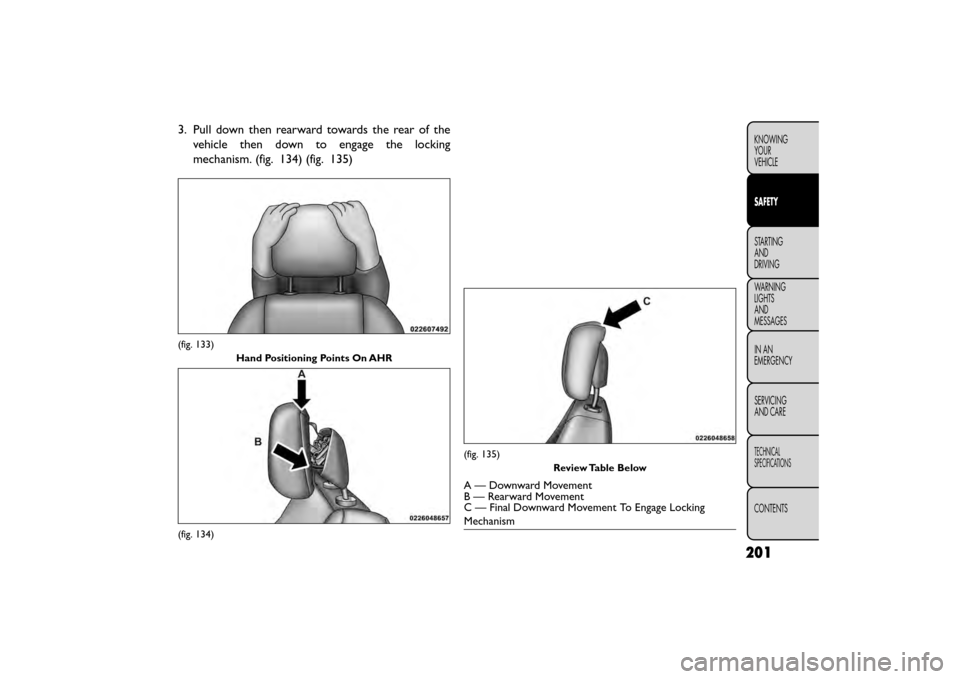
3. Pull down then rearward towards the rear of thevehicle then down to engage the locking
mechanism. (fig. 134) (fig. 135)
(fig. 133)
Hand Positioning Points On AHR
(fig. 134)
(fig. 135) Review Table Below
A — Downward Movement
B — Rearward Movement
C — Final Downward Movement To Engage Locking
Mechanism
201
KNOWING
YOUR
VEHICLE
SAFETY
STARTING
AND
DRIVING
WARNING
LIGHTS
AND
MESSAGES
IN
AN
EMERGENCY
SERVICING
AND CARE
TECHNICAL
SPECIFICATIONS
CONTENTS
Page 245 of 412
NOTE:If the ignition switch is left in the ACC or RUN
(engine not running) position and the transmission is in
PARK, the system will automatically time out after 30
minutes of inactivity and the ignition will switch to the
OFF position.
ENGINE START/STOP Button Functions –
With Driver’s Foot OFF The Brake Pedal (In
PARK Or NEUTRAL Position)
The ENGINE START/STOP button operates similar to
an ignition switch. It has four positions, OFF, ACC,
RUN and START. To change the ignition switch posi-
tions without starting the vehicle and use the accesso-
ries follow these steps.
• Starting with the ignition switch in the OFF position:
• Press the ENGINE START/STOP button once to change the ignition switch to the ACC position,
• Press the ENGINE START/STOP button a second time to change the ignition switch to the RUN
position,
• Press the ENGINE START/STOP button a third time to return the ignition switch to the OFF position. EXTREME COLD WEATHER
(BELOW −29°C)
To ensure reliable starting at these temperatures, use
of an externally powered electric engine block heater is
recommended.
IF ENGINE FAILS TO START
WARNING!
• Never pour fuel or other flammable
li qui
ds into the throttle body air inlet
opening in an attempt to start the vehicle. This
could result in a flash fire causing serious per-
sonal injury.
• Do not attempt to push or tow your vehicle to
get it started. Unburned fuel could enter the
catalytic converter and once the engine has
started, ignite and damage the converter and
vehicle. If the vehicle has a discharged battery,
booster cables may be used to obtain a start from
a booster battery or the battery in another ve-
hicle.This type of start can be dangerous if done
improperly. Refer to “Jump Starting” in “In An
Emergency” for further information.
239
KNOWING
YOUR
VEHICLE
SAFETY
STARTING
AND
DRIVING
WARNING
LIGHTS
AND
MESSAGES
IN AN
EMERGENC
Y
SERVICING
AND CARE
TECHNICAL
SPECIFICATIONS
CONTENTS
Page 249 of 412
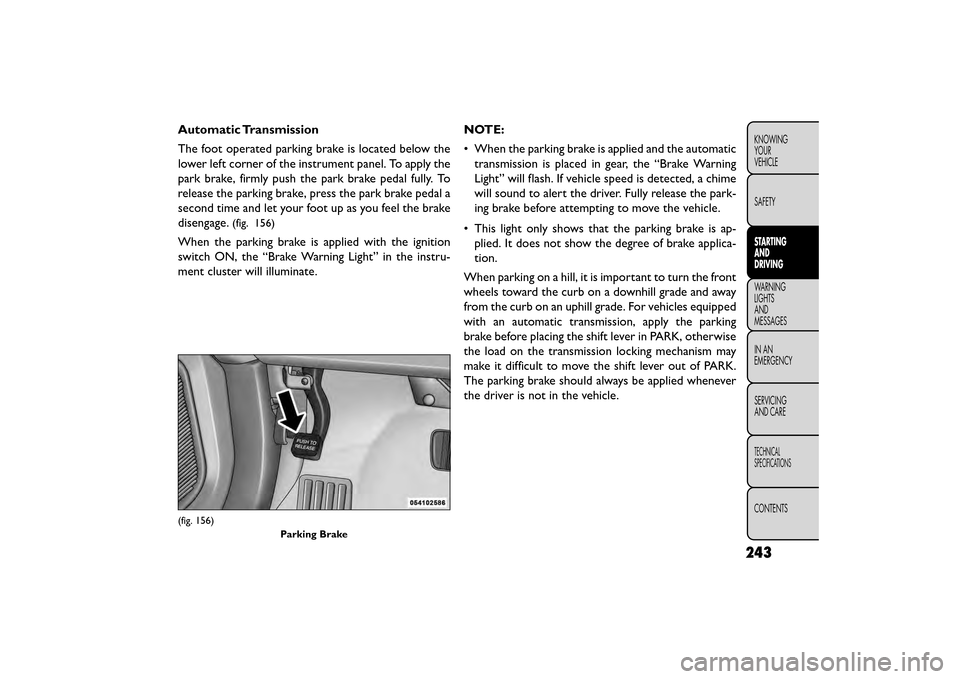
Automatic Transmission
The foot operated parking brake is located below the
lower left corner of the instrument panel. To apply the
park brake, firmly push the park brake pedal fully. To
release the parking brake, press the park brake pedal a
second time and let your foot up as you feel the brake
disengage.
(fig. 156)
When the parking brake is applied with the ignition
switch ON, the “Brake Warning Light” in the instru-
ment cluster will illuminate.NOTE:
• When the parking brake is applied and the automatic
transmission is placed in gear, the “Brake Warning
Light” will flash. If vehicle speed is detected, a chime
will sound to alert the driver. Fully release the park-
ing brake before attempting to move the vehicle.
• This light only shows that the parking brake is ap- plied. It does not show the degree of brake applica-
tion.
When parking on a hill, it is important to turn the front
wheels toward the curb on a downhill grade and away
from the curb on an uphill grade. For vehicles equipped
with an automatic transmission, apply the parking
brake before placing the shift lever in PARK, otherwise
the load on the transmission locking mechanism may
make it difficult to move the shift lever out of PARK.
The parking brake should always be applied whenever
the driver is not in the vehicle.
(fig. 156) Parking Brake
243
KNOWING
YOUR
VEHICLE
SAFETY
STARTING
AND
DRIVING
WARNING
LIGHTS
AND
MESSAGES
INAN
EMERGENC
Y
SERVICING
AND CARE
TECHNICAL
SPECIFICATIONS
CONTENTS