battery FIAT FULLBACK 2017 Owner handbook (in English)
[x] Cancel search | Manufacturer: FIAT, Model Year: 2017, Model line: FULLBACK, Model: FIAT FULLBACK 2017Pages: 312, PDF Size: 12.31 MB
Page 86 of 312
96)Do not spray water or spill beverages
inside the vehicle. If the switches, wires, or
electrical components become wet, they
could malfunction or cause a vehicle fire. If
you accidentally spill a beverage, wipe up
as much liquid as possible and immediately
consult a Fiat Dealership.
97)Do not put a hanger or any heavy or
pointed object on the coat hook. If the
curtain airbag was activated, any such item
could be propelled away with great force
and could prevent the curtain airbag from
inflating correctly. Hang clothes directly on
the coat hook (without using a hanger).
Make sure there are no heavy or sharp
objects in the pockets of clothes that you
hang on the coat hook.
IMPORTANT
32)When the accessory socket is not in
use, be sure to close the lid, because the
socket might become clogged by foreign
material and be short-circuited.
33)Never leave lighters, canned
carbonated beverage, and spectacles in
the cabin when parking the vehicle in hot
sunshine. The cabin will become extremely
hot, so lighters and other flammable items
may catch fire and unopened drink cans
may rupture. Also, spectacles with plastic
lenses or materials could deform or crack.
34)Put out matches and cigarettes before
they are placed in the ashtray.
35)Always close the ashtray. If left open,
other cigarette butts in the ashtray may be
rekindled.36)Be sure to use a “plug-in” type
accessory operating at 12 V and at 120 W
or less. When using more than one socket
at the same time, make sure that the
electrical accessories are 12 V accessories
and that the total power consumption does
not exceed 120 W.
37)Long use of the electric appliance
without running the engine may run down
the battery.
FUEL SELECTION
Recommended fuel:Cetane number
(EN590) 51 or higher
38) 39) 40) 41)
NOTE For diesel fuel, due to the
separation of paraffin, the fluidity
decreases considerably as the
temperature falls. Because of this fact
there are two kinds of fuel: “summer”
and “winter”. This must be considered
in winter use. Select either of the two
kinds of fuel in accordance with
ambient temperature.
Above -5 °C: “Summer” diesel
Below -5 °C: “Winter” diesel
When travelling abroad, find out in
advance about the fuels served in local
service stations.
Poor-quality diesel fuel can cause
deposits to form in the injector, resulting
in black smoke and rough idling.
If these problems occur, you are
advised to add a cleaning additive to
the diesel fuel when you refuel the
vehicle. The additive will break up and
remove the deposits, thereby returning
the engine to a normal condition.
Be sure to use a FCA GENUINE
DIESEL FUEL SYSTEM CLEANER.
Using an unsuitable additive could
make the engine malfunction. For
details, please contact your Fiat
Dealsership.
84
GETTING TO KNOW YOUR VEHICLE
Page 94 of 312
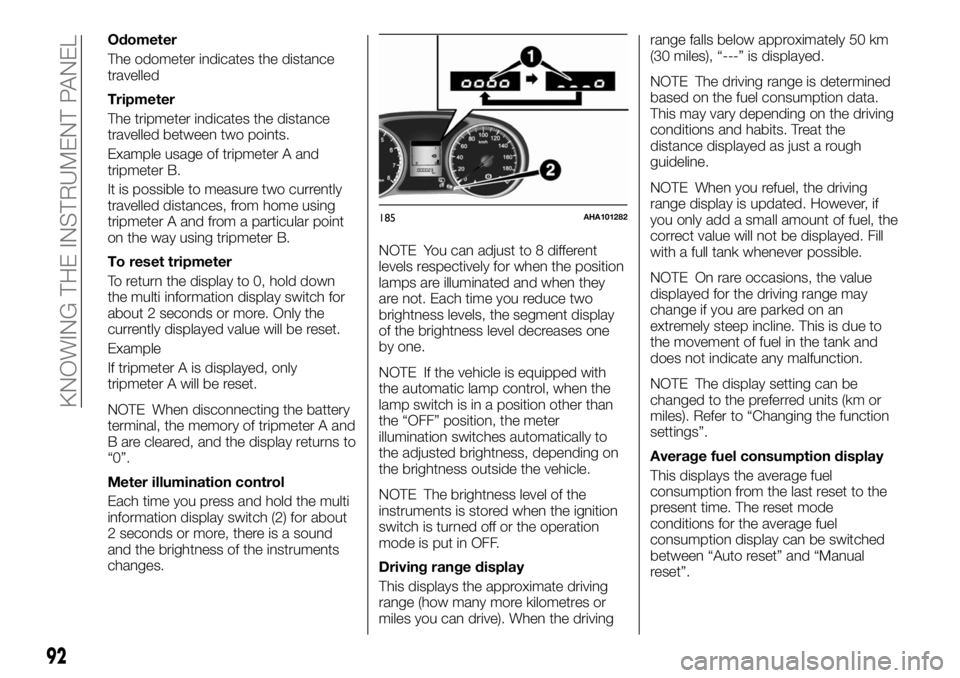
Odometer
The odometer indicates the distance
travelled
Tripmeter
The tripmeter indicates the distance
travelled between two points.
Example usage of tripmeter A and
tripmeter B.
It is possible to measure two currently
travelled distances, from home using
tripmeter A and from a particular point
on the way using tripmeter B.
To reset tripmeter
To return the display to 0, hold down
the multi information display switch for
about 2 seconds or more. Only the
currently displayed value will be reset.
Example
If tripmeter A is displayed, only
tripmeter A will be reset.
NOTE When disconnecting the battery
terminal, the memory of tripmeter A and
B are cleared, and the display returns to
“0”.
Meter illumination control
Each time you press and hold the multi
information display switch (2) for about
2 seconds or more, there is a sound
and the brightness of the instruments
changes.NOTE You can adjust to 8 different
levels respectively for when the position
lamps are illuminated and when they
are not. Each time you reduce two
brightness levels, the segment display
of the brightness level decreases one
by one.
NOTE If the vehicle is equipped with
the automatic lamp control, when the
lamp switch is in a position other than
the “OFF” position, the meter
illumination switches automatically to
the adjusted brightness, depending on
the brightness outside the vehicle.
NOTE The brightness level of the
instruments is stored when the ignition
switch is turned off or the operation
mode is put in OFF.
Driving range display
This displays the approximate driving
range (how many more kilometres or
miles you can drive). When the drivingrange falls below approximately 50 km
(30 miles), “---” is displayed.
NOTE The driving range is determined
based on the fuel consumption data.
This may vary depending on the driving
conditions and habits. Treat the
distance displayed as just a rough
guideline.
NOTE When you refuel, the driving
range display is updated. However, if
you only add a small amount of fuel, the
correct value will not be displayed. Fill
with a full tank whenever possible.
NOTE On rare occasions, the value
displayed for the driving range may
change if you are parked on an
extremely steep incline. This is due to
the movement of fuel in the tank and
does not indicate any malfunction.
NOTE The display setting can be
changed to the preferred units (km or
miles). Refer to “Changing the function
settings”.
Average fuel consumption display
This displays the average fuel
consumption from the last reset to the
present time. The reset mode
conditions for the average fuel
consumption display can be switched
between “Auto reset” and “Manual
reset”.
185AHA101282
92
KNOWING THE INSTRUMENT PANEL
Page 95 of 312
For information on how to change the
average fuel consumption display
setting, refer to “Changing the function
settings”.
NOTE The average fuel consumption
display can be reset separately for the
auto reset mode and for the manual
reset mode.
NOTE “---” is displayed when the
average fuel consumption cannot be
measured.
NOTE The initial (default) setting is
“Auto reset mode”.
NOTE The average fuel consumption
will depend on the driving conditions
(road conditions, how you drive, etc.).
The displayed fuel consumption may
vary from the actual fuel consumption.
Treat the fuel consumption displayed as
just a rough guideline.
NOTE The memory of the manual reset
mode or auto reset mode for the
average fuel consumption display is
erased if the battery is disconnected.
NOTE The display setting can be
changed to the preferred units {km/L,
L/100 km, mpg}. Refer to “Changing
the function settings”.
Start&Stop monitor
The accumulated time the engine has
been stopped by Start&Stop system is
displayed. Refer to Start&Stop system.NOTE When the ignition switch or the
operation mode is ON again, the
accumulated time will be reset.
Outside temperature display (if so
equipped)
This displays the temperature outside
the vehicle.
NOTE The display setting can be
changed to the preferred units (°C or
°F). Refer to “Changing the function
settings”.
NOTE Depending on factors such as
the driving conditions, the displayed
temperature may vary from the actual
outside temperature.
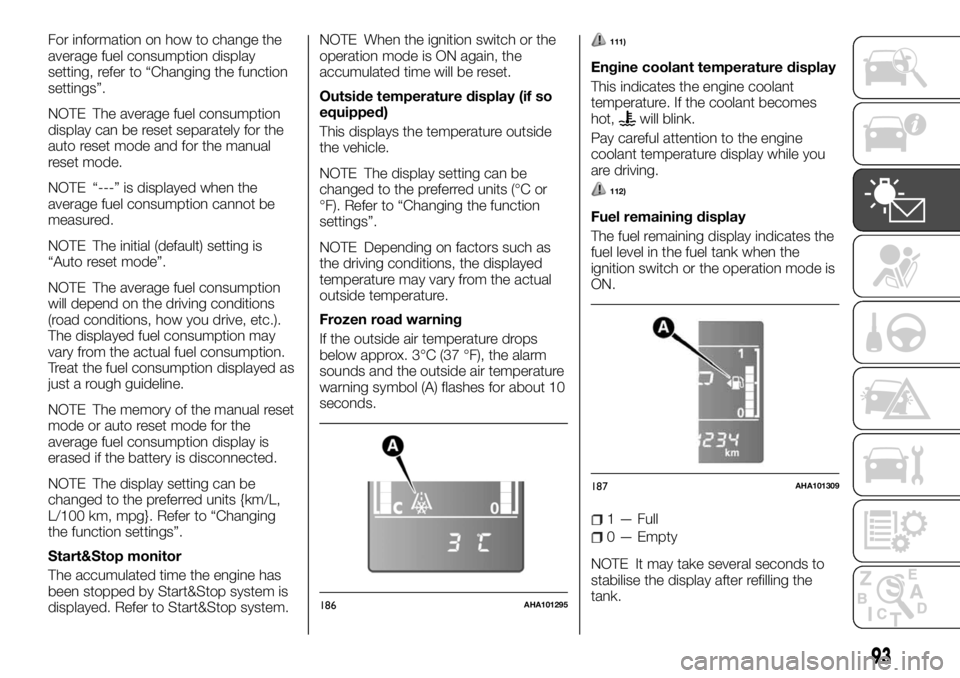
Frozen road warning
If the outside air temperature drops
below approx. 3°C (37 °F), the alarm
sounds and the outside air temperature
warning symbol (A) flashes for about 10
seconds.111)
Engine coolant temperature display
This indicates the engine coolant
temperature. If the coolant becomes
hot,
will blink.
Pay careful attention to the engine
coolant temperature display while you
are driving.
112)
Fuel remaining display
The fuel remaining display indicates the
fuel level in the fuel tank when the
ignition switch or the operation mode is
ON.
1 — Full
0 — Empty
NOTE It may take several seconds to
stabilise the display after refilling the
tank.
186AHA101295
187AHA101309
93
Page 98 of 312
longer. For vehicles equipped with the
keyless operation system: the operation
mode is in ACC or OFF for about
4 hours or longer.
IMPORTANT The average fuel
consumption display can be reset
separately for the auto reset mode and
for the manual reset mode.
IMPORTANT The memory of the
manual reset mode or auto reset mode
for the average fuel consumption
display is erased if the battery is
disconnected.
The initial (default) setting is “Auto reset
mode”.
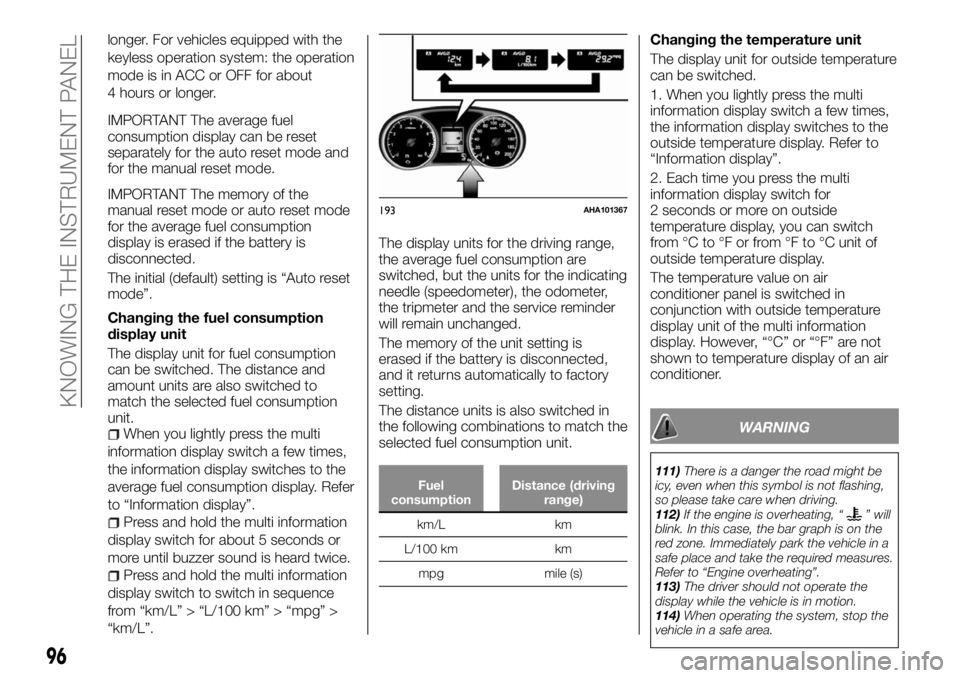
Changing the fuel consumption
display unit
The display unit for fuel consumption
can be switched. The distance and
amount units are also switched to
match the selected fuel consumption
unit.
When you lightly press the multi
information display switch a few times,
the information display switches to the
average fuel consumption display. Refer
to “Information display”.
Press and hold the multi information
display switch for about 5 seconds or
more until buzzer sound is heard twice.
Press and hold the multi information
display switch to switch in sequence
from “km/L” > “L/100 km” > “mpg” >
“km/L”.The display units for the driving range,
the average fuel consumption are
switched, but the units for the indicating
needle (speedometer), the odometer,
the tripmeter and the service reminder
will remain unchanged.
The memory of the unit setting is
erased if the battery is disconnected,
and it returns automatically to factory
setting.
The distance units is also switched in
the following combinations to match the
selected fuel consumption unit.
Fuel
consumptionDistance (driving
range)
km/L km
L/100 km km
mpg mile (s)
Changing the temperature unit
The display unit for outside temperature
can be switched.
1. When you lightly press the multi
information display switch a few times,
the information display switches to the
outside temperature display. Refer to
“Information display”.
2. Each time you press the multi
information display switch for
2 seconds or more on outside
temperature display, you can switch
from °C to °F or from °F to °C unit of
outside temperature display.
The temperature value on air
conditioner panel is switched in
conjunction with outside temperature
display unit of the multi information
display. However, “°C” or “°F” are not
shown to temperature display of an air
conditioner.
WARNING
111)There is a danger the road might be
icy, even when this symbol is not flashing,
so please take care when driving.
112)If the engine is overheating, “
” will
blink. In this case, the bar graph is on the
red zone. Immediately park the vehicle in a
safe place and take the required measures.
Refer to “Engine overheating”.
113)The driver should not operate the
display while the vehicle is in motion.
114)When operating the system, stop the
vehicle in a safe area.
193AHA101367
96
KNOWING THE INSTRUMENT PANEL
Page 104 of 312
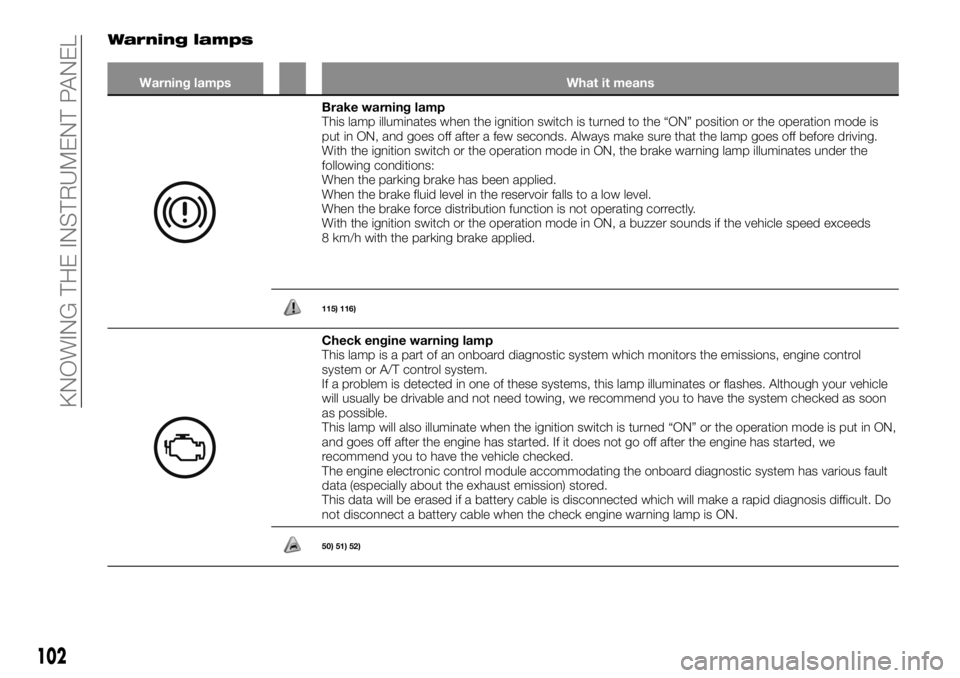
Warning lamps
Warning lamps What it means
Brake warning lamp
This lamp illuminates when the ignition switch is turned to the “ON” position or the operation mode is
put in ON, and goes off after a few seconds. Always make sure that the lamp goes off before driving.
With the ignition switch or the operation mode in ON, the brake warning lamp illuminates under the
following conditions:
When the parking brake has been applied.
When the brake fluid level in the reservoir falls to a low level.
When the brake force distribution function is not operating correctly.
With the ignition switch or the operation mode in ON, a buzzer sounds if the vehicle speed exceeds
8 km/h with the parking brake applied.
115) 116)
Check engine warning lamp
This lamp is a part of an onboard diagnostic system which monitors the emissions, engine control
system or A/T control system.
If a problem is detected in one of these systems, this lamp illuminates or flashes. Although your vehicle
will usually be drivable and not need towing, we recommend you to have the system checked as soon
as possible.
This lamp will also illuminate when the ignition switch is turned “ON” or the operation mode is put in ON,
and goes off after the engine has started. If it does not go off after the engine has started, we
recommend you to have the vehicle checked.
The engine electronic control module accommodating the onboard diagnostic system has various fault
data (especially about the exhaust emission) stored.
This data will be erased if a battery cable is disconnected which will make a rapid diagnosis difficult. Do
not disconnect a battery cable when the check engine warning lamp is ON.
50) 51) 52)
102
KNOWING THE INSTRUMENT PANEL
Page 152 of 312
STARTING AND
STOPPING THE
ENGINE
225)
89) 90) 91) 92) 93) 94) 95) 96) 97) 98) 99)
Tips for starting
Except for vehicles equipped with
the keyless operation system
Do not operate the starter motor
continuously longer than 10 seconds;
doing so could run down the battery. If
the engine does not start, turn the
ignition switch back to “LOCK”, wait a
few seconds, and then try again. Trying
repeatedly with the starter motor still
turning will damage the starter
mechanism.
For vehicles equipped with the
keyless operation system
The operation mode can be in any
mode to start the engine.
The starter motor will be turning for up
to approximately 15 seconds if the
engine switch is released at once.
Pressing the engine switch again while
the starter motor is still turning will stop
the starter motor. The starter motor will
be turning for up to approximately
30 seconds while the engine switch is
pressed. If the engine does not start,
wait for a while and then attempt to
start the engine again. Trying repeatedly
with the starter motor still turning will
damage the starter mechanism.Starting the engine
Except for vehicles equipped with
the keyless operation system
1. Insert the ignition key and fasten the
seat belt.
2. Make sure the parking brake is
applied.
3. Press and hold the brake pedal
down firmly with your right foot.
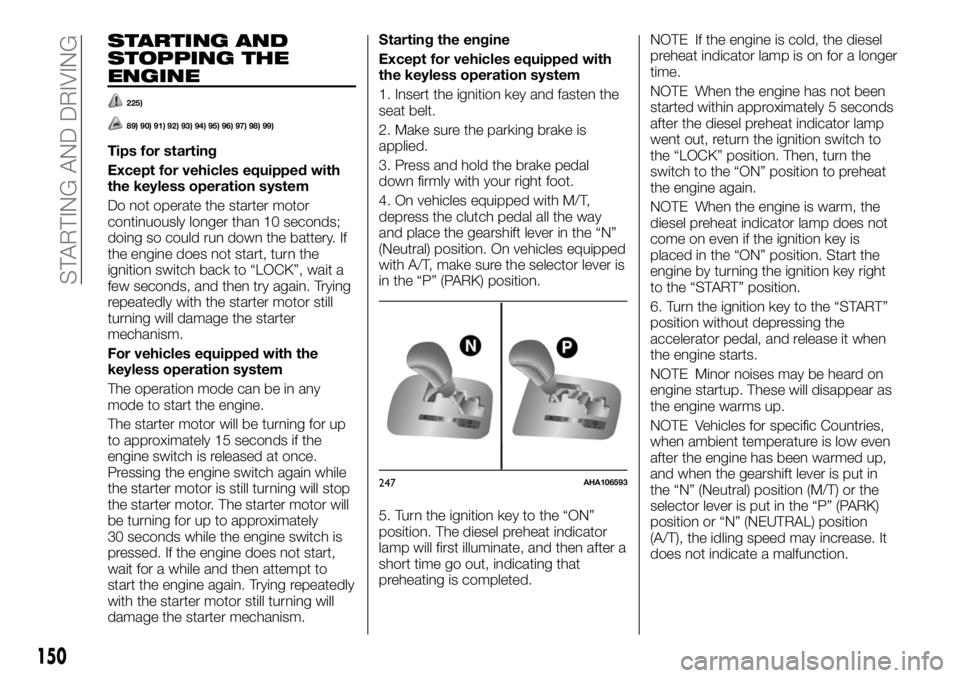
4. On vehicles equipped with M/T,
depress the clutch pedal all the way
and place the gearshift lever in the “N”
(Neutral) position. On vehicles equipped
with A/T, make sure the selector lever is
in the “P” (PARK) position.
5. Turn the ignition key to the “ON”
position. The diesel preheat indicator
lamp will first illuminate, and then after a
short time go out, indicating that
preheating is completed.NOTE If the engine is cold, the diesel
preheat indicator lamp is on for a longer
time.
NOTE When the engine has not been
started within approximately 5 seconds
after the diesel preheat indicator lamp
went out, return the ignition switch to
the “LOCK” position. Then, turn the
switch to the “ON” position to preheat
the engine again.
NOTE When the engine is warm, the
diesel preheat indicator lamp does not
come on even if the ignition key is
placed in the “ON” position. Start the
engine by turning the ignition key right
to the “START” position.
6. Turn the ignition key to the “START”
position without depressing the
accelerator pedal, and release it when
the engine starts.
NOTE Minor noises may be heard on
engine startup. These will disappear as
the engine warms up.
NOTE Vehicles for specific Countries,
when ambient temperature is low even
after the engine has been warmed up,
and when the gearshift lever is put in
the “N” (Neutral) position (M/T) or the
selector lever is put in the “P” (PARK)
position or “N” (NEUTRAL) position
(A/T), the idling speed may increase. It
does not indicate a malfunction.
247AHA106593
150
STARTING AND DRIVING
Page 157 of 312
After the engine restarts
automatically, the vehicle speed has not
exceeded approximately 5 km/h.
After the engine start, approximately
30 seconds or more have not elapsed.
After the engine restarts
automatically, the vehicle stops again
within 10 seconds.
Engine coolant temperature is low.
Ambient temperature is low.
When the heater is operated, vehicle
indicator temperature is not still hot
enough.
Air conditioner is operating and
passenger compartment has not
sufficiently cooled.
Demister switch is pressed. Refer to
“Demisting of the windscreen and door
windows: for quick demisting”.
When the air conditioner is operated
in AUTO mode where the temperature
control is set to the max. hot or the
max. cool (for vehicles with automatic
climate air conditioning).
When the diesel particulate filter
(DPF) automatically burns away trapped
particulate matter (PM).
Electric power consumption is high,
such as when the rear window demister
or other electrical components are
operating or the blower speed is set to
a high setting.
Battery voltage or battery
performance is low.
Check engine warning lamp is
illuminated or the
indicator lamp is
blinking.
On 4WD vehicles, the drive
mode-selector in “4H” or “4L” (Easy
select 4WD), “4HLc” or “4LLc” (Super
select 4WD II).
NOTE In the following cases, the
engine will not stop automatically even
if “Start&Stop” indicator lamp turn on.
Push the accelerator pedal
Brake booster vacuum pressure is
low
Operate the steering wheel
Parking on steep hill
NOTE Do not rest your foot on the
clutch pedal while driving because this
will cause detection of clutch pedal
switch malfunction and blinking of the
Start&Stop OFF indicator, and the
Start&Stop system will not operate.
NOTE If the Start&Stop system
operates while the air conditioner is
operating, both the engine and the air
conditioning compressor will stop.
Therefore, only the blower will operate,
the windows may start to fog up. If this
occurs, press the demister switch to
restart the engine. Refer to “Demister
switch”.NOTE If the windows become fogged
up each time the engine is stopped, we
recommend you to deactivate the
Start&Stop system by pressing the
“Start&Stop OFF” switch. Refer to “To
deactivate”.
NOTE If the air conditioner is operating,
set the temperature control higher to
lengthen the time that the engine is
stopped automatically.
Automatically restarting the engine
Depress the clutch pedal while the
gearshift lever is in the “N” (Neutral)
position. The indicator lamp turns off
and the engine restarts automatically.
NOTE Do not move the gearshift lever
to a position other than the “N” (Neutral)
position or do not release the clutch
pedal while the engine is restarting
automatically. The starter motor will
stop and the engine will not restart
automatically.
NOTE If the engine does not restart
automatically or if the engine stalls, the
charge warning lamp and check engine
warning lamp will illuminate. If this
occurs, the engine will not restart even
if the clutch pedal is depressed again.
While depressing the brake pedal, fully
depress the clutch pedal and turn the
ignition switch to the “START” position
or press the engine switch to start the
engine. For details, refer to “Starting
and stopping the engine”.
104)
155
Page 159 of 312
104)In the following cases, the engine will
restart automatically even if the engine was
stopped by the Start&Stop system. Pay
careful attention, otherwise an unexpected
accident might occur when the engine
restarts: vehicle speed is 3 km/h or higher
when coasting down a slope; brake
booster vacuum pressure is low because
the brake pedal is depressed repeatedly or
depressed harder than usual; engine
coolant temperature is low; when the air
conditioner is operated by pressing the air
conditioning switch; when the preset
temperature of the air conditioner is
changed significantly; when the air
conditioner is operated in AUTO mode
where the temperature control is set to the
max. hot or the max. cool (for vehicles with
automatic climate air conditioning); when
the air conditioner is ON, the passenger
compartment temperature rises and the air
conditioning compressor operates to lower
the temperature; demister switch is
pressed. Refer to “For quick demisting”;
electric power consumption is high, such
as when the rear window demister or other
electrical components are operating or the
blower speed is set to a high setting;
battery voltage or battery performance is
low; operate the steering wheel; driver’s
seat belt is unfastened; driver’s door is
opened.MANUAL
TRANSMISSION
The shift pattern is shown on the
gearshift lever knob. To start off,
depress the clutch pedal all the way
down and shift into 1st or “R” (Reverse)
position. Then gradually release the
clutch pedal while depressing the
accelerator pedal.
227)
105) 106) 107) 108) 109)
During cold weather, shifting may be
difficult until the transmission lubricant
has warmed up. This is normal and not
harmful to the transmission.
If it is hard to shift into 1st, depress the
clutch pedal again; the shift will then be
easier to make.
In case of hot weather condition or long
time cruising with high speed, a speed
limitation function may work to restrict
the oil temperature rising of the manual
transmission. After the oil temperature
drops to the appropriate level, the
speed limitation function is cancelled.
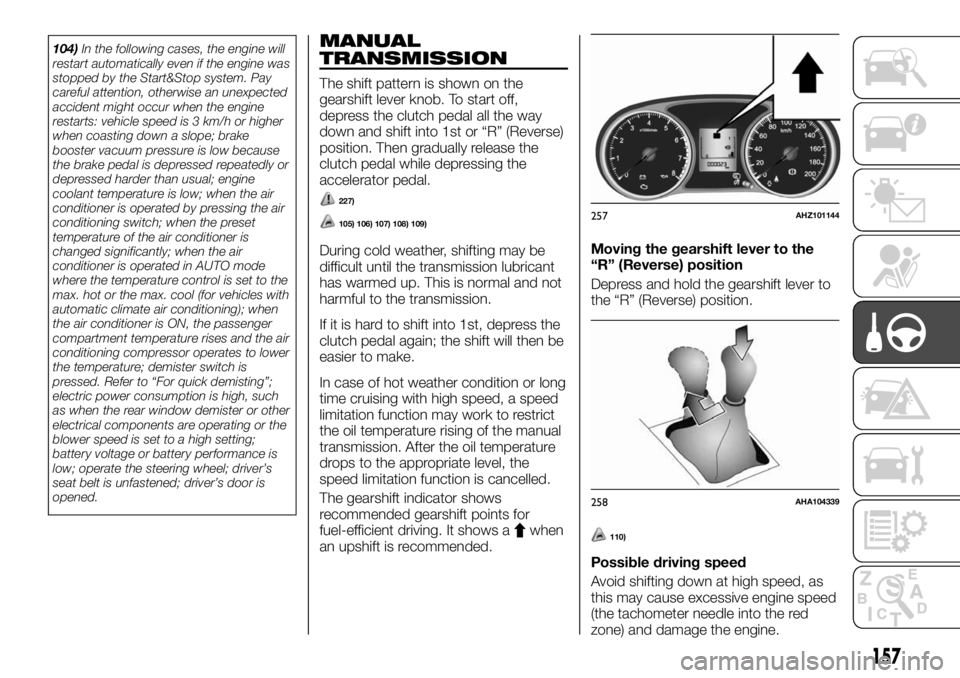
The gearshift indicator shows
recommended gearshift points for
fuel-efficient driving. It shows a
when
an upshift is recommended.Moving the gearshift lever to the
“R” (Reverse) position
Depress and hold the gearshift lever to
the “R” (Reverse) position.110)
Possible driving speed
Avoid shifting down at high speed, as
this may cause excessive engine speed
(the tachometer needle into the red
zone) and damage the engine.
257AHZ101144
258AHA104339
157
Page 161 of 312
AUTOMATIC
TRANSMISSION
SPORTS MODE 5A/T
(where provided)
During running-in period or immediately
after reconnection of the battery cable,
there may be a case where gear shifts
are not made smoothly. This does not
indicate a faulty transmission. Gear
shifts will become smooth after the
transmission has been shifted several
times by the electronic control system.
Selector lever operation
The transmission has 5 forward gears
and 1 reverse gear.
The individual gears are selected
automatically, depending on the speed
of the vehicle and the position of the
accelerator pedal.
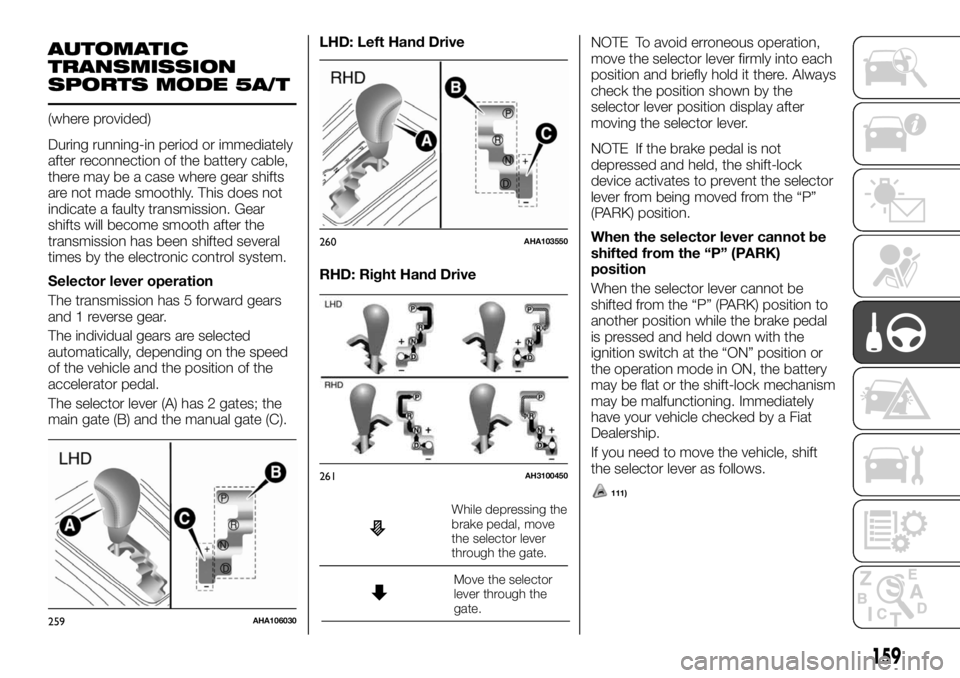
The selector lever (A) has 2 gates; the
main gate (B) and the manual gate (C).LHD: Left Hand Drive
RHD: Right Hand Drive
While depressing the
brake pedal, move
the selector lever
through the gate.
Move the selector
lever through the
gate.
111)
NOTE To avoid erroneous operation,
move the selector lever firmly into each
position and briefly hold it there. Always
check the position shown by the
selector lever position display after
moving the selector lever.
NOTE If the brake pedal is not
depressed and held, the shift-lock
device activates to prevent the selector
lever from being moved from the “P”
(PARK) position.
When the selector lever cannot be
shifted from the “P” (PARK)
position
When the selector lever cannot be
shifted from the “P” (PARK) position to
another position while the brake pedal
is pressed and held down with the
ignition switch at the “ON” position or
the operation mode in ON, the battery
may be flat or the shift-lock mechanism
may be malfunctioning. Immediately
have your vehicle checked by a Fiat
Dealership.
If you need to move the vehicle, shift
the selector lever as follows.
259AHA106030
260AHA103550
261AH3100450
159
Page 207 of 312
Indicator list
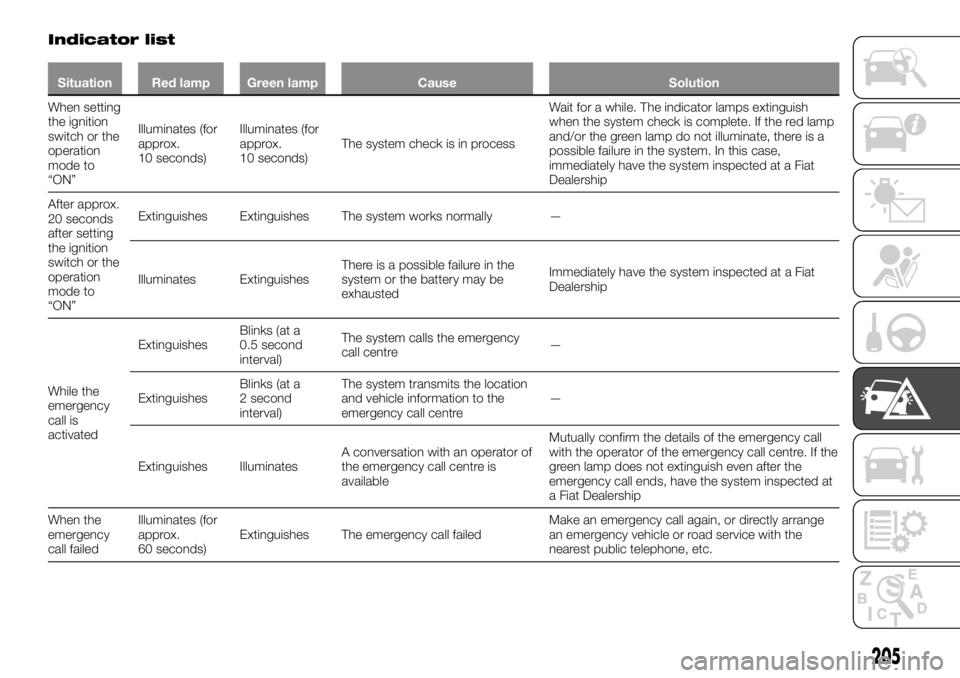
Situation Red lamp Green lamp Cause Solution
When setting
the ignition
switch or the
operation
mode to
“ON”Illuminates (for
approx.
10 seconds)Illuminates (for
approx.
10 seconds)The system check is in processWait for a while. The indicator lamps extinguish
when the system check is complete. If the red lamp
and/or the green lamp do not illuminate, there is a
possible failure in the system. In this case,
immediately have the system inspected at a Fiat
Dealership
After approx.
20 seconds
after setting
the ignition
switch or the
operation
mode to
“ON”Extinguishes Extinguishes The system works normally —
Illuminates ExtinguishesThere is a possible failure in the
system or the battery may be
exhaustedImmediately have the system inspected at a Fiat
Dealership
While the
emergency
call is
activatedExtinguishesBlinks (at a
0.5 second
interval)The system calls the emergency
call centre—
ExtinguishesBlinks (at a
2 second
interval)The system transmits the location
and vehicle information to the
emergency call centre—
Extinguishes IlluminatesA conversation with an operator of
the emergency call centre is
availableMutually confirm the details of the emergency call
with the operator of the emergency call centre. If the
green lamp does not extinguish even after the
emergency call ends, have the system inspected at
a Fiat Dealership
When the
emergency
call failedIlluminates (for
approx.
60 seconds)Extinguishes The emergency call failedMake an emergency call again, or directly arrange
an emergency vehicle or road service with the
nearest public telephone, etc.
205