ignition FIAT FULLBACK 2017 Owner handbook (in English)
[x] Cancel search | Manufacturer: FIAT, Model Year: 2017, Model line: FULLBACK, Model: FIAT FULLBACK 2017Pages: 312, PDF Size: 12.31 MB
Page 57 of 312
Precautions to observe when using
wipers and washers
If the moving wipers become
blocked partway through a sweep by
ice or other deposits on the glass, the
wipers may temporarily stop operating
to prevent the motor from overheating.
In this case, park the vehicle in a safe
place, turn the ignition switch to the
“OFF” position or put the operation
mode in OFF, and then remove the ice
or other deposits. Because the wipers
will start operating again after the wiper
motor cools down, check that the
wipers operate before using them.
Do not use the wipers when the
glass is dry. They may scratch the glass
surface and the blades wear out
prematurely.
Before using the wipers in cold
weather, check that the wiper blades
are not frozen onto the glass. The
motor may burn out if the wipers are
used with the blades frozen onto the
glass.
Avoid using the washer continuously
for more than 20 seconds. Do not
operate the washer when the fluid
reservoir is empty. Otherwise, the motor
may burn out.
Periodically check the level of washer
fluid in the reservoir and refill if required.During cold weather, add a
recommended washer solution that will
not freeze in the washer reservoir.
Failure to do so could result in loss of
washer function and frost damage to
the system components.
WARNING
63)Do not use the screen wiper to remove
layers of snow or ice from the windscreen.
In such conditions, the windscreen wiper
may be subjected to excessive stress and
the motor cut-out switch, which prevents
operation for a few seconds, may
intervene. If operation is not restored,
contact a Fiat Dealership.
64)Streaks of water may cause
unnecessary blade movements.
65)If the washer is used in cold weather,
the washer fluid sprayed against the glass
may freeze, which may hinder visibility.
Warm the glass with the defroster or rear
window demister before using the washer.66)With the ignition switch or the
operation mode in ON and the lever in the
“AUTO” position, the wipers may
automatically operate in the situations
described below. If your hands get
trapped, you could suffer injuries or the
wipers could malfunction. Be sure to turn
the ignition switch to the “LOCK” position
or put the operation mode in OFF, or move
lever to the “OFF” position to deactivate
the rain sensor: when cleaning the outside
surface of the windscreen, if you touch or
wipe with a cloth on top of the rain sensor;
when using an automatic car wash; when a
physical shock is applied to the windscreen
or to the rain sensor.
IMPORTANT
21)Do not activate the rain sensor when
washing the car in an automatic car wash.
55
Page 72 of 312
WINDOW
MANUAL WINDOW
CONTROL
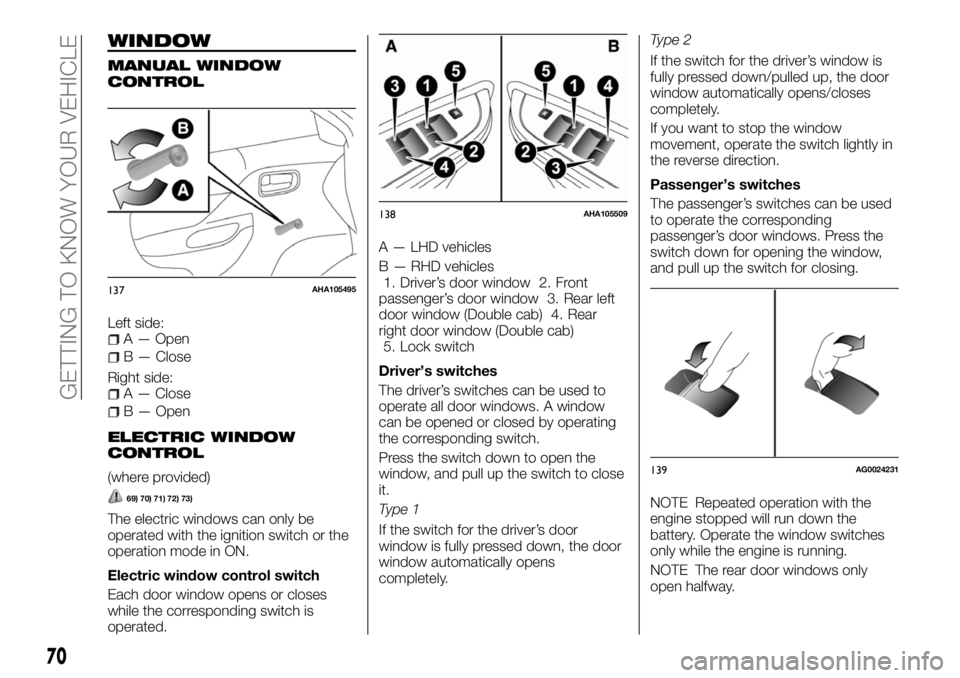
Left side:A — Open
B — Close
Right side:
A — Close
B — Open
ELECTRIC WINDOW
CONTROL
(where provided)
69) 70) 71) 72) 73)
The electric windows can only be
operated with the ignition switch or the
operation mode in ON.
Electric window control switch
Each door window opens or closes
while the corresponding switch is
operated.A — LHD vehicles
B — RHD vehicles
1. Driver’s door window 2. Front
passenger’s door window 3. Rear left
door window (Double cab) 4. Rear
right door window (Double cab)
5. Lock switch
Driver’s switches
The driver’s switches can be used to
operate all door windows. A window
can be opened or closed by operating
the corresponding switch.
Press the switch down to open the
window, and pull up the switch to close
it.
Type 1
If the switch for the driver’s door
window is fully pressed down, the door
window automatically opens
completely.Type 2
If the switch for the driver’s window is
fully pressed down/pulled up, the door
window automatically opens/closes
completely.
If you want to stop the window
movement, operate the switch lightly in
the reverse direction.
Passenger’s switches
The passenger’s switches can be used
to operate the corresponding
passenger’s door windows. Press the
switch down for opening the window,
and pull up the switch for closing.
NOTE Repeated operation with the
engine stopped will run down the
battery. Operate the window switches
only while the engine is running.
NOTE The rear door windows only
open halfway.
137AHA105495
138AHA105509
139AG0024231
70
GETTING TO KNOW YOUR VEHICLE
Page 73 of 312
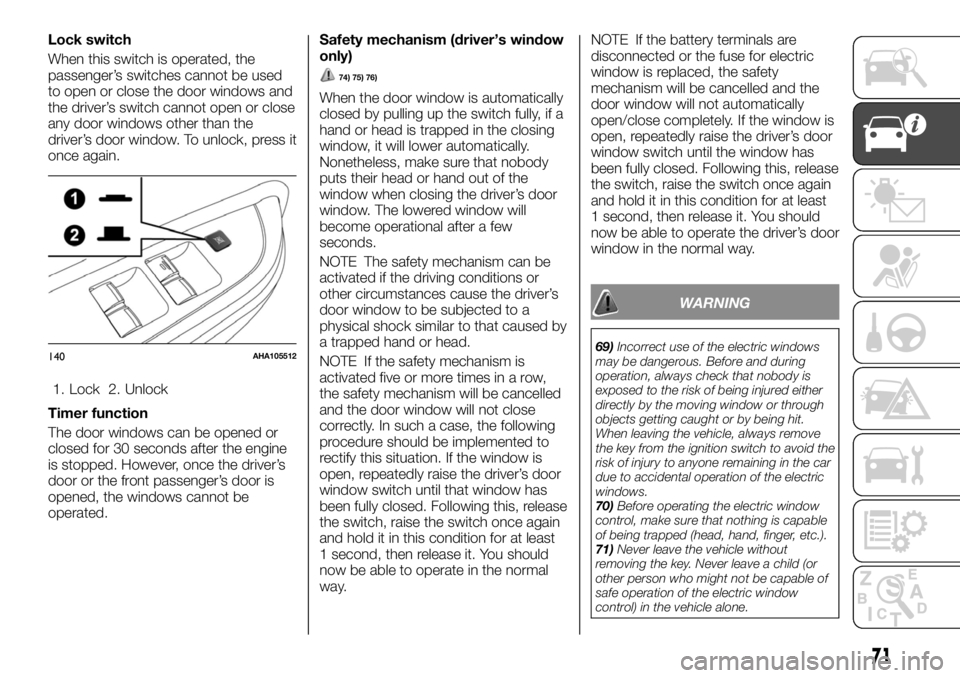
Lock switch
When this switch is operated, the
passenger’s switches cannot be used
to open or close the door windows and
the driver’s switch cannot open or close
any door windows other than the
driver’s door window. To unlock, press it
once again.
1. Lock 2. Unlock
Timer function
The door windows can be opened or
closed for 30 seconds after the engine
is stopped. However, once the driver’s
door or the front passenger’s door is
opened, the windows cannot be
operated.Safety mechanism (driver’s window
only)
74) 75) 76)
When the door window is automatically
closed by pulling up the switch fully, if a
hand or head is trapped in the closing
window, it will lower automatically.
Nonetheless, make sure that nobody
puts their head or hand out of the
window when closing the driver’s door
window. The lowered window will
become operational after a few
seconds.
NOTE The safety mechanism can be
activated if the driving conditions or
other circumstances cause the driver’s
door window to be subjected to a
physical shock similar to that caused by
a trapped hand or head.
NOTE If the safety mechanism is
activated five or more times in a row,
the safety mechanism will be cancelled
and the door window will not close
correctly. In such a case, the following
procedure should be implemented to
rectify this situation. If the window is
open, repeatedly raise the driver’s door
window switch until that window has
been fully closed. Following this, release
the switch, raise the switch once again
and hold it in this condition for at least
1 second, then release it. You should
now be able to operate in the normal
way.NOTE If the battery terminals are
disconnected or the fuse for electric
window is replaced, the safety
mechanism will be cancelled and the
door window will not automatically
open/close completely. If the window is
open, repeatedly raise the driver’s door
window switch until the window has
been fully closed. Following this, release
the switch, raise the switch once again
and hold it in this condition for at least
1 second, then release it. You should
now be able to operate the driver’s door
window in the normal way.
WARNING
69)Incorrect use of the electric windows
may be dangerous. Before and during
operation, always check that nobody is
exposed to the risk of being injured either
directly by the moving window or through
objects getting caught or by being hit.
When leaving the vehicle, always remove
the key from the ignition switch to avoid the
risk of injury to anyone remaining in the car
due to accidental operation of the electric
windows.
70)Before operating the electric window
control, make sure that nothing is capable
of being trapped (head, hand, finger, etc.).
71)Never leave the vehicle without
removing the key. Never leave a child (or
other person who might not be capable of
safe operation of the electric window
control) in the vehicle alone.140AHA105512
71
Page 81 of 312
ASHTRAY
(where provided)
90)
32) 33) 34) 35)
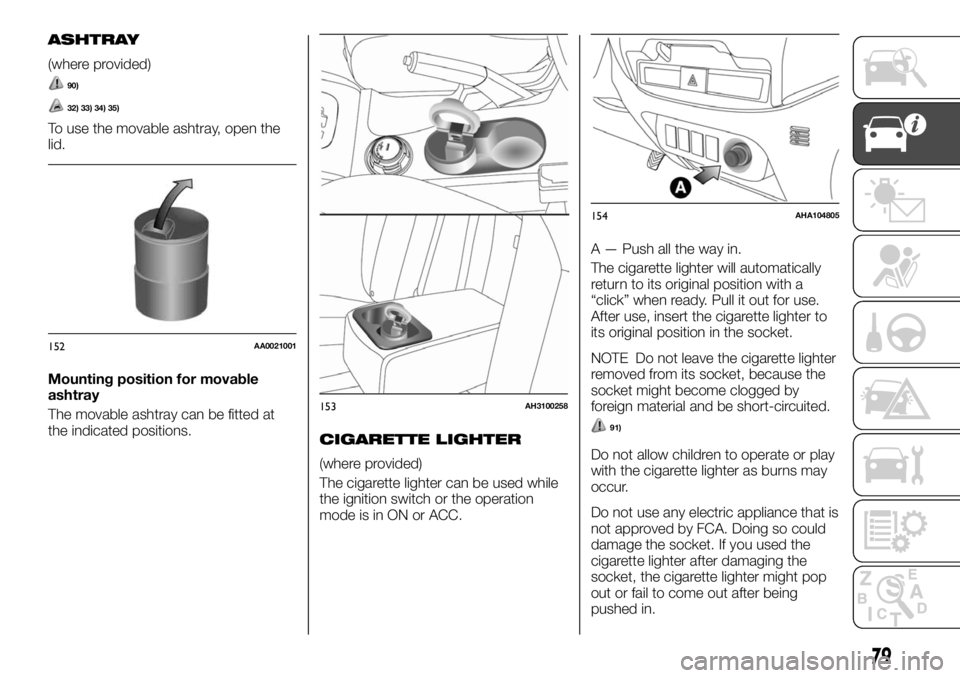
To use the movable ashtray, open the
lid.
Mounting position for movable
ashtray
The movable ashtray can be fitted at
the indicated positions.
CIGARETTE LIGHTER
(where provided)
The cigarette lighter can be used while
the ignition switch or the operation
mode is in ON or ACC.A — Push all the way in.
The cigarette lighter will automatically
return to its original position with a
“click” when ready. Pull it out for use.
After use, insert the cigarette lighter to
its original position in the socket.
NOTE Do not leave the cigarette lighter
removed from its socket, because the
socket might become clogged by
foreign material and be short-circuited.
91)
Do not allow children to operate or play
with the cigarette lighter as burns may
occur.
Do not use any electric appliance that is
not approved by FCA. Doing so could
damage the socket. If you used the
cigarette lighter after damaging the
socket, the cigarette lighter might pop
out or fail to come out after being
pushed in.
152AA0021001
153AH3100258
154AHA104805
79
Page 82 of 312
Something is wrong with the cigarette
lighter if it does not pop back out within
approximately 30 seconds of being
pushed in. Pull it out and have the
problem corrected at Fiat Dealership.
When the cigarette lighter socket is
used as a power source for an electric
appliance, be sure that the electric
appliance operates at 12 V and has an
electric capacity of 120 W or less. In
addition, long use of the electric
appliance without running the engine
may run down the battery.
ACCESSORY SOCKET
(where provided)
The accessory socket can be used
while the ignition switch or the
operation mode is in ON or ACC. To
use a plug-in type accessory, open the
lid, and insert the plug in the accessory
socket.
36) 37)
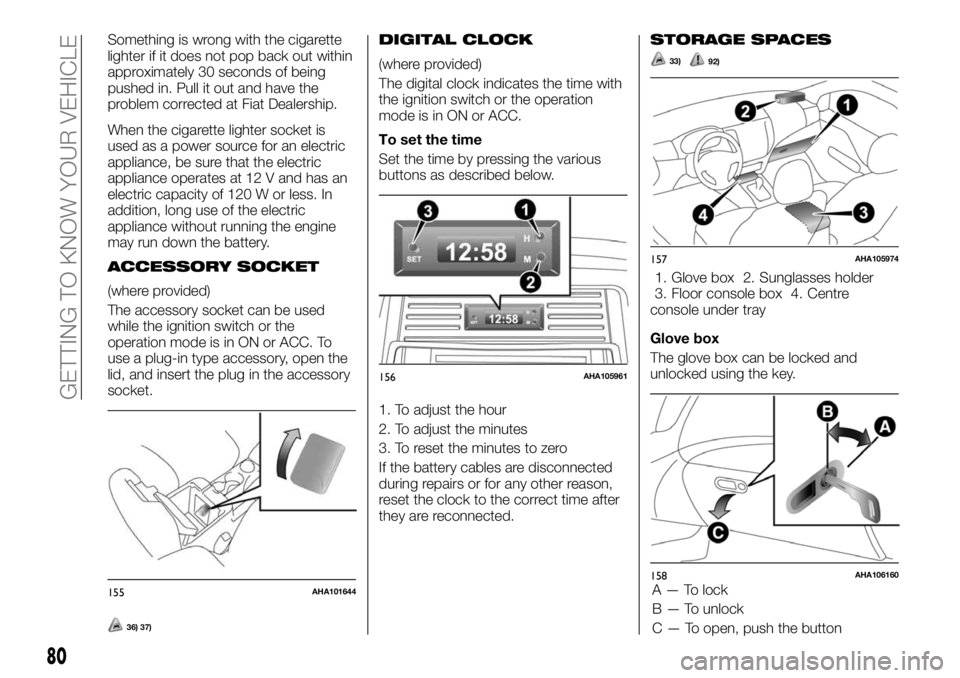
DIGITAL CLOCK
(where provided)
The digital clock indicates the time with
the ignition switch or the operation
mode is in ON or ACC.
To set the time
Set the time by pressing the various
buttons as described below.
1. To adjust the hour
2. To adjust the minutes
3. To reset the minutes to zero
If the battery cables are disconnected
during repairs or for any other reason,
reset the clock to the correct time after
they are reconnected.
STORAGE SPACES
33)92)
1. Glove box 2. Sunglasses holder
3. Floor console box 4. Centre
console under tray
Glove box
The glove box can be locked and
unlocked using the key.
155AHA101644
156AHA105961
157AHA105974
158AHA106160
80
GETTING TO KNOW YOUR VEHICLE
A — To lock
B — To unlock
C — To open, push the button
Page 87 of 312
Graphical expression for consumer
information
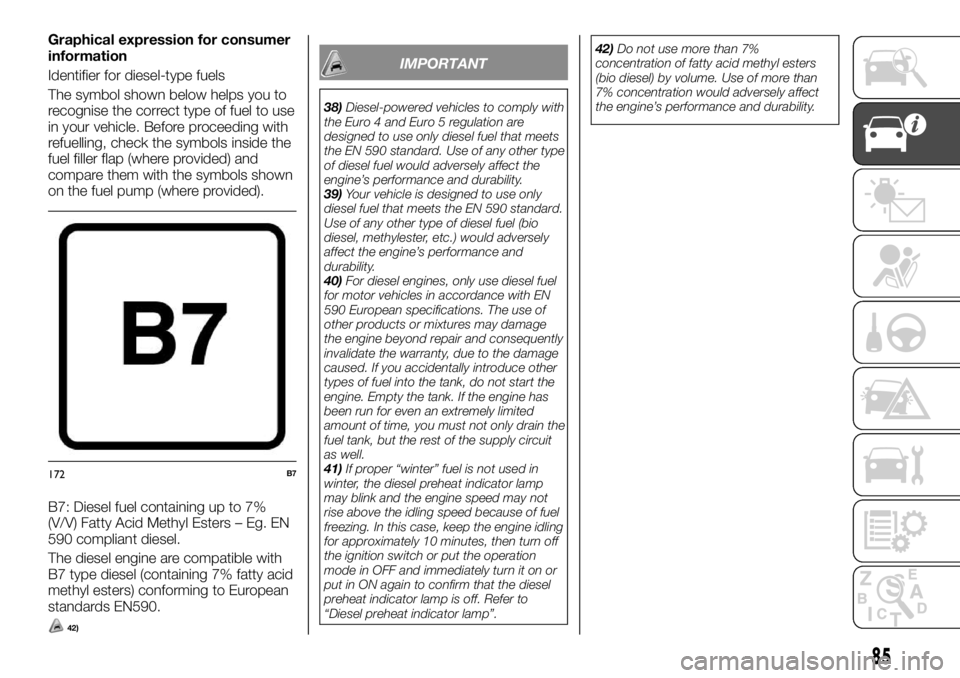
Identifier for diesel-type fuels
The symbol shown below helps you to
recognise the correct type of fuel to use
in your vehicle. Before proceeding with
refuelling, check the symbols inside the
fuel filler flap (where provided) and
compare them with the symbols shown
on the fuel pump (where provided).
B7: Diesel fuel containing up to 7%
(V/V) Fatty Acid Methyl Esters – Eg. EN
590 compliant diesel.
The diesel engine are compatible with
B7 type diesel (containing 7% fatty acid
methyl esters) conforming to European
standards EN590.
42)
IMPORTANT
38)Diesel-powered vehicles to comply with
the Euro 4 and Euro 5 regulation are
designed to use only diesel fuel that meets
the EN 590 standard. Use of any other type
of diesel fuel would adversely affect the
engine’s performance and durability.
39)Your vehicle is designed to use only
diesel fuel that meets the EN 590 standard.
Use of any other type of diesel fuel (bio
diesel, methylester, etc.) would adversely
affect the engine’s performance and
durability.
40)For diesel engines, only use diesel fuel
for motor vehicles in accordance with EN
590 European specifications. The use of
other products or mixtures may damage
the engine beyond repair and consequently
invalidate the warranty, due to the damage
caused. If you accidentally introduce other
types of fuel into the tank, do not start the
engine. Empty the tank. If the engine has
been run for even an extremely limited
amount of time, you must not only drain the
fuel tank, but the rest of the supply circuit
as well.
41)If proper “winter” fuel is not used in
winter, the diesel preheat indicator lamp
may blink and the engine speed may not
rise above the idling speed because of fuel
freezing. In this case, keep the engine idling
for approximately 10 minutes, then turn off
the ignition switch or put the operation
mode in OFF and immediately turn it on or
put in ON again to confirm that the diesel
preheat indicator lamp is off. Refer to
“Diesel preheat indicator lamp”.42)Do not use more than 7%
concentration of fatty acid methyl esters
(bio diesel) by volume. Use of more than
7% concentration would adversely affect
the engine’s performance and durability.
172B7
85
Page 92 of 312
INSTRUMENTS
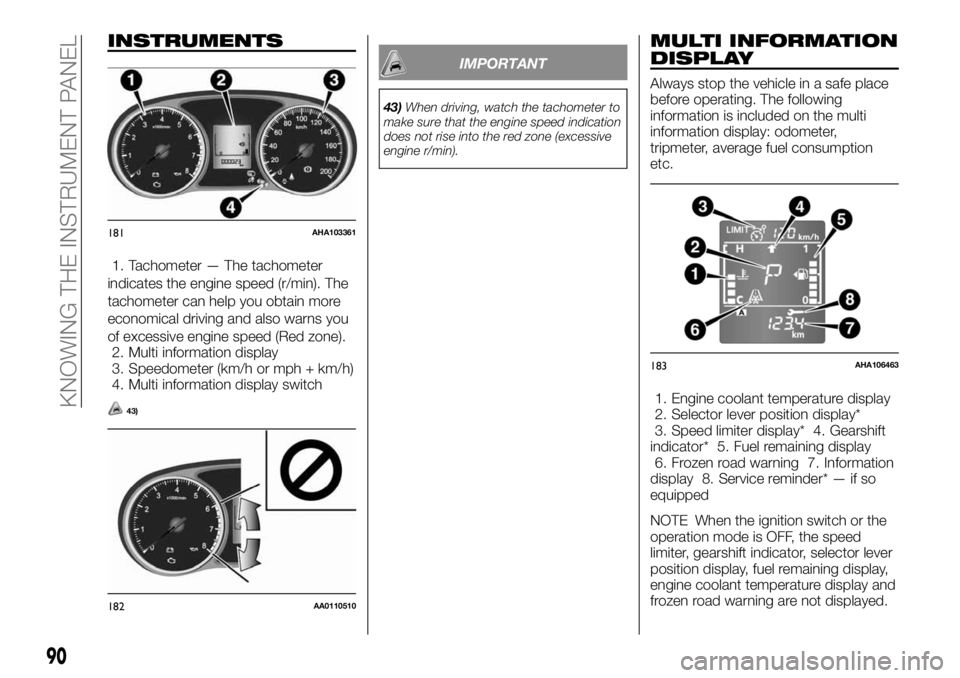
1. Tachometer — The tachometer
indicates the engine speed (r/min). The
tachometer can help you obtain more
economical driving and also warns you
of excessive engine speed (Red zone).
2. Multi information display
3. Speedometer (km/h or mph + km/h)
4. Multi information display switch
43)
IMPORTANT
43)When driving, watch the tachometer to
make sure that the engine speed indication
does not rise into the red zone (excessive
engine r/min).
MULTI INFORMATION
DISPLAY
Always stop the vehicle in a safe place
before operating. The following
information is included on the multi
information display: odometer,
tripmeter, average fuel consumption
etc.
1. Engine coolant temperature display
2. Selector lever position display*
3. Speed limiter display* 4. Gearshift
indicator* 5. Fuel remaining display
6. Frozen road warning 7. Information
display 8. Service reminder* — if so
equipped
NOTE When the ignition switch or the
operation mode is OFF, the speed
limiter, gearshift indicator, selector lever
position display, fuel remaining display,
engine coolant temperature display and
frozen road warning are not displayed.
181AHA103361
182AA0110510
183AHA106463
90
KNOWING THE INSTRUMENT PANEL
Page 93 of 312
INFORMATION DISPLAY
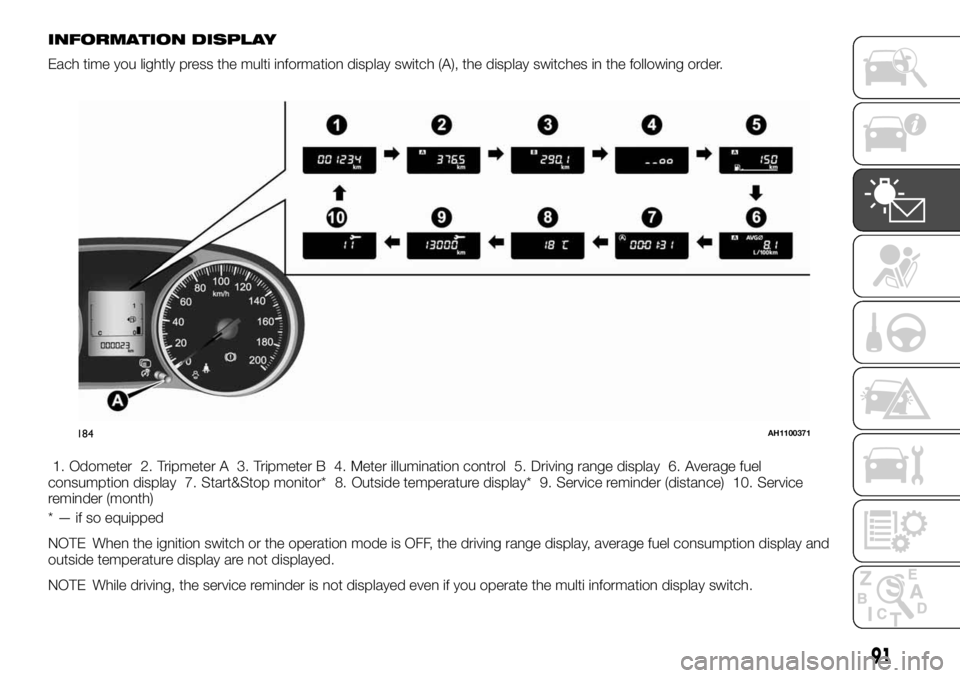
Each time you lightly press the multi information display switch (A), the display switches in the following order.
1. Odometer 2. Tripmeter A 3. Tripmeter B 4. Meter illumination control 5. Driving range display 6. Average fuel
consumption display 7. Start&Stop monitor* 8. Outside temperature display* 9. Service reminder (distance) 10. Service
reminder (month)
* — if so equipped
NOTE When the ignition switch or the operation mode is OFF, the driving range display, average fuel consumption display and
outside temperature display are not displayed.
NOTE While driving, the service reminder is not displayed even if you operate the multi information display switch.
184AH1100371
91
Page 94 of 312
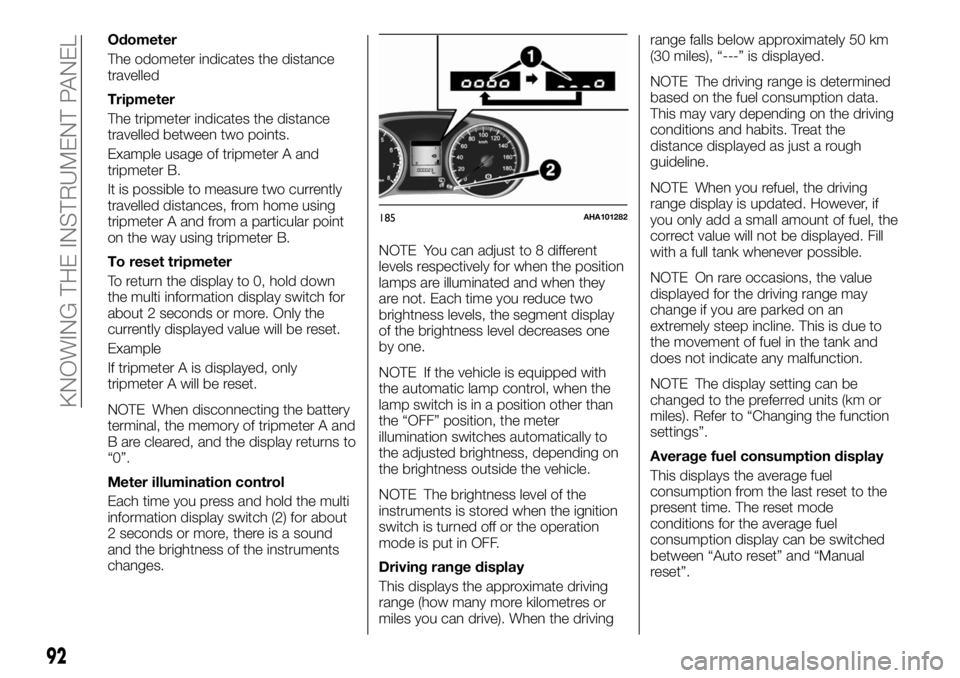
Odometer
The odometer indicates the distance
travelled
Tripmeter
The tripmeter indicates the distance
travelled between two points.
Example usage of tripmeter A and
tripmeter B.
It is possible to measure two currently
travelled distances, from home using
tripmeter A and from a particular point
on the way using tripmeter B.
To reset tripmeter
To return the display to 0, hold down
the multi information display switch for
about 2 seconds or more. Only the
currently displayed value will be reset.
Example
If tripmeter A is displayed, only
tripmeter A will be reset.
NOTE When disconnecting the battery
terminal, the memory of tripmeter A and
B are cleared, and the display returns to
“0”.
Meter illumination control
Each time you press and hold the multi
information display switch (2) for about
2 seconds or more, there is a sound
and the brightness of the instruments
changes.NOTE You can adjust to 8 different
levels respectively for when the position
lamps are illuminated and when they
are not. Each time you reduce two
brightness levels, the segment display
of the brightness level decreases one
by one.
NOTE If the vehicle is equipped with
the automatic lamp control, when the
lamp switch is in a position other than
the “OFF” position, the meter
illumination switches automatically to
the adjusted brightness, depending on
the brightness outside the vehicle.
NOTE The brightness level of the
instruments is stored when the ignition
switch is turned off or the operation
mode is put in OFF.
Driving range display
This displays the approximate driving
range (how many more kilometres or
miles you can drive). When the drivingrange falls below approximately 50 km
(30 miles), “---” is displayed.
NOTE The driving range is determined
based on the fuel consumption data.
This may vary depending on the driving
conditions and habits. Treat the
distance displayed as just a rough
guideline.
NOTE When you refuel, the driving
range display is updated. However, if
you only add a small amount of fuel, the
correct value will not be displayed. Fill
with a full tank whenever possible.
NOTE On rare occasions, the value
displayed for the driving range may
change if you are parked on an
extremely steep incline. This is due to
the movement of fuel in the tank and
does not indicate any malfunction.
NOTE The display setting can be
changed to the preferred units (km or
miles). Refer to “Changing the function
settings”.
Average fuel consumption display
This displays the average fuel
consumption from the last reset to the
present time. The reset mode
conditions for the average fuel
consumption display can be switched
between “Auto reset” and “Manual
reset”.
185AHA101282
92
KNOWING THE INSTRUMENT PANEL
Page 95 of 312
For information on how to change the
average fuel consumption display
setting, refer to “Changing the function
settings”.
NOTE The average fuel consumption
display can be reset separately for the
auto reset mode and for the manual
reset mode.
NOTE “---” is displayed when the
average fuel consumption cannot be
measured.
NOTE The initial (default) setting is
“Auto reset mode”.
NOTE The average fuel consumption
will depend on the driving conditions
(road conditions, how you drive, etc.).
The displayed fuel consumption may
vary from the actual fuel consumption.
Treat the fuel consumption displayed as
just a rough guideline.
NOTE The memory of the manual reset
mode or auto reset mode for the
average fuel consumption display is
erased if the battery is disconnected.
NOTE The display setting can be
changed to the preferred units {km/L,
L/100 km, mpg}. Refer to “Changing
the function settings”.
Start&Stop monitor
The accumulated time the engine has
been stopped by Start&Stop system is
displayed. Refer to Start&Stop system.NOTE When the ignition switch or the
operation mode is ON again, the
accumulated time will be reset.
Outside temperature display (if so
equipped)
This displays the temperature outside
the vehicle.
NOTE The display setting can be
changed to the preferred units (°C or
°F). Refer to “Changing the function
settings”.
NOTE Depending on factors such as
the driving conditions, the displayed
temperature may vary from the actual
outside temperature.
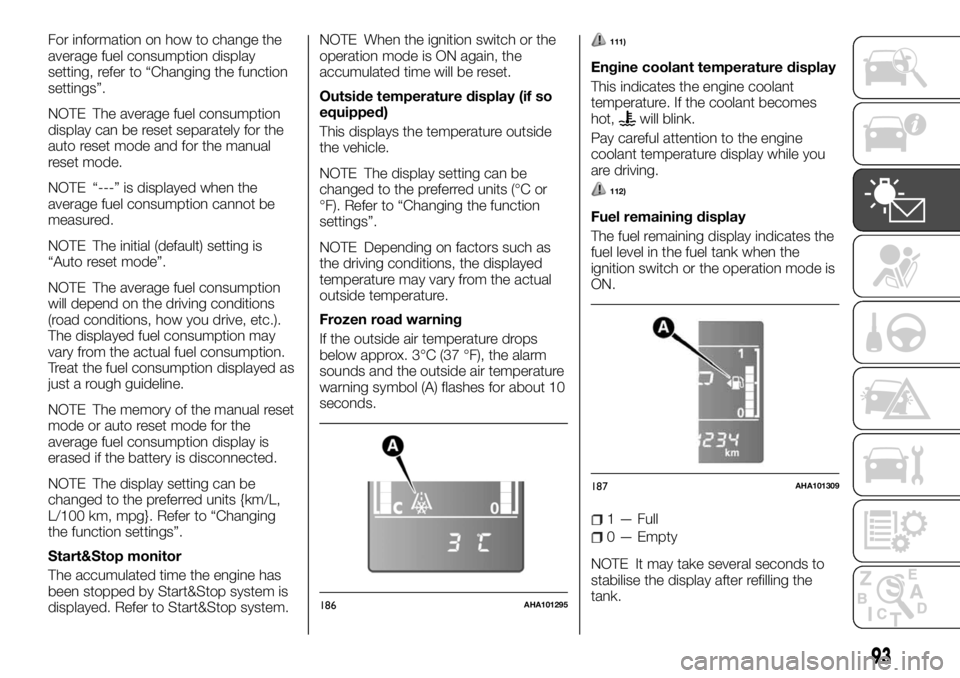
Frozen road warning
If the outside air temperature drops
below approx. 3°C (37 °F), the alarm
sounds and the outside air temperature
warning symbol (A) flashes for about 10
seconds.111)
Engine coolant temperature display
This indicates the engine coolant
temperature. If the coolant becomes
hot,
will blink.
Pay careful attention to the engine
coolant temperature display while you
are driving.
112)
Fuel remaining display
The fuel remaining display indicates the
fuel level in the fuel tank when the
ignition switch or the operation mode is
ON.
1 — Full
0 — Empty
NOTE It may take several seconds to
stabilise the display after refilling the
tank.
186AHA101295
187AHA101309
93