light FIAT FULLBACK 2018 Owner handbook (in English)
[x] Cancel search | Manufacturer: FIAT, Model Year: 2018, Model line: FULLBACK, Model: FIAT FULLBACK 2018Pages: 316, PDF Size: 10.52 MB
Page 80 of 316
WARNING
83)If the vehicle is parked on a very steep
slope or side gradient, opening the rear
flap of the flatbed or a side door may
cause any objects or luggage which is not
fixed to spill out.
84)If you wish to carry a reserve of petrol
in a can, observe the legal restrictions and
only use a can that is type-approved and
properly secured to the load anchorage
eyebolts. Anyway, by doing so, you
increase the risk of fire in the event of an
accident with your vehicle.
85)Respect the maximum permitted
vehicle loads also shown on the
registration certificate. The user is
responsible for arranging goods in the
luggage compartment and/or on the load
platform within the maximum permitted
loads.
86)Do not carry unnecessary objects on
the flatbed. Particularly if the vehicle is
driven in cities, where frequent stopping
and starting is necessary, supplementary
loads on the vehicle may have major
repercussions on fuel consumption.
Furthermore, do not travel with
unnecessary luggage, loads etc. on the
roof: the increased air resistance will
increase fuel consumption.
87)Using a lower gear when travelling with
heavy loads will improve vehicle
performance and extend the life of the
gearbox, limiting gear shifts and
overheating. This action ensures better
exhaust braking.88)All precautions must be adopted to
prevent danger to other road users if the
load protrudes beyond the contour of the
vehicle. The rear and side protrusion must
be indicated according to the laws in force
in the country. The load must not
compromise stability of the vehicle or cover
lights, visual indicators or identifying plates.
Poles, bars and similar loads which are
difficult to see arranged horizontally must
not protrude beyond the contour of the
vehicle.
IMPORTANT
32)Use a roof carrier that properly fits your
vehicle. Do not load luggage directly onto
the roof. For installation, refer to the
instruction manual accompanying the roof
carrier.
33)Make sure that the weight of the
luggage does not exceed the allowable roof
load. If the allowable roof load is exceeded,
this may cause damage to the vehicle. The
roof load is the total allowable load on the
roof (the weight of the roof carrier plus the
weight of luggage placed on the roof
carrier). For the specific value, refer to
“Maximum roof load”.34)When luggage is loaded onto the
vehicle, please make sure to drive slowly
and avoid excessive maneuvers such as
sudden braking or quick turning. In
addition, place the luggage on the carrier
so that its weight is distributed evenly with
the heaviest items on the bottom. Do not
load items that are wider than the roof
carrier. The additional weight on the roof
could raise the vehicle’s centre of gravity
and affect vehicle handling characteristics.
As a result, driving errors or emergency
maneuvers could lead to a loss of control
and result in an accident.
35)Before driving and after travelling a
short distance, always check the load to
make sure it is securely fastened to the roof
carrier. Check periodically during your travel
that the load remains secure.
78
GETTING TO KNOW YOUR VEHICLE
Page 82 of 316
NOTE The values under item 9 are
applicable to unladen vehicles. The
value can also be varied depending on
the tyre size, optional equipment and
suspension conditions.
Operating hints
Have your vehicle serviced prior to
towing a heavy trailer, taking particular
care of the state of engine tune, the
condition of brakes, steering and tyres.
Adjust tyre pressures to those
specifications at trailer towing (refer to
“tyre inflation pressure”). Check the
tyres, wiring and brakes (if fitted) on the
trailer.
Leave plenty of room between the
front of your vehicle and the preceding
vehicle. If the trailer begins to sway or
becomes difficult to handle, gently slow
down or apply the independent trailer
brakes (if fitted) NOT the vehicle brakes.
Stop the vehicle and trailer in a safe
location. One cause of swaying is poor
trailer balance and until this has been
overcome the swaying will recur.
Relocated the load in your trailer and
re-assess the problem.
Be sure that the driving speed does
not exceed 100 km/h for trailer
operation.
It is also recommended that you
obey the local regulations in case
driving speed with a trailer is limited to
less than 100 km/h.
To prevent the clutch from slipping
(vehicle with a M/T only), do not rev the
engine more than is required when
starting off.
To prevent shocks from the overrun
brake, depress the brake pedal lightly at
first and then more strongly.
To make full use of engine braking,
change to a lower gear before
descending a slope.
The body, brakes, clutch, and
chassis will be under additional strain
when towing a trailer.
The heavier weight and higher rolling
and air resistance will increase fuel
consumption.
Additional precautions for vehicles
equipped with an automatic
transmission
It is recommended a lower gear in
sports mode on slopes or at low speed,
taking care to keep the engine speed
below the red zone.
WARNING
89)Danger of Accident! A towing bar
should be fitted according to Fiat
Dealership guidelines.
INTERIOR FEATURES
SUN VISORS
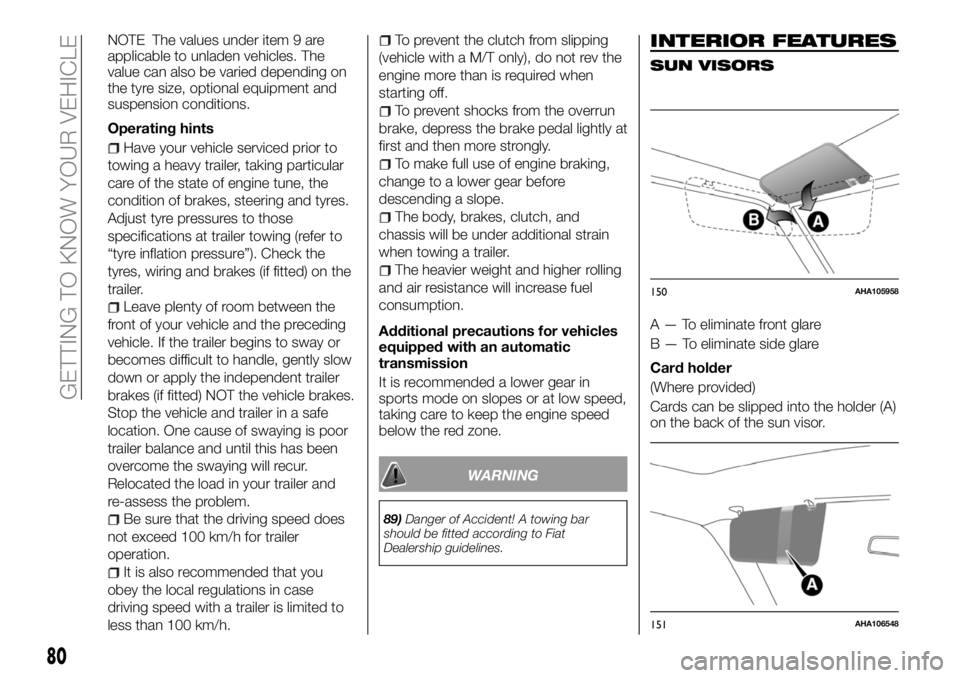
A — To eliminate front glare
B — To eliminate side glare
Card holder
(Where provided)
Cards can be slipped into the holder (A)
on the back of the sun visor.
150AHA105958
151AHA106548
80
GETTING TO KNOW YOUR VEHICLE
Page 83 of 316
VANITY MIRROR
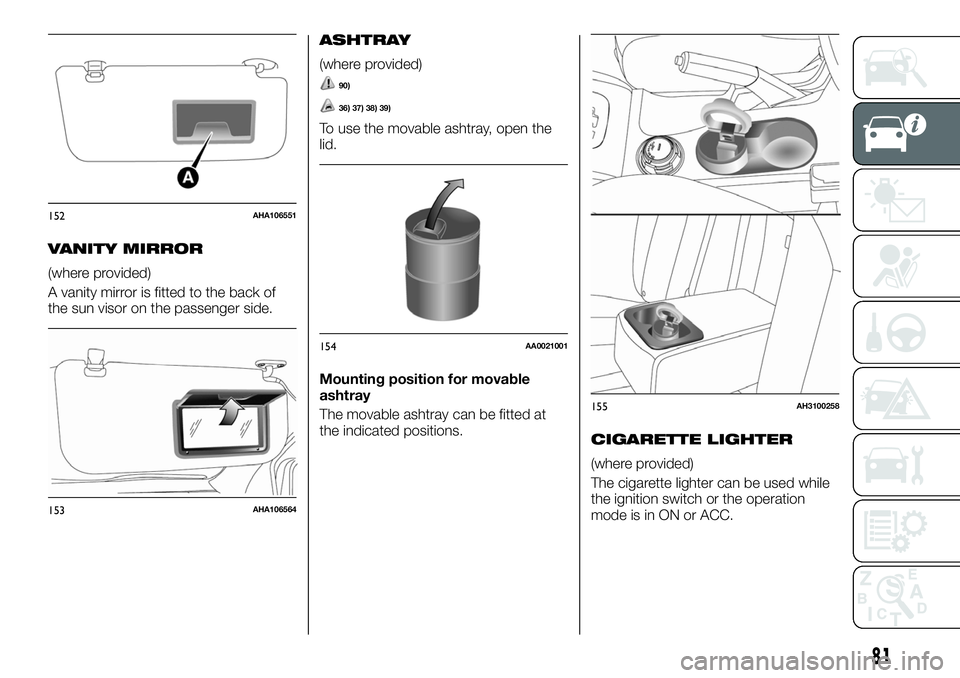
(where provided)
A vanity mirror is fitted to the back of
the sun visor on the passenger side.
ASHTRAY
(where provided)
90)
36) 37) 38) 39)
To use the movable ashtray, open the
lid.
Mounting position for movable
ashtray
The movable ashtray can be fitted at
the indicated positions.
CIGARETTE LIGHTER
(where provided)
The cigarette lighter can be used while
the ignition switch or the operation
mode is in ON or ACC.
152AHA106551
153AHA106564
154AA0021001
155AH3100258
81
Page 84 of 316
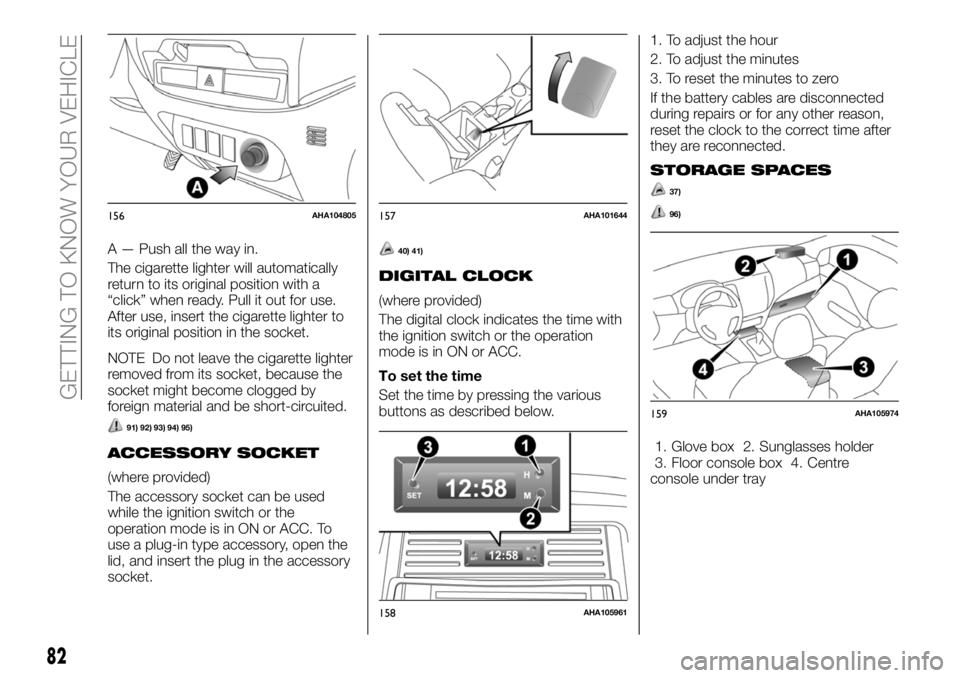
A — Push all the way in.
The cigarette lighter will automatically
return to its original position with a
“click” when ready. Pull it out for use.
After use, insert the cigarette lighter to
its original position in the socket.
NOTE Do not leave the cigarette lighter
removed from its socket, because the
socket might become clogged by
foreign material and be short-circuited.
91) 92) 93) 94) 95)
ACCESSORY SOCKET
(where provided)
The accessory socket can be used
while the ignition switch or the
operation mode is in ON or ACC. To
use a plug-in type accessory, open the
lid, and insert the plug in the accessory
socket.
40) 41)
DIGITAL CLOCK
(where provided)
The digital clock indicates the time with
the ignition switch or the operation
mode is in ON or ACC.
To set the time
Set the time by pressing the various
buttons as described below.1. To adjust the hour
2. To adjust the minutes
3. To reset the minutes to zero
If the battery cables are disconnected
during repairs or for any other reason,
reset the clock to the correct time after
they are reconnected.
STORAGE SPACES
37)
96)
1. Glove box 2. Sunglasses holder
3. Floor console box 4. Centre
console under tray
156AHA104805157AHA101644
158AHA105961
159AHA105974
82
GETTING TO KNOW YOUR VEHICLE
Page 87 of 316
BOTTLE HOLDER
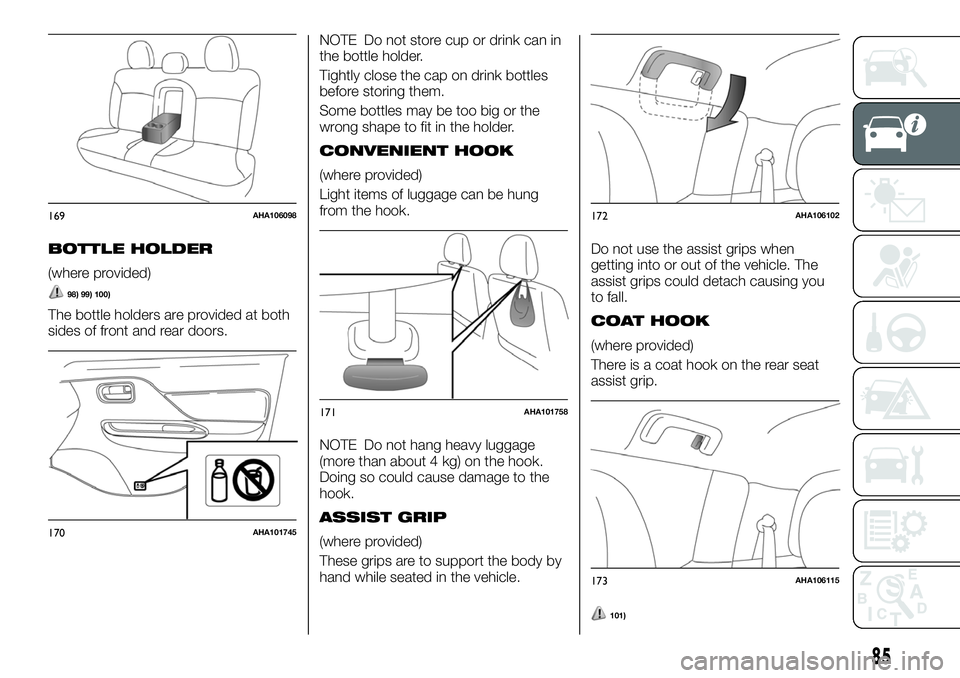
(where provided)
98) 99) 100)
The bottle holders are provided at both
sides of front and rear doors.NOTE Do not store cup or drink can in
the bottle holder.
Tightly close the cap on drink bottles
before storing them.
Some bottles may be too big or the
wrong shape to fit in the holder.
CONVENIENT HOOK
(where provided)
Light items of luggage can be hung
from the hook.
NOTE Do not hang heavy luggage
(more than about 4 kg) on the hook.
Doing so could cause damage to the
hook.
ASSIST GRIP
(where provided)
These grips are to support the body by
hand while seated in the vehicle.Do not use the assist grips when
getting into or out of the vehicle. The
assist grips could detach causing you
to fall.
COAT HOOK
(where provided)
There is a coat hook on the rear seat
assist grip.
101)
169AHA106098
170AHA101745
171AHA101758
172AHA106102
173AHA106115
85
Page 88 of 316
WARNING
90)Don’t put papers and other things that
burn into your ashtrays. If you do,
cigarettes or other smoking materials could
set them on fire, causing damage.
91)Do not touch the heating element or
the cigarette lighter housing, hold the knob
only to prevent burns.
92)Do not allow children to operate or play
with the cigarette lighter as burns may
occur.
93)Do not use any electric appliance that
is not approved by FCA. Doing so could
damage the socket. If you used the
cigarette lighter after damaging the socket,
the cigarette lighter might pop out or fail to
come out after being pushed in.
94)Something is wrong with the cigarette
lighter if it does not pop back out within
approximately 30 seconds of being pushed
in. Pull it out and have the problem
corrected at Fiat Dealership.
95)When the cigarette lighter socket is
used as a power source for an electric
appliance, be sure that the electric
appliance operates at 12 V and has an
electric capacity of 120 W or less. In
addition, long use of the electric appliance
without running the engine may run down
the battery.
96)Keep the lids of storage spaces closed
while driving the vehicle. A lid or the
contents of a storage space could
otherwise cause injuries.
97)The holder should not be used to store
anything heavier than sunglasses. These
objects could drop out.98)Do not drink beverages while driving.
This is distracting and could cause an
accident.
99)Drinks could be spilled by the vibration
and jolts while driving. If the spilt drink is
very hot, you could be burnt.
100)Do not spray water or spill beverages
inside the vehicle. If the switches, wires, or
electrical components become wet, they
could malfunction or cause a vehicle fire. If
you accidentally spill a beverage, wipe up
as much liquid as possible and immediately
consult a Fiat Dealership.
101)Do not put a hanger or any heavy or
pointed object on the coat hook. If the
curtain airbag was activated, any such item
could be propelled away with great force
and could prevent the curtain airbag from
inflating correctly. Hang clothes directly on
the coat hook (without using a hanger).
Make sure there are no heavy or sharp
objects in the pockets of clothes that you
hang on the coat hook.
IMPORTANT
36)When the accessory socket is not in
use, be sure to close the lid, because the
socket might become clogged by foreign
material and be short-circuited.
37)Never leave lighters, canned
carbonated beverage, and spectacles in
the cabin when parking the vehicle in hot
sunshine. The cabin will become extremely
hot, so lighters and other flammable items
may catch fire and unopened drink cans
may rupture. Also, spectacles with plastic
lenses or materials could deform or crack.38)Put out matches and cigarettes before
they are placed in the ashtray.
39)Always close the ashtray. If left open,
other cigarette butts in the ashtray may be
rekindled.
40)Be sure to use a “plug-in” type
accessory operating at 12 V and at 120 W
or less. When using more than one socket
at the same time, make sure that the
electrical accessories are 12 V accessories
and that the total power consumption does
not exceed 120 W.
41)Long use of the electric appliance
without running the engine may run down
the battery.
86
GETTING TO KNOW YOUR VEHICLE
Page 95 of 316
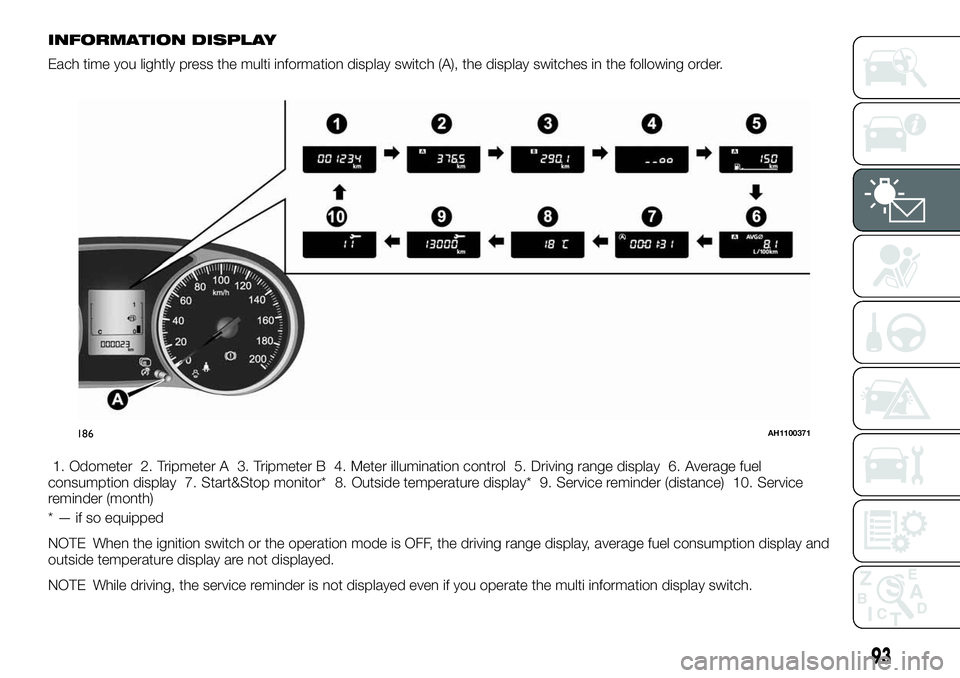
INFORMATION DISPLAY
Each time you lightly press the multi information display switch (A), the display switches in the following order.
1. Odometer 2. Tripmeter A 3. Tripmeter B 4. Meter illumination control 5. Driving range display 6. Average fuel
consumption display 7. Start&Stop monitor* 8. Outside temperature display* 9. Service reminder (distance) 10. Service
reminder (month)
* — if so equipped
NOTE When the ignition switch or the operation mode is OFF, the driving range display, average fuel consumption display and
outside temperature display are not displayed.
NOTE While driving, the service reminder is not displayed even if you operate the multi information display switch.
186AH1100371
93
Page 98 of 316
NOTE If fuel is added with the ignition
switch or the operation mode is ON,
the fuel gauge may incorrectly indicate
the fuel level.
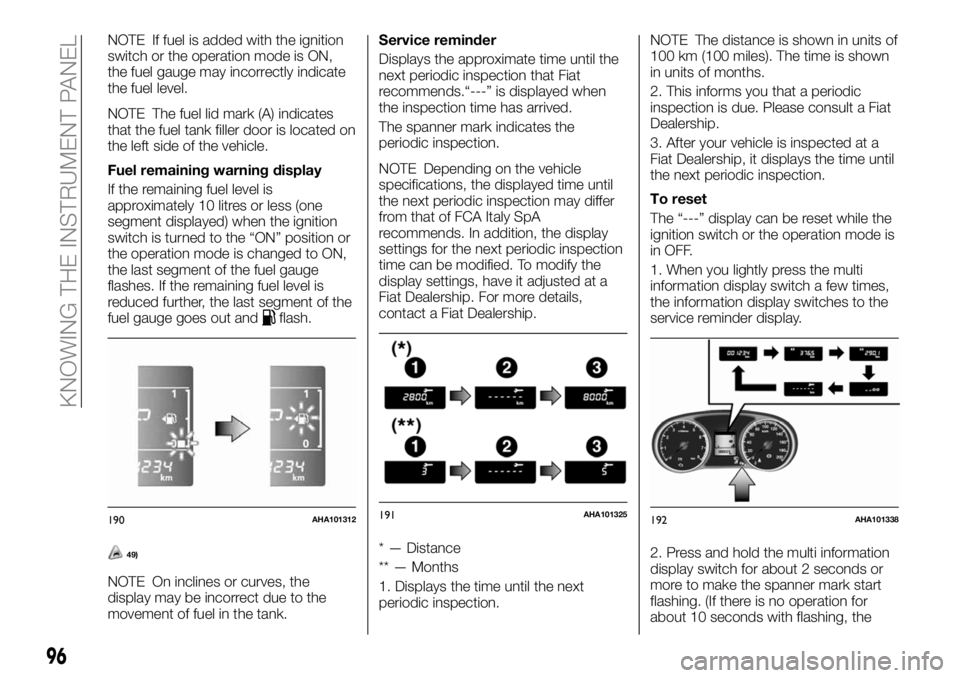
NOTE The fuel lid mark (A) indicates
that the fuel tank filler door is located on
the left side of the vehicle.
Fuel remaining warning display
If the remaining fuel level is
approximately 10 litres or less (one
segment displayed) when the ignition
switch is turned to the “ON” position or
the operation mode is changed to ON,
the last segment of the fuel gauge
flashes. If the remaining fuel level is
reduced further, the last segment of the
fuel gauge goes out and
flash.
49)
NOTE On inclines or curves, the
display may be incorrect due to the
movement of fuel in the tank.Service reminder
Displays the approximate time until the
next periodic inspection that Fiat
recommends.“---” is displayed when
the inspection time has arrived.
The spanner mark indicates the
periodic inspection.
NOTE Depending on the vehicle
specifications, the displayed time until
the next periodic inspection may differ
from that of FCA Italy SpA
recommends. In addition, the display
settings for the next periodic inspection
time can be modified. To modify the
display settings, have it adjusted at a
Fiat Dealership. For more details,
contact a Fiat Dealership.
* — Distance
** — Months
1. Displays the time until the next
periodic inspection.NOTE The distance is shown in units of
100 km (100 miles). The time is shown
in units of months.
2. This informs you that a periodic
inspection is due. Please consult a Fiat
Dealership.
3. After your vehicle is inspected at a
Fiat Dealership, it displays the time until
the next periodic inspection.
To reset
The “---” display can be reset while the
ignition switch or the operation mode is
in OFF.
1. When you lightly press the multi
information display switch a few times,
the information display switches to the
service reminder display.
2. Press and hold the multi information
display switch for about 2 seconds or
more to make the spanner mark start
flashing. (If there is no operation for
about 10 seconds with flashing, the
190AHA101312191AHA101325192AHA101338
96
KNOWING THE INSTRUMENT PANEL
Page 99 of 316
display will revert to its original
indication.)
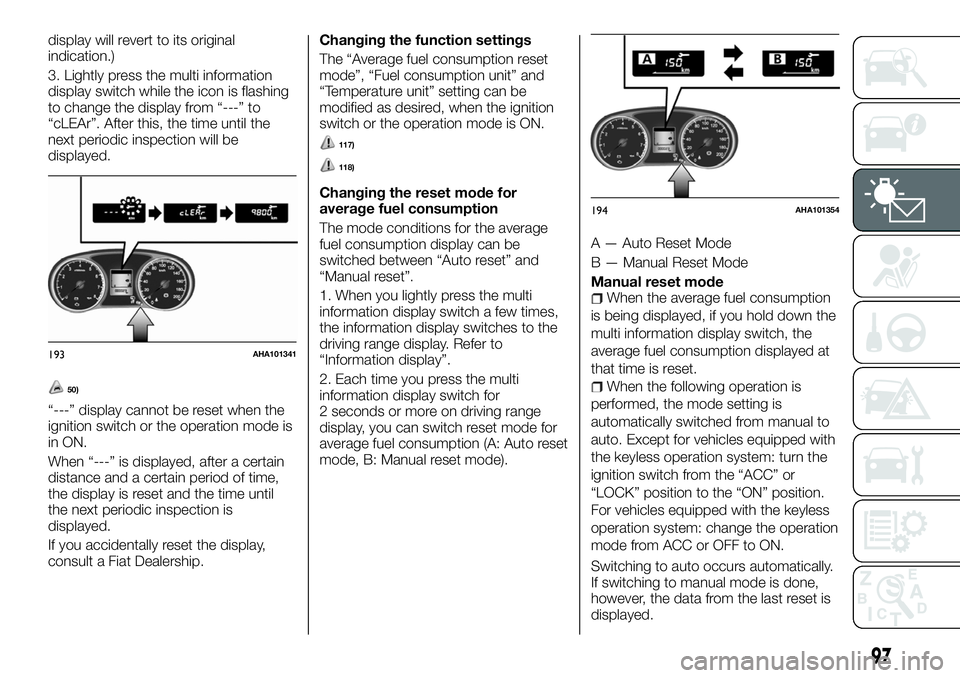
3. Lightly press the multi information
display switch while the icon is flashing
to change the display from “---” to
“cLEAr”. After this, the time until the
next periodic inspection will be
displayed.
50)
“---” display cannot be reset when the
ignition switch or the operation mode is
in ON.
When “---” is displayed, after a certain
distance and a certain period of time,
the display is reset and the time until
the next periodic inspection is
displayed.
If you accidentally reset the display,
consult a Fiat Dealership.Changing the function settings
The “Average fuel consumption reset
mode”, “Fuel consumption unit” and
“Temperature unit” setting can be
modified as desired, when the ignition
switch or the operation mode is ON.
117)
118)
Changing the reset mode for
average fuel consumption
The mode conditions for the average
fuel consumption display can be
switched between “Auto reset” and
“Manual reset”.
1. When you lightly press the multi
information display switch a few times,
the information display switches to the
driving range display. Refer to
“Information display”.
2. Each time you press the multi
information display switch for
2 seconds or more on driving range
display, you can switch reset mode for
average fuel consumption (A: Auto reset
mode, B: Manual reset mode).A — Auto Reset Mode
B — Manual Reset Mode
Manual reset mode
When the average fuel consumption
is being displayed, if you hold down the
multi information display switch, the
average fuel consumption displayed at
that time is reset.
When the following operation is
performed, the mode setting is
automatically switched from manual to
auto. Except for vehicles equipped with
the keyless operation system: turn the
ignition switch from the “ACC” or
“LOCK” position to the “ON” position.
For vehicles equipped with the keyless
operation system: change the operation
mode from ACC or OFF to ON.
Switching to auto occurs automatically.
If switching to manual mode is done,
however, the data from the last reset is
displayed.
193AHA101341
194AHA101354
97
Page 100 of 316
Auto reset modeWhen the average fuel consumption
is being displayed, if you hold down the
multi information display switch, the
average fuel consumption displayed at
that time are reset.
When the engine switch or the
operation mode is in the following
conditions, the average fuel
consumption display is automatically
reset. Except for vehicles equipped with
the keyless operation system: the
ignition switch is in the “ACC” or
“LOCK” position for about 4 hours or
longer. For vehicles equipped with the
keyless operation system: the operation
mode is in ACC or OFF for about
4 hours or longer.
IMPORTANT The average fuel
consumption display can be reset
separately for the auto reset mode and
for the manual reset mode.
IMPORTANT The memory of the
manual reset mode or auto reset mode
for the average fuel consumption
display is erased if the battery is
disconnected.
The initial (default) setting is “Auto reset
mode”.Changing the fuel consumption
display unit
The display unit for fuel consumption
can be switched. The distance and
amount units are also switched to
match the selected fuel consumption
unit.When you lightly press the multi
information display switch a few times,
the information display switches to the
average fuel consumption display. Refer
to “Information display”.
Press and hold the multi information
display switch for about 5 seconds or
more until buzzer sound is heard twice.
Press and hold the multi information
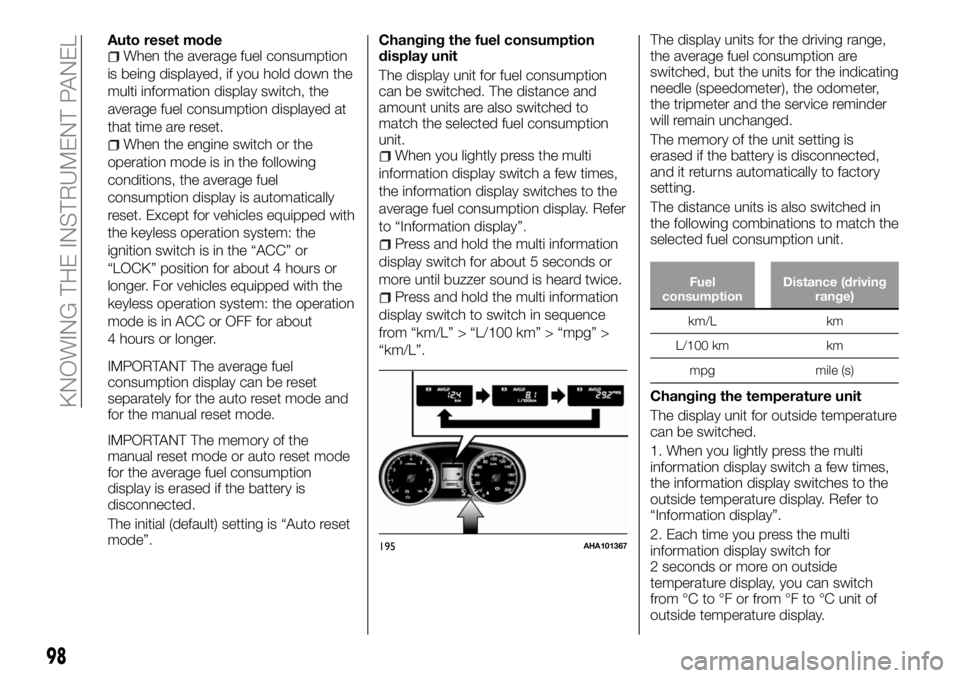
display switch to switch in sequence
from “km/L” > “L/100 km” > “mpg” >
“km/L”.The display units for the driving range,
the average fuel consumption are
switched, but the units for the indicating
needle (speedometer), the odometer,
the tripmeter and the service reminder
will remain unchanged.
The memory of the unit setting is
erased if the battery is disconnected,
and it returns automatically to factory
setting.
The distance units is also switched in
the following combinations to match the
selected fuel consumption unit.Fuel
consumptionDistance (driving
range)
km/L km
L/100 km km
mpg mile (s)
Changing the temperature unit
The display unit for outside temperature
can be switched.
1. When you lightly press the multi
information display switch a few times,
the information display switches to the
outside temperature display. Refer to
“Information display”.
2. Each time you press the multi
information display switch for
2 seconds or more on outside
temperature display, you can switch
from °C to °F or from °F to °C unit of
outside temperature display.
195AHA101367
98
KNOWING THE INSTRUMENT PANEL