ignition FIAT FULLBACK 2018 Owner handbook (in English)
[x] Cancel search | Manufacturer: FIAT, Model Year: 2018, Model line: FULLBACK, Model: FIAT FULLBACK 2018Pages: 316, PDF Size: 10.52 MB
Page 177 of 316
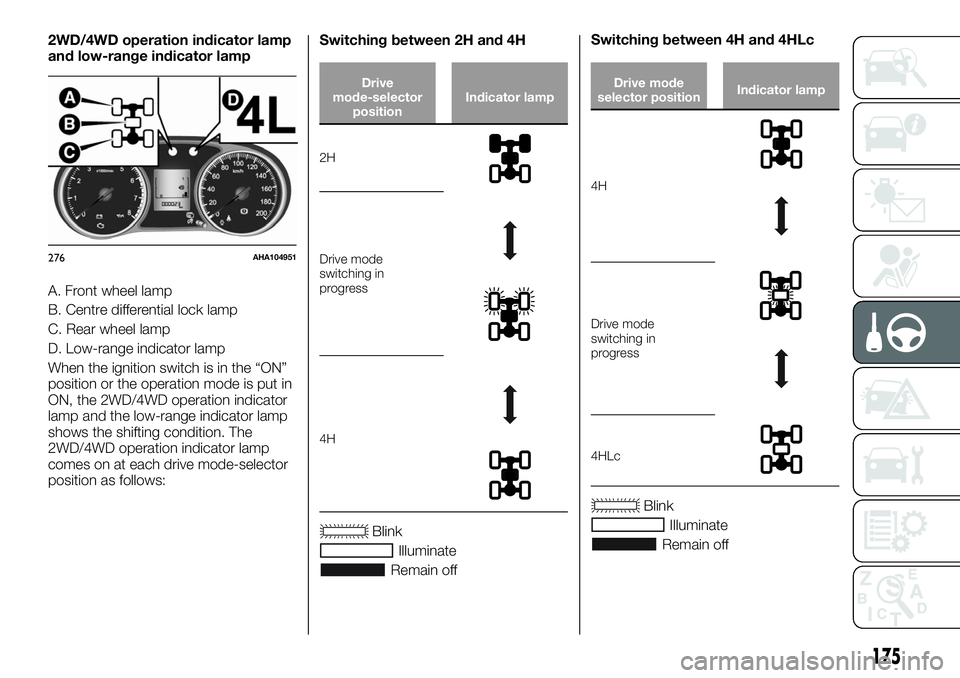
2WD/4WD operation indicator lamp
and low-range indicator lamp
A. Front wheel lamp
B. Centre differential lock lamp
C. Rear wheel lamp
D. Low-range indicator lamp
When the ignition switch is in the “ON”
position or the operation mode is put in
ON, the 2WD/4WD operation indicator
lamp and the low-range indicator lamp
shows the shifting condition. The
2WD/4WD operation indicator lamp
comes on at each drive mode-selector
position as follows:Switching between 2H and 4H
Drive
mode-selector
positionIndicator lamp
2H
Drive mode
switching in
progress
4H
Blink
Illuminate
Remain offSwitching between 4H and 4HLc
Drive mode
selector positionIndicator lamp
4H
Drive mode
switching in
progress
4HLc
Blink
Illuminate
Remain off
276AHA104951
175
Page 180 of 316
141)
NOTE The rear differential lock does
not operate when the drive
mode-selector is in “2H” position (Easy
select 4WD), “2H” or “4H” position
(Super select 4WD II).
NOTE When the rear differential is
locked with the drive mode-selector in
“4L” or “4H” position (Easy select
4WD), “4LLc” or “4HLc” position (Super
select 4WD II) changing the drive
mode-selector to “2H” position (Easy
select 4WD), “2H” or “4H” position
(Super select 4WD II) makes the rear
differential unlock automatically.
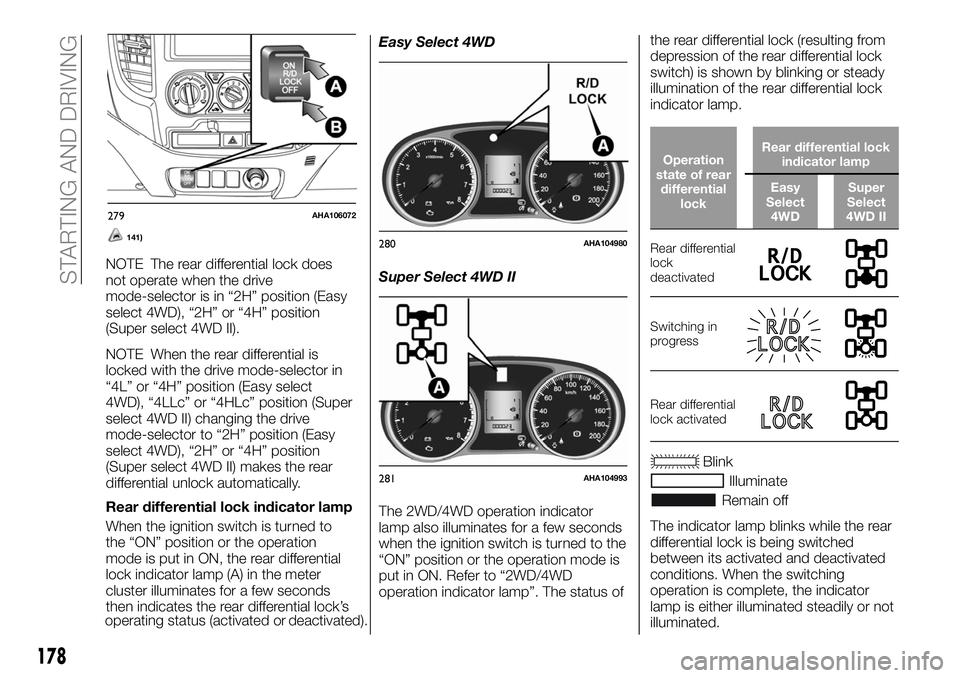
Rear differential lock indicator lamp
When the ignition switch is turned to
the “ON” position or the operation
mode is put in ON, the rear differential
lock indicator lamp (A) in the meter
cluster illuminates for a few seconds
then indicates the rear differential lock’s
operating status (activated or
deactivated).Easy Select 4WD
Super Select 4WD II
The 2WD/4WD operation indicator
lamp also illuminates for a few seconds
when the ignition switch is turned to the
“ON” position or the operation mode is
put in ON. Refer to “2WD/4WD
operation indicator lamp”. The status ofthe rear differential lock (resulting from
depression of the rear differential lock
switch) is shown by blinking or steady
illumination of the rear differential lock
indicator lamp.
Operation
state of rear
differential
lockRear differential lock
indicator lamp
Easy
Select
4WDSuper
Select
4WD II
Rear differential
lock
deactivated
Switching in
progress
Rear differential
lock activated
Blink
Illuminate
Remain off
The indicator lamp blinks while the rear
differential lock is being switched
between its activated and deactivated
conditions. When the switching
operation is complete, the indicator
lamp is either illuminated steadily or not
illuminated.
279AHA106072
280AHA104980
281AHA104993
178
STARTING AND DRIVING
Page 189 of 316
Type 2
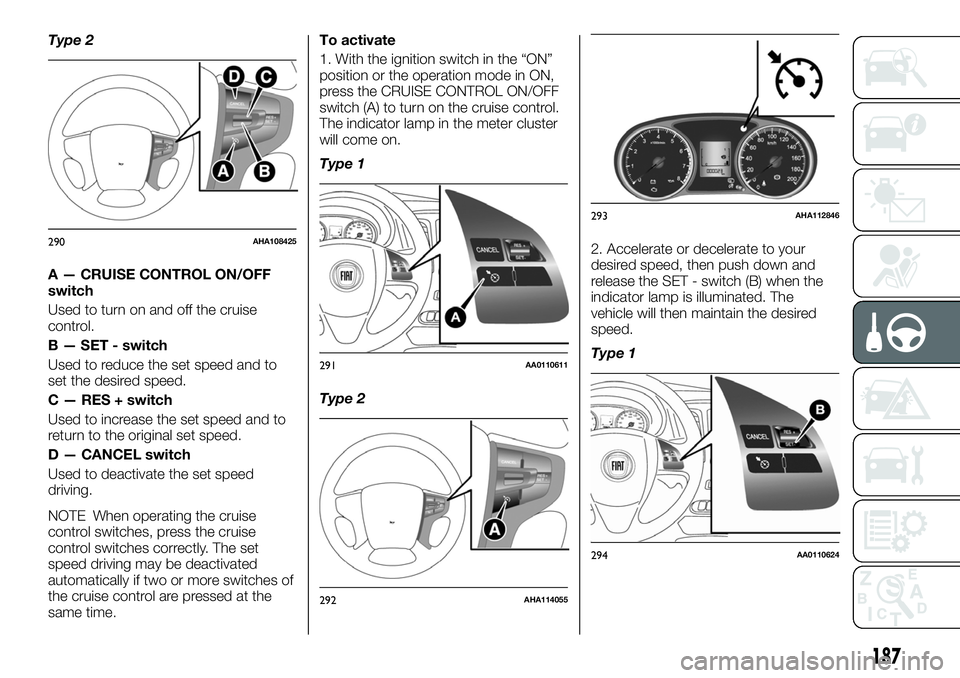
A — CRUISE CONTROL ON/OFF
switch
Used to turn on and off the cruise
control.
B — SET - switch
Used to reduce the set speed and to
set the desired speed.
C — RES + switch
Used to increase the set speed and to
return to the original set speed.
D — CANCEL switch
Used to deactivate the set speed
driving.
NOTE When operating the cruise
control switches, press the cruise
control switches correctly. The set
speed driving may be deactivated
automatically if two or more switches of
the cruise control are pressed at the
same time.To activate
1. With the ignition switch in the “ON”
position or the operation mode in ON,
press the CRUISE CONTROL ON/OFF
switch (A) to turn on the cruise control.
The indicator lamp in the meter cluster
will come on.
Type 1
Type 22. Accelerate or decelerate to your
desired speed, then push down and
release the SET - switch (B) when the
indicator lamp is illuminated. The
vehicle will then maintain the desired
speed.
Type 1
290AHA108425
291AA0110611
292AHA114055
293AHA112846
294AA0110624
187
Page 193 of 316
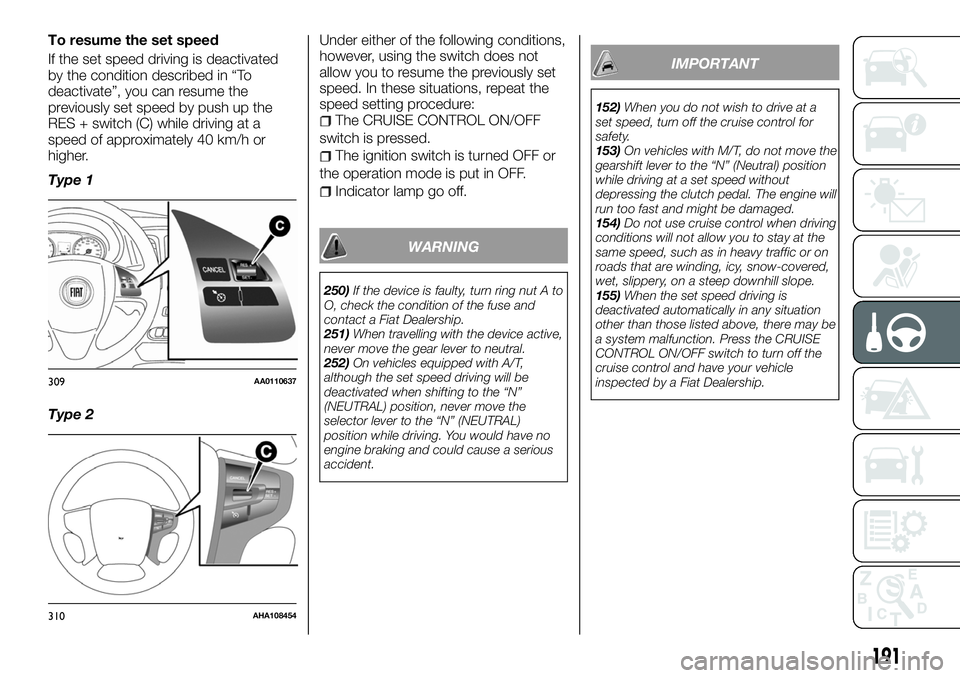
To resume the set speed
If the set speed driving is deactivated
by the condition described in “To
deactivate”, you can resume the
previously set speed by push up the
RES + switch (C) while driving at a
speed of approximately 40 km/h or
higher.
Type 1
Type 2Under either of the following conditions,
however, using the switch does not
allow you to resume the previously set
speed. In these situations, repeat the
speed setting procedure:
The CRUISE CONTROL ON/OFF
switch is pressed.
The ignition switch is turned OFF or
the operation mode is put in OFF.
Indicator lamp go off.
WARNING
250)If the device is faulty, turn ring nut A to
O, check the condition of the fuse and
contact a Fiat Dealership.
251)When travelling with the device active,
never move the gear lever to neutral.
252)On vehicles equipped with A/T,
although the set speed driving will be
deactivated when shifting to the “N”
(NEUTRAL) position, never move the
selector lever to the “N” (NEUTRAL)
position while driving. You would have no
engine braking and could cause a serious
accident.
IMPORTANT
152)When you do not wish to drive at a
set speed, turn off the cruise control for
safety.
153)On vehicles with M/T, do not move the
gearshift lever to the “N” (Neutral) position
while driving at a set speed without
depressing the clutch pedal. The engine will
run too fast and might be damaged.
154)Do not use cruise control when driving
conditions will not allow you to stay at the
same speed, such as in heavy traffic or on
roads that are winding, icy, snow-covered,
wet, slippery, on a steep downhill slope.
155)When the set speed driving is
deactivated automatically in any situation
other than those listed above, there may be
a system malfunction. Press the CRUISE
CONTROL ON/OFF switch to turn off the
cruise control and have your vehicle
inspected by a Fiat Dealership.
309AA0110637
310AHA108454
191
Page 195 of 316
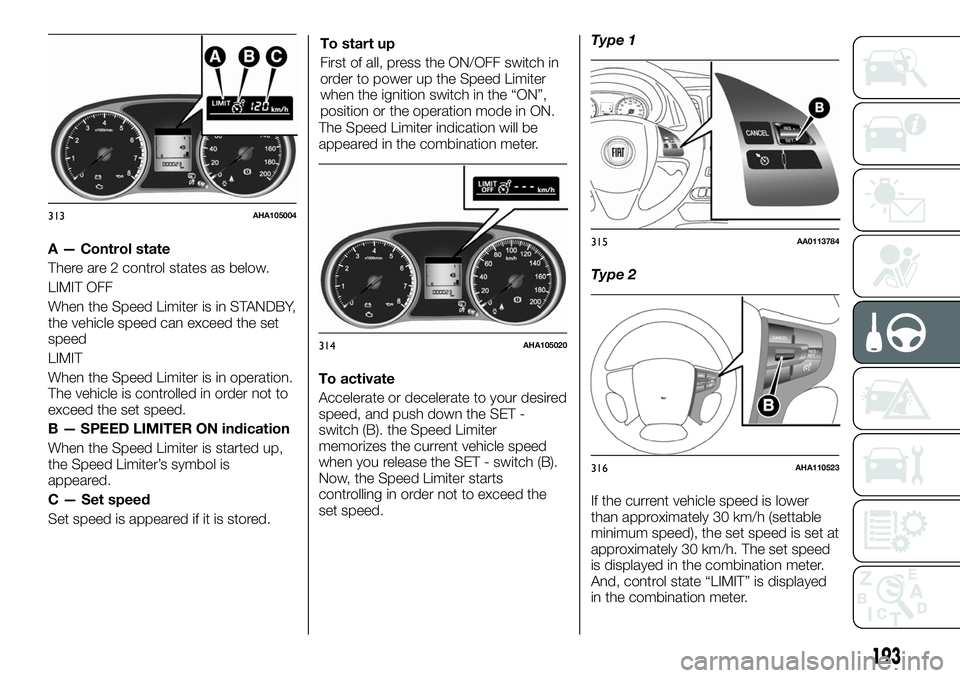
A — Control state
There are 2 control states as below.
LIMIT OFF
When the Speed Limiter is in STANDBY,
the vehicle speed can exceed the set
speed
LIMIT
When the Speed Limiter is in operation.
The vehicle is controlled in order not to
exceed the set speed.
B — SPEED LIMITER ON indication
When the Speed Limiter is started up,
the Speed Limiter’s symbol is
appeared.
C — Set speed
Set speed is appeared if it is stored.To start up
First of all, press the ON/OFF switch in
order to power up the Speed Limiter
when the ignition switch in the “ON”,
position or the operation mode in ON.
The Speed Limiter indication will be
appeared in the combination meter.
To activate
Accelerate or decelerate to your desired
speed, and push down the SET -
switch (B). the Speed Limiter
memorizes the current vehicle speed
when you release the SET - switch (B).
Now, the Speed Limiter starts
controlling in order not to exceed the
set speed.Type 1
Type 2
If the current vehicle speed is lower
than approximately 30 km/h (settable
minimum speed), the set speed is set at
approximately 30 km/h. The set speed
is displayed in the combination meter.
And, control state “LIMIT” is displayed
in the combination meter.
313AHA105004
314AHA105020
315AA0113784
316AHA110523
193
Page 200 of 316
LANE DEPARTURE
WARNING
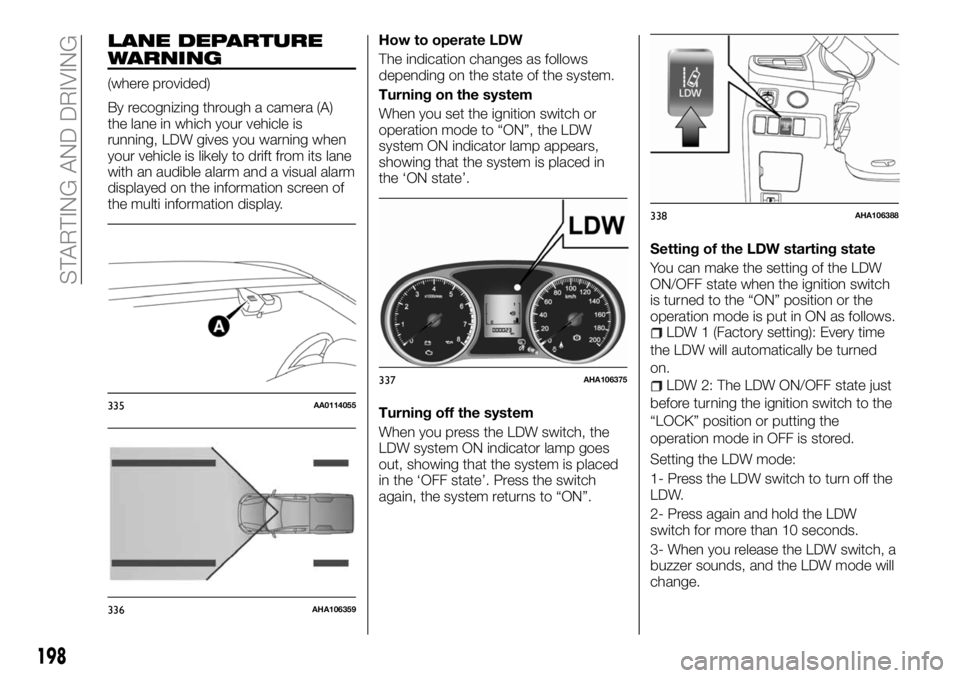
(where provided)
By recognizing through a camera (A)
the lane in which your vehicle is
running, LDW gives you warning when
your vehicle is likely to drift from its lane
with an audible alarm and a visual alarm
displayed on the information screen of
the multi information display.How to operate LDW
The indication changes as follows
depending on the state of the system.
Turning on the system
When you set the ignition switch or
operation mode to “ON”, the LDW
system ON indicator lamp appears,
showing that the system is placed in
the ‘ON state’.
Turning off the system
When you press the LDW switch, the
LDW system ON indicator lamp goes
out, showing that the system is placed
in the ‘OFF state’. Press the switch
again, the system returns to “ON”.Setting of the LDW starting state
You can make the setting of the LDW
ON/OFF state when the ignition switch
is turned to the “ON” position or the
operation mode is put in ON as follows.
LDW 1 (Factory setting): Every time
the LDW will automatically be turned
on.
LDW 2: The LDW ON/OFF state just
before turning the ignition switch to the
“LOCK” position or putting the
operation mode in OFF is stored.
Setting the LDW mode:
1- Press the LDW switch to turn off the
LDW.
2- Press again and hold the LDW
switch for more than 10 seconds.
3- When you release the LDW switch, a
buzzer sounds, and the LDW mode will
change.
335AA0114055
336AHA106359
337AHA106375
338AHA106388
198
STARTING AND DRIVING
Page 203 of 316
160)Follow the instructions given below to
keep your LDW in good operating
conditions: always keep the windscreen
clean; avoid applying a strong shock or
pressure to the LDW camera. Do not
attempt to disassemble it; disturbing the
installation of the LDW camera or its
removal is under no circumstances
permitted. The camera has been precisely
oriented at the factory; do not put anything
like a sticker on the area in front of the LDW
camera lens of the windscreen; use only
GENUINE Parts when replacing the
windscreen wipers.REAR VIEW CAMERA
(where provided)
The rear view camera is a system that
shows the view behind the vehicle on a
screen of the Multi Communication
System (MCS), the Smartphone Link
Display Audio or the DISPLAY AUDIO.
260) 261) 262)
161)
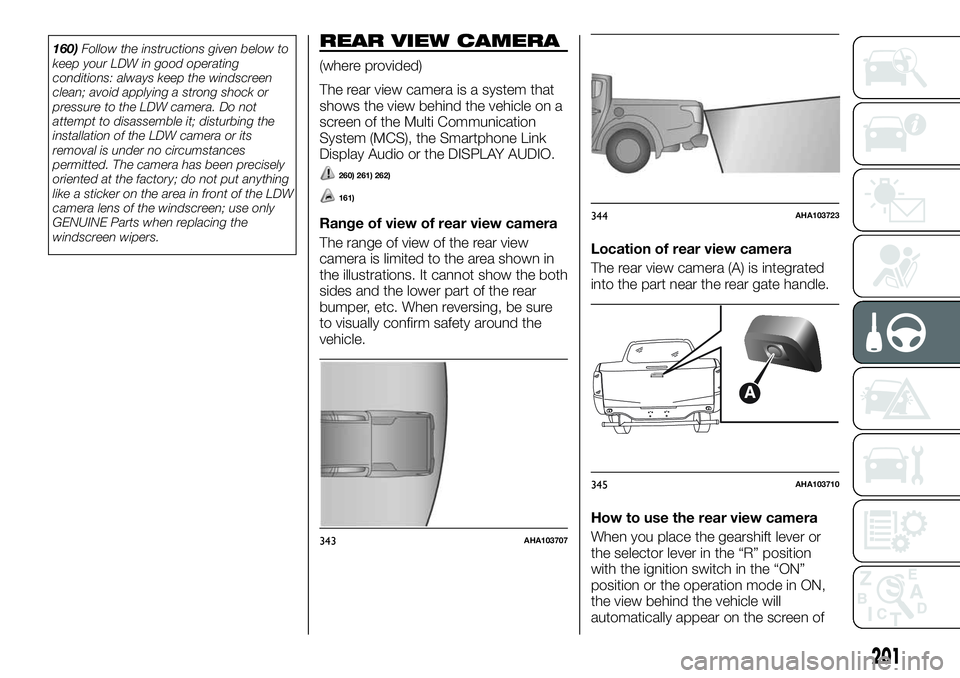
Range of view of rear view camera
The range of view of the rear view
camera is limited to the area shown in
the illustrations. It cannot show the both
sides and the lower part of the rear
bumper, etc. When reversing, be sure
to visually confirm safety around the
vehicle.Location of rear view camera
The rear view camera (A) is integrated
into the part near the rear gate handle.
How to use the rear view camera
When you place the gearshift lever or
the selector lever in the “R” position
with the ignition switch in the “ON”
position or the operation mode in ON,
the view behind the vehicle will
automatically appear on the screen of
343AHA103707
344AHA103723
345AHA103710
201
Page 208 of 316
ERA GLONASS
(where provided)
ERA-GLONASS is a system designed
to reduce the severity of accidents. The
location and vehicle information is
transmitted from the system to the
emergency call centre in case of an
accident or sudden illness, and the
emergency call centre arranges for
despatch of emergency vehicles as
required.
263) 264) 265) 266)
NOTE This system reports to the
emergency call centre, but does not
directly arrange an emergency vehicle
or pass to the road service. This system
helps an emergency call for a traffic
accident or sudden illness, but does
not have a function to protect the
occupants.
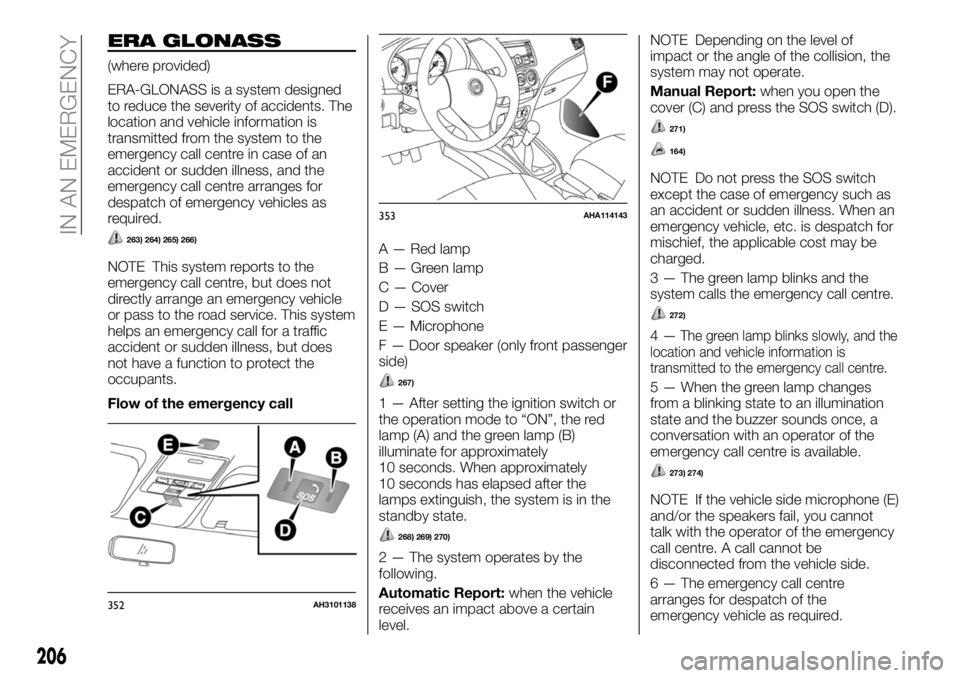
Flow of the emergency callA — Red lamp
B — Green lamp
C — Cover
D — SOS switch
E — Microphone
F — Door speaker (only front passenger
side)
267)
1 — After setting the ignition switch or
the operation mode to “ON”, the red
lamp (A) and the green lamp (B)
illuminate for approximately
10 seconds. When approximately
10 seconds has elapsed after the
lamps extinguish, the system is in the
standby state.
268) 269) 270)
2 — The system operates by the
following.
Automatic Report:when the vehicle
receives an impact above a certain
level.NOTE Depending on the level of
impact or the angle of the collision, the
system may not operate.
Manual Report:when you open the
cover (C) and press the SOS switch (D).
271)
164)
NOTE Do not press the SOS switch
except the case of emergency such as
an accident or sudden illness. When an
emergency vehicle, etc. is despatch for
mischief, the applicable cost may be
charged.
3 — The green lamp blinks and the
system calls the emergency call centre.
272)
4—The green lamp blinks slowly, and the
location and vehicle information is
transmitted to the emergency call centre.
5 — When the green lamp changes
from a blinking state to an illumination
state and the buzzer sounds once, a
conversation with an operator of the
emergency call centre is available.
273) 274)
NOTE If the vehicle side microphone (E)
and/or the speakers fail, you cannot
talk with the operator of the emergency
call centre. A call cannot be
disconnected from the vehicle side.
6 — The emergency call centre
arranges for despatch of the
emergency vehicle as required.
352AH3101138
353AHA114143
206
IN AN EMERGENCY
Page 209 of 316
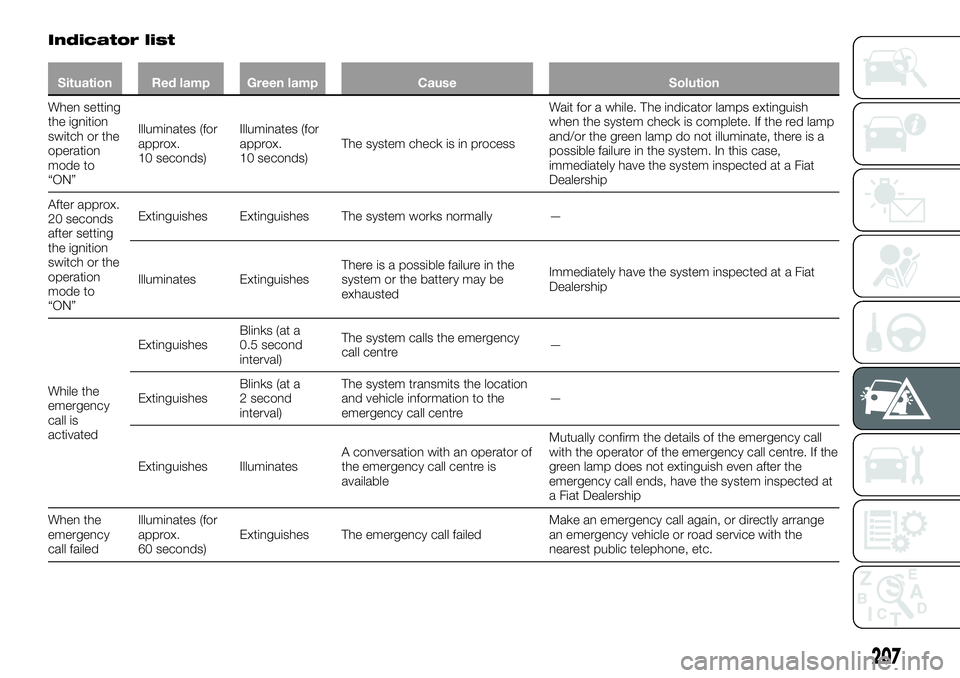
Indicator list
Situation Red lamp Green lamp Cause Solution
When setting
the ignition
switch or the
operation
mode to
“ON”Illuminates (for
approx.
10 seconds)Illuminates (for
approx.
10 seconds)The system check is in processWait for a while. The indicator lamps extinguish
when the system check is complete. If the red lamp
and/or the green lamp do not illuminate, there is a
possible failure in the system. In this case,
immediately have the system inspected at a Fiat
Dealership
After approx.
20 seconds
after setting
the ignition
switch or the
operation
mode to
“ON”Extinguishes Extinguishes The system works normally —
Illuminates ExtinguishesThere is a possible failure in the
system or the battery may be
exhaustedImmediately have the system inspected at a Fiat
Dealership
While the
emergency
call is
activatedExtinguishesBlinks (at a
0.5 second
interval)The system calls the emergency
call centre—
ExtinguishesBlinks (at a
2 second
interval)The system transmits the location
and vehicle information to the
emergency call centre—
Extinguishes IlluminatesA conversation with an operator of
the emergency call centre is
availableMutually confirm the details of the emergency call
with the operator of the emergency call centre. If the
green lamp does not extinguish even after the
emergency call ends, have the system inspected at
a Fiat Dealership
When the
emergency
call failedIlluminates (for
approx.
60 seconds)Extinguishes The emergency call failedMake an emergency call again, or directly arrange
an emergency vehicle or road service with the
nearest public telephone, etc.
207
Page 210 of 316
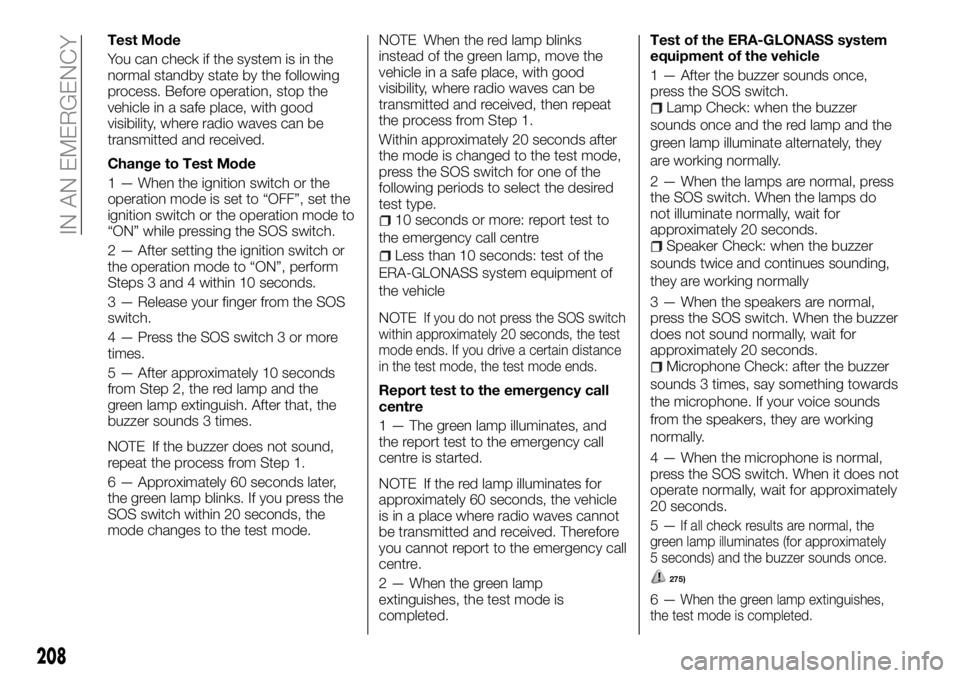
Test Mode
You can check if the system is in the
normal standby state by the following
process. Before operation, stop the
vehicle in a safe place, with good
visibility, where radio waves can be
transmitted and received.
Change to Test Mode
1 — When the ignition switch or the
operation mode is set to “OFF”, set the
ignition switch or the operation mode to
“ON” while pressing the SOS switch.
2 — After setting the ignition switch or
the operation mode to “ON”, perform
Steps 3 and 4 within 10 seconds.
3 — Release your finger from the SOS
switch.
4 — Press the SOS switch 3 or more
times.
5 — After approximately 10 seconds
from Step 2, the red lamp and the
green lamp extinguish. After that, the
buzzer sounds 3 times.
NOTE If the buzzer does not sound,
repeat the process from Step 1.
6 — Approximately 60 seconds later,
the green lamp blinks. If you press the
SOS switch within 20 seconds, the
mode changes to the test mode.NOTE When the red lamp blinks
instead of the green lamp, move the
vehicle in a safe place, with good
visibility, where radio waves can be
transmitted and received, then repeat
the process from Step 1.
Within approximately 20 seconds after
the mode is changed to the test mode,
press the SOS switch for one of the
following periods to select the desired
test type.
10 seconds or more: report test to
the emergency call centre
Less than 10 seconds: test of the
ERA-GLONASS system equipment of
the vehicle
NOTE
If you do not press the SOS switch
within approximately 20 seconds, the test
mode ends. If you drive a certain distance
in the test mode, the test mode ends.
Report test to the emergency call
centre
1 — The green lamp illuminates, and
the report test to the emergency call
centre is started.
NOTE If the red lamp illuminates for
approximately 60 seconds, the vehicle
is in a place where radio waves cannot
be transmitted and received. Therefore
you cannot report to the emergency call
centre.
2 — When the green lamp
extinguishes, the test mode is
completed.Test of the ERA-GLONASS system
equipment of the vehicle
1 — After the buzzer sounds once,
press the SOS switch.
Lamp Check: when the buzzer
sounds once and the red lamp and the
green lamp illuminate alternately, they
are working normally.
2 — When the lamps are normal, press
the SOS switch. When the lamps do
not illuminate normally, wait for
approximately 20 seconds.
Speaker Check: when the buzzer
sounds twice and continues sounding,
they are working normally
3 — When the speakers are normal,
press the SOS switch. When the buzzer
does not sound normally, wait for
approximately 20 seconds.
Microphone Check: after the buzzer
sounds 3 times, say something towards
the microphone. If your voice sounds
from the speakers, they are working
normally.
4 — When the microphone is normal,
press the SOS switch. When it does not
operate normally, wait for approximately
20 seconds.
5—
If all check results are normal, the
green lamp illuminates (for approximately
5 seconds) and the buzzer sounds once.
275)
6—When the green lamp extinguishes,
the test mode is completed.
208
IN AN EMERGENCY