set FIAT MULTIPLA 2004 1.G Connect NavPlus Manual
[x] Cancel search | Manufacturer: FIAT, Model Year: 2004, Model line: MULTIPLA, Model: FIAT MULTIPLA 2004 1.GPages: 202, PDF Size: 2.22 MB
Page 190 of 202
189
CONNECT NAV
NAVIGATOR
Switching the time status
on and off
Proceed as follows to switch the
time status function on and off:
1)open the SETTINGS menu
fig. 185as described previously
2) turn the knob/button (11) to se-
lect CLOCK
3) press the knob/button (11) to
confirm
4)turn the knob/button (11) to se-
lect STATUS CLOCK
5) press the knob/button (11) to dis-
play ON or OFF
Setting the exact time
manually
Proceed as follows to set manually
the exact time (e.g.: when no GPS
satellite signal is received):
1) open the SETTINGS menu
fig. 185as described previously2) turn the knob/button (11) to se-
lect CLOCK
3)press the knob/button (11) to
confirm
4)turn the knob/button (11) to se-
lect SETTINGS
5) turn the knob/button (11) to se-
lect SYSTEM TIME
6)press the knob/button (11) to
confirm: hours will be displayed with
reverse writing
7)turn the knob/button (11) to set
hours
8) press the knob/button (11) to
confirm: minutes will be displayed with
reverse writing
9)turn the knob/button (11) to set
minutes
10)press the knob/button (11) to
confirmSELECTING THE LANGUAGE
You can select the language for mes-
sages on the display. “Metric” (dis-
tances in kilometres) and “imperial”
(distances in miles) versions are of-
fered for English
1)open the SETTINGS menu
fig. 185as described previously
2)turn the knob/button (11) to se-
lect LANGUAGE
3) press the knob/button (11) to
confirm: the display will show the list
of the available languages
4)select the required language by
turning the knob/button (
11)
5)confirm the selection by pressing
the knob/button (11).
Page 191 of 202
190
CONNECT NAV
NAVIGATOR
A new language will be loaded. At the
end of the loading operation, with the
navigation CD inserted in the drive, a
confirmation voice message will be
heard.
The SETTINGS menu will be then
displayed again.
IMPORTANT For certain coun-
tries (e.g. Denmark, Sweden and Por-
tugal), the voice messages related to
Navigation are in English whereas dis-
played messages are written in the lan-
guage of each country.GPS STATUS
Proceed as follows to display the
number of GPS satellites which can be
received and the car position:
1) press the NAV button (12) to
open the main navigation menu
2) press MEN (10) to display the
SETTINGS menu
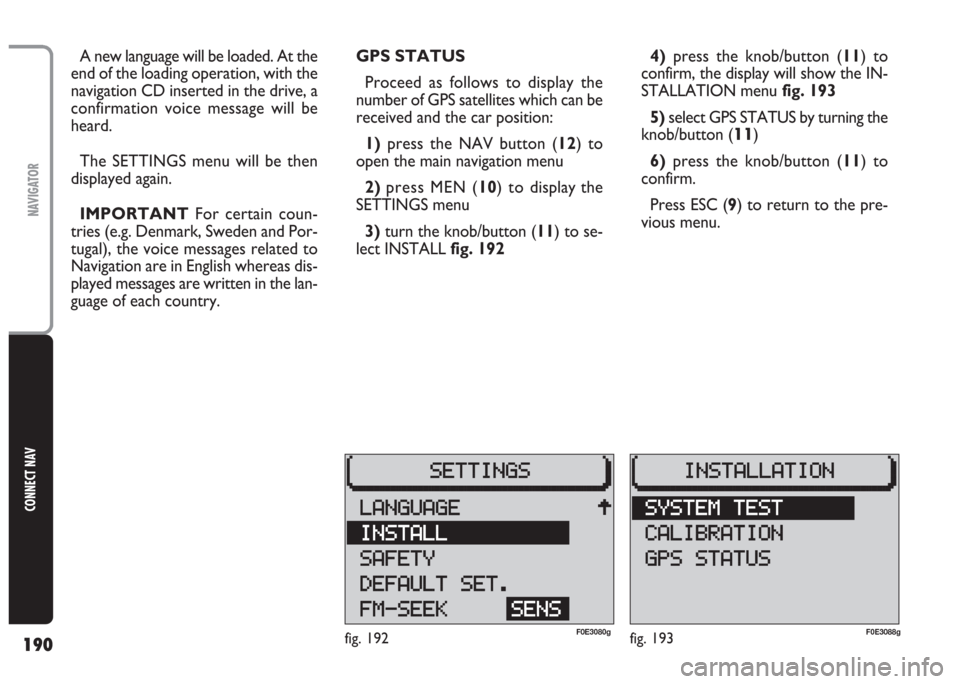
3) turn the knob/button (11) to se-
lect INSTALL fig. 1924)press the knob/button (11) to
confirm, the display will show the IN-
STALLATION menufig. 193
5)select GPS STATUS by turning the
knob/button (
11)
6)press the knob/button (11) to
confirm.
Press ESC (9) to return to the pre-
vious menu.
fig. 192F0E3080gfig. 193F0E3088g
Page 192 of 202
191
CONNECT NAV
NAVIGATOR
Proceed as follows to activate/deac-
tivate the code:
1) press the NAV button (12) to
open the main navigation menu
2)press the MEN button (10) to
open the SETTINGS menu
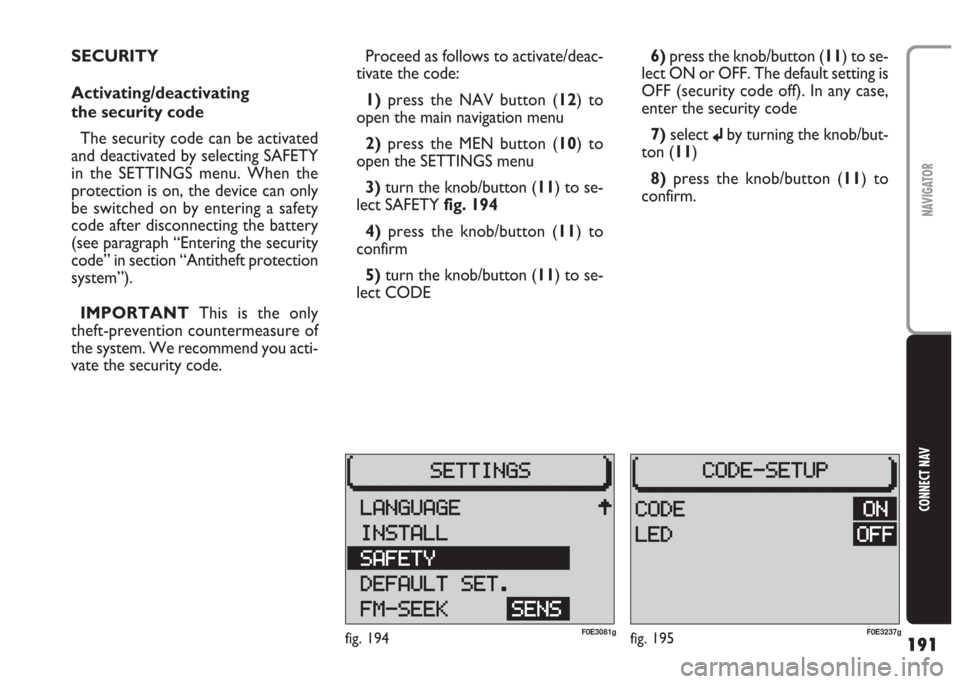
3)turn the knob/button (11) to se-
lect SAFETY fig. 194
4) press the knob/button (11) to
confirm
5)turn the knob/button (11) to se-
lect CODE6) press the knob/button (11) to se-
lect ON or OFF. The default setting is
OFF (security code off). In any case,
enter the security code
7)select
jby turning the knob/but-
ton (11)
8)press the knob/button (11) to
confirm. SECURITY
Activating/deactivating
the security code
The security code can be activated
and deactivated by selecting SAFETY
in the SETTINGS menu. When the
protection is on, the device can only
be switched on by entering a safety
code after disconnecting the battery
(see paragraph “Entering the security
code” in section “Antitheft protection
system”).
IMPORTANT This is the only
theft-prevention countermeasure of
the system. We recommend you acti-
vate the security code.
fig. 194F0E3081gfig. 195F0E3237g
Page 193 of 202
192
CONNECT NAV
NAVIGATOR
Resetting default
settings (reset)
To reset the system default settings:
1)press the NAV button (12) to
open the main navigation menu
2)press the MEN button (10) to
open the SETTINGS menu
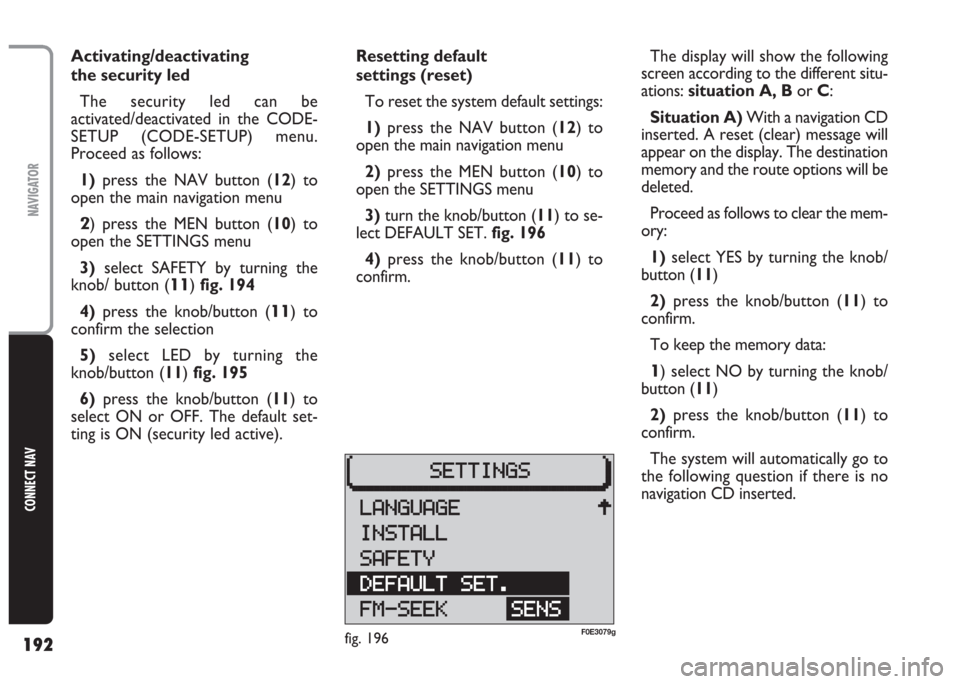
3) turn the knob/button (11) to se-
lect DEFAULT SET. fig. 196
4)press the knob/button (11) to
confirm. Activating/deactivating
the security led
The security led can be
activated/deactivated in the CODE-
SETUP (CODE-SETUP) menu.
Proceed as follows:
1)press the NAV button (12) to
open the main navigation menu
2) press the MEN button (10) to
open the SETTINGS menu
3)select SAFETY by turning the
knob/ button (
11) fig. 194
4)press the knob/button (
11) to
confirm the selection
5)select LED by turning the
knob/button (11) fig. 195
6) press the knob/button (11) to
select ON or OFF. The default set-
ting is ON (security led active).The display will show the following
screen according to the different situ-
ations: situation A, Bor C:
Situation A)With a navigation CD
inserted. A reset (clear) message will
appear on the display. The destination
memory and the route options will be
deleted.
Proceed as follows to clear the mem-
ory:
1) select YES by turning the knob/
button (11)
2)press the knob/button (11) to
confirm.
To keep the memory data:
1) select NO by turning the knob/
button (11)
2) press the knob/button (11) to
confirm.
The system will automatically go to
the following question if there is no
navigation CD inserted.
fig. 196F0E3079g
Page 194 of 202
193
CONNECT NAV
NAVIGATOR
Situation B)A CD sound setting
deletion message will appear on the
display.
Proceed as follows to clear the
memory:
1)select YES by turning the knob/
button (11)
2) press the knob/button (11) for
longer than two seconds to confirm.
To keep the memory data
1) select END by turning the knob/
button (11)
2)press the knob/button (11) for
longer than two seconds to confirm.Situation C)Finally, a SETTINGS
menu option and sound volume dele-
tion message will appear on the dis-
play.
Proceed as follows to clear the mem-
ory:
1)select YES by turning the knob/
button (11)
2)press the knob/button (11) for
longer than two seconds to confirm.
To keep the memory data:
1)select NO by turning the knob/
button (11)
2)press the knob/button (11) for
longer than two seconds to confirm.IMPORTANT In all three cases, se-
lect SI to reset (clear) the memory.
The system will automatically switch
off and on again.
IMPORTANT Select NO in any
case to automatically return to the
SETTINGS menu.
Page 195 of 202
194
CONNECT NAV
NAVIGATOR
Setting tuner sensitivity
With this function it is possible to set
the sensitivity of automatic radio sta-
tion tuning.
Proceed as follows:
1)press the NAV button (12) to
open the main navigation menu
2)press the MEN button (10) to
open the SETTINGS menu
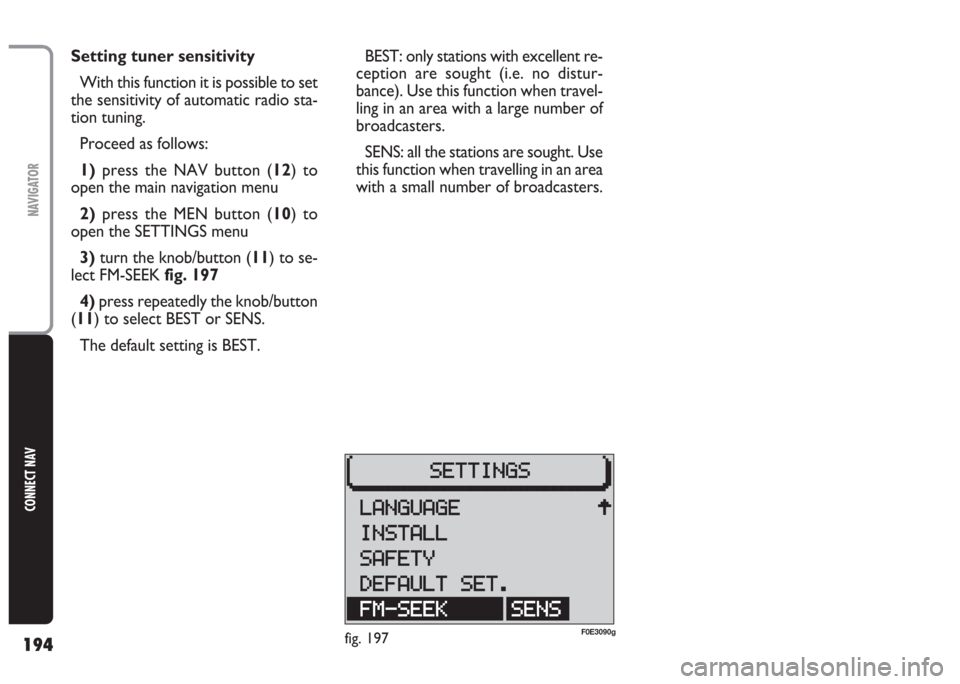
3)turn the knob/button (11) to se-
lect FM-SEEK fig. 197
4) press repeatedly the knob/button
(11) to select BEST or SENS.
The default setting is BEST.BEST: only stations with excellent re-
ception are sought (i.e. no distur-
bance). Use this function when travel-
ling in an area with a large number of
broadcasters.
SENS: all the stations are sought. Use
this function when travelling in an area
with a small number of broadcasters.
fig. 197F0E3090g
Page 197 of 202
196
CONNECT NAV
NAVIGATOR
Proceed as follows to enter the se-
curity code:
1) select the first code digit by turn-
ing the knob/button (11)
2) confirm the first digit by pressing
the knob/button (11)
3) continue with the other three dig-
its to complete the security code.
Proceed as follows if you make a
mistake:
1) position the cursor on
¯fig. 199
by turning the knob/button (11)
2) press the knob/button (11) to
confirm.
When the code is complete, position
the cursor on symbol
jand confirm
with the knob/button (11). The device
will switch to radio mode.IMPORTANT You can repeat
code entry if you make a mistake. The
device will however lock out for one
hour after the third attempt to pre-
vent entering the code by attempts.
Keep the Navigator on for on hour
before entering the code again. The
timeout (always one hour) will start
from zero again if the battery is dis-
connected during this period of time.Deactivating/activating
the security code
The security code can be deactivat-
ed, see paragraph “Security” in section
“Basic settings”.
Page 199 of 202
198
CONNECT NAV
NAVIGATOR
AUDIO
– Separate bass/treble settings.
– Right/left and front/rear channel
balance.
– Automatic LOUDNESS function.SATELLITE NAVIGATION
– Voice messages for the route to be
followed.
– Driving advice, distance and esti-
mated time required to reach the des-
tination on the display.
– Possibility of entering special or dif-
ferent destinations.
– Possibility of storing destinations.
TARGA INFOMOBILITY
SERVICES
– Access to Targa infomobility
services:
•“Infomobility” services (Connect,
Follow me function, (Message list)
•“Medical advice” service
•“Road assistance” serviceTELEPHONE
– Handfree set (using the speakers
fitted on the car)
– Phone book
– Sending/receiving short text mes-
sages (SMS)
– Enabling SIM card reading
Multimedia CDs contain
sound and data tracks.
Playing these CDs can cause noise
loud enough to jeopardise road
safety and damage final stages and
speakers.
WARNING