Key FIAT PANDA 2009 169 / 2.G User Guide
[x] Cancel search | Manufacturer: FIAT, Model Year: 2009, Model line: PANDA, Model: FIAT PANDA 2009 169 / 2.GPages: 226, PDF Size: 5.29 MB
Page 28 of 226
27KNOW YOUR
VEHICLESAFETY
CORRECT USE
OF THE CAR
WARNING LIGHTS
AND MESSAGES
IN
AN EMERGENCY
CAR
MAINTENANCE
TECHNICAL
SPECIFICATIONS
INDEX
Note The “Scheduled servicing plan” ensures car servic-
ing every 20,000 km (or 12,000 miles). This is automati-
cally displayed when the ignition key is in the MAR posi-
tion, from 2,000 km (or the equivalent in miles) before the
service and reappears every 200 km (or the equivalent
in miles). Below 200 km servicing indications are more fre-
quent. The displaying will be in kilometres or miles de-
pending on the measurement unit settings. When the next
scheduled servicing is approaching (“coupon”), the mes-
sage “Service” will appear on the display followed by
the number of kilometres or miles left when the key is
turned to MAR. Contact a Fiat Dealership to carry out any
service operation provided by the “Scheduled servicing
plan” and to reset the display.
Exit Menu
This is the last function that closes the cycle of settings
listed in the menu screen.
Briefly press the button MODE to go back to the standard
screen without storing the settings.
Press the button
–to return to the first menu option
(Speed Lim.). Adjust the button volume (Button Vol.)
This function is used to set the volume (8 levels) of the
beep accompanying the activation of the buttons MODE,
+ and –.
To set the desired volume, proceed as follows:
– briefly press the button MODE: the previously set
volume “level” will flash on the display;
– press the button + or – for setting;
– briefly press the button MODE to go back to the menu
screen or press the button for a prolonged time to go back
to the standard screen without storing the settings.
Scheduled Servicing (Service)
By this function you can display information about the
mileage intervals for car servicing.
To consult this display, proceed as follows:
– briefly press the button MODE: the display shows ser-
vice requirements in km or mi according to the previous
setting (see paragraph “Measurement units”);
– briefly press the button MODE to go back to the menu
screen or press the button for a prolonged time to go back
to the standard screen.
001-030 PANDA EN 7-10-2009 13:40 Pagina 27
Page 29 of 226
28
KNOW YOUR
VEHICLE
SAFETY
CORRECT USE
OF THE CAR
WARNING LIGHTS
AND MESSAGES
IN
AN EMERGENCY
CAR
MAINTENANCE
TECHNICAL
SPECIFICATIONS
INDEX
– Average consumption B (for versions/markets where
provided)
– Average speed B
– Trip time B (driving time).
NOTE “Trip B” function can be excluded (see paragraph
“Trip B on”). “‘Range to empty” cannot be reset.
Values displayed
Range (for versions/markets where provided)
This value shows the distance that the car can still cover
before needing fuel, assuming that driving conditions are
kept unvaried. The display will show the reading “----”
when the following events take place:
– range value lower than 50 km (or 30 mi)
– car parked with engine running for long.
Trip distance
This value shows the distance covered from the start of
the new mission.Average consumption (for versions/markets where provided)This value shows the average consumption from the start
of the new mission.Instant consumption (for versions/markets where provided)This indicates instant fuel consumption and it is constant-
ly updated. The display will show “----” if the car is parked
with the engine running.
TRIP COMPUTER (for versions/markets, where provided)
General features
The “Trip computer” is provided on cars fitted with mul-
tifunction display or reconfigurable multifunction display.
With ignition key at MAR, the “Trip computer” displays
information about the operating status of the car. This
function comprises the “General trip” concerning the
“complete mission” of the car (journey) and “Trip B”, (on-
ly available on reconfigurable multifunction display), con-
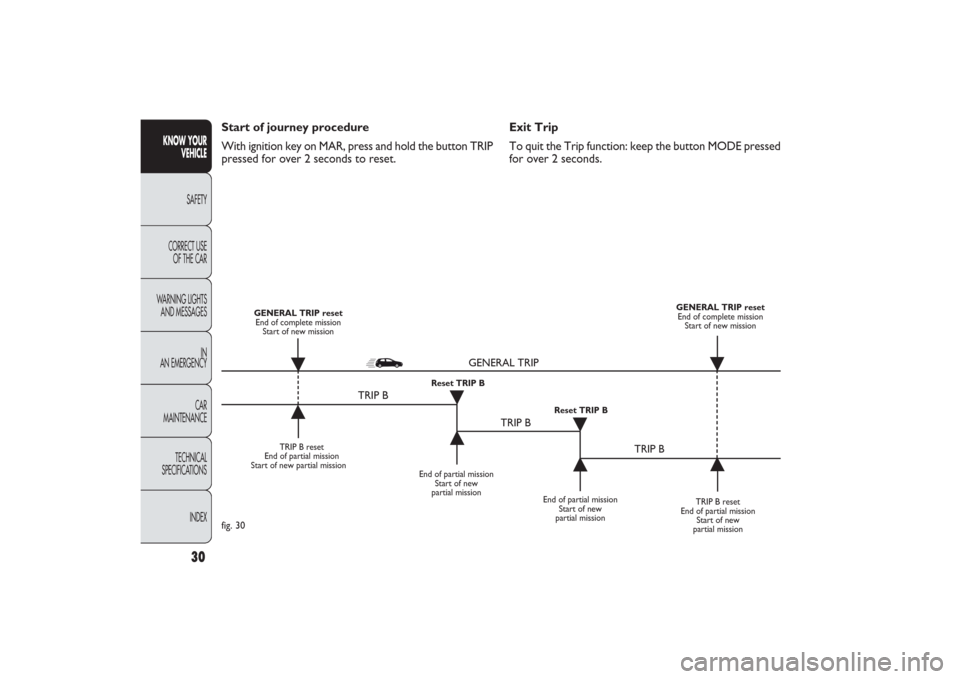
cerning the partial mission of the car; this function is in-
cluded in the general trip information (as shown in fig. 30).
Both functions can be reset (reset means start of a new
journey).
“General Trip” displays the figures relating to:
– Range to empty (for versions/markets, where provided)
– Trip distance
– Average consumption (for versions/markets where pro-
vided)
– Instant consumption (for versions/markets where pro-
vided)
– Average speed
– Trip time (driving time).
“Trip B”, available on the reconfigurable multifunction dis-
play only, shows only the figures relating to:
– Trip distance B
001-030 PANDA EN 7-10-2009 13:40 Pagina 28
Page 30 of 226
29KNOW YOUR
VEHICLESAFETY
CORRECT USE
OF THE CAR
WARNING LIGHTS
AND MESSAGES
IN
AN EMERGENCY
CAR
MAINTENANCE
TECHNICAL
SPECIFICATIONS
INDEX
New mission
A new mission starts after:
– “manual” resetting by the user, by pressing the relevant
button;
– “automatic” resetting, when the “Trip distance” reaches
3999.9 km or 9999.9 km (according to the type of display)
or when the “Trip time” reaches 99.59 (99 hours and 59
minutes);
– disconnection/reconnection of the battery.
IMPORTANT The reset operations performed after the
“General Trip” message displaying are used to also reset
the “Trip B”, which, on its turn, is used to reset the
values of the corresponding function. Average speed
This shows the car average speed as a function of the over-
all time elapsed since the start of the new mission.
Trip time
This value shows the time elapsed since the start of the
new mission.
IMPORTANT Lacking information, Trip Computer values
are displayed with “----”. When normal operating condi-
tion is reset, calculation of different units will restart reg-
ularly. All values displayed before the failure will not be
reset nor a new mission is started.
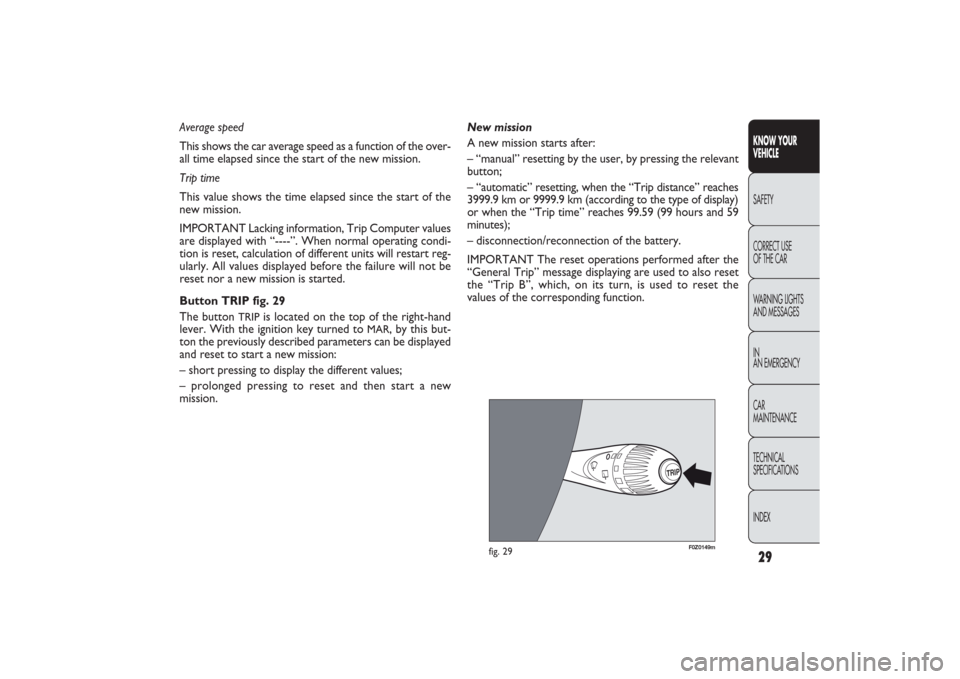
Button TRIP fig. 29
The button
TRIP
is located on the top of the right-hand
lever. With the ignition key turned to
MAR
, by this but-
ton the previously described parameters can be displayed
and reset to start a new mission:
– short pressing to display the different values;
– prolonged pressing to reset and then start a new
mission.
TRIP
F0Z0149m
fig. 29
001-030 PANDA EN 7-10-2009 13:40 Pagina 29
Page 31 of 226
30
KNOW YOUR
VEHICLE
SAFETY
CORRECT USE
OF THE CAR
WARNING LIGHTS
AND MESSAGES
IN
AN EMERGENCY
CAR
MAINTENANCE
TECHNICAL
SPECIFICATIONS
INDEX
Exit Trip
To quit the Trip function: keep the button MODE pressed
for over 2 seconds. Start of journey procedure
With ignition key on MAR, press and hold the button TRIP
pressed for over 2 seconds to reset.
TRIP B reset
End of partial mission
Start of new partial mission
End of partial mission
Start of new
partial mission
TRIP B reset
End of partial mission
Start of new
partial mission GENERAL TRIP reset
End of complete mission
Start of new mission GENERAL TRIP reset
End of complete mission
Start of new mission
End of partial mission
Start of new
partial mission Reset TRIP B
Reset TRIP B
TRIP B
TRIP B
TRIP B GENERAL TRIP
˙
˙
˙
˙
˙
˙
˙ ˙
fig. 30
001-030 PANDA EN 7-10-2009 13:40 Pagina 30
Page 49 of 226
F0Z0122m
fig. 48
F0Z0126m
fig. 49
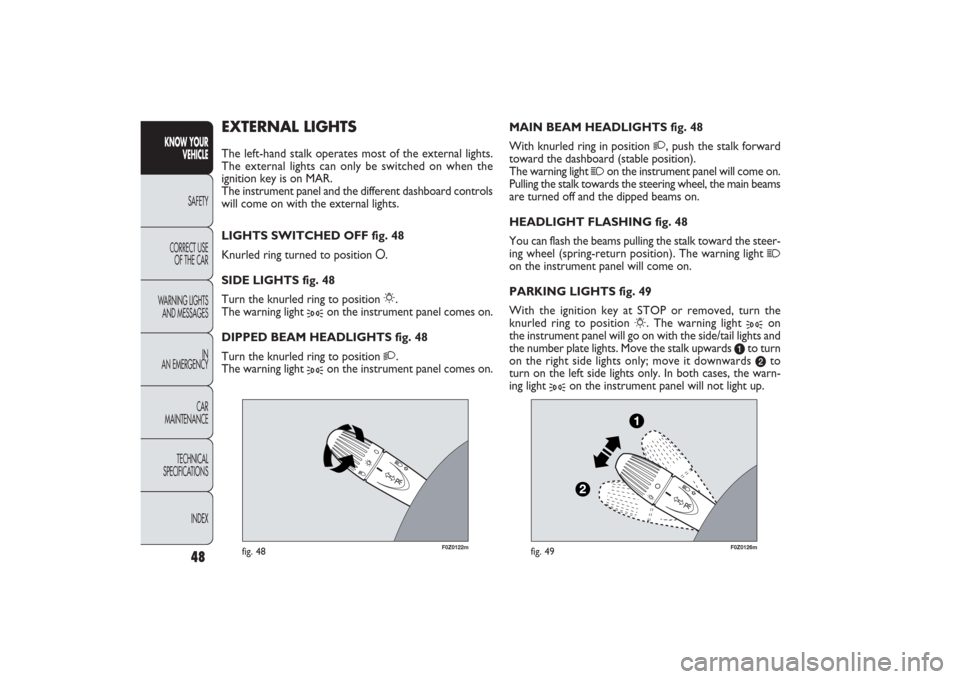
MAIN BEAM HEADLIGHTS fig. 48
With knurled ring in position
2
, push the stalk forward
toward the dashboard (stable position).
The warning light
1
on the instrument panel will come on.
Pulling the stalk towards the steering wheel, the main beams
are turned off and the dipped beams on.
HEADLIGHT FLASHING fig. 48
You can flash the beams pulling the stalk toward the steer-
ing wheel (spring-return position). The warning light
1
on the instrument panel will come on.
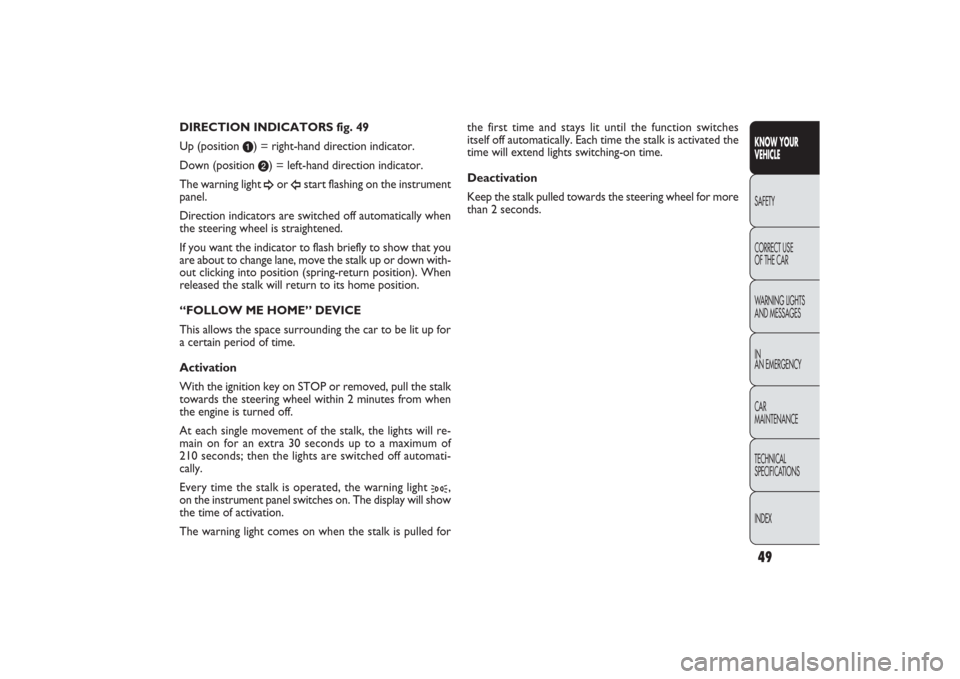
PARKING LIGHTS fig. 49
With the ignition key at STOP or removed, turn the
knurled ring to position
6
. The warning light
3
on
the instrument panel will go on with the side/tail lights and
the number plate lights. Move the stalk upwards
a
to turn
on the right side lights only; move it downwards b
to
turn on the left side lights only. In both cases, the warn-
ing light
3
on the instrument panel will not light up.
EXTERNAL LIGHTSThe left-hand stalk operates most of the external lights.
The external lights can only be switched on when the
ignition key is on MAR.
The instrument panel and the different dashboard controls
will come on with the external lights.
LIGHTS SWITCHED OFF fig. 48
Knurled ring turned to position O.
SIDE LIGHTS fig. 48
Turn the knurled ring to position
6
.
The warning light
3
on the instrument panel comes on.
DIPPED BEAM HEADLIGHTS fig. 48
Turn the knurled ring to position
2
.
The warning light
3
on the instrument panel comes on.
48
KNOW YOUR
VEHICLE
SAFETY
CORRECT USE
OF THE CAR
WARNING LIGHTS
AND MESSAGES
IN
AN EMERGENCY
CAR
MAINTENANCE
TECHNICAL
SPECIFICATIONS
INDEX
031-064 PANDA EN 7-10-2009 13:43 Pagina 48
Page 50 of 226
49KNOW YOUR
VEHICLESAFETY
CORRECT USE
OF THE CAR
WARNING LIGHTS
AND MESSAGES
IN
AN EMERGENCY
CAR
MAINTENANCE
TECHNICAL
SPECIFICATIONS
INDEX
the first time and stays lit until the function switches
itself off automatically. Each time the stalk is activated the
time will extend lights switching-on time.
Deactivation
Keep the stalk pulled towards the steering wheel for more
than 2 seconds. DIRECTION INDICATORS fig. 49
Up (position
a) = right-hand direction indicator.
Down (position b) = left-hand direction indicator.
The warning light ¥
or
Î
start flashing on the instrument
panel.
Direction indicators are switched off automatically when
the steering wheel is straightened.
If you want the indicator to flash briefly to show that you
are about to change lane, move the stalk up or down with-
out clicking into position (spring-return position). When
released the stalk will return to its home position.
“FOLLOW ME HOME” DEVICE
This allows the space surrounding the car to be lit up for
a certain period of time.
Activation
With the ignition key on STOP or removed, pull the stalk
towards the steering wheel within 2 minutes from when
the engine is turned off.
At each single movement of the stalk, the lights will re-
main on for an extra 30 seconds up to a maximum of
210 seconds; then the lights are switched off automati-
cally.
Every time the stalk is operated, the warning light
3
,
on the instrument panel switches on. The display will show
the time of activation.
The warning light comes on when the stalk is pulled for
031-064 PANDA EN 7-10-2009 13:43 Pagina 49
Page 51 of 226
,
F0Z0127m
fig. 50
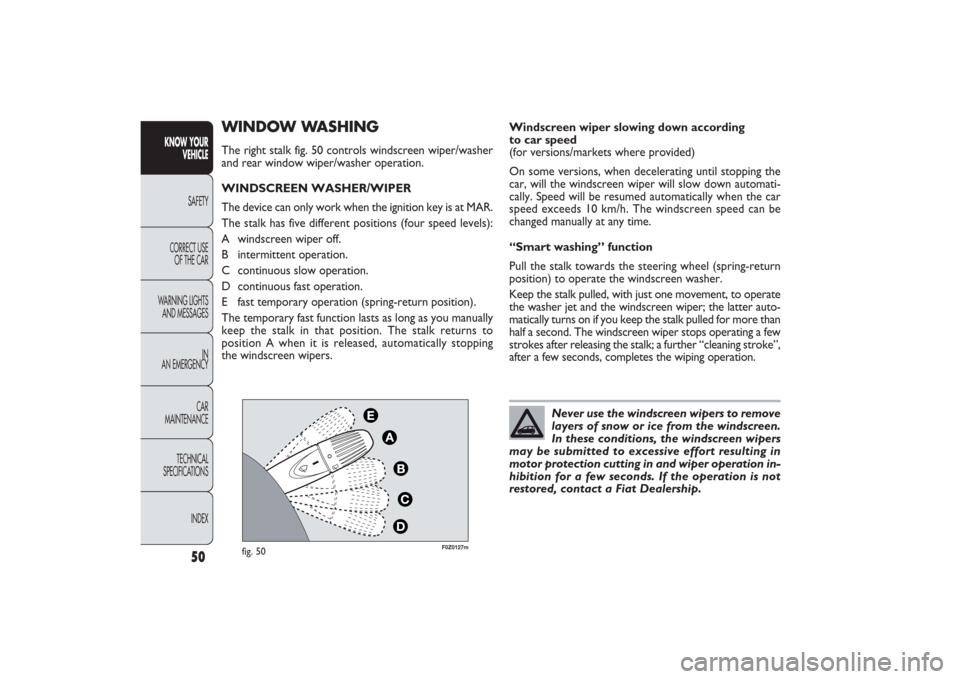
WINDOW WASHINGThe right stalk fig. 50 controls windscreen wiper/washer
and rear window wiper/washer operation.
WINDSCREEN WASHER/WIPER
The device can only work when the ignition key is at MAR.
The stalk has five different positions (four speed levels):
A windscreen wiper off.
B intermittent operation.
C continuous slow operation.
D continuous fast operation.
E fast temporary operation (spring-return position).
The temporary fast function lasts as long as you manually
keep the stalk in that position. The stalk returns to
position A when it is released, automatically stopping
the windscreen wipers.
50
KNOW YOUR
VEHICLE
SAFETY
CORRECT USE
OF THE CAR
WARNING LIGHTS
AND MESSAGES
IN
AN EMERGENCY
CAR
MAINTENANCE
TECHNICAL
SPECIFICATIONS
INDEX
Windscreen wiper slowing down according
to car speed
(for versions/markets where provided)
On some versions, when decelerating until stopping the
car, will the windscreen wiper will slow down automati-
cally. Speed will be resumed automatically when the car
speed exceeds 10 km/h. The windscreen speed can be
changed manually at any time.
“Smart washing” function
Pull the stalk towards the steering wheel (spring-return
position) to operate the windscreen washer.
Keep the stalk pulled, with just one movement, to operate
the washer jet and the windscreen wiper; the latter auto-
matically turns on if you keep the stalk pulled for more than
half a second. The windscreen wiper stops operating a few
strokes after releasing the stalk; a further “cleaning stroke”,
after a few seconds, completes the wiping operation.
Never use the windscreen wipers to remove
layers of snow or ice from the windscreen.
In these conditions, the windscreen wipers
may be submitted to excessive effort resulting in
motor protection cutting in and wiper operation in-
hibition for a few seconds. If the operation is not
restored, contact a Fiat Dealership.
031-064 PANDA EN 7-10-2009 13:43 Pagina 50
Page 52 of 226
51KNOW YOUR
VEHICLESAFETY
CORRECT USE
OF THE CAR
WARNING LIGHTS
AND MESSAGES
IN
AN EMERGENCY
CAR
MAINTENANCE
TECHNICAL
SPECIFICATIONS
INDEX
REAR WINDOW WASHER/WIPER
The device can only work when the ignition key is at MAR.
Turn the knurled ring to
'
to operate the rear window
wiper.
With the windscreen wiper on, turn the knurled ring to
'
to turn on the rear window wiper. In this case the wiper
works (in the different positions) timed with the wind-
screen wiper, but at half speed.
With the windscreen wiper on, engaging reverse gear will
automatically turn the rear window wiper on, in continu-
ous slow operation.
Operation stops by disengaging reverse.
“Smart washing” function
Pushing the stalk towards the dashboard (spring-return
position) will activate the rear window washer.
Keep the stalk pressed, with just one movement, to op-
erate the rear window washer jet and the rear window
wiper itself; the latter automatically turns on if you keep
the stalk pressed for more than half a second.
The rear window wiper stops operating a few strokes af-
ter releasing the stalk; a further “cleaning stroke”, after
a few seconds, completes the wiping operation.
Do not use the rear window wiper to re-
move layers of snow or ice from the wind-
screen. In these conditions, the rear window
wipers may be submitted to excessive effort result-
ing in motor protection cutting in and wiper oper-
ation inhibition for a few seconds. If the operation
is not restored, contact a Fiat Dealership.
031-064 PANDA EN 7-10-2009 13:43 Pagina 51
Page 53 of 226
F0Z0032m
fig. 51
Ceiling light timing (lens central position)
Three different switching-on modes are provided:❒
when opening one door a three-minute timing will start,
to be repeated each time one door is opened;
❒
approximately 10-second timing will start when re-
moving the ignition key within two minutes from turn-
ing the engine off;
❒
approximately 10-second timing will start when open-
ing the doors (by both remote control or key into
driver’s door lock).
Two switching-off modes are provided:
❒
when closing all doors, the 3-minute timing will go
off and a 10-second one will start. This timing will
go off when turning the key to MAR;
❒
when locking the doors (by both remote control or key
into driver’s door lock), the ceiling light goes off.
On Emotion and Dynamic versions, the ceiling light will
switch on and off gradually; the ceiling light will switch off
automatically 15 minutes after turning the engine off.
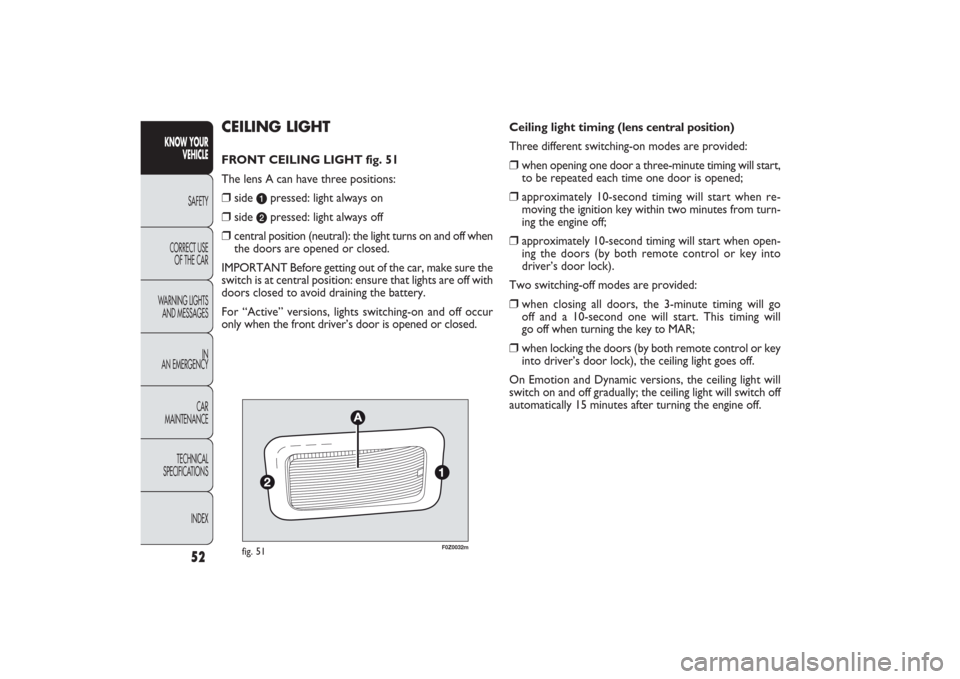
CEILING LIGHTFRONT CEILING LIGHT fig. 51
The lens A can have three positions:❒
side
a
pressed: light always on
❒
side
b
pressed: light always off
❒
central position (neutral): the light turns on and off when
the doors are opened or closed.
IMPORTANT Before getting out of the car, make sure the
switch is at central position: ensure that lights are off with
doors closed to avoid draining the battery.
For “Active” versions, lights switching-on and off occur
only when the front driver’s door is opened or closed.
52
KNOW YOUR
VEHICLE
SAFETY
CORRECT USE
OF THE CAR
WARNING LIGHTS
AND MESSAGES
IN
AN EMERGENCY
CAR
MAINTENANCE
TECHNICAL
SPECIFICATIONS
INDEX
031-064 PANDA EN 7-10-2009 13:43 Pagina 52
Page 54 of 226
53KNOW YOUR
VEHICLESAFETY
CORRECT USE
OF THE CAR
WARNING LIGHTS
AND MESSAGES
IN
AN EMERGENCY
CAR
MAINTENANCE
TECHNICAL
SPECIFICATIONS
INDEX
F0Z0230m
fig. 52
F0Z0020m
fig. 53
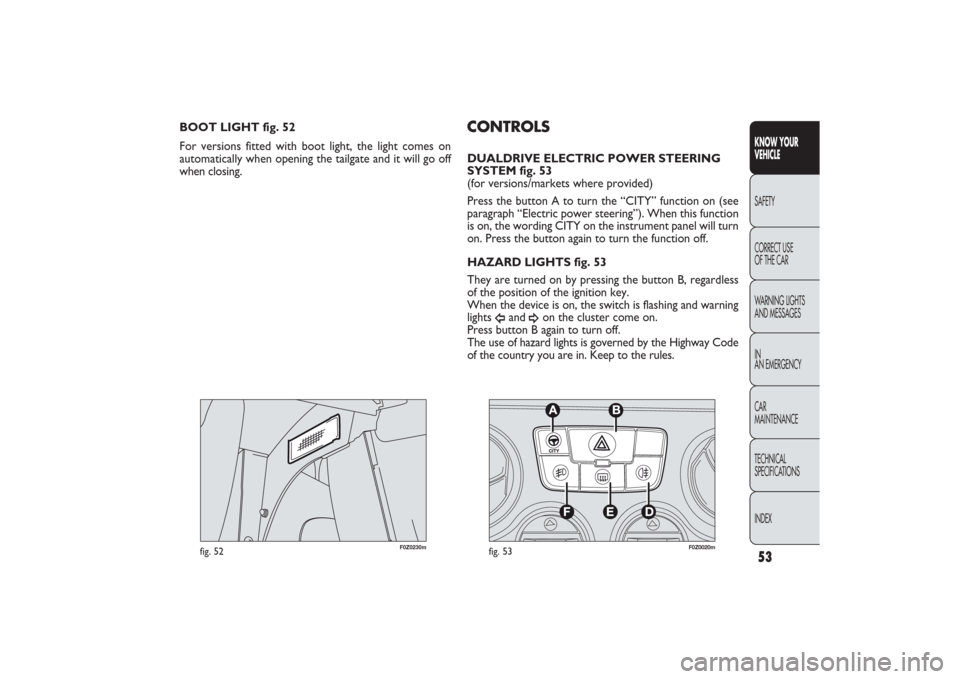
CONTROLSDUALDRIVE ELECTRIC POWER STEERING
SYSTEM fig. 53
(for versions/markets where provided)
Press the button A to turn the “CITY” function on (see
paragraph “Electric power steering”). When this function
is on, the wording CITY on the instrument panel will turn
on. Press the button again to turn the function off.
HAZARD LIGHTS fig. 53
They are turned on by pressing the button B, regardless
of the position of the ignition key.
When the device is on, the switch is flashing and warning
lights
Î
and
¥
on the cluster come on.
Press button B again to turn off.
The use of hazard lights is governed by the Highway Code
of the country you are in. Keep to the rules. BOOT LIGHT fig. 52
For versions fitted with boot light, the light comes on
automatically when opening the tailgate and it will go off
when closing.
031-064 PANDA EN 7-10-2009 13:43 Pagina 53