Trip FIAT PANDA 2009 169 / 2.G Owners Manual
[x] Cancel search | Manufacturer: FIAT, Model Year: 2009, Model line: PANDA, Model: FIAT PANDA 2009 169 / 2.GPages: 226, PDF Size: 5.29 MB
Page 17 of 226
16
KNOW YOUR
VEHICLE
SAFETY
CORRECT USE
OF THE CAR
WARNING LIGHTS
AND MESSAGES
IN
AN EMERGENCY
CAR
MAINTENANCE
TECHNICAL
SPECIFICATIONS
INDEX
F0Z0015m
fig. 20
F0Z0027m
fig. 21
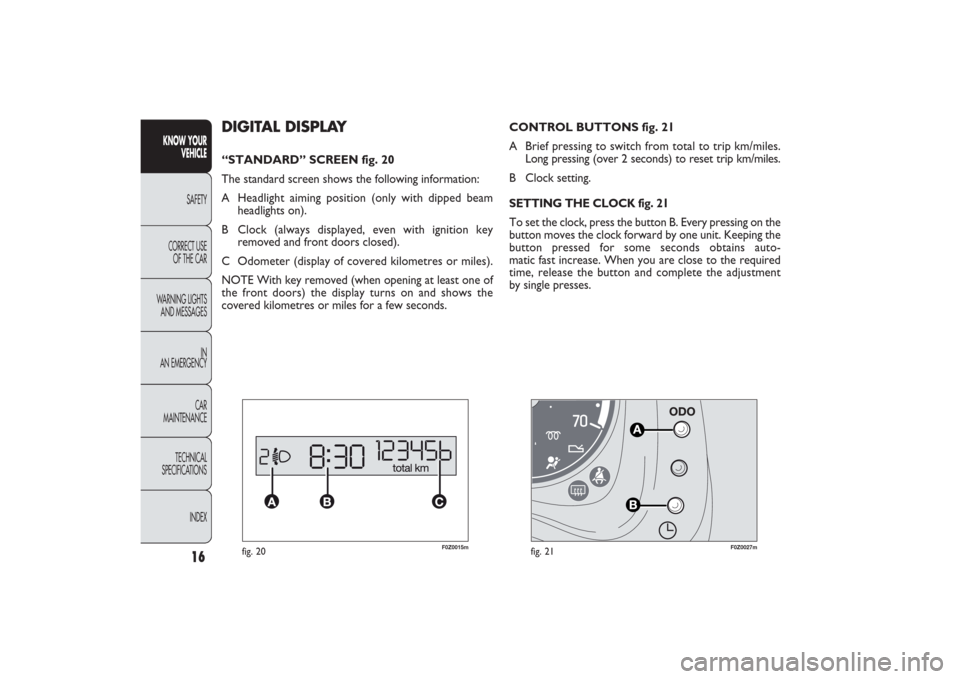
CONTROL BUTTONS fig. 21
A Brief pressing to switch from total to trip km/miles.
Long pressing (over 2 seconds) to reset trip km/miles.
B Clock setting.SETTING THE CLOCK fig. 21To set the clock, press the button B. Every pressing on the
button moves the clock forward by one unit. Keeping the
button pressed for some seconds obtains auto-
matic fast increase. When you are close to the required
time, release the button and complete the adjustment
by single presses.
DIGITAL DISPLAY“STANDARD” SCREEN fig. 20
The standard screen shows the following information:
A Headlight aiming position (only with dipped beam
headlights on).
B Clock (always displayed, even with ignition key
removed and front doors closed).
C Odometer (display of covered kilometres or miles).
NOTE With key removed (when opening at least one of
the front doors) the display turns on and shows the
covered kilometres or miles for a few seconds.
001-030 PANDA EN 7-10-2009 13:39 Pagina 16
Page 23 of 226
22
KNOW YOUR
VEHICLE
SAFETY
CORRECT USE
OF THE CAR
WARNING LIGHTS
AND MESSAGES
IN
AN EMERGENCY
CAR
MAINTENANCE
TECHNICAL
SPECIFICATIONS
INDEX
Day
Year
MODE
button
pressed
briefly Month
DeutschPortuguês
English
Español
Français
Italiano
Nederlands
Polski
Example:
EXIT MENUTRIP B DATA
SET TIME
SET DATE
SEE RADIO
AUTOCLOSE
MEASUREMENT UNIT
LANGUAGE BUZZER VOLUME SERVICE
BUTTON VOLUMESPEED BEEP
fig. 28Example:
+
−
+
–
– +
– +
–
– +
+++
–––
++ – –+ +
–
MODE
button
pressed
briefly
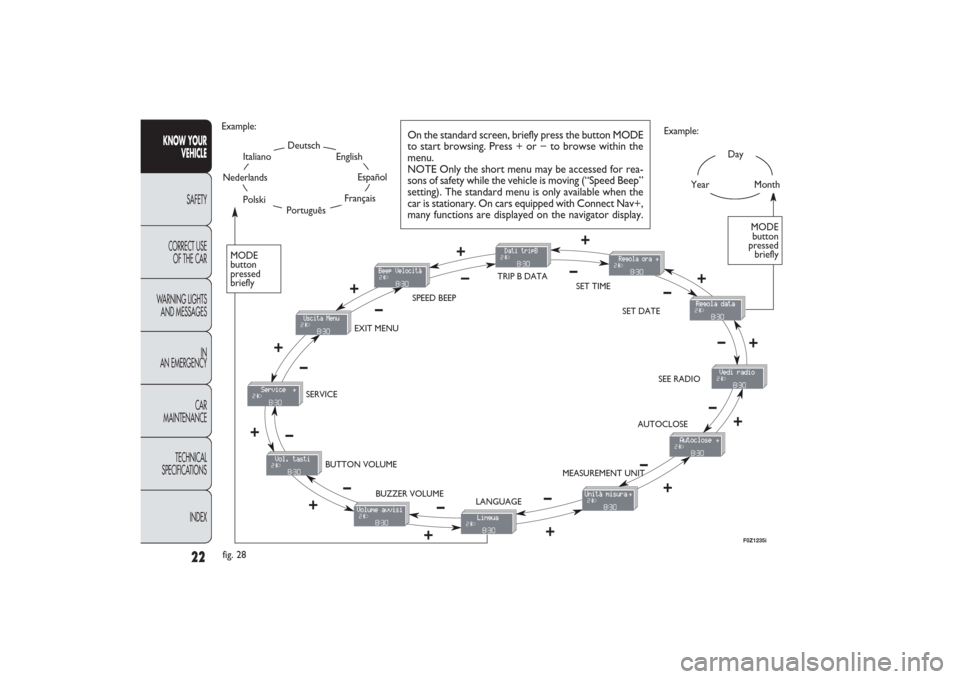
On the standard screen, briefly press the button MODE
to start browsing. Press + or − to browse within the
menu.
NOTE Only the short menu may be accessed for rea-
sons of safety while the vehicle is moving (“Speed Beep”
setting). The standard menu is only available when the
car is stationary. On cars equipped with Connect Nav+,
many functions are displayed on the navigator display.
F0Z1235i
001-030 PANDA EN 7-10-2009 13:40 Pagina 22
Page 24 of 226
23KNOW YOUR
VEHICLESAFETY
CORRECT USE
OF THE CAR
WARNING LIGHTS
AND MESSAGES
IN
AN EMERGENCY
CAR
MAINTENANCE
TECHNICAL
SPECIFICATIONS
INDEX
Trip B On/Off (trip B data)
This function can be used to activate (On) or deactivate
(Off) the Trip B displaying (partial trip).
For further information see “Trip computer”.
Proceed as follows to switch the function on and off:
– briefly press the button MODE: “On” or “Off” flash on
the display (depending on the previous setting);
– press the button + or − to select;
– briefly press the button MODE to go back to the menu
screen or press the button for a prolonged time to go back
to the standard screen without storing the settings.
Setting the clock (Set time)
This function enables to set the clock through two sub-
menus: “Time” and “Format”.
To carry out the adjustment, proceed as follows:
– briefly press the button MODE, the display will show the
two submenus “Time” and “Format”;
– press the button
+or − to switch between the two
submenus;
– once you have selected the submenu to be changed,
press the button MODE briefly;
– when accessing the “Time” submenu:briefly press the but-
ton MODE : “hours” will flash on the display;
– press the button + or − for setting;
– briefly press the button MODE: “minutes” starts flash-
ing on the display;
– press the button + or − for setting; Speed limit (Speed Beep)
This function is used to set the car speed limit (km/h or
mph); the driver is immediately alerted when this limit is
exceeded (see chapter “Warning lights and messages”).
To set the desired speed limit, proceed as follows:
– briefly press the button MODE: the display will show the
wording “Speed Beep”;
– press button
+or
−to select speed limit activation (On)
or deactivation (Off);
– if the function has been activated (On), press the but-
tons + or − to select the required speed limit and then
press MODE to confirm.
NOTE The possible setting is between 30 and 250 km/h, or
between 20 and 155 mph depending on the previously set unit
see “Setting the distance unit” – “Measurement units” de-
scribed below. The setting will increase/decrease by five units
each time the button + /
−
is pressed. Hold the button
+/
−pressed to increase/decrease the setting rapidly and au-
tomatically. Complete the setting by single pressing the but-
ton when you approach the required value.
– press the button MODE briefly to return to the menu
screen or press the button for a prolonged time to go back
to the standard screen without storing settings.
To cancel the setting, proceed as follows:
– briefly press the button MODE: “On” flashes on the
display;
– press the button −: “Off” flashes on the display;
– briefly press the button MODE to go back to the menu
screen or press the button for a prolonged time to go back
to the standard screen without storing the settings.
001-030 PANDA EN 7-10-2009 13:40 Pagina 23
Page 29 of 226
28
KNOW YOUR
VEHICLE
SAFETY
CORRECT USE
OF THE CAR
WARNING LIGHTS
AND MESSAGES
IN
AN EMERGENCY
CAR
MAINTENANCE
TECHNICAL
SPECIFICATIONS
INDEX
– Average consumption B (for versions/markets where
provided)
– Average speed B
– Trip time B (driving time).
NOTE “Trip B” function can be excluded (see paragraph
“Trip B on”). “‘Range to empty” cannot be reset.
Values displayed
Range (for versions/markets where provided)
This value shows the distance that the car can still cover
before needing fuel, assuming that driving conditions are
kept unvaried. The display will show the reading “----”
when the following events take place:
– range value lower than 50 km (or 30 mi)
– car parked with engine running for long.
Trip distance
This value shows the distance covered from the start of
the new mission.Average consumption (for versions/markets where provided)This value shows the average consumption from the start
of the new mission.Instant consumption (for versions/markets where provided)This indicates instant fuel consumption and it is constant-
ly updated. The display will show “----” if the car is parked
with the engine running.
TRIP COMPUTER (for versions/markets, where provided)
General features
The “Trip computer” is provided on cars fitted with mul-
tifunction display or reconfigurable multifunction display.
With ignition key at MAR, the “Trip computer” displays
information about the operating status of the car. This
function comprises the “General trip” concerning the
“complete mission” of the car (journey) and “Trip B”, (on-
ly available on reconfigurable multifunction display), con-
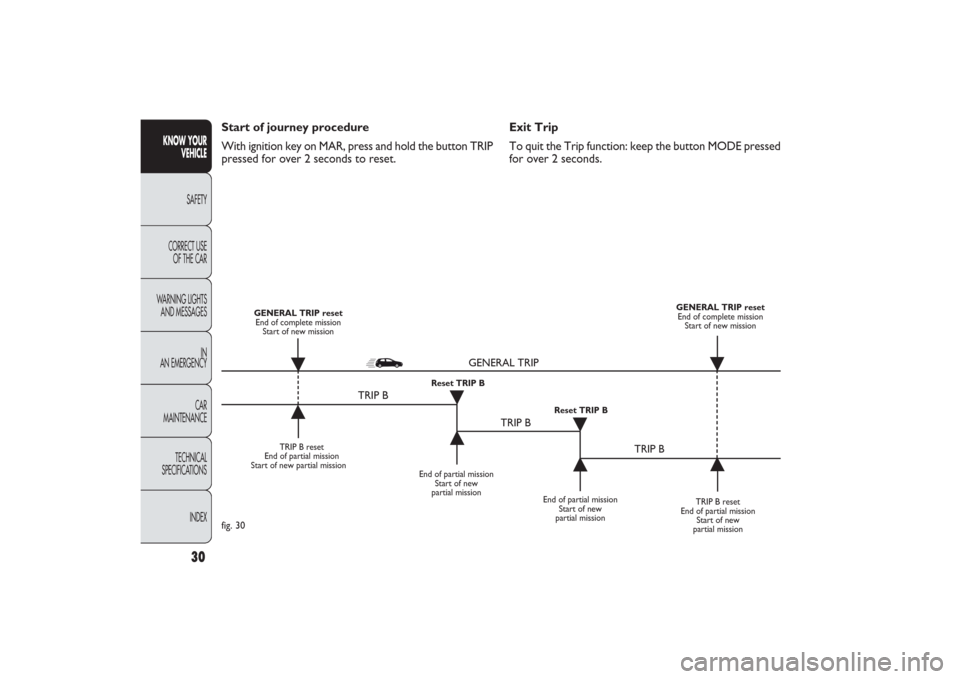
cerning the partial mission of the car; this function is in-
cluded in the general trip information (as shown in fig. 30).
Both functions can be reset (reset means start of a new
journey).
“General Trip” displays the figures relating to:
– Range to empty (for versions/markets, where provided)
– Trip distance
– Average consumption (for versions/markets where pro-
vided)
– Instant consumption (for versions/markets where pro-
vided)
– Average speed
– Trip time (driving time).
“Trip B”, available on the reconfigurable multifunction dis-
play only, shows only the figures relating to:
– Trip distance B
001-030 PANDA EN 7-10-2009 13:40 Pagina 28
Page 30 of 226
29KNOW YOUR
VEHICLESAFETY
CORRECT USE
OF THE CAR
WARNING LIGHTS
AND MESSAGES
IN
AN EMERGENCY
CAR
MAINTENANCE
TECHNICAL
SPECIFICATIONS
INDEX
New mission
A new mission starts after:
– “manual” resetting by the user, by pressing the relevant
button;
– “automatic” resetting, when the “Trip distance” reaches
3999.9 km or 9999.9 km (according to the type of display)
or when the “Trip time” reaches 99.59 (99 hours and 59
minutes);
– disconnection/reconnection of the battery.
IMPORTANT The reset operations performed after the
“General Trip” message displaying are used to also reset
the “Trip B”, which, on its turn, is used to reset the
values of the corresponding function. Average speed
This shows the car average speed as a function of the over-
all time elapsed since the start of the new mission.
Trip time
This value shows the time elapsed since the start of the
new mission.
IMPORTANT Lacking information, Trip Computer values
are displayed with “----”. When normal operating condi-
tion is reset, calculation of different units will restart reg-
ularly. All values displayed before the failure will not be
reset nor a new mission is started.
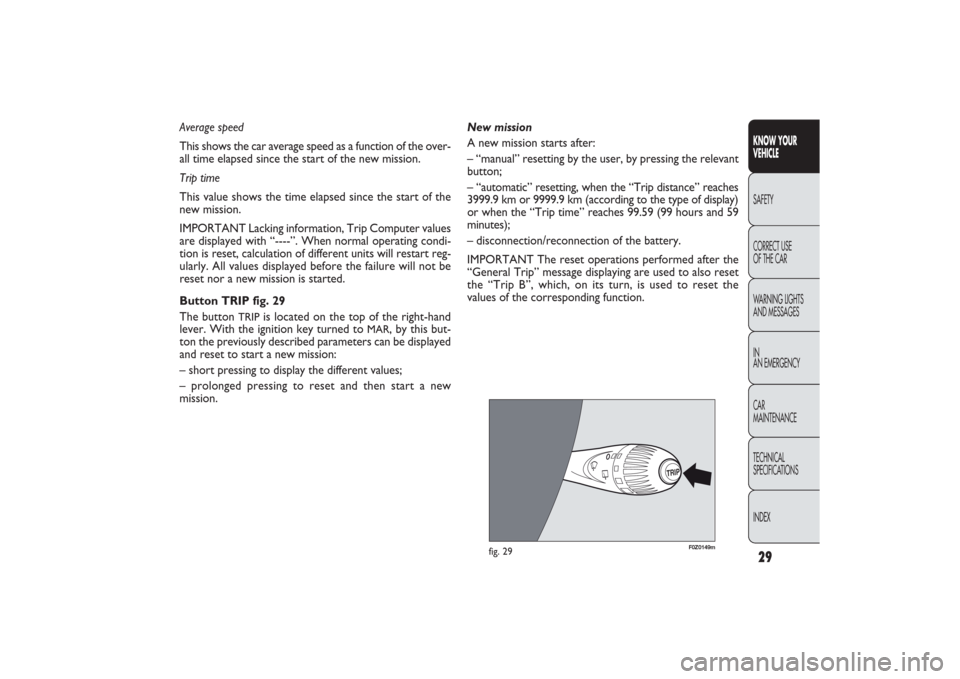
Button TRIP fig. 29
The button
TRIP
is located on the top of the right-hand
lever. With the ignition key turned to
MAR
, by this but-
ton the previously described parameters can be displayed
and reset to start a new mission:
– short pressing to display the different values;
– prolonged pressing to reset and then start a new
mission.
TRIP
F0Z0149m
fig. 29
001-030 PANDA EN 7-10-2009 13:40 Pagina 29
Page 31 of 226
30
KNOW YOUR
VEHICLE
SAFETY
CORRECT USE
OF THE CAR
WARNING LIGHTS
AND MESSAGES
IN
AN EMERGENCY
CAR
MAINTENANCE
TECHNICAL
SPECIFICATIONS
INDEX
Exit Trip
To quit the Trip function: keep the button MODE pressed
for over 2 seconds. Start of journey procedure
With ignition key on MAR, press and hold the button TRIP
pressed for over 2 seconds to reset.
TRIP B reset
End of partial mission
Start of new partial mission
End of partial mission
Start of new
partial mission
TRIP B reset
End of partial mission
Start of new
partial mission GENERAL TRIP reset
End of complete mission
Start of new mission GENERAL TRIP reset
End of complete mission
Start of new mission
End of partial mission
Start of new
partial mission Reset TRIP B
Reset TRIP B
TRIP B
TRIP B
TRIP B GENERAL TRIP
˙
˙
˙
˙
˙
˙
˙ ˙
fig. 30
001-030 PANDA EN 7-10-2009 13:40 Pagina 30
Page 133 of 226
132
KNOW YOUR
VEHICLE
SAFETY
CORRECT USE
OF THE CAR
WARNING LIGHTS
AND MESSAGES
IN
AN EMERGENCY
CAR
MAINTENANCE
TECHNICAL
SPECIFICATIONS
INDEX
ESP SYSTEM FAILURE (amber)
Turning the ignition key to MAR the warning light
turns on, but it should go off after a few seconds.
If the warning light does not go off or stays on together
with the LED on the button ASR OFF when travelling, con-
tact a Fiat Dealership.
On some versions the display shows the dedicated message.
NOTE The warning light flashing when driving indicates
that the ESP system is active.
á
GENERIC FAILURE INDICATION
(amber)
The warning light turns on in the following cir-
cumstances.
Engine oil pressure sensor failure
The warning light turns on when failure is detected in en-
gine oil pressure sensor. Contact a Fiat Dealership to have
the failure fixed as soon as possible.
Water in diesel fuel filter
See what described for warning light
c.
Inertia fuel cut-off switch tripped
The warning light comes on when the inertia fuel cut-off
switch is triggered. The display shows the dedicated
message.
è
EXTERNAL LIGHT FAILURE (amber)
The warning light will come on (some versions
only) when a failure to one of the following lights
is detected:
– side lights;
– brake lights (third brake light excluded);
– rear fog lights;
– direction indicators;
– number plate lights.
The failure referring to these lights could be: one or more
blown bulbs, a blown protection fuse or an electric con-
nection cut-off.
The display shows the dedicated message.
W
REAR FOG LIGHTS (amber)
The warning light turns on when the rear fog
lights are turned on.
4
HEATED REAR WINDOW (amber)
The warning light turns on when switching the
heated rear window on.
(
123-134 PANDA EN 7-10-2009 13:49 Pagina 132
Page 216 of 226
215KNOW
YOUR VEHICLE
SAFETY
CORRECT USE
OF THE CAR
WARNING LIGHTS
AND MESSAGES
IN
AN EMERGENCY
CAR
MAINTENANCE
TECHNICAL
SPECIFICATIONSINDEX
Baby surveillance mirror .......... 43
Battery
– battery recharging ................. 166
– battery replacement ............. 182
– servicing ................................... 181
– starting with auxiliary
battery ..................................... 135
– useful advice for extending
the life of your battery ......... 182
Beam adjustment .......................... 72
Body Computer (trip) ................. 28
Body paintwork identification
plate .............................................. 89
Bodywork marking ...................... 192
Bodywork versions ..................... 193
Bodywork
– advice for preserving
the bodywork ......................... 188
– bodywork version codes ..... 193
Bonnet
– opening/closing ................... 69-70Boot extension ......................... 67-68
Boot ................................................ 65
– boot extension ................... 67-68
– parcel shelf (removal) ........... 67
– parcel shelf lifting ................... 66
– tailgate closing ........................ 66
– tailgate opening ...................... 65
Brake fluid
– level check and top-up ......... 179
– specifications .......................... 205
Brake lights (stop)
– bulb replacement ........... 155-157
Brakes
– technical specifications ......... 196
– handbrake ............................... 113
– brake fluid (type) ................... 179
– fluid level check and top-up .. 179
Bulb replacement ......................... 149
– bulb types ................................ 150
– exterior ................................... 152
– general instructions .............. 149
ABS system .................................. 74
Accessories purchased by
the owner .................................... 86
Additional brake light
– bulb replacement ................... 157
Air bag deactivation ..................... 106
Air filter ......................................... 180
Air recirculation .................. 38-41-45
Air vent and diffusors ................. 37
Annual inspection plan ............... 172
Ashtray ........................................... 55
ASR (system) ................................ 77
ASR function ................................. 77
ASR system ................................... 77
Automatic climate control
system .......................................... 44
– controls ................................... 44
– system servicing ..................... 47
– using the climate control
system ...................................... 47
INDEX
215-224 PANDA EN 13-10-2009 11:48 Pagina 215
Page 224 of 226
223KNOW
YOUR VEHICLE
SAFETY
CORRECT USE
OF THE CAR
WARNING LIGHTS
AND MESSAGES
IN
AN EMERGENCY
CAR
MAINTENANCE
TECHNICAL
SPECIFICATIONSINDEX
– turning circle .......................... 196
Steering
– steering wheel adjustment
lever .......................................... 34
– technical specifications ......... 196
Sun visors ...................................... 56
Suspension .................................... 196
Symbols .......................................... 5Tailgate
– opening with remote
control ..................................... 8
Technical specifications....... 191
Temperature gauge
Third brake light .......................... 157
Top speed ..................................... 201
Towing of trailers ........................ 117
Towing of vehicle ........................ 167
Trailer (towing) ............................ 117
– installing the tow hook ........ 118
Transmission
– technical specifications ......... 195
Trip Computer ............................ 28
– control button ....................... 29– start of journey
procedure ............................... 30
Turning circle ............................... 196
Tyre pressure ............................... 199
Tyre puncturing
– general instructions .............. 137
– quick tyre repair kit
Tyre repair kit Fix&Go
automatic .................................... 143
– bottle replacement
procedure ............................... 148
– inflation procedure ............... 146
Tyres
– in case of puncture ............... 137
– inflation pressure ................... 199
– quick repair kit Fix&Go
automatic ................................. 143
– reading the tyre code ........... 197
– snow chains ............................ 122
– snow tyres .............................. 121
– tool and space-saver wheel
compartment ................... 138-139
– tyre and wheel types ............ 199
– wheel replacement ................ 143– winter tyres ............................ 122
Vehicle dimensions .................... 200
Vehicle end of life ........................ 209
Vehicle identification data .......... 191
Vehicle identification plate ........ 191
Vehicle identification ................... 191
Vehicle lifting points .................... 140
Vehicle scrapping ......................... 209
Vehicle weights ............................ 202W
arning lights and messages
.. 123
Wheel rims ................................... 199
– understanding rim
marking .................................... 198
Wheel trim ................................... 197
Wheels and tyres.......................... 183
– geometry ................................. 197
– in case of puncture ............... 137
– quick repair kit Fix&Go
automatic ................................. 143
– reading the tyre code ........... 197
– snow chains ............................ 122
– snow tyres .............................. 122
215-224 PANDA EN 7-10-2009 15:09 Pagina 223