wheel FIAT TIPO 4DOORS 2017 1.G Workshop Manual
[x] Cancel search | Manufacturer: FIAT, Model Year: 2017, Model line: TIPO 4DOORS, Model: FIAT TIPO 4DOORS 2017 1.GPages: 240, PDF Size: 4.15 MB
Page 186 of 240
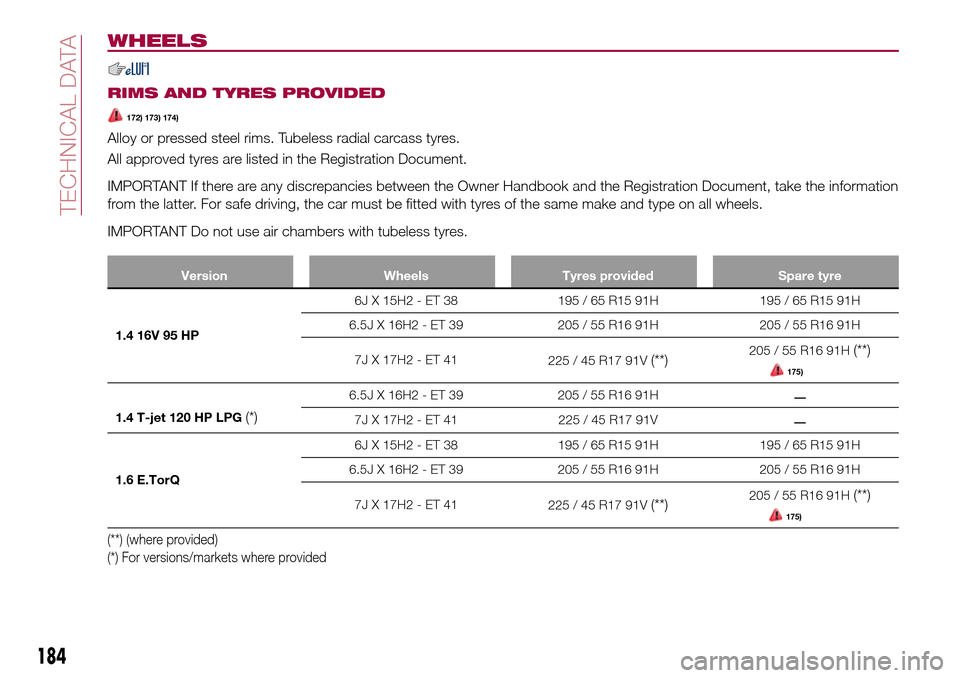
WHEELS
RIMS AND TYRES PROVIDED
172) 173) 174)
Alloy or pressed steel rims. Tubeless radial carcass tyres.
All approved tyres are listed in the Registration Document.
IMPORTANT If there are any discrepancies between the Owner Handbook and the Registration Document, take the information
from the latter. For safe driving, the car must be fitted with tyres of the same make and type on all wheels.
IMPORTANT Do not use air chambers with tubeless tyres.
Version Wheels Tyres provided Spare tyre
1.4 16V 95 HP6J X 15H2 - ET 38 195 / 65 R15 91H 195 / 65 R15 91H
6.5J X 16H2 - ET 39 205 / 55 R16 91H 205 / 55 R16 91H
7JX17H2-ET41
225 / 45 R17 91V
(**)205 / 55 R16 91H(**)
175)
1.4 T-jet 120 HP LPG(*)
6.5J X 16H2 - ET 39 205 / 55 R16 91H
7J X 17H2 - ET 41 225 / 45 R17 91V
1.6 E.TorQ6J X 15H2 - ET 38 195 / 65 R15 91H 195 / 65 R15 91H
6.5J X 16H2 - ET 39 205 / 55 R16 91H 205 / 55 R16 91H
7JX17H2-ET41
225 / 45 R17 91V
(**)205 / 55 R16 91H(**)
175)
(**) (where provided)
(*) For versions/markets where provided
184
TECHNICAL DATA
__
Page 187 of 240
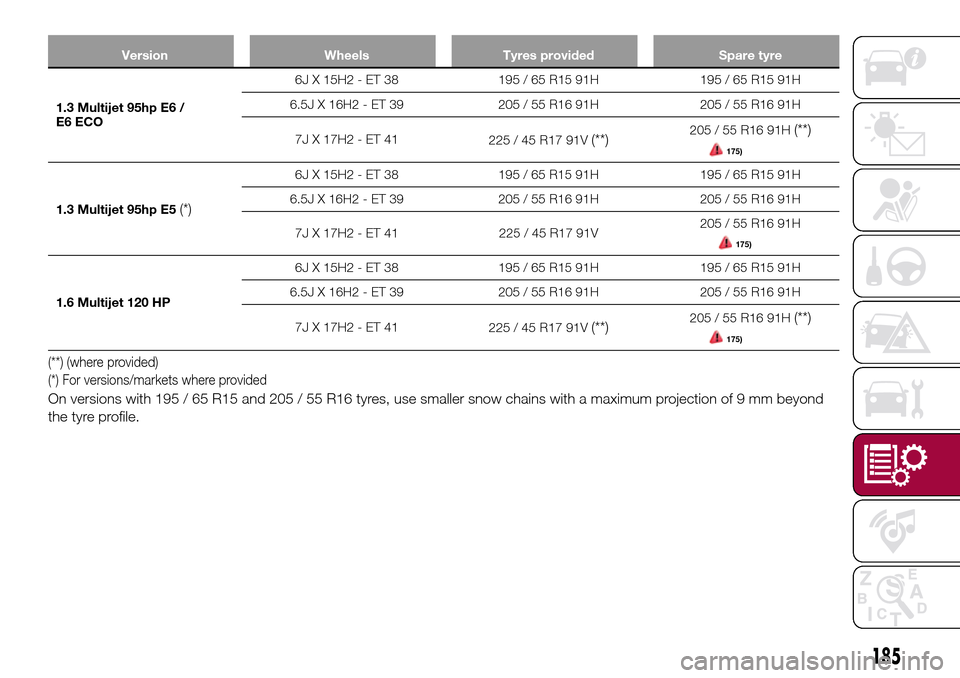
Version Wheels Tyres provided Spare tyre
1.3 Multijet 95hp E6 /
E6 ECO6J X 15H2 - ET 38 195 / 65 R15 91H 195 / 65 R15 91H
6.5J X 16H2 - ET 39 205 / 55 R16 91H 205 / 55 R16 91H
7JX17H2-ET41
225 / 45 R17 91V
(**)205 / 55 R16 91H(**)
175)
1.3 Multijet 95hp E5(*)
6J X 15H2 - ET 38 195 / 65 R15 91H 195 / 65 R15 91H
6.5J X 16H2 - ET 39 205 / 55 R16 91H 205 / 55 R16 91H
7J X 17H2 - ET 41 225 / 45 R17 91V205 / 55 R16 91H
175)
1.6 Multijet 120 HP6J X 15H2 - ET 38 195 / 65 R15 91H 195 / 65 R15 91H
6.5J X 16H2 - ET 39 205 / 55 R16 91H 205 / 55 R16 91H
7JX17H2-ET41
225 / 45 R17 91V
(**)205 / 55 R16 91H(**)
175)
(**) (where provided)
(*) For versions/markets where provided
On versions with 195 / 65 R15 and 205 / 55 R16 tyres, use smaller snow chains with a maximum projection of 9 mm beyond
the tyre profile.
185
Page 188 of 240
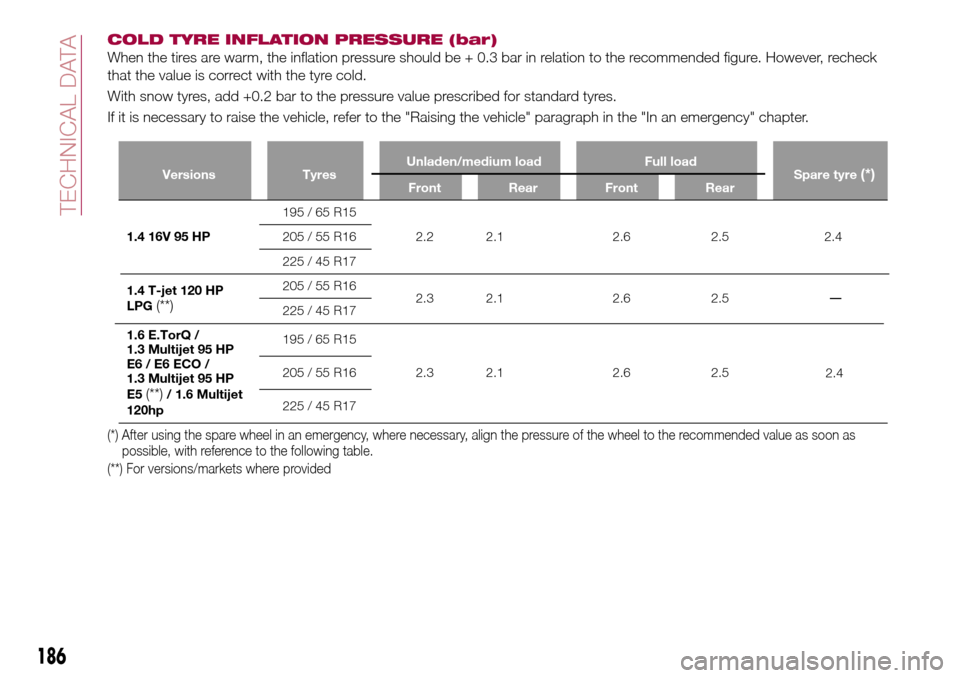
COLD TYRE INFLATION PRESSURE (bar)
When the tires are warm, the inflation pressure should be + 0.3 bar in relation to the recommended figure. However, recheck
that the value is correct with the tyre cold.
With snow tyres, add +0.2 bar to the pressure value prescribed for standard tyres.
If it is necessary to raise the vehicle, refer to the "Raising the vehicle" paragraph in the "In an emergency" chapter.
Versions TyresUnladen/medium load Full load
Spare tyre(*)Front Rear Front Rear
1.4 16V 95 HP195 / 65 R15
2.2 2.1 2.6 2.5
2.4 205 / 55 R16
225 / 45 R17
1.4 T-jet 120 HP
LPG
(**)
205 / 55 R16
2.3 2.1 2.6 2.5
225 / 45 R17
1.6 E.TorQ /
1.3 Multijet 95 HP
E6 / E6 ECO /
1.3 Multijet 95 HP
E5
(**)/ 1.6 Multijet
120hp
195 / 65 R15
2.3 2.1 2.6 2.5 205 / 55 R16
225 / 45 R17
(*) After using the spare wheel in an emergency, where necessary, align the pressure of the wheel to the recommended value as soon as
possible, with reference to the following table.
(**) For versions/markets where provided
186
TECHNICAL DATA
2.4
_
Page 189 of 240
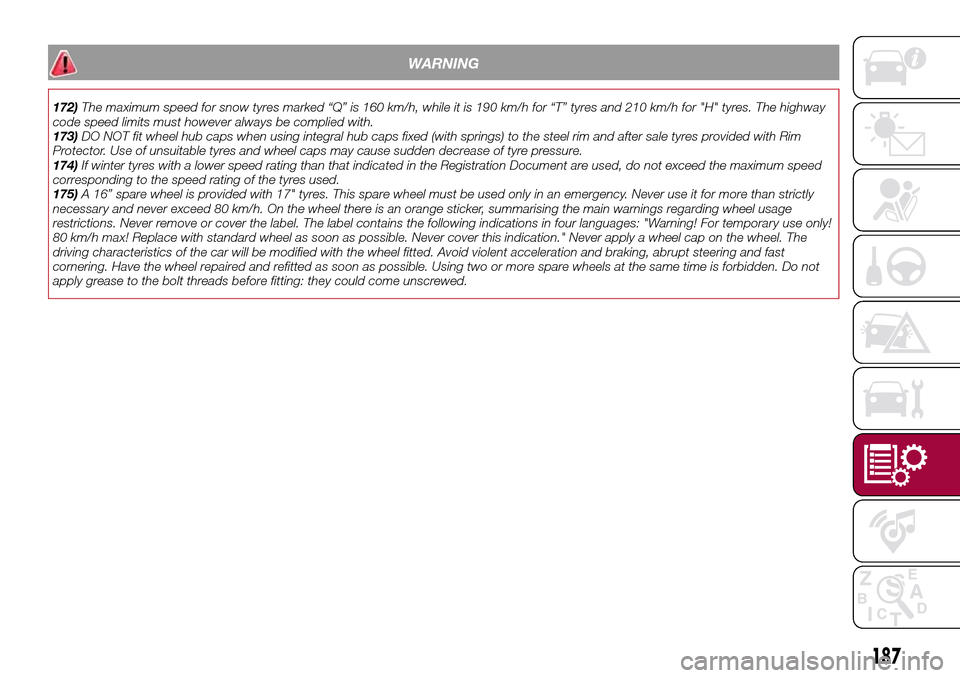
WARNING
172)The maximum speed for snow tyres marked “Q” is 160 km/h, while it is 190 km/h for “T” tyres and 210 km/h for "H" tyres. The highway
code speed limits must however always be complied with.
173)DO NOT fit wheel hub caps when using integral hub caps fixed (with springs) to the steel rim and after sale tyres provided with Rim
Protector. Use of unsuitable tyres and wheel caps may cause sudden decrease of tyre pressure.
174)If winter tyres with a lower speed rating than that indicated in the Registration Document are used, do not exceed the maximum speed
corresponding to the speed rating of the tyres used.
175)A 16” spare wheel is provided with 17" tyres. This spare wheel must be used only in an emergency. Never use it for more than strictly
necessary and never exceed 80 km/h. On the wheel there is an orange sticker, summarising the main warnings regarding wheel usage
restrictions. Never remove or cover the label. The label contains the following indications in four languages: "Warning! For temporary use only!
80 km/h max! Replace with standard wheel as soon as possible. Never cover this indication." Never apply a wheel cap on the wheel. The
driving characteristics of the car will be modified with the wheel fitted. Avoid violent acceleration and braking, abrupt steering and fast
cornering. Have the wheel repaired and refitted as soon as possible. Using two or more spare wheels at the same time is forbidden. Do not
apply grease to the bolt threads before fitting: they could come unscrewed.
187
Page 198 of 240
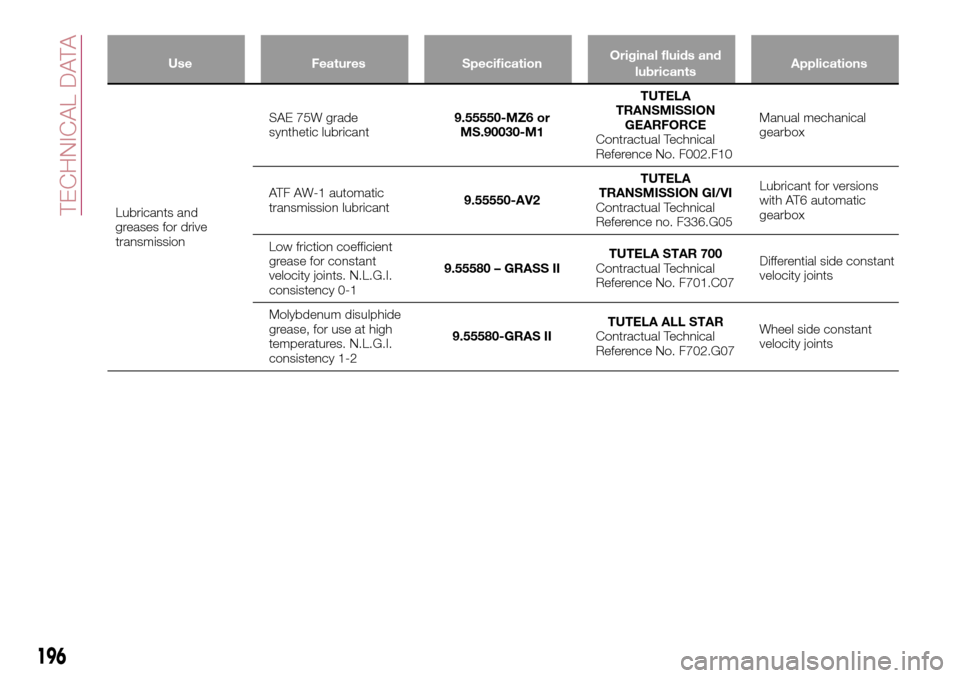
Use Features SpecificationOriginal fluids and
lubricantsApplications
Lubricants and
greases for drive
transmissionSAE 75W grade
synthetic lubricant9.55550-MZ6 or
MS.90030-M1TUTELA
TRANSMISSION
GEARFORCE
Contractual Technical
Reference No. F002.F10Manual mechanical
gearbox
ATF AW-1 automatic
transmission lubricant9.55550-AV2TUTELA
TRANSMISSION GI/VI
Contractual Technical
Reference no. F336.G05Lubricant for versions
with AT6 automatic
gearbox
Low friction coefficient
grease for constant
velocity joints. N.L.G.I.
consistency 0-19.55580 – GRASS IITUTELA STAR 700
Contractual Technical
Reference No. F701.C07Differential side constant
velocity joints
Molybdenum disulphide
grease, for use at high
temperatures. N.L.G.I.
consistency 1-29.55580-GRAS IITUTELA ALL STAR
Contractual Technical
Reference No. F702.G07Wheel side constant
velocity joints
196
TECHNICAL DATA
Page 211 of 240
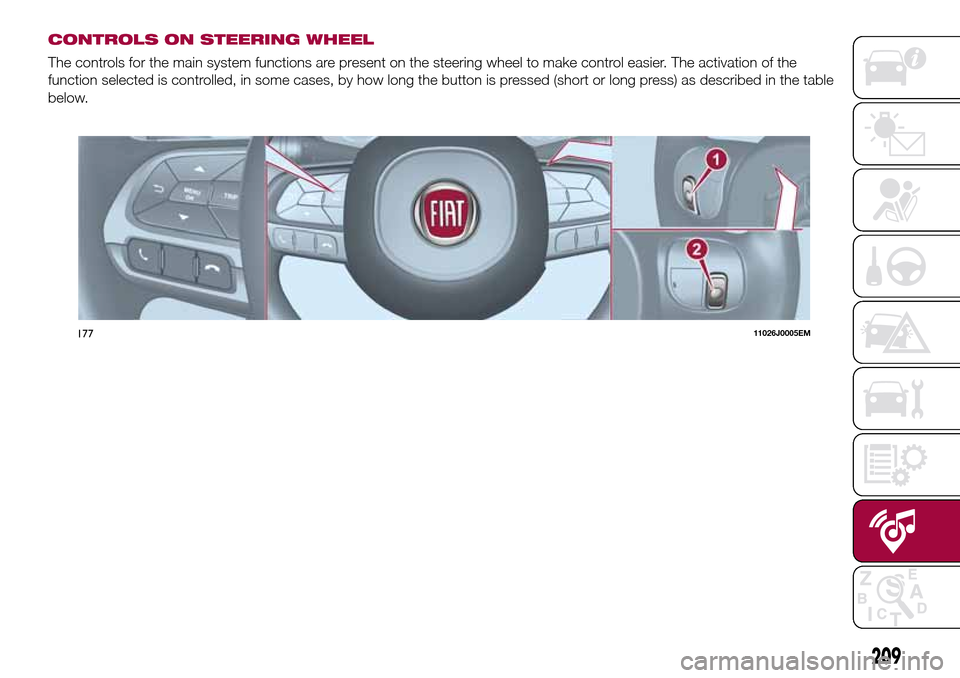
CONTROLS ON STEERING WHEEL
The controls for the main system functions are present on the steering wheel to make control easier. The activation of the
function selected is controlled, in some cases, by how long the button is pressed (short or long press) as described in the table
below.
17711026J0005EM
209
Page 212 of 240
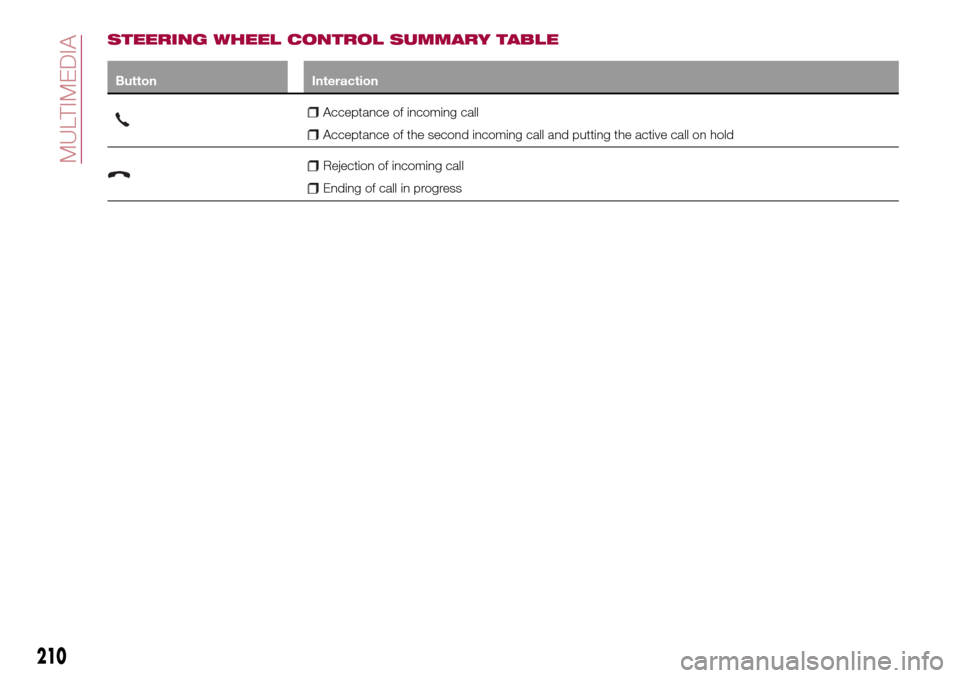
STEERING WHEEL CONTROL SUMMARY TABLE
Button Interaction
Acceptance of incoming call
Acceptance of the second incoming call and putting the active call on hold
Rejection of incoming call
Ending of call in progress
210
MULTIMEDIA
Page 213 of 240
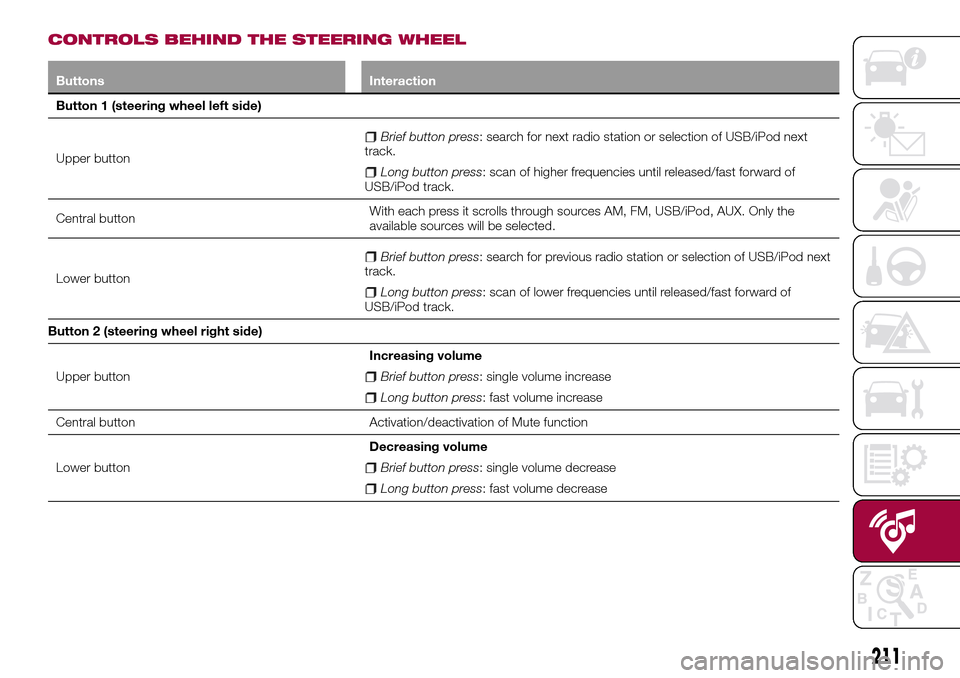
CONTROLS BEHIND THE STEERING WHEEL
Buttons Interaction
Button 1 (steering wheel left side)
Upper button
Brief button press: search for next radio station or selection of USB/iPod next
track.
Long button press: scan of higher frequencies until released/fast forward of
USB/iPod track.
Central buttonWith each press it scrolls through sources AM, FM, USB/iPod, AUX. Only the
available sources will be selected.
Lower button
Brief button press: search for previous radio station or selection of USB/iPod next
track.
Long button press: scan of lower frequencies until released/fast forward of
USB/iPod track.
Button 2 (steering wheel right side)
Upper buttonIncreasing volume
Brief button press: single volume increase
Long button press: fast volume increase
Central button Activation/deactivation of Mute function
Lower buttonDecreasing volume
Brief button press: single volume decrease
Long button press: fast volume decrease
211
Page 214 of 240
SWITCHING THE SYSTEM
ON/OFF
The system is switched on/off by
pressing the
button/knob.
Turn the button/knob clockwise to
increase the radio volume or
anticlockwise to decrease it.
RADIO (TUNER) MODE
The system is equipped with the
following tuners: AM, FM and DAB (for
versions/markets, where provided).
Radio mode selection
Press the RADIO button on the front
panel to activate radio mode.
Selecting a frequency band
The different tuning modes can be
selected by pressing the RADIO button
on the front panel.
Indications on display
After the desired radio station is
selected on the display, the following
information is shown (INFO mode
activated):
In the upper part: the preset station, the
time and the other active radio settings
are highlighted.
In the central part: the name of the
current station, the frequency and the
radio text information (if any) are
highlighted.FM station list
Press the BROWSE ENTER
button/knob to display the complete list
of the FM stations that can be received.
AM/FM radio station storage
The preset stations are available in all
system modes and are selected by
touching one of the presetting buttons
1-2-3-4-5-6on the front panel. If you
are tuned to a radio station that you
wish to store, hold down the button on
the display which corresponds to the
desired preset until an acoustic
confirmation signal is emitted.
AM/FM radio station selection
To search for the desired radio station
press the
orbutton or use the
wheel of the steering wheel controls, or
turn the "BROWSE ENTER" knob.
Previous/next radio station search
Briefly press the
orbutton:
when the button is released the
previous or the next radio station is
displayed.
Previous/next radio station fast
search
Hold down the
orbutton to
start the fast search: when the button is
released, the first tunable radio is
played.
MEDIA MODE
Interaction modes for AUX, USB/iPod
operation.
Audio source selection
To select the desired audio source
among those available: AUX o
USB/iPod, press theMEDIAbutton.
To select and playback music tracks on
the cell phone CD card (where the
phone allows) press the BROWSE
ENTER button, select Folders then
Card.
IMPORTANT Some multimedia players
may not be compatible with the
Uconnect™.
Track change (next/previous)
Briefly press the
button to play the
next track or briefly press the
button to return to the beginning
of the selected track or to the beginning
of the previous track if this has been
played for less than 3 seconds.
Fast forward/rewind through tracks
Press and hold down the
button to
fast forward the selected track or keep
the
button pressed to fast rewind
the track.
212
MULTIMEDIA
Page 215 of 240
Track selection (browse)
Use this function to scroll through and
select the tracks on the active device.
The choices available depend on the
device connected. For example, on a
USB/iPod device you can also scroll
through the list of artists, genres and
albums available on the device
depending on the information present
on the tracks using the BROWSE
ENTER button/knob.
Within each alphabetical list, theA-B-C
button on the front panel allows the
user to skip to the desired letter in the
list.
This button might be disabled for some
Apple®devices.
Press the BROWSE ENTER button to
activate this function on the source
being played. Turn the BROWSE
ENTER button/knob to select the
desired category and then press the
button/knob to confirm the selection.
Press the
button to cancel the
function.
The BROWSE ENTER button does not
allow any operation on an AUX device.
Track information display
Press theINFObutton to select the
information displayed while playing
(Artist, Album, Genre, Name, Folder, File
name). Press the
button to exit the
screen.
Shuffle
Press the
button to play the tracks
on USB/iPod in a random order. Press
again to deactivate the function.
Repeat
To listen to the track again, press the
button. Press again to deactivate
the function.
USB/iPod SOURCE
To activate the USB/iPod mode insert
the corresponding device (USB or iPod)
in the USB port present on the vehicle.
If a USB/iPod device is inserted with the
system on, this starts playing the tracks
present on the device.
IMPORTANT When connecting a device
(USB or iPod) to the USB port, make
sure that it does not obstruct the
operation of the handbrake lever.
AUX SOURCE
To activate AUX mode, insert an
appropriate device in the AUX socket
on the car (see the image in the
"USB/iPod Support" paragraph).When a device WITH AUX output is
inserted the system starts reproducing
the AUX source connected, if it is
already being played.
Adjust the volume using the
button/knob on the front panel or
using the volume adjustment control on
the connected device.
For the "Audio source selection"
function, see the "Media mode"
chapter.
IMPORTANT NOTES
The functions of the device connected
with the AUX socket are directly
managed by the device itself: it is not
possible to change track/folder/playlist
or control playing start/end/pause with
the controls on the front panel or on the
steering wheel.
Do not leave the cable of your portable
player connected to the AUX socket
after disconnection, to avoid possible
hiss from the speakers.
IMPORTANT When connecting a device
to the AUX socket, make sure that it
does not obstruct the operation of the
handbrake lever.
213