air FORD B MAX 2012 1.G User Guide
[x] Cancel search | Manufacturer: FORD, Model Year: 2012, Model line: B MAX, Model: FORD B MAX 2012 1.GPages: 256, PDF Size: 19.67 MB
Page 24 of 256
Downloaded from www.Manualslib.com manuals search engine PRINCIPLE OF OPERATION
WARNINGS
Do not modify the front of yourvehicle in any way. This couldadversely affect deployment of theairbags.
Original text according to ECER94.01: Extreme Hazard! Do not usea rearward facing child restraint ona seat protected by an airbag in front of it!
Wear a seat belt and keep sufficientdistance between yourself and thesteering wheel. Only when you usethe seat belt properly, can it hold you in aposition that allows the airbag to achieveits optimum effect. See Sitting in theCorrect Position (page 76).
Have repairs to the steering wheel,steering column, seats, airbags andseat belts carried out by anauthorised dealer.
Keep the areas in front of the airbagsfree from obstruction. Do not affixanything to or over the airbag covers.
Do not puncture the seat with pins,needles or other pointed objects.This could cause damage andadversely affect deployment of theairbags.
Use seat covers designed for seatswith side airbags. Have these fittedby an authorised dealer.
Note:You will hear a loud bang and see acloud of harmless powdery residue if anairbag deploys. This is normal.
Note:Only wipe airbag covers with a dampcloth.
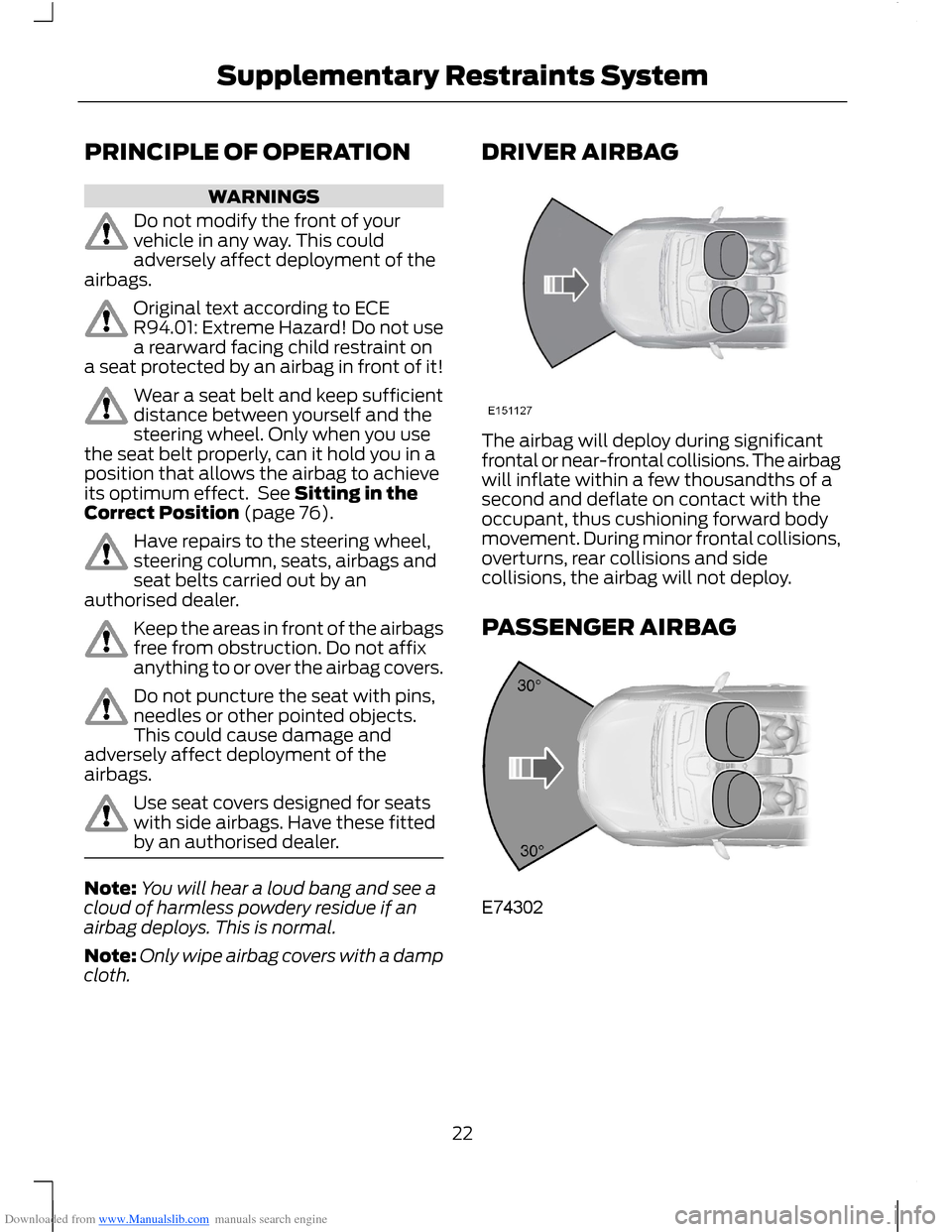
DRIVER AIRBAG
The airbag will deploy during significantfrontal or near-frontal collisions. The airbagwill inflate within a few thousandths of asecond and deflate on contact with theoccupant, thus cushioning forward bodymovement. During minor frontal collisions,overturns, rear collisions and sidecollisions, the airbag will not deploy.
PASSENGER AIRBAG
22Supplementary Restraints System
Page 25 of 256
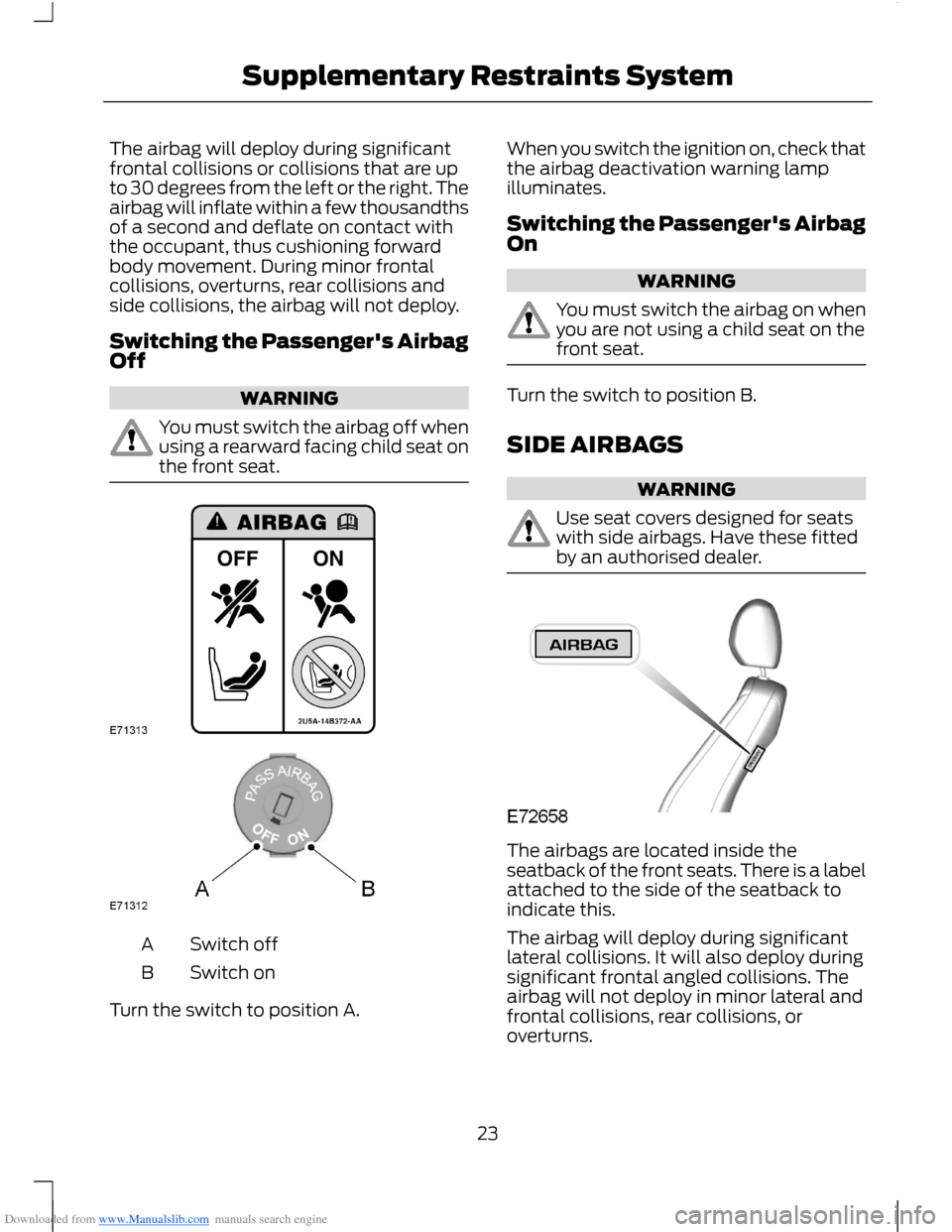
Downloaded from www.Manualslib.com manuals search engine The airbag will deploy during significantfrontal collisions or collisions that are upto 30 degrees from the left or the right. Theairbag will inflate within a few thousandthsof a second and deflate on contact withthe occupant, thus cushioning forwardbody movement. During minor frontalcollisions, overturns, rear collisions andside collisions, the airbag will not deploy.
Switching the Passenger's AirbagOff
WARNING
You must switch the airbag off whenusing a rearward facing child seat onthe front seat.
Switch offA
Switch onB
Turn the switch to position A.
When you switch the ignition on, check thatthe airbag deactivation warning lampilluminates.
Switching the Passenger's AirbagOn
WARNING
You must switch the airbag on whenyou are not using a child seat on thefront seat.
Turn the switch to position B.
SIDE AIRBAGS
WARNING
Use seat covers designed for seatswith side airbags. Have these fittedby an authorised dealer.
The airbags are located inside theseatback of the front seats. There is a labelattached to the side of the seatback toindicate this.
The airbag will deploy during significantlateral collisions. It will also deploy duringsignificant frontal angled collisions. Theairbag will not deploy in minor lateral andfrontal collisions, rear collisions, oroverturns.
23Supplementary Restraints System
Page 26 of 256
Downloaded from www.Manualslib.com manuals search engine KNEE AIRBAG
WARNING
Do not attempt to open the airbagcover.
The airbag will deploy during frontalcollisions or collisions that are up to 30degrees from the left or the right. Theairbag will inflate within a few thousandthsof a second and deflate on contact withthe occupants, thus providing a cushionbetween the driver’s knees and the steeringcolumn. During overturns, rear collisionsand side collisions, the knee airbag will notdeploy.
For item location: See At a Glance (page8).
Note:The airbag has a lower deploymentthreshold than the front airbags. During aminor collision, it is possible that only theknee airbag will deploy.
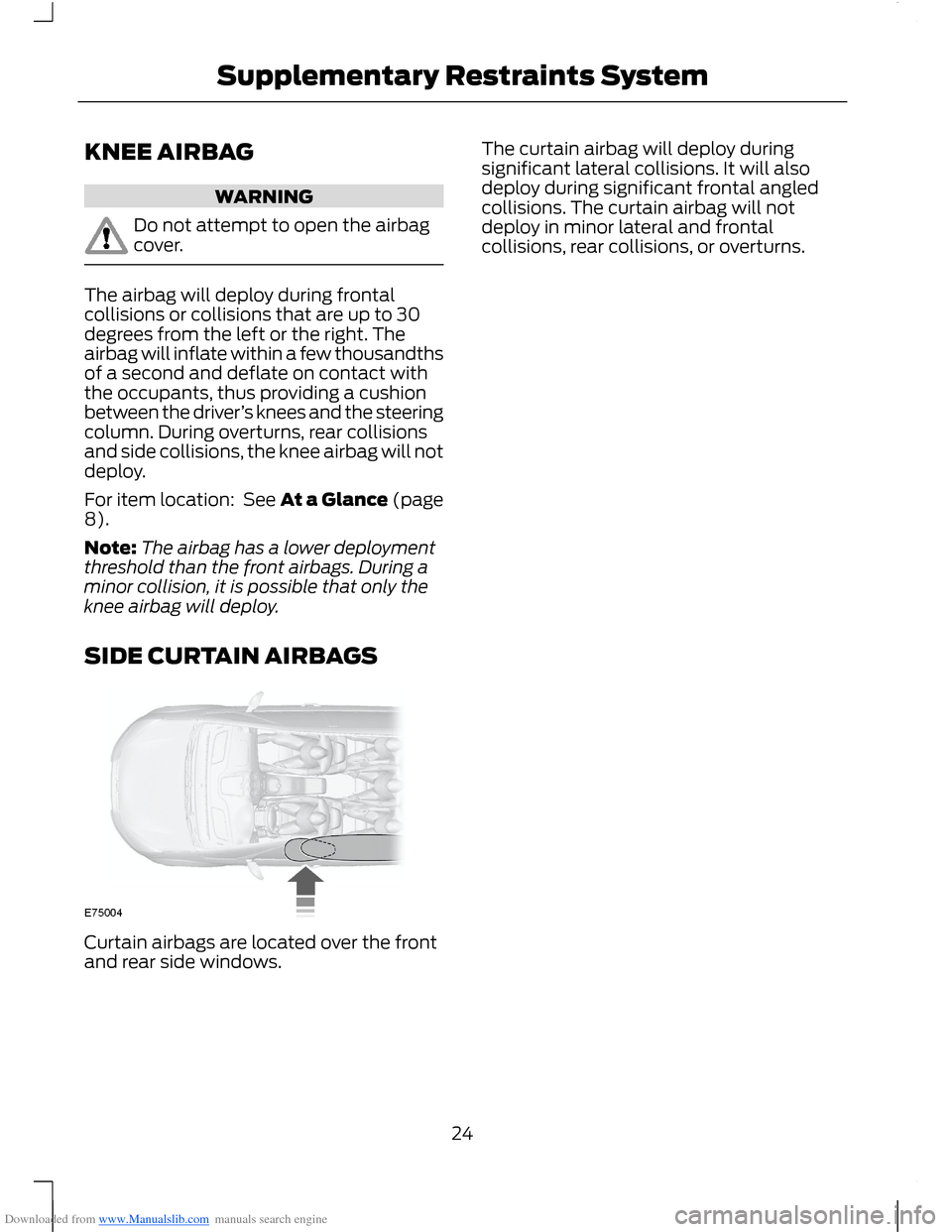
SIDE CURTAIN AIRBAGS
Curtain airbags are located over the frontand rear side windows.
The curtain airbag will deploy duringsignificant lateral collisions. It will alsodeploy during significant frontal angledcollisions. The curtain airbag will notdeploy in minor lateral and frontalcollisions, rear collisions, or overturns.
24Supplementary Restraints System
Page 32 of 256
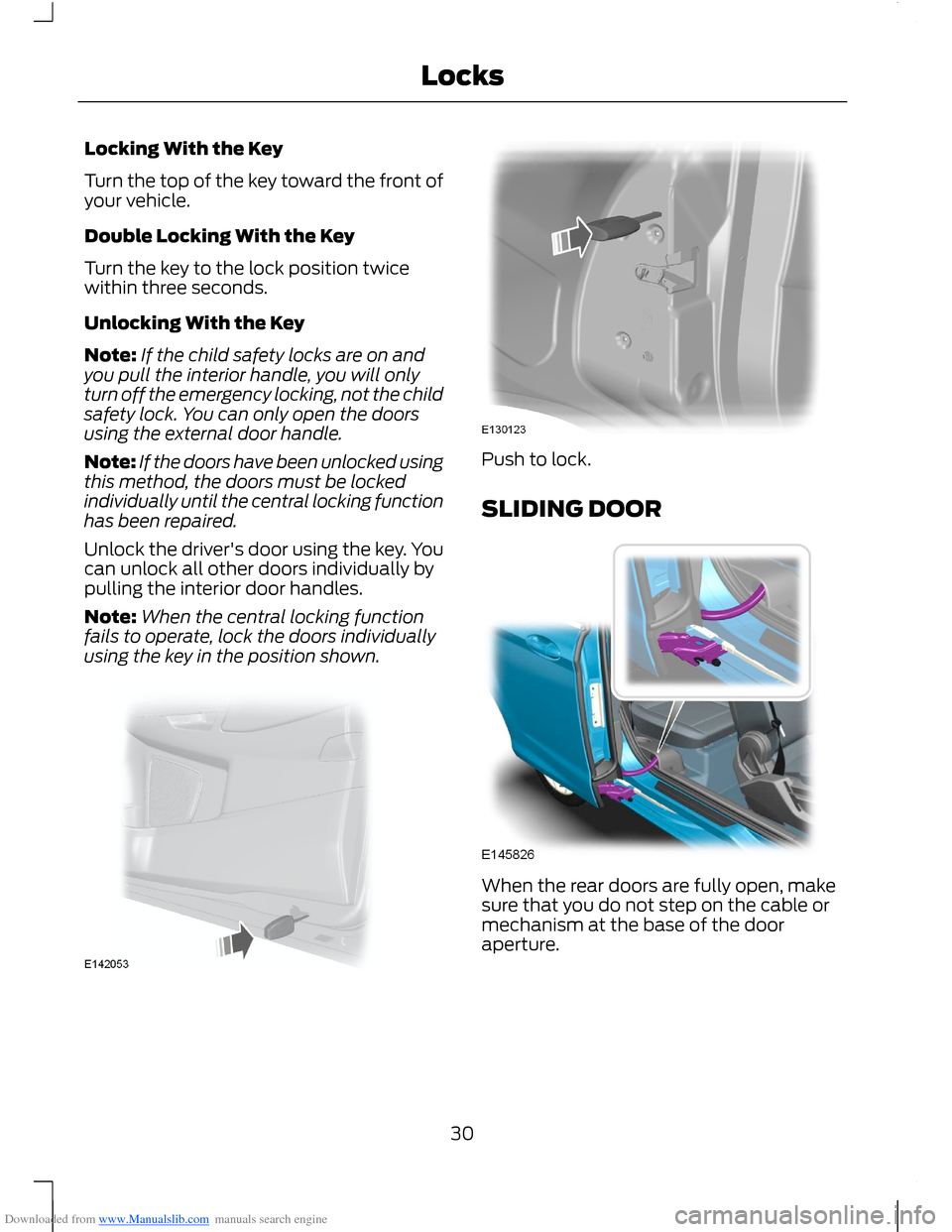
Downloaded from www.Manualslib.com manuals search engine Locking With the Key
Turn the top of the key toward the front ofyour vehicle.
Double Locking With the Key
Turn the key to the lock position twicewithin three seconds.
Unlocking With the Key
Note:If the child safety locks are on andyou pull the interior handle, you will onlyturn off the emergency locking, not the childsafety lock. You can only open the doorsusing the external door handle.
Note:If the doors have been unlocked usingthis method, the doors must be lockedindividually until the central locking functionhas been repaired.
Unlock the driver's door using the key. Youcan unlock all other doors individually bypulling the interior door handles.
Note:When the central locking functionfails to operate, lock the doors individuallyusing the key in the position shown.
Push to lock.
SLIDING DOOR
When the rear doors are fully open, makesure that you do not step on the cable ormechanism at the base of the dooraperture.
30Locks
Page 33 of 256
Downloaded from www.Manualslib.com manuals search engine MANUAL LIFTGATE
WARNINGS
It is extremely dangerous to ride inthe cargo area, inside or outside ofyour vehicle. In a collision, peopleriding in these areas are more likely to beseriously injured or killed. Do not allowpeople to ride in any area of your vehiclethat does not have seats and seat belts.Make sure everyone in your vehicle is in aseat and using a seat belt correctly.
Make sure that the liftgate is closedto prevent exhaust fumes from beingdrawn into your vehicle. This will alsoprevent passengers and cargo from fallingout. If you must drive with the liftgate dooropen, keep your vehicle well ventilated sooutside air does not enter your vehicle.
Note:Be careful when opening or closingthe liftgate in a garage or other enclosedarea to avoid damaging the liftgate.
Note:Do not hang anything (bike rack, etc.)from the spoiler, glass or liftgate. This coulddamage the liftgate and its components.
Note:Do not leave the liftgate open whiledriving. This could damage the liftgate andits components.
Opening and Closing the Liftgate
To Open the Liftgate
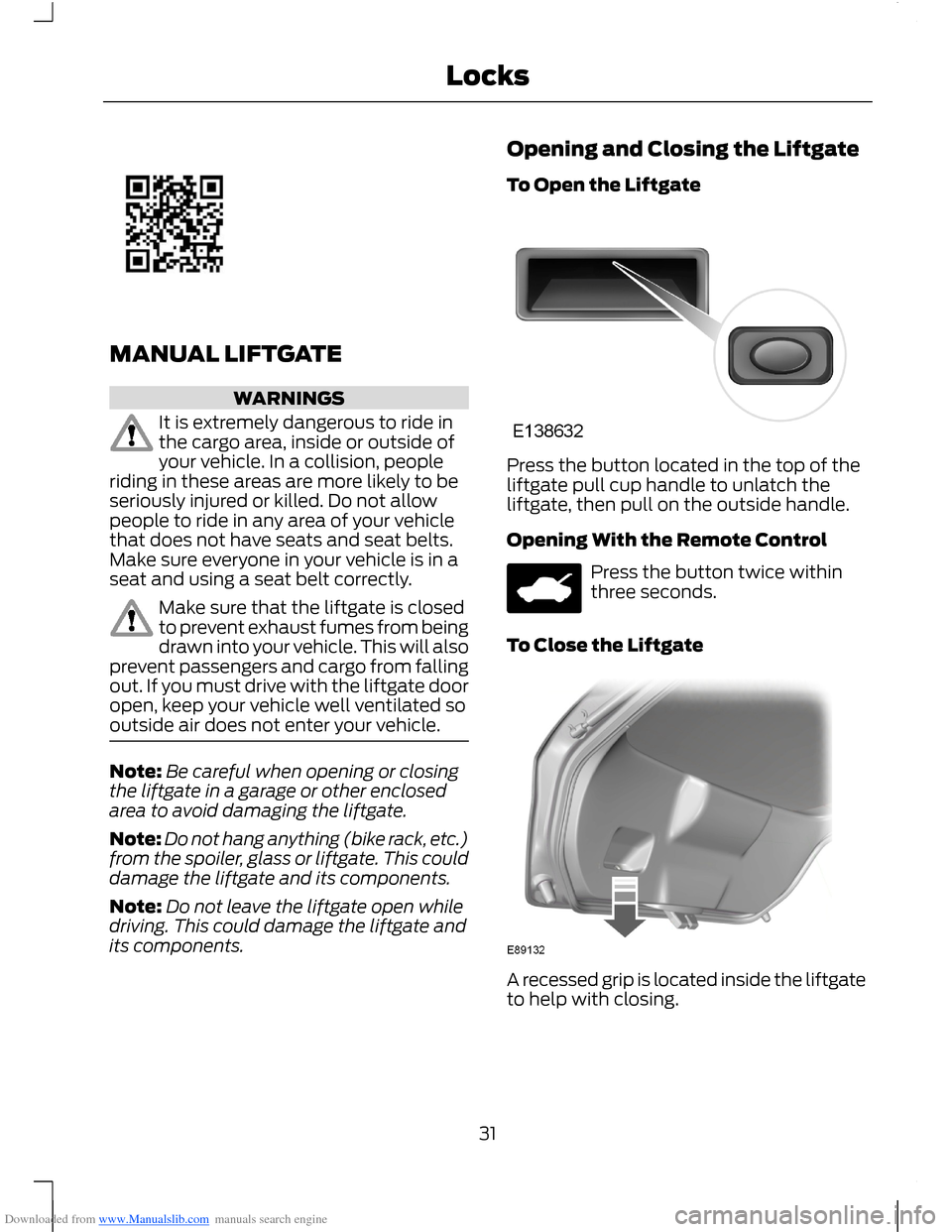
Press the button located in the top of theliftgate pull cup handle to unlatch theliftgate, then pull on the outside handle.
Opening With the Remote Control
Press the button twice withinthree seconds.
To Close the Liftgate
A recessed grip is located inside the liftgateto help with closing.
31Locks
Page 55 of 256
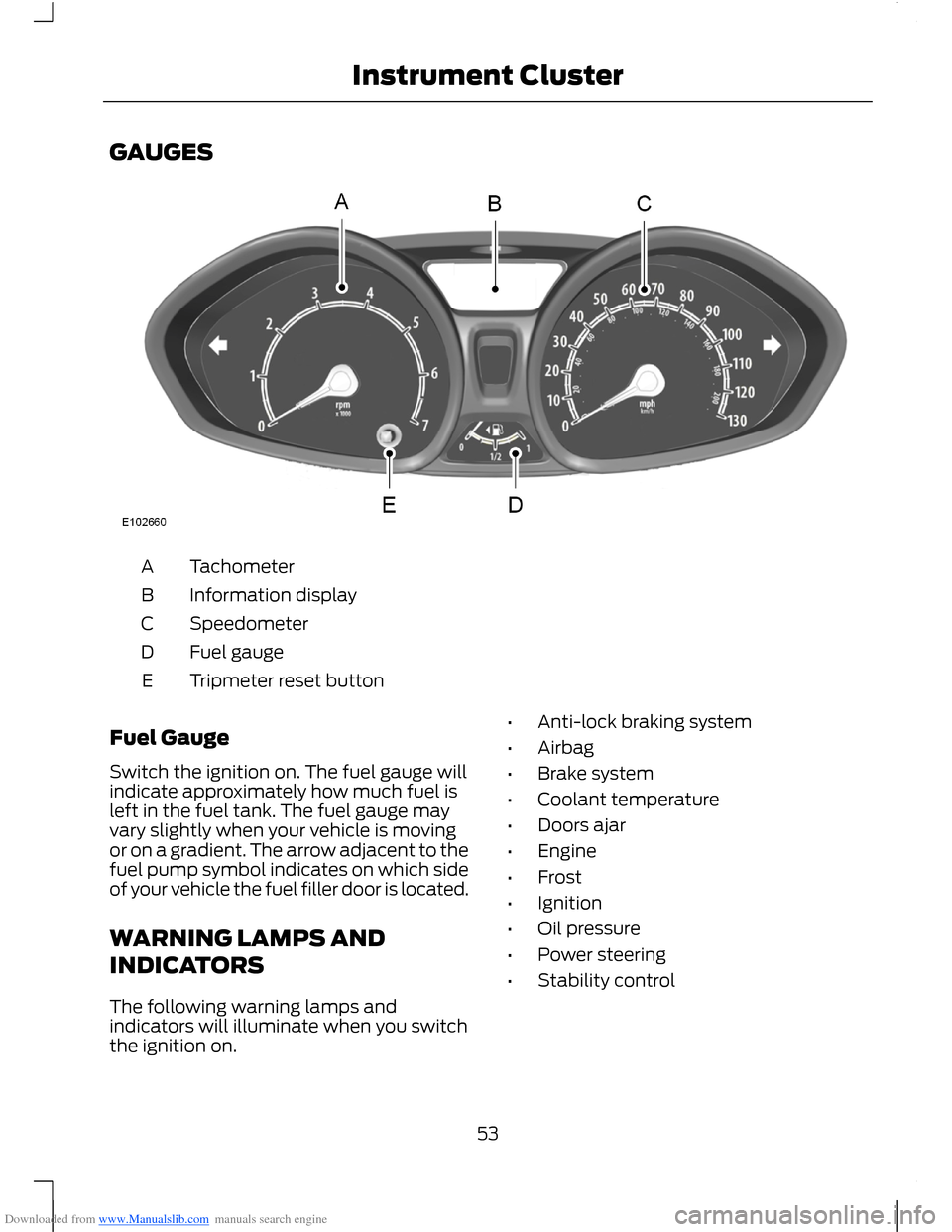
Downloaded from www.Manualslib.com manuals search engine GAUGES
TachometerA
Information displayB
SpeedometerC
Fuel gaugeD
Tripmeter reset buttonE
Fuel Gauge
Switch the ignition on. The fuel gauge willindicate approximately how much fuel isleft in the fuel tank. The fuel gauge mayvary slightly when your vehicle is movingor on a gradient. The arrow adjacent to thefuel pump symbol indicates on which sideof your vehicle the fuel filler door is located.
WARNING LAMPS AND
INDICATORS
The following warning lamps andindicators will illuminate when you switchthe ignition on.
•Anti-lock braking system
•Airbag
•Brake system
•Coolant temperature
•Doors ajar
•Engine
•Frost
•Ignition
•Oil pressure
•Power steering
•Stability control
53Instrument Cluster
Page 57 of 256
Downloaded from www.Manualslib.com manuals search engine All Vehicles
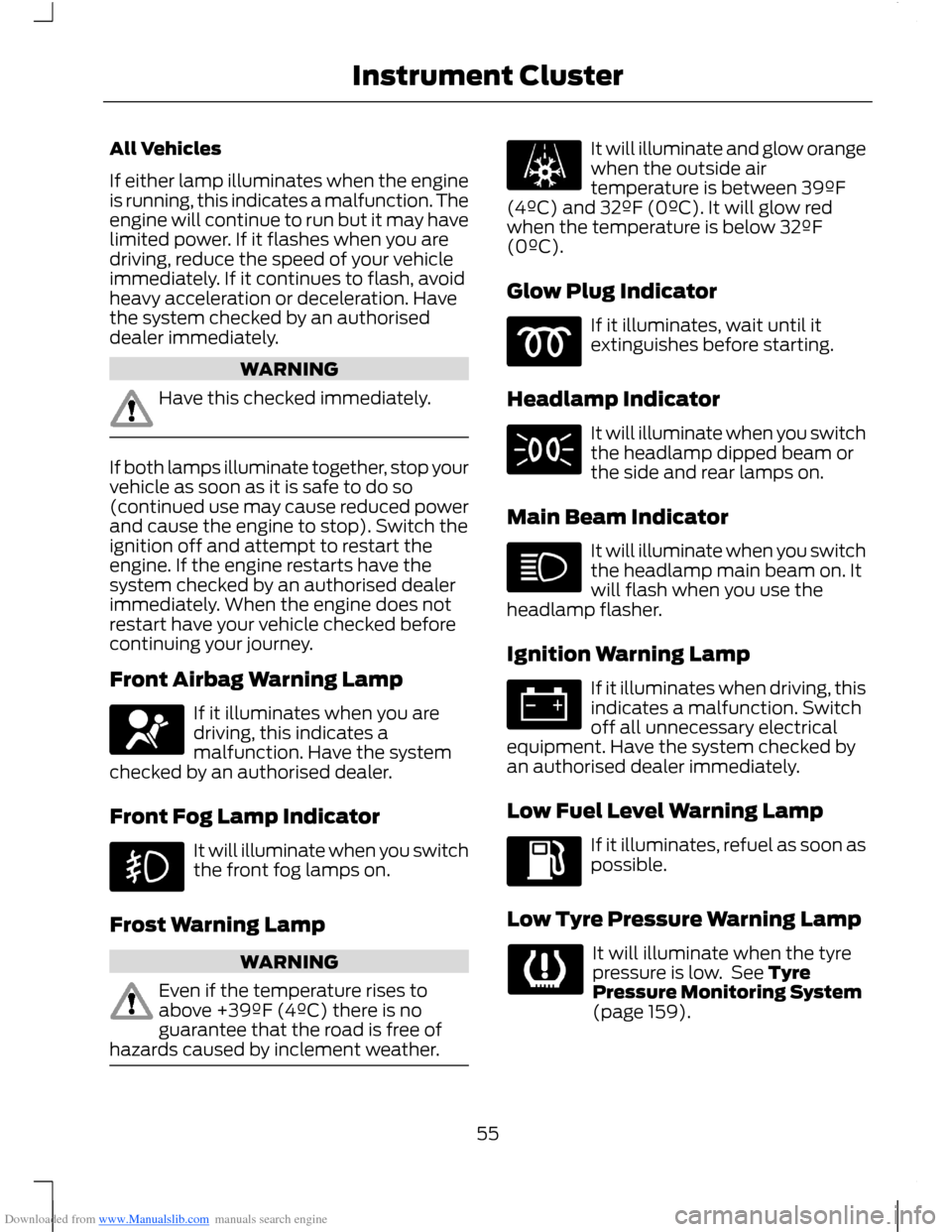
If either lamp illuminates when the engineis running, this indicates a malfunction. Theengine will continue to run but it may havelimited power. If it flashes when you aredriving, reduce the speed of your vehicleimmediately. If it continues to flash, avoidheavy acceleration or deceleration. Havethe system checked by an authoriseddealer immediately.
WARNING
Have this checked immediately.
If both lamps illuminate together, stop yourvehicle as soon as it is safe to do so(continued use may cause reduced powerand cause the engine to stop). Switch theignition off and attempt to restart theengine. If the engine restarts have thesystem checked by an authorised dealerimmediately. When the engine does notrestart have your vehicle checked beforecontinuing your journey.
Front Airbag Warning Lamp
If it illuminates when you aredriving, this indicates amalfunction. Have the systemchecked by an authorised dealer.
Front Fog Lamp Indicator
It will illuminate when you switchthe front fog lamps on.
Frost Warning Lamp
WARNING
Even if the temperature rises toabove +39ºF (4ºC) there is noguarantee that the road is free ofhazards caused by inclement weather.
It will illuminate and glow orangewhen the outside airtemperature is between 39ºF(4ºC) and 32ºF (0ºC). It will glow redwhen the temperature is below 32ºF(0ºC).
Glow Plug Indicator
If it illuminates, wait until itextinguishes before starting.
Headlamp Indicator
It will illuminate when you switchthe headlamp dipped beam orthe side and rear lamps on.
Main Beam Indicator
It will illuminate when you switchthe headlamp main beam on. Itwill flash when you use theheadlamp flasher.
Ignition Warning Lamp
If it illuminates when driving, thisindicates a malfunction. Switchoff all unnecessary electricalequipment. Have the system checked byan authorised dealer immediately.
Low Fuel Level Warning Lamp
If it illuminates, refuel as soon aspossible.
Low Tyre Pressure Warning Lamp
It will illuminate when the tyrepressure is low. See TyrePressure Monitoring System(page 159).
55Instrument Cluster
Page 64 of 256
Downloaded from www.Manualslib.com manuals search engine Distance Odometer
Registers the total distance yourvehicle has travelled.
PERSONALISED SETTINGS
Measure Units
To toggle between imperial and metricunits, scroll to this display and press theOK button.
Toggling the measure units using thisdisplay will affect the following displays:
•Distance to empty.
•Average fuel consumption.
•Instantaneous fuel consumption.
•Average speed.
Switching Chimes Off
The following chimes can be switched off:
•Warning messages.
•Information messages.
INFORMATION MESSAGES
Note:Depending on the options on yourvehicle, not all of the messages will displayor be available. Certain messages may beabbreviated or shortened depending uponwhich cluster type you have.
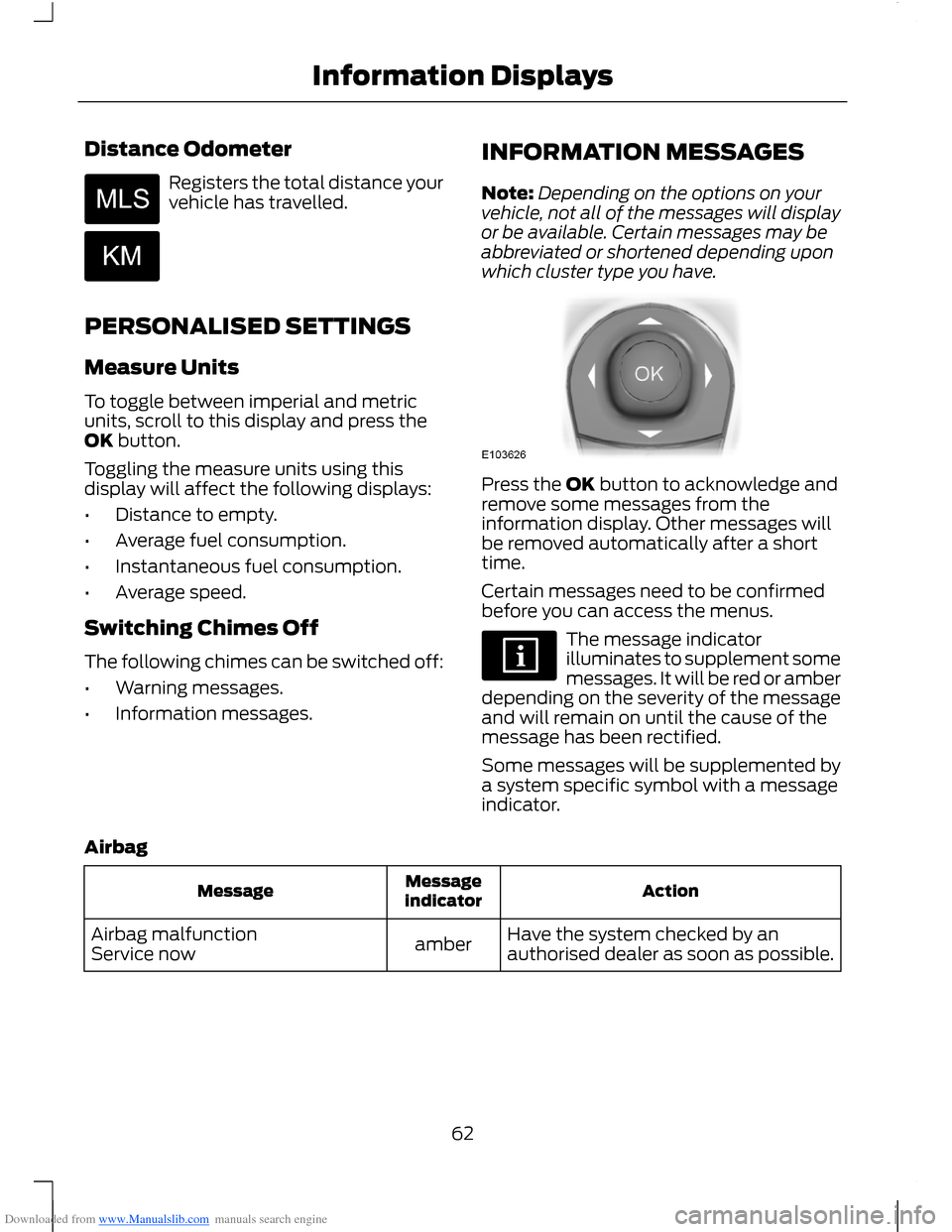
Press the OK button to acknowledge andremove some messages from theinformation display. Other messages willbe removed automatically after a shorttime.
Certain messages need to be confirmedbefore you can access the menus.
The message indicatorilluminates to supplement somemessages. It will be red or amberdepending on the severity of the messageand will remain on until the cause of themessage has been rectified.
Some messages will be supplemented bya system specific symbol with a messageindicator.
Airbag
ActionMessageindicatorMessage
Have the system checked by anauthorised dealer as soon as possible.amberAirbag malfunctionService now
62Information Displays
Page 70 of 256
Downloaded from www.Manualslib.com manuals search engine PRINCIPLE OF OPERATION
Outside Air
Keep the air intakes in front of thewindscreen free from obstruction (snow,leaves etc.) to allow the climate controlsystem to function effectively.
Recirculated Air
WARNING
Prolonged use of recirculated air maycause the windows to mist up. If thewindows mist up, follow the settingsfor demisting the windscreen.
The air currently in the passenger'scompartment will be recirculated. Outsideair will not enter your vehicle.
Heating
Heating performance depends on thetemperature of the engine coolant.
Air Conditioning
Note:The air conditioning operates onlywhen the temperature is above 39°F (4°C).
Note:If you use the air conditioning, thefuel consumption of your vehicle will behigher.
Air is directed through the evaporatorwhere it is cooled. Humidity is extractedfrom the air to help keep the windows freeof mist. The resulting condensation isdirected to the outside of your vehicle andit is therefore normal if you see a smallpool of water under your vehicle.
General Information on Controllingthe Interior Climate
Fully close all the windows.
Warming the Interior
Direct the air toward your feet. In cold orhumid weather conditions, direct some ofthe air toward the windscreen and the doorwindows.
Cooling the Interior
Direct the air toward your face.
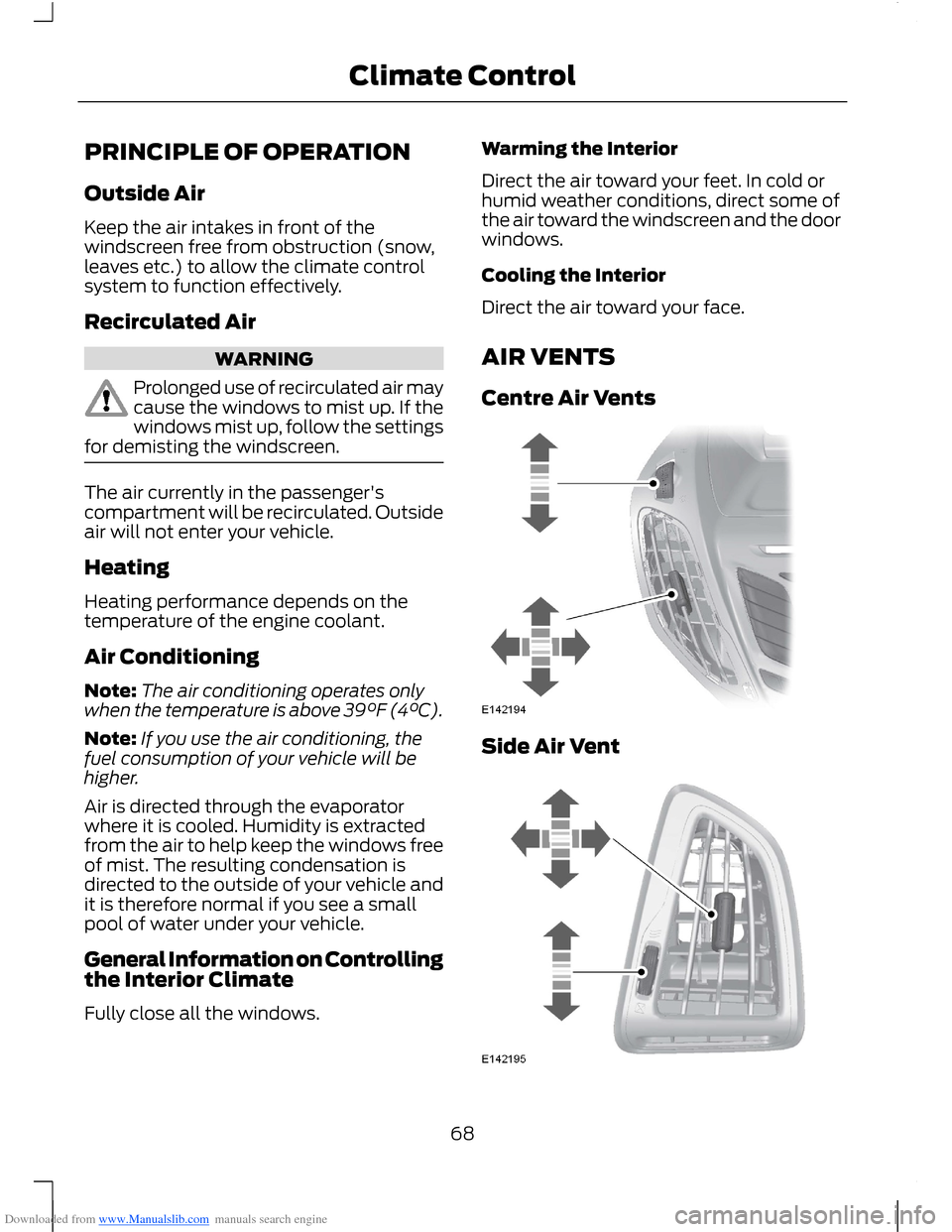
AIR VENTS
Centre Air Vents
Side Air Vent
68Climate Control
Page 71 of 256
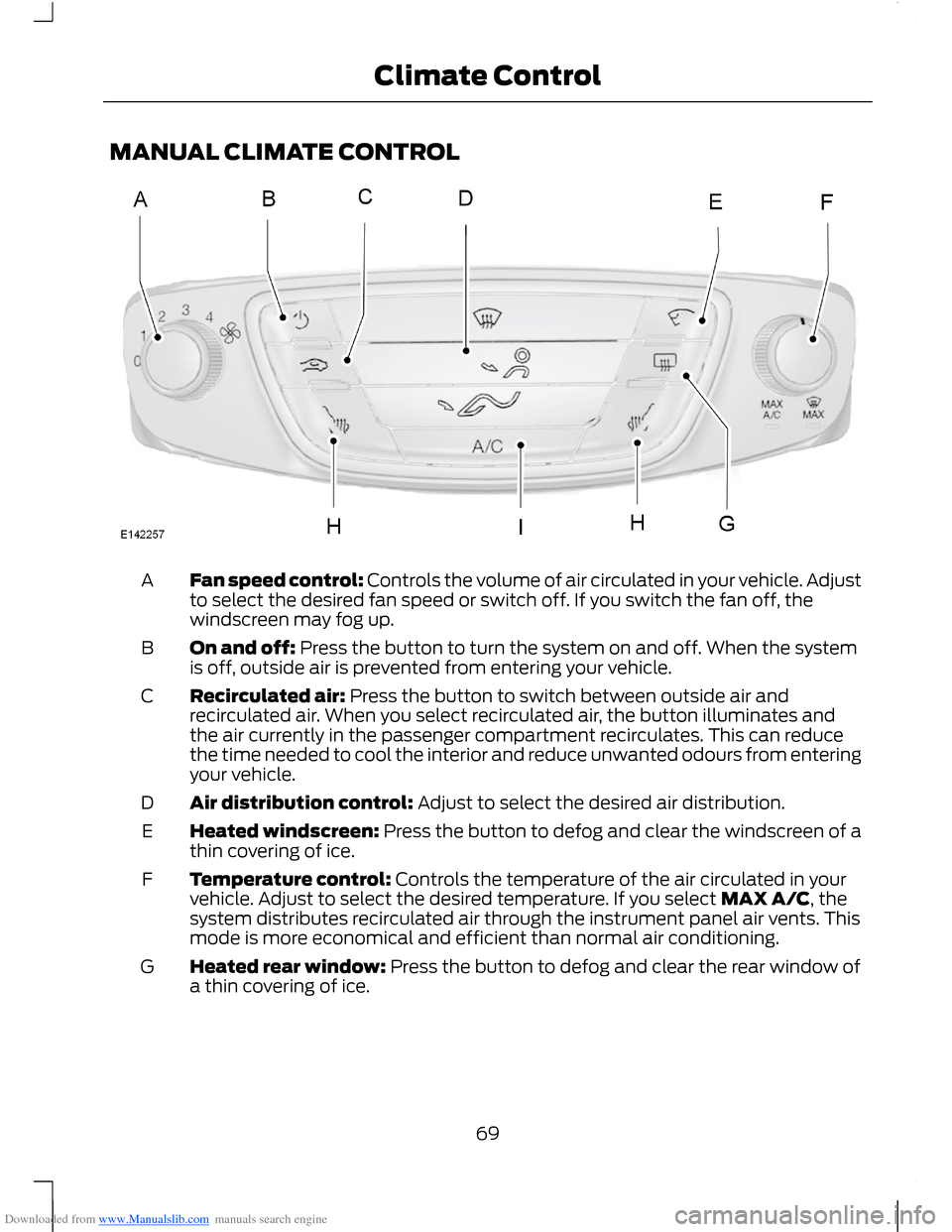
Downloaded from www.Manualslib.com manuals search engine MANUAL CLIMATE CONTROL
Fan speed control: Controls the volume of air circulated in your vehicle. Adjustto select the desired fan speed or switch off. If you switch the fan off, thewindscreen may fog up.
A
On and off: Press the button to turn the system on and off. When the systemis off, outside air is prevented from entering your vehicle.B
Recirculated air: Press the button to switch between outside air andrecirculated air. When you select recirculated air, the button illuminates andthe air currently in the passenger compartment recirculates. This can reducethe time needed to cool the interior and reduce unwanted odours from enteringyour vehicle.
C
Air distribution control: Adjust to select the desired air distribution.D
Heated windscreen: Press the button to defog and clear the windscreen of athin covering of ice.E
Temperature control: Controls the temperature of the air circulated in yourvehicle. Adjust to select the desired temperature. If you select MAX A/C, thesystem distributes recirculated air through the instrument panel air vents. Thismode is more economical and efficient than normal air conditioning.
F
Heated rear window: Press the button to defog and clear the rear window ofa thin covering of ice.G
69Climate Control