air FORD B MAX 2012 1.G Owner's Manual
[x] Cancel search | Manufacturer: FORD, Model Year: 2012, Model line: B MAX, Model: FORD B MAX 2012 1.GPages: 256, PDF Size: 19.67 MB
Page 72 of 256
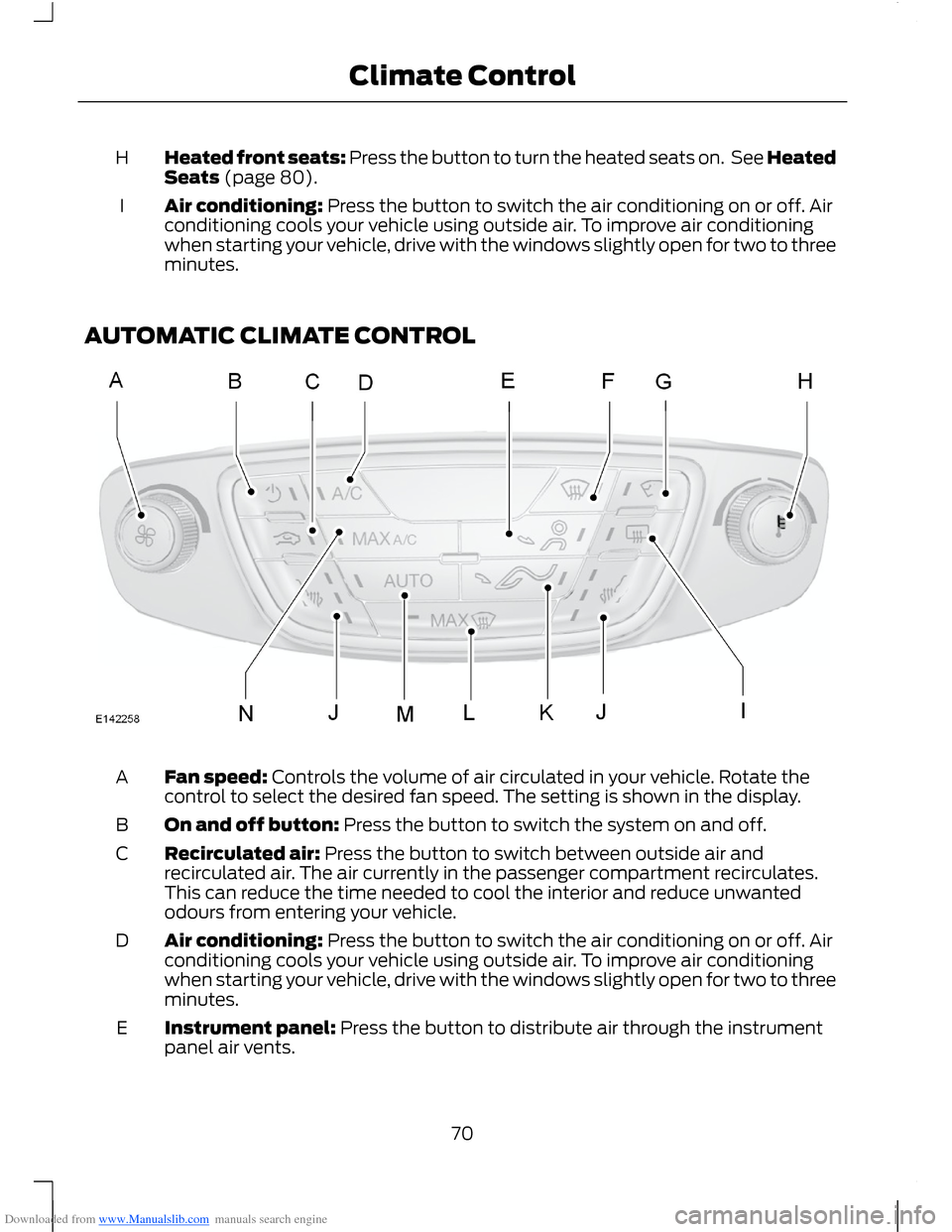
Downloaded from www.Manualslib.com manuals search engine Heated front seats: Press the button to turn the heated seats on. See HeatedSeats (page 80).H
Air conditioning: Press the button to switch the air conditioning on or off. Airconditioning cools your vehicle using outside air. To improve air conditioningwhen starting your vehicle, drive with the windows slightly open for two to threeminutes.
I
AUTOMATIC CLIMATE CONTROL
Fan speed: Controls the volume of air circulated in your vehicle. Rotate thecontrol to select the desired fan speed. The setting is shown in the display.A
On and off button: Press the button to switch the system on and off.B
Recirculated air: Press the button to switch between outside air andrecirculated air. The air currently in the passenger compartment recirculates.This can reduce the time needed to cool the interior and reduce unwantedodours from entering your vehicle.
C
Air conditioning: Press the button to switch the air conditioning on or off. Airconditioning cools your vehicle using outside air. To improve air conditioningwhen starting your vehicle, drive with the windows slightly open for two to threeminutes.
D
Instrument panel: Press the button to distribute air through the instrumentpanel air vents.E
70Climate Control
Page 73 of 256
Downloaded from www.Manualslib.com manuals search engine Windscreen: Press the button to distribute air through the windscreen air vents.You can also use this setting to defog and clear the windscreen of a thin coveringof ice.
F
Heated windscreen: Press the button to defog and clear the windscreen of athin covering of ice.G
Temperature control: Controls the temperature of the air circulated in yourvehicle. Adjust to select the desired temperature. If you select MAX A/C, thesystem distributes recirculated air through the instrument panel air vents. Thismode is more economical and efficient than normal air conditioning.
H
Heated rear window: Press the button to defog and clear the rear window ofa thin covering of ice.I
Heated front seats: Press the button to turn the heated seats on. See HeatedSeats (page 80).J
Footwell: Press the button to distribute air through the footwell air vents.K
Windscreen defrosting and defogging: Press the button to distribute outsideair through the windscreen air vents. The heated windows and air conditioningwill be automatically selected. The fan will be set to the highest speed and thetemperature to high. When the air distribution is set in this position, you will beunable to select recirculated air or manually adjust the fan speed andtemperature control. Press the AUTO button to return the system to auto mode.
L
AUTO: Press the button to select automatic operation. The systemautomatically controls the temperature, amount and distribution of the airflowto reach and maintain your previously selected temperature.
M
MAX A/C: Press the button to distribute maximum air conditioning throughthe instrument panel air vents. This mode is more economical and efficientthan normal air conditioning.
E
71Climate Control
Page 74 of 256
Downloaded from www.Manualslib.com manuals search engine Temperature Control
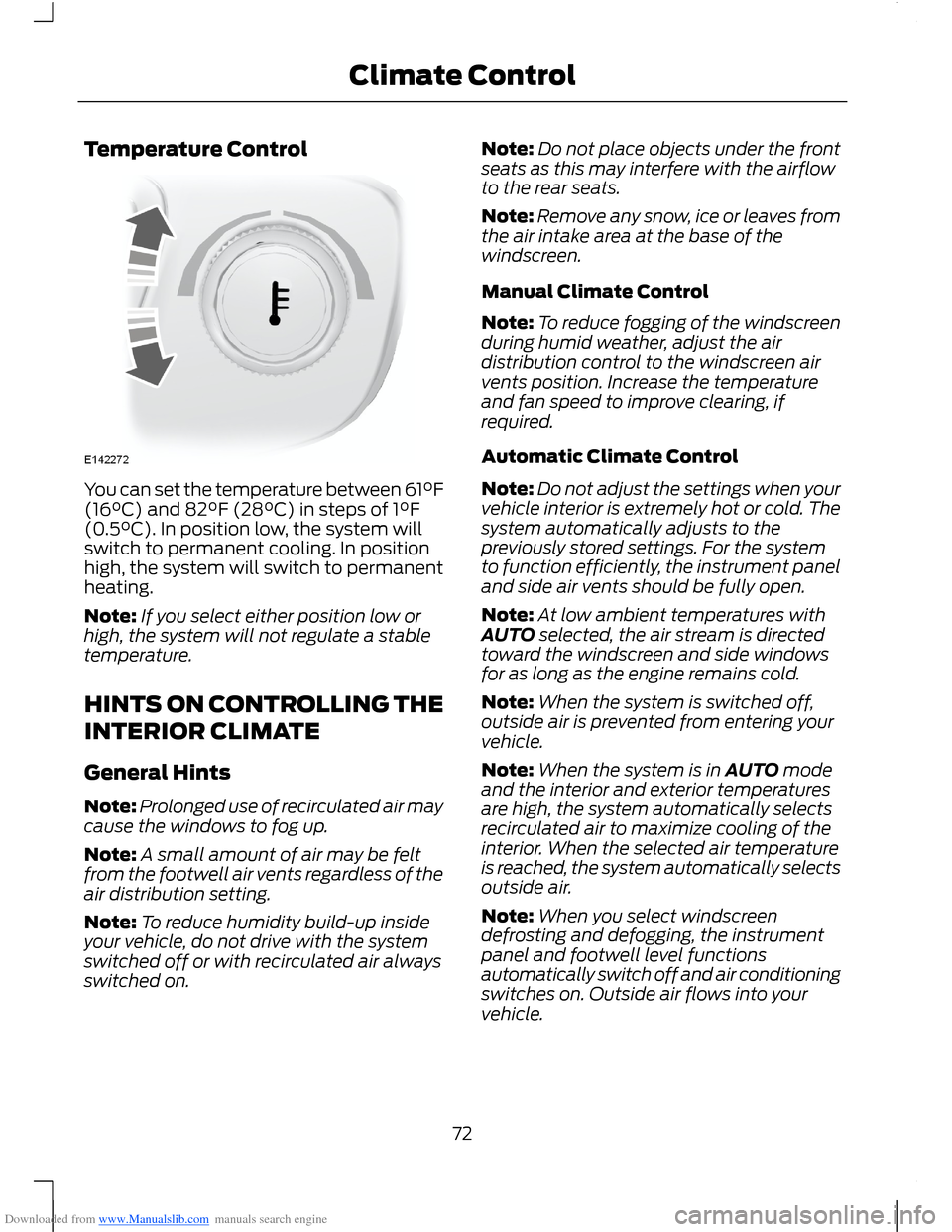
You can set the temperature between 61°F(16°C) and 82°F (28°C) in steps of 1°F(0.5°C). In position low, the system willswitch to permanent cooling. In positionhigh, the system will switch to permanentheating.
Note:If you select either position low orhigh, the system will not regulate a stabletemperature.
HINTS ON CONTROLLING THE
INTERIOR CLIMATE
General Hints
Note:Prolonged use of recirculated air maycause the windows to fog up.
Note:A small amount of air may be feltfrom the footwell air vents regardless of theair distribution setting.
Note:To reduce humidity build-up insideyour vehicle, do not drive with the systemswitched off or with recirculated air alwaysswitched on.
Note:Do not place objects under the frontseats as this may interfere with the airflowto the rear seats.
Note:Remove any snow, ice or leaves fromthe air intake area at the base of thewindscreen.
Manual Climate Control
Note:To reduce fogging of the windscreenduring humid weather, adjust the airdistribution control to the windscreen airvents position. Increase the temperatureand fan speed to improve clearing, ifrequired.
Automatic Climate Control
Note:Do not adjust the settings when yourvehicle interior is extremely hot or cold. Thesystem automatically adjusts to thepreviously stored settings. For the systemto function efficiently, the instrument paneland side air vents should be fully open.
Note:At low ambient temperatures withAUTO selected, the air stream is directedtoward the windscreen and side windowsfor as long as the engine remains cold.
Note:When the system is switched off,outside air is prevented from entering yourvehicle.
Note:When the system is in AUTO modeand the interior and exterior temperaturesare high, the system automatically selectsrecirculated air to maximize cooling of theinterior. When the selected air temperatureis reached, the system automatically selectsoutside air.
Note:When you select windscreendefrosting and defogging, the instrumentpanel and footwell level functionsautomatically switch off and air conditioningswitches on. Outside air flows into yourvehicle.
72Climate Control
Page 75 of 256
Downloaded from www.Manualslib.com manuals search engine Heating the Interior Quickly
Vehicles With Automatic Climate ControlVehicles With Manual Climate Control
Adjust the fan speed to the highestspeed setting.Adjust the fan speed to the highestspeed setting.1
Adjust the temperature control to thehighest setting.Adjust the temperature control to thehighest setting.2
Press the footwell button to distributeair to the footwell air vents.Adjust the air distribution control to thefootwell air vents position.3
Recommended Settings for Heating
Vehicles With Automatic Climate ControlVehicles With Manual Climate Control
Press the AUTO button.Adjust the fan speed to the secondspeed setting.1
Adjust the temperature control settingto the desired setting.Adjust the temperature control to themidway point of the hot settings.2
Close the instrument panel air vents.Open the side air vents and direct themtoward the side windows.
Adjust the air distribution control to thefootwell and windscreen air vents posi-tion.
3
Cooling the Interior Quickly
Vehicles With Automatic Climate ControlVehicles With Manual Climate Control
Press the AUTO button.Adjust the fan speed to the highestspeed setting.1
Adjust the temperature control settingto low.Adjust the temperature control to theMAX A/C position.2
Adjust the air distribution control to theinstrument panel air vents position.3
73Climate Control
Page 76 of 256
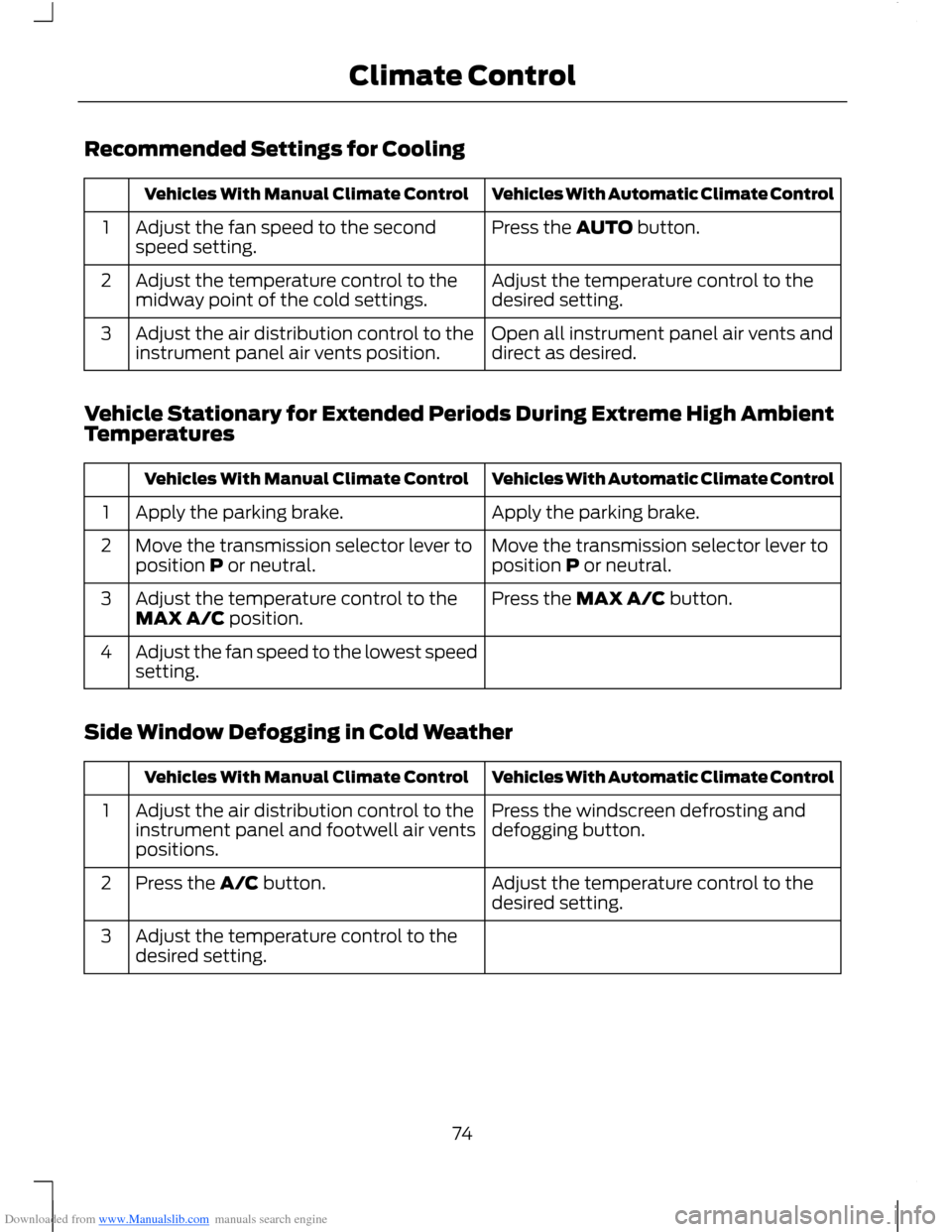
Downloaded from www.Manualslib.com manuals search engine Recommended Settings for Cooling
Vehicles With Automatic Climate ControlVehicles With Manual Climate Control
Press the AUTO button.Adjust the fan speed to the secondspeed setting.1
Adjust the temperature control to thedesired setting.Adjust the temperature control to themidway point of the cold settings.2
Open all instrument panel air vents anddirect as desired.Adjust the air distribution control to theinstrument panel air vents position.3
Vehicle Stationary for Extended Periods During Extreme High AmbientTemperatures
Vehicles With Automatic Climate ControlVehicles With Manual Climate Control
Apply the parking brake.Apply the parking brake.1
Move the transmission selector lever toposition P or neutral.Move the transmission selector lever toposition P or neutral.2
Press the MAX A/C button.Adjust the temperature control to theMAX A/C position.3
Adjust the fan speed to the lowest speedsetting.4
Side Window Defogging in Cold Weather
Vehicles With Automatic Climate ControlVehicles With Manual Climate Control
Press the windscreen defrosting anddefogging button.Adjust the air distribution control to theinstrument panel and footwell air ventspositions.
1
Adjust the temperature control to thedesired setting.Press the A/C button.2
Adjust the temperature control to thedesired setting.3
74Climate Control
Page 77 of 256
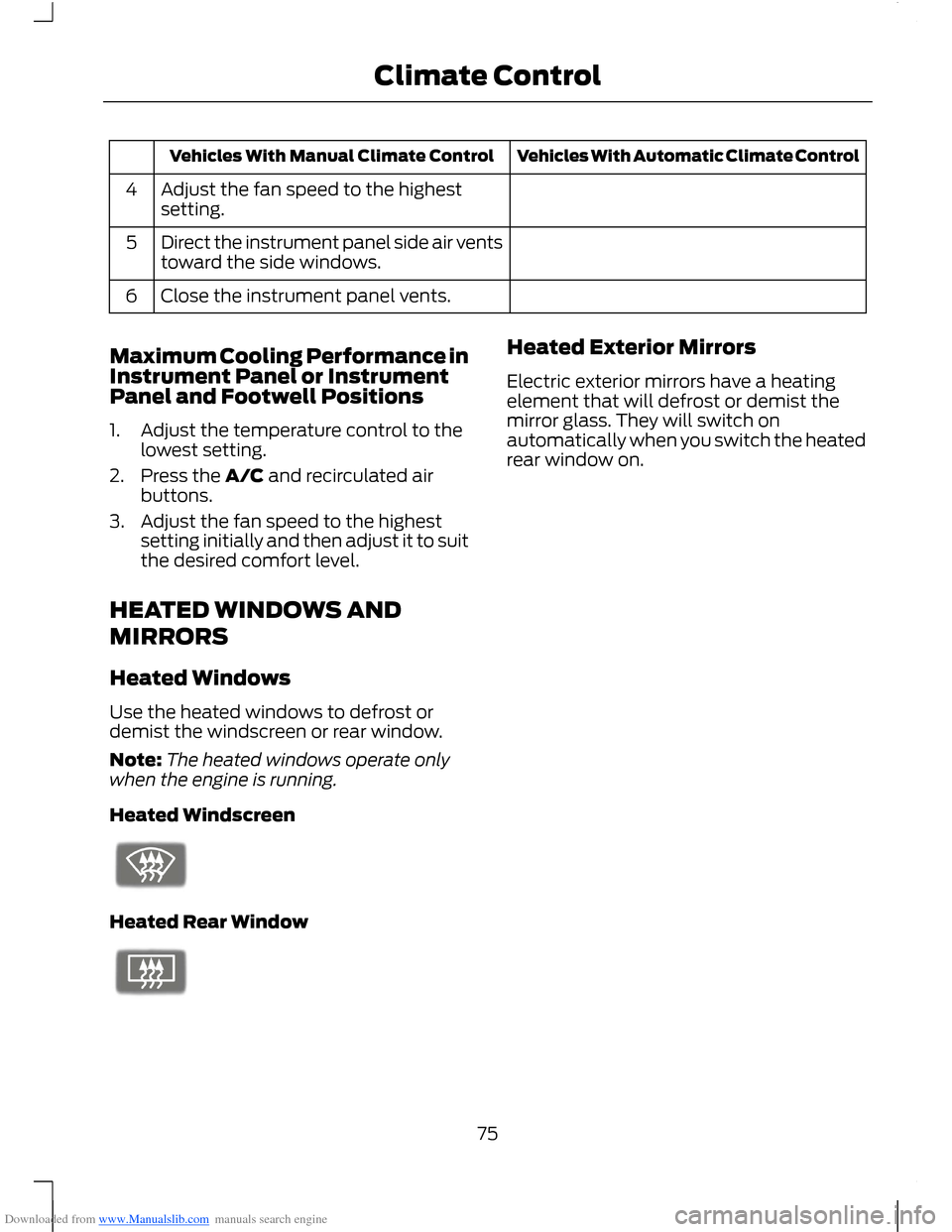
Downloaded from www.Manualslib.com manuals search engine Vehicles With Automatic Climate ControlVehicles With Manual Climate Control
Adjust the fan speed to the highestsetting.4
Direct the instrument panel side air ventstoward the side windows.5
Close the instrument panel vents.6
Maximum Cooling Performance inInstrument Panel or InstrumentPanel and Footwell Positions
1.Adjust the temperature control to thelowest setting.
2.Press the A/C and recirculated airbuttons.
3.Adjust the fan speed to the highestsetting initially and then adjust it to suitthe desired comfort level.
HEATED WINDOWS AND
MIRRORS
Heated Windows
Use the heated windows to defrost ordemist the windscreen or rear window.
Note:The heated windows operate onlywhen the engine is running.
Heated Windscreen
Heated Rear Window
Heated Exterior Mirrors
Electric exterior mirrors have a heatingelement that will defrost or demist themirror glass. They will switch onautomatically when you switch the heatedrear window on.
75Climate Control
Page 78 of 256
Downloaded from www.Manualslib.com manuals search engine SITTING IN THE CORRECT
POSITION
WARNINGS
Do not recline the seatback too faras this can cause the occupant toslide under the seat belt, resulting inserious injury in the event of a collision.
Sitting improperly, out of position orwith the seatback reclined too far,can result in serious injury or deathin the event of a collision. Always situpright against your seatback, with yourfeet on the floor.
Do not place objects higher than theseatback to reduce the risk of seriousinjury in the event of a collision orduring heavy braking.
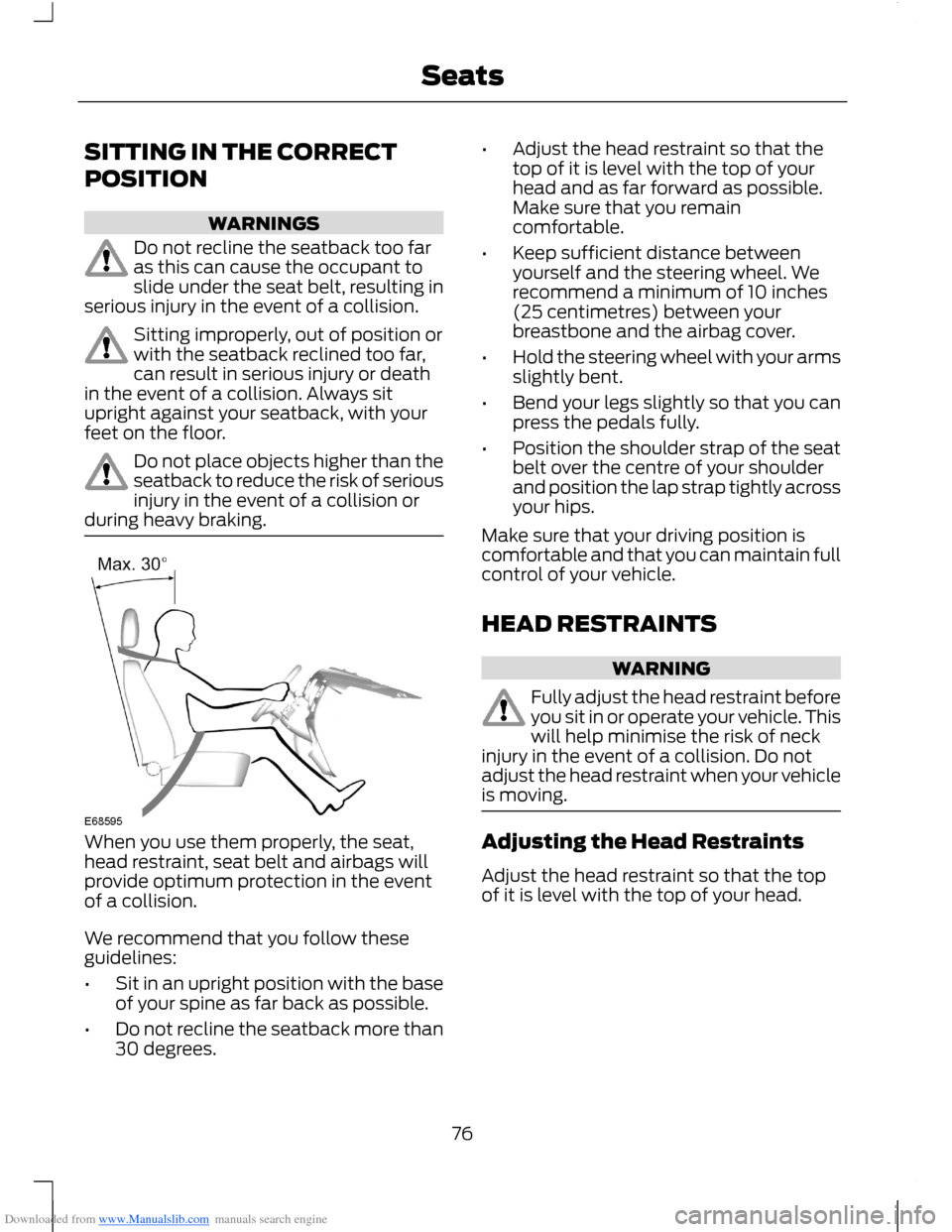
When you use them properly, the seat,head restraint, seat belt and airbags willprovide optimum protection in the eventof a collision.
We recommend that you follow theseguidelines:
•Sit in an upright position with the baseof your spine as far back as possible.
•Do not recline the seatback more than30 degrees.
•Adjust the head restraint so that thetop of it is level with the top of yourhead and as far forward as possible.Make sure that you remaincomfortable.
•Keep sufficient distance betweenyourself and the steering wheel. Werecommend a minimum of 10 inches(25 centimetres) between yourbreastbone and the airbag cover.
•Hold the steering wheel with your armsslightly bent.
•Bend your legs slightly so that you canpress the pedals fully.
•Position the shoulder strap of the seatbelt over the centre of your shoulderand position the lap strap tightly acrossyour hips.
Make sure that your driving position iscomfortable and that you can maintain fullcontrol of your vehicle.
HEAD RESTRAINTS
WARNING
Fully adjust the head restraint beforeyou sit in or operate your vehicle. Thiswill help minimise the risk of neckinjury in the event of a collision. Do notadjust the head restraint when your vehicleis moving.
Adjusting the Head Restraints
Adjust the head restraint so that the topof it is level with the top of your head.
76Seats
Page 97 of 256
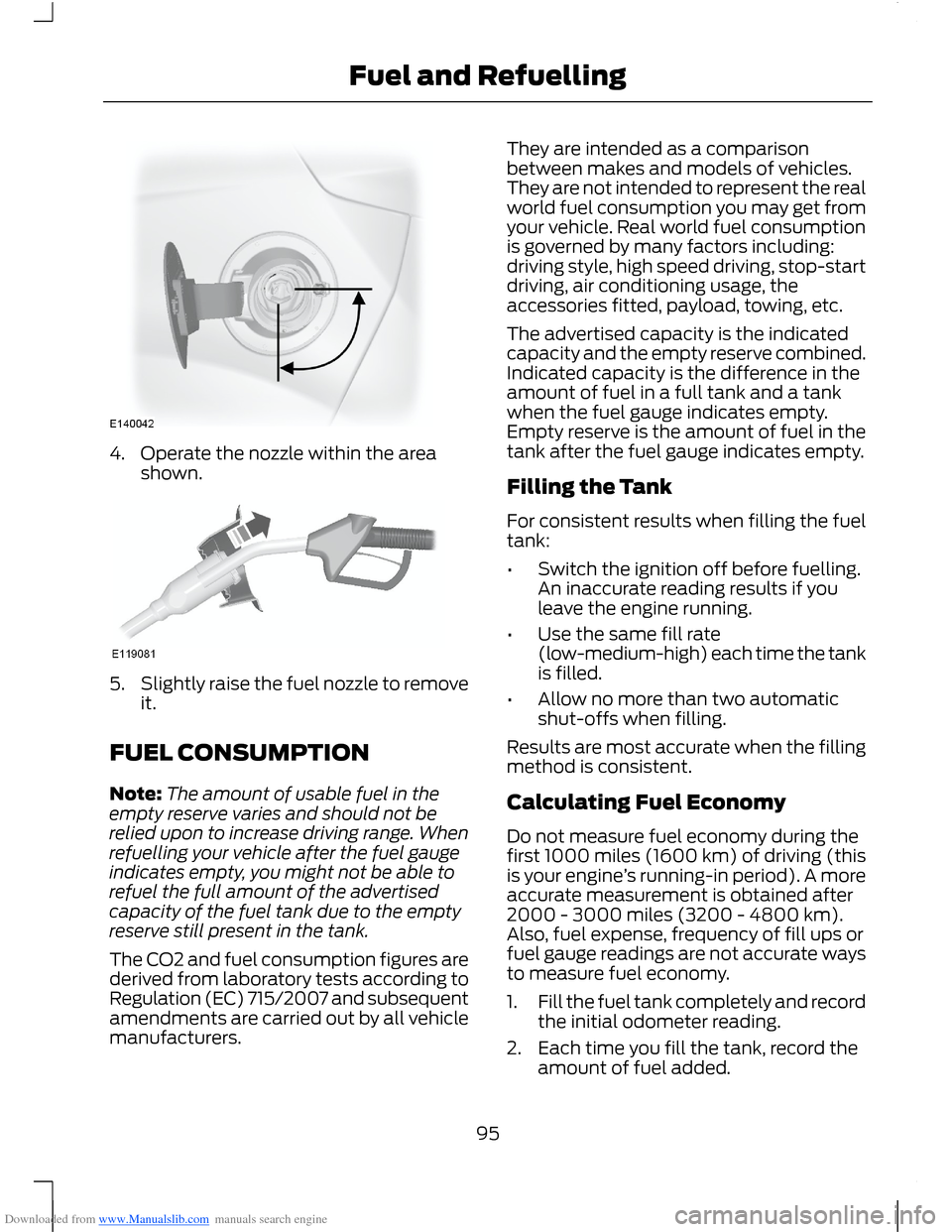
Downloaded from www.Manualslib.com manuals search engine 4.Operate the nozzle within the areashown.
5.Slightly raise the fuel nozzle to removeit.
FUEL CONSUMPTION
Note:The amount of usable fuel in theempty reserve varies and should not berelied upon to increase driving range. Whenrefuelling your vehicle after the fuel gaugeindicates empty, you might not be able torefuel the full amount of the advertisedcapacity of the fuel tank due to the emptyreserve still present in the tank.
The CO2 and fuel consumption figures arederived from laboratory tests according toRegulation (EC) 715/2007 and subsequentamendments are carried out by all vehiclemanufacturers.
They are intended as a comparisonbetween makes and models of vehicles.They are not intended to represent the realworld fuel consumption you may get fromyour vehicle. Real world fuel consumptionis governed by many factors including:driving style, high speed driving, stop-startdriving, air conditioning usage, theaccessories fitted, payload, towing, etc.
The advertised capacity is the indicatedcapacity and the empty reserve combined.Indicated capacity is the difference in theamount of fuel in a full tank and a tankwhen the fuel gauge indicates empty.Empty reserve is the amount of fuel in thetank after the fuel gauge indicates empty.
Filling the Tank
For consistent results when filling the fueltank:
•Switch the ignition off before fuelling.An inaccurate reading results if youleave the engine running.
•Use the same fill rate(low-medium-high) each time the tankis filled.
•Allow no more than two automaticshut-offs when filling.
Results are most accurate when the fillingmethod is consistent.
Calculating Fuel Economy
Do not measure fuel economy during thefirst 1000 miles (1600 km) of driving (thisis your engine’s running-in period). A moreaccurate measurement is obtained after2000 - 3000 miles (3200 - 4800 km).Also, fuel expense, frequency of fill ups orfuel gauge readings are not accurate waysto measure fuel economy.
1.Fill the fuel tank completely and recordthe initial odometer reading.
2.Each time you fill the tank, record theamount of fuel added.
95Fuel and Refuelling
Page 105 of 256
Downloaded from www.Manualslib.com manuals search engine PRINCIPLE OF OPERATION
Electronic Stability Program
WARNING
The system does not relieve you ofyour responsibility to drive with duecare and attention.
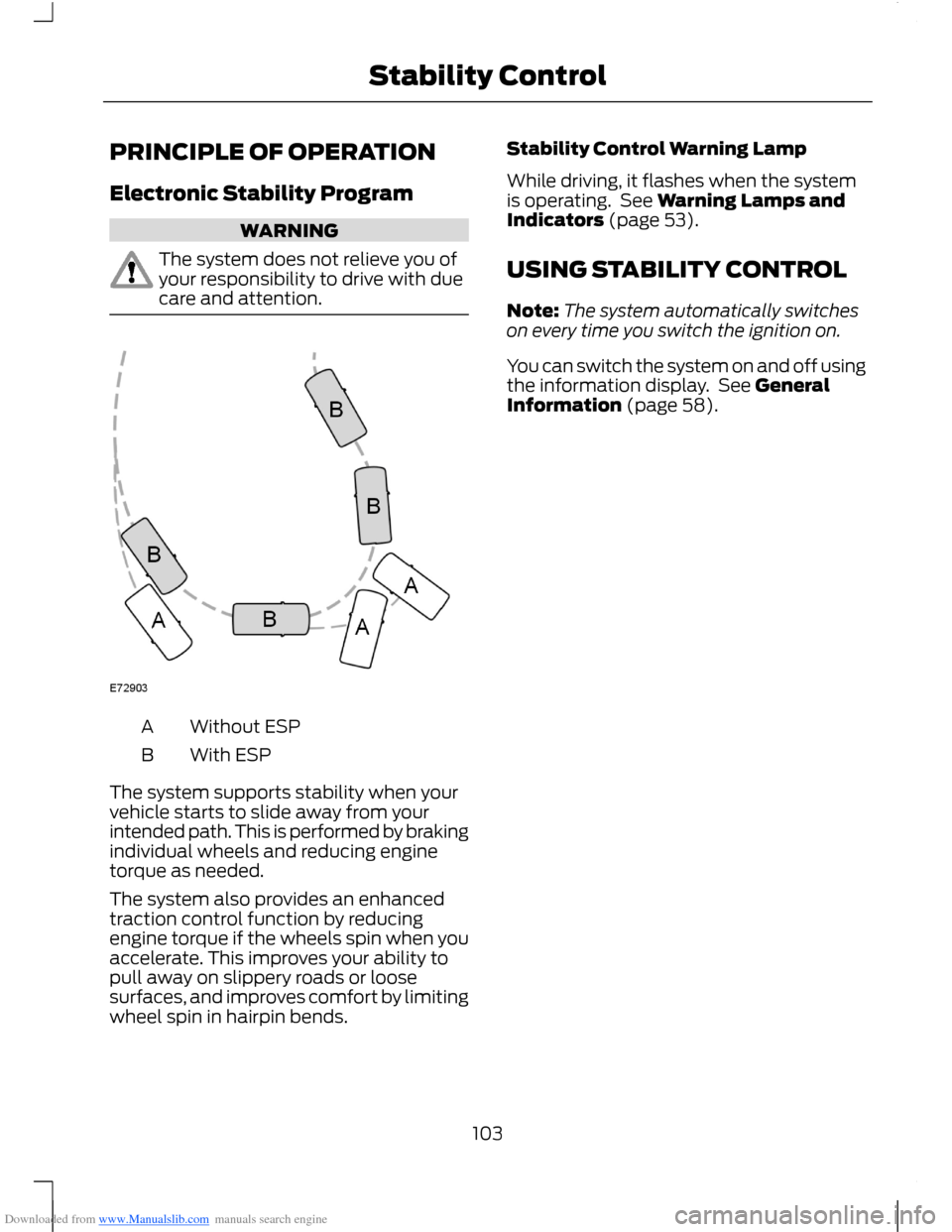
Without ESPA
With ESPB
The system supports stability when yourvehicle starts to slide away from yourintended path. This is performed by brakingindividual wheels and reducing enginetorque as needed.
The system also provides an enhancedtraction control function by reducingengine torque if the wheels spin when youaccelerate. This improves your ability topull away on slippery roads or loosesurfaces, and improves comfort by limitingwheel spin in hairpin bends.
Stability Control Warning Lamp
While driving, it flashes when the systemis operating. See Warning Lamps andIndicators (page 53).
USING STABILITY CONTROL
Note:The system automatically switcheson every time you switch the ignition on.
You can switch the system on and off usingthe information display. See GeneralInformation (page 58).
103Stability Control
Page 106 of 256
Downloaded from www.Manualslib.com manuals search engine PRINCIPLE OF OPERATION
WARNINGS
The system does not relieve you ofyour responsibility to drive with duecare and attention.
If your vehicles has a trailer towmodule not approved by us, thesystem may not correctly detectobstacles.
The sensors may not detect objectsin heavy rain or other conditions thatcause disruptive reflections.
The sensors may not detect objectswith surfaces that absorb ultrasonicwaves.
The system does not detectobstacles moving away from yourvehicle. They will only be detectedshortly after they start to move towardyour vehicle.
Take particular care when reversingwith a tow ball arm or rear fittedaccessories e.g. a bicycle carrier, asthe rear parking aid will only indicate thedistance from the bumper to the obstacle.
If you use a high pressure spray towash your vehicle, only spray thesensors briefly from a distance notless than 8 inches (20 centimetres).
Note:If your vehicle has a tow ball arm, thesystem is switched off automatically whenany trailer lamps (or lighting boards) areconnected to the 13-pin socket via a trailertow module we have approved.
Note:Keep the sensors free from dirt, iceand snow. Do not clean with sharp objects.
Note:The system may emit false tones ifit detects a signal using the same frequencyas the sensors or if your vehicle is fully laden.
Note:The outer sensors may detect theside walls of a garage. If the distancebetween the outer sensor and the side wallremains constant for three seconds, thetone will switch off. As you continue, theinner sensors will detect rearward objects.
PARKING AID
WARNINGS
To help avoid personal injury, readand understand the limitations of thesystem as contained in this section.Sensing is only an aid for some (generallylarge and fixed) objects when moving inreverse on a flat surface at parking speeds.Traffic control systems, inclementweather, air brakes and external motorsand fans may also affect the function ofthe sensing system. This may includereduced performance or a false activation.
To help avoid personal injury, alwaysuse caution when moving in reverseand when using the sensing system.
This system is not designed toprevent contact with small or movingobjects. The system is designed toprovide a warning to assist the driver indetecting large stationary objects to avoiddamaging the vehicle. The system may notdetect smaller objects, particularly thoseclose to the ground.
Certain add-on devices such as largetrailer hitches, bike or surfboard racksand any device that may block thenormal detection zone of the system, maycreate false audible warnings.
Note:Keep the sensors located on thebumper or fascia free from snow, ice andlarge accumulations of dirt. If the sensorsare covered, the system’s accuracy can beaffected. Do not clean the sensors withsharp objects.
104Parking Aids