air FORD B MAX 2012 1.G Repair Manual
[x] Cancel search | Manufacturer: FORD, Model Year: 2012, Model line: B MAX, Model: FORD B MAX 2012 1.GPages: 256, PDF Size: 19.67 MB
Page 212 of 256
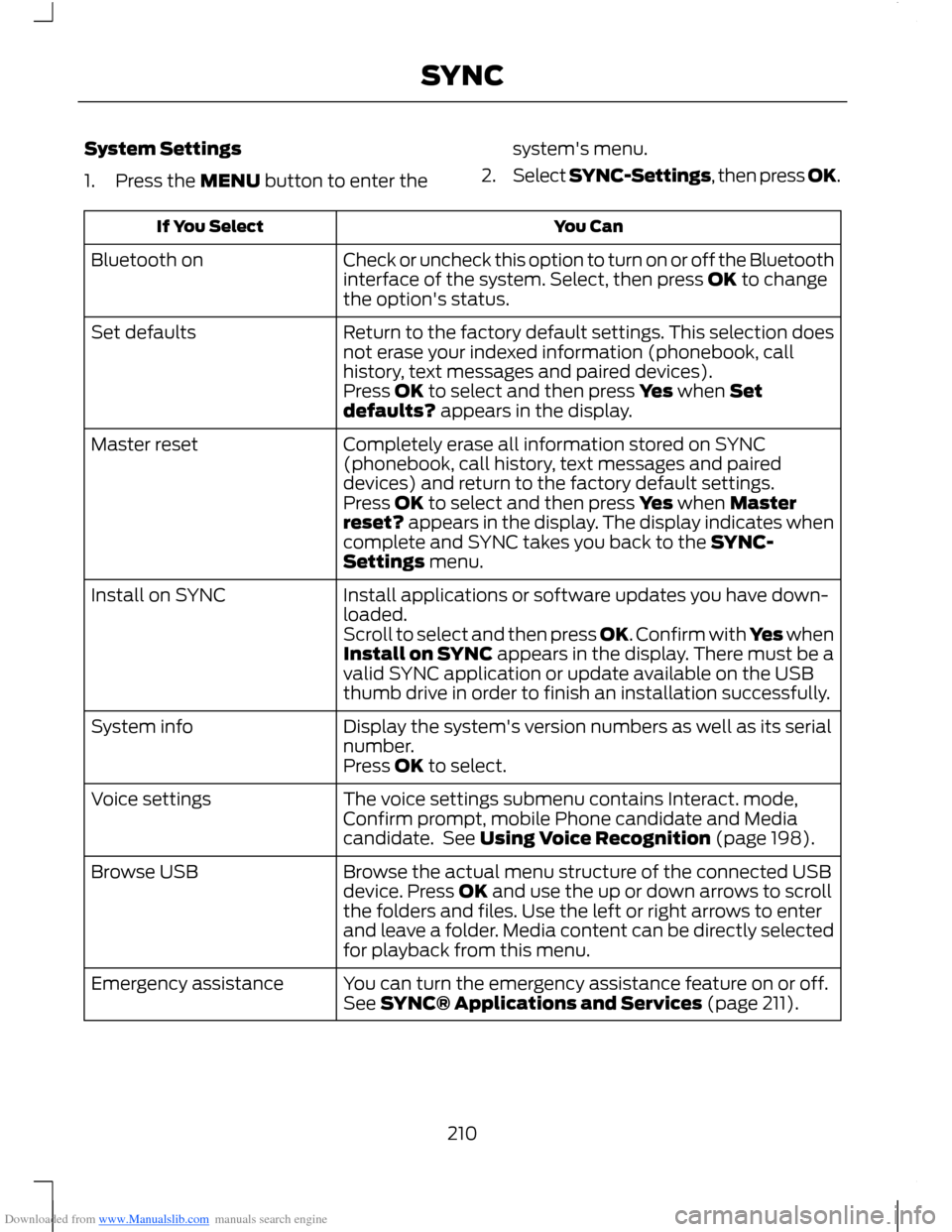
Downloaded from www.Manualslib.com manuals search engine System Settings
1.Press the MENU button to enter the
system's menu.
2.Select SYNC-Settings, then press OK.
You CanIf You Select
Check or uncheck this option to turn on or off the Bluetoothinterface of the system. Select, then press OK to changethe option's status.
Bluetooth on
Return to the factory default settings. This selection doesnot erase your indexed information (phonebook, callhistory, text messages and paired devices).
Set defaults
Press OK to select and then press Yes when Setdefaults? appears in the display.
Completely erase all information stored on SYNC(phonebook, call history, text messages and paireddevices) and return to the factory default settings.
Master reset
Press OK to select and then press Yes when Masterreset? appears in the display. The display indicates whencomplete and SYNC takes you back to the SYNC-Settings menu.
Install applications or software updates you have down-loaded.Install on SYNC
Scroll to select and then press OK. Confirm with Yes whenInstall on SYNC appears in the display. There must be avalid SYNC application or update available on the USBthumb drive in order to finish an installation successfully.
Display the system's version numbers as well as its serialnumber.System info
Press OK to select.
The voice settings submenu contains Interact. mode,Confirm prompt, mobile Phone candidate and Mediacandidate. See Using Voice Recognition (page 198).
Voice settings
Browse the actual menu structure of the connected USBdevice. Press OK and use the up or down arrows to scrollthe folders and files. Use the left or right arrows to enterand leave a folder. Media content can be directly selectedfor playback from this menu.
Browse USB
You can turn the emergency assistance feature on or off.See SYNC® Applications and Services (page 211).Emergency assistance
210SYNC
Page 213 of 256
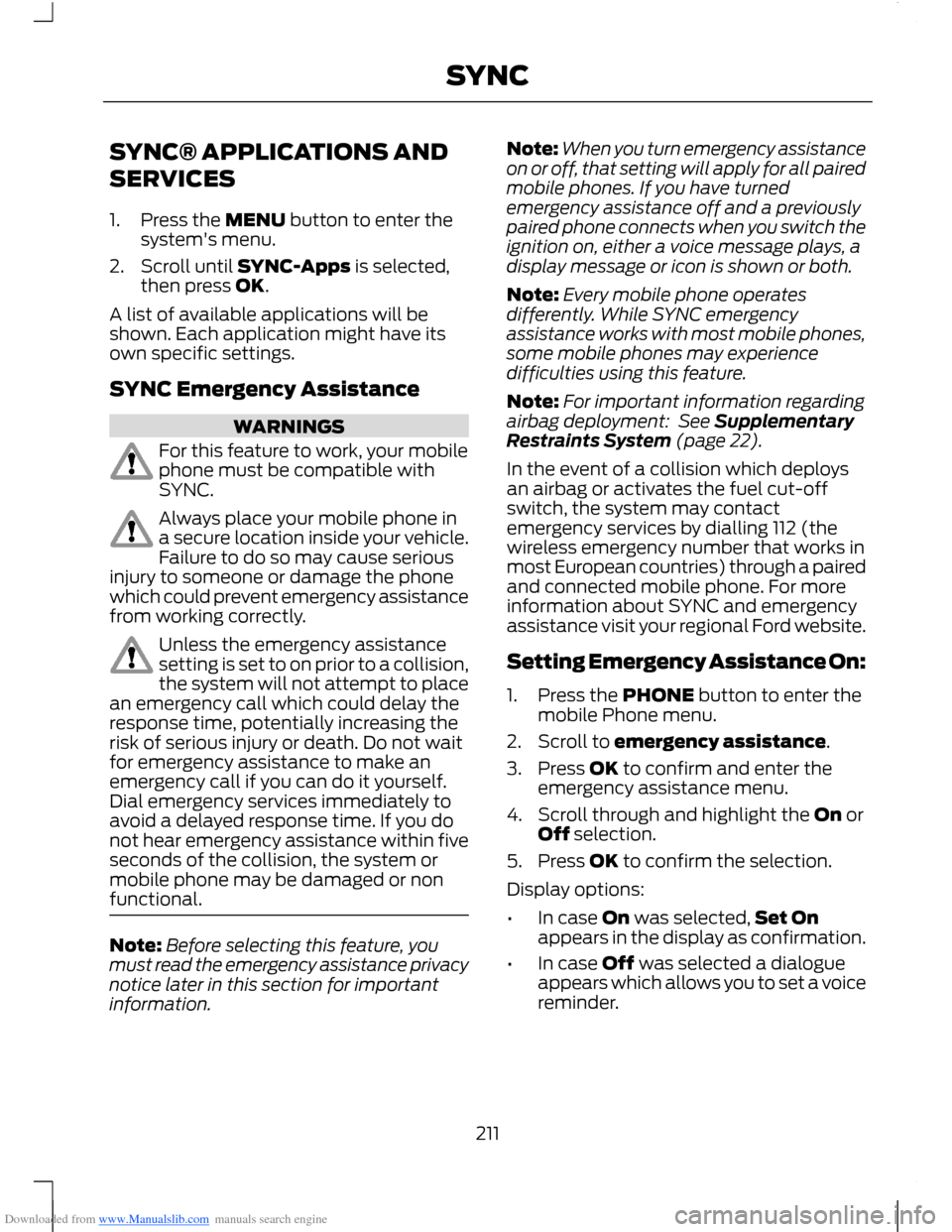
Downloaded from www.Manualslib.com manuals search engine SYNC® APPLICATIONS AND
SERVICES
1.Press the MENU button to enter thesystem's menu.
2.Scroll until SYNC-Apps is selected,then press OK.
A list of available applications will beshown. Each application might have itsown specific settings.
SYNC Emergency Assistance
WARNINGS
For this feature to work, your mobilephone must be compatible withSYNC.
Always place your mobile phone ina secure location inside your vehicle.Failure to do so may cause seriousinjury to someone or damage the phonewhich could prevent emergency assistancefrom working correctly.
Unless the emergency assistancesetting is set to on prior to a collision,the system will not attempt to placean emergency call which could delay theresponse time, potentially increasing therisk of serious injury or death. Do not waitfor emergency assistance to make anemergency call if you can do it yourself.Dial emergency services immediately toavoid a delayed response time. If you donot hear emergency assistance within fiveseconds of the collision, the system ormobile phone may be damaged or nonfunctional.
Note:Before selecting this feature, youmust read the emergency assistance privacynotice later in this section for importantinformation.
Note:When you turn emergency assistanceon or off, that setting will apply for all pairedmobile phones. If you have turnedemergency assistance off and a previouslypaired phone connects when you switch theignition on, either a voice message plays, adisplay message or icon is shown or both.
Note:Every mobile phone operatesdifferently. While SYNC emergencyassistance works with most mobile phones,some mobile phones may experiencedifficulties using this feature.
Note:For important information regardingairbag deployment: See SupplementaryRestraints System (page 22).
In the event of a collision which deploysan airbag or activates the fuel cut-offswitch, the system may contactemergency services by dialling 112 (thewireless emergency number that works inmost European countries) through a pairedand connected mobile phone. For moreinformation about SYNC and emergencyassistance visit your regional Ford website.
Setting Emergency Assistance On:
1.Press the PHONE button to enter themobile Phone menu.
2.Scroll to emergency assistance.
3.Press OK to confirm and enter theemergency assistance menu.
4.Scroll through and highlight the On orOff selection.
5.Press OK to confirm the selection.
Display options:
•In case On was selected,Set Onappears in the display as confirmation.
•In case Off was selected a dialogueappears which allows you to set a voicereminder.
211SYNC
Page 214 of 256
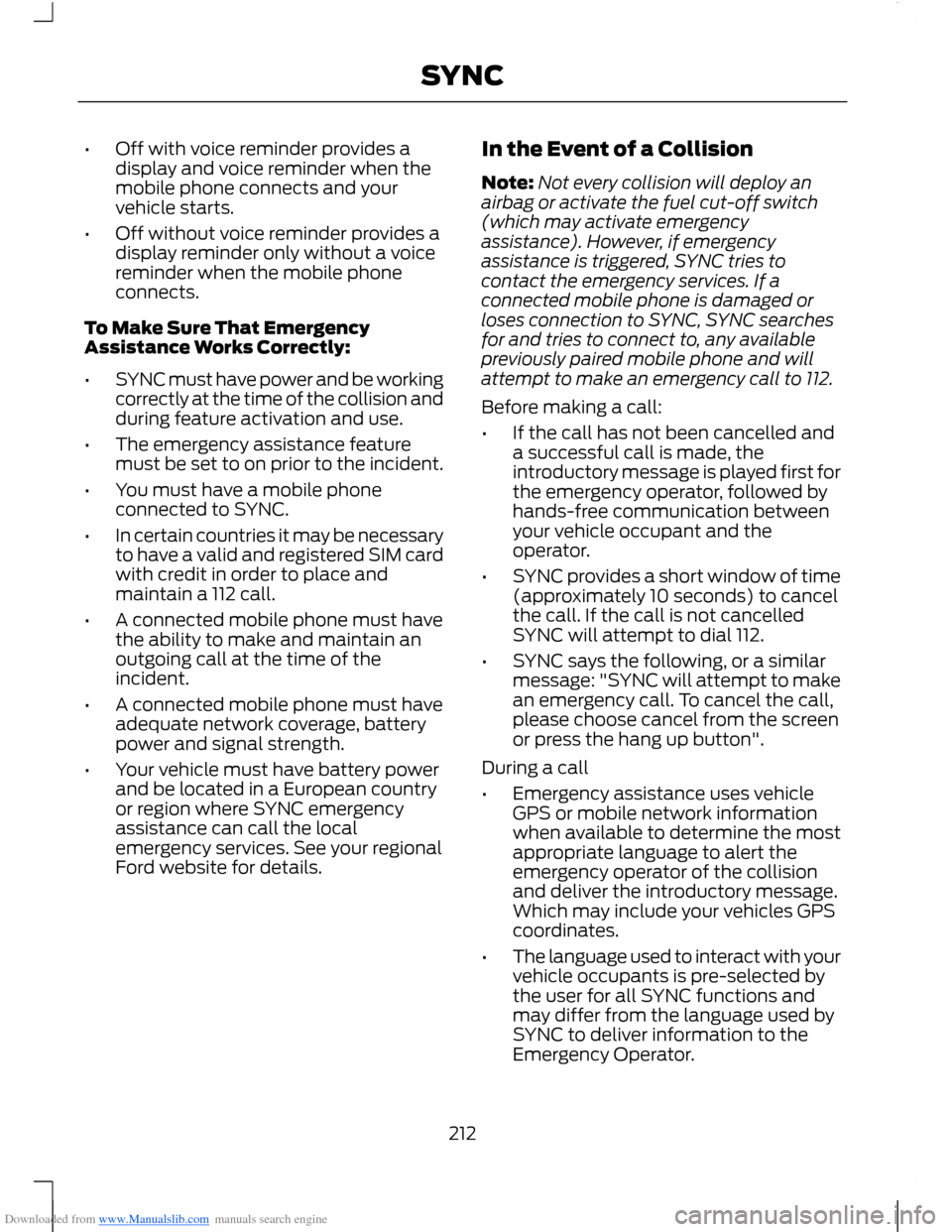
Downloaded from www.Manualslib.com manuals search engine •Off with voice reminder provides adisplay and voice reminder when themobile phone connects and yourvehicle starts.
•Off without voice reminder provides adisplay reminder only without a voicereminder when the mobile phoneconnects.
To Make Sure That EmergencyAssistance Works Correctly:
•SYNC must have power and be workingcorrectly at the time of the collision andduring feature activation and use.
•The emergency assistance featuremust be set to on prior to the incident.
•You must have a mobile phoneconnected to SYNC.
•In certain countries it may be necessaryto have a valid and registered SIM cardwith credit in order to place andmaintain a 112 call.
•A connected mobile phone must havethe ability to make and maintain anoutgoing call at the time of theincident.
•A connected mobile phone must haveadequate network coverage, batterypower and signal strength.
•Your vehicle must have battery powerand be located in a European countryor region where SYNC emergencyassistance can call the localemergency services. See your regionalFord website for details.
In the Event of a Collision
Note:Not every collision will deploy anairbag or activate the fuel cut-off switch(which may activate emergencyassistance). However, if emergencyassistance is triggered, SYNC tries tocontact the emergency services. If aconnected mobile phone is damaged orloses connection to SYNC, SYNC searchesfor and tries to connect to, any availablepreviously paired mobile phone and willattempt to make an emergency call to 112.
Before making a call:
•If the call has not been cancelled anda successful call is made, theintroductory message is played first forthe emergency operator, followed byhands-free communication betweenyour vehicle occupant and theoperator.
•SYNC provides a short window of time(approximately 10 seconds) to cancelthe call. If the call is not cancelledSYNC will attempt to dial 112.
•SYNC says the following, or a similarmessage: "SYNC will attempt to makean emergency call. To cancel the call,please choose cancel from the screenor press the hang up button".
During a call
•Emergency assistance uses vehicleGPS or mobile network informationwhen available to determine the mostappropriate language to alert theemergency operator of the collisionand deliver the introductory message.Which may include your vehicles GPScoordinates.
•The language used to interact with yourvehicle occupants is pre-selected bythe user for all SYNC functions andmay differ from the language used bySYNC to deliver information to theEmergency Operator.
212SYNC
Page 215 of 256
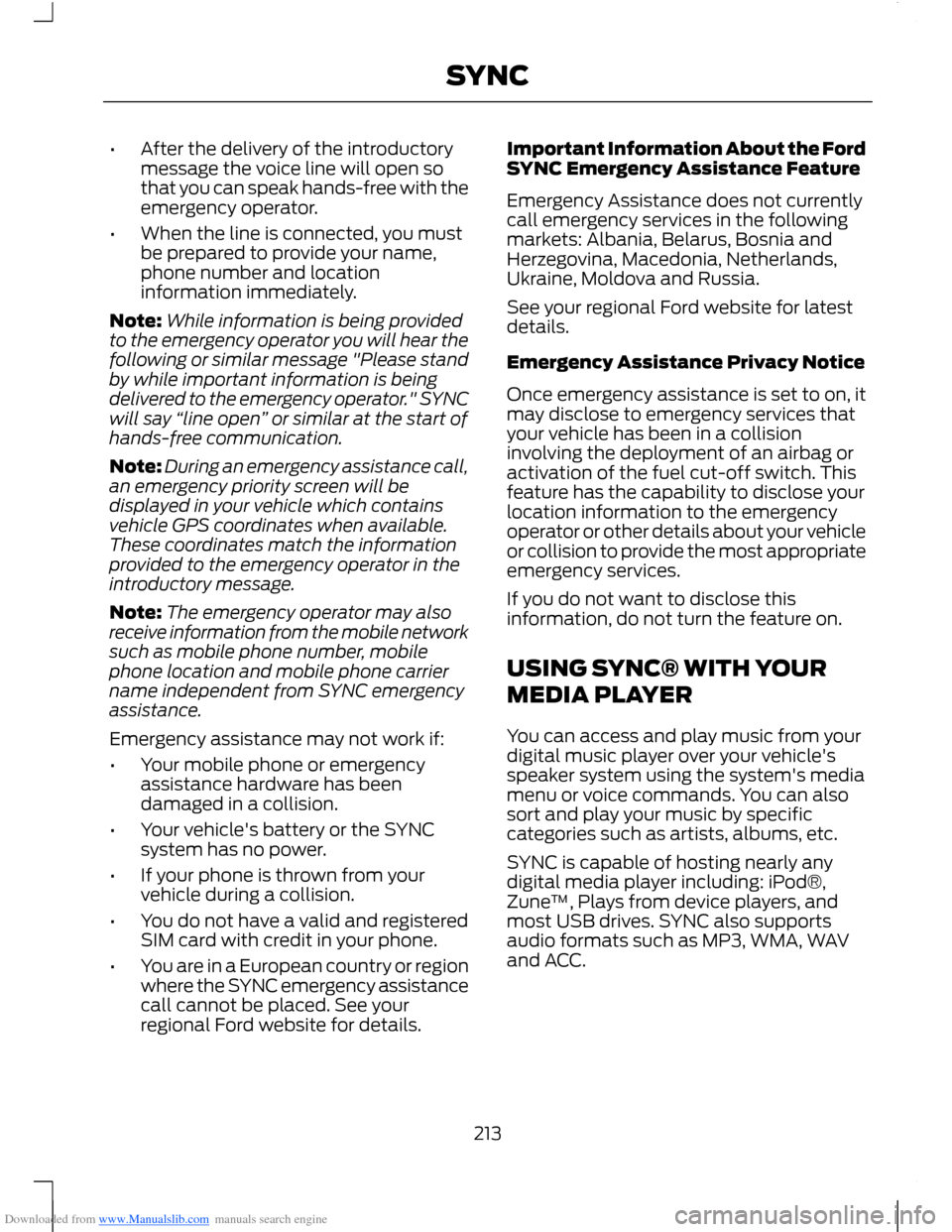
Downloaded from www.Manualslib.com manuals search engine •After the delivery of the introductorymessage the voice line will open sothat you can speak hands-free with theemergency operator.
•When the line is connected, you mustbe prepared to provide your name,phone number and locationinformation immediately.
Note:While information is being providedto the emergency operator you will hear thefollowing or similar message "Please standby while important information is beingdelivered to the emergency operator." SYNCwill say “line open” or similar at the start ofhands-free communication.
Note:During an emergency assistance call,an emergency priority screen will bedisplayed in your vehicle which containsvehicle GPS coordinates when available.These coordinates match the informationprovided to the emergency operator in theintroductory message.
Note:The emergency operator may alsoreceive information from the mobile networksuch as mobile phone number, mobilephone location and mobile phone carriername independent from SYNC emergencyassistance.
Emergency assistance may not work if:
•Your mobile phone or emergencyassistance hardware has beendamaged in a collision.
•Your vehicle's battery or the SYNCsystem has no power.
•If your phone is thrown from yourvehicle during a collision.
•You do not have a valid and registeredSIM card with credit in your phone.
•You are in a European country or regionwhere the SYNC emergency assistancecall cannot be placed. See yourregional Ford website for details.
Important Information About the FordSYNC Emergency Assistance Feature
Emergency Assistance does not currentlycall emergency services in the followingmarkets: Albania, Belarus, Bosnia andHerzegovina, Macedonia, Netherlands,Ukraine, Moldova and Russia.
See your regional Ford website for latestdetails.
Emergency Assistance Privacy Notice
Once emergency assistance is set to on, itmay disclose to emergency services thatyour vehicle has been in a collisioninvolving the deployment of an airbag oractivation of the fuel cut-off switch. Thisfeature has the capability to disclose yourlocation information to the emergencyoperator or other details about your vehicleor collision to provide the most appropriateemergency services.
If you do not want to disclose thisinformation, do not turn the feature on.
USING SYNC® WITH YOUR
MEDIA PLAYER
You can access and play music from yourdigital music player over your vehicle'sspeaker system using the system's mediamenu or voice commands. You can alsosort and play your music by specificcategories such as artists, albums, etc.
SYNC is capable of hosting nearly anydigital media player including: iPod®,Zune™, Plays from device players, andmost USB drives. SYNC also supportsaudio formats such as MP3, WMA, WAVand ACC.
213SYNC
Page 222 of 256
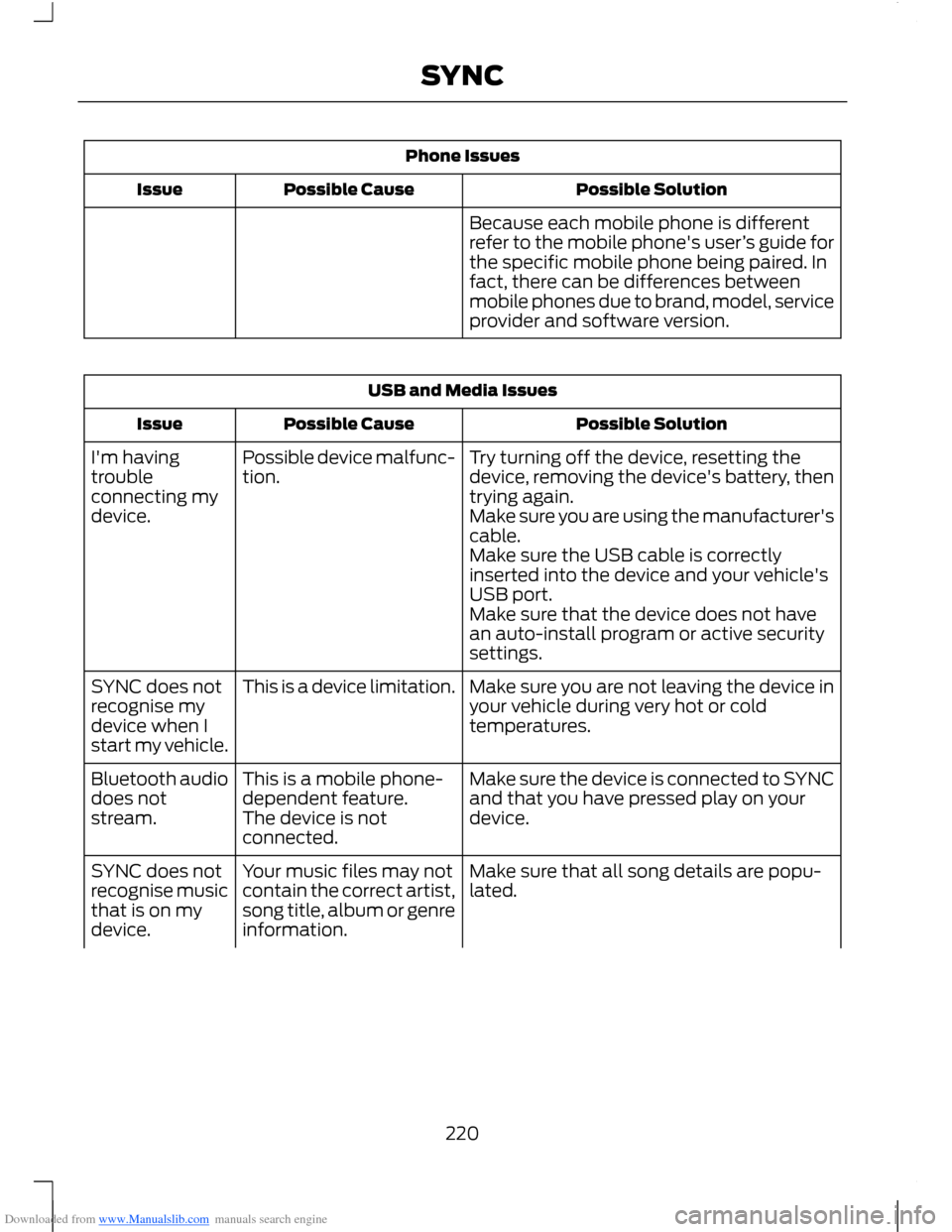
Downloaded from www.Manualslib.com manuals search engine Phone Issues
Possible SolutionPossible CauseIssue
Because each mobile phone is differentrefer to the mobile phone's user’s guide forthe specific mobile phone being paired. Infact, there can be differences betweenmobile phones due to brand, model, serviceprovider and software version.
USB and Media Issues
Possible SolutionPossible CauseIssue
Try turning off the device, resetting thedevice, removing the device's battery, thentrying again.
Possible device malfunc-tion.I'm havingtroubleconnecting mydevice.Make sure you are using the manufacturer'scable.Make sure the USB cable is correctlyinserted into the device and your vehicle'sUSB port.Make sure that the device does not havean auto-install program or active securitysettings.
Make sure you are not leaving the device inyour vehicle during very hot or coldtemperatures.
This is a device limitation.SYNC does notrecognise mydevice when Istart my vehicle.
Make sure the device is connected to SYNCand that you have pressed play on yourdevice.
This is a mobile phone-dependent feature.The device is notconnected.
Bluetooth audiodoes notstream.
Make sure that all song details are popu-lated.Your music files may notcontain the correct artist,song title, album or genreinformation.
SYNC does notrecognise musicthat is on mydevice.
220SYNC
Page 223 of 256
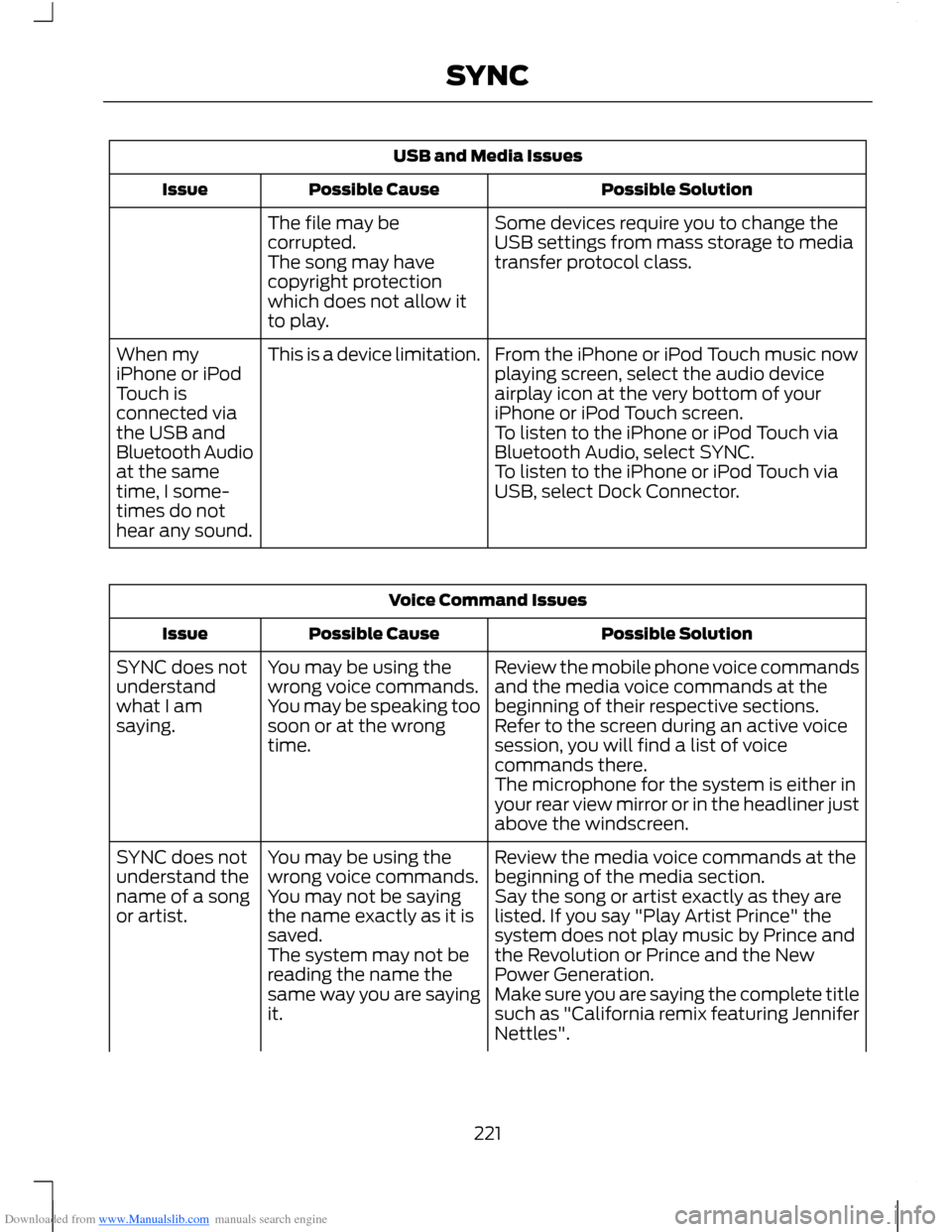
Downloaded from www.Manualslib.com manuals search engine USB and Media Issues
Possible SolutionPossible CauseIssue
Some devices require you to change theUSB settings from mass storage to mediatransfer protocol class.
The file may becorrupted.The song may havecopyright protectionwhich does not allow itto play.
From the iPhone or iPod Touch music nowplaying screen, select the audio deviceairplay icon at the very bottom of youriPhone or iPod Touch screen.
This is a device limitation.When myiPhone or iPodTouch isconnected viathe USB andBluetooth Audioat the sametime, I some-times do nothear any sound.
To listen to the iPhone or iPod Touch viaBluetooth Audio, select SYNC.To listen to the iPhone or iPod Touch viaUSB, select Dock Connector.
Voice Command Issues
Possible SolutionPossible CauseIssue
Review the mobile phone voice commandsand the media voice commands at thebeginning of their respective sections.
You may be using thewrong voice commands.You may be speaking toosoon or at the wrongtime.
SYNC does notunderstandwhat I amsaying.Refer to the screen during an active voicesession, you will find a list of voicecommands there.The microphone for the system is either inyour rear view mirror or in the headliner justabove the windscreen.
Review the media voice commands at thebeginning of the media section.You may be using thewrong voice commands.SYNC does notunderstand thename of a songor artist.Say the song or artist exactly as they arelisted. If you say "Play Artist Prince" thesystem does not play music by Prince andthe Revolution or Prince and the NewPower Generation.
You may not be sayingthe name exactly as it issaved.The system may not bereading the name thesame way you are sayingit.Make sure you are saying the complete titlesuch as "California remix featuring JenniferNettles".
221SYNC
Page 227 of 256
Downloaded from www.Manualslib.com manuals search engine ELECTROMAGNETIC
COMPATIBILITY
WARNINGS
Your vehicle has been tested andcertified to legislations relating toelectromagnetic compatibility(72/245/EEC, UN ECE Regulation 10 orother applicable local requirements). It isyour responsibility to make sure that anyequipment you have fitted complies withapplicable local legislations. Have anyequipment fitted by an authorised dealer.
WARNINGS
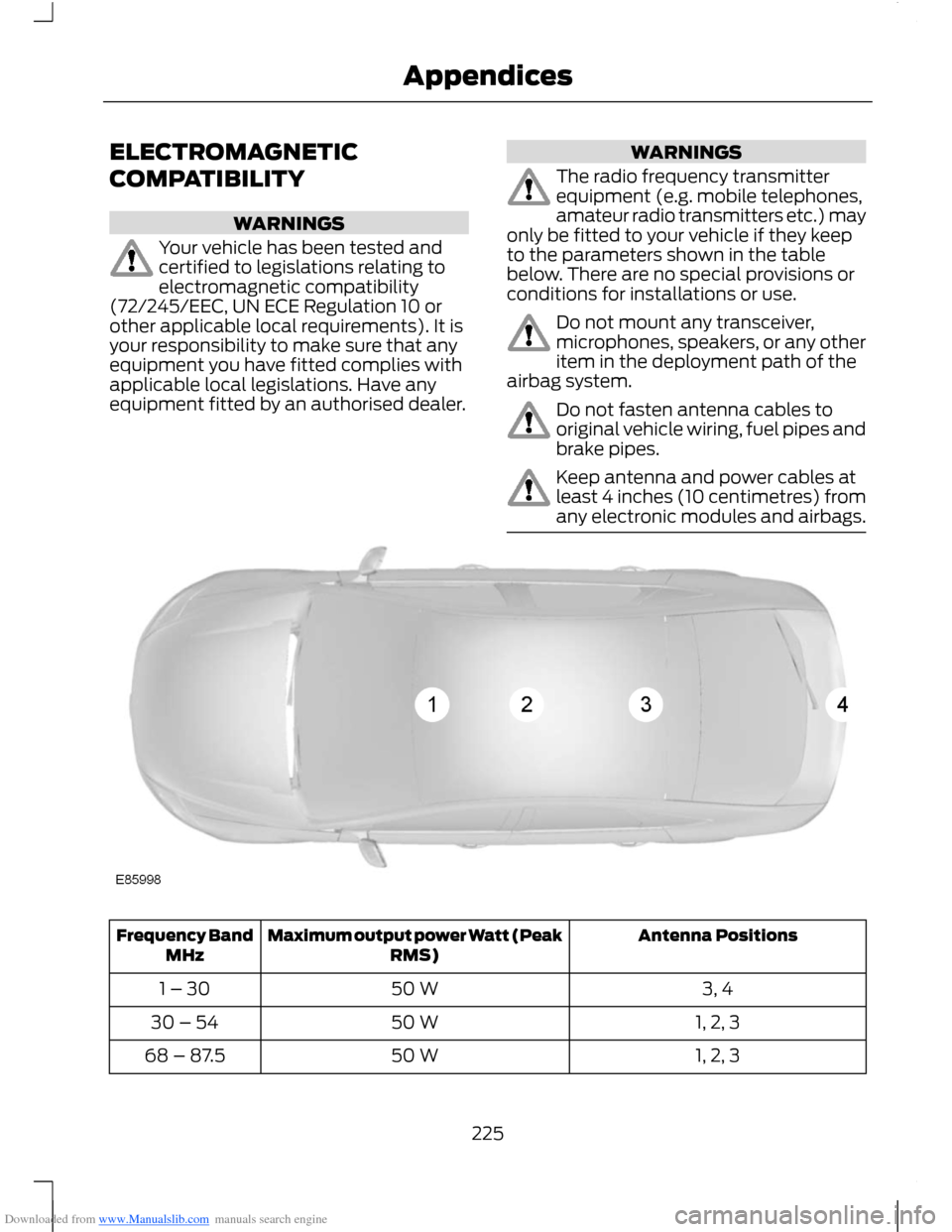
The radio frequency transmitterequipment (e.g. mobile telephones,amateur radio transmitters etc.) mayonly be fitted to your vehicle if they keepto the parameters shown in the tablebelow. There are no special provisions orconditions for installations or use.
Do not mount any transceiver,microphones, speakers, or any otheritem in the deployment path of theairbag system.
Do not fasten antenna cables tooriginal vehicle wiring, fuel pipes andbrake pipes.
Keep antenna and power cables atleast 4 inches (10 centimetres) fromany electronic modules and airbags.
Antenna PositionsMaximum output power Watt (PeakRMS)Frequency BandMHz
3, 450 W1 – 30
1, 2, 350 W30 – 54
1, 2, 350 W68 – 87.5
225Appendices
Page 235 of 256
Downloaded from www.Manualslib.com manuals search engine 1. Safe and Lawful Use
You acknowledge that devoting attentionto the TeleNav Software may pose a riskof injury or death to you and others insituations that otherwise require yourundivided attention, and you thereforeagree to comply with the following whenusing the TeleNav Software: (a) observeall traffic laws and otherwise drive safely;(b) use your own personal judgment whiledriving. If you feel that a route suggestedby the TeleNav Software instructs you toperform an unsafe or illegal manoeuver,places you in an unsafe situation, or directsyou into an area that you consider to beunsafe, do not follow such instructions; (c)do not input destinations, or otherwisemanipulate the TeleNav Software, unlessyour vehicle is stationary and parked; (d)do not use the TeleNav Software for anyillegal, unauthorised, unintended, unsafe,hazardous, or unlawful purposes, or in anymanner inconsistent with this Agreement;(e) arrange all GPS and wireless devicesand cables necessary for use of theTeleNav Software in a secure manner inyour vehicle so that they will not interferewith your driving and will not prevent theoperation of any safety device (such as anairbag).
You agree to indemnify and hold TeleNavharmless against all claims resulting fromany dangerous or otherwise inappropriateuse of the TeleNav Software in any movingvehicle, including as a result of your failureto comply with the directions above.
2. Account Information
You agree: (a) when registering theTeleNav Software, to provide TeleNav withtrue, accurate, current, and completeinformation about yourself, and (b) toinform TeleNav promptly of any changesto such information, and to keep it true,accurate, current and complete.
3. Software Licence
Subject to your compliance with the termsof this Agreement, TeleNav hereby grantsto you a personal, non-exclusive,non-transferable licence (except asexpressly permitted below in connectionwith your permanent transfer of theTeleNav Software licence), without theright to sublicence, to use the TeleNavSoftware (in object code form only) inorder to access and use the TeleNavSoftware. This licence shall terminate uponany termination or expiration of thisAgreement. You agree that you will use theTeleNav Software only for your personalbusiness or leisure purposes, and not toprovide commercial navigation services toother parties.
233Appendices
Page 245 of 256
Downloaded from www.Manualslib.com manuals search engine A
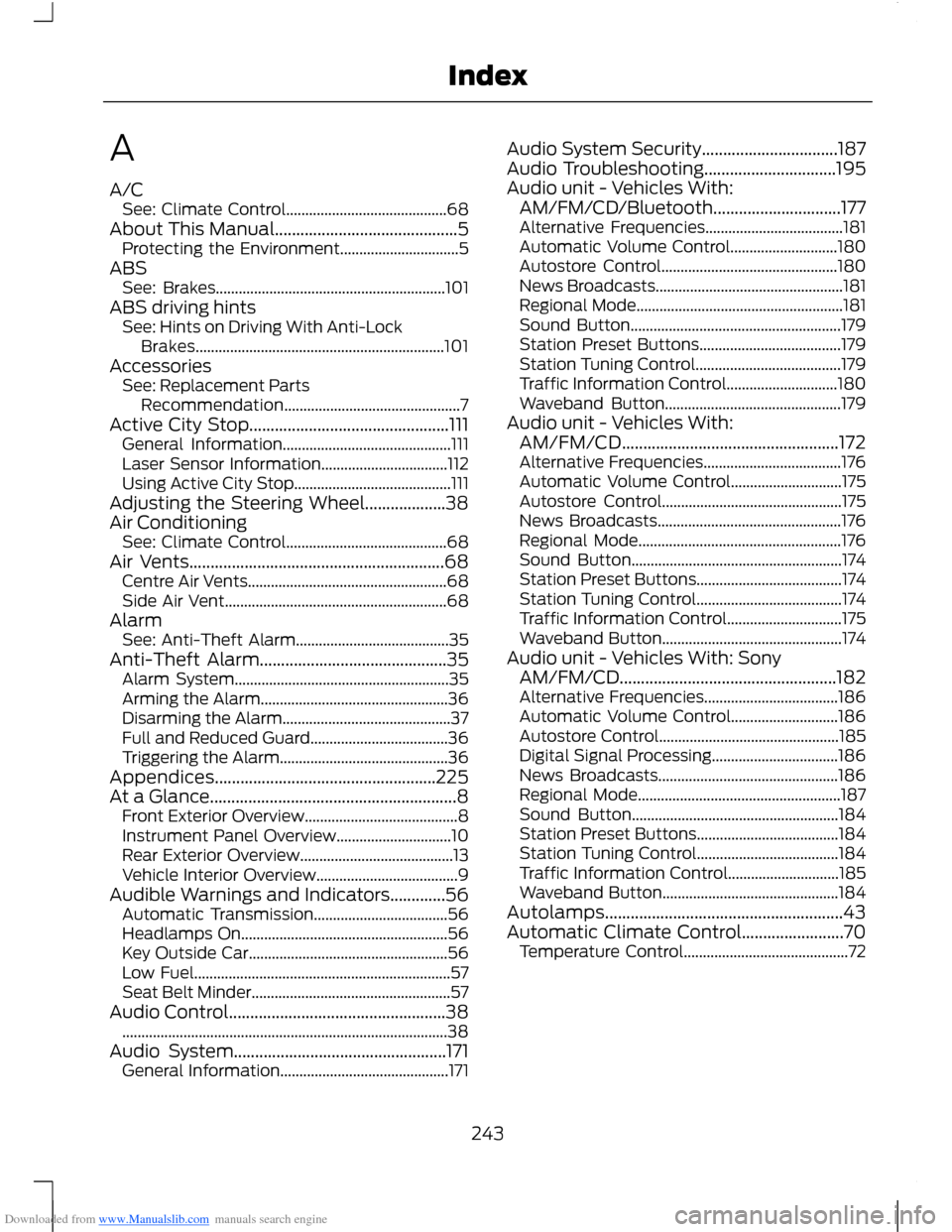
A/CSee: Climate Control..........................................68About This Manual...........................................5Protecting the Environment...............................5ABSSee: Brakes............................................................101ABS driving hintsSee: Hints on Driving With Anti-LockBrakes.................................................................101AccessoriesSee: Replacement PartsRecommendation..............................................7Active City Stop...............................................111General Information............................................111Laser Sensor Information.................................112Using Active City Stop.........................................111Adjusting the Steering Wheel...................38Air ConditioningSee: Climate Control..........................................68Air Vents............................................................68Centre Air Vents....................................................68Side Air Vent..........................................................68AlarmSee: Anti-Theft Alarm........................................35Anti-Theft Alarm............................................35Alarm System........................................................35Arming the Alarm.................................................36Disarming the Alarm............................................37Full and Reduced Guard....................................36Triggering the Alarm............................................36Appendices....................................................225At a Glance..........................................................8Front Exterior Overview........................................8Instrument Panel Overview..............................10Rear Exterior Overview........................................13Vehicle Interior Overview.....................................9Audible Warnings and Indicators.............56Automatic Transmission...................................56Headlamps On......................................................56Key Outside Car....................................................56Low Fuel...................................................................57Seat Belt Minder....................................................57Audio Control...................................................38.....................................................................................38Audio System..................................................171General Information............................................171
Audio System Security................................187Audio Troubleshooting...............................195Audio unit - Vehicles With:AM/FM/CD/Bluetooth..............................177Alternative Frequencies....................................181Automatic Volume Control............................180Autostore Control..............................................180News Broadcasts.................................................181Regional Mode......................................................181Sound Button.......................................................179Station Preset Buttons.....................................179Station Tuning Control......................................179Traffic Information Control.............................180Waveband Button..............................................179Audio unit - Vehicles With:AM/FM/CD...................................................172Alternative Frequencies....................................176Automatic Volume Control.............................175Autostore Control...............................................175News Broadcasts................................................176Regional Mode.....................................................176Sound Button.......................................................174Station Preset Buttons......................................174Station Tuning Control......................................174Traffic Information Control..............................175Waveband Button...............................................174Audio unit - Vehicles With: SonyAM/FM/CD...................................................182Alternative Frequencies...................................186Automatic Volume Control............................186Autostore Control...............................................185Digital Signal Processing.................................186News Broadcasts...............................................186Regional Mode.....................................................187Sound Button......................................................184Station Preset Buttons.....................................184Station Tuning Control.....................................184Traffic Information Control.............................185Waveband Button..............................................184Autolamps........................................................43Automatic Climate Control........................70Temperature Control...........................................72
243Index
Page 247 of 256
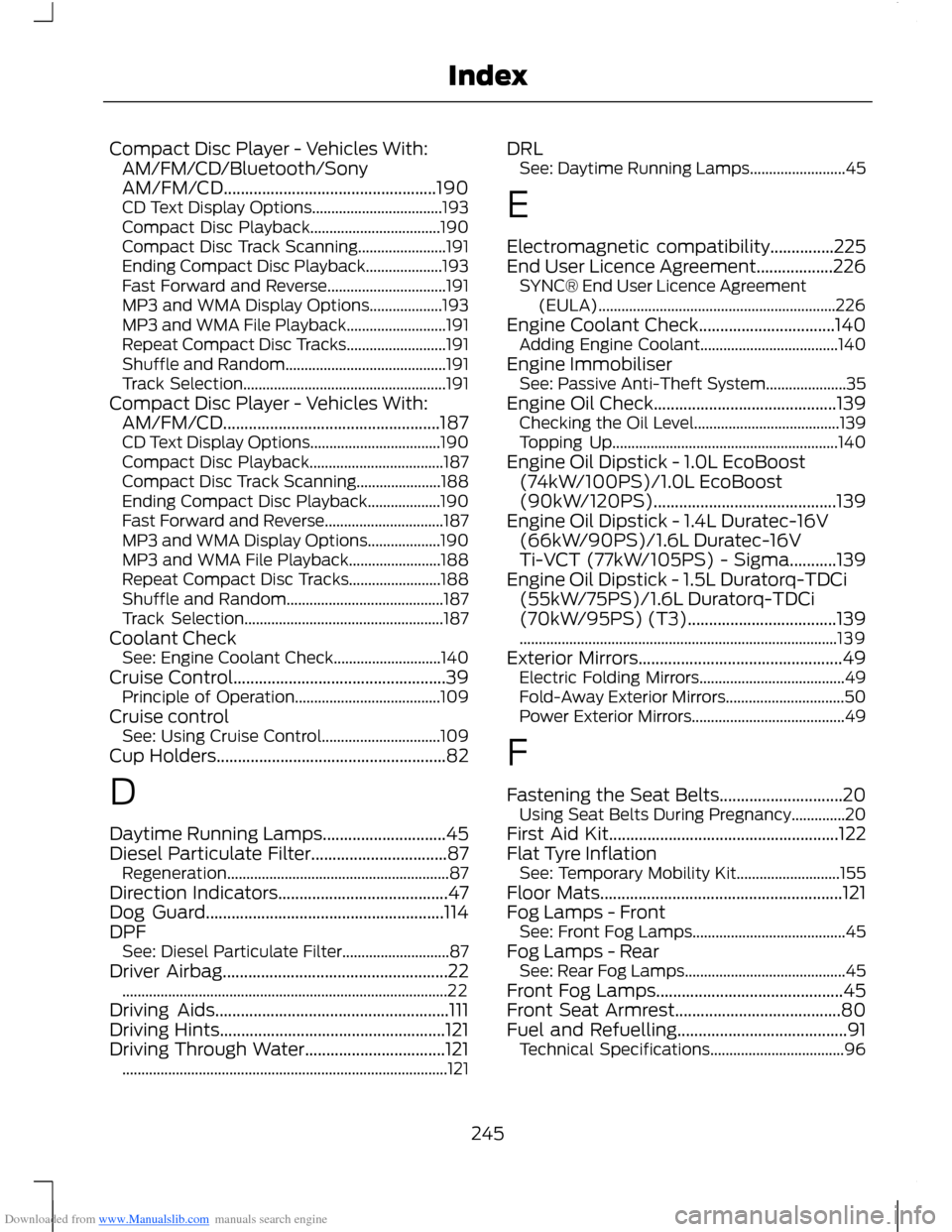
Downloaded from www.Manualslib.com manuals search engine Compact Disc Player - Vehicles With:AM/FM/CD/Bluetooth/SonyAM/FM/CD..................................................190CD Text Display Options..................................193Compact Disc Playback..................................190Compact Disc Track Scanning.......................191Ending Compact Disc Playback....................193Fast Forward and Reverse...............................191MP3 and WMA Display Options...................193MP3 and WMA File Playback..........................191Repeat Compact Disc Tracks..........................191Shuffle and Random..........................................191Track Selection.....................................................191Compact Disc Player - Vehicles With:AM/FM/CD...................................................187CD Text Display Options..................................190Compact Disc Playback...................................187Compact Disc Track Scanning......................188Ending Compact Disc Playback...................190Fast Forward and Reverse...............................187MP3 and WMA Display Options...................190MP3 and WMA File Playback........................188Repeat Compact Disc Tracks........................188Shuffle and Random.........................................187Track Selection....................................................187Coolant CheckSee: Engine Coolant Check............................140Cruise Control..................................................39Principle of Operation......................................109Cruise controlSee: Using Cruise Control...............................109Cup Holders......................................................82
D
Daytime Running Lamps.............................45Diesel Particulate Filter................................87Regeneration..........................................................87Direction Indicators........................................47Dog Guard........................................................114DPFSee: Diesel Particulate Filter............................87Driver Airbag.....................................................22.....................................................................................22Driving Aids.......................................................111Driving Hints.....................................................121Driving Through Water.................................121.....................................................................................121
DRLSee: Daytime Running Lamps.........................45
E
Electromagnetic compatibility...............225End User Licence Agreement..................226SYNC® End User Licence Agreement(EULA)..............................................................226Engine Coolant Check................................140Adding Engine Coolant....................................140Engine ImmobiliserSee: Passive Anti-Theft System.....................35Engine Oil Check...........................................139Checking the Oil Level......................................139Topping Up...........................................................140Engine Oil Dipstick - 1.0L EcoBoost(74kW/100PS)/1.0L EcoBoost(90kW/120PS)...........................................139Engine Oil Dipstick - 1.4L Duratec-16V(66kW/90PS)/1.6L Duratec-16VTi-VCT (77kW/105PS) - Sigma...........139Engine Oil Dipstick - 1.5L Duratorq-TDCi(55kW/75PS)/1.6L Duratorq-TDCi(70kW/95PS) (T3)...................................139...................................................................................139Exterior Mirrors................................................49Electric Folding Mirrors......................................49Fold-Away Exterior Mirrors...............................50Power Exterior Mirrors........................................49
F
Fastening the Seat Belts.............................20Using Seat Belts During Pregnancy..............20First Aid Kit......................................................122Flat Tyre InflationSee: Temporary Mobility Kit...........................155Floor Mats.........................................................121Fog Lamps - FrontSee: Front Fog Lamps........................................45Fog Lamps - RearSee: Rear Fog Lamps..........................................45Front Fog Lamps............................................45Front Seat Armrest.......................................80Fuel and Refuelling........................................91Technical Specifications...................................96
245Index