lock FORD B MAX 2013 1.G Repair Manual
[x] Cancel search | Manufacturer: FORD, Model Year: 2013, Model line: B MAX, Model: FORD B MAX 2013 1.GPages: 298, PDF Size: 20.63 MB
Page 180 of 298
Downloaded from www.Manualslib.com manuals search engine USING SNOW CHAINS
WARNINGS
Do not exceed 30 mph (50 km/h).
Do not use snow chains on snow-freeroads.
Only fit snow chains to specifiedtires. See Technical Specifications(page 183).
If your vehicle has wheel trims,remove them before fitting snowchains.
Note:The anti-lock braking system willcontinue to operate normally.
Only use small link snow chains.
Only use snow chains on the front wheels.
Vehicles with Stability Control
When stability control is on, your vehiclemay exhibit some unusual drivingcharacteristics. To reduce this, switchtraction control off. See Using StabilityControl (page 111).
TIRE PRESSURE MONITORING
SYSTEM
WARNINGS
The system does not relieve you ofyour responsibility to regularly checkthe tire pressures.
The system will only provide a lowtire pressure warning. It will notinflate the tires.
WARNINGS
Do not drive on significantlyunder-inflated tires. This may causethe tires to overheat and fail.Under-inflation reduces fuel efficiency, tiretread life and may also affect your abilityto drive your vehicle safely.
Do not bend or damage the valveswhen you are inflating the tires.
Have tires installed by an authorizeddealer.
The deflation detection system will alertyou if there is a change of air pressure inany tire. It does this by using the anti-lockbraking sensors to detect the rollingcircumference of the wheels. When thecircumference changes, this indicates lowtire pressure. A warning message isdisplayed in the information display andthe message indicator will illuminate. SeeInformation Messages (page 67).
If a low pressure warning message isdisplayed in the information display, checkthe tire pressures as soon as possible andinflate them to the recommendedpressure. See Technical Specifications(page 183).
If this happens frequently, have the causedetermined and rectified as soon aspossible.
Apart from a too low tire pressure or adamaged tire, the following situations canaffect the rolling circumference:
•Vehicle load is uneven.
•When using a trailer or traveling up anddown an incline.
•Using snow chains.
•Driving on soft surfaces such as snowor mud.
Note:The system will still functioncorrectly, but there may be an increaseddetection time.
178B-MAX (CB2) Vehicles Built From: 25-06-2012, Vehicles Built Up To: 31-12-2013Wheels and Tires
Page 181 of 298
Downloaded from www.Manualslib.com manuals search engine System Reset
Note:Do not reset the system when yourvehicle is moving.
Note:You should reset the systemfollowing any adjustment to the tirepressures or any changing of tires.
1.Switch the ignition on.
2.Using the information display control,navigate to Menu > Vehicle settings> Deflation detection.
3.Press and hold the OK button untilconfirmation appears.
CHANGING A ROAD WHEEL
Lug Nuts
You can obtain a replacement locking lugnut key and replacement locking lug nutsfrom your dealer using the referencenumber certificate.
Vehicles With a Spare Wheel
If the spare wheel is exactly the same typeand size as the other fitted road wheels,you can replace the existing road wheelwith the spare wheel and continue to drivein the normal manner.
If the spare wheel is different to the otherroad wheels, it will carry a yellow label withthe appropriate speed limit.
Refer to the following information beforechanging the road wheel.
WARNINGS
Drive the shortest possible distances.
Do not fit more than one spare wheelon your vehicle at any one time.
Do not carry out any tire repairs on aspare wheel.
WARNINGS
Do not drive through an automaticcar wash.
If you are unsure what type of sparewheel you have do not exceed 80km/h (50 mph).
Only fit snow chains to specifiedtires. See Technical Specifications(page 183).
The ground clearance of your vehiclemay be reduced. Take care whenparking next to a curb.
Note:Your vehicle may exhibit someunusual driving characteristics.
Vehicle Jack
WARNINGS
The vehicle jack supplied with yourvehicle should only be used whenchanging a wheel in emergencysituations.
Before using the vehicle jack, checkthat it is not damaged or deformedand that the thread is lubricated andfree from foreign matter.
Never place anything between thejack and the ground, or the jack andyour vehicle.
Note:Vehicles with a temporary mobilitykit do not have a vehicle jack or a wheelbrace.
It is recommended to use a workshop typehydraulic jack for changing betweensummer and winter tires.
Note:Use a jack with a minimum liftingcapacity of 1.5 tonnes and a lifting plate witha minimum diameter of 3.1 inches (80millimeters).
179B-MAX (CB2) Vehicles Built From: 25-06-2012, Vehicles Built Up To: 31-12-2013Wheels and Tires
Page 183 of 298
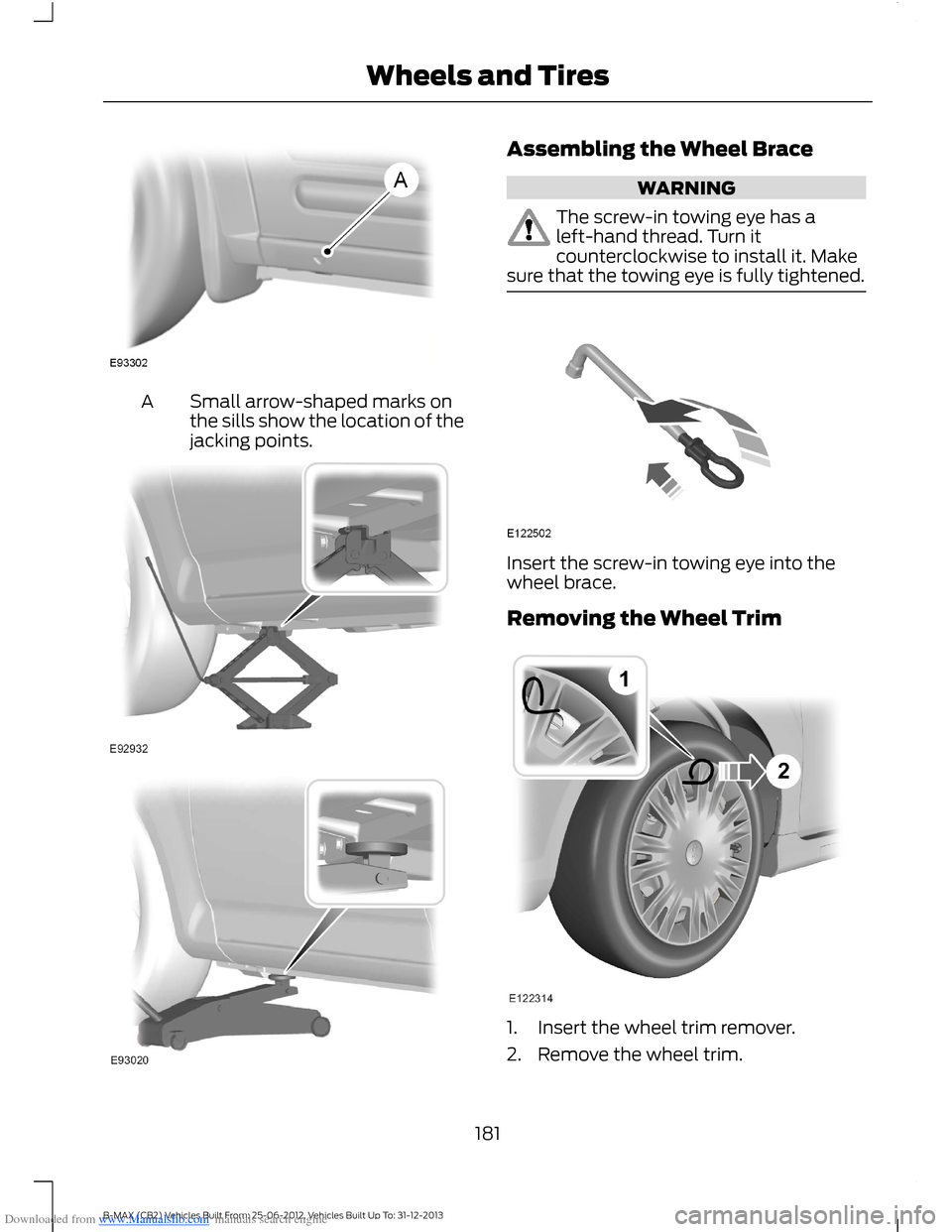
Downloaded from www.Manualslib.com manuals search engine Small arrow-shaped marks onthe sills show the location of thejacking points.
A
Assembling the Wheel Brace
WARNING
The screw-in towing eye has aleft-hand thread. Turn itcounterclockwise to install it. Makesure that the towing eye is fully tightened.
Insert the screw-in towing eye into thewheel brace.
Removing the Wheel Trim
1.Insert the wheel trim remover.
2.Remove the wheel trim.
181B-MAX (CB2) Vehicles Built From: 25-06-2012, Vehicles Built Up To: 31-12-2013Wheels and Tires
Page 184 of 298
Downloaded from www.Manualslib.com manuals search engine Note:Make sure that you pull the wheeltrim remover at right angles to the trim.
Removing a Road Wheel
WARNINGS
Park your vehicle in such a positionthat neither the traffic nor you arehindered or endangered.
Set up a warning triangle.
Make sure that your vehicle is on firm,level ground with the wheels pointingstraight ahead.
Switch the ignition off and apply theparking brake.
If your vehicle has a manualtransmission, move the selector leverto first or reverse gear. If it has anautomatic transmission, move the selectorlever to position (P).
Have the passengers leave yourvehicle.
Secure the diagonally oppositewheel with an appropriate block orwheel chock.
Make sure that the arrows ondirectional tires point in the directionof rotation when your vehicle ismoving forward. If you have to fit a sparewheel with the arrows pointing in theopposite direction, have the tire refitted inthe correct direction by an authorizeddealer.
Do not work underneath your vehiclewhen it is supported only by a jack.
Make sure that the jack is vertical tothe jacking point and the base is flaton the ground.
Note:Do not lay alloy wheels face downon the ground, this will damage the paint.
Note:The spare wheel is located under thefloor cover in the luggage compartment.
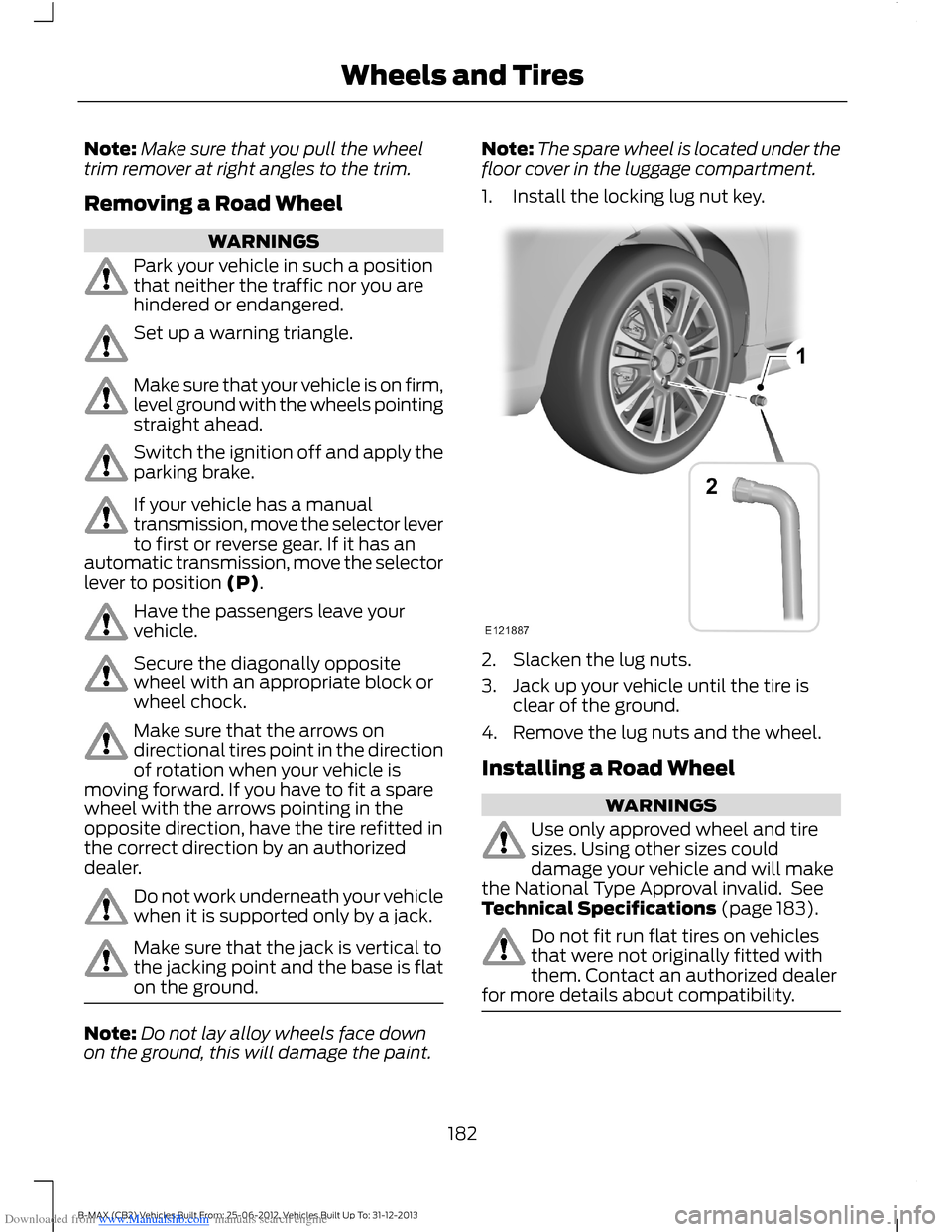
1.Install the locking lug nut key.
2.Slacken the lug nuts.
3.Jack up your vehicle until the tire isclear of the ground.
4.Remove the lug nuts and the wheel.
Installing a Road Wheel
WARNINGS
Use only approved wheel and tiresizes. Using other sizes coulddamage your vehicle and will makethe National Type Approval invalid. SeeTechnical Specifications (page 183).
Do not fit run flat tires on vehiclesthat were not originally fitted withthem. Contact an authorized dealerfor more details about compatibility.
182B-MAX (CB2) Vehicles Built From: 25-06-2012, Vehicles Built Up To: 31-12-2013Wheels and Tires
Page 185 of 298
Downloaded from www.Manualslib.com manuals search engine WARNING
Do not install alloy wheels using lugnuts designed for use with steelwheels.
Note:The lug nuts of alloy wheels andspoked steel wheels can also be used forthe steel spare wheel for a short time(maximum two weeks).
Note:Make sure the wheel and hub contactsurfaces are free from foreign matter.
Note:Make sure that the cones on the lugnuts are against the wheel.
1.Install the wheel.
2.Install the lug nuts finger tight.
3.Install the locking lug nut key.
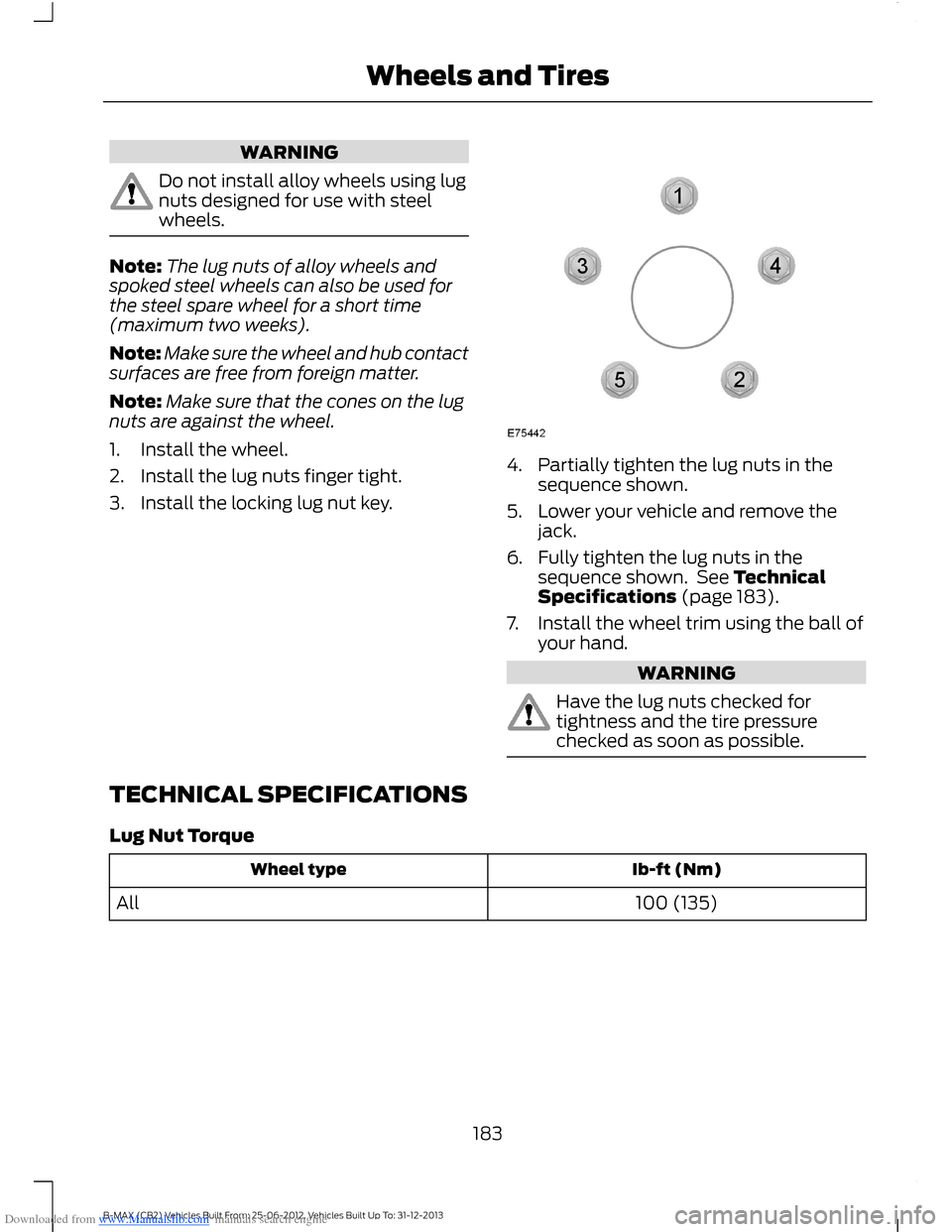
4.Partially tighten the lug nuts in thesequence shown.
5.Lower your vehicle and remove thejack.
6.Fully tighten the lug nuts in thesequence shown. See TechnicalSpecifications (page 183).
7.Install the wheel trim using the ball ofyour hand.
WARNING
Have the lug nuts checked fortightness and the tire pressurechecked as soon as possible.
TECHNICAL SPECIFICATIONS
Lug Nut Torque
Ib-ft (Nm)Wheel type
100 (135)All
183B-MAX (CB2) Vehicles Built From: 25-06-2012, Vehicles Built Up To: 31-12-2013Wheels and Tires
Page 188 of 298
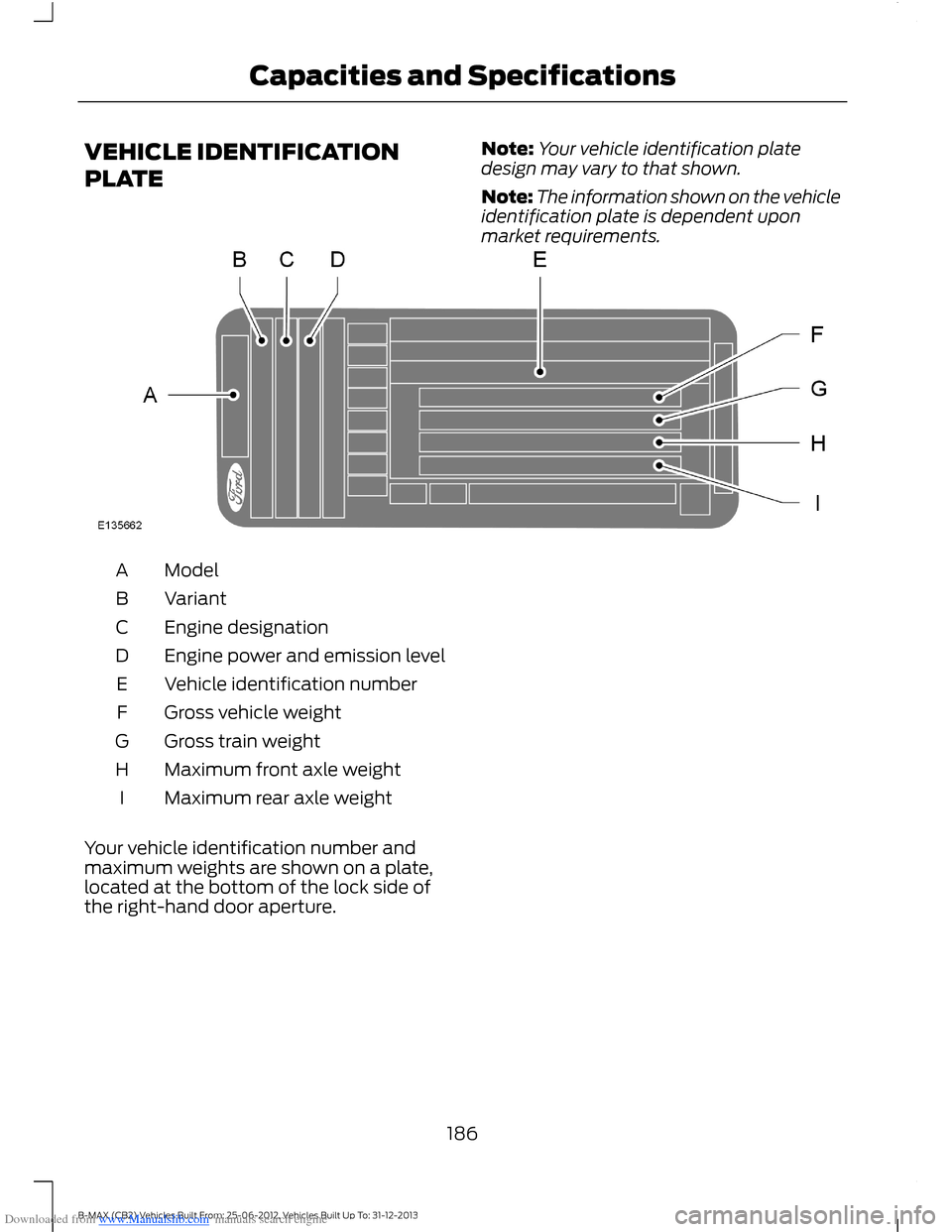
Downloaded from www.Manualslib.com manuals search engine VEHICLE IDENTIFICATION
PLATE
Note:Your vehicle identification platedesign may vary to that shown.
Note:The information shown on the vehicleidentification plate is dependent uponmarket requirements.
ModelA
VariantB
Engine designationC
Engine power and emission levelD
Vehicle identification numberE
Gross vehicle weightF
Gross train weightG
Maximum front axle weightH
Maximum rear axle weightI
Your vehicle identification number andmaximum weights are shown on a plate,located at the bottom of the lock side ofthe right-hand door aperture.
186B-MAX (CB2) Vehicles Built From: 25-06-2012, Vehicles Built Up To: 31-12-2013Capacities and Specifications
Page 211 of 298
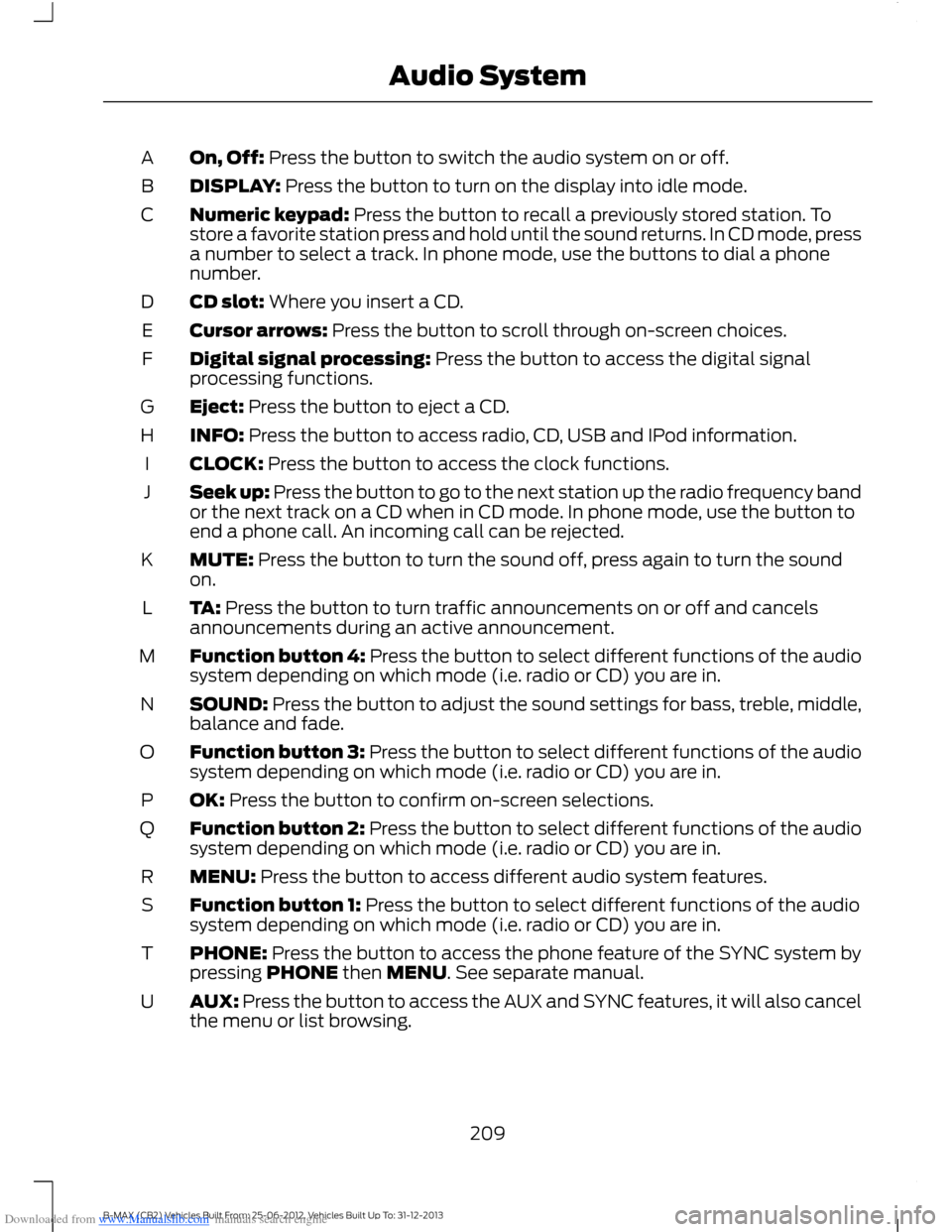
Downloaded from www.Manualslib.com manuals search engine On, Off: Press the button to switch the audio system on or off.A
DISPLAY: Press the button to turn on the display into idle mode.B
Numeric keypad: Press the button to recall a previously stored station. Tostore a favorite station press and hold until the sound returns. In CD mode, pressa number to select a track. In phone mode, use the buttons to dial a phonenumber.
C
CD slot: Where you insert a CD.D
Cursor arrows: Press the button to scroll through on-screen choices.E
Digital signal processing: Press the button to access the digital signalprocessing functions.F
Eject: Press the button to eject a CD.G
INFO: Press the button to access radio, CD, USB and IPod information.H
CLOCK: Press the button to access the clock functions.I
Seek up: Press the button to go to the next station up the radio frequency bandor the next track on a CD when in CD mode. In phone mode, use the button toend a phone call. An incoming call can be rejected.
J
MUTE: Press the button to turn the sound off, press again to turn the soundon.K
TA: Press the button to turn traffic announcements on or off and cancelsannouncements during an active announcement.L
Function button 4: Press the button to select different functions of the audiosystem depending on which mode (i.e. radio or CD) you are in.M
SOUND: Press the button to adjust the sound settings for bass, treble, middle,balance and fade.N
Function button 3: Press the button to select different functions of the audiosystem depending on which mode (i.e. radio or CD) you are in.O
OK: Press the button to confirm on-screen selections.P
Function button 2: Press the button to select different functions of the audiosystem depending on which mode (i.e. radio or CD) you are in.Q
MENU: Press the button to access different audio system features.R
Function button 1: Press the button to select different functions of the audiosystem depending on which mode (i.e. radio or CD) you are in.S
PHONE: Press the button to access the phone feature of the SYNC system bypressing PHONE then MENU. See separate manual.T
AUX: Press the button to access the AUX and SYNC features, it will also cancelthe menu or list browsing.U
209B-MAX (CB2) Vehicles Built From: 25-06-2012, Vehicles Built Up To: 31-12-2013Audio System
Page 217 of 298
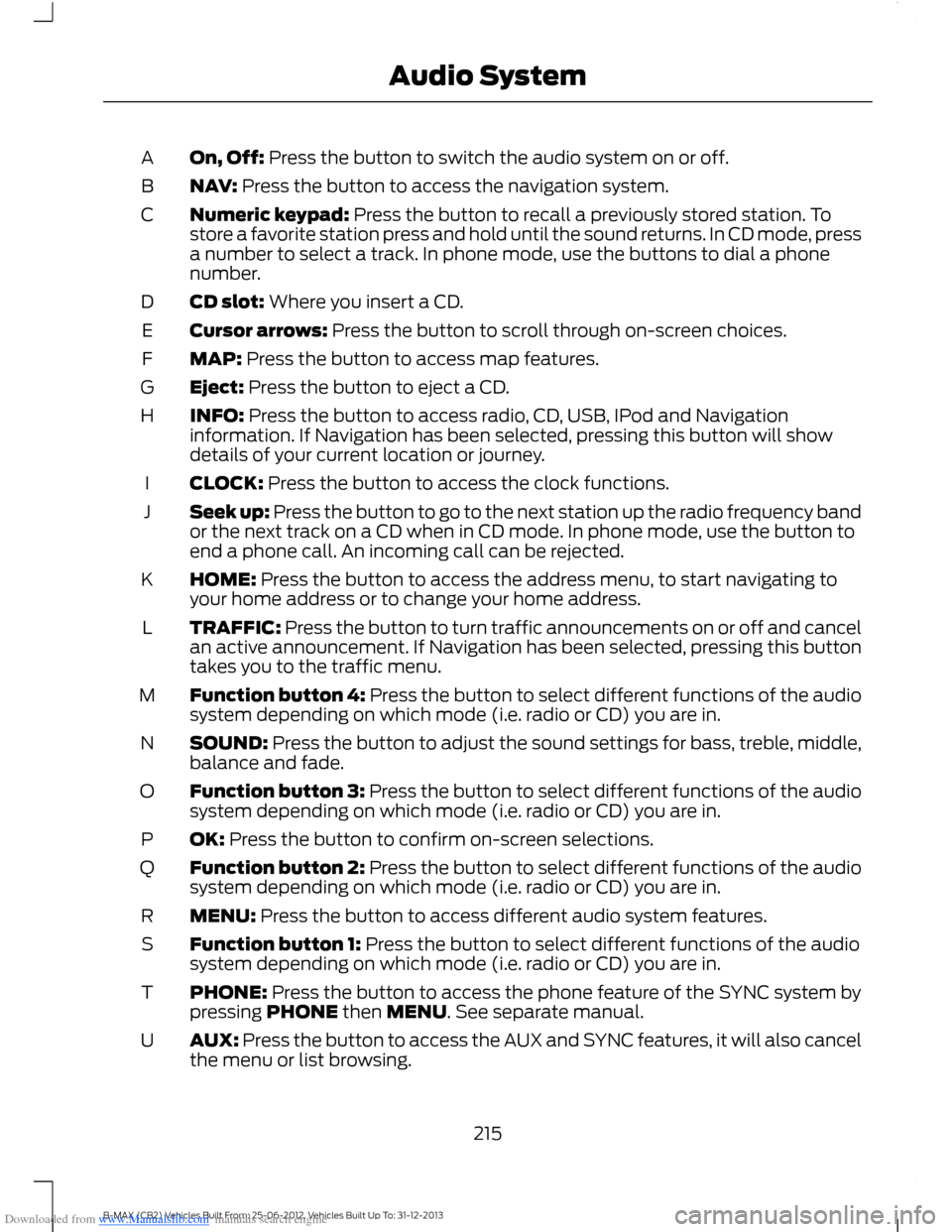
Downloaded from www.Manualslib.com manuals search engine On, Off: Press the button to switch the audio system on or off.A
NAV: Press the button to access the navigation system.B
Numeric keypad: Press the button to recall a previously stored station. Tostore a favorite station press and hold until the sound returns. In CD mode, pressa number to select a track. In phone mode, use the buttons to dial a phonenumber.
C
CD slot: Where you insert a CD.D
Cursor arrows: Press the button to scroll through on-screen choices.E
MAP: Press the button to access map features.F
Eject: Press the button to eject a CD.G
INFO: Press the button to access radio, CD, USB, IPod and Navigationinformation. If Navigation has been selected, pressing this button will showdetails of your current location or journey.
H
CLOCK: Press the button to access the clock functions.I
Seek up: Press the button to go to the next station up the radio frequency bandor the next track on a CD when in CD mode. In phone mode, use the button toend a phone call. An incoming call can be rejected.
J
HOME: Press the button to access the address menu, to start navigating toyour home address or to change your home address.K
TRAFFIC: Press the button to turn traffic announcements on or off and cancelan active announcement. If Navigation has been selected, pressing this buttontakes you to the traffic menu.
L
Function button 4: Press the button to select different functions of the audiosystem depending on which mode (i.e. radio or CD) you are in.M
SOUND: Press the button to adjust the sound settings for bass, treble, middle,balance and fade.N
Function button 3: Press the button to select different functions of the audiosystem depending on which mode (i.e. radio or CD) you are in.O
OK: Press the button to confirm on-screen selections.P
Function button 2: Press the button to select different functions of the audiosystem depending on which mode (i.e. radio or CD) you are in.Q
MENU: Press the button to access different audio system features.R
Function button 1: Press the button to select different functions of the audiosystem depending on which mode (i.e. radio or CD) you are in.S
PHONE: Press the button to access the phone feature of the SYNC system bypressing PHONE then MENU. See separate manual.T
AUX: Press the button to access the AUX and SYNC features, it will also cancelthe menu or list browsing.U
215B-MAX (CB2) Vehicles Built From: 25-06-2012, Vehicles Built Up To: 31-12-2013Audio System
Page 233 of 298
Downloaded from www.Manualslib.com manuals search engine Note:You are ultimately responsible forthe safe operation of your vehicle and mustevaluate whether it is safe to follow routesuggestions. Navigation features areprovided only as an aid. Driving decisionsbased on observations of local conditionsand existing traffic regulations must beobserved. Do not follow route suggestionsif they would result in an unsafe or illegalmaneuver, an unsafe situation, or if youwould be directed into an area that youconsider unsafe. Maps used by this systemmay be inaccurate due to errors, changes inroads, traffic or driving conditions.
Safety Information
If detailed viewing of route instructions isnecessary, pull off the road when it is safeto do so and park your vehicle.
Setting a Route
1.Press the NAV button.
2.Select Destination input.
3.Starting at the top, select the countryfollowed by either the postcode or cityand street name, together with thehouse number or intersection.
4.Use the arrow buttons to enter youraddress details.
5.After entering sufficient information,select Start guidance or pressfunction key one to begin routecalculation.
Note:After first entry, the country selectedwill remain the default option until youmanually change it.
Note:If required you can select differentcharacter screens by using the up and downarrow buttons.
Note:If you only need to navigate to a citycenter, just enter the city name and startguidance.
Note:If you only need to navigate to adistrict, within a city for example, just enterthe district name and start guidance.
The route is calculated and the screenreturns to the main navigation screen. Ifprompted, select the type of route yourequire first. Follow the screen and voiceprompts to reach your destination.
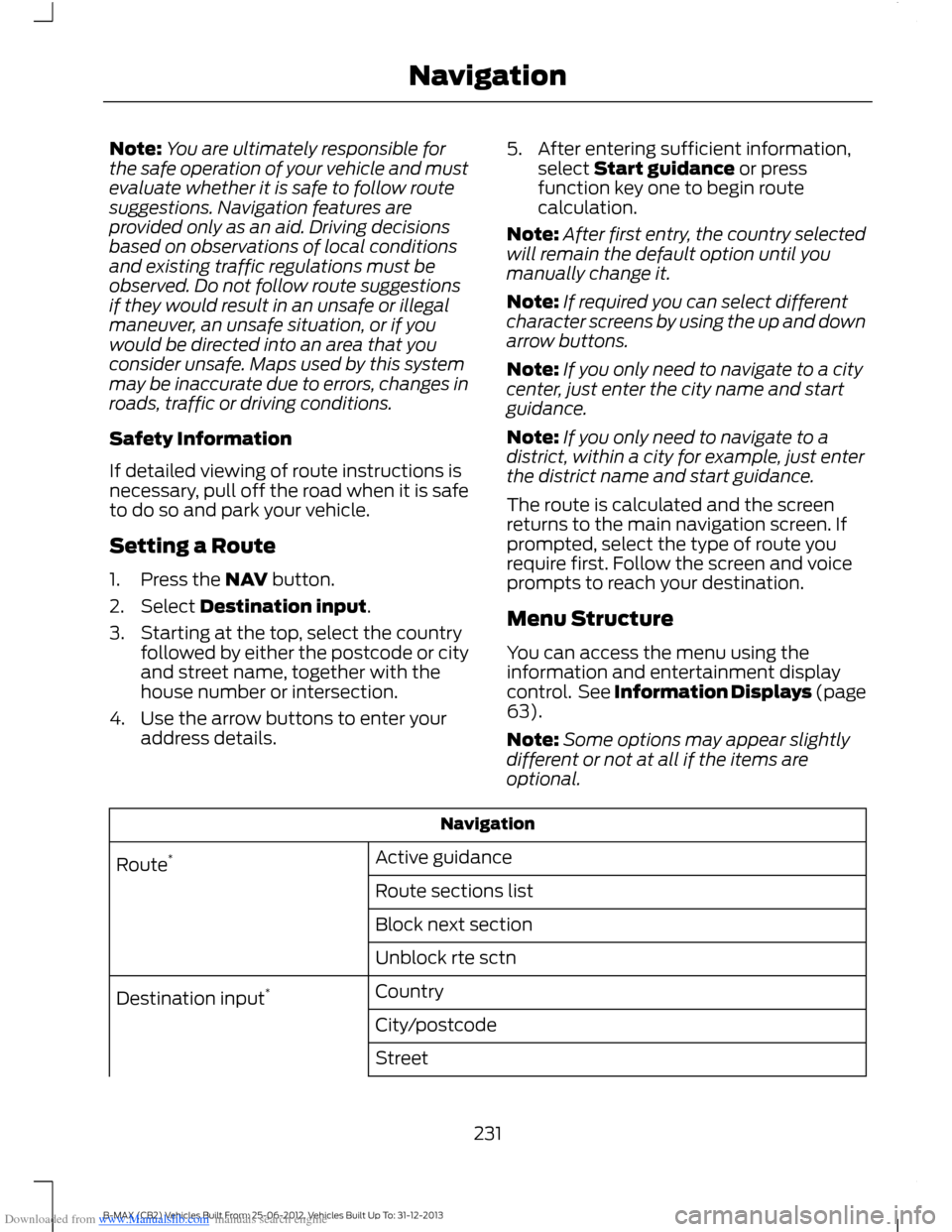
Menu Structure
You can access the menu using theinformation and entertainment displaycontrol. See Information Displays (page63).
Note:Some options may appear slightlydifferent or not at all if the items areoptional.
Navigation
Active guidanceRoute*
Route sections list
Block next section
Unblock rte sctn
CountryDestination input*
City/postcode
Street
231B-MAX (CB2) Vehicles Built From: 25-06-2012, Vehicles Built Up To: 31-12-2013Navigation
Page 234 of 298
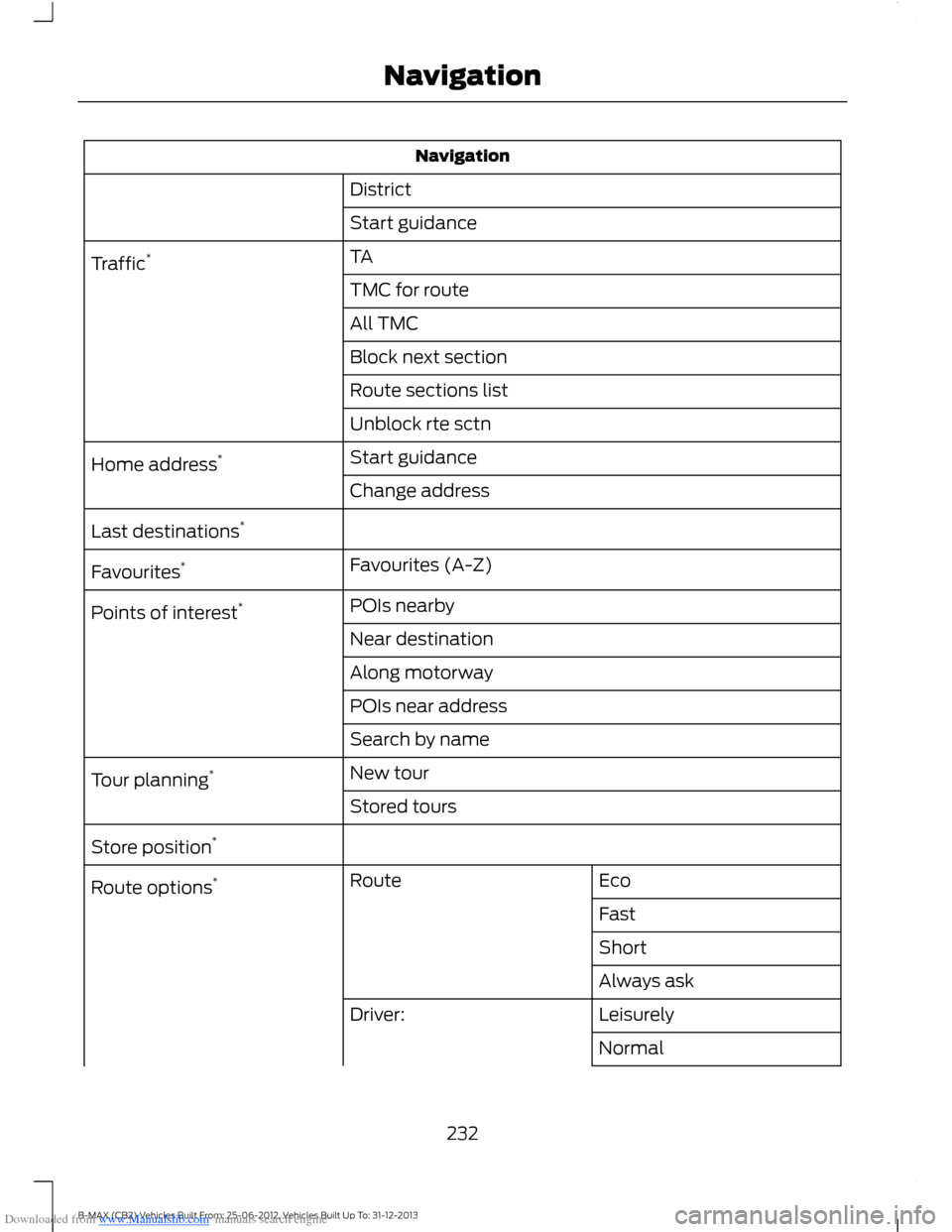
Downloaded from www.Manualslib.com manuals search engine Navigation
District
Start guidance
TATraffic*
TMC for route
All TMC
Block next section
Route sections list
Unblock rte sctn
Start guidanceHome address*
Change address
Last destinations*
Favourites (A-Z)Favourites*
POIs nearbyPoints of interest*
Near destination
Along motorway
POIs near address
Search by name
New tourTour planning*
Stored tours
Store position*
EcoRouteRoute options*
Fast
Short
Always ask
LeisurelyDriver:
Normal
232B-MAX (CB2) Vehicles Built From: 25-06-2012, Vehicles Built Up To: 31-12-2013Navigation