park assist FORD BRONCO 2022 User Guide
[x] Cancel search | Manufacturer: FORD, Model Year: 2022, Model line: BRONCO, Model: FORD BRONCO 2022Pages: 562, PDF Size: 73 MB
Page 215 of 562
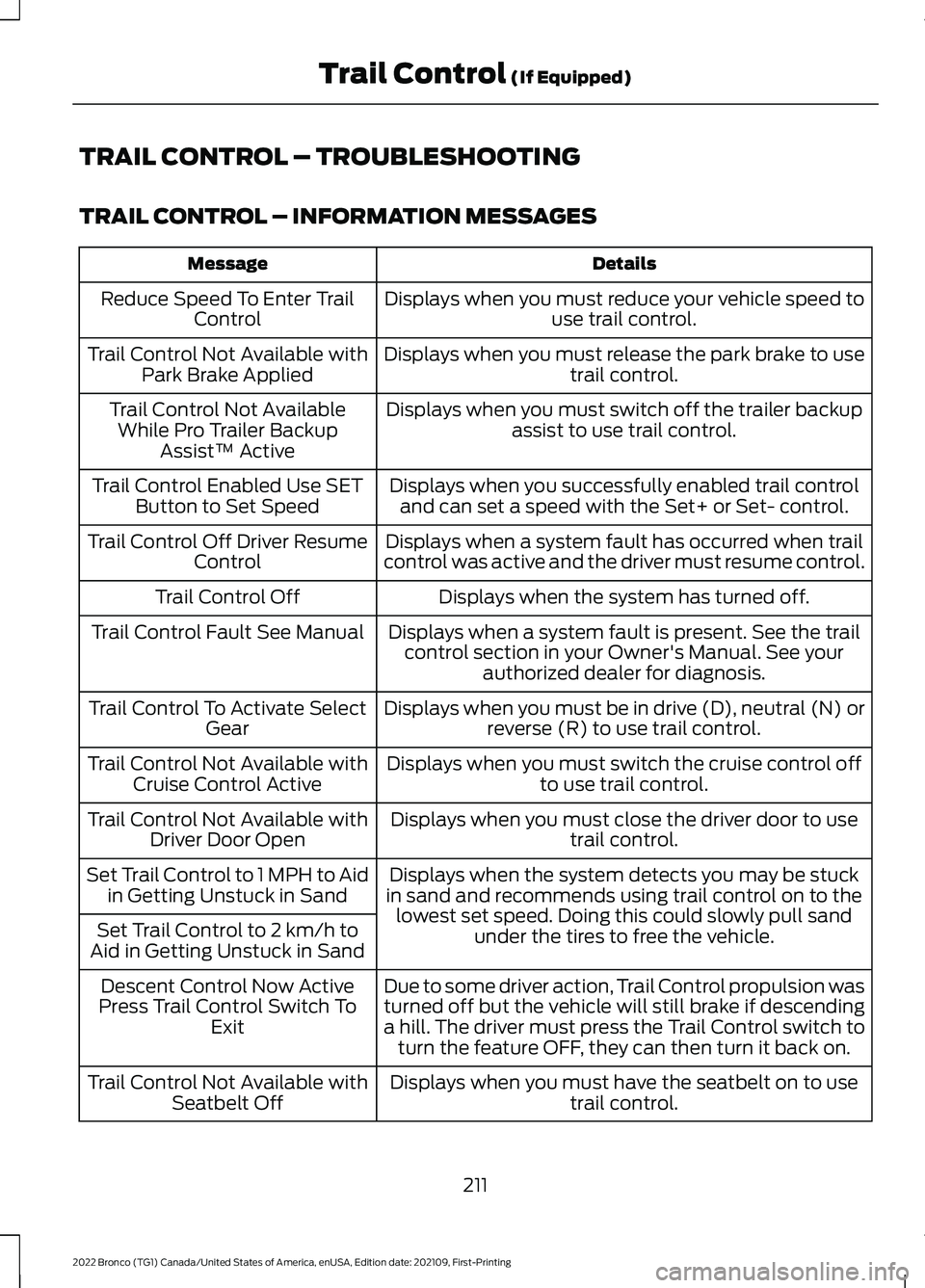
TRAIL CONTROL – TROUBLESHOOTING
TRAIL CONTROL – INFORMATION MESSAGES
DetailsMessage
Displays when you must reduce your vehicle speed touse trail control.Reduce Speed To Enter TrailControl
Displays when you must release the park brake to usetrail control.Trail Control Not Available withPark Brake Applied
Displays when you must switch off the trailer backupassist to use trail control.Trail Control Not AvailableWhile Pro Trailer BackupAssist™ Active
Displays when you successfully enabled trail controland can set a speed with the Set+ or Set- control.Trail Control Enabled Use SETButton to Set Speed
Displays when a system fault has occurred when trailcontrol was active and the driver must resume control.Trail Control Off Driver ResumeControl
Displays when the system has turned off.Trail Control Off
Displays when a system fault is present. See the trailcontrol section in your Owner's Manual. See yourauthorized dealer for diagnosis.
Trail Control Fault See Manual
Displays when you must be in drive (D), neutral (N) orreverse (R) to use trail control.Trail Control To Activate SelectGear
Displays when you must switch the cruise control offto use trail control.Trail Control Not Available withCruise Control Active
Displays when you must close the driver door to usetrail control.Trail Control Not Available withDriver Door Open
Displays when the system detects you may be stuckin sand and recommends using trail control on to thelowest set speed. Doing this could slowly pull sandunder the tires to free the vehicle.
Set Trail Control to 1 MPH to Aidin Getting Unstuck in Sand
Set Trail Control to 2 km/h toAid in Getting Unstuck in Sand
Due to some driver action, Trail Control propulsion wasturned off but the vehicle will still brake if descendinga hill. The driver must press the Trail Control switch toturn the feature OFF, they can then turn it back on.
Descent Control Now ActivePress Trail Control Switch ToExit
Displays when you must have the seatbelt on to usetrail control.Trail Control Not Available withSeatbelt Off
211
2022 Bronco (TG1) Canada/United States of America, enUSA, Edition date: 202109, First-PrintingTrail Control (If Equipped)
Page 226 of 562
PARKING AID PRECAUTIONS
WARNING: To help avoid personalinjury, always use caution when inreverse (R) and when using the sensingsystem.
WARNING: The system may notdetect objects with surfaces that absorbreflection. Always drive with due careand attention. Failure to take care mayresult in a crash.
WARNING: Traffic control systems,fluorescent lamps, inclement weather,air brakes, external motors and fans mayaffect the correct operation of thesensing system. This may cause reducedperformance or false alerts.
WARNING: The system may notdetect small or moving objects,particularly those close to the ground.
WARNING: The parking aid systemcan only assist you to detect objectswhen your vehicle is moving at parkingspeeds. To help avoid personal injury youmust take care when using the parkingaid system.
WARNING: The system may notfunction if the sensor is blocked.
WARNING: In cold and severeweather conditions the system may notfunction. Rain, snow and spray can alllimit sensor performance.
WARNING: If damage occurs in theimmediate area surrounding the sensor,have your vehicle checked as soon aspossible.
Note:If your vehicle sustains damageleaving the sensors misaligned, this willcause inaccurate measurements or falsealerts.
When you connect a trailer to your vehicle,the rear parking aid detects the trailer andprovides an alert. Disable the parking aidwhen you connect a trailer to prevent thealert.
Note:Connected trailers might be detectedby the vehicle and parking aid turns offautomatically in those instances.
Note:Certain add-on devices installedaround the bumper or fascia may createfalse alerts, for example, large trailerhitches, bike or surfboard racks, license platebrackets, bumper covers or any other devicethat could block the normal detection zoneof the parking aid system. Aftermarket sparetires or spare tire covers mounted to the reartailgate could cause false alerts from thepark aid system. Remove the add-on deviceto prevent false alerts.
Note: Keep the sensors free from snow, iceand large accumulations of dirt. If thesensors are covered, the system's accuracycan be affected.
Do not clean the sensors with sharpobjects.
Note: When using a programmed MyKey,you cannot switch the parking aids off. SeeMyKey™ (page 74).
SWITCHING PARKING AID ON
AND OFF
Press the parking aid button anduse the menu to switch thesystem on and off.
You can also switch the system off usingthe pop-up message that appears whenyou are in reverse (R).
222
2022 Bronco (TG1) Canada/United States of America, enUSA, Edition date: 202109, First-PrintingParking Aids (If Equipped)E139213
Page 232 of 562
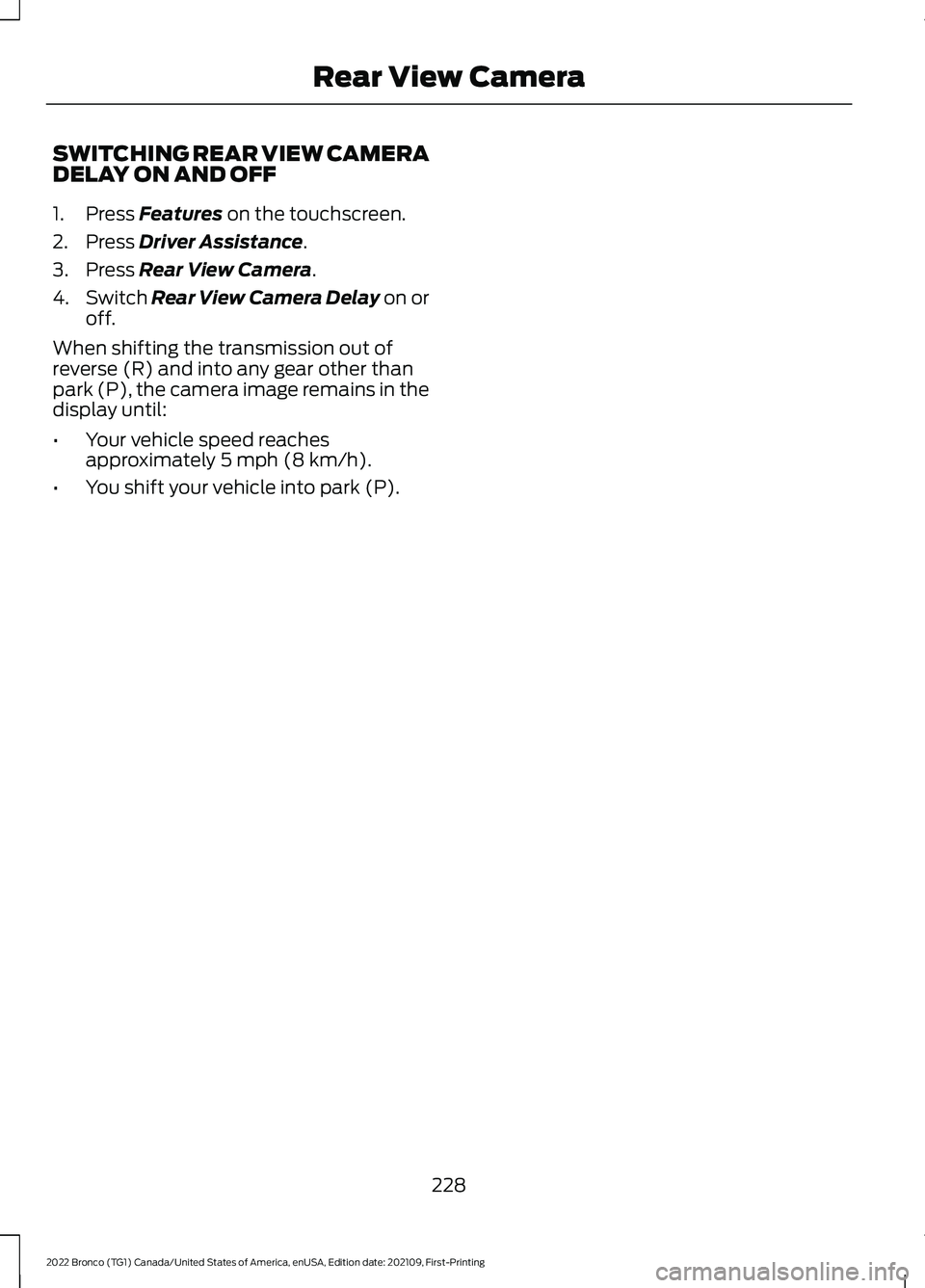
SWITCHING REAR VIEW CAMERADELAY ON AND OFF
1.Press Features on the touchscreen.
2.Press Driver Assistance.
3.Press Rear View Camera.
4.Switch Rear View Camera Delay on oroff.
When shifting the transmission out ofreverse (R) and into any gear other thanpark (P), the camera image remains in thedisplay until:
•Your vehicle speed reachesapproximately 5 mph (8 km/h).
•You shift your vehicle into park (P).
228
2022 Bronco (TG1) Canada/United States of America, enUSA, Edition date: 202109, First-PrintingRear View Camera
Page 263 of 562
WHAT IS CROSS TRAFFIC
ALERT
The system alerts you of vehiclesapproaching from the sides behind yourvehicle when you shift into reverse (R).
HOW DOES CROSS TRAFFIC
ALERT WORK
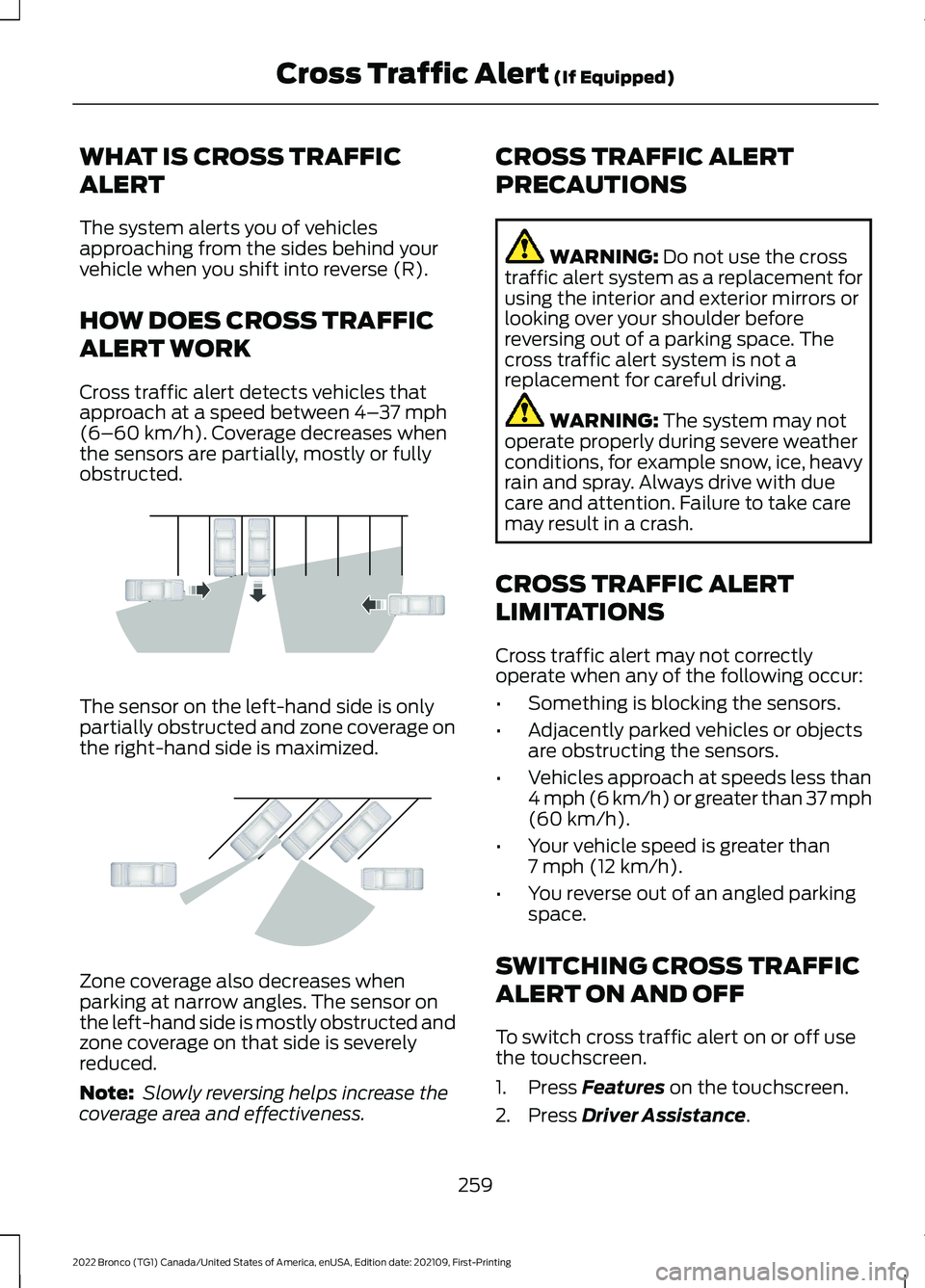
Cross traffic alert detects vehicles thatapproach at a speed between 4–37 mph(6–60 km/h). Coverage decreases whenthe sensors are partially, mostly or fullyobstructed.
The sensor on the left-hand side is onlypartially obstructed and zone coverage onthe right-hand side is maximized.
Zone coverage also decreases whenparking at narrow angles. The sensor onthe left-hand side is mostly obstructed andzone coverage on that side is severelyreduced.
Note: Slowly reversing helps increase thecoverage area and effectiveness.
CROSS TRAFFIC ALERT
PRECAUTIONS
WARNING: Do not use the crosstraffic alert system as a replacement forusing the interior and exterior mirrors orlooking over your shoulder beforereversing out of a parking space. Thecross traffic alert system is not areplacement for careful driving.
WARNING: The system may notoperate properly during severe weatherconditions, for example snow, ice, heavyrain and spray. Always drive with duecare and attention. Failure to take caremay result in a crash.
CROSS TRAFFIC ALERT
LIMITATIONS
Cross traffic alert may not correctlyoperate when any of the following occur:
•Something is blocking the sensors.
•Adjacently parked vehicles or objectsare obstructing the sensors.
•Vehicles approach at speeds less than4 mph (6 km/h) or greater than 37 mph(60 km/h).
•Your vehicle speed is greater than7 mph (12 km/h).
•You reverse out of an angled parkingspace.
SWITCHING CROSS TRAFFIC
ALERT ON AND OFF
To switch cross traffic alert on or off usethe touchscreen.
1.Press Features on the touchscreen.
2.Press Driver Assistance.
259
2022 Bronco (TG1) Canada/United States of America, enUSA, Edition date: 202109, First-PrintingCross Traffic Alert (If Equipped)E142440 E142441
Page 289 of 562
When towing a trailer:
•Obey country specific regulations fortowing a trailer.
•Do not drive faster than 70 mph(113 km/h) during the first 500 mi(800 km).
•Do not make full-throttle starts.
•Check your hitch, electrical connectionsand trailer wheel lug nuts thoroughlyafter you have traveled 50 mi (80 km).
•Place the transmission in neutral (N)when stopped in congested or heavytraffic during hot weather. This will aidin engine and transmission cooling andto help A/C performance.
•Turn off the speed control with heavyloads or in hilly terrain. The speedcontrol may turn off when you aretowing on long, steep slopes.
•Shift to a lower gear when driving downa long or steep hill. Do not continuouslyapply the brakes, as they may overheatand become less effective.
•If your transmission has Grade Assistor Tow/Haul, use this feature whentowing. This provides engine brakingand helps eliminate excessivetransmission shifting for optimum fueleconomy and transmission cooling.
•Your vehicle has AdvanceTrac with rollstability control. When towing a trailer,additional loads could cause theAdvanceTrac system to engage duringcornering maneuvers. Reduce corneringspeeds to make sure that you canmaintain control of the vehicle andtrailer if the AdvanceTrac systemengages.
•Allow more distance for stopping witha trailer attached. Anticipate stops andgradually brake.
•Avoid parking on a slope. However, ifyou must park on a slope. Turn thesteering wheel to point your vehicletires away from traffic flow. Set yourvehicle parking brake. Place thetransmission in a low gear. Place wheelchocks in front and back of the trailerwheels.
Note:Chocks are not included with yourvehicle.
TRAILER TOWING HINTS -
AUTOMATIC TRANSMISSION
Towing a trailer places an extra load onyour vehicle's engine, transmission, axle,brakes, tires and suspension. Periodicallyinspect these components during and afterany towing operation.
When driving with a trailer or payload, aslight takeoff vibration or shudder may bepresent due to the increased payloadweight.
Your vehicle may have a temporary orconventional spare tire. A temporary sparetire is different in diameter or width,tread-type, or is from a differentmanufacturer than the road tires on yourvehicle. Consult information on the tirelabel or Safety Compliance label forlimitations when using.
When towing a trailer:
•Obey country specific regulations fortowing a trailer.
•Do not drive faster than 70 mph(113 km/h) during the first 500 mi(800 km).
•Do not make full-throttle starts.
•Check your hitch, electrical connectionsand trailer wheel lug nuts thoroughlyafter you have traveled 50 mi (80 km).
285
2022 Bronco (TG1) Canada/United States of America, enUSA, Edition date: 202109, First-PrintingTowing a Trailer
Page 290 of 562
•When stopped in congested or heavytraffic during hot weather, place thetransmission in park (P) to aid engineand transmission cooling and to helpA/C performance.
•Turn off the speed control with heavyloads or in hilly terrain. The speedcontrol may turn off when you aretowing on long, steep slopes.
•Shift to a lower gear when driving downa long or steep hill. Do not continuouslyapply the brakes, as they may overheatand become less effective.
•If your transmission has Grade Assistor Tow/Haul, use this feature whentowing. This provides engine brakingand helps eliminate excessivetransmission shifting for optimum fueleconomy and transmission cooling.
•Your vehicle has AdvanceTrac with rollstability control. When towing a trailer,additional loads could cause theAdvanceTrac system to engage duringcornering maneuvers. Reduce corneringspeeds to make sure that you canmaintain control of the vehicle andtrailer if the AdvanceTrac systemengages.
•Allow more distance for stopping witha trailer attached. Anticipate stops andgradually brake.
•Avoid parking on a slope. However, ifyou must park on a slope, turn thesteering wheel to point your vehicletires away from traffic flow, set theparking brake, place the transmissionin park (P) and place wheel chocks infront and back of the trailer wheels.
Note:Chocks are not included with yourvehicle.
LAUNCHING OR RETRIEVING
A BOAT OR PERSONAL
WATERCRAFT
When backing down a ramp during boatlaunching or retrieval:
•Do not allow the static water level torise above the bottom edge of the rearbumper.
•Do not allow waves to break higherthan 6 in (15 cm) above the bottomedge of the rear bumper.
Exceeding 6 in (15 cm) could allow waterto enter vehicle components, causinginternal damage to the components andaffecting driveability, emissions andreliability.
Note:Replace the rear axle lubricantanytime the rear axle has been submergedin water.
Note:Disconnect the trailer wiringconnector before backing the trailer into thewater.
Note:Reconnect the trailer wiringconnector after removing the trailer fromthe water.
286
2022 Bronco (TG1) Canada/United States of America, enUSA, Edition date: 202109, First-PrintingTowing a Trailer
Page 306 of 562
Vehicles Sold in Canada: GettingRoadside Assistance
To fully assist you should you have avehicle concern, Ford Motor Company ofCanada, Limited offers a complimentaryroadside assistance program. Thisprogram is eligible within Canada or thecontinental United States.
The service is available 24 hours a day,seven days a week.
This program is separate from the NewVehicle Limited Warranty, but the coverageis concurrent with the powertrain coverageperiod of your vehicle. Canadian roadsidecoverage and benefits may differ from theU.S. coverage.
If you require more information, please callus in Canada at 1-800-665-2006, or visitour website at www.ford.ca.
SWITCHING THE HAZARD
FLASHERS ON AND OFF
The hazard flasher button is onthe instrument panel. Press thebutton to switch the hazardflashers on if your vehicle is creating asafety hazard for other road users.
When you switch the hazard flashers on,all front and rear direction indicators flash.
Note:The hazard flashers operate whenthe ignition is in any position, or if the key isnot in the ignition. The battery loses chargeand could have insufficient power to restartyour vehicle.
Press the button again to switch them off.
JUMP STARTING THE VEHICLE
JUMP STARTING PRECAUTIONS
WARNING: Batteries normallyproduce explosive gases which cancause personal injury. Therefore, do notallow flames, sparks or lightedsubstances to come near the battery.When working near the battery, alwaysshield your face and protect your eyes.Always provide correct ventilation.
WARNING: Keep batteries out ofreach of children. Batteries containsulfuric acid. Avoid contact with skin,eyes or clothing. Shield your eyes whenworking near the battery to protectagainst possible splashing of acidsolution. In case of acid contact with skinor eyes, flush immediately with water fora minimum of 15 minutes and get promptmedical attention. If acid is swallowed,call a physician immediately.
WARNING: Use only adequatelysized cables with insulated clamps.
WARNING: Make sure that thecables are clear of any moving parts andfuel delivery system parts.
WARNING: Connect batteries withonly the same nominal voltage.
WARNING: If the engine is runningwhile the hood is open, stay clear ofmoving engine components. Failure tofollow this warning could result in seriouspersonal injury or death.
Do not attempt to push-start an automatictransmission vehicle. This could causetransmission damage.
302
2022 Bronco (TG1) Canada/United States of America, enUSA, Edition date: 202109, First-PrintingCrash and Breakdown Information
Page 315 of 562
2.Starting with the brake pedal releasedand the transmission in neutral (N),fully press and hold the brake pedal forapproximately seven seconds and shiftthe transmission to park (P). Continueholding the brake pedal until theinstrument cluster display shows 2Hand Neutral Tow Disabled.
Note:If completed successfully, theinstrument cluster displays 2H and NeutralTow Disabled.
Note:Perform the switching neutral towon and switching neutral tow off proceduresagain from the beginning if the indicatorlight and message do not display.
Note:You could hear a noise as the transfercase shifts out of its neutral position. Thisis normal.
3.Release the brake pedal.
4.Apply the parking brake, thendisconnect your vehicle from the towvehicle.
5.Release the parking brake, start yourvehicle, and shift into either drive (D)or reverse (R) to make sure the transfercase is out of the neutral tow position.
6.If the transfer case did not successfullyshift out of its neutral position, set theparking brake. Have your vehiclechecked as soon as possible.
Resolving the Shift Delayed DriveForward Message
1.Fully press and hold the brake pedal.
2.Press the push button ignition switch.
3.With the vehicle running, shift into drive(D). Let the vehicle roll forward up to3 ft (1 m).
Note:You could hear a noise as the transfercase shifts out of its neutral position. Thisis normal.
4.Make sure the instrument clusterdisplays Neutral Tow Disabled.
EMERGENCY TOWING
If you need to tow your vehicle, contact aprofessional towing service or, if you are amember of a roadside assistance program,your roadside assistance service provider.
TOWING YOUR VEHICLE – TROUBLESHOOTING
TOWING YOUR VEHICLE – INFORMATION MESSAGES
DescriptionMessage
The transfer case is in the neutral position and your vehicleis safe to tow with all four wheels on the ground.Neutral Tow EnabledLeave Transmission inNeutral
There is a transfer case gear tooth blockage present. Withyour vehicle on, shift the transmission into drive (D) and letthe vehicle roll forward, up to 3 ft (1 m).
Shift Delayed DriveForward
The transfer case is not in the neutral position and your vehicleis not safe to tow with all four wheels on the ground.Neutral Tow Disabled
311
2022 Bronco (TG1) Canada/United States of America, enUSA, Edition date: 202109, First-PrintingTowing Your Vehicle
Page 323 of 562
Protected ComponentRatingItem
Not used.—33
Run/start relay.30 A34
Not used (spare).5 A35
Automatic high beam.15 A36Image processing module A.
Auto-dimming interiormirror.20 A37
Parking assist controlmodule.Heated steering wheel.
Not used.30 A Circuit Breaker38
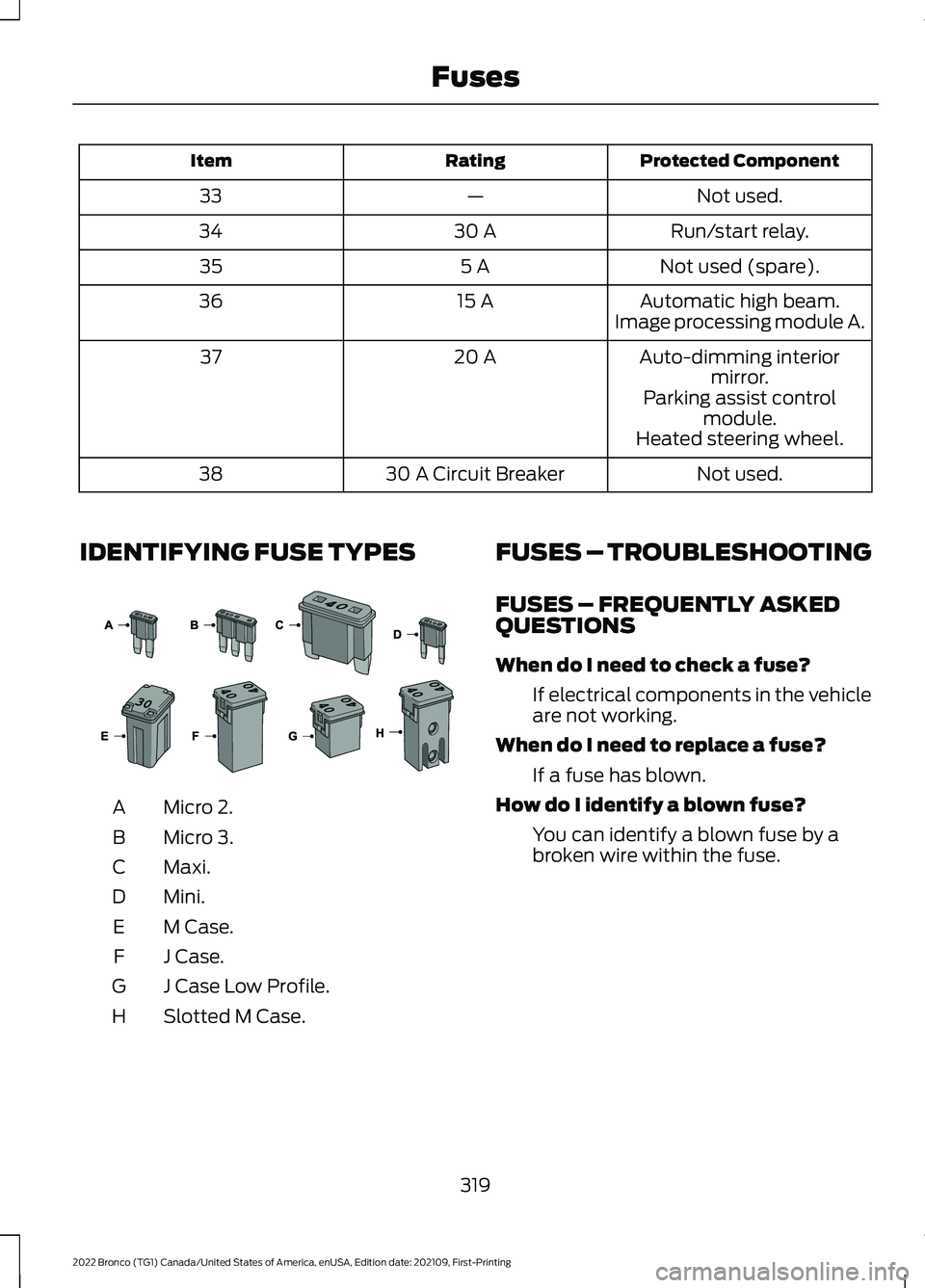
IDENTIFYING FUSE TYPES
Micro 2.A
Micro 3.B
Maxi.C
Mini.D
M Case.E
J Case.F
J Case Low Profile.G
Slotted M Case.H
FUSES – TROUBLESHOOTING
FUSES – FREQUENTLY ASKEDQUESTIONS
When do I need to check a fuse?
If electrical components in the vehicleare not working.
When do I need to replace a fuse?
If a fuse has blown.
How do I identify a blown fuse?
You can identify a blown fuse by abroken wire within the fuse.
319
2022 Bronco (TG1) Canada/United States of America, enUSA, Edition date: 202109, First-PrintingFuses E267379
Page 373 of 562
CLEANING HEADLAMPS ANDREAR LAMPS
We recommend that you only use cold orlukewarm water containing car shampooto clean the headlamps and the rearlamps.
Do not scrape the lamps.
Do not wipe lamps when they are dry.
CLEANING WINDOWS AND WIPERBLADES
To clean the windshield and wiper blades:
•Clean the windshield with anon-abrasive glass cleaner.
Note:When cleaning the interior of thewindshield, avoid getting any glass cleaneron the instrument panel or door panels.Wipe any glass cleaner off these surfacesimmediately.
•Clean the wiper blades with washerfluid or water applied with a softsponge or cloth.
Note: Do not use razor blades or othersharp objects to clean or remove decalsfrom the inside of the heated rear window.This can cause damage not covered by thevehicle Warranty.
CLEANING CHROME, ALUMINIUMOR STAINLESS STEEL
We recommend that you only use a carshampoo, a soft cloth and water onbumpers and other chrome, aluminium orstainless steel parts.
Note:For additional information andassistance, we recommend that you contactan authorized dealer.
Note:Rinse the area well after cleaning.
Note:Do not use abrasive materials, forexample steel wool or plastic pads, as theycan scratch these surfaces.
Note:Do not use chrome cleaner, metalcleaner or polish on wheels or wheel covers.
CLEANING WHEELS
Only use a recommended wheel and tirecleaner to clean the wheels weekly. Foradditional information and assistance, werecommend that you contact anauthorized dealer.
1.Use a sponge to remove heavydeposits of dirt and brake dust.
2.Rinse well after cleaning.
Note:Do not apply a cleaning chemical towarm or hot wheel rims and covers.
If you intend on parking your vehicle for anextended period after cleaning the wheelswith a wheel cleaner, drive your vehicle fora few minutes before parking your vehicle.This reduces the risk of corrosion of thebrake discs, brake pads and linings.
Do not clean the wheels when they are hot.
Note: Some car washes could damagewheel rims and covers.
Note: Using non-recommended cleaners,harsh cleaning products, chrome wheelcleaners or abrasive materials coulddamage wheel rims and covers.
CLEANING THE ENGINECOMPARTMENT
Use a vacuum cleaner to remove debrisfrom the screen area below windshield.
Note:If you are not familiar with the partsaround the engine do not wash the enginecompartment. Avoid frequent enginewashes.
369
2022 Bronco (TG1) Canada/United States of America, enUSA, Edition date: 202109, First-PrintingVehicle Care