steering FORD BRONCO 2022 Owner's Guide
[x] Cancel search | Manufacturer: FORD, Model Year: 2022, Model line: BRONCO, Model: FORD BRONCO 2022Pages: 562, PDF Size: 73 MB
Page 216 of 562
WHAT IS TRAIL TURN ASSIST
Trail turn assist can reduce the turningradius of your vehicle by applying thebrakes to the inside rear wheel inlow-speed, high steering-angle maneuvers.
TRAIL TURN ASSIST
PRECAUTIONS
Note:Do not use trail turn assist on dry,hard surfaced roads. Doing so can produceexcessive noise, increase tire wear and maydamage drive line, or braking components.Trail turn assist is only intended for slippery,or loose surfaces.
You may hear noise from the anti-lockbrake system while trail turn assist isactive. This is normal operation.
TRAIL TURN ASSIST
LIMITATIONS
You can only use trail turn assist when thesystem is in four-wheel drive high (4H), orfour-wheel drive low (4L) mode.
You cannot use trail turn assist with therear differential engaged. If the systemdetects that the rear differential hasrecently been engaged, it may not activatetrail turn assist until it can confirm that therear differential is disengaged.
If the vehicle’s rear differential is engagedwhen pressing the trail turn assist button,the rear differential will attempt todisengage to allow for trail turn assistoperation.
SWITCHING TRAIL TURN
ASSIST ON AND OFF
While in four-wheel drive high (4H) orfour-wheel drive low (4L), press the trailturn assist button to turn the feature on.trail turn assist will be on at this time butwill not activate until:
•Vehicle speed is less than 12 mph(19.3 km/h).
•Rear differential is fully unlocked.
•Steering wheel is almost fully turnedto the left or right.
You can turn off trail turn assist by doingany of the following:
•Pressing the trail turn assist buttonagain.
•Selecting a two-wheel drive high (2H),or four-wheel drive auto (4A).
•Turning on the rear locking differential.
TRAIL TURN ASSIST
INDICATORS
When trail turn assist is on, oneof these two indicators will bedisplayed, depending on thedirection of the vehicle’s lastturn. When the feature is on butnot in use, the indicator light willbe gray. When the feature is active theindicator light will be green.
212
2022 Bronco (TG1) Canada/United States of America, enUSA, Edition date: 202109, First-PrintingTrail Turn Assist (If Equipped)E338899 E338900
Page 221 of 562
WHAT IS HILL DESCENT
CONTROL
Hill descent control allows the driver to setand maintain vehicle speed whiledescending steep slopes in various surfaceconditions.
HOW DOES HILL DESCENT
CONTROL WORK
Hill descent control can maintain vehiclespeeds on downhill slopes between2–20 mph (3–32 km/h). Above 20 mph(32 km/h), the system remains on but thedescent speed cannot be set ormaintained.
Note:The system does not function below2 mph (3 km/h).
The system requires a cool down intervalafter a period of sustained use. Hill descentcontrol provides a warning in the messagecenter and a tone sounds when the systemis about to disengage for cooling. At thistime, manually apply the brakes as neededto maintain descent speed.
Note:The amount of time that the systemcan remain active before cooling varies withconditions.
HILL DESCENT CONTROL
PRECAUTIONS
WARNING: The system does notcontrol speed in low traction conditionsor extremely steep slopes. The systemis designed to be an aid and does notrelieve you of your responsibility to drivewith due care and attention. Failure tofollow this instruction could result inpersonal injury.
WARNING: The system does notreplace the parking brake. When youleave your vehicle, always apply theparking brake.
SWITCHING HILL DESCENT
CONTROL ON AND OFF
Press the button on the centerconsole. A light in the instrumentcluster illuminates when thesystem is active.
SETTING THE HILL DESCENT
SPEED
To increase or decrease the descent speed,press the accelerator or brake pedal, or usethe SET + and SET - buttons on thesteering wheel. Once you reach thepreferred speed remove your feet from thepedals.
HILL DESCENT CONTROL
INDICATOR
Illuminates when you switch hilldescent control on.
217
2022 Bronco (TG1) Canada/United States of America, enUSA, Edition date: 202109, First-PrintingHill Descent Control - Manual TransmissionE328593 E328593
Page 223 of 562
ELECTRIC POWER STEERING
HOW DOES ELECTRIC POWERSTEERING WORK
The electric power steering system assiststhe brake system to help operateadvanced stability control and accidentavoidance systems.
If your vehicle loses electrical power ordetects a concern when you are driving thesystem switches off and you retain normalsteering function. Additionally, wheneverthe battery is disconnected or a newbattery is installed, you must drive yourvehicle a short distance before the systemrelearns the strategy and reactivates allsystems.
ELECTRIC POWER STEERINGPRECAUTIONS
WARNING: The electric powersteering system has diagnostic checksthat continuously monitor the system. Ifa fault is detected, a message displaysin the information display. Stop yourvehicle as soon as it is safe to do so.
Switch the vehicle off. After at least 10seconds, switch the vehicle on andwatch the information display for asteering system warning message. If asteering system warning messagereturns, have the system checked assoon as possible.
WARNING: If the system detectsan error, you may not feel a difference inthe steering, however a serious conditionmay exist. Have your vehicle checked assoon as possible. Failure to do so mayresult in loss of steering control.
Adapt your speed and driving behavioraccording to reduced steering assist.
Extreme continuous steering may increasethe effort to steer. This occurs to preventinternal overheating and damage to thesteering system. If this occurs, you will notlose the ability to steer your vehiclemanually nor will it cause damage to thesystem. Normal steering and driving allowsthe system to cool down and steeringassist returns to normal.
Note:There is no fluid reservoir to check orfill.
219
2022 Bronco (TG1) Canada/United States of America, enUSA, Edition date: 202109, First-PrintingSteering
Page 224 of 562
STEERING – TROUBLESHOOTING
STEERING – INFORMATION MESSAGES
ActionMessage
The power steering system has detected acondition that requires service. Have yourvehicle checked as soon as possible.
Steering Fault Service Now
The power steering system is not working.Stop your vehicle in a safe place. Have yourvehicle checked as soon as possible.
Steering Loss Stop Safely
The power steering system has detected acondition that requires service. Have yourvehicle checked as soon as possible.
Steering Assist Fault Service Required
The steering system has detected a condi-tion that requires service. Have your vehiclechecked as soon as possible.
Steering Lock Malfunction Service Now
220
2022 Bronco (TG1) Canada/United States of America, enUSA, Edition date: 202109, First-PrintingSteering
Page 225 of 562
STEERING – FREQUENTLY ASKEDQUESTIONS
Why does it seem that the steering iswandering or pulling?
Check your vehicle for an improperlyinflated or uneven tire, loose or wornsuspension or steering components,or improper vehicle alignment.
The system is functioning properly andthe components have been checked,why is the steering system continuingto pull or wander?
A high crown in the road or crosswindscould make the steering system feellike it is wandering or pulling.
221
2022 Bronco (TG1) Canada/United States of America, enUSA, Edition date: 202109, First-PrintingSteering
Page 231 of 562
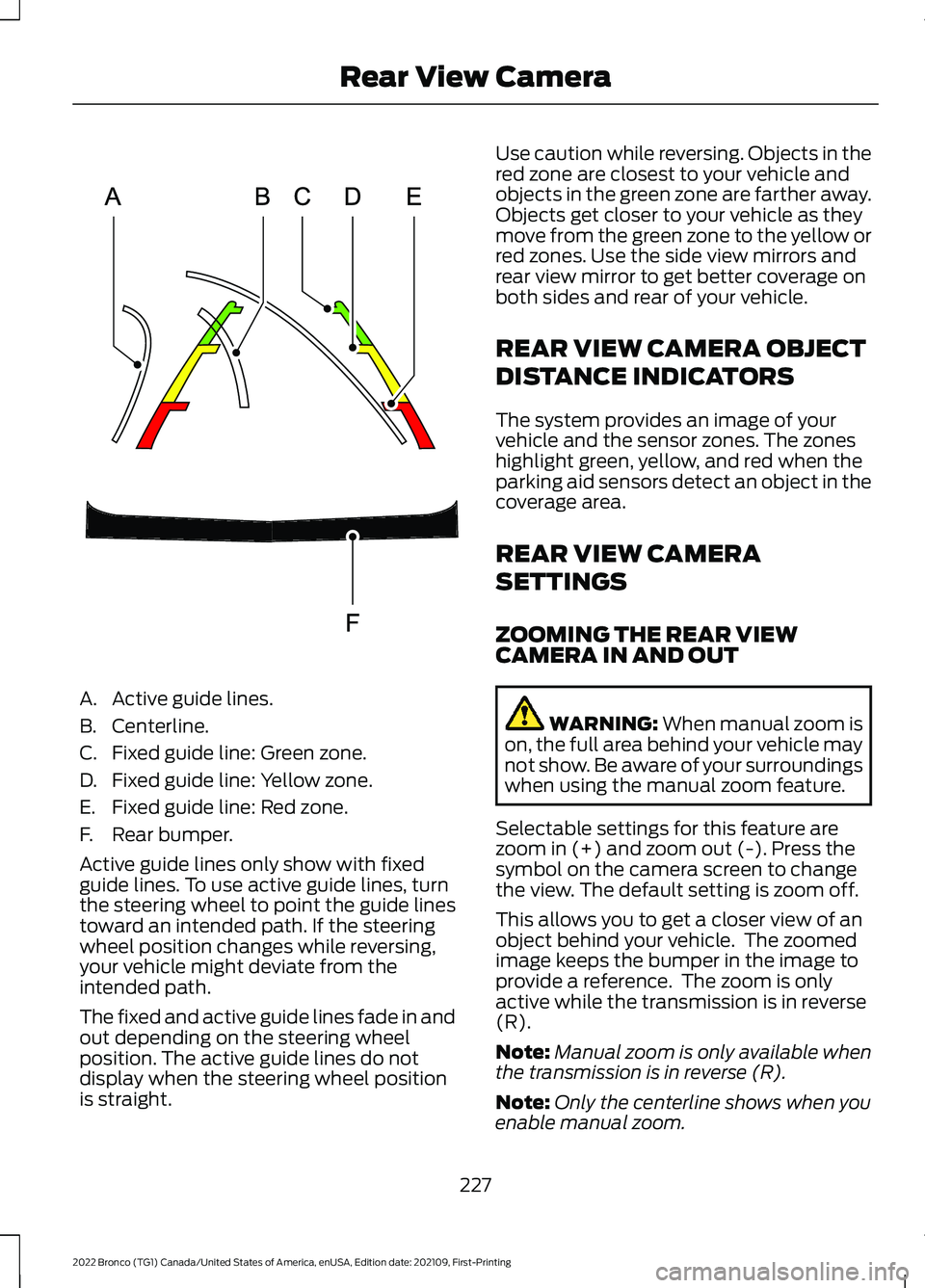
A.Active guide lines.
B.Centerline.
C.Fixed guide line: Green zone.
D.Fixed guide line: Yellow zone.
E.Fixed guide line: Red zone.
F.Rear bumper.
Active guide lines only show with fixedguide lines. To use active guide lines, turnthe steering wheel to point the guide linestoward an intended path. If the steeringwheel position changes while reversing,your vehicle might deviate from theintended path.
The fixed and active guide lines fade in andout depending on the steering wheelposition. The active guide lines do notdisplay when the steering wheel positionis straight.
Use caution while reversing. Objects in thered zone are closest to your vehicle andobjects in the green zone are farther away.Objects get closer to your vehicle as theymove from the green zone to the yellow orred zones. Use the side view mirrors andrear view mirror to get better coverage onboth sides and rear of your vehicle.
REAR VIEW CAMERA OBJECT
DISTANCE INDICATORS
The system provides an image of yourvehicle and the sensor zones. The zoneshighlight green, yellow, and red when theparking aid sensors detect an object in thecoverage area.
REAR VIEW CAMERA
SETTINGS
ZOOMING THE REAR VIEWCAMERA IN AND OUT
WARNING: When manual zoom ison, the full area behind your vehicle maynot show. Be aware of your surroundingswhen using the manual zoom feature.
Selectable settings for this feature arezoom in (+) and zoom out (-). Press thesymbol on the camera screen to changethe view. The default setting is zoom off.
This allows you to get a closer view of anobject behind your vehicle. The zoomedimage keeps the bumper in the image toprovide a reference. The zoom is onlyactive while the transmission is in reverse(R).
Note:Manual zoom is only available whenthe transmission is in reverse (R).
Note:Only the centerline shows when youenable manual zoom.
227
2022 Bronco (TG1) Canada/United States of America, enUSA, Edition date: 202109, First-PrintingRear View CameraE306774
Page 234 of 562
LOCATING THE 360 DEGREE
CAMERAS
Rear View Camera
The rear view camera is in the spare tirecarrier. It provides an image of the areabehind your vehicle.
Front View Camera
The front video camera is in the grille. Itprovides a video image of the area in frontof your vehicle. To use the front camerasystem, place the transmission in any gearexcept reverse (R) and press the cameraicon in the corner of the screen.
Note:The front camera system switcheson when you are in mud/sand, rock crawl,or baja mode.
Side View Camera
The side view cameras are on the outsidemirrors. They provide a video image of thearea on the sides of your vehicle to aid youwhen parking.
360 DEGREE CAMERA GUIDE
LINES
Note:Active guide lines are only availablewhen the transmission is in reverse (R).
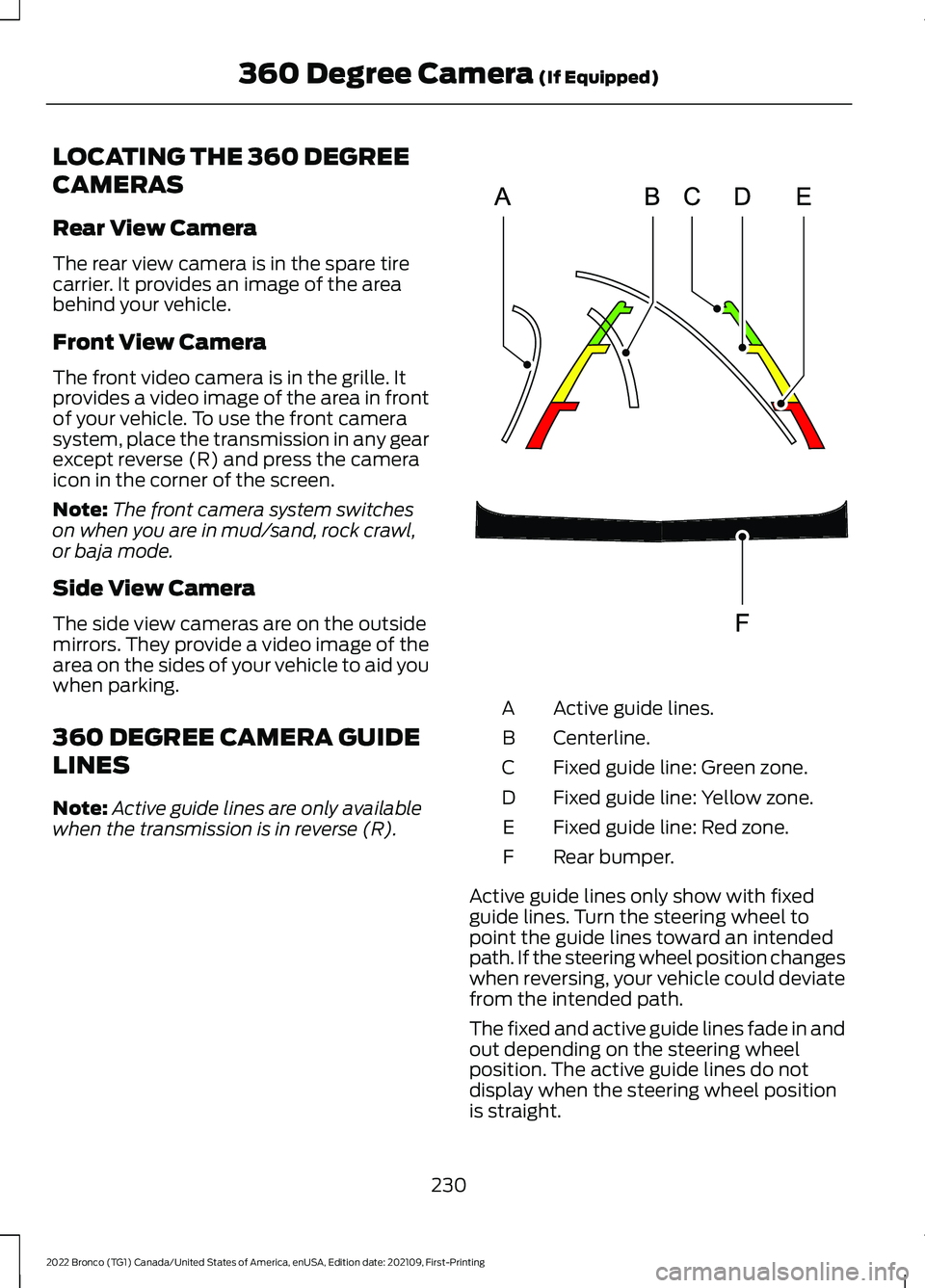
Active guide lines.A
Centerline.B
Fixed guide line: Green zone.C
Fixed guide line: Yellow zone.D
Fixed guide line: Red zone.E
Rear bumper.F
Active guide lines only show with fixedguide lines. Turn the steering wheel topoint the guide lines toward an intendedpath. If the steering wheel position changeswhen reversing, your vehicle could deviatefrom the intended path.
The fixed and active guide lines fade in andout depending on the steering wheelposition. The active guide lines do notdisplay when the steering wheel positionis straight.
230
2022 Bronco (TG1) Canada/United States of America, enUSA, Edition date: 202109, First-Printing360 Degree Camera (If Equipped)E306774
Page 236 of 562
WHAT IS CRUISE CONTROL
Cruise control lets you maintain a setspeed without keeping your foot on theaccelerator pedal.
Requirements
Use cruise control when the vehicle speedis greater than 15 mph in imperial units and20 km/h in metric units.
SWITCHING CRUISE CONTROL
ON AND OFF
WARNING: Do not use cruisecontrol on winding roads, in heavy trafficor when the road surface is slippery. Thiscould result in loss of vehicle control,serious injury or death.
The cruise controls are on the steeringwheel.
Switching Cruise Control On
Press the button to activate thesystem. When the systemactivates, the set speed is equalto whichever is greater, the current vehiclespeed, or 15 mph when in imperial units or20 km/h when in metric units. If the speedis too low, or other conditions are notcorrect for cruise control activation, thesystem will instead enter standby mode.
Switching Cruise Control Off
Press the button when thesystem is active or switch theignition off.
Note:When you switch cruise control off,the set speed clears.
SETTING THE CRUISE
CONTROL SPEED
WARNING: When you are goingdownhill, your vehicle speed couldincrease above the set speed. Thesystem does not apply the brakes.
Drive to the speed you prefer.
Press either the SET+ or SET-buttons to set the current speed.
Take your foot off the accelerator pedal.
Note:The indicator changes color in theinformation display.
Changing the Set Speed
Press the SET+ button toincrease the set speed in smallincrements. Press and hold theSET+ button to accelerate. Release thebutton when you have reached yourpreferred speed.
Press the SET- button todecrease the set speed in smallincrements. Press and hold theSET- button to decelerate. Release thebutton when you have reached yourpreferred speed.
Note: If you accelerate by pressing theaccelerator pedal, the set speed does notchange. When you release the acceleratorpedal, your vehicle returns to the speed thatyou previously set.
232
2022 Bronco (TG1) Canada/United States of America, enUSA, Edition date: 202109, First-PrintingCruise Control (If Equipped)E332905 E332905
Page 241 of 562
Optimal system performance requires aclear view of the road by thewindshield-mounted camera.
Optimal performance may not occur if:
•The camera is blocked.
•There is poor visibility or lightingconditions.
•There are bad weather conditions.
SWITCHING ADAPTIVE
CRUISE CONTROL ON AND OFF
The cruise controls are on the steeringwheel. See Cruise Control (page 232).
Switching Adaptive Cruise ControlOn
Press the button to activate thesystem. When the systemactivates, the set speed is equalto the current vehicle speed. If the speedis too low, or other conditions are notcorrect for adaptive cruise controlactivation, the system enters standbymode.
Note:The minimum set speed is 15 mph or20 km/h.
The indicator, current gap setting and setspeed appear in the instrument clusterdisplay.
Switching Adaptive Cruise ControlOff
Press the button when thesystem is in standby mode orswitch the ignition off.
Note:When you switch the system off, theset speed clears.
Automatic Cancellation orDeactivation
The system may cancel if:
•The tires lose traction.
•You apply the parking brake.
•Your vehicle speed falls significantlybelow 15 mph or 20 km/h.
The system may turn off or preventactivating when requested if:
•The vehicle has a blocked sensor.
•The brake temperature is too high.
•There is a failure in the system or arelated system.
SETTING THE ADAPTIVE
CRUISE CONTROL SPEED
Drive to the speed you prefer.
Press the button to set thecurrent speed.
Take your foot off the accelerator pedal.
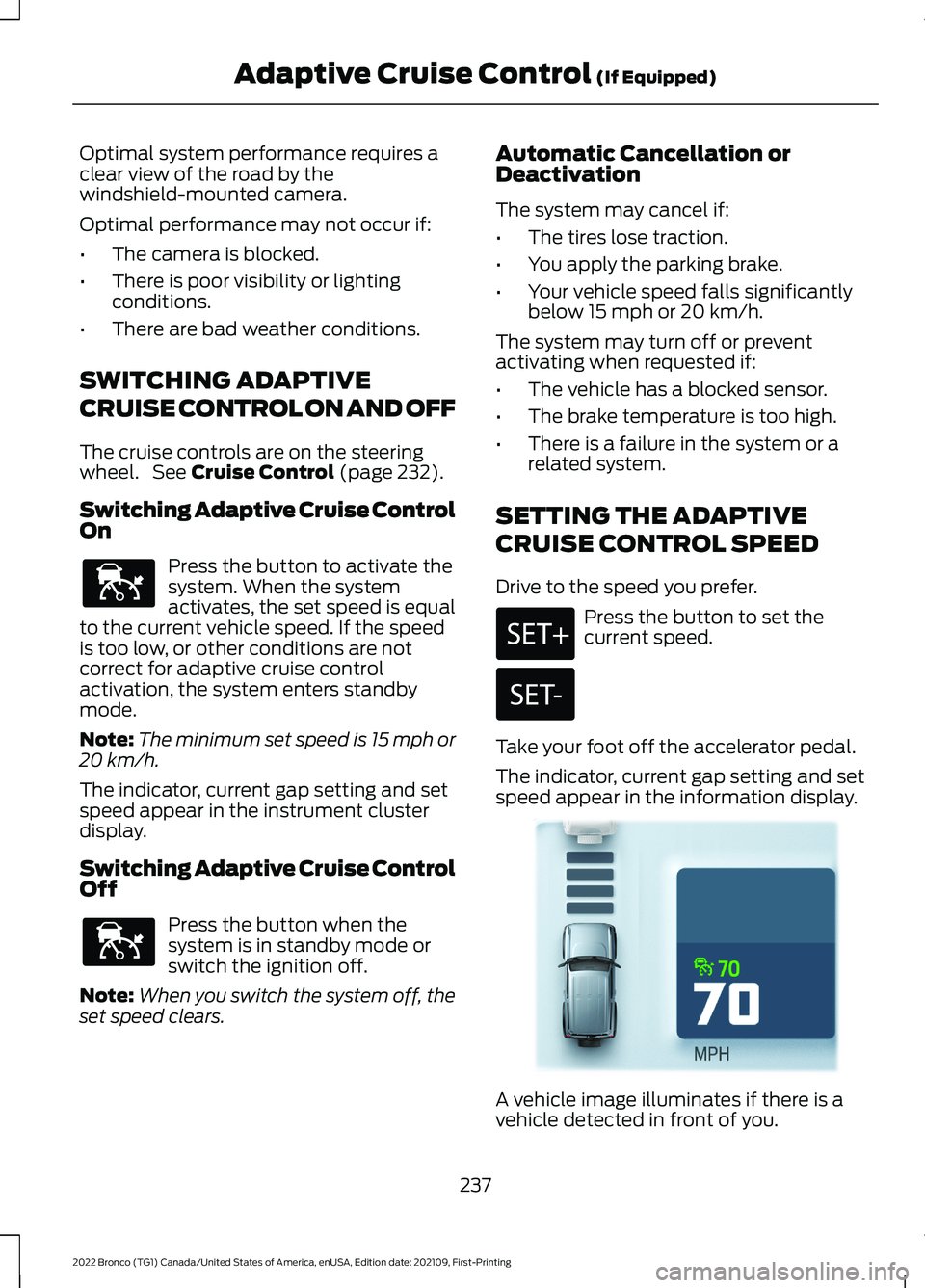
The indicator, current gap setting and setspeed appear in the information display.
A vehicle image illuminates if there is avehicle detected in front of you.
237
2022 Bronco (TG1) Canada/United States of America, enUSA, Edition date: 202109, First-PrintingAdaptive Cruise Control (If Equipped)E144529 E144529 E355963
Page 246 of 562
WHAT IS G.O.A.T. MODE
CONTROL
Your vehicle has several goes overany-type of terrain (G.O.A.T.) modes thatyou can select for different drivingconditions. Depending on the mode thatyou select, the system adjusts variousvehicle settings.
HOW DOES G.O.A.T. MODE
CONTROL WORK
Each selectable mode changes variouselectronic and mechanical settings withinyour vehicle to tailor its performance anddriving characteristics to on-road oroff-road driving conditions. The systemmay alter steering feel and effort, tractioncontrol, stability control, chassis controls,powertrain response, transmission shiftpoints, four-wheel driveline setting,exhaust noise level and suspensiondampening to predetermined settings,depending upon the mode that you select.
The system reverts to the normal modeeach time you start your vehicle. At startupthe system also displays a prompt on theinstrument cluster display that gives youthe option to return to the previouslyselected drive mode during the last ignitioncycle. If you select yes, the system returnsto the last selected drive mode and thedefault driveline settings associated withthat mode. If you select no or do not makea selection within a short time, the systemremains in normal mode and the drivelinesettings remain the same as selected inthe prior ignition cycle.
Note:Your vehicle has diagnostic checksthat continuously monitor all systems forproper operation. If a mode is unavailabledue to a system fault, your vehicle defaultsto normal mode and the driveline remainsin the four-wheel drive setting that you lastselected prior to the system fault.
SELECTING A G.O.A.T. MODE
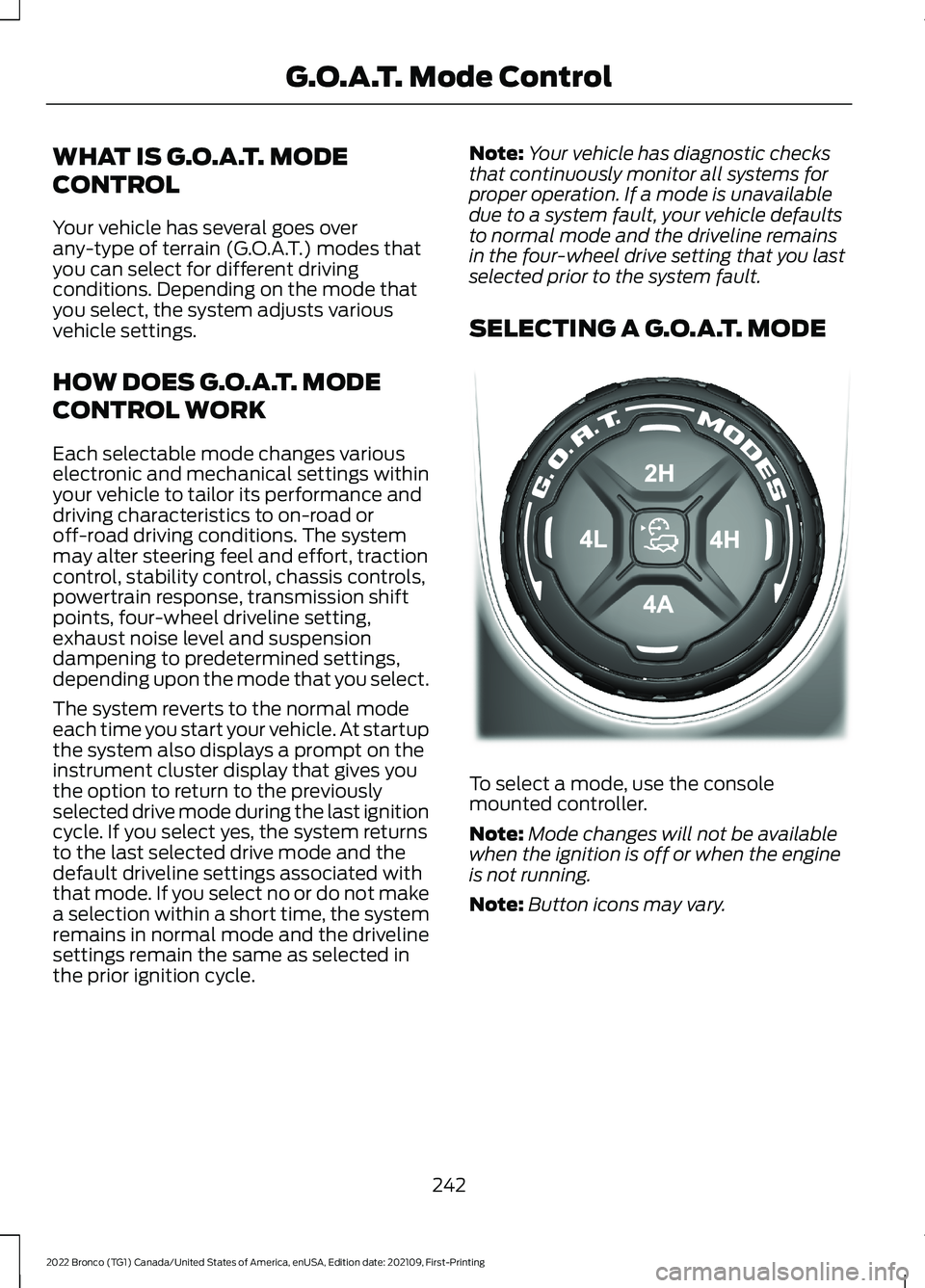
To select a mode, use the consolemounted controller.
Note:Mode changes will not be availablewhen the ignition is off or when the engineis not running.
Note:Button icons may vary.
242
2022 Bronco (TG1) Canada/United States of America, enUSA, Edition date: 202109, First-PrintingG.O.A.T. Mode ControlE324543