ECO mode FORD BRONCO 2023 Owner's Manual
[x] Cancel search | Manufacturer: FORD, Model Year: 2023, Model line: BRONCO, Model: FORD BRONCO 2023Pages: 642, PDF Size: 14.71 MB
Page 196 of 642
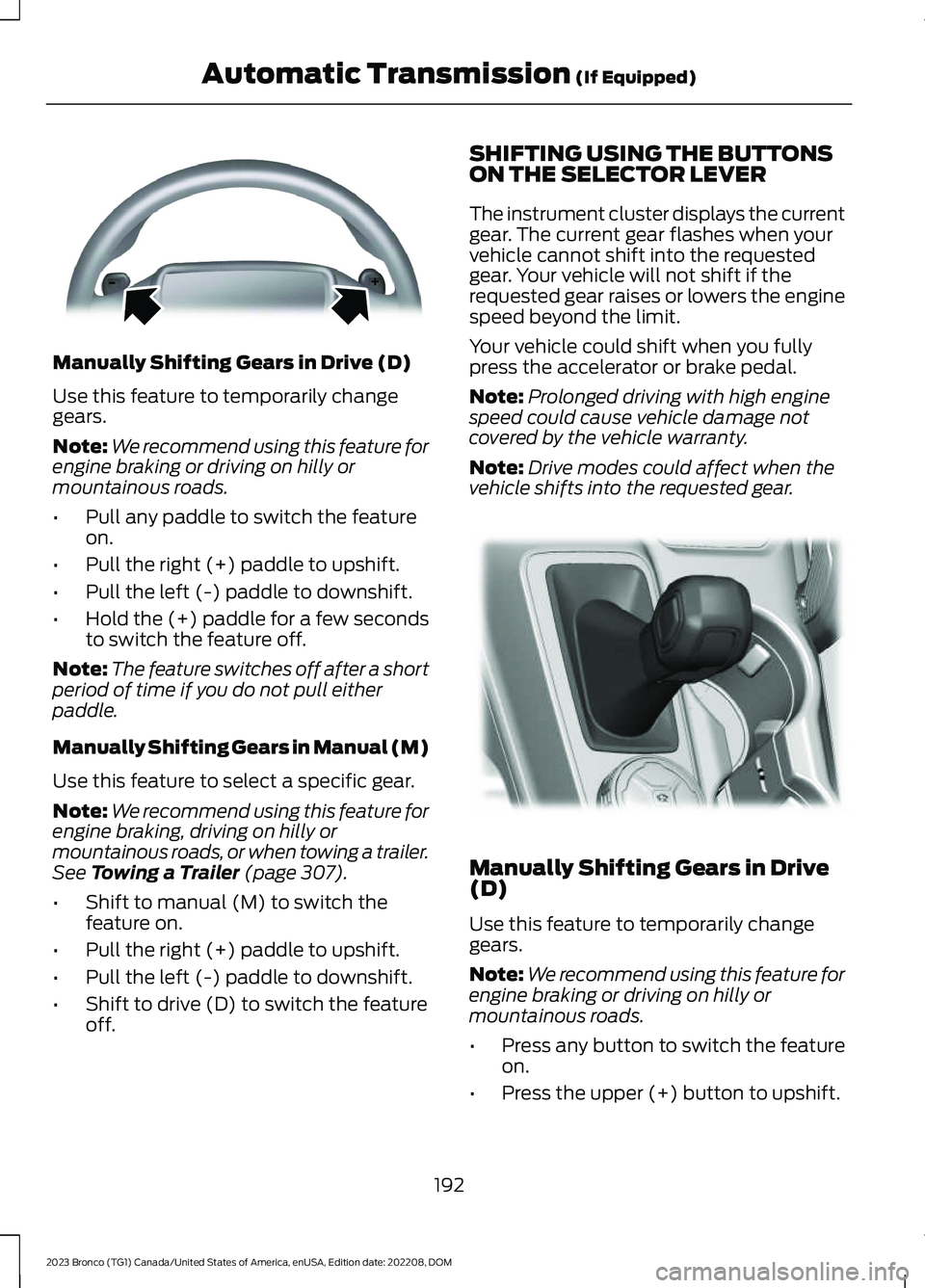
Manually Shifting Gears in Drive (D)
Use this feature to temporarily changegears.
Note:We recommend using this feature forengine braking or driving on hilly ormountainous roads.
•Pull any paddle to switch the featureon.
•Pull the right (+) paddle to upshift.
•Pull the left (-) paddle to downshift.
•Hold the (+) paddle for a few secondsto switch the feature off.
Note:The feature switches off after a shortperiod of time if you do not pull eitherpaddle.
Manually Shifting Gears in Manual (M)
Use this feature to select a specific gear.
Note:We recommend using this feature forengine braking, driving on hilly ormountainous roads, or when towing a trailer.See Towing a Trailer (page 307).
•Shift to manual (M) to switch thefeature on.
•Pull the right (+) paddle to upshift.
•Pull the left (-) paddle to downshift.
•Shift to drive (D) to switch the featureoff.
SHIFTING USING THE BUTTONSON THE SELECTOR LEVER
The instrument cluster displays the currentgear. The current gear flashes when yourvehicle cannot shift into the requestedgear. Your vehicle will not shift if therequested gear raises or lowers the enginespeed beyond the limit.
Your vehicle could shift when you fullypress the accelerator or brake pedal.
Note:Prolonged driving with high enginespeed could cause vehicle damage notcovered by the vehicle warranty.
Note:Drive modes could affect when thevehicle shifts into the requested gear.
Manually Shifting Gears in Drive(D)
Use this feature to temporarily changegears.
Note:We recommend using this feature forengine braking or driving on hilly ormountainous roads.
•Press any button to switch the featureon.
•Press the upper (+) button to upshift.
192
2023 Bronco (TG1) Canada/United States of America, enUSA, Edition date: 202208, DOMAutomatic Transmission (If Equipped)E144821 E324063
Page 199 of 642
HOW DOES FOUR-WHEEL
DRIVE WORK - 4X4 WITH PART
TIME ENGAGEMENT
Bronco 4x4 Systems
4x4 With Part Time Engagement (If
Equipped)
This system offers the driver two-wheeldrive high, four-wheel drive high, andfour-wheel drive low as available modesof operation. When you select eitherfour-wheel drive high or four-wheel drivelow, the system provides mechanicallylocked four-wheel drive power to both thefront and rear wheels for use in off-road orslippery conditions such as deep snow,sand or mud. Selecting four-wheel drivelow also provides additional gearing forincreased torque multiplication forconditions like deep sand, steep slopes, orpulling heavy objects.
Additionally, the system is capable ofrecreational flat towing by putting thetransfer case into neutral (N). SeeRecreationally Towing Your Vehicle(page 338).
HOW DOES FOUR-WHEEL
DRIVE WORK - ADVANCED 4X4
WITH 4A MODE (IF EQUIPPED)
Bronco 4x4 Systems
Advanced 4x4 With Automatic OnDemand Engagement
This system monitors various vehiclesensory inputs to provide an increasedlevel of performance. This system offerstwo-wheel drive high, four-wheel driveauto, four-wheel drive high, and four-wheeldrive low as available modes of operation.When you select four-wheel drive auto, thesystem continuously varies power to the
front wheels for optimum performance forall on-road conditions. When you selecteither four-wheel drive high or four-wheeldrive low, the system provideselectronically locked power to the frontand rear wheels for use in off-road orslippery conditions such as deep snow,sand or mud. Selecting four-wheel drivelow also provides additional gearing forincreased torque multiplication forconditions like deep sand, steep slopes, orpulling heavy objects.
Additionally, the system is capable ofrecreational flat towing by putting thetransfer case into neutral (N). SeeRecreationally Towing Your Vehicle(page 338).
FOUR-WHEEL DRIVE
PRECAUTIONS
WARNING: Do not becomeoverconfident in the ability of four-wheeldrive vehicles. Although a four-wheeldrive vehicle may accelerate better thana two-wheel drive vehicle in low tractionsituations, it won't stop any faster thantwo-wheel drive vehicles. Always driveat a safe speed.
WARNING: Vehicles with a highercenter of gravity (utility and four-wheeldrive vehicles) handle differently thanvehicles with a lower center of gravity(passenger cars). Avoid sharp turns,excessive speed and abrupt steering inthese vehicles. Failure to drive cautiouslyincreases the risk of losing control of yourvehicle, vehicle rollover, personal injuryand death.
195
2023 Bronco (TG1) Canada/United States of America, enUSA, Edition date: 202208, DOMFour-Wheel Drive
Page 200 of 642
FOUR-WHEEL DRIVE
LIMITATIONS
Do not use four-wheel drive high orfour-wheel drive low mode on dry, hardsurfaced roads. Doing so can produceexcessive noise, increase tire wear and candamage driveline components. Four-wheeldrive high or four-wheel drive low mode isonly for use on consistently slippery orloose surfaces. Use of four-wheel drive lowmode on these surfaces could producesome noise, such as occasional clunks, butshould not damage driveline components.
For vehicles with an electronicshift-on-the-fly transfer case, the drivelinecould become mechanically blocked whenattempting to shift out of a four-wheeldrive mode on dry, hard surfaced roads.
Note:When your vehicle comes with the4x4 part-time selectable engagementtransfer case and you are transitioning fromconsistently loose or slippery surfaces, besure the four-wheel drive system is notmechanically blocked once you are on dry,hard surfaced roads in two-wheel drive high.
Note: In certain scenarios, where thefour-wheel drive system has difficultyengaging, a To Engage 4x4 Slow to 3 MPHor To Engage 4x4 Slow to 5 km/hmessage could appear in the instrumentcluster. You can also see this messagewhen engaging the four-wheel drive systemin extreme cold climates at the beginningof the drive cycle. Once the driveline warmsup, shifting to four-wheel drive can resumeas normal.
Operating Four-Wheel Drive witha Spare or Mismatched Tires
On four-wheel drive vehicles, the size ofthe spare tire can affect the four-wheeldrive system.
If there is a significant difference betweenthe size of the spare tire and the remainingtires, you could have limited four-wheeldrive functionality, added noise, discomfortand driveline damage.
Due to normal tire wear, your spare tire isnot necessarily the same size as youron-road tires, which makes your spare tirea dissimilar size. Use the spare tire on alimited basis only.
When driving with a dissimilar wheel andtire assembly do not:
•Exceed 50 mph (80 km/h) whenoperating in a four-wheel drive mode.
•Select a four-wheel drive mode unlessthe vehicle is stationary.
•Use a four-wheel drive mode on drypavement.
You could have limited four-wheel drivefunctionality when driving with a dissimilarwheel and tire assembly, especially whendriving in a mechanically locked four-wheeldrive mode. You can experience thefollowing:
•Additional noise from the transfer caseor other drive components.
•Difficulty shifting in and out of amechanically locked four-wheel drivemode.
•Driveline component damage.
Mechanical Shift Blocking
On vehicles with an electronicshift-on-the-fly transfer case, the transfercase distributes torque to the front wheelsby mechanically interlocking the front andrear driveshafts together. Various externalfactors can affect shifting performance ofthis type of system including, but notlimited to:
•Vehicle acceleration.
•Dissimilar tire sizes.
•High steering input.
196
2023 Bronco (TG1) Canada/United States of America, enUSA, Edition date: 202208, DOMFour-Wheel Drive
Page 201 of 642
For vehicles with an electronicshift-on-the-fly transfer case, whenshifting into two-wheel drive high on dry,hard surfaced roads, we recommend thatyou follow the following procedure toreduce the likelihood of a mechanical shiftblock:
1.When driving straight, come to acomplete stop on a flat, horizontalsurface.
2.For vehicles with an automatictransmission, shift into park (P). Forvehicles with a manual transmission,press the clutch.
3.Select 2H and wait for the 2H LED tobecome solid.
4.For vehicles with an automatictransmission, shift into reverse (R). Forvehicles with a manual transmission,select reverse (R) and release theclutch. Let the vehicle roll backward upto 3 ft (1 m) and press the brake.
5.For vehicles with an automatictransmission, shift into drive (D). Forvehicles with a manual transmission,press the clutch in again, select aforward gear and release the clutch.Let the vehicle roll forward up to 3 ft(1 m).
If the system is mechanically blocked, oneor more of the following actions can relievethe mechanical shift block:
•Momentary acceleration.
•Momentary braking.
•Bringing the vehicle to a stop.
•Shifting the transmission to neutral andback to drive.
•Shifting the transmission to reverseand back to drive.
•Driving the vehicle around a tight turnat a slow speed.
SWITCHING FOUR-WHEEL
DRIVE ON AND OFF
A vehicle that comes with four-wheel drive,when selected, has the ability to use allfour wheels to power itself. This increasestraction, which may enable you to safelydrive over terrain and road conditions thata conventional two-wheel drive vehiclecannot.
On some four-wheel drive models, theinitial shift from two-wheel drive tofour-wheel drive while the vehicle ismoving can cause a momentary clunk andratcheting sound. These sounds are normalas the front drivetrain comes up to speedand are not cause for concern.
SELECTING A FOUR-WHEEL
DRIVE MODE - 4X4 WITH PART
TIME ENGAGEMENT
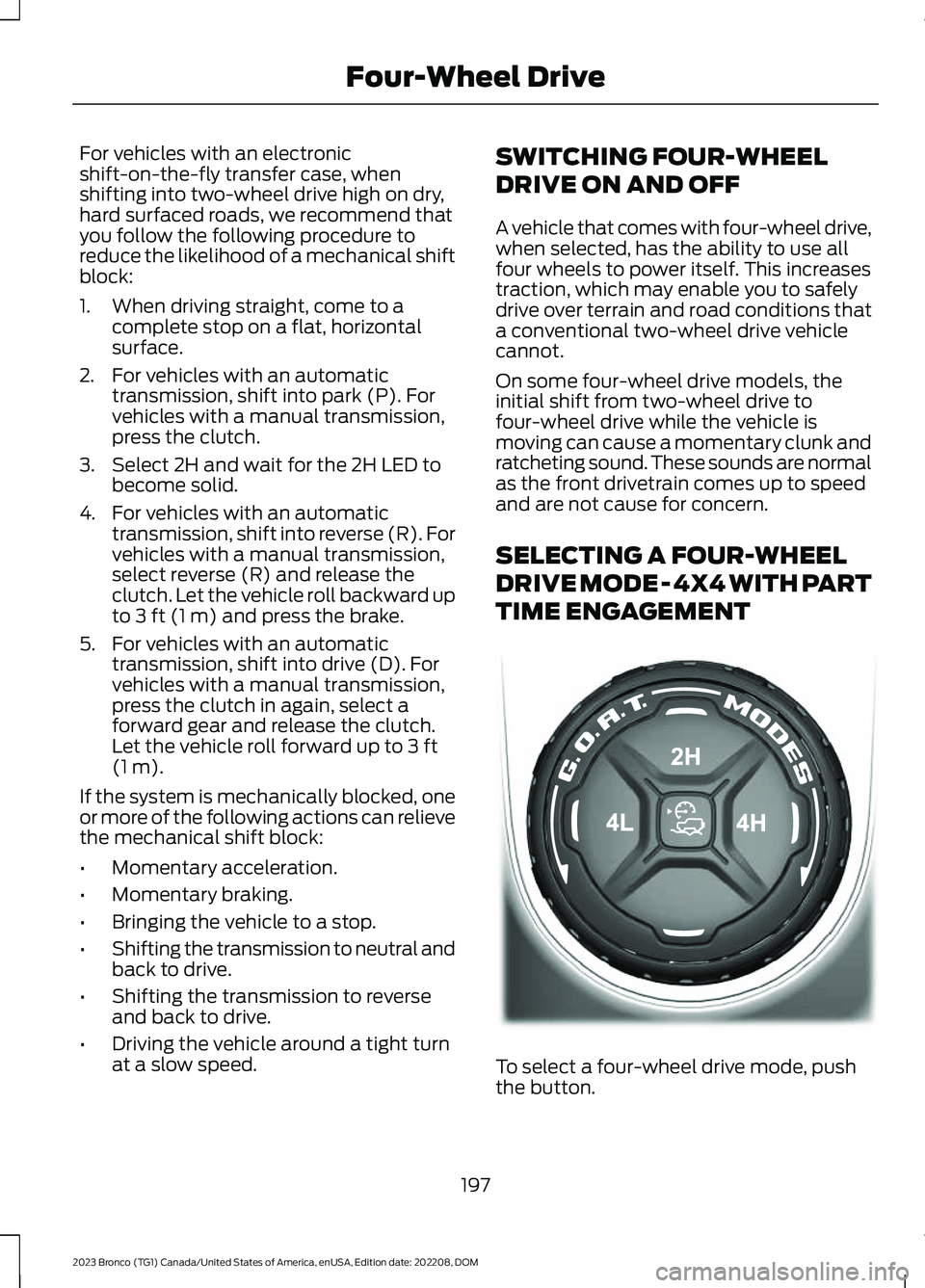
To select a four-wheel drive mode, pushthe button.
197
2023 Bronco (TG1) Canada/United States of America, enUSA, Edition date: 202208, DOMFour-Wheel DriveE345849
Page 207 of 642
WHAT IS THE ELECTRONIC
LOCKING DIFFERENTIAL
The electronic locking differential is adevice housed in the front or rear axle and,when activated allows both wheels on thataxle to turn at the same speed. Theelectronic locking differential can provideadditional traction should your vehiclebecome stuck. You can activate thedifferential electronically and shift it on thefly within the operating speed range. Theelectronic differential automaticallydisengages when the vehicle speedexceeds a set value and it automaticallyreengages when the vehicle speed goesbelow a set value. See Switching theElectronic Locking Differential On andOff (page 203). It also automaticallyengages based on certain selected G.O.A.Tmodes. See G.O.A.T. Mode Control(page 260). The electronic lockingdifferential is for use in mud, rocks, sand,or any off-road condition where you needmaximum traction. It is not for use on drypavement.
Note:The electronic locking differentialsare for off-road use only and not for use ondry pavement. Using the electronic lockingdifferentials on dry pavement results inincreased tire wear, noise and vibration ordriveline damage.
Note:The front electronic lockingdifferential is only available in four-wheeldrive low (4L).
Note:Locking the front differential reducesyour ability to make tight turning maneuversand creates additional resistance to steeringinputs.
Note:Switching the electronic lockingdifferentials off while turning results indisengagement difficulties. If the electroniclocking differential has difficultydisengaging, release the accelerator pedaland turn the steering wheel back and forthin small increments while maintainingcontrol and following a straight line.
SWITCHING THE ELECTRONIC
LOCKING DIFFERENTIAL ON
AND OFF - EXCLUDING:
RAPTOR
Bronco 4x4 Systems
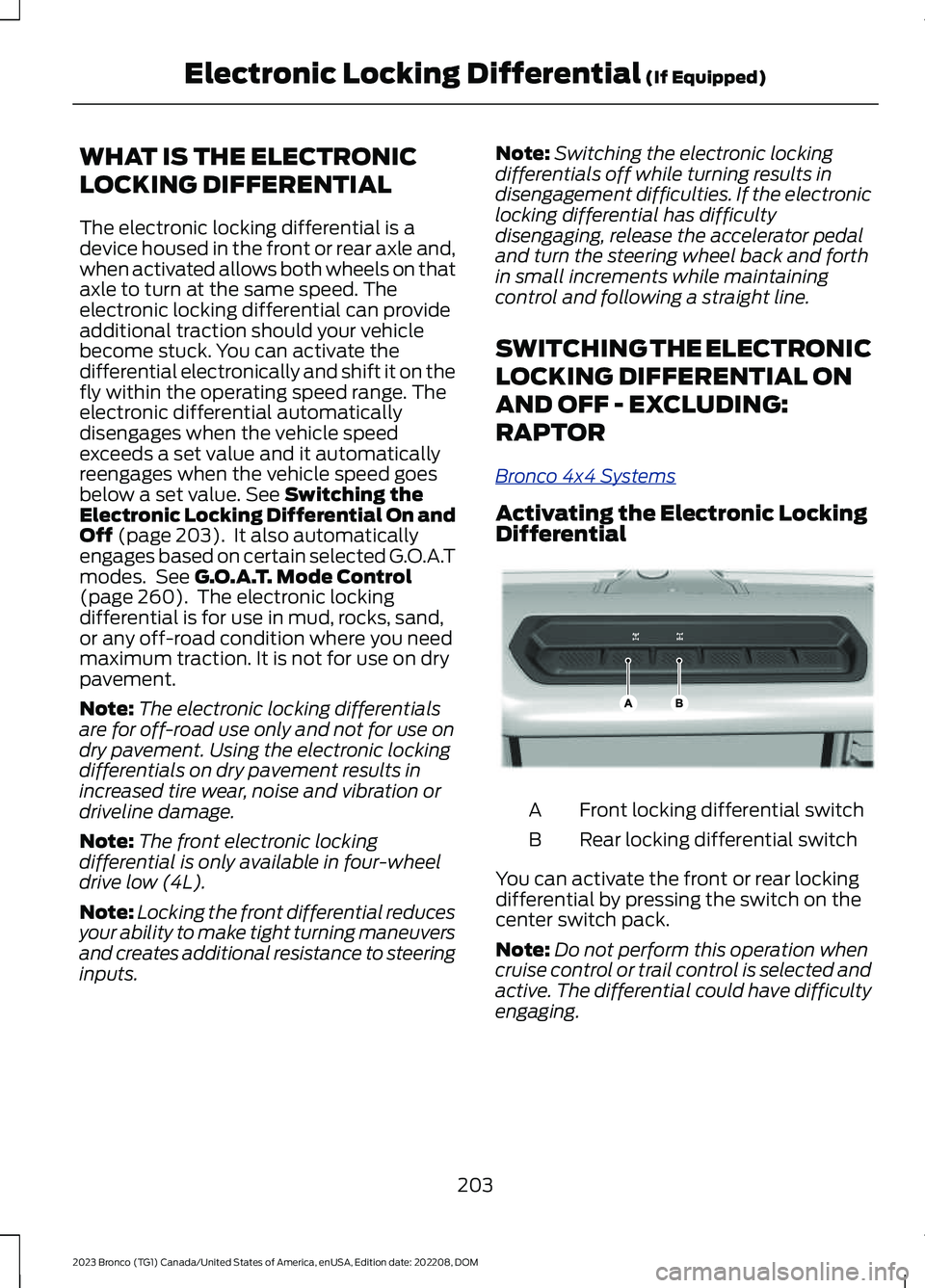
Activating the Electronic LockingDifferential
Front locking differential switchA
Rear locking differential switchB
You can activate the front or rear lockingdifferential by pressing the switch on thecenter switch pack.
Note:Do not perform this operation whencruise control or trail control is selected andactive. The differential could have difficultyengaging.
203
2023 Bronco (TG1) Canada/United States of America, enUSA, Edition date: 202208, DOMElectronic Locking Differential (If Equipped)E333068
Page 208 of 642
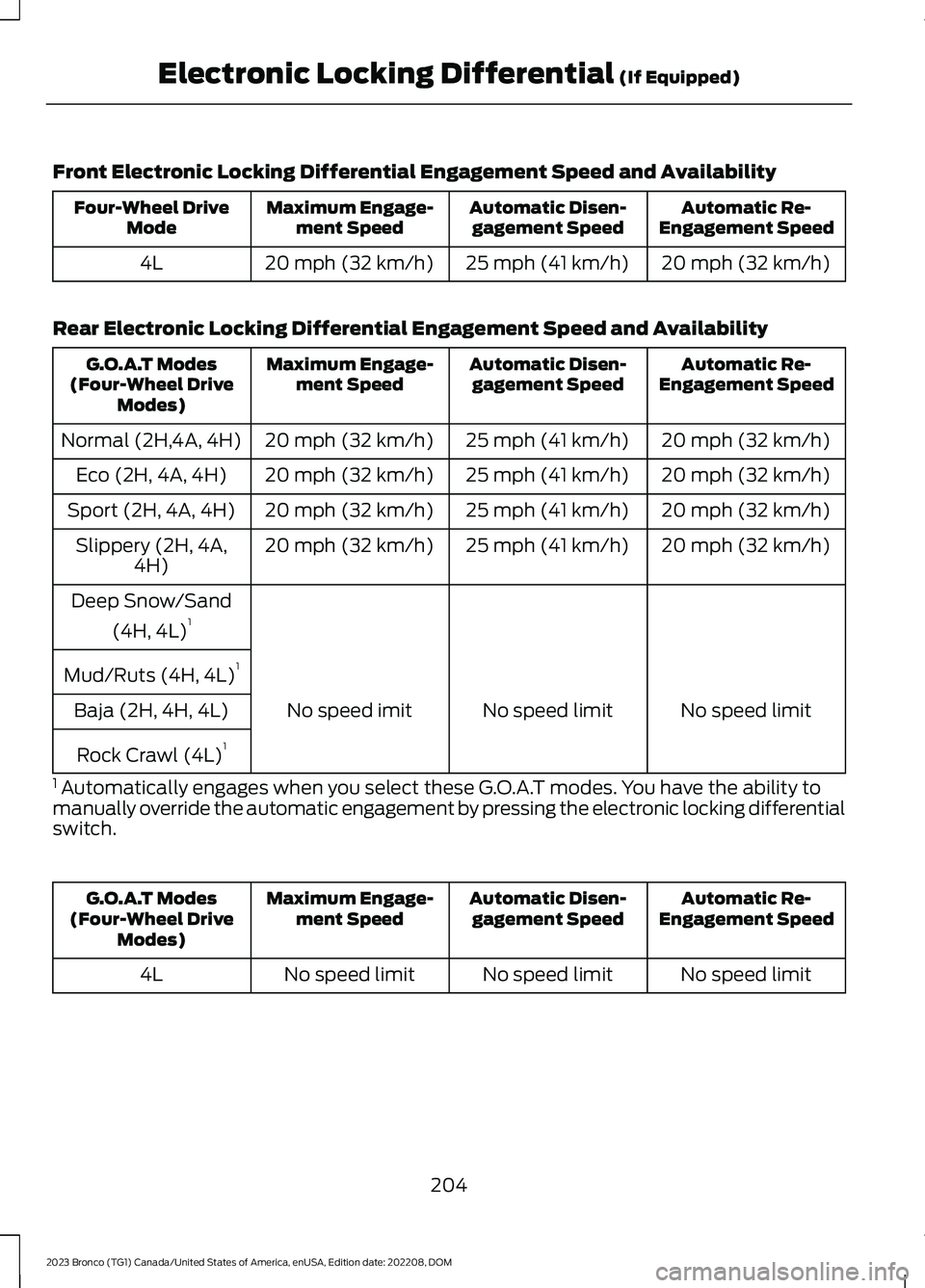
Front Electronic Locking Differential Engagement Speed and Availability
Automatic Re-Engagement SpeedAutomatic Disen-gagement SpeedMaximum Engage-ment SpeedFour-Wheel DriveMode
20 mph (32 km/h)25 mph (41 km/h)20 mph (32 km/h)4L
Rear Electronic Locking Differential Engagement Speed and Availability
Automatic Re-Engagement SpeedAutomatic Disen-gagement SpeedMaximum Engage-ment SpeedG.O.A.T Modes(Four-Wheel DriveModes)
20 mph (32 km/h)25 mph (41 km/h)20 mph (32 km/h)Normal (2H,4A, 4H)
20 mph (32 km/h)25 mph (41 km/h)20 mph (32 km/h)Eco (2H, 4A, 4H)
20 mph (32 km/h)25 mph (41 km/h)20 mph (32 km/h)Sport (2H, 4A, 4H)
20 mph (32 km/h)25 mph (41 km/h)20 mph (32 km/h)Slippery (2H, 4A,4H)
Deep Snow/Sand
(4H, 4L)1
Mud/Ruts (4H, 4L)1
No speed limitNo speed limitNo speed imitBaja (2H, 4H, 4L)
Rock Crawl (4L)1
1 Automatically engages when you select these G.O.A.T modes. You have the ability tomanually override the automatic engagement by pressing the electronic locking differentialswitch.
Automatic Re-Engagement SpeedAutomatic Disen-gagement SpeedMaximum Engage-ment SpeedG.O.A.T Modes(Four-Wheel DriveModes)
No speed limitNo speed limitNo speed limit4L
204
2023 Bronco (TG1) Canada/United States of America, enUSA, Edition date: 202208, DOMElectronic Locking Differential (If Equipped)
Page 221 of 642
WHAT IS TRACTION CONTROL
The traction control system helps to avoiddrive wheel spin and loss of traction.
HOW DOES TRACTION
CONTROL WORK
If your wheels begin to spin, the loss oftraction can compromise steering controland stability of the vehicle. The tractioncontrol system applies the brakes toindividual wheels and when needed,reduces engine power at the same time toincrease traction.
SWITCHING TRACTION
CONTROL ON AND OFF
WARNING: Operating your vehiclewith the traction control disabled couldlead to an increased risk of loss of vehiclecontrol, vehicle rollover, personal injuryand death.
The system turns on each time you switchthe ignition on.
If your vehicle is stuck in mud or snow,switching traction control off may bebeneficial as this allows the wheels to spin.
Switching the System Off
The switch for the stability andtraction control system is on theinstrument panel.
When you switch the system off, amessage and an illuminated icon appearon the instrument cluster.
Use the switch again to return the tractioncontrol system to normal operation.
Note:When you switch traction control off,stability control remains fully active.
Note:When you place your vehicle intofour-wheel drive low (4L), the tractioncontrol disables. Traction control resumeswhen you put your vehicle back intotwo-wheel drive or four-wheel drive high(4H).
Note:For additional information on thetraction and stability control systems. SeeStability Control (page 219).
TRACTION CONTROL
INDICATOR
Stability and Traction ControlIndicator
If the indicator does notilluminate when you switch theignition on, or remains on whenthe engine is running, this indicates amalfunction. Have your vehicle checkedby an authorized dealer as soon aspossible.
The traction control off indicatorilluminates when you switch thetraction control system off, orwhen an alternative stability control modeis selected that requires the tractioncontrol off depending on the drive modeselected.
217
2023 Bronco (TG1) Canada/United States of America, enUSA, Edition date: 202208, DOMTraction ControlE348750 E138639 E130458
Page 225 of 642
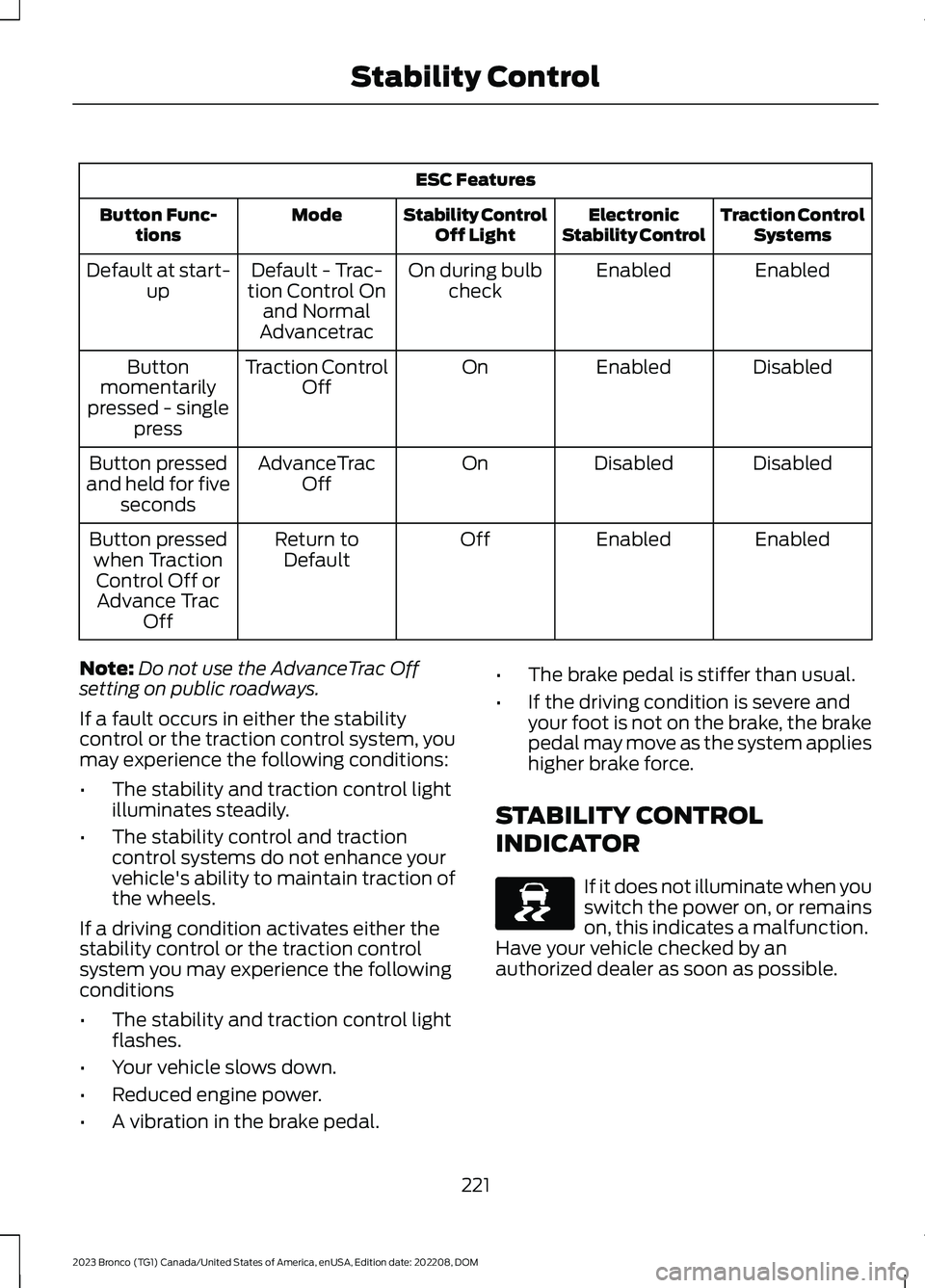
ESC Features
Traction ControlSystemsElectronicStability ControlStability ControlOff LightModeButton Func-tions
EnabledEnabledOn during bulbcheckDefault - Trac-tion Control Onand NormalAdvancetrac
Default at start-up
DisabledEnabledOnTraction ControlOffButtonmomentarilypressed - singlepress
DisabledDisabledOnAdvanceTracOffButton pressedand held for fiveseconds
EnabledEnabledOffReturn toDefaultButton pressedwhen TractionControl Off orAdvance TracOff
Note:Do not use the AdvanceTrac Offsetting on public roadways.
If a fault occurs in either the stabilitycontrol or the traction control system, youmay experience the following conditions:
•The stability and traction control lightilluminates steadily.
•The stability control and tractioncontrol systems do not enhance yourvehicle's ability to maintain traction ofthe wheels.
If a driving condition activates either thestability control or the traction controlsystem you may experience the followingconditions
•The stability and traction control lightflashes.
•Your vehicle slows down.
•Reduced engine power.
•A vibration in the brake pedal.
•The brake pedal is stiffer than usual.
•If the driving condition is severe andyour foot is not on the brake, the brakepedal may move as the system applieshigher brake force.
STABILITY CONTROL
INDICATOR
If it does not illuminate when youswitch the power on, or remainson, this indicates a malfunction.Have your vehicle checked by anauthorized dealer as soon as possible.
221
2023 Bronco (TG1) Canada/United States of America, enUSA, Edition date: 202208, DOMStability ControlE138639
Page 233 of 642
WHAT IS THE STABILIZER BAR
DISCONNECT
Stabilizer bar disconnect is a feature thatallows the front stabilizer bar to bedisconnected for off-road use. This allowsfor increased front wheel articulation toimprove capability and comfort on off-roadterrain.
STABILIZER BAR DISCONNECT
PRECAUTIONS
WARNING: If the stabilizer bardisconnect warning lamp illuminates red,a fault could be detected and thestabilizer bar could not be connected.Do not drive your vehicle above 20 mph(32 km/h) and have the system checkedas soon as possible. Driving your vehicleabove 20 mph (32 km/h) could reducevehicle stability.
WARNING: Do not get under avehicle that is switched on as thestabilizer bar disconnect could activateand the vehicle could unexpectedly drop.Failure to follow this instruction couldresult in personal injury or death.
If an amber warning message appears inthe cluster indicating that the systemrequires service, the stabilizer bardisconnect will not be available. Have yourvehicle checked by an authorized dealeras soon as possible.
SWITCHING THE STABILIZER
BAR DISCONNECT ON AND
OFF - EXCLUDING: RAPTOR
Bronco 4x4 Systems
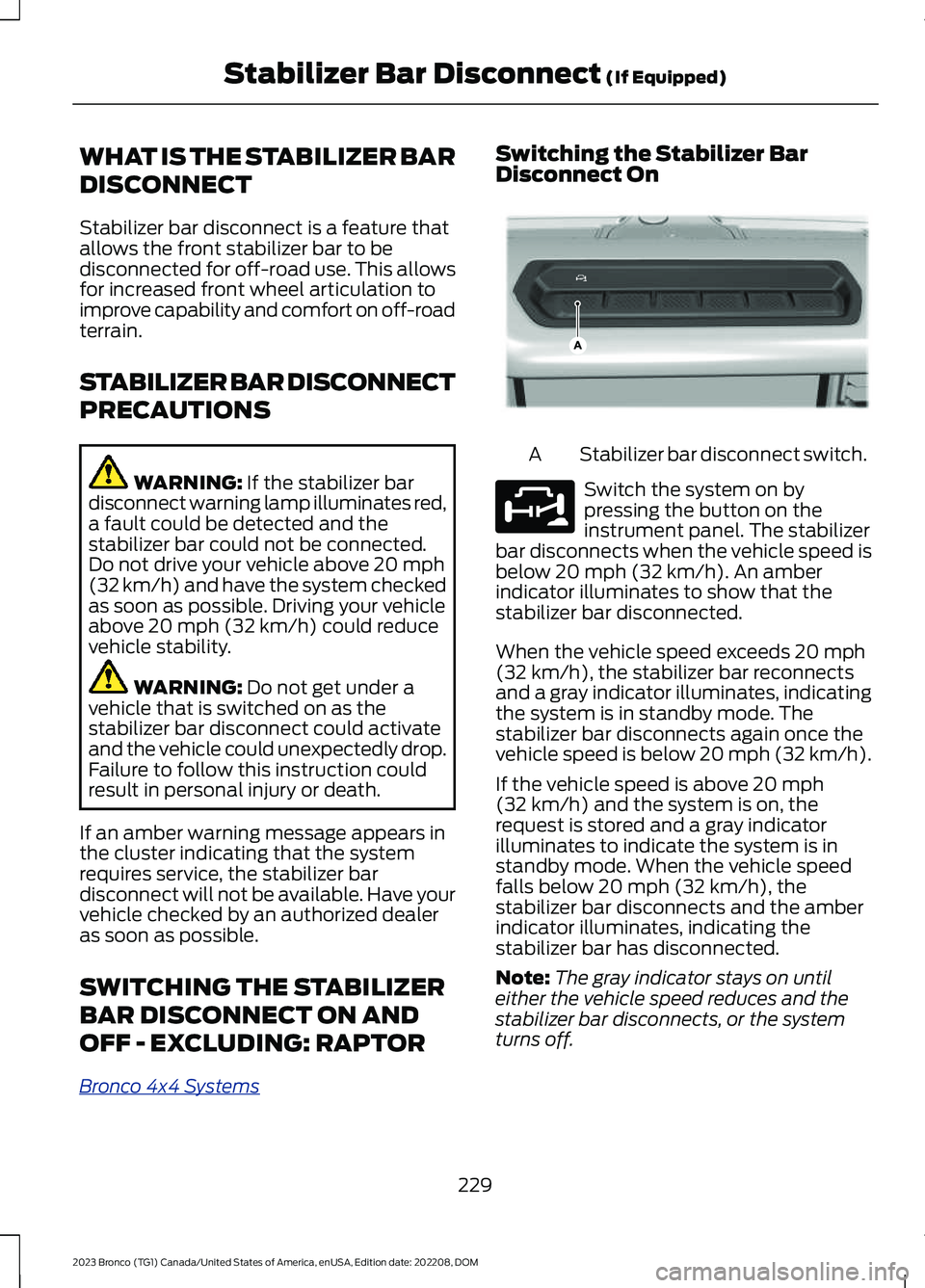
Switching the Stabilizer BarDisconnect On
Stabilizer bar disconnect switch.A
Switch the system on bypressing the button on theinstrument panel. The stabilizerbar disconnects when the vehicle speed isbelow 20 mph (32 km/h). An amberindicator illuminates to show that thestabilizer bar disconnected.
When the vehicle speed exceeds 20 mph(32 km/h), the stabilizer bar reconnectsand a gray indicator illuminates, indicatingthe system is in standby mode. Thestabilizer bar disconnects again once thevehicle speed is below 20 mph (32 km/h).
If the vehicle speed is above 20 mph(32 km/h) and the system is on, therequest is stored and a gray indicatorilluminates to indicate the system is instandby mode. When the vehicle speedfalls below 20 mph (32 km/h), thestabilizer bar disconnects and the amberindicator illuminates, indicating thestabilizer bar has disconnected.
Note:The gray indicator stays on untileither the vehicle speed reduces and thestabilizer bar disconnects, or the systemturns off.
229
2023 Bronco (TG1) Canada/United States of America, enUSA, Edition date: 202208, DOMStabilizer Bar Disconnect (If Equipped)E358560 E329476
Page 234 of 642
The stabilizer bar system also turns on anddisconnects when you select the RockCrawl drive mode. See Selecting aG.O.A.T. Mode (page 260).
Note:The stabilizer bar disconnect is notavailable in certain drive modes. SeeSelecting a G.O.A.T. Mode (page 260).
Note:The stabilizer bar disconnect couldbe delayed during wheel slippage, dynamicmaneuvers, dynamic cornering or whenthere is an anti-lock brake system orelectronic stability control event in progress.
Switching the Stabilizer BarDisconnect Off
Switch the system off by pressing thestabilizer bar disconnect button, whichreconnects the stabilizer bar if currentlydisconnected.
The stabilizer bar disconnect system alsoturns off when any of the following occur:
•The engine is switched off.
•You switch out of four-wheel drive low(4L) or four-wheel drive high (4H).
•You select a drive mode that does notallow the stabilizer bar to disconnect.
Note:The stabilizer bar can be reconnectedat any time. It is not necessary for thevehicle to be on a level surface as thestabilizer bar self-aligns.
SWITCHING THE STABILIZER
BAR DISCONNECT ON AND
OFF - RAPTOR
Bronco 4x4 Systems
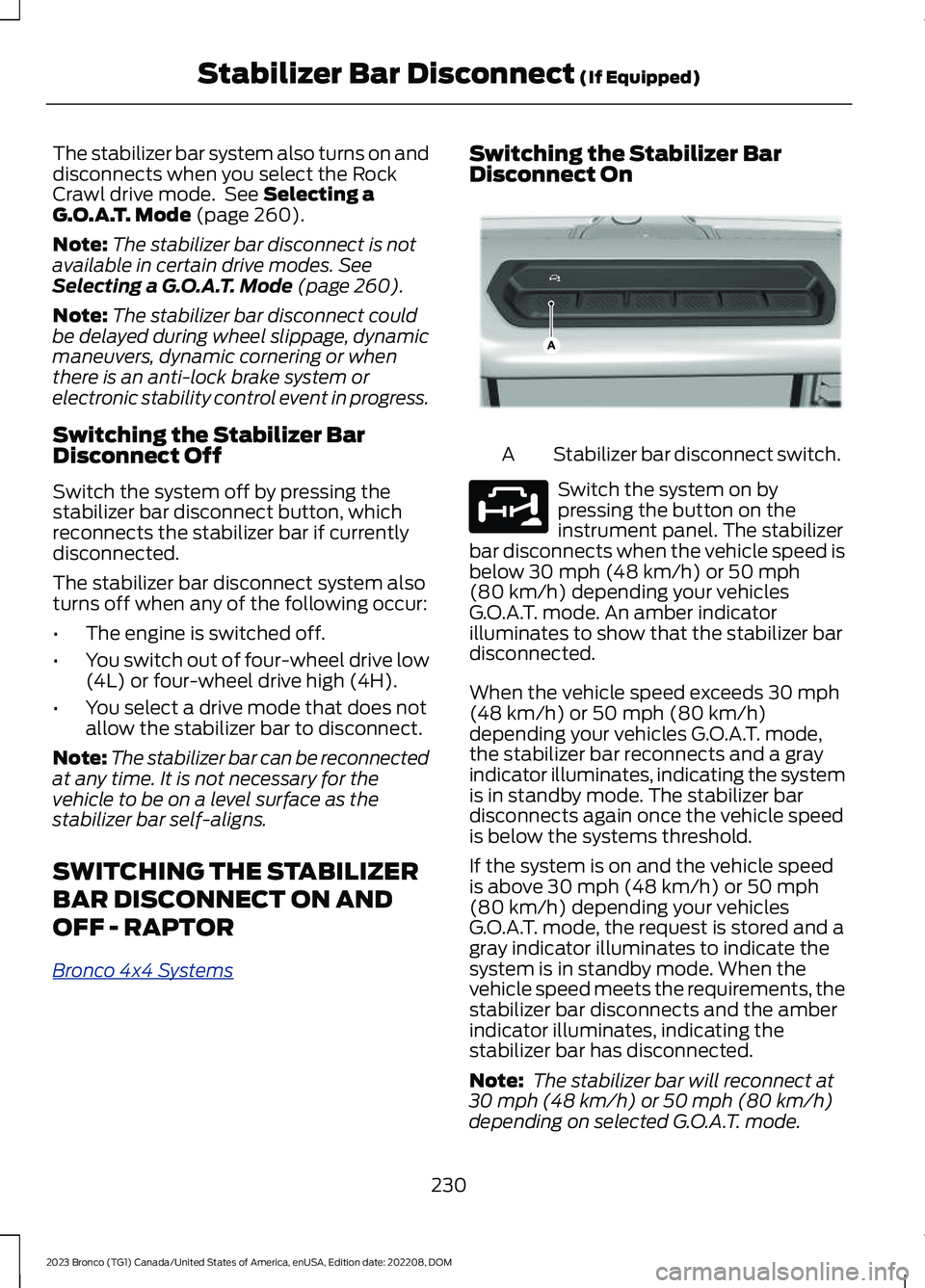
Switching the Stabilizer BarDisconnect On
Stabilizer bar disconnect switch.A
Switch the system on bypressing the button on theinstrument panel. The stabilizerbar disconnects when the vehicle speed isbelow 30 mph (48 km/h) or 50 mph(80 km/h) depending your vehiclesG.O.A.T. mode. An amber indicatorilluminates to show that the stabilizer bardisconnected.
When the vehicle speed exceeds 30 mph(48 km/h) or 50 mph (80 km/h)depending your vehicles G.O.A.T. mode,the stabilizer bar reconnects and a grayindicator illuminates, indicating the systemis in standby mode. The stabilizer bardisconnects again once the vehicle speedis below the systems threshold.
If the system is on and the vehicle speedis above 30 mph (48 km/h) or 50 mph(80 km/h) depending your vehiclesG.O.A.T. mode, the request is stored and agray indicator illuminates to indicate thesystem is in standby mode. When thevehicle speed meets the requirements, thestabilizer bar disconnects and the amberindicator illuminates, indicating thestabilizer bar has disconnected.
Note: The stabilizer bar will reconnect at30 mph (48 km/h) or 50 mph (80 km/h)depending on selected G.O.A.T. mode.
230
2023 Bronco (TG1) Canada/United States of America, enUSA, Edition date: 202208, DOMStabilizer Bar Disconnect (If Equipped)E358560 E329476