automatic transmission FORD BRONCO 2023 Owner's Manual
[x] Cancel search | Manufacturer: FORD, Model Year: 2023, Model line: BRONCO, Model: FORD BRONCO 2023Pages: 642, PDF Size: 14.71 MB
Page 196 of 642
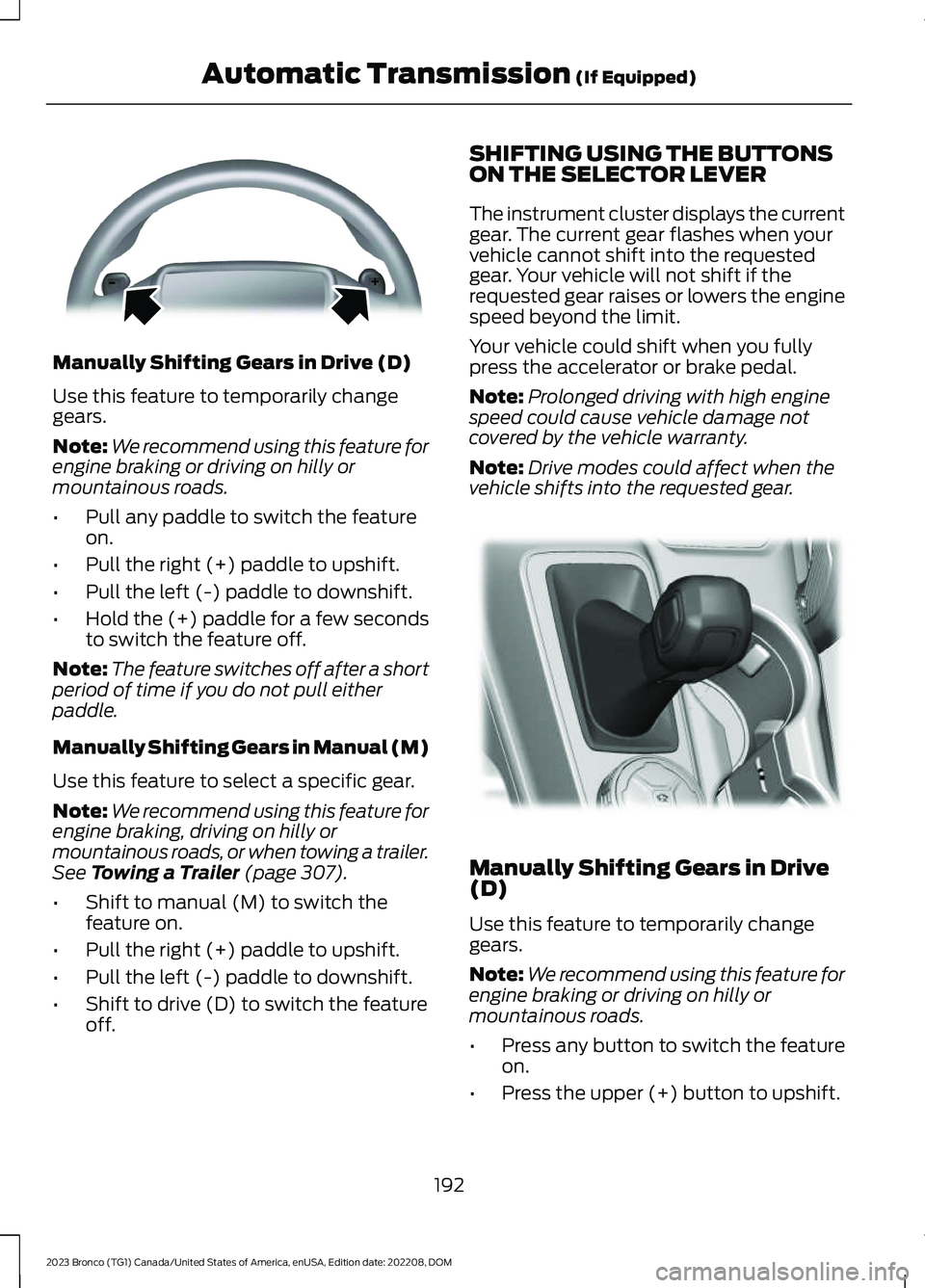
Manually Shifting Gears in Drive (D)
Use this feature to temporarily changegears.
Note:We recommend using this feature forengine braking or driving on hilly ormountainous roads.
•Pull any paddle to switch the featureon.
•Pull the right (+) paddle to upshift.
•Pull the left (-) paddle to downshift.
•Hold the (+) paddle for a few secondsto switch the feature off.
Note:The feature switches off after a shortperiod of time if you do not pull eitherpaddle.
Manually Shifting Gears in Manual (M)
Use this feature to select a specific gear.
Note:We recommend using this feature forengine braking, driving on hilly ormountainous roads, or when towing a trailer.See Towing a Trailer (page 307).
•Shift to manual (M) to switch thefeature on.
•Pull the right (+) paddle to upshift.
•Pull the left (-) paddle to downshift.
•Shift to drive (D) to switch the featureoff.
SHIFTING USING THE BUTTONSON THE SELECTOR LEVER
The instrument cluster displays the currentgear. The current gear flashes when yourvehicle cannot shift into the requestedgear. Your vehicle will not shift if therequested gear raises or lowers the enginespeed beyond the limit.
Your vehicle could shift when you fullypress the accelerator or brake pedal.
Note:Prolonged driving with high enginespeed could cause vehicle damage notcovered by the vehicle warranty.
Note:Drive modes could affect when thevehicle shifts into the requested gear.
Manually Shifting Gears in Drive(D)
Use this feature to temporarily changegears.
Note:We recommend using this feature forengine braking or driving on hilly ormountainous roads.
•Press any button to switch the featureon.
•Press the upper (+) button to upshift.
192
2023 Bronco (TG1) Canada/United States of America, enUSA, Edition date: 202208, DOMAutomatic Transmission (If Equipped)E144821 E324063
Page 197 of 642
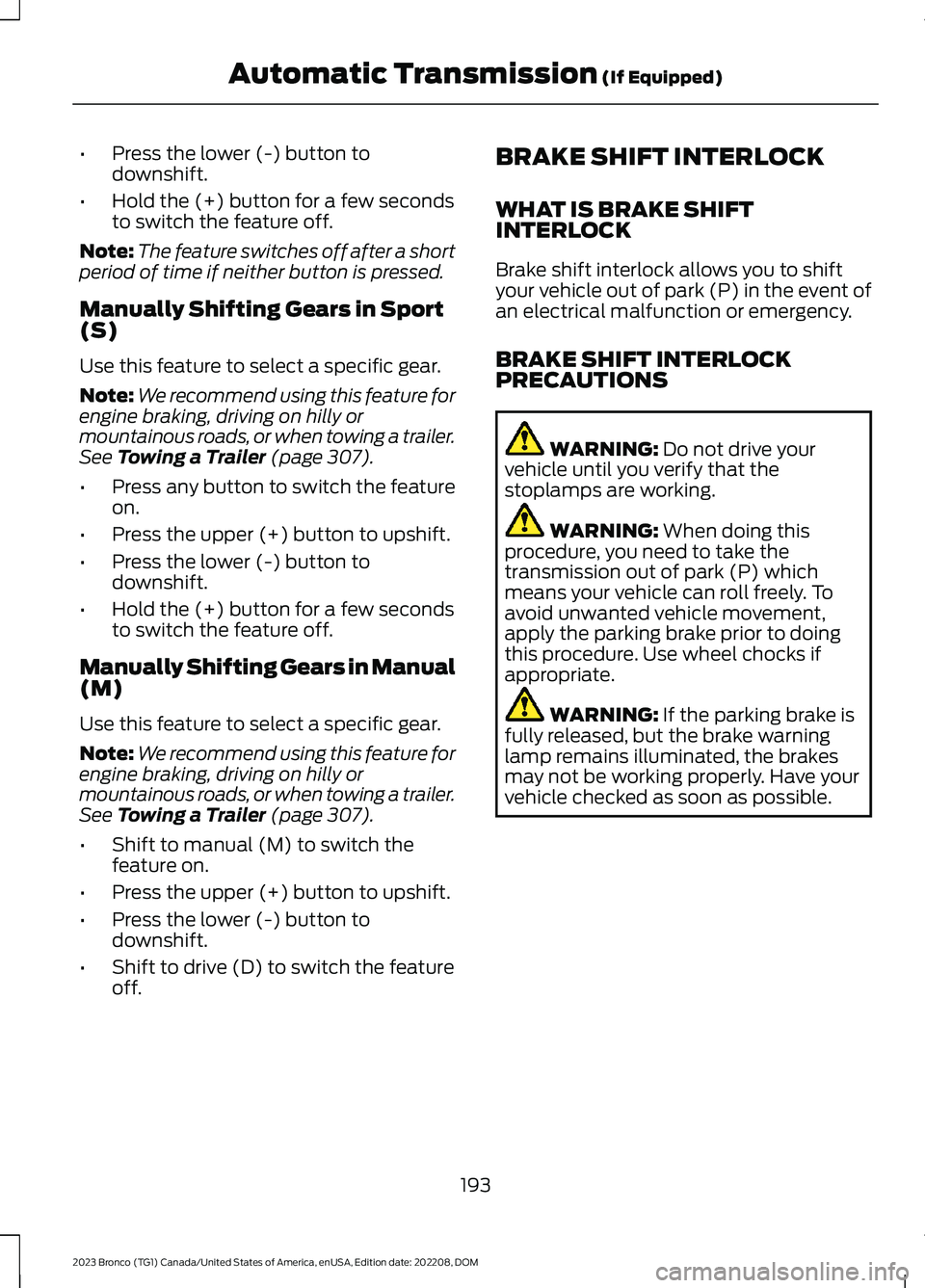
•Press the lower (-) button todownshift.
•Hold the (+) button for a few secondsto switch the feature off.
Note:The feature switches off after a shortperiod of time if neither button is pressed.
Manually Shifting Gears in Sport(S)
Use this feature to select a specific gear.
Note:We recommend using this feature forengine braking, driving on hilly ormountainous roads, or when towing a trailer.See Towing a Trailer (page 307).
•Press any button to switch the featureon.
•Press the upper (+) button to upshift.
•Press the lower (-) button todownshift.
•Hold the (+) button for a few secondsto switch the feature off.
Manually Shifting Gears in Manual(M)
Use this feature to select a specific gear.
Note:We recommend using this feature forengine braking, driving on hilly ormountainous roads, or when towing a trailer.See Towing a Trailer (page 307).
•Shift to manual (M) to switch thefeature on.
•Press the upper (+) button to upshift.
•Press the lower (-) button todownshift.
•Shift to drive (D) to switch the featureoff.
BRAKE SHIFT INTERLOCK
WHAT IS BRAKE SHIFTINTERLOCK
Brake shift interlock allows you to shiftyour vehicle out of park (P) in the event ofan electrical malfunction or emergency.
BRAKE SHIFT INTERLOCKPRECAUTIONS
WARNING: Do not drive yourvehicle until you verify that thestoplamps are working.
WARNING: When doing thisprocedure, you need to take thetransmission out of park (P) whichmeans your vehicle can roll freely. Toavoid unwanted vehicle movement,apply the parking brake prior to doingthis procedure. Use wheel chocks ifappropriate.
WARNING: If the parking brake isfully released, but the brake warninglamp remains illuminated, the brakesmay not be working properly. Have yourvehicle checked as soon as possible.
193
2023 Bronco (TG1) Canada/United States of America, enUSA, Edition date: 202208, DOMAutomatic Transmission (If Equipped)
Page 198 of 642
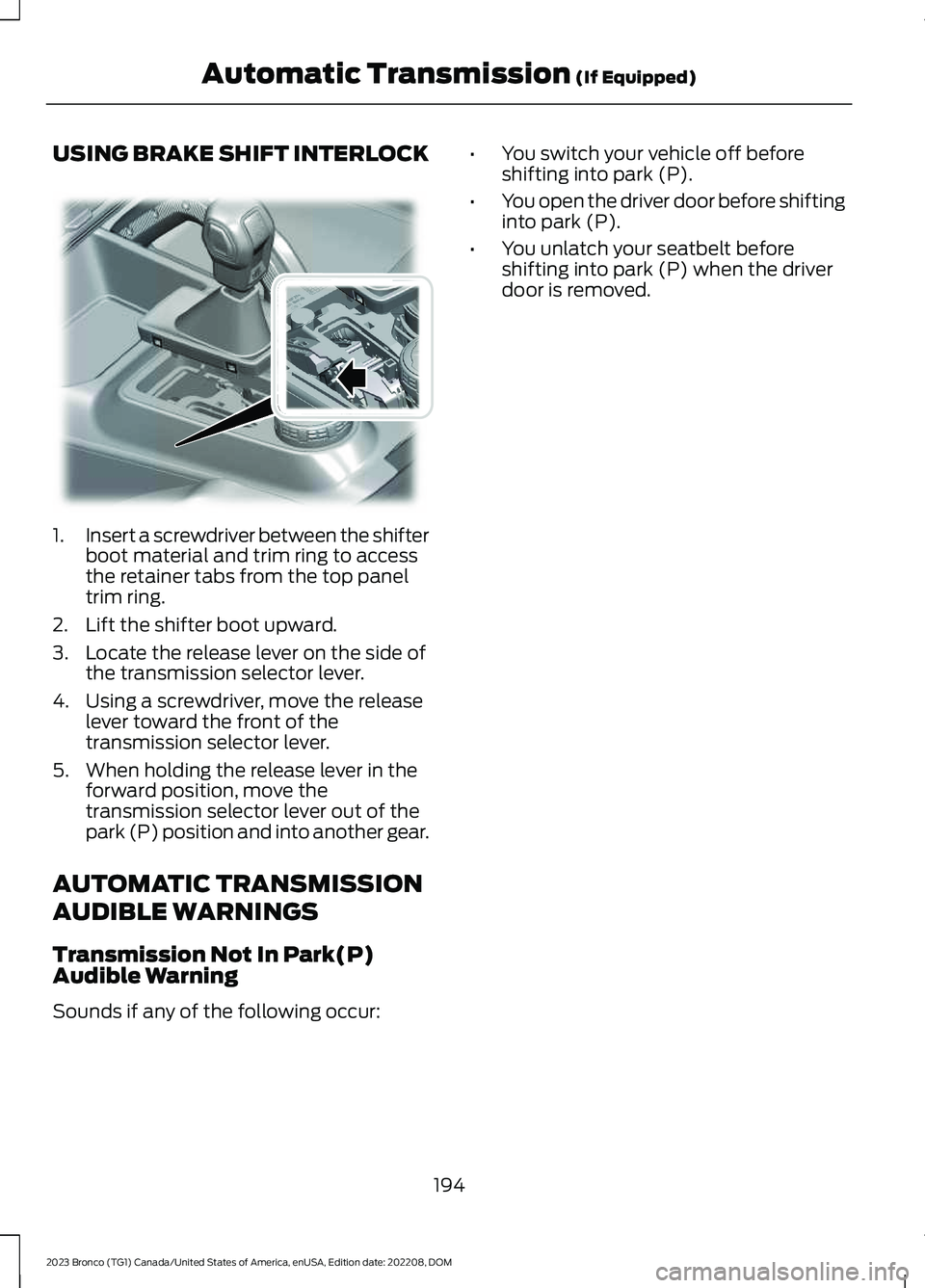
USING BRAKE SHIFT INTERLOCK
1.Insert a screwdriver between the shifterboot material and trim ring to accessthe retainer tabs from the top paneltrim ring.
2.Lift the shifter boot upward.
3.Locate the release lever on the side ofthe transmission selector lever.
4.Using a screwdriver, move the releaselever toward the front of thetransmission selector lever.
5.When holding the release lever in theforward position, move thetransmission selector lever out of thepark (P) position and into another gear.
AUTOMATIC TRANSMISSION
AUDIBLE WARNINGS
Transmission Not In Park(P)Audible Warning
Sounds if any of the following occur:
•You switch your vehicle off beforeshifting into park (P).
•You open the driver door before shiftinginto park (P).
•You unlatch your seatbelt beforeshifting into park (P) when the driverdoor is removed.
194
2023 Bronco (TG1) Canada/United States of America, enUSA, Edition date: 202208, DOMAutomatic Transmission (If Equipped)E346836
Page 201 of 642
For vehicles with an electronicshift-on-the-fly transfer case, whenshifting into two-wheel drive high on dry,hard surfaced roads, we recommend thatyou follow the following procedure toreduce the likelihood of a mechanical shiftblock:
1.When driving straight, come to acomplete stop on a flat, horizontalsurface.
2.For vehicles with an automatictransmission, shift into park (P). Forvehicles with a manual transmission,press the clutch.
3.Select 2H and wait for the 2H LED tobecome solid.
4.For vehicles with an automatictransmission, shift into reverse (R). Forvehicles with a manual transmission,select reverse (R) and release theclutch. Let the vehicle roll backward upto 3 ft (1 m) and press the brake.
5.For vehicles with an automatictransmission, shift into drive (D). Forvehicles with a manual transmission,press the clutch in again, select aforward gear and release the clutch.Let the vehicle roll forward up to 3 ft(1 m).
If the system is mechanically blocked, oneor more of the following actions can relievethe mechanical shift block:
•Momentary acceleration.
•Momentary braking.
•Bringing the vehicle to a stop.
•Shifting the transmission to neutral andback to drive.
•Shifting the transmission to reverseand back to drive.
•Driving the vehicle around a tight turnat a slow speed.
SWITCHING FOUR-WHEEL
DRIVE ON AND OFF
A vehicle that comes with four-wheel drive,when selected, has the ability to use allfour wheels to power itself. This increasestraction, which may enable you to safelydrive over terrain and road conditions thata conventional two-wheel drive vehiclecannot.
On some four-wheel drive models, theinitial shift from two-wheel drive tofour-wheel drive while the vehicle ismoving can cause a momentary clunk andratcheting sound. These sounds are normalas the front drivetrain comes up to speedand are not cause for concern.
SELECTING A FOUR-WHEEL
DRIVE MODE - 4X4 WITH PART
TIME ENGAGEMENT
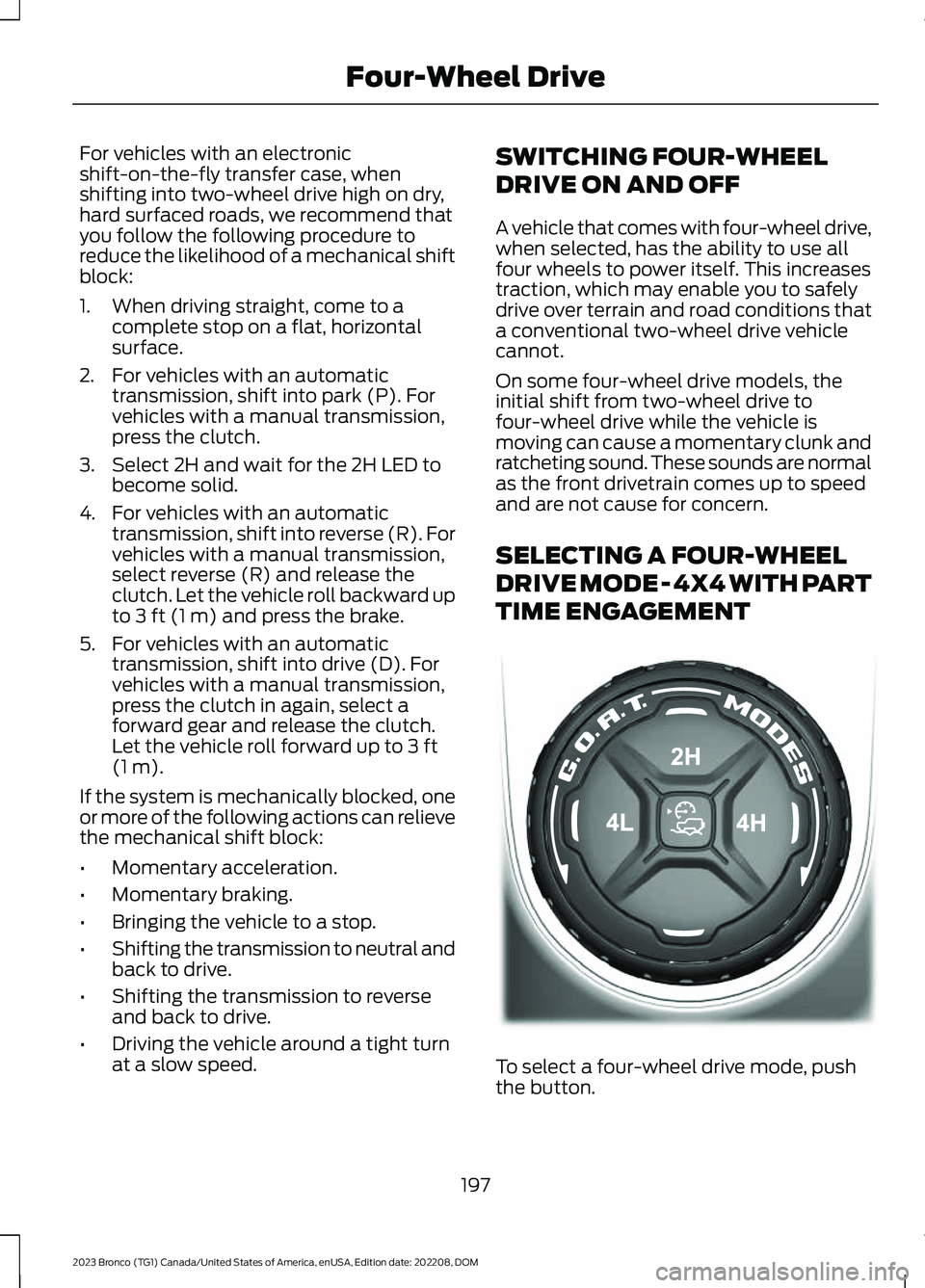
To select a four-wheel drive mode, pushthe button.
197
2023 Bronco (TG1) Canada/United States of America, enUSA, Edition date: 202208, DOMFour-Wheel DriveE345849
Page 202 of 642
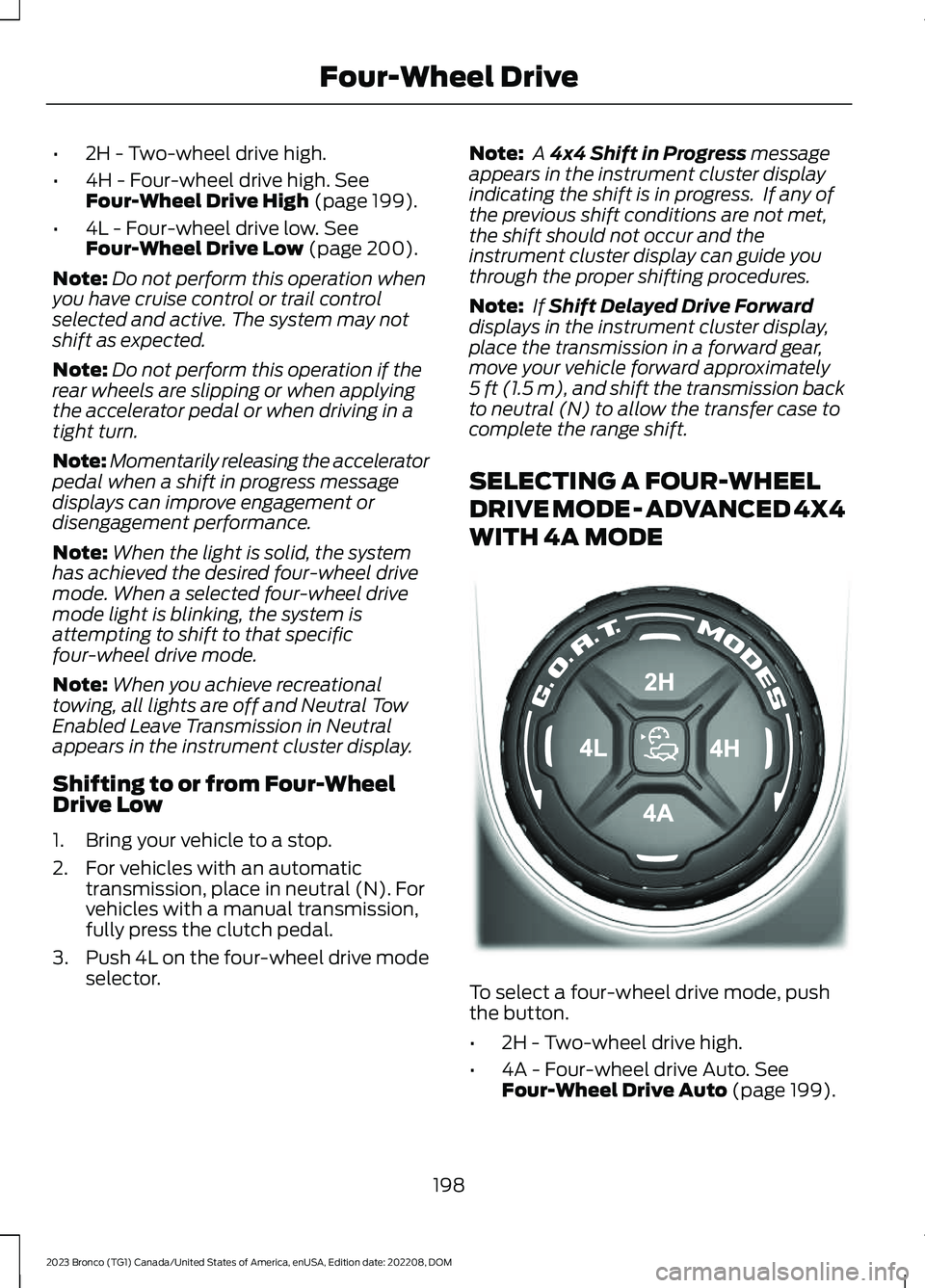
•2H - Two-wheel drive high.
•4H - Four-wheel drive high. SeeFour-Wheel Drive High (page 199).
•4L - Four-wheel drive low. SeeFour-Wheel Drive Low (page 200).
Note:Do not perform this operation whenyou have cruise control or trail controlselected and active. The system may notshift as expected.
Note:Do not perform this operation if therear wheels are slipping or when applyingthe accelerator pedal or when driving in atight turn.
Note:Momentarily releasing the acceleratorpedal when a shift in progress messagedisplays can improve engagement ordisengagement performance.
Note:When the light is solid, the systemhas achieved the desired four-wheel drivemode. When a selected four-wheel drivemode light is blinking, the system isattempting to shift to that specificfour-wheel drive mode.
Note:When you achieve recreationaltowing, all lights are off and Neutral TowEnabled Leave Transmission in Neutralappears in the instrument cluster display.
Shifting to or from Four-WheelDrive Low
1.Bring your vehicle to a stop.
2.For vehicles with an automatictransmission, place in neutral (N). Forvehicles with a manual transmission,fully press the clutch pedal.
3.Push 4L on the four-wheel drive modeselector.
Note: A 4x4 Shift in Progress messageappears in the instrument cluster displayindicating the shift is in progress. If any ofthe previous shift conditions are not met,the shift should not occur and theinstrument cluster display can guide youthrough the proper shifting procedures.
Note: If Shift Delayed Drive Forwarddisplays in the instrument cluster display,place the transmission in a forward gear,move your vehicle forward approximately5 ft (1.5 m), and shift the transmission backto neutral (N) to allow the transfer case tocomplete the range shift.
SELECTING A FOUR-WHEEL
DRIVE MODE - ADVANCED 4X4
WITH 4A MODE
To select a four-wheel drive mode, pushthe button.
•2H - Two-wheel drive high.
•4A - Four-wheel drive Auto. SeeFour-Wheel Drive Auto (page 199).
198
2023 Bronco (TG1) Canada/United States of America, enUSA, Edition date: 202208, DOMFour-Wheel DriveE324543
Page 203 of 642
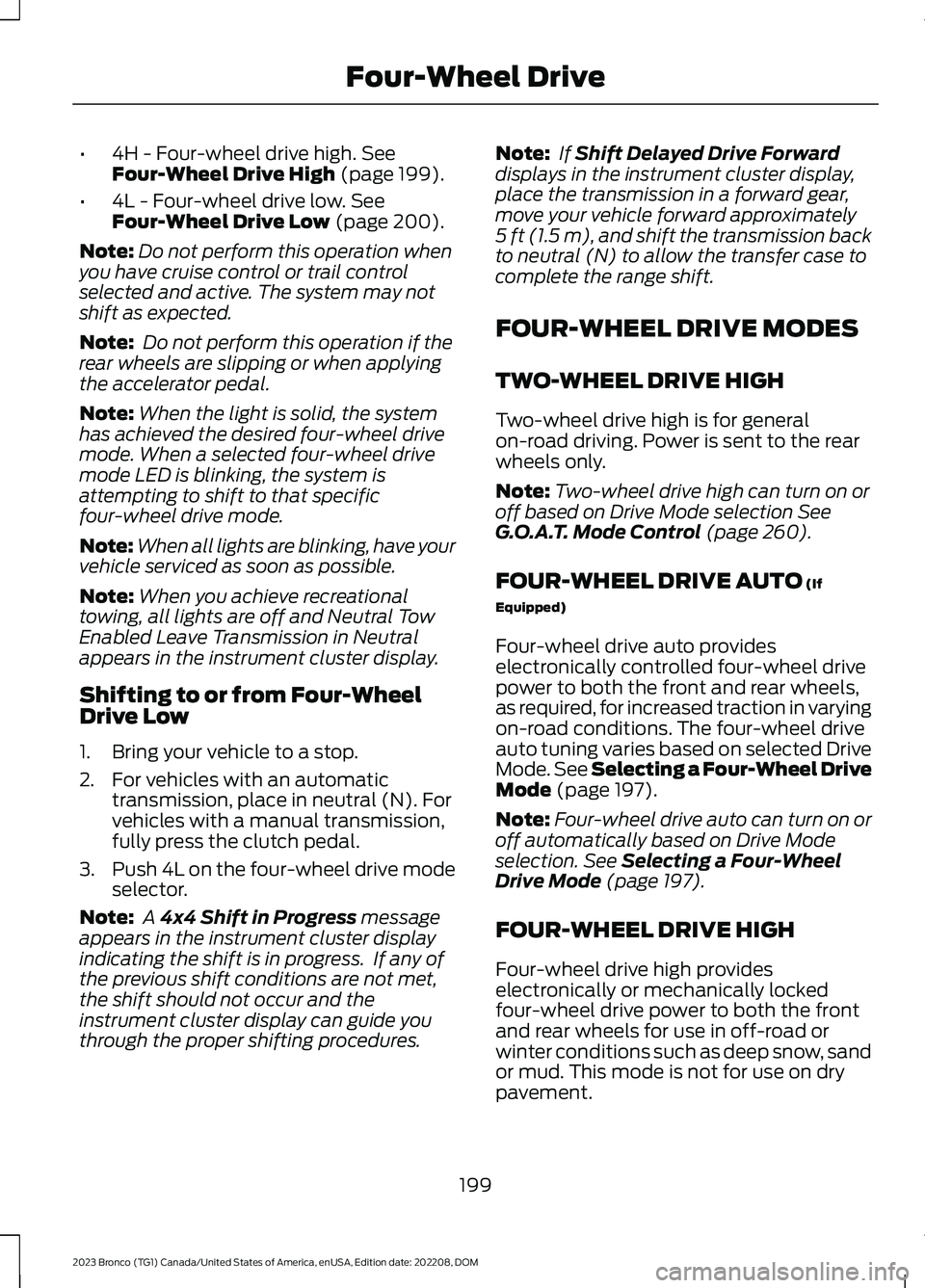
•4H - Four-wheel drive high. SeeFour-Wheel Drive High (page 199).
•4L - Four-wheel drive low. SeeFour-Wheel Drive Low (page 200).
Note:Do not perform this operation whenyou have cruise control or trail controlselected and active. The system may notshift as expected.
Note: Do not perform this operation if therear wheels are slipping or when applyingthe accelerator pedal.
Note:When the light is solid, the systemhas achieved the desired four-wheel drivemode. When a selected four-wheel drivemode LED is blinking, the system isattempting to shift to that specificfour-wheel drive mode.
Note:When all lights are blinking, have yourvehicle serviced as soon as possible.
Note:When you achieve recreationaltowing, all lights are off and Neutral TowEnabled Leave Transmission in Neutralappears in the instrument cluster display.
Shifting to or from Four-WheelDrive Low
1.Bring your vehicle to a stop.
2.For vehicles with an automatictransmission, place in neutral (N). Forvehicles with a manual transmission,fully press the clutch pedal.
3.Push 4L on the four-wheel drive modeselector.
Note: A 4x4 Shift in Progress messageappears in the instrument cluster displayindicating the shift is in progress. If any ofthe previous shift conditions are not met,the shift should not occur and theinstrument cluster display can guide youthrough the proper shifting procedures.
Note: If Shift Delayed Drive Forwarddisplays in the instrument cluster display,place the transmission in a forward gear,move your vehicle forward approximately5 ft (1.5 m), and shift the transmission backto neutral (N) to allow the transfer case tocomplete the range shift.
FOUR-WHEEL DRIVE MODES
TWO-WHEEL DRIVE HIGH
Two-wheel drive high is for generalon-road driving. Power is sent to the rearwheels only.
Note:Two-wheel drive high can turn on oroff based on Drive Mode selection SeeG.O.A.T. Mode Control (page 260).
FOUR-WHEEL DRIVE AUTO (If
Equipped)
Four-wheel drive auto provideselectronically controlled four-wheel drivepower to both the front and rear wheels,as required, for increased traction in varyingon-road conditions. The four-wheel driveauto tuning varies based on selected DriveMode. See Selecting a Four-Wheel DriveMode (page 197).
Note:Four-wheel drive auto can turn on oroff automatically based on Drive Modeselection. See Selecting a Four-WheelDrive Mode (page 197).
FOUR-WHEEL DRIVE HIGH
Four-wheel drive high provideselectronically or mechanically lockedfour-wheel drive power to both the frontand rear wheels for use in off-road orwinter conditions such as deep snow, sandor mud. This mode is not for use on drypavement.
199
2023 Bronco (TG1) Canada/United States of America, enUSA, Edition date: 202208, DOMFour-Wheel Drive
Page 217 of 642
WHAT IS THE ELECTRIC
PARKING BRAKE
Electric Parking Brake
The electric parking brake is used to holdyour vehicle on slopes and flat roads.
APPLYING THE ELECTRIC
PARKING BRAKE
WARNING: Always fully apply theparking brake. Failure to follow thisinstruction could result in personal injuryor death.
WARNING: If you drive extendeddistances with the parking brake applied,you could cause damage to the brakesystem.
The switch is on the lower partof the instrument panel.
Pull the electric parking brake switch.
The red warning lamp flashes duringoperation and illuminates when the parkingbrake is applied.
Note:You can apply the electric parkingbrake when the ignition is off.
Note:The electric parking brake couldapply when the transmission selector is inpark (P). See Park (P) (page 190).
APPLYING THE ELECTRIC
PARKING BRAKE IN AN
EMERGENCY
You can use the electric parking brake toslow or stop your vehicle in an emergency.
Pull and hold the electric parking brakeswitch.
The electric parking brake continues toslow your vehicle down unless you releasethe switch.
The red warning lamp illuminates, a tonesounds and the stoplamps turn on whenyou use the electric parking brake in anemergency.
Note:Do not apply the electric parkingbrake when your vehicle is moving, exceptin an emergency. If you repeatedly use theelectric parking brake to slow or stop yourvehicle, you could cause damage to thebrake system.
MANUALLY RELEASING THE
ELECTRIC PARKING BRAKE
1.Switch the ignition on.
2.Apply and hold the brake pedal.
3.Push the electric parking brake switch.
The red warning lamp turns off.
Pulling Away on a Hill When Towing aTrailer
1.Apply and hold the brake pedal.
2.Pull and hold the electric parking brakeswitch.
3.Shift the vehicle into gear.
4.Apply the accelerator pedal until theengine has developed sufficient torqueto prevent your vehicle from rollingdown the hill.
5.Release the switch and pull away in anormal manner.
AUTOMATICALLY RELEASING
THE ELECTRIC PARKING
BRAKE
Note:If the driver door is removed, bucklethe driver seatbelt and proceed to step 2.
213
2023 Bronco (TG1) Canada/United States of America, enUSA, Edition date: 202208, DOMElectric Parking BrakeE267156
Page 220 of 642
WHAT IS HILL START ASSIST
Hill Start Assist
This feature applies the brakes to hold yourvehicle after you bring the vehicle to a stopon a slope.
HOW DOES HILL START
ASSIST WORK
When the system activates, your vehicleremains stationary for a few seconds afteryou release the brake pedal. This gives youtime to move your foot from the brakepedal to the accelerator pedal. The brakesrelease when you apply the acceleratorpedal and the vehicle begins to moveforward, or the vehicle is stationary beyondthe Hill Start Assist hold time.
The system activates when your vehicle isin any forward gear and facing uphill, orwhen your vehicle is in reverse (R) andfacing downhill.
HILL START ASSIST
PRECAUTIONS
WARNING: The system does notreplace the parking brake. When youleave your vehicle, always apply theparking brake.
WARNING: You must remain inyour vehicle when the system turns on.At all times you are responsible forcontrolling your vehicle, supervising thesystem, and intervening if required.Failure to follow this instruction couldresult in the loss of control of yourvehicle, personal injury or death.
SWITCHING HILL START
ASSIST ON AND OFF -
MANUAL TRANSMISSION
You can switch hill start assist on and offon the touchscreen:
1.Press Features on the touchscreen.
2.Press Driver Assistance.
3.Switch Hill Start Assist on or off.
Note:The system remembers the lastsetting when you start your vehicle.
SWITCHING HILL START
ASSIST ON AND OFF -
AUTOMATIC TRANSMISSION
Hill start assist is active when you switchthe ignition on. You cannot switch thesystem on or off.
HILL START ASSIST –
TROUBLESHOOTING
HILL START ASSIST –INFORMATION MESSAGES
ActionMessage
Displays whensystem is not avail-able. Have yourvehicle checked assoon as possible.
Hill Start Assist NotAvailable
216
2023 Bronco (TG1) Canada/United States of America, enUSA, Edition date: 202208, DOMHill Start Assist
Page 227 of 642
Press the button to set ordecrease the set speed. Pressand hold to adjust the speed inlarger increments.
Note:The indicator changes color.
You can also adjust the set speed bybraking, then pressing the + or - button.
Note:Pressing the brake pedal does notswitch off the system.
CANCELING THE SET SPEED
Press the button on the steeringwheel to cancel the set speed.
Note:If your vehicle has trail one pedaldrive and you are in four-wheel drive high(4H) or four-wheel drive low (4L) mode,cancelling the set speed activates thisfeature.
TRAIL CONTROL INDICATORS
TRAIL ONE PEDAL DRIVE (IF
EQUIPPED)
WHAT IS TRAIL ONE PEDAL DRIVE
Trail one pedal drive allows you toaccelerate and brake using only theaccelerator pedal. The system assistswhen driving through difficult off-roadterrain. Pressing the accelerator pedaldown accelerates your vehicle andreleasing pressure on the accelerator
pedal, with your foot still on the pedal,slows your vehicle down. Releasing theaccelerator pedal may allow your vehicleto come to a complete stop, somesituations may require you to press thebrake pedal to come to a complete stop.
TRAIL ONE PEDAL DRIVEPRECAUTIONS
WARNING: This system is an extradriving aid. It does not replace yourattention and judgment, or the need toapply the brakes. This system does NOTautomatically brake your vehicle. If youfail to press the brake pedal whennecessary, you may collide with anothervehicle.
Shifting into drive (D) or reverse (R) doesnot cause the vehicle to move.
You can press the brake pedal to increasebraking. This does not turn the system off.
Trail one pedal drive could apply theparking brake when your vehicle is notmoving and not in park (P).
Note:Always check the transmissionselection before accelerating.
Note:Only use trail one pedal drive onslippery or loose surfaces. Using trail onepedal drive on dry, hard surfaces couldproduce some vibration, driveline bind upand potential excessive tire and vehiclewear.
223
2023 Bronco (TG1) Canada/United States of America, enUSA, Edition date: 202208, DOMTrail Control (If Equipped)E246885 E318506
Page 283 of 642
WHAT IS BLIND SPOT
INFORMATION SYSTEM
Blind spot information system detectsvehicles that may have entered the blindspot zone.
HOW DOES BLIND SPOT
INFORMATION SYSTEM WORK
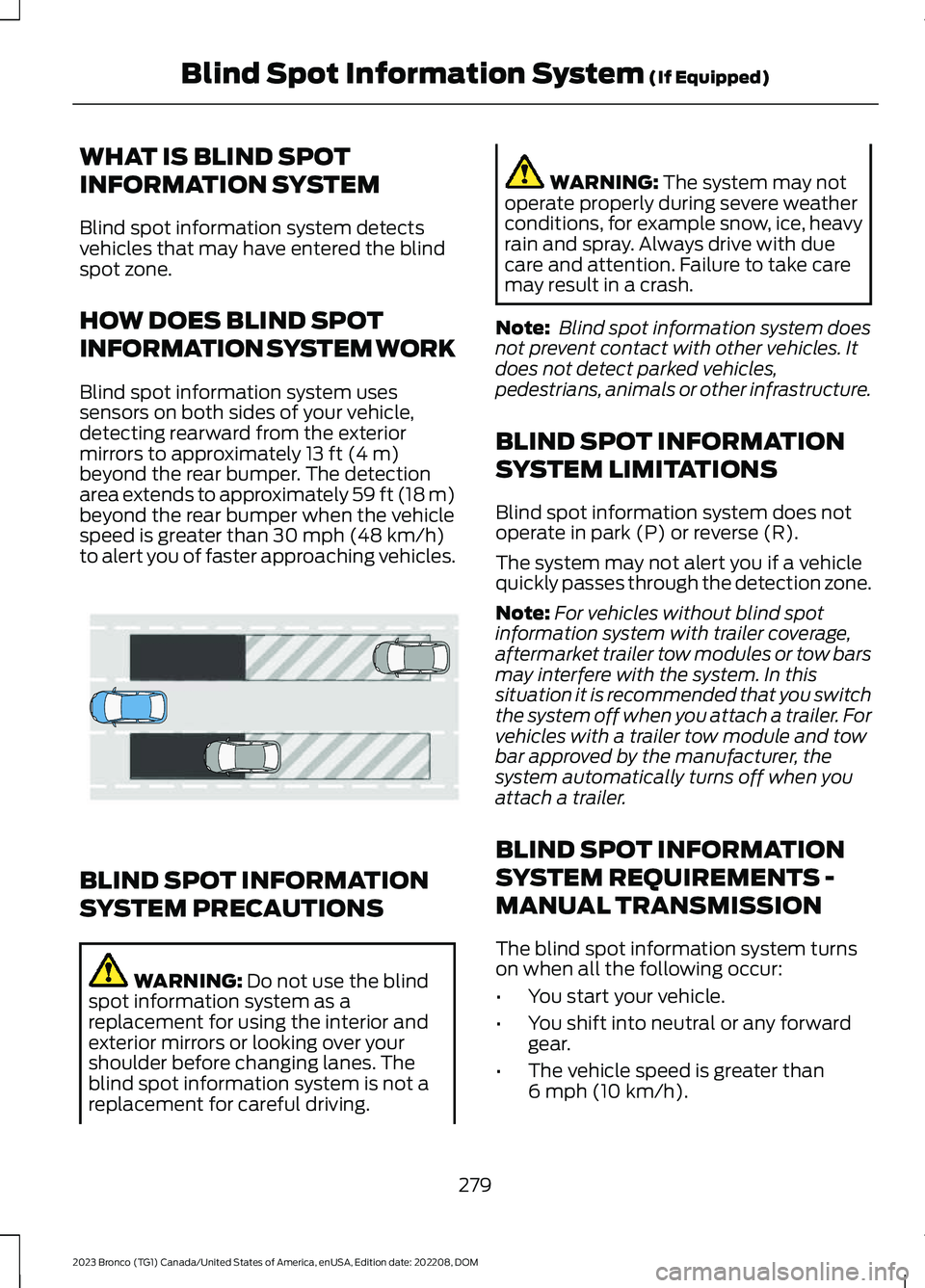
Blind spot information system usessensors on both sides of your vehicle,detecting rearward from the exteriormirrors to approximately 13 ft (4 m)beyond the rear bumper. The detectionarea extends to approximately 59 ft (18 m)beyond the rear bumper when the vehiclespeed is greater than 30 mph (48 km/h)to alert you of faster approaching vehicles.
BLIND SPOT INFORMATION
SYSTEM PRECAUTIONS
WARNING: Do not use the blindspot information system as areplacement for using the interior andexterior mirrors or looking over yourshoulder before changing lanes. Theblind spot information system is not areplacement for careful driving.
WARNING: The system may notoperate properly during severe weatherconditions, for example snow, ice, heavyrain and spray. Always drive with duecare and attention. Failure to take caremay result in a crash.
Note: Blind spot information system doesnot prevent contact with other vehicles. Itdoes not detect parked vehicles,pedestrians, animals or other infrastructure.
BLIND SPOT INFORMATION
SYSTEM LIMITATIONS
Blind spot information system does notoperate in park (P) or reverse (R).
The system may not alert you if a vehiclequickly passes through the detection zone.
Note:For vehicles without blind spotinformation system with trailer coverage,aftermarket trailer tow modules or tow barsmay interfere with the system. In thissituation it is recommended that you switchthe system off when you attach a trailer. Forvehicles with a trailer tow module and towbar approved by the manufacturer, thesystem automatically turns off when youattach a trailer.
BLIND SPOT INFORMATION
SYSTEM REQUIREMENTS -
MANUAL TRANSMISSION
The blind spot information system turnson when all the following occur:
•You start your vehicle.
•You shift into neutral or any forwardgear.
•The vehicle speed is greater than6 mph (10 km/h).
279
2023 Bronco (TG1) Canada/United States of America, enUSA, Edition date: 202208, DOMBlind Spot Information System (If Equipped)E255695