brake light FORD BRONCO 2023 Owner's Manual
[x] Cancel search | Manufacturer: FORD, Model Year: 2023, Model line: BRONCO, Model: FORD BRONCO 2023Pages: 642, PDF Size: 14.71 MB
Page 323 of 642
Look ahead on your route noting upcomingobstacles, surface texture or color changesor any other factors which may indicate achange in available traction. Adjust thevehicle speed and route to avoid a loss intraction. Conditions can change causingthe course to vary day to day. Markobstacles with GPS markers to avoidpotential vehicle damage. Wherenecessary, get out of your vehicle andcheck the terrain.
When driving off-road, if the front or rearsuspension is bottoming-out or excessivecontact with the skid-plates is happening,reduce the vehicle's speed to avoidpotential damage to your vehicle.
If you are driving in a dusty area, be sure toleave ample distance between your vehicleand any other vehicles to allow foradequate vision.
When driving off-road verify that yourwipers and washers are working properlyand reduce your speed for better visibility.
When driving in desert conditions, werecommend driving with your headlampson to help other drivers easily see you.
When convoying with other vehicles, werecommend that communication is used,and the lead vehicle notify other vehiclesof upcoming obstacles.
Keep available ground clearance in mindand pick a route that minimizes the risk ofcatching the underside of the vehicle onan obstacle.
When negotiating low speed obstacles,applying light brake pressure in conjunctionwith the throttle allows you to negotiatethe obstacle in a more controlled manner.
Driving off-road requires a high amount ofconcentration. Even if your local law doesnot prohibit drinking alcohol when drivingoff-road we do not recommend it.
DRIVING OFF-ROAD
Driving In Snow and Ice
WARNING: If you are driving inslippery conditions that require tirechains or cables, then it is critical thatyou drive cautiously. Keep speeds down,allow for longer stopping distances andavoid aggressive steering to reduce thechances of a loss of vehicle controlwhich can lead to serious injury or death.If the rear end of your vehicle slides whilecornering, steer in the direction of theslide until you regain control of yourvehicle.
Four-wheel drive vehicles have advantagesover two-wheel drive vehicles in snow andice but can skid like any other vehicle. Ifyour vehicle slides when driving on snowyor icy roads, turn the steering wheel in thedirection of the slide until you regaincontrol. Avoid sudden applications ofpower and quick changes of direction onsnow and ice. Slowly and steadily applythe accelerator when starting from a fullstop. Avoid sudden braking.
WARNING: Do not becomeoverconfident in the ability of four-wheeldrive vehicles. Although a four-wheeldrive vehicle may accelerate better thana two-wheel drive vehicle in low tractionsituations, it won't stop any faster thantwo-wheel drive vehicles. Always driveat a safe speed.
Make sure you allow sufficient distancebetween your vehicle and other vehiclesfor stopping.
In emergency stopping situations, do notpump the brake pedal, apply the brakefirmly.
319
2023 Bronco (TG1) Canada/United States of America, enUSA, Edition date: 202208, DOMDriving Hints
Page 326 of 642
Muddy waters can reduce the coolingsystem effectiveness by depositing debrisinto the radiator.
Extra care must be taken crossing any typeof water. Do not drive into water unlessnecessary. You should only drive throughareas that are designated and approved.
High currents even in shallow water canwash the dirt out from around your tires orpush your vehicle across slippery rocks orsurfaces.
Never attempt to cross flowing water thatis deeper than your vehicles groundclearance. Even in low currents yourvehicles body surface area can be pusheddownstream and out of control.
Do not cross any body of water that is fastflowing and rising, wait for the flow rate toreduce.
Determine exit points that are downstreamof your entry point to allow for drifting.
If there are other vehicles ahead, wait untilthey’ve left the water. Unsettled water canmake a safe passage more challenging.
Know your vehicle’s abilities and be ableto recover it if something goes wrong.
Keep the doors fully closed during a watercrossing.
Vehicles used to traverse water regularlyshould be periodically inspected for signsof water ingestion in all of the vehicle'sfluids. If water is found inside your vehiclefluids, service your vehicle or see anauthorized dealer.
After driving through water and as soon asit is safe to do so, check the brakes, horn,lights, and steering wheel to make sureeverything is still in working order.
Avoid Getting High-Centered
Always keep available ground clearancein mind and pick a route that minimizes therisk of catching the underside of the vehicleon an obstacle and getting high-centered.
Freeing A Stuck Vehicle
WARNING: Do not spin the wheelsat over 34 mph (55 km/h). The tires mayfail and injure a passenger or bystander.
Recovery hooks are mounted to thevehicle's structure and are used to pull outthe vehicle from a surface or location whenstuck. Recover your vehicle using varioustowing apparatus attached to yourrecovery hook such as winch, open hook,or strap.
Note:Do not use recovery hooks torecreationally tow your vehicle. SeeRecreationally Towing Your Vehicle (page338).
If your vehicle gets stuck in mud or snow,you may rock it out by shifting betweenforward and reverse gears, stoppingbetween shifts in a steady pattern. Pressthe accelerator in each gear.
Note: Do not rock your vehicle if the engineis not at normal operating temperaturedamage to the transmission may occur.
Note:Do not rock your vehicle for morethan a minute damage to the transmissionand tires may occur or the engine mayoverheat.
If you are unable to free your vehicle callroadside assistance. See RoadsideAssistance (page 328).
322
2023 Bronco (TG1) Canada/United States of America, enUSA, Edition date: 202208, DOMDriving Hints
Page 342 of 642
Note: If completed successfully, theinformation display shows Neutral TowEnabled Leave Transmission in Neutral.This indicates that your vehicle is safe totow with all wheels on the ground.
Note:If you do not see a confirmationmessage in the instrument cluster display,you must perform the procedure again fromthe beginning.
Note:You may hear noise as the transfercase shifts into its neutral position. This isnormal.
7.Release both the clutch and the brakepedals and leave the gearshift lever inthe neutral position.
8.Switch your vehicle off by pressing thepush button ignition switch oncewithout pressing any pedals.
Switching Neutral Tow Off
1.With your vehicle properly secured tothe tow vehicle, switch your vehicle toaccessory mode by pressing the pushbutton ignition switch without pressingany pedals.
2.Starting with both the brake and clutchpedal released, fully press and holdboth pedals at the same time forapproximately seven seconds.Continue holding both pedals until theinstrument cluster display shows 2Hand Neutral Tow Disabled.
Note:If completed successfully, theinstrument cluster displays 2H and NeutralTow Disabled.
Note:You must perform the switchingneutral tow on and switching neutral towoff procedures again from the beginning ifthe indicator light and message do notdisplay.
Note:You may hear a noise as the transfercase shifts out of its neutral position. Thisis normal.
3.Release the pedals.
4.Apply the parking brake, thendisconnect your vehicle from the towvehicle.
5.Release the parking brake, start yourvehicle, and shift into either a forwardor a reverse gear to make sure thetransfer case is out of the neutral towposition.
6.If the transfer case did not successfullyshift out of its neutral position, set theparking brake. Have your vehiclechecked as soon as possible.
Resolving the Shift Delayed DriveForward Message
1.Fully press and hold both the brake andthe clutch pedals.
2.Press the push button ignition switch.
3.With the vehicle running, shift into aforward gear and release the clutch.Let the vehicle roll forward up to 3 ft(1 m).
Note:You may hear a noise as the transfercase shifts out of its neutral position. Thisis normal.
4.Make sure the instrument clusterdisplays Neutral Tow Disabled.
RECREATIONALLY TOWING
YOUR VEHICLE - AUTOMATIC
TRANSMISSION
WARNING: Do not disconnect thebattery when recreationally towing yourvehicle. This prevents the transfer casefrom shifting properly and could causethe vehicle to roll, even if thetransmission is in park (P).
338
2023 Bronco (TG1) Canada/United States of America, enUSA, Edition date: 202208, DOMTowing Your Vehicle
Page 344 of 642
2.Starting with the brake pedal releasedand the transmission in neutral (N),fully press and hold the brake pedal forapproximately seven seconds and shiftthe transmission to park (P). Continueholding the brake pedal until theinstrument cluster display shows 2Hand Neutral Tow Disabled.
Note:If completed successfully, theinstrument cluster displays 2H and NeutralTow Disabled.
Note:Perform the switching neutral towon and switching neutral tow off proceduresagain from the beginning if the indicatorlight and message do not display.
Note:You could hear a noise as the transfercase shifts out of its neutral position. Thisis normal.
3.Release the brake pedal.
4.Apply the parking brake, thendisconnect your vehicle from the towvehicle.
5.Release the parking brake, start yourvehicle, and shift into either drive (D)or reverse (R) to make sure the transfercase is out of the neutral tow position.
6.If the transfer case did not successfullyshift out of its neutral position, set theparking brake. Have your vehiclechecked as soon as possible.
Resolving the Shift Delayed DriveForward Message
1.Fully press and hold the brake pedal.
2.Press the push button ignition switch.
3.With the vehicle running, shift into drive(D). Let the vehicle roll forward up to3 ft (1 m).
Note:You could hear a noise as the transfercase shifts out of its neutral position. Thisis normal.
4.Make sure the instrument clusterdisplays Neutral Tow Disabled.
EMERGENCY TOWING
If you need to tow your vehicle, contact aprofessional towing service or, if you are amember of a roadside assistance program,your roadside assistance service provider.
TOWING YOUR VEHICLE – TROUBLESHOOTING
TOWING YOUR VEHICLE – INFORMATION MESSAGES
DescriptionMessage
The transfer case is in the neutral position and your vehicleis safe to tow with all four wheels on the ground.Neutral Tow EnabledLeave Transmission inNeutral
There is a transfer case gear tooth blockage present. Withyour vehicle on, shift the transmission into drive (D) and letthe vehicle roll forward, up to 3 ft (1 m).
Shift Delayed DriveForward
The transfer case is not in the neutral position and your vehicleis not safe to tow with all four wheels on the ground.Neutral Tow Disabled
340
2023 Bronco (TG1) Canada/United States of America, enUSA, Edition date: 202208, DOMTowing Your Vehicle
Page 367 of 642
For longer, trouble-free operation, keep thetop of the battery clean and dry and thebattery cables tightly fastened to thebattery terminals. If any corrosion ispresent on the battery or terminals, removethe cables from the terminals and cleanwith a wire brush. You can neutralize theacid with a solution of baking soda andwater.
We recommend that you disconnect thenegative battery cable terminal from thebattery if you plan to store your vehicle foran extended period.
Note:If you only disconnect the negativebattery cable terminal, make sure it isisolated or placed away from the batteryterminal to avoid unintended connection orarcing.
If you disconnect or replace the batteryand your vehicle has an automatictransmission, it must relearn its adaptivestrategy. Because of this, the transmissionmay shift firmly when first driven. This isnormal operation while the transmissionfully updates its operation to optimumshift feel.
Removing the Battery
1.Apply the parking brake and switch theignition off.
2.Switch all electrical equipment off, forexample lights and radio.
3.Wait a minimum of two minutes beforedisconnecting the battery.
Note:The engine management system hasa power hold function and remains poweredfor a period of time after you switch theignition off. This is to allow diagnostic andadaptive tables to be stored. Disconnectingthe battery without waiting can causedamage not covered by the vehicleWarranty.
4.Disconnect and isolate the negativebattery cable terminal.
5.Disconnect and isolate the positivebattery cable terminal.
6.Remove the battery securing clamp.
7.Remove the battery.
If you disconnect or replace the vehiclebattery, you must reset the followingfeatures:
•Window bounce-back. See WindowBounce-Back (page 114).
•Clock Settings.
•Pre-set radio stations.
Replacing the Battery
Note:Before reconnecting the battery,make sure the ignition remains switched off.
You must replace the battery with one ofexactly the same specification.
To install, reverse the removal procedure.
Note:Make sure that you correctly installthe battery terminal covers, battery coverand battery cable terminals.
RESETTING THE BATTERYSENSOR
When you install a new battery, reset thebattery sensor by doing the following:
1.Switch the ignition on, and leave theengine off.
Note:Complete Steps 2 and 3 within 10seconds.
2.Flash the high beam headlamps fivetimes, ending with the high beams off.
3.Press and release the brake pedal threetimes.
The battery warning lamp flashes threetimes to confirm that the reset issuccessful.
363
2023 Bronco (TG1) Canada/United States of America, enUSA, Edition date: 202208, DOMMaintenance
Page 432 of 642
PREPARING YOUR VEHICLE
FOR STORAGE
If you plan on storing your vehicle for 30days or more, the following maintenancerecommendations ensures your vehiclestays in good operating condition.
Under various conditions, long-termstorage may lead to degraded engineperformance or failure unless you usespecific precautions to preserve yourvehicle.
General
•Store all vehicles in a dry, ventilatedplace.
•If vehicles are stored outside, theyrequire regular maintenance to protectagainst rust and weather damage.
•Make sure all linkages, cables, leversand pins under your vehicle are coveredwith grease to prevent rust.
•Move vehicles at least 25 ft (7.5 m)every 15 days to lubricate working partsand prevent corrosion.
•Fill the fuel tank with high-quality fueluntil the first automatic shutoff of thefuel pump nozzle.
Engine
•Change the engine oil and filter prior tostorage because used engine oilcontains contaminants which maycause engine damage.
•Start the engine every 15 days for aminimum of 15 minutes. Run at fastidle with the climate controls set todefrost until the engine reaches normaloperating temperature.
•With your foot on the brake, shiftthrough all the gears while the engineis running.
Body
•Wash your vehicle thoroughly toremove dirt, grease, oil, tar or mud fromexterior surfaces, rear wheel housingsand the underside of front fenders.
•Periodically wash your vehicle if it isstored in exposed locations.
•Touch-up exposed or primed metal toprevent rust.
•Cover chrome and stainless steel partswith a thick coat of auto wax to preventdiscoloration. Rewax as necessarywhen you wash your vehicle.
•Lubricate all hood, door and luggagecompartment hinges and latches witha light grade oil.
•Cover interior trim to prevent fading.
•Keep all rubber parts free from oil andsolvents.
12 Volt Battery
•When storing your vehicle for greaterthan 30 days the state of chargeshould be approximately 50%.Additionally, we recommenddisconnecting the 12v battery whichwill reduce system loads on thebattery.
•Check and recharge as necessary. Keepconnections clean.
Note:It is necessary to reset memoryfeatures if you disconnect the batterycables.
Brakes
Make sure the brakes and parking brakerelease fully.
Note:If you intend on parking your vehiclefor an extended period after cleaning thewheels with a wheel cleaner, drive yourvehicle for a few minutes before doing so toreduce the risk of increased corrosion of thebrake discs, brake pads and linings.
428
2023 Bronco (TG1) Canada/United States of America, enUSA, Edition date: 202208, DOMStoring Your Vehicle
Page 453 of 642
CHANGING A FLAT TIRE -
EXCLUDING: RAPTOR
Note:You should only use tire sealants inroadside emergencies as they may causedamage to the tire pressure monitoringsystem sensor.
Note:The tire pressure monitoring systemindicator light illuminates when the sparetire is in use. To restore the full function ofthe monitoring system, all road wheelsequipped with tire pressure monitoringsensors must be mounted on the vehicle.
If you get a flat tire when driving, do notapply the brake heavily. Instead, graduallydecrease your speed, hold the steeringwheel firmly, and slowly move to a safeplace on the side of the road.
Have your flat serviced by an authorizeddealer in order to prevent damage to thetire pressure monitoring system sensors.Replace the spare tire with a road tire assoon as possible. During repairing orreplacing of the flat tire, have theauthorized dealer inspect the tire pressuremonitoring system sensor for damage.
Tire Change Procedure
WARNING: Failure to follow theseguidelines could result in an increasedrisk of loss of vehicle control, injury ordeath.
WARNING: Do not get under avehicle that is supported by a jack.
WARNING: The jack supplied withthis vehicle is only intended for changinga flat tire in an emergency. Do notattempt to do any other work on yourvehicle when it is supported by the jack,as your vehicle could slip off the jack.Failure to follow this instruction couldresult in personal injury or death.
WARNING: To help prevent yourvehicle from moving when changing awheel, shift the transmission into park(P), set the parking brake and use anappropriate block or wheel chock tosecure the wheel diagonally opposite tothe wheel being changed. For example,when changing the front left wheel,place an appropriate block or wheelchock on the right rear wheel.
WARNING: Only use the jackprovided as original equipment with yourvehicle.
WARNING: Only use the specifiedjacking points. If you use any otherlocations you could damage vehiclecomponents, such as brake lines.
WARNING: Never place anythingbetween the vehicle jack and yourvehicle.
WARNING: Never place anythingbetween the vehicle jack and the ground.
WARNING: Do not attempt tochange a tire on the side of the vehicleclose to moving traffic. Pull far enoughoff the road to not obstruct the flow oftraffic and avoid the danger of being hitwhen operating the jack or changing thewheel.
WARNING: Always fully apply theparking brake. Failure to follow thisinstruction could result in personal injuryor death.
WARNING: The jack should beused on level firm ground whereverpossible.
449
2023 Bronco (TG1) Canada/United States of America, enUSA, Edition date: 202208, DOMChanging a Road Wheel
Page 457 of 642
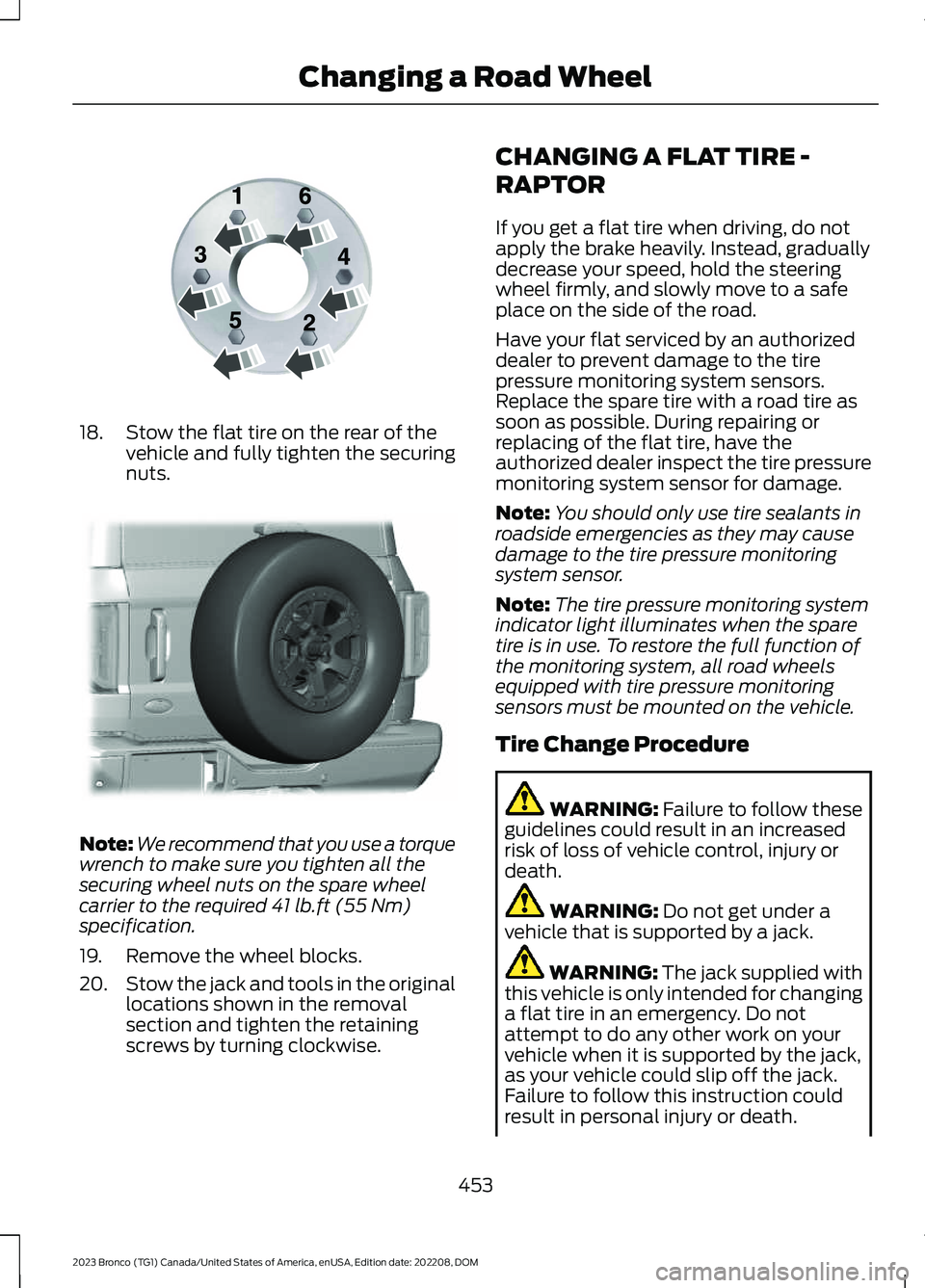
18.Stow the flat tire on the rear of thevehicle and fully tighten the securingnuts.
Note:We recommend that you use a torquewrench to make sure you tighten all thesecuring wheel nuts on the spare wheelcarrier to the required 41 lb.ft (55 Nm)specification.
19.Remove the wheel blocks.
20.Stow the jack and tools in the originallocations shown in the removalsection and tighten the retainingscrews by turning clockwise.
CHANGING A FLAT TIRE -
RAPTOR
If you get a flat tire when driving, do notapply the brake heavily. Instead, graduallydecrease your speed, hold the steeringwheel firmly, and slowly move to a safeplace on the side of the road.
Have your flat serviced by an authorizeddealer to prevent damage to the tirepressure monitoring system sensors.Replace the spare tire with a road tire assoon as possible. During repairing orreplacing of the flat tire, have theauthorized dealer inspect the tire pressuremonitoring system sensor for damage.
Note:You should only use tire sealants inroadside emergencies as they may causedamage to the tire pressure monitoringsystem sensor.
Note:The tire pressure monitoring systemindicator light illuminates when the sparetire is in use. To restore the full function ofthe monitoring system, all road wheelsequipped with tire pressure monitoringsensors must be mounted on the vehicle.
Tire Change Procedure
WARNING: Failure to follow theseguidelines could result in an increasedrisk of loss of vehicle control, injury ordeath.
WARNING: Do not get under avehicle that is supported by a jack.
WARNING: The jack supplied withthis vehicle is only intended for changinga flat tire in an emergency. Do notattempt to do any other work on yourvehicle when it is supported by the jack,as your vehicle could slip off the jack.Failure to follow this instruction couldresult in personal injury or death.
453
2023 Bronco (TG1) Canada/United States of America, enUSA, Edition date: 202208, DOMChanging a Road WheelE166719 E324079
Page 619 of 642
1
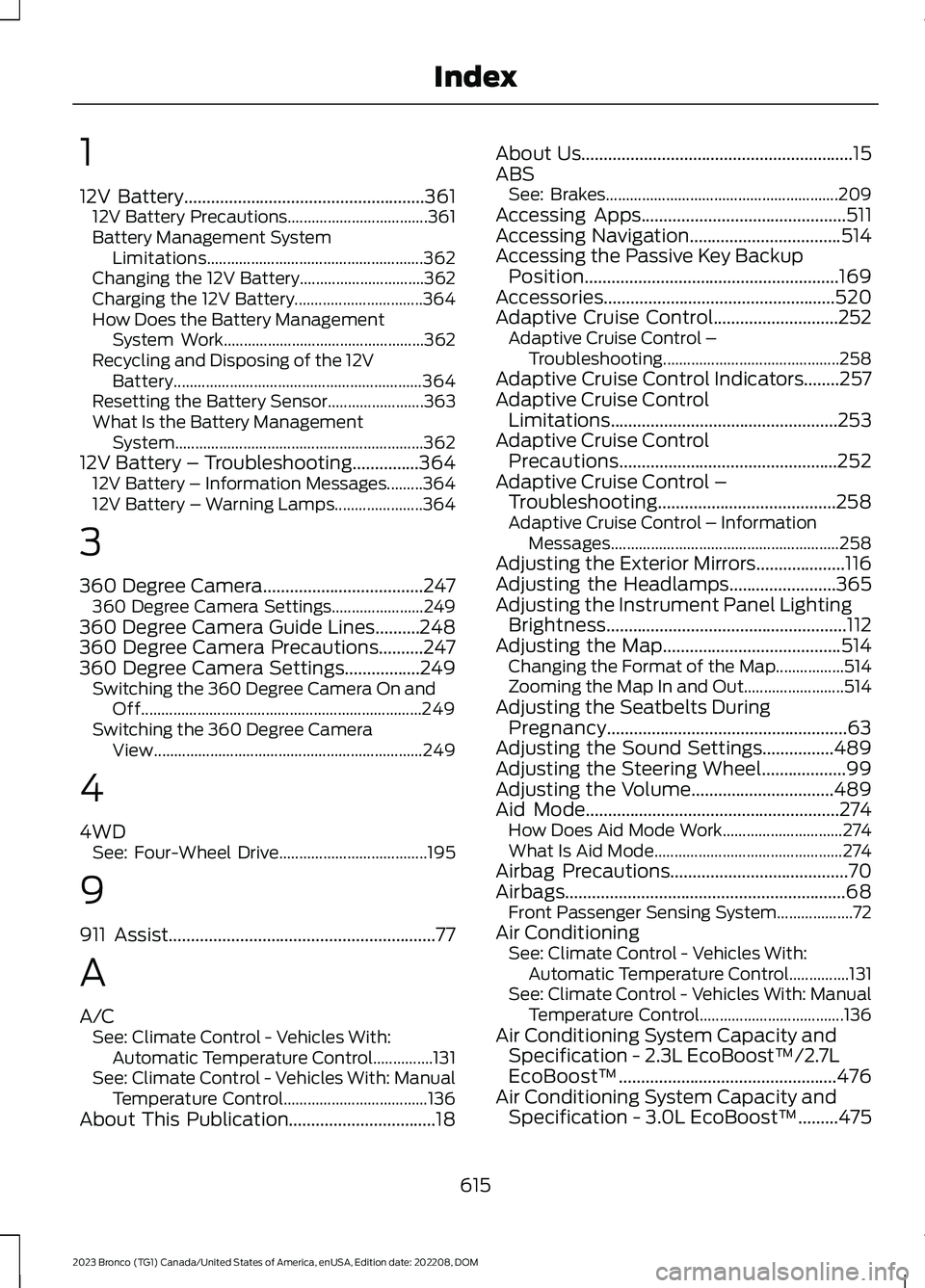
12V Battery......................................................36112V Battery Precautions...................................361Battery Management SystemLimitations......................................................362Changing the 12V Battery...............................362Charging the 12V Battery................................364How Does the Battery ManagementSystem Work..................................................362Recycling and Disposing of the 12VBattery..............................................................364Resetting the Battery Sensor........................363What Is the Battery ManagementSystem..............................................................36212V Battery – Troubleshooting...............36412V Battery – Information Messages.........36412V Battery – Warning Lamps......................364
3
360 Degree Camera....................................247360 Degree Camera Settings.......................249360 Degree Camera Guide Lines..........248360 Degree Camera Precautions..........247360 Degree Camera Settings.................249Switching the 360 Degree Camera On andOff......................................................................249Switching the 360 Degree CameraView...................................................................249
4
4WDSee: Four-Wheel Drive.....................................195
9
911 Assist............................................................77
A
A/CSee: Climate Control - Vehicles With:Automatic Temperature Control...............131See: Climate Control - Vehicles With: ManualTemperature Control....................................136About This Publication.................................18
About Us.............................................................15ABSSee: Brakes..........................................................209Accessing Apps..............................................511Accessing Navigation..................................514Accessing the Passive Key BackupPosition.........................................................169Accessories....................................................520Adaptive Cruise Control............................252Adaptive Cruise Control –Troubleshooting............................................258Adaptive Cruise Control Indicators........257Adaptive Cruise ControlLimitations...................................................253Adaptive Cruise ControlPrecautions.................................................252Adaptive Cruise Control –Troubleshooting........................................258Adaptive Cruise Control – InformationMessages.........................................................258Adjusting the Exterior Mirrors....................116Adjusting the Headlamps........................365Adjusting the Instrument Panel LightingBrightness......................................................112Adjusting the Map........................................514Changing the Format of the Map.................514Zooming the Map In and Out.........................514Adjusting the Seatbelts DuringPregnancy......................................................63Adjusting the Sound Settings................489Adjusting the Steering Wheel...................99Adjusting the Volume................................489Aid Mode.........................................................274How Does Aid Mode Work..............................274What Is Aid Mode...............................................274Airbag Precautions........................................70Airbags...............................................................68Front Passenger Sensing System...................72Air ConditioningSee: Climate Control - Vehicles With:Automatic Temperature Control...............131See: Climate Control - Vehicles With: ManualTemperature Control....................................136Air Conditioning System Capacity andSpecification - 2.3L EcoBoost™/2.7LEcoBoost™.................................................476Air Conditioning System Capacity andSpecification - 3.0L EcoBoost™.........475
615
2023 Bronco (TG1) Canada/United States of America, enUSA, Edition date: 202208, DOMIndex
Page 620 of 642
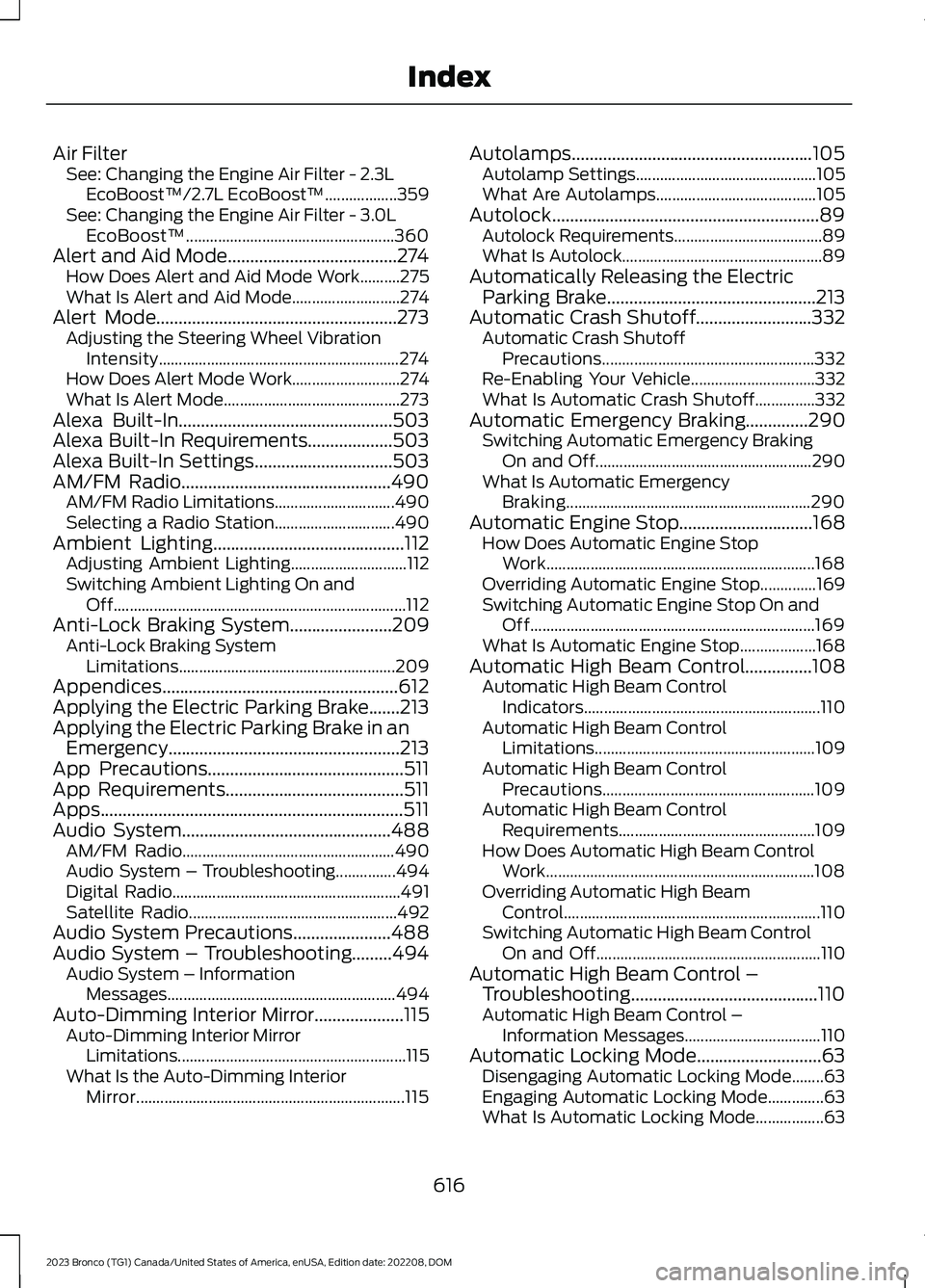
Air FilterSee: Changing the Engine Air Filter - 2.3LEcoBoost™/2.7L EcoBoost™..................359See: Changing the Engine Air Filter - 3.0LEcoBoost™....................................................360Alert and Aid Mode......................................274How Does Alert and Aid Mode Work..........275What Is Alert and Aid Mode...........................274Alert Mode......................................................273Adjusting the Steering Wheel VibrationIntensity............................................................274How Does Alert Mode Work...........................274What Is Alert Mode............................................273Alexa Built-In................................................503Alexa Built-In Requirements...................503Alexa Built-In Settings...............................503AM/FM Radio...............................................490AM/FM Radio Limitations..............................490Selecting a Radio Station..............................490Ambient Lighting...........................................112Adjusting Ambient Lighting.............................112Switching Ambient Lighting On andOff.........................................................................112Anti-Lock Braking System.......................209Anti-Lock Braking SystemLimitations......................................................209Appendices.....................................................612Applying the Electric Parking Brake.......213Applying the Electric Parking Brake in anEmergency....................................................213App Precautions............................................511App Requirements........................................511Apps....................................................................511Audio System...............................................488AM/FM Radio.....................................................490Audio System – Troubleshooting...............494Digital Radio.........................................................491Satellite Radio....................................................492Audio System Precautions......................488Audio System – Troubleshooting.........494Audio System – InformationMessages.........................................................494Auto-Dimming Interior Mirror....................115Auto-Dimming Interior MirrorLimitations.........................................................115What Is the Auto-Dimming InteriorMirror...................................................................115
Autolamps......................................................105Autolamp Settings.............................................105What Are Autolamps........................................105Autolock............................................................89Autolock Requirements.....................................89What Is Autolock..................................................89Automatically Releasing the ElectricParking Brake...............................................213Automatic Crash Shutoff..........................332Automatic Crash ShutoffPrecautions.....................................................332Re-Enabling Your Vehicle...............................332What Is Automatic Crash Shutoff...............332Automatic Emergency Braking..............290Switching Automatic Emergency BrakingOn and Off......................................................290What Is Automatic EmergencyBraking.............................................................290Automatic Engine Stop..............................168How Does Automatic Engine StopWork...................................................................168Overriding Automatic Engine Stop..............169Switching Automatic Engine Stop On andOff.......................................................................169What Is Automatic Engine Stop...................168Automatic High Beam Control...............108Automatic High Beam ControlIndicators...........................................................110Automatic High Beam ControlLimitations.......................................................109Automatic High Beam ControlPrecautions.....................................................109Automatic High Beam ControlRequirements.................................................109How Does Automatic High Beam ControlWork...................................................................108Overriding Automatic High BeamControl................................................................110Switching Automatic High Beam ControlOn and Off........................................................110Automatic High Beam Control –Troubleshooting..........................................110Automatic High Beam Control –Information Messages..................................110Automatic Locking Mode............................63Disengaging Automatic Locking Mode........63Engaging Automatic Locking Mode..............63What Is Automatic Locking Mode.................63
616
2023 Bronco (TG1) Canada/United States of America, enUSA, Edition date: 202208, DOMIndex