clutch FORD BRONCO 2023 Owner's Manual
[x] Cancel search | Manufacturer: FORD, Model Year: 2023, Model line: BRONCO, Model: FORD BRONCO 2023Pages: 642, PDF Size: 14.71 MB
Page 342 of 642
Note: If completed successfully, theinformation display shows Neutral TowEnabled Leave Transmission in Neutral.This indicates that your vehicle is safe totow with all wheels on the ground.
Note:If you do not see a confirmationmessage in the instrument cluster display,you must perform the procedure again fromthe beginning.
Note:You may hear noise as the transfercase shifts into its neutral position. This isnormal.
7.Release both the clutch and the brakepedals and leave the gearshift lever inthe neutral position.
8.Switch your vehicle off by pressing thepush button ignition switch oncewithout pressing any pedals.
Switching Neutral Tow Off
1.With your vehicle properly secured tothe tow vehicle, switch your vehicle toaccessory mode by pressing the pushbutton ignition switch without pressingany pedals.
2.Starting with both the brake and clutchpedal released, fully press and holdboth pedals at the same time forapproximately seven seconds.Continue holding both pedals until theinstrument cluster display shows 2Hand Neutral Tow Disabled.
Note:If completed successfully, theinstrument cluster displays 2H and NeutralTow Disabled.
Note:You must perform the switchingneutral tow on and switching neutral towoff procedures again from the beginning ifthe indicator light and message do notdisplay.
Note:You may hear a noise as the transfercase shifts out of its neutral position. Thisis normal.
3.Release the pedals.
4.Apply the parking brake, thendisconnect your vehicle from the towvehicle.
5.Release the parking brake, start yourvehicle, and shift into either a forwardor a reverse gear to make sure thetransfer case is out of the neutral towposition.
6.If the transfer case did not successfullyshift out of its neutral position, set theparking brake. Have your vehiclechecked as soon as possible.
Resolving the Shift Delayed DriveForward Message
1.Fully press and hold both the brake andthe clutch pedals.
2.Press the push button ignition switch.
3.With the vehicle running, shift into aforward gear and release the clutch.Let the vehicle roll forward up to 3 ft(1 m).
Note:You may hear a noise as the transfercase shifts out of its neutral position. Thisis normal.
4.Make sure the instrument clusterdisplays Neutral Tow Disabled.
RECREATIONALLY TOWING
YOUR VEHICLE - AUTOMATIC
TRANSMISSION
WARNING: Do not disconnect thebattery when recreationally towing yourvehicle. This prevents the transfer casefrom shifting properly and could causethe vehicle to roll, even if thetransmission is in park (P).
338
2023 Bronco (TG1) Canada/United States of America, enUSA, Edition date: 202208, DOMTowing Your Vehicle
Page 481 of 642
Materials
SpecificationName
WSS-M14P19-AMotorcraft® Premium Windshield Wash Concen-trate with Bitterant(U.S.)Motorcraft® Premium Quality Windshield WasherFluid / Liquide lave-glace de haute qualité Motor-craft®(Canada)ZC-32-B2(U.S.)CXC-37-F/M(Canada)
MANUAL TRANSMISSION
FLUID CAPACITY AND
SPECIFICATION
Use fluid that meets the definedspecification and viscosity grade.
If you do not use fluid that meets thedefined specification and viscosity grade,it could result in:
•Component damage that your vehiclewarranty does not cover.
•Reduced vehicle performance.
•Reduced fuel economy.
Capacities
QuantityVariant
2.5 qt (2.4 L)1All.
1 Approximate total oil volume/capacity. Actual amount could vary between fluid changes.
Note:Transmission oil is filled-for-life. Norequirement to service the transmission oil.
Materials
SpecificationName
WSS-M2C200-D2Motorcraft® Dual Clutch Transmission Fluid(U.S.)Motorcraft® Dual Clutch Transmission Fluid / Huilepour boîtes embrayage double Motor-craft®(Canada)XT-11-QDC(U.S. & Canada)
477
2023 Bronco (TG1) Canada/United States of America, enUSA, Edition date: 202208, DOMCapacities and Specifications
Page 482 of 642
CLUTCH FLUID CAPACITY AND
SPECIFICATION
The clutch and brake systems share thesame fluid reservoir. See Brake Fluid
Specification (page 478).
AUTOMATIC TRANSMISSION
FLUID CAPACITY AND
SPECIFICATION
Materials
SpecificationName
WSS-M2C949-A, MERCON® ULVMotorcraft® MERCON® ULV Automatic Transmis-sion Fluid(U.S.)Motorcraft® MERCON® ULV Automatic Transmis-sion Fluid / MERCON® ULV huile pour boîtes auto-matique Motorcraft®(Canada)XT-12-QULV(U.S. & Canada)
Note:Only use transmission fluid thatconforms to the defined specification. Useof other fluids could result in vehicledamage not covered by the vehiclewarranty.
BRAKE FLUID SPECIFICATION
Use fluid that meets the definedspecification and viscosity grade.
If you do not use fluid that meets thedefined specification and viscosity grade,it could result in:
•Component damage that your vehiclewarranty does not cover.
•Reduced brake performance.
Note:We recommend you use Dot 4 LowViscosity (LV) High Performance Brake Fluidmeeting WSS-M6C65-A2 specifications orISO 4925 Class 6 standards. If you use anyfluid other than the recommended fluid, itcould cause reduced brake performanceand not meet our performance standards.Keep brake fluid clean and dry.Contamination with dirt, water, petroleumproducts or other materials could result inbrake system damage and possible failure.
Capacities
QuantityVariant
Fill as required.All.
478
2023 Bronco (TG1) Canada/United States of America, enUSA, Edition date: 202208, DOMCapacities and Specifications
Page 531 of 642
Less Cost to Properly Maintain YourVehicle
The Ford Protect extended service planalso offers a Premium Maintenance Planthat covers all scheduled maintenance,and selected wear items. The coverage isprepaid, so you never have to worry aboutthe cost of your vehicle’s maintenance.
Covered maintenance includes:
•Windshield wiper blades.
•Spark plugs.
•The clutch disc (if equipped).
•Brake pads and linings.
•Shock absorbers.
•Struts.
•Engine belts.
•Engine coolant hoses, clamps ando-rings.
•Diesel exhaust fluid replenishment (ifequipped).
•Cabin air filter replacement every20,000 mi (32,000 km) for electricvehicles only.
Interest Free Finance Options
Just a 5% down payment provides youwith an affordable, no interest, no feepayment program allowing you all thesecurity and benefits Ford Protectextended service plan has to offer whilepaying over time. You are pre-approvedwith no credit check or hassles. To learnmore, call our Ford Protect extendedservice plan specialists at 800-367-3377.
Ford Protect Extended Service PlanP.O. Box 321067Detroit, MI 48232
Ford Protect Extended ServicePlan (Canada Only)
You can get more protection for yourvehicle by purchasing a Ford Protectextended service plan. Ford Protectextended service plan is the only servicecontract backed by Ford Motor Companyof Canada, Limited. Depending on the planyou purchase, Ford Protect extendedservice plan provides benefits such as:
•Rental reimbursement.
•Coverage for certain maintenance andwear items.
•Protection against repair costs afteryour New Vehicle Limited WarrantyCoverage expires.
•Roadside Assistance benefits.
There are several Ford Protect extendedservice plans available in various time,distance and deductible combinations.Each plan is tailored to fit your own drivingneeds, including reimbursement for towingand rental. When you purchase FordProtect extended service plan, you receiveadded peace-of-mind protectionthroughout Canada, the United States andMexico, provided by a network ofparticipating authorized Ford MotorCompany dealers.
Note:Repairs performed outside of Canadaand the United States are not eligible forFord Protect extended service plancoverage.
This information is subject to change. Visityour local Ford of Canada dealer orwww.ford.ca to find the Ford Protectextended service plan that is right for you.
527
2023 Bronco (TG1) Canada/United States of America, enUSA, Edition date: 202208, DOMFord Protect
Page 622 of 642
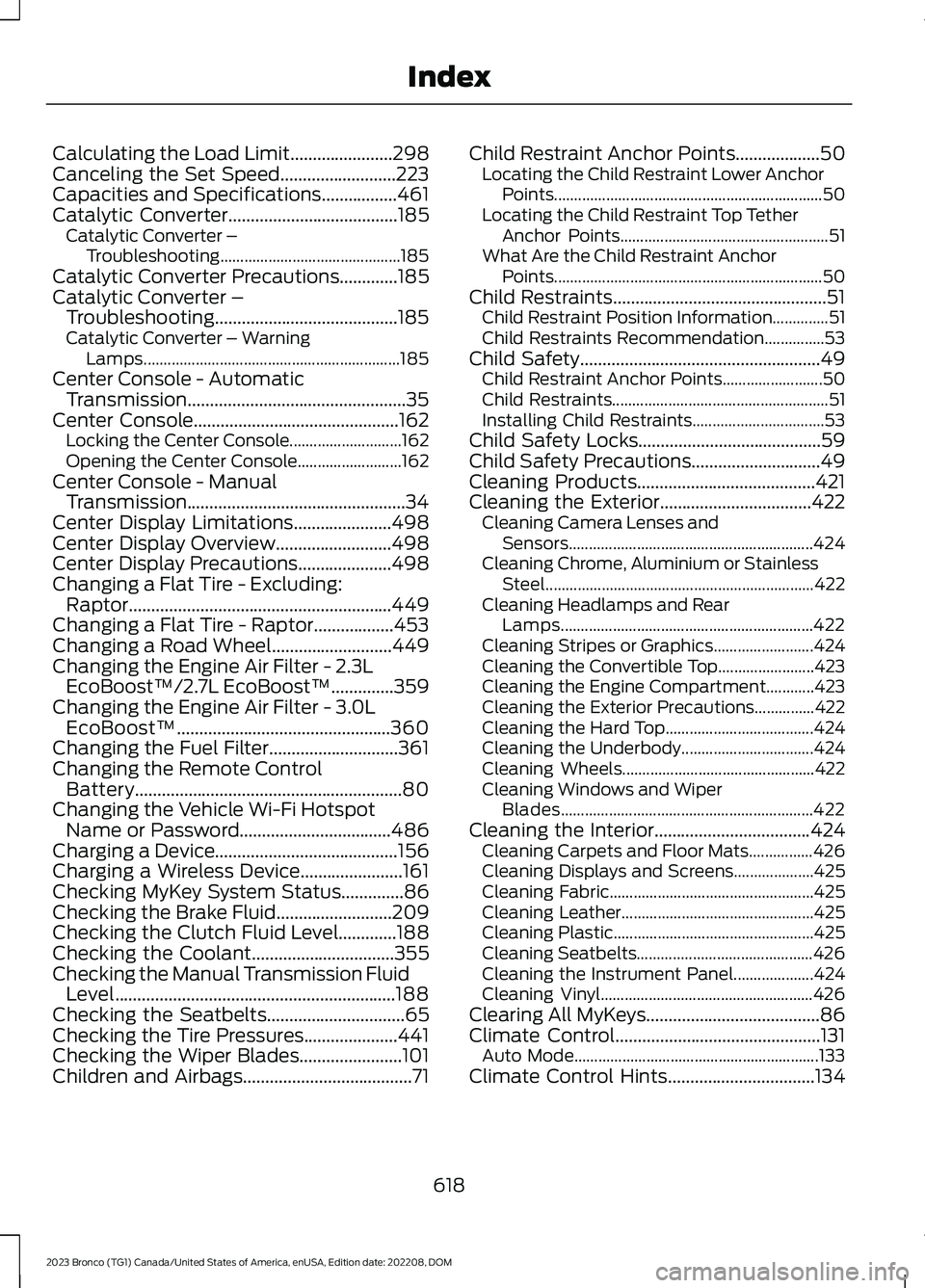
Calculating the Load Limit.......................298Canceling the Set Speed..........................223Capacities and Specifications.................461Catalytic Converter......................................185Catalytic Converter –Troubleshooting.............................................185Catalytic Converter Precautions.............185Catalytic Converter –Troubleshooting.........................................185Catalytic Converter – WarningLamps................................................................185Center Console - AutomaticTransmission.................................................35Center Console..............................................162Locking the Center Console............................162Opening the Center Console..........................162Center Console - ManualTransmission.................................................34Center Display Limitations......................498Center Display Overview..........................498Center Display Precautions.....................498Changing a Flat Tire - Excluding:Raptor...........................................................449Changing a Flat Tire - Raptor..................453Changing a Road Wheel...........................449Changing the Engine Air Filter - 2.3LEcoBoost™/2.7L EcoBoost™..............359Changing the Engine Air Filter - 3.0LEcoBoost™................................................360Changing the Fuel Filter.............................361Changing the Remote ControlBattery............................................................80Changing the Vehicle Wi-Fi HotspotName or Password..................................486Charging a Device.........................................156Charging a Wireless Device.......................161Checking MyKey System Status..............86Checking the Brake Fluid..........................209Checking the Clutch Fluid Level.............188Checking the Coolant................................355Checking the Manual Transmission FluidLevel...............................................................188Checking the Seatbelts...............................65Checking the Tire Pressures.....................441Checking the Wiper Blades.......................101Children and Airbags......................................71
Child Restraint Anchor Points...................50Locating the Child Restraint Lower AnchorPoints...................................................................50Locating the Child Restraint Top TetherAnchor Points....................................................51What Are the Child Restraint AnchorPoints...................................................................50Child Restraints................................................51Child Restraint Position Information..............51Child Restraints Recommendation...............53Child Safety......................................................49Child Restraint Anchor Points.........................50Child Restraints......................................................51Installing Child Restraints.................................53Child Safety Locks.........................................59Child Safety Precautions.............................49Cleaning Products........................................421Cleaning the Exterior..................................422Cleaning Camera Lenses andSensors.............................................................424Cleaning Chrome, Aluminium or StainlessSteel...................................................................422Cleaning Headlamps and RearLamps...............................................................422Cleaning Stripes or Graphics.........................424Cleaning the Convertible Top........................423Cleaning the Engine Compartment............423Cleaning the Exterior Precautions...............422Cleaning the Hard Top.....................................424Cleaning the Underbody.................................424Cleaning Wheels................................................422Cleaning Windows and WiperBlades...............................................................422Cleaning the Interior...................................424Cleaning Carpets and Floor Mats................426Cleaning Displays and Screens....................425Cleaning Fabric...................................................425Cleaning Leather................................................425Cleaning Plastic..................................................425Cleaning Seatbelts............................................426Cleaning the Instrument Panel....................424Cleaning Vinyl.....................................................426Clearing All MyKeys.......................................86Climate Control..............................................131Auto Mode.............................................................133Climate Control Hints.................................134
618
2023 Bronco (TG1) Canada/United States of America, enUSA, Edition date: 202208, DOMIndex
Page 623 of 642
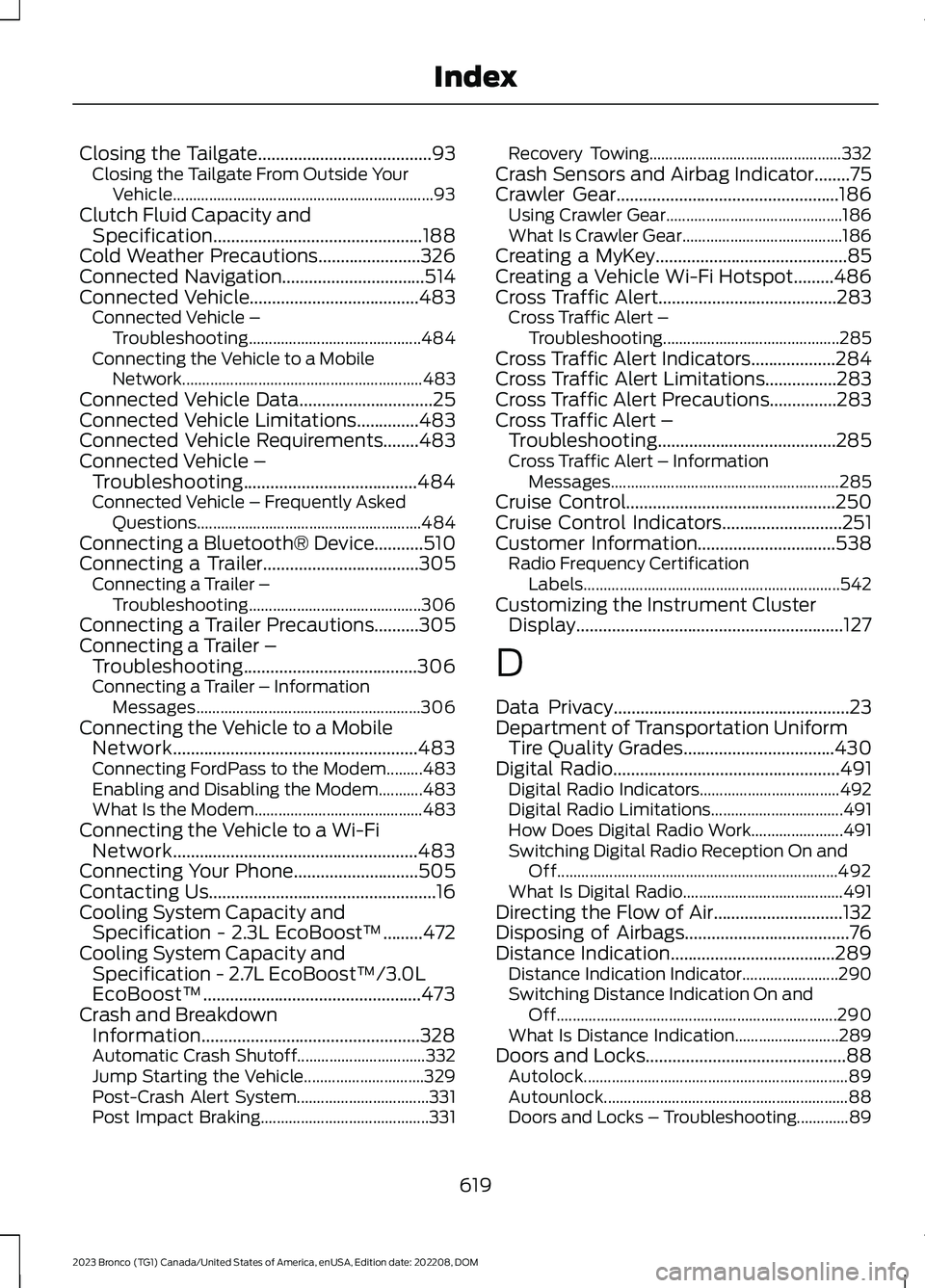
Closing the Tailgate.......................................93Closing the Tailgate From Outside YourVehicle.................................................................93Clutch Fluid Capacity andSpecification...............................................188Cold Weather Precautions.......................326Connected Navigation................................514Connected Vehicle......................................483Connected Vehicle –Troubleshooting...........................................484Connecting the Vehicle to a MobileNetwork............................................................483Connected Vehicle Data..............................25Connected Vehicle Limitations..............483Connected Vehicle Requirements........483Connected Vehicle –Troubleshooting.......................................484Connected Vehicle – Frequently AskedQuestions........................................................484Connecting a Bluetooth® Device...........510Connecting a Trailer...................................305Connecting a Trailer –Troubleshooting...........................................306Connecting a Trailer Precautions..........305Connecting a Trailer –Troubleshooting.......................................306Connecting a Trailer – InformationMessages........................................................306Connecting the Vehicle to a MobileNetwork.......................................................483Connecting FordPass to the Modem.........483Enabling and Disabling the Modem...........483What Is the Modem..........................................483Connecting the Vehicle to a Wi-FiNetwork.......................................................483Connecting Your Phone............................505Contacting Us...................................................16Cooling System Capacity andSpecification - 2.3L EcoBoost™.........472Cooling System Capacity andSpecification - 2.7L EcoBoost™/3.0LEcoBoost™.................................................473Crash and BreakdownInformation.................................................328Automatic Crash Shutoff................................332Jump Starting the Vehicle..............................329Post-Crash Alert System.................................331Post Impact Braking..........................................331
Recovery Towing................................................332Crash Sensors and Airbag Indicator........75Crawler Gear..................................................186Using Crawler Gear............................................186What Is Crawler Gear........................................186Creating a MyKey...........................................85Creating a Vehicle Wi-Fi Hotspot.........486Cross Traffic Alert........................................283Cross Traffic Alert –Troubleshooting............................................285Cross Traffic Alert Indicators...................284Cross Traffic Alert Limitations................283Cross Traffic Alert Precautions...............283Cross Traffic Alert –Troubleshooting........................................285Cross Traffic Alert – InformationMessages.........................................................285Cruise Control...............................................250Cruise Control Indicators...........................251Customer Information...............................538Radio Frequency CertificationLabels................................................................542Customizing the Instrument ClusterDisplay............................................................127
D
Data Privacy.....................................................23Department of Transportation UniformTire Quality Grades..................................430Digital Radio...................................................491Digital Radio Indicators...................................492Digital Radio Limitations.................................491How Does Digital Radio Work.......................491Switching Digital Radio Reception On andOff......................................................................492What Is Digital Radio........................................491Directing the Flow of Air.............................132Disposing of Airbags.....................................76Distance Indication.....................................289Distance Indication Indicator........................290Switching Distance Indication On andOff......................................................................290What Is Distance Indication..........................289Doors and Locks.............................................88Autolock..................................................................89Autounlock.............................................................88Doors and Locks – Troubleshooting.............89
619
2023 Bronco (TG1) Canada/United States of America, enUSA, Edition date: 202208, DOMIndex