low 4L FORD BRONCO 2023 Owners Manual
[x] Cancel search | Manufacturer: FORD, Model Year: 2023, Model line: BRONCO, Model: FORD BRONCO 2023Pages: 642, PDF Size: 14.71 MB
Page 473 of 642
An oil that displays this symbol conformsto current engine, emission system andfuel economy performance standards ofILSAC.
We recommend Motorcraft motor oil foryour vehicle. If Motorcraft oil is notavailable, use motor oils of therecommended viscosity grade that displaythe API Certification Mark for gasolineengines.
Do not use supplemental engine oiladditives because they are unnecessaryand could lead to engine damage that yourvehicle warranty does not cover.
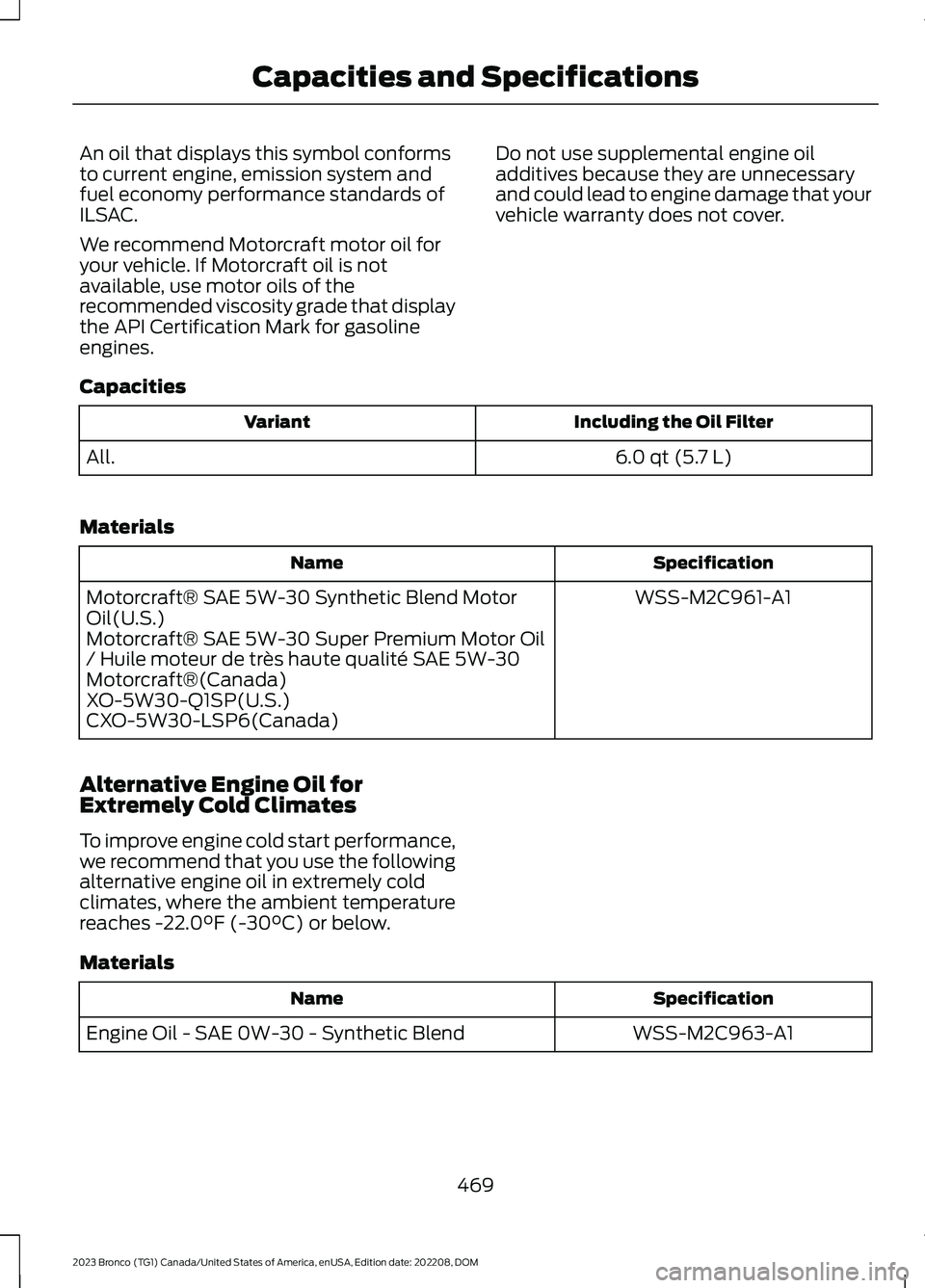
Capacities
Including the Oil FilterVariant
6.0 qt (5.7 L)All.
Materials
SpecificationName
WSS-M2C961-A1Motorcraft® SAE 5W-30 Synthetic Blend MotorOil(U.S.)Motorcraft® SAE 5W-30 Super Premium Motor Oil/ Huile moteur de très haute qualité SAE 5W-30Motorcraft®(Canada)XO-5W30-Q1SP(U.S.)CXO-5W30-LSP6(Canada)
Alternative Engine Oil forExtremely Cold Climates
To improve engine cold start performance,we recommend that you use the followingalternative engine oil in extremely coldclimates, where the ambient temperaturereaches -22.0°F (-30°C) or below.
Materials
SpecificationName
WSS-M2C963-A1Engine Oil - SAE 0W-30 - Synthetic Blend
469
2023 Bronco (TG1) Canada/United States of America, enUSA, Edition date: 202208, DOMCapacities and Specifications
Page 475 of 642
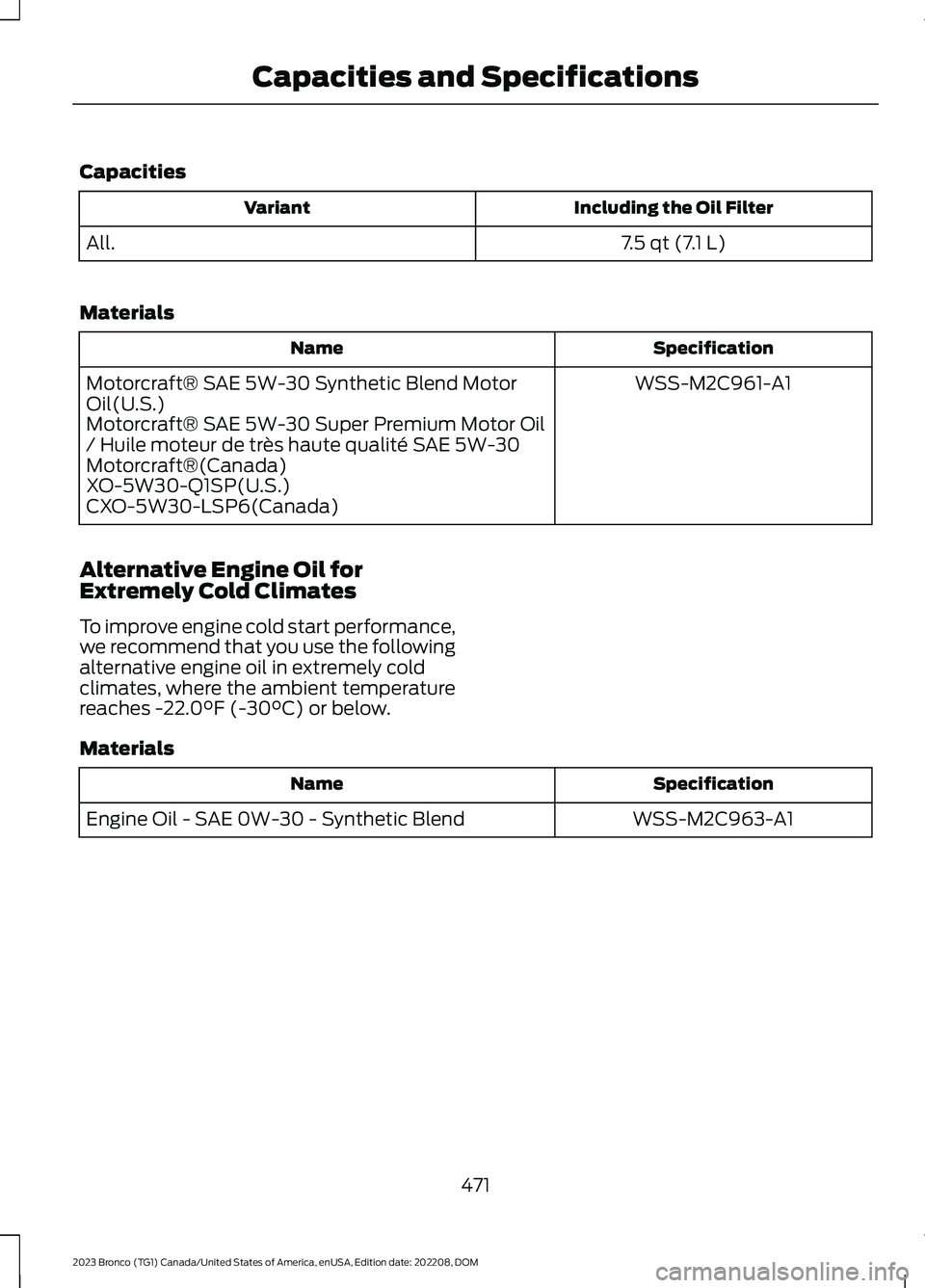
Capacities
Including the Oil FilterVariant
7.5 qt (7.1 L)All.
Materials
SpecificationName
WSS-M2C961-A1Motorcraft® SAE 5W-30 Synthetic Blend MotorOil(U.S.)Motorcraft® SAE 5W-30 Super Premium Motor Oil/ Huile moteur de très haute qualité SAE 5W-30Motorcraft®(Canada)XO-5W30-Q1SP(U.S.)CXO-5W30-LSP6(Canada)
Alternative Engine Oil forExtremely Cold Climates
To improve engine cold start performance,we recommend that you use the followingalternative engine oil in extremely coldclimates, where the ambient temperaturereaches -22.0°F (-30°C) or below.
Materials
SpecificationName
WSS-M2C963-A1Engine Oil - SAE 0W-30 - Synthetic Blend
471
2023 Bronco (TG1) Canada/United States of America, enUSA, Edition date: 202208, DOMCapacities and Specifications
Page 477 of 642
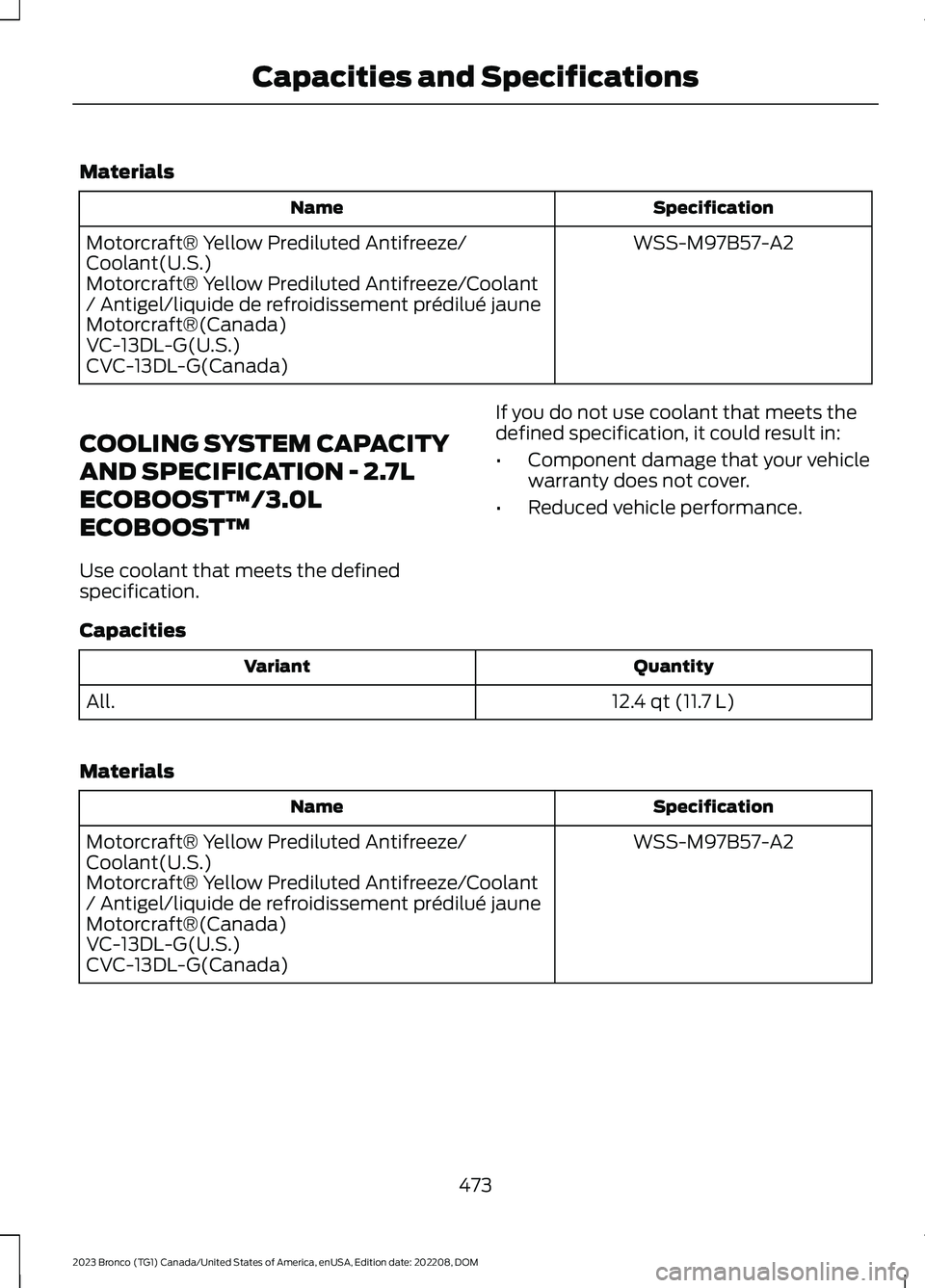
Materials
SpecificationName
WSS-M97B57-A2Motorcraft® Yellow Prediluted Antifreeze/Coolant(U.S.)Motorcraft® Yellow Prediluted Antifreeze/Coolant/ Antigel/liquide de refroidissement prédilué jauneMotorcraft®(Canada)VC-13DL-G(U.S.)CVC-13DL-G(Canada)
COOLING SYSTEM CAPACITY
AND SPECIFICATION - 2.7L
ECOBOOST™/3.0L
ECOBOOST™
Use coolant that meets the definedspecification.
If you do not use coolant that meets thedefined specification, it could result in:
•Component damage that your vehiclewarranty does not cover.
•Reduced vehicle performance.
Capacities
QuantityVariant
12.4 qt (11.7 L)All.
Materials
SpecificationName
WSS-M97B57-A2Motorcraft® Yellow Prediluted Antifreeze/Coolant(U.S.)Motorcraft® Yellow Prediluted Antifreeze/Coolant/ Antigel/liquide de refroidissement prédilué jauneMotorcraft®(Canada)VC-13DL-G(U.S.)CVC-13DL-G(Canada)
473
2023 Bronco (TG1) Canada/United States of America, enUSA, Edition date: 202208, DOMCapacities and Specifications
Page 482 of 642
CLUTCH FLUID CAPACITY AND
SPECIFICATION
The clutch and brake systems share thesame fluid reservoir. See Brake Fluid
Specification (page 478).
AUTOMATIC TRANSMISSION
FLUID CAPACITY AND
SPECIFICATION
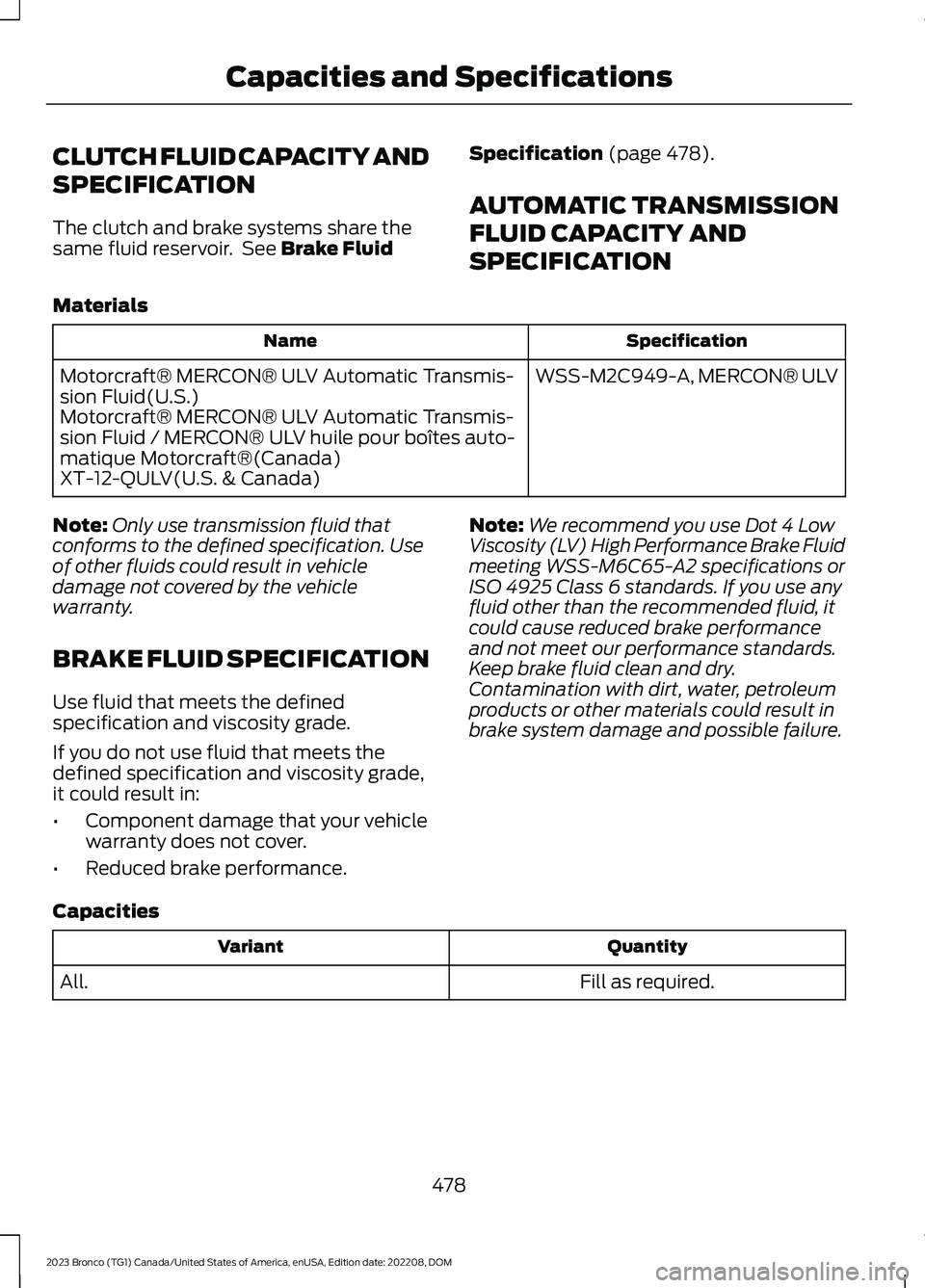
Materials
SpecificationName
WSS-M2C949-A, MERCON® ULVMotorcraft® MERCON® ULV Automatic Transmis-sion Fluid(U.S.)Motorcraft® MERCON® ULV Automatic Transmis-sion Fluid / MERCON® ULV huile pour boîtes auto-matique Motorcraft®(Canada)XT-12-QULV(U.S. & Canada)
Note:Only use transmission fluid thatconforms to the defined specification. Useof other fluids could result in vehicledamage not covered by the vehiclewarranty.
BRAKE FLUID SPECIFICATION
Use fluid that meets the definedspecification and viscosity grade.
If you do not use fluid that meets thedefined specification and viscosity grade,it could result in:
•Component damage that your vehiclewarranty does not cover.
•Reduced brake performance.
Note:We recommend you use Dot 4 LowViscosity (LV) High Performance Brake Fluidmeeting WSS-M6C65-A2 specifications orISO 4925 Class 6 standards. If you use anyfluid other than the recommended fluid, itcould cause reduced brake performanceand not meet our performance standards.Keep brake fluid clean and dry.Contamination with dirt, water, petroleumproducts or other materials could result inbrake system damage and possible failure.
Capacities
QuantityVariant
Fill as required.All.
478
2023 Bronco (TG1) Canada/United States of America, enUSA, Edition date: 202208, DOMCapacities and Specifications
Page 486 of 642
VEHICLE IDENTIFICATION
NUMBER
LOCATING THE VEHICLEIDENTIFICATION NUMBER
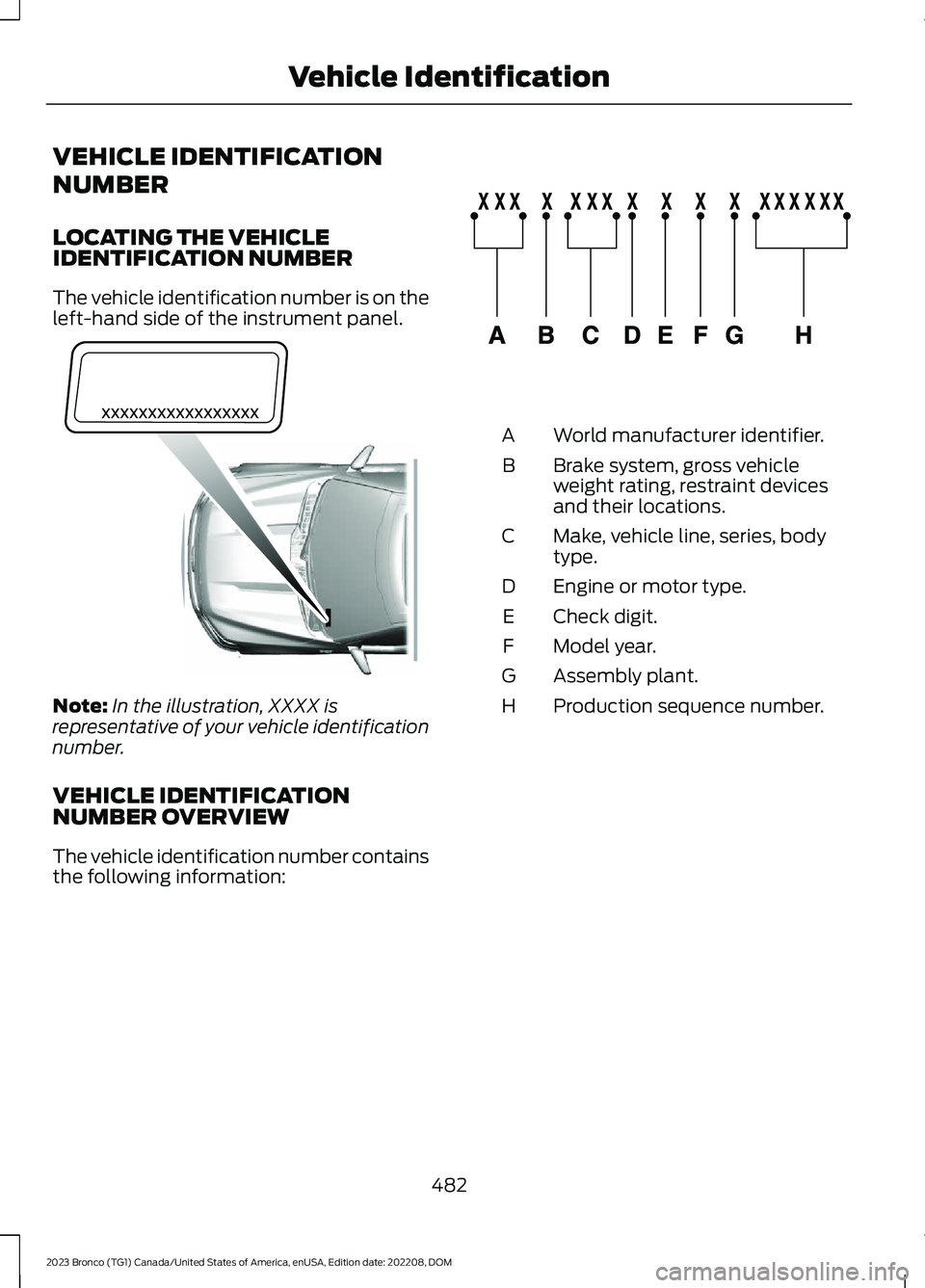
The vehicle identification number is on theleft-hand side of the instrument panel.
Note:In the illustration, XXXX isrepresentative of your vehicle identificationnumber.
VEHICLE IDENTIFICATIONNUMBER OVERVIEW
The vehicle identification number containsthe following information:
World manufacturer identifier.A
Brake system, gross vehicleweight rating, restraint devicesand their locations.
B
Make, vehicle line, series, bodytype.C
Engine or motor type.D
Check digit.E
Model year.F
Assembly plant.G
Production sequence number.H
482
2023 Bronco (TG1) Canada/United States of America, enUSA, Edition date: 202208, DOMVehicle IdentificationE311767 E142477
Page 487 of 642
WHAT IS A CONNECTED
VEHICLE
A connected vehicle has technology thatallows your vehicle to connect to a mobilenetwork and for you to access a range offeatures. When used in conjunction withthe FordPass app, it could allow you tomonitor and control your vehicle further,for example checking the tire pressures,the fuel level and the vehicle location. Foradditional information, refer to the localFord website.
CONNECTED VEHICLE
REQUIREMENTS
Connected service and related featurefunctionality requires a compatible vehiclenetwork.
Some remote features require additionalservice activation. Log in to your Fordaccount for details. Some restrictions, thirdparty terms and message or data ratesmay apply.
CONNECTED VEHICLE
LIMITATIONS
Evolving technology, cellular networks, orregulations could affect functionality andavailability, or continued provision of somefeatures. These changes could even stopsome features from functioning.
CONNECTING THE VEHICLE TO
A MOBILE NETWORK
WHAT IS THE MODEM
The modem allows access to arange of features built into yourvehicle.
ENABLING AND DISABLING THEMODEM
1.Press Settings.
2.Press Connectivity.
3.Press Connected Vehicle Features.
4.Switch vehicle connectivity on or off.
CONNECTING FORDPASS TO THEMODEM
1.Make sure that the modem is enabledusing the vehicle settings menu.
2.Open the FordPass app on your deviceand log in.
3.Add your vehicle or select your vehicleif already added.
4.Select the option to activate yourvehicle.
5.Make sure that the name on the screenmatches the name shown in yourFordPass account.
6.Confirm that FordPass account isconnected to the modem.
CONNECTING THE VEHICLE TO
A WI-FI NETWORK
Select the settings option on thefeature bar.
1.Press Connectivity.
2.Press Manage Wi-Fi Networks.
3.Switch Wi-Fi on.
4.Press View Available Networks.
5.Select an available Wi-Fi network.
Note:Enter the network password toconnect to a secure network.
483
2023 Bronco (TG1) Canada/United States of America, enUSA, Edition date: 202208, DOMConnected Vehicle E280315
Page 488 of 642
CONNECTED VEHICLE –
TROUBLESHOOTING
CONNECTED VEHICLE –FREQUENTLY ASKED QUESTIONS
Why can I not confirm theconnection of my FordPassaccount to the modem?
•The modem is not enabled. Switchvehicle connectivity on.
•The network signal is weak. Move yourvehicle closer to a place where thenetwork signal is not obstructed.
Why can I not connect to a Wi-Finetwork?
•You entered the wrong networkpassword. Enter the correct password.
•The network signal is weak. Move yourvehicle closer to the Wi-Fi router or toa place where the network signal is notobstructed.
•There are multiple access points inrange with the same network name.Choose a unique name for yournetwork. Do not use the default nameunless it contains a unique identifier,for example as part of the MACaddress.
Why does the Wi-Fi connectiondisconnect after successfulconnection?
•The network signal is weak. Move yourvehicle closer to the Wi-Fi router or toa place where the network signal is notobstructed.
What can I do if I am close to a Wi-Fi router but the network signalstrength is weak?
•If your vehicle has a heated windshield,position your vehicle so that thewindshield is not facing the Wi-Firouter.
•If your vehicle has metallic tinting onthe windows but not on the windshield,position your vehicle so that thewindshield is facing the Wi-Fi router oropen the windows that are facing therouter.
•If your vehicle has metallic tinting onthe windows and the windshield, openthe windows that are facing the router.
•If your vehicle is in a garage and youhave the garage door closed, open thegarage door as it could block the signal.
Why can I not see a network Iexpect to see in the list of availablenetworks?
•The network is hidden. Make thenetwork visible and try again, ormanually add a network in the Wi-Fisettings menu.
Why do software downloads taketoo long?
•The network signal is weak. Move yourvehicle closer to the Wi-Fi router or toa place where the network signal is notobstructed.
•Wi-Fi network is in high demand or hasa slow Internet connection. Use a morereliable Wi-Fi network.
484
2023 Bronco (TG1) Canada/United States of America, enUSA, Edition date: 202208, DOMConnected Vehicle
Page 490 of 642
CREATING A VEHICLE WI-FI
HOTSPOT
You can create a Wi-Fi hotspot in yourvehicle and allow devices to connect to itfor access to the Internet.
Select the settings option on thefeature bar.
1.Press Vehicle Hotspot.
Note:The vehicle hotspot default settingis on.
2.Press Settings.
3.Press Edit.
4.Press Hotspot visibility.
Note:The hotspot visibility default settingis on.
Finding the Wi-Fi Hotspot Nameand Password
Select the settings option on thefeature bar.
1.Press Vehicle Hotspot.
2.Press Settings.
Note:The network name is the hotspotname.
3.Press View Password.
Connecting a Device to the Wi-FiHotspot
1.On your device, switch Wi-Fi on andselect the hotspot from the list ofavailable Wi-Fi networks.
2.When prompted, enter the password.
Purchasing a Data Plan
1.Connect a device to the hotspot.
Note:The vehicle network carrier’s portalopens on your device.
2.If the portal does not open on yourdevice, open a website and it redirectsto the vehicle network carrier’s portal.
Note:Secure websites do not redirect.
3.Follow the instructions on the carrierportal to purchase a plan.
Note:If you have an active plan, the systemdoes not redirect to the vehicle networkcarrier’s portal when you connect a device.Visit the vehicle network carrier’s websiteto purchase more data.
Note:If data usage information is availablein the vehicle hotspot menu, it isapproximate.
Note:If you carry out a master reset, thesystem does not remove your vehicle fromyour vehicle network carrier’s account. Toremove your vehicle from the account,contact your vehicle network carrier.
Note:The vehicle network carrier providesVehicle Hotspot services, subject to yourvehicle network carrier agreement, coverageand availability.
CHANGING THE VEHICLE WI-
FI HOTSPOT NAME OR
PASSWORD
Select the settings option on thefeature bar.
1.Press Vehicle Hotspot.
2.Press Settings.
3.Press Edit.
4.Press Change Network Name.
5.Enter your required network name.
6.Press Done.
7.Press Change Password.
8.Enter your required password.
9.Press Done.
486
2023 Bronco (TG1) Canada/United States of America, enUSA, Edition date: 202208, DOMVehicle Wi-Fi HotspotE280315 E280315 E280315
Page 495 of 642
Using Seek
Press either button. The systemstops at the first station it findsin that direction.
SWITCHING THE DISPLAY ON
AND OFF
Audio Unit
Press the button.
Touchscreen
To switch the display off:
1.Press Settings on the touchscreen.
2.Press Display Settings.
3.Press Display Off.
Note:The display defaults to on each timeyou switch your vehicle on.
To switch the display on, press anywhereon the touchscreen.
DIGITAL RADIO (IF EQUIPPED)
WHAT IS DIGITAL RADIO
HD Radio™ technology is the digitalevolution of analog AM/FM radio.
For additional information, visitwww.HDRadio.com.
HD Radio Technology is manufacturedunder license from iBiquity DigitalCorporation and foreign patents. HD Radioand the HD and HD Radio logos areproprietary trademarks of XPERI. Thevehicle manufacturer and XPERI are notresponsible for the content sent using HDRadio technology. Content may bechanged, added or deleted at any time atthe station owner's discretion.
HOW DOES DIGITAL RADIO WORK
Your system has a special receiver thatallows it to receive digital broadcasts inaddition to analog broadcasts.
HD1 signifies the main programming statusand is available in both analog and digitalbroadcasts. Other multicast stations areonly available digitally and could containnew or different content.
Note:When the system first receives anHD1 station, it plays the station in the analogversion until it verifies the station is an HDRadio station. Then it shifts to the digitalversion.
Note:There is an audio mute delay whenswitching to an HD2 or HD3 station becausethe system has to reacquire and decode thedigital signal.
DIGITAL RADIO LIMITATIONS
If you are outside the reception area, thesystem could not work.
If you are on the fringe of the receptionarea, the station could mute due to weaksignal strength.
Note:If you are listening to HD1, the systemchanges back to the analog broadcast untilthe digital broadcast is available again. Ifyou are listening to any other multicastchannels, the station mutes and staysmuted unless it is able to connect to thedigital signal again.
491
2023 Bronco (TG1) Canada/United States of America, enUSA, Edition date: 202208, DOMAudio System E272035
Page 498 of 642
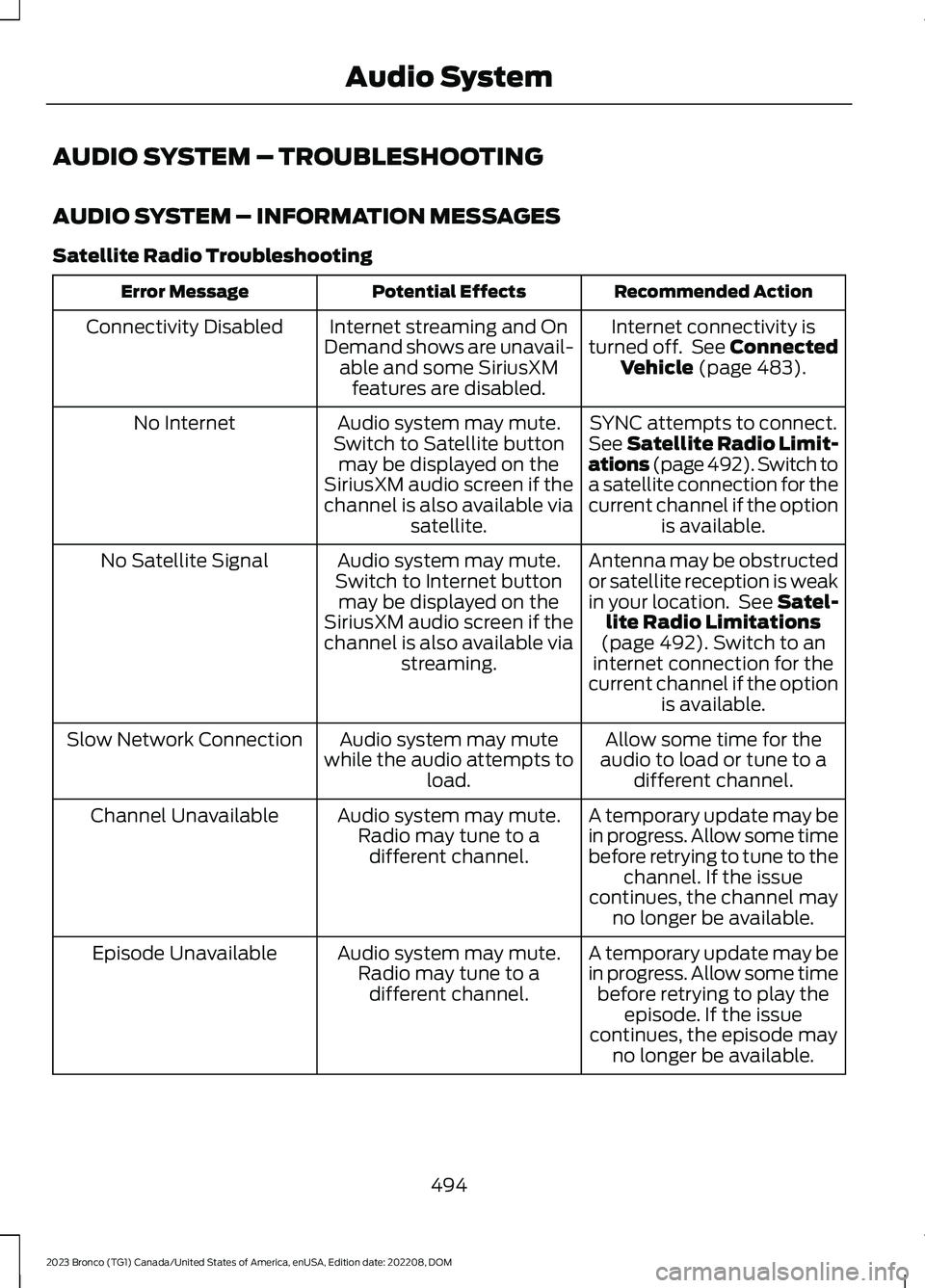
AUDIO SYSTEM – TROUBLESHOOTING
AUDIO SYSTEM – INFORMATION MESSAGES
Satellite Radio Troubleshooting
Recommended ActionPotential EffectsError Message
Internet connectivity isturned off. See ConnectedVehicle (page 483).
Internet streaming and OnDemand shows are unavail-able and some SiriusXMfeatures are disabled.
Connectivity Disabled
SYNC attempts to connect.See Satellite Radio Limit-ations (page 492).Switch toa satellite connection for thecurrent channel if the optionis available.
Audio system may mute.Switch to Satellite buttonmay be displayed on theSiriusXM audio screen if thechannel is also available viasatellite.
No Internet
Antenna may be obstructedor satellite reception is weakin your location. See Satel-lite Radio Limitations(page 492).Switch to aninternet connection for thecurrent channel if the optionis available.
Audio system may mute.Switch to Internet buttonmay be displayed on theSiriusXM audio screen if thechannel is also available viastreaming.
No Satellite Signal
Allow some time for theaudio to load or tune to adifferent channel.
Audio system may mutewhile the audio attempts toload.
Slow Network Connection
A temporary update may bein progress. Allow some timebefore retrying to tune to thechannel. If the issuecontinues, the channel mayno longer be available.
Audio system may mute.Radio may tune to adifferent channel.
Channel Unavailable
A temporary update may bein progress. Allow some timebefore retrying to play theepisode. If the issuecontinues, the episode mayno longer be available.
Audio system may mute.Radio may tune to adifferent channel.
Episode Unavailable
494
2023 Bronco (TG1) Canada/United States of America, enUSA, Edition date: 202208, DOMAudio System