lock FORD BRONCO SPORT 2023 Owners Manual
[x] Cancel search | Manufacturer: FORD, Model Year: 2023, Model line: BRONCO SPORT, Model: FORD BRONCO SPORT 2023Pages: 516, PDF Size: 14.27 MB
Page 309 of 516
•Use a spray with a 40 degree widespray angle pattern.
•Keep the nozzle at a 12 in (305 mm)distance and 90 degree angle to yourvehicle's surface.
Note:Holding the pressure washer nozzleat an angle to the vehicle's surface maydamage graphics and cause the edges topeel away from the vehicle's surface.
Underbody
Regularly clean the entire underside of yourvehicle. This includes the chassis, bodyfloor sheet metal and wheel wells usingfresh water. Keep body and door drainholes free of debris or foreign material.
Under Hood
For removing black rubber marks fromunder the hood we recommend MotorcraftWheel and Tire Cleaner or Motorcraft Bugand Tar Remover.
WAXING
Regular waxing is necessary to protect yourcar's paint from the elements. Werecommend that you wash and wax thepainted surface once or twice a year.
When washing and waxing, park yourvehicle in a shaded area out of directsunlight. Always wash your vehicle beforeapplying wax.
•Use a quality wax that does not containabrasives.
•Follow the manufacturer’s instructionsto apply and remove the wax.
•Apply a small amount of wax in aback-and-forth motion, not in circles.
•Do not allow wax to come in contactwith any non-body (low-gloss black)colored trim. The wax will discolor orstain the parts over time.
•Roof racks.
•Bumpers.
•Grained door handles.
•Side moldings.
•Mirror housings.
•Windshield cowl area.
•Do not apply wax to glass areas.
•After waxing, your car's paint shouldfeel smooth, and be free of streaks andsmudges.
CLEANING THE ENGINE
Engines are more efficient when they areclean because grease and dirt buildup keepthe engine warmer than normal.
When washing:
•Take care when using a power washerto clean the engine. The high-pressurefluid could penetrate the sealed partsand cause damage.
•Do not spray a hot engine with coldwater to avoid cracking the engineblock or other engine components.
•Spray Motorcraft Engine Shampoo andDegreaser on all parts that requirecleaning and pressure rinse clean. InCanada, use Motorcraft EngineShampoo.
Note:If your vehicle has an engine coverremove the cover before application ofMotorcraft Engine Shampoo and Degreaser.Immediately rinse away any over spray.
305
2023 Bronco Sport (CHD) Canada/United States of America, enUSA, Edition date: 202208, First-PrintingVehicle Care
Page 338 of 516
WARNING: To help prevent yourvehicle from moving when changing awheel, shift the transmission into park(P), set the parking brake and use anappropriate block or wheel chock tosecure the wheel diagonally opposite tothe wheel being changed. For example,when changing the front left wheel,place an appropriate block or wheelchock on the right rear wheel.
WARNING: Only use the jackprovided as original equipment with yourvehicle.
WARNING: Failure to follow theseguidelines could result in an increasedrisk of loss of vehicle control, injury ordeath.
WARNING: Only use the specifiedjacking points. If you use any otherlocations you could damage vehiclecomponents, such as brake lines.
WARNING: Never place anythingbetween the vehicle jack and yourvehicle.
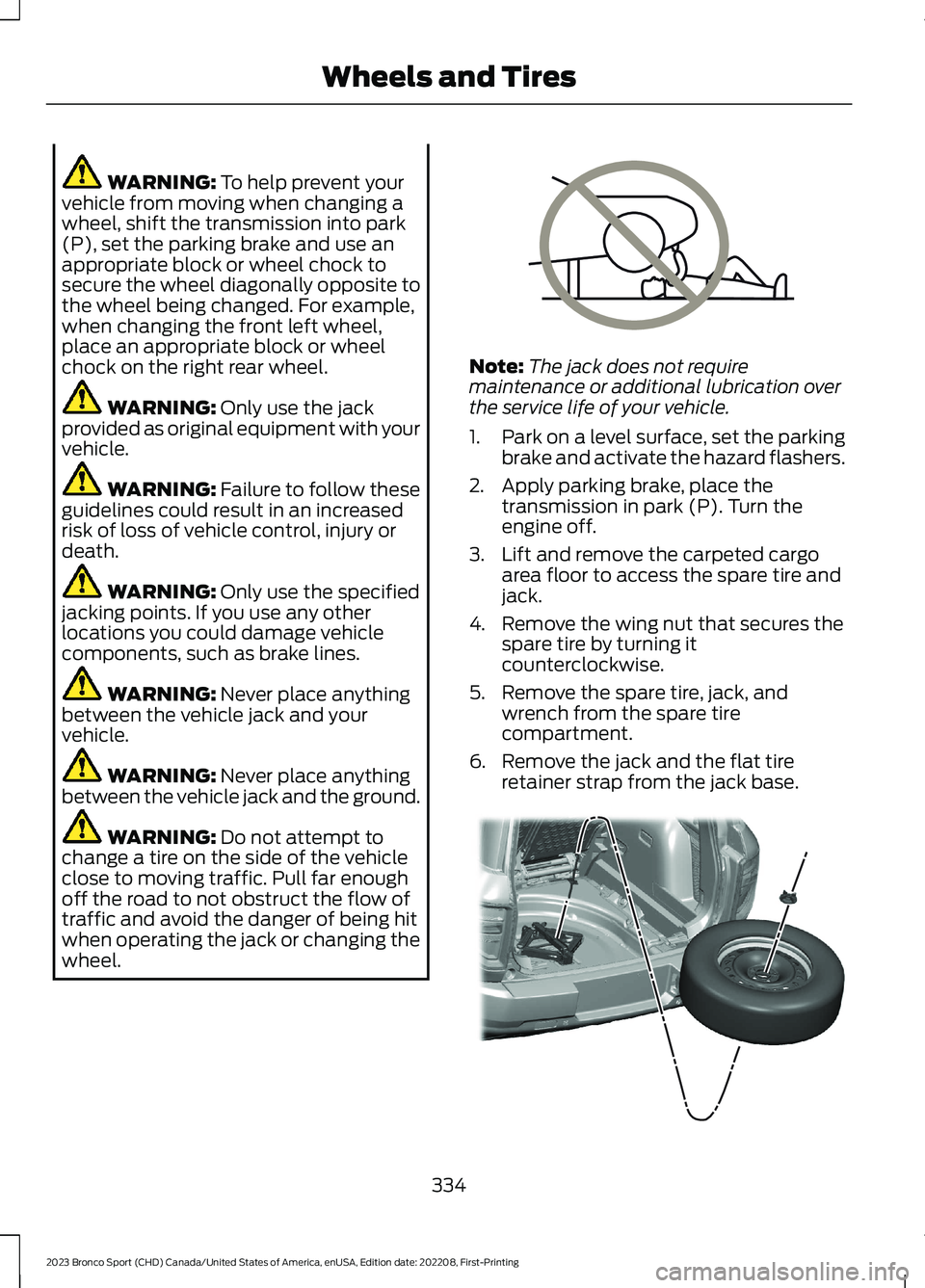
WARNING: Never place anythingbetween the vehicle jack and the ground.
WARNING: Do not attempt tochange a tire on the side of the vehicleclose to moving traffic. Pull far enoughoff the road to not obstruct the flow oftraffic and avoid the danger of being hitwhen operating the jack or changing thewheel.
Note:The jack does not requiremaintenance or additional lubrication overthe service life of your vehicle.
1.Park on a level surface, set the parkingbrake and activate the hazard flashers.
2.Apply parking brake, place thetransmission in park (P). Turn theengine off.
3.Lift and remove the carpeted cargoarea floor to access the spare tire andjack.
4.Remove the wing nut that secures thespare tire by turning itcounterclockwise.
5.Remove the spare tire, jack, andwrench from the spare tirecompartment.
6.Remove the jack and the flat tireretainer strap from the jack base.
334
2023 Bronco Sport (CHD) Canada/United States of America, enUSA, Edition date: 202208, First-PrintingWheels and TiresE166722 E323462
Page 339 of 516
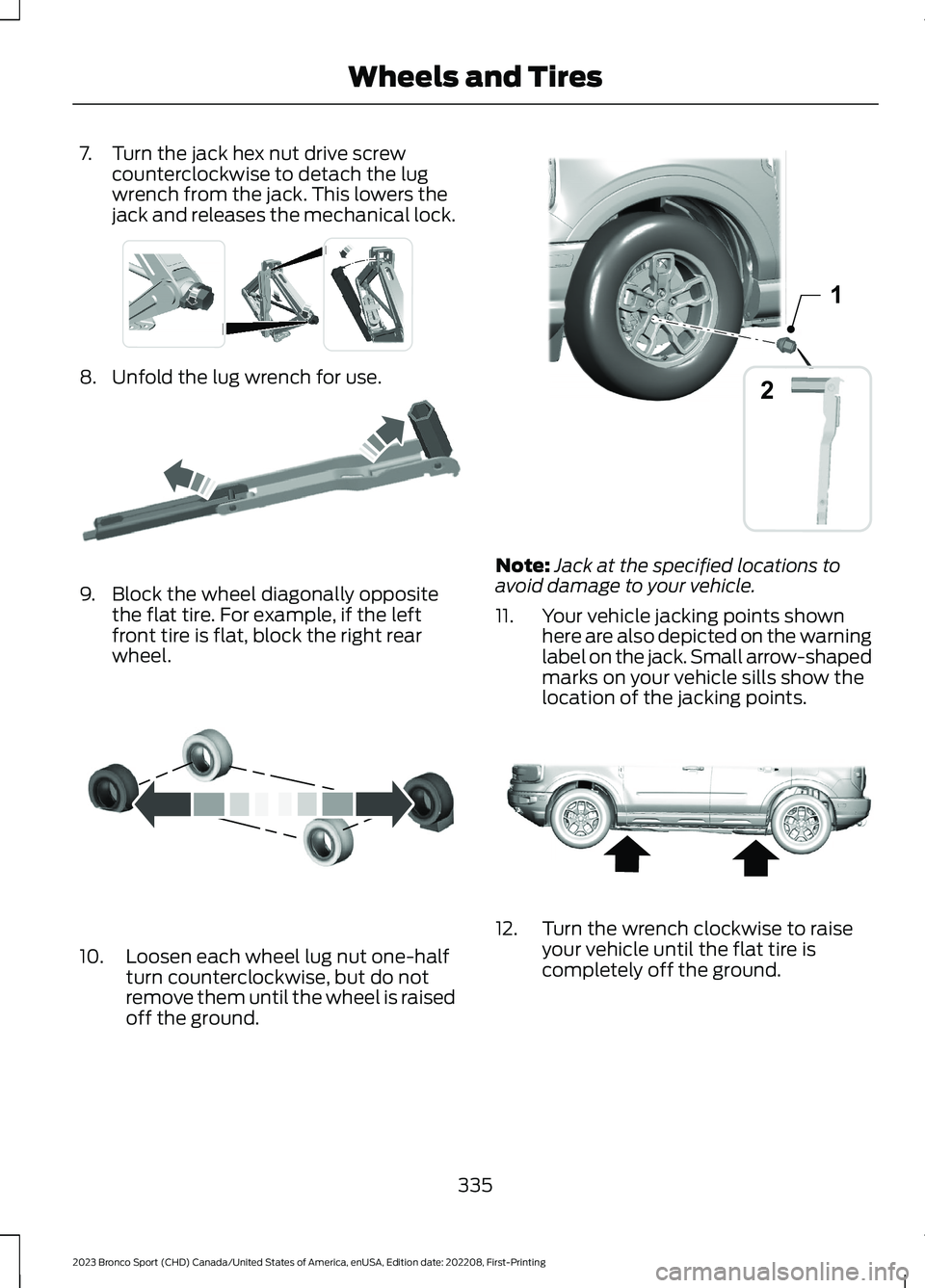
7.Turn the jack hex nut drive screwcounterclockwise to detach the lugwrench from the jack. This lowers thejack and releases the mechanical lock.
8.Unfold the lug wrench for use.
9.Block the wheel diagonally oppositethe flat tire. For example, if the leftfront tire is flat, block the right rearwheel.
10.Loosen each wheel lug nut one-halfturn counterclockwise, but do notremove them until the wheel is raisedoff the ground.
Note:Jack at the specified locations toavoid damage to your vehicle.
11.Your vehicle jacking points shownhere are also depicted on the warninglabel on the jack. Small arrow-shapedmarks on your vehicle sills show thelocation of the jacking points.
12.Turn the wrench clockwise to raiseyour vehicle until the flat tire iscompletely off the ground.
335
2023 Bronco Sport (CHD) Canada/United States of America, enUSA, Edition date: 202208, First-PrintingWheels and TiresE337330 E181744 E142551 21E357778 E322803
Page 340 of 516
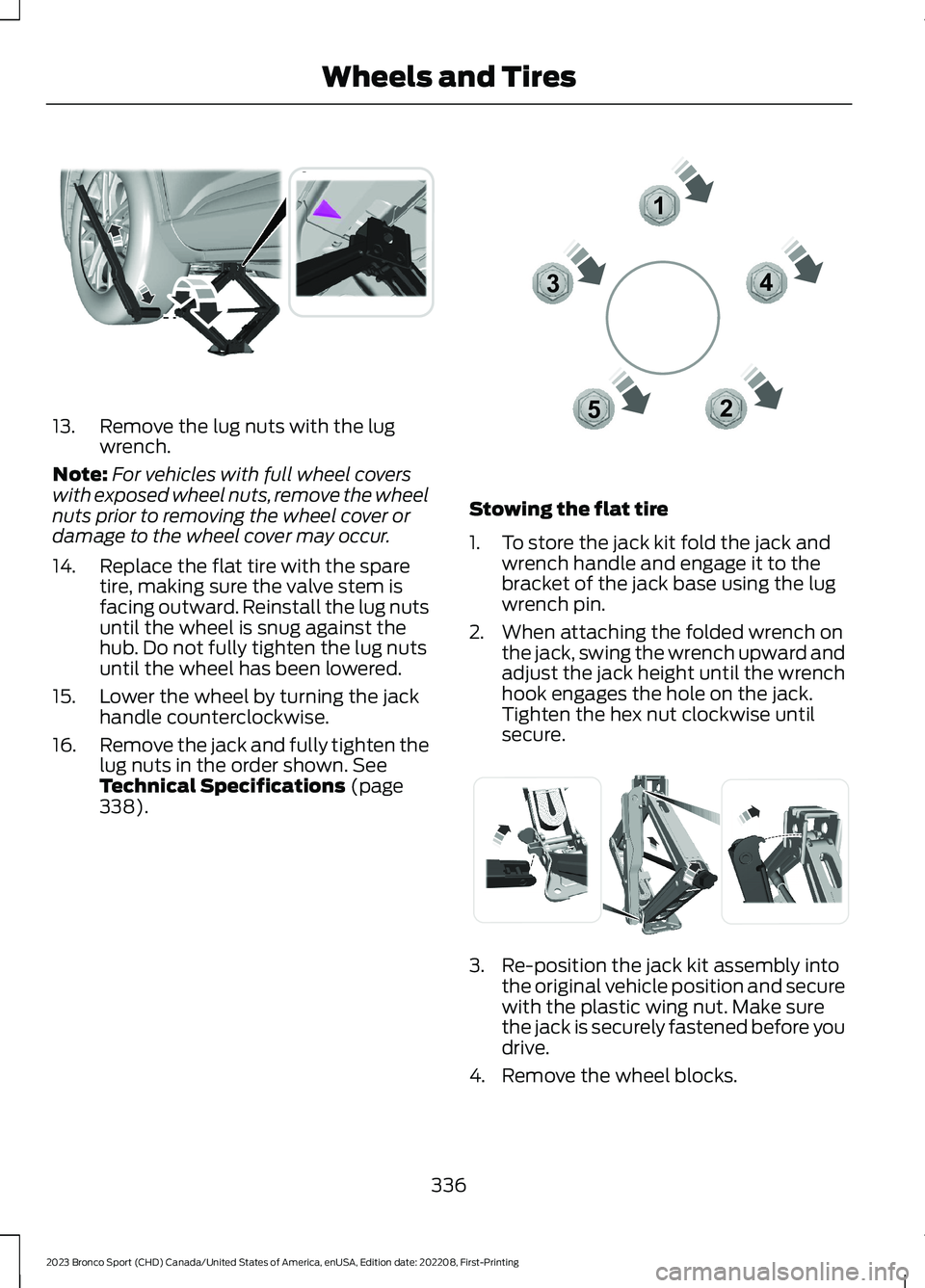
13.Remove the lug nuts with the lugwrench.
Note:For vehicles with full wheel coverswith exposed wheel nuts, remove the wheelnuts prior to removing the wheel cover ordamage to the wheel cover may occur.
14.Replace the flat tire with the sparetire, making sure the valve stem isfacing outward. Reinstall the lug nutsuntil the wheel is snug against thehub. Do not fully tighten the lug nutsuntil the wheel has been lowered.
15.Lower the wheel by turning the jackhandle counterclockwise.
16.Remove the jack and fully tighten thelug nuts in the order shown. SeeTechnical Specifications (page338).
Stowing the flat tire
1.To store the jack kit fold the jack andwrench handle and engage it to thebracket of the jack base using the lugwrench pin.
2.When attaching the folded wrench onthe jack, swing the wrench upward andadjust the jack height until the wrenchhook engages the hole on the jack.Tighten the hex nut clockwise untilsecure.
3.Re-position the jack kit assembly intothe original vehicle position and securewith the plastic wing nut. Make surethe jack is securely fastened before youdrive.
4.Remove the wheel blocks.
336
2023 Bronco Sport (CHD) Canada/United States of America, enUSA, Edition date: 202208, First-PrintingWheels and TiresE294119 12345E306781 E294121
Page 357 of 516
3.Switch Wi-Fi on.
4.Press View Available Networks.
5.Select an available Wi-Fi network.
Note:Enter the network password toconnect to a secure network.
CONNECTED VEHICLE –
TROUBLESHOOTING
CONNECTED VEHICLE –FREQUENTLY ASKED QUESTIONS- VEHICLES WITH: MODEM
Why can I not confirm theconnection of my FordPassaccount to the modem?
•The modem is not enabled. Switchvehicle connectivity on.
•The network signal is weak. Move yourvehicle closer to a place where thenetwork signal is not obstructed.
CONNECTED VEHICLE –FREQUENTLY ASKED QUESTIONS- VEHICLES WITH: SYNC 3
Why can I not connect to a Wi-Finetwork?
•You entered the wrong networkpassword. Enter the correct password.
•The network signal is weak. Move yourvehicle closer to the Wi-Fi router or toa place where the network signal is notobstructed.
•There are multiple access points inrange with the same SSID. Choose aunique name for your SSID. Do not usethe default name unless it contains aunique identifier, for example as partof the MAC address.
Why does the Wi-Fi connectiondisconnect after successfulconnection?
•The network signal is weak. Move yourvehicle closer to the Wi-Fi router or toa place where the network signal is notobstructed.
What can I do if I am close to a Wi-Fi router but the network signalstrength is weak?
•If your vehicle has a heated windshield,position your vehicle so that thewindshield is not facing the Wi-Firouter.
•If your vehicle has metallic tinting onthe windows but not on the windshield,position your vehicle so that thewindshield is facing the Wi-Fi router oropen the windows that are facing therouter.
•If your vehicle has metallic tinting onthe windows and the windshield, openthe windows that are facing the router.
•If your vehicle is in a garage and youhave the garage door closed, open thegarage door as it could block the signal.
Why can I not see a network Iexpect to see in the list of availablenetworks?
•The network is hidden. Make thenetwork visible and try again, ormanually add a network in the Wi-Fisettings menu.
353
2023 Bronco Sport (CHD) Canada/United States of America, enUSA, Edition date: 202208, First-PrintingConnected Vehicle
Page 367 of 516
SiriusXM satellite radio is asubscription-based satellite radio servicethat broadcasts a variety of music, sports,news, weather, traffic and entertainmentprogramming. Your factory-installedSiriusXM satellite radio system includeshardware and a limited subscription term,which begins on the date of sale or leaseof your vehicle. See an authorized dealerfor availability.
For more information on extendedsubscription terms, a service fee is required,the online media player and a completelist of SiriusXM satellite radio channels,and other features, please visitwww.siriusxm.com in the United States,www.siriusxm.ca in Canada, or callSiriusXM at 1-888-539-7474.
Satellite Radio Electronic SerialNumber (ESN)
You need your ESN to activate, modify ortrack your satellite radio account.
Locating Your ESN
1.Select SiriusXM as the audio source.
2.Tune to channel 0.
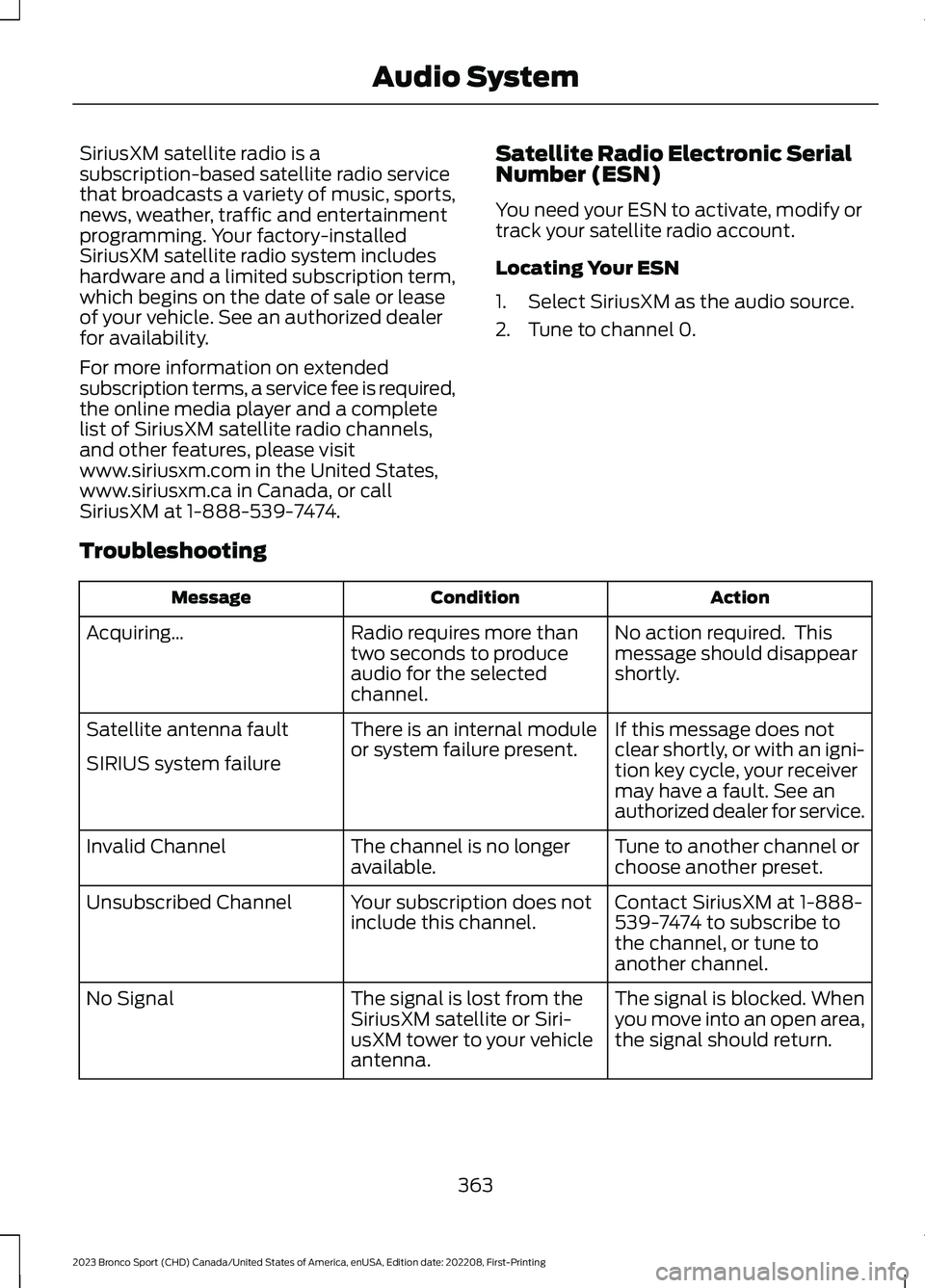
Troubleshooting
ActionConditionMessage
No action required. Thismessage should disappearshortly.
Radio requires more thantwo seconds to produceaudio for the selectedchannel.
Acquiring…
If this message does notclear shortly, or with an igni-tion key cycle, your receivermay have a fault. See anauthorized dealer for service.
There is an internal moduleor system failure present.Satellite antenna fault
SIRIUS system failure
Tune to another channel orchoose another preset.The channel is no longeravailable.Invalid Channel
Contact SiriusXM at 1-888-539-7474 to subscribe tothe channel, or tune toanother channel.
Your subscription does notinclude this channel.Unsubscribed Channel
The signal is blocked. Whenyou move into an open area,the signal should return.
The signal is lost from theSiriusXM satellite or Siri-usXM tower to your vehicleantenna.
No Signal
363
2023 Bronco Sport (CHD) Canada/United States of America, enUSA, Edition date: 202208, First-PrintingAudio System
Page 368 of 516
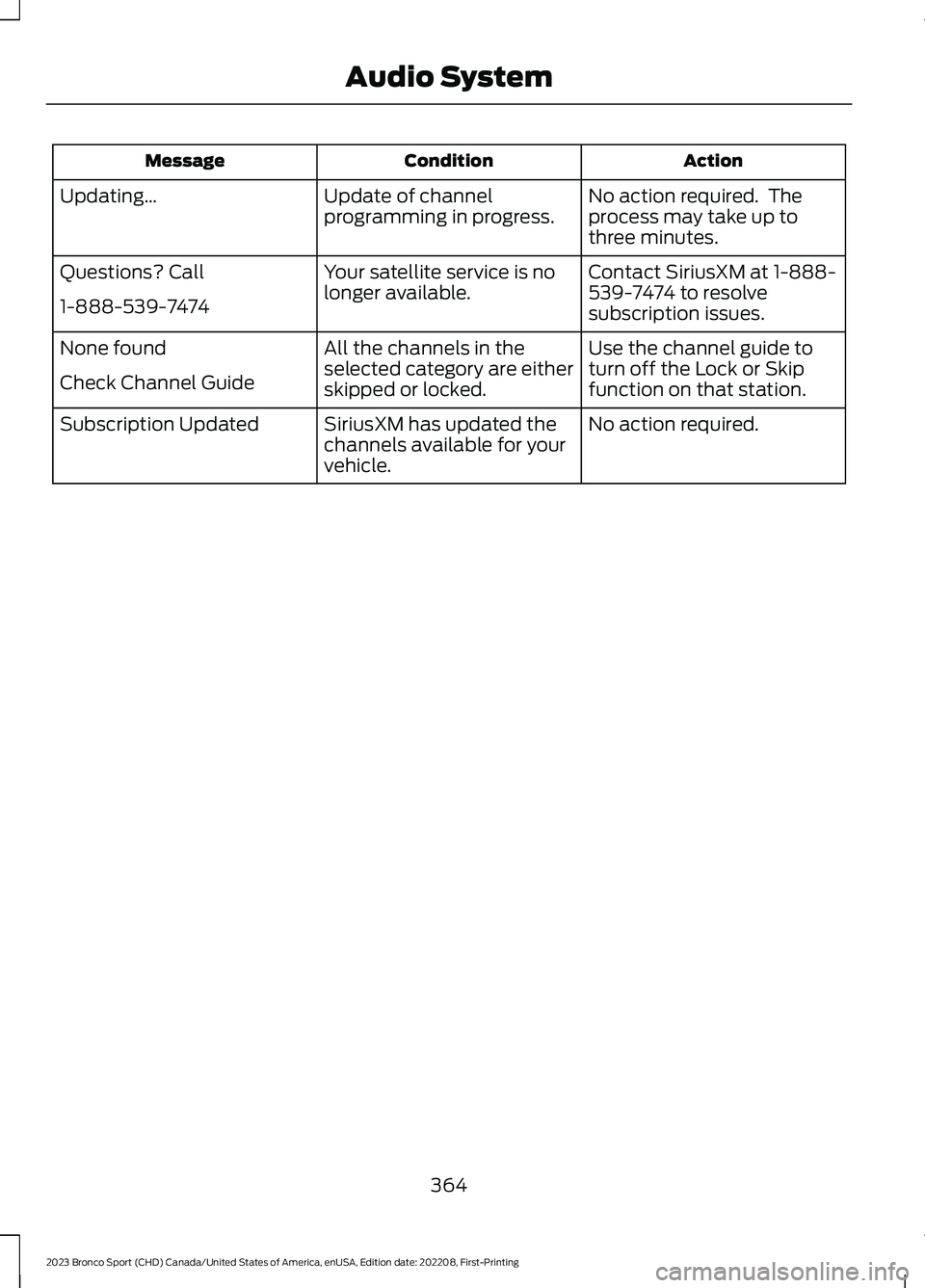
ActionConditionMessage
No action required. Theprocess may take up tothree minutes.
Update of channelprogramming in progress.Updating…
Contact SiriusXM at 1-888-539-7474 to resolvesubscription issues.
Your satellite service is nolonger available.Questions? Call
1-888-539-7474
Use the channel guide toturn off the Lock or Skipfunction on that station.
All the channels in theselected category are eitherskipped or locked.
None found
Check Channel Guide
No action required.SiriusXM has updated thechannels available for yourvehicle.
Subscription Updated
364
2023 Bronco Sport (CHD) Canada/United States of America, enUSA, Edition date: 202208, First-PrintingAudio System
Page 369 of 516
GENERAL INFORMATION
WARNING: Driving while distractedcan result in loss of vehicle control, crashand injury. We strongly recommend thatyou use extreme caution when using anydevice that may take your focus off theroad. Your primary responsibility is thesafe operation of your vehicle. Werecommend against the use of anyhand-held device while driving andencourage the use of voice-operatedsystems when possible. Make sure youare aware of all applicable local lawsthat may affect the use of electronicdevices while driving.
About SYNC
The system allows you to interact with theentertainment, information andcommunication systems on your vehicleusing voice commands and a touchscreen.The system provides easy interaction withaudio, phone, navigation, mobile apps andsettings.
Note:You can switch the system on anduse it for up to an hour without switchingthe ignition on.
Note:You can use the system after youswitch the ignition off for up to 10 minutesor until you open a door.
Note:For your safety, some features arespeed-dependent. Their use is limited towhen your vehicle speed is less than 3 mph(5 km/h).
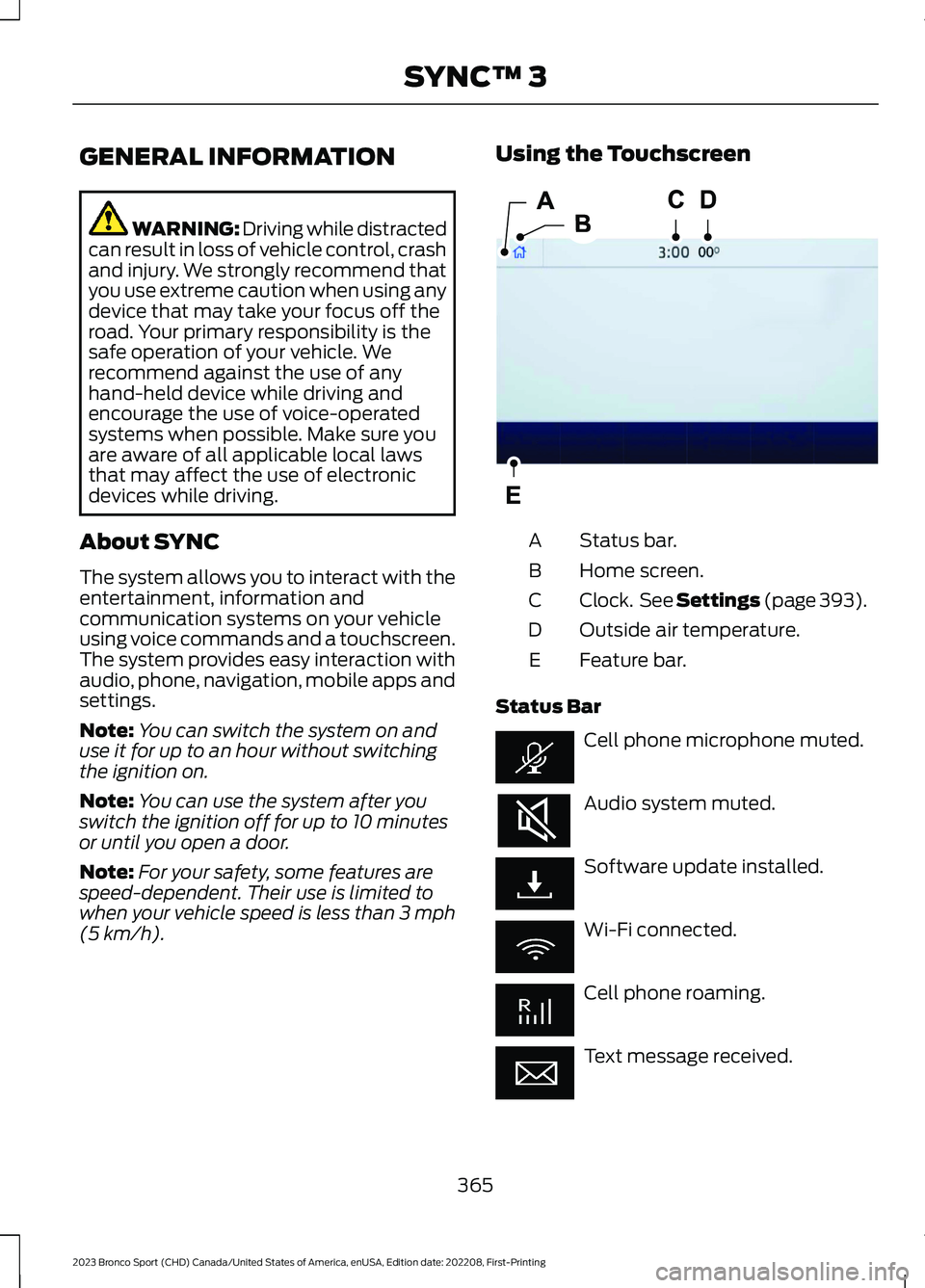
Using the Touchscreen
Status bar.A
Home screen.B
Clock. See Settings (page 393).C
Outside air temperature.D
Feature bar.E
Status Bar
Cell phone microphone muted.
Audio system muted.
Software update installed.
Wi-Fi connected.
Cell phone roaming.
Text message received.
365
2023 Bronco Sport (CHD) Canada/United States of America, enUSA, Edition date: 202208, First-PrintingSYNC™ 3E293823
Page 374 of 516
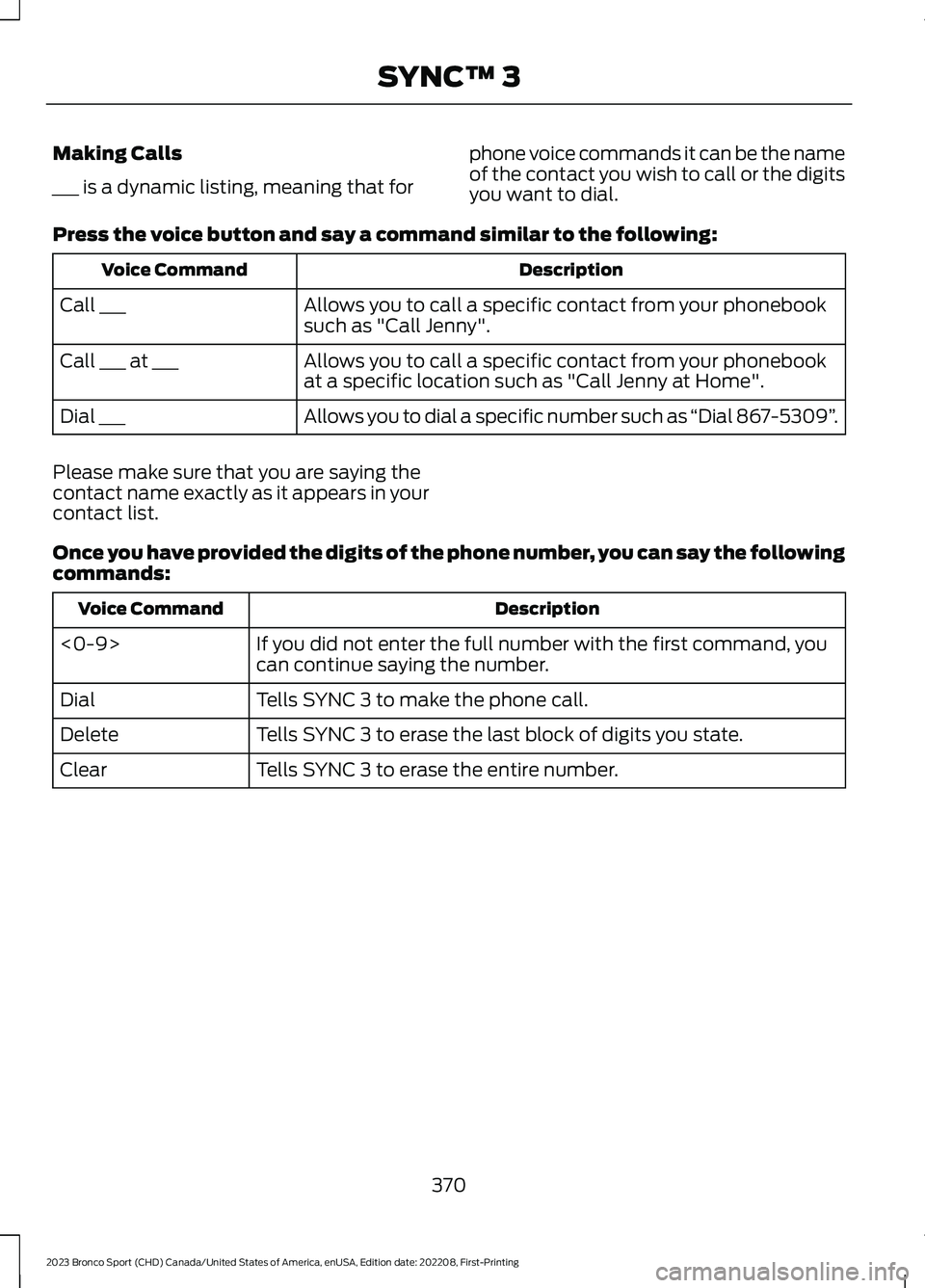
Making Calls
___ is a dynamic listing, meaning that for
phone voice commands it can be the nameof the contact you wish to call or the digitsyou want to dial.
Press the voice button and say a command similar to the following:
DescriptionVoice Command
Allows you to call a specific contact from your phonebooksuch as "Call Jenny".Call ___
Allows you to call a specific contact from your phonebookat a specific location such as "Call Jenny at Home".Call ___ at ___
Allows you to dial a specific number such as “Dial 867-5309”.Dial ___
Please make sure that you are saying thecontact name exactly as it appears in yourcontact list.
Once you have provided the digits of the phone number, you can say the followingcommands:
DescriptionVoice Command
If you did not enter the full number with the first command, youcan continue saying the number.<0-9>
Tells SYNC 3 to make the phone call.Dial
Tells SYNC 3 to erase the last block of digits you state.Delete
Tells SYNC 3 to erase the entire number.Clear
370
2023 Bronco Sport (CHD) Canada/United States of America, enUSA, Edition date: 202208, First-PrintingSYNC™ 3
Page 382 of 516
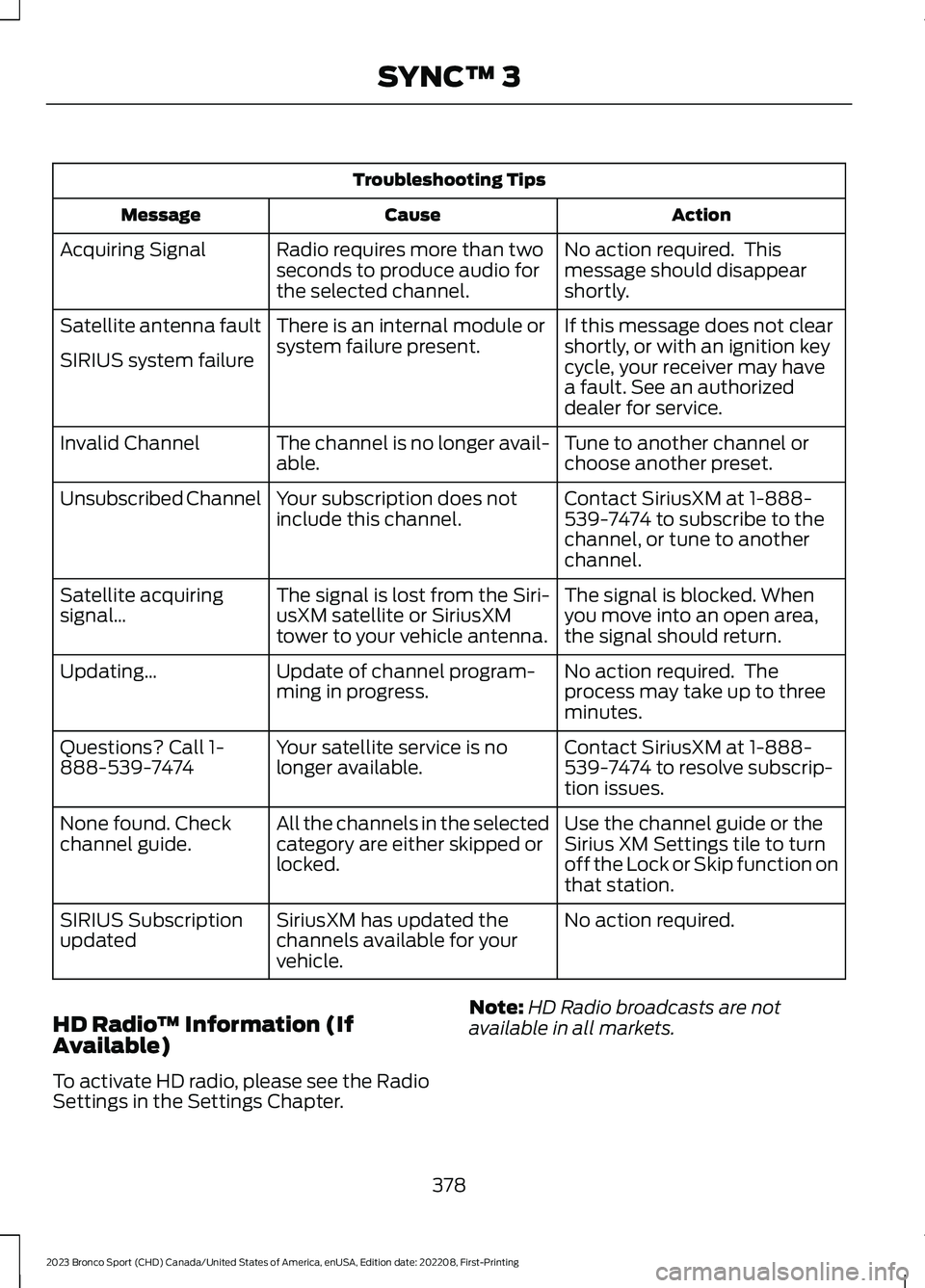
Troubleshooting Tips
ActionCauseMessage
No action required. Thismessage should disappearshortly.
Radio requires more than twoseconds to produce audio forthe selected channel.
Acquiring Signal
If this message does not clearshortly, or with an ignition keycycle, your receiver may havea fault. See an authorizeddealer for service.
There is an internal module orsystem failure present.Satellite antenna fault
SIRIUS system failure
Tune to another channel orchoose another preset.The channel is no longer avail-able.Invalid Channel
Contact SiriusXM at 1-888-539-7474 to subscribe to thechannel, or tune to anotherchannel.
Your subscription does notinclude this channel.Unsubscribed Channel
The signal is blocked. Whenyou move into an open area,the signal should return.
The signal is lost from the Siri-usXM satellite or SiriusXMtower to your vehicle antenna.
Satellite acquiringsignal…
No action required. Theprocess may take up to threeminutes.
Update of channel program-ming in progress.Updating…
Contact SiriusXM at 1-888-539-7474 to resolve subscrip-tion issues.
Your satellite service is nolonger available.Questions? Call 1-888-539-7474
Use the channel guide or theSirius XM Settings tile to turnoff the Lock or Skip function onthat station.
All the channels in the selectedcategory are either skipped orlocked.
None found. Checkchannel guide.
No action required.SiriusXM has updated thechannels available for yourvehicle.
SIRIUS Subscriptionupdated
HD Radio™ Information (IfAvailable)
To activate HD radio, please see the RadioSettings in the Settings Chapter.
Note:HD Radio broadcasts are notavailable in all markets.
378
2023 Bronco Sport (CHD) Canada/United States of America, enUSA, Edition date: 202208, First-PrintingSYNC™ 3