steering FORD BRONCO SPORT 2023 User Guide
[x] Cancel search | Manufacturer: FORD, Model Year: 2023, Model line: BRONCO SPORT, Model: FORD BRONCO SPORT 2023Pages: 516, PDF Size: 14.27 MB
Page 54 of 516
While the system is designed to helpreduce serious injuries, contact with adeploying airbag may also cause abrasionsor swelling. Temporary hearing loss is alsoa possibility as a result of the noiseassociated with a deploying airbag.Because airbags must inflate rapidly andwith considerable force, there is the risk ofdeath or serious injuries such as fractures,facial and eye injuries or internal injuries,particularly to occupants who are notproperly restrained or are otherwise out ofposition at the time of airbag deployment.Thus, it is extremely important thatoccupants be properly restrained as faraway from the airbag module as possiblewhile maintaining vehicle control.
Routine maintenance of the airbags is notrequired.
DRIVER AND PASSENGER
AIRBAGS
WARNING: Do not place your armson the airbag cover or through thesteering wheel. Failure to follow thisinstruction could result in personal injury.
WARNING: Keep the areas in frontof the airbags free from obstruction. Donot affix anything to or over the airbagcovers. Objects could become projectilesduring airbag deployment or in a suddenstop. Failure to follow this instructioncould result in personal injury or death.
WARNING: Airbags can kill or injurea child in a child restraint. Never place arear-facing child restraint in front of anactive airbag. If you must use aforward-facing child restraint in the frontseat, move the seat upon which the childrestraint is installed all the way back.
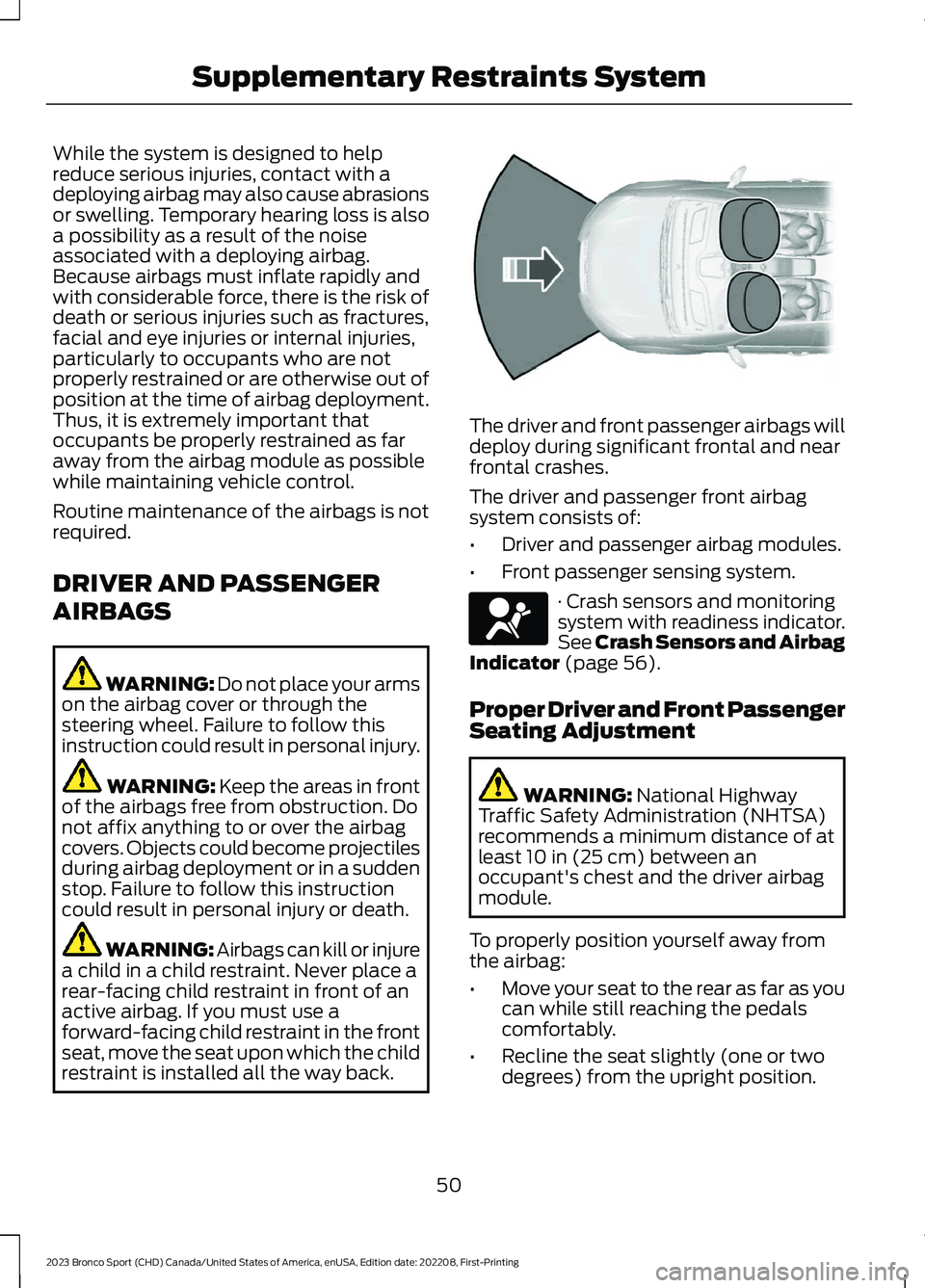
The driver and front passenger airbags willdeploy during significant frontal and nearfrontal crashes.
The driver and passenger front airbagsystem consists of:
•Driver and passenger airbag modules.
•Front passenger sensing system.
· Crash sensors and monitoringsystem with readiness indicator.See Crash Sensors and AirbagIndicator (page 56).
Proper Driver and Front PassengerSeating Adjustment
WARNING: National HighwayTraffic Safety Administration (NHTSA)recommends a minimum distance of atleast 10 in (25 cm) between anoccupant's chest and the driver airbagmodule.
To properly position yourself away fromthe airbag:
•Move your seat to the rear as far as youcan while still reaching the pedalscomfortably.
•Recline the seat slightly (one or twodegrees) from the upright position.
50
2023 Bronco Sport (CHD) Canada/United States of America, enUSA, Edition date: 202208, First-PrintingSupplementary Restraints SystemE151127 E67017
Page 62 of 516
WHAT IS 911 ASSIST
If a crash deploys an airbag, excluding kneeairbags and rear inflatable seatbelts, oractivates the fuel pump shut-off, yourvehicle may be able to contact emergencyservices by dialing 911 through a paired andconnected Bluetooth®-enabled phone.
Website
www.owner.ford.comwww.syncmyride.cawww.syncmaroute.ca
Not all crashes will deploy an airbag oractivate the fuel pump shut-off (thetriggers for 911 Assist). If a connected cellphone sustains damage or loses itsconnection to SYNC during a crash, SYNCwill search for and try to connect to apreviously paired cell phone; SYNC willthen attempt to call emergency services.
Before making the call:
•SYNC provides a short window of time(about 10 seconds) to cancel the call.If you fail to cancel the call, SYNCattempts to dial 911.
•SYNC says the following, or a similarmessage: "SYNC will attempt to call911, to cancel the call, press Cancel onyour screen or press and hold thephone button on your steering wheel."
If you do not cancel the call, and SYNCmakes a successful call, a pre-recordedmessage plays for the 911 operator, andthen the occupant(s) in your vehicle is ableto talk with the operator. Be prepared toprovide your name, phone number andlocation immediately, because not all 911systems are capable of receiving thisinformation electronically.
During an emergency call, the systemtransmits vehicle data to emergencyservices.
HOW DOES 911 ASSIST WORK
If a crash deploys an airbag, excluding kneeairbags and rear inflatable seatbelts, oractivates the fuel pump shut-off, yourvehicle may be able to contact emergencyservices by dialing 911 through a paired andconnected Bluetooth® enabled phone.
Not all crashes deploy an airbag or activatethe fuel pump shut-off. If a connected cellphone sustains damage or loses itsconnection to SYNC during a crash, SYNCsearches for and tries to connect to apreviously paired cell phone. SYNC thenattempts to call the emergency services.
Before making the call:
•SYNC provides about 10 seconds tocancel the call. If you fail to cancel thecall, SYNC attempts to dial 911.
•SYNC says the following, or a similarmessage: SYNC will attempt to call 911,to cancel the call, press Cancel on yourscreen or press and hold the phonebutton on your steering wheel.
If you do not cancel the call and SYNCmakes a successful call a pre-recordedmessage plays for the 911 operator. Theoccupants in your vehicle are able to talkwith the operator. Be prepared to provideyour name, phone number and locationimmediately because not all 911 systemsare capable of receiving this informationelectronically.
During an emergency call the systemtransmits vehicle data to the emergencyservice.
58
2023 Bronco Sport (CHD) Canada/United States of America, enUSA, Edition date: 202208, First-Printing911 Assist
Page 83 of 516
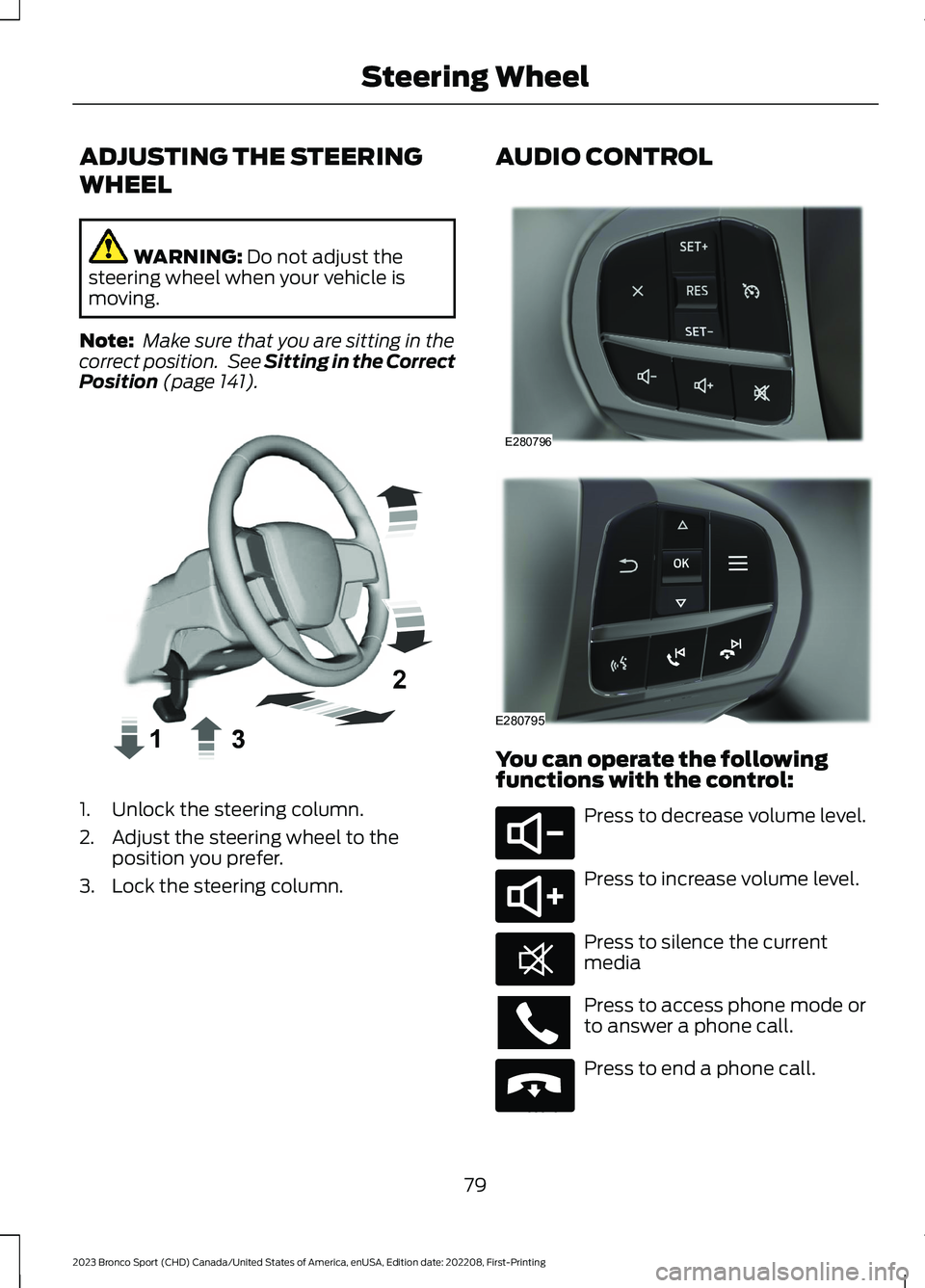
ADJUSTING THE STEERING
WHEEL
WARNING: Do not adjust thesteering wheel when your vehicle ismoving.
Note: Make sure that you are sitting in thecorrect position. See Sitting in the CorrectPosition (page 141).
1.Unlock the steering column.
2.Adjust the steering wheel to theposition you prefer.
3.Lock the steering column.
AUDIO CONTROL
You can operate the followingfunctions with the control:
Press to decrease volume level.
Press to increase volume level.
Press to silence the currentmedia
Press to access phone mode orto answer a phone call.
Press to end a phone call.
79
2023 Bronco Sport (CHD) Canada/United States of America, enUSA, Edition date: 202208, First-PrintingSteering WheelE359744 E280796 E280795 E280802 E280803 E268549 E265040
Page 84 of 516
Press to access the previousmedia selection.
Press to access the next mediaselection.
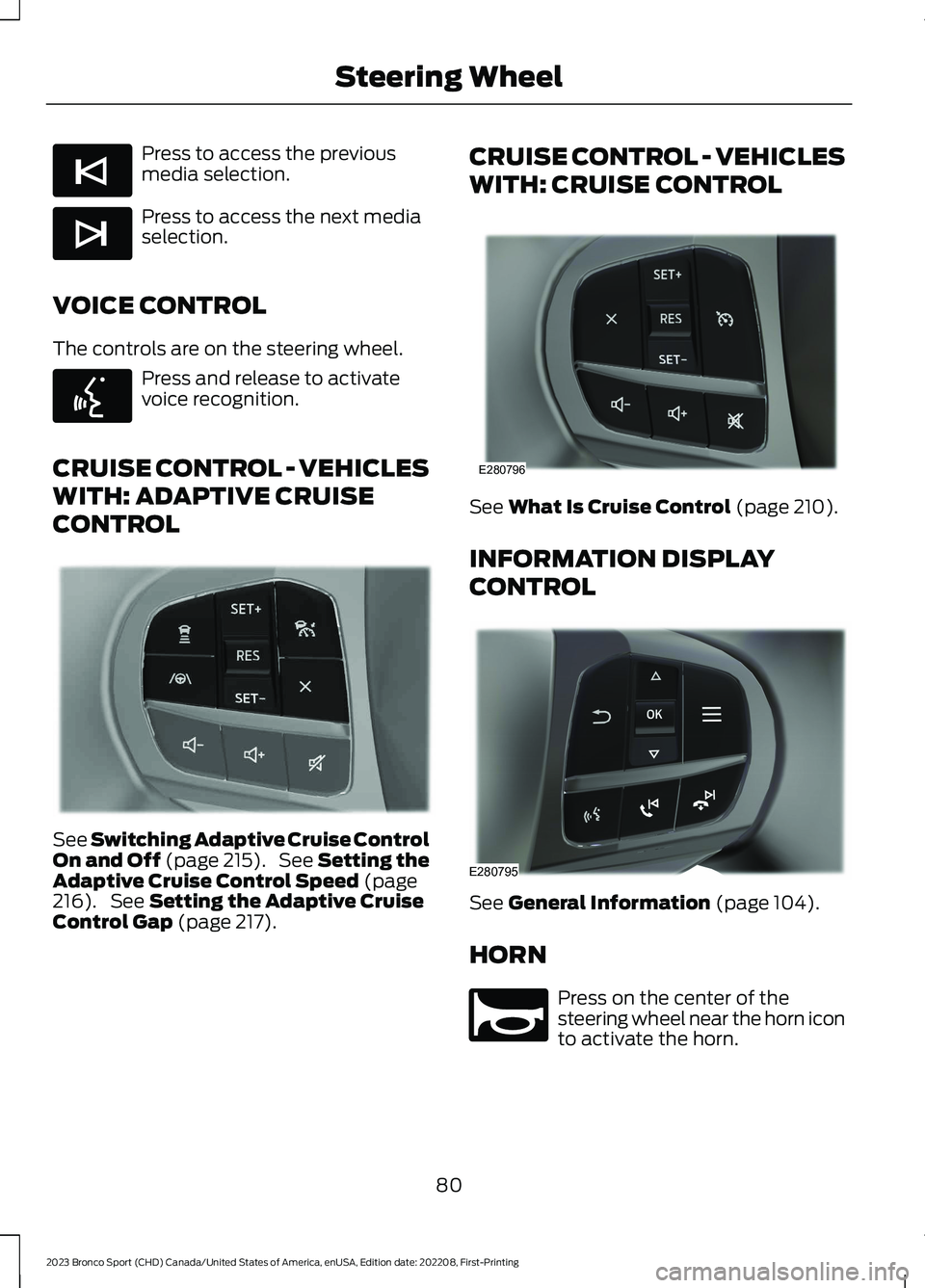
VOICE CONTROL
The controls are on the steering wheel.
Press and release to activatevoice recognition.
CRUISE CONTROL - VEHICLES
WITH: ADAPTIVE CRUISE
CONTROL
See Switching Adaptive Cruise ControlOn and Off (page 215). See Setting theAdaptive Cruise Control Speed (page216). See Setting the Adaptive CruiseControl Gap (page 217).
CRUISE CONTROL - VEHICLES
WITH: CRUISE CONTROL
See What Is Cruise Control (page 210).
INFORMATION DISPLAY
CONTROL
See General Information (page 104).
HORN
Press on the center of thesteering wheel near the horn iconto activate the horn.
80
2023 Bronco Sport (CHD) Canada/United States of America, enUSA, Edition date: 202208, First-PrintingSteering WheelE265045 E265044 E142599 E349487 E280796 E280795 E270945
Page 85 of 516
SWITCHING THE HEATED
STEERING WHEEL ON AND OFF
(IF EQUIPPED)
To activate the heated steeringwheel, press the button on theclimate control unit.
On some vehicles, an indicator on thebutton illuminates when the heatedsteering wheel is on.
Note:A sensor regulates the temperatureof the steering wheel.
81
2023 Bronco Sport (CHD) Canada/United States of America, enUSA, Edition date: 202208, First-PrintingSteering WheelE256621
Page 92 of 516
Note:The lights on the front fog lamps turnoff when you switch the high beams on.
Front Fog Lamp Indicator
It illuminates when you switchthe front fog lamps on.
CORNERING LAMPS (IF EQUIPPED)
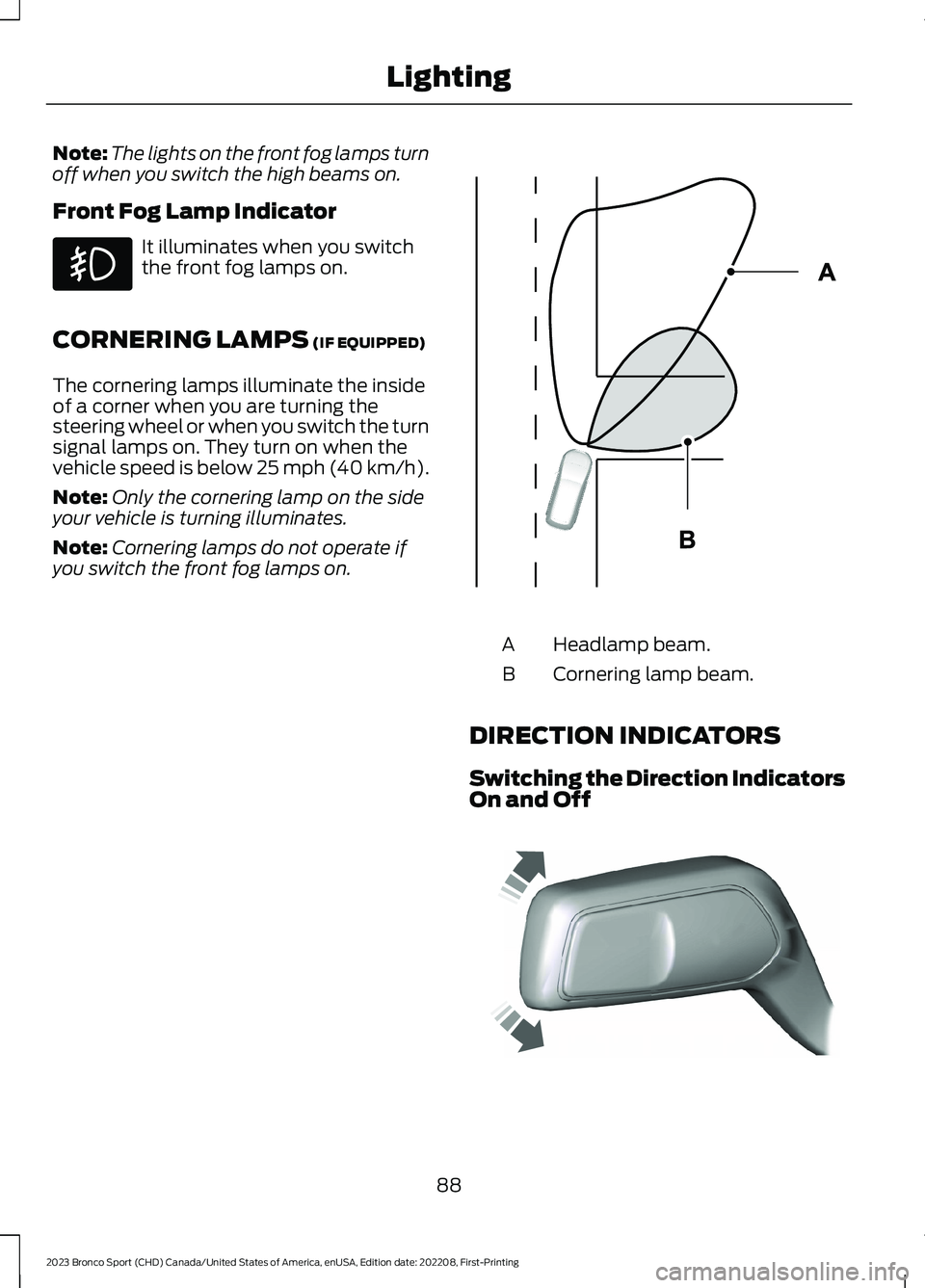
The cornering lamps illuminate the insideof a corner when you are turning thesteering wheel or when you switch the turnsignal lamps on. They turn on when thevehicle speed is below 25 mph (40 km/h).
Note:Only the cornering lamp on the sideyour vehicle is turning illuminates.
Note:Cornering lamps do not operate ifyou switch the front fog lamps on.
Headlamp beam.A
Cornering lamp beam.B
DIRECTION INDICATORS
Switching the Direction IndicatorsOn and Off
88
2023 Bronco Sport (CHD) Canada/United States of America, enUSA, Edition date: 202208, First-PrintingLighting E327599 E242676
Page 108 of 516
GENERAL INFORMATION
WARNING: Driving while distractedcan result in loss of vehicle control, crashand injury. We strongly recommend thatyou use extreme caution when using anydevice that may take your focus off theroad. Your primary responsibility is thesafe operation of your vehicle. Werecommend against the use of anyhand-held device while driving andencourage the use of voice-operatedsystems when possible. Make sure youare aware of all applicable local lawsthat may affect the use of electronicdevices while driving.
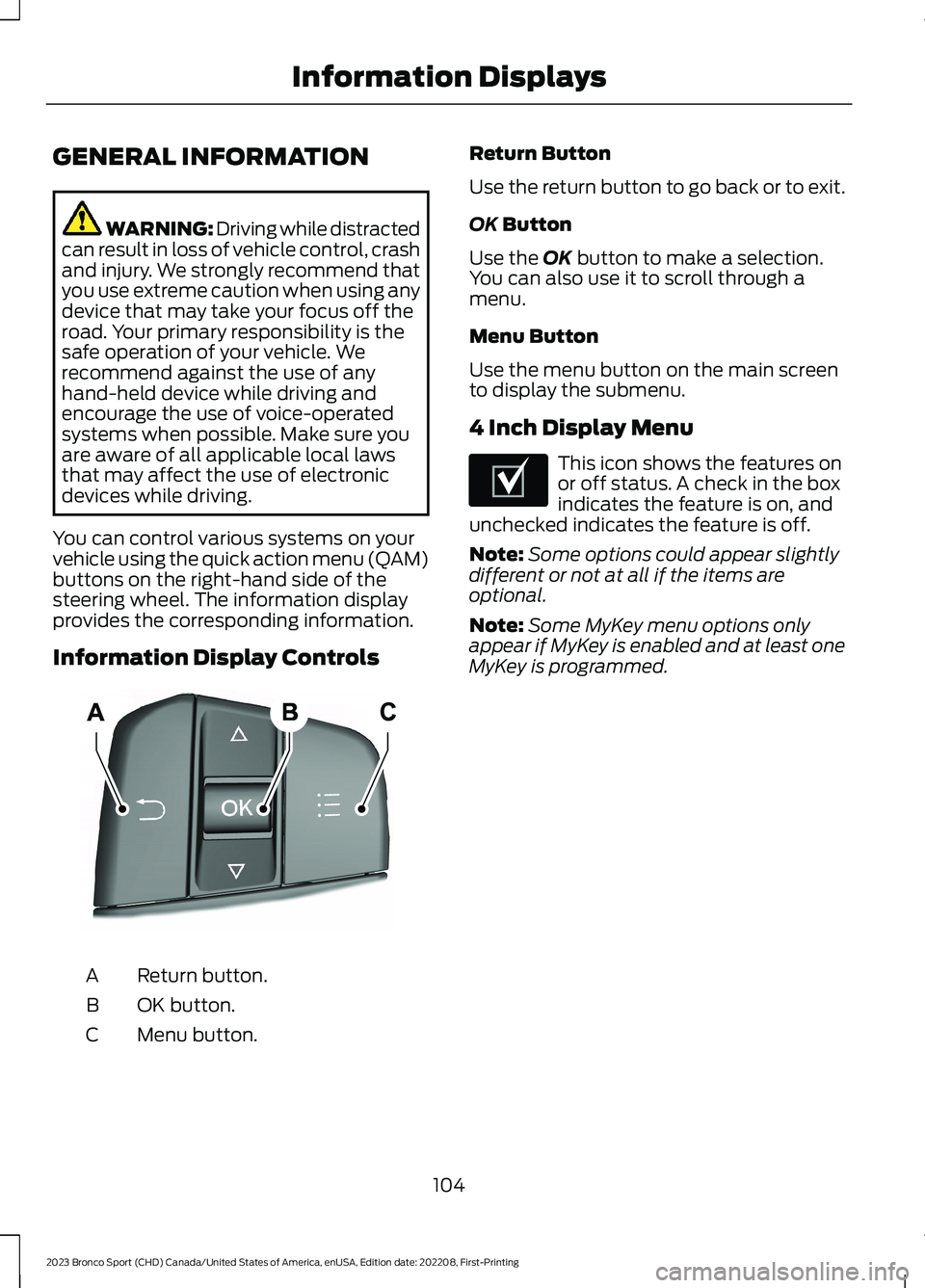
You can control various systems on yourvehicle using the quick action menu (QAM)buttons on the right-hand side of thesteering wheel. The information displayprovides the corresponding information.
Information Display Controls
Return button.A
OK button.B
Menu button.C
Return Button
Use the return button to go back or to exit.
OK Button
Use the OK button to make a selection.You can also use it to scroll through amenu.
Menu Button
Use the menu button on the main screento display the submenu.
4 Inch Display Menu
This icon shows the features onor off status. A check in the boxindicates the feature is on, andunchecked indicates the feature is off.
Note:Some options could appear slightlydifferent or not at all if the items areoptional.
Note:Some MyKey menu options onlyappear if MyKey is enabled and at least oneMyKey is programmed.
104
2023 Bronco Sport (CHD) Canada/United States of America, enUSA, Edition date: 202208, First-PrintingInformation DisplaysE250032 E204495
Page 120 of 516
Lane Keeping System
DetailsMessage
The system has malfunctioned. Have the system checked as soonas possible.Lane Keeping Sys.MalfunctionService Required
The system has detected a condition that has caused the systemto be temporarily unavailable.Front CameraTemporarily NotAvailable
The system has detected a condition that requires the windshieldto be cleaned to properly operate.Front Camera LowVisibility CleanScreen
The system has malfunctioned. Have the system checked as soonas possible.Front CameraMalfunctionService Required
The system requests the driver to keep their hands on the steeringwheel.Keep Hands onSteering Wheel
Maintenance
DetailsMessage
Stop your vehicle as soon as safely possible, turn off the engine.Check the oil level. If the warning stays on or continues to come onwith your engine running, Have the system checked as soon aspossible.
Low Engine OilPressure
The engine oil life remaining is 10% or less.Change Engine OilSoon
The oil life left reaches 0%.Oil ChangeRequired
The brake fluid level is low and the brake system should be imme-diately inspected. See Brake Fluid Check (page 295).Brake Fluid LevelLow
The brake system needs servicing. Stop the vehicle in a safe place.Have the system checked as soon as possible.Check BrakeSystem
The engine coolant temperature is excessively high.Engine CoolantOver Temperature
The washer fluid is low and needs to be refilled.Washer Fluid LevelLow
116
2023 Bronco Sport (CHD) Canada/United States of America, enUSA, Edition date: 202208, First-PrintingInformation Displays
Page 123 of 516
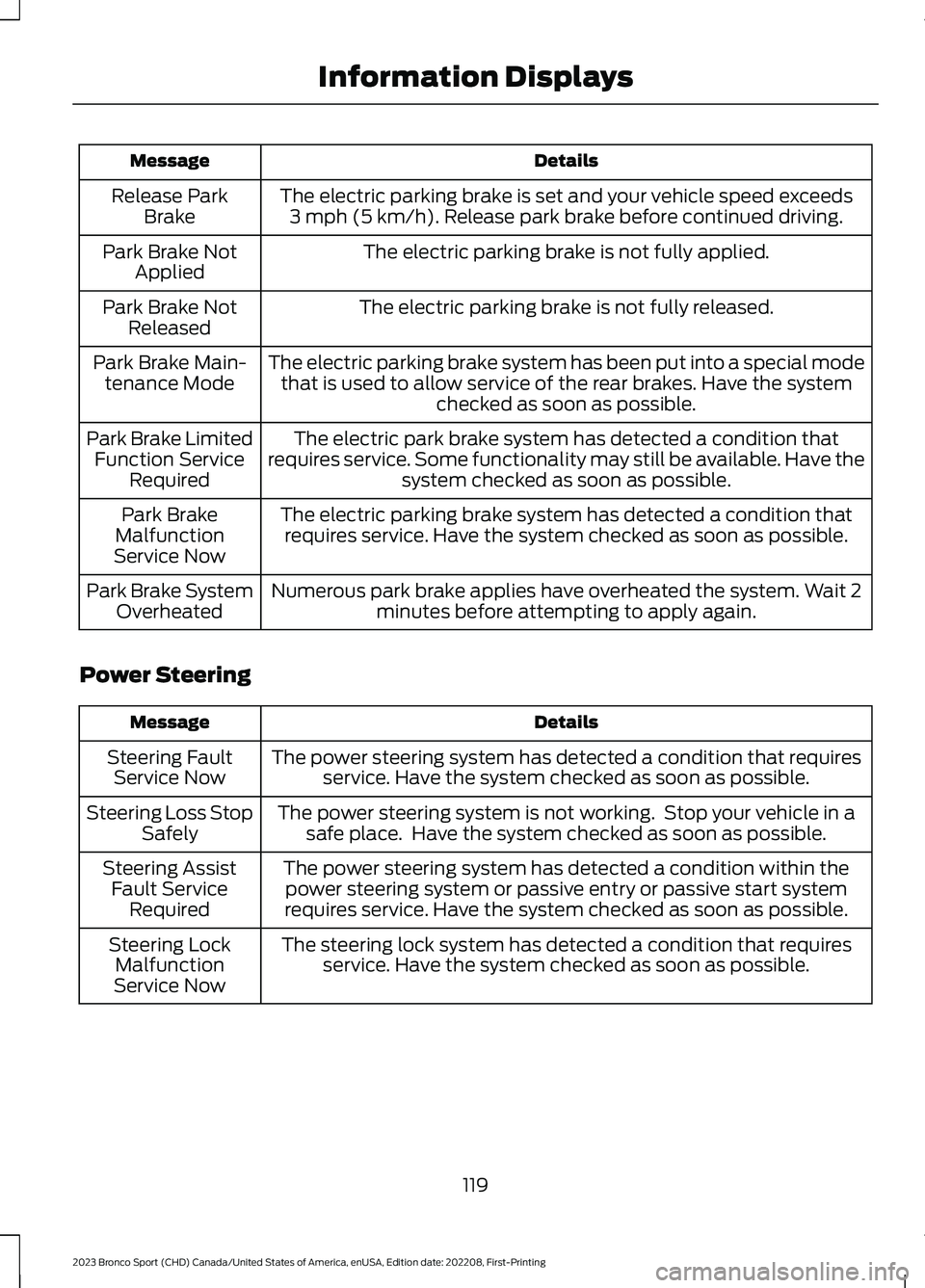
DetailsMessage
The electric parking brake is set and your vehicle speed exceeds3 mph (5 km/h). Release park brake before continued driving.Release ParkBrake
The electric parking brake is not fully applied.Park Brake NotApplied
The electric parking brake is not fully released.Park Brake NotReleased
The electric parking brake system has been put into a special modethat is used to allow service of the rear brakes. Have the systemchecked as soon as possible.
Park Brake Main-tenance Mode
The electric park brake system has detected a condition thatrequires service. Some functionality may still be available. Have thesystem checked as soon as possible.
Park Brake LimitedFunction ServiceRequired
The electric parking brake system has detected a condition thatrequires service. Have the system checked as soon as possible.Park BrakeMalfunctionService Now
Numerous park brake applies have overheated the system. Wait 2minutes before attempting to apply again.Park Brake SystemOverheated
Power Steering
DetailsMessage
The power steering system has detected a condition that requiresservice. Have the system checked as soon as possible.Steering FaultService Now
The power steering system is not working. Stop your vehicle in asafe place. Have the system checked as soon as possible.Steering Loss StopSafely
The power steering system has detected a condition within thepower steering system or passive entry or passive start systemrequires service. Have the system checked as soon as possible.
Steering AssistFault ServiceRequired
The steering lock system has detected a condition that requiresservice. Have the system checked as soon as possible.Steering LockMalfunctionService Now
119
2023 Bronco Sport (CHD) Canada/United States of America, enUSA, Edition date: 202208, First-PrintingInformation Displays
Page 130 of 516
EXTENDING THE REMOTE
START DURATION
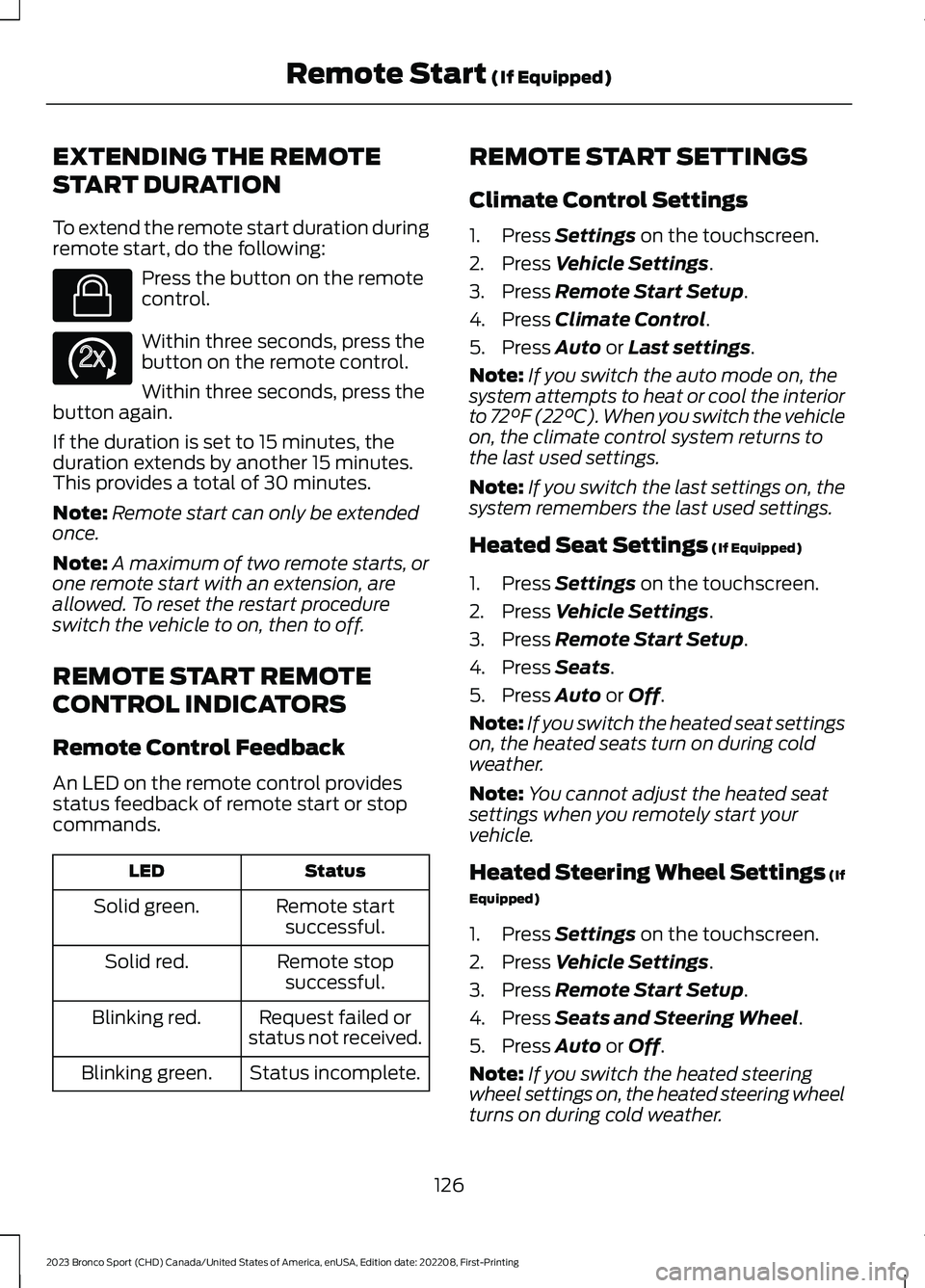
To extend the remote start duration duringremote start, do the following:
Press the button on the remotecontrol.
Within three seconds, press thebutton on the remote control.
Within three seconds, press thebutton again.
If the duration is set to 15 minutes, theduration extends by another 15 minutes.This provides a total of 30 minutes.
Note:Remote start can only be extendedonce.
Note:A maximum of two remote starts, orone remote start with an extension, areallowed. To reset the restart procedureswitch the vehicle to on, then to off.
REMOTE START REMOTE
CONTROL INDICATORS
Remote Control Feedback
An LED on the remote control providesstatus feedback of remote start or stopcommands.
StatusLED
Remote startsuccessful.Solid green.
Remote stopsuccessful.Solid red.
Request failed orstatus not received.Blinking red.
Status incomplete.Blinking green.
REMOTE START SETTINGS
Climate Control Settings
1.Press Settings on the touchscreen.
2.Press Vehicle Settings.
3.Press Remote Start Setup.
4.Press Climate Control.
5.Press Auto or Last settings.
Note:If you switch the auto mode on, thesystem attempts to heat or cool the interiorto 72°F (22°C). When you switch the vehicleon, the climate control system returns tothe last used settings.
Note:If you switch the last settings on, thesystem remembers the last used settings.
Heated Seat Settings (If Equipped)
1.Press Settings on the touchscreen.
2.Press Vehicle Settings.
3.Press Remote Start Setup.
4.Press Seats.
5.Press Auto or Off.
Note:If you switch the heated seat settingson, the heated seats turn on during coldweather.
Note:You cannot adjust the heated seatsettings when you remotely start yourvehicle.
Heated Steering Wheel Settings (If
Equipped)
1.Press Settings on the touchscreen.
2.Press Vehicle Settings.
3.Press Remote Start Setup.
4.Press Seats and Steering Wheel.
5.Press Auto or Off.
Note:If you switch the heated steeringwheel settings on, the heated steering wheelturns on during cold weather.
126
2023 Bronco Sport (CHD) Canada/United States of America, enUSA, Edition date: 202208, First-PrintingRemote Start (If Equipped)E138623 E138625