steering FORD BRONCO SPORT 2023 Service Manual
[x] Cancel search | Manufacturer: FORD, Model Year: 2023, Model line: BRONCO SPORT, Model: FORD BRONCO SPORT 2023Pages: 516, PDF Size: 14.27 MB
Page 231 of 516
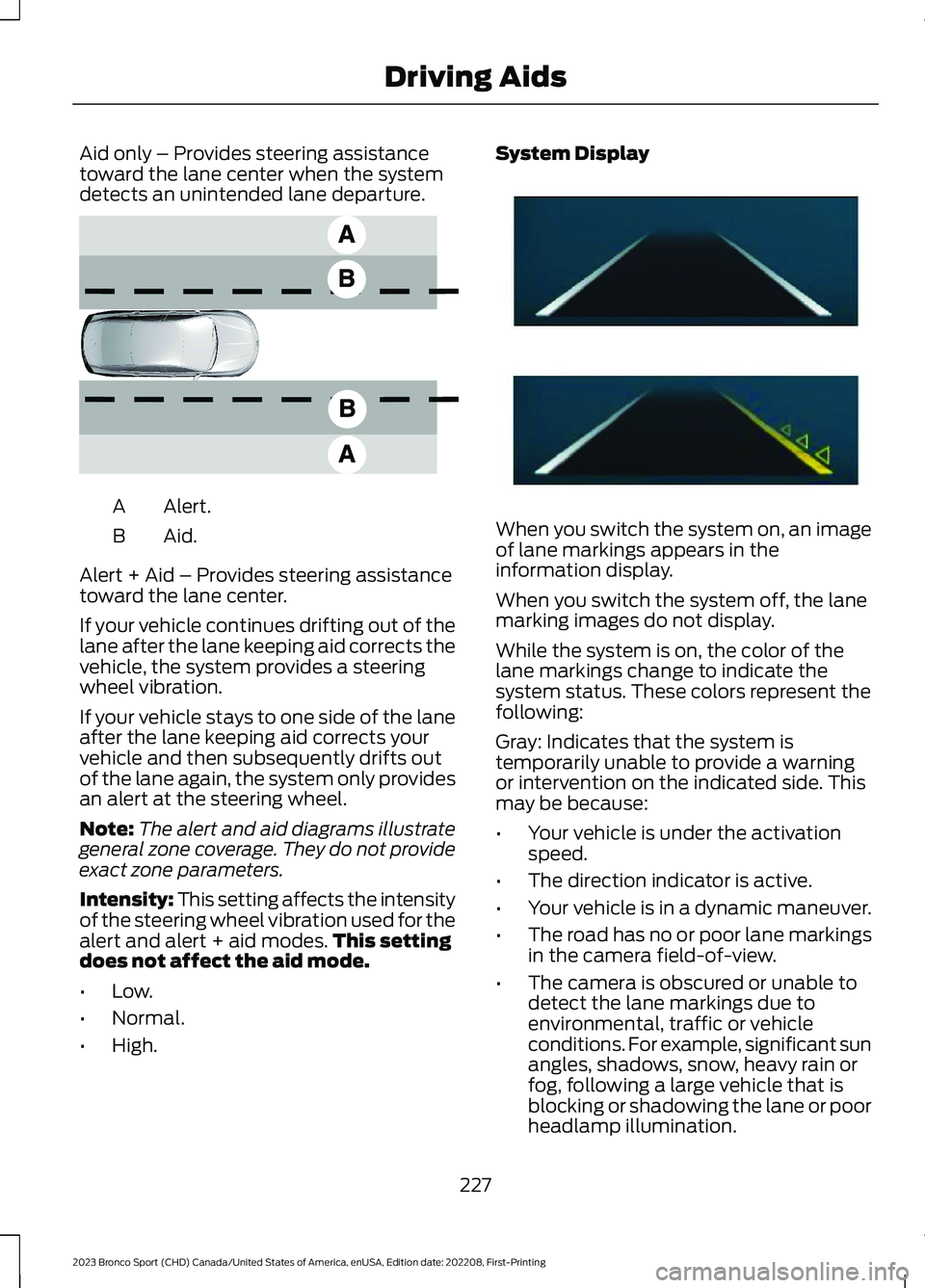
Aid only – Provides steering assistancetoward the lane center when the systemdetects an unintended lane departure.
Alert.A
Aid.B
Alert + Aid – Provides steering assistancetoward the lane center.
If your vehicle continues drifting out of thelane after the lane keeping aid corrects thevehicle, the system provides a steeringwheel vibration.
If your vehicle stays to one side of the laneafter the lane keeping aid corrects yourvehicle and then subsequently drifts outof the lane again, the system only providesan alert at the steering wheel.
Note:The alert and aid diagrams illustrategeneral zone coverage. They do not provideexact zone parameters.
Intensity: This setting affects the intensityof the steering wheel vibration used for thealert and alert + aid modes.This settingdoes not affect the aid mode.
•Low.
•Normal.
•High.
System Display
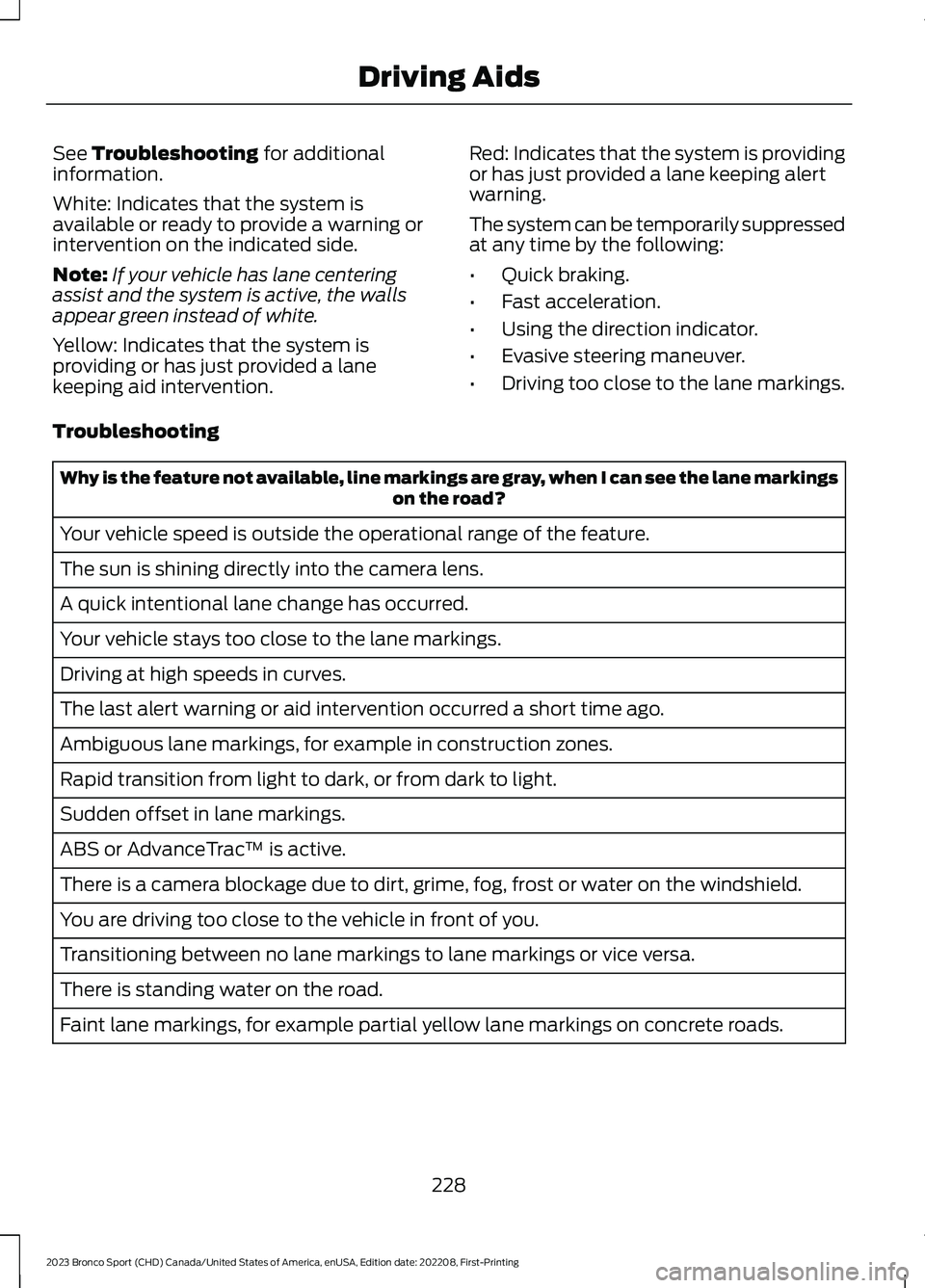
When you switch the system on, an imageof lane markings appears in theinformation display.
When you switch the system off, the lanemarking images do not display.
While the system is on, the color of thelane markings change to indicate thesystem status. These colors represent thefollowing:
Gray: Indicates that the system istemporarily unable to provide a warningor intervention on the indicated side. Thismay be because:
•Your vehicle is under the activationspeed.
•The direction indicator is active.
•Your vehicle is in a dynamic maneuver.
•The road has no or poor lane markingsin the camera field-of-view.
•The camera is obscured or unable todetect the lane markings due toenvironmental, traffic or vehicleconditions. For example, significant sunangles, shadows, snow, heavy rain orfog, following a large vehicle that isblocking or shadowing the lane or poorheadlamp illumination.
227
2023 Bronco Sport (CHD) Canada/United States of America, enUSA, Edition date: 202208, First-PrintingDriving AidsE165517 E294544
Page 232 of 516
See Troubleshooting for additionalinformation.
White: Indicates that the system isavailable or ready to provide a warning orintervention on the indicated side.
Note:If your vehicle has lane centeringassist and the system is active, the wallsappear green instead of white.
Yellow: Indicates that the system isproviding or has just provided a lanekeeping aid intervention.
Red: Indicates that the system is providingor has just provided a lane keeping alertwarning.
The system can be temporarily suppressedat any time by the following:
•Quick braking.
•Fast acceleration.
•Using the direction indicator.
•Evasive steering maneuver.
•Driving too close to the lane markings.
Troubleshooting
Why is the feature not available, line markings are gray, when I can see the lane markingson the road?
Your vehicle speed is outside the operational range of the feature.
The sun is shining directly into the camera lens.
A quick intentional lane change has occurred.
Your vehicle stays too close to the lane markings.
Driving at high speeds in curves.
The last alert warning or aid intervention occurred a short time ago.
Ambiguous lane markings, for example in construction zones.
Rapid transition from light to dark, or from dark to light.
Sudden offset in lane markings.
ABS or AdvanceTrac™ is active.
There is a camera blockage due to dirt, grime, fog, frost or water on the windshield.
You are driving too close to the vehicle in front of you.
Transitioning between no lane markings to lane markings or vice versa.
There is standing water on the road.
Faint lane markings, for example partial yellow lane markings on concrete roads.
228
2023 Bronco Sport (CHD) Canada/United States of America, enUSA, Edition date: 202208, First-PrintingDriving Aids
Page 240 of 516
STEERING
Electric Power Steering
WARNING: The electric powersteering system has diagnostic checksthat continuously monitor the system. Ifa fault is detected, a message displaysin the information display. Stop yourvehicle as soon as it is safe to do so.Switch the ignition off. After at least 10seconds, switch the ignition on andwatch the information display for asteering system warning message. If asteering system warning messagereturns, have the system checked assoon as possible.
WARNING: If the system detectsan error, you may not feel a difference inthe steering, however a serious conditionmay exist. Have your vehicle checked assoon as possible. Failure to do so mayresult in loss of steering control.
If your vehicle loses electrical power whileyou are driving (or if the ignition is turnedoff), you can steer the vehicle manually,but it takes more effort. You must adaptyour speed and driving behavior to reducedsteering assist. Extreme continuoussteering may increase the effort it takesfor you to steer. This occurs to preventinternal overheating and permanentdamage to your steering system. If thisshould occur, you will neither lose theability to steer the vehicle manually norwill it cause permanent damage. Typicalsteering and driving maneuvers will allowthe system to cool down and steeringassist will return to normal.
Steering Tips
If the steering wanders or pulls, check for:
•An improperly inflated tire.
•Uneven tire wear.
•Loose or worn suspensioncomponents.
•Loose or worn steering components.
•Improper vehicle alignment.
A high crown in the road or high crosswindsmay also make the steering seem towander or pull.
PRE-COLLISION ASSIST
WARNING: You are responsible forcontrolling your vehicle at all times. Thesystem is designed to be an aid and doesnot relieve you of your responsibility todrive with due care and attention. Failureto follow this instruction could result inthe loss of control of your vehicle,personal injury or death.
WARNING: The system does notdetect vehicles that are driving in adifferent direction, cyclists or animals.Apply the brakes when necessary. Failureto follow this instruction could result inthe loss of control of your vehicle,personal injury or death.
WARNING: The system does notoperate during hard acceleration orsteering. Failure to take care may leadto a crash or personal injury.
236
2023 Bronco Sport (CHD) Canada/United States of America, enUSA, Edition date: 202208, First-PrintingDriving Aids
Page 242 of 516
Distance Indication and Alert (If
Equipped)
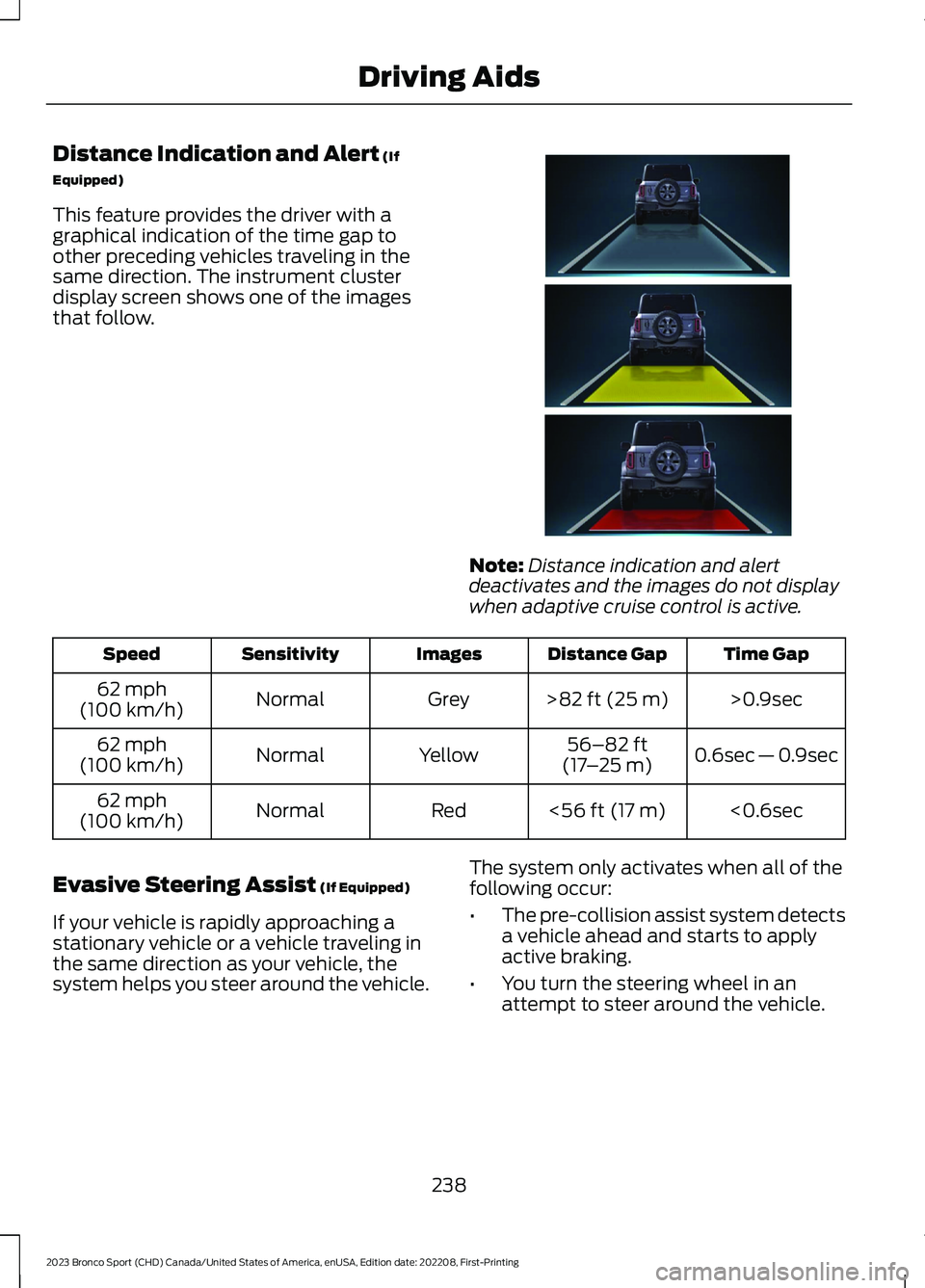
This feature provides the driver with agraphical indication of the time gap toother preceding vehicles traveling in thesame direction. The instrument clusterdisplay screen shows one of the imagesthat follow.
Note:Distance indication and alertdeactivates and the images do not displaywhen adaptive cruise control is active.
Time GapDistance GapImagesSensitivitySpeed
>0.9sec>82 ft (25 m)GreyNormal62 mph(100 km/h)
0.6sec — 0.9sec56–82 ft(17–25 m)YellowNormal62 mph(100 km/h)
<0.6sec<56 ft (17 m)RedNormal62 mph(100 km/h)
Evasive Steering Assist (If Equipped)
If your vehicle is rapidly approaching astationary vehicle or a vehicle traveling inthe same direction as your vehicle, thesystem helps you steer around the vehicle.
The system only activates when all of thefollowing occur:
•The pre-collision assist system detectsa vehicle ahead and starts to applyactive braking.
•You turn the steering wheel in anattempt to steer around the vehicle.
238
2023 Bronco Sport (CHD) Canada/United States of America, enUSA, Edition date: 202208, First-PrintingDriving AidsE357884
Page 243 of 516
After you turn the steering wheel, thesystem applies additional steering torqueto help you steer around the vehicle. Afteryou pass the vehicle, the system appliessteering torque in the opposite direction toencourage you to steer back into the lane.The system deactivates after you fully passthe vehicle.
Note:The system does not automaticallysteer around a vehicle. If you do not turn thesteering wheel, the system does notactivate.
Note:The system does not activate if thedistance to the vehicle ahead is too smalland you cannot avoid a crash.
Note:The system does not activate forcyclists or pedestrians.
Adjusting the Pre-Collision AssistSettings
Depending on your vehicle options, thepre-collision assist settings can be in thefollowing:
•instrument cluster display. SeeGeneral Information (page 104).
•Touchscreen. See Settings (page 393).
You can adjust the following settings:
•Change alert and distance alertsensitivity to one of three possiblesettings.
•Switch distance indication and alert onor off.
•If required, switch active braking on oroff.
•If required, switch evasive steeringassist on or off.
Note:Active braking and evasive steeringassist turn on every time you switch theignition on.
Note:If you switch active braking off,evasive steering assist turns off.
Blocked Sensors
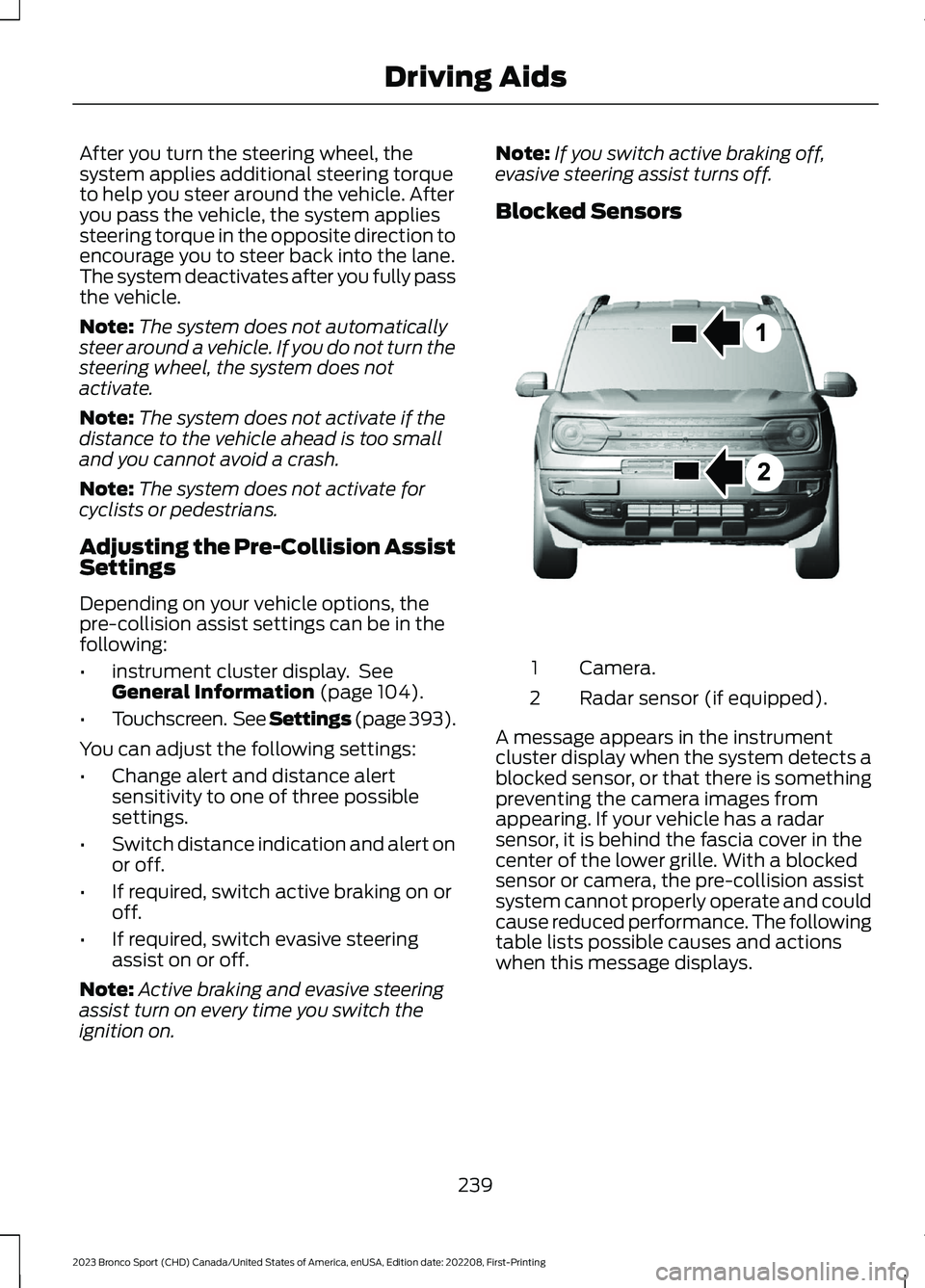
Camera.1
Radar sensor (if equipped).2
A message appears in the instrumentcluster display when the system detects ablocked sensor, or that there is somethingpreventing the camera images fromappearing. If your vehicle has a radarsensor, it is behind the fascia cover in thecenter of the lower grille. With a blockedsensor or camera, the pre-collision assistsystem cannot properly operate and couldcause reduced performance. The followingtable lists possible causes and actionswhen this message displays.
239
2023 Bronco Sport (CHD) Canada/United States of America, enUSA, Edition date: 202208, First-PrintingDriving AidsE325781
Page 245 of 516
WHAT IS G.O.A.T. MODE
CONTROL
Your vehicle has several goes overany-type of terrain (G.O.A.T.) modes thatyou can select for different drivingconditions. Depending on the mode thatyou select, the system adjusts variousvehicle settings.
HOW DOES G.O.A.T. MODE
CONTROL WORK
Each selectable mode changes variouselectronic and mechanical settings withinyour vehicle to tailor its performance anddriving characteristics to on-road oroff-road driving conditions. The systemcan alter steering feel and effort, tractioncontrol, stability control, chassis controls,powertrain response, transmission shiftpoints, four-wheel driveline settings andthe exhaust noise level to apre-determined setting, depending uponthe mode that you select.
Your vehicle reverts to normal mode eachtime you start it.
Note:Your vehicle has diagnostic checksthat continuously monitor all systems forproper operation. If a mode is unavailabledue to a system fault, your vehicle defaultsto normal mode and the driveline remainsin the four-wheel drive setting that you lastselected prior to the system fault.
SELECTING A G.O.A.T. MODE -
1.5L ECOBOOST™
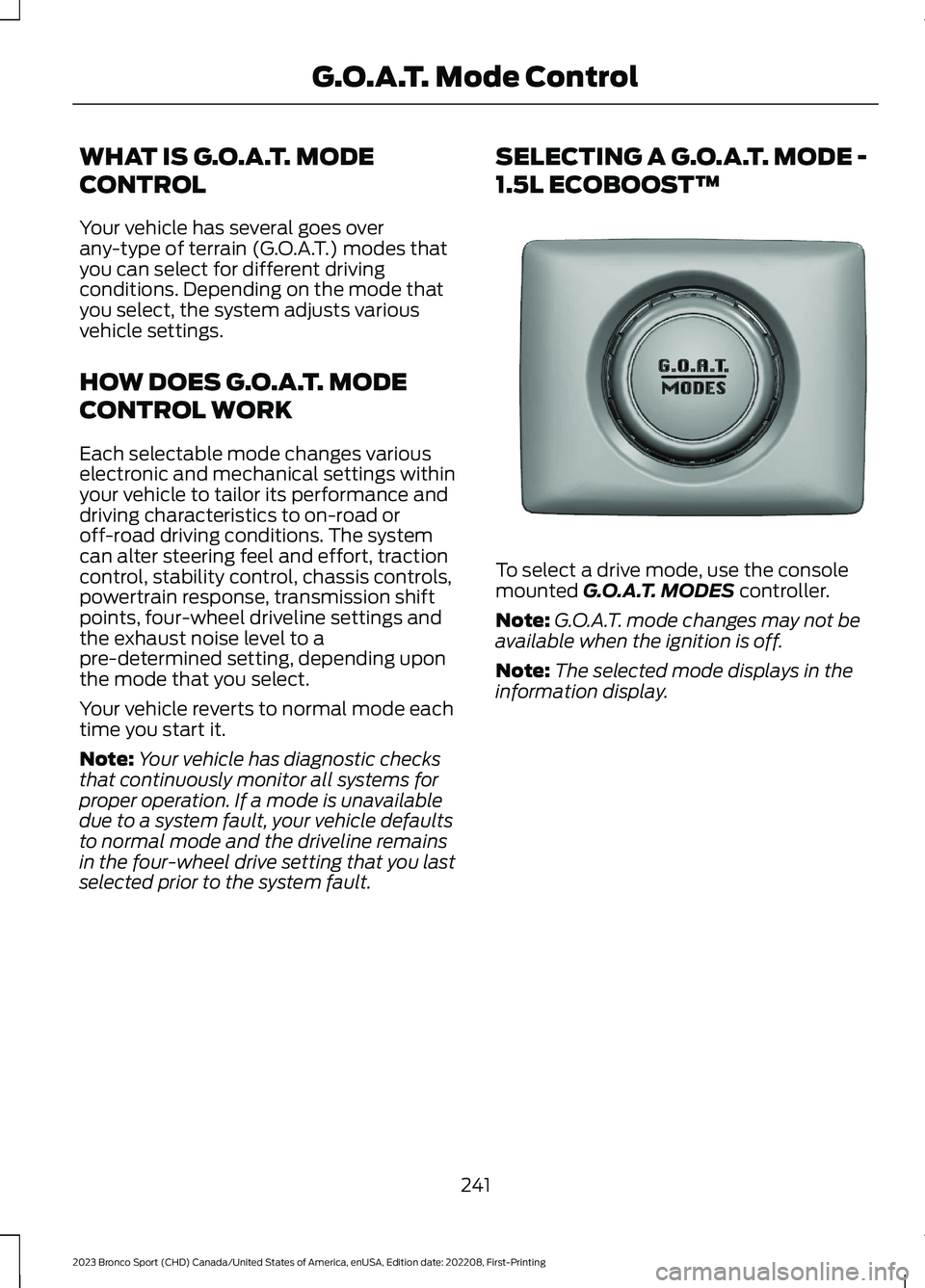
To select a drive mode, use the consolemounted G.O.A.T. MODES controller.
Note:G.O.A.T. mode changes may not beavailable when the ignition is off.
Note:The selected mode displays in theinformation display.
241
2023 Bronco Sport (CHD) Canada/United States of America, enUSA, Edition date: 202208, First-PrintingG.O.A.T. Mode ControlE339228
Page 247 of 516
throttle control and minimize speedchange over rough terrain. The steeringoptimizes for less effort with reducedkick-back. Rock crawl mode optimizesbraking for off-road conditions, allowingquick path corrections and minimizedstopping distance when on deformablesurfaces. The engine sound enhanceswhen in rock crawl mode.
The rear differential lock feature enablesin rock crawl mode. When enabled it isengaged below 30 mph (48 km/h). Youcan disable the feature using the drivemode controller.
Note:The front camera system switcheson when you are in rock crawl mode. Youcan switch the camera off using the buttonon the audio unit.
Note:This mode may help get your vehicleunstuck from deep snow or sand.
Note:Do not use this mode on dry, hardpavement. This could produce somevibration, driveline bind up, and potentialexcessive tire and vehicle wear dependingon the four-wheel drive mode selection.
SAND
For more spirited off-roaddriving. Sand mode is foroff-road driving on soft, dry sandor deep conditions. Lower gears holdlonger in sand mode to maintainmomentum in soft conditions. Sand modeengages the four-wheel drive lock, whichyou can switch off using the drive modecontroller. Sand mode optimizes brakingfor off-road conditions, allowing quick pathcorrections and minimized stoppingdistance when on deformable surfaces.The engine sound enhances when in sandmode.
The rear differential lock feature enablesin sand mode. When enabled it is engagedbelow 30 mph (48 km/h). You can disablethe feature using the drive mode controller.
Note:The front camera system switcheson when you are in sand mode. You canswitch the camera off using the button onthe audio unit.
Note:Using sand mode on dry, hardsurfaces could produce some vibration,driveline bind up, potential excessive tirewear and vehicle wear.
Note:Do not use on firm, slippery surfaces,such as paved roads covered with snow orice or driving on packed snow. For slippery,firm surfaces use slippery mode.
SLIPPERY
For less than ideal roadconditions such as snow or icecovered roads. You can use thismode for crossing terrain where loose, wetor slippery materials covers a firm surface.Slippery mode lowers throttle responseand optimizes shifting for slippery surfaces.
The rear differential lock feature isavailable in slippery mode. When enabledit is engaged below 15 mph (24 km/h).
Note:Do not use this mode on dry, hardpavement. This could produce somevibration, driveline bind up, and potentialexcessive tire and vehicle wear dependingon the four-wheel drive mode selection.
243
2023 Bronco Sport (CHD) Canada/United States of America, enUSA, Edition date: 202208, First-PrintingG.O.A.T. Mode ControlE332185 E295414
Page 248 of 516
SPORT
For sporty driving with improvedperformance handling andresponse. This mode increasesaccelerator pedal response and providesa sportier steering feel. The powertrainsystem holds onto lower gears longer,helping your vehicle accelerate faster. Thesteering optimizes for higher effort withmore kick-back. The engine soundenhances when in sport mode.
G.O.A.T. MODE CONTROL –
TROUBLESHOOTING
G.O.A.T. MODE CONTROL –WARNING LAMPS
Some drive modes reducetraction and stability controlperformance and the indicatorilluminates in the instrument cluster.
G.O.A.T. MODE CONTROL – INFORMATION MESSAGES
DetailsMessage
Displays when the system switches tonormal mode to support towing perform-ance.
Changing to Normal Drive Mode forImproved Towing Performance
Displays when you select a drive mode thatis not available. Select a different mode.Drive Mode Not Available
Displays when you select a drive mode thatis not available. Check the four-wheel drivemode and electronic locking differentialbefore selecting a mode.
Drive Mode Preconditions Not Met
Displays when you select a mode that isnot available. Have the system checked.Drive Mode Selection Reduced due toSystem Fault
Displays when you select a four-wheel drivemode that is not available in the currentmode. Select an available four-wheel drivemode.
Selected 4x4 Mode Not Available in CurrentDrive Mode
Displays when you select an electroniclocking differential that is not available inthe current mode. Select an availableelectric locking differential.
Selected Locking Differential Not Availablein Current Drive Mode
244
2023 Bronco Sport (CHD) Canada/United States of America, enUSA, Edition date: 202208, First-PrintingG.O.A.T. Mode ControlE246593 E130458
Page 262 of 516
•Shift to a lower gear when driving downa long or steep hill. Do not apply thebrakes continuously, as they mayoverheat and become less effective.
•If your transmission is equipped with aGrade Assist or Tow/Haul feature, usethis feature when towing. This providesengine braking and helps eliminateexcessive transmission shifting foroptimum fuel economy andtransmission cooling.
•Allow more distance for stopping witha trailer attached. Anticipate stops andbrake gradually.
•Avoid parking on a grade. However, ifyou must park on a grade:
1.Turn the steering wheel to point yourvehicle tires away from traffic flow.
2.Set your vehicle parking brake.
3.Place the automatic transmission inpark (P).
4.Place wheel chocks in front and backof the trailer wheels. Chocks are notincluded with your vehicle.
Launching or Retrieving a Boat orPersonal Watercraft (PWC)
Note:Disconnect the wiring to the trailerbefore backing the trailer into the water.
Note:Reconnect the wiring to the trailerafter removing the trailer from the water.
When backing down a ramp during boatlaunching or retrieval:
•Do not allow the static water level torise above the bottom edge of the rearbumper.
•Do not allow waves to break higherthan 6 in (15 cm) above the bottomedge of the rear bumper.
Exceeding these limits may allow water toenter vehicle components:
•Causing internal damage to thecomponents.
•Affecting driveability, emissions, andreliability.
Replace the rear axle lubricant anytimethe rear axle has been submerged in water.Water may have contaminated the rearaxle lubricant, which is not normallychecked or changed unless a leak issuspected or other axle repair is required.
TOWING THE VEHICLE ON
FOUR WHEELS
Emergency Towing
If you need to tow your vehicle, contact aprofessional towing service or, if you are amember of a roadside assistance program,your roadside assistance service provider.
Recreational Towing - Front-WheelDrive Vehicles (If Equipped)
You cannot recreational tow your vehiclewith all wheels on the ground becausevehicle or transmission damage couldoccur. Place the front wheels on atwo-wheel tow dolly. If you are using a towdolly, follow the instructions specified bythe equipment provider.
Recreational Towing - Rear-WheelDrive Vehicles (If Equipped)
You cannot recreational tow your vehiclewith all wheels on the ground becausevehicle or transmission damage couldoccur. We recommend towing your vehiclewith all four wheels off the ground, suchas when using a car-hauling trailer.Otherwise, you cannot recreational towyour vehicle.
258
2023 Bronco Sport (CHD) Canada/United States of America, enUSA, Edition date: 202208, First-PrintingTowing
Page 264 of 516
OFF-ROAD DRIVING
WHAT IS OFF-ROAD DRIVING
Off-road driving is driving your vehicle onunsurfaced roads or trails, made from dirt,rocks, sand and mud.
Your vehicle has been designed andequipped to explore those places wherethe road cannot take you, whether youchoose a forest trail or the open desert.
OFF-ROAD DRIVINGPRECAUTIONS
WARNING: If you continue to driveyour vehicle when the engine isoverheating, the engine could stopwithout warning. Failure to follow thisinstruction could result in the loss ofcontrol of your vehicle.
Before going off-road, consult with yourlocal governmental agencies to determinedesignated off-road trails and recreationareas. Also, be sure to understand anyoff-road vehicle registration requirementsfor the area in which you plan on driving.
Tread Lightly is an educational programdesigned to increase public awareness ofland-use regulations and responsibilitiesin our nation’s wilderness areas. The U.S.Forest Service and Bureau of LandManagement is encouraging you to helppreserve our national forest and otherpublic and private lands by treading lightly.
Before taking your vehicle off-road,perform a basic vehicle inspection to makesure the vehicle is in top working condition.
Before you venture off road, have a clearmental picture of the underside of yourvehicle. Learn the location of any lowhanging items and any skid plates that maybe on the vehicle. You can avoid snaggingthem on rocks and other obstacles if youknow where they are.
Memorizing some basic dimensions helpsyou confidently deal with off-roadobstacles. Get to know your vehicle’sheight and width, its lowest point, itswading depth and angles. Familiarizeyourself with your vehicle’s on-boardtechnology features.
We recommend driving at least twovehicles when driving off-road. The buddysystem helps make sure that help is closeat hand should a vehicle become stuck ordamaged.
We recommend taking supplies such as afirst aid kit, supply of water, tow strap andcell or satellite phone with you any timeyou plan an off-road excursion.
Note:Remove the front license plate beforeoff-road driving to achieve optimalperformance.
BASIC OFF-ROAD DRIVINGTECHNIQUES
Grip the steering wheel with your thumbson the outside of the rim. This reduces therisk of injury due to abrupt steering wheelmotions that occur when negotiating roughterrain.
Control your throttle, brake and steeringinputs in a smooth manner. Sudden inputsto the controls can cause a loss of tractionfor the vehicle, especially when on slopedterrain or crossing obstacles such as rocksor logs.
260
2023 Bronco Sport (CHD) Canada/United States of America, enUSA, Edition date: 202208, First-PrintingDriving Hints