ESP FORD BRONCO SPORT 2023 Repair Manual
[x] Cancel search | Manufacturer: FORD, Model Year: 2023, Model line: BRONCO SPORT, Model: FORD BRONCO SPORT 2023Pages: 516, PDF Size: 14.27 MB
Page 331 of 516
TIRE PRESSURE MONITORING
SYSTEM
WARNING: The tirepressure monitoring system isnot a substitute for manuallychecking tire pressures. Youshould periodically check tirepressures using a pressuregauge. Failure to correctlymaintain tire pressures couldincrease the risk of tire failure,loss of control, vehicle rolloverand personal injury.
Note: You should only use tiresealants in roadside emergenciesas they may cause damage to thetire pressure monitoring systemsensor.
Note: If the tire pressuremonitoring system sensor becomesdamaged, it may not function.
Each tire, including thespare (if provided), shouldbe checked monthly whencold and inflated to the inflationpressure recommended by thevehicle manufacturer on thevehicle placard or tire inflationpressure label. (If your vehicle hastires of a different size than thesize indicated on the vehicleplacard or tire inflation pressurelabel, you should determine theproper tire inflation pressure forthose tires).
As an added safety feature, yourvehicle has been equipped with aTire Pressure Monitoring System(TPMS) that illuminates a low tirepressure telltale when one ormore of your tires is significantlyunder-inflated. Accordingly, whenthe low tire pressure telltaleilluminates, you should stop andcheck your tires as soon aspossible, and inflate them to theproper pressure. Driving on asignificantly under-inflated tirecauses the tire to overheat andcan lead to tire failure.Under-inflation also reduces fuelefficiency and tire tread life, andmay affect the vehicle’s handlingand stopping ability.
Please note that the TPMS is nota substitute for proper tiremaintenance, and it is the driver’sresponsibility to maintain correcttire pressure, even ifunder-inflation has not reachedthe level to trigger illumination ofthe TPMS low tire pressuretelltale.
Your vehicle has also beenequipped with a TPMSmalfunction indicator to indicatewhen the system is not operatingproperly. The TPMS malfunctionindicator is combined with the lowtire pressure telltale. When thesystem detects a malfunction, thetelltale will flash for
327
2023 Bronco Sport (CHD) Canada/United States of America, enUSA, Edition date: 202208, First-PrintingWheels and TiresE139232
Page 332 of 516
approximately one minute andthen remain continuouslyilluminated. This sequence willcontinue upon subsequent vehiclestart-ups as long as themalfunction exists.
When the malfunction indicatoris illuminated, the system may notbe able to detect or signal low tirepressure as intended. TPMSmalfunctions may occur for avariety of reasons, including theinstallation of replacement oralternate tires or wheels on thevehicle that prevent the TPMSfrom functioning properly. Alwayscheck the TPMS malfunctiontelltale after replacing one ormore tires or wheels on yourvehicle to ensure that thereplacement or alternate tires andwheels allow the TPMS tocontinue to function properly.
This device complies with Part 15of the FCC Rules and with Licenseexempt RSS Standards of IndustryCanada. Operation is subject tothe following two conditions:
1.This device may not causeharmful interference, and
2.This device must accept anyinterference received, includinginterference that may causeundesired operation.
WARNING: Changes ormodifications not expressivelyapproved by the partyresponsible for compliancecould void the user's authorityto operate the equipment. Theterm "IC:" before the radiocertification number onlysignifies that Industry Canadatechnical specifications weremet.
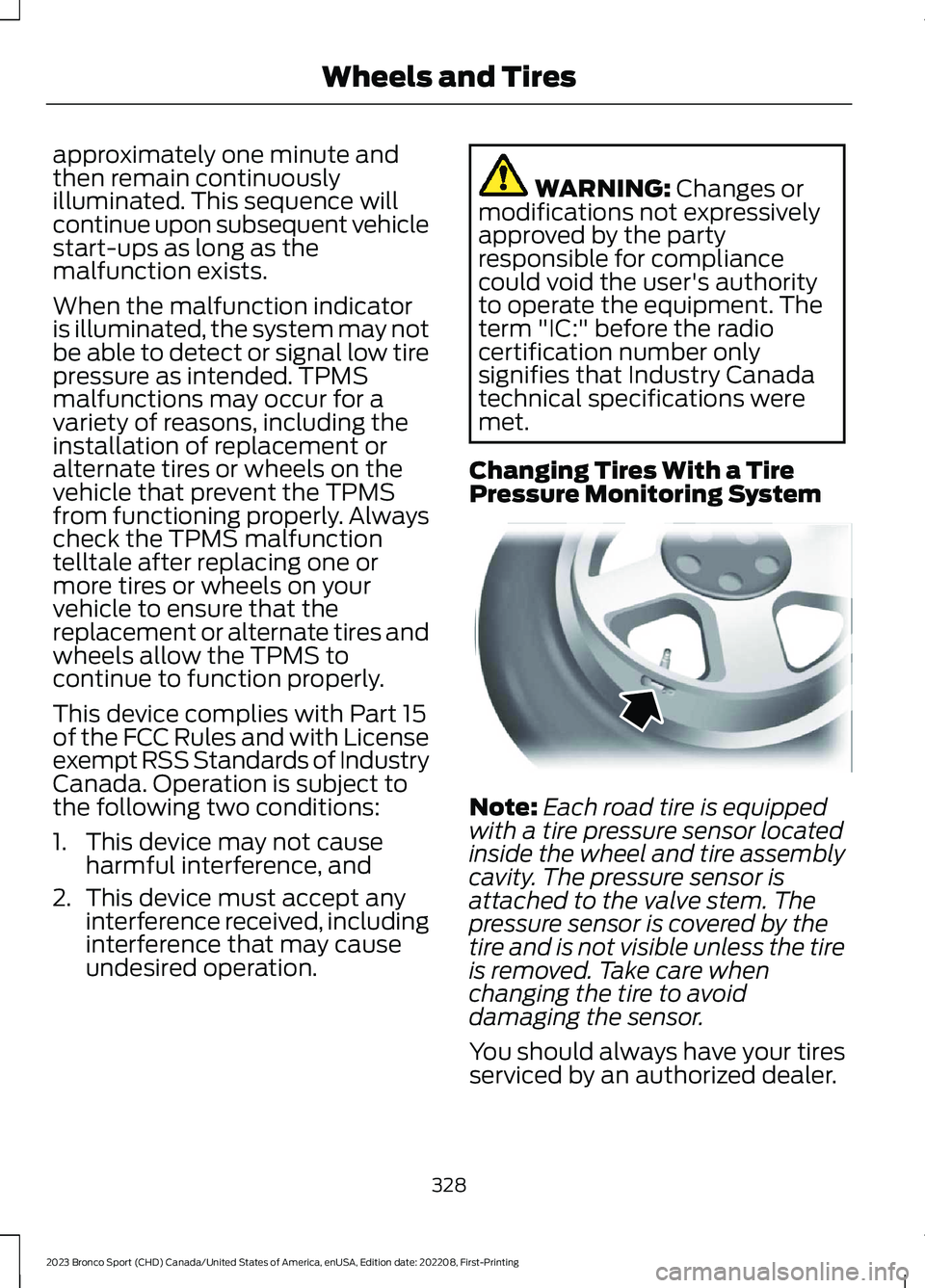
Changing Tires With a TirePressure Monitoring System
Note:Each road tire is equippedwith a tire pressure sensor locatedinside the wheel and tire assemblycavity. The pressure sensor isattached to the valve stem. Thepressure sensor is covered by thetire and is not visible unless the tireis removed. Take care whenchanging the tire to avoiddamaging the sensor.
You should always have your tiresserviced by an authorized dealer.
328
2023 Bronco Sport (CHD) Canada/United States of America, enUSA, Edition date: 202208, First-PrintingWheels and TiresE142549
Page 335 of 516
Customer action requiredPossible causeLow tire pres-sure warninglight
but the light remains on, contactyour authorized dealer as soonas possible.
When Inflating Your Tires
WARNING: Do not use thetire pressure displayed in theinformation display as a tirepressure gauge. Failure to followthis instruction could result inpersonal injury or death.
When putting air into your tires(such as at a gas station or in yourgarage), the tire pressuremonitoring system may notrespond immediately to the airadded to your tires.
It may take up to two minutes ofdriving over 20 mph (32 km/h) forthe light to turn off after you havefilled your tires to therecommended inflation pressure.
How Temperature Affects YourTire Pressure
The tire pressure monitoringsystem monitors tire pressure ineach pneumatic tire. While drivingin a normal manner, a typicalpassenger tire inflation pressuremay increase about 2–4 psi(14–28 kPa) from a cold startsituation. If the vehicle is
stationary overnight with theoutside temperature significantlylower than the daytimetemperature, the tire pressure maydecrease about 3 psi (21 kPa) fora drop of 30°F (17°C) in ambienttemperature. This lower pressurevalue may be detected by the tirepressure monitoring system asbeing significantly lower than therecommended inflation pressureand activate the system warninglight for low tire pressure. If thelow tire pressure warning light ison, visually check each tire toverify that no tire is flat. If one ormore tires are flat, repair asnecessary. Check the air pressurein the road tires. If any tire isunder-inflated, carefully drive thevehicle to the nearest locationwhere air can be added to thetires. Inflate all the tires to therecommended inflation pressure.
331
2023 Bronco Sport (CHD) Canada/United States of America, enUSA, Edition date: 202208, First-PrintingWheels and Tires
Page 338 of 516
WARNING: To help prevent yourvehicle from moving when changing awheel, shift the transmission into park(P), set the parking brake and use anappropriate block or wheel chock tosecure the wheel diagonally opposite tothe wheel being changed. For example,when changing the front left wheel,place an appropriate block or wheelchock on the right rear wheel.
WARNING: Only use the jackprovided as original equipment with yourvehicle.
WARNING: Failure to follow theseguidelines could result in an increasedrisk of loss of vehicle control, injury ordeath.
WARNING: Only use the specifiedjacking points. If you use any otherlocations you could damage vehiclecomponents, such as brake lines.
WARNING: Never place anythingbetween the vehicle jack and yourvehicle.
WARNING: Never place anythingbetween the vehicle jack and the ground.
WARNING: Do not attempt tochange a tire on the side of the vehicleclose to moving traffic. Pull far enoughoff the road to not obstruct the flow oftraffic and avoid the danger of being hitwhen operating the jack or changing thewheel.
Note:The jack does not requiremaintenance or additional lubrication overthe service life of your vehicle.
1.Park on a level surface, set the parkingbrake and activate the hazard flashers.
2.Apply parking brake, place thetransmission in park (P). Turn theengine off.
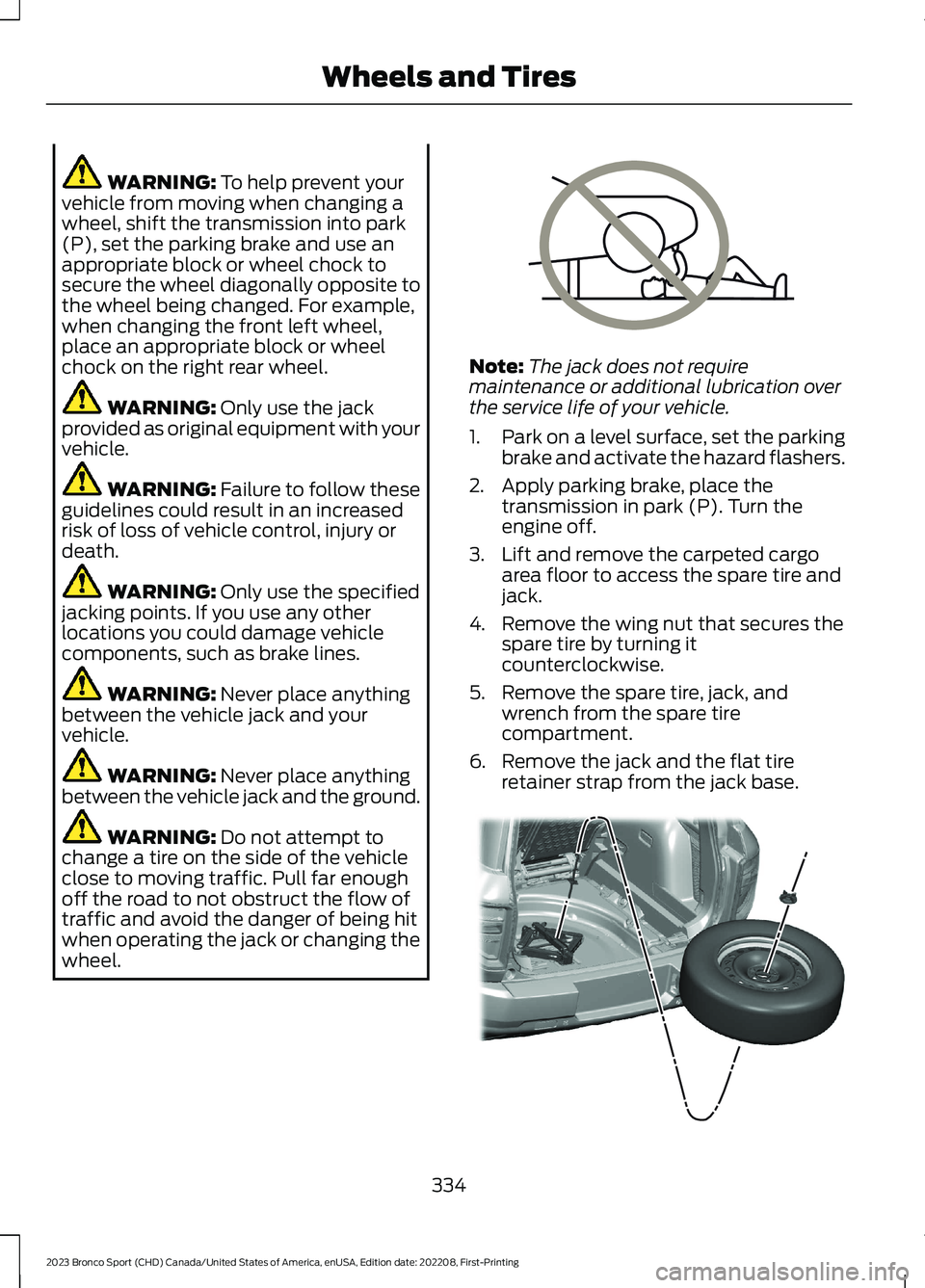
3.Lift and remove the carpeted cargoarea floor to access the spare tire andjack.
4.Remove the wing nut that secures thespare tire by turning itcounterclockwise.
5.Remove the spare tire, jack, andwrench from the spare tirecompartment.
6.Remove the jack and the flat tireretainer strap from the jack base.
334
2023 Bronco Sport (CHD) Canada/United States of America, enUSA, Edition date: 202208, First-PrintingWheels and TiresE166722 E323462
Page 361 of 516
GENERAL INFORMATION
WARNING: Driving while distractedcan result in loss of vehicle control, crashand injury. We strongly recommend thatyou use extreme caution when using anydevice that may take your focus off theroad. Your primary responsibility is thesafe operation of your vehicle. Werecommend against the use of any
hand-held device while driving andencourage the use of voice-operatedsystems when possible. Make sure youare aware of all applicable local lawsthat may affect the use of electronicdevices while driving.
Radio Frequencies and ReceptionFactors
Note:Listening to loud audio for longperiods of time could damage your hearing.
Radio Reception Factors
The further you travel from an AM or FM station, theweaker the signal and the weaker the reception.Distance and strength
Hills, mountains, tall buildings, bridges, tunnels, freewayoverpasses, parking garages, dense tree foliage andthunderstorms can interfere with the reception.
Terrain
When you pass a ground-based broadcast repeatingtower, a stronger signal may overtake a weaker one andresult in the audio system muting.
Station overload
AUDIO UNIT
WARNING: Driving while distractedcan result in loss of vehicle control, crashand injury. We strongly recommend thatyou use extreme caution when using anydevice that may take your focus off theroad. Your primary responsibility is thesafe operation of your vehicle. Werecommend against the use of anyhand-held device while driving andencourage the use of voice-operatedsystems when possible. Make sure youare aware of all applicable local lawsthat may affect the use of electronicdevices while driving.
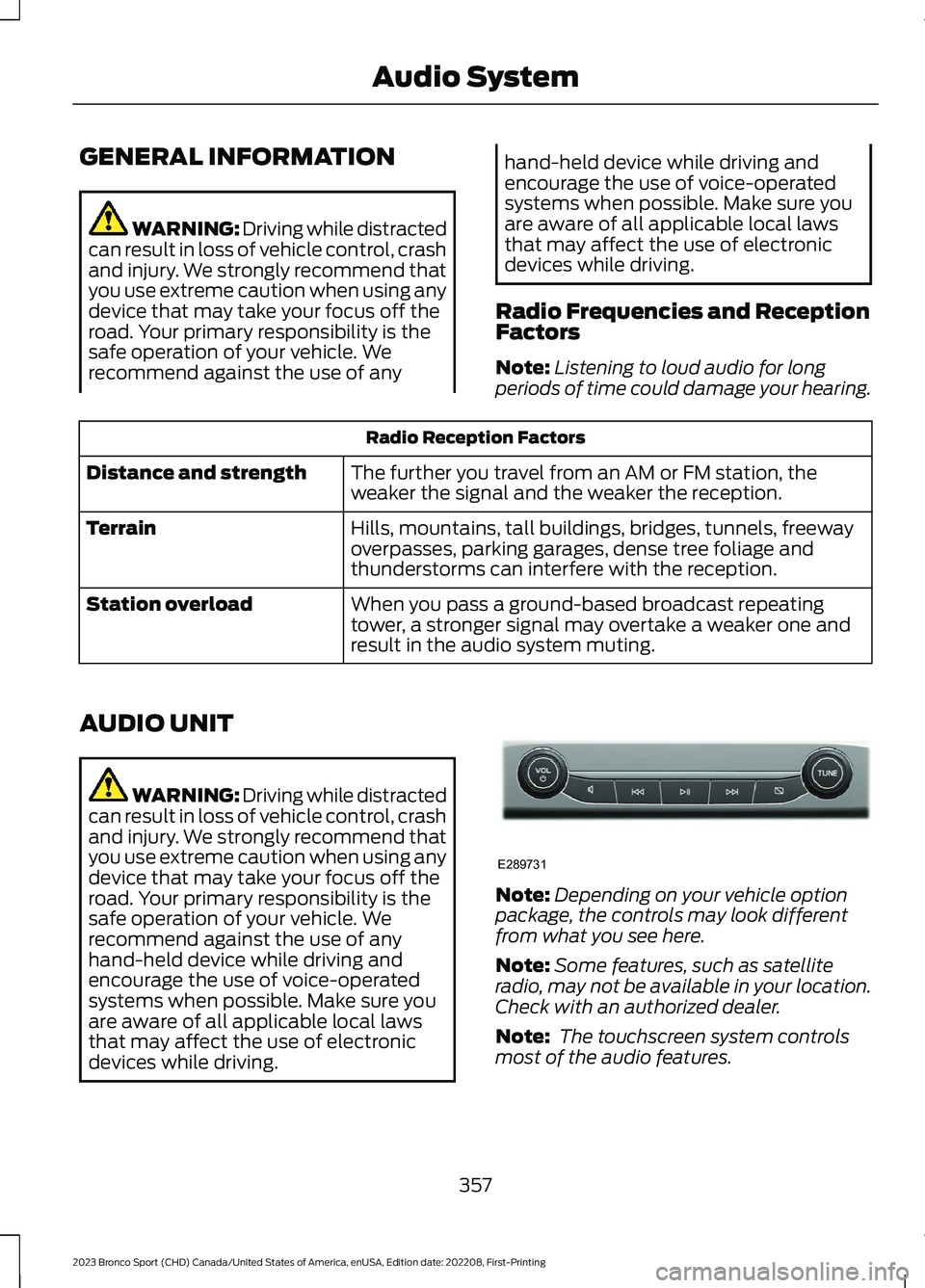
Note:Depending on your vehicle optionpackage, the controls may look differentfrom what you see here.
Note:Some features, such as satelliteradio, may not be available in your location.Check with an authorized dealer.
Note: The touchscreen system controlsmost of the audio features.
357
2023 Bronco Sport (CHD) Canada/United States of America, enUSA, Edition date: 202208, First-PrintingAudio SystemE289731
Page 364 of 516
HD Radio Reception and Station Troubleshooting
Potential Reception Issues
If you are listening to a multicast station and you are onthe fringe of the reception area, the station may mute dueto weak signal strength.
Reception area
If you are listening to HD1, the system switches back tothe analog broadcast until the digital broadcast is availableagain. However, if you are listening to any of the possibleHD2-HD7 multicast channels, the station mutes and staysmuted unless it is able to connect to the digital signalagain.
When the system first receives a station, aside from HD2-HD7 multicast stations, it first plays the station in theanalog version. Once the receiver verifies the station is anHD Radio station, it shifts to the digital version. Dependingon the station quality, you may hear a slight sound changewhen the station changes from analog to digital. Blendingis the shift from analog to digital sound or digital back toanalog sound.
Station blending
In order to provide the best possibleexperience, use the contact form to reportany station issues found while listening toa station broadcasting with HD Radiotechnology. Independent entities own andoperate each station. These stations areresponsible for the accuracy of all audiostreams and data fields.
360
2023 Bronco Sport (CHD) Canada/United States of America, enUSA, Edition date: 202208, First-PrintingAudio System
Page 365 of 516
Potential Station Issues
ActionCauseIssues
No action required. This is abroadcast issue.This is poor time alignmentby the radio broadcaster.Echo, stutter, skip or repeatin audio.Increase or decrease inaudio volume.
No action required. Thereception issue may clear upas you continue to drive.
The radio is shifting betweenanalog and digital audio.Sound fading or blending inand out.
No action required. This isnormal behavior. Wait untilthe audio is available.
The digital multicast is notavailable until the HD Radiobroadcast is decoded. Oncedecoded, the audio is avail-able.
There is an audio mutedelay when selecting HD2 orHD3, multicast preset ordirect tune.
No action required. Thestation is not available inyour current location.
The previously storedmulticast preset or directtune is not available in yourcurrent reception area.
Cannot access the HD2 orHD3 multicast channelswhen recalling a preset orfrom a direct tune.
Fill out the station issueform at website listed
below.1
Data service issue by theradio broadcaster.Text information does notmatch currently playingaudio.
Fill out the station issueform at website listed
below.1
Data service issue by theradio broadcaster.There is no text informationshown for currently selectedfrequency.
1 http://hdradio.com/stations/feedback.
HD Radio Technology manufactured underlicense from iBiquity Digital Corporationand foreign patents. HD Radio and the HDand HD Radio logos are proprietarytrademarks of DTS. Ford and DTS are notresponsible for the content sent using HDRadio technology. Content may bechanged, added or deleted at any time atthe station owner's discretion.
SATELLITE RADIO (IF EQUIPPED)
SiriusXM® Satellite Radio broadcasts avariety of music, news, sports, weather,traffic and entertainment satellite radiochannels. For more information and acomplete list of SiriusXM satellite radiochannels, visit www.siriusxm.com in theUnited States, www.siriusxm.ca in Canada,or call SiriusXM at 1-888-539-7474.
361
2023 Bronco Sport (CHD) Canada/United States of America, enUSA, Edition date: 202208, First-PrintingAudio System
Page 369 of 516
GENERAL INFORMATION
WARNING: Driving while distractedcan result in loss of vehicle control, crashand injury. We strongly recommend thatyou use extreme caution when using anydevice that may take your focus off theroad. Your primary responsibility is thesafe operation of your vehicle. Werecommend against the use of anyhand-held device while driving andencourage the use of voice-operatedsystems when possible. Make sure youare aware of all applicable local lawsthat may affect the use of electronicdevices while driving.
About SYNC
The system allows you to interact with theentertainment, information andcommunication systems on your vehicleusing voice commands and a touchscreen.The system provides easy interaction withaudio, phone, navigation, mobile apps andsettings.
Note:You can switch the system on anduse it for up to an hour without switchingthe ignition on.
Note:You can use the system after youswitch the ignition off for up to 10 minutesor until you open a door.
Note:For your safety, some features arespeed-dependent. Their use is limited towhen your vehicle speed is less than 3 mph(5 km/h).
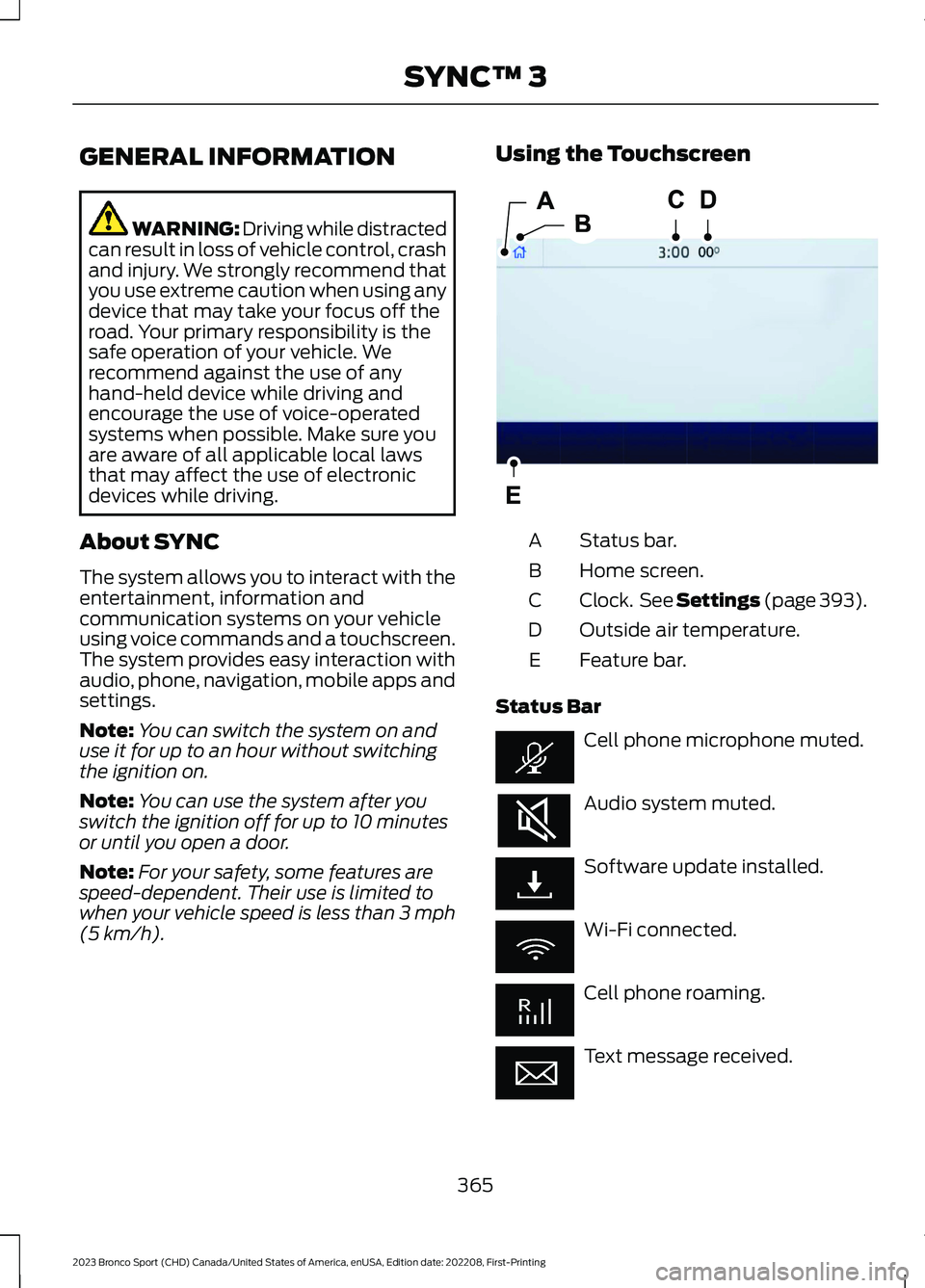
Using the Touchscreen
Status bar.A
Home screen.B
Clock. See Settings (page 393).C
Outside air temperature.D
Feature bar.E
Status Bar
Cell phone microphone muted.
Audio system muted.
Software update installed.
Wi-Fi connected.
Cell phone roaming.
Text message received.
365
2023 Bronco Sport (CHD) Canada/United States of America, enUSA, Edition date: 202208, First-PrintingSYNC™ 3E293823
Page 375 of 516
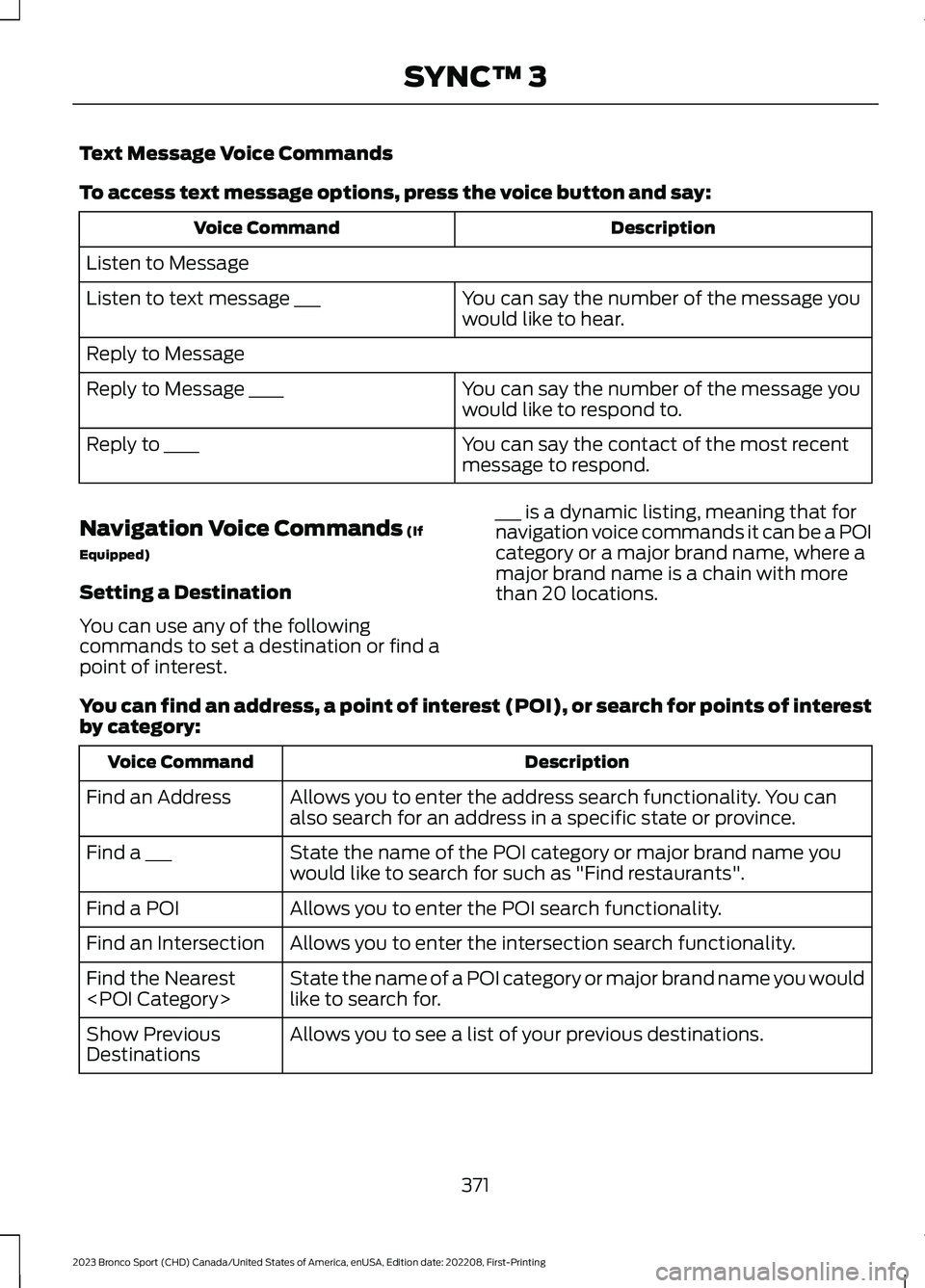
Text Message Voice Commands
To access text message options, press the voice button and say:
DescriptionVoice Command
Listen to Message
You can say the number of the message youwould like to hear.Listen to text message ___
Reply to Message
You can say the number of the message youwould like to respond to.Reply to Message ____
You can say the contact of the most recentmessage to respond.Reply to ____
Navigation Voice Commands (If
Equipped)
Setting a Destination
You can use any of the followingcommands to set a destination or find apoint of interest.
___ is a dynamic listing, meaning that fornavigation voice commands it can be a POIcategory or a major brand name, where amajor brand name is a chain with morethan 20 locations.
You can find an address, a point of interest (POI), or search for points of interestby category:
DescriptionVoice Command
Allows you to enter the address search functionality. You canalso search for an address in a specific state or province.Find an Address
State the name of the POI category or major brand name youwould like to search for such as "Find restaurants".Find a ___
Allows you to enter the POI search functionality.Find a POI
Allows you to enter the intersection search functionality.Find an Intersection
State the name of a POI category or major brand name you wouldlike to search for.Find the Nearest
Allows you to see a list of your previous destinations.Show PreviousDestinations
371
2023 Bronco Sport (CHD) Canada/United States of America, enUSA, Edition date: 202208, First-PrintingSYNC™ 3
Page 380 of 516
SiriusXM® Satellite Radio (IfActivated)
Note: This feature may not be available inall markets and requires an activesubscription.
SiriusXM satellite radio is asubscription-based satellite radio servicethat broadcasts a variety of music, sports,news, weather, traffic and entertainmentprogramming. Your factory-installedSiriusXM satellite radio system includeshardware and a limited subscription termthat begins on the date of sale or lease ofyour vehicle. See an authorized dealer foravailability.
For more information on extendedsubscription terms, a service fee is required,the online media player and a list ofSiriusXM satellite radio channels, and otherfeatures, please visit www.siriusxm.comin the United States, www.siriusxm.ca inCanada, or call SiriusXM at1-888-539-7474.
Note:SiriusXM reserves the unrestrictedright to change, rearrange, add or deleteprogramming. This includes canceling,moving or adding particular channels, andits prices, at any time, with or without noticeto you. We are not responsible for any suchprogramming changes.
Note:This receiver includes the eCosreal-time operating system. eCos ispublished under the eCos License.
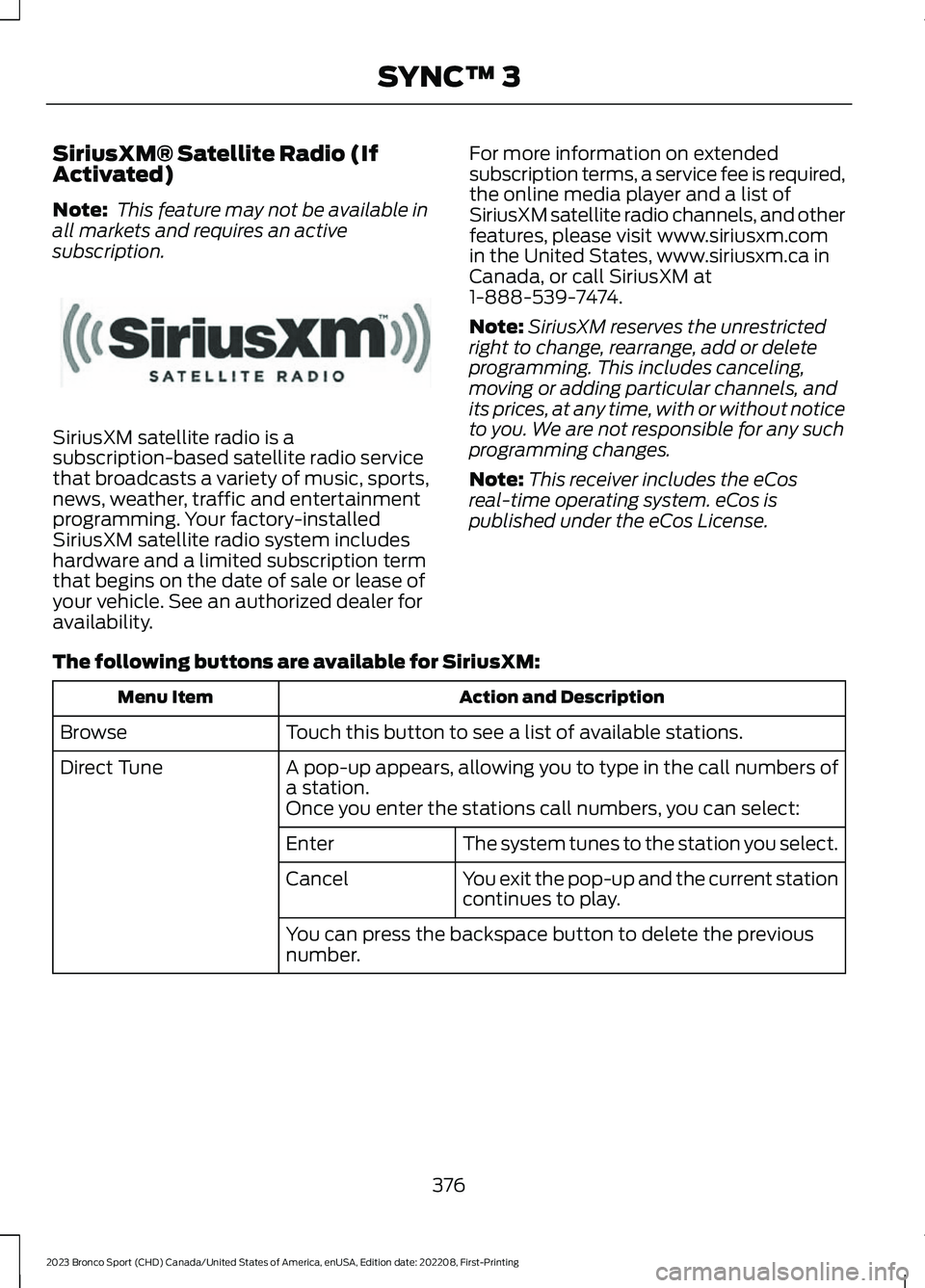
The following buttons are available for SiriusXM:
Action and DescriptionMenu Item
Touch this button to see a list of available stations.Browse
A pop-up appears, allowing you to type in the call numbers ofa station.Direct Tune
Once you enter the stations call numbers, you can select:
The system tunes to the station you select.Enter
You exit the pop-up and the current stationcontinues to play.Cancel
You can press the backspace button to delete the previousnumber.
376
2023 Bronco Sport (CHD) Canada/United States of America, enUSA, Edition date: 202208, First-PrintingSYNC™ 3E234451