Rack FORD C MAX 2011 2.G User Guide
[x] Cancel search | Manufacturer: FORD, Model Year: 2011, Model line: C MAX, Model: FORD C MAX 2011 2.GPages: 296, PDF Size: 7.87 MB
Page 224 of 296
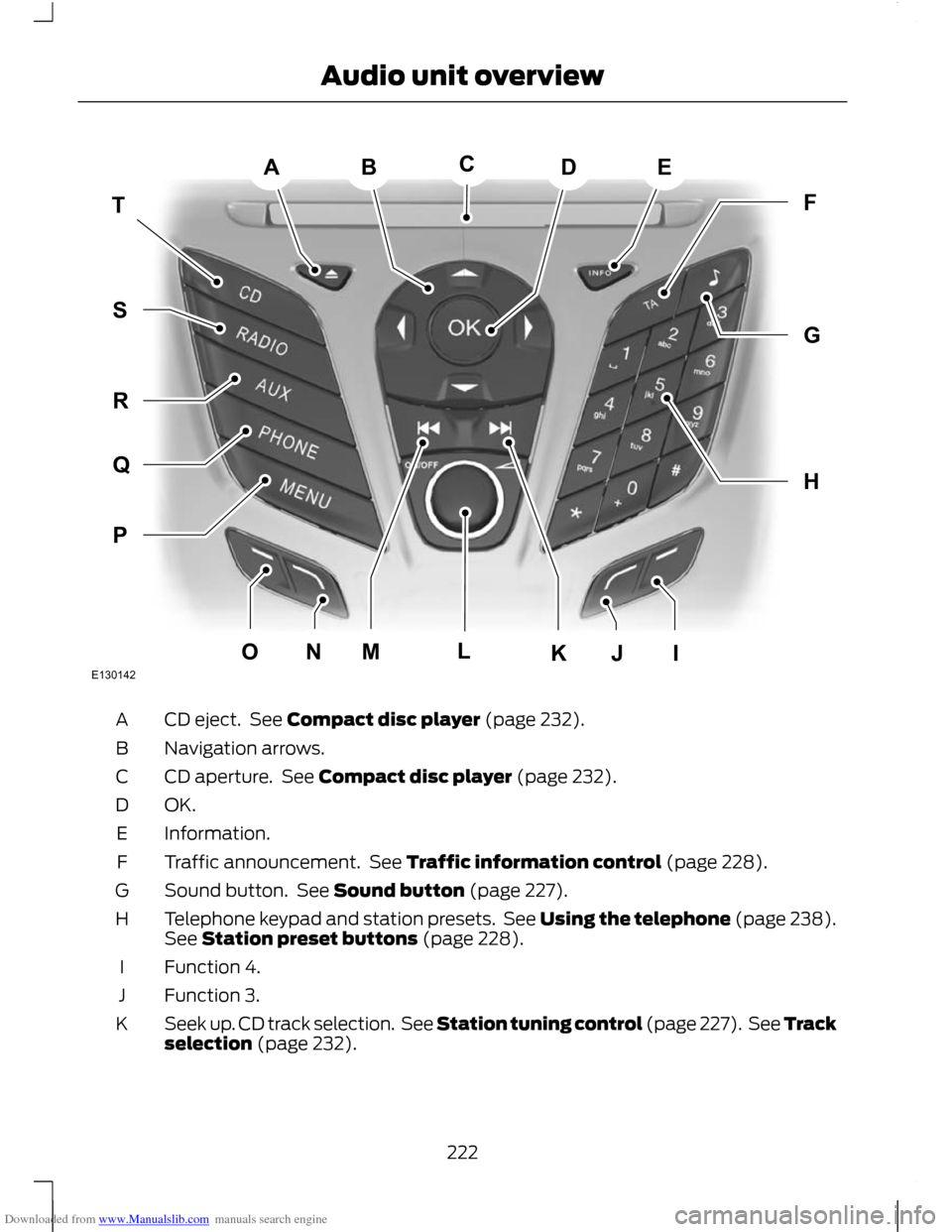
Downloaded from www.Manualslib.com manuals search engine CD eject. See Compact disc player (page 232).
A
Navigation arrows.
B
CD aperture. See Compact disc player (page 232).
C
OK.D
Information.
E
Traffic announcement. See Traffic information control (page 228).
F
Sound button. See Sound button (page 227).
G
Telephone keypad and station presets. See Using the telephone (page 238).
See Station preset buttons (page 228).
H
Function 4.
I
Function 3.
J
Seek up. CD track selection. See Station tuning control (page 227). See Track
selection (page 232).
K
222
Audio unit overviewABEDTHFGPQRSMONJIKLCE130142
Page 225 of 296
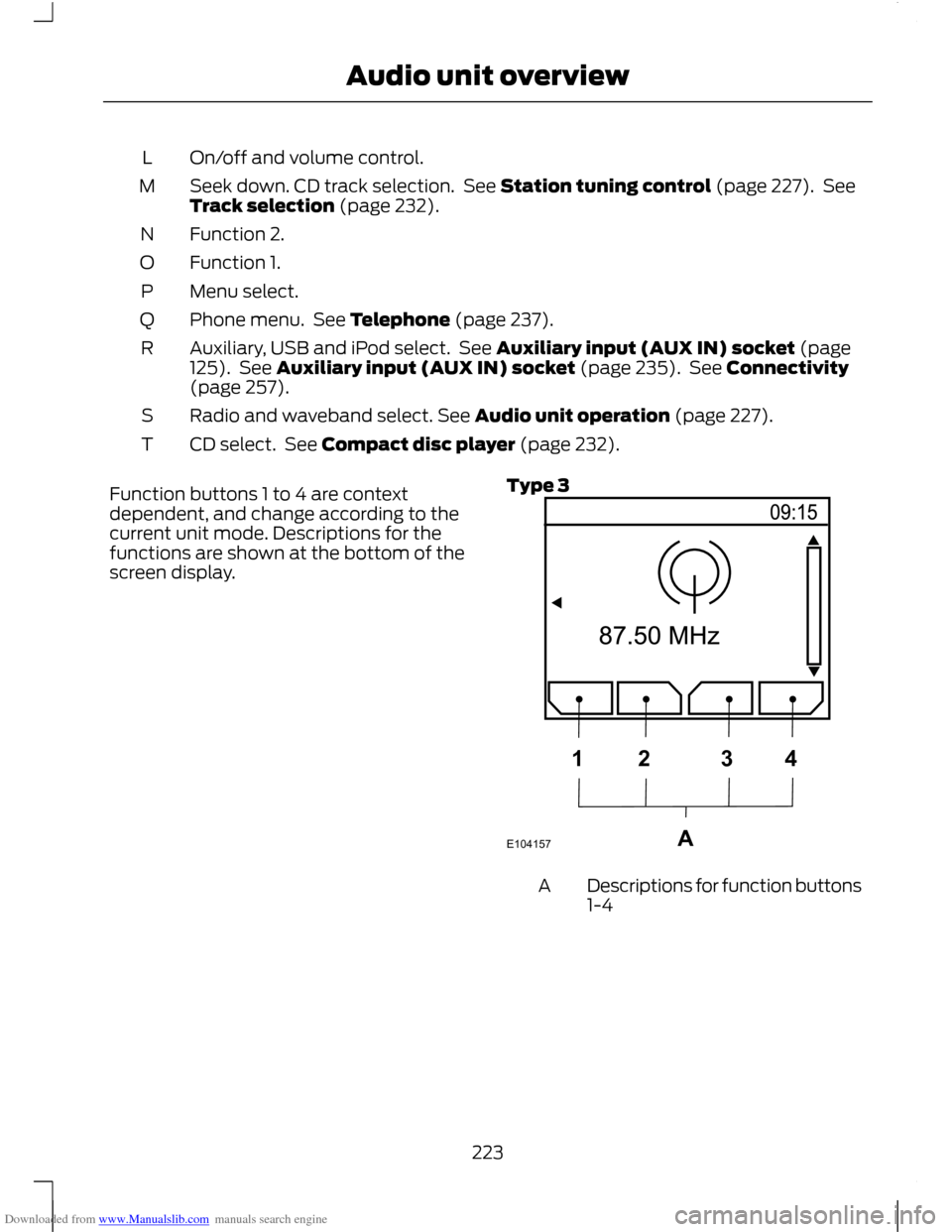
Downloaded from www.Manualslib.com manuals search engine On/off and volume control.
L
Seek down. CD track selection. See Station tuning control (page 227). See
Track selection (page 232).
M
Function 2.
N
Function 1.
O
Menu select.
P
Phone menu. See Telephone (page 237).
Q
Auxiliary, USB and iPod select. See Auxiliary input (AUX IN) socket (page
125). See Auxiliary input (AUX IN) socket (page 235). See Connectivity
(page 257).
R
Radio and waveband select. See Audio unit operation (page 227).
S
CD select. See Compact disc player (page 232).
T
Function buttons 1 to 4 are context
dependent, and change according to the
current unit mode. Descriptions for the
functions are shown at the bottom of the
screen display. Type 3 Descriptions for function buttons
1-4
A
223
Audio unit overviewE104157A1234
Page 226 of 296
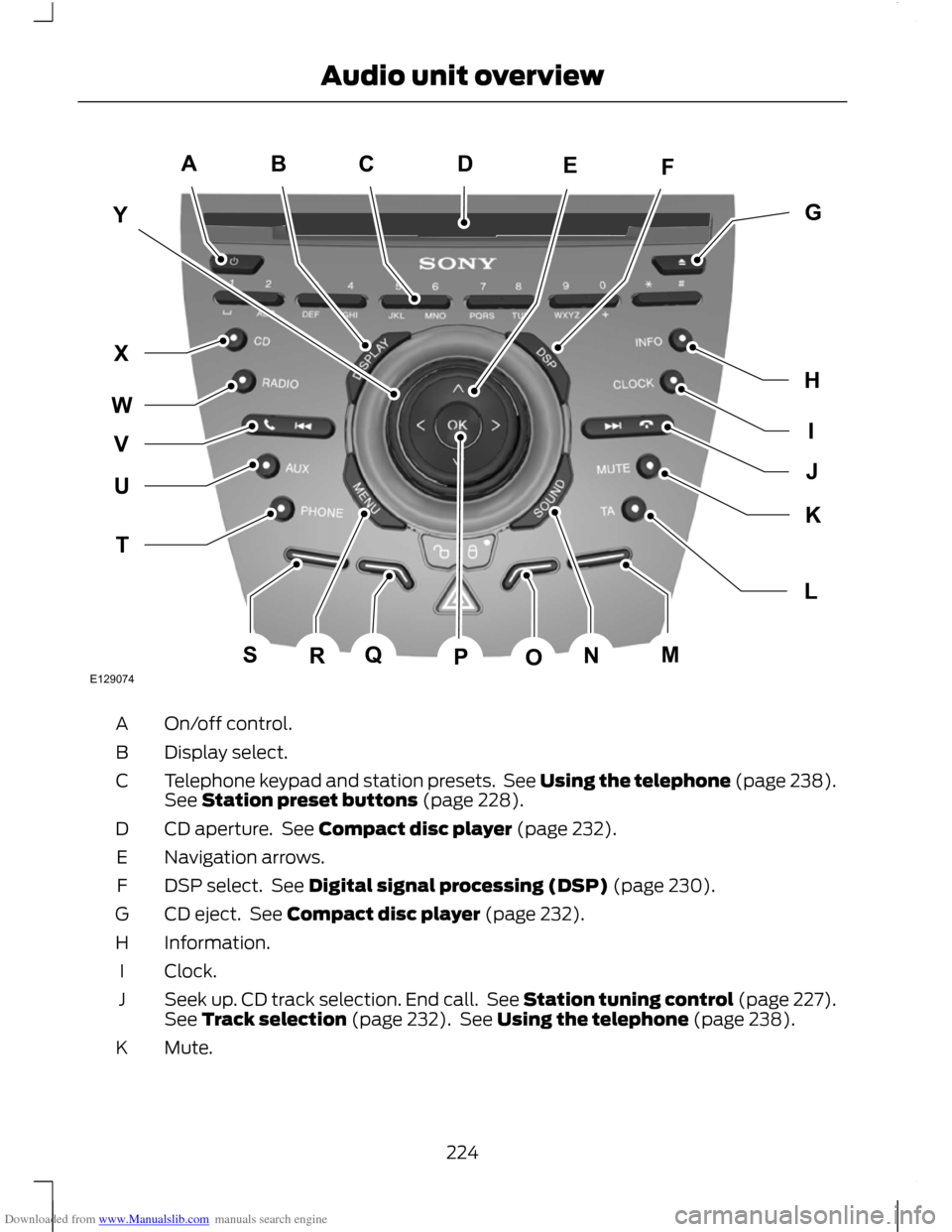
Downloaded from www.Manualslib.com manuals search engine On/off control.
A
Display select.
B
Telephone keypad and station presets. See Using the telephone (page 238).
See Station preset buttons (page 228).
C
CD aperture. See Compact disc player (page 232).
D
Navigation arrows.
E
DSP select. See Digital signal processing (DSP) (page 230).
F
CD eject. See Compact disc player (page 232).
G
Information.
H
Clock.
I
Seek up. CD track selection. End call. See Station tuning control (page 227).
See Track selection (page 232). See Using the telephone (page 238).
J
Mute.
K
224
Audio unit overviewE129074ACBFEYIGHJLKTUWXVQSRNMOPD
Page 227 of 296
Downloaded from www.Manualslib.com manuals search engine Traffic announcement. See Traffic information control (page 228).
L
Function 4.
M
Sound button. See Sound button (page 227).
N
Function 3.
O
OK.P
Function 2.
Q
Menu select.
R
Function 1.
S
Phone menu. See Telephone (page 237).
T
Auxiliary select. See Auxiliary input (AUX IN) socket (page 125). See
Auxiliary input (AUX IN) socket (page 235).
U
Seek down. CD track selection. Accept call. See Station tuning control (page
227). See Track selection (page 232). See Using the telephone (page 238).
V
Radio and waveband select. See Audio unit operation (page 227).
W
CD select. See Compact disc player (page 232).
X
Volume control.
Y
Function buttons 1 to 4 are context
dependent, and change according to the
current unit mode. Descriptions for the
functions are shown at the bottom of the
screen display.
225
Audio unit overview
Page 234 of 296
Downloaded from www.Manualslib.com manuals search engine COMPACT DISC PLAYBACK
Note:
During playback, the display indicates
the disc, track and time that has elapsed
since the start of the track.
During radio reception, press the CD button
once to start CD playback.
Playback will start immediately after a disc
is loaded.
TRACK SELECTION
• Press the seek up button once to move
to the next track or press it repeatedly
to access later tracks.
• Press the seek down button once to
replay the current track. If pressed
within two seconds of the start of a
track, the previous track will be
selected.
• Press the seek down button repeatedly
to select previous tracks.
• Press the up or down arrow buttons,
and using the OK button, select the
required track.
Type 2 and 3
The desired track number may be entered
using the numeric keypad. Dial the required
track number until complete (for example
1 then 2 for track 12), or dial the number
and directly press OK.
FAST FORWARD/REVERSE
Press and hold the seek down or up
buttons to search backwards or forwards
within the tracks on the disc. SHUFFLE/RANDOM
Random track playback, also known as
shuffle, plays all tracks on the CD in
random order.
Type 1
1. Press the MENU button and select CD
MODE.
2. Select SHUFFLE, which then enables the function to be selected on or off.
When an MP3 CD is playing, options
include SHUFFLE for the whole CD, or to
play all the tracks in the folder in a random
order.
Type 2 and 3
Press function button 2.
Note: When an MP3 CD is playing, options
include SHUFFLE for the whole CD, or to
play all the tracks in the folder in a random
order. Repeat presses of function button 2
will toggle these options.
Use the seek up or down button to select
the next track to shuffle if required.
REPEAT COMPACT DISC
TRACKS
Type 1
1. Press the MENU button and select CD MODE.
2. Select REPEAT, which then enables the function to be selected on or off.
The track will replay once ended.
When an MP3 CD is playing, options
include REPEAT for the track, or to repeat
all the tracks in the folder.
Type 2 and 3
Press function button 1.
232
Compact disc player
Page 235 of 296
Downloaded from www.Manualslib.com manuals search engine When an MP3 CD is playing, options
include REPEAT for the track, or to repeat
all the tracks in the folder. Repeat presses
of function button 1 will toggle these
options.
COMPACT DISC TRACK
SCANNING
The SCAN function allows you to preview
each track for approximately 5 seconds.
Type 1
Various scan modes are possible,
according to the type of CD currently
playing.
1. Press the MENU button and select CD
MODE.
2. Select SCAN, which then enables the function to be selected on or off.
Note: When an MP3 CD is playing, options
include SCAN for the CD, or just the tracks
in the folder.
3. Press the OK button to stop the scan mode.
Type 2 and 3
1. Press function button 3.
Note: When an MP3 CD is playing, options
include SCAN for the CD, or just the tracks
in the folder. Repeat presses of function
button 3 will toggle these options.
2. Press function button 3 again to stop the scan mode.
MP3 FILE PLAYBACK
Note: Some copy protected audio files may
not be read by the CD player.
The CD player also supports MP3 and
WMA format audio files. When a CD containing audio is inserted
into the CD player the disc's directory
structure is read in. It may take a while
before playback starts and is dependant
on the quality of the disc.
MP3 tracks may be recorded on the CD in
several ways. They can all be placed in the
root directory like a conventional audio CD,
or they can be placed in folders that may
represent, for example, an album, an artist,
or a genre.
Playing a multi session disc
The normal playing sequence on CD's with
multiple folders is to play the tracks in the
first folder, then the tracks in any folders
nested inside the first folder, then move
onto the second folder, and so on. For
example, if folder 1 has folders 1a and 1b
within it, and folder 2 contains folder 2a,
the playing sequence will be folder 1, 1a, 1b,
2, 2a.
When the playback of a file is finished the
playback of the other files in the same
directory continues. Directory change takes
place automatically when all files in the
current directory have been played back.
MP3 DISPLAY OPTIONS
When an MP3 disc is playing, certain
information encoded in each track can be
displayed. Such information will normally
include:
•
The file name
• The folder name
• ID3 information which might be the
album or artist’ s name.
The unit will normally show the file name
that is playing. To select one of the other
items of information, press the INFO
button repeatedly until the required item
is shown in the display.
233
Compact disc player
Page 236 of 296
Downloaded from www.Manualslib.com manuals search engine Note:
If the ID3 information selected is
unavailable, NO MP3 TAG will be shown in
the display.
CD text display options
When an audio disc with CD text is playing,
limited information encoded in each track
can be displayed. Such information will
normally include:
• The disc name
• The artist name
• The track name.
Note: These display options are selected
in the same way as MP3 displays. NO DISC
NAME or NO TRACK NAME will be shown
in the display if no information has been
encoded.
ENDING COMPACT DISC
PLAYBACK
To restore radio reception on all units:
• Press the RADIO button.
Note: This will not eject the CD; the disc
will merely pause at the point where radio
reception was restored.
To resume CD playback, press the CD
button again.
234
Compact disc player
Page 243 of 296
Downloaded from www.Manualslib.com manuals search engine PRINCIPLE OF OPERATION
CAUTION
Using the system with the engine off
will drain the battery.
Voice recognition enables operation of the
system without the need to divert your
attention from the road ahead in order to
change settings, or receive feedback from
the system.
Whenever you issue one of the defined
commands with the system active, the
voice recognition system converts your
command into a control signal for the
system. Your inputs take the form of
dialogues or commands. You are guided
through these dialogues by
announcements or questions.
Please familiarise yourself with the
functions of the system before using voice
recognition.
Supported commands
The voice control system allows you to
control the following vehicle functions:
•
Bluetooth phone
• radio
• CD Player
• external device (USB)
• external device (iPod)
• automatic climate control
System response
As you work through a voice session the
system will prompt you with a beep tone
each time the system is ready to proceed.
Do not try to give any commands until the
beep tone has been heard. The voice
control system will repeat each spoken
command back to you. If you are not sure how to continue say
"HELP" for assistance or "CANCEL" if you
do not wish to continue.
The "HELP" function provides only a
subset of the available voice commands.
Detailed explanations of all possible voice
commands can be found on the following
pages.
Voice commands
All voice commands should be given using
a natural speaking voice, as if speaking to
a passenger or on the phone. Your voice
level should be dependant on the
surrounding noise level inside or outside
the vehicle but do not shout.
USING VOICE CONTROL
System operation
The order and content of the voice controls
are given in the following lists. The tables
show the sequence of user voice
commands and system responses for each
available function.
<> indicates a number or stored name tag
to be inserted by the user.
Short cuts
There are a number of voice command
short cuts available, which allow you to
control some vehicle features without
having to follow the complete command
menu. These are:
•
phone: "MOBILE NAME", "DIAL
NUMBER", "DIAL NAME", and "REDIAL"
• automatic climate control:
"TEMPERATURE", "AUTO MODE",
"DEFROSTING/DEMISTING ON" and
"DEFROSTING/DEMISTING OFF"
• radio: "TUNE NAME"
• external device (USB): "TRACK"
• external device (iPod): "TRACK"
241
Voice control
Page 244 of 296
Downloaded from www.Manualslib.com manuals search engine Start communicating with the system
Before you can start talking to the system
you first have to press the VOICE button
for each operation and wait until the
system answers with a beep. See Voice
Control (page 51).
Press the button again to cancel the voice
session.
Name tag
The name tag functionality can support
the phone, audio and navigation features
by using the "STORE NAME" function. You
can assign name tags to items such as
favourite radio stations and personal
phone contacts. See Audio unit
commands (page 242). See Telephone
commands (page 249).
•
Store up to 20 name tags per function.
• The average recording time for each
name tag is approximately 2-3
seconds.
AUDIO UNIT COMMANDS
CD Player
You can control playback directly by voice
control.
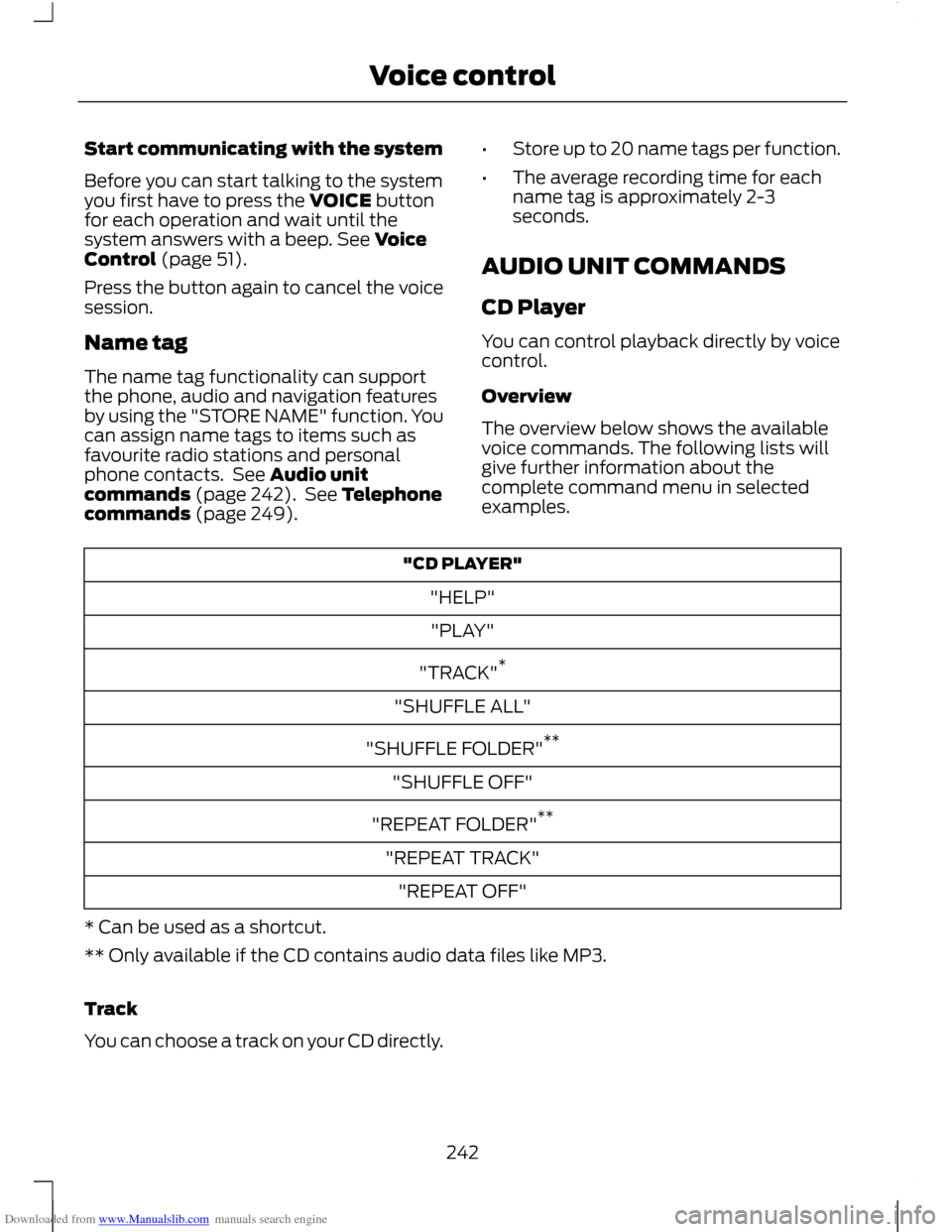
Overview
The overview below shows the available
voice commands. The following lists will
give further information about the
complete command menu in selected
examples. "CD PLAYER"
"HELP""PLAY"
"TRACK" *
"SHUFFLE ALL"
"SHUFFLE FOLDER" **
"SHUFFLE OFF"
"REPEAT FOLDER" **
"REPEAT TRACK" "REPEAT OFF"
* Can be used as a shortcut.
** Only available if the CD contains audio data files like MP3.
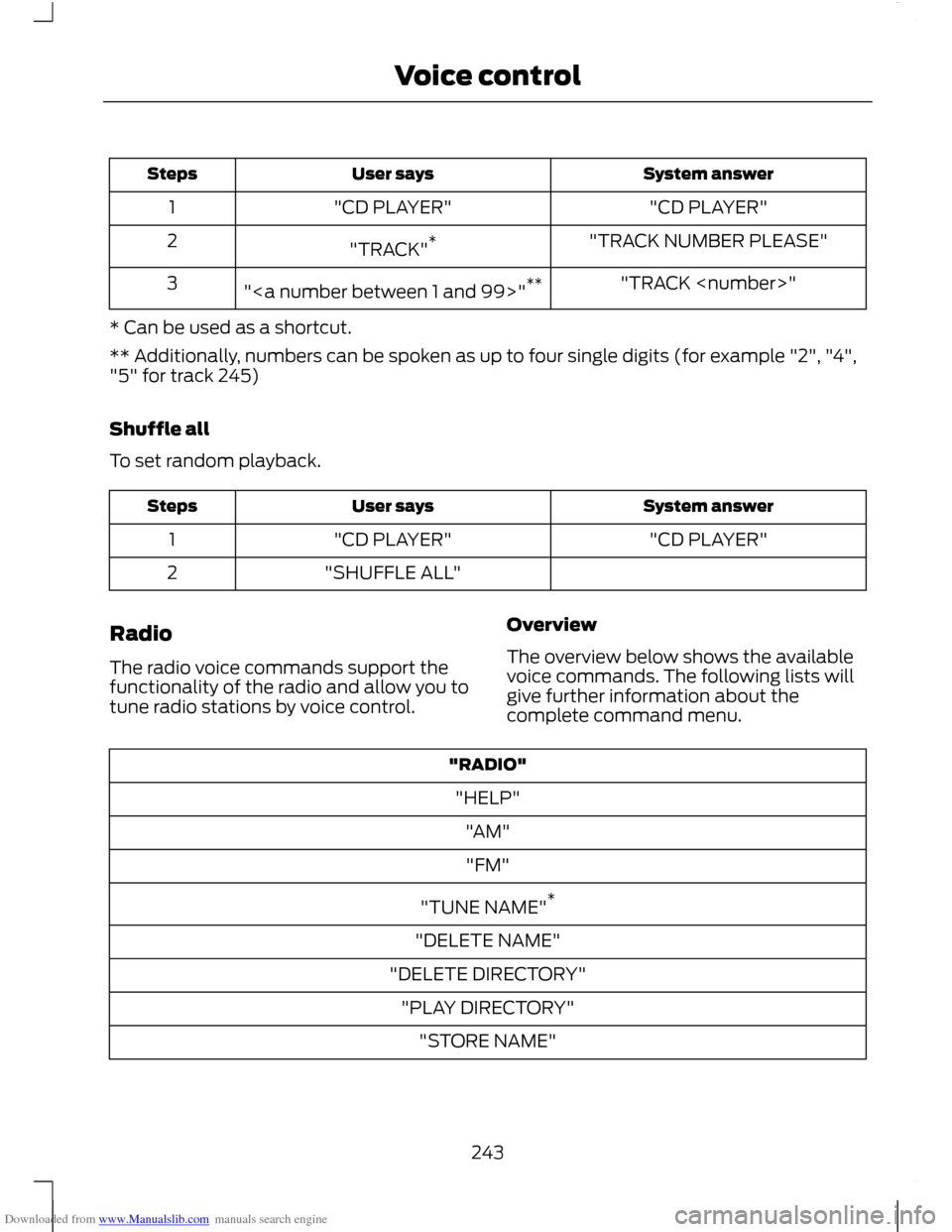
Track
You can choose a track on your CD directly.
242
Voice control
Page 245 of 296
Downloaded from www.Manualslib.com manuals search engine System answer
User says
Steps
"CD PLAYER"
"CD PLAYER"
1
"TRACK NUMBER PLEASE"
"TRACK" *
2
"TRACK
"" **
3
* Can be used as a shortcut.
** Additionally, numbers can be spoken as up to four single digits (for example "2", "4",
"5" for track 245)
Shuffle all
To set random playback. System answer
User says
Steps
"CD PLAYER"
"CD PLAYER"
1
"SHUFFLE ALL"
2
Radio
The radio voice commands support the
functionality of the radio and allow you to
tune radio stations by voice control. Overview
The overview below shows the available
voice commands. The following lists will
give further information about the
complete command menu."RADIO"
"HELP" "AM""FM"
"TUNE NAME" *
"DELETE NAME"
"DELETE DIRECTORY" "PLAY DIRECTORY" "STORE NAME"
243
Voice control