fuel FORD C MAX 2011 2.G User Guide
[x] Cancel search | Manufacturer: FORD, Model Year: 2011, Model line: C MAX, Model: FORD C MAX 2011 2.GPages: 296, PDF Size: 7.87 MB
Page 91 of 296
Downloaded from www.Manualslib.com manuals search engine TRIP COMPUTER
Trip Odometer
Registers the mileage of individual
journeys.
Distance to empty
Indicates the approximate distance the
vehicle will travel on the fuel remaining in
the tank. Changes in driving pattern may
cause the value to vary.
Instantaneous fuel consumption
Indicates the current average fuel
consumption.
Average fuel consumption
Indicates the average fuel consumption
since the function was last reset.
Average speed
Indicates the average speed calculated
since the function was last reset.
Outside air temperature
Shows the outside air temperature.
Odometer
Registers the total mileage of the vehicle.
Resetting the trip computer
To reset a particular display:
1. Highlight Trip Computer with the up
and down arrow buttons and press the
right arrow button.
2. Highlight the function to be reset.
3. Hold the OK button pressed.
PERSONALISED SETTINGS
Language setting
A choice of eleven languages are available:
English, German, Italian, French, Spanish,
Turkish, Russian, Dutch, Polish, Swedish
and Portuguese.
89
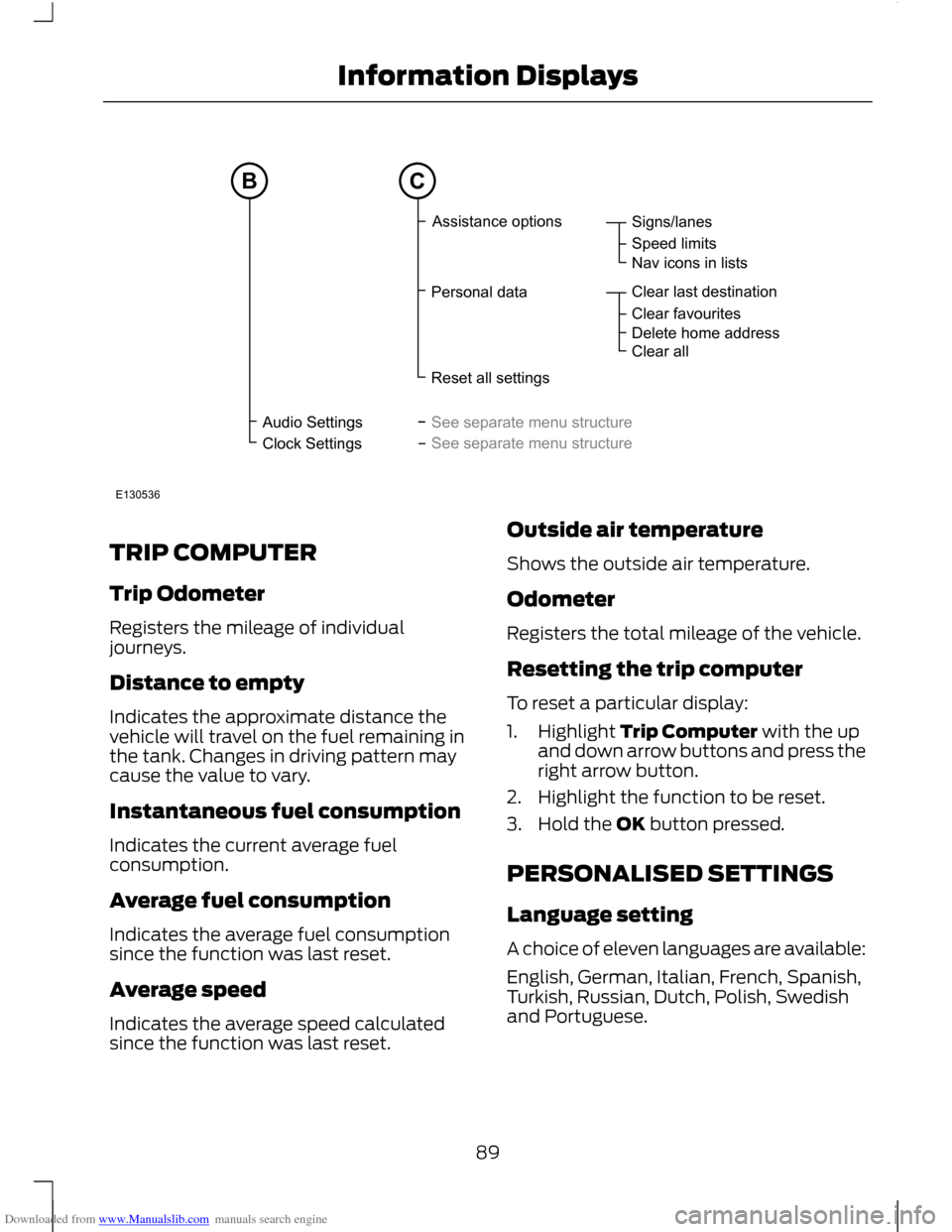
Information DisplaysAudioSettingsClockSettingsSigns/lanesSpeedlimitsNaviconsinlistsClearlastdestinationClearfavouritesDeletehomeaddressClearallAssistanceoptionsPersonaldataResetallsettingsSeeseparatemenustructureSeeseparatemenustructureBCE130536
Page 92 of 296
Downloaded from www.Manualslib.com manuals search engine Measure units
To toggle between metric and imperial
units, scroll to this display and press the
OK button.
Toggling the units of measure using this
display will affect the following displays:
•
Distance to empty.
• Average fuel consumption.
• Instantaneous fuel consumption.
• Average speed.
Temperature units
To toggle between metric and imperial
units, scroll to this display and press the
OK button.
Toggling the temperature units using this
display will affect the following displays:
• Outside air temperature.
• The temperature display in the
automatic climate control.
Chime deactivation
The following chimes can be deactivated:
• Warning messages.
• Information messages.
INFORMATION MESSAGES
Note: Certain messages may be
abbreviated or shortened depending upon
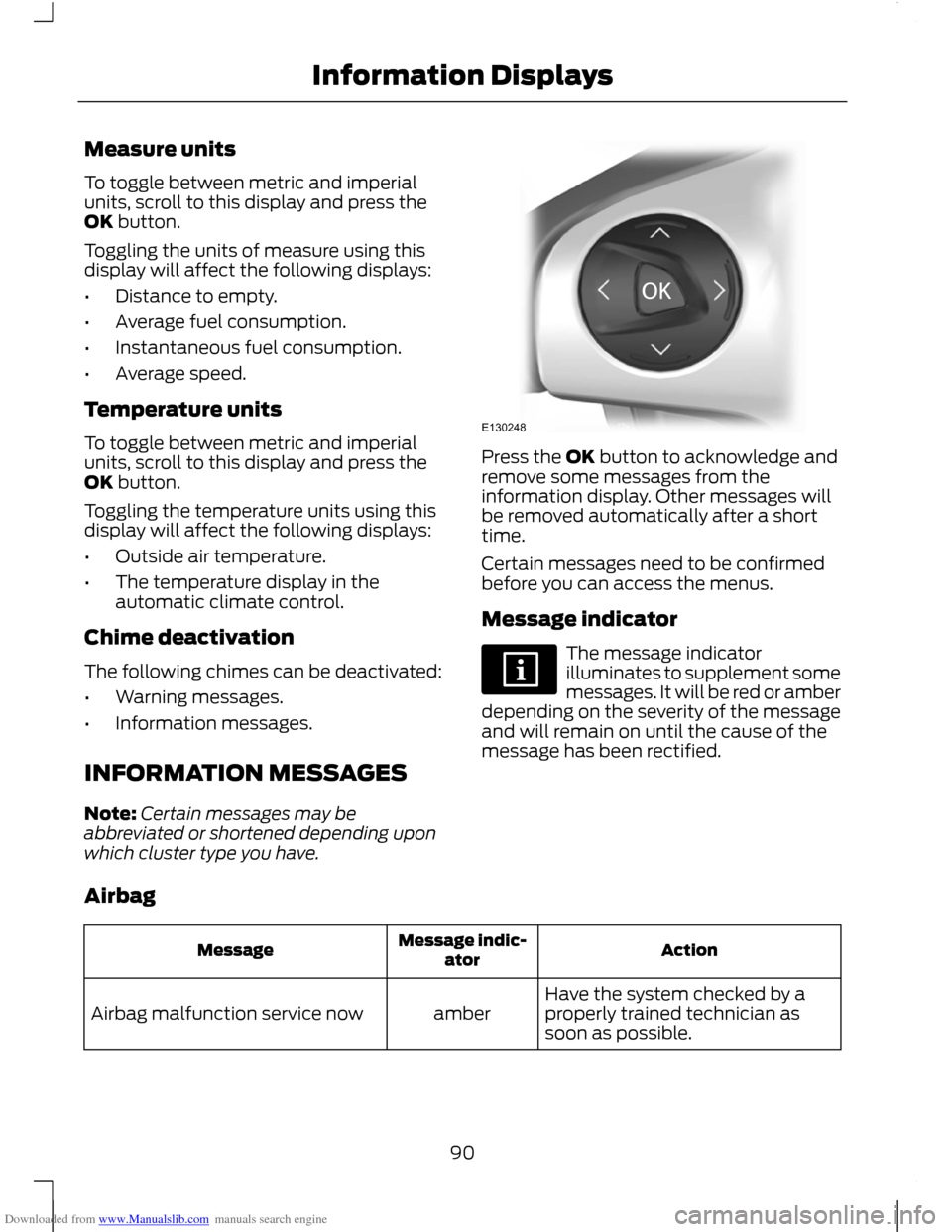
which cluster type you have. Press the OK button to acknowledge and
remove some messages from the
information display. Other messages will
be removed automatically after a short
time.
Certain messages need to be confirmed
before you can access the menus.
Message indicator
The message indicator
illuminates to supplement some
messages. It will be red or amber
depending on the severity of the message
and will remain on until the cause of the
message has been rectified.
Airbag Action
Message indic-
ator
Message
Have the system checked by a
properly trained technician as
soon as possible.
amber
Airbag malfunction service now
90
Information DisplaysE130248
Page 97 of 296
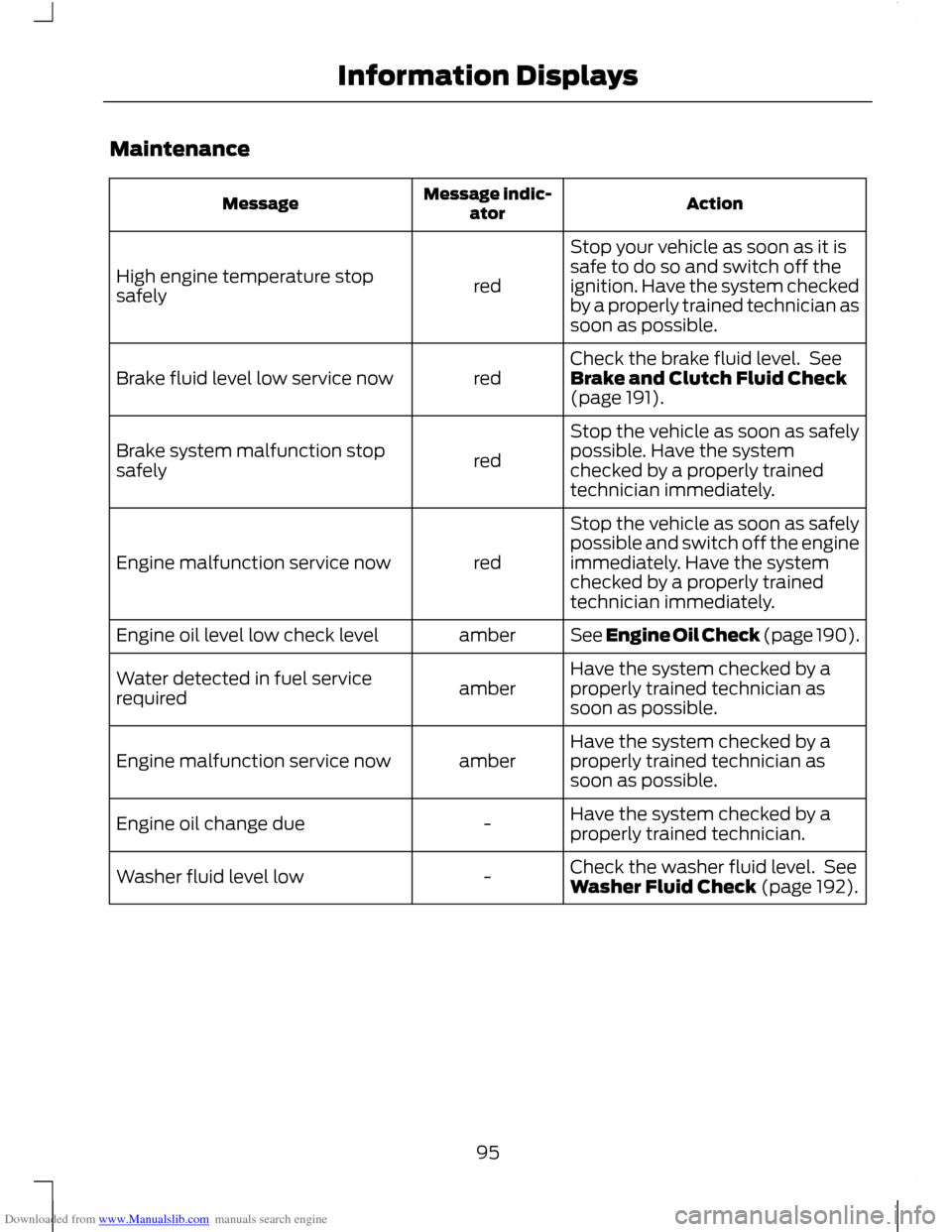
Downloaded from www.Manualslib.com manuals search engine Maintenance
Action
Message indic-
ator
Message
Stop your vehicle as soon as it is
safe to do so and switch off the
ignition. Have the system checked
by a properly trained technician as
soon as possible.
red
High engine temperature stop
safely
Check the brake fluid level. See
Brake and Clutch Fluid Check
(page 191).
red
Brake fluid level low service now
Stop the vehicle as soon as safely
possible. Have the system
checked by a properly trained
technician immediately.
red
Brake system malfunction stop
safely
Stop the vehicle as soon as safely
possible and switch off the engine
immediately. Have the system
checked by a properly trained
technician immediately.
red
Engine malfunction service now
See Engine Oil Check (page 190).
amber
Engine oil level low check level
Have the system checked by a
properly trained technician as
soon as possible.
amber
Water detected in fuel service
required
Have the system checked by a
properly trained technician as
soon as possible.
amber
Engine malfunction service now
Have the system checked by a
properly trained technician.
-
Engine oil change due
Check the washer fluid level. See
Washer Fluid Check (page 192).
-
Washer fluid level low
95
Information Displays
Page 102 of 296
Downloaded from www.Manualslib.com manuals search engine PRINCIPLE OF OPERATION
Outside air
Keep the air intakes forward of the
windscreen free from obstruction (snow,
leaves etc.) to allow the climate control
system to function effectively.
Recirculated air
CAUTION
Prolonged use of recirculated air may
cause the windows to mist up. If the
windows mist up, follow the settings
for defrosting and demisting the
windscreen. The air currently in the passenger
compartment will be recirculated. Outside
air will not enter the vehicle.
Heating
Heating performance depends on the
temperature of the engine coolant.
Air conditioning
Note:
The air conditioning operates only
when the temperature is above 4°C (39°F).
Note: If you use the air conditioning, the
fuel consumption of your vehicle will be
higher.
Air is directed through the evaporator
where it is cooled. Humidity is extracted
from the air to help keep the windows free
of mist. The resulting condensation is
directed to the outside of the vehicle and
it is therefore normal if you see a small
pool of water under your vehicle.
General information on controlling
the interior climate
Fully close all the windows. Warming the interior
Direct the air towards your feet. In cold or
humid weather conditions, direct some of
the air towards the windscreen and the
door windows.
Cooling the interior
Direct the air towards your face.
AIR VENTS
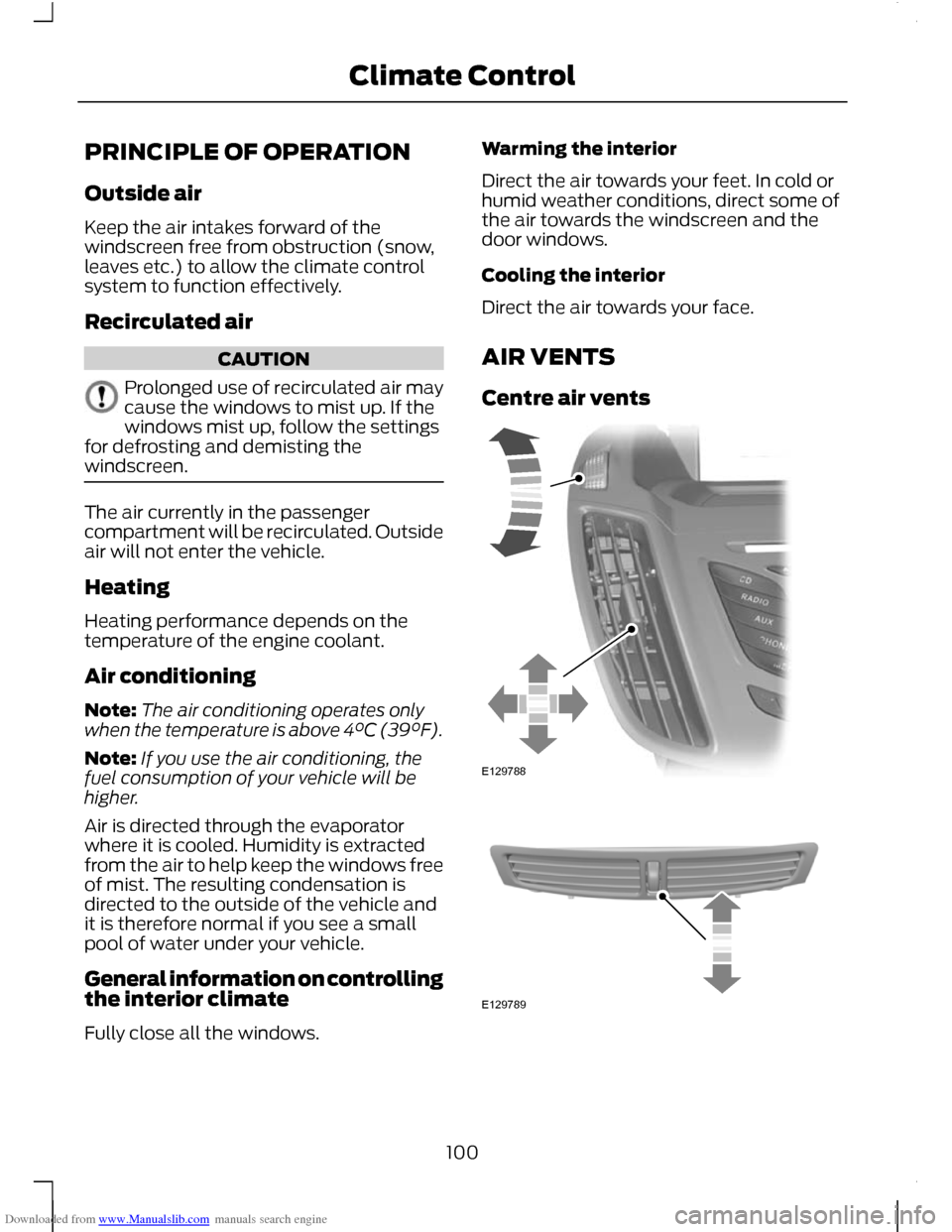
Centre air vents
100
Climate ControlE129788 E129789
Page 108 of 296
Downloaded from www.Manualslib.com manuals search engine AUXILIARY HEATER
Parking heater
WARNINGS
The parking heater must not be
operated at filling stations, near
sources of combustible vapours or
dust or in enclosed spaces. The parking heater should be
switched on for approximately 10
minutes at least once a month all
year round. This prevents the water pump
and heater motor from seizing. Note:
The parking heater will only operate
if there is at least 7.5 litres (1.6 gallons) of
fuel in the fuel tank and the ambient
temperature is below 15°C (59°F). The
heater will not operate if the battery is low.
Note: The heating depends on the outside
air temperature.
Note: When the parking heater is activated,
exhaust fumes may come from under the
sides of the vehicle. This is normal.
Note: On vehicles with manual climate
control the heating of the vehicle interior is
dependent on the temperature, air
distribution and blower control settings.
The parking heater operates independently
of the vehicle heater by heating the
engine ’s coolant circuit. It is fed from the
vehicle fuel tank. You can also use it while
the vehicle is in motion to help the vehicle
heater warm up the interior more quickly.
Used properly, the parking heater provides
the following benefits: •
It preheats the interior of the vehicle.
• It keeps the windows clear of ice in the
event of frost and prevents
condensation.
• It avoids cold starts and allows the
engine to reach operating temperature
sooner.
To prevent the battery from discharging:
• Once the parking heater has performed
one heating cycle, the next
programmed heating cycle will only be
carried out if you have started the
vehicle ’s engine in between.
• After a heating cycle, drive the vehicle
for at least the period of the heating
cycle.
Programming the parking heater
Note: The programmed time is the time at
which you wish the vehicle to be warm and
ready to drive, not the time at which the
heater switches on.
Note: You must programme the times at
least 70 minutes in advance of the time you
wish to set.
Note: You must set the time and date
correctly. See Clock (page 122).
To programme the heating times:
1. Use the arrow buttons on the steering wheel to enter the main menu. See
Information Displays (page 83).
2. Select the park heater option.
106
Climate Control
Page 110 of 296
Downloaded from www.Manualslib.com manuals search engine Fuel operated heater (depending
on country)
WARNING
The fuel operated heater must not
be operated at filling stations, near
sources of combustible vapours or
dust or in enclosed spaces. The fuel operated heater aids in warming
the engine and the vehicle interior on
vehicles with a diesel engine. It is switched
on or off automatically depending on the
outside air temperature and the coolant
temperature, unless you have deactivated
it.
To deactivate the fuel operated heater:
1. Highlight Aux. Heater and press the
OK button. A cross appears in the box
when the heater is activated.
Diesel auxiliary heater (depending
on country)
The diesel auxiliary heater (PTC electrical
heater) aids in warming the engine and the
vehicle interior on vehicles with a diesel
engine. It is switched on or off
automatically depending on the outside
air temperature, the coolant temperature
and the alternator load.
108
Climate Control
Page 130 of 296
Downloaded from www.Manualslib.com manuals search engine STARTING A PETROL ENGINE
Note:
You can only operate the starter for
a maximum of 30 seconds at a time.
Cold or hot engine
All vehicles CAUTION
When the temperature is below -20°C
(-4°F), switch the ignition on for at
least one second before starting the
engine. This will make sure that the
maximum fuel pressure is established for
starting the engine. Vehicles with manual transmission
Note:
Do not touch the accelerator pedal.
1. Fully depress the clutch pedal.
2. Start the engine.
Vehicles with automatic transmission
Note: Do not touch the accelerator pedal.
1. Select park or neutral.
2. Fully depress the brake pedal.
3. Start the engine.
All vehicles
If the engine does not start within 15
seconds, wait for a short period and try
again.
If the engine does not start after three
attempts, wait 10 seconds and follow the
Flooded engine procedure.
If you have difficulty starting the engine
when the temperature is below -25°C
(-13°F), press the accelerator pedal
between ¼ to ½ of its travel and try again. Flooded engine
Vehicles with manual transmission
1. Fully depress the clutch pedal.
2.
Fully depress the accelerator pedal and
hold it there.
3. Start the engine.
Vehicles with automatic transmission
1. Select park or neutral.
2. Fully depress the accelerator pedal and
hold it there.
3. Fully depress the brake pedal.
4. Start the engine.
All vehicles
If the engine does not start, repeat the
Cold or hot engine procedure.
Engine idle speed after starting
The speed at which the engine idles
immediately after starting will vary
depending on the engine temperature.
If the engine is cold then the idle speed will
automatically be increased in order to heat
the catalytic converter as quickly as
possible. This makes sure that vehicle
emissions are kept to an absolute
minimum.
The idle speed will slowly decrease to the
normal level as the catalytic converter
warms up.
STARTING A DIESEL ENGINE
Cold or hot engine
All vehicles
Note: When the temperature is below -15°C
(5°F), you may need to crank the engine for
up to 25 seconds.
128
Starting and Stopping the Engine
Page 133 of 296
Downloaded from www.Manualslib.com manuals search engine Regeneration
WARNING
Do not park or idle your vehicle over
dry leaves, dry grass or other
combustible materials. The DPF
regeneration process creates very high
exhaust gas temperatures and the exhaust
will radiate a considerable amount of heat
during and after DPF regeneration, and
after you have switched the engine off.
This is a potential fire hazard. CAUTION
Avoid running out of fuel.
Note:
During regeneration at low speed or
engine idle, you may smell a hot metallic
odour and could notice a clicking metallic
sound. This is due to the high temperatures
reached during regeneration and is normal.
Note: After you have switched your engine
off the fans may continue to run for a short
period of time.
Unlike a normal filter which requires
periodic replacement, the DPF has been
designed to regenerate, or clean itself to
maintain operating efficiency. The
regeneration process takes place
automatically. However, some driving
conditions mean that you may need to
support the regeneration process.
If you drive only short distances or your
journeys contain frequent stopping and
starting, where there is increased
acceleration and deceleration, occasional
trips with the following conditions will
assist the regeneration process: •
Drive your vehicle at a constant speed,
preferably on a main road or motorway,
for up to 20 minutes.
• Avoid prolonged idling and always
observe speed limits and road
conditions.
• Do not switch off the ignition.
• Use a lower gear than normal to
maintain a higher engine speed during
this journey, where appropriate.
SWITCHING OFF THE ENGINE
Vehicles with a turbocharger CAUTION
Do not switch the engine off when it
is running at high speed. If you do, the
turbocharger will continue running
after the engine oil pressure has dropped
to zero. This will lead to premature
turbocharger bearing wear. Release the accelerator pedal. Wait until
the engine has reached idle speed and then
switch it off.
ENGINE BLOCK HEATER
CAUTION
Make sure you disconnect the power
cable from the engine heater
connector before driving away.
Note:
The engine heater connector is
located in the front bumper.
131
Starting and Stopping the Engine
Page 135 of 296
Downloaded from www.Manualslib.com manuals search engine PRINCIPLE OF OPERATION
CAUTION
For vehicles with Start-stop the
battery requirement is different. It
must be replaced by one of exactly
the same specification as the original. The system reduces fuel consumption and
CO2 emissions by shutting down the
engine when the vehicle is idling, for
example at traffic lights. The engine will
automatically restart when the driver
presses the clutch pedal or when required
by a vehicle system, for example to
recharge the battery.
To obtain maximum benefit from the
system, move the gear lever to the neutral
position and release the clutch pedal
during any stop of longer than three
seconds.
USING START-STOP
WARNINGS
The engine may restart
automatically if required by the
system. See Principle of Operation
(page 133). Switch the ignition off before
opening the bonnet or carrying out
any maintenance.
Always switch the ignition off before
leaving your vehicle, as the system
may have shut down the engine but
the ignition will still be live. Note:
The system only operates when the
engine is warm and the outside temperature
is between 0°C (32°F) and 30°C (86°F). Note:
If you stall the engine, and then
depress the clutch pedal within a couple of
seconds, the system will automatically
restart the engine.
Note: The Start-stop indicator will
illuminate green when the engine shuts
down. See Warning Lamps and Indicators
(page 79).
Note: The Start-stop indicator will flash
amber, requiring you to select neutral or
depress the clutch pedal. In conjunction a
message will be shown in the display.
Note: If the system detects a malfunction,
it is deactivated. Have the system checked
by a properly trained technician.
Note: If you have switched the system off,
the switch will be illuminated.
Note: The system is on by default. To
switch the system off, press the switch in
the instrument panel. The system will only
be de-activated for the current ignition
cycle. To turn it on, press the switch again.
For item location. See At a Glance (page
10). To stop the engine
1. Stop the vehicle.
2. Move the gear lever to the neutral
position.
3. Release the clutch pedal.
4. Release the accelerator pedal.
The system may not shut down the engine
under certain conditions, for example:
• To maintain the interior climate.
• Low battery voltage.
• The outside temperature is too low or
too high.
• The driver's door has been opened.
133
Start-Stop
Page 137 of 296
Downloaded from www.Manualslib.com manuals search engine PRINCIPLE OF OPERATION
The system assists the driver to drive more
efficiently by constantly monitoring
characteristics of gear changing,
anticipation of traffic conditions and
speeds on motorways and open roads.
Note:
These efficiency values do not result
in a defined fuel consumption figure. It might
vary as it is not only related to these driving
disciplines but also influenced by many
other factors such as short journeys and cold
starts.
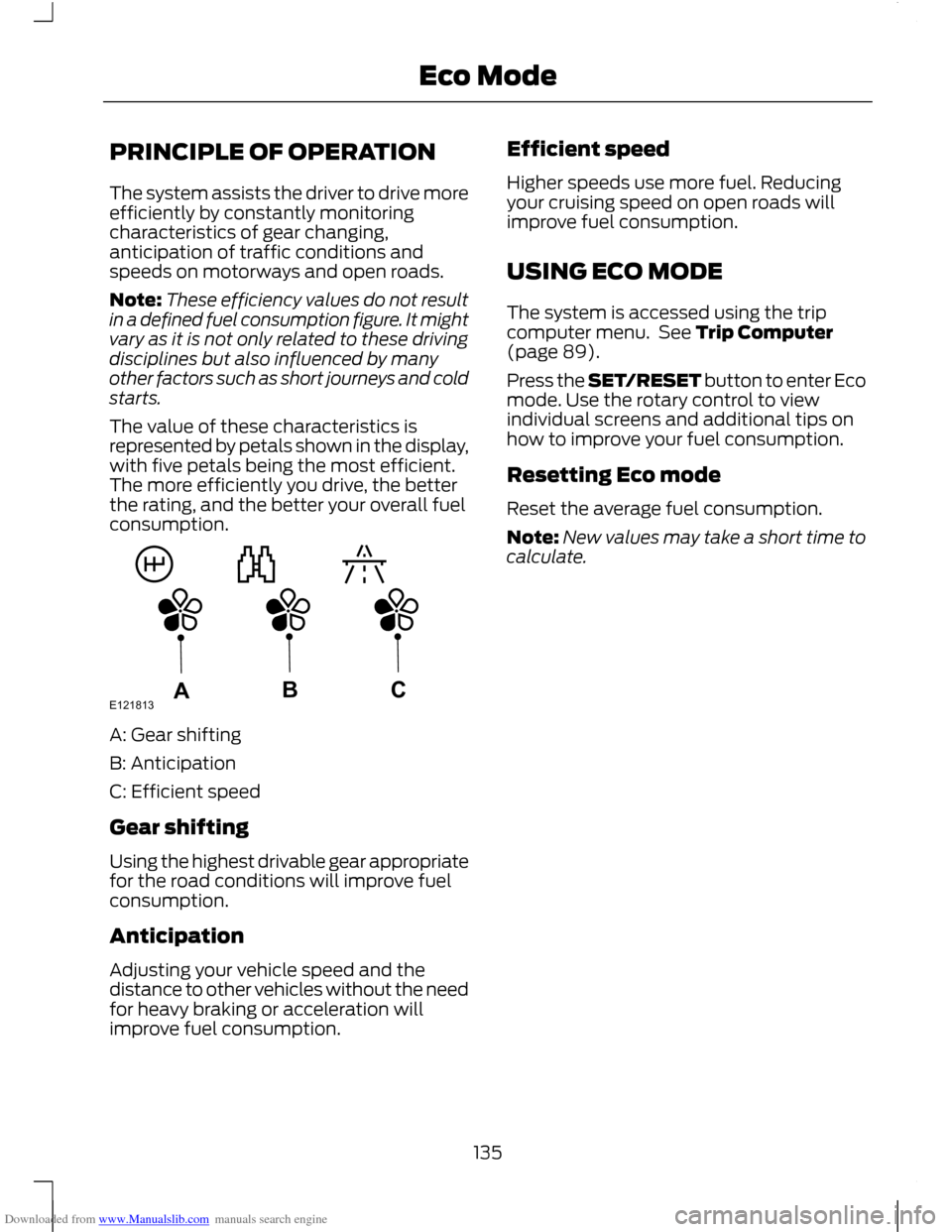
The value of these characteristics is
represented by petals shown in the display,
with five petals being the most efficient.
The more efficiently you drive, the better
the rating, and the better your overall fuel
consumption. A: Gear shifting
B: Anticipation
C: Efficient speed
Gear shifting
Using the highest drivable gear appropriate
for the road conditions will improve fuel
consumption.
Anticipation
Adjusting your vehicle speed and the
distance to other vehicles without the need
for heavy braking or acceleration will
improve fuel consumption. Efficient speed
Higher speeds use more fuel. Reducing
your cruising speed on open roads will
improve fuel consumption.
USING ECO MODE
The system is accessed using the trip
computer menu. See Trip Computer
(page 89).
Press the SET/RESET button to enter Eco
mode. Use the rotary control to view
individual screens and additional tips on
how to improve your fuel consumption.
Resetting Eco mode
Reset the average fuel consumption.
Note:
New values may take a short time to
calculate.
135
Eco ModeE121813ABC