Voice FORD C MAX 2011 2.G Owners Manual
[x] Cancel search | Manufacturer: FORD, Model Year: 2011, Model line: C MAX, Model: FORD C MAX 2011 2.GPages: 296, PDF Size: 7.87 MB
Page 3 of 296
Downloaded from www.Manualslib.com manuals search engine Introduction
About This Manual...........................................7
Symbols Glossary.............................................7
Parts and Accessories.....................................7
At a Glance
At a Glance........................................................10
Child Safety
Child Seats.........................................................19
Booster Seats..................................................20
Child Seat Positioning...................................21
ISOFIX Anchor Points...................................24
Child Safety Locks..........................................25
Occupant protection
Principle of Operation...................................27
Fastening the seat belts..............................29
Seat belt height adjustment......................33
Seat belt reminder.........................................33
Using seat belts during pregnancy..........33
Disabling the passenger airbag................34
Keys and Remote Controls
General Information on Radio
Frequencies..................................................36
Programming the remote control............36
Changing the remote control battery............................................................36
Locks
Locking and Unlocking.................................39
Keyless Entry....................................................43
Global Opening and Closing......................45
Engine immobiliser
Principle of Operation...................................47
Coded keys........................................................47
Arming the engine immobiliser.................47
Disarming the engine immobiliser...........47 Alarm
Principle of Operation..................................48
Arming the alarm...........................................49
Disarming the alarm.....................................49
Steering Wheel
Adjusting the Steering Wheel...................50
Audio Control..................................................50
Voice Control.....................................................51
Wipers and Washers
Windscreen Wipers.......................................52
Autowipers........................................................52
Windscreen Washers....................................53
Rear Window Wiper and Washers...........53
Headlamp Washers......................................54
Checking the Wiper Blades........................54
Changing the Wiper Blades.......................54
Technical Specifications.............................56
Lighting
Lighting Control...............................................57
Autolamps........................................................58
Front Fog Lamps............................................58
Rear Fog Lamps.............................................58
Adjusting the Headlamps - Vehicles
With: Adaptive Front Lighting/Xenon
Headlamps...................................................59
Headlamp Levelling......................................59
Hazard Warning Flashers............................59
Direction Indicators.......................................60
Cornering Lamps...........................................60
Interior Lamps..................................................61
Removing a Headlamp................................62
Changing a Bulb.............................................62
Bulb Specification Chart.............................69
Windows and Mirrors
Power Windows...............................................71
1
Table of Contents
Page 7 of 296
Downloaded from www.Manualslib.com manuals search engine Audio troubleshooting
Audio troubleshooting...............................236
Telephone
General Information....................................237
Bluetooth setup............................................237
Telephone setup...........................................237
Telephone controls.....................................238
Using the telephone...................................238
Voice control
Principle of Operation.................................241
Using voice control.......................................241
Audio unit commands...............................242
Telephone commands..............................249
Climate control commands....................254
Connectivity
General Information....................................257
Connecting an external device...............258
Connecting an external device - Vehicles
With: Bluetooth........................................258
Using a USB device.....................................259
Using an iPod................................................260
Navigation introduction
General Information...................................262
Road Safety...................................................262
Navigation Quick start
Navigation Quick start...............................264
Navigation unit overview
Navigation unit overview...........................267
Loading the navigation data.....................271
System settings
System settings............................................272 Navigation system
Route options menu...................................275
Route displays...............................................276
Traffic Message Channel
Principle of Operation.................................277
Using TMC.......................................................277
Map updates
Map updates..................................................278
Appendices
Type approvals.............................................279
Type approvals.............................................279
Type approvals.............................................279
Type approvals.............................................280
Type approvals.............................................280
Electromagnetic compatibility................281
5
Table of Contents
Page 13 of 296
Downloaded from www.Manualslib.com manuals search engine Right-hand drive
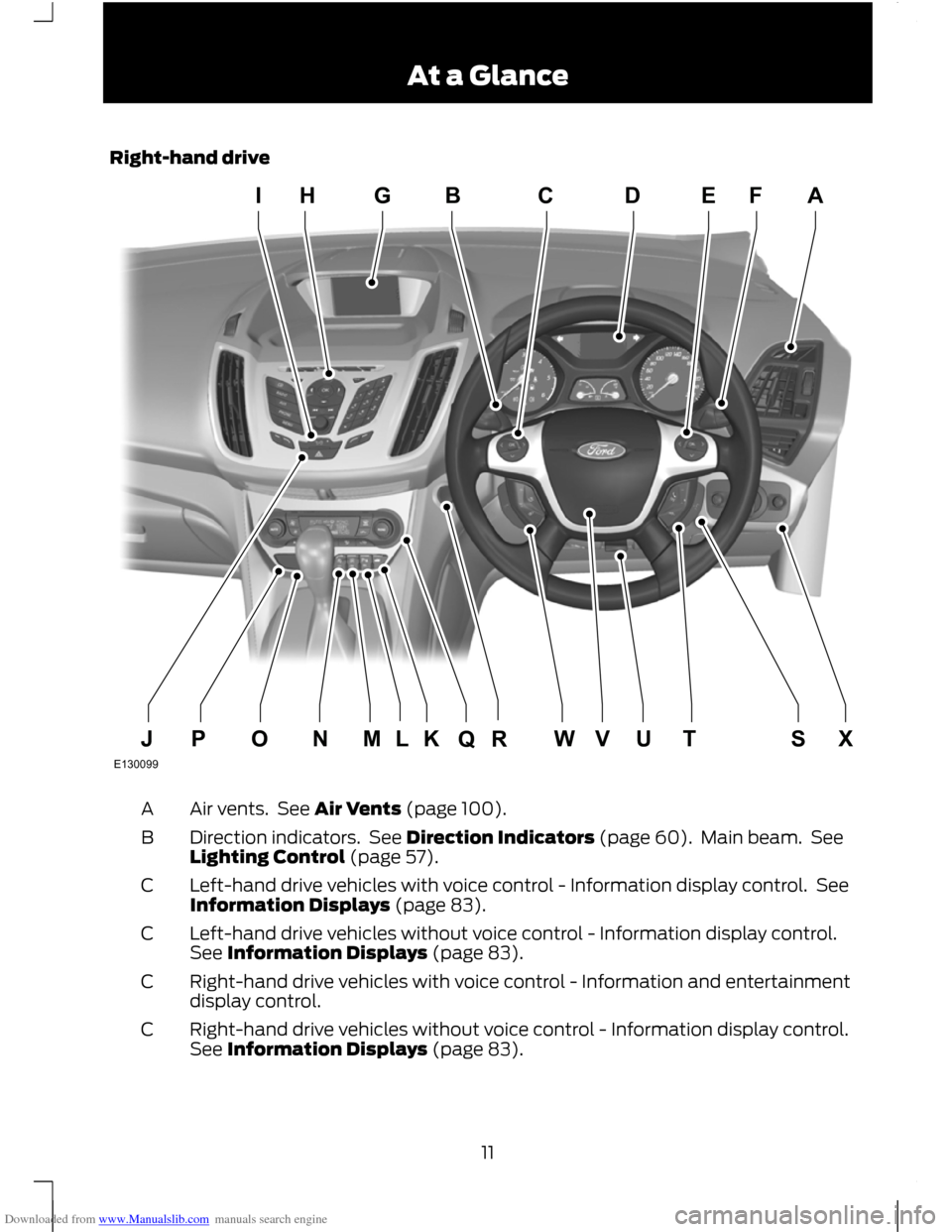
Air vents. See Air Vents (page 100).
A
Direction indicators. See Direction Indicators (page 60). Main beam. See
Lighting Control (page 57).
B
Left-hand drive vehicles with voice control - Information display control. See
Information Displays (page 83).
C
Left-hand drive vehicles without voice control - Information display control.
See Information Displays (page 83).
C
Right-hand drive vehicles with voice control - Information and entertainment
display control.
C
Right-hand drive vehicles without voice control - Information display control.
See Information Displays (page 83).
C
11 At a GlanceE130099HIGBDCFEAXSUTVWKLRQOMNPJ
Page 14 of 296
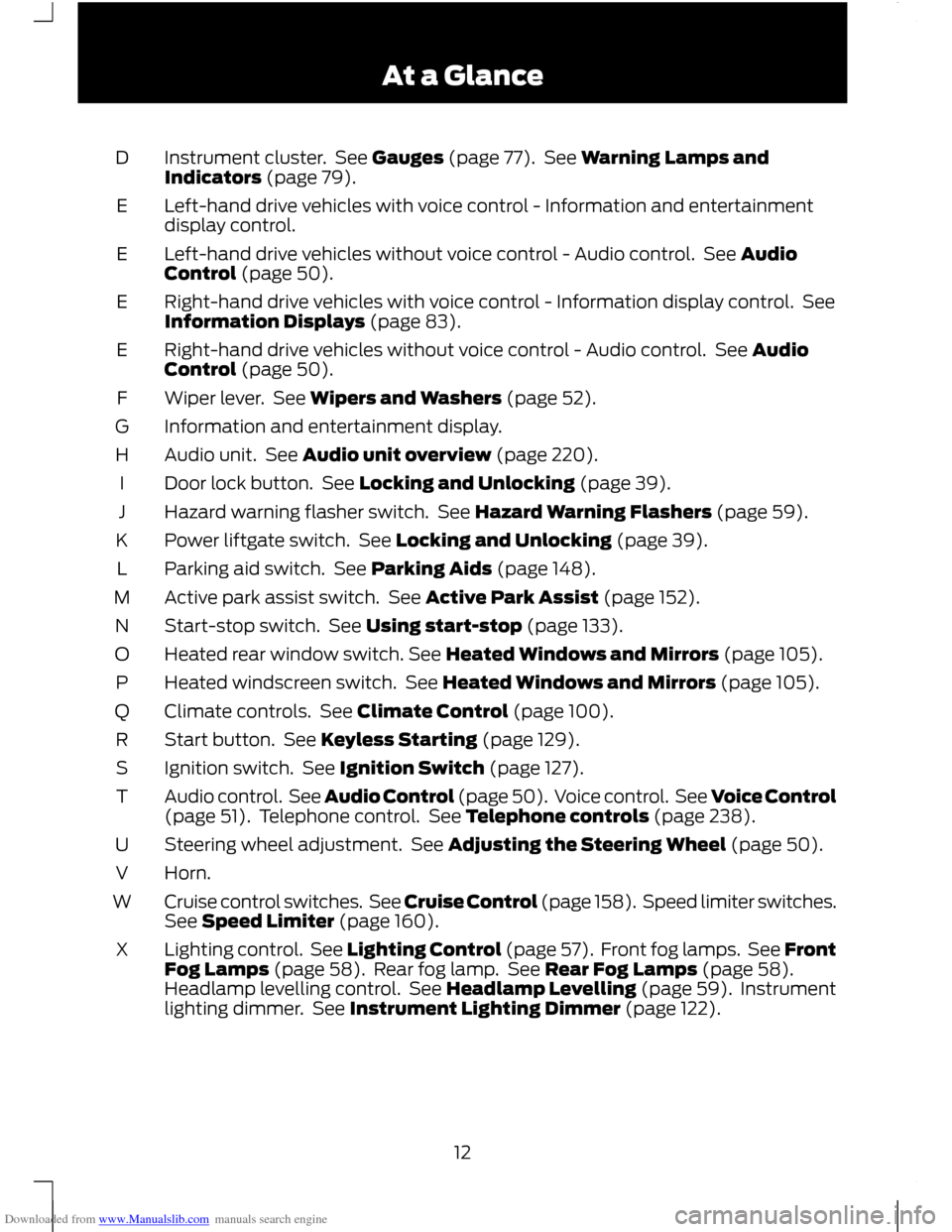
Downloaded from www.Manualslib.com manuals search engine Instrument cluster. See Gauges (page 77). See Warning Lamps and
Indicators (page 79).
D
Left-hand drive vehicles with voice control - Information and entertainment
display control.
E
Left-hand drive vehicles without voice control - Audio control. See Audio
Control (page 50).
E
Right-hand drive vehicles with voice control - Information display control. See
Information Displays (page 83).
E
Right-hand drive vehicles without voice control - Audio control. See Audio
Control (page 50).
E
Wiper lever. See Wipers and Washers (page 52).
F
Information and entertainment display.
G
Audio unit. See Audio unit overview (page 220).
H
Door lock button. See Locking and Unlocking (page 39).
I
Hazard warning flasher switch. See Hazard Warning Flashers (page 59).
J
Power liftgate switch. See Locking and Unlocking (page 39).
K
Parking aid switch. See Parking Aids (page 148).
L
Active park assist switch. See Active Park Assist (page 152).
M
Start-stop switch. See Using start-stop (page 133).
N
Heated rear window switch. See Heated Windows and Mirrors (page 105).
O
Heated windscreen switch. See Heated Windows and Mirrors (page 105).
P
Climate controls. See Climate Control (page 100).
Q
Start button. See Keyless Starting (page 129).
R
Ignition switch. See Ignition Switch (page 127).
S
Audio control. See Audio Control (page 50). Voice control. See Voice Control
(page 51). Telephone control. See Telephone controls (page 238).
T
Steering wheel adjustment. See Adjusting the Steering Wheel (page 50).
U
Horn.
V
Cruise control switches. See Cruise Control (page 158). Speed limiter switches.
See Speed Limiter (page 160).
W
Lighting control. See Lighting Control (page 57). Front fog lamps. See Front
Fog Lamps (page 58). Rear fog lamp. See Rear Fog Lamps (page 58).
Headlamp levelling control. See Headlamp Levelling (page 59). Instrument
lighting dimmer. See Instrument Lighting Dimmer (page 122).
X
12At a Glance
Page 53 of 296
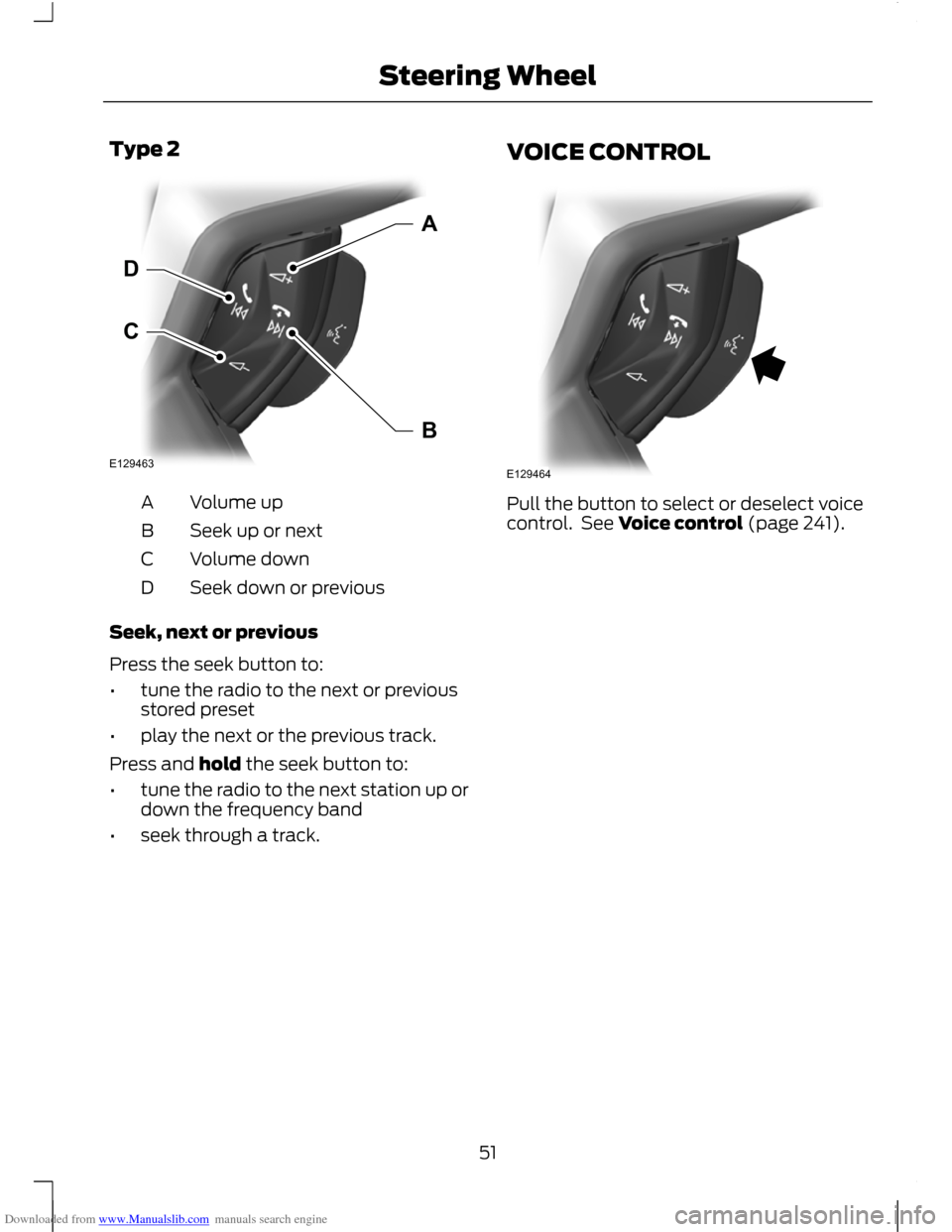
Downloaded from www.Manualslib.com manuals search engine Type 2
Volume up
A
Seek up or next
B
Volume down
C
Seek down or previous
D
Seek, next or previous
Press the seek button to:
• tune the radio to the next or previous
stored preset
• play the next or the previous track.
Press and hold the seek button to:
• tune the radio to the next station up or
down the frequency band
• seek through a track. VOICE CONTROL
Pull the button to select or deselect voice
control. See Voice control (page 241).
51
Steering WheelE129463CDAB E129464
Page 181 of 296
Downloaded from www.Manualslib.com manuals search engine Circuits protected
Ampere
rating
Fuse
Not used
-
57
Not used
-
58
Passive anti theft system (PATS)
5
59
Interior lamp, driver's door switch pack, glove box
10
60
Cigar lighter, second row power point
20
61
Rain sensor module, interior mirror
5
62
Not used
-
63
Not used
-
64
Liftgate release
10
65
Driver's door lock, double locking
20
66
Information and entertainment display
7.5
67
Steering column lock
15
68
Instrument cluster
5
69
Central locking
20
70
Air conditioning
10
71
Steering wheel control module
7.5
72
Alarm, on-board diagnostics II
5
73
Main beam
15
74
Front fog lamps
15
75
Reversing lamp
10
76
Washer pump
20
77
Ignition switch or start button
5
78
Voice control module, radio, navigation system, DVD
player, CD changer, door lock button
15
79
Not used
-
80
Interior motion sensor, RF receiver, sun blinds.
5
81
Washer pump ground
20
82
179
Fuses
Page 240 of 296
Downloaded from www.Manualslib.com manuals search engine After start up access to the phonebook list
can be delayed for several minutes,
depending upon the size.
Phonebook categories
The category is indicated as an icon:
Phone
Mobile
Home
Office
Making a phone an active phone
Note: If there is an ongoing call when the
phone in use is selected as the new active
phone, the call is transferred to the vehicle
audio system.
When using the system for the first time,
no phone is connected to the system.
After switching on the ignition and the
audio unit, the Bluetooth phone must be
bonded to the system. See Bluetooth
setup (page 237).
After bonding a Bluetooth phone to the
system, this becomes the active phone.
For further information refer to the phone
menu.
Select the phone from the active phone
menu.
Turning the ignition and radio back on
again, the last active phone is picked up by
the system.
Note: In some cases the Bluetooth
connection must also be confirmed on the
phone. Bond another Bluetooth phone
Bond a new Bluetooth phone as described
in the requirements for a Bluetooth
connection.
Phones stored in the system are accessible
by using the phone list on the audio unit.
Note:
A maximum of six devices may be
bonded. If six Bluetooth devices have
already been bonded, one of these has to
be debonded in order to bond a new device.
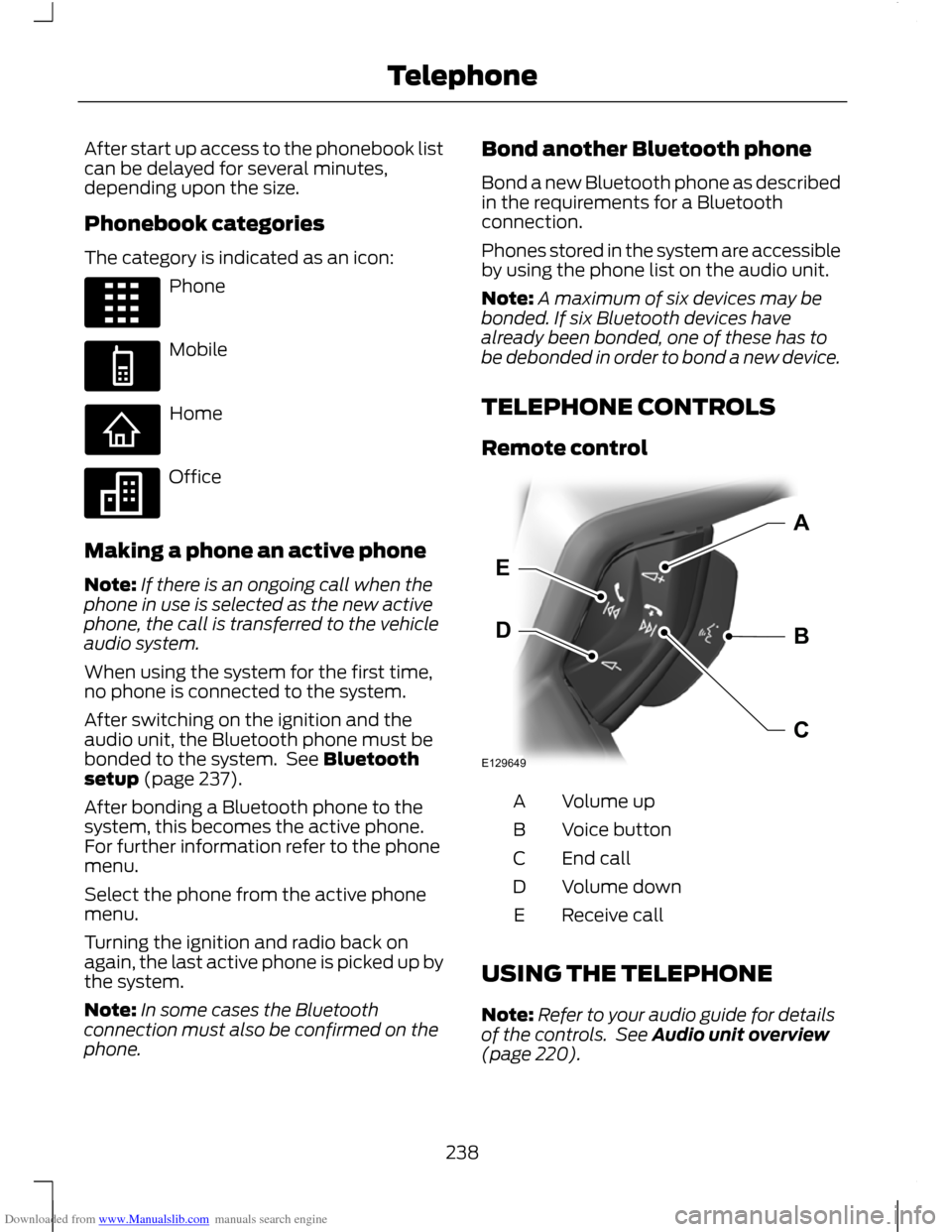
TELEPHONE CONTROLS
Remote control Volume up
A
Voice button
B
End call
C
Volume down
D
Receive call
E
USING THE TELEPHONE
Note: Refer to your audio guide for details
of the controls. See Audio unit overview
(page 220).
238
TelephoneE87990 E87991 E87992 E87993 E129649BDEAC
Page 241 of 296
Downloaded from www.Manualslib.com manuals search engine Note:
You can exit the phone menu by
pressing any source button CD, RADIO or
AUX.
Note: When referred to, the use of the
up/down arrow buttons, seek up and seek
down buttons, and the OK button can be
used on either the steering wheel or the
audio unit.
This chapter describes the phone functions
of the audio unit.
An active phone must be present.
Even if connected to the audio unit, your
phone can still be used in the usual way.
Making a call
Dialling a number using voice control
Phone numbers can be dialled using voice
control. See Telephone commands
(page 249).
Dialling a number using the address
book
1. Press the PHONE button.
2. Press the up/down arrow buttons until
PHONEBOOK is shown.
3. Press the OK button.
Note: You can also use the telephone
keypad to select the first letter of the entry
you are looking for. Press the relevant
number that corresponds to the letter
repeatedly until the required letter is
displayed.
4. Press the up/down arrow buttons to select the desired phone number.
Note: Press and hold the up/down arrow
buttons to search forwards or backwards
within the phonebook.
5. Press the OK button to dial the selected phone number. Dialling a number using the telephone
keypad
1. Press the PHONE button.
2. Dial the number using the telephone
keypad on the audio unit.
3. Press the OK button.
Note: If you enter an incorrect digit whilst
entering a phone number, press function
button 3 to erase the last digit. A long press
will erase the complete string of digits.
Ending a call
Calls can be ended by:
• pressing the seek up button
• pressing the OK button
• pressing function button 4.
Redialling a number
1. Press the PHONE button.
2. Press the up/down arrow buttons until
CALL LISTS is displayed.
3. Press the OK button.
Note: If the active phone does not provide
a call out list, the last outgoing call
number/entry can be redialled.
4. Press the up/down buttons to select the desired call list.
5. Press the OK button.
6. Press the up/down buttons to select the desired phone number.
7. Press the OK button.
Redialling the last dialled number
1. Press the PHONE button.
2. Press the up/down arrow buttons until
REDIAL is displayed.
3. Press the OK button.
239
Telephone
Page 243 of 296
Downloaded from www.Manualslib.com manuals search engine PRINCIPLE OF OPERATION
CAUTION
Using the system with the engine off
will drain the battery.
Voice recognition enables operation of the
system without the need to divert your
attention from the road ahead in order to
change settings, or receive feedback from
the system.
Whenever you issue one of the defined
commands with the system active, the
voice recognition system converts your
command into a control signal for the
system. Your inputs take the form of
dialogues or commands. You are guided
through these dialogues by
announcements or questions.
Please familiarise yourself with the
functions of the system before using voice
recognition.
Supported commands
The voice control system allows you to
control the following vehicle functions:
•
Bluetooth phone
• radio
• CD Player
• external device (USB)
• external device (iPod)
• automatic climate control
System response
As you work through a voice session the
system will prompt you with a beep tone
each time the system is ready to proceed.
Do not try to give any commands until the
beep tone has been heard. The voice
control system will repeat each spoken
command back to you. If you are not sure how to continue say
"HELP" for assistance or "CANCEL" if you
do not wish to continue.
The "HELP" function provides only a
subset of the available voice commands.
Detailed explanations of all possible voice
commands can be found on the following
pages.
Voice commands
All voice commands should be given using
a natural speaking voice, as if speaking to
a passenger or on the phone. Your voice
level should be dependant on the
surrounding noise level inside or outside
the vehicle but do not shout.
USING VOICE CONTROL
System operation
The order and content of the voice controls
are given in the following lists. The tables
show the sequence of user voice
commands and system responses for each
available function.
<> indicates a number or stored name tag
to be inserted by the user.
Short cuts
There are a number of voice command
short cuts available, which allow you to
control some vehicle features without
having to follow the complete command
menu. These are:
•
phone: "MOBILE NAME", "DIAL
NUMBER", "DIAL NAME", and "REDIAL"
• automatic climate control:
"TEMPERATURE", "AUTO MODE",
"DEFROSTING/DEMISTING ON" and
"DEFROSTING/DEMISTING OFF"
• radio: "TUNE NAME"
• external device (USB): "TRACK"
• external device (iPod): "TRACK"
241
Voice control
Page 244 of 296
Downloaded from www.Manualslib.com manuals search engine Start communicating with the system
Before you can start talking to the system
you first have to press the VOICE button
for each operation and wait until the
system answers with a beep. See Voice
Control (page 51).
Press the button again to cancel the voice
session.
Name tag
The name tag functionality can support
the phone, audio and navigation features
by using the "STORE NAME" function. You
can assign name tags to items such as
favourite radio stations and personal
phone contacts. See Audio unit
commands (page 242). See Telephone
commands (page 249).
•
Store up to 20 name tags per function.
• The average recording time for each
name tag is approximately 2-3
seconds.
AUDIO UNIT COMMANDS
CD Player
You can control playback directly by voice
control.
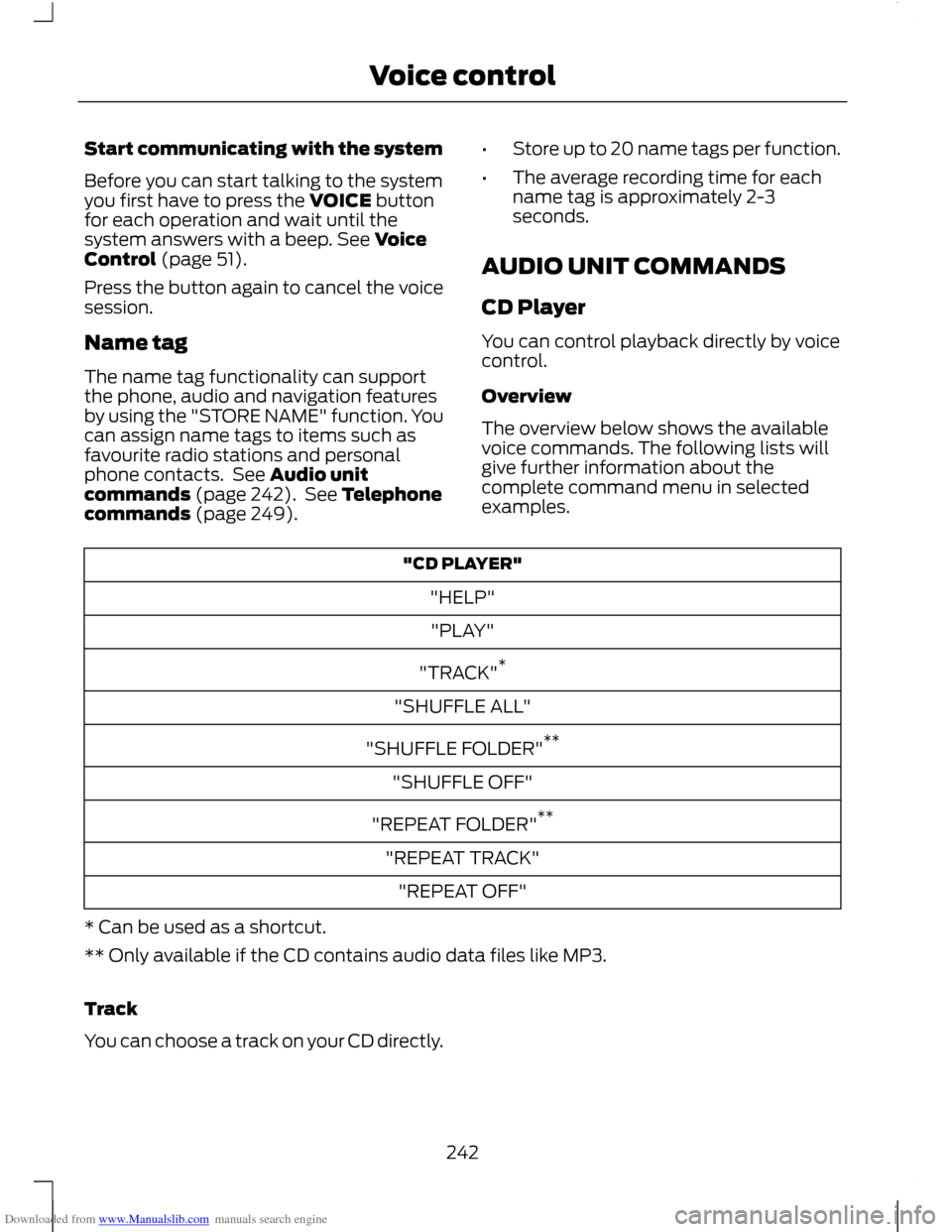
Overview
The overview below shows the available
voice commands. The following lists will
give further information about the
complete command menu in selected
examples. "CD PLAYER"
"HELP""PLAY"
"TRACK" *
"SHUFFLE ALL"
"SHUFFLE FOLDER" **
"SHUFFLE OFF"
"REPEAT FOLDER" **
"REPEAT TRACK" "REPEAT OFF"
* Can be used as a shortcut.
** Only available if the CD contains audio data files like MP3.
Track
You can choose a track on your CD directly.
242
Voice control