steering FORD C MAX ENERGI 2016 User Guide
[x] Cancel search | Manufacturer: FORD, Model Year: 2016, Model line: C MAX ENERGI, Model: FORD C MAX ENERGI 2016Pages: 395, PDF Size: 6.78 MB
Page 100 of 395
Fuel Economy (Energi only)
This display is only available in HybridMode. In Plug-in Power Mode the displaychanges to Miles (or km)/Full Charge.
An Instant Fuel Economy gauge is providedalong with Avg Fuel Economy. Whileviewing this screen you can reset youraverage fuel economy by pressing andholding the OK button on the left handsteering wheel controls. For moreinformation see Common Displays in thischapter.
Trip 1 & 2
Provides trip odometer, trip average fueleconomy and trip timer.
Distance traveled on battery power onlywith the engine off is shown in blue nextto total trip distance.
For Energi vehicles total plug-in electricityused in kilowatt hours (kWh) is shown inblue next to trip average fuel economy.
Info
In this mode, you can viewdifferent vehicle systeminformation and perform asystem check.
Information
Displays a number of different system tutorials. Use the up/downarrows to scroll through the tutorials. Then press OK to view.Tutorial
MyKeys (Number of MyKeys programmed)MyKey
MyKey Miles (km) (Distance traveled using a programmed MyKey)
Admin Keys (Number of admin keys)
All active warnings will display first if applicable. The system checkmenu may appear different based upon equipment options andcurrent vehicle status. Use the up/down arrow buttons to scrollthrough the list.
System Check
Settings
In this mode, you can configuredifferent driver setting choices.
Note:Some items are optional and may not appear.
Note:Some MyKey items will only appear if a MyKey is set.
97
C-MAX (CCG) Canada/United States of America, enUSA, First Printing
Information DisplaysE144642 E100023
Page 104 of 395
Note:Fuel Economy will be impacted byyour use of brakes, accelerator andaccessories, as well as environmentalconditions such as hills and weather.
Note:Fuel economy is not always ameasure of appropriate driving behavior. Forexample, when driving uphill andmaintaining an appropriate speed, yourinstant fuel economy may not be good(losing leaves) but the Coach may show ablue bar for Acceleration and Cruising.
Common Displays
Both Average fuel economy and aninstantaneous fuel economy gauge areincluded in Engage, Empower, MyView (ifselected) and Fuel Economy (shown inHybrid Mode) on the left informationdisplay. They are also included in FuelHistory on the right information display.
Average Fuel Economy
Average Fuel Economy is continuouslyaveraged since the last reset. You can resetyour average fuel economy by pressing andholding the OK button on thecorresponding steering wheel controls. ForEnergi vehicles both Hybrid and Plug-inPower mode operation will be included inthe calculation.
Note:Average fuel economy cannot bereset in MyView.
Instantaneous Fuel Economy
If your instantaneous fuel economy isgreater than the maximum valuedisplayed, a + sign will be shown next tothe maximum scale number. When yourvehicle is operating on battery power only,EV will display and the gauge fill will showin blue.
INFORMATION MESSAGES
Note:Depending on the vehicle optionsequipped with your vehicle, not all of themessages display or are available. Certainmessages may be abbreviated or shorteneddepending upon which cluster type youhave.
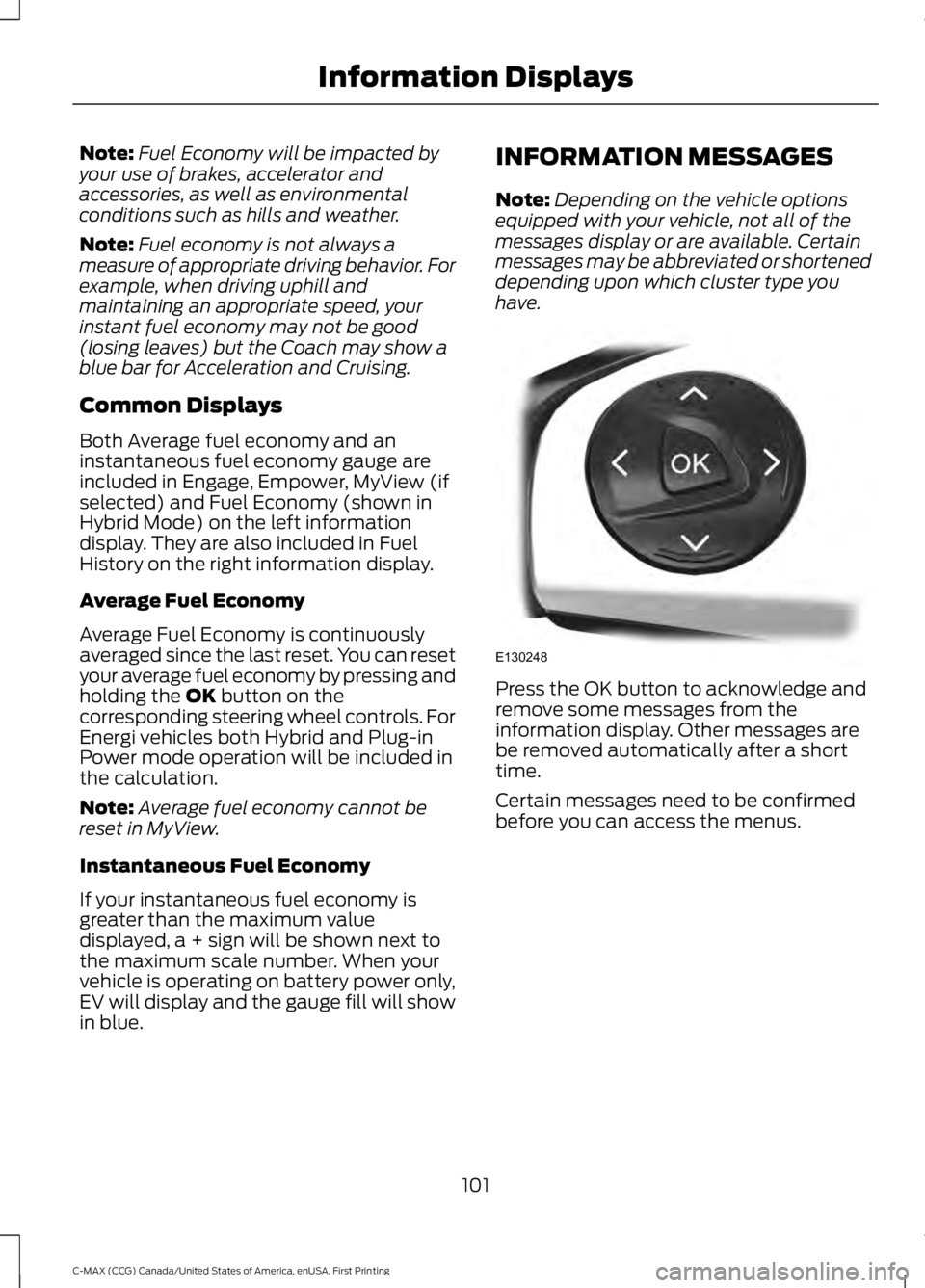
Press the OK button to acknowledge andremove some messages from theinformation display. Other messages arebe removed automatically after a shorttime.
Certain messages need to be confirmedbefore you can access the menus.
101
C-MAX (CCG) Canada/United States of America, enUSA, First Printing
Information DisplaysE130248
Page 110 of 395
Power Steering
ActionMessage
The power steering system has detected a condition thatrequires service. See your authorized dealer.Steering Fault ServiceNow
The power steering system is not working. Stop the vehicle asafe place. Contact your authorized dealer.Steering Loss StopSafely
Remote Start
ActionMessage
Displayed when the remote start system is active.Remote Start Active
Tire Pressure Monitoring System
ActionMessage
Displays when one or more tires on your vehicle have low tirepressure. See Tire Pressure Monitoring System (page 270).Tire Pressure Low
Displays when the tire pressure monitoring system ismalfunctioning. If the warning stays on or continues to comeon, contact your authorized dealer. See Tire PressureMonitoring System (page 270).
Tire Pressure MonitorFault
Displayed when a tire pressure sensor is malfunctioning, oryour spare tire is in use. See Tire Pressure MonitoringSystem (page 270). If the warning stays on or continues tocome on, contact your authorized dealer as soon as possible.
Tire Pressure SensorFault
Transmission
ActionMessage
Displays as a reminder to shift into park.Transmission Not in Park
107
C-MAX (CCG) Canada/United States of America, enUSA, First Printing
Information Displays
Page 115 of 395
•Heated steering wheel.
•Heated mirrors.
•Heated rear window.
You can adjust the default remote startsettings using the information displaycontrols. See Information Displays(page 93).
Automatic Settings
In hot weather, the system is set to 72°F(22°C). The cooled seats are set to high(if available, and selected to AUTO in theinformation display).
In moderate weather, the system eitherheats or cools (based on previoussettings). The rear defroster, heatedmirrors and heated seats do notautomatically turn on.
In cold weather, the system is set to 72°F(22°C). The heated seats are set to high(if available, and selected to AUTO in theinformation display). The rear defrosterand heated mirrors automatically turn on.
112
C-MAX (CCG) Canada/United States of America, enUSA, First Printing
Climate Control
Page 116 of 395
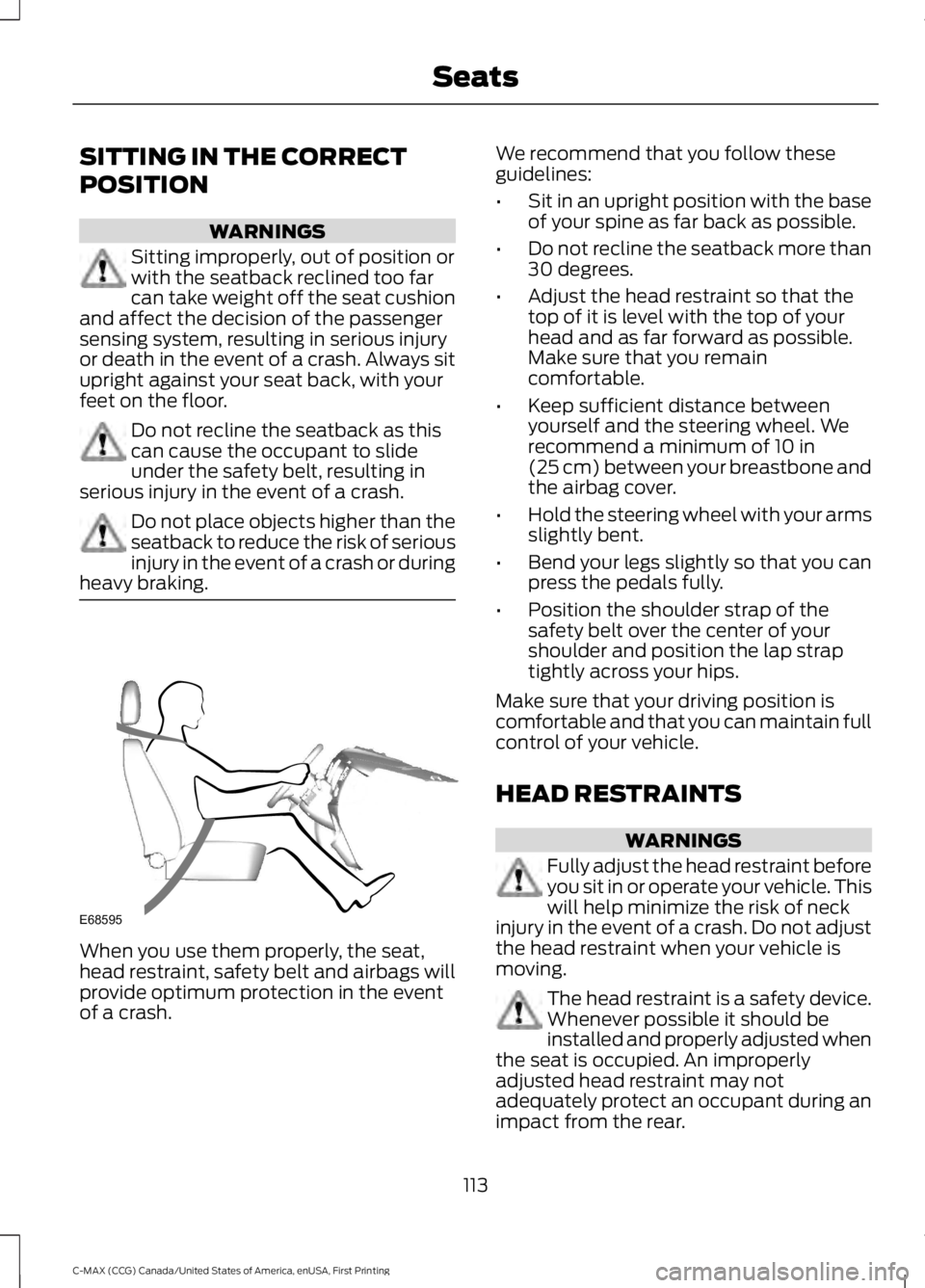
SITTING IN THE CORRECT
POSITION
WARNINGS
Sitting improperly, out of position orwith the seatback reclined too farcan take weight off the seat cushionand affect the decision of the passengersensing system, resulting in serious injuryor death in the event of a crash. Always situpright against your seat back, with yourfeet on the floor.
Do not recline the seatback as thiscan cause the occupant to slideunder the safety belt, resulting inserious injury in the event of a crash.
Do not place objects higher than theseatback to reduce the risk of seriousinjury in the event of a crash or duringheavy braking.
When you use them properly, the seat,head restraint, safety belt and airbags willprovide optimum protection in the eventof a crash.
We recommend that you follow theseguidelines:
•Sit in an upright position with the baseof your spine as far back as possible.
•Do not recline the seatback more than30 degrees.
•Adjust the head restraint so that thetop of it is level with the top of yourhead and as far forward as possible.Make sure that you remaincomfortable.
•Keep sufficient distance betweenyourself and the steering wheel. Werecommend a minimum of 10 in(25 cm) between your breastbone andthe airbag cover.
•Hold the steering wheel with your armsslightly bent.
•Bend your legs slightly so that you canpress the pedals fully.
•Position the shoulder strap of thesafety belt over the center of yourshoulder and position the lap straptightly across your hips.
Make sure that your driving position iscomfortable and that you can maintain fullcontrol of your vehicle.
HEAD RESTRAINTS
WARNINGS
Fully adjust the head restraint beforeyou sit in or operate your vehicle. Thiswill help minimize the risk of neckinjury in the event of a crash. Do not adjustthe head restraint when your vehicle ismoving.
The head restraint is a safety device.Whenever possible it should beinstalled and properly adjusted whenthe seat is occupied. An improperlyadjusted head restraint may notadequately protect an occupant during animpact from the rear.
113
C-MAX (CCG) Canada/United States of America, enUSA, First Printing
SeatsE68595
Page 134 of 395
Note:The green ready indicator illuminatesletting you know that the vehicle is readyfor driving. Since your vehicle is equippedwith a silent key start, the engine may notstart at the time of the vehicle start. SeeHybrid Vehicle Operation (page 135).
The system does not function if:
•The key frequencies are jammed.
•The key battery has no charge.
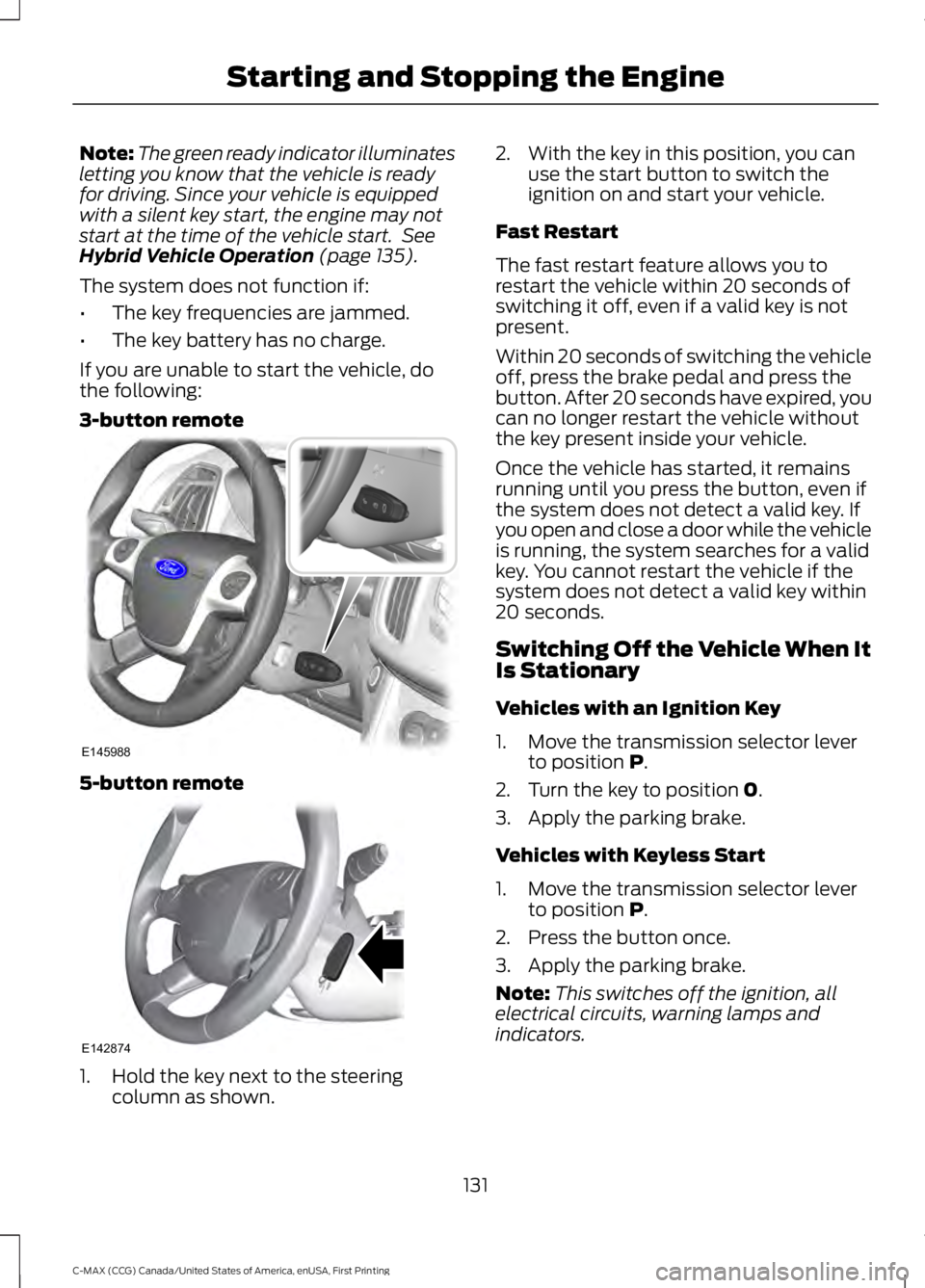
If you are unable to start the vehicle, dothe following:
3-button remote
5-button remote
1. Hold the key next to the steeringcolumn as shown.
2. With the key in this position, you canuse the start button to switch theignition on and start your vehicle.
Fast Restart
The fast restart feature allows you torestart the vehicle within 20 seconds ofswitching it off, even if a valid key is notpresent.
Within 20 seconds of switching the vehicleoff, press the brake pedal and press thebutton. After 20 seconds have expired, youcan no longer restart the vehicle withoutthe key present inside your vehicle.
Once the vehicle has started, it remainsrunning until you press the button, even ifthe system does not detect a valid key. Ifyou open and close a door while the vehicleis running, the system searches for a validkey. You cannot restart the vehicle if thesystem does not detect a valid key within20 seconds.
Switching Off the Vehicle When ItIs Stationary
Vehicles with an Ignition Key
1. Move the transmission selector leverto position P.
2. Turn the key to position 0.
3. Apply the parking brake.
Vehicles with Keyless Start
1. Move the transmission selector leverto position P.
2. Press the button once.
3. Apply the parking brake.
Note:This switches off the ignition, allelectrical circuits, warning lamps andindicators.
131
C-MAX (CCG) Canada/United States of America, enUSA, First Printing
Starting and Stopping the EngineE145988 E142874
Page 135 of 395
Switching Off the Vehicle When ItIs Moving
WARNING
Switching off the engine when thevehicle is still moving will result in aloss of brake and steering assistance.The steering will not lock, but higher effortwill be required. When the ignition isswitched off, some electrical circuits,including air bags, warning lamps andindicators may also be off. If the ignitionwas turned off accidentally, you can shiftinto neutral (N) and re-start the engine.
Vehicles with an Ignition Key
1. Move the transmission selector leverto position N and use the brakes tobring your vehicle to a safe stop.
2. When your vehicle has stopped, movethe transmission selector lever toposition P and turn the key to position0.
3. Apply the parking brake.
Vehicles with Keyless Start
1. Move the transmission selector leverto position N and use the brakes tobring your vehicle to a safe stop.
2. When your vehicle has stopped, movethe transmission selector lever toposition P.
3. Press and hold the button for onesecond, or press it three times withintwo seconds.
4. Apply the parking brake.
Guarding Against Exhaust Fumes
WARNING
If you smell exhaust fumes insideyour vehicle, have your vehiclechecked by your authorized dealerimmediately. Do not drive your vehicle ifyou smell exhaust fumes. Carbonmonoxide is present in exhaust fumes.Take precautions to avoid its dangerouseffects.
Important Ventilating Information
If you stop your vehicle and leave it idlingfor long periods, we recommend that youdo one of the following:
•Open the windows at least 1 in(2.5 cm).
•Set your climate control to outside air.
ENGINE BLOCK HEATER (If
Equipped)
WARNINGS
Failure to follow engine block heaterinstructions could result in propertydamage or serious personal injury.
Do not use your heater withungrounded electrical systems ortwo-pronged adapters. There is a riskof electrical shock.
Do not fully close the hood, or allowit to drop under its own weight whenusing the engine block heater. Thiscould damage the power cable and maycause an electrical short resulting in fire,injury and property damage.
Note:The heater is most effective whenoutdoor temperatures are below 0°F(-18°C).
132
C-MAX (CCG) Canada/United States of America, enUSA, First Printing
Starting and Stopping the Engine
Page 141 of 395
These modes are available when yourvehicle can run under high voltage batterypower. With your vehicle in driving mode,you can change EV modes with each pressof the EV button. The current mode will bedisplayed in the left-hand instrumentcluster screen.
Auto EV
This mode provides anautomatic use of high voltagebattery power during the drive,staying in electric mode when possible andrunning the engine when needed. Thismode will be the only one available if theplug-in power has been depleted.
EV Now
This mode provides an electriconly driving experience. Theleft-hand information displaychanges to a screen displaying youraverage miles or kilometers per chargealong with EV specific tools and functions.
Your vehicle may accelerate more slowlyand the top speed may be lower in EV Nowmode than in Auto EV mode.
You can enable your engine at any time byusing one of the following methods:
1.Press the OK button on the left 5–waysteering wheel control while viewingthe miles or kilometers per chargescreen. Your vehicle will enable theengine as needed, and willautomatically return to EV Now aftereight seconds or when the engine is nolonger needed.
2.Press the accelerator pedal fully. A popup message will appear. Press OK onthe left-hand steering wheel button toactivate as needed. The message willdisappear if you release the acceleratorpedal.
3. Press the EV button. This will changethe mode to EV Later and permitengine operation.
Your vehicle may automatically enterEngine Enabled mode if system conditionsrequire it. A engine enabled message willdisplay if this occurs. This is normalfunction, and your vehicle will return to EVNow when possible.
Your vehicle may enter Enable Enginemode if the climate control is in a defrostmode and the outside temperature is cold.A engine enabled message will display ifthis occurs. If defrost is not needed, selecta different climate control mode to permitEV Now.
When you enable EV Now, a blue EV icondisplays in the left-hand informationdisplay. If your vehicle is in the EngineEnabled mode, the EV icon will be yellow.
EV Now will automatically exit when thePlug in power has been depleted.
EV Later
This mode saves most of thehigh voltage battery plug inpower for future use (forexample, your initial drive is at high speedson open roads, but later your drive will beat low speeds in an urban area whereplug-in power usage is most efficient).Your vehicle will run the engine as neededand keep most of the high voltage batteryplug in power for later use in Auto Mode orEV Now mode.
When you enable EV Later, a white EVLater icon appears on the left-handinformation display.
The EV Later mode will automatically resetto EV Auto mode when you power yourvehicle off. You may press the EV buttontwice during the next drive to return to EVLater mode, if desired.
138
C-MAX (CCG) Canada/United States of America, enUSA, First Printing
Unique Driving CharacteristicsE155152 E144814 E151263
Page 167 of 395
GENERAL INFORMATION
Note:Occasional brake noise is normal. Ifa metal-to-metal, continuous grinding orcontinuous squeal sound is present, thebrake linings may be worn-out. Have thesystem checked by an authorized dealer. Ifthe vehicle has continuous vibration orshudder in the steering wheel while braking,have it checked by an authorized dealer.
Note:Brake dust may accumulate on thewheels, even under normal drivingconditions. Some dust is inevitable as thebrakes wear and does not contribute tobrake noise. See Cleaning the AlloyWheels (page 245).
See Warning Lamps andIndicators (page 89).
Wet brakes result in reduced brakingefficiency. Gently press the brake pedal afew times when driving from a car wash orstanding water to dry the brakes.
Brake Over Accelerator
In the event the accelerator pedalbecomes stuck or entrapped, apply steadyand firm pressure to the brake pedal toslow the vehicle and reduce engine power.If you experience this condition, apply thebrakes and bring your vehicle to a safestop. Move the transmission to park (P),switch the engine off and apply the parkingbrake. Inspect the accelerator pedal forany interference. If none are found and thecondition persists, have your vehicle towedto the nearest authorized dealer.
Brake Assist
Brake assist detects when you brakeheavily by measuring the rate at which youpress the brake pedal. It providesmaximum braking efficiency as long as youpress the pedal. Brake assist can reducestopping distances in critical situations.
Anti-lock Brake System
This system helps you maintain steeringcontrol during emergency stops by keepingthe brakes from locking.
This lamp momentarilyilluminates when you turn theignition on. If the light does notilluminate during start up, remains on orflashes, the system may be disabled. Havethe system checked by an authorizeddealer. If the anti-lock brake system isdisabled, normal braking is still effective.
If the brake warning lampilluminates when you release theparking brake, have the systemchecked by an authorized dealer.
Regenerative Braking System
This feature is used to simulate the enginebraking of an internal combustion engineand assist the standard brake system whilerecovering some of the energy of motionand storing it in the battery to improve therange of your vehicle. The standard brakesystem is designed to fully stop the car ifregenerative braking is not available.During regenerative braking, the motor isspun as a generator to create electricalcurrent. This recharges the battery andslows the vehicle. In effect, once theaccelerator pedal is released, the motorchanges from an energy user to an energyproducer.
When the accelerator pedal is released orthe brake pedal is applied, the brakecontroller automatically detects theamount of deceleration requested andoptimizes how much of the decelerationwill be produced by regenerative braking.The remaining portion is generated by
164
C-MAX (CCG) Canada/United States of America, enUSA, First Printing
BrakesE144522 E144522
Page 168 of 395
standard friction braking. When the batteryis almost fully charged, the amount ofregenerative braking is limited to avoidovercharging, and the requesteddeceleration is produced by standardfriction braking alone.
Regenerative braking does not take theplace of the standard friction brakes; it onlyassists them. Regenerative braking hasalso been designed to interact with theanti-lock brake system. Regenerativebraking is disabled when the anti-lockbrake system is activated or the battery isfully charged.
HINTS ON DRIVING WITH
ANTI-LOCK BRAKES
Note:When the system is operating, thebrake pedal may pulse and may travelfurther. Maintain pressure on the brakepedal. You may also hear a noise from thesystem. This is normal.
The anti-lock braking system will noteliminate the risks when:
•You drive too closely to the vehicle infront of you.
•Your vehicle is hydroplaning.
•You take corners too fast.
•The road surface is poor.
PARKING BRAKE
WARNING
Always set the parking brake fullyand make sure you shift the gearshiftlever to park (P). Switch the ignitionoff and remove the key whenever you leaveyour vehicle.
Note:Do not press the release button whilepulling the lever up.
To apply the parking brake:
1. Press the foot brake pedal firmly.
2. Pull the parking brake lever up to itsfullest extent.
Note:If you park your vehicle on a hill andfacing uphill, shift the gearshift lever to park(P) and turn the steering wheel away fromthe curb.
Note:If you park your vehicle on a hill andfacing downhill, shift the gearshift lever topark (P) and turn the steering wheel towardthe curb.
To release the parking brake:
1. Press the brake pedal firmly.
2. Pull the lever up slightly.
3. Press the release button and push thelever down.
HILL START ASSIST
WARNINGS
The system does not replace theparking brake. When you leave yourvehicle, always apply the parkingbrake and shift the transmission into park(P) (automatic transmission) or first gear(1) (manual transmission).
You must remain in your vehicle onceyou have activated the system.
During all times, you are responsiblefor controlling your vehicle,supervising the system andintervening, if required.
If the engine is revved excessively, orif a malfunction is detected, thesystem will be deactivated.
The system makes it easier to pull awaywhen your vehicle is on a slope without theneed to use the parking brake.
165
C-MAX (CCG) Canada/United States of America, enUSA, First Printing
Brakes