light FORD C MAX ENERGI 2016 Workshop Manual
[x] Cancel search | Manufacturer: FORD, Model Year: 2016, Model line: C MAX ENERGI, Model: FORD C MAX ENERGI 2016Pages: 395, PDF Size: 6.78 MB
Page 162 of 395
The light ring located around the chargeport indicates the charge status of the highvoltage battery in your vehicle:
•When the top right-hand side quadrantis pulsing, the charge is between 0-25percent.
•When the top right-hand side quadrantis on and the bottom right-handquadrant is pulsing, the charge isbetween 25-50 percent.
•When both right-hand side quadrantsare on and the bottom left-hand sidequadrant is pulsing, the charge isbetween 50-75 percent.
•When three quadrants are on and thetop left-hand side quadrant is pulsing,the charge is between 75-100 percent.
•When all the lights on the light ring areon, the charge is complete.
Note:The light ring will turn off one minuteafter reaching a full charge.
Locking the Charging Coupler
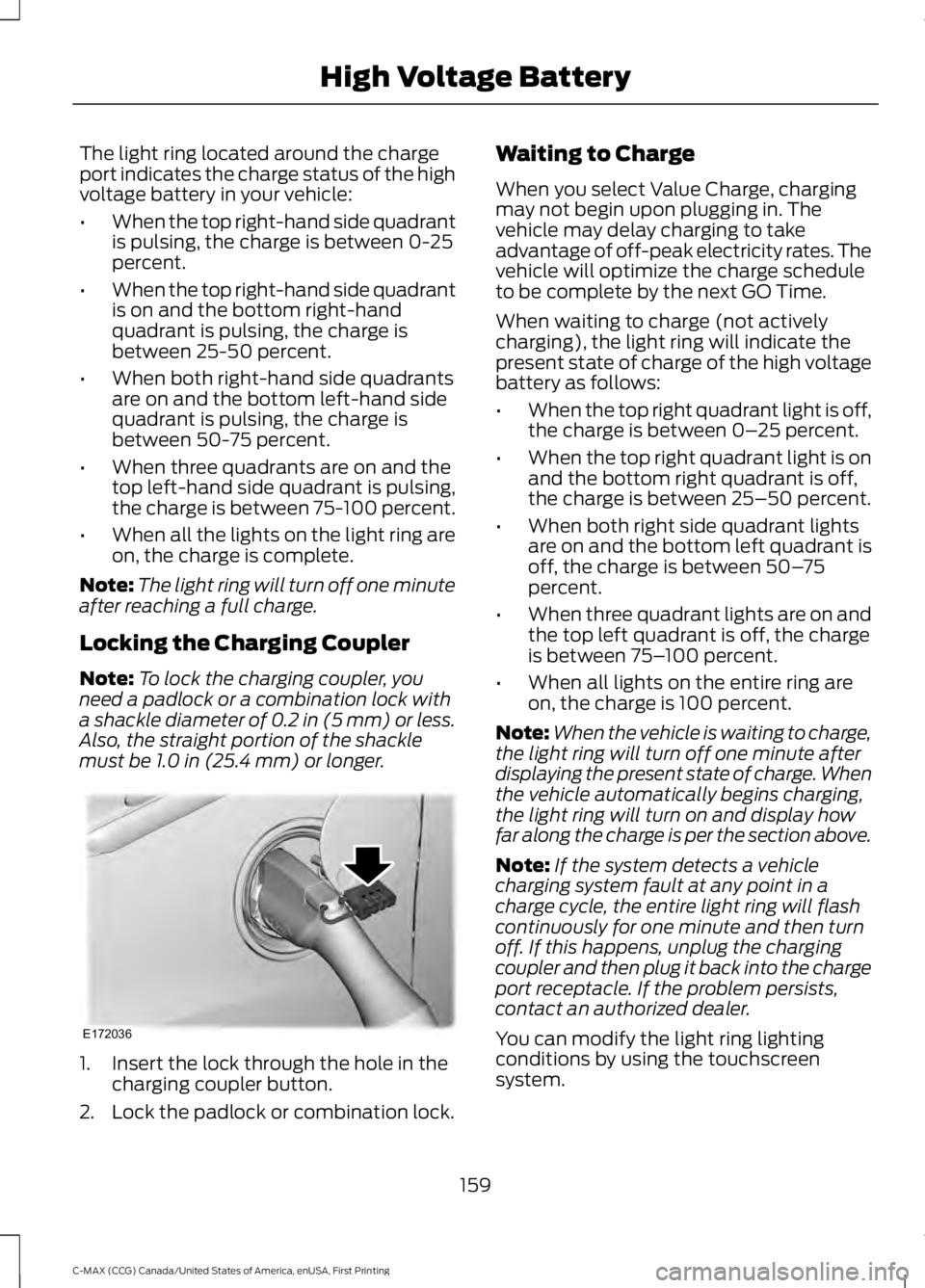
Note:To lock the charging coupler, youneed a padlock or a combination lock witha shackle diameter of 0.2 in (5 mm) or less.Also, the straight portion of the shacklemust be 1.0 in (25.4 mm) or longer.
1. Insert the lock through the hole in thecharging coupler button.
2. Lock the padlock or combination lock.
Waiting to Charge
When you select Value Charge, chargingmay not begin upon plugging in. Thevehicle may delay charging to takeadvantage of off-peak electricity rates. Thevehicle will optimize the charge scheduleto be complete by the next GO Time.
When waiting to charge (not activelycharging), the light ring will indicate thepresent state of charge of the high voltagebattery as follows:
•When the top right quadrant light is off,the charge is between 0–25 percent.
•When the top right quadrant light is onand the bottom right quadrant is off,the charge is between 25–50 percent.
•When both right side quadrant lightsare on and the bottom left quadrant isoff, the charge is between 50–75percent.
•When three quadrant lights are on andthe top left quadrant is off, the chargeis between 75–100 percent.
•When all lights on the entire ring areon, the charge is 100 percent.
Note:When the vehicle is waiting to charge,the light ring will turn off one minute afterdisplaying the present state of charge. Whenthe vehicle automatically begins charging,the light ring will turn on and display howfar along the charge is per the section above.
Note:If the system detects a vehiclecharging system fault at any point in acharge cycle, the entire light ring will flashcontinuously for one minute and then turnoff. If this happens, unplug the chargingcoupler and then plug it back into the chargeport receptacle. If the problem persists,contact an authorized dealer.
You can modify the light ring lightingconditions by using the touchscreensystem.
159
C-MAX (CCG) Canada/United States of America, enUSA, First Printing
High Voltage BatteryE172036
Page 166 of 395
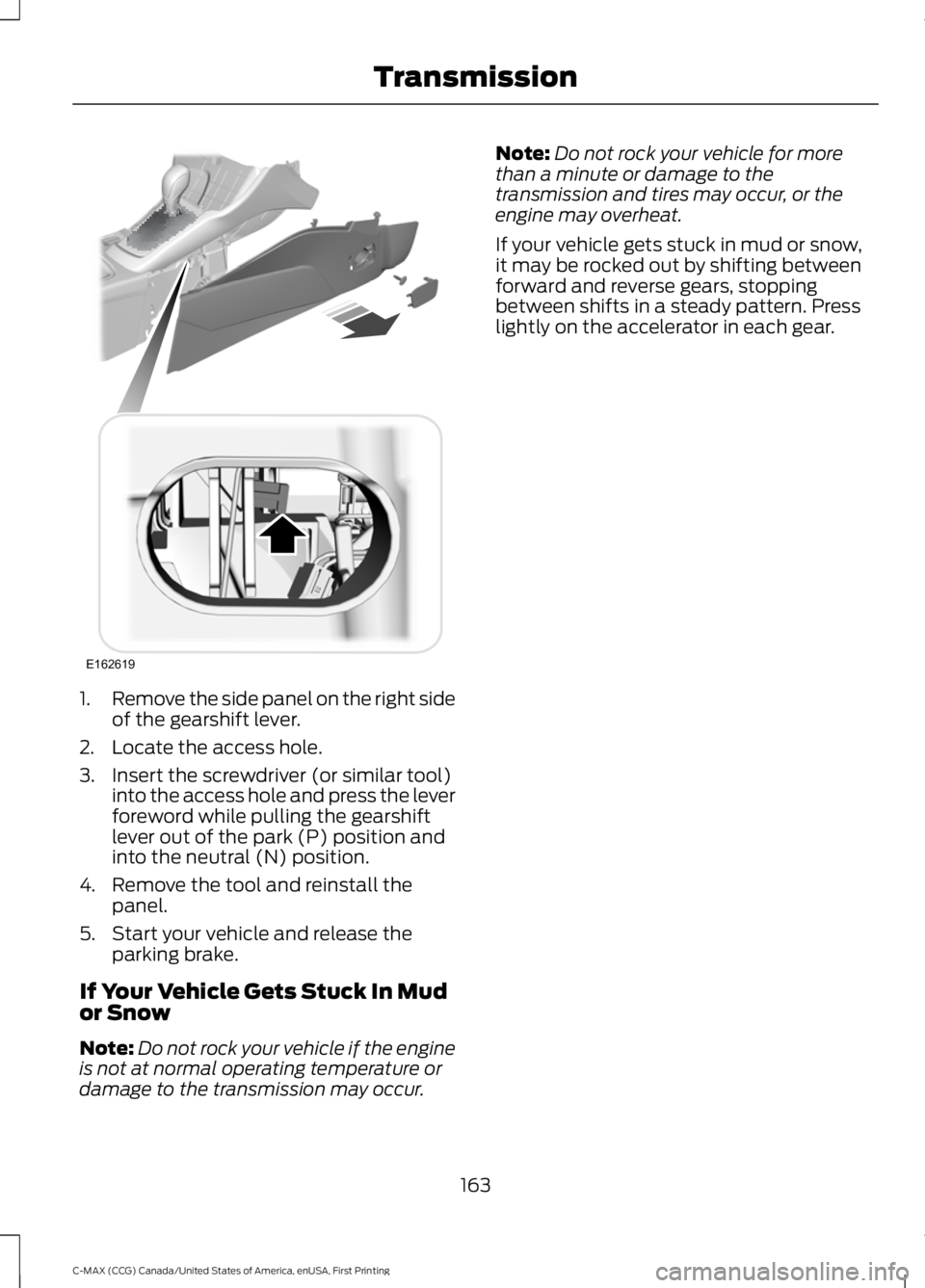
1.Remove the side panel on the right sideof the gearshift lever.
2. Locate the access hole.
3. Insert the screwdriver (or similar tool)into the access hole and press the leverforeword while pulling the gearshiftlever out of the park (P) position andinto the neutral (N) position.
4. Remove the tool and reinstall thepanel.
5. Start your vehicle and release theparking brake.
If Your Vehicle Gets Stuck In Mudor Snow
Note:Do not rock your vehicle if the engineis not at normal operating temperature ordamage to the transmission may occur.
Note:Do not rock your vehicle for morethan a minute or damage to thetransmission and tires may occur, or theengine may overheat.
If your vehicle gets stuck in mud or snow,it may be rocked out by shifting betweenforward and reverse gears, stoppingbetween shifts in a steady pattern. Presslightly on the accelerator in each gear.
163
C-MAX (CCG) Canada/United States of America, enUSA, First Printing
TransmissionE162619
Page 167 of 395
GENERAL INFORMATION
Note:Occasional brake noise is normal. Ifa metal-to-metal, continuous grinding orcontinuous squeal sound is present, thebrake linings may be worn-out. Have thesystem checked by an authorized dealer. Ifthe vehicle has continuous vibration orshudder in the steering wheel while braking,have it checked by an authorized dealer.
Note:Brake dust may accumulate on thewheels, even under normal drivingconditions. Some dust is inevitable as thebrakes wear and does not contribute tobrake noise. See Cleaning the AlloyWheels (page 245).
See Warning Lamps andIndicators (page 89).
Wet brakes result in reduced brakingefficiency. Gently press the brake pedal afew times when driving from a car wash orstanding water to dry the brakes.
Brake Over Accelerator
In the event the accelerator pedalbecomes stuck or entrapped, apply steadyand firm pressure to the brake pedal toslow the vehicle and reduce engine power.If you experience this condition, apply thebrakes and bring your vehicle to a safestop. Move the transmission to park (P),switch the engine off and apply the parkingbrake. Inspect the accelerator pedal forany interference. If none are found and thecondition persists, have your vehicle towedto the nearest authorized dealer.
Brake Assist
Brake assist detects when you brakeheavily by measuring the rate at which youpress the brake pedal. It providesmaximum braking efficiency as long as youpress the pedal. Brake assist can reducestopping distances in critical situations.
Anti-lock Brake System
This system helps you maintain steeringcontrol during emergency stops by keepingthe brakes from locking.
This lamp momentarilyilluminates when you turn theignition on. If the light does notilluminate during start up, remains on orflashes, the system may be disabled. Havethe system checked by an authorizeddealer. If the anti-lock brake system isdisabled, normal braking is still effective.
If the brake warning lampilluminates when you release theparking brake, have the systemchecked by an authorized dealer.
Regenerative Braking System
This feature is used to simulate the enginebraking of an internal combustion engineand assist the standard brake system whilerecovering some of the energy of motionand storing it in the battery to improve therange of your vehicle. The standard brakesystem is designed to fully stop the car ifregenerative braking is not available.During regenerative braking, the motor isspun as a generator to create electricalcurrent. This recharges the battery andslows the vehicle. In effect, once theaccelerator pedal is released, the motorchanges from an energy user to an energyproducer.
When the accelerator pedal is released orthe brake pedal is applied, the brakecontroller automatically detects theamount of deceleration requested andoptimizes how much of the decelerationwill be produced by regenerative braking.The remaining portion is generated by
164
C-MAX (CCG) Canada/United States of America, enUSA, First Printing
BrakesE144522 E144522
Page 168 of 395
standard friction braking. When the batteryis almost fully charged, the amount ofregenerative braking is limited to avoidovercharging, and the requesteddeceleration is produced by standardfriction braking alone.
Regenerative braking does not take theplace of the standard friction brakes; it onlyassists them. Regenerative braking hasalso been designed to interact with theanti-lock brake system. Regenerativebraking is disabled when the anti-lockbrake system is activated or the battery isfully charged.
HINTS ON DRIVING WITH
ANTI-LOCK BRAKES
Note:When the system is operating, thebrake pedal may pulse and may travelfurther. Maintain pressure on the brakepedal. You may also hear a noise from thesystem. This is normal.
The anti-lock braking system will noteliminate the risks when:
•You drive too closely to the vehicle infront of you.
•Your vehicle is hydroplaning.
•You take corners too fast.
•The road surface is poor.
PARKING BRAKE
WARNING
Always set the parking brake fullyand make sure you shift the gearshiftlever to park (P). Switch the ignitionoff and remove the key whenever you leaveyour vehicle.
Note:Do not press the release button whilepulling the lever up.
To apply the parking brake:
1. Press the foot brake pedal firmly.
2. Pull the parking brake lever up to itsfullest extent.
Note:If you park your vehicle on a hill andfacing uphill, shift the gearshift lever to park(P) and turn the steering wheel away fromthe curb.
Note:If you park your vehicle on a hill andfacing downhill, shift the gearshift lever topark (P) and turn the steering wheel towardthe curb.
To release the parking brake:
1. Press the brake pedal firmly.
2. Pull the lever up slightly.
3. Press the release button and push thelever down.
HILL START ASSIST
WARNINGS
The system does not replace theparking brake. When you leave yourvehicle, always apply the parkingbrake and shift the transmission into park(P) (automatic transmission) or first gear(1) (manual transmission).
You must remain in your vehicle onceyou have activated the system.
During all times, you are responsiblefor controlling your vehicle,supervising the system andintervening, if required.
If the engine is revved excessively, orif a malfunction is detected, thesystem will be deactivated.
The system makes it easier to pull awaywhen your vehicle is on a slope without theneed to use the parking brake.
165
C-MAX (CCG) Canada/United States of America, enUSA, First Printing
Brakes
Page 169 of 395
When the system is active, your vehicle willremain stationary on the slope for two tothree seconds after you release the brakepedal. This allows you time to move yourfoot from the brake to the acceleratorpedal. The brakes release automaticallywhen the engine has sufficient torque toprevent your vehicle from rolling down thegrade. This is an advantage when pullingaway on a slope, for example from a carpark ramp, traffic lights or when reversinguphill into a parking space.
The system will activate automatically onany slope that will cause significant vehiclerollback. For vehicles with a manualtransmission, you can switch this featureoff using the information display. SeeInformation Displays (page 93). Thesystem will remain on or off depending onhow it was last set.
Note:There is no warning lamp to indicatethe system is either on or off.
Note:If your vehicle is equipped with AutoHold, Hill Start Assist will not be availablewhile Auto Hold is active.
Using Hill Start Assist
1. Bring your vehicle to a completestandstill. Keep the brake pedalpressed and select an uphill gear (forexample, first (1) when facing uphill orreverse (R) when facing downhill).
2. If the sensors detect that your vehicleis on a slope, the system will activateautomatically.
3. When you remove your foot from thebrake pedal, your vehicle will remainon the slope without rolling away forabout two or three seconds. This holdtime will automatically be extended ifyou are in the process of driving off.
4. Drive off in the normal manner. Thebrakes will release automatically.
Switching the System On and Off
You can switch this feature on or off if yourvehicle is equipped with a manualtransmission and an information display.See General Information (page 93). Thesystem remembers the last setting whenyou start your vehicle.
If your vehicle is not equipped with amanual transmission and an informationdisplay, you cannot turn the system on oroff. When you switch the ignition on, thesystem automatically turns on.
166
C-MAX (CCG) Canada/United States of America, enUSA, First Printing
Brakes
Page 170 of 395
PRINCIPLE OF OPERATION
The traction control system helps avoiddrive wheel spin and loss of traction.
If your vehicle begins to slide, the systemapplies the brakes to individual wheelsand, when needed, reduces engine powerat the same time. If the wheels spin whenaccelerating on slippery or loose surfaces,the system reduces engine power in orderto increase traction.
USING TRACTION CONTROL
WARNING
The stability and traction controllight illuminates steadily if thesystem detects a failure. Make sureyou did not manually disable the tractioncontrol system using the informationdisplay controls or the switch. If thestability control and traction control lightis still illuminating steadily, have thesystem serviced by an authorized dealerimmediately. Operating your vehicle withthe traction control disabled could lead toan increased risk of loss of vehicle control,vehicle rollover, personal injury and death.
The system automatically turns on eachtime you switch the ignition on.
If your vehicle is stuck in mud or snow,switching traction control off may bebeneficial as this allows the wheels to spin.
Note:When you switch traction control off,stability control remains fully active.
Switching the System Off
When you switch the system off or on, amessage appears in the informationdisplay showing system status.
You can switch the system off by eitherusing the information display controls orthe switch.
Using the Information DisplayControls
You can switch this feature off or on in theinformation display. See GeneralInformation (page 93).
Using a Switch (If Equipped)
Use the traction control switch on theinstrument panel to switch the system offor on.
The switch illuminates when tractioncontrol is off.
System Indicator Lights andMessages
The stability and traction controllight:
•Temporarily illuminates on enginestart-up.
•Flashes when a driving conditionactivates either of the systems.
•Illuminates if a problem occurs in eitherof the systems.
The stability and traction controloff light temporarily illuminateson engine start-up and stays onwhen you switch the traction controlsystem off.
167
C-MAX (CCG) Canada/United States of America, enUSA, First Printing
Traction ControlE138639
Page 171 of 395
PRINCIPLE OF OPERATION
WARNINGS
Vehicle modifications involvingbraking system, aftermarket roofracks, suspension, steering system,tire construction and wheel and tire sizemay change the handling characteristicsof your vehicle and may adversely affectthe performance of the electronic stabilitycontrol system. In addition, installing anystereo loudspeakers may interfere withand adversely affect the electronic stabilitycontrol system. Install any aftermarketstereo loudspeaker as far as possible fromthe front center console, the tunnel, andthe front seats in order to minimize the riskof interfering with the electronic stabilitycontrol sensors. Reducing theeffectiveness of the electronic stabilitycontrol system could lead to an increasedrisk of loss of vehicle control, vehiclerollover, personal injury and death.
Remember that even advancedtechnology cannot defy the laws ofphysics. It’s always possible to losecontrol of a vehicle due to inappropriatedriver input for the conditions. Aggressivedriving on any road condition can causeyou to lose control of your vehicleincreasing the risk of personal injury orproperty damage. Activation of theelectronic stability control system is anindication that at least some of the tireshave exceeded their ability to grip the road;this could reduce the operator’s ability tocontrol the vehicle potentially resulting ina loss of vehicle control, vehicle rollover,personal injury and death. If your electronicstability control system activates, SLOWDOWN.
The system automatically turns on eachtime you switch the ignition on.
If a driving condition activates either thestability control or the traction controlsystem you may experience the followingconditions:
•The stability and traction control lightflashes.
•Your vehicle slows down.
•Reduced engine power.
•A vibration in the brake pedal.
•The brake pedal is stiffer than usual.
•If the driving condition is severe andyour foot is not on the brake, the brakepedal may move as the systemsapplies higher brake forces.
The stability control system has severalfeatures built into it to help you maintaincontrol of your vehicle:
Electronic Stability Control
The system enhances your vehicle’s abilityto prevent skids or lateral slides byapplying brakes to one or more of thewheels individually and, if necessary,reducing engine power.
Roll Stability Control
The system enhances your vehicle’s abilityto prevent rollovers by detecting yourvehicle’s roll motion and the rate at whichit changes by applying the brakes to oneor more wheels individually.
Traction Control
The system enhances your vehicle’s abilityto maintain traction of the wheels bydetecting and controlling wheel spin. SeeUsing Traction Control (page 167).
168
C-MAX (CCG) Canada/United States of America, enUSA, First Printing
Stability Control
Page 181 of 395
The fixed and active guidelines fade in andout depending on the steering wheelposition. The active guidelines are notshown when the steering wheel positionis straight.
Always use caution while reversing.Objects in the red zone are closest to yourvehicle and objects in the green zone arefarther away. Objects are getting closer toyour vehicle as they move from the greenzone to the yellow or red zones. Use theside view mirrors and rear view mirror toget better coverage on both sides and rearof your vehicle.
Enhanced Park Aids
Note:The reverse sensing system is noteffective at speeds above 7 mph (12 km/h)and may not detect certain angular ormoving objects.
When the sensing system detects anobject, it displays red, yellow and greenhighlights at the top of the image. The alerthighlights all objects detected.
Selectable settings for this feature are ONand OFF.
Manual Zoom
WARNING
When manual zoom is on, the fullarea behind your vehicle is notshown. Be aware of yoursurroundings when using the manual zoomfeature.
Note:Manual zoom is only available whenthe transmission is in reverse (R).
Note:When manual zoom is enabled, onlythe centerline is shown.
This allows you to get a closer view of anobject behind your vehicle. The zoomedimage keeps the bumper in the image toprovide a reference. The zoom is onlyactive while the transmission is in reverse(R). When the transmission is shifted outof reverse (R), the feature automaticallyturns off and must be reset when it is usedagain.
Selectable settings for this feature are +and -. The default setting for the manualzoom is OFF.
Rear Camera Delay (If Equipped)
When you shift the transmission out ofreverse (R) and into any gear while the rearcamera delay is active, the camera imagedisplays until:
•Your vehicle speed sufficientlyincreases.
•You shift your vehicle into park (P).
Selectable settings for this feature are ONand OFF. The default setting for the rearcamera delay is OFF.
178
C-MAX (CCG) Canada/United States of America, enUSA, First Printing
Parking Aids
Page 196 of 395
•Perform all regularly scheduledmaintenance. See ScheduledMaintenance (page 348).
•Use the coach and brake coach displayto get feedback on your economicaldrive style. For more information, SeeInformation Displays (page 93).
Avoid these actions because they reduceyour fuel economy:
•Avoid sudden or hard accelerations anddecelerations. Accelerate and slowdown in a smooth, moderate fashion.
•Avoid revving the engine beforeswitching off your vehicle.
•Avoid long idle periods.
•Do not warm up your vehicle on coldmornings.
•Do not rest your foot on the brakepedal while driving.
•Avoid carrying unnecessary weight.Approximately 1 mile per gallon (0.4kilometers per liter) is lost for every400 lb (180 kg) of weight carried.
•Avoid adding accessories that increaseaerodynamic drag to your vehicle suchas bug deflectors, car top carriers andski or bike racks.
•Avoid driving with the wheels out ofalignment.
Things to keep in mind when you refuelyour vehicle:
•Fuel generates fewer vapors when it iscool and dark outside. Refuel yourvehicle in the early morning or lateevening.
•Use the recommended octane-ratedfuel. Using fuel below therecommended rating will lower yourfuel economy.
DRIVING THROUGH WATER
WARNING
Do not drive through flowing or deepwater as you may lose control of yourvehicle.
Note:Driving through standing water cancause vehicle damage.
Note:Engine damage can occur if waterenters the air filter.
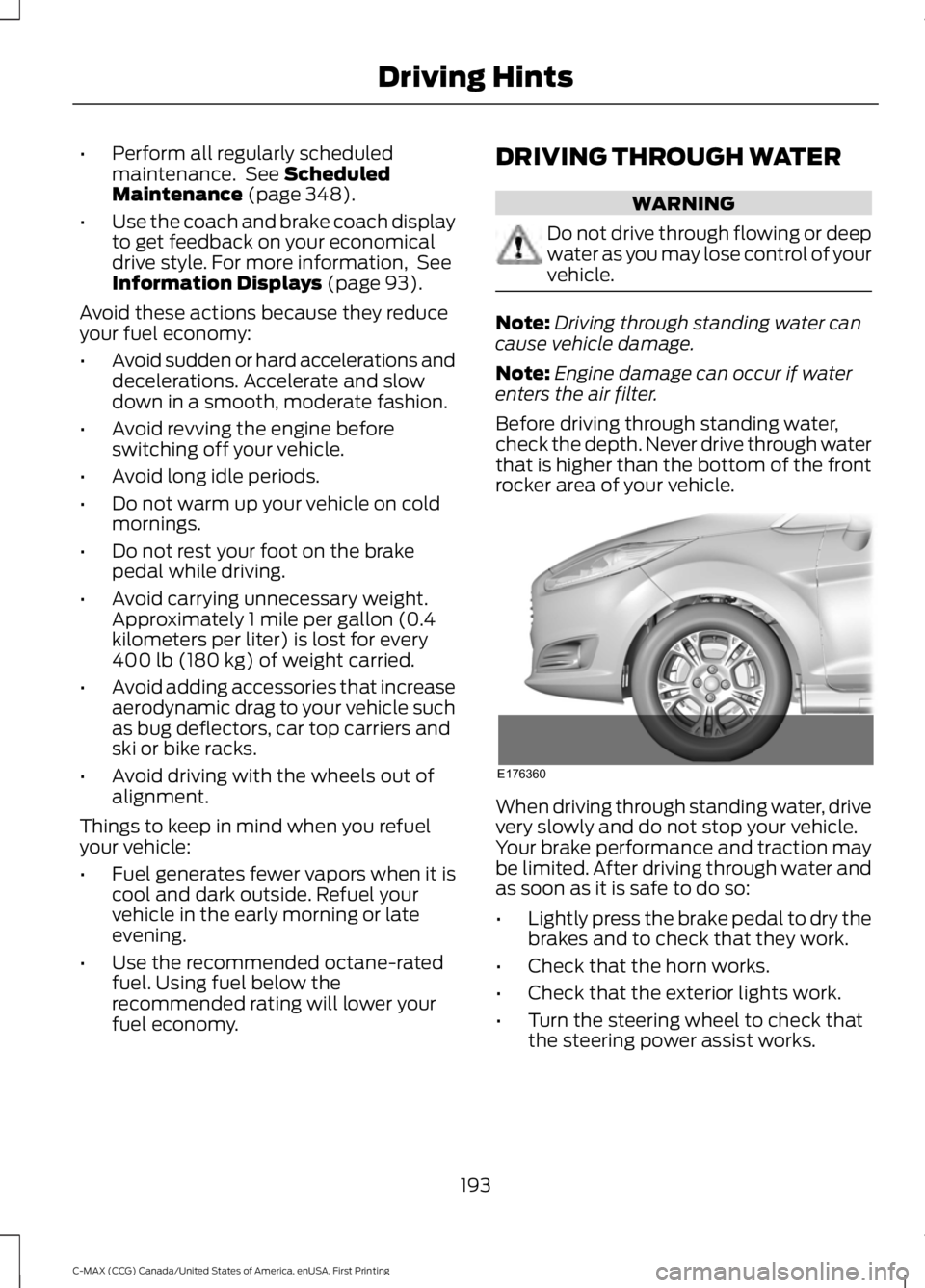
Before driving through standing water,check the depth. Never drive through waterthat is higher than the bottom of the frontrocker area of your vehicle.
When driving through standing water, drivevery slowly and do not stop your vehicle.Your brake performance and traction maybe limited. After driving through water andas soon as it is safe to do so:
•Lightly press the brake pedal to dry thebrakes and to check that they work.
•Check that the horn works.
•Check that the exterior lights work.
•Turn the steering wheel to check thatthe steering power assist works.
193
C-MAX (CCG) Canada/United States of America, enUSA, First Printing
Driving HintsE176360
Page 199 of 395

This program is separate from the NewVehicle Limited Warranty, but the coverageis concurrent with the powertrain coverageperiod of your vehicle.
Canadian customers who require roadsideassistance, call 1-800-665-2006.
Vehicles Sold in Canada: UsingRoadside Assistance
Complete the roadside assistanceidentification card and place it in yourwallet for quick reference.
In Canada, this card is found in theWarranty Guide in the glove compartmentof your vehicle.
Vehicles Sold in Canada: RoadsideAssistance Program Coverage
The service is available 24 hours a day,seven days a week.
Canadian roadside coverage and benefitsmay differ from the U.S. coverage.
For complete program coverage detailsyou may contact your dealer, you can callus in Canada at 1-800-665-2006, or visitour website at www.ford.ca.
HAZARD WARNING FLASHERS
Note:If used when the vehicle is notrunning, the battery will lose charge. Theremay be insufficient power to restart yourvehicle.
The hazard warning button islocated on the instrument panel.Use it when your vehicle iscreating a safety hazard for othermotorists.
•Press the button to turn on the hazardwarning function, and the front andrear direction indicators will flash.
•Press the button again to turn themoff.
FUEL SHUTOFF
WARNING
Failure to inspect and, if necessary,repair fuel leaks after a collision mayincrease the risk of fire and seriousinjury. Ford Motor Company recommendsthat the fuel system be inspected by anauthorized dealer after any collision.
In the event of a moderate to severecollision, this vehicle has a fuel pumpshut-off feature that stops the flow of fuelto the engine. Not every impact will causea shut-off.
Should your vehicle shut off after acollision, you may restart your vehicle.
For vehicles equipped with a key system:
1. Switch off the ignition.
2. Switch on the ignition.
3. Check the information display for theReady to Drive light as the gasolineengine may not start, but the electricmotor may be running. If you do not seethe Ready to Drive light, repeat Steps1 and 2 up to two more times.
For vehicles equipped with a push buttonstart system:
1. Press the push button start to switchoff the ignition.
2. Press the brake pedal and press thepush button start to switch on theignition.
3. Check the information display for theReady to Drive light as the gasolineengine may not start, but the electricmotor may be running. If you do not seethe Ready to Drive light, repeat Steps1 and 2 up to two more times.
196
C-MAX (CCG) Canada/United States of America, enUSA, First Printing
Roadside Emergencies