ECU FORD C MAX ENERGI 2017 Service Manual
[x] Cancel search | Manufacturer: FORD, Model Year: 2017, Model line: C MAX ENERGI, Model: FORD C MAX ENERGI 2017Pages: 497, PDF Size: 7.64 MB
Page 425 of 497
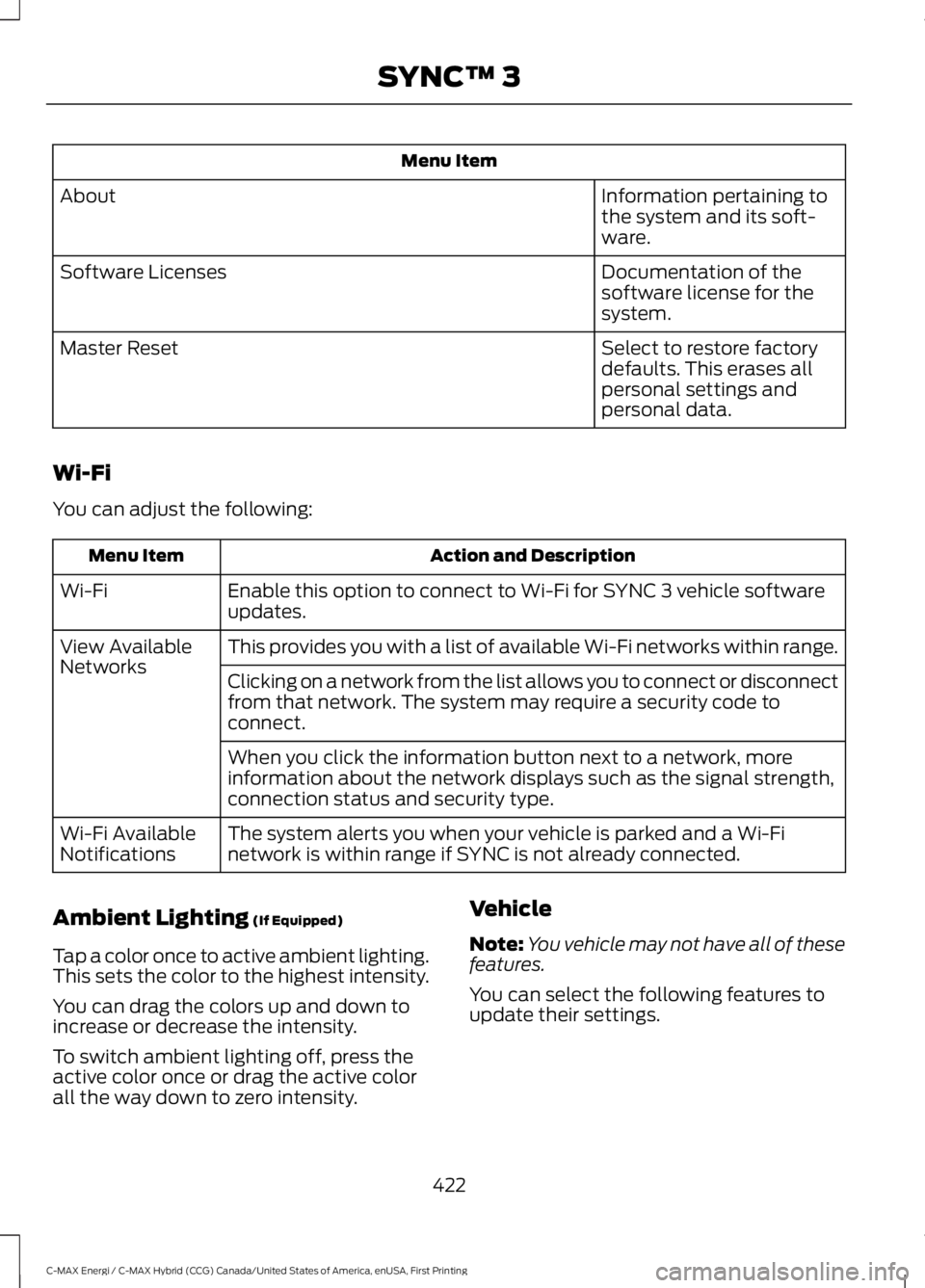
Menu Item
Information pertaining tothe system and its soft-ware.
About
Documentation of thesoftware license for thesystem.
Software Licenses
Select to restore factorydefaults. This erases allpersonal settings andpersonal data.
Master Reset
Wi-Fi
You can adjust the following:
Action and DescriptionMenu Item
Enable this option to connect to Wi-Fi for SYNC 3 vehicle softwareupdates.Wi-Fi
This provides you with a list of available Wi-Fi networks within range.View AvailableNetworksClicking on a network from the list allows you to connect or disconnectfrom that network. The system may require a security code toconnect.
When you click the information button next to a network, moreinformation about the network displays such as the signal strength,connection status and security type.
The system alerts you when your vehicle is parked and a Wi-Finetwork is within range if SYNC is not already connected.Wi-Fi AvailableNotifications
Ambient Lighting (If Equipped)
Tap a color once to active ambient lighting.This sets the color to the highest intensity.
You can drag the colors up and down toincrease or decrease the intensity.
To switch ambient lighting off, press theactive color once or drag the active colorall the way down to zero intensity.
Vehicle
Note:You vehicle may not have all of thesefeatures.
You can select the following features toupdate their settings.
422
C-MAX Energi / C-MAX Hybrid (CCG) Canada/United States of America, enUSA, First Printing
SYNC™ 3
Page 429 of 497
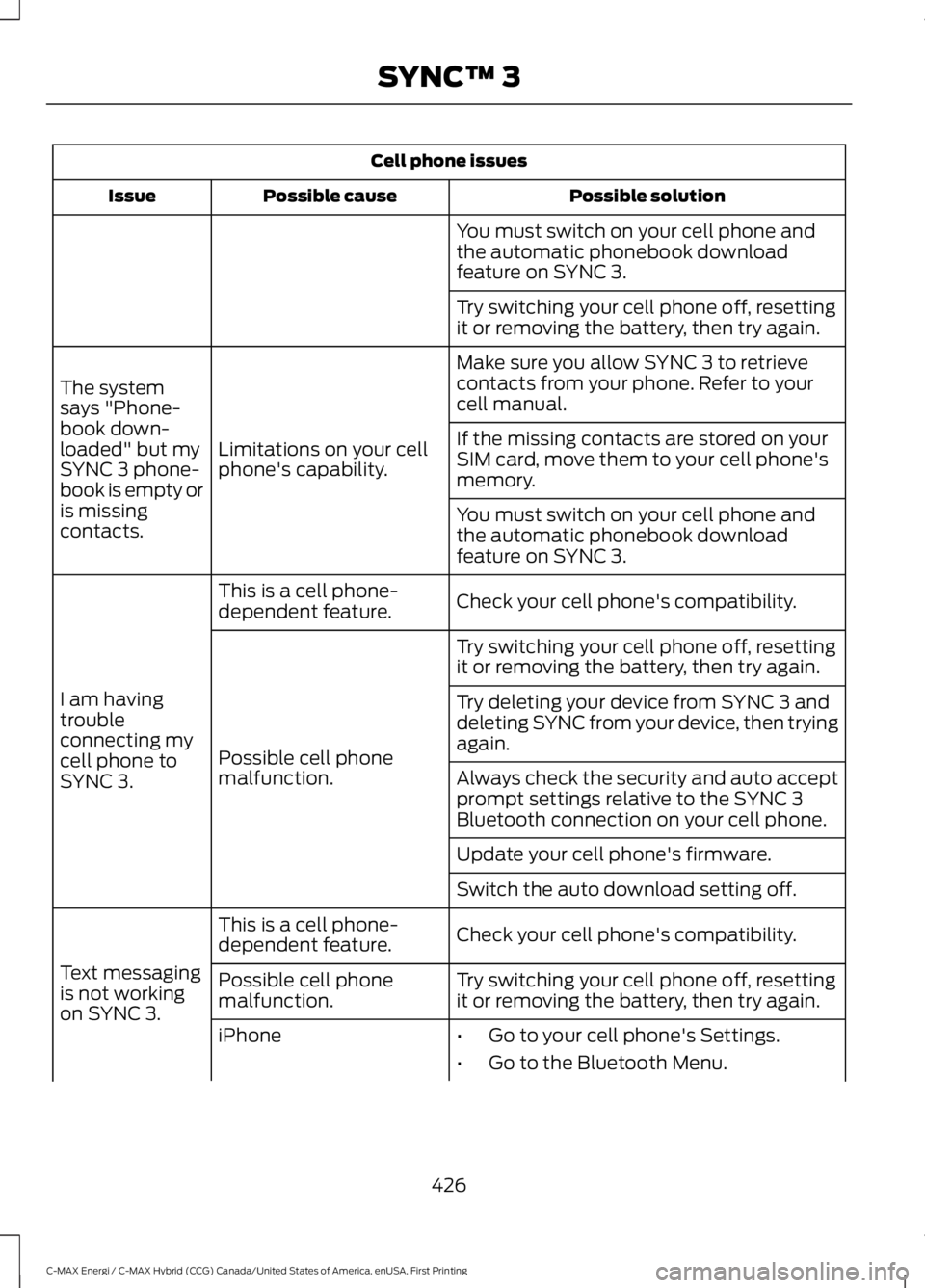
Cell phone issues
Possible solutionPossible causeIssue
You must switch on your cell phone andthe automatic phonebook downloadfeature on SYNC 3.
Try switching your cell phone off, resettingit or removing the battery, then try again.
Make sure you allow SYNC 3 to retrievecontacts from your phone. Refer to yourcell manual.
Limitations on your cellphone's capability.
The systemsays "Phone-book down-loaded" but mySYNC 3 phone-book is empty oris missingcontacts.
If the missing contacts are stored on yourSIM card, move them to your cell phone'smemory.
You must switch on your cell phone andthe automatic phonebook downloadfeature on SYNC 3.
Check your cell phone's compatibility.This is a cell phone-dependent feature.
I am havingtroubleconnecting mycell phone toSYNC 3.
Try switching your cell phone off, resettingit or removing the battery, then try again.
Possible cell phonemalfunction.
Try deleting your device from SYNC 3 anddeleting SYNC from your device, then tryingagain.
Always check the security and auto acceptprompt settings relative to the SYNC 3Bluetooth connection on your cell phone.
Update your cell phone's firmware.
Switch the auto download setting off.
Check your cell phone's compatibility.This is a cell phone-dependent feature.
Text messagingis not workingon SYNC 3.
Try switching your cell phone off, resettingit or removing the battery, then try again.Possible cell phonemalfunction.
iPhone•Go to your cell phone's Settings.
•Go to the Bluetooth Menu.
426
C-MAX Energi / C-MAX Hybrid (CCG) Canada/United States of America, enUSA, First Printing
SYNC™ 3
Page 431 of 497
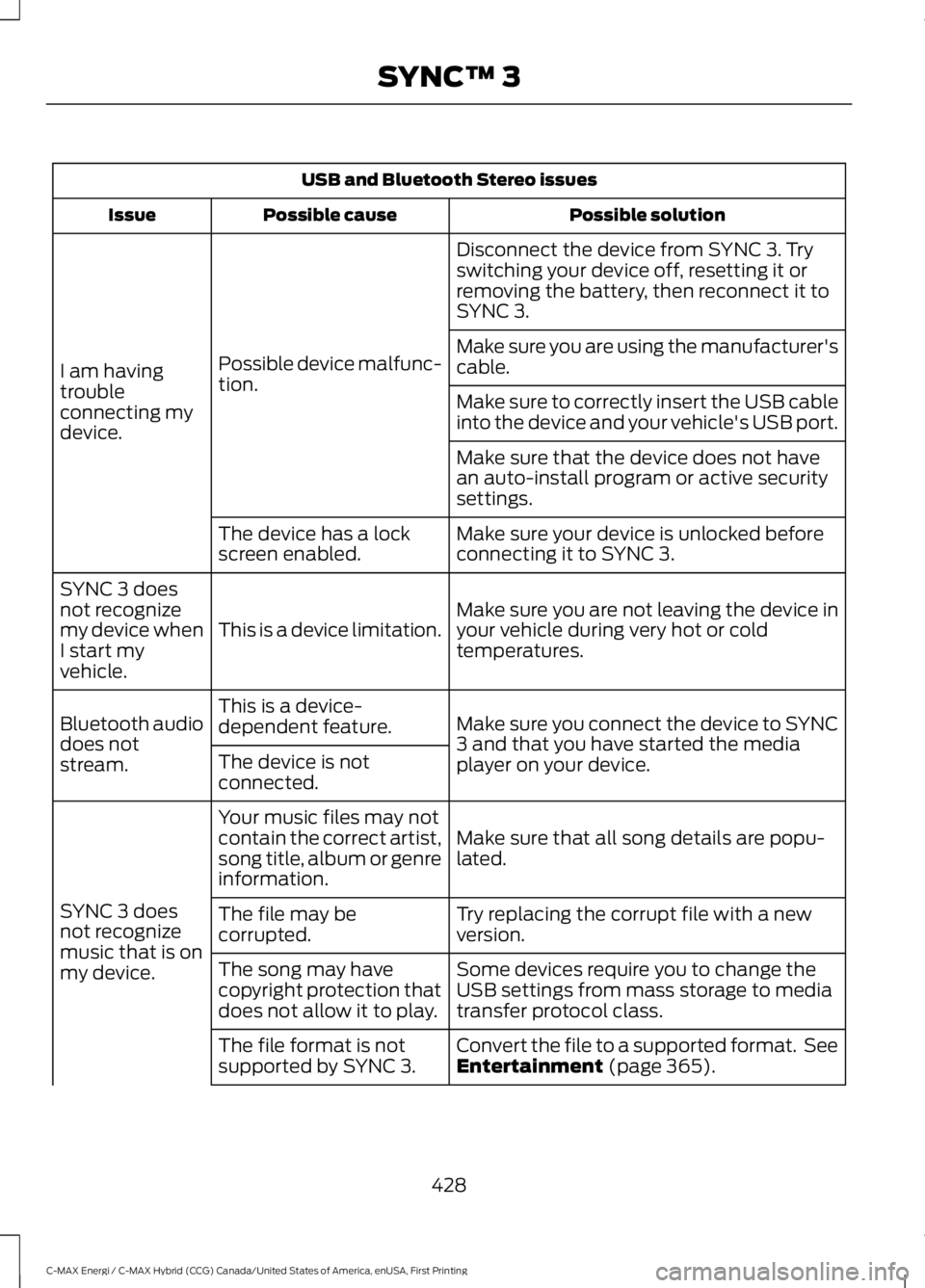
USB and Bluetooth Stereo issues
Possible solutionPossible causeIssue
Disconnect the device from SYNC 3. Tryswitching your device off, resetting it orremoving the battery, then reconnect it toSYNC 3.
Possible device malfunc-tion.I am havingtroubleconnecting mydevice.
Make sure you are using the manufacturer'scable.
Make sure to correctly insert the USB cableinto the device and your vehicle's USB port.
Make sure that the device does not havean auto-install program or active securitysettings.
Make sure your device is unlocked beforeconnecting it to SYNC 3.The device has a lockscreen enabled.
Make sure you are not leaving the device inyour vehicle during very hot or coldtemperatures.This is a device limitation.
SYNC 3 doesnot recognizemy device whenI start myvehicle.
Make sure you connect the device to SYNC3 and that you have started the mediaplayer on your device.
This is a device-dependent feature.Bluetooth audiodoes notstream.The device is notconnected.
Make sure that all song details are popu-lated.
Your music files may notcontain the correct artist,song title, album or genreinformation.
SYNC 3 doesnot recognizemusic that is onmy device.
Try replacing the corrupt file with a newversion.The file may becorrupted.
Some devices require you to change theUSB settings from mass storage to mediatransfer protocol class.
The song may havecopyright protection thatdoes not allow it to play.
Convert the file to a supported format. SeeEntertainment (page 365).The file format is notsupported by SYNC 3.
428
C-MAX Energi / C-MAX Hybrid (CCG) Canada/United States of America, enUSA, First Printing
SYNC™ 3
Page 438 of 497
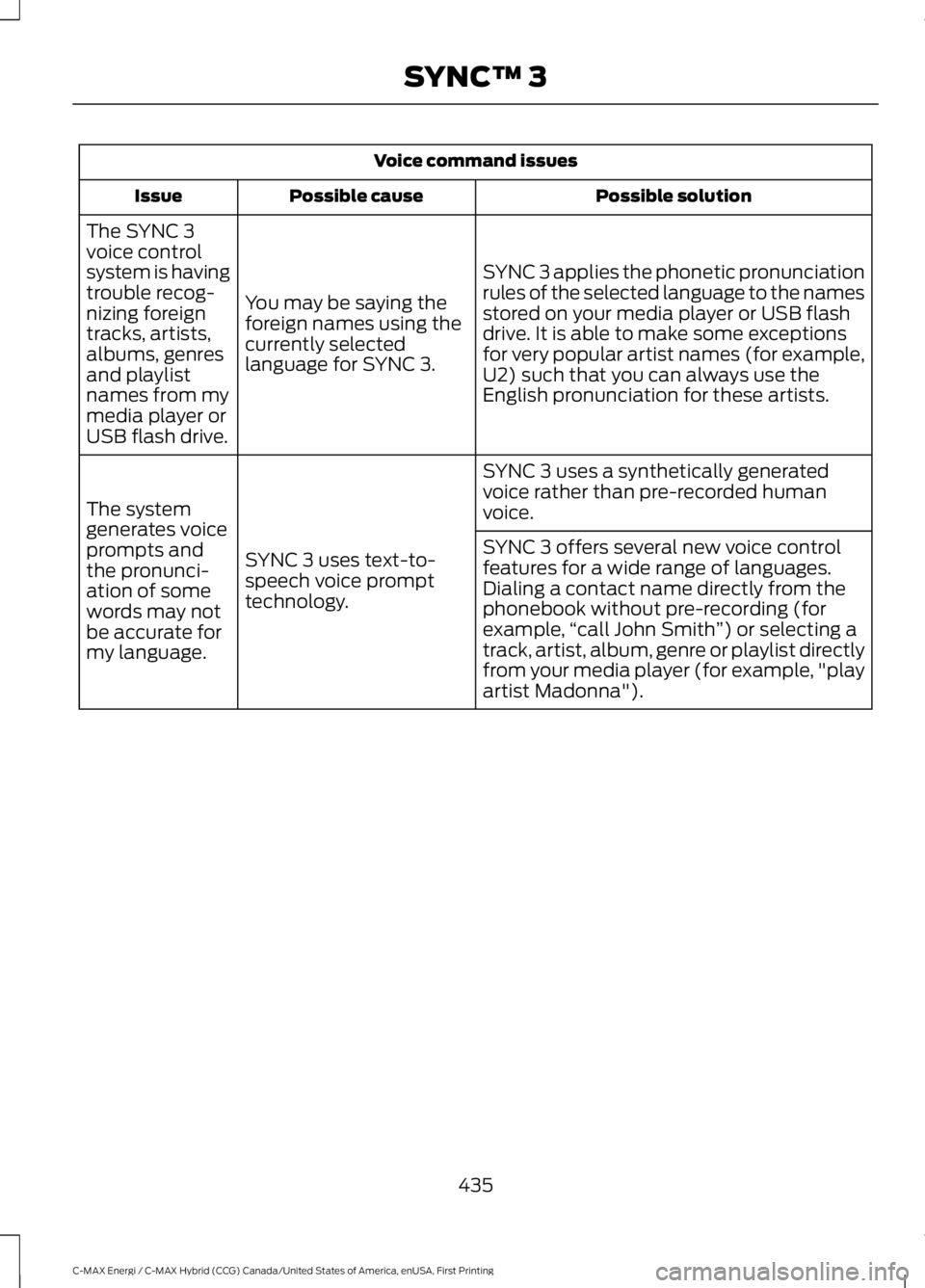
Voice command issues
Possible solutionPossible causeIssue
SYNC 3 applies the phonetic pronunciationrules of the selected language to the namesstored on your media player or USB flashdrive. It is able to make some exceptionsfor very popular artist names (for example,U2) such that you can always use theEnglish pronunciation for these artists.
You may be saying theforeign names using thecurrently selectedlanguage for SYNC 3.
The SYNC 3voice controlsystem is havingtrouble recog-nizing foreigntracks, artists,albums, genresand playlistnames from mymedia player orUSB flash drive.
SYNC 3 uses a synthetically generatedvoice rather than pre-recorded humanvoice.
SYNC 3 uses text-to-speech voice prompttechnology.
The systemgenerates voiceprompts andthe pronunci-ation of somewords may notbe accurate formy language.
SYNC 3 offers several new voice controlfeatures for a wide range of languages.Dialing a contact name directly from thephonebook without pre-recording (forexample,“call John Smith”) or selecting atrack, artist, album, genre or playlist directlyfrom your media player (for example, "playartist Madonna").
435
C-MAX Energi / C-MAX Hybrid (CCG) Canada/United States of America, enUSA, First Printing
SYNC™ 3
Page 439 of 497
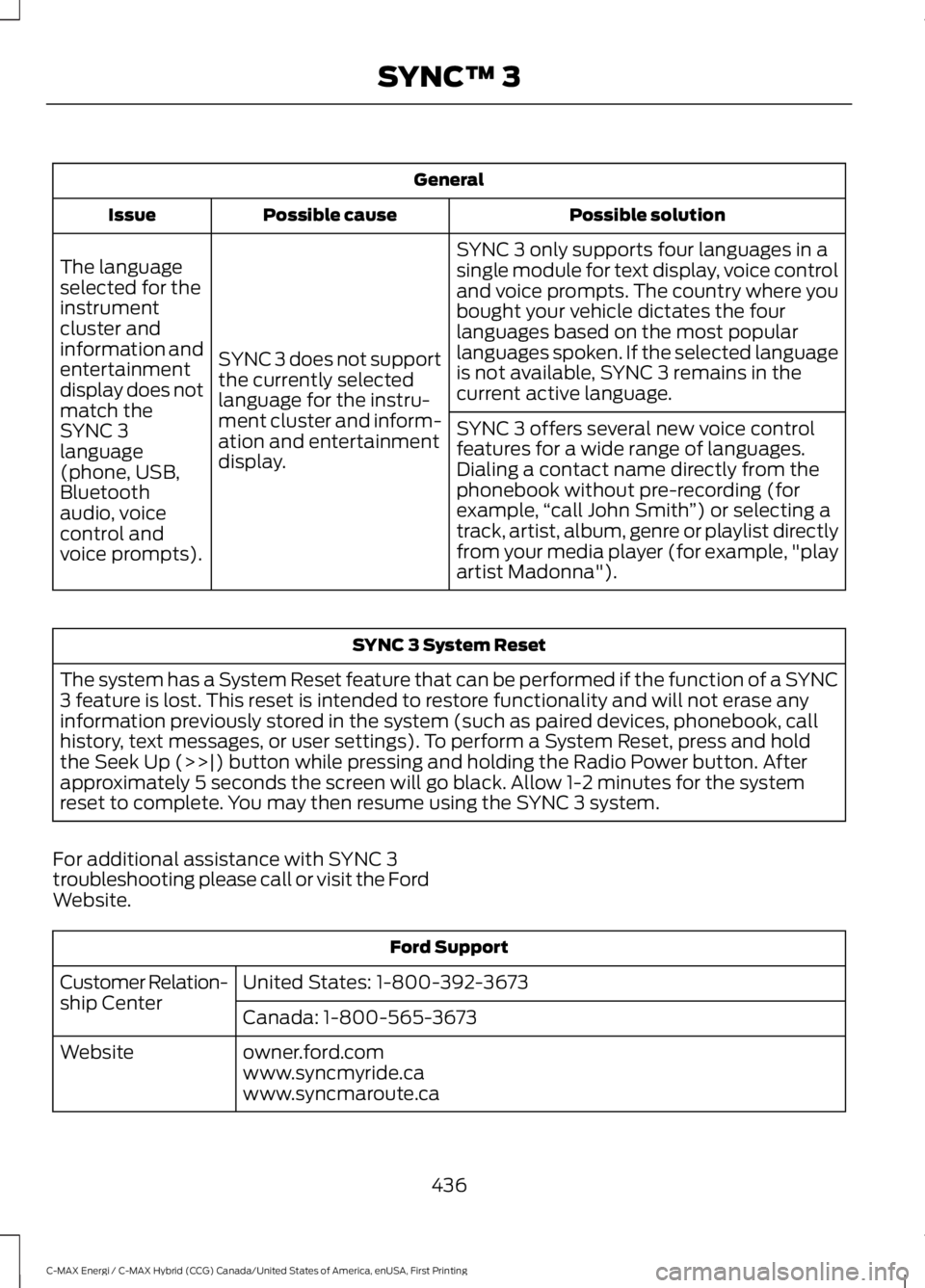
General
Possible solutionPossible causeIssue
SYNC 3 only supports four languages in asingle module for text display, voice controland voice prompts. The country where youbought your vehicle dictates the fourlanguages based on the most popularlanguages spoken. If the selected languageis not available, SYNC 3 remains in thecurrent active language.
SYNC 3 does not supportthe currently selectedlanguage for the instru-ment cluster and inform-ation and entertainmentdisplay.
The languageselected for theinstrumentcluster andinformation andentertainmentdisplay does notmatch theSYNC 3SYNC 3 offers several new voice controlfeatures for a wide range of languages.Dialing a contact name directly from thephonebook without pre-recording (forexample,“call John Smith”) or selecting atrack, artist, album, genre or playlist directlyfrom your media player (for example, "playartist Madonna").
language(phone, USB,Bluetoothaudio, voicecontrol andvoice prompts).
SYNC 3 System Reset
The system has a System Reset feature that can be performed if the function of a SYNC3 feature is lost. This reset is intended to restore functionality and will not erase anyinformation previously stored in the system (such as paired devices, phonebook, callhistory, text messages, or user settings). To perform a System Reset, press and holdthe Seek Up (>>|) button while pressing and holding the Radio Power button. Afterapproximately 5 seconds the screen will go black. Allow 1-2 minutes for the systemreset to complete. You may then resume using the SYNC 3 system.
For additional assistance with SYNC 3troubleshooting please call or visit the FordWebsite.
Ford Support
United States: 1-800-392-3673Customer Relation-ship CenterCanada: 1-800-565-3673
owner.ford.comWebsitewww.syncmyride.cawww.syncmaroute.ca
436
C-MAX Energi / C-MAX Hybrid (CCG) Canada/United States of America, enUSA, First Printing
SYNC™ 3
Page 440 of 497
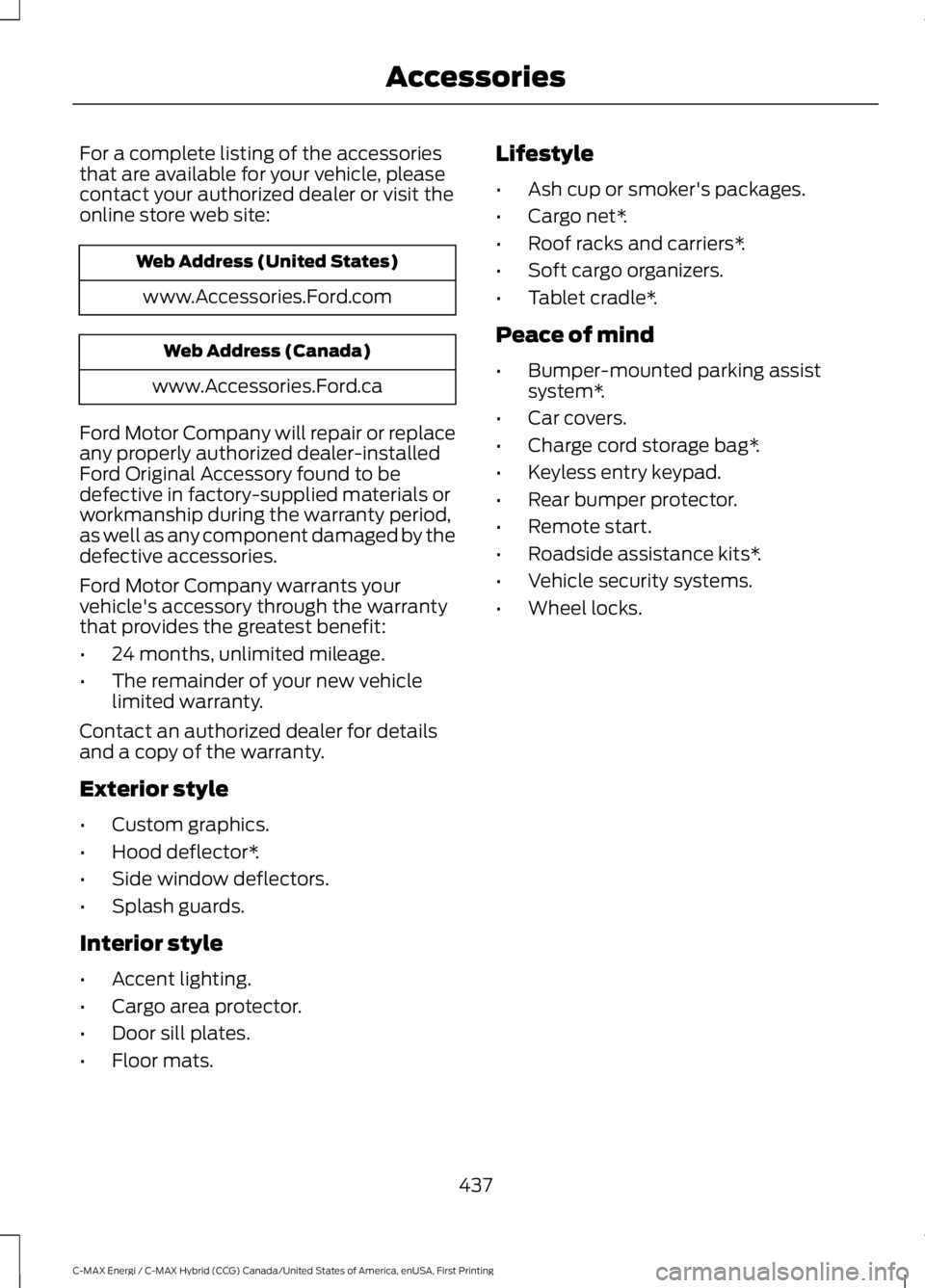
For a complete listing of the accessoriesthat are available for your vehicle, pleasecontact your authorized dealer or visit theonline store web site:
Web Address (United States)
www.Accessories.Ford.com
Web Address (Canada)
www.Accessories.Ford.ca
Ford Motor Company will repair or replaceany properly authorized dealer-installedFord Original Accessory found to bedefective in factory-supplied materials orworkmanship during the warranty period,as well as any component damaged by thedefective accessories.
Ford Motor Company warrants yourvehicle's accessory through the warrantythat provides the greatest benefit:
•24 months, unlimited mileage.
•The remainder of your new vehiclelimited warranty.
Contact an authorized dealer for detailsand a copy of the warranty.
Exterior style
•Custom graphics.
•Hood deflector*.
•Side window deflectors.
•Splash guards.
Interior style
•Accent lighting.
•Cargo area protector.
•Door sill plates.
•Floor mats.
Lifestyle
•Ash cup or smoker's packages.
•Cargo net*.
•Roof racks and carriers*.
•Soft cargo organizers.
•Tablet cradle*.
Peace of mind
•Bumper-mounted parking assistsystem*.
•Car covers.
•Charge cord storage bag*.
•Keyless entry keypad.
•Rear bumper protector.
•Remote start.
•Roadside assistance kits*.
•Vehicle security systems.
•Wheel locks.
437
C-MAX Energi / C-MAX Hybrid (CCG) Canada/United States of America, enUSA, First Printing
Accessories
Page 443 of 497
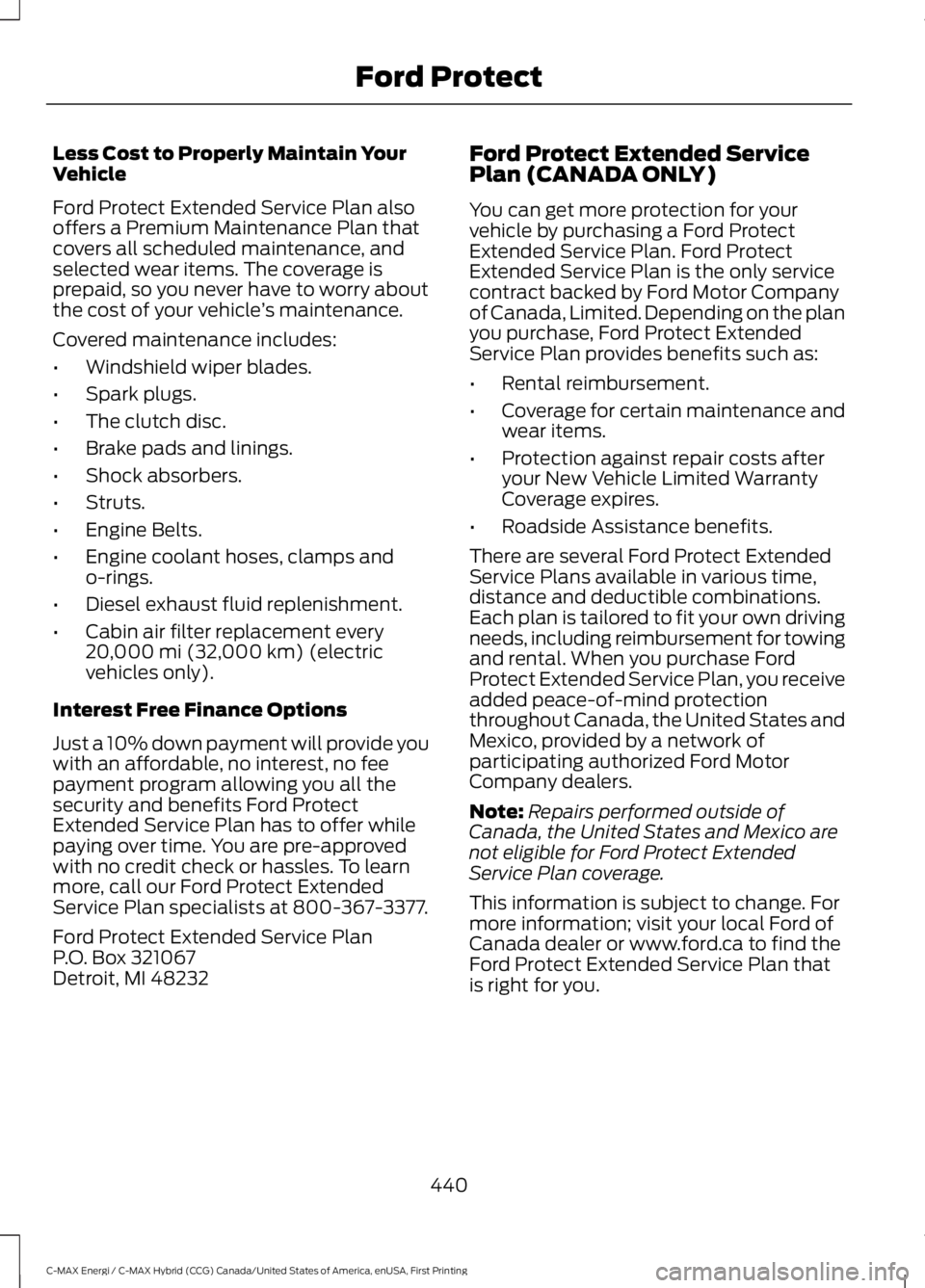
Less Cost to Properly Maintain YourVehicle
Ford Protect Extended Service Plan alsooffers a Premium Maintenance Plan thatcovers all scheduled maintenance, andselected wear items. The coverage isprepaid, so you never have to worry aboutthe cost of your vehicle’s maintenance.
Covered maintenance includes:
•Windshield wiper blades.
•Spark plugs.
•The clutch disc.
•Brake pads and linings.
•Shock absorbers.
•Struts.
•Engine Belts.
•Engine coolant hoses, clamps ando-rings.
•Diesel exhaust fluid replenishment.
•Cabin air filter replacement every20,000 mi (32,000 km) (electricvehicles only).
Interest Free Finance Options
Just a 10% down payment will provide youwith an affordable, no interest, no feepayment program allowing you all thesecurity and benefits Ford ProtectExtended Service Plan has to offer whilepaying over time. You are pre-approvedwith no credit check or hassles. To learnmore, call our Ford Protect ExtendedService Plan specialists at 800-367-3377.
Ford Protect Extended Service PlanP.O. Box 321067Detroit, MI 48232
Ford Protect Extended ServicePlan (CANADA ONLY)
You can get more protection for yourvehicle by purchasing a Ford ProtectExtended Service Plan. Ford ProtectExtended Service Plan is the only servicecontract backed by Ford Motor Companyof Canada, Limited. Depending on the planyou purchase, Ford Protect ExtendedService Plan provides benefits such as:
•Rental reimbursement.
•Coverage for certain maintenance andwear items.
•Protection against repair costs afteryour New Vehicle Limited WarrantyCoverage expires.
•Roadside Assistance benefits.
There are several Ford Protect ExtendedService Plans available in various time,distance and deductible combinations.Each plan is tailored to fit your own drivingneeds, including reimbursement for towingand rental. When you purchase FordProtect Extended Service Plan, you receiveadded peace-of-mind protectionthroughout Canada, the United States andMexico, provided by a network ofparticipating authorized Ford MotorCompany dealers.
Note:Repairs performed outside ofCanada, the United States and Mexico arenot eligible for Ford Protect ExtendedService Plan coverage.
This information is subject to change. Formore information; visit your local Ford ofCanada dealer or www.ford.ca to find theFord Protect Extended Service Plan thatis right for you.
440
C-MAX Energi / C-MAX Hybrid (CCG) Canada/United States of America, enUSA, First Printing
Ford Protect
Page 470 of 497
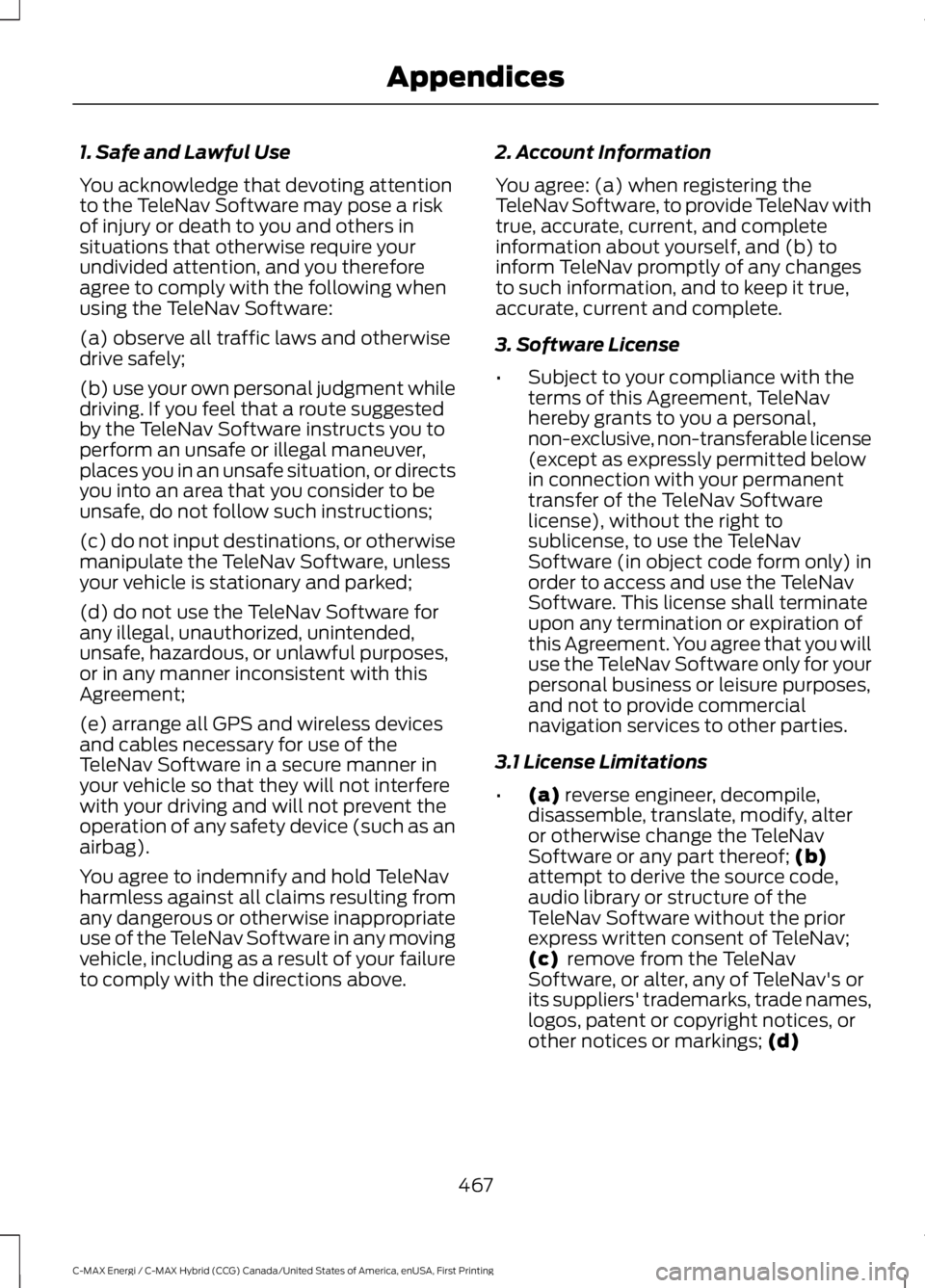
1. Safe and Lawful Use
You acknowledge that devoting attentionto the TeleNav Software may pose a riskof injury or death to you and others insituations that otherwise require yourundivided attention, and you thereforeagree to comply with the following whenusing the TeleNav Software:
(a) observe all traffic laws and otherwisedrive safely;
(b) use your own personal judgment whiledriving. If you feel that a route suggestedby the TeleNav Software instructs you toperform an unsafe or illegal maneuver,places you in an unsafe situation, or directsyou into an area that you consider to beunsafe, do not follow such instructions;
(c) do not input destinations, or otherwisemanipulate the TeleNav Software, unlessyour vehicle is stationary and parked;
(d) do not use the TeleNav Software forany illegal, unauthorized, unintended,unsafe, hazardous, or unlawful purposes,or in any manner inconsistent with thisAgreement;
(e) arrange all GPS and wireless devicesand cables necessary for use of theTeleNav Software in a secure manner inyour vehicle so that they will not interferewith your driving and will not prevent theoperation of any safety device (such as anairbag).
You agree to indemnify and hold TeleNavharmless against all claims resulting fromany dangerous or otherwise inappropriateuse of the TeleNav Software in any movingvehicle, including as a result of your failureto comply with the directions above.
2. Account Information
You agree: (a) when registering theTeleNav Software, to provide TeleNav withtrue, accurate, current, and completeinformation about yourself, and (b) toinform TeleNav promptly of any changesto such information, and to keep it true,accurate, current and complete.
3. Software License
•Subject to your compliance with theterms of this Agreement, TeleNavhereby grants to you a personal,non-exclusive, non-transferable license(except as expressly permitted belowin connection with your permanenttransfer of the TeleNav Softwarelicense), without the right tosublicense, to use the TeleNavSoftware (in object code form only) inorder to access and use the TeleNavSoftware. This license shall terminateupon any termination or expiration ofthis Agreement. You agree that you willuse the TeleNav Software only for yourpersonal business or leisure purposes,and not to provide commercialnavigation services to other parties.
3.1 License Limitations
•(a) reverse engineer, decompile,disassemble, translate, modify, alteror otherwise change the TeleNavSoftware or any part thereof; (b)attempt to derive the source code,audio library or structure of theTeleNav Software without the priorexpress written consent of TeleNav;(c) remove from the TeleNavSoftware, or alter, any of TeleNav's orits suppliers' trademarks, trade names,logos, patent or copyright notices, orother notices or markings; (d)
467
C-MAX Energi / C-MAX Hybrid (CCG) Canada/United States of America, enUSA, First Printing
Appendices
Page 475 of 497
PARTICULAR PURPOSE ORNON-INFRINGEMENT. Some States,Territories and Countries do not allowcertain warranty exclusions, so to thatextent the above exclusion may not applyto you.
Disclaimer of Liability: TELENAV ANDITS LICENSORS (INCLUDING THEIRLICENSORS AND SUPPLIERS) SHALL NOTBE LIABLE TO YOU: IN RESPECT OF ANYCLAIM, DEMAND OR ACTION,IRRESPECTIVE OF THE NATURE OF THECAUSE OF THE CLAIM, DEMAND ORACTION ALLEGING ANY LOSS, INJURY ORDAMAGES, DIRECT OR INDIRECT, WHICHMAY RESULT FROM THE USE ORPOSSESSION OF THE INFORMATION; ORFOR ANY LOSS OF PROFIT, REVENUE,CONTRACTS OR SAVINGS, OR ANYOTHER DIRECT, INDIRECT, INCIDENTAL,SPECIAL OR CONSEQUENTIAL DAMAGESARISING OUT OF YOUR USE OF ORINABILITY TO USE THIS INFORMATION,ANY DEFECT IN THE INFORMATION, ORTHE BREACH OF THESE TERMS ORCONDITIONS, WHETHER IN AN ACTIONIN CONTRACT OR TORT OR BASED ON AWARRANTY, EVEN IF TELENAV OR ITSLICENSORS HAVE BEEN ADVISED OF THEPOSSIBILITY OF SUCH DAMAGES. SomeStates, Territories and Countries do notallow certain liability exclusions ordamages limitations, so to that extent theabove may not apply to you.
Export Control. You shall not export fromanywhere any part of the Data or any directproduct thereof except in compliance with,and with all licenses and approvalsrequired under, applicable export laws,rules and regulations, including but notlimited to the laws, rules and regulationsadministered by the Office of ForeignAssets Control of the U.S. Department ofCommerce and the Bureau of Industry andSecurity of the U.S. Department ofCommerce. To the extent that any such
export laws, rules or regulations prohibitHERE from complying with any of itsobligations hereunder to deliver ordistribute Data, such failure shall beexcused and shall not constitute a breachof this Agreement.
Entire Agreement. These terms andconditions constitute the entire agreementbetween Telenav (and its licensors,including their licensors and suppliers) andyou pertaining to the subject matter hereof,and supersedes in their entirety any andall written or oral agreements previouslyexisting between us with respect to suchsubject matter.
Governing Law. The above terms andconditions shall be governed by the lawsof the State of Illinois [insert “Netherlands”where European HERE Data is used],without giving effect to (i) its conflict oflaws provisions, or (ii) the United NationsConvention for Contracts for theInternational Sale of Goods, which isexplicitly excluded. You agree to submit tothe jurisdiction of the State of Illinois[insert “The Netherlands” where EuropeanHERE Data is used] for any and alldisputes, claims and actions arising fromor in connection with the Data provided toyou hereunder.
Government End Users. If the Data isbeing acquired by or on behalf of theUnited States government or any otherentity seeking or applying rights similar tothose customarily claimed by the UnitedStates government, this Data is a“commercial item” as that term is definedat 48 C.F.R. (“FAR”) 2.101, is licensed inaccordance with these End-User Terms,and each copy of Data delivered orotherwise furnished shall be marked andembedded as appropriate with thefollowing “Notice of Use,” and shall betreated in accordance with such Notice:
472
C-MAX Energi / C-MAX Hybrid (CCG) Canada/United States of America, enUSA, First Printing
Appendices
Page 478 of 497
II. Mexico. The following provision appliesto the Data for Mexico, which includescertain data from the Instituto Nacionalde Estadística y Geografía (“INEGI”):
A. Any and all copies of the Data and/orpackaging containing Data for Mexicoshall contain the following notice:“Fuente: INEGI (Instituto Nacional deEstadística y Geografía)”
III. Latin America Territory
A. Third Party Notices. Any and all copiesof the Data and/or packaging relatingthereto shall include the respective ThirdParty Notices set forth below and usedas described below corresponding tothe Territory (or portion thereof)included in such copy:
NoticeTerritory
“INSTITUTO GEOGRAFICOMILITAR DEL ECUADORAUTORIZACION N° IGM-2011-01- PCO-01 DEL 25 DEENERO DE 2011”
Ecuador
“source: © IGN 2009 - BDTOPO ®”
“Fuente: INEGI (InstitutoNacional de Estadística yGeografía)”
Guade-loupe,FrenchGuianaandMarti-niqueMexico
IV. Middle East Territory
A. Third Party Notices. Any and all copiesof the Data and/or packaging relatingthereto shall include the respective ThirdParty Notices set forth below and usedas described below corresponding tothe Territory (or portion thereof)included in such copy:
NoticeCountry
“© Royal JordanianGeographic Centre”. Theforegoing notice requirementfor Jordan Data is a materialterm of the Agreement. IfClient or any of its permitted
Jordan
sublicensees (if any) fail tomeet such requirement, HEREshall have the right toterminate Client’s licensewith respect to the JordanData.
B. Jordan Data. Client and its permittedsublicensees (if any) are restricted fromlicensing and/or otherwise distributingHERE’s database for the country ofJordan (“Jordan Data”) for use in Enter-prise Applications to (i) non-Jordanianentities for use of the Jordan Data solelyin Jordan or (ii) Jordan-based customers.In addition, Client, its permitted subli-censees (if any) and End-Users arerestricted from using the Jordan Data inEnterprise Applications if such party is(i) a non-Jordanian entity using theJordan Data solely in Jordan or (ii) aJordan-based customer. For purposesof the foregoing,“Enterprise Applica-tions” shall mean Geomarketing applic-ations, GIS applications, mobile businessasset management applications, callcenter applications, telematics applica-tions, public organization Internetapplications or for providing geocodingservices.
475
C-MAX Energi / C-MAX Hybrid (CCG) Canada/United States of America, enUSA, First Printing
Appendices