engine FORD C-MAY HYBRID 2018 User Guide
[x] Cancel search | Manufacturer: FORD, Model Year: 2018, Model line: C-MAY HYBRID, Model: FORD C-MAY HYBRID 2018Pages: 475, PDF Size: 8.09 MB
Page 93 of 475
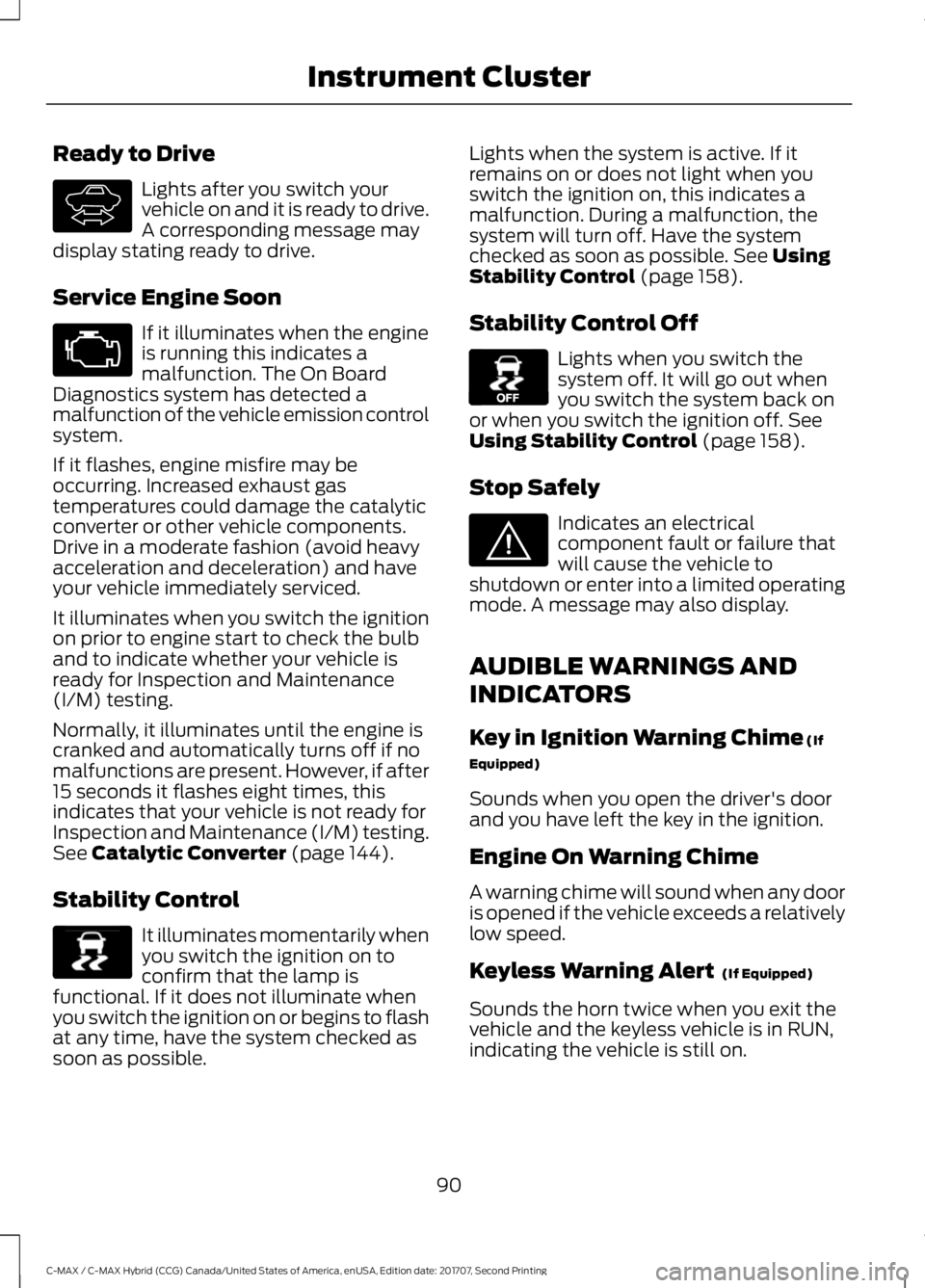
Ready to Drive
Lights after you switch your
vehicle on and it is ready to drive.
A corresponding message may
display stating ready to drive.
Service Engine Soon If it illuminates when the engine
is running this indicates a
malfunction. The On Board
Diagnostics system has detected a
malfunction of the vehicle emission control
system.
If it flashes, engine misfire may be
occurring. Increased exhaust gas
temperatures could damage the catalytic
converter or other vehicle components.
Drive in a moderate fashion (avoid heavy
acceleration and deceleration) and have
your vehicle immediately serviced.
It illuminates when you switch the ignition
on prior to engine start to check the bulb
and to indicate whether your vehicle is
ready for Inspection and Maintenance
(I/M) testing.
Normally, it illuminates until the engine is
cranked and automatically turns off if no
malfunctions are present. However, if after
15 seconds it flashes eight times, this
indicates that your vehicle is not ready for
Inspection and Maintenance (I/M) testing.
See Catalytic Converter (page 144).
Stability Control It illuminates momentarily when
you switch the ignition on to
confirm that the lamp is
functional. If it does not illuminate when
you switch the ignition on or begins to flash
at any time, have the system checked as
soon as possible. Lights when the system is active. If it
remains on or does not light when you
switch the ignition on, this indicates a
malfunction. During a malfunction, the
system will turn off. Have the system
checked as soon as possible.
See Using
Stability Control (page 158).
Stability Control Off Lights when you switch the
system off. It will go out when
you switch the system back on
or when you switch the ignition off.
See
Using Stability Control (page 158).
Stop Safely Indicates an electrical
component fault or failure that
will cause the vehicle to
shutdown or enter into a limited operating
mode. A message may also display.
AUDIBLE WARNINGS AND
INDICATORS
Key in Ignition Warning Chime
(If
Equipped)
Sounds when you open the driver's door
and you have left the key in the ignition.
Engine On Warning Chime
A warning chime will sound when any door
is opened if the vehicle exceeds a relatively
low speed.
Keyless Warning Alert
(If Equipped)
Sounds the horn twice when you exit the
vehicle and the keyless vehicle is in RUN,
indicating the vehicle is still on.
90
C-MAX / C-MAX Hybrid (CCG) Canada/United States of America, enUSA, Edition date: 201707, Second Printing Instrument ClusterE144692 E138639 E130458 E144693
Page 96 of 475
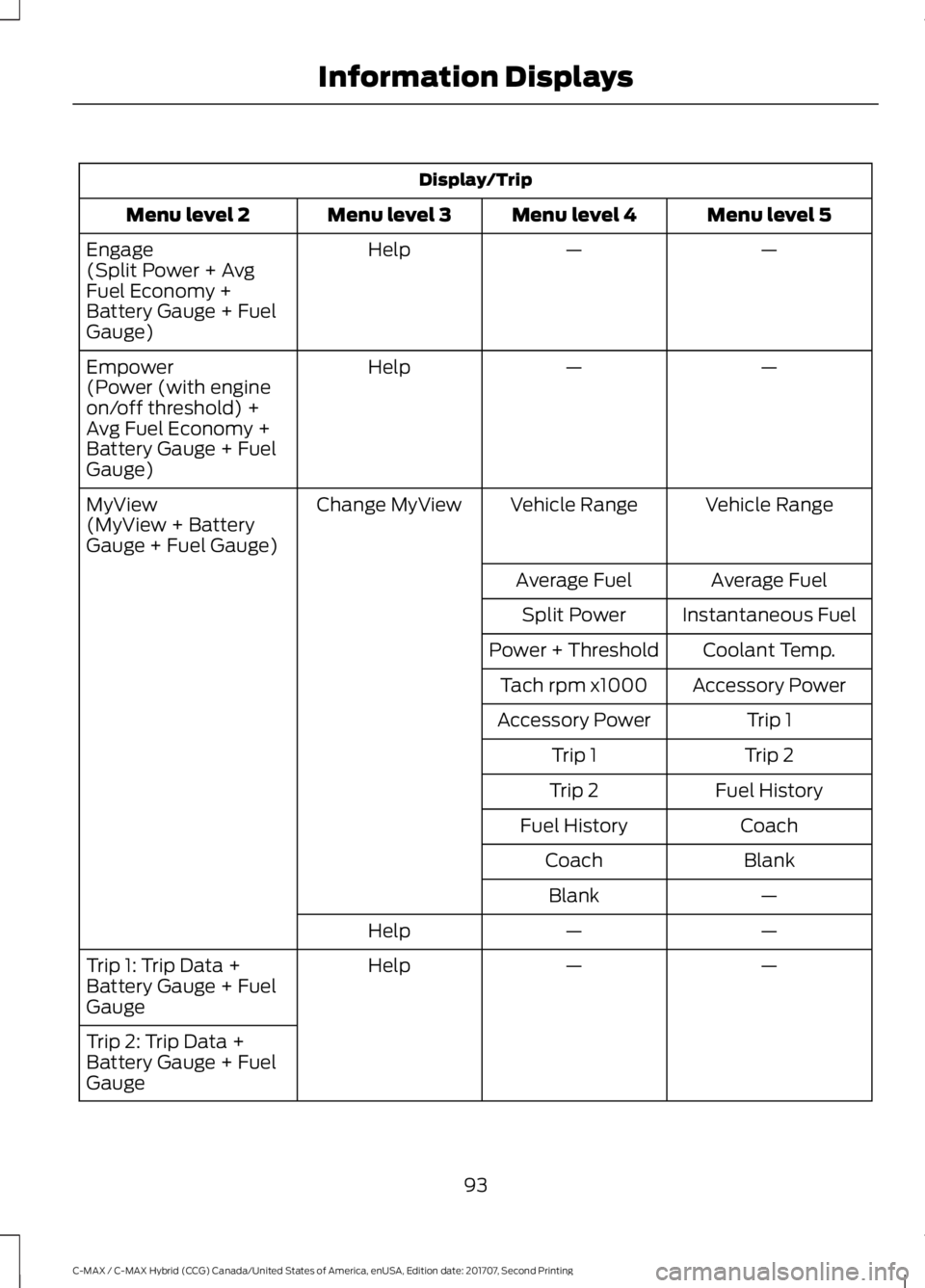
Display/Trip
Menu level 5
Menu level 4
Menu level 3
Menu level 2
—
—
Help
Engage
(Split Power + Avg
Fuel Economy +
Battery Gauge + Fuel
Gauge)
—
—
Help
Empower
(Power (with engine
on/off threshold) +
Avg Fuel Economy +
Battery Gauge + Fuel
Gauge)
Vehicle Range
Vehicle Range
Change MyView
MyView
(MyView + Battery
Gauge + Fuel Gauge)
Average Fuel
Average Fuel
Instantaneous Fuel
Split Power
Coolant Temp.
Power + Threshold
Accessory Power
Tach rpm x1000
Trip 1
Accessory Power
Trip 2
Trip 1
Fuel History
Trip 2
Coach
Fuel History
Blank
Coach
—
Blank
—
—
Help
—
—
Help
Trip 1: Trip Data +
Battery Gauge + Fuel
Gauge
Trip 2: Trip Data +
Battery Gauge + Fuel
Gauge
93
C-MAX / C-MAX Hybrid (CCG) Canada/United States of America, enUSA, Edition date: 201707, Second Printing Information Displays
Page 97 of 475
Engage
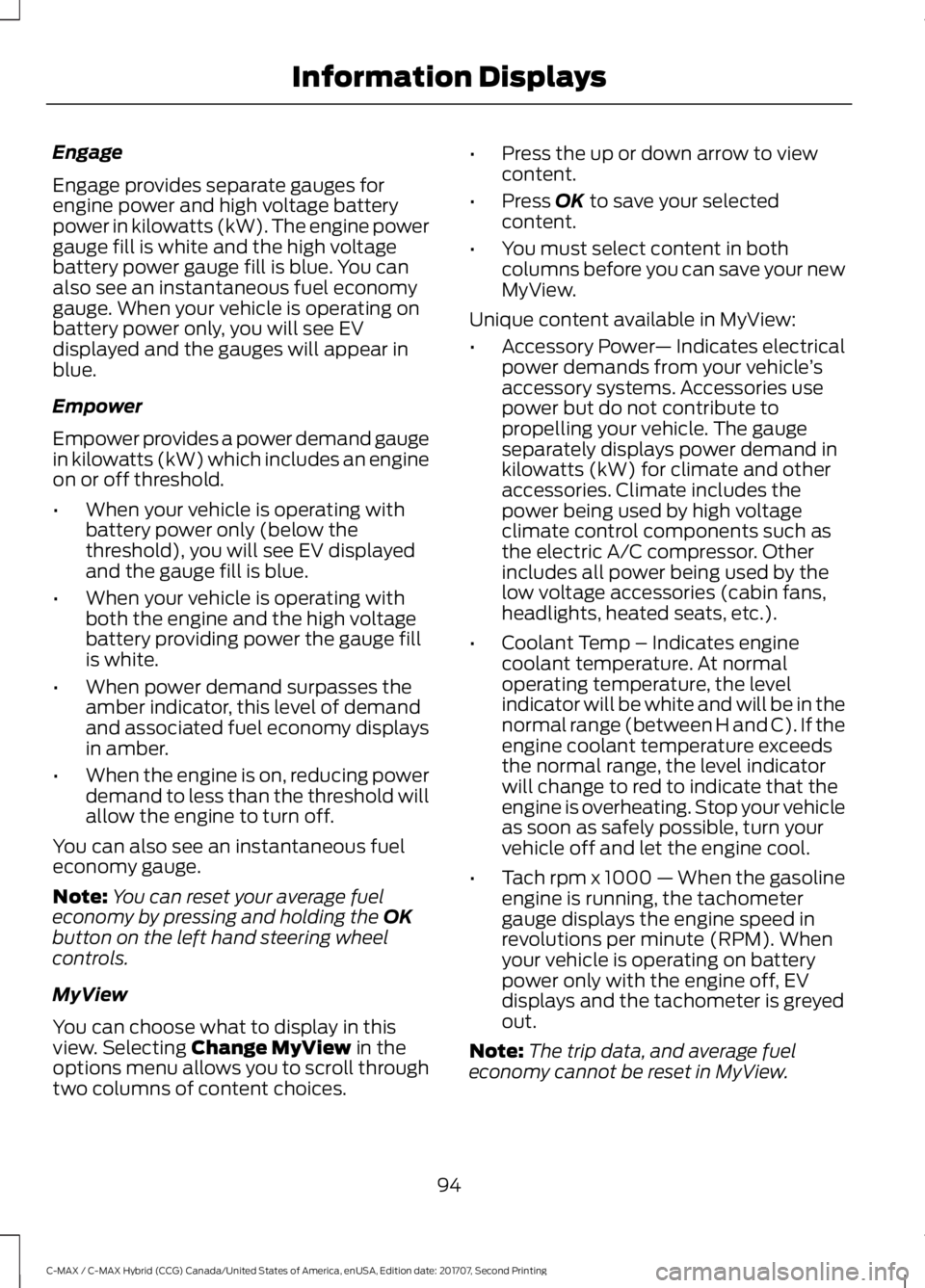
Engage provides separate gauges for
engine power and high voltage battery
power in kilowatts (kW). The engine power
gauge fill is white and the high voltage
battery power gauge fill is blue. You can
also see an instantaneous fuel economy
gauge. When your vehicle is operating on
battery power only, you will see EV
displayed and the gauges will appear in
blue.
Empower
Empower provides a power demand gauge
in kilowatts (kW) which includes an engine
on or off threshold.
•
When your vehicle is operating with
battery power only (below the
threshold), you will see EV displayed
and the gauge fill is blue.
• When your vehicle is operating with
both the engine and the high voltage
battery providing power the gauge fill
is white.
• When power demand surpasses the
amber indicator, this level of demand
and associated fuel economy displays
in amber.
• When the engine is on, reducing power
demand to less than the threshold will
allow the engine to turn off.
You can also see an instantaneous fuel
economy gauge.
Note: You can reset your average fuel
economy by pressing and holding the OK
button on the left hand steering wheel
controls.
MyView
You can choose what to display in this
view. Selecting
Change MyView in the
options menu allows you to scroll through
two columns of content choices. •
Press the up or down arrow to view
content.
• Press
OK to save your selected
content.
• You must select content in both
columns before you can save your new
MyView.
Unique content available in MyView:
• Accessory Power — Indicates electrical
power demands from your vehicle ’s
accessory systems. Accessories use
power but do not contribute to
propelling your vehicle. The gauge
separately displays power demand in
kilowatts (kW) for climate and other
accessories. Climate includes the
power being used by high voltage
climate control components such as
the electric A/C compressor. Other
includes all power being used by the
low voltage accessories (cabin fans,
headlights, heated seats, etc.).
• Coolant Temp – Indicates engine
coolant temperature. At normal
operating temperature, the level
indicator will be white and will be in the
normal range (between H and C). If the
engine coolant temperature exceeds
the normal range, the level indicator
will change to red to indicate that the
engine is overheating. Stop your vehicle
as soon as safely possible, turn your
vehicle off and let the engine cool.
• Tach rpm x 1000 — When the gasoline
engine is running, the tachometer
gauge displays the engine speed in
revolutions per minute (RPM). When
your vehicle is operating on battery
power only with the engine off, EV
displays and the tachometer is greyed
out.
Note: The trip data, and average fuel
economy cannot be reset in MyView.
94
C-MAX / C-MAX Hybrid (CCG) Canada/United States of America, enUSA, Edition date: 201707, Second Printing Information Displays
Page 98 of 475
Trip 1 & 2
Provides trip odometer, trip average fuel
economy and trip timer.
Distance traveled on battery power only
with the engine off is shown in blue next
to total trip distance.
Info In this mode, you can view
different vehicle system
information and perform a
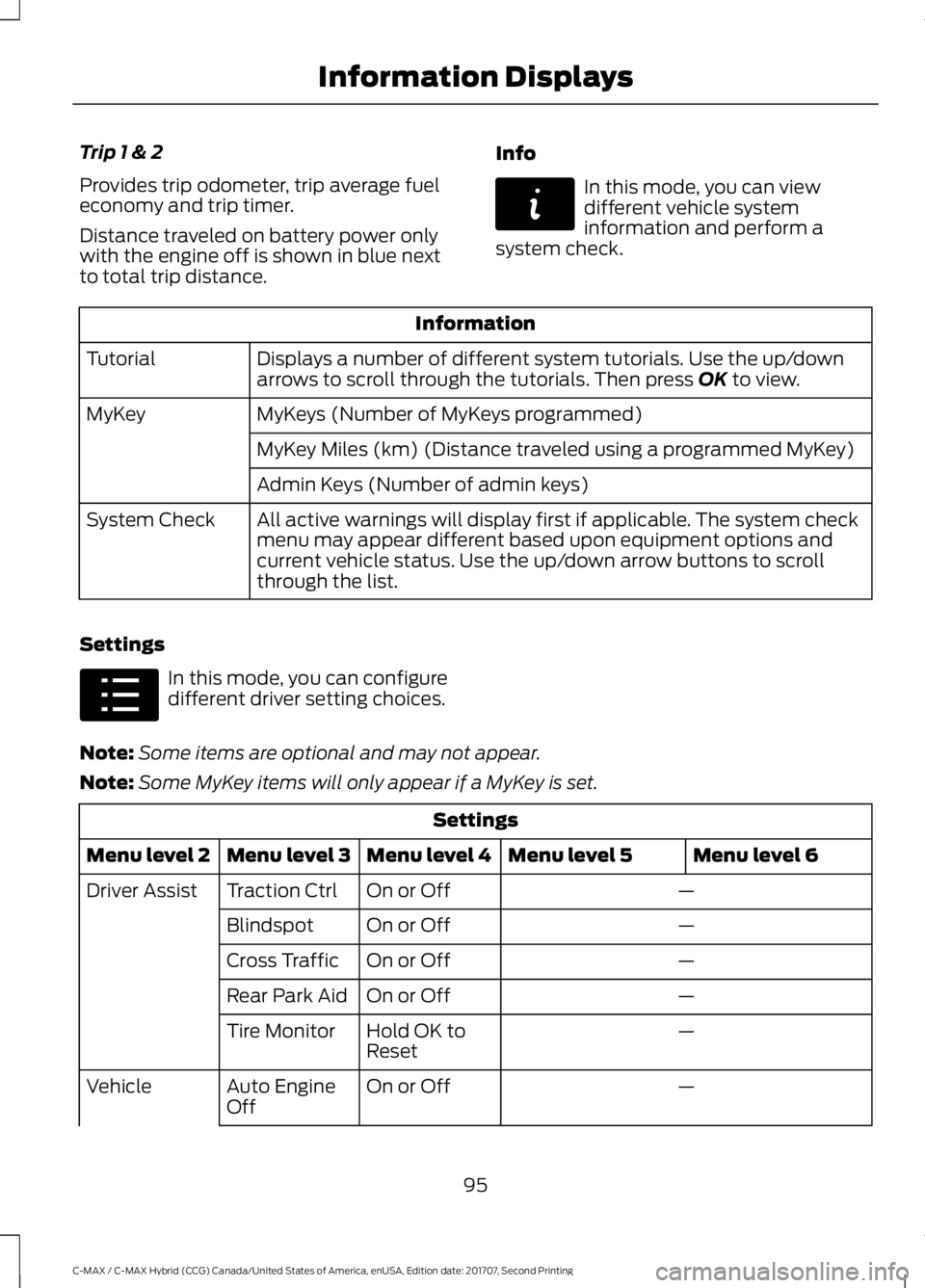
system check. Information
Displays a number of different system tutorials. Use the up/down
arrows to scroll through the tutorials. Then press OK to view.
Tutorial
MyKeys (Number of MyKeys programmed)
MyKey
MyKey Miles (km) (Distance traveled using a programmed MyKey)
Admin Keys (Number of admin keys)
All active warnings will display first if applicable. The system check
menu may appear different based upon equipment options and
current vehicle status. Use the up/down arrow buttons to scroll
through the list.
System Check
Settings In this mode, you can configure
different driver setting choices.
Note: Some items are optional and may not appear.
Note: Some MyKey items will only appear if a MyKey is set. Settings
Menu level 6
Menu level 5
Menu level 4
Menu level 3
Menu level 2
—
On or Off
Traction Ctrl
Driver Assist
—
On or Off
Blindspot
—
On or Off
Cross Traffic
—
On or Off
Rear Park Aid
—
Hold OK to
Reset
Tire Monitor
—
On or Off
Auto Engine
Off
Vehicle
95
C-MAX / C-MAX Hybrid (CCG) Canada/United States of America, enUSA, Edition date: 201707, Second Printing Information DisplaysE144642 E100023
Page 104 of 475
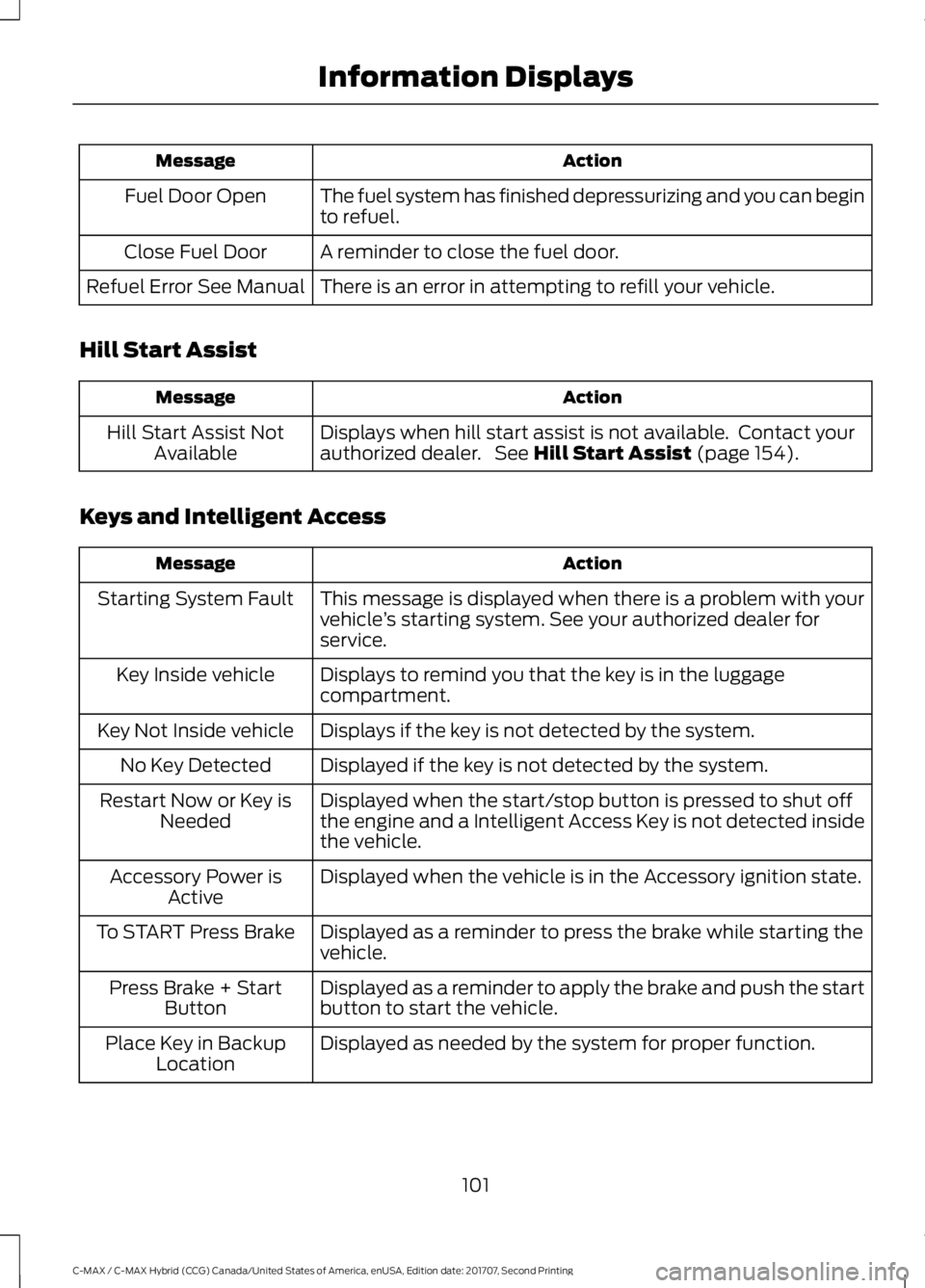
Action
Message
The fuel system has finished depressurizing and you can begin
to refuel.
Fuel Door Open
A reminder to close the fuel door.
Close Fuel Door
There is an error in attempting to refill your vehicle.
Refuel Error See Manual
Hill Start Assist Action
Message
Displays when hill start assist is not available. Contact your
authorized dealer. See Hill Start Assist (page 154).
Hill Start Assist Not
Available
Keys and Intelligent Access Action
Message
This message is displayed when there is a problem with your
vehicle’s starting system. See your authorized dealer for
service.
Starting System Fault
Displays to remind you that the key is in the luggage
compartment.
Key Inside vehicle
Displays if the key is not detected by the system.
Key Not Inside vehicle
Displayed if the key is not detected by the system.
No Key Detected
Displayed when the start/stop button is pressed to shut off
the engine and a Intelligent Access Key is not detected inside
the vehicle.
Restart Now or Key is
Needed
Displayed when the vehicle is in the Accessory ignition state.
Accessory Power is
Active
Displayed as a reminder to press the brake while starting the
vehicle.
To START Press Brake
Displayed as a reminder to apply the brake and push the start
button to start the vehicle.
Press Brake + Start
Button
Displayed as needed by the system for proper function.
Place Key in Backup
Location
101
C-MAX / C-MAX Hybrid (CCG) Canada/United States of America, enUSA, Edition date: 201707, Second Printing Information Displays
Page 105 of 475
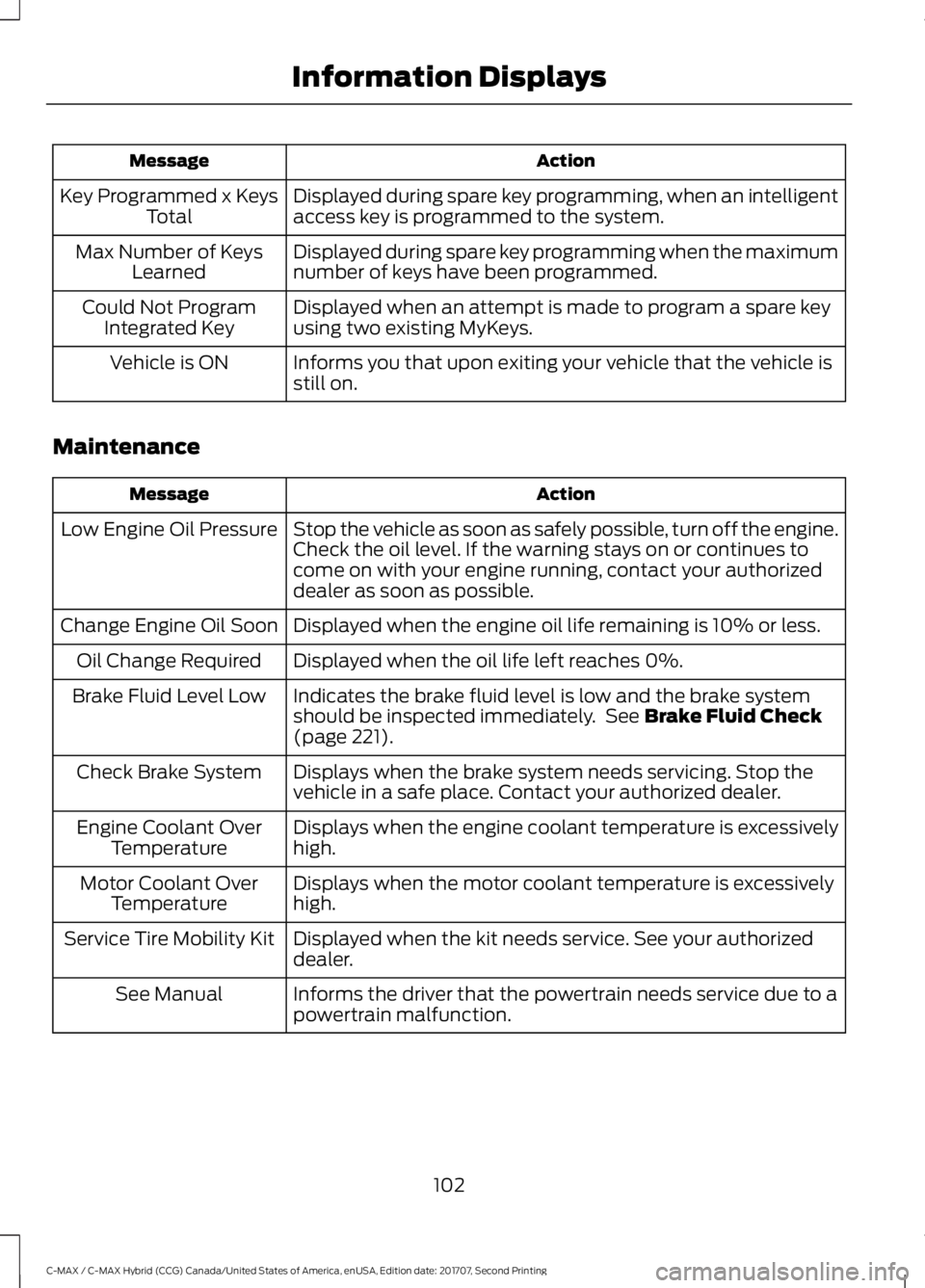
Action
Message
Displayed during spare key programming, when an intelligent
access key is programmed to the system.
Key Programmed x Keys
Total
Displayed during spare key programming when the maximum
number of keys have been programmed.
Max Number of Keys
Learned
Displayed when an attempt is made to program a spare key
using two existing MyKeys.
Could Not Program
Integrated Key
Informs you that upon exiting your vehicle that the vehicle is
still on.
Vehicle is ON
Maintenance Action
Message
Stop the vehicle as soon as safely possible, turn off the engine.
Check the oil level. If the warning stays on or continues to
come on with your engine running, contact your authorized
dealer as soon as possible.
Low Engine Oil Pressure
Displayed when the engine oil life remaining is 10% or less.
Change Engine Oil Soon
Displayed when the oil life left reaches 0%.
Oil Change Required
Indicates the brake fluid level is low and the brake system
should be inspected immediately. See Brake Fluid Check
(page 221).
Brake Fluid Level Low
Displays when the brake system needs servicing. Stop the
vehicle in a safe place. Contact your authorized dealer.
Check Brake System
Displays when the engine coolant temperature is excessively
high.
Engine Coolant Over
Temperature
Displays when the motor coolant temperature is excessively
high.
Motor Coolant Over
Temperature
Displayed when the kit needs service. See your authorized
dealer.
Service Tire Mobility Kit
Informs the driver that the powertrain needs service due to a
powertrain malfunction.
See Manual
102
C-MAX / C-MAX Hybrid (CCG) Canada/United States of America, enUSA, Edition date: 201707, Second Printing Information Displays
Page 107 of 475
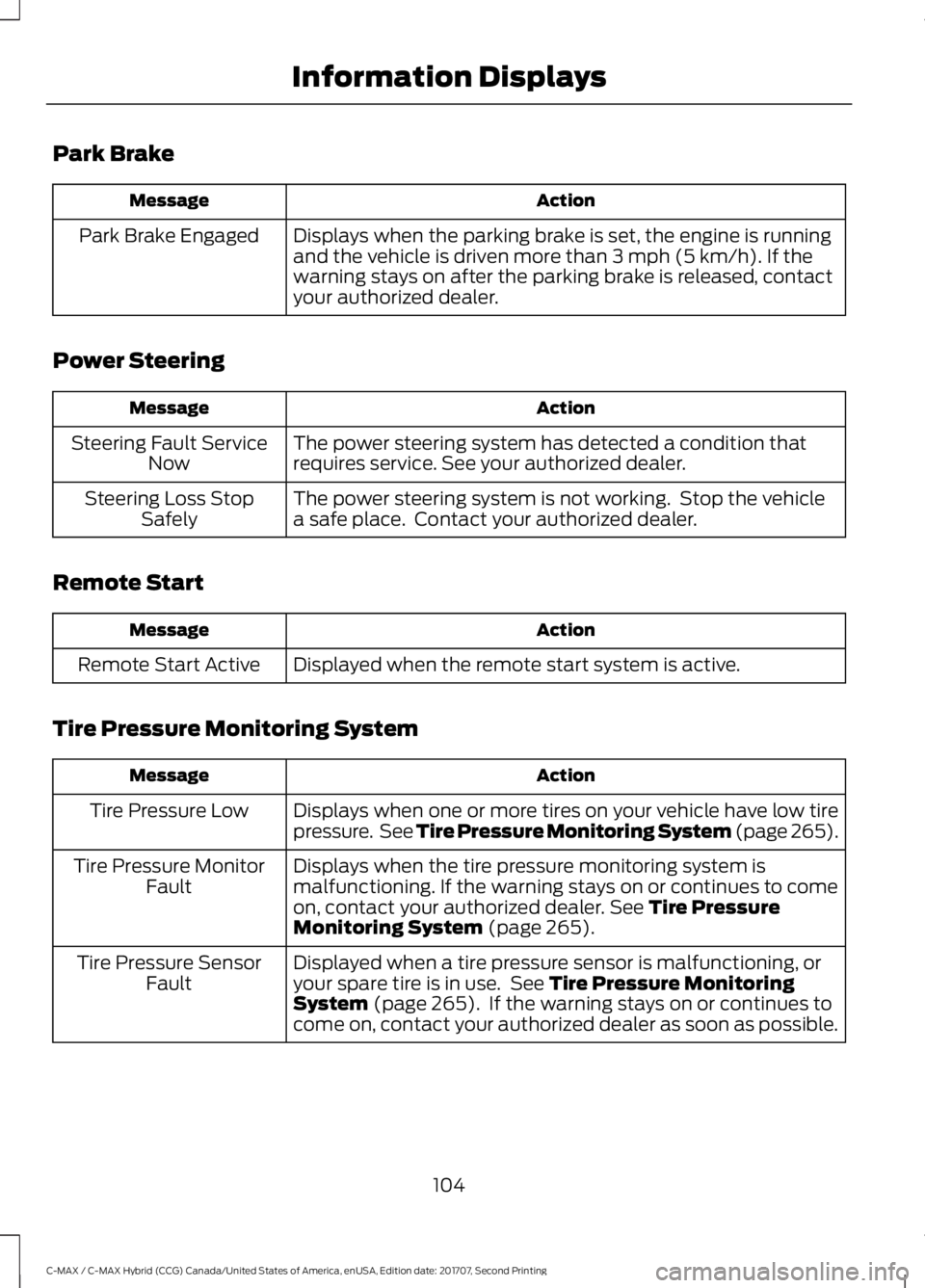
Park Brake
Action
Message
Displays when the parking brake is set, the engine is running
and the vehicle is driven more than 3 mph (5 km/h). If the
warning stays on after the parking brake is released, contact
your authorized dealer.
Park Brake Engaged
Power Steering Action
Message
The power steering system has detected a condition that
requires service. See your authorized dealer.
Steering Fault Service
Now
The power steering system is not working. Stop the vehicle
a safe place. Contact your authorized dealer.
Steering Loss Stop
Safely
Remote Start Action
Message
Displayed when the remote start system is active.
Remote Start Active
Tire Pressure Monitoring System Action
Message
Displays when one or more tires on your vehicle have low tire
pressure. See Tire Pressure Monitoring System (page 265).
Tire Pressure Low
Displays when the tire pressure monitoring system is
malfunctioning. If the warning stays on or continues to come
on, contact your authorized dealer.
See Tire Pressure
Monitoring System (page 265).
Tire Pressure Monitor
Fault
Displayed when a tire pressure sensor is malfunctioning, or
your spare tire is in use. See
Tire Pressure Monitoring
System (page 265). If the warning stays on or continues to
come on, contact your authorized dealer as soon as possible.
Tire Pressure Sensor
Fault
104
C-MAX / C-MAX Hybrid (CCG) Canada/United States of America, enUSA, Edition date: 201707, Second Printing Information Displays
Page 111 of 475
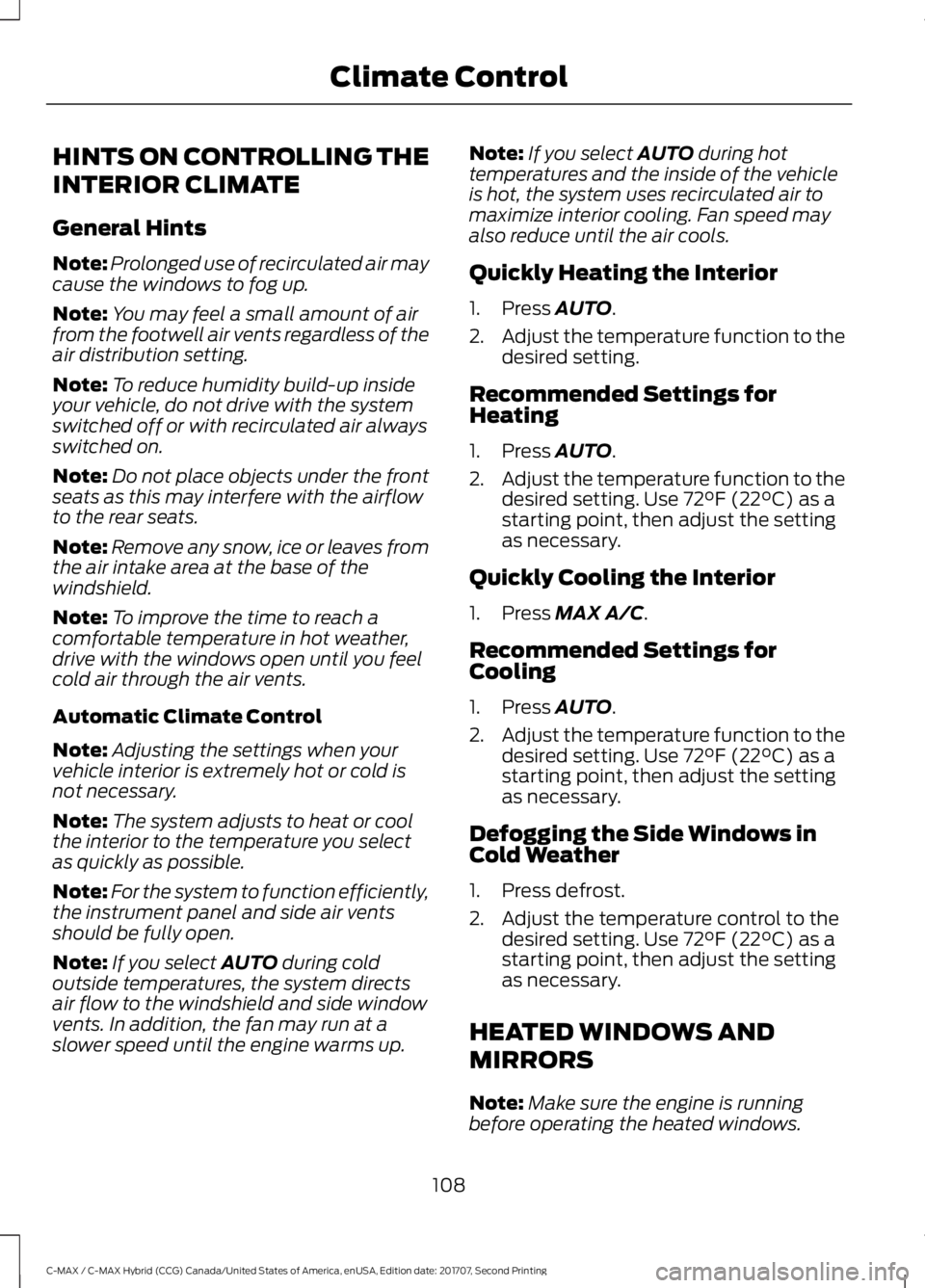
HINTS ON CONTROLLING THE
INTERIOR CLIMATE
General Hints
Note:
Prolonged use of recirculated air may
cause the windows to fog up.
Note: You may feel a small amount of air
from the footwell air vents regardless of the
air distribution setting.
Note: To reduce humidity build-up inside
your vehicle, do not drive with the system
switched off or with recirculated air always
switched on.
Note: Do not place objects under the front
seats as this may interfere with the airflow
to the rear seats.
Note: Remove any snow, ice or leaves from
the air intake area at the base of the
windshield.
Note: To improve the time to reach a
comfortable temperature in hot weather,
drive with the windows open until you feel
cold air through the air vents.
Automatic Climate Control
Note: Adjusting the settings when your
vehicle interior is extremely hot or cold is
not necessary.
Note: The system adjusts to heat or cool
the interior to the temperature you select
as quickly as possible.
Note: For the system to function efficiently,
the instrument panel and side air vents
should be fully open.
Note: If you select AUTO during cold
outside temperatures, the system directs
air flow to the windshield and side window
vents. In addition, the fan may run at a
slower speed until the engine warms up. Note:
If you select
AUTO during hot
temperatures and the inside of the vehicle
is hot, the system uses recirculated air to
maximize interior cooling. Fan speed may
also reduce until the air cools.
Quickly Heating the Interior
1. Press
AUTO.
2. Adjust the temperature function to the
desired setting.
Recommended Settings for
Heating
1. Press
AUTO.
2. Adjust the temperature function to the
desired setting. Use
72°F (22°C) as a
starting point, then adjust the setting
as necessary.
Quickly Cooling the Interior
1. Press
MAX A/C.
Recommended Settings for
Cooling
1. Press
AUTO.
2. Adjust the temperature function to the
desired setting. Use
72°F (22°C) as a
starting point, then adjust the setting
as necessary.
Defogging the Side Windows in
Cold Weather
1. Press defrost.
2. Adjust the temperature control to the desired setting. Use
72°F (22°C) as a
starting point, then adjust the setting
as necessary.
HEATED WINDOWS AND
MIRRORS
Note: Make sure the engine is running
before operating the heated windows.
108
C-MAX / C-MAX Hybrid (CCG) Canada/United States of America, enUSA, Edition date: 201707, Second Printing Climate Control
Page 120 of 475
HEATED SEATS (If Equipped)
WARNING
People who are unable to feel pain
to their skin because of advanced
age, chronic illness, diabetes, spinal
cord injury, medication, alcohol use,
exhaustion or other physical conditions,
must exercise care when using the heated
seat. The heated seat may cause burns
even at low temperatures, especially if
used for long periods of time. Do not place
anything on the seat that insulates against
heat, such as a blanket or cushion. This
may cause the heated seat to overheat.
Do not puncture the seat with pins, needles
or other pointed objects. This may damage
the heating element which may cause the
heated seat to overheat. An overheated
seat may cause serious personal injury. Do not do the following:
•
Place heavy objects on the seat.
• Operate the heated seat if water or any
other liquid is spilled on the seat. Allow
the seat to dry thoroughly.
• Operate the heated seats unless the
engine is running. Doing so can cause
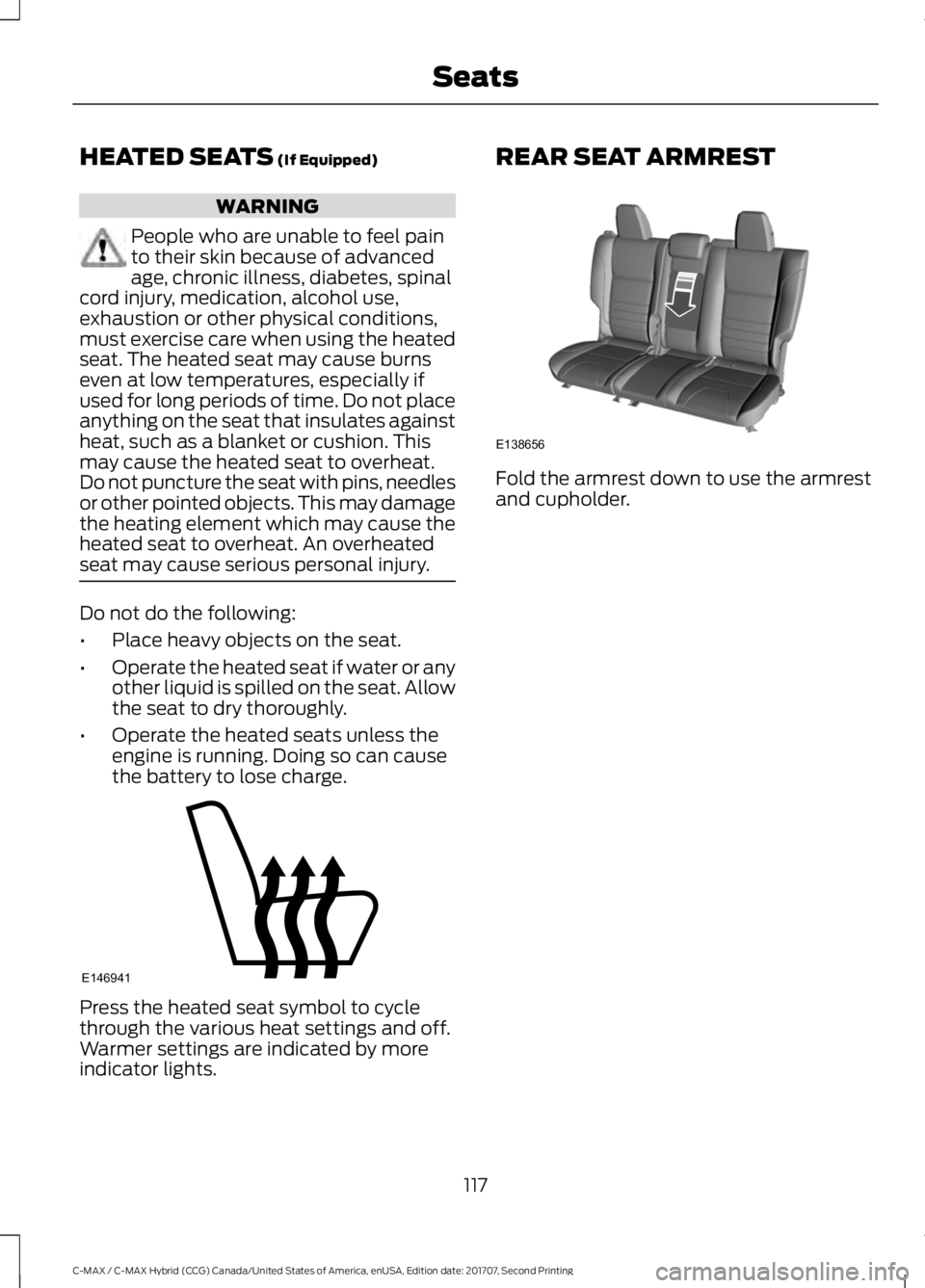
the battery to lose charge. Press the heated seat symbol to cycle
through the various heat settings and off.
Warmer settings are indicated by more
indicator lights. REAR SEAT ARMREST
Fold the armrest down to use the armrest
and cupholder.
117
C-MAX / C-MAX Hybrid (CCG) Canada/United States of America, enUSA, Edition date: 201707, Second Printing SeatsE146941 E138656
Page 128 of 475
GENERAL INFORMATION
WARNINGS
Extended idling at high engine
speeds can produce very high
temperatures in the engine and
exhaust system, creating the risk of fire or
other damage. Do not park, idle or drive your vehicle
on dry grass or other dry ground
cover. The emission system heats up
the engine compartment and exhaust
system, creating the risk of fire. Do not start the vehicle in a closed
garage or in other enclosed areas.
Exhaust fumes can be toxic. Always
open the garage door before you start the
vehicle. If you smell exhaust fumes inside
your vehicle, have your vehicle
checked by an authorized dealer
immediately. Do not drive your vehicle if
you smell exhaust fumes. If you disconnect the battery, your vehicle
may exhibit some unusual driving
characteristics for approximately 5 mi
(8 km) after you reconnect it. This is
because the engine management system
must realign itself with the engine. You can
disregard any unusual driving
characteristics during this period.
The powertrain control system meets all
Canadian interference-causing equipment
standard requirements regulating the
impulse electrical field or radio noise.
When you start your vehicle, avoid pressing
the accelerator pedal until the ready to
drive indicator illuminates. Only use the
accelerator pedal when you have difficulty
starting your vehicle. IGNITION SWITCH
(If Equipped)
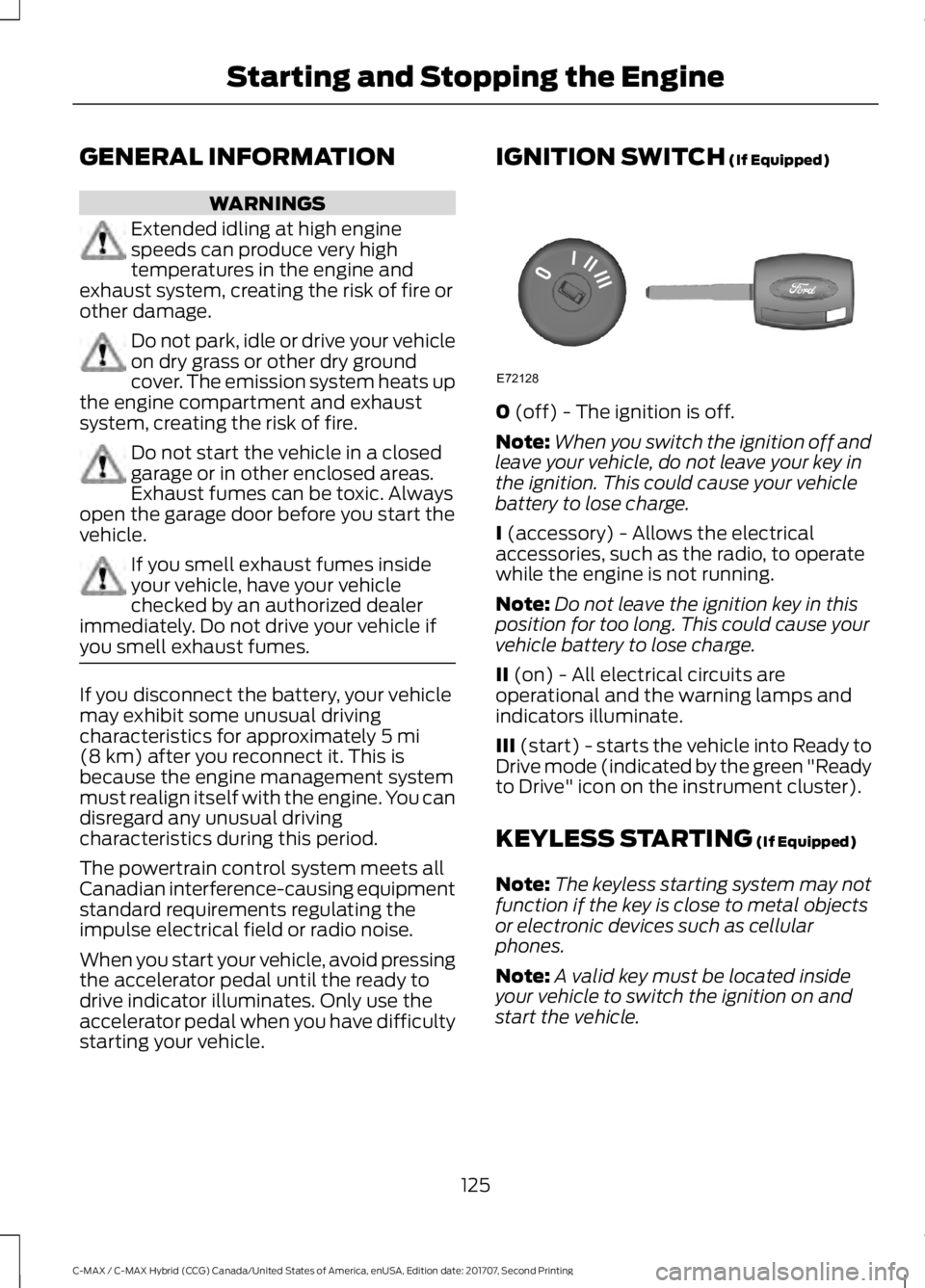
0
(off) - The ignition is off.
Note: When you switch the ignition off and
leave your vehicle, do not leave your key in
the ignition. This could cause your vehicle
battery to lose charge.
I
(accessory) - Allows the electrical
accessories, such as the radio, to operate
while the engine is not running.
Note: Do not leave the ignition key in this
position for too long. This could cause your
vehicle battery to lose charge.
II
(on) - All electrical circuits are
operational and the warning lamps and
indicators illuminate.
III
(start) - starts the vehicle into Ready to
Drive mode (indicated by the green "Ready
to Drive" icon on the instrument cluster).
KEYLESS STARTING
(If Equipped)
Note: The keyless starting system may not
function if the key is close to metal objects
or electronic devices such as cellular
phones.
Note: A valid key must be located inside
your vehicle to switch the ignition on and
start the vehicle.
125
C-MAX / C-MAX Hybrid (CCG) Canada/United States of America, enUSA, Edition date: 201707, Second Printing Starting and Stopping the EngineE72128