AUX FORD E SERIES 2015 4.G User Guide
[x] Cancel search | Manufacturer: FORD, Model Year: 2015, Model line: E SERIES, Model: FORD E SERIES 2015 4.GPages: 360, PDF Size: 3.28 MB
Page 170 of 360
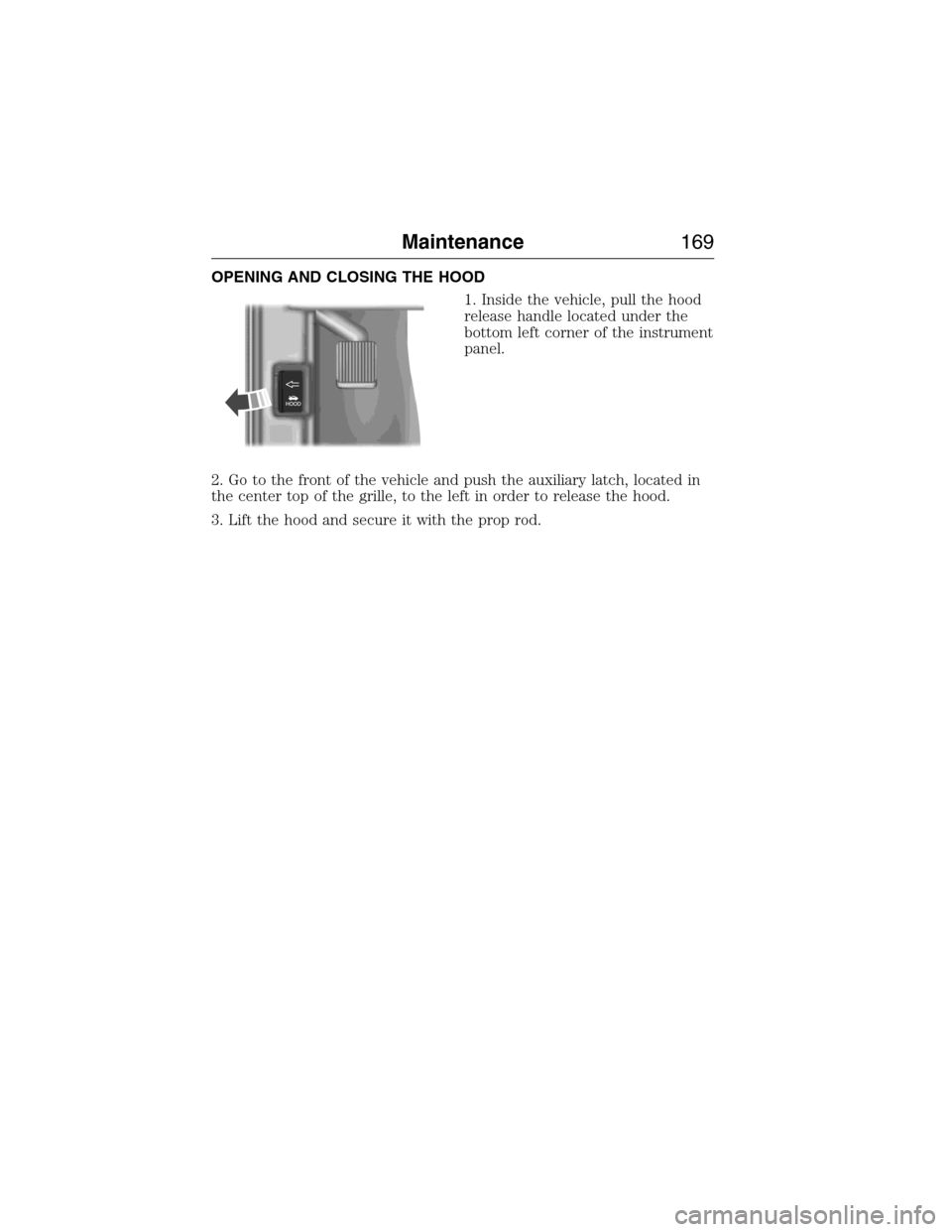
OPENING AND CLOSING THE HOOD
1. Inside the vehicle, pull the hood
release handle located under the
bottom left corner of the instrument
panel.
2. Go to the front of the vehicle and push the auxiliary latch, located in
the center top of the grille, to the left in order to release the hood.
3. Lift the hood and secure it with the prop rod.
Maintenance169
2015 Econoline(eco)
Owners Guide gf, 1st Printing, June 2014
USA(fus)
Page 251 of 360
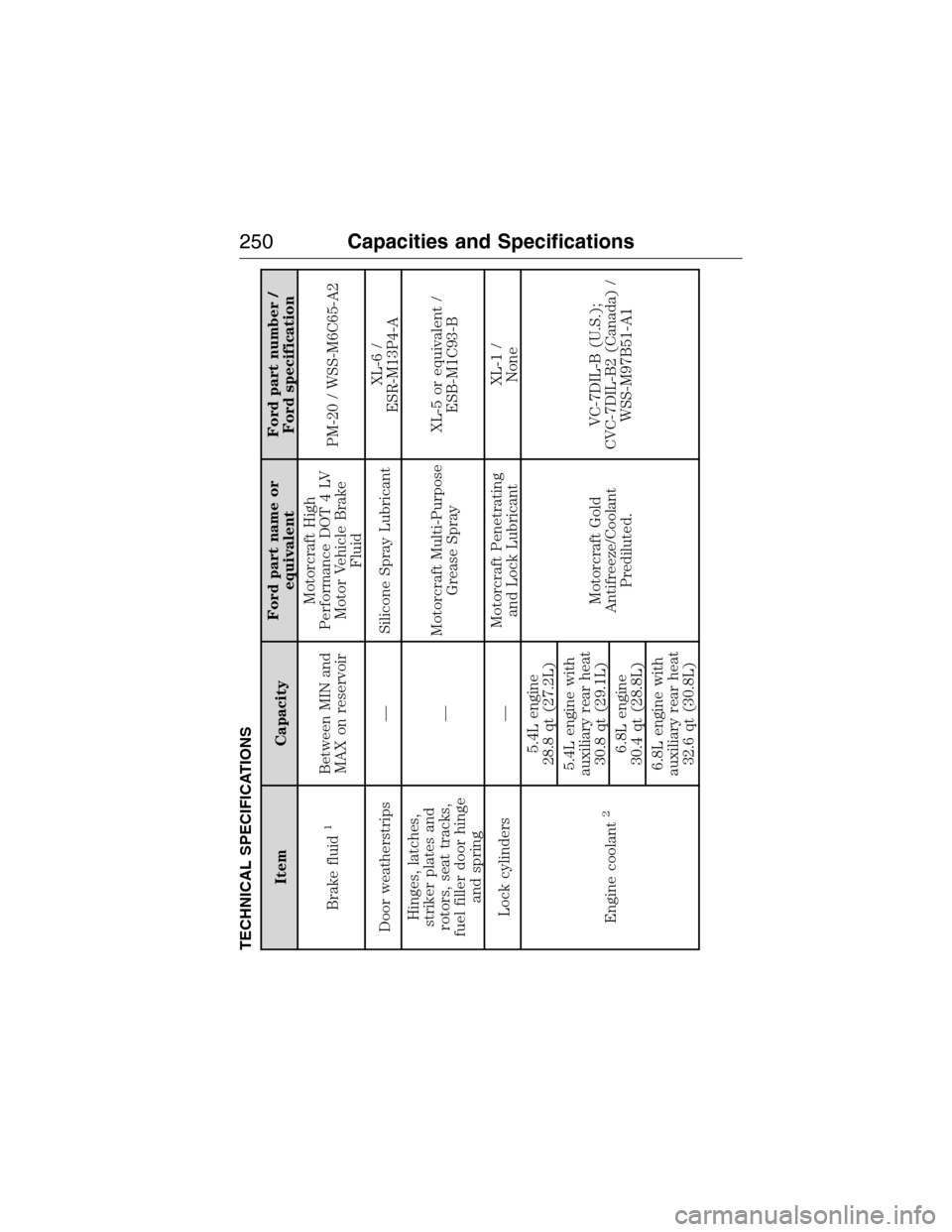
TECHNICAL SPECIFICATIONS
Item CapacityFord part name or
equivalentFord part number /
Ford specification
Brake fluid
1
Between MIN and
MAX on reservoirMotorcraft High
Performance DOT 4 LV
Motor Vehicle Brake
FluidPM-20 / WSS-M6C65-A2
Door weatherstrips — Silicone Spray LubricantXL-6 /
ESR-M13P4-A
Hinges, latches,
striker plates and
rotors, seat tracks,
fuel filler door hinge
and spring—Motorcraft Multi-Purpose
Grease SprayXL-5 or equivalent /
ESB-M1C93-B
Lock cylinders —Motorcraft Penetrating
and Lock LubricantXL-1 /
None
Engine coolant
2
5.4L engine
28.8 qt (27.2L)
Motorcraft Gold
Antifreeze/Coolant
Prediluted.VC-7DIL-B (U.S.);
CVC-7DIL-B2 (Canada) /
WSS-M97B51-A1 5.4L engine with
auxiliary rear heat
30.8 qt (29.1L)
6.8L engine
30.4 qt (28.8L)
6.8L engine with
auxiliary rear heat
32.6 qt (30.8L)
250Capacities and Specifications
2015 Econoline(eco)
Owners Guide gf, 1st Printing, June 2014
USA(fus)
Page 256 of 360
WARNING:The air conditioning refrigerant system contains
refrigerant R–134a under high pressure. Opening the air
conditioning refrigerant system can cause personal injury. Only qualified
personnel should service the air conditioning refrigerant system.
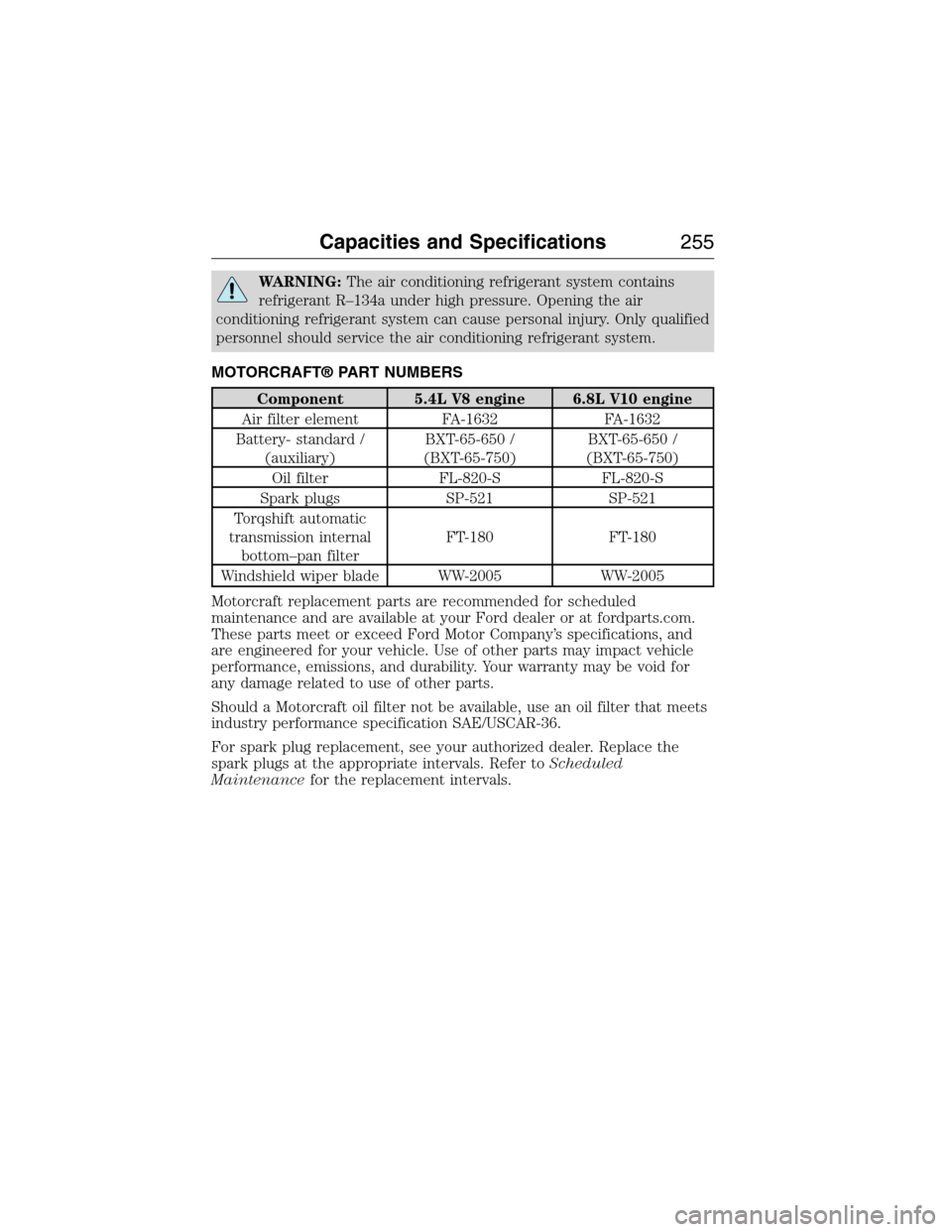
MOTORCRAFT® PART NUMBERS
Component 5.4L V8 engine 6.8L V10 engine
Air filter element FA-1632 FA-1632
Battery- standard /
(auxiliary)BXT-65-650 /
(BXT-65-750)BXT-65-650 /
(BXT-65-750)
Oil filter FL-820-S FL-820-S
Spark plugs SP-521 SP-521
Torqshift automatic
transmission internal
bottom–pan filterFT-180 FT-180
Windshield wiper blade WW-2005 WW-2005
Motorcraft replacement parts are recommended for scheduled
maintenance and are available at your Ford dealer or at fordparts.com.
These parts meet or exceed Ford Motor Company’s specifications, and
are engineered for your vehicle. Use of other parts may impact vehicle
performance, emissions, and durability. Your warranty may be void for
any damage related to use of other parts.
Should a Motorcraft oil filter not be available, use an oil filter that meets
industry performance specification SAE/USCAR-36.
For spark plug replacement, see your authorized dealer. Replace the
spark plugs at the appropriate intervals. Refer toScheduled
Maintenancefor the replacement intervals.
Capacities and Specifications255
2015 Econoline(eco)
Owners Guide gf, 1st Printing, June 2014
USA(fus)
Page 260 of 360
For maximum vehicle performance, keep the following information in
mind when adding accessories or equipment to your vehicle:
•When adding accessories, equipment, passengers and luggage to your
vehicle, do not exceed the total weight capacity of the vehicle or of
the front or rear axle (GVWR or GAWR as indicated on the Safety
Compliance Certification label). Ask an authorized dealer for specific
weight information.
•The Federal Communications Commission (FCC) and Canadian Radio
Telecommunications Commission (CRTC) regulate the use of mobile
communications systems that are equipped with radio transmitters, for
example, two-way radios, telephones and theft alarms. Any such
equipment installed in your vehicle should comply with Federal
Communications Commission (FCC) and Canadian Radio
Telecommunications Commission (CRTC) regulations and should be
installed only by an authorized dealer.
•An authorized dealer needs to install mobile communications systems.
Improper installation may harm the operation of your vehicle,
particularly if the manufacturer did not design the mobile
communication system specifically for automotive use.
•If you or an authorized Ford dealer add any non-Ford electrical or
electronic accessories or components to your vehicle, you may
adversely affect battery performance and durability. In addition, you
may also adversely affect the performance of other electrical systems
in the vehicle.
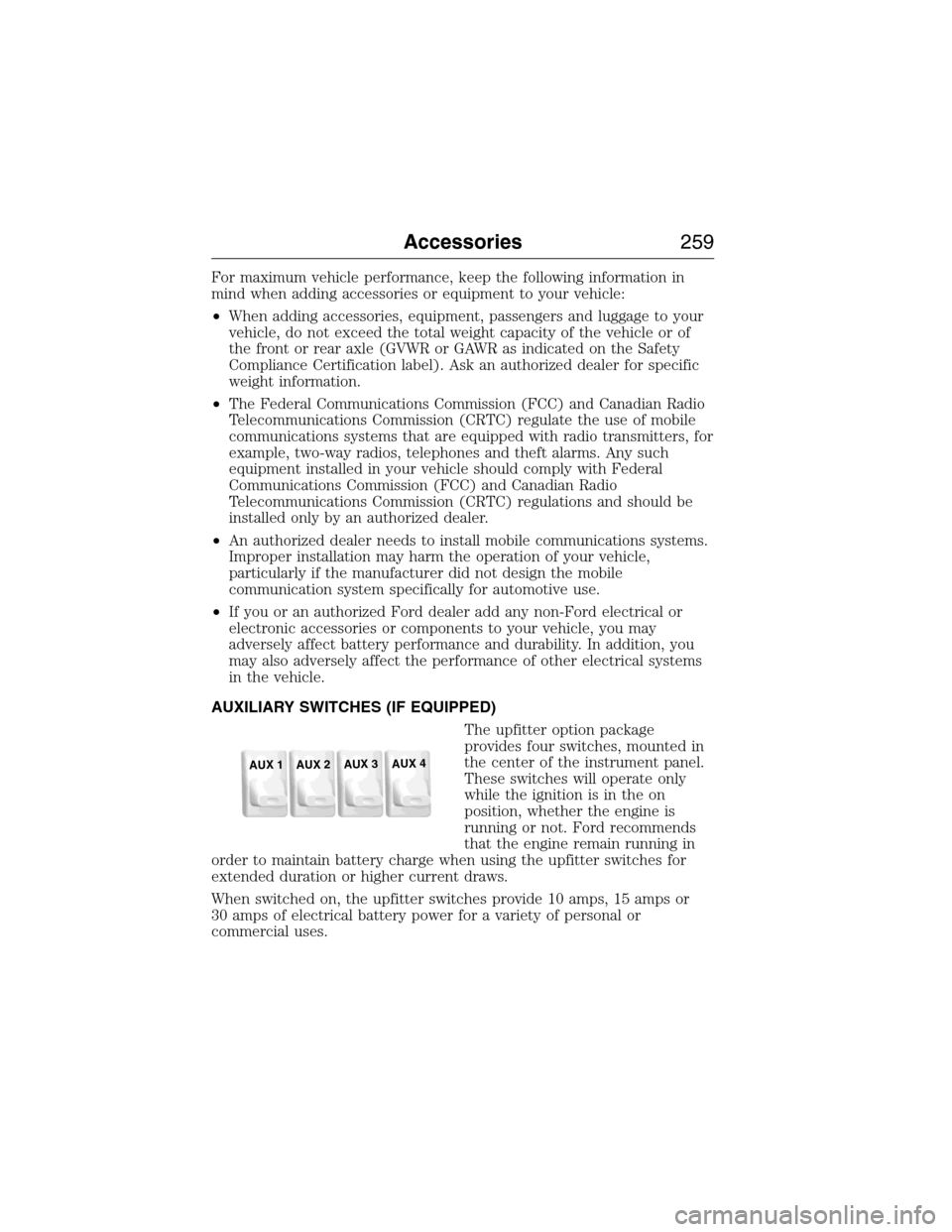
AUXILIARY SWITCHES (IF EQUIPPED)
The upfitter option package
provides four switches, mounted in
the center of the instrument panel.
These switches will operate only
while the ignition is in the on
position, whether the engine is
running or not. Ford recommends
that the engine remain running in
order to maintain battery charge when using the upfitter switches for
extended duration or higher current draws.
When switched on, the upfitter switches provide 10 amps, 15 amps or
30 amps of electrical battery power for a variety of personal or
commercial uses.
AUX 1
AUX 2
AUX 3
AUX 4
Accessories259
2015 Econoline(eco)
Owners Guide gf, 1st Printing, June 2014
USA(fus)
Page 261 of 360
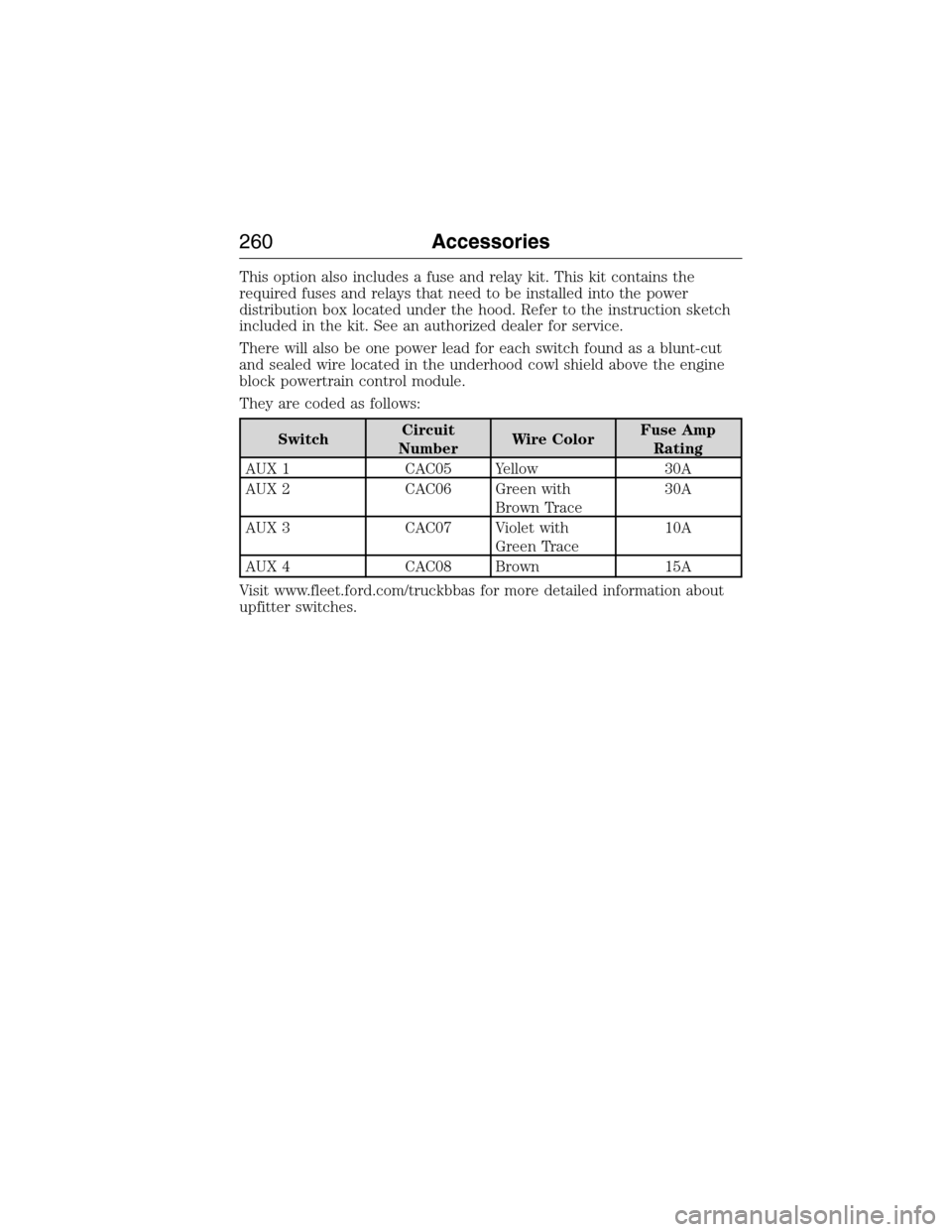
This option also includes a fuse and relay kit. This kit contains the
required fuses and relays that need to be installed into the power
distribution box located under the hood. Refer to the instruction sketch
included in the kit. See an authorized dealer for service.
There will also be one power lead for each switch found as a blunt-cut
and sealed wire located in the underhood cowl shield above the engine
block powertrain control module.
They are coded as follows:
SwitchCircuit
NumberWire ColorFuse Amp
Rating
AUX 1 CAC05 Yellow 30A
AUX 2 CAC06 Green with
Brown Trace30A
AUX 3 CAC07 Violet with
Green Trace10A
AUX 4 CAC08 Brown 15A
Visit www.fleet.ford.com/truckbbas for more detailed information about
upfitter switches.
260Accessories
2015 Econoline(eco)
Owners Guide gf, 1st Printing, June 2014
USA(fus)
Page 268 of 360
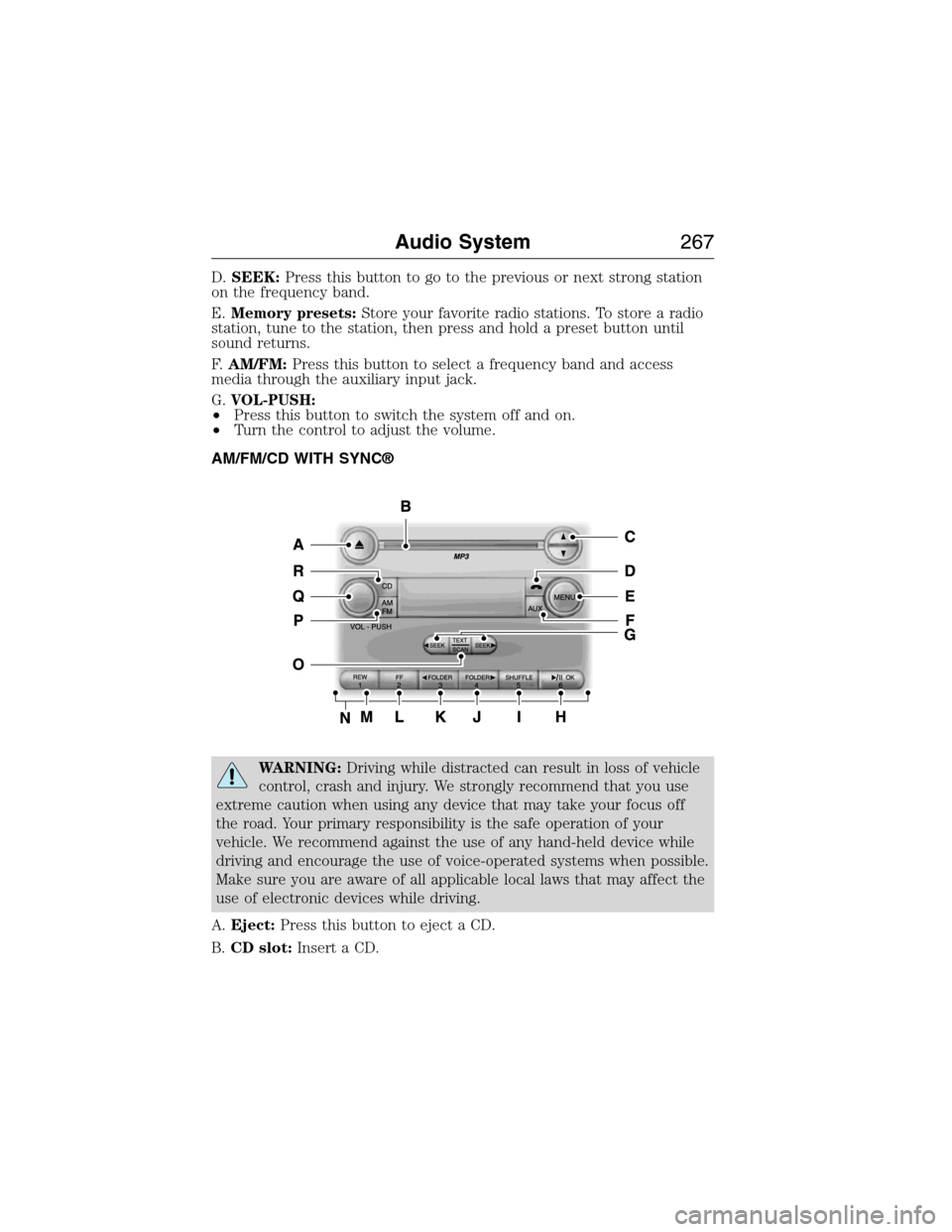
D.SEEK:Press this button to go to the previous or next strong station
on the frequency band.
E.Memory presets:Store your favorite radio stations. To store a radio
station, tune to the station, then press and hold a preset button until
sound returns.
F.AM/FM:Press this button to select a frequency band and access
media through the auxiliary input jack.
G.VOL-PUSH:
•Press this button to switch the system off and on.
•Turn the control to adjust the volume.
AM/FM/CD WITH SYNC®
WARNING:Driving while distracted can result in loss of vehicle
control, crash and injury. We strongly recommend that you use
extreme caution when using any device that may take your focus off
the road. Your primary responsibility is the safe operation of your
vehicle. We recommend against the use of any hand-held device while
driving and encourage the use of voice-operated systems when possible.
Make sure you are aware of all applicable local laws that may affect the
use of electronic devices while driving.
A.Eject:Press this button to eject a CD.
B.CD slot:Insert a CD.
Audio System267
2015 Econoline(eco)
Owners Guide gf, 1st Printing, June 2014
USA(fus)
Page 269 of 360
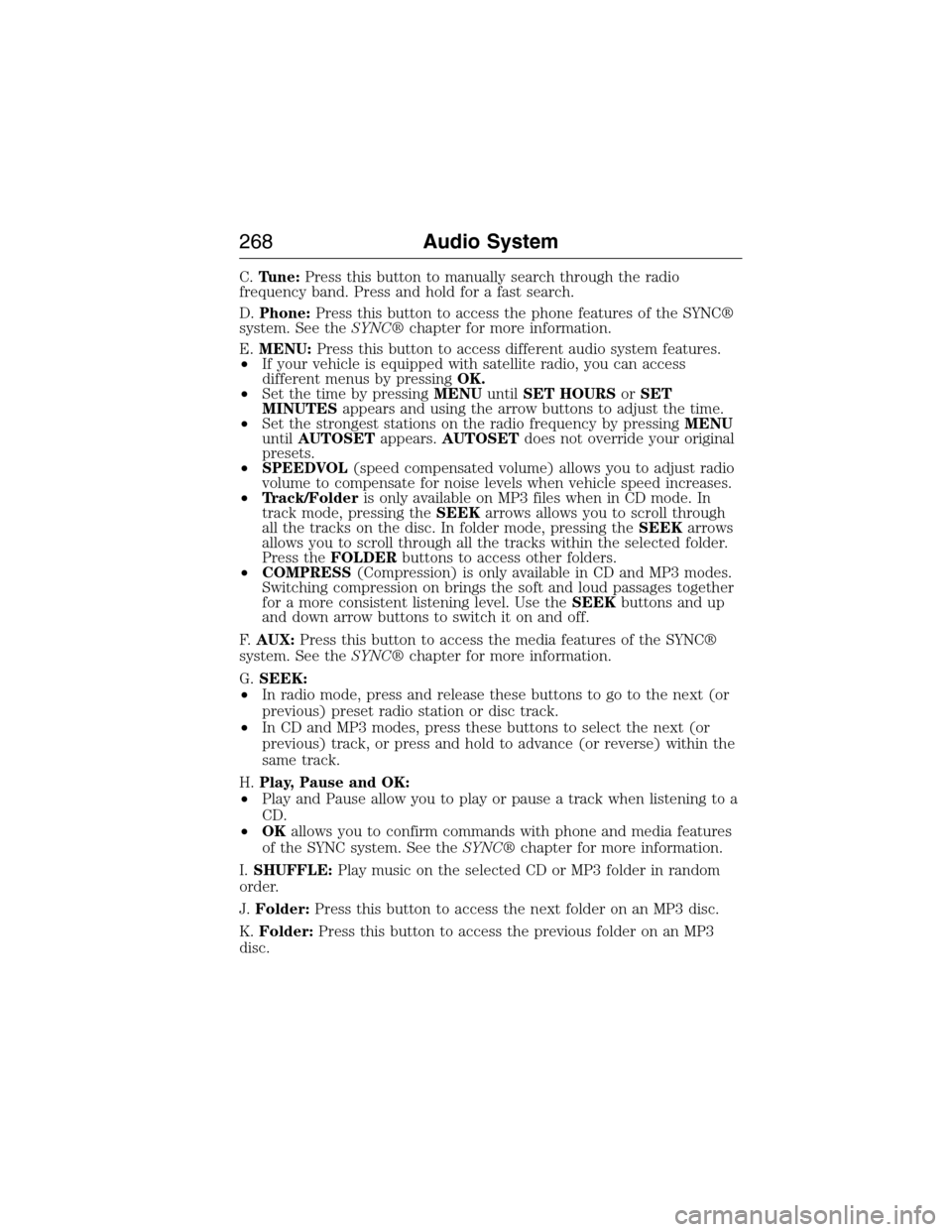
C.Tune:Press this button to manually search through the radio
frequency band. Press and hold for a fast search.
D.Phone:Press this button to access the phone features of the SYNC®
system. See theSYNC®chapter for more information.
E.MENU:Press this button to access different audio system features.
•If your vehicle is equipped with satellite radio, you can access
different menus by pressingOK.
•Set the time by pressingMENUuntilSET HOURSorSET
MINUTESappears and using the arrow buttons to adjust the time.
•Set the strongest stations on the radio frequency by pressingMENU
untilAUTOSETappears.AUTOSETdoes not override your original
presets.
•SPEEDVOL(speed compensated volume) allows you to adjust radio
volume to compensate for noise levels when vehicle speed increases.
•Track/Folderis only available on MP3 files when in CD mode. In
track mode, pressing theSEEKarrows allows you to scroll through
all the tracks on the disc. In folder mode, pressing theSEEKarrows
allows you to scroll through all the tracks within the selected folder.
Press theFOLDERbuttons to access other folders.
•COMPRESS(Compression) is only available in CD and MP3 modes.
Switching compression on brings the soft and loud passages together
for a more consistent listening level. Use theSEEKbuttons and up
and down arrow buttons to switch it on and off.
F.AUX:Press this button to access the media features of the SYNC®
system. See theSYNC®chapter for more information.
G.SEEK:
•In radio mode, press and release these buttons to go to the next (or
previous) preset radio station or disc track.
•In CD and MP3 modes, press these buttons to select the next (or
previous) track, or press and hold to advance (or reverse) within the
same track.
H.Play, Pause and OK:
•Play and Pause allow you to play or pause a track when listening to a
CD.
•OKallows you to confirm commands with phone and media features
of the SYNC system. See theSYNC®chapter for more information.
I.SHUFFLE:Play music on the selected CD or MP3 folder in random
order.
J.Folder:Press this button to access the next folder on an MP3 disc.
K.Folder:Press this button to access the previous folder on an MP3
disc.
268Audio System
2015 Econoline(eco)
Owners Guide gf, 1st Printing, June 2014
USA(fus)
Page 273 of 360
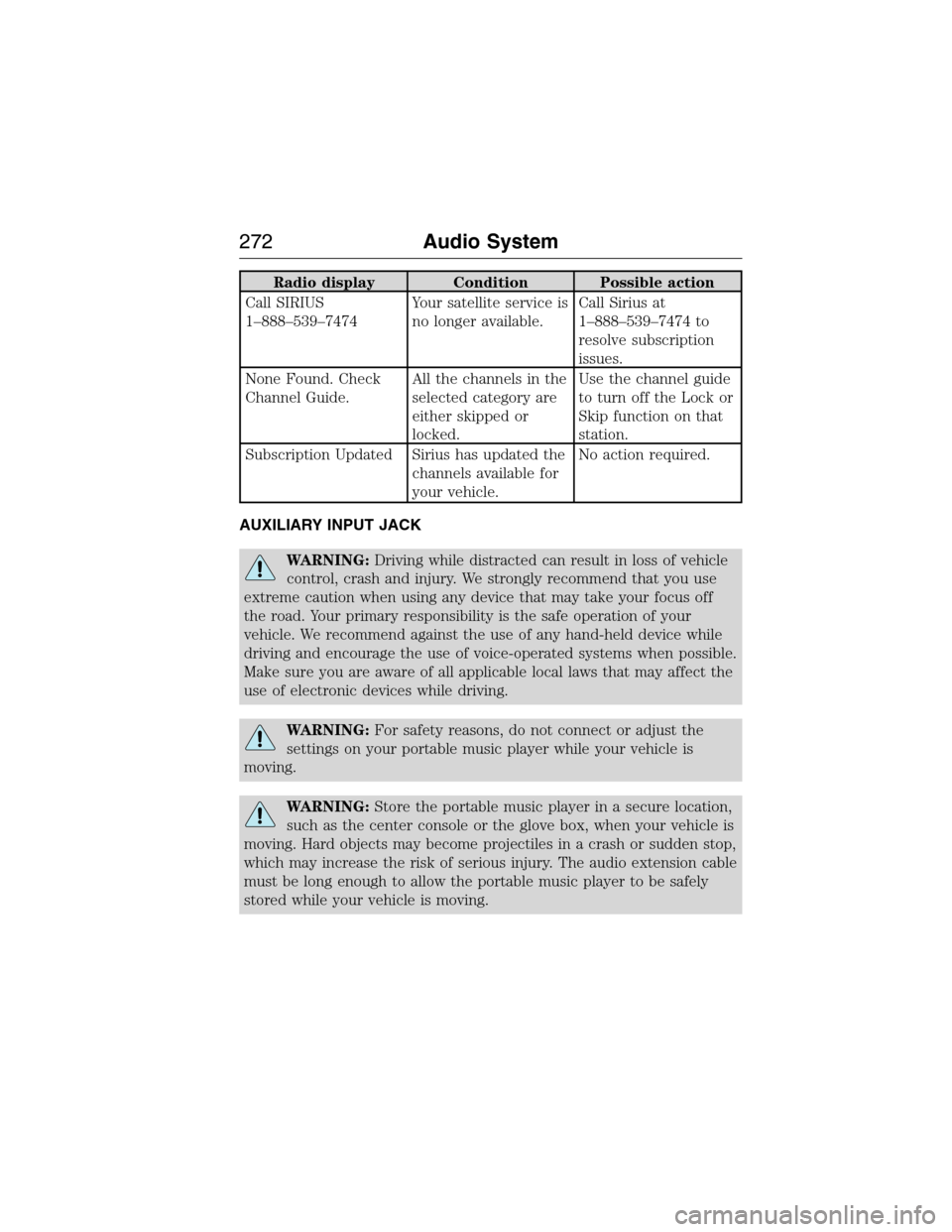
Radio display Condition Possible action
Call SIRIUS
1–888–539–7474Your satellite service is
no longer available.Call Sirius at
1–888–539–7474 to
resolve subscription
issues.
None Found. Check
Channel Guide.All the channels in the
selected category are
either skipped or
locked.Use the channel guide
to turn off the Lock or
Skip function on that
station.
Subscription Updated Sirius has updated the
channels available for
your vehicle.No action required.
AUXILIARY INPUT JACK
WARNING:Driving while distracted can result in loss of vehicle
control, crash and injury. We strongly recommend that you use
extreme caution when using any device that may take your focus off
the road. Your primary responsibility is the safe operation of your
vehicle. We recommend against the use of any hand-held device while
driving and encourage the use of voice-operated systems when possible.
Make sure you are aware of all applicable local laws that may affect the
use of electronic devices while driving.
WARNING:For safety reasons, do not connect or adjust the
settings on your portable music player while your vehicle is
moving.
WARNING:Store the portable music player in a secure location,
such as the center console or the glove box, when your vehicle is
moving. Hard objects may become projectiles in a crash or sudden stop,
which may increase the risk of serious injury. The audio extension cable
must be long enough to allow the portable music player to be safely
stored while your vehicle is moving.
272Audio System
2015 Econoline(eco)
Owners Guide gf, 1st Printing, June 2014
USA(fus)
Page 274 of 360
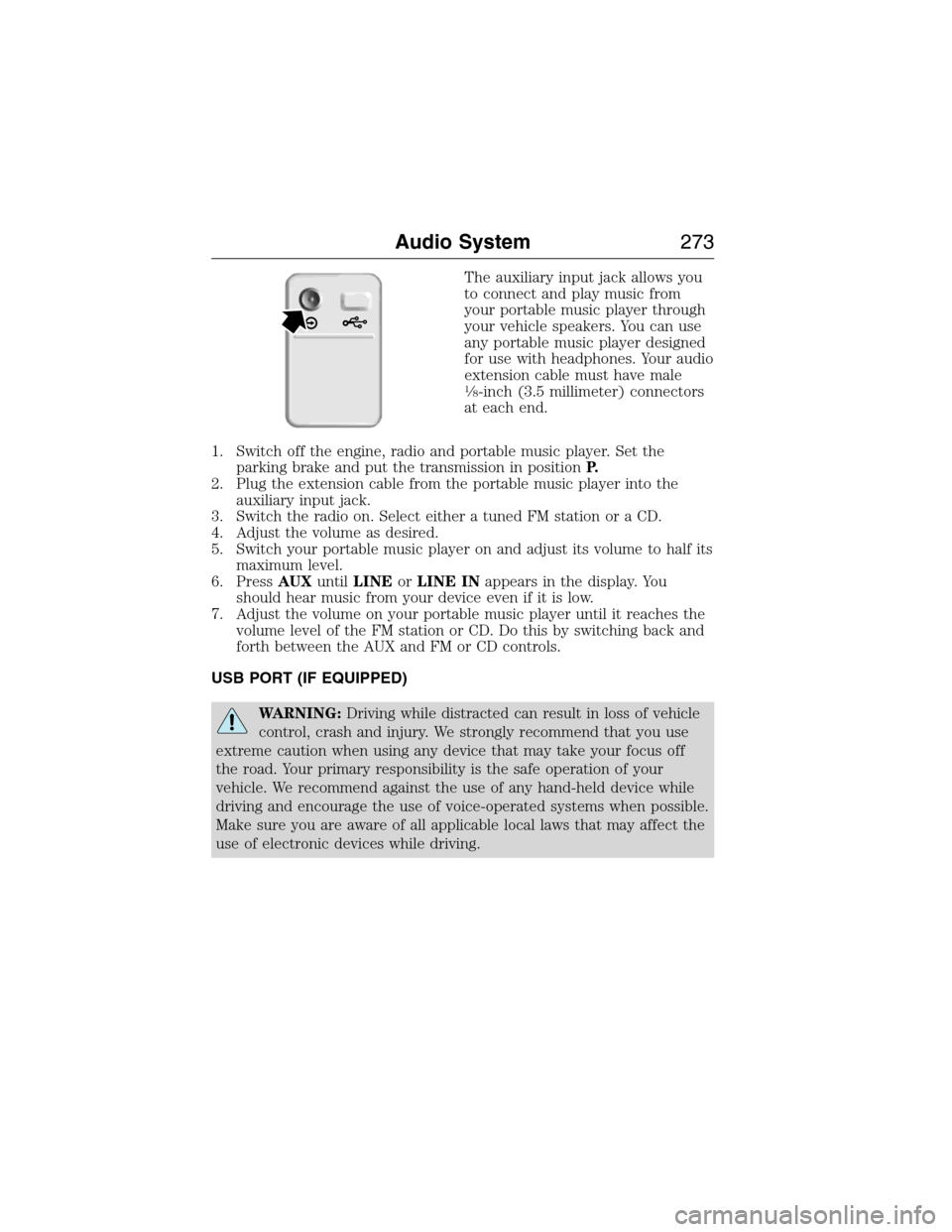
The auxiliary input jack allows you
to connect and play music from
your portable music player through
your vehicle speakers. You can use
any portable music player designed
for use with headphones. Your audio
extension cable must have male
18-inch (3.5 millimeter) connectors
at each end.
1. Switch off the engine, radio and portable music player. Set the
parking brake and put the transmission in positionP.
2. Plug the extension cable from the portable music player into the
auxiliary input jack.
3. Switch the radio on. Select either a tuned FM station or a CD.
4. Adjust the volume as desired.
5. Switch your portable music player on and adjust its volume to half its
maximum level.
6. PressAUXuntilLINEorLINE INappears in the display. You
should hear music from your device even if it is low.
7. Adjust the volume on your portable music player until it reaches the
volume level of the FM station or CD. Do this by switching back and
forth between the AUX and FM or CD controls.
USB PORT (IF EQUIPPED)
WARNING:Driving while distracted can result in loss of vehicle
control, crash and injury. We strongly recommend that you use
extreme caution when using any device that may take your focus off
the road. Your primary responsibility is the safe operation of your
vehicle. We recommend against the use of any hand-held device while
driving and encourage the use of voice-operated systems when possible.
Make sure you are aware of all applicable local laws that may affect the
use of electronic devices while driving.
Audio System273
2015 Econoline(eco)
Owners Guide gf, 1st Printing, June 2014
USA(fus)
Page 279 of 360
independently of Ford Motor Company and Ford of Canada. For further
privacy information, see the sections on 911 Assist, Vehicle Health
Report, and Traffic, Directions and Information.
USING VOICE RECOGNITION
This system helps you control many features using voice commands. This
allows you to keep your hands on the wheel and focus on what is in
front of you.
Initiating a Voice Session
Push the voice icon; a tone sounds and Listening appears in the
display. Say any of the following:
Say: If you want to:
“Phone” Make calls.
“USB” Access the device connected to your USB
port.
“Bluetooth Audio” Stream audio from your phone.
“Line in” Access the device connected to the auxiliary
input jack.
“Cancel” Cancel the requested action.
“SYNC” Return to the main menu.
“Voice settings” Adjust the level of voice interaction and
feedback.
“Vehicle Health Report” Run a vehicle health report.
*
“Services” Access the SYNC Services portal.*
“Mobile apps” Access mobile applications.*
“Help” Hear a list of voice commands available in the
current mode.
*If equipped, U.S. only.
278SYNC®
2015 Econoline(eco)
Owners Guide gf, 1st Printing, June 2014
USA(fus)