seats FORD E SERIES 2015 4.G Owner's Manual
[x] Cancel search | Manufacturer: FORD, Model Year: 2015, Model line: E SERIES, Model: FORD E SERIES 2015 4.GPages: 360, PDF Size: 3.28 MB
Page 87 of 360
SITTING IN THE CORRECT POSITION
WARNING:Sitting improperly out of position or with the
seatback reclined too far can take off weight from the seat
cushion and affect the passenger sensing system, resulting in serious
injury or death in a crash. Always sit upright against your seatback,
with your feet on the floor.
WARNING:Do not recline the seatback as this can cause the
occupant to slide under the seat’s safety belt, resulting in severe
personal injury in the event of a crash.
WARNING:Do not place objects higher than the seatbacks to
reduce the risk of injury in a crash or during heavy braking or
when stopping suddenly.
When you use them properly, the
seat, head restraint, safety belt and
airbags will provide optimum
protection in the event of a crash.
We recommend that you follow
these guidelines:
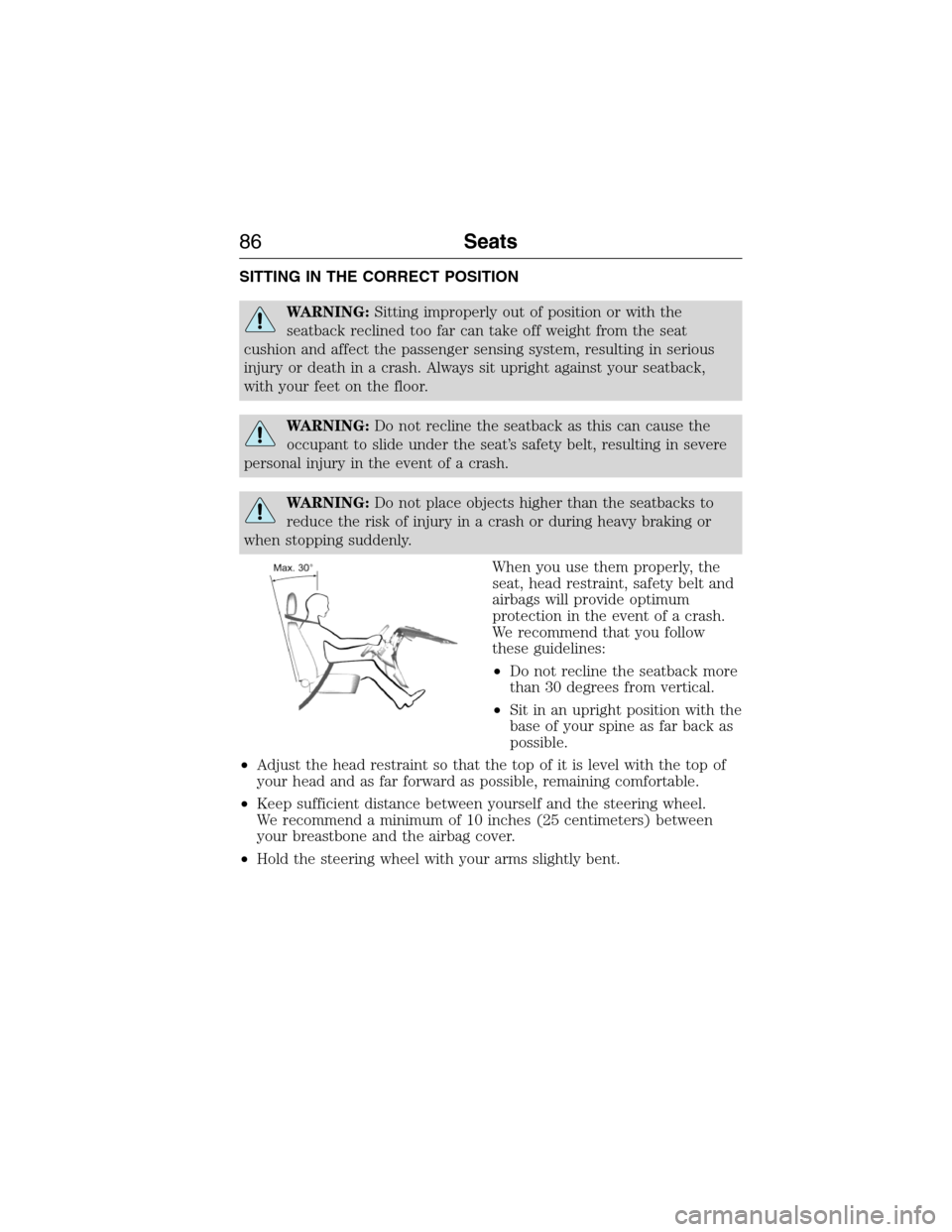
•Do not recline the seatback more
than 30 degrees from vertical.
•Sit in an upright position with the
base of your spine as far back as
possible.
•Adjust the head restraint so that the top of it is level with the top of
your head and as far forward as possible, remaining comfortable.
•Keep sufficient distance between yourself and the steering wheel.
We recommend a minimum of 10 inches (25 centimeters) between
your breastbone and the airbag cover.
•Hold the steering wheel with your arms slightly bent.
86Seats
2015 Econoline(eco)
Owners Guide gf, 1st Printing, June 2014
USA(fus)
Page 88 of 360
•Bend your legs slightly so that you can press the pedals fully.
•Position the shoulder strap of the safety belt over the center of your
shoulder and position the lap strap tightly across your hips.
Make sure that your driving position is comfortable and that you can
maintain full control of your vehicle.
HEAD RESTRAINTS
WARNING:To minimize the risk of neck injury in the event of a
crash, the driver and passenger occupants should not sit in and
operate the vehicle until the seatback is placed in its proper position.
The driver should never adjust the head restraint while the vehicle is
in motion.
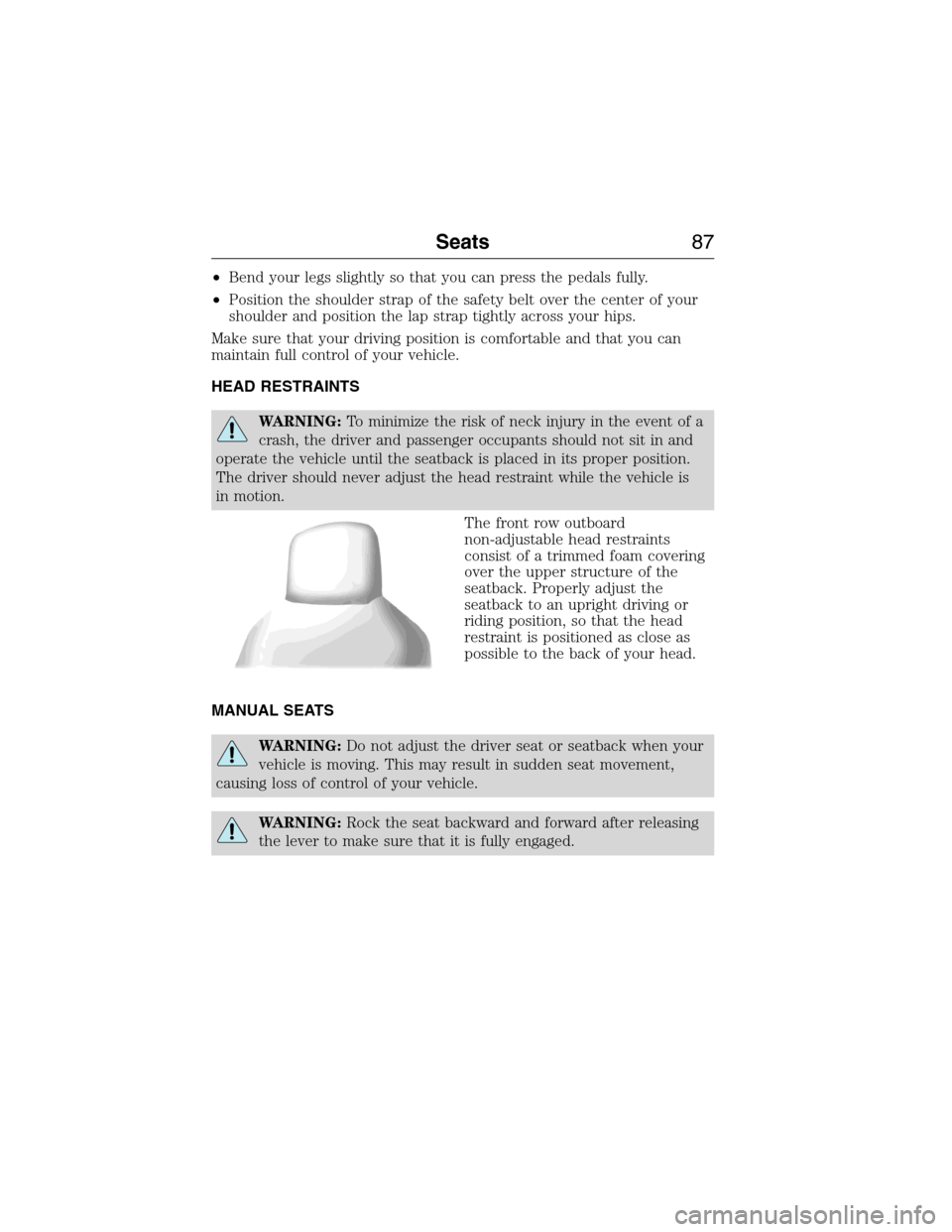
The front row outboard
non-adjustable head restraints
consist of a trimmed foam covering
over the upper structure of the
seatback. Properly adjust the
seatback to an upright driving or
riding position, so that the head
restraint is positioned as close as
possible to the back of your head.
MANUAL SEATS
WARNING:Do not adjust the driver seat or seatback when your
vehicle is moving. This may result in sudden seat movement,
causing loss of control of your vehicle.
WARNING:Rock the seat backward and forward after releasing
the lever to make sure that it is fully engaged.
Seats87
2015 Econoline(eco)
Owners Guide gf, 1st Printing, June 2014
USA(fus)
Page 89 of 360
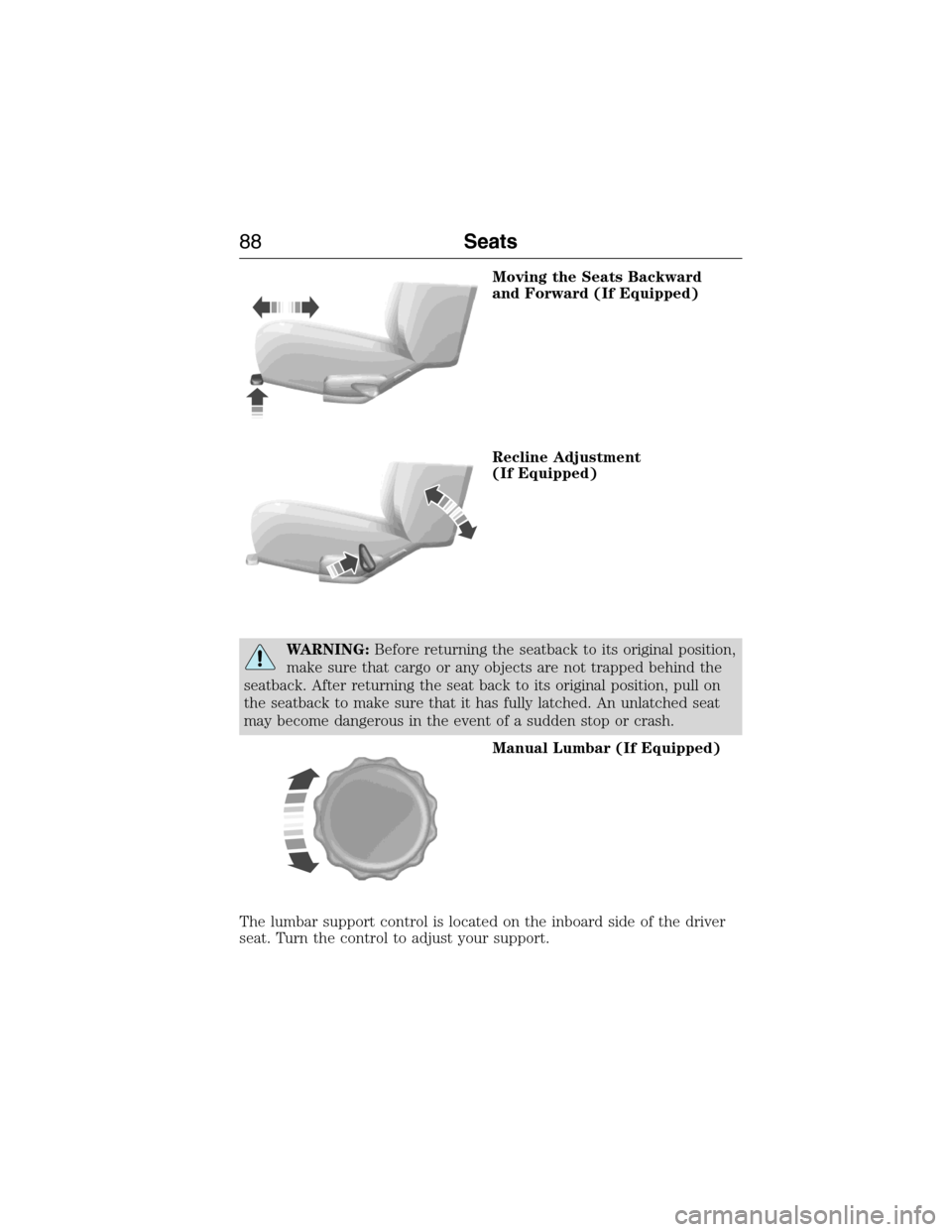
Moving the Seats Backward
and Forward (If Equipped)
Recline Adjustment
(If Equipped)
WARNING:Before returning the seatback to its original position,
make sure that cargo or any objects are not trapped behind the
seatback. After returning the seat back to its original position, pull on
the seatback to make sure that it has fully latched. An unlatched seat
may become dangerous in the event of a sudden stop or crash.
Manual Lumbar (If Equipped)
The lumbar support control is located on the inboard side of the driver
seat. Turn the control to adjust your support.
88Seats
2015 Econoline(eco)
Owners Guide gf, 1st Printing, June 2014
USA(fus)
Page 90 of 360
POWER SEATS
WARNING:Do not adjust the driver seat while the vehicle is
moving. This may result in sudden seat movement, causing loss
of control of your vehicle.
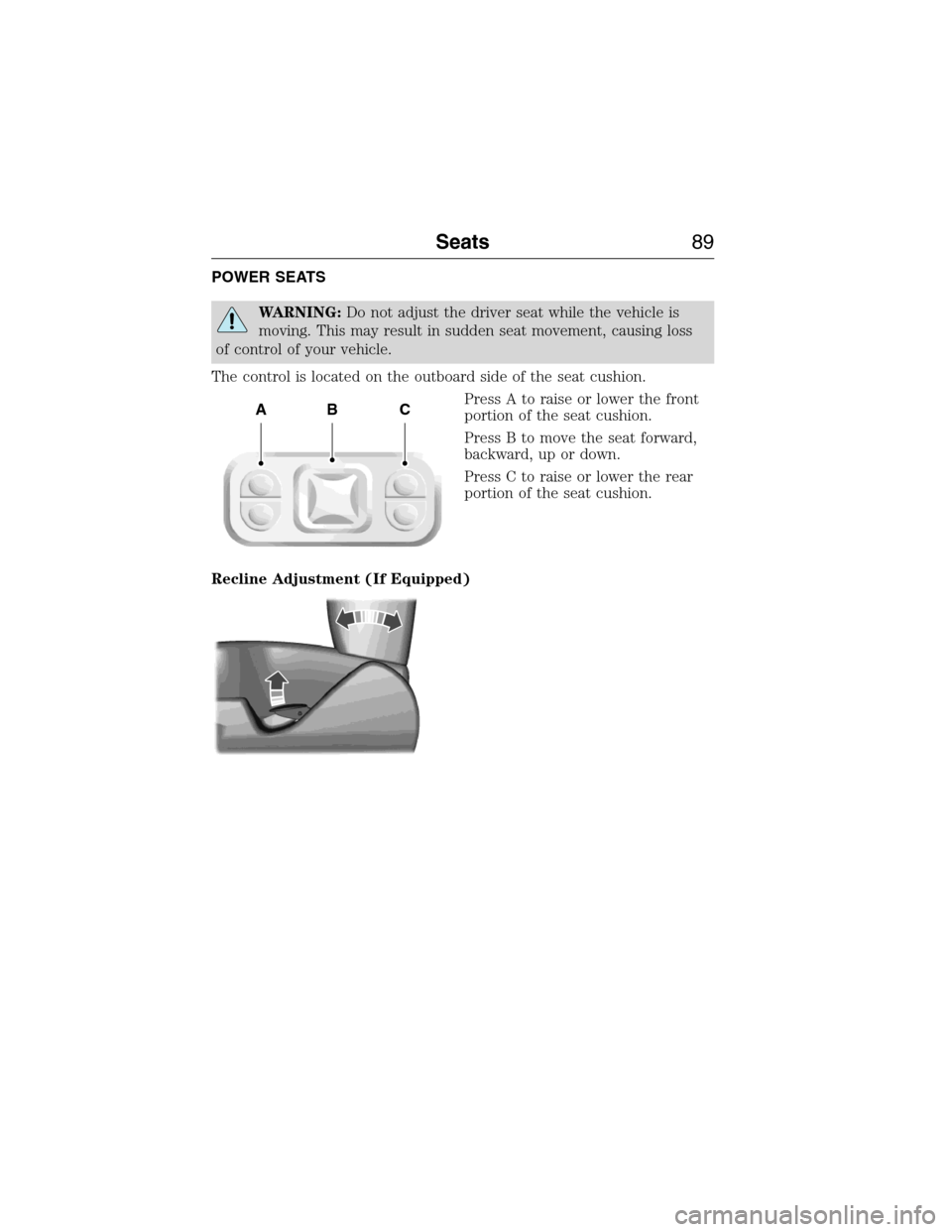
The control is located on the outboard side of the seat cushion.
Press A to raise or lower the front
portion of the seat cushion.
Press B to move the seat forward,
backward, up or down.
Press C to raise or lower the rear
portion of the seat cushion.
Recline Adjustment (If Equipped)
ABC
Seats89
2015 Econoline(eco)
Owners Guide gf, 1st Printing, June 2014
USA(fus)
Page 140 of 360
PREPARING TO DRIVE
WARNING:Utility vehicles have a significantly higher rollover
rate than other types of vehicles.
WARNING:In a rollover crash, an unbelted person is
significantly more likely to die than a person wearing a seat belt.
WARNING:Vehicles with a higher center of gravity such as
utility vehicles and trucks handle differently than vehicles with a
lower center of gravity. Utility vehicles and trucks arenotdesigned for
cornering at speeds as high as passenger cars any more than low-slung
sports cars are designed to perform satisfactorily under off-road
conditions. Avoid sharp turns, excessive speed or abrupt maneuvers in
these vehicles. Failure to drive cautiously could result in an increased
risk of loss of vehicle control, vehicle rollover, personal injury and
death.
WARNING:Loaded vehicles, with a higher center of gravity, may
handle differently than unloaded vehicles. Do not overload your
vehicle and use extra precautions, such as driving at slower speeds,
avoiding abrupt steering changes and allowing for increased stopping
distance, when driving a heavily loaded vehicle. Over-loading or loading
the vehicle improperly can deteriorate handling capability and
contribute to loss of vehicle control and vehicle rollover.
Utility vehicles and trucks have larger tires and increased ground
clearance, giving the vehicle a higher center of gravity than a passenger
car.
Vehicle stability and handling
This van or wagon, like any vehicle designed to carry very heavy loads,
must be driven differently from a passenger car. The extra weight can
affect stopping distance and maneuverability. The higher center of
gravity and other features may reduce the ability to make abrupt
maneuvers and may increase the risk of rollover compared to a
passenger car. Do not place any loads on the roof of passenger wagons.
This raises the center of gravity, which increases the risk of rollover.
When loading your wagon, passengers should fill the front rows of seats
Driving Hints139
2015 Econoline(eco)
Owners Guide gf, 1st Printing, June 2014
USA(fus)
Page 206 of 360
If you cannot remove those streaks after cleaning with the glass cleaner
or if the wipers chatter and move in a jerky motion, clean the outer
surface of the windshield and the wiper blades using a sponge or soft
cloth with a neutral detergent or mild-abrasive cleaning solution. After
cleaning, rinse the windshield and wiper blades with clean water. The
windshield is clean if beads do not form when you rinse the windshield
with water.
Note:Do not use sharp objects, such as a razor blade, to clean the
inside of the rear window or to remove decals, as it may cause damage
to the rear window defroster’s heated grid lines.
CLEANING THE INTERIOR
WARNING:Do not use cleaning solvents, bleach or dye on the
vehicle’s safety belts, as these actions may weaken the belt
webbing.
WARNING:On vehicles equipped with seat-mounted airbags, do
not use chemical solvents or strong detergents. Such products
could contaminate the side airbag system and affect performance of the
side airbag in a collision.
For fabric, carpets, cloth seats, safety belts and seats equipped with side
airbags:
•Remove dust and loose dirt with a vacuum cleaner.
•Apply a layer of high quality foam cleaner designed for automotive
interiors, such as Motorcraft Carpet and Upholstery Cleaner, to the
dry stained area(s) of the item you are cleaning and let it soak in for
one minute.
•If grease or tar is present on the material, spot-clean the area first
with Motorcraft Spot and Stain Remover. In Canada, use Motorcraft
Multi-Purpose Cleaner.
•If a ring forms on the fabric after spot cleaning, clean the entire area
immediately (but do not oversaturate) or the ring can set.
•Do not use household cleaning products or glass cleaners, which can
stain and discolor the fabric and affect the flame retardant abilities of
the seat materials.
Vehicle Care205
2015 Econoline(eco)
Owners Guide gf, 1st Printing, June 2014
USA(fus)
Page 207 of 360
CLEANING THE INSTRUMENT PANEL AND INSTRUMENT
CLUSTER LENS
WARNING:Do not use chemical solvents or strong detergents
when cleaning the steering wheel or instrument panel to avoid
contamination of the airbag system.
Note:Follow the same procedure as cleaning leather seats for cleaning
leather instrument panels and leather interior trim surfaces. See
Cleaning Leather Seatsin this chapter.
Clean the instrument panel and cluster lens with a clean, damp, white,
cotton cloth, then use a clean and dry, white, cotton cloth to dry these
areas.
•Avoid cleaners or polishes that increase the gloss of the upper portion
of the instrument panel. The dull finish in this area helps protect the
driver from undesirable windshield reflection.
•Be certain to wash or wipe your hands clean if you have been in
contact with certain products, such as insect repellent and suntan
lotion, in order to avoid possible damage to the interior painted
surfaces.
•Do not use household or glass cleaners as these may damage the
finish of the instrument panel, interior trim and cluster lens.
•Do not allow air fresheners and hand sanitizers to spill on interior
surfaces. If a spill occurs, wipe off immediately. Damage may not be
covered by your warranty.
If a staining liquid like coffee or juice has been spilled on the instrument
panel or on interior trim surfaces, clean as follows:
1. Wipe up spilled liquid using a clean, white, cotton cloth.
2. Use Motorcraft Premium Leather and Vinyl Cleaner or a commercially
available leather cleaning product for automotive interiors. Test any
cleaner or stain remover on an inconspicuous area.
3. Alternatively, wipe the surface with a damp, clean, white, cotton cloth
and a mild soap and water solution. Dry the area with a clean, soft cloth.
4. If necessary, apply more soap and water solution or cleaning product
to a clean, white, cotton cloth and press the cloth onto the soiled area.
Allow this to set at room temperature for 30 minutes.
206Vehicle Care
2015 Econoline(eco)
Owners Guide gf, 1st Printing, June 2014
USA(fus)
Page 208 of 360
5. Remove the soaked cloth, then with a clean, damp cloth, use a rubbing
motion for 60 seconds on the soiled area.
6. Following this, wipe area dry with a clean, white, cotton cloth.
CLEANING LEATHER SEATS (IF EQUIPPED)
Note:Follow the same procedure as cleaning leather seats for cleaning
leather instrument panels and leather interior trim surfaces.
For routine cleaning, wipe the surface with a soft, damp cloth and a mild
soap and water solution. Dry the area with a clean, soft cloth.
For cleaning and removing spots and stains such as dye transfer, use
Motorcraft Premium Leather and Vinyl Cleaner or a commercially
available leather cleaning product for automotive interiors.
Note:Test any cleaner or stain remover on an inconspicuous area.
You should:
•Remove dust and loose dirt with a vacuum cleaner.
•Clean and treat spills and stains as soon as possible.
Do not use the following products as these may damage the leather:
•Oil and petroleum or silicone-based leather conditioners.
•Household cleaners.
•Alcohol solutions.
•Solvents or cleaners intended specifically for rubber, vinyl and
plastics.Motorcraft
Note:Do not use Motorcraft Premium Leather and Vinyl Cleaner ZC-56
on Lincoln Black Label, Presidential or Reserve Leathers because it can
damage these and other semi-aniline leather seating fabrics. It can also
damage surrounding microfiber accent surfaces. To clean Lincoln Black
Label, Presidential or Reserve Leather, first vacuum the seats to remove
loose dirt. Then wipe the leather with a clean soft cloth dampened with
lukewarm water and a mild soap. Wipe the leather again with a slightly
damp cloth to remove soap residue, and dry with a soft cloth. To
maintain the leather’s resiliency, it should be cleaned whenever soiled.
Vehicle Care207
2015 Econoline(eco)
Owners Guide gf, 1st Printing, June 2014
USA(fus)
Page 278 of 360
When using SYNC:
•Do not operate playing devices if the power cords or cables are
broken, split or damaged. Place cords and cables out of the way, so
they do not interfere with the operation of pedals, seats,
compartments or safe driving abilities.
•Do not leave playing devices in your vehicle during extreme conditions
as it could cause them damage. See your device’s manual for further
information.
•Do not attempt to service or repair the system. See your authorized
dealer.
For your safety, some SYNC functions are speed-dependent. Their use is
limited to when your vehicle is traveling at speeds under 3 mph
(5 km/h).
Make sure that you review your device’s manual before using it with
SYNC.
Privacy Information
When a cellular phone is connected to SYNC, the system creates a
profile within your vehicle that is linked to that cellular phone. This
profile is created in order to offer you more cellular features and to
operate more efficiently. Among other things, this profile may contain
data about your cellular phone book, text messages (read and unread),
and call history, including history of calls when your cell phone was not
connected to the system. In addition, if you connect a media device, the
system creates and retains an index of supported media content. The
system also records a short development log of approximately
10 minutes of all recent system activity. The log profile and other system
data may be used to improve the system and help diagnose any problems
that may occur.
The cellular profile, media device index, and development log remain in
the vehicle unless you delete them and are generally accessible only in
the vehicle when the cellular phone or media player is connected. If you
no longer plan to use the system or the vehicle, we recommend you
perform a Master Reset to erase all stored information.
System data cannot be accessed without special equipment and access to
the vehicle’s SYNC module. Ford Motor Company and Ford of Canada do
not access the system data for any purpose other than as described
absent consent, a court order, or where required by law enforcement,
other government authorities, or other third parties acting with lawful
authority. Other parties may seek to access the information
SYNC®277
2015 Econoline(eco)
Owners Guide gf, 1st Printing, June 2014
USA(fus)
Page 355 of 360
911 Assist™ ..............................296
A
ABS (see Brakes) .....................113
Accessing call history/phone
book during active call .............284
Accessing your media menu
features ......................................308
Accessing your phone menu
features ......................................286
Accessory delay ..........................63
Active call menu options .........284
Advanced menu options ...294, 315
Advanced menu options
(prompts, languages, defaults,
master reset, installing
applications) ..............................294
Airbag supplemental restraint
system ..........................................40
and child safety seats ..............41
description ................................40
disposal ......................................47
driver airbag ..............................40
passenger airbag .......................40
passenger deactivation
switch ........................................41
side airbag .................................40
Air cleaner filter .......190–191, 255
Air conditioning ....................82–83
manual heating and air
conditioning system ...........82–83
Ambulance packages ..................14
Antifreeze (see Engine
coolant) .....................................172
Anti-lock brake system (see
Brakes) ......................................113Anti-theft system ........................55
arming the system ....................56
AppLink™ .................................303
Audio system
Single CD ........................266–267
Audio system
(see Radio) ........................266–267
Automatic transmission
driving an automatic
overdrive .................................108
fluid, adding ............................177
fluid, checking ........................177
fluid, refill capacities ..............250
fluid, specification ..................250
Auxiliary input jack (Line in) ..272
Auxiliary powerpoint ..................90
Axle
lubricant specifications ..........250
refill capacities ........................250
traction lok ..............................112
B
Battery .......................................186
acid, treating emergencies .....186
jumping a disabled battery ....148
maintenance-free ....................186
replacement, specifications ...255
servicing ..................................186
Booster seats ...............................21
Brakes ........................................113
anti-lock ...................................113
anti-lock brake system (ABS)
warning light ...........................113
brake warning light ................113
fluid, checking and adding ....184
fluid, refill capacities ..............250
fluid, specifications .................250
lubricant specifications ..........250
354Index
2015 Econoline(eco)
Owners Guide gf, 1st Printing, June 2014
USA(fus)