ECU FORD E SERIES 2015 4.G Owner's Guide
[x] Cancel search | Manufacturer: FORD, Model Year: 2015, Model line: E SERIES, Model: FORD E SERIES 2015 4.GPages: 360, PDF Size: 3.28 MB
Page 273 of 360
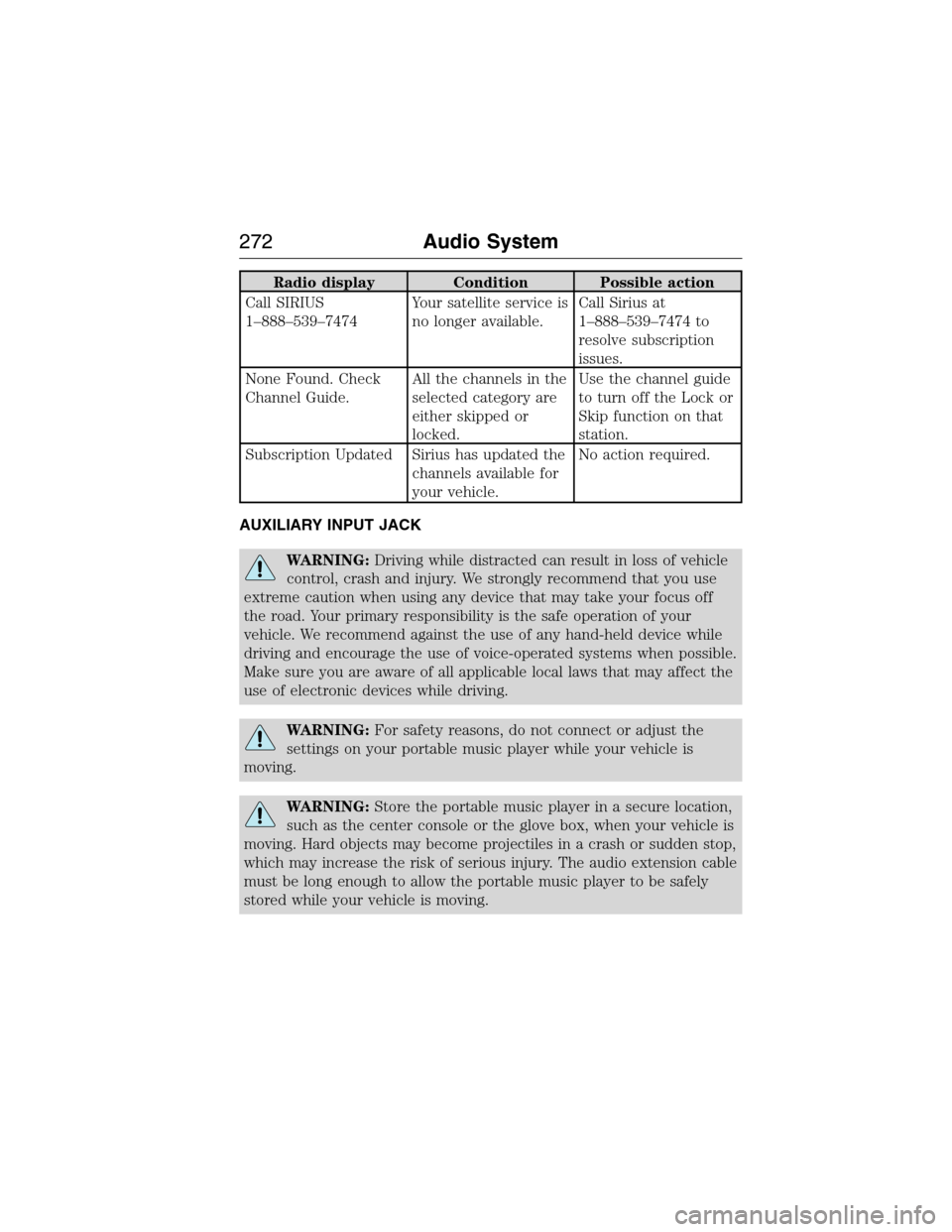
Radio display Condition Possible action
Call SIRIUS
1–888–539–7474Your satellite service is
no longer available.Call Sirius at
1–888–539–7474 to
resolve subscription
issues.
None Found. Check
Channel Guide.All the channels in the
selected category are
either skipped or
locked.Use the channel guide
to turn off the Lock or
Skip function on that
station.
Subscription Updated Sirius has updated the
channels available for
your vehicle.No action required.
AUXILIARY INPUT JACK
WARNING:Driving while distracted can result in loss of vehicle
control, crash and injury. We strongly recommend that you use
extreme caution when using any device that may take your focus off
the road. Your primary responsibility is the safe operation of your
vehicle. We recommend against the use of any hand-held device while
driving and encourage the use of voice-operated systems when possible.
Make sure you are aware of all applicable local laws that may affect the
use of electronic devices while driving.
WARNING:For safety reasons, do not connect or adjust the
settings on your portable music player while your vehicle is
moving.
WARNING:Store the portable music player in a secure location,
such as the center console or the glove box, when your vehicle is
moving. Hard objects may become projectiles in a crash or sudden stop,
which may increase the risk of serious injury. The audio extension cable
must be long enough to allow the portable music player to be safely
stored while your vehicle is moving.
272Audio System
2015 Econoline(eco)
Owners Guide gf, 1st Printing, June 2014
USA(fus)
Page 297 of 360
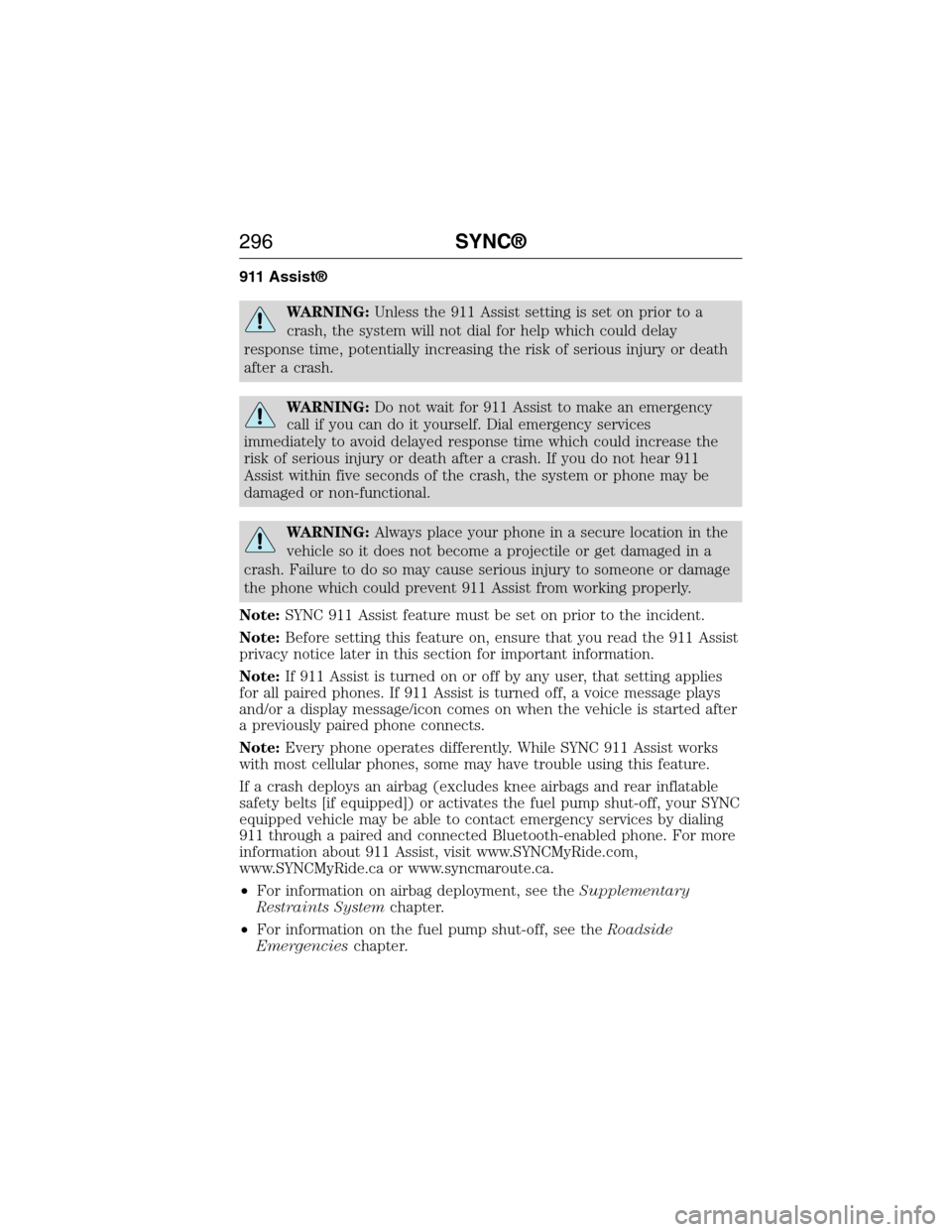
911 Assist®
WARNING:Unless the 911 Assist setting is set on prior to a
crash, the system will not dial for help which could delay
response time, potentially increasing the risk of serious injury or death
after a crash.
WARNING:Do not wait for 911 Assist to make an emergency
call if you can do it yourself. Dial emergency services
immediately to avoid delayed response time which could increase the
risk of serious injury or death after a crash. If you do not hear 911
Assist within five seconds of the crash, the system or phone may be
damaged or non-functional.
WARNING:Always place your phone in a secure location in the
vehicle so it does not become a projectile or get damaged in a
crash. Failure to do so may cause serious injury to someone or damage
the phone which could prevent 911 Assist from working properly.
Note:SYNC 911 Assist feature must be set on prior to the incident.
Note:Before setting this feature on, ensure that you read the 911 Assist
privacy notice later in this section for important information.
Note:If 911 Assist is turned on or off by any user, that setting applies
for all paired phones. If 911 Assist is turned off, a voice message plays
and/or a display message/icon comes on when the vehicle is started after
a previously paired phone connects.
Note:Every phone operates differently. While SYNC 911 Assist works
with most cellular phones, some may have trouble using this feature.
If a crash deploys an airbag (excludes knee airbags and rear inflatable
safety belts [if equipped]) or activates the fuel pump shut-off, your SYNC
equipped vehicle may be able to contact emergency services by dialing
911 through a paired and connected Bluetooth-enabled phone. For more
information about 911 Assist, visit www.SYNCMyRide.com,
www.SYNCMyRide.ca or www.syncmaroute.ca.
•For information on airbag deployment, see theSupplementary
Restraints Systemchapter.
•For information on the fuel pump shut-off, see theRoadside
Emergencieschapter.
296SYNC®
2015 Econoline(eco)
Owners Guide gf, 1st Printing, June 2014
USA(fus)
Page 319 of 360
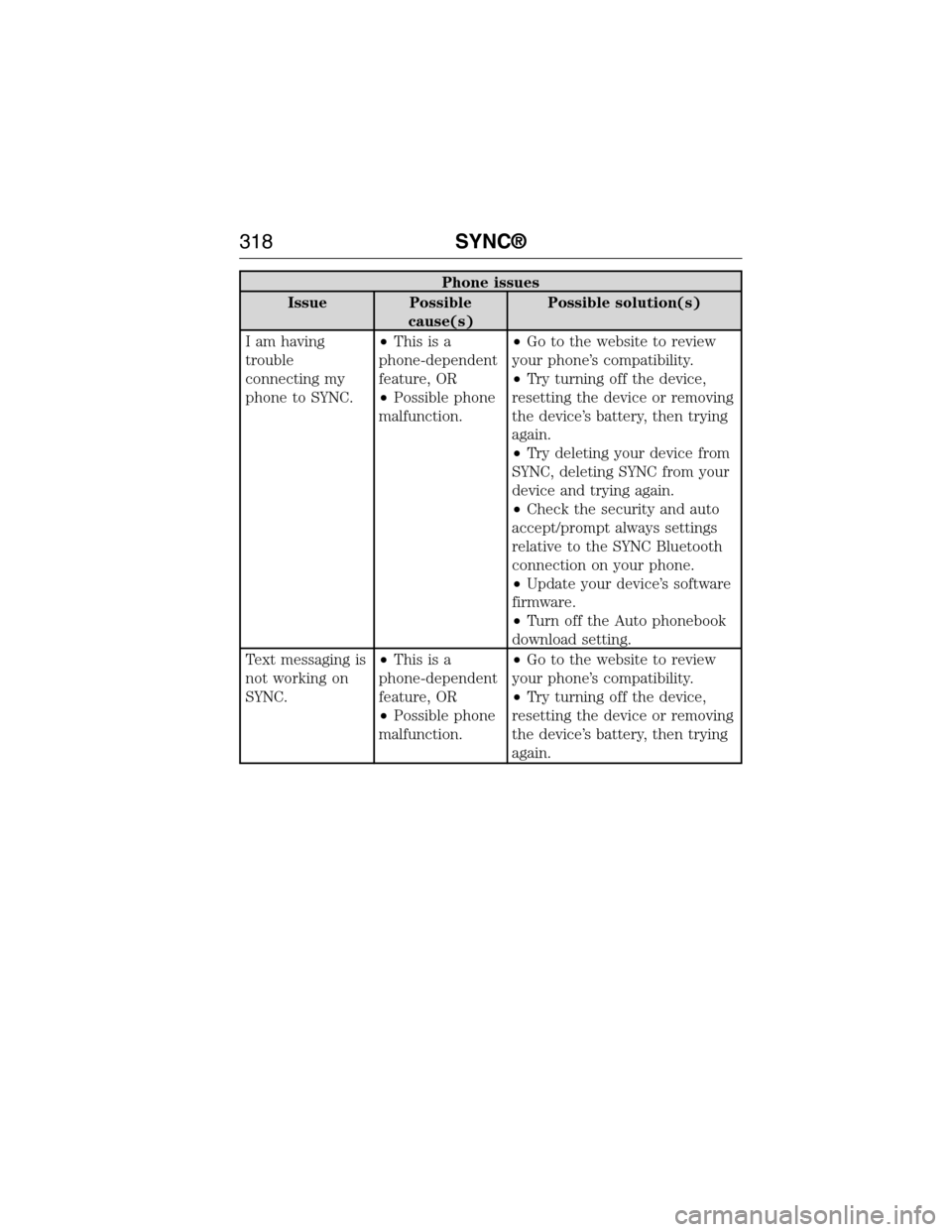
Phone issues
Issue Possible
cause(s)Possible solution(s)
I am having
trouble
connecting my
phone to SYNC.•Thisisa
phone-dependent
feature, OR
•Possible phone
malfunction.•Go to the website to review
your phone’s compatibility.
•Try turning off the device,
resetting the device or removing
the device’s battery, then trying
again.
•Try deleting your device from
SYNC, deleting SYNC from your
device and trying again.
•Check the security and auto
accept/prompt always settings
relative to the SYNC Bluetooth
connection on your phone.
•Update your device’s software
firmware.
•Turn off the Auto phonebook
download setting.
Text messaging is
not working on
SYNC.•Thisisa
phone-dependent
feature, OR
•Possible phone
malfunction.•Go to the website to review
your phone’s compatibility.
•Try turning off the device,
resetting the device or removing
the device’s battery, then trying
again.
318SYNC®
2015 Econoline(eco)
Owners Guide gf, 1st Printing, June 2014
USA(fus)
Page 320 of 360
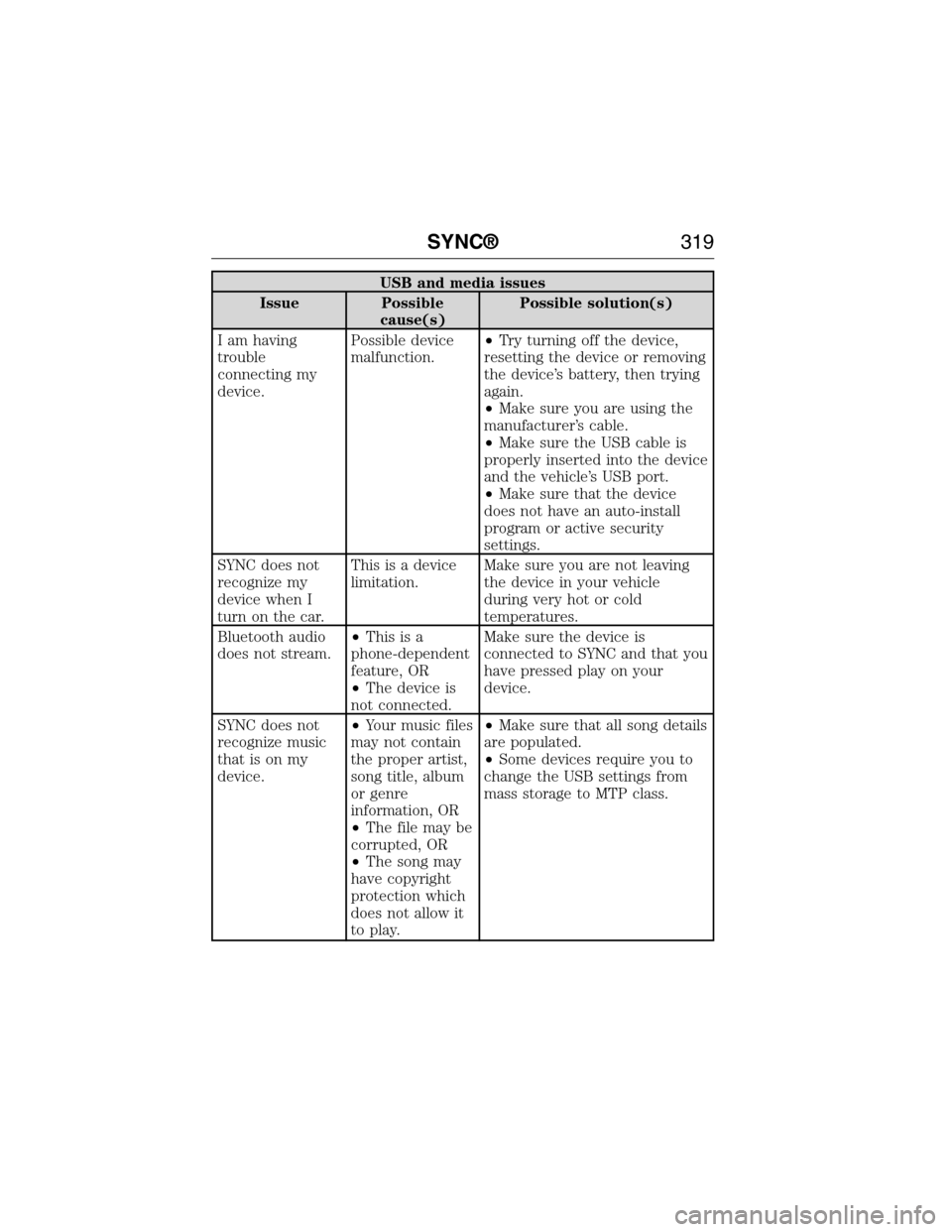
USB and media issues
Issue Possible
cause(s)Possible solution(s)
I am having
trouble
connecting my
device.Possible device
malfunction.•Try turning off the device,
resetting the device or removing
the device’s battery, then trying
again.
•Make sure you are using the
manufacturer’s cable.
•Make sure the USB cable is
properly inserted into the device
and the vehicle’s USB port.
•Make sure that the device
does not have an auto-install
program or active security
settings.
SYNC does not
recognize my
device when I
turn on the car.This is a device
limitation.Make sure you are not leaving
the device in your vehicle
during very hot or cold
temperatures.
Bluetooth audio
does not stream.•Thisisa
phone-dependent
feature, OR
•The device is
not connected.Make sure the device is
connected to SYNC and that you
have pressed play on your
device.
SYNC does not
recognize music
that is on my
device.•Your music files
may not contain
the proper artist,
song title, album
or genre
information, OR
•The file may be
corrupted, OR
•The song may
have copyright
protection which
does not allow it
to play.•Make sure that all song details
are populated.
•Some devices require you to
change the USB settings from
mass storage to MTP class.
SYNC®319
2015 Econoline(eco)
Owners Guide gf, 1st Printing, June 2014
USA(fus)
Page 329 of 360
DESCRIPTION OF OTHER RIGHTS AND LIMITATIONS:
•Speech Recognition:If the SOFTWARE includes speech recognition
component(s), you should understand that speech recognition is an
inherently statistical process and that recognition errors are inherent
in the process. Neither FORD MOTOR COMPANY nor its suppliers
shall be liable for any damages arising out of errors in the speech
recognition process.
•
Limitations on Reverse Engineering, Decompilation and
Disassembly:You may not reverse engineer, decompile, or disassemble
nor permit others to reverse engineer, decompile or disassemble the
SOFTWARE, except and only to the extent that such activity is
expressly permitted by applicable law notwithstanding this limitation.
•Limitations on Distributing, Copying, Modifying and Creating
Derivative Works:You may not distribute, copy, make modifications
to or create derivative works based on the SOFTWARE, except and
only to the extent that such activity is expressly permitted by
applicable law notwithstanding this limitation.
•Single EULA:The end user documentation for the DEVICE and
related systems and services may contain multiple EULAs, such as
multiple translations and/or multiple media versions (e.g., in the user
documentation and in the software). Even if you receive multiple
EULAs, you are licensed to use only one (1) copy of the SOFTWARE.
•
SOFTWARE Transfer:You may permanently transfer your rights under
this EULA only as part of a sale or transfer of the DEVICE, provided you
retain no copies, you transfer all of the SOFTWARE (including all
component parts, the media and printed materials, any upgrades, and, if
applicable, the Certificate(s) of Authenticity), and the recipient agrees
to the terms of this EULA. If the SOFTWARE is an upgrade, any transfer
must include all prior versions of the SOFTWARE.
•Termination:Without prejudice to any other rights, FORD MOTOR
COMPANY or MS may terminate this EULA if you fail to comply with
the terms and conditions of this EULA.
•Security Updates/Digital Rights Management:Content owners use
the WMDRM technology included in your DEVICE to protect their
intellectual property, included copyrighted content. Portions of the
SOFTWARE on your DEVICE use WMDRM software to access
WMDRM-protected content. If the WMDRM software fails to protect
the content, content owners may ask Microsoft to revoke the
SOFTWARE’s ability to use WMDRM to play or copy protected
328Appendices
2015 Econoline(eco)
Owners Guide gf, 1st Printing, June 2014
USA(fus)
Page 359 of 360
R
Radio ..................................266–267
Single CD ........................266–267
Radio reception .........................264
Rear window defroster .........82–83
Receiving a text message .........288
Recommendations for
attaching safety restraints for
children ........................................23
Relays ................................159–160
Remote entry system
illuminated entry ......................53
locking/unlocking doors ...........51
replacing the batteries .............49
Roadside assistance ..................145
S
Safety Belt Maintenance ............37
Safety belts (see Safety
restraints) ....................................34
Safety defects, reporting ..........158
Safety information ....................276
Safety restraints ..............31–32, 34
Belt-Minder® ............................35
extension assembly ..................34
for adults .............................31–32
for children ...............................23
safety belt maintenance ...........37
seat belt maintenance ..............37
warning light and chime ..........35
Safety seats for children ............23
Safety Compliance
Certification Label ....................257Scheduled Maintenance Guide
Normal Scheduled
Maintenance and Log .............343
Seats
child safety seats ......................23
front seats ...........................87, 89
SecuriLock passive anti-theft
system ..........................................55
Selecting your media source
(USB, Line in, BT audio) .........308
Setting the clock ...............266–267
SOS Post Crash Alert .................39
Spark plugs,
specifications .............248–249, 255
Special notice
ambulance conversions ............14
utility-type vehicles ..................14
Specification chart,
lubricants ...................................250
Starting a flex fuel vehicle .........96
Starting your vehicle ............94, 96
jump starting ..........................148
Steering wheel ............................58
tilting .........................................58
Sun visor ......................................67
Supplemental Restraint System
(SRS) (see airbags) ....................40
SYNC® AppLink™ ...................303
SYNC® customer support ........276
SYNC® Services ........................300
T
Temperature control (see
Climate control) ....................82–83
Text messaging .........................287
358Index
2015 Econoline(eco)
Owners Guide gf, 1st Printing, June 2014
USA(fus)