ECO mode FORD E SERIES 2018 User Guide
[x] Cancel search | Manufacturer: FORD, Model Year: 2018, Model line: E SERIES, Model: FORD E SERIES 2018Pages: 323, PDF Size: 7.09 MB
Page 61 of 323
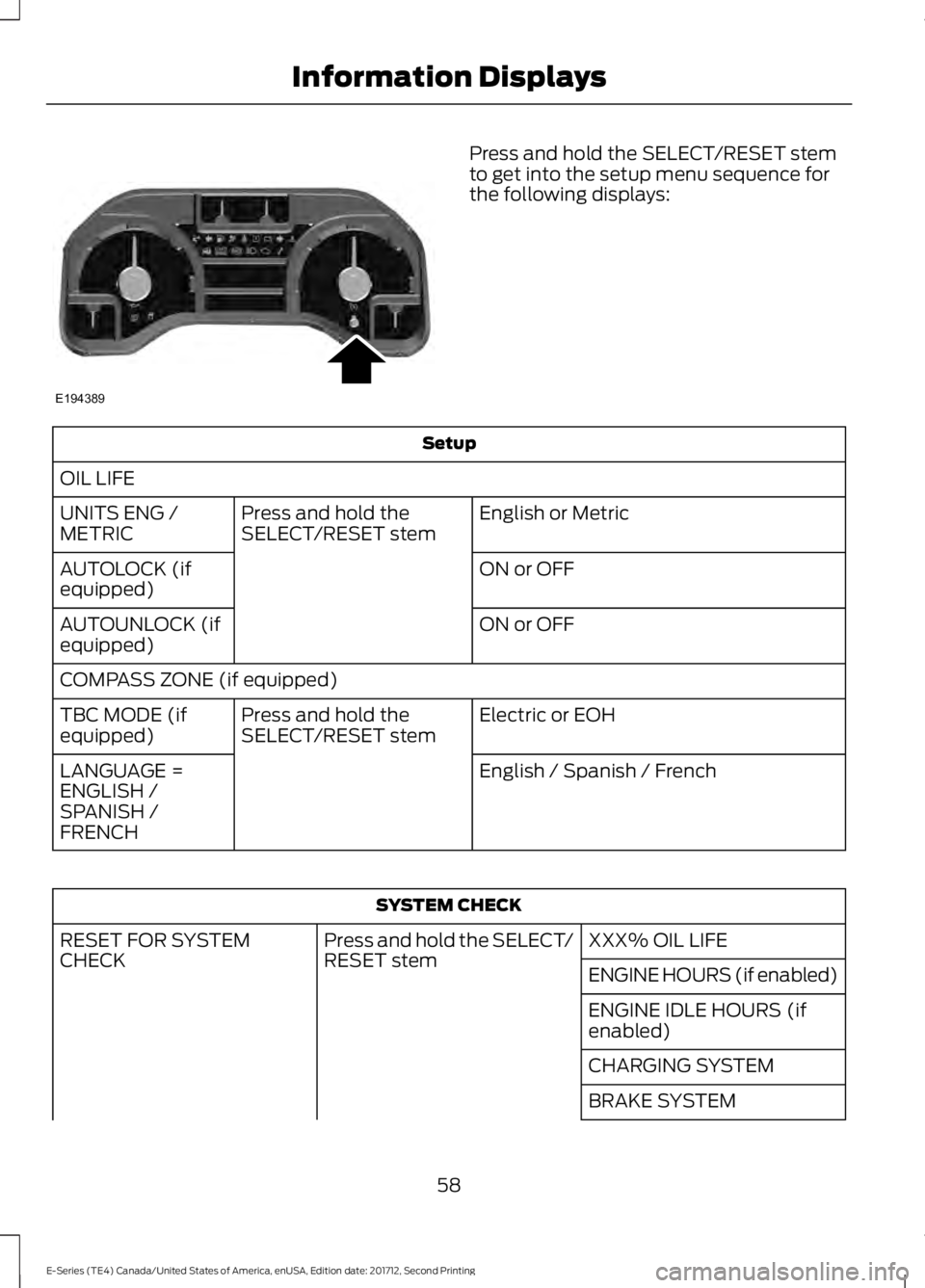
Press and hold the SELECT/RESET stemto get into the setup menu sequence forthe following displays:
Setup
OIL LIFE
English or MetricPress and hold theSELECT/RESET stemUNITS ENG /METRIC
ON or OFFAUTOLOCK (ifequipped)
ON or OFFAUTOUNLOCK (ifequipped)
COMPASS ZONE (if equipped)
Electric or EOHPress and hold theSELECT/RESET stemTBC MODE (ifequipped)
English / Spanish / FrenchLANGUAGE =ENGLISH /SPANISH /FRENCH
SYSTEM CHECK
XXX% OIL LIFEPress and hold the SELECT/RESET stemRESET FOR SYSTEMCHECKENGINE HOURS (if enabled)
ENGINE IDLE HOURS (ifenabled)
CHARGING SYSTEM
BRAKE SYSTEM
58
E-Series (TE4) Canada/United States of America, enUSA, Edition date: 201712, Second Printing
Information DisplaysE194389
Page 63 of 323
1. Determine which magnetic zone youare in for your geographic location byreferring to the zone map.
2. Press and release the SELECT/RESETstem to scroll through the informationdisplays until the message centerdisplays HOLD RESET FOR SETUPMENU.
3. Press and hold the SELECT/RESETstem to get into the setup menu. Pressrepeatedly to scroll through the setupmenu until COMPASS ZONE XXappears in the information display.
4. Press and hold the SELECT/RESETstem for approximately two secondsto go to the next zone, then release.
5. Press and hold to go up by one zonethen release. Repeat this until youreach the desired zone.
6. To exit the procedure, release theSELECT/RESET stem and allow thesetup timer to expire.
Compass calibration adjustment
Note:For optimum calibration, drive to anopen, level location away from largemetallic objects or structures. Switch off allnon-essential electrical accessories (heatedrear window, heater, A/C, map lamps, wiper,etc.) and make sure all the doors are closed.
Note: If you press the SELECT/RESET stemduring the calibration or three minuteselapse since the beginning of the calibrationwithout driving the vehicle, the informationdisplay reverts back to normal operationand CAL displays until you complete asuccessful calibration.
1. Press and release the SELECT/RESETstem to scroll through the informationdisplays until HOLD RESET FOR SETUPMENU appears.
2. Press and hold the SELECT/RESETstem to get into the setup menu. Pressit repeatedly to scroll through the setupmenu until HOLD RESET FORCALIBRATION appears in theinformation display.
3. Press and hold the SELECT/RESETstem for approximately two secondsuntil the information display enters thecompass zone adjustment mode.
4. Press and hold the SELECT/RESETstem until CIRCLE SLOWLY TOCALIBRATE appears in the informationdisplay.
5. Slowly drive the vehicle in a circle lessthan 3 mph (5 km/h) until the CIRCLESLOWLY TO CALIBRATE messagechanges to CALIBRATIONCOMPLETED. This may require up tofive circles to complete the calibration.
TBC MODE (if equipped)
Allows you to choose the trailer brakemode.
LANGUAGE = ENGLISH / SPANISH /FRENCH
Allows you to choose which languageappears in the information display.
Waiting four seconds or pressing theSELECT/RESET stem cycles theinformation display through each of thelanguage choices.
Press the SELECT/RESET stem to set thelanguage choice when the language youwant appears.
HOLD RESET FOR SYSTEM CHECK
The information display begins to cyclethrough the vehicle systems and providesa status of the item if needed. Somesystems show a message only if acondition is present.
60
E-Series (TE4) Canada/United States of America, enUSA, Edition date: 201712, Second Printing
Information Displays
Page 75 of 323
When the indicator light on the power pointis:
•On: The power point is working, theignition is on and a device is pluggedin.
•Off: The power point is off, the ignitionis off or no device is plugged in.
•Flashing: The power point is in faultmode.
The power outlet temporarily turns offpower when in fault mode if the deviceexceeds the 150 watt limit. Unplug yourdevice and switch the ignition off. Switchthe ignition back on, but do not plug yourdevice back in. Let the system cool off andswitch the ignition off to reset the faultmode. Switch the ignition back on andmake sure the indicator light remains on.
Do not use the power point for certainelectric devices, including:
•Cathode-ray, tube-type televisions.
•Motor loads, such as vacuum cleaners,electric saws and other electric powertools or compressor-drivenrefrigerators.
•Measuring devices, which processprecise data, such as medicalequipment or measuring equipment.
•Other appliances requiring anextremely stable power supply such asmicrocomputer-controlled electricblankets or touch-sensor lamps.
72
E-Series (TE4) Canada/United States of America, enUSA, Edition date: 201712, Second Printing
Auxiliary Power Points
Page 90 of 323
Tow/Haul Mode
To activate tow/haul, press thebutton on the gearshift lever.The TOW HAUL indicator lightilluminates in the instrument cluster.
The tow/haul feature:
•Delays upshifts to reduce the frequencyof transmission shifting.
•Provides engine braking in all forwardgears, which slows your vehicle andassists you in controlling your vehiclewhen descending a slope.
•Depending on driving conditions andload conditions, may downshift thetransmission, slow your vehicle andcontrol your vehicle speed whendescending a hill, without pressing theaccelerator pedal. The amount ofdownshift braking provided will varybased upon the amount you press thebrake pedal.
The tow/haul feature improvestransmission operation when towing atrailer or a heavy load. All transmissiongear ranges are available when usingtow/haul.
To deactivate the tow/haul feature andreturn to normal driving mode, press thebutton on the gearshift lever again. TheTOW HAUL light deactivates. Tow/haulalso deactivates when you power downyour vehicle.
WARNING
Do not use tow/haul when the roadsurface is slippery. Failure to followthis instruction could result in theloss of control of your vehicle.
Brake-Shift Interlock
WARNINGS
When doing this procedure, you needto take the transmission out of park(P) which means your vehicle canroll freely. To avoid unwanted vehiclemovement, always fully apply the parkingbrake prior to doing this procedure. Usewheels chocks if appropriate.
If the parking brake is fully released,but the brake warning lamp remainsilluminated, the brakes may not beworking properly. Have your vehiclechecked as soon as possible.
Note:Do not drive your vehicle until youverify that the brake lamps are working.
Your vehicle has a brake-shift interlockfeature that prevents the gearshift leverfrom moving from park (P) when theignition is in the 3 (on) position and thebrake pedal is not pressed.
If you cannot move the gearshift lever outof park (P) position with the ignition in the4 (on) position and the brake pedalpressed, a malfunction may have occurred.It is possible that a fuse has blown or yourvehicle’s brake lamps are not operatingproperly. See Fuse Specification Chart(page 129).
If the fuse is not blown and the brakelamps are working properly, the followingprocedure allows you to move the gearshiftlever from park (P):
1. Apply the parking brake and turn theignition on.
2.Use a screwdriver to remove the lowertrim panel under the steering column.Make sure not to disturb the wires onthe electrical connector.
3. Locate the brake-shift interlocksolenoid underneath the steeringcolumn.
87
E-Series (TE4) Canada/United States of America, enUSA, Edition date: 201712, Second Printing
TransmissionE161509
Page 98 of 323
PRINCIPLE OF OPERATION
Cruise control lets you maintain a setspeed without keeping your foot on theaccelerator pedal. You can use cruisecontrol when your vehicle speed is greaterthan 20 mph (30 km/h).
USING CRUISE CONTROL (If
Equipped)
WARNINGS
Do not use cruise control on windingroads, in heavy traffic or when theroad surface is slippery. This couldresult in loss of vehicle control, seriousinjury or death.
When you are going downhill, yourvehicle speed could increase abovethe set speed. The system does notapply the brakes.
To help the system to maintain the setspeed when going downhill, downshift toa lower gear.
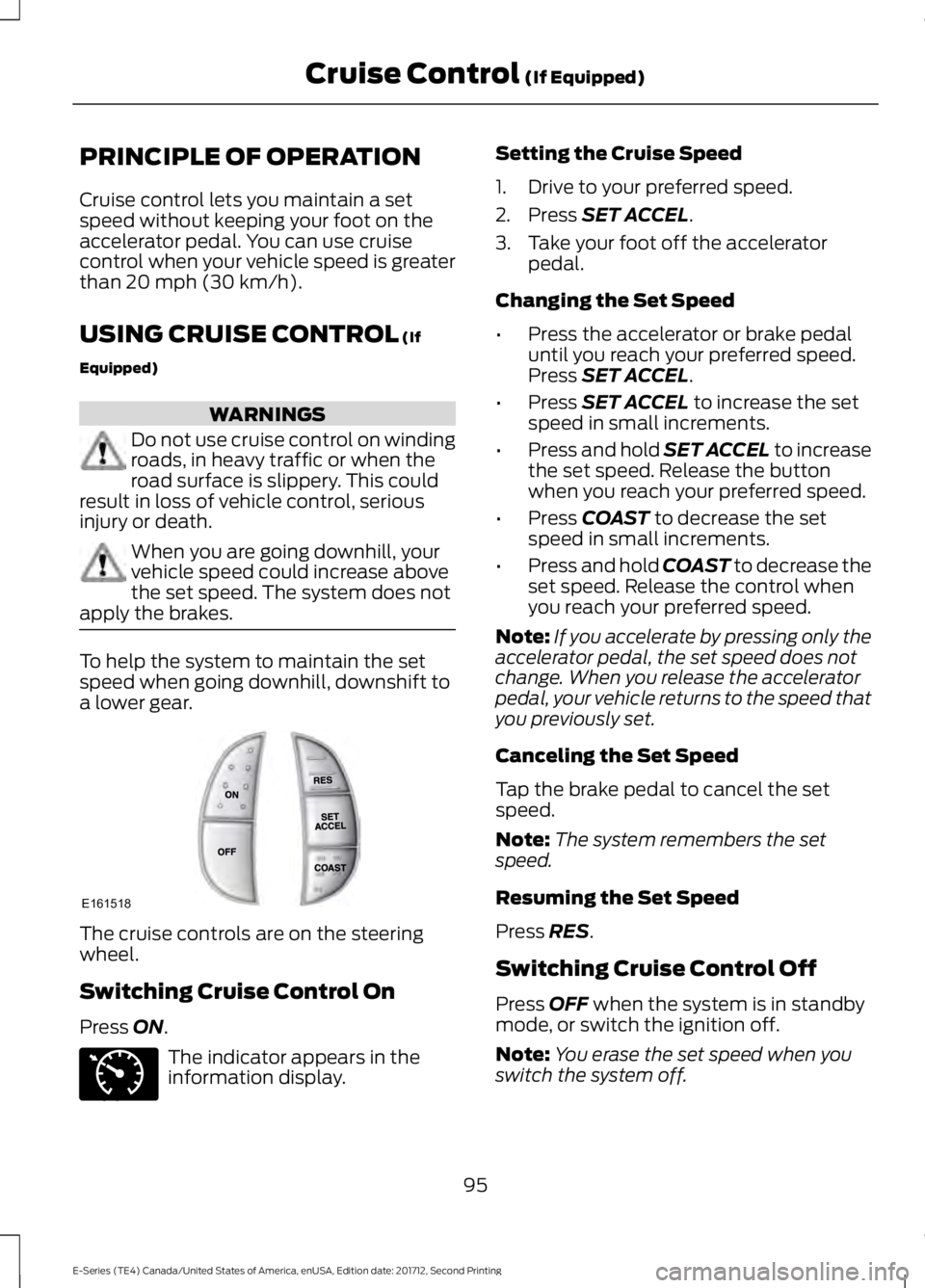
The cruise controls are on the steeringwheel.
Switching Cruise Control On
Press ON.
The indicator appears in theinformation display.
Setting the Cruise Speed
1. Drive to your preferred speed.
2. Press SET ACCEL.
3. Take your foot off the acceleratorpedal.
Changing the Set Speed
•Press the accelerator or brake pedaluntil you reach your preferred speed.Press SET ACCEL.
•Press SET ACCEL to increase the setspeed in small increments.
•Press and hold SET ACCEL to increasethe set speed. Release the buttonwhen you reach your preferred speed.
•Press COAST to decrease the setspeed in small increments.
•Press and hold COAST to decrease theset speed. Release the control whenyou reach your preferred speed.
Note:If you accelerate by pressing only theaccelerator pedal, the set speed does notchange. When you release the acceleratorpedal, your vehicle returns to the speed thatyou previously set.
Canceling the Set Speed
Tap the brake pedal to cancel the setspeed.
Note:The system remembers the setspeed.
Resuming the Set Speed
Press RES.
Switching Cruise Control Off
Press OFF when the system is in standbymode, or switch the ignition off.
Note:You erase the set speed when youswitch the system off.
95
E-Series (TE4) Canada/United States of America, enUSA, Edition date: 201712, Second Printing
Cruise Control (If Equipped)E161518 E71340
Page 109 of 323
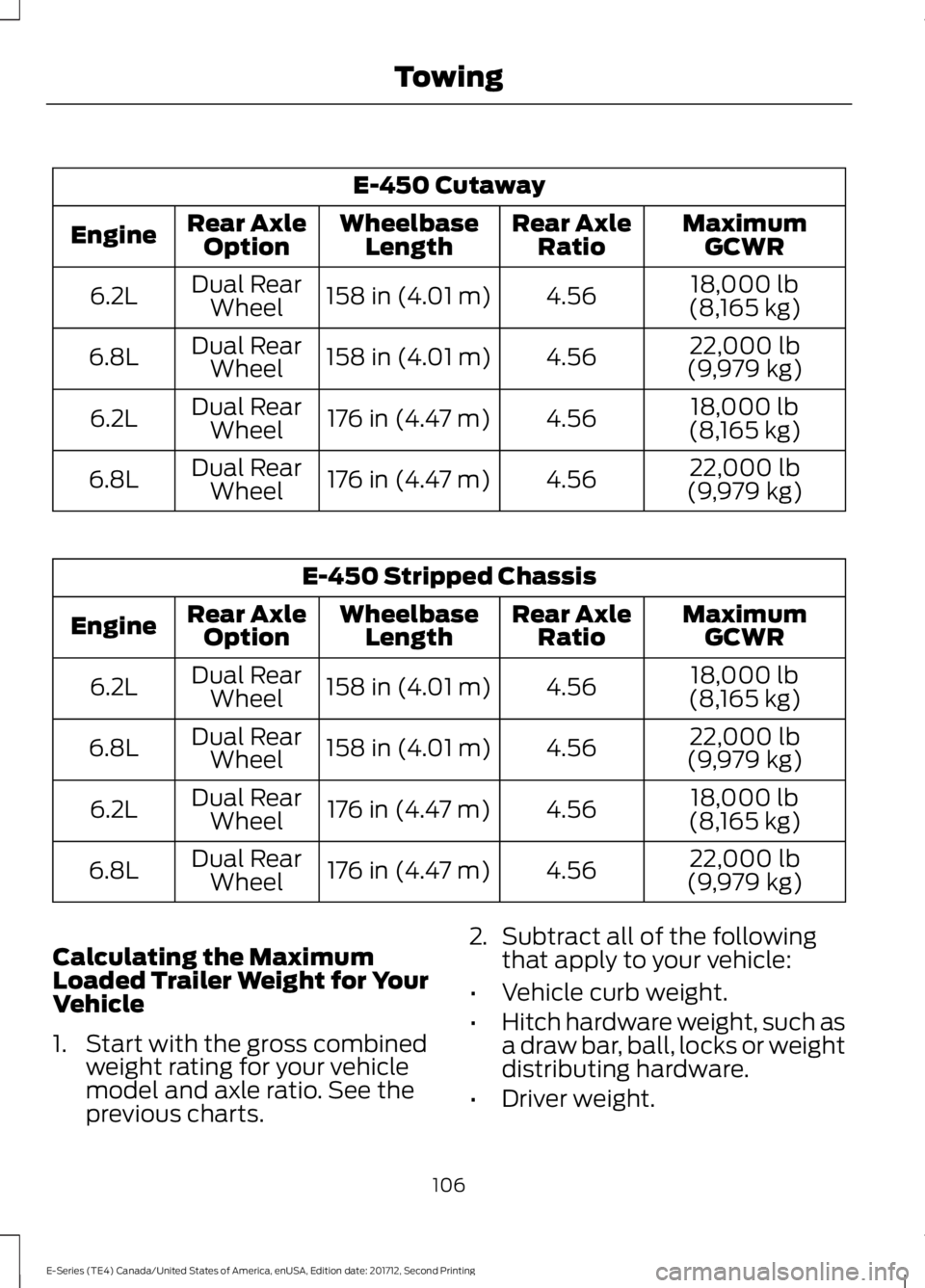
E-450 Cutaway
MaximumGCWRRear AxleRatioWheelbaseLengthRear AxleOptionEngine
18,000 lb(8,165 kg)4.56158 in (4.01 m)Dual RearWheel6.2L
22,000 lb(9,979 kg)4.56158 in (4.01 m)Dual RearWheel6.8L
18,000 lb(8,165 kg)4.56176 in (4.47 m)Dual RearWheel6.2L
22,000 lb(9,979 kg)4.56176 in (4.47 m)Dual RearWheel6.8L
E-450 Stripped Chassis
MaximumGCWRRear AxleRatioWheelbaseLengthRear AxleOptionEngine
18,000 lb(8,165 kg)4.56158 in (4.01 m)Dual RearWheel6.2L
22,000 lb(9,979 kg)4.56158 in (4.01 m)Dual RearWheel6.8L
18,000 lb(8,165 kg)4.56176 in (4.47 m)Dual RearWheel6.2L
22,000 lb(9,979 kg)4.56176 in (4.47 m)Dual RearWheel6.8L
Calculating the MaximumLoaded Trailer Weight for YourVehicle
1. Start with the gross combinedweight rating for your vehicle
model and axle ratio. See theprevious charts.
2.Subtract all of the followingthat apply to your vehicle:
•Vehicle curb weight.
•Hitch hardware weight, such asa draw bar, ball, locks or weightdistributing hardware.
•Driver weight.
106
E-Series (TE4) Canada/United States of America, enUSA, Edition date: 201712, Second Printing
Towing
Page 116 of 323
Exceeding these limits may allow water toenter vehicle components:
•Causing internal damage to thecomponents.
•Affecting driveability, emissions andreliability.
Replace the rear axle lubricant anytimethe rear axle has been submerged in water.Water may have contaminated the rearaxle lubricant, which is not normallychecked or changed unless a leak issuspected or other axle repair is required.
TOWING THE VEHICLE ON
FOUR WHEELS
Emergency Towing
WARNING
If your vehicle has a steering wheellock make sure the ignition is in theaccessory or on position when beingtowed.
You can flat-tow (all wheels on theground, regardless of the powertrain ortransmission configuration) your disabledvehicle (without access to wheel dolliesor vehicle transport trailer) under thefollowing conditions:
•Your vehicle is facing forward so youtow it in a forward direction.
•You shift into Neutral (N). If you cannotshift into Neutral (N), you may need tooverride the transmission. SeeTransmission (page 86).
•Maximum speed is 35 mph (56 km/h).
•Maximum distance is 50 mi (80 km).
Recreational Towing
Note: Put your climate control system inrecirculated air mode to prevent exhaustfumes from entering the vehicle. SeeClimate Control (page 64).
Follow these guidelines if you have a needfor recreational (RV) towing. An exampleof recreational towing would be towingyour vehicle behind a motorhome. Theseguidelines are to make sure you do notdamage the transmission during towing.
Do not tow your vehicle with any wheelson the ground, as vehicle or transmissiondamage may occur. It is recommended totow your vehicle with all four wheels offthe ground, for example when using avehicle transport trailer. Otherwise, youcannot tow your vehicle.
113
E-Series (TE4) Canada/United States of America, enUSA, Edition date: 201712, Second Printing
Towing
Page 117 of 323
BREAKING-IN
You need to break in new tires forapproximately 300 mi (480 km). Duringthis time, your vehicle may exhibit someunusual driving characteristics.
Avoid driving too fast during the first1,000 mi (1,600 km). Vary your speedfrequently and change up through thegears early. Do not labor the engine.
Do not tow during the first 1,000 mi(1,600 km).
REDUCED ENGINE
PERFORMANCE
WARNING
If you continue to drive your vehiclewhen the engine is overheating, theengine could stop without warning.Failure to follow this instruction couldresult in the loss of control of your vehicle.
If the engine coolant temperature gaugeneedle moves to the upper limit position,the engine is overheating. See Gauges(page 51).
You must only drive your vehicle for a shortdistance if the engine overheats. Thedistance you can travel depends onambient temperature, vehicle load andterrain. The engine continues to operatewith limited power for a short period oftime.
If the engine temperature continues to rise,the fuel supply to the engine reduces. Theair conditioning switches off and the enginecooling fan operates continually.
1. Gradually reduce your speed and stopyour vehicle as soon as it is safe to doso.
2. Immediately switch the engine off toprevent severe engine damage.
3. Wait for the engine to cool down.
4. Check the coolant level. See EngineCoolant Check (page 142).
5. Have your vehicle checked as soon aspossible.
ECONOMICAL DRIVING
Fuel economy is affected by several thingssuch as how you drive, the conditions youdrive under and how you maintain yourvehicle.
There are some things to keep in mind thatmay improve your fuel economy:
•Accelerate and slow down in a smooth,moderate fashion.
•Drive at steady speeds.
•Anticipate stops; slowing down mayeliminate the need to stop.
•Combine errands and minimizestop-and-go driving (When runningerrands, go to the furthest destinationfirst and then work your way backhome).
•Close the windows for high-speeddriving.
•Drive at reasonable speeds.
•Keep the tires properly inflated and useonly the recommended size.
•Use the recommended engine oil.
•Perform all regularly scheduledmaintenance.
There are also some things you may wantto avoid doing because they reduce yourfuel economy:
•Avoid sudden or hard accelerations.
•Avoid revving the engine before turningoff the car.
•Avoid long idle periods.
•Do not warm up your vehicle on coldmornings.
114
E-Series (TE4) Canada/United States of America, enUSA, Edition date: 201712, Second Printing
Driving Hints
Page 121 of 323
Vehicles Sold in Canada: GettingRoadside Assistance
To fully assist you should you have avehicle concern, Ford Motor Company ofCanada, Limited offers a complimentaryroadside assistance program. Thisprogram is eligible within Canada or thecontinental United States.
This program is separate from the NewVehicle Limited Warranty, but the coverageis concurrent with the powertrain coverageperiod of your vehicle.
Canadian customers who require roadsideassistance, call 1-800-665-2006.
Vehicles Sold in Canada: UsingRoadside Assistance
Complete the roadside assistanceidentification card and place it in yourwallet for quick reference.
In Canada, this card is found in theWarranty Guide in the glove compartmentof your vehicle.
Vehicles Sold in Canada: RoadsideAssistance Program Coverage
The service is available 24 hours a day,seven days a week.
Canadian roadside coverage and benefitsmay differ from the U.S. coverage.
If you require more information, pleaserefer to the coverage section of yourwarranty guide, call us in Canada at1-800-665-2006, or visit our website atwww.ford.ca.
HAZARD FLASHERS
Note:If used when the vehicle is notrunning, the battery loses charge. As a result,there may be insufficient power to restartyour vehicle.
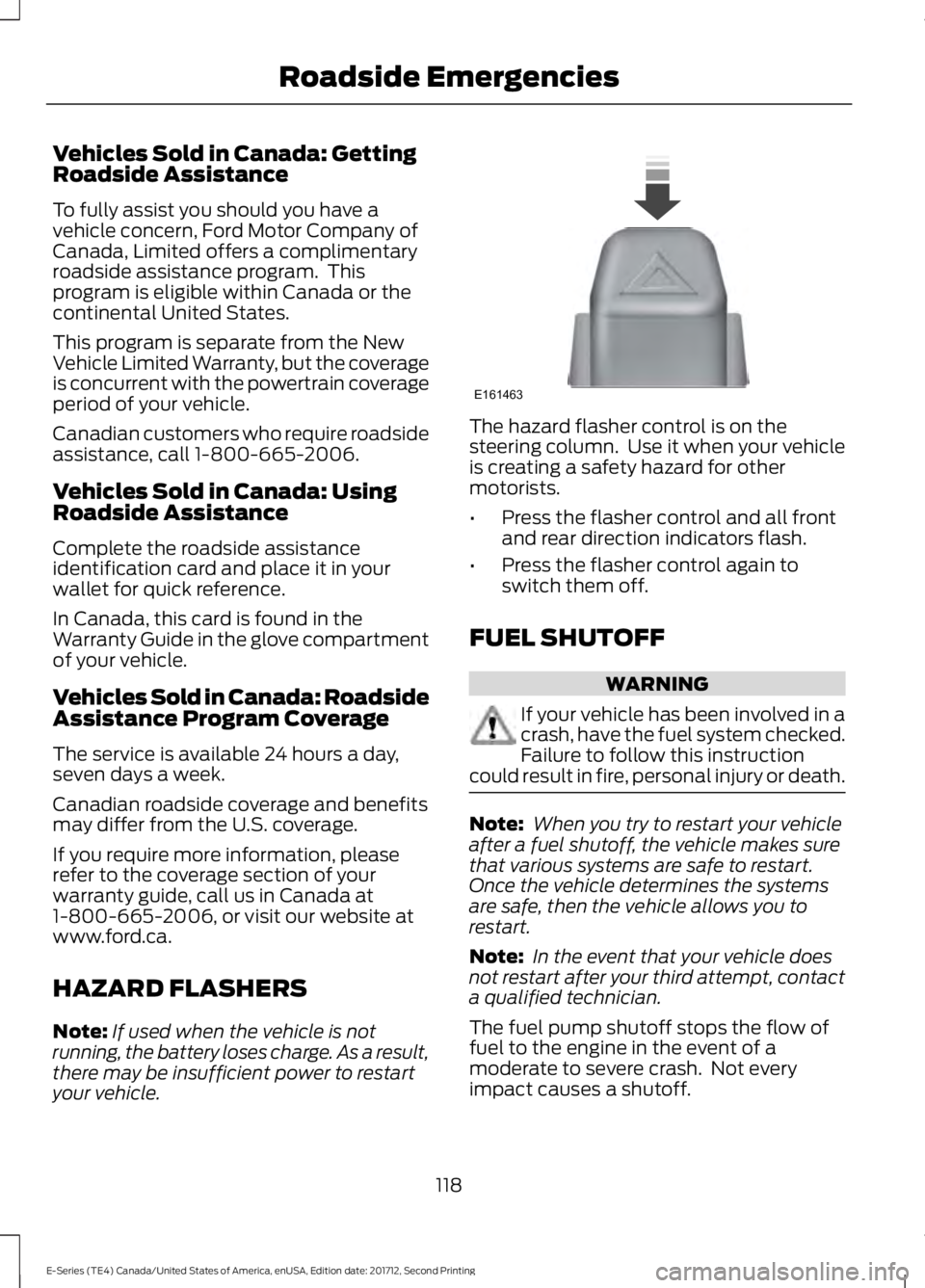
The hazard flasher control is on thesteering column. Use it when your vehicleis creating a safety hazard for othermotorists.
•Press the flasher control and all frontand rear direction indicators flash.
•Press the flasher control again toswitch them off.
FUEL SHUTOFF
WARNING
If your vehicle has been involved in acrash, have the fuel system checked.Failure to follow this instructioncould result in fire, personal injury or death.
Note: When you try to restart your vehicleafter a fuel shutoff, the vehicle makes surethat various systems are safe to restart.Once the vehicle determines the systemsare safe, then the vehicle allows you torestart.
Note: In the event that your vehicle doesnot restart after your third attempt, contacta qualified technician.
The fuel pump shutoff stops the flow offuel to the engine in the event of amoderate to severe crash. Not everyimpact causes a shutoff.
118
E-Series (TE4) Canada/United States of America, enUSA, Edition date: 201712, Second Printing
Roadside EmergenciesE161463
Page 123 of 323
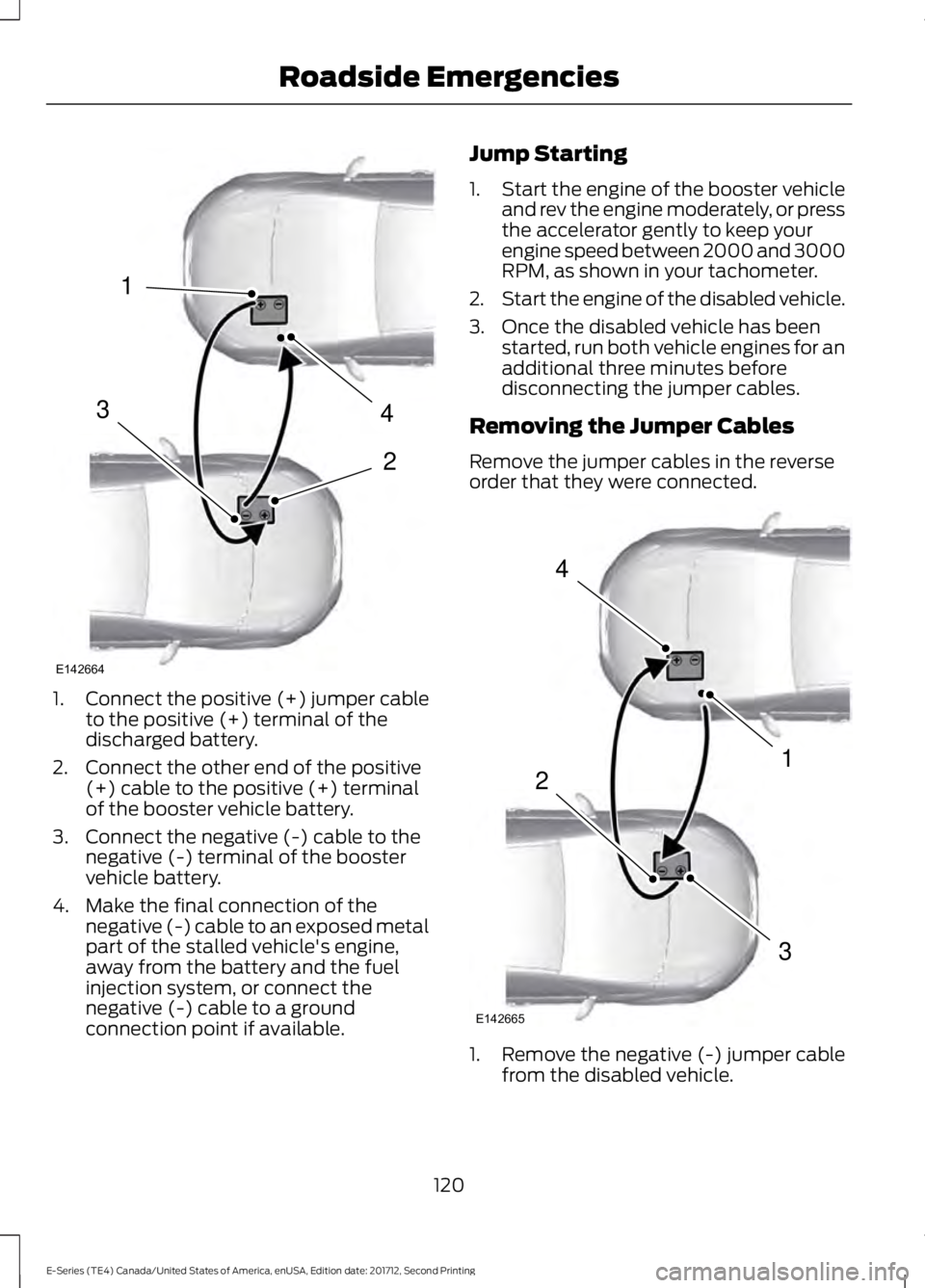
1.Connect the positive (+) jumper cableto the positive (+) terminal of thedischarged battery.
2. Connect the other end of the positive(+) cable to the positive (+) terminalof the booster vehicle battery.
3. Connect the negative (-) cable to thenegative (-) terminal of the boostervehicle battery.
4. Make the final connection of thenegative (-) cable to an exposed metalpart of the stalled vehicle's engine,away from the battery and the fuelinjection system, or connect thenegative (-) cable to a groundconnection point if available.
Jump Starting
1.Start the engine of the booster vehicleand rev the engine moderately, or pressthe accelerator gently to keep yourengine speed between 2000 and 3000RPM, as shown in your tachometer.
2.Start the engine of the disabled vehicle.
3. Once the disabled vehicle has beenstarted, run both vehicle engines for anadditional three minutes beforedisconnecting the jumper cables.
Removing the Jumper Cables
Remove the jumper cables in the reverseorder that they were connected.
1. Remove the negative (-) jumper cablefrom the disabled vehicle.
120
E-Series (TE4) Canada/United States of America, enUSA, Edition date: 201712, Second Printing
Roadside Emergencies4
2
1
3
E142664 4
1
3
2
E142665