ECO mode FORD E SERIES 2018 Owner's Manual
[x] Cancel search | Manufacturer: FORD, Model Year: 2018, Model line: E SERIES, Model: FORD E SERIES 2018Pages: 323, PDF Size: 7.09 MB
Page 146 of 323
Note:Make sure that the coolant level isbetween the MIN and MAX marks on thecoolant reservoir.
Note: Coolant expands when it is hot. Thelevel may extend beyond the MAX mark.
Maintain coolant concentration within48% to 50%, which equates to a freezepoint between -29°F (-34°C) and -35°F(-37°C). Coolant concentration should bechecked using a refractometer. We do notrecommend the use of hydrometers orcoolant test strips for measuring coolantconcentration.
Adding Coolant
WARNINGS
Do not add engine coolant when theengine is hot. Failure to follow thisinstruction could result in personalinjury.
Never remove the coolant reservoircap when the engine is running orhot.
Note: Automotive fluids are notinterchangeable. Do not use coolant orwindshield washer fluid outside of itsspecified function and vehicle location.
Note: Do not use stop leak pellets, coolingsystem sealants, or non-specified additivesas they can cause damage to the enginecooling or heating systems. Resultingcomponent damage may not be covered bythe vehicle Warranty.
It is very important to use predilutedcoolant approved to the correctspecification in order to avoid plugging thesmall passageways in the engine coolingsystem. See Capacities andSpecifications (page 199). Do not mixdifferent colors or types of coolant in yourvehicle. Mixing of engine coolants or usingan incorrect coolant may harm the engineor cooling system components and maynot be covered by the vehicle Warranty.
Note:If prediluted coolant is not available,use the approved concentrated coolantdiluting it to 50/50 with distilled water. SeeEngine Specifications (page 194). Usingwater that has not been deionised maycontribute to deposit formation, corrosionand plugging of the small cooling systempassageways.
Note: Coolants marketed for all makes andmodels may not be approved to Fordspecifications and may cause damage tothe cooling system. Resulting componentdamage may not be covered by the vehicleWarranty.
If the coolant level is at or below theminimum mark, add prediluted coolantimmediately.
To top up the coolant level do thefollowing:
1. Unscrew the cap slowly. Any pressureescapes as you unscrew the cap.
2. Add prediluted coolant approved tothe correct specification. SeeCapacities and Specifications (page194).
3. Add enough prediluted coolant toreach the correct level.
4.Replace the coolant reservoir cap, turnit clockwise until you feel a strongresistance.
143
E-Series (TE4) Canada/United States of America, enUSA, Edition date: 201712, Second Printing
Maintenance
Page 148 of 323
Coolant Change
At specific mileage intervals, as listed inthe scheduled maintenance information,the coolant should be changed. Addprediluted coolant approved to the correctspecification. See Capacities andSpecifications (page 194).
Fail-Safe Cooling
Fail-safe cooling allows you to temporarilydrive your vehicle before any incrementalcomponent damage occurs. The fail-safedistance depends on ambienttemperature, vehicle load and terrain.
How Fail-Safe Cooling Works
If the engine begins to overheat, thecoolant temperature gauge moves towardthe red zone:
A warning lamp illuminates anda message may appear in theinformation display.
If the engine reaches a presetover-temperature condition, the engineautomatically switches to alternatingcylinder operation. Each disabled cylinderacts as an air pump and cools the engine.
When this occurs, your vehicle stilloperates, however:
•Engine power is limited.
•The air conditioning system turns off.
Continued operation increases the enginetemperature, causing the engine tocompletely shut down. Your steering andbraking effort increases in this situation.
When the engine temperature cools, youcan re-start the engine. Have your vehiclechecked as soon as possible to minimizeengine damage.
When Fail-Safe Mode Is Activated
WARNINGS
Fail-safe mode is for use duringemergencies only. Operate yourvehicle in fail-safe mode only as longas necessary to bring your vehicle to restin a safe location and seek immediaterepairs. When in fail-safe mode, yourvehicle will have limited power, will not beable to maintain high-speed operation, andmay completely shut down withoutwarning, potentially losing engine power,power steering assist, and power brakeassist, which may increase the possibilityof a crash resulting in serious injury.
Never remove the coolant reservoircap when the engine is running orhot.
Your vehicle has limited engine powerwhen in the fail-safe mode, drive yourvehicle with caution. Your vehicle does notmaintain high-speed operation and theengine may operate poorly.
Remember that the engine is capable ofautomatically shutting down to preventengine damage. In this situation:
1. Pull off the road as soon as safelypossible and switch the engine off.
2. If you are a member of a roadsideassistance program, we recommendthat you contact your roadsideassistance service provider.
3. If this is not possible, wait a shortperiod for the engine to cool.
4. Check the coolant level. If the coolantlevel is at or below the minimum mark,add prediluted coolant immediately.
5. When the engine temperature cools,you can re-start the engine. Have yourvehicle checked as soon as possible tominimize engine damage.
145
E-Series (TE4) Canada/United States of America, enUSA, Edition date: 201712, Second Printing
Maintenance
Page 149 of 323
Note:Driving your vehicle without repairincreases the chance of engine damage.
Engine Coolant TemperatureManagement (If Equipped)
WARNING
To reduce the risk of crash and injury,be prepared that the vehicle speedmay reduce and the vehicle may notbe able to accelerate with full power untilthe coolant temperature reduces.
If you tow a trailer with your vehicle, theengine may temporarily reach a highertemperature during severe operatingconditions, for example ascending a longor steep slope in high ambienttemperatures.
At this time, you may notice the coolanttemperature gauge moves toward the redzone and a message may appear in theinformation display.
You may notice a reduction in vehiclespeed caused by reduced engine power inorder to manage the engine coolanttemperature. Your vehicle may enter thismode if certain high-temperature andhigh-load conditions take place. Theamount of speed reduction depends onvehicle loading, grade and ambienttemperature. If this occurs, there is no needto pull off the road. You can continue todrive your vehicle.
The air conditioning may automaticallyturn on and off during severe operatingconditions to protect the engine fromoverheating. When the coolanttemperature decreases to the normaloperating temperature, the air conditioningturns on.
If the coolant temperature gauge movesfully into the red zone, or if the coolanttemperature warning or service enginesoon messages appear in your informationdisplay, do the following:
1. Pull off the road as soon as safelypossible and shift the transmission intopark (P).
2. Leave the engine running until thecoolant temperature gauge needlereturns to the normal position. If thetemperature does not drop afterseveral minutes, follow the remainingsteps.
3.Switch the engine off and wait for it tocool. Check the coolant level.
4. If the coolant level is at or below theminimum mark, immediately addprediluted coolant.
5. If the coolant level is normal, restartthe engine and continue driving.
AUTOMATIC TRANSMISSION
FLUID CHECK
Have an authorized dealer check andchange the transmission fluid and filter atthe correct service interval. SeeScheduled Maintenance (page 270).
Do not use supplemental transmissionfluid additives, treatments or cleaningagents. The use of these materials mayaffect transmission operation and resultin damage to internal transmissioncomponents.
146
E-Series (TE4) Canada/United States of America, enUSA, Edition date: 201712, Second Printing
Maintenance
Page 195 of 323
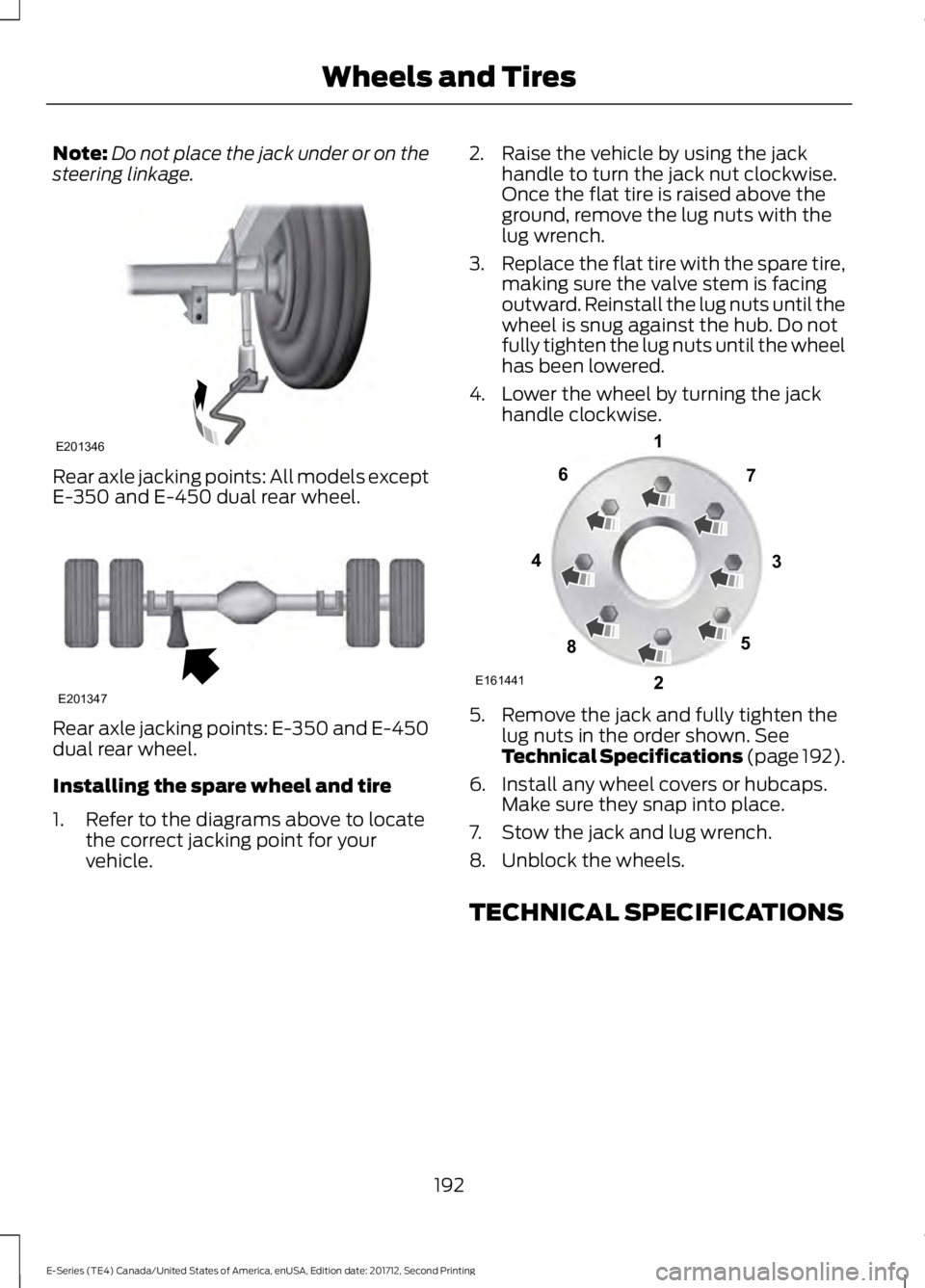
Note:Do not place the jack under or on thesteering linkage.
Rear axle jacking points: All models exceptE-350 and E-450 dual rear wheel.
Rear axle jacking points: E-350 and E-450dual rear wheel.
Installing the spare wheel and tire
1. Refer to the diagrams above to locatethe correct jacking point for yourvehicle.
2. Raise the vehicle by using the jackhandle to turn the jack nut clockwise.Once the flat tire is raised above theground, remove the lug nuts with thelug wrench.
3.Replace the flat tire with the spare tire,making sure the valve stem is facingoutward. Reinstall the lug nuts until thewheel is snug against the hub. Do notfully tighten the lug nuts until the wheelhas been lowered.
4. Lower the wheel by turning the jackhandle clockwise.
5. Remove the jack and fully tighten thelug nuts in the order shown. SeeTechnical Specifications (page 192).
6. Install any wheel covers or hubcaps.Make sure they snap into place.
7. Stow the jack and lug wrench.
8. Unblock the wheels.
TECHNICAL SPECIFICATIONS
192
E-Series (TE4) Canada/United States of America, enUSA, Edition date: 201712, Second Printing
Wheels and TiresE201346 E201347 E161441
13
4
27
6
5
8
Page 200 of 323
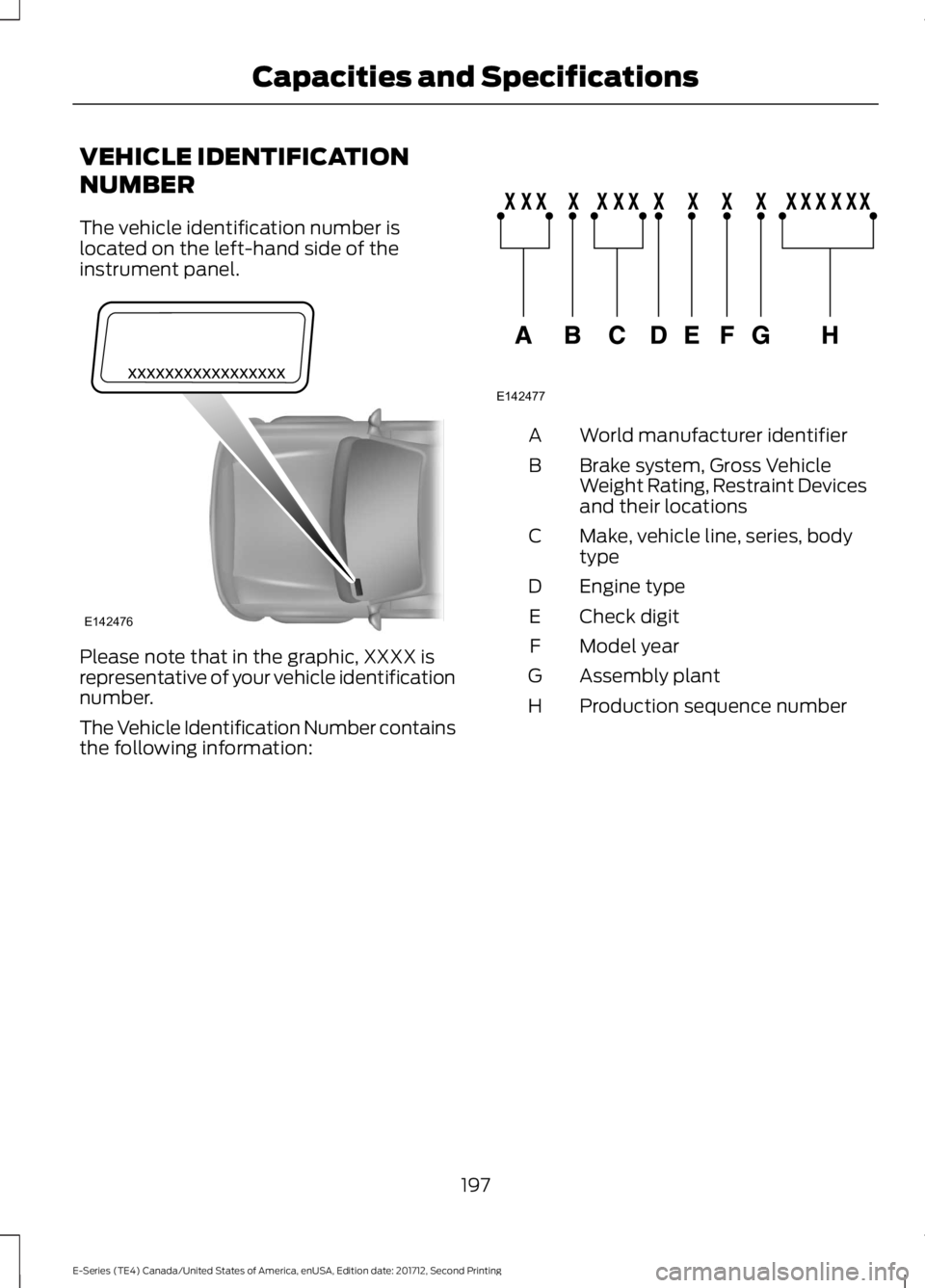
VEHICLE IDENTIFICATION
NUMBER
The vehicle identification number islocated on the left-hand side of theinstrument panel.
Please note that in the graphic, XXXX isrepresentative of your vehicle identificationnumber.
The Vehicle Identification Number containsthe following information:
World manufacturer identifierA
Brake system, Gross VehicleWeight Rating, Restraint Devicesand their locations
B
Make, vehicle line, series, bodytypeC
Engine typeD
Check digitE
Model yearF
Assembly plantG
Production sequence numberH
197
E-Series (TE4) Canada/United States of America, enUSA, Edition date: 201712, Second Printing
Capacities and SpecificationsE142476 E142477
Page 213 of 323
MP3 and WMA Track and FolderStructure
Audio systems capable of recognizing andplaying MP3 and WMA individual tracksand folder structures work as follows:
•There are two different modes for MP3and WMA disc playback: MP3 andWMA track mode (system default) andMP3 and WMA folder mode.
•MP3 and WMA track mode ignores anyfolder structure on the MP3 and WMAdisc. The player numbers each MP3and WMA track on the disc (noted bythe MP3 or WMA file extension) fromT001 to a maximum of T255. Themaximum number of playable MP3 andWMA files may be less depending onthe structure of the CD and exactmodel of radio present.
•MP3 and WMA folder mode representsa folder structure consisting of onelevel of folders. The CD player numbersall MP3 and WMA tracks on the disc(noted by the MP3 or WMA fileextension) and all folders containingMP3 and WMA files, from F001 (folder)T001 (track) to F253 T255.
•Creating discs with only one level offolders helps with navigation throughthe disc files.
If you are burning your own MP3 and WMAdiscs, it is important to understand howthe system reads the structures you create.While various files may be present (fileswith extensions other than MP3 andWMA), only files with the MP3 and WMAextension are played; other files areignored by the system. This enables you touse the same MP3 and WMA disc for avariety of tasks on your work computer,home computer and your in-vehiclesystem.
In track mode, the system displays andplays the structure as if it were only onelevel deep (all MP3 and WMA files play,regardless of being in a specific folder). Infolder mode, the system only plays theMP3 and WMA files in the current folder.
AUDIO UNIT - VEHICLES WITH:
AM/FM/CD/SYNC
WARNING
Driving while distracted can result inloss of vehicle control, crash andinjury. We strongly recommend thatyou use extreme caution when using anydevice that may take your focus off theroad. Your primary responsibility is the safeoperation of your vehicle. We recommendagainst the use of any hand-held devicewhile driving and encourage the use ofvoice-operated systems when possible.Make sure you are aware of all applicablelocal laws that may affect the use ofelectronic devices while driving.
210
E-Series (TE4) Canada/United States of America, enUSA, Edition date: 201712, Second Printing
Audio System
Page 214 of 323
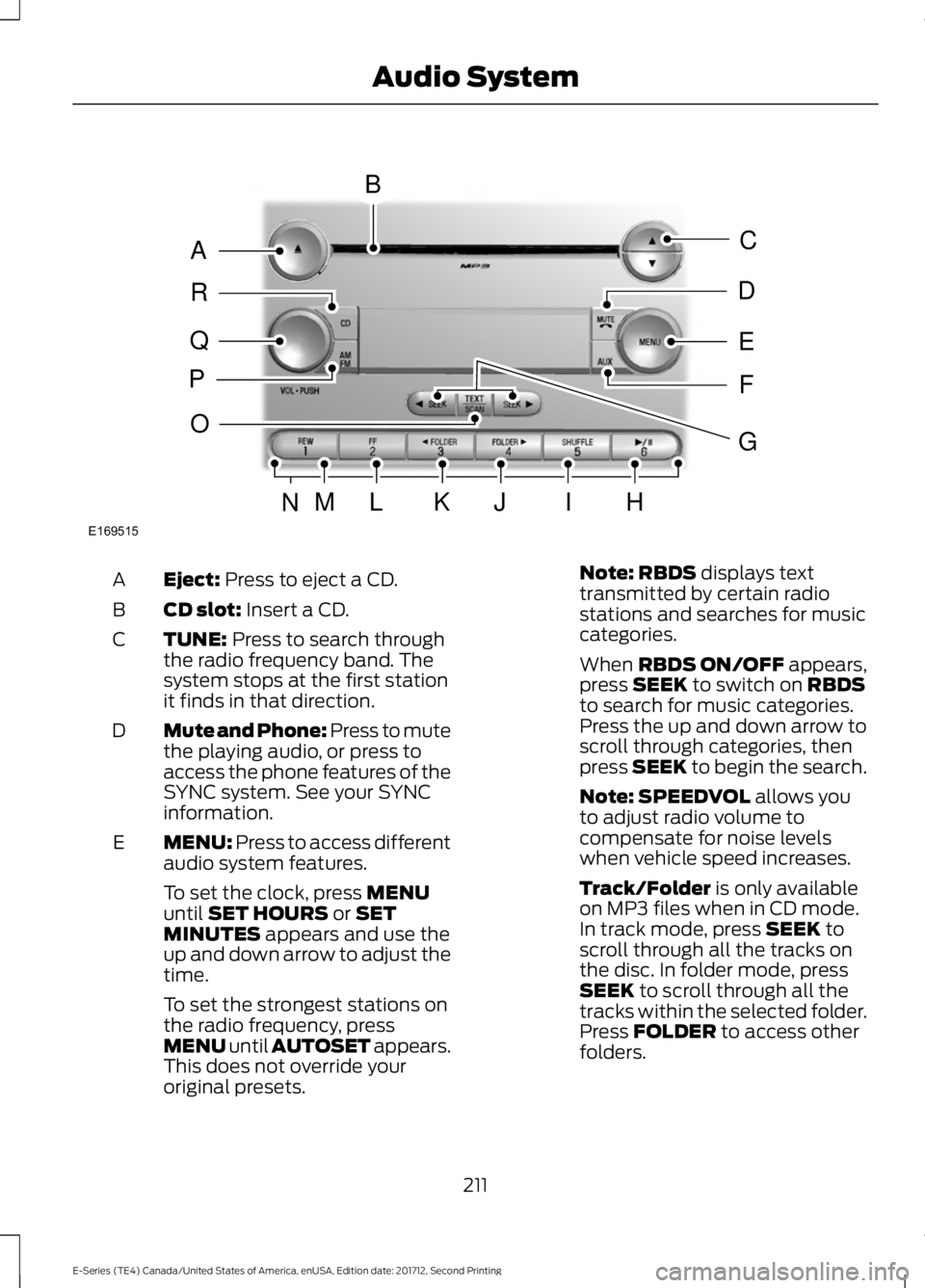
Eject: Press to eject a CD.A
CD slot: Insert a CD.B
TUNE: Press to search throughthe radio frequency band. Thesystem stops at the first stationit finds in that direction.
C
Mute and Phone: Press to mutethe playing audio, or press toaccess the phone features of theSYNC system. See your SYNCinformation.
D
MENU: Press to access differentaudio system features.E
To set the clock, press MENUuntil SET HOURS or SETMINUTES appears and use theup and down arrow to adjust thetime.
To set the strongest stations onthe radio frequency, pressMENU until AUTOSET appears.This does not override youroriginal presets.
Note: RBDS displays texttransmitted by certain radiostations and searches for musiccategories.
When RBDS ON/OFF appears,press SEEK to switch on RBDSto search for music categories.Press the up and down arrow toscroll through categories, thenpress SEEK to begin the search.
Note: SPEEDVOL allows youto adjust radio volume tocompensate for noise levelswhen vehicle speed increases.
Track/Folder is only availableon MP3 files when in CD mode.In track mode, press SEEK toscroll through all the tracks onthe disc. In folder mode, pressSEEK to scroll through all thetracks within the selected folder.Press FOLDER to access otherfolders.
211
E-Series (TE4) Canada/United States of America, enUSA, Edition date: 201712, Second Printing
Audio SystemE169515
B
A
Q
R
P
C
E
D
F
O
MLKJIHN
G
Page 215 of 323
Note: COMPRESS is onlyavailable in CD and MP3 modes.Switching on compression bringsthe soft and loud passagestogether for a more consistentlistening level.
To switch compression on andoff, press SEEK and the up anddown arrow.
AUX: Press to access the mediafeatures of the SYNC system.See your SYNC information.
F
Seek, Fast Forward andReverse: In radio mode, pressand release to go to the next orprevious preset radio station ordisc track. In CD and MP3 modes,press to move forward orbackward through the tracks.Press and hold to move quicklyforward or backward through thecurrent track.
G
Play, Pause: Allows you to playor pause a track when listeningto a CD.
H
SHUFFLE: Play music on theselected CD or MP3 folder inrandom order.
I
FOLDER >: Press to access thenext folder on an MP3 disc.J
< FOLDER: Press to access theprevious folder on an MP3 disc.K
FF: Press to fast forward a CDtrack or MP3 file.L
REW: Press to rewind a CD trackor MP3 file.M
Memory presets: Store yourfavorite radio stations. To storea radio station, tune to thestation, then press and hold apreset button until soundreturns.
N
TEXT/SCAN: In radio, CD andMP3 modes, press and hold tohear a brief sampling of radiostations, CD tracks or MP3 files.In CD and MP3 modes, press andrelease to display track title,
O
artist name and disc title. In textmode, the display may requireadditional text to show. Whenthe < / > indicator is on, pressTEXT and then press SEEK toview the additional display text.
AM/FM: Press to select afrequency band.P
VOL-PUSH: Turn to adjust thevolume. Press to switch thesystem on and off.
Q
CD: Press to enter CD or MP3mode.R
AUDIO UNIT - VEHICLES WITH:
AM/FM
WARNING
Driving while distracted can result inloss of vehicle control, crash andinjury. We strongly recommend thatyou use extreme caution when using anydevice that may take your focus off theroad. Your primary responsibility is the safeoperation of your vehicle. We recommendagainst the use of any hand-held devicewhile driving and encourage the use ofvoice-operated systems when possible.Make sure you are aware of all applicablelocal laws that may affect the use ofelectronic devices while driving.
212
E-Series (TE4) Canada/United States of America, enUSA, Edition date: 201712, Second Printing
Audio System
Page 216 of 323
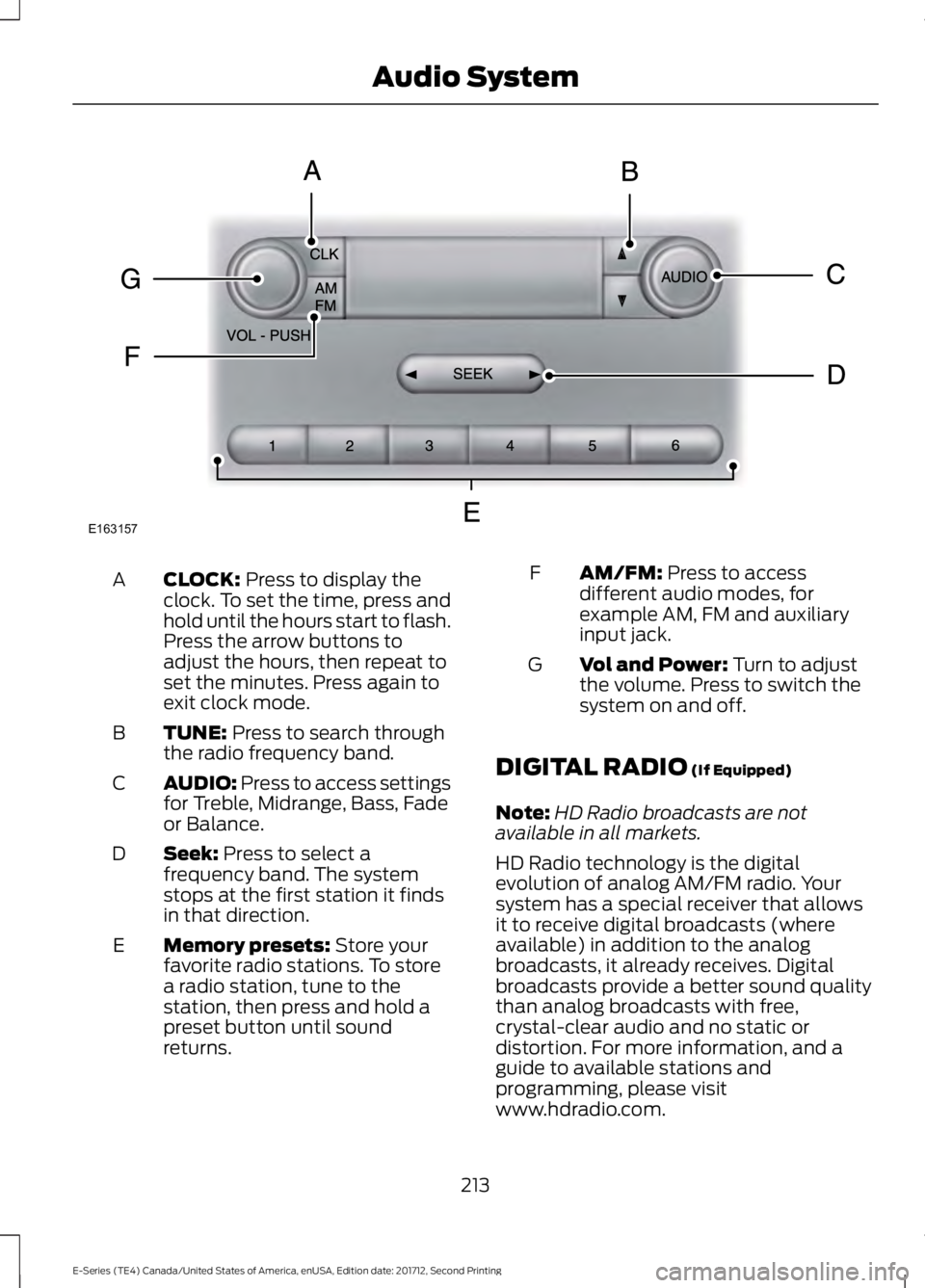
CLOCK: Press to display theclock. To set the time, press andhold until the hours start to flash.Press the arrow buttons toadjust the hours, then repeat toset the minutes. Press again toexit clock mode.
A
TUNE: Press to search throughthe radio frequency band.B
AUDIO: Press to access settingsfor Treble, Midrange, Bass, Fadeor Balance.
C
Seek: Press to select afrequency band. The systemstops at the first station it findsin that direction.
D
Memory presets: Store yourfavorite radio stations. To storea radio station, tune to thestation, then press and hold apreset button until soundreturns.
E
AM/FM: Press to accessdifferent audio modes, forexample AM, FM and auxiliaryinput jack.
F
Vol and Power: Turn to adjustthe volume. Press to switch thesystem on and off.
G
DIGITAL RADIO (If Equipped)
Note:HD Radio broadcasts are notavailable in all markets.
HD Radio technology is the digitalevolution of analog AM/FM radio. Yoursystem has a special receiver that allowsit to receive digital broadcasts (whereavailable) in addition to the analogbroadcasts, it already receives. Digitalbroadcasts provide a better sound qualitythan analog broadcasts with free,crystal-clear audio and no static ordistortion. For more information, and aguide to available stations andprogramming, please visitwww.hdradio.com.
213
E-Series (TE4) Canada/United States of America, enUSA, Edition date: 201712, Second Printing
Audio SystemE163157
Page 217 of 323
When HD Radio is on and you tune to astation broadcasting HD Radio technology,you may notice the HD Radio logo on yourscreen. When this logo is available, youmay also see Title and Artist fieldson-screen.
The multicast indicator appears in FMmode (only) if the current station isbroadcasting multiple digital broadcasts.The highlighted numbers signify availabledigital channels where new or differentcontent is available. HD1 signifies the mainprogramming status and is available inanalog and digital broadcasts. Othermulticast stations (HD2 through HD7) areonly available digitally.
When HD Radio broadcasts are active, youcan access the following functions:
•Scan allows you to hear a briefsampling of all available stations. Thisfeature still works when HD Radioreception is on, although it does notscan for HD2-HD7 channels. You maysee the HD logo appear if the stationhas a digital broadcast.
•Memory presets allow you to save anactive channel as a memory preset.Touch and hold a memory preset slotuntil the sound returns. There is a briefmute while the radio saves the station.Sound returns when finished. Whenswitching to an HD2 or HD3 memorypreset, the sound mutes before thedigital audio plays, because the systemhas to reacquire the digital signal.
Note:As with any saved radio station, youcannot access a station you save if yourvehicle is outside the station’s receptionarea.
HD Radio Reception and Station Troubleshooting
Potential Reception Issues
If you are listening to a multicast station and you are onthe fringe of the reception area, the station may mute dueto weak signal strength.
Reception area
If you are listening to HD1, the system switches back tothe analog broadcast until the digital broadcast is availableagain. However, if you are listening to any of the possibleHD2-HD7 multicast channels, the station mutes and staysmuted unless it is able to connect to the digital signalagain.
When the system first receives a station (aside from HD2-HD7 multicast stations), it first plays the station in theanalog version. Once the receiver verifies the station is anHD Radio station, it shifts to the digital version. Dependingon the station quality, you may hear a slight sound changewhen the station changes from analog to digital. Blendingis the shift from analog to digital sound or digital back toanalog sound.
Station blending
214
E-Series (TE4) Canada/United States of America, enUSA, Edition date: 201712, Second Printing
Audio System