lock FORD E SERIES 2024 Owner's Guide
[x] Cancel search | Manufacturer: FORD, Model Year: 2024, Model line: E SERIES, Model: FORD E SERIES 2024Pages: 303, PDF Size: 6.95 MB
Page 87 of 303
Important Ventilating Information
If you stop your vehicle and leave theengine idling for long periods of time, werecommend you either open the windowsat least 1 in (3 cm) or set the climatecontrol to outside air.
ENGINE BLOCK HEATER (IF
EQUIPPED)
WARNING: Failure to follow engineblock heater instructions could result inproperty damage or serious personalinjury.
WARNING: Do not use your heaterwith ungrounded electrical systems ortwo-pronged adapters. There is a risk ofelectrical shock.
WARNING: Do not fully close thehood, or allow it to drop under its ownweight when using the engine blockheater. This could damage the powercable and may cause an electrical shortresulting in fire, injury and propertydamage.
Note:The heater is most effective whenoutdoor temperatures are below 0°F(-18°C).
The heater acts as a starting aid bywarming the engine coolant. This allowsthe climate control system to respondquickly. The equipment includes a heaterelement, installed in the engine block anda wire harness. You can connect thesystem to a grounded 120-volt ACelectrical source.
We recommend that you do the followingfor a safe and correct operation:
•Use a 16-gauge outdoor extension cordthat is product certified byUnderwriter’s Laboratory (UL) orCanadian Standards Association(CSA). This extension cord must besuitable for use outdoors, in coldtemperatures, and be clearly markedSuitable for Use with OutdoorAppliances. Do not use an indoorextension cord outdoors. This couldresult in an electric shock or become afire hazard.
•Use as short an extension cord aspossible.
•Do not use multiple extension cords.
•Make sure that when in operation, theextension cord plug and heater cordplug connections are free and clear ofwater. This could cause an electricshock or fire.
•If the block heater cord is under thehood, Do Not remove the wiring fromits original location. Do Not close thehood on the extension wiring.
•Make sure your vehicle is parked in aclean area, clear of combustibles.
•Make sure the heater, heater cord andextension cord are firmly connected.
•Check for heat anywhere in theelectrical hookup once the system hasbeen operating for approximately 30minutes.
•Make sure the system is unplugged andproperly stowed before starting anddriving your vehicle. Make sure theprotective cover seals the prongs of theblock heater cord plug when not in use.
•Make sure the heater system ischecked for proper operation beforewinter.
83
2024 E-Series (TE4) Canada/United States of America, enUSA, Edition date: 202210, First-PrintingStarting and Stopping the Engine
Page 88 of 303
Using the Engine Block Heater
Make sure the receptacle terminals areclean and dry prior to use. Clean them witha dry cloth if necessary.
The heater uses 0.4 to 1.0 kilowatt-hoursof energy per hour of use. The system doesnot have a thermostat. It achievesmaximum temperature afterapproximately three hours of operation.Using the heater longer than three hoursdoes not improve system performance andunnecessarily uses electricity.
84
2024 E-Series (TE4) Canada/United States of America, enUSA, Edition date: 202210, First-PrintingStarting and Stopping the Engine
Page 93 of 303
Fuel Filler Cap
WARNING: The fuel system maybe under pressure. If you hear a hissingsound near the fuel filler inlet, do notrefuel until the sound stops. Otherwise,fuel may spray out, which could causeserious personal injury.
Note:If you must replace the fuel filler cap,replace it with a fuel filler cap that isdesigned for your vehicle. The customerwarranty may be void for any damage to thefuel tank or fuel system if the correctgenuine Ford, Motorcraft or other certifiedfuel filler cap is not used.
Your vehicle has a threaded fuel filler cap.When fueling your vehicle:
1.Put your vehicle in park (P).
2.Switch the engine off.
3.Carefully turn the fuel filler capcounterclockwise until it spins off.
4.Pull to remove the cap from the fuelfiller pipe and place on the fuel doorhanging hook if equipped.
5.When the nozzle shuts off, wait at leastfive seconds, then slightly raise the fuelpump nozzle and slowly remove it.
6.Install the fuel filler cap by rotating itclockwise until it clicks.
If the Check Fuel Cap light or a Check FuelCap message appears in the instrumentcluster and stays on after you start theengine, you may not have installed the fuelfiller properly.
If the fuel cap light remains on, at the nextopportunity, safely pull off of the road,remove the fuel filler cap, align the capproperly and reinstall it. The check fuel caplight or Check fuel cap message may notreset immediately. It may take severaldriving cycles for the indicators to turn off.A driving cycle consists of an enginestart-up (after four or more hours with theengine off) followed by normal city andhighway driving.
FUEL CONSUMPTION
Advertised Capacity
The advertised capacity is the maximumamount of fuel that you can add to the fueltank after running out of fuel. Included inthe advertised capacity is an emptyreserve. The empty reserve is anunspecified amount of fuel that remainsin the fuel tank when the fuel gaugeindicates empty.
Note:The amount of fuel in the emptyreserve varies and should not be relied uponto increase driving range.
Fuel Economy
Your vehicle calculates fuel economyfigures through the trip computer averagefuel function. See General Information(page 64).
The first 1,000 mi (1,500 km) of driving isthe break-in period of the engine. A moreaccurate measurement is obtained after2,000 mi (3,000 km).
Impacting Fuel Economy
•Incorrect tire inflation pressures.
•Fully loading your vehicle.
•Carrying unnecessary weight.
89
2024 E-Series (TE4) Canada/United States of America, enUSA, Edition date: 202210, First-PrintingFuel and Refueling
Page 99 of 303
AUTOMATIC TRANSMISSION
WARNING: Apply the parkingbrake, shift into park (P), switch theignition off and remove the key beforeyou leave your vehicle. Failure to followthis instruction could result in personalinjury or death.
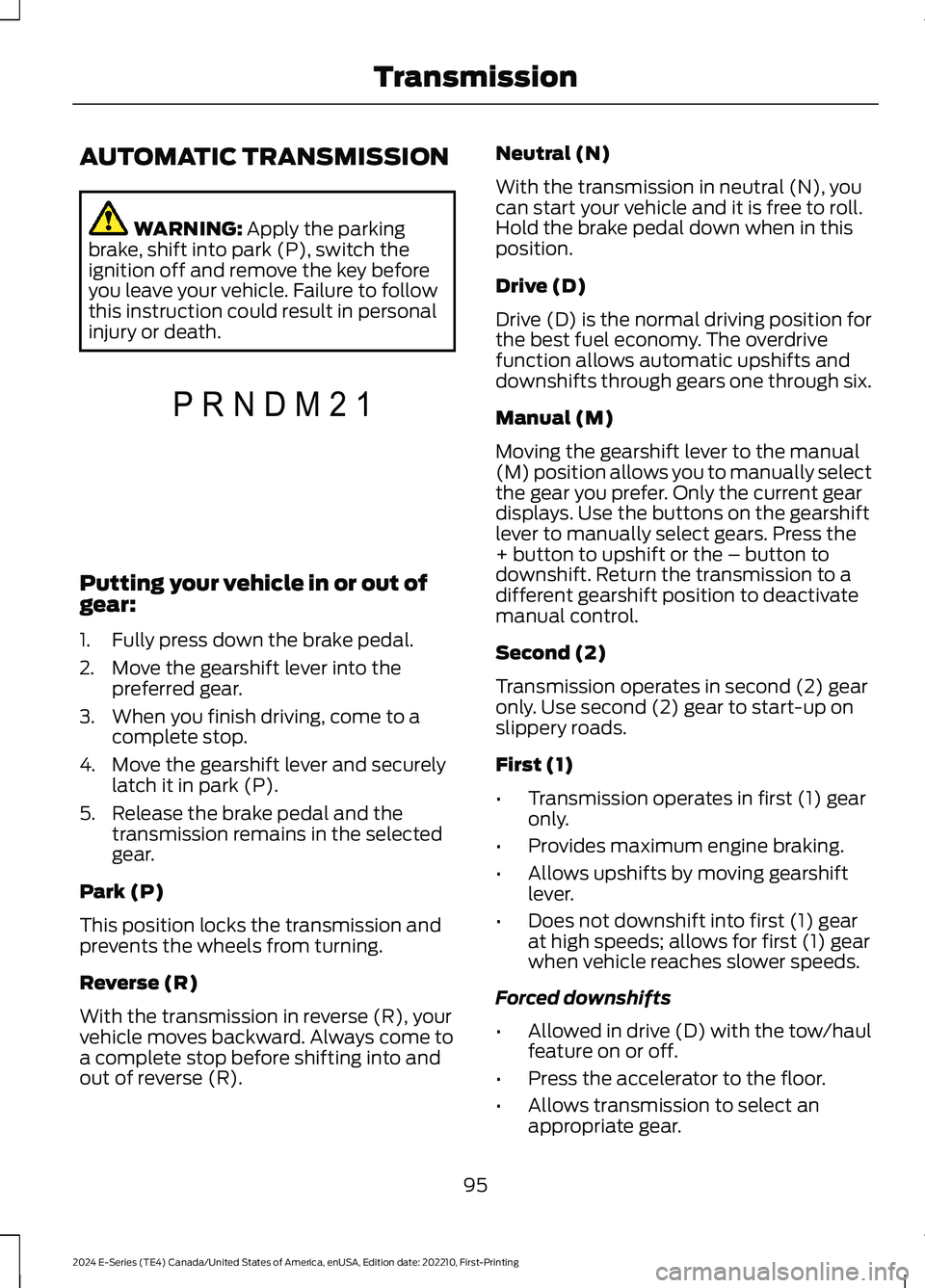
Putting your vehicle in or out ofgear:
1.Fully press down the brake pedal.
2.Move the gearshift lever into thepreferred gear.
3.When you finish driving, come to acomplete stop.
4.Move the gearshift lever and securelylatch it in park (P).
5.Release the brake pedal and thetransmission remains in the selectedgear.
Park (P)
This position locks the transmission andprevents the wheels from turning.
Reverse (R)
With the transmission in reverse (R), yourvehicle moves backward. Always come toa complete stop before shifting into andout of reverse (R).
Neutral (N)
With the transmission in neutral (N), youcan start your vehicle and it is free to roll.Hold the brake pedal down when in thisposition.
Drive (D)
Drive (D) is the normal driving position forthe best fuel economy. The overdrivefunction allows automatic upshifts anddownshifts through gears one through six.
Manual (M)
Moving the gearshift lever to the manual(M) position allows you to manually selectthe gear you prefer. Only the current geardisplays. Use the buttons on the gearshiftlever to manually select gears. Press the+ button to upshift or the – button todownshift. Return the transmission to adifferent gearshift position to deactivatemanual control.
Second (2)
Transmission operates in second (2) gearonly. Use second (2) gear to start-up onslippery roads.
First (1)
•Transmission operates in first (1) gearonly.
•Provides maximum engine braking.
•Allows upshifts by moving gearshiftlever.
•Does not downshift into first (1) gearat high speeds; allows for first (1) gearwhen vehicle reaches slower speeds.
Forced downshifts
•Allowed in drive (D) with the tow/haulfeature on or off.
•Press the accelerator to the floor.
•Allows transmission to select anappropriate gear.
95
2024 E-Series (TE4) Canada/United States of America, enUSA, Edition date: 202210, First-PrintingTransmissionPRNDM21E307627
Page 101 of 303
Progressive Range Selection - PRS
(If Equipped)
Progressive Range Selection gives you theability to lockout gears from the automaticshifting range. This may provide you withan improved driving experience. Forexample, in slippery conditions or whenexperiencing a steep grade.
With the gearshift lever in drive (D), pressthe – button to active PRS. The instrumentcluster indicates the available and selectedgears.
All available gears display with the currentgear indicated. Press the – button again tolock out gears beginning with the highestgear. Example: press the – button twice tolock out 6th and 5th gears. Only theavailable gears display, and thetransmission automatically shifts betweenthe available gears. Press the + button tounlock gears to allow the transmission toshift to higher gears. The transmissionshifts within the gear range you select.
Automatic Transmission AdaptiveLearning
This feature may increase durability andprovide consistent shift feel over the lifeof your vehicle. A new vehicle ortransmission may have firm shifts, softshifts, or both. This is normal and does notaffect function or durability of thetransmission. Over time, the adaptivelearning process fully updates transmissionoperation.
Brake-Shift Interlock
WARNING: Do not drive yourvehicle until you verify that thestoplamps are working.
WARNING: When doing thisprocedure, you need to take thetransmission out of park (P) whichmeans your vehicle can roll freely. Toavoid unwanted vehicle movement,apply the parking brake prior to doingthis procedure. Use wheel chocks ifappropriate.
WARNING: If the parking brake isfully released, but the brake warninglamp remains illuminated, the brakesmay not be working properly. Have yourvehicle checked as soon as possible.
Your vehicle has a brake-shift interlockfeature that prevents the gearshift leverfrom moving from park (P) when theignition is in the 3 (on) position and thebrake pedal is not pressed.
If you cannot move the gearshift lever outof park (P) position with the ignition in the3 (on) position and the brake pedalpressed, a malfunction may have occurred.It is possible that a fuse has blown or yourvehicle’s brake lamps are not operatingproperly. See Fuse Specification Chart(page 150).
If the fuse is not blown and the brakelamps are working properly, the followingprocedure allows you to move the gearshiftlever from park (P):
1.Apply the parking brake. Switch theignition key to 1 (off), then remove thekey.
2.Move the steering column to the fulldown and full rearward position,toward the driver seat.
3.Remove the gearshift lever boot.
97
2024 E-Series (TE4) Canada/United States of America, enUSA, Edition date: 202210, First-PrintingTransmission
Page 102 of 303
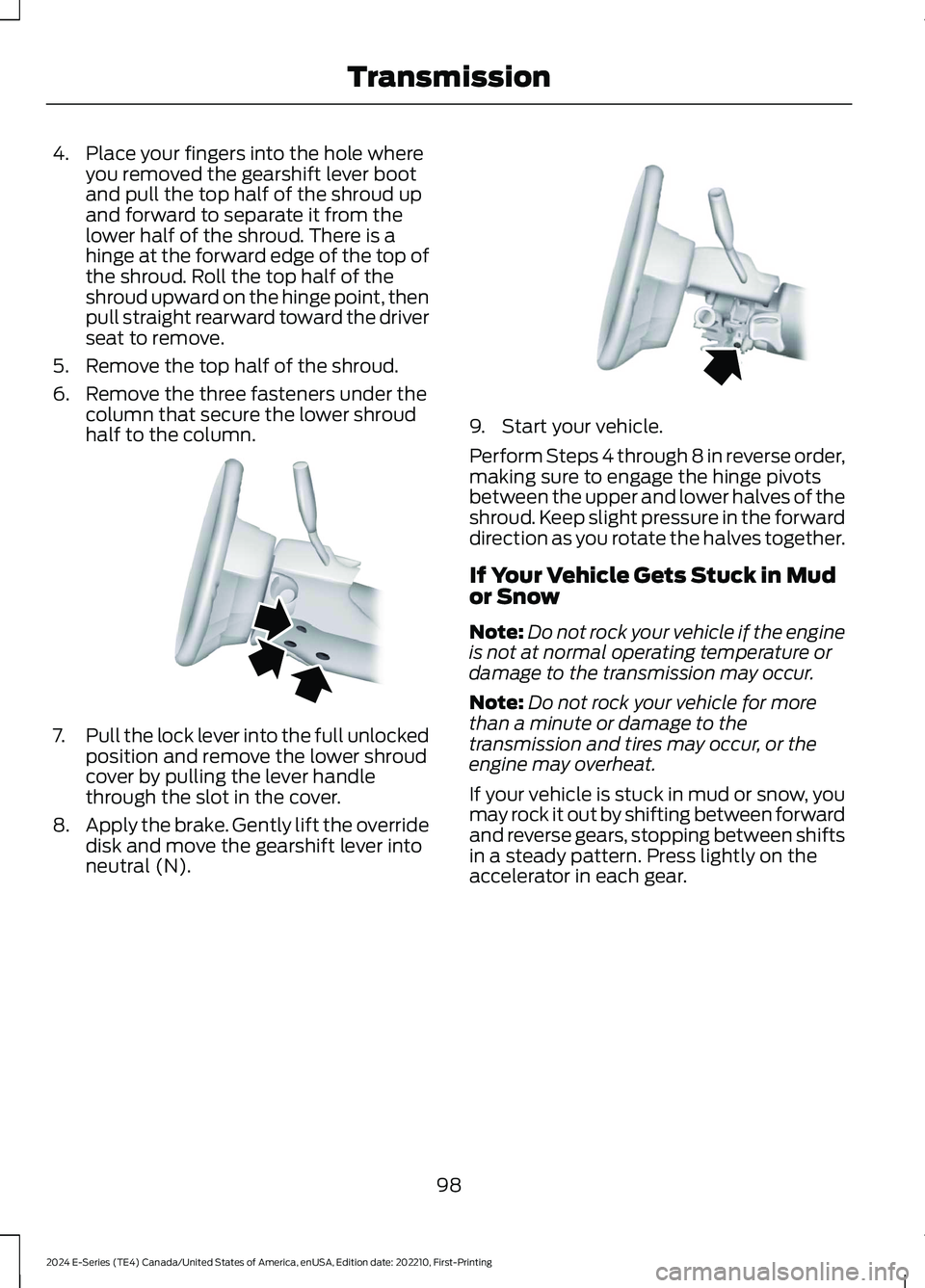
4.Place your fingers into the hole whereyou removed the gearshift lever bootand pull the top half of the shroud upand forward to separate it from thelower half of the shroud. There is ahinge at the forward edge of the top ofthe shroud. Roll the top half of theshroud upward on the hinge point, thenpull straight rearward toward the driverseat to remove.
5.Remove the top half of the shroud.
6.Remove the three fasteners under thecolumn that secure the lower shroudhalf to the column.
7.Pull the lock lever into the full unlockedposition and remove the lower shroudcover by pulling the lever handlethrough the slot in the cover.
8.Apply the brake. Gently lift the overridedisk and move the gearshift lever intoneutral (N).
9.Start your vehicle.
Perform Steps 4 through 8 in reverse order,making sure to engage the hinge pivotsbetween the upper and lower halves of theshroud. Keep slight pressure in the forwarddirection as you rotate the halves together.
If Your Vehicle Gets Stuck in Mudor Snow
Note:Do not rock your vehicle if the engineis not at normal operating temperature ordamage to the transmission may occur.
Note:Do not rock your vehicle for morethan a minute or damage to thetransmission and tires may occur, or theengine may overheat.
If your vehicle is stuck in mud or snow, youmay rock it out by shifting between forwardand reverse gears, stopping between shiftsin a steady pattern. Press lightly on theaccelerator in each gear.
98
2024 E-Series (TE4) Canada/United States of America, enUSA, Edition date: 202210, First-PrintingTransmissionE163185 E163186
Page 103 of 303
GENERAL INFORMATION
Note: Occasional brake noise is normal. Ifa metal-to-metal, continuous grinding orcontinuous squeal sound is present, thebrake linings may be worn-out, have thesystem checked. If the vehicle hascontinuous vibration or shudder in thesteering wheel while braking, have thesystem checked as soon as possible.
Note: Brake dust may accumulate on thewheels, even under normal drivingconditions. Some dust is inevitable as thebrakes wear and does not contribute tobrake noise. See Cleaning the Wheels(page 187).
See Warning Lamps andIndicators (page 61).
Wet brakes result in reduced brakingefficiency. Gently press the brake pedal afew times when driving from a car wash orstanding water to dry the brakes.
Brake Over Accelerator
In the event the accelerator pedalbecomes stuck or entrapped, apply steadyand firm pressure to the brake pedal toslow the vehicle and reduce engine power.If you experience this condition, apply thebrakes and bring your vehicle to a safestop. Move the transmission to park (P),switch the engine off and apply the parkingbrake. Inspect the accelerator pedal forany interference. If none are found and thecondition persists, have the systemchecked.
Anti-lock Brake System
This system helps you maintain steeringcontrol during emergency stops by keepingthe brakes from locking.
If it illuminates when you aredriving, your vehicle requiresservice. Your vehicle continuesto have normal braking without theanti-lock brake system function. Have yourvehicle checked as soon as possible.
It also momentarily illuminates when youswitch the ignition on to confirm the lampis functional. If it does not illuminate whenyou switch the ignition on, or begins toflash at any time, have the systemchecked.
It illuminates when you engagethe parking brake and theignition is on.
If it illuminates when your vehicleis moving, make sure the parkingbrake is disengaged. If theparking brake is disengaged, this indicateslow brake fluid level or a brake systemfault. Have your vehicle checked as soonas possible.
It also momentarily illuminates when youswitch the ignition on to confirm the lampis functional. If it does not illuminate whenyou switch the ignition on, or begins toflash at any time, have the systemchecked.
Hydraulic brake booster system(Hydroboost or Hydromax)
The Hydroboost and Hydromax systemsreceive fluid pressure from the powersteering pump to provide power assistduring braking.
The Hydromax booster receives backuppressure from the reserve system electricpump whenever the fluid in the powersteering system is not flowing. When theengine is off, the pump turns on if you applythe brake pedal, or if you switch the ignitionto the on position.
99
2024 E-Series (TE4) Canada/United States of America, enUSA, Edition date: 202210, First-PrintingBrakesE270480 E67024 E67020 E270480 E67024
Page 104 of 303
The sound of the pump operating may beheard by the driver. This is a normalcharacteristic of the system.
The reserve system provides reducedbraking power, so the vehicle should beoperated under these conditions withcaution, and only to seek service repair andremoval of the vehicle from the roadway.
Note:For vehicles with the Hydromaxsystem operating under normal conditions,the noise of the fluid flowing through thebooster may be heard whenever you applythe brake. This condition is normal. Vehicleservice is not required.
If braking performance or pedal responsebecomes very poor, even when youstrongly press the pedal, it may indicatethe presence of air in the hydraulic systemor leakage of fluid. Stop your vehicle assoon as it is safe to do so. Have the systemchecked as soon as possible.
HINTS ON DRIVING WITH
ANTI-LOCK BRAKES
The anti-lock brake system does noteliminate the risks when:
•You drive too closely to the vehicle infront of you.
•Your vehicle is hydroplaning.
•You take corners too fast.
•The road surface is poor.
Note: If the system activates, the brakepedal could pulse and may travel further.Maintain pressure on the brake pedal. Youmay also hear a noise from the system. Thisis normal.
PARKING BRAKE
WARNING: Apply the parkingbrake, shift into park (P), switch theignition off and remove the key beforeyou leave your vehicle. Failure to followthis instruction could result in personalinjury or death.
Apply the parking brake whenever you parkyour vehicle.
•For vehicles with a foot operatedparking brake, press the pedal down.
•For vehicles with a hand operatedparking brake, pull the parking brakelever up.
It illuminates when you switchthe ignition on and apply theparking brake. It also illuminatesmomentarily when you switchthe ignition on to confirm thelamp is functional. If it does notilluminate when you switch the ignition onor begins to flash at any time, have thesystem checked by an authorized dealer.
If it illuminates when your vehicle ismoving, make sure you disengage theparking brake.
If the parking brake is disengaged, thisindicates a low brake fluid level or a brakesystem fault. Have your vehicle checkedas soon as possible.
To release the parking brake:
•For vehicles with a foot operatedparking brake, pull the parking brakerelease lever.
•For vehicles with a hand operatedparking brake, push the parking brakelever down.
100
2024 E-Series (TE4) Canada/United States of America, enUSA, Edition date: 202210, First-PrintingBrakesE270480 E67024
Page 116 of 303
Detection issues can occur:
When driving on a different linethan the vehicle in front.A
With vehicles that edge into yourlane. The system can only detectthese vehicles once they movefully into your lane.
B
There may be issues with thedetection of vehicles in frontwhen driving into and coming outof a bend or curve in the road.
C
In these cases, the system may brake lateor unexpectedly. You should stay alert andtake action when necessary.
If something hits the front end of yourvehicle or damage occurs, theradar-sensing zone may change. This couldcause missed or false vehicle detection.
Optimal system performance requires aclear view of the road by thewindshield-mounted camera.
Optimal performance may not occur if:
•The camera is blocked.
•There is poor visibility or lightingconditions.
•There are bad weather conditions.
System Not Available
Conditions that can cause the system todeactivate or prevent the system fromactivating when requested include:
•A blocked sensor.
•High brake temperature.
•A failure in the system or a relatedsystem.
Blocked Sensor
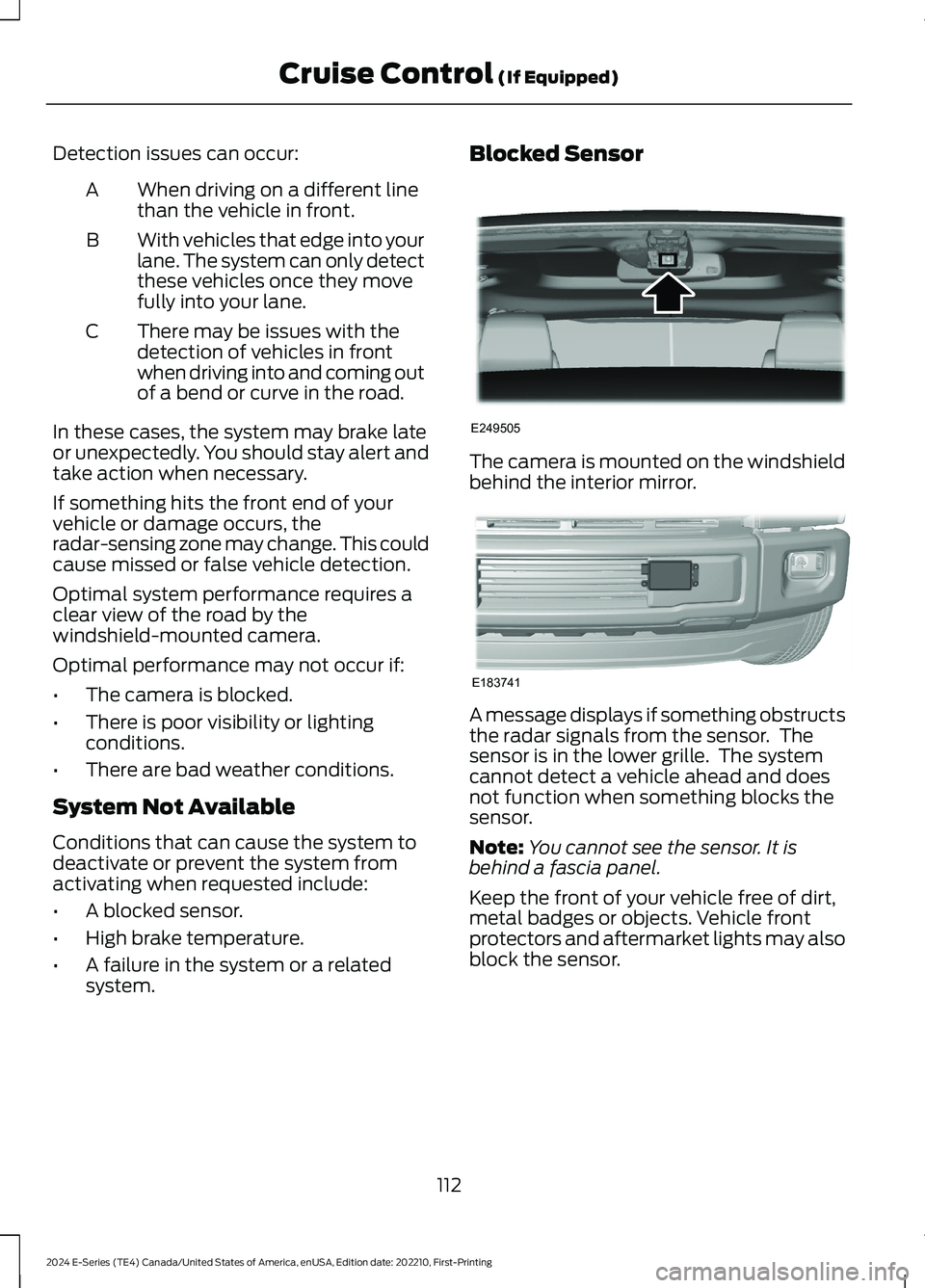
The camera is mounted on the windshieldbehind the interior mirror.
A message displays if something obstructsthe radar signals from the sensor. Thesensor is in the lower grille. The systemcannot detect a vehicle ahead and doesnot function when something blocks thesensor.
Note:You cannot see the sensor. It isbehind a fascia panel.
Keep the front of your vehicle free of dirt,metal badges or objects. Vehicle frontprotectors and aftermarket lights may alsoblock the sensor.
112
2024 E-Series (TE4) Canada/United States of America, enUSA, Edition date: 202210, First-PrintingCruise Control (If Equipped)E249505 E183741
Page 117 of 303
Possible causes and actions for the blocked sensor message displaying:
ActionCause
Clean the grille surface in front of the radaror remove the object causing the obstruc-tion.
The surface of the radar is dirty orobstructed
Wait a short time. It may take severalminutes for the radar to detect that it is freefrom obstruction.
The surface of the radar is clean but themessage remains in the display.
Do not use the system in these conditionsbecause it may not detect any vehiclesahead.
Heavy rain or snow is interfering with theradar signals
Do not use the system in these conditionsbecause it may not detect any vehiclesahead.
Water, snow or ice on the surface of theroad may interfere with the radar signals.
Wait a short time or switch to normal cruisecontrol.You are in a desert or remote area with noother vehicles and no roadside objects.
Due to the nature of radar technology, it is possible to get a blockage warning with noactual block. A false blocked condition either self-clears, or clears after you restart yourvehicle.
Switching to Normal CruiseControl
WARNING: Normal cruise controlwill not brake when your vehicle isapproaching slower vehicles. Always beaware of which mode you have selectedand apply the brakes when necessary.
The cruise control indicator lightreplaces the adaptive cruisecontrol indicator light if youselect normal cruise control. The gapsetting does not display, and the systemdoes not respond to lead vehicles.Automatic braking remains active tomaintain set speed.
You can change from adaptive cruisecontrol to normal cruise control throughthe information display.
113
2024 E-Series (TE4) Canada/United States of America, enUSA, Edition date: 202210, First-PrintingCruise Control (If Equipped)E71340