manual transmission FORD EDGE 2015 2.G User Guide
[x] Cancel search | Manufacturer: FORD, Model Year: 2015, Model line: EDGE, Model: FORD EDGE 2015 2.GPages: 508, PDF Size: 6.2 MB
Page 180 of 508
WARNINGS
With the exception of emergency
conditions (for example, the brake
pedal does not work or is blocked),
do not apply the electric parking brake
while the vehicle is moving. On bends, or
poor road surfaces or weather conditions,
emergency braking can cause the vehicle
to skid out of control or off the road. If you apply the electric parking brake when
your vehicle is moving, the brake system
warning lamp will illuminate and a warning
chime will sound. See Information
Displays (page 100).
If your vehicle speed is above
4 mph
(6 km/h), the braking force is applied as
long as the switch is pulled. Releasing or
pressing the switch or pressing the
accelerator pedal will stop the braking
force.
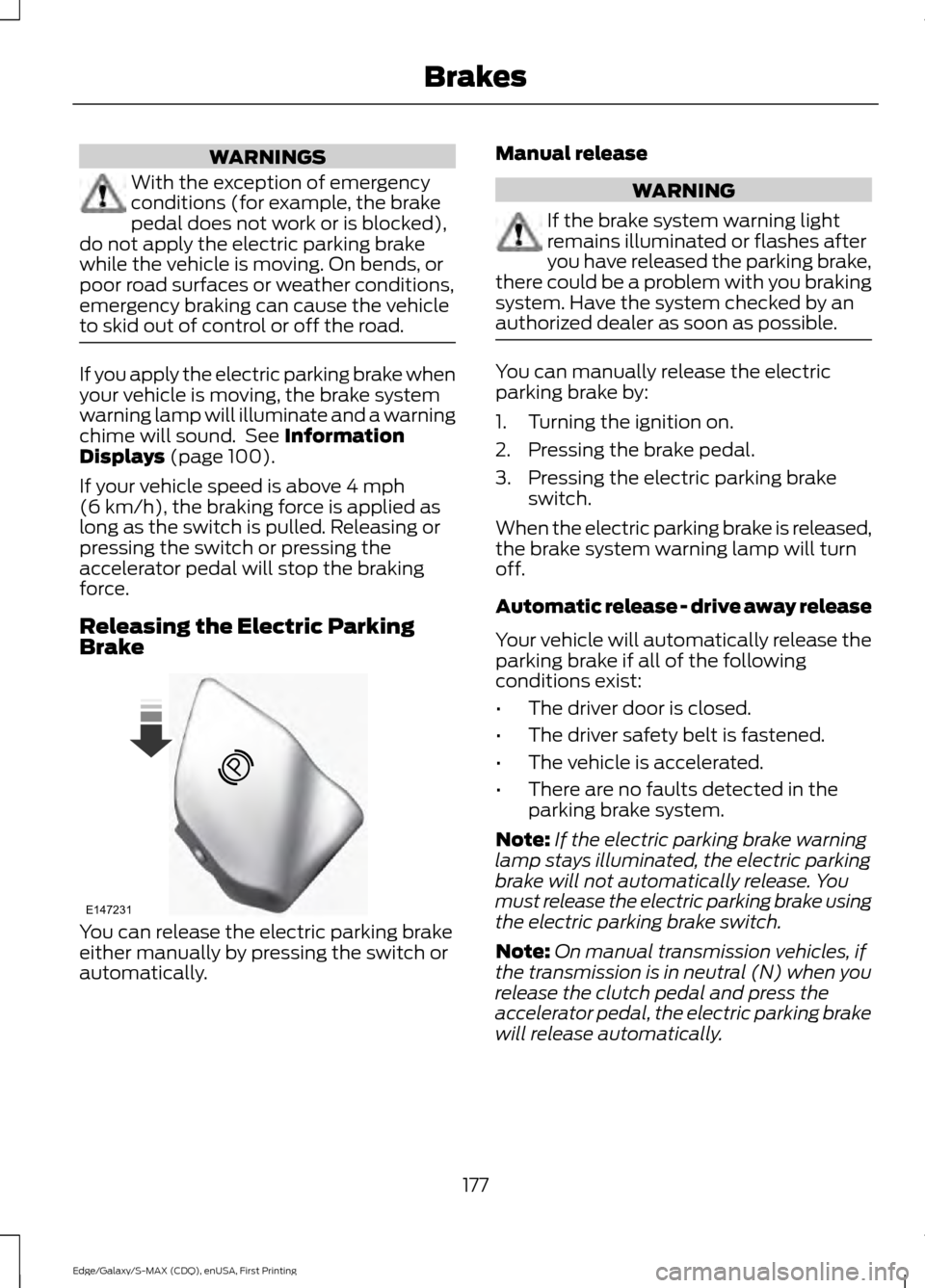
Releasing the Electric Parking
Brake You can release the electric parking brake
either manually by pressing the switch or
automatically. Manual release WARNING
If the brake system warning light
remains illuminated or flashes after
you have released the parking brake,
there could be a problem with you braking
system. Have the system checked by an
authorized dealer as soon as possible. You can manually release the electric
parking brake by:
1. Turning the ignition on.
2. Pressing the brake pedal.
3. Pressing the electric parking brake
switch.
When the electric parking brake is released,
the brake system warning lamp will turn
off.
Automatic release - drive away release
Your vehicle will automatically release the
parking brake if all of the following
conditions exist:
• The driver door is closed.
• The driver safety belt is fastened.
• The vehicle is accelerated.
• There are no faults detected in the
parking brake system.
Note: If the electric parking brake warning
lamp stays illuminated, the electric parking
brake will not automatically release. You
must release the electric parking brake using
the electric parking brake switch.
Note: On manual transmission vehicles, if
the transmission is in neutral (N) when you
release the clutch pedal and press the
accelerator pedal, the electric parking brake
will release automatically.
177
Edge/Galaxy/S-MAX (CDQ), enUSA, First Printing BrakesE147231
Page 181 of 508
Note:
On manual transmission vehicles,
you must fully press the clutch pedal before
the drive away release feature will operate.
Drive as normal using the accelerator and
clutch pedals and the electric parking brake
will be automatically released.
The brake system warning lamp will go off
to confirm that the electric parking brake
has been released.
Note: The electric parking brake drive away
release makes starting on a hill easier. This
feature will release the parking brake
automatically when the vehicle has
sufficient drive force to move up the hill. To
assure drive away release when starting
uphill, press the accelerator pedal quickly.
Driving with a Trailer
Depending on the slope and the weight of
the trailer, your vehicle and trailer may roll
backwards slightly when you start on a
slope.
To prevent this from happening, do the
following:
1. Pull the switch up and hold it in this position.
2. Drive your vehicle, then release the switch when you notice that the engine
has developed sufficient driving force.
Battery With No Charge WARNING
You will not be able to apply or
release the electric parking brake if
the battery is low or has no charge.
If the battery is low or has no charge, use
jumper cables and a booster battery. HILL START ASSIST WARNINGS
The system does not replace the
parking brake. When you leave your
vehicle, always apply the parking
brake. Failure to leave your vehicle securely
parked may lead to a crash or injury. See
Electric Parking Brake (page 176). You must remain in your vehicle
when the system turns on. At all
times, you are responsible for
controlling your vehicle, supervising the
system and intervening, if required. Failure
to take care may result in the loss of
control of your vehicle, serious personal
injury or death. The system will turn off if a
malfunction is apparent or if you rev
the engine excessively. Failure to
take care may result in the loss of control
of your vehicle, serious personal injury or
death. The system makes it easier to pull away
when your vehicle is on a slope without the
need to use the parking brake.
When the system is active, your vehicle
remains stationary on the slope for two to
three seconds after you release the brake
pedal. This allows time to move your foot
from the brake to the accelerator pedal.
The system releases the brakes
automatically once the engine has
developed sufficient drive to prevent your
vehicle from rolling down the slope. This
is an advantage when pulling away on a
slope, for example from a car park ramp,
traffic lights or when reversing uphill into
a parking space.
Note:
The system only functions when you
bring your vehicle to a complete standstill.
Shift the gearshift lever to reverse (R) when
facing downhill and first gear (1) when
facing uphill.
178
Edge/Galaxy/S-MAX (CDQ), enUSA, First Printing Brakes
Page 182 of 508
Note:
There is no warning light to indicate
the system is either on or off.
Using Hill Start Assist
1. Press the brake pedal to bring your vehicle to a complete standstill. Keep
the brake pedal pressed.
2. If the sensors detect that your vehicle is on a slope, the system activates
automatically.
3. When you remove your foot from the brake pedal, your vehicle remains on
the slope without rolling away for
about two to three seconds. This hold
time automatically extends if you are
in the process of driving off.
4. Drive off in the normal manner. The system releases the brakes
automatically.
Note: When you remove your foot from the
brake pedal and press the pedal again when
the system is active, you will experience
significantly reduced brake pedal travel. This
is normal.
Switching the System On and Off
When you switch the ignition on, the
system automatically turns on. You can
switch the system on or off in the
information display. See General
Information (page 100). The system
remains off until you switch the ignition off.
Note: For vehicles with a manual
transmission, the system can be switched
on or off.
Note: For vehicles with an automatic
transmission, the system cannot be
switched off.
179
Edge/Galaxy/S-MAX (CDQ), enUSA, First Printing Brakes
Page 188 of 508
The indicator displays:
•
As the distance to the obstacle
decreases the indicator blocks
illuminate and move towards the
vehicle icon.
• If there is no obstacle detected, the
distance indicator blocks are greyed
out.
If the transmission is in reverse (R), the
front sensing system provides audio
warnings when your vehicle is moving and
the detected obstacle is moving towards
your vehicle. Once the vehicle is stationary,
the audio warning will be stopped after 2
seconds.
If the transmission is in drive (D) or any
other forward gear (for example, low (L),
sport (S) or any forward gear in a manual
transmission), the front sensing system
provides audio and visual warnings when
your vehicle is moving below a speed of
7 mph (12 km/h) and an obstacle is located
inside the detection area. Once the vehicle
is stationary, the audio warning will be
stopped after 2 seconds and the visual
indication stops after 4 seconds. If the
obstacles detected are within 12 in
(30 cm), the visual indication remains on.
If the transmission is in neutral (N), the
system provides visual indication only
when your vehicle is moving at
7 mph
(12 km/h) or below and an obstacle is
located inside the detection area. Once
your vehicle is stationary, the visual
indication will stop after 4 seconds.
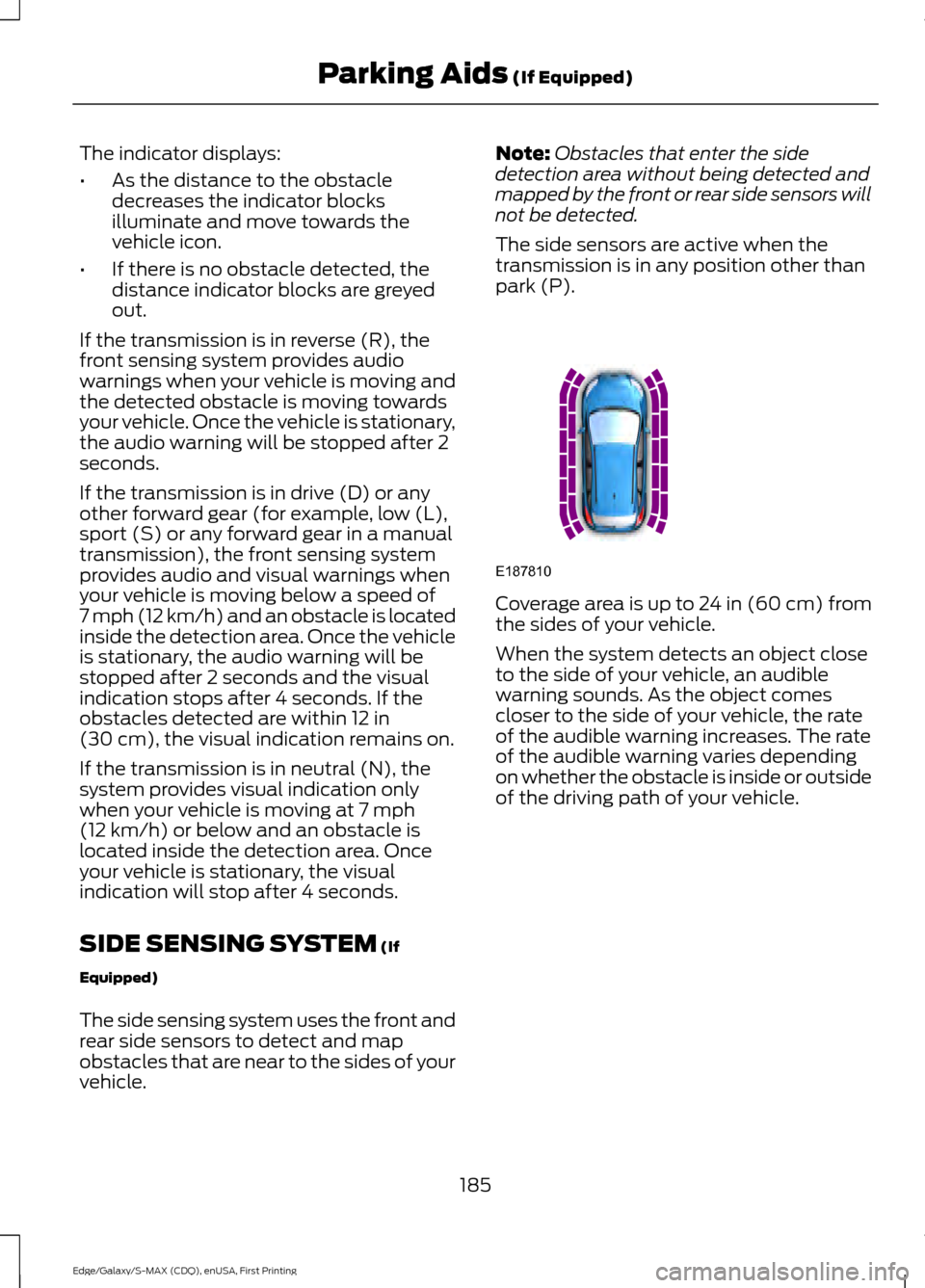
SIDE SENSING SYSTEM
(If
Equipped)
The side sensing system uses the front and
rear side sensors to detect and map
obstacles that are near to the sides of your
vehicle. Note:
Obstacles that enter the side
detection area without being detected and
mapped by the front or rear side sensors will
not be detected.
The side sensors are active when the
transmission is in any position other than
park (P). Coverage area is up to 24 in (60 cm) from
the sides of your vehicle.
When the system detects an object close
to the side of your vehicle, an audible
warning sounds. As the object comes
closer to the side of your vehicle, the rate
of the audible warning increases. The rate
of the audible warning varies depending
on whether the obstacle is inside or outside
of the driving path of your vehicle.
185
Edge/Galaxy/S-MAX (CDQ), enUSA, First Printing Parking Aids
(If Equipped)E187810
Page 189 of 508
Obstacle Distance Indicator (If
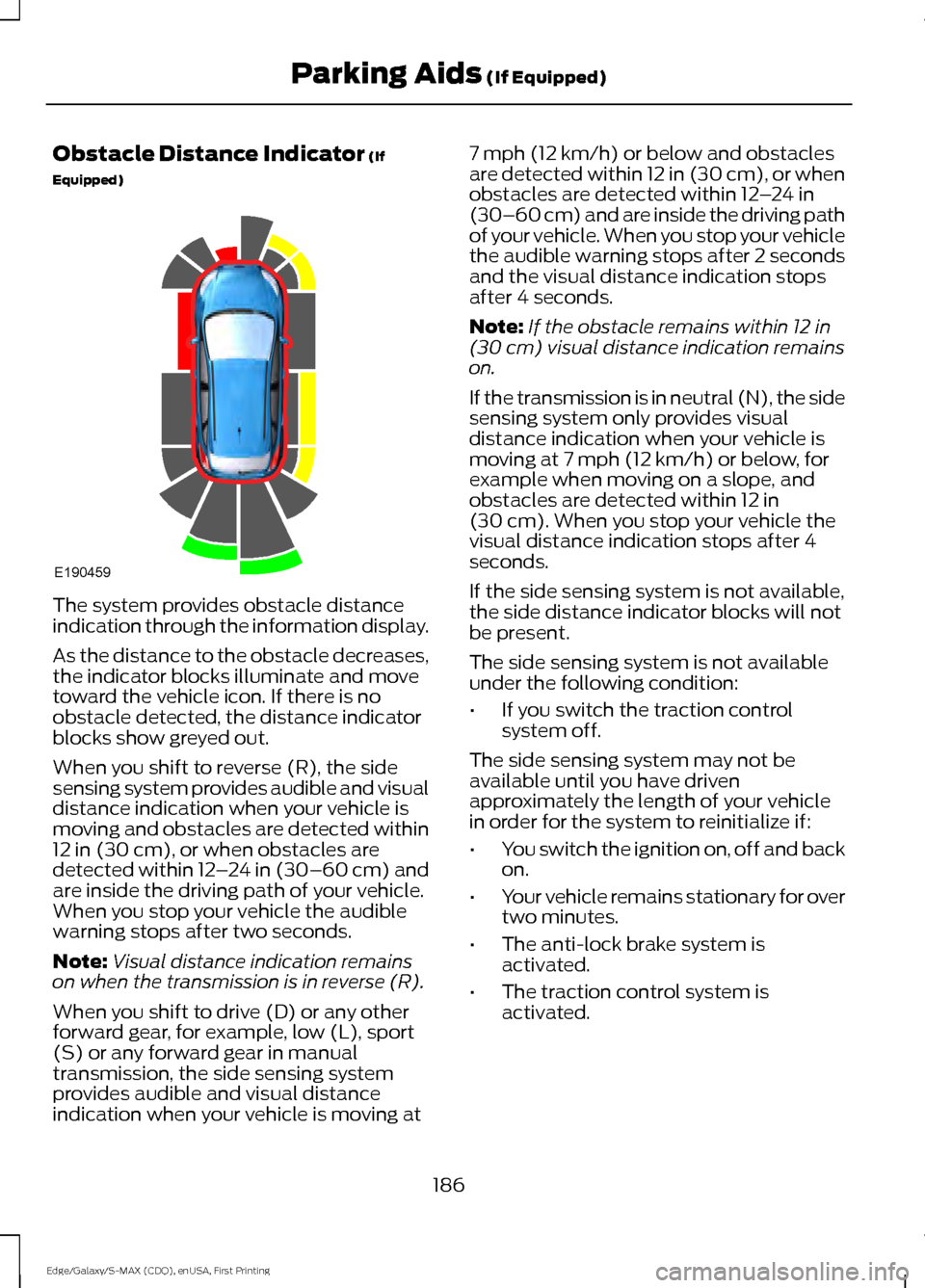
Equipped) The system provides obstacle distance
indication through the information display.
As the distance to the obstacle decreases,
the indicator blocks illuminate and move
toward the vehicle icon. If there is no
obstacle detected, the distance indicator
blocks show greyed out.
When you shift to reverse (R), the side
sensing system provides audible and visual
distance indication when your vehicle is
moving and obstacles are detected within
12 in (30 cm)
, or when obstacles are
detected within 12 –24 in (30–60 cm) and
are inside the driving path of your vehicle.
When you stop your vehicle the audible
warning stops after two seconds.
Note: Visual distance indication remains
on when the transmission is in reverse (R).
When you shift to drive (D) or any other
forward gear, for example, low (L), sport
(S) or any forward gear in manual
transmission, the side sensing system
provides audible and visual distance
indication when your vehicle is moving at 7 mph (12 km/h)
or below and obstacles
are detected within 12 in (30 cm), or when
obstacles are detected within
12 –24 in
(30–60 cm) and are inside the driving path
of your vehicle. When you stop your vehicle
the audible warning stops after 2 seconds
and the visual distance indication stops
after 4 seconds.
Note: If the obstacle remains within
12 in
(30 cm) visual distance indication remains
on.
If the transmission is in neutral (N), the side
sensing system only provides visual
distance indication when your vehicle is
moving at
7 mph (12 km/h) or below, for
example when moving on a slope, and
obstacles are detected within
12 in
(30 cm). When you stop your vehicle the
visual distance indication stops after 4
seconds.
If the side sensing system is not available,
the side distance indicator blocks will not
be present.
The side sensing system is not available
under the following condition:
• If you switch the traction control
system off.
The side sensing system may not be
available until you have driven
approximately the length of your vehicle
in order for the system to reinitialize if:
• You switch the ignition on, off and back
on.
• Your vehicle remains stationary for over
two minutes.
• The anti-lock brake system is
activated.
• The traction control system is
activated.
186
Edge/Galaxy/S-MAX (CDQ), enUSA, First Printing Parking Aids
(If Equipped)E190459
Page 194 of 508
The system determines the clearance to
the front and rear of your vehicle and
automatically steers your vehicle out of a
parallel parking space (hands-free) while
you control the accelerator, gearshift and
brakes. The system visually and audibly
guides you to enter traffic.
After the system has directed your vehicle
past the adjacent vehicle or object, it
guides you to take control of the steering
to complete the exit from the parking spot.
The system may not function correctly if
something passes between the front
bumper and the parking space (a
pedestrian or cyclist) or if the edge of the
neighboring parked vehicle is high off the
ground (for example, a bus, tow truck or
flatbed truck).
Note:
If the clearance in front of your
vehicle allows easy departure, the Park Out
Assist feature might not be available.
Note: You are responsible for controlling
your vehicle and making sure the path is
clear prior to pulling into traffic.
Note: This system is not intended to assist
in exiting perpendicular parking spaces,
damages to your vehicle may occur.
Note: If your vehicle speed exceeds 6 mph
(9 km/h) or the maneuver is interrupted
(driver input), the system switches off and
you need to take full control of your vehicle. Deactivating the Active Park
Assist Feature
Manually deactivate the system by:
•
Pressing the active park assist button
twice.
• Grabbing the steering wheel during an
active maneuver.
• Driving above approximately
22 mph
(35 km/h) for 30 seconds during an
active park search.
• Driving above
6 mph (9 km/h) during
automatic steering.
• Switching off the traction control
system.
Certain vehicle conditions can also
deactivate the system, such as:
• Traction control has activated.
• There is an anti-lock brake system
activation or failure.
If a problem occurs with the system, a
warning message displays accompanied
by a tone. Occasional system messages
may occur in normal operation. For
recurring or frequent system faults, contact
an authorized dealer to have your vehicle
serviced.
Troubleshooting the System The system does not look for a space
The traction control system may be off.
The transmission is in reverse ( R). Your vehicle must be moving forward to be able to
detect a parking space.
191
Edge/Galaxy/S-MAX (CDQ), enUSA, First Printing Parking Aids
(If Equipped)
Page 198 of 508
Always use caution while reversing.
Objects in the red zone are closest to your
vehicle and objects in the green zone are
farther away. Objects are getting closer to
your vehicle as they move from the green
zone to the yellow or red zones. Use the
side view mirrors and rear view mirror to
get better coverage on both sides and rear
of the vehicle.
Manual Zoom
WARNING
When manual zoom is on, the full
area behind your vehicle may not
show. Be aware of your surroundings
when using the manual zoom feature. Note:
Manual zoom is only available when
the transmission is in reverse (R).
Note: When you enable manual zoom, only
the centerline is shown.
Selectable settings for this feature are
Zoom in (+) and Zoom out (-). Press the
symbol in the camera screen to change the
view. The default setting is Zoom OFF.
This allows you to get a closer view of an
object behind your vehicle. The zoomed
image keeps the bumper in the image to
provide a reference. The zoom is only
active while the transmission is in reverse
(R).
Camera System Settings
To access any of the rear view camera
system settings, make the following
selections in the multifunctional display
when the transmission is not in reverse (R): Main Menu
SettingsVehicle
Camera Settings Enhanced Park Aids or Park Pilot
Selectable settings for this feature are ON
and OFF.
The system uses red, yellow and green
highlights that appear on top of the video
image when any of the sensing systems
detect an object.
Rear Camera Delay
Selectable settings for this feature are ON
and OFF.
The default setting for the rear camera
delay is OFF.
When shifting the transmission out of
reverse (R) and into any gear other than
park (P), the camera image remains in the
display until:
•
Your vehicle speed sufficiently
increases.
• You shift your vehicle into park (P).
• 10 seconds of time elapse.
195
Edge/Galaxy/S-MAX (CDQ), enUSA, First Printing Parking Aids (If Equipped)
Page 212 of 508
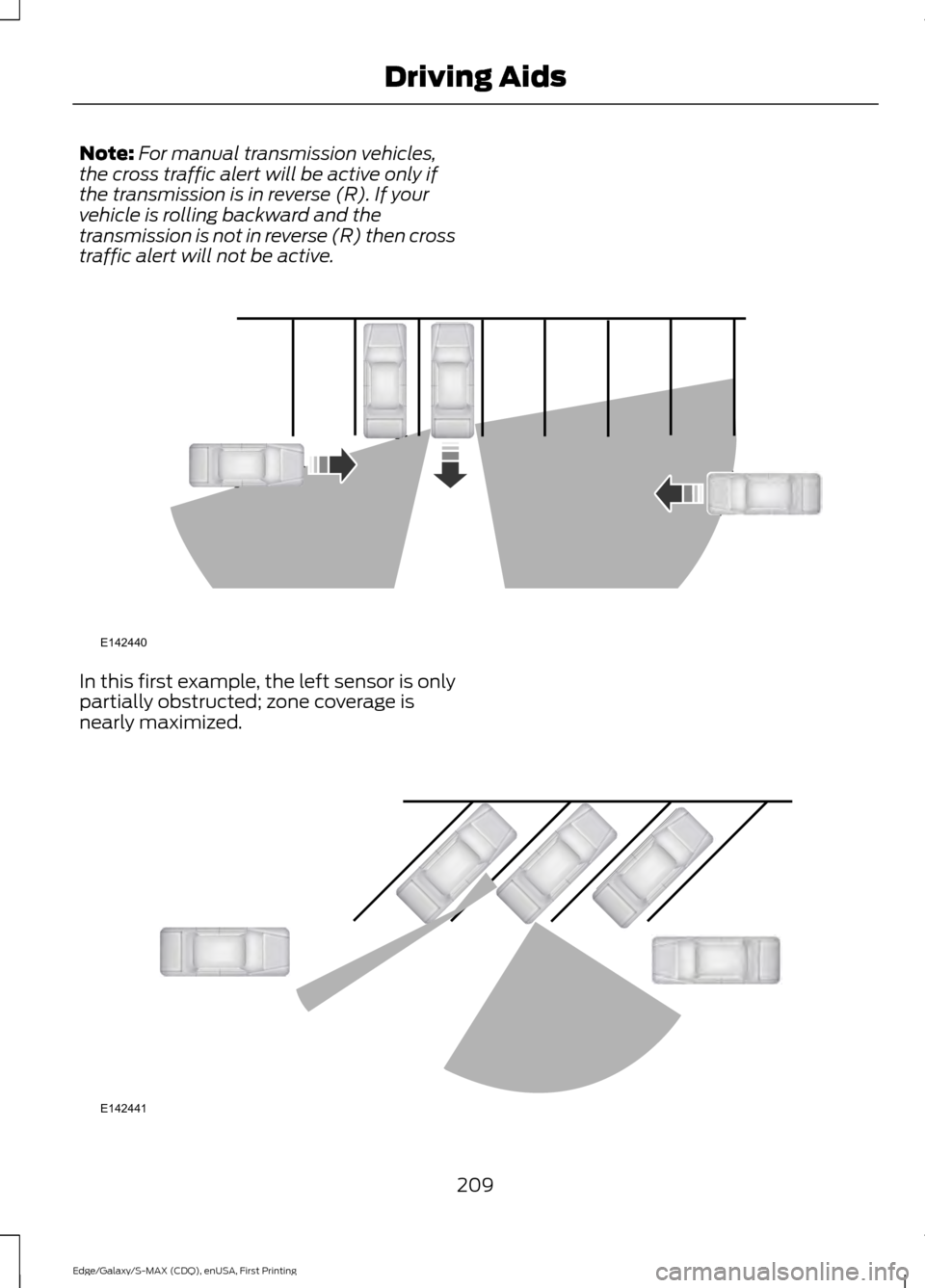
Note:
For manual transmission vehicles,
the cross traffic alert will be active only if
the transmission is in reverse (R). If your
vehicle is rolling backward and the
transmission is not in reverse (R) then cross
traffic alert will not be active. In this first example, the left sensor is only
partially obstructed; zone coverage is
nearly maximized.
209
Edge/Galaxy/S-MAX (CDQ), enUSA, First Printing Driving AidsE142440 E142441
Page 233 of 508
Trailer lamps are required on most towed
vehicles. Make sure all running lights, brake
lights, turn signals and hazard lights are
working.
Before Towing a Trailer
Practice turning, stopping and backing-up
to get the feel of your vehicle-trailer
combination before starting on a trip.
When turning, make wider turns so the
trailer wheels clear curbs and other
obstacles.
When Towing a Trailer
•
Do not drive faster than 70 mph (113
km/h) during the first 500 miles (800
kilometers).
• Do not make full-throttle starts.
• Check your hitch, electrical connections
and trailer wheel lug nuts thoroughly
after you have traveled 50 miles (80
kilometers).
• When stopped in congested or heavy
traffic during hot weather, place the
gearshift in position P (automatic
transmission) or neutral (manual
transmission) to aid engine and
transmission cooling and to help A/C
performance.
• Turn off the speed control with heavy
loads or in hilly terrain. The speed
control may turn off automatically
when you are towing on long, steep
grades.
• Shift to a lower gear when driving down
a long or steep hill. Do not apply the
brakes continuously, as they may
overheat and become less effective.
• If your transmission is equipped with a
Grade Assist or Tow/Haul feature, use
this feature when towing. This provides
engine braking and helps eliminate
excessive transmission shifting for
optimum fuel economy and
transmission cooling. •
Allow more distance for stopping with
a trailer attached. Anticipate stops and
brake gradually.
• Avoid parking on a grade. However, if
you must park on a grade:
1. Turn the steering wheel to point your vehicle tires away from traffic flow.
2. Set your vehicle parking brake.
3. Place the automatic transmission in position
P or manual transmission in a
low gear.
4. Place wheel chocks in front and back of the trailer wheels. (Chocks not
included with vehicle.)
Launching or Retrieving a Boat or
Personal Watercraft (PWC)
Note: Disconnect the wiring to the trailer
before
backing the trailer into the water.
Note: Reconnect the wiring to the trailer
after
removing the trailer from the water.
When backing down a ramp during boat
launching or retrieval:
• Do not allow the static water level to
rise above the bottom edge of the rear
bumper.
• Do not allow waves to break higher
than 6 inches (15 centimeters) above
the bottom edge of the rear bumper.
Exceeding these limits may allow water to
enter vehicle components:
• Causing internal damage to the
components.
• Affecting drivability, emissions, and
reliability.
Replace the rear axle lubricant anytime
the rear axle has been submerged in water.
Water may have contaminated the rear
axle lubricant, which is not normally
checked or changed unless a leak is
suspected or other axle repair is required.
230
Edge/Galaxy/S-MAX (CDQ), enUSA, First Printing Towing
Page 234 of 508
TRANSPORTING THE VEHICLE
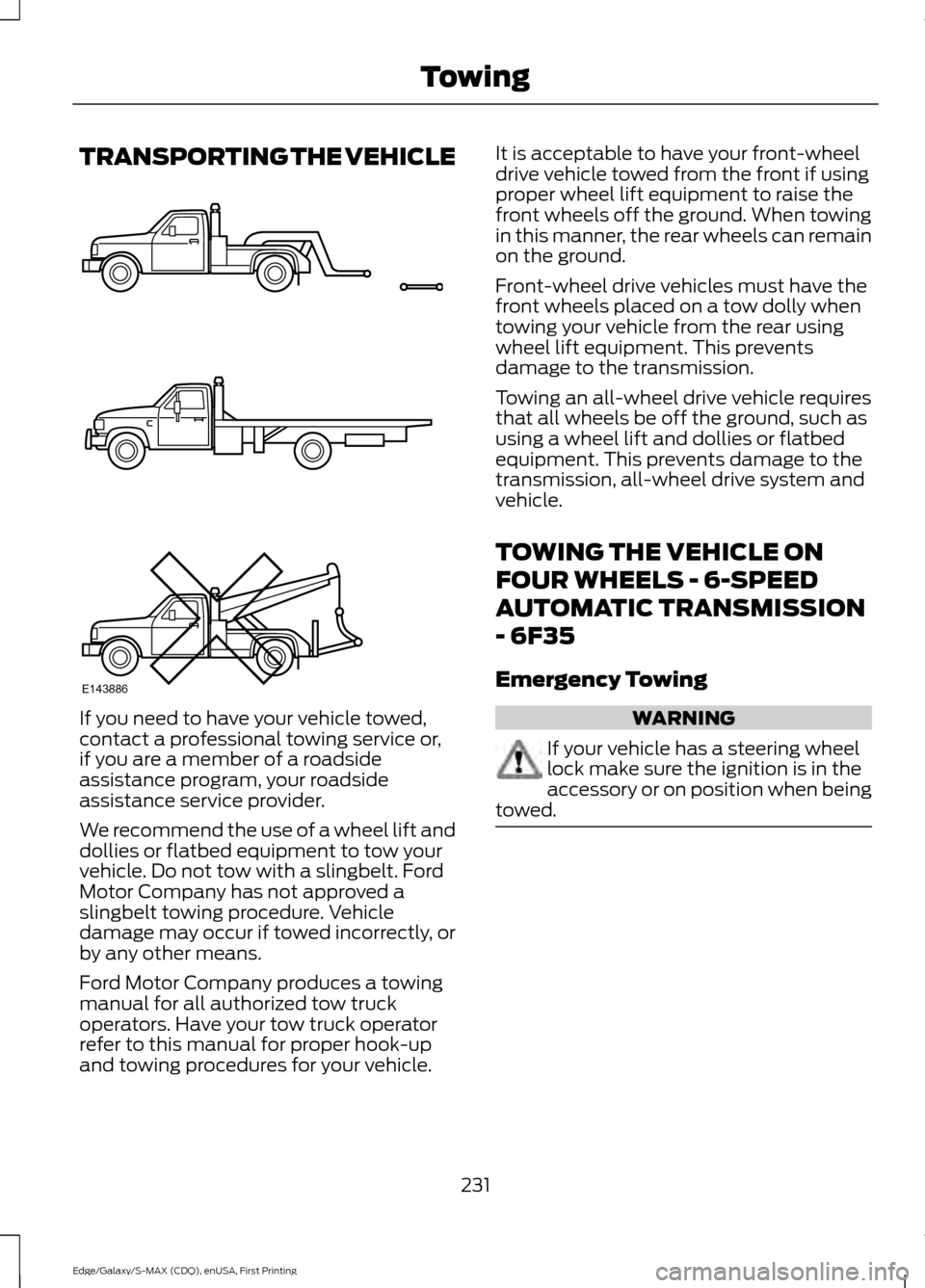
If you need to have your vehicle towed,
contact a professional towing service or,
if you are a member of a roadside
assistance program, your roadside
assistance service provider.
We recommend the use of a wheel lift and
dollies or flatbed equipment to tow your
vehicle. Do not tow with a slingbelt. Ford
Motor Company has not approved a
slingbelt towing procedure. Vehicle
damage may occur if towed incorrectly, or
by any other means.
Ford Motor Company produces a towing
manual for all authorized tow truck
operators. Have your tow truck operator
refer to this manual for proper hook-up
and towing procedures for your vehicle. It is acceptable to have your front-wheel
drive vehicle towed from the front if using
proper wheel lift equipment to raise the
front wheels off the ground. When towing
in this manner, the rear wheels can remain
on the ground.
Front-wheel drive vehicles must have the
front wheels placed on a tow dolly when
towing your vehicle from the rear using
wheel lift equipment. This prevents
damage to the transmission.
Towing an all-wheel drive vehicle requires
that all wheels be off the ground, such as
using a wheel lift and dollies or flatbed
equipment. This prevents damage to the
transmission, all-wheel drive system and
vehicle.
TOWING THE VEHICLE ON
FOUR WHEELS - 6-SPEED
AUTOMATIC TRANSMISSION
- 6F35
Emergency Towing
WARNING
If your vehicle has a steering wheel
lock make sure the ignition is in the
accessory or on position when being
towed. 231
Edge/Galaxy/S-MAX (CDQ), enUSA, First Printing TowingE143886