audio FORD EDGE 2015 2.G Owners Manual
[x] Cancel search | Manufacturer: FORD, Model Year: 2015, Model line: EDGE, Model: FORD EDGE 2015 2.GPages: 508, PDF Size: 6.2 MB
Page 5 of 508
Audio Control...................................................75
Audio Control...................................................76
Voice Control....................................................76
Cruise Control
..................................................76
Information Display Control........................77
Heated Steering Wheel
................................77
Wipers and Washers
Windshield Wipers
.........................................78
Autowipers........................................................78
Windshield Washers
.....................................79
Rear Window Wiper and Washers..........80
Lighting
General Information
.......................................81
Lighting Control
...............................................81
Autolamps........................................................82
Instrument Lighting Dimmer.....................83
Headlamp Exit Delay....................................83
Daytime Running Lamps
.............................83
Automatic High Beam Control.................84
Direction Indicators
.......................................85
Interior Lamps
.................................................85
Ambient Lighting
............................................87
Windows and Mirrors
Power Windows.............................................88
Global Opening
..............................................88
Exterior Mirrors................................................89
Interior Mirror...................................................90
Sun Visors
..........................................................91
Moonroof............................................................91
Instrument Cluster
Gauges...............................................................93
Warning Lamps and Indicators
................95
Audible Warnings and Indicators
.............98 Information Displays
General Information...................................100
Information Messages...............................109
Climate Control
Manual Climate Control -
Vehicles With:
Electronic Manual Temperature
Control (EMTC).........................................124
Automatic Climate Control -
Vehicles
With: Dual Automatic Temperature
Control (DATC)
.........................................126
Automatic Climate Control -
Vehicles
With: Dual Automatic Temperature
Control (DATC)/
Sony Audio
System..........................................................127
Hints on Controlling the Interior Climate.........................................................129
Heated Windows and Mirrors...................131
Cabin Air Filter.................................................131
Remote Start
...................................................131
Seats
Sitting in the Correct Position..................133
Head Restraints
.............................................133
Manual Seats
.................................................135
Power Seats....................................................135
Memory Function
..........................................137
Rear Seats.......................................................139
Heated Seats
.................................................140
Climate Controlled Seats...........................141
Rear Seat Armrest........................................142
Universal Garage Door Opener
Universal Garage Door Opener...............143
Auxiliary Power Points
Auxiliary Power Points................................147
Storage Compartments
Center Console..............................................149
2
Edge/Galaxy/S-MAX (CDQ), enUSA, First Printing Table of Contents
Page 8 of 508
Cleaning the Instrument Panel and
Instrument Cluster Lens........................281
Cleaning Leather Seats.............................282
Repairing Minor Paint Damage..............283
Cleaning the Alloy Wheels.......................283
Vehicle Storage............................................283
Wheels and Tires
General Information...................................286
Temporary Mobility Kit..............................288
Tire Care
..........................................................294
Using Summer Tires.....................................311
Using Snow Chains.......................................311
Tire Pressure Monitoring System............312
Changing a Road Wheel............................315
Technical Specifications............................319
Capacities and Specific- ations
Engine Specifications -
2.0L
EcoBoost™.................................................321
Engine Specifications -
2.7L
EcoBoost™.................................................321
Engine Specifications - 3.5L....................322
Motorcraft Parts - 2.0L EcoBoost™......323
Motorcraft Parts -
2.7L EcoBoost™......324
Motorcraft Parts -
3.5L..............................325
Vehicle Identification Number................326
Vehicle Certification Label.......................326
Transmission Code Designation.............327
Capacities and Specifications -
2.0L
EcoBoost™................................................328
Capacities and Specifications -
2.7L
EcoBoost™.................................................331
Capacities and Specifications -
3.5L....335
Audio System
General Information...................................339
Audio Unit - Vehicles With: AM/FM/CD/ SYNC...........................................................340 Audio Unit - Vehicles With: Premium AM/
FM/CD.........................................................343
Audio Unit - Vehicles With: Sony AM/FM/ CD..................................................................344
Digital Radio
..................................................347
Satellite Radio..............................................349
Audio Input Jack
...........................................352
USB Port..........................................................352
Media Hub......................................................353
SYNC™
General Information...................................354
Using Voice Recognition
...........................356
Using SYNC™ With Your Phone
............358
SYNC™ Applications and Services
......368
Using SYNC™ With Your Media Player............................................................372
SYNC™ Troubleshooting
..........................379
MyFord Touch ™
General Information...................................388
Settings...........................................................397
Entertainment..............................................407
Phone...............................................................424
Information....................................................430
Climate............................................................439
Navigation......................................................442
Accessories
Accessories.....................................................451
Extended Service Plan (ESP)
Extended Service Plan (ESP).................453
Scheduled Maintenance
General Maintenance Information
.......455
Normal Scheduled Maintenance
..........458
Special Operating Conditions Scheduled Maintenance..............................................461
5
Edge/Galaxy/S-MAX (CDQ), enUSA, First Printing Table of Contents
Page 57 of 508
PRINCIPLE OF OPERATION
MyKey allows you to program keys with
restricted driving modes to promote good
driving habits. All but one of the keys can
be activated with these restricted modes.
Any keys that remain unprogrammed are
referred to as administrator keys or admin
keys. They can be used to:
•
Create a MyKey.
• Program configurable MyKey settings.
• Clear all MyKey features.
When you have created a MyKey, you can
access the following information by using
the information display to determine:
• How many admin keys and MyKeys are
programmed to your vehicle.
• The total distance your vehicle traveled
with a MyKey.
Note: Switch the vehicle on to use the
system.
Note: All MyKeys are programmed to the
same settings. You cannot program them
individually.
Note: For vehicles equipped with
push-button start, when both a MyKey and
an admin remote transmitter are present,
the admin remote transmitter will be
recognized by the vehicle while switching
the vehicle on to start the vehicle. Non-configurable Settings
The following settings cannot be changed
by an admin key user:
•
Safety belt reminder. You cannot
disable this feature. The audio system
will mute when the front seat
passengers’ safety belts are not
fastened.
• Early low fuel or charge. The low-fuel
or low charge warning activates earlier,
giving the MyKey user more time to
refuel or recharge.
• Driver assist features, if equipped on
your vehicle, are forced on: parking aid
and Blind Spot Information System
(BLIS) with cross traffic alert.
• Satellite radio adult content
restrictions, if equipped on your vehicle.
Configurable Settings
With an admin key, you can configure
certain MyKey settings when you first
create a MyKey and before you recycle the
key or restart the vehicle. You can also
change the settings afterward with an
admin key.
• A vehicle speed limit can be set.
Warnings will be shown in the display
followed by an audible tone when your
vehicle reaches the set speed. You
cannot override the set speed by fully
depressing the accelerator pedal or by
setting cruise control. WARNING
Do not set MyKey maximum speed
limit to a limit that will prevent the
driver from maintaining a safe speed
considering posted speed limits and
prevailing road conditions. The driver is
always responsible to drive in accordance
with local laws and prevailing conditions.
Failure to do so could result in accident or
injury. 54
Edge/Galaxy/S-MAX (CDQ), enUSA, First Printing MyKey
™
Page 58 of 508
•
Various vehicle speed minders can be
set. Once you select a speed, it will be
shown in the display, followed by an
audible tone when the preselected
vehicle speed is exceeded.
• Audio system maximum volume of
45%. A message will be shown in the
display when you attempt to exceed
the limited volume. Also, the
speed-sensitive or compensated
automatic volume control will be
disabled.
• Always on setting. When this is
selected, you will not be able to switch
off Advance Trac or traction control,
911 Assist or Emergency Assist, or the
do not disturb feature (if your vehicle
is equipped with these features).
CREATING A MYKEY
Use the information display to create a
MyKey:
1. Insert the key you want to program into
the ignition. If your vehicle is equipped with
a push-button start, place the intelligent
access key fob into the backup slot. The
location of your backup slot is in another
chapter. See Starting and Stopping the
Engine (page 150).
2. Switch the ignition on.
3. Access the main menu on the
information display controls, and select
Settings
then MyKey by pressing OK or
the > button.
4. Press
OK or the > button to select
Create MyKey.
5. When prompted, hold the
OK button
until you see a message informing you to
label this key as a MyKey. The key will be
restricted at the next start. MyKey is successfully created. Make sure
you label it so you can distinguish it from
the admin keys.
You can also program configurable
settings for the key(s). See
Programming/Changing Configurable
Settings
.
Programming/Changing
Configurable Settings
Use the information display to access your
configurable MyKey settings.
1. Switch the ignition on using an admin key or fob.
2. Access the main menu on the information display controls, and select
Settings
, then MyKey by pressing OK
or > button.
3. Use the arrow buttons to get to a feature.
4. Press
OK or > to make a selection.
Note: You can clear or change your MyKey
settings at any time during the same key
cycle as you created the MyKey. Once you
have switched the vehicle off, however, you
will need an admin key to change or clear
your MyKey settings.
CLEARING ALL MYKEYS
You can clear or change your MyKey
settings using the information display
control on the steering wheel. See
Information Displays
(page 100).
Switch the ignition on using an admin key
or fob.
55
Edge/Galaxy/S-MAX (CDQ), enUSA, First Printing MyKey
™
Page 78 of 508
End of Travel Position
The steering column sets a stopping
position just short of the end of the column
position to prevent damage to the steering
column. A new stopping position sets if the
steering column encounters an object
when tilting or telescoping.
To reset the steering column to its normal
stopping position:
1. Confirm there is nothing obstructing
the motion of the steering column.
2. Press and hold the steering column control until the steering column stops
moving.
3. Press the steering column control again. The steering column may begin
to move again.
4. When the steering column stops, continue holding the control for an
additional few seconds.
5. Repeat for each direction as necessary.
A new stopping position is set. The next
time you tilt or telescope the steering
column, it will stop just short of the end of
the column position.
Memory Feature
You can save and recall the steering
column position with the memory function.
See Memory Function (page 137).
Note: Pressing the adjustment control
during memory recall cancels the operation.
Easy Entry and Exit Feature
When you switch the ignition off, the
steering column will move to allow extra
room to exit your vehicle. The column will
return to the previous setting when you
switch the ignition on. You can enable or
disable this feature in the information
display. See Information Displays (page
100
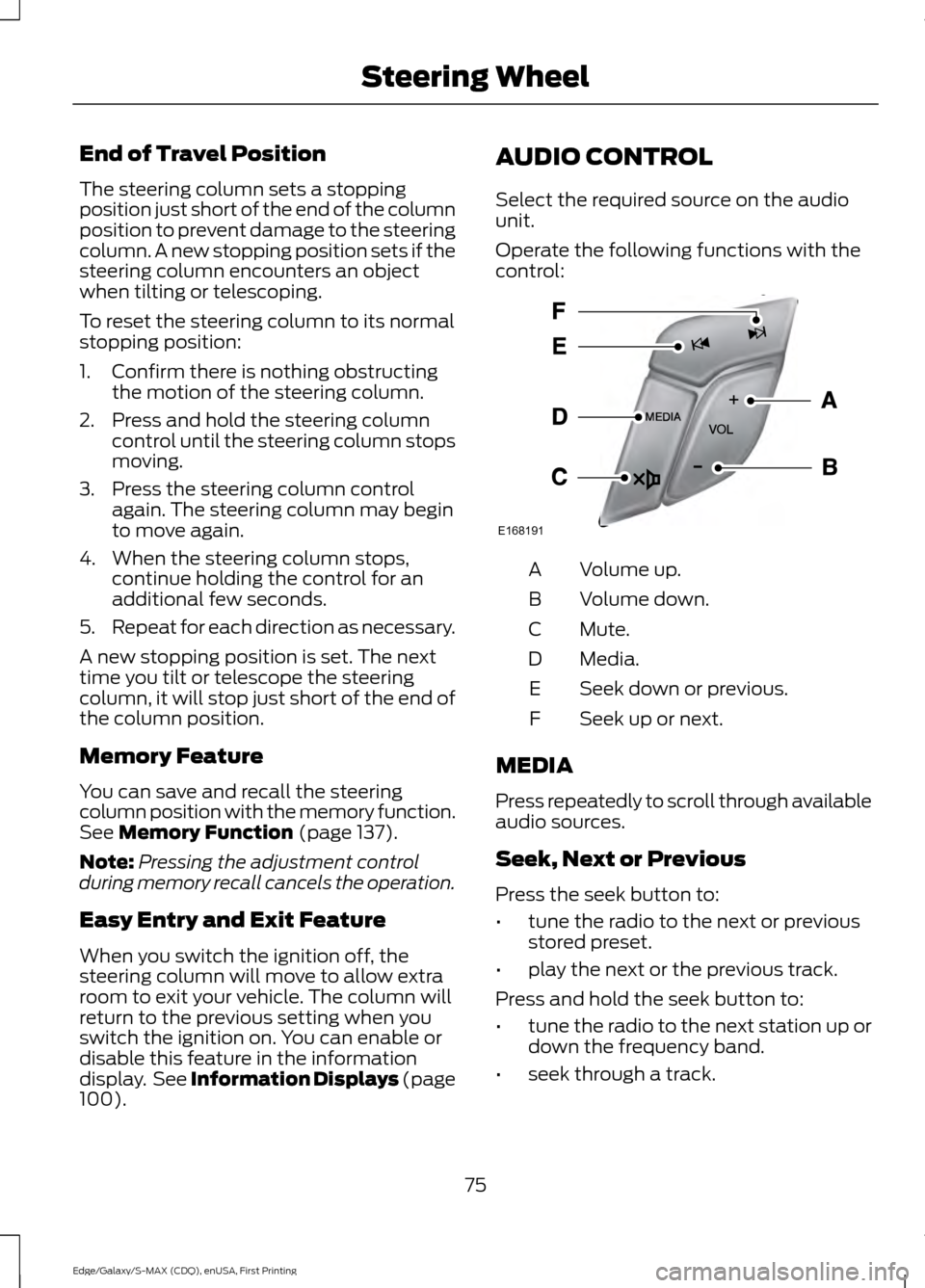
). AUDIO CONTROL
Select the required source on the audio
unit.
Operate the following functions with the
control:
Volume up.
A
Volume down.
B
Mute.
C
Media.
D
Seek down or previous.
E
Seek up or next.
F
MEDIA
Press repeatedly to scroll through available
audio sources.
Seek, Next or Previous
Press the seek button to:
• tune the radio to the next or previous
stored preset.
• play the next or the previous track.
Press and hold the seek button to:
• tune the radio to the next station up or
down the frequency band.
• seek through a track.
75
Edge/Galaxy/S-MAX (CDQ), enUSA, First Printing Steering WheelE168191
Page 79 of 508
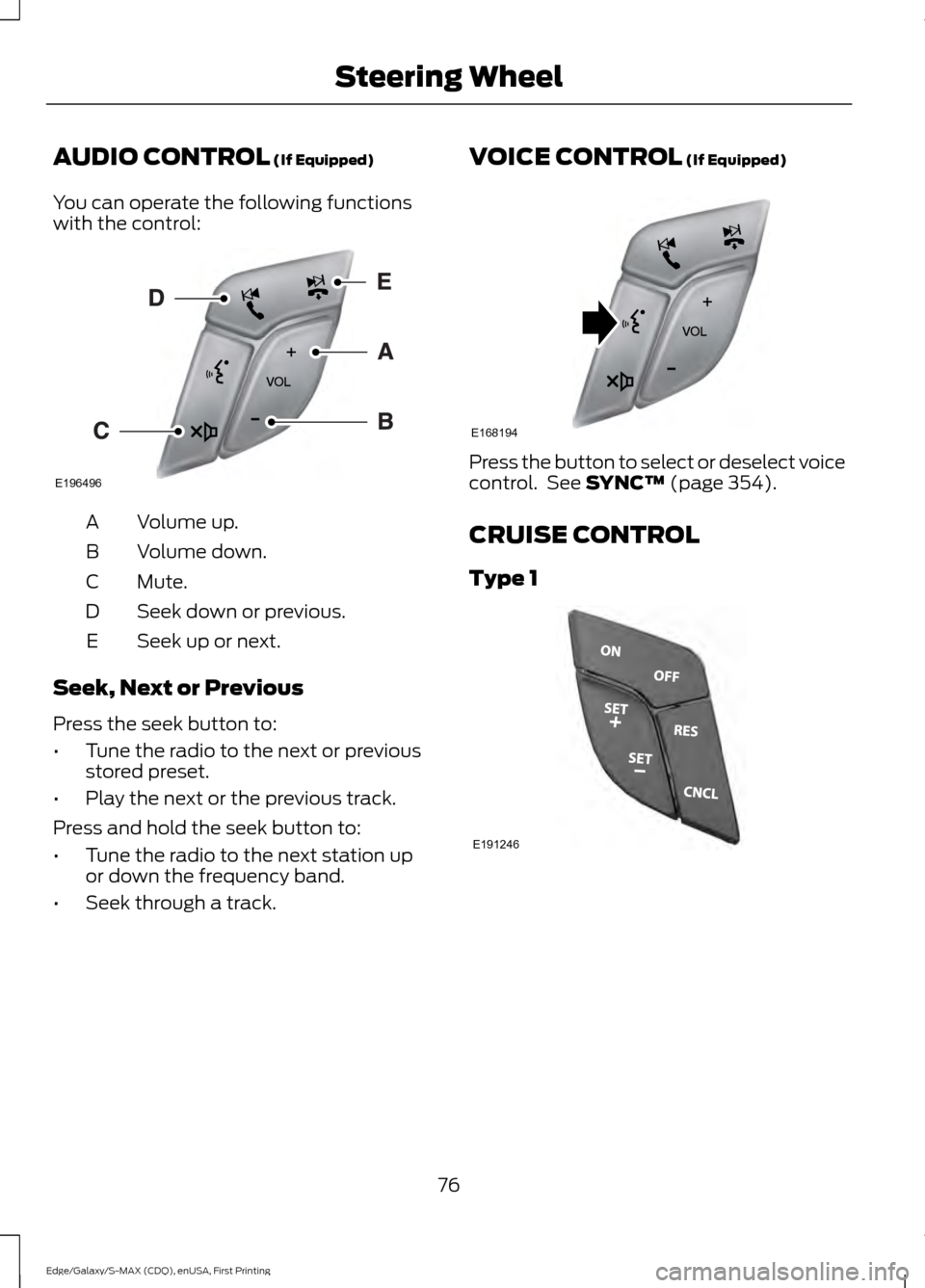
AUDIO CONTROL (If Equipped)
You can operate the following functions
with the control: Volume up.
A
Volume down.
B
Mute.
C
Seek down or previous.
D
Seek up or next.
E
Seek, Next or Previous
Press the seek button to:
• Tune the radio to the next or previous
stored preset.
• Play the next or the previous track.
Press and hold the seek button to:
• Tune the radio to the next station up
or down the frequency band.
• Seek through a track. VOICE CONTROL (If Equipped) Press the button to select or deselect voice
control. See
SYNC™ (page 354).
CRUISE CONTROL
Type 1 76
Edge/Galaxy/S-MAX (CDQ), enUSA, First Printing Steering WheelE196496 E168194 E191246
Page 80 of 508
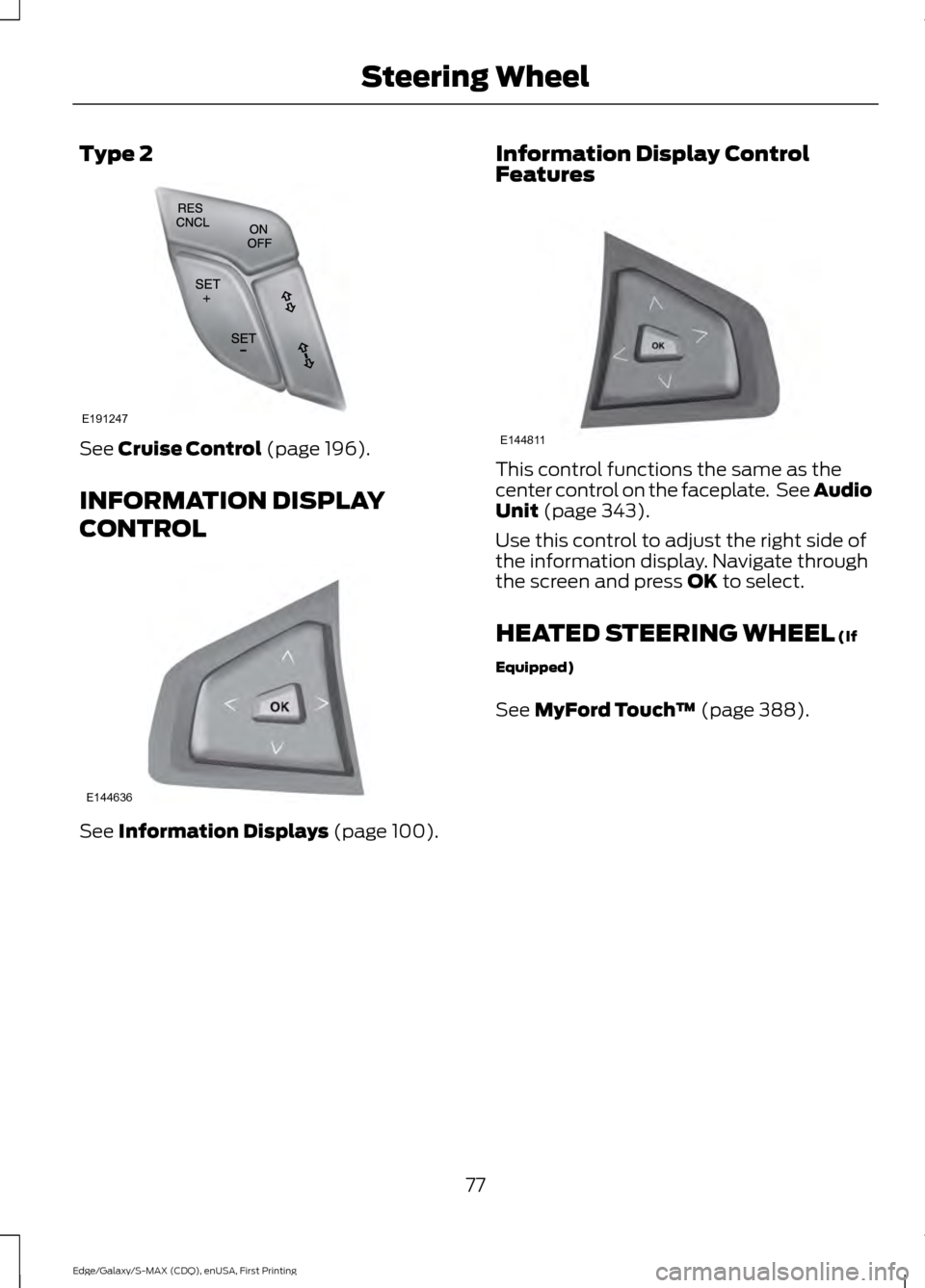
Type 2
See Cruise Control (page 196).
INFORMATION DISPLAY
CONTROL See
Information Displays (page 100). Information Display Control
Features This control functions the same as the
center control on the faceplate. See Audio
Unit
(page 343).
Use this control to adjust the right side of
the information display. Navigate through
the screen and press
OK to select.
HEATED STEERING WHEEL
(If
Equipped)
See
MyFord Touch ™ (page 388).
77
Edge/Galaxy/S-MAX (CDQ), enUSA, First Printing Steering WheelE191247 E144636 E144811
Page 121 of 508
Action
Message
The brake system needs servicing. Stop your vehicle in a safeplace. Contact an authorized dealer.
Check Brake System
The engine coolant temperature is excessively high.
Engine Coolant Overtem-
perature
The engine has reduced power to help reduce high engine temperature.
Power Reduced to
Lower Engine Temp
Your vehicle is still in Transport or Factory mode. This maynot allow some features to operate properly. Contact an authorized dealer.
Transport / Factory
Mode
The powertrain needs service due to a powertrain malfunction.
See Manual
MyKey Action
Message
You cannot program a MyKey.
MyKey Not Created
MyKey is active.
MyKey Active Drive
Safely
When switching on your vehicle and MyKey is in use, displaysthat the MyKey speed limit is on.
Speed Limited to XX
MPH/km/h
MyKey is in use, the MyKey speed limit is on and your vehiclespeed is approaching 80 mph (130 km/h).
Near Vehicle Top Speed
You have reached the speed limit set for your MyKey.
Vehicle at Top Speed of
MyKey Setting
You have an active MyKey with a programmed set speed limit.
Check Speed Drive
Safely
Belt-Minder turns on with a MyKey in use.
Buckle Up to Unmute
Audio
With a MyKey in use, AdvanceTrac turns on.
AdvanceTrac On -
MyKey Setting
118
Edge/Galaxy/S-MAX (CDQ), enUSA, First Printing Information Displays
Page 130 of 508
A/C: Press the button to switch the air conditioning on or off. Air conditioning
cools your vehicle using outside air. To improve the time to reach a comfortable
temperature in hot weather, drive with the windows open until you feel cold air
through the air vents.
G
Note: In certain conditions (for example, maximum defrost), the air conditioning
compressor may continue to operate even though the air conditioning is
switched off.
Power:
Press the button to switch the system on and off. When the system is
off, it prevents outside air from entering the vehicle.
H
AUTO:
Press the button to switch on automatic operation. Adjust to select the
desired temperature. Fan speed, air distribution, air conditioning operation, and
outside or recirculated air are automatically adjusted to heat or cool the vehicle
to maintain the desired temperature. You can also turn off dual zone mode by
pressing and holding the button for greater than two seconds.
I
Heated rear window:
Press the button to switch the heated rear window on
and off. See Heated Windows and Mirrors (page 131).
J
MAX Defrost: Press the button to switch on defrost. Outside air flows through
the windshield vents, air conditioning automatically turns on, and fan
automatically adjusts to the highest speed. You can also use this setting to
defrost and clear the windshield of a thin covering of ice. The heated rear window
also automatically turns on when you select maximum defrost.
K
Note:
To prevent window fogging, you cannot select recirculated air when
maximum defrost is on.
Defrost: Select to distribute air through the windshield air vents. Air distribution
to the instrument panel and footwell vents turns off. You can also use this
setting to defrost and clear the windshield of a thin covering of ice.
L
AUTOMATIC CLIMATE
CONTROL - VEHICLES WITH:
DUAL AUTOMATIC
TEMPERATURE CONTROL
(DATC)/SONY AUDIO SYSTEM
Note: You can switch temperature units
between Fahrenheit and Celsius. See
Information Displays
(page 100).
127
Edge/Galaxy/S-MAX (CDQ), enUSA, First Printing Climate Control
Page 187 of 508
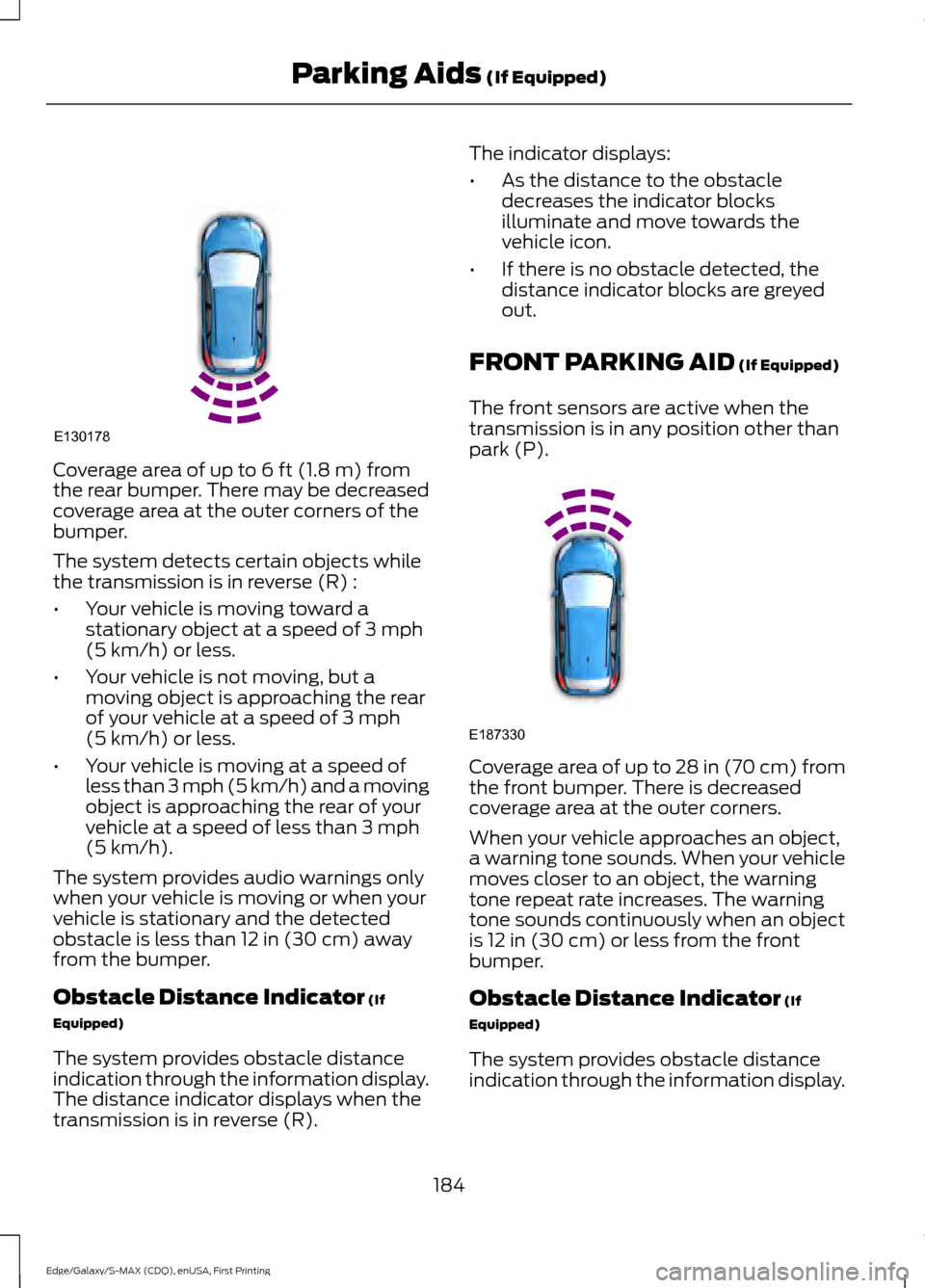
Coverage area of up to 6 ft (1.8 m) from
the rear bumper. There may be decreased
coverage area at the outer corners of the
bumper.
The system detects certain objects while
the transmission is in reverse (R) :
• Your vehicle is moving toward a
stationary object at a speed of
3 mph
(5 km/h) or less.
• Your vehicle is not moving, but a
moving object is approaching the rear
of your vehicle at a speed of
3 mph
(5 km/h) or less.
• Your vehicle is moving at a speed of
less than 3 mph (5 km/h) and a moving
object is approaching the rear of your
vehicle at a speed of less than
3 mph
(5 km/h).
The system provides audio warnings only
when your vehicle is moving or when your
vehicle is stationary and the detected
obstacle is less than
12 in (30 cm) away
from the bumper.
Obstacle Distance Indicator
(If
Equipped)
The system provides obstacle distance
indication through the information display.
The distance indicator displays when the
transmission is in reverse (R). The indicator displays:
•
As the distance to the obstacle
decreases the indicator blocks
illuminate and move towards the
vehicle icon.
• If there is no obstacle detected, the
distance indicator blocks are greyed
out.
FRONT PARKING AID
(If Equipped)
The front sensors are active when the
transmission is in any position other than
park (P). Coverage area of up to
28 in (70 cm) from
the front bumper. There is decreased
coverage area at the outer corners.
When your vehicle approaches an object,
a warning tone sounds. When your vehicle
moves closer to an object, the warning
tone repeat rate increases. The warning
tone sounds continuously when an object
is
12 in (30 cm) or less from the front
bumper.
Obstacle Distance Indicator
(If
Equipped)
The system provides obstacle distance
indication through the information display.
184
Edge/Galaxy/S-MAX (CDQ), enUSA, First Printing Parking Aids
(If Equipped)E130178 E187330