power steering FORD EDGE 2021 Owners Manual
[x] Cancel search | Manufacturer: FORD, Model Year: 2021, Model line: EDGE, Model: FORD EDGE 2021Pages: 500, PDF Size: 8.52 MB
Page 6 of 500

Changing the Remote Control Battery
........................................................................\
..62
Replacing a Lost Key or Remote Control ........................................................................\
..
63
Programming the Remote Control ........
64
Keys and Remote Controls – Troubleshooting ........................................
65
MyKey ™
What Is MyKey ...............................................
66
MyKey Settings ..............................................
66
Creating a MyKey ...........................................
67
Programming a MyKey ................................
67
Clearing All MyKeys ......................................
67
Checking MyKey System Status .............
68
Using MyKey With Remote Start Systems ........................................................
68
MyKey – Troubleshooting ..........................
68
Doors and Locks
Operating the Doors From Outside Your Vehicle ...........................................................
70
Operating the Doors From Inside Your Vehicle ............................................................
71
Autounlock ........................................................
71
Autolock ............................................................
72
Mislock ...............................................................
72
Doors and Locks Audible Warnings ........
72
Doors and Locks – Troubleshooting ........................................................................\
...
72
Keyless Entry
Keyless Entry Limitations ...........................
74
Keyless Entry Settings .................................
74
Using Keyless Entry .......................................
74
Keyless Entry – Troubleshooting .............
75
Keyless Entry Keypad
What Is the Keyless Entry Keypad ..........
76
Keyless Entry Keypad Limitations ...........
76
Locating the Keyless Entry Keypad ........
76Keyless Entry Keypad Master Access
Code ...............................................................
76
Keyless Entry Keypad Personal Access Codes .............................................................
77
Using the Keyless Entry Keypad ..............
78
Keyless Entry Keypad – Troubleshooting ........................................................................\
...
78
Easy Entry and Exit
How Does Easy Entry and Exit Work ........................................................................\
...
79
Switching Easy Entry and Exit On and Off ...................................................................
79
Liftgate - Vehicles With: Manual Liftgate
Opening the Liftgate ...................................
80
Closing the Liftgate ......................................
80
Liftgate - Vehicles With: Power Liftgate
Liftgate Precautions .....................................
82
Opening the Liftgate ....................................
82
Setting the Liftgate Opening Height ........................................................................\
..
84
Closing the Liftgate ......................................
84
Stopping the Liftgate Movement ...........
86
Liftgate Obstacle Detection ......................
87
Liftgate – Troubleshooting ........................
87
Security
Passive Anti-Theft System .......................
89
Anti-Theft Alarm System ..........................
89
Anti-Theft Alarm System Settings ........
90
Security – Troubleshooting ......................
90
Steering Wheel
Adjusting the Steering Wheel - Vehicles With: Manual Adjustable Steering
Column .........................................................
92
2
2021 Edge (CDQ) Canada/United States of America, enUSA, Edition date: 202011, First-Printing Table of Contents
Page 7 of 500
Adjusting the Steering Wheel - Vehicles
With: Power Adjustable Steering
Column .........................................................92
Resetting the Stopping Position - Vehicles With: Power Adjustable
Steering Column .......................................
93
Horn ....................................................................
93
Switching the Heated Steering Wheel On and Off ...................................................
93
Wipers and Washers
Wipers ...............................................................
94
Autowipers ......................................................
94
Switching the Rear Window Wiper On and Off ..........................................................
95
Reverse Wipe ..................................................
95
Checking the Wiper Blades .......................
95
Replacing the Front Wiper Blades ..........
95
Replacing the Rear Wiper Blades ...........
96
Washers ............................................................
96
Wipers and Washers – Troubleshooting ........................................................................\
...
97
Exterior Lighting
Exterior Lighting Control ............................
98
Headlamps ......................................................
98
Headlamps – Troubleshooting ...............
99
Autolamps .......................................................
99
Exterior Lamps .............................................
100
Automatic High Beam Control ................
101
Automatic High Beam Control – Troubleshooting ......................................
103
Adaptive Front Lighting ............................
103
Interior Lighting
Switching All of the Interior Lamps On and Off ........................................................
105
Switching the Front Interior Lamps On and Off ........................................................
105
Switching the Rear Interior Lamps On and Off ........................................................
105
Interior Lamp Function ..............................
105Adjusting the Instrument Panel Lighting
Brightness ..................................................
106
Ambient Lighting .........................................
106
Interior Lighting – Troubleshooting ......
106
Windows
Opening and Closing the Windows ......
107
Global Opening ............................................
107
Window Bounce-Back ..............................
108
Locking the Rear Window Controls ......
108
Interior Mirror
Interior Mirror Precautions .......................
109
Manually Dimming the Interior Mirror ........................................................................\
109
Auto-Dimming Interior Mirror .................
109
Exterior Mirrors
Adjusting the Exterior Mirrors ..................
110
Folding the Exterior Mirrors ......................
110
Auto-Dimming Exterior Mirror .................
110
Moonroof
Opening and Closing the Sun Shade ........................................................................\
...
111
Opening and Closing the Moonroof .......
111
Venting the Moonroof .................................
112
Moonroof Bounce-Back .............................
112
Instrument Cluster
Instrument Cluster Overview ...................
113
What Is the Tachometer ............................
113
What Is the Speedometer .........................
113
Fuel Gauge ......................................................
113
What Is the Engine Coolant Temperature Gauge ............................................................
114
What Is the Turbo Boost Gauge ..............
114
What Are the Instrument Cluster Warning Lamps .........................................
114
Instrument Cluster Warning Lamps ......
114
3
2021 Edge (CDQ) Canada/United States of America, enUSA, Edition date: 202011, First-Printing Table of Contents
Page 11 of 500

Switching Stability Control On and Off
........................................................................\
196
Stability Control Indicator ........................
196
Stability Control – Troubleshooting ......
196
Steering
Electric Power Steering .............................
197
Steering – Troubleshooting .....................
197
Parking Aids
Parking Aid Precautions ...........................
198
Switching Parking Aid On and Off ........
198
Rear Parking Aid ..........................................
199
Front Parking Aid .........................................
199
Side Parking Aid .........................................
200
Parking Aid Indicators ...............................
202
Parking Aids – Troubleshooting ............
202
Rear View Camera
What Is the Rear View Camera .............
203
Rear View Camera Precautions ............
203
Locating the Rear View Camera ...........
203
Rear View Camera Guide Lines .............
203
Rear View Camera Object Distance Indicators ..................................................
204
Rear View Camera Settings ...................
204
180 Degree Camera
What Is the 180 Degree Camera ..........
206
How Does the 180 Degree Camera Work .......................................................................
206
180 Degree Camera Precautions .........
206
180 Degree Camera Limitations ...........
206
Locating the 180 Degree Cameras ......
206
180 Degree Camera Indicators .............
206
180 Degree Camera Settings .................
206
Active Park Assist
What Is Active Park Assist ......................
208
How Does Active Park Assist Work ......
208Active Park Assist Precautions
.............
208
Switching Active Park Assist On and Off .......................................................................
208
Entering a Parallel Parking Space ........
208
Entering a Perpendicular Parking Space .......................................................................
209
Exiting a Parking Space .............................
210
Active Park Assist – Troubleshooting ........................................................................\
.
210
Cruise Control
What Is Cruise Control ...............................
212
Switching Cruise Control On and Off ........................................................................\
.
212
Setting the Cruise Control Speed ..........
212
Canceling the Set Speed ..........................
213
Resuming the Set Speed ..........................
213
Cruise Control Indicators ...........................
213
Adaptive Cruise Control
How Does Adaptive Cruise Control With Stop and Go Work ...................................
214
Adaptive Cruise Control Precautions ........................................................................\
.
214
Adaptive Cruise Control Limitations ........................................................................\
.
215
Switching Adaptive Cruise Control On and Off .........................................................
217
Adaptive Cruise Control Automatic Cancellation ...............................................
217
Setting the Adaptive Cruise Control Speed ...........................................................
217
Setting the Adaptive Cruise Control Gap ........................................................................\
.
218
Canceling the Set Speed ..........................
219
Resuming the Set Speed ..........................
219
Overriding the Set Speed .........................
219
Adaptive Cruise Control Indicators ......
220
Switching From Adaptive Cruise Control to Cruise Control .....................................
220
Lane Centering ............................................
220
7
2021 Edge (CDQ) Canada/United States of America, enUSA, Edition date: 202011, First-Printing Table of Contents
Page 24 of 500
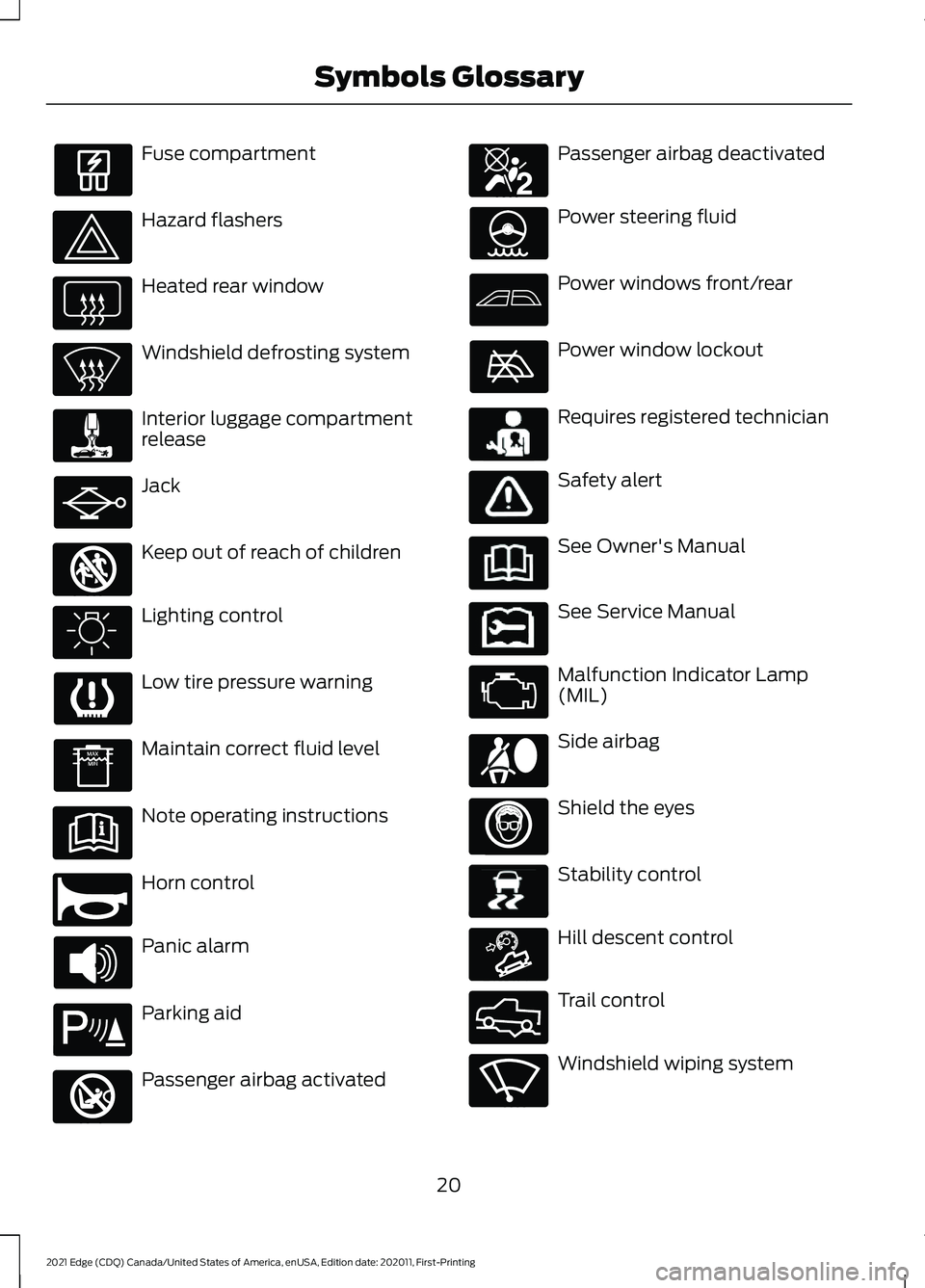
Fuse compartment
Hazard flashers
Heated rear window
Windshield defrosting system
Interior luggage compartment
release
Jack
Keep out of reach of children
Lighting control
Low tire pressure warning
Maintain correct fluid level
Note operating instructions
Horn control
Panic alarm
Parking aid
Passenger airbag activated Passenger airbag deactivated
Power steering fluid
Power windows front/rear
Power window lockout
Requires registered technician
Safety alert
See Owner's Manual
See Service Manual
Malfunction Indicator Lamp
(MIL)
Side airbag
Shield the eyes
Stability control
Hill descent control
Trail control
Windshield wiping system
20
2021 Edge (CDQ) Canada/United States of America, enUSA, Edition date: 202011, First-Printing Symbols Glossary E161353 E270945 E139213 E270849 E270850 E231159 E231158 E167012 E138639 E163171 E332910 E270969
Page 63 of 500
HOW DOES 911 ASSIST WORK
If a crash deploys an airbag, excluding knee
airbags and rear inflatable seatbelts, or
activates the fuel pump shut-off, your
vehicle may be able to contact emergency
services by dialing 911 through a paired and
connected Bluetooth-enabled phone.
Not all crashes will deploy an airbag or
activate the fuel pump shut-off. If a
connected cell phone sustains damage or
loses its connection to SYNC during a
crash, SYNC will search for and try to
connect to a previously paired cell phone.
SYNC will then attempt to call the
emergency services.
Before making the call:
•
SYNC provides about 10 seconds to
cancel the call. If you fail to cancel the
call, SYNC attempts to dial 911.
• SYNC says the following, or a similar
message: "SYNC will attempt to call
911, to cancel the call, press Cancel on
your screen or press and hold the
phone button on your steering wheel."
If you do not cancel the call and SYNC
makes a successful call a pre-recorded
message plays for the 911 operator. The
occupants in your vehicle are able to talk
with the operator. Be prepared to provide
your name, phone number and location
immediately because not all 911 systems
are capable of receiving this information
electronically.
During an emergency call the system
transmits vehicle data to the emergency
service. EMERGENCY CALL
REQUIREMENTS WARNING: Do not wait for 911
Assist to make an emergency call if you
can do it yourself. Dial emergency
services immediately to avoid delayed
response time which could increase the
risk of serious injury or death after a
crash. If you do not hear 911 Assist within
five seconds of the crash, the system or
phone may be damaged or
non-functional. WARNING:
Always place your
phone in a secure location in your vehicle
so it does not become a projectile or get
damaged in a crash. Failure to do so may
cause serious injury to someone or
damage the phone which could prevent
911 Assist from working properly. WARNING:
Unless the 911 Assist
setting is set on before a crash, the
system will not dial for help which could
delay response time, potentially
increasing the risk of serious injury or
death after a crash.
• SYNC must be powered and working
properly at the time of the incident and
throughout feature activation and use.
• The 911 Assist feature must be set on
before the incident.
• You must pair and connect a Bluetooth
enabled and compatible cell phone to
SYNC.
• A connected Bluetooth enabled phone
must have the ability to make and
maintain an outgoing call at the time
of the incident.
59
2021 Edge (CDQ) Canada/United States of America, enUSA, Edition date: 202011, First-Printing 911 Assist
Page 75 of 500
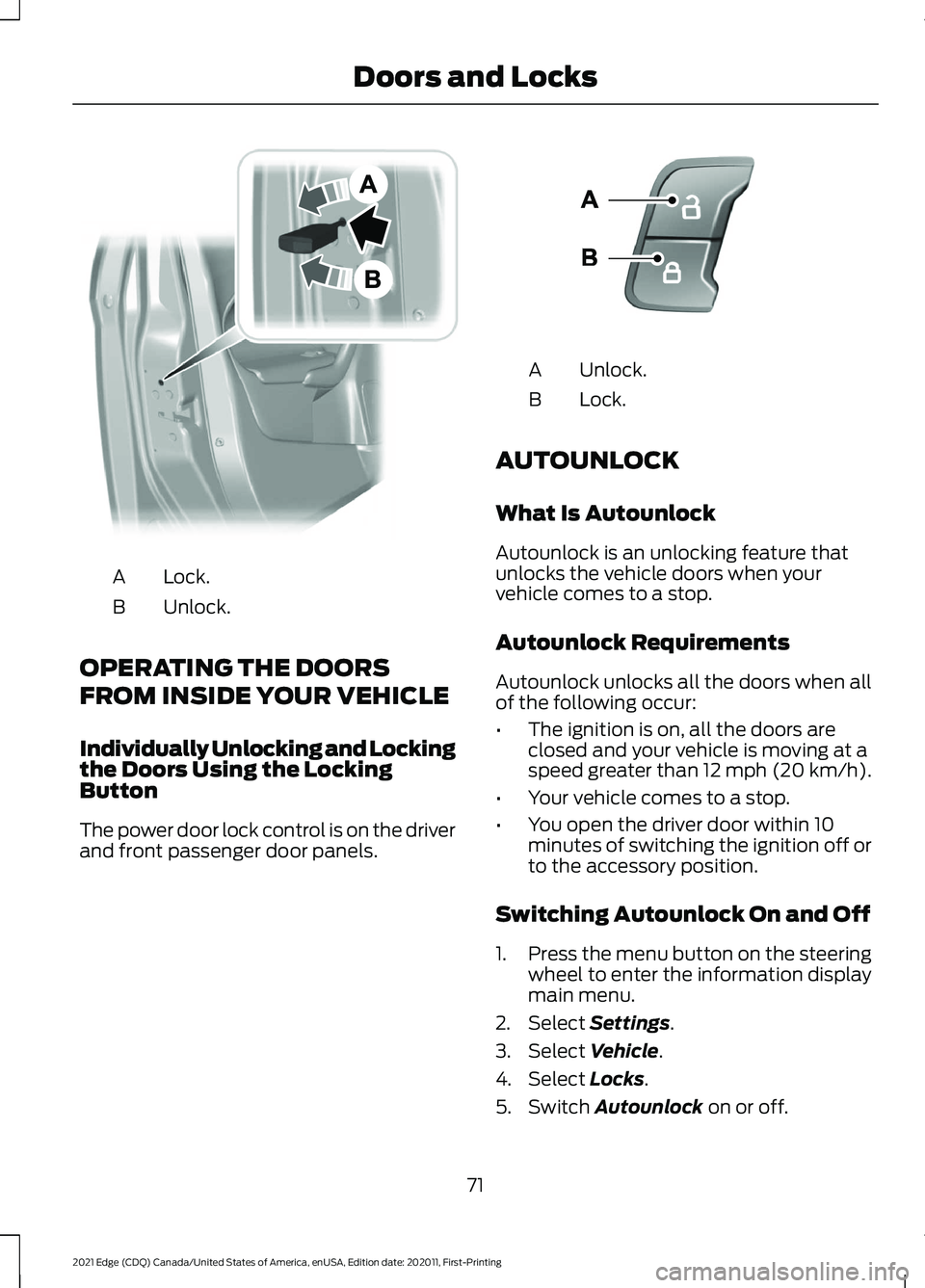
Lock.
A
Unlock.
B
OPERATING THE DOORS
FROM INSIDE YOUR VEHICLE
Individually Unlocking and Locking
the Doors Using the Locking
Button
The power door lock control is on the driver
and front passenger door panels. Unlock.
A
Lock.
B
AUTOUNLOCK
What Is Autounlock
Autounlock is an unlocking feature that
unlocks the vehicle doors when your
vehicle comes to a stop.
Autounlock Requirements
Autounlock unlocks all the doors when all
of the following occur:
• The ignition is on, all the doors are
closed and your vehicle is moving at a
speed greater than 12 mph (20 km/h).
• Your vehicle comes to a stop.
• You open the driver door within 10
minutes of switching the ignition off or
to the accessory position.
Switching Autounlock On and Off
1. Press the menu button on the steering
wheel to enter the information display
main menu.
2. Select Settings.
3. Select
Vehicle.
4. Select
Locks.
5. Switch
Autounlock on or off.
71
2021 Edge (CDQ) Canada/United States of America, enUSA, Edition date: 202011, First-Printing Doors and LocksE112203 E138628
Page 96 of 500
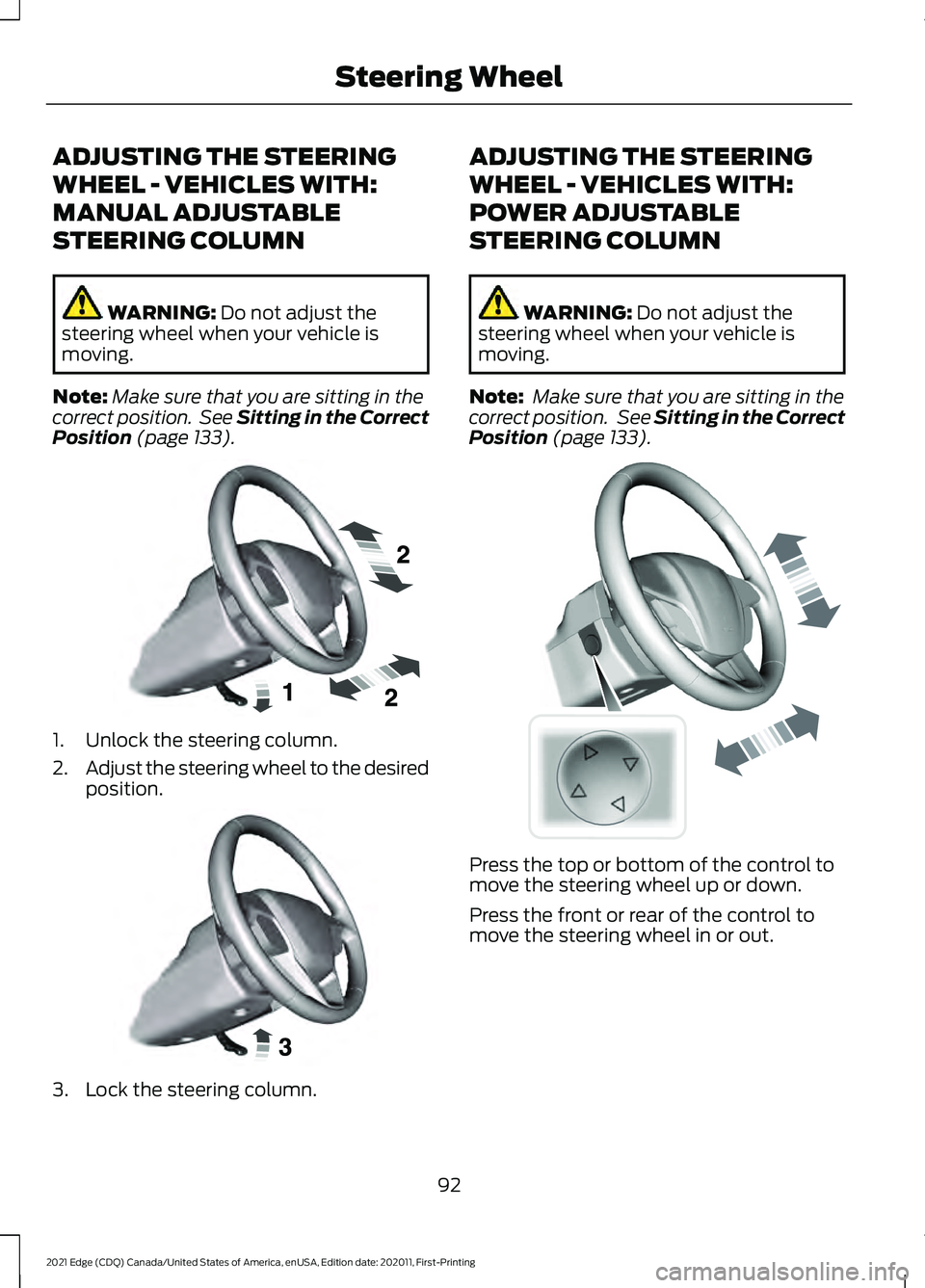
ADJUSTING THE STEERING
WHEEL - VEHICLES WITH:
MANUAL ADJUSTABLE
STEERING COLUMN
WARNING: Do not adjust the
steering wheel when your vehicle is
moving.
Note: Make sure that you are sitting in the
correct position. See Sitting in the Correct
Position
(page 133). 1. Unlock the steering column.
2.
Adjust the steering wheel to the desired
position. 3. Lock the steering column. ADJUSTING THE STEERING
WHEEL - VEHICLES WITH:
POWER ADJUSTABLE
STEERING COLUMN
WARNING:
Do not adjust the
steering wheel when your vehicle is
moving.
Note: Make sure that you are sitting in the
correct position. See
Sitting in the Correct
Position (page 133). Press the top or bottom of the control to
move the steering wheel up or down.
Press the front or rear of the control to
move the steering wheel in or out.
92
2021 Edge (CDQ) Canada/United States of America, enUSA, Edition date: 202011, First-Printing Steering WheelE191039 E191047 E261582
Page 97 of 500
RESETTING THE STOPPING
POSITION - VEHICLES WITH:
POWER ADJUSTABLE
STEERING COLUMN
Note:
The steering wheel stops when it
detects an obstruction. This sets a new
stopping position.
To reset the steering column to its normal
stopping position:
1. Confirm there is nothing obstructing the motion of the steering column.
2. Press and hold the steering column control until the steering column stops
moving.
3. Press the steering column control again.
Note: The steering column may start to
move again.
4. When the steering column stops, continue holding the control for a few
seconds.
5. Repeat for each direction, as necessary.
HORN Press on the center of the
steering wheel near the horn icon
to activate the horn.
SWITCHING THE HEATED
STEERING WHEEL ON AND OFF
(IF EQUIPPED) To switch the heated steering
wheel on or off, press the button
on the touchscreen near the
climate controls.
Note: A sensor regulates the temperature
of the steering wheel.
93
2021 Edge (CDQ) Canada/United States of America, enUSA, Edition date: 202011, First-Printing Steering WheelE270945
Page 150 of 500
HOW DOES THE MEMORY
FUNCTION WORK
Memory S
e a t s
The memory function recalls the position
of these features:
•
Driver seat.
• Power mirrors.
• Optional power steering column.
MEMORY FUNCTION
PRECAUTIONS WARNING: Before activating the
memory seat, make sure that the area
immediately surrounding the seat is clear
of obstructions and that all occupants
are clear of moving parts. WARNING:
Do not use the memory
function when your vehicle is moving.
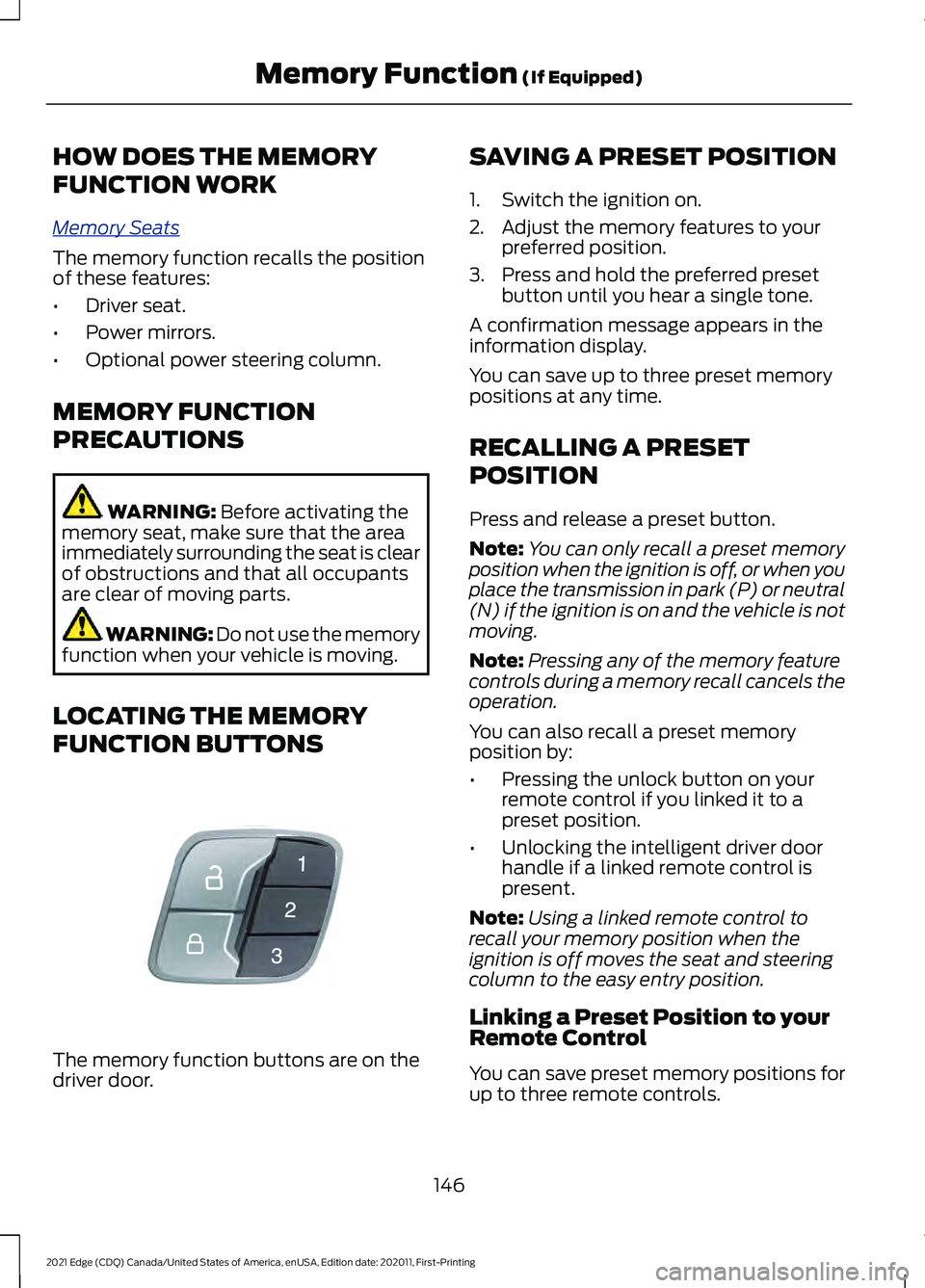
LOCATING THE MEMORY
FUNCTION BUTTONS The memory function buttons are on the
driver door. SAVING A PRESET POSITION
1. Switch the ignition on.
2. Adjust the memory features to your
preferred position.
3. Press and hold the preferred preset button until you hear a single tone.
A confirmation message appears in the
information display.
You can save up to three preset memory
positions at any time.
RECALLING A PRESET
POSITION
Press and release a preset button.
Note: You can only recall a preset memory
position when the ignition is off, or when you
place the transmission in park (P) or neutral
(N) if the ignition is on and the vehicle is not
moving.
Note: Pressing any of the memory feature
controls during a memory recall cancels the
operation.
You can also recall a preset memory
position by:
• Pressing the unlock button on your
remote control if you linked it to a
preset position.
• Unlocking the intelligent driver door
handle if a linked remote control is
present.
Note: Using a linked remote control to
recall your memory position when the
ignition is off moves the seat and steering
column to the easy entry position.
Linking a Preset Position to your
Remote Control
You can save preset memory positions for
up to three remote controls.
146
2021 Edge (CDQ) Canada/United States of America, enUSA, Edition date: 202011, First-Printing Memory Function
(If Equipped)E142554
Page 167 of 500
4. Press the push button ignition switch.
Stopping the Engine When Your
Vehicle is Moving
WARNING: Switching off the
engine when your vehicle is still moving
results in a significant decrease in
braking assistance. Higher effort is
required to apply the brakes and to stop
your vehicle. A significant decrease in
steering assistance could also occur. The
steering does not lock, but higher effort
could be required to steer your vehicle.
When you switch the ignition off, some
electrical circuits, for example airbags,
also turn off. If you unintentionally switch
the ignition off, shift into neutral (N) and
restart the engine. 1.
Press and hold the push button ignition
switch until the engine stops, or press
it three times within two seconds.
2. Shift into neutral and use the brakes to
bring your vehicle to a safe stop.
3. Shift into park (P).
4. Apply the parking brake.
AUTOMATIC ENGINE STOP
What Is Automatic Engine Stop
Automatic engine stop is a feature that
switches the engine off if it has been idling
for an extended period to help you save
fuel. How Does Automatic Engine Stop
Work
Automatic engine stop turns the engine
off. The ignition also turns off in order to
save battery power. Before the engine
shuts down, a message appears in the
information display showing a timer
counting down. If you do not intervene
within 30 seconds, the engine shuts down.
Another message appears in the
information display to inform you that the
engine has shut down in order to save fuel.
Start your vehicle as you normally do.
Switching Automatic Engine Stop
On and Off
1.
Press the menu button on the steering
wheel to enter the information display
main menu.
2. Select
Settings.
3. Switch
Auto Engine Off on or off.
Note: You cannot permanently switch off
the automatic shutdown. If you switch it
off, it turns on each time you switch the
ignition on.
Overriding Automatic Engine Stop
Note: You cannot permanently switch off
the automatic engine shutdown feature.
When you switch it off temporarily, it turns
on at the next ignition cycle.
You can stop the engine shutdown, or reset
the timer, at any point before the
30-second countdown has expired by
doing any of the following:
• Pressing the brake pedal or accelerator
pedal.
• Pressing the
OK or RESET button
during the countdown.
163
2021 Edge (CDQ) Canada/United States of America, enUSA, Edition date: 202011, First-Printing Starting and Stopping the EngineE321258