high FORD EDGE 2023 User Guide
[x] Cancel search | Manufacturer: FORD, Model Year: 2023, Model line: EDGE, Model: FORD EDGE 2023Pages: 504, PDF Size: 14.96 MB
Page 99 of 504
When you select high sensitivity, the wipersoperate when the sensor detects a smallamount of water on the windshield.
When you select low sensitivity, the wipersoperate when the sensor detects a largeamount of water on the windshield.
SWITCHING THE REAR
WINDOW WIPER ON AND OFF
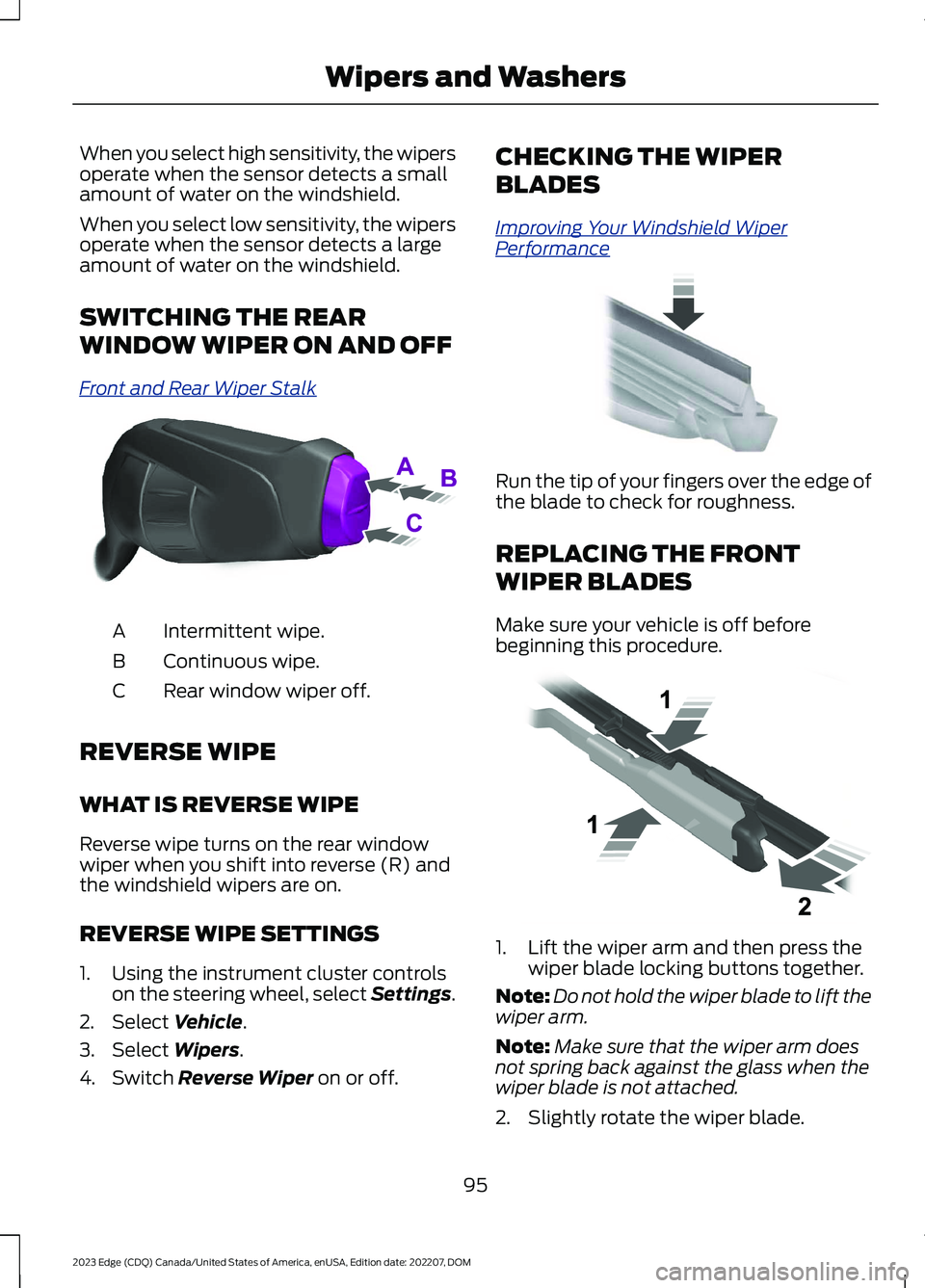
Front and Rear Wiper Stalk
Intermittent wipe.A
Continuous wipe.B
Rear window wiper off.C
REVERSE WIPE
WHAT IS REVERSE WIPE
Reverse wipe turns on the rear windowwiper when you shift into reverse (R) andthe windshield wipers are on.
REVERSE WIPE SETTINGS
1.Using the instrument cluster controlson the steering wheel, select Settings.
2.Select Vehicle.
3.Select Wipers.
4.Switch Reverse Wiper on or off.
CHECKING THE WIPER
BLADES
Improving Your Windshield WiperPerformance
Run the tip of your fingers over the edge ofthe blade to check for roughness.
REPLACING THE FRONT
WIPER BLADES
Make sure your vehicle is off beforebeginning this procedure.
1.Lift the wiper arm and then press thewiper blade locking buttons together.
Note:Do not hold the wiper blade to lift thewiper arm.
Note:Make sure that the wiper arm doesnot spring back against the glass when thewiper blade is not attached.
2.Slightly rotate the wiper blade.
95
2023 Edge (CDQ) Canada/United States of America, enUSA, Edition date: 202207, DOMWipers and WashersE171615 E142463 E129990
Page 102 of 504
EXTERIOR LIGHTING
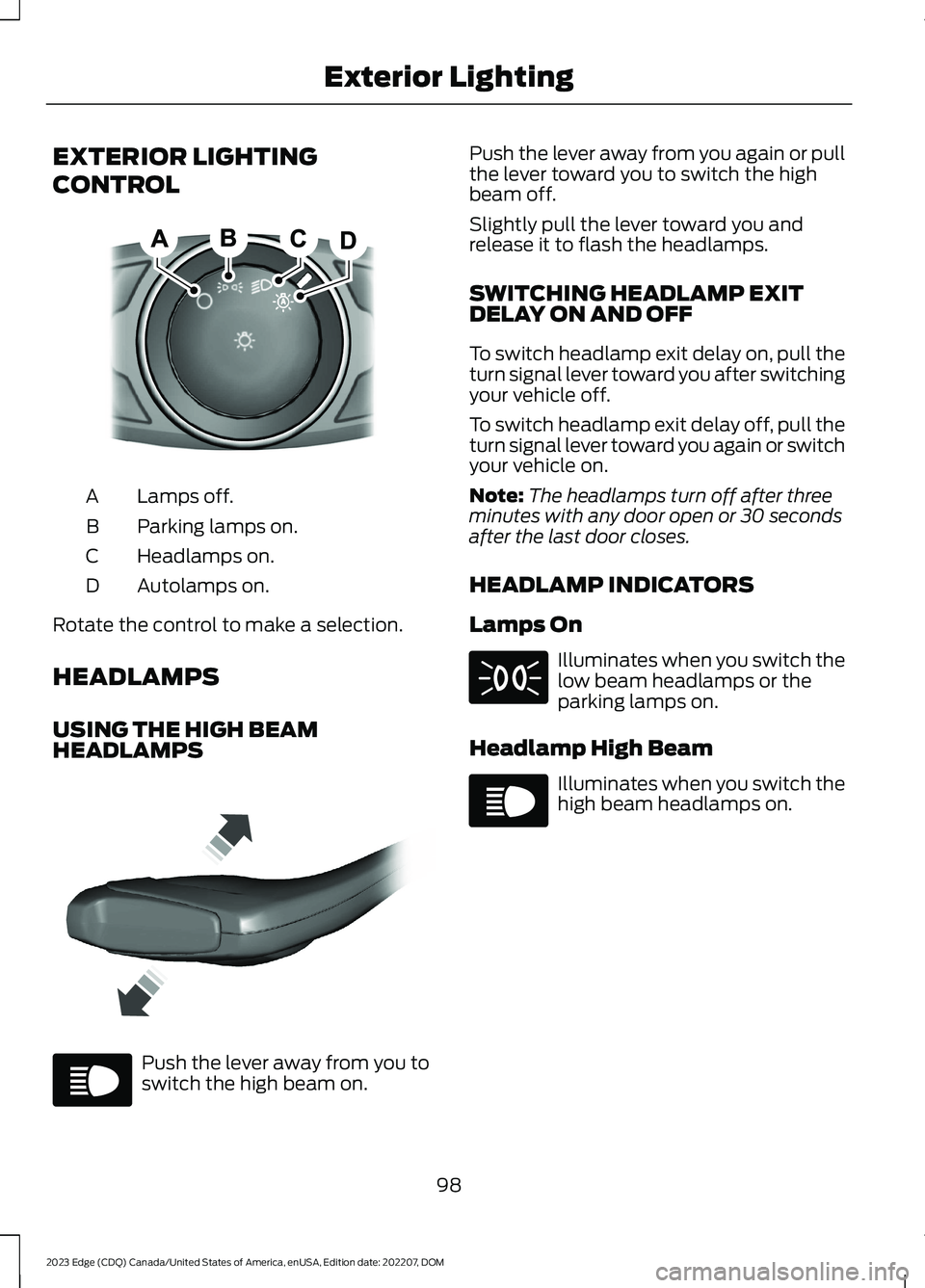
CONTROL
Lamps off.A
Parking lamps on.B
Headlamps on.C
Autolamps on.D
Rotate the control to make a selection.
HEADLAMPS
USING THE HIGH BEAMHEADLAMPS
Push the lever away from you toswitch the high beam on.
Push the lever away from you again or pullthe lever toward you to switch the highbeam off.
Slightly pull the lever toward you andrelease it to flash the headlamps.
SWITCHING HEADLAMP EXITDELAY ON AND OFF
To switch headlamp exit delay on, pull theturn signal lever toward you after switchingyour vehicle off.
To switch headlamp exit delay off, pull theturn signal lever toward you again or switchyour vehicle on.
Note:The headlamps turn off after threeminutes with any door open or 30 secondsafter the last door closes.
HEADLAMP INDICATORS
Lamps On
Illuminates when you switch thelow beam headlamps or theparking lamps on.
Headlamp High Beam
Illuminates when you switch thehigh beam headlamps on.
98
2023 Edge (CDQ) Canada/United States of America, enUSA, Edition date: 202207, DOMExterior LightingE322426 E339577 E67019 E71341 E67019
Page 105 of 504
SWITCHING THE DAYTIMERUNNING LAMPS ON AND OFF -VEHICLES WITH: DAYTIMERUNNING LAMPS (DRL)
WARNING: The daytime runninglamps system does not activate the rearlamps and may not provide adequatelighting during low visibility drivingconditions. Make sure you switch theheadlamps on, as appropriate, during alllow visibility conditions. Failure to do somay result in a crash.
Daytime running lamps are always onunless you switch on the headlamps oryour vehicle is in park (P).
USING THE FRONT FOG LAMPS
To switch the lamps on or off:
1.Set the lighting control to the parkinglamps, headlamps or autolampsposition.
Note:When the lighting control is in theautolamps position, you cannot switch thefog lamps on unless the low beamheadlamps are on.
2.
Press the button on thelighting control to switch the front foglamps on or off.
Note:Only switch the front fog lamps onduring reduced visibility.
Note:The brightness of the daytime runninglamps may decrease when the front foglamps are switched on.
Note:The front fog lamps lights switch offautomatically when high beams areactivated.
Front Fog Lamps Indicator
It illuminates when you switchthe front fog lamps on.
EXTERIOR LAMP INDICATORS
Front Fog Lamp
It illuminates when you switchthe front fog lamps on.
Turn Signal Lamp
It flashes when you switch theturn signal lamps on.
Note:An increase in the rate of flashingwarns of a failed turn signal lamp.
AUTOMATIC HIGH BEAM
CONTROL
HOW DOES AUTOMATIC HIGHBEAM CONTROL WORK
Auto High Beams
Automatic high beam control turns thehigh beams on if it is dark enough and noother traffic is present. If it detects anapproaching vehicle’s headlamps or taillamps, or street lighting ahead, the systemturns the high beams off.
A camera sensor, centrally mountedbehind the windshield of your vehicle,continuously monitors conditions to turnthe high beams on and off.
101
2023 Edge (CDQ) Canada/United States of America, enUSA, Edition date: 202207, DOMExterior Lighting E67018
Page 106 of 504

Without automatic high beamcontrol.A
With automatic high beamcontrol.B
AUTOMATIC HIGH BEAMCONTROL PRECAUTIONS
WARNING: The system does notrelieve you of your responsibility to drivewith due care and attention. You mayneed to override the system if it does notturn the high beams on or off.
WARNING: The system may notswitch the high beams off if the lights ofoncoming vehicles are hidden byobstacles, for example guard rails.
WARNING: Do not use the systemin poor visibility, for example fog, heavyrain, spray or snow.
WARNING: You may need tooverride the system when approachingother road users.
WARNING: You may need tooverride the system during inclementweather.
AUTOMATIC HIGH BEAMCONTROL REQUIREMENTS
The system turns the high beams on if allof the following occur:
•You switch the system on.
•You set the lighting control to theautolamps position.
•The ambient light level is low enoughthat you require high beams.
•There is no traffic in front of yourvehicle.
•The vehicle speed is greater thanapproximately 25 mph (40 km/h).
AUTOMATIC HIGH BEAMCONTROL LIMITATIONS
The system turns the high beams off if anyof the following occur:
•You switch the system off.
•You set the lighting control to anyposition except autolamps.
•The ambient light level is high enoughthat you do not require high beams.
102
2023 Edge (CDQ) Canada/United States of America, enUSA, Edition date: 202207, DOMExterior Lighting E327596
Page 107 of 504
•The system detects an approachingvehicle's headlamps or a leadingvehicle's tail lamps.
•The system detects severe rain, snowor fog.
•The system detects street lighting.
•The camera has reduced visibility.
•The vehicle speed falls belowapproximately 19 mph (30 km/h).
SWITCHING AUTOMATIC HIGHBEAM CONTROL ON AND OFF
1.Using the instrument cluster controlson the steering wheel, select Settings.
2.Select Vehicle.
3.Select Lighting.
4.Switch Auto High Beam on or off.
AUTOMATIC HIGH BEAMCONTROL INDICATORS
Illuminates to confirm when thesystem is ready to assist.
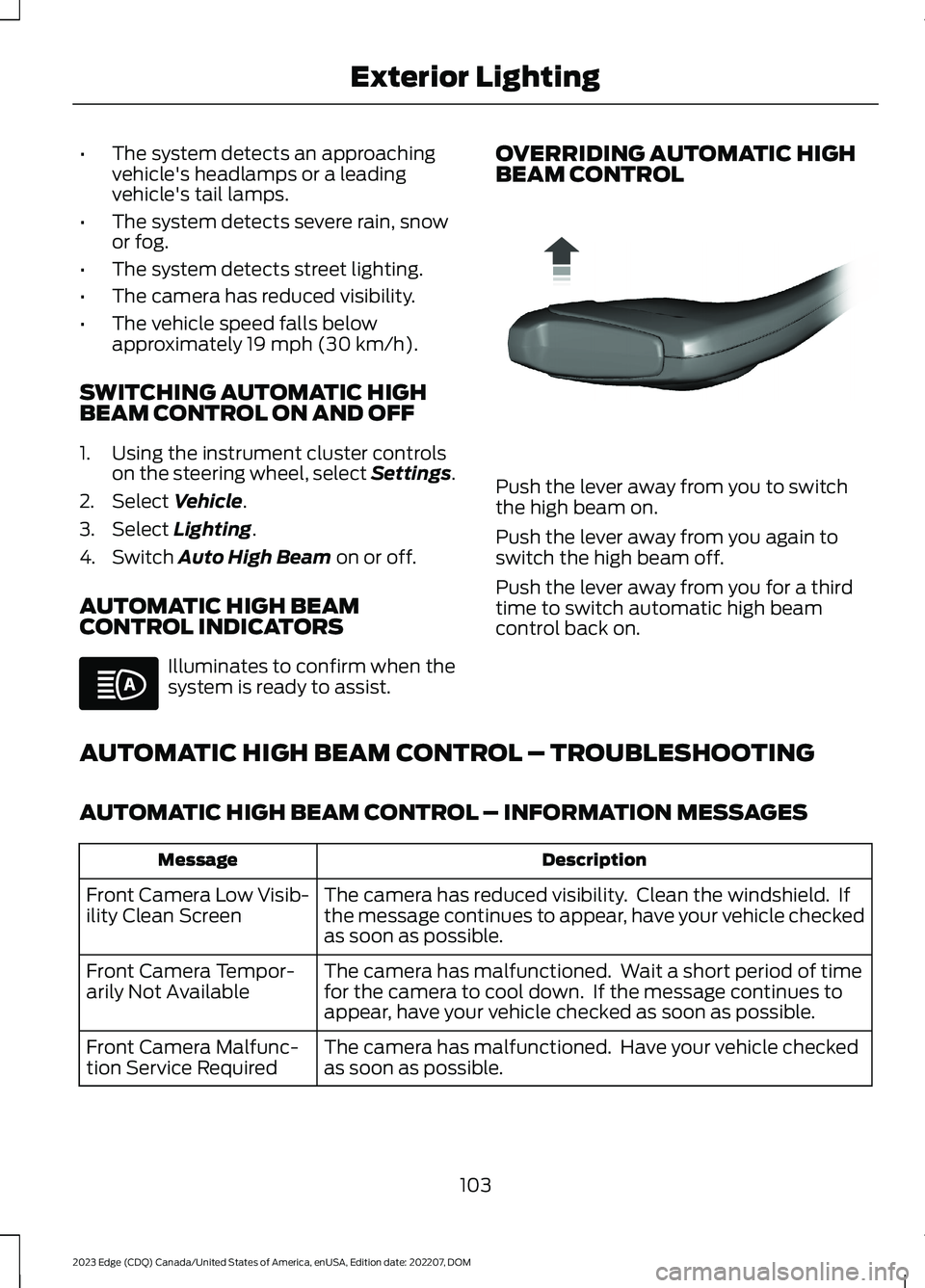
OVERRIDING AUTOMATIC HIGHBEAM CONTROL
Push the lever away from you to switchthe high beam on.
Push the lever away from you again toswitch the high beam off.
Push the lever away from you for a thirdtime to switch automatic high beamcontrol back on.
AUTOMATIC HIGH BEAM CONTROL – TROUBLESHOOTING
AUTOMATIC HIGH BEAM CONTROL – INFORMATION MESSAGES
DescriptionMessage
The camera has reduced visibility. Clean the windshield. Ifthe message continues to appear, have your vehicle checkedas soon as possible.
Front Camera Low Visib-ility Clean Screen
The camera has malfunctioned. Wait a short period of timefor the camera to cool down. If the message continues toappear, have your vehicle checked as soon as possible.
Front Camera Tempor-arily Not Available
The camera has malfunctioned. Have your vehicle checkedas soon as possible.Front Camera Malfunc-tion Service Required
103
2023 Edge (CDQ) Canada/United States of America, enUSA, Edition date: 202207, DOMExterior LightingE146105 E162679
Page 120 of 504
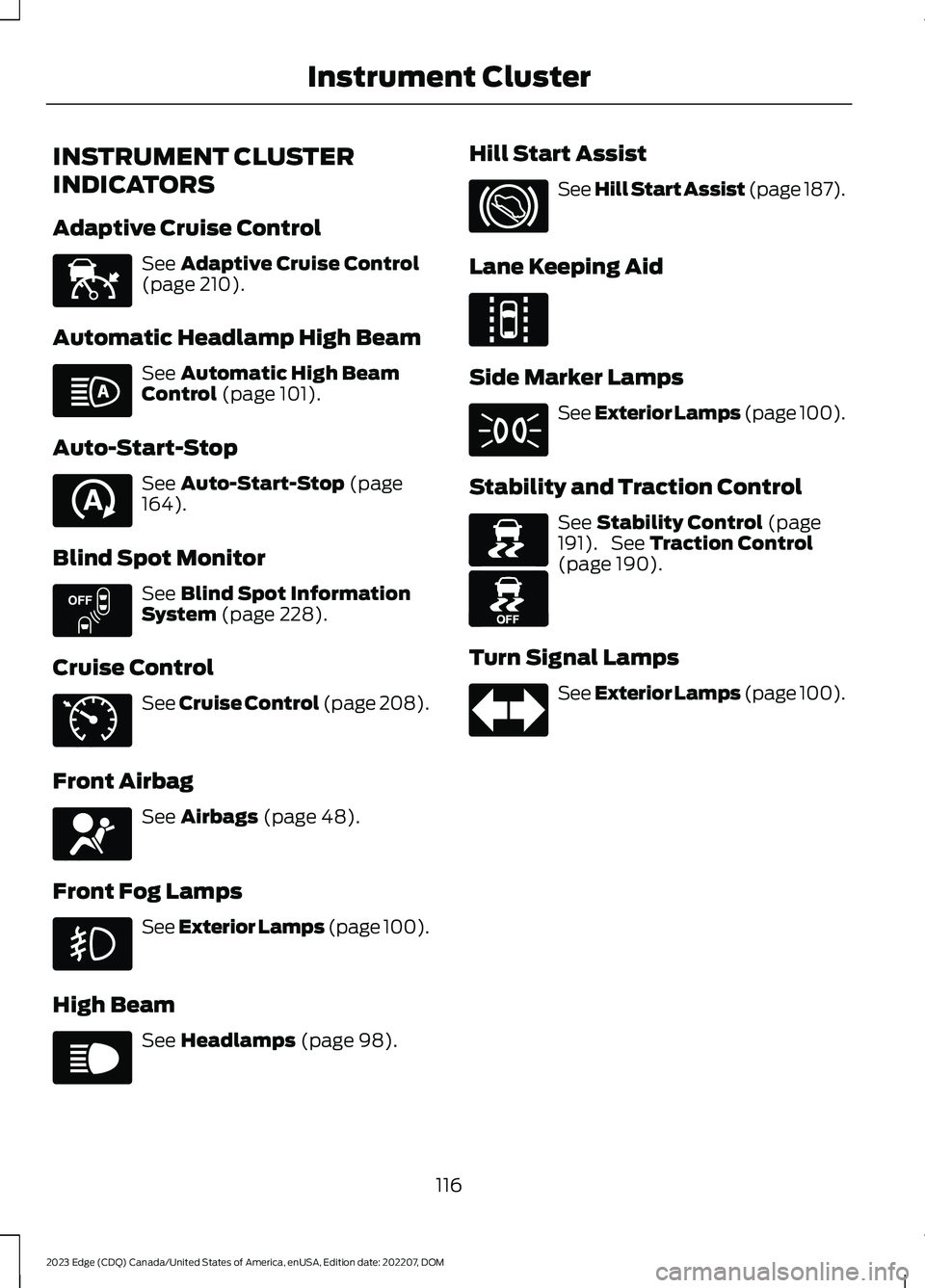
INSTRUMENT CLUSTER
INDICATORS
Adaptive Cruise Control
See Adaptive Cruise Control(page 210).
Automatic Headlamp High Beam
See Automatic High BeamControl (page 101).
Auto-Start-Stop
See Auto-Start-Stop (page164).
Blind Spot Monitor
See Blind Spot InformationSystem (page 228).
Cruise Control
See Cruise Control (page 208).
Front Airbag
See Airbags (page 48).
Front Fog Lamps
See Exterior Lamps (page 100).
High Beam
See Headlamps (page 98).
Hill Start Assist
See Hill Start Assist (page 187).
Lane Keeping Aid
Side Marker Lamps
See Exterior Lamps (page 100).
Stability and Traction Control
See Stability Control (page191). See Traction Control(page 190).
Turn Signal Lamps
See Exterior Lamps (page 100).
116
2023 Edge (CDQ) Canada/United States of America, enUSA, Edition date: 202207, DOMInstrument ClusterE144524 E146105 E121377 E151262 E71340 E67017 E67019 E144813 E71341 E138639 E130458 E67018
Page 132 of 504
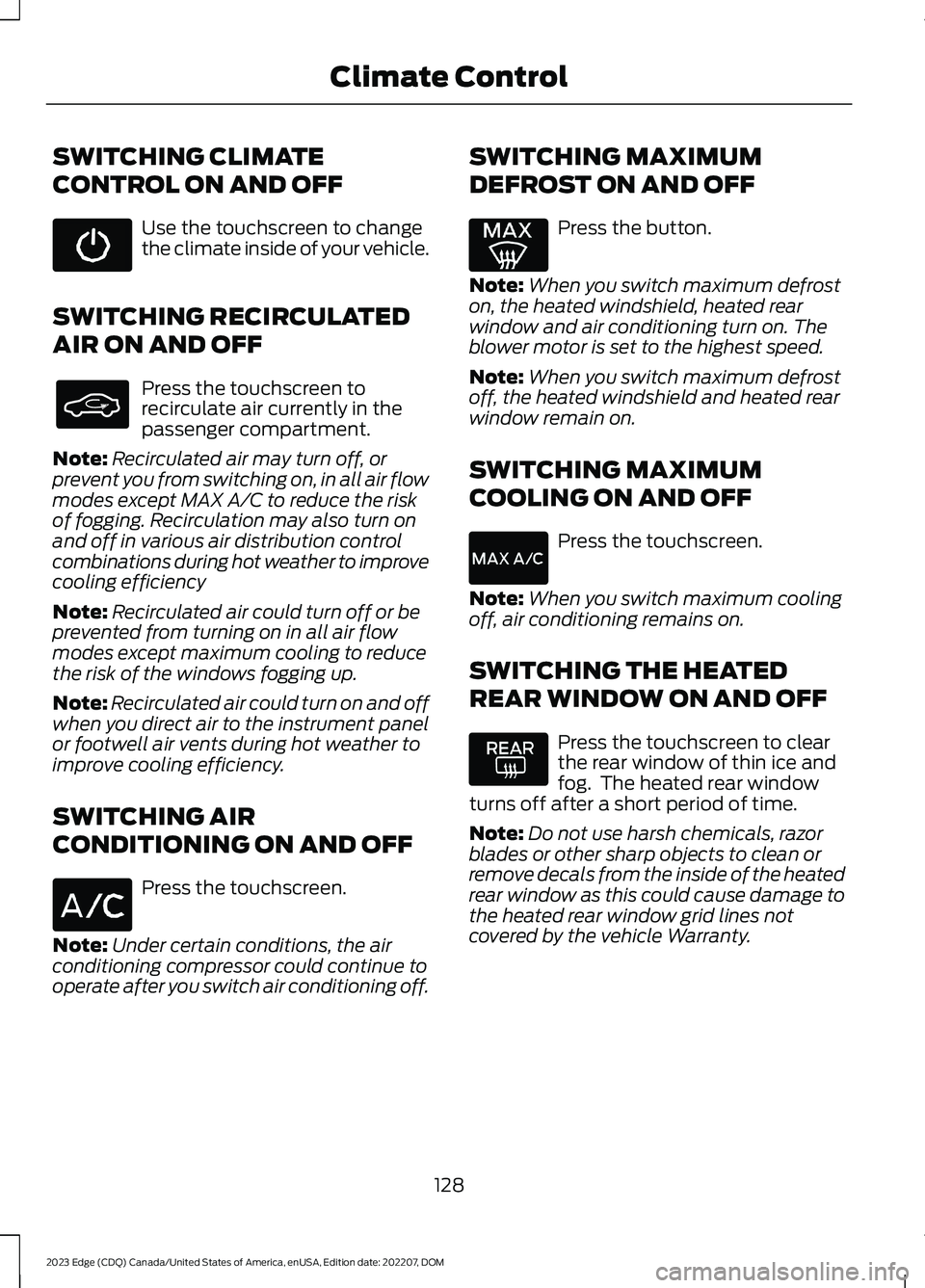
SWITCHING CLIMATE
CONTROL ON AND OFF
Use the touchscreen to changethe climate inside of your vehicle.
SWITCHING RECIRCULATED
AIR ON AND OFF
Press the touchscreen torecirculate air currently in thepassenger compartment.
Note:Recirculated air may turn off, orprevent you from switching on, in all air flowmodes except MAX A/C to reduce the riskof fogging. Recirculation may also turn onand off in various air distribution controlcombinations during hot weather to improvecooling efficiency
Note:Recirculated air could turn off or beprevented from turning on in all air flowmodes except maximum cooling to reducethe risk of the windows fogging up.
Note:Recirculated air could turn on and offwhen you direct air to the instrument panelor footwell air vents during hot weather toimprove cooling efficiency.
SWITCHING AIR
CONDITIONING ON AND OFF
Press the touchscreen.
Note:Under certain conditions, the airconditioning compressor could continue tooperate after you switch air conditioning off.
SWITCHING MAXIMUM
DEFROST ON AND OFF
Press the button.
Note:When you switch maximum defroston, the heated windshield, heated rearwindow and air conditioning turn on. Theblower motor is set to the highest speed.
Note:When you switch maximum defrostoff, the heated windshield and heated rearwindow remain on.
SWITCHING MAXIMUM
COOLING ON AND OFF
Press the touchscreen.
Note:When you switch maximum coolingoff, air conditioning remains on.
SWITCHING THE HEATED
REAR WINDOW ON AND OFF
Press the touchscreen to clearthe rear window of thin ice andfog. The heated rear windowturns off after a short period of time.
Note:Do not use harsh chemicals, razorblades or other sharp objects to clean orremove decals from the inside of the heatedrear window as this could cause damage tothe heated rear window grid lines notcovered by the vehicle Warranty.
128
2023 Edge (CDQ) Canada/United States of America, enUSA, Edition date: 202207, DOMClimate Control
Page 136 of 504
FRONT SEAT PRECAUTIONS
WARNING: Sitting improperly, outof position or with the seatback reclinedtoo far can take weight off the seatcushion and affect the decision of thepassenger sensing system, resulting inserious injury or death in the event of acrash. Always sit upright against yourseat back, with your feet on the floor.
WARNING: Do not recline the seatbackrest too far as this can cause theoccupant to slide under the seatbelt,resulting in personal injury in the eventof a crash.
WARNING: Do not place objectshigher than the top of the seat backrest.Failure to follow this instruction couldresult in personal injury or death in theevent of a sudden stop or crash.
WARNING: Do not adjust the driverseat or seat backrest when your vehicleis moving. This may result in sudden seatmovement, causing the loss of controlof your vehicle.
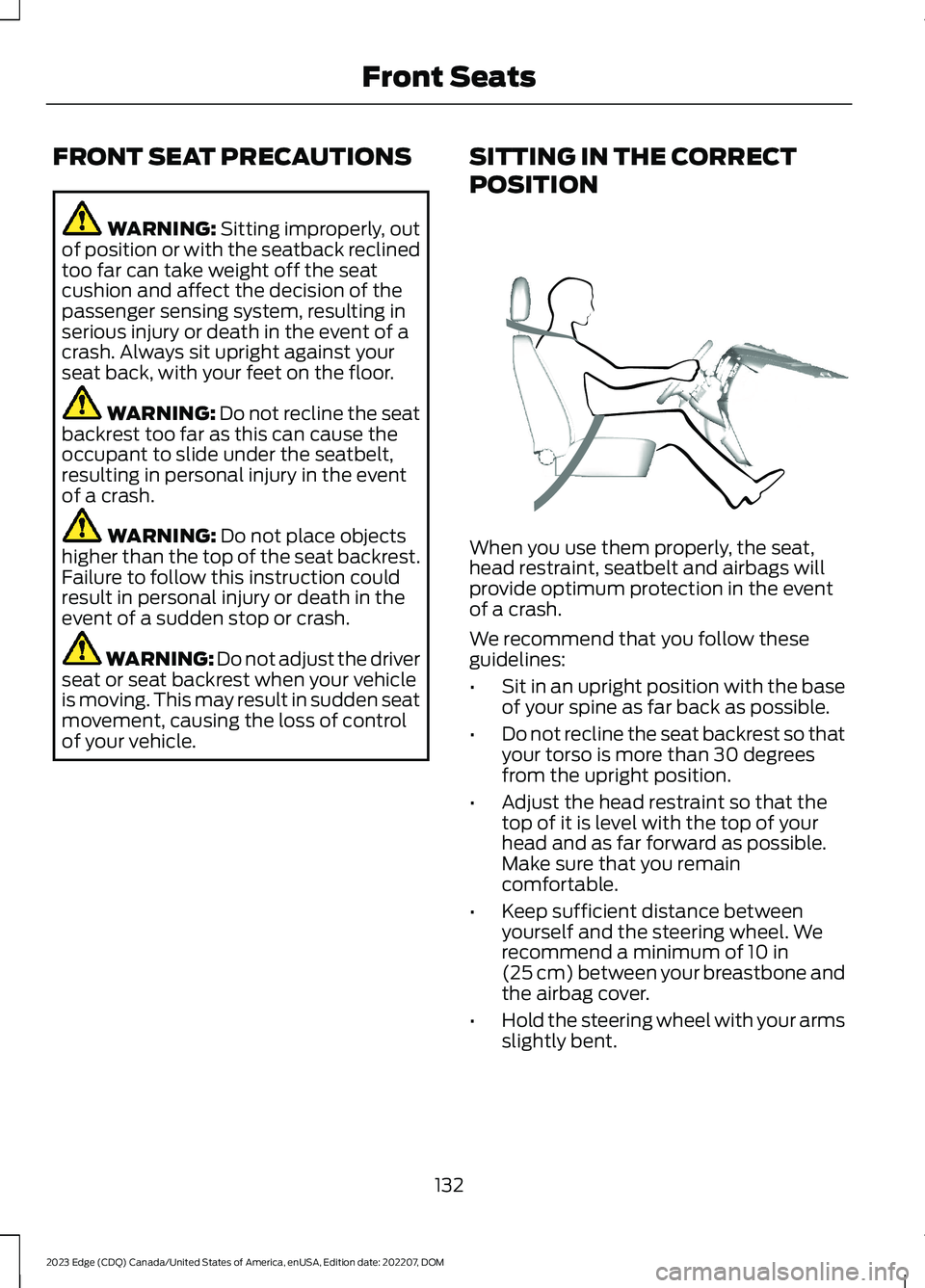
SITTING IN THE CORRECT
POSITION
When you use them properly, the seat,head restraint, seatbelt and airbags willprovide optimum protection in the eventof a crash.
We recommend that you follow theseguidelines:
•Sit in an upright position with the baseof your spine as far back as possible.
•Do not recline the seat backrest so thatyour torso is more than 30 degreesfrom the upright position.
•Adjust the head restraint so that thetop of it is level with the top of yourhead and as far forward as possible.Make sure that you remaincomfortable.
•Keep sufficient distance betweenyourself and the steering wheel. Werecommend a minimum of 10 in(25 cm) between your breastbone andthe airbag cover.
•Hold the steering wheel with your armsslightly bent.
132
2023 Edge (CDQ) Canada/United States of America, enUSA, Edition date: 202207, DOMFront SeatsE68595
Page 137 of 504
•Bend your legs slightly so that you canpress the pedals fully.
•Position the shoulder strap of theseatbelt over the center of yourshoulder and position the lap straptightly across your hips.
Make sure that your driving position iscomfortable and that you can maintain fullcontrol of your vehicle.
MANUAL SEATS
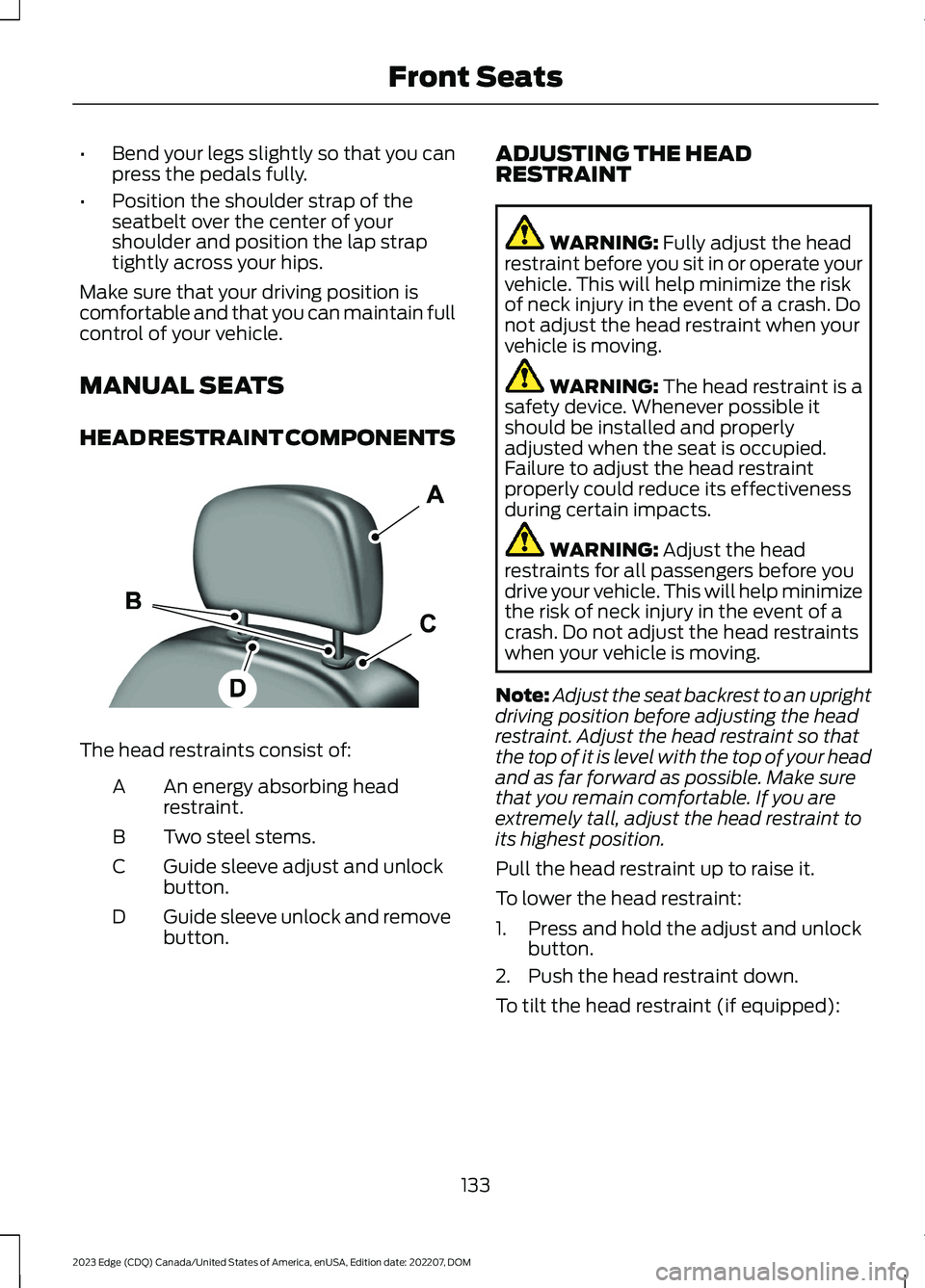
HEAD RESTRAINT COMPONENTS
The head restraints consist of:
An energy absorbing headrestraint.A
Two steel stems.B
Guide sleeve adjust and unlockbutton.C
Guide sleeve unlock and removebutton.D
ADJUSTING THE HEADRESTRAINT
WARNING: Fully adjust the headrestraint before you sit in or operate yourvehicle. This will help minimize the riskof neck injury in the event of a crash. Donot adjust the head restraint when yourvehicle is moving.
WARNING: The head restraint is asafety device. Whenever possible itshould be installed and properlyadjusted when the seat is occupied.Failure to adjust the head restraintproperly could reduce its effectivenessduring certain impacts.
WARNING: Adjust the headrestraints for all passengers before youdrive your vehicle. This will help minimizethe risk of neck injury in the event of acrash. Do not adjust the head restraintswhen your vehicle is moving.
Note:Adjust the seat backrest to an uprightdriving position before adjusting the headrestraint. Adjust the head restraint so thatthe top of it is level with the top of your headand as far forward as possible. Make surethat you remain comfortable. If you areextremely tall, adjust the head restraint toits highest position.
Pull the head restraint up to raise it.
To lower the head restraint:
1.Press and hold the adjust and unlockbutton.
2.Push the head restraint down.
To tilt the head restraint (if equipped):
133
2023 Edge (CDQ) Canada/United States of America, enUSA, Edition date: 202207, DOMFront SeatsE138642
Page 138 of 504
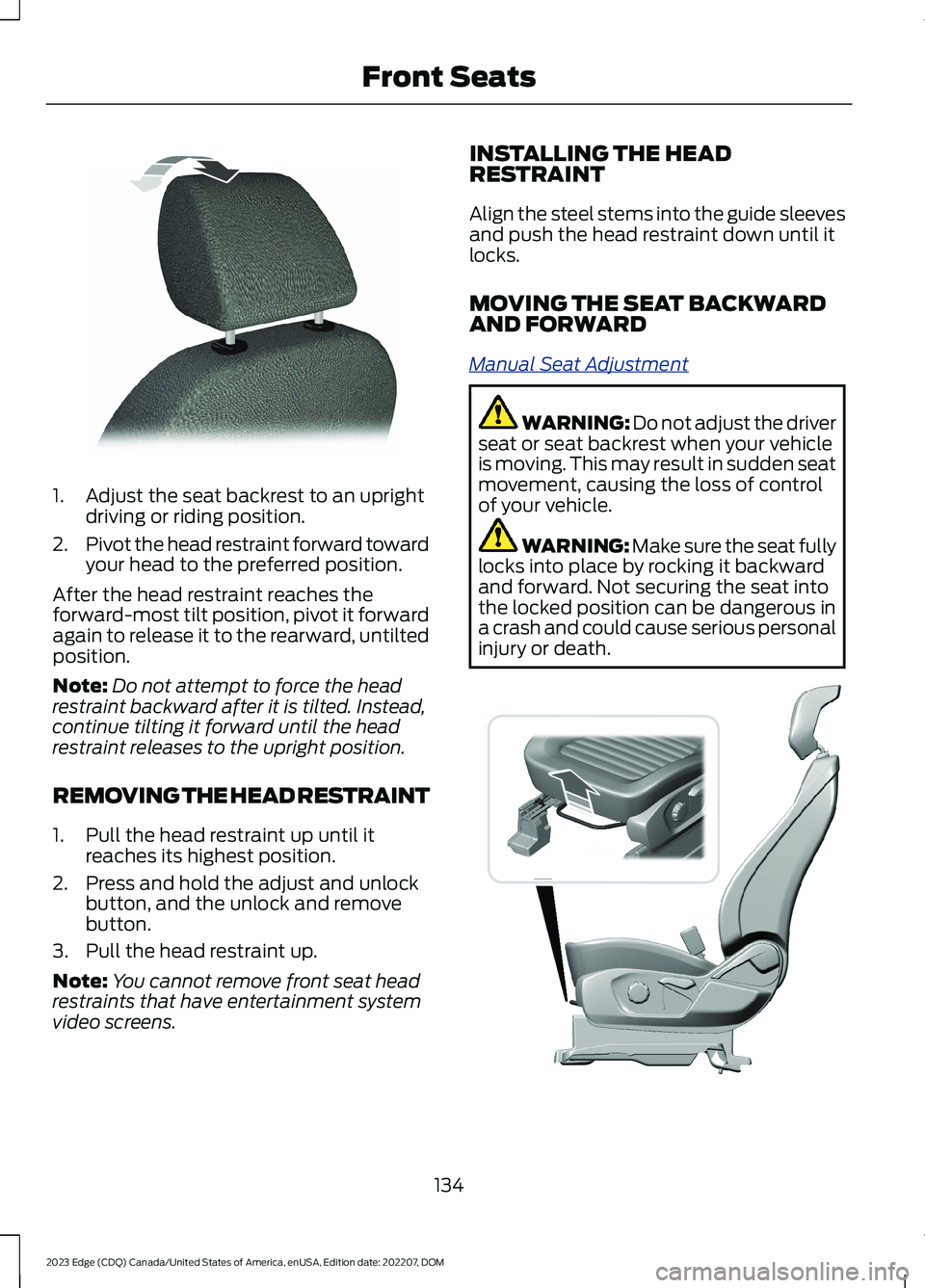
1.Adjust the seat backrest to an uprightdriving or riding position.
2.Pivot the head restraint forward towardyour head to the preferred position.
After the head restraint reaches theforward-most tilt position, pivot it forwardagain to release it to the rearward, untiltedposition.
Note:Do not attempt to force the headrestraint backward after it is tilted. Instead,continue tilting it forward until the headrestraint releases to the upright position.
REMOVING THE HEAD RESTRAINT
1.Pull the head restraint up until itreaches its highest position.
2.Press and hold the adjust and unlockbutton, and the unlock and removebutton.
3.Pull the head restraint up.
Note:You cannot remove front seat headrestraints that have entertainment systemvideo screens.
INSTALLING THE HEADRESTRAINT
Align the steel stems into the guide sleevesand push the head restraint down until itlocks.
MOVING THE SEAT BACKWARDAND FORWARD
Manual Seat Adjustment
WARNING: Do not adjust the driverseat or seat backrest when your vehicleis moving. This may result in sudden seatmovement, causing the loss of controlof your vehicle.
WARNING: Make sure the seat fullylocks into place by rocking it backwardand forward. Not securing the seat intothe locked position can be dangerous ina crash and could cause serious personalinjury or death.
134
2023 Edge (CDQ) Canada/United States of America, enUSA, Edition date: 202207, DOMFront SeatsE144727 E325269