high FORD EDGE 2023 Owner's Manual
[x] Cancel search | Manufacturer: FORD, Model Year: 2023, Model line: EDGE, Model: FORD EDGE 2023Pages: 504, PDF Size: 14.96 MB
Page 140 of 504
POWER SEATS (IF EQUIPPED)
HEAD RESTRAINT COMPONENTS
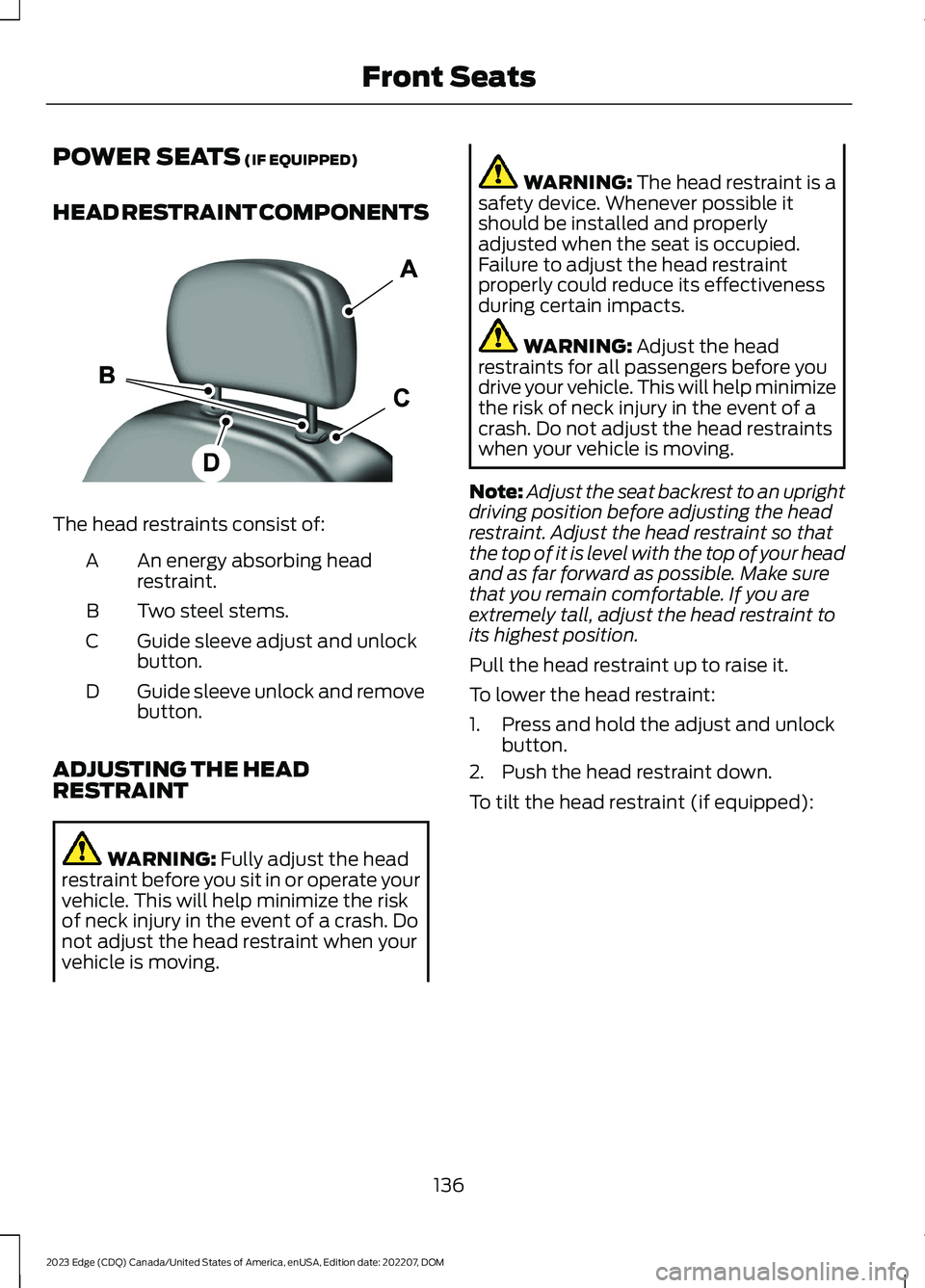
The head restraints consist of:
An energy absorbing headrestraint.A
Two steel stems.B
Guide sleeve adjust and unlockbutton.C
Guide sleeve unlock and removebutton.D
ADJUSTING THE HEADRESTRAINT
WARNING: Fully adjust the headrestraint before you sit in or operate yourvehicle. This will help minimize the riskof neck injury in the event of a crash. Donot adjust the head restraint when yourvehicle is moving.
WARNING: The head restraint is asafety device. Whenever possible itshould be installed and properlyadjusted when the seat is occupied.Failure to adjust the head restraintproperly could reduce its effectivenessduring certain impacts.
WARNING: Adjust the headrestraints for all passengers before youdrive your vehicle. This will help minimizethe risk of neck injury in the event of acrash. Do not adjust the head restraintswhen your vehicle is moving.
Note:Adjust the seat backrest to an uprightdriving position before adjusting the headrestraint. Adjust the head restraint so thatthe top of it is level with the top of your headand as far forward as possible. Make surethat you remain comfortable. If you areextremely tall, adjust the head restraint toits highest position.
Pull the head restraint up to raise it.
To lower the head restraint:
1.Press and hold the adjust and unlockbutton.
2.Push the head restraint down.
To tilt the head restraint (if equipped):
136
2023 Edge (CDQ) Canada/United States of America, enUSA, Edition date: 202207, DOMFront SeatsE138642
Page 141 of 504
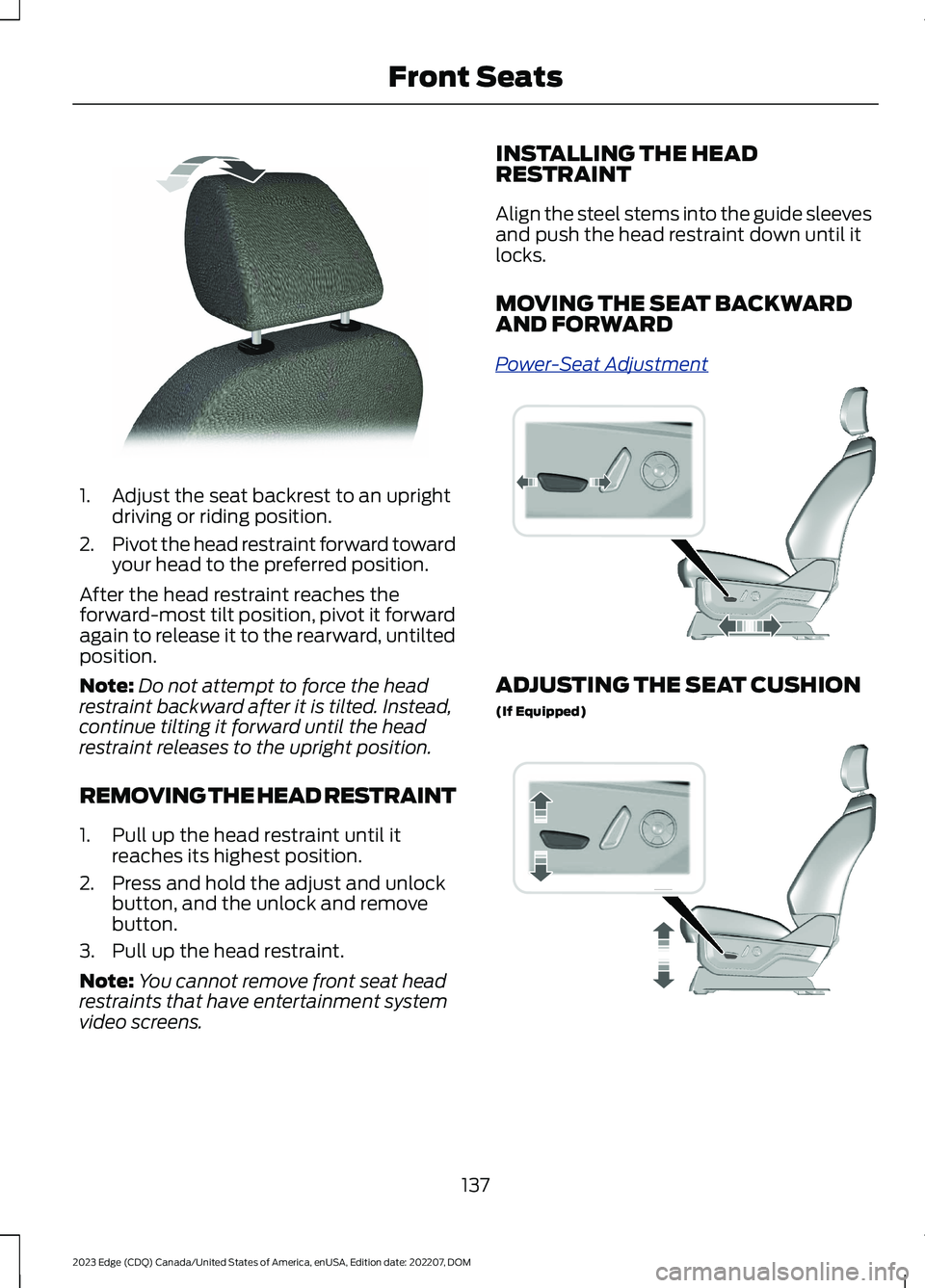
1.Adjust the seat backrest to an uprightdriving or riding position.
2.Pivot the head restraint forward towardyour head to the preferred position.
After the head restraint reaches theforward-most tilt position, pivot it forwardagain to release it to the rearward, untiltedposition.
Note:Do not attempt to force the headrestraint backward after it is tilted. Instead,continue tilting it forward until the headrestraint releases to the upright position.
REMOVING THE HEAD RESTRAINT
1.Pull up the head restraint until itreaches its highest position.
2.Press and hold the adjust and unlockbutton, and the unlock and removebutton.
3.Pull up the head restraint.
Note:You cannot remove front seat headrestraints that have entertainment systemvideo screens.
INSTALLING THE HEADRESTRAINT
Align the steel stems into the guide sleevesand push the head restraint down until itlocks.
MOVING THE SEAT BACKWARDAND FORWARD
Power-Seat Adjustment
ADJUSTING THE SEAT CUSHION
(If Equipped)
137
2023 Edge (CDQ) Canada/United States of America, enUSA, Edition date: 202207, DOMFront SeatsE144727 E308339 E308336
Page 144 of 504
MANUAL SEATS
HEAD RESTRAINT COMPONENTS
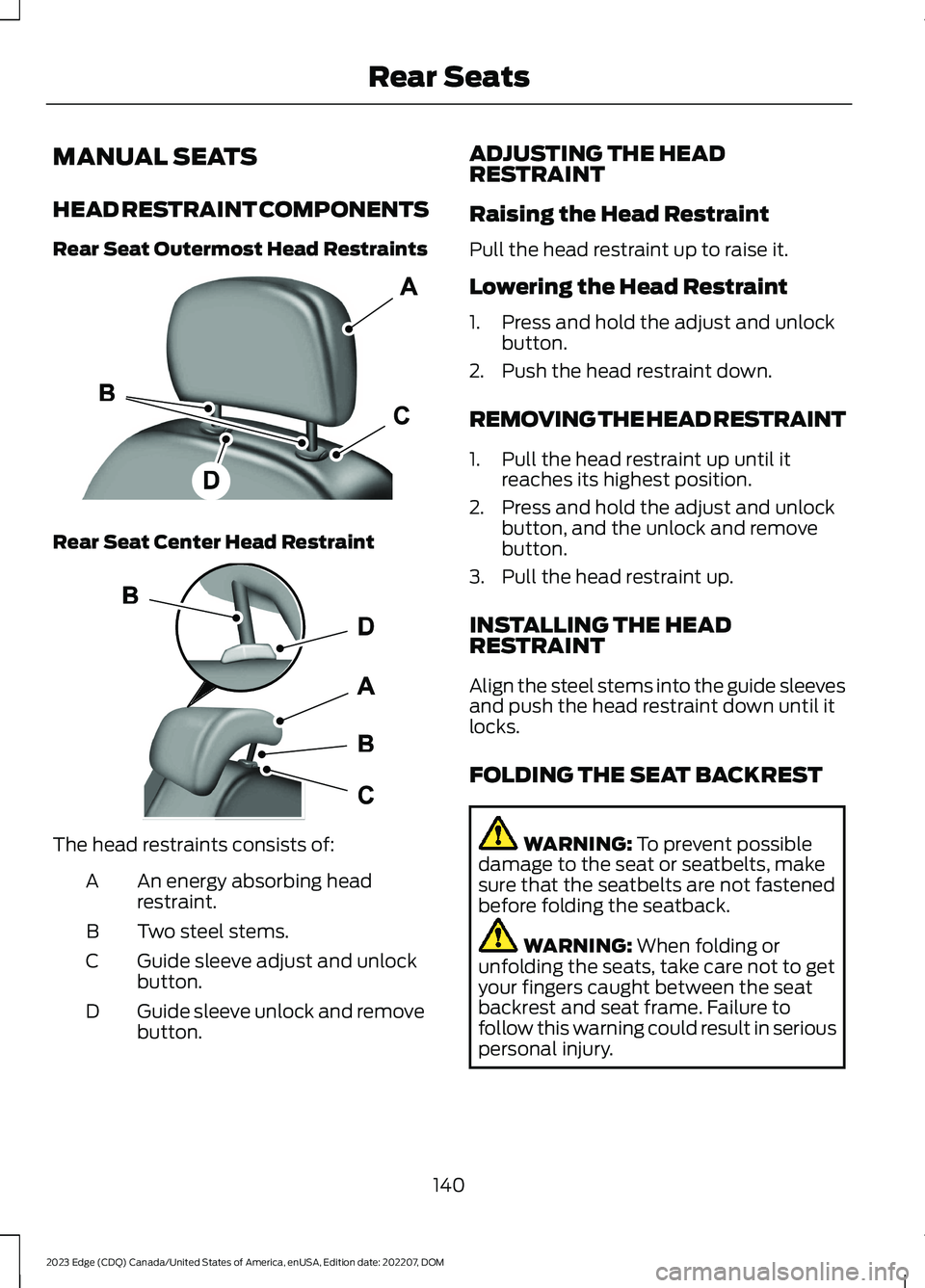
Rear Seat Outermost Head Restraints
Rear Seat Center Head Restraint
The head restraints consists of:
An energy absorbing headrestraint.A
Two steel stems.B
Guide sleeve adjust and unlockbutton.C
Guide sleeve unlock and removebutton.D
ADJUSTING THE HEADRESTRAINT
Raising the Head Restraint
Pull the head restraint up to raise it.
Lowering the Head Restraint
1.Press and hold the adjust and unlockbutton.
2.Push the head restraint down.
REMOVING THE HEAD RESTRAINT
1.Pull the head restraint up until itreaches its highest position.
2.Press and hold the adjust and unlockbutton, and the unlock and removebutton.
3.Pull the head restraint up.
INSTALLING THE HEADRESTRAINT
Align the steel stems into the guide sleevesand push the head restraint down until itlocks.
FOLDING THE SEAT BACKREST
WARNING: To prevent possibledamage to the seat or seatbelts, makesure that the seatbelts are not fastenedbefore folding the seatback.
WARNING: When folding orunfolding the seats, take care not to getyour fingers caught between the seatbackrest and seat frame. Failure tofollow this warning could result in seriouspersonal injury.
140
2023 Edge (CDQ) Canada/United States of America, enUSA, Edition date: 202207, DOMRear SeatsE138642 E138645
Page 147 of 504
WHAT IS THE REAR
OCCUPANT ALERT SYSTEM
The rear occupant alert system monitorsvehicle conditions and notifies you to checkfor rear seat occupants when you switchthe ignition off.
HOW DOES THE REAR
OCCUPANT ALERT SYSTEM
WORK
The system monitors when rear doors havebeen opened and closed to indicate thepotential presence of an occupant in therear seat.
A message displays in the information andentertainment display screen and anaudible warning sounds when you switchthe ignition off after any of the followingconditions have been met:
•A rear door is opened or closed whilethe ignition is on.
•You switch the ignition on within 15minutes of a rear door opening andclosing.
•You switch the ignition on within 15minutes of the alert having displayedor sounded.
REAR OCCUPANT ALERT
SYSTEM PRECAUTIONS
WARNING: On hot days, thetemperature inside the vehicle can risevery quickly. Exposure of people oranimals to these high temperatures foreven a short time can cause death orserious heat related injuries, includingbrain damage. Small children areparticularly at risk.
WARNING: Do not leave childrenor pets unattended in your vehicle.Failure to follow this instruction couldresult in personal injury or death.
REAR OCCUPANT ALERT
SYSTEM LIMITATIONS
The system does not detect the presenceof objects or passengers in the rear seat.It monitors when rear doors are openedand closed.
Note:It is possible to receive an alert whenthere is no rear seat occupant, but alertconditions are met.
Note:It is possible to receive no alert whenthere is an occupant in the rear seat, if alertconditions are not met. For example, if a rearseat occupant does not enter the vehiclethrough a rear door.
Note:The audible warning does not soundwhen the front door is opened before youswitch the ignition off.
SWITCHING REAR OCCUPANT
ALERT SYSTEM ON AND OFF
1.Access the vehicle drawer on thetouchscreen.
2.Press SETTINGS.
3.Press Vehicle.
4.Switch Rear Occupant Alert on or off.
Note:The default setting is on.
Note:Performing a master reset causes thesystem to switch on again.
143
2023 Edge (CDQ) Canada/United States of America, enUSA, Edition date: 202207, DOMRear Occupant Alert System (If Equipped)
Page 159 of 504
WHAT IS THE WIRELESS
ACCESSORY CHARGER
Wireless Charging Pad
The wireless accessory charger allows youto charge one compatible Qi wirelesscharging device on the charging area.
WIRELESS ACCESSORY
CHARGER PRECAUTIONS
WARNING: Wireless chargingdevices can affect the operation ofimplanted medical devices, includingcardiac pacemakers. If you have anyimplanted medical devices, werecommend that you consult with yourphysician.
Keep the charging area clean and removeforeign objects prior to charging a device.
Do not place items with a magnetic stripor radio-frequency identification chip, forexample passports, parking tickets,transportation passes or credit cards, nearthe charging area when charging a device.Damage could occur to the magnetic stripor radio-frequency identification chip.
Do not place metal objects, for exampleremote controls, coins and candywrappers, on or near the charging areawhen charging a device. Metal objects mayheat up and degrade the chargingperformance, in addition to causinginterruptions in charging.
Charging could be interrupted, degraded,or could stop if any of the following occur:
•The system detects a foreign object.
•The device is misaligned on thecharging area.
•The device moves on the activecharging area when the vehicle is inmotion.
•The vehicle ambient temperature is toohigh.
•You attempt to charge a non-Qicompatible device on the wirelesscharger.
Note:During charging, the device and thecharger could heat up, this is normal. If thebattery gets hotter than usual, the devicemay stop charging.
LOCATING THE WIRELESS
ACCESSORY CHARGER
The charging area is on thecenter console or in the mediabin below the instrument panel.
CHARGING A WIRELESS
DEVICE
Place the device on the center of thecharging surface with the charging sidedown. The charging stops after your devicereaches a full charge.
You can use the charger when the vehicleis in accessory mode, when the vehicle isrunning, or when SYNC is on.
Displays on the status bar whenwireless charging is in progress.
Note:The charging performance may beaffected if your device is in a case. It may benecessary to remove the case to wirelesslycharge your device.
Note:Software and firmware updates mayaffect device compatibility, including theuse of unofficial software or firmware. Youshould verify charging functionality with yourspecific devices in-vehicle.
155
2023 Edge (CDQ) Canada/United States of America, enUSA, Edition date: 202207, DOMWireless Accessory Charger (If Equipped)E297549 E263583
Page 161 of 504
STARTING AND STOPPING
THE ENGINE – PRECAUTIONS
WARNING: Extended idling at highengine speeds can produce very hightemperatures in the engine and exhaustsystem, creating the risk of fire or otherdamage.
WARNING: Do not park, idle ordrive your vehicle on dry grass or otherdry ground cover. The emission systemheats up the engine compartment andexhaust system, creating the risk of fire.
WARNING: Do not start the enginein a closed garage or in other enclosedareas. Exhaust fumes are toxic. Alwaysopen the garage door before you startthe engine. Failure to follow thisinstruction could result in personal injuryor death.
WARNING: Do not use startingfluid, for example ether, in the air intakesystem. Such fluid could causeimmediate explosive damage to theengine and possible personal injury.
WARNING: Exhaust leaks mayresult in entry of harmful and potentiallylethal fumes into the passengercompartment. If you smell exhaustfumes inside your vehicle, have yourvehicle inspected immediately. Do notdrive if you smell exhaust fumes.
The powertrain control system meets allCanadian interference-causing equipmentstandard requirements regulating theimpulse electrical field or radio noise.
Note:If you use your vehicle regularly abovethe altitude of 7,500 ft (2,286 m) and underthe temperature of -4.0°F (-20°C), it isrecommended to use the alternative engineoil. See Capacities and Specifications(page 341).
If you stop your vehicle and leave theengine idling for long periods, werecommend that you do one of thefollowing:
•Open the windows at least 1 in(2.5 cm).
•Set your climate control to outside air.
PUSH BUTTON IGNITION
SWITCH
Switching the Ignition Off
When the ignition is on or in accessorymode, press the push button ignitionswitch once without your foot on the brakepedal.
Switching the Ignition toAccessory Mode
When the ignition is off, press the pushbutton ignition switch once without yourfoot on the brake pedal.
All electrical circuits and accessories areoperational and the warning lamps andindicators illuminate.
Note:Your vehicle has a battery saverfeature that shuts your vehicle off when itdetects a certain amount of battery drain,or after approximately 30 minutes ofinactivity in accessory mode.
157
2023 Edge (CDQ) Canada/United States of America, enUSA, Edition date: 202207, DOMStarting and Stopping the EngineE321258
Page 164 of 504
4.Press the push button ignition switch.
STOPPING THE ENGINE WHENYOUR VEHICLE IS MOVING
WARNING: Switching off theengine when your vehicle is still movingresults in a significant decrease inbraking assistance. Higher effort isrequired to apply the brakes and to stopyour vehicle. A significant decrease insteering assistance could also occur. Thesteering does not lock, but higher effortcould be required to steer your vehicle.When you switch the ignition off, someelectrical circuits, for example airbags,also turn off. If you unintentionally switchthe ignition off, shift into neutral (N) andrestart the engine.
1.Press and hold the push button ignitionswitch until the engine stops, or pressit three times within two seconds.
2.Shift into neutral and use the brakes tobring your vehicle to a safe stop.
3.Shift into park (P).
4.Apply the parking brake.
AUTOMATIC ENGINE STOP (IF
EQUIPPED)
WHAT IS AUTOMATIC ENGINESTOP
Automatic engine stop is a feature thatswitches the engine off if it has been idlingfor an extended period to help you savefuel.
HOW DOES AUTOMATIC ENGINESTOP WORK
Automatic engine stop turns the engineoff. The ignition also turns off in order tosave battery power. Before the engineshuts down, a message appears in theinformation display showing a timercounting down. If you do not intervenewithin 30 seconds, the engine shuts down.Another message appears in theinformation display to inform you that theengine has shut down in order to save fuel.Start your vehicle as you normally do.
SWITCHING AUTOMATIC ENGINESTOP ON AND OFF
1.Press the menu button on the steeringwheel to enter the information displaymain menu.
2.Select Settings.
3.Switch Auto Engine Off or 30minMax Idle on or off.
Note: You cannot permanently switch offthe automatic shutdown. If you switch itoff, it turns on each time you switch theignition on.
160
2023 Edge (CDQ) Canada/United States of America, enUSA, Edition date: 202207, DOMStarting and Stopping the EngineE357998 E357998
Page 167 of 504
STARTING AND STOPPING THEENGINE – FREQUENTLY ASKEDQUESTIONS
Why is the engine idle speed high whenI am starting the engine?
The speed at which the engine idlesimmediately after starting is optimizedto minimize vehicle emissions andmaximize cabin comfort and fueleconomy.
Why does the engine not crank?
You can only attempt to start theengine for a limited amount of timebefore the starting system temporarilydisables. If you exceed the startingtime limit, a message may appear andyou cannot attempt to start the enginefor at least 15 minutes.
Why do I experience different drivingcharacteristics?
If you disconnect the battery, yourvehicle may exhibit some unusualdriving characteristics forapproximately 5 mi (8 km) after youreconnect it. This is because the enginemanagement system must realignitself with the engine. You candisregard any unusual drivingcharacteristics during this period.
Why can I not start the engine?
If you cannot start the engine after 3attempts, wait 10 seconds and do thefollowing:
1.Fully press the brake pedal.
Note:Make sure that the parking brake isapplied.
Note:Make sure that the transmission is inpark (P) or neutral (N).
2.Fully press the accelerator pedal andhold it there.
3.Press the push button ignition switch.
Note:The engine cranks for a short periodof time and then it stops.
4.Release the accelerator pedal.
5.Press the push button ignition switch.
Why does the system not detect apassive key?
If the system does not detect a passivekey and you are unable to start theengine, insert the passive key into thebackup position and press the pushbutton ignition switch to start theengine. See Accessing the PassiveKey Backup Position (page 161).
163
2023 Edge (CDQ) Canada/United States of America, enUSA, Edition date: 202207, DOMStarting and Stopping the EngineE321258
Page 170 of 504
AUTO-START-STOP –FREQUENTLY ASKED QUESTIONS
Why does the engine not alwaysstop when I expect it to?
The system is designed to work in a waythat complements other vehicle systems,allowing them to operate at optimumperformance.
The system does not stop the engine if:
•The driver door is open.
•Your vehicle is at high altitude.
•The heated windshield is on.
•The engine is warming up.
•The outside temperature is too low ortoo high.
•The battery charge is low.
•The battery temperature is outside theoptimal operating range.
•The engine is required to run tomaintain interior climate and reducefogging.
Why does the engine sometimesrestart when I do not expect it to?
The system is designed to work in a waythat complements other vehicle systems,allowing them to operate at optimumperformance.
The system restarts the engine if:
•You switch the heated windshield on.
•You switch maximum defrost on.
•Your vehicle starts to roll downhill inneutral.
•The engine is required to run tomaintain adequate brake systemassistance.
•The engine is required to run tomaintain interior climate and reducefogging.
Can I permanently switch thesystem off?
No. The system plays an important role inreducing the fuel consumption and the CO2emissions.
Will the frequent engine startscause parts to wear out?
Your vehicle has an enhanced battery andstarter motor that are designed for theincreased number of engine starts.
166
2023 Edge (CDQ) Canada/United States of America, enUSA, Edition date: 202207, DOMAuto-Start-Stop
Page 171 of 504
FUEL AND REFUELING
PRECAUTIONS
Easy Fuel Capless Fuel Filler Video Link
WARNING: Do not overfill the fueltank. The pressure in an overfilled tankmay cause leakage and lead to fuel sprayand fire.
WARNING: The fuel system maybe under pressure. If you hear a hissingsound near the fuel filler inlet, do notrefuel until the sound stops. Otherwise,fuel may spray out, which could causeserious personal injury.
WARNING: Fuels can cause seriousinjury or death if misused or mishandled.
WARNING: Fuel may containbenzene, which is a cancer-causingagent.
WARNING: When refueling alwaysshut the engine off and never allowsparks or open flames near the fuel tankfiller valve. Never smoke or use a cellphone while refueling. Fuel vapor isextremely hazardous under certainconditions. Avoid inhaling excess fumes.
WARNING: Read and follow all theinstructions on the pump island.
Follow these guidelines when refueling:
•Extinguish all smoking materials andany open flames before refueling yourvehicle.
•Switch the engine off before refueling.
•Automotive fuels can be harmful orfatal if swallowed. Fuel is highly toxicand if swallowed can cause death orpermanent injury. If fuel is swallowedimmediately call a physician, even if nosymptoms are immediately apparent.The toxic effects of fuel may not beapparent for hours.
•Avoid inhaling fuel vapors. Inhaling fuelvapor can lead to eye and respiratorytract irritation. In severe cases,excessive or prolonged breathing offuel vapor can cause serious illness andpermanent injury.
•Avoid getting fuel in your eyes. If yousplash fuel in your eyes, immediatelyremove contact lenses, if worn, flushwith water for 15 minutes and seekmedical attention. Failure to seekproper medical attention could lead topermanent injury.
•Fuels can be harmful if absorbedthrough the skin. If you splash fuel onyour skin, clothing or both, promptlyremove contaminated clothing andthoroughly wash your skin with soapand water. Repeated or prolonged skincontact causes skin irritation.
•Be particularly careful if you are takingAntabuse or other forms of Disulfiramfor the treatment of alcoholism.Breathing fuel vapors could cause anadverse reaction, serious personalinjury or sickness. Immediately call aphysician if you experience any adversereactions.
FUEL QUALITY
SELECTING THE CORRECT FUEL
Your Fuel Economy - Gas Engines Video Link
167
2023 Edge (CDQ) Canada/United States of America, enUSA, Edition date: 202207, DOMFuel and Refueling