steering wheel FORD EDGE 2023 Owner's Guide
[x] Cancel search | Manufacturer: FORD, Model Year: 2023, Model line: EDGE, Model: FORD EDGE 2023Pages: 504, PDF Size: 14.96 MB
Page 131 of 504
3.Select Remote Start.
4.Select Seats and Wheel.
5.Select Auto or Off.
Note:If you switch the heated steeringwheel settings on, the heated steering wheelturns on during cold weather.
Note:You cannot adjust the heatedsteering wheel settings when you remotelystart your vehicle.
Remote Start Duration
1.Using the instrument cluster displaycontrols on the steering wheel, selectSettings.
2.Select Vehicle.
3.Select Remote Start.
4.Select Duration.
5.Press the duration you prefer.
127
2023 Edge (CDQ) Canada/United States of America, enUSA, Edition date: 202207, DOMRemote Start (If Equipped)
Page 136 of 504
FRONT SEAT PRECAUTIONS
WARNING: Sitting improperly, outof position or with the seatback reclinedtoo far can take weight off the seatcushion and affect the decision of thepassenger sensing system, resulting inserious injury or death in the event of acrash. Always sit upright against yourseat back, with your feet on the floor.
WARNING: Do not recline the seatbackrest too far as this can cause theoccupant to slide under the seatbelt,resulting in personal injury in the eventof a crash.
WARNING: Do not place objectshigher than the top of the seat backrest.Failure to follow this instruction couldresult in personal injury or death in theevent of a sudden stop or crash.
WARNING: Do not adjust the driverseat or seat backrest when your vehicleis moving. This may result in sudden seatmovement, causing the loss of controlof your vehicle.
SITTING IN THE CORRECT
POSITION
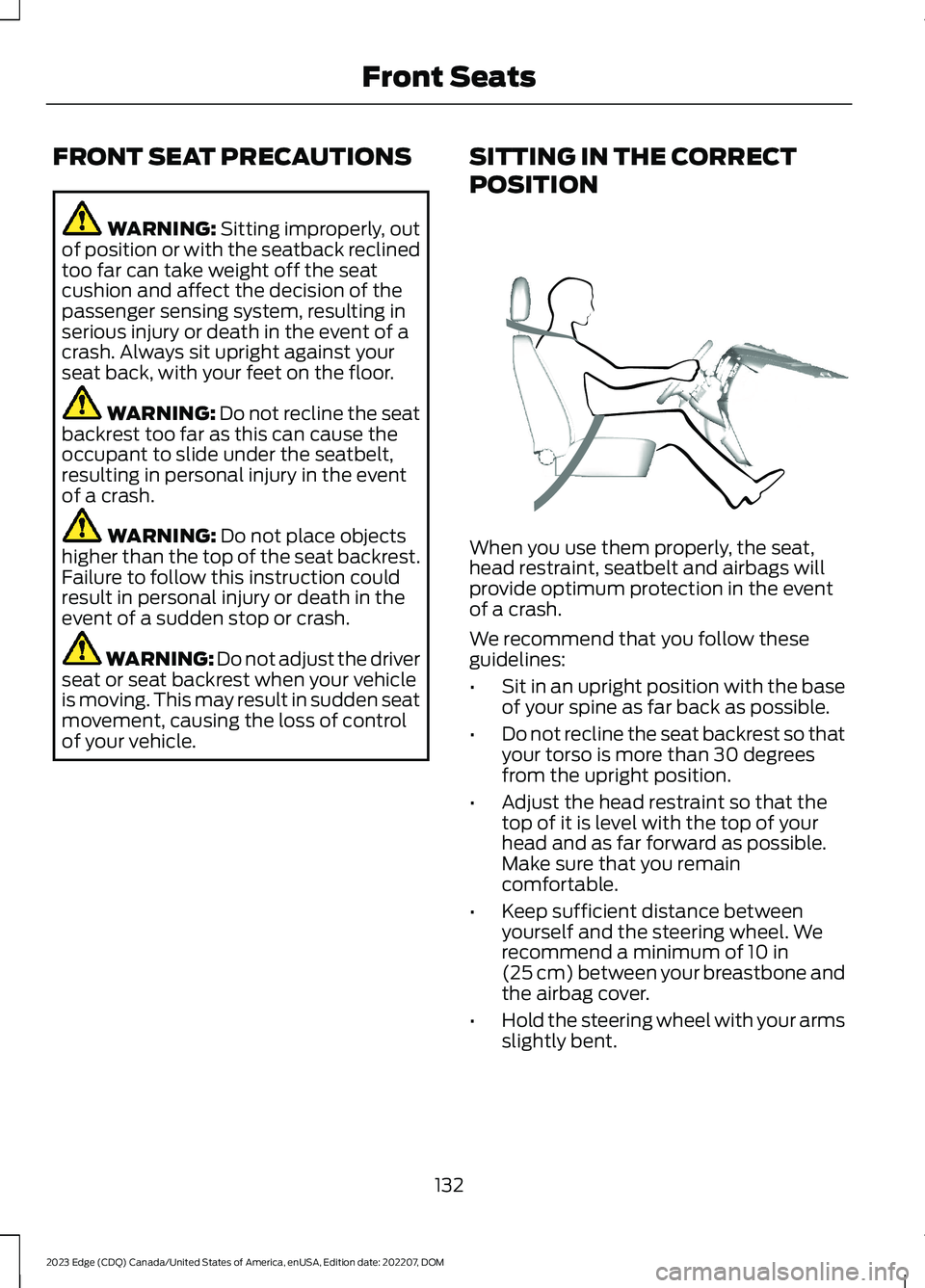
When you use them properly, the seat,head restraint, seatbelt and airbags willprovide optimum protection in the eventof a crash.
We recommend that you follow theseguidelines:
•Sit in an upright position with the baseof your spine as far back as possible.
•Do not recline the seat backrest so thatyour torso is more than 30 degreesfrom the upright position.
•Adjust the head restraint so that thetop of it is level with the top of yourhead and as far forward as possible.Make sure that you remaincomfortable.
•Keep sufficient distance betweenyourself and the steering wheel. Werecommend a minimum of 10 in(25 cm) between your breastbone andthe airbag cover.
•Hold the steering wheel with your armsslightly bent.
132
2023 Edge (CDQ) Canada/United States of America, enUSA, Edition date: 202207, DOMFront SeatsE68595
Page 164 of 504
4.Press the push button ignition switch.
STOPPING THE ENGINE WHENYOUR VEHICLE IS MOVING
WARNING: Switching off theengine when your vehicle is still movingresults in a significant decrease inbraking assistance. Higher effort isrequired to apply the brakes and to stopyour vehicle. A significant decrease insteering assistance could also occur. Thesteering does not lock, but higher effortcould be required to steer your vehicle.When you switch the ignition off, someelectrical circuits, for example airbags,also turn off. If you unintentionally switchthe ignition off, shift into neutral (N) andrestart the engine.
1.Press and hold the push button ignitionswitch until the engine stops, or pressit three times within two seconds.
2.Shift into neutral and use the brakes tobring your vehicle to a safe stop.
3.Shift into park (P).
4.Apply the parking brake.
AUTOMATIC ENGINE STOP (IF
EQUIPPED)
WHAT IS AUTOMATIC ENGINESTOP
Automatic engine stop is a feature thatswitches the engine off if it has been idlingfor an extended period to help you savefuel.
HOW DOES AUTOMATIC ENGINESTOP WORK
Automatic engine stop turns the engineoff. The ignition also turns off in order tosave battery power. Before the engineshuts down, a message appears in theinformation display showing a timercounting down. If you do not intervenewithin 30 seconds, the engine shuts down.Another message appears in theinformation display to inform you that theengine has shut down in order to save fuel.Start your vehicle as you normally do.
SWITCHING AUTOMATIC ENGINESTOP ON AND OFF
1.Press the menu button on the steeringwheel to enter the information displaymain menu.
2.Select Settings.
3.Switch Auto Engine Off or 30minMax Idle on or off.
Note: You cannot permanently switch offthe automatic shutdown. If you switch itoff, it turns on each time you switch theignition on.
160
2023 Edge (CDQ) Canada/United States of America, enUSA, Edition date: 202207, DOMStarting and Stopping the EngineE357998 E357998
Page 182 of 504
USING MANUAL PARK RELEASE
Activating the Manual ParkRelease Cable
1.Apply the parking brake. See ElectricParking Brake (page 184).
Note:If the vehicle's battery has run out ofcharge, use an external power source toapply the parking brake.
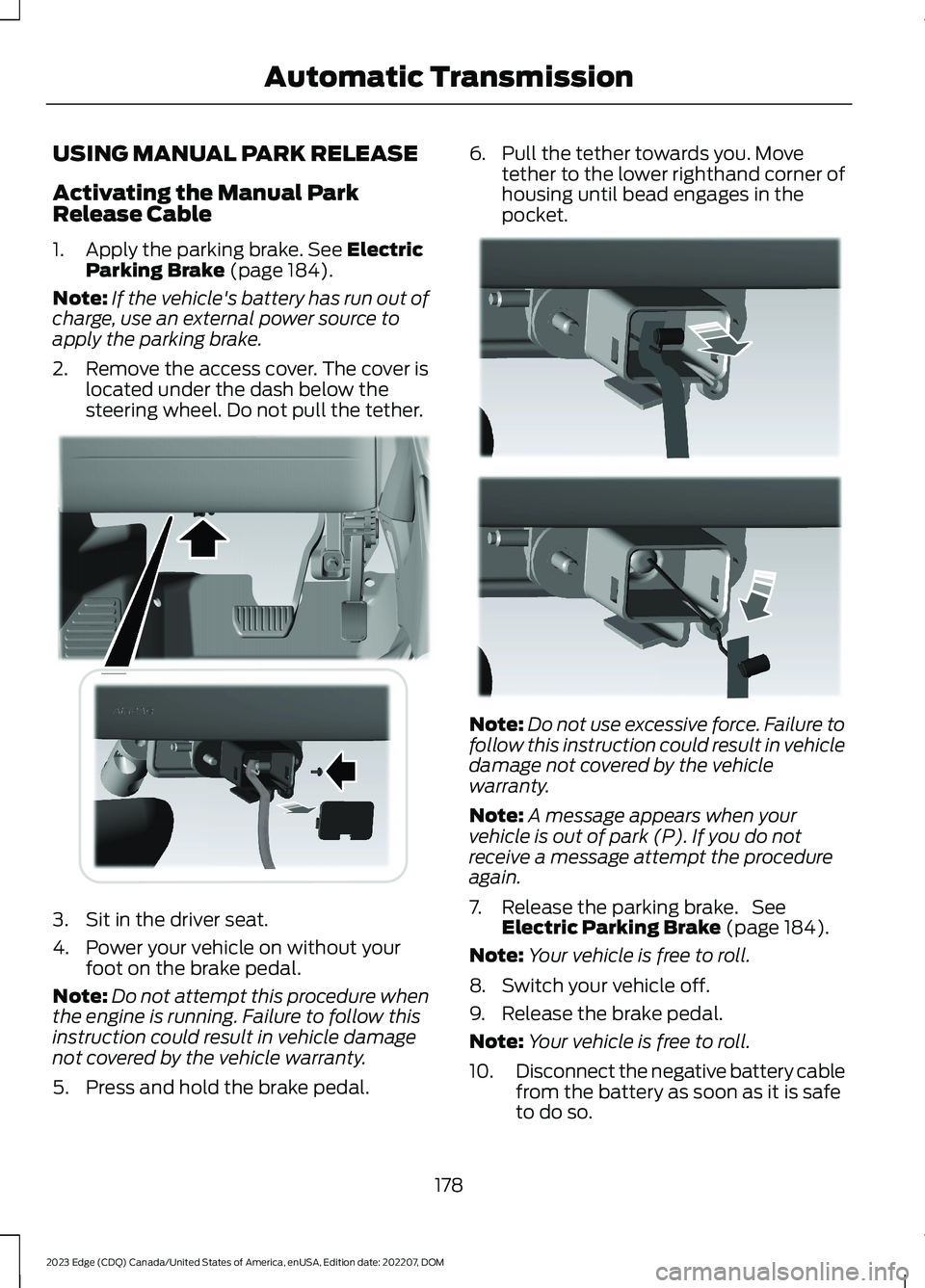
2.Remove the access cover. The cover islocated under the dash below thesteering wheel. Do not pull the tether.
3.Sit in the driver seat.
4.Power your vehicle on without yourfoot on the brake pedal.
Note:Do not attempt this procedure whenthe engine is running. Failure to follow thisinstruction could result in vehicle damagenot covered by the vehicle warranty.
5.Press and hold the brake pedal.
6.Pull the tether towards you. Movetether to the lower righthand corner ofhousing until bead engages in thepocket.
Note:Do not use excessive force. Failure tofollow this instruction could result in vehicledamage not covered by the vehiclewarranty.
Note:A message appears when yourvehicle is out of park (P). If you do notreceive a message attempt the procedureagain.
7.Release the parking brake. SeeElectric Parking Brake (page 184).
Note:Your vehicle is free to roll.
8.Switch your vehicle off.
9.Release the brake pedal.
Note:Your vehicle is free to roll.
10.Disconnect the negative battery cablefrom the battery as soon as it is safeto do so.
178
2023 Edge (CDQ) Canada/United States of America, enUSA, Edition date: 202207, DOMAutomatic TransmissionE307294 E307295
Page 187 of 504
BRAKES – INFORMATIONMESSAGES
The brake fluidlevel is low and thebrake systemshould beinspected immedi-ately. SeeChecking theBrake Fluid (page181).
Brake Fluid LevelLow
The brake systemneeds servicing.Stop the vehicle ina safe place.Contact an author-ized dealer.
Check BrakeSystem
BRAKES – FREQUENTLY ASKEDQUESTIONS
Is brake dust on the wheels normal?
Brake dust could accumulate on thewheels, even under normal drivingconditions. Some dust is inevitable asthe brakes wear and does notcontribute to brake noise. SeeCleaning Wheels (page 302).
Will wet driving conditions effect mybraking abilities?
Wet brakes result in reduced brakingefficiency. Gently press the brakepedal a few times when driving froma car wash or standing water to dry thebrakes.
Is brake noise considered normal?
Occasional brake noise is normal. If ametal-to-metal, continuous grindingor continuous squeal sound is present,the brake linings may be worn-out andan authorized dealer should checkthem. If the vehicle has continuousvibration or shudder in the steeringwheel while braking, an authorizeddealer should check your vehicle.
When should you replace the brakefluid?
Brake fluid absorbs water over timewhich degrades the effectiveness ofthe brake fluid. Change the brake fluidat the specified intervals to preventdegraded braking performance. SeeNormal Scheduled Maintenance(page 391).
183
2023 Edge (CDQ) Canada/United States of America, enUSA, Edition date: 202207, DOMBrakes
Page 195 of 504
HOW DOES STABILITY
CONTROL WORK
WARNING: Vehicle modificationsinvolving braking system, aftermarketroof racks, suspension, steering system,tire construction and wheel and tire sizemay change the handling characteristicsof your vehicle and may adversely affectthe performance of the electronicstability control system. In addition,installing any stereo loudspeakers mayinterfere with and adversely affect theelectronic stability control system. Installany aftermarket stereo loudspeaker asfar as possible from the front centerconsole, the tunnel, and the front seatsin order to minimize the risk of interferingwith the electronic stability controlsensors. Reducing the effectiveness ofthe electronic stability control systemcould lead to an increased risk of loss ofvehicle control, vehicle rollover, personalinjury and death.
WARNING: Remember that evenadvanced technology cannot defy thelaws of physics. It's always possible tolose control of a vehicle due toinappropriate driver input for theconditions. Aggressive driving on anyroad condition can cause you to losecontrol of your vehicle increasing the riskof personal injury or property damage.Activation of the electronic stabilitycontrol system is an indication that atleast some of the tires have exceededtheir ability to grip the road; this couldreduce the operator's ability to controlthe vehicle potentially resulting in a lossof vehicle control, vehicle rollover,personal injury and death. If yourelectronic stability control systemactivates, SLOW DOWN.
If a driving condition activates either thestability control or the traction controlsystem you may experience the followingconditions:
•The stability and traction control lightflashes.
•Your vehicle slows down.
•Reduced engine power.
The stability control system has severalfeatures built into it to help you maintaincontrol of your vehicle:
Electronic Stability Control
Electronic stability control enhances yourvehicle’s ability to prevent skids or lateralslides by applying brakes to one or moreof the wheels individually and, if necessary,reducing engine power.
Roll Stability Control
Roll stability control enhances yourvehicle’s ability to prevent rollovers bydetecting your vehicle’s roll motion andthe rate at which it changes by applyingthe brakes to one or more wheelsindividually.
Curve Control
Curve control enhances your vehicle’sability to follow the road when corneringseverely or avoiding objects in the roadway.Curve control operates by reducing enginepower and, if necessary, applying brakesto one or more of the wheels individually.
Traction Control
Traction control enhances your vehicle’sability to maintain traction of the wheelsby detecting and controlling wheel spin.See How Does Traction Control Work(page 190).
191
2023 Edge (CDQ) Canada/United States of America, enUSA, Edition date: 202207, DOMStability Control
Page 201 of 504
The side parking aid may not function if:
•Your vehicle remains stationary for overtwo minutes.
•The anti-lock brake system activates.
•The traction control system activates.
•Your vehicle is in park (P).
•The steering wheel angle informationis not available. You must drive at least492 ft (150 m) above 19 mph(30 km/h) to reset the steering wheelangle information.
Note:If you switch traction control off, theside sensing system also turns off.
To reinitialize the system, drive the lengthof your vehicle.
The side parking aid does not detect anobject that is moving toward the side ofyour vehicle, for example another vehiclemoving at a low speed, if it does not passa front or rear parking aid sensor.
If the transmission is in reverse (R), the sidesensing system provides audible warnings.When your vehicle is moving slowly,obstacles are detected within 24 in(60 cm) and are inside the driving path ofyour vehicle. If your vehicle remainsstationary for a few seconds, the audiblewarning turns off. Visual indication isalways present in reverse (R).
If your vehicle is in neutral (N), the sidesensing system provides visual indicationonly when your vehicle is moving slowlyand there is a front or rear parking aidobstacle detected, and the side obstacleis within 24 in (60 cm) from the side ofyour vehicle. If your vehicle remainsstationary for a few seconds, the visualindication turns off.
If the transmission is in drive (D) or anyother forward gear, the side sensing systemprovides audible and visual warnings.When your vehicle is moving slowly,obstacles are detected within 24 in(60 cm) and are inside the driving path ofyour vehicle. If your vehicle remainsstationary for a few seconds, the visualindication and audible warning turns off.
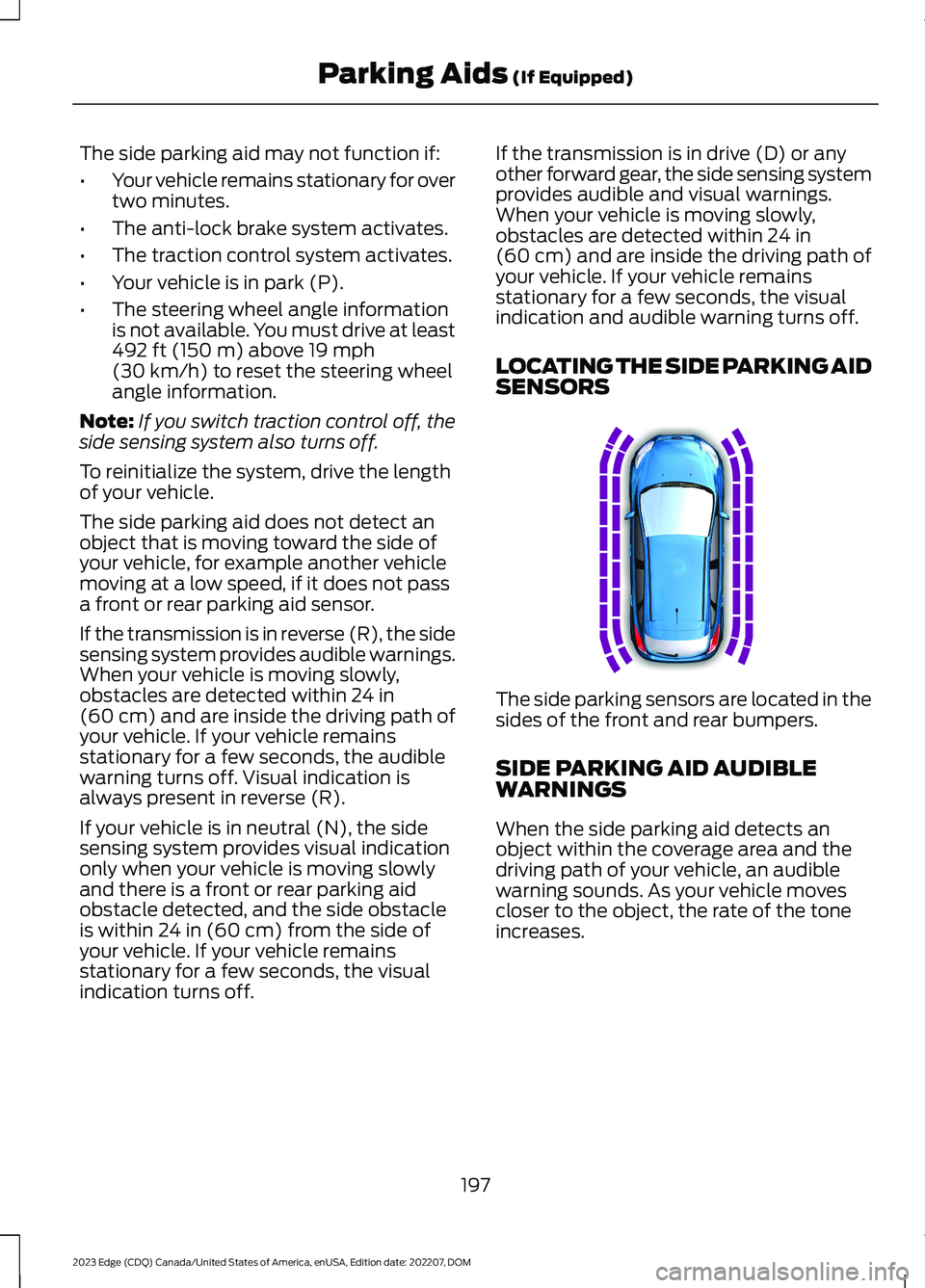
LOCATING THE SIDE PARKING AIDSENSORS
The side parking sensors are located in thesides of the front and rear bumpers.
SIDE PARKING AID AUDIBLEWARNINGS
When the side parking aid detects anobject within the coverage area and thedriving path of your vehicle, an audiblewarning sounds. As your vehicle movescloser to the object, the rate of the toneincreases.
197
2023 Edge (CDQ) Canada/United States of America, enUSA, Edition date: 202207, DOMParking Aids (If Equipped)E187810
Page 204 of 504
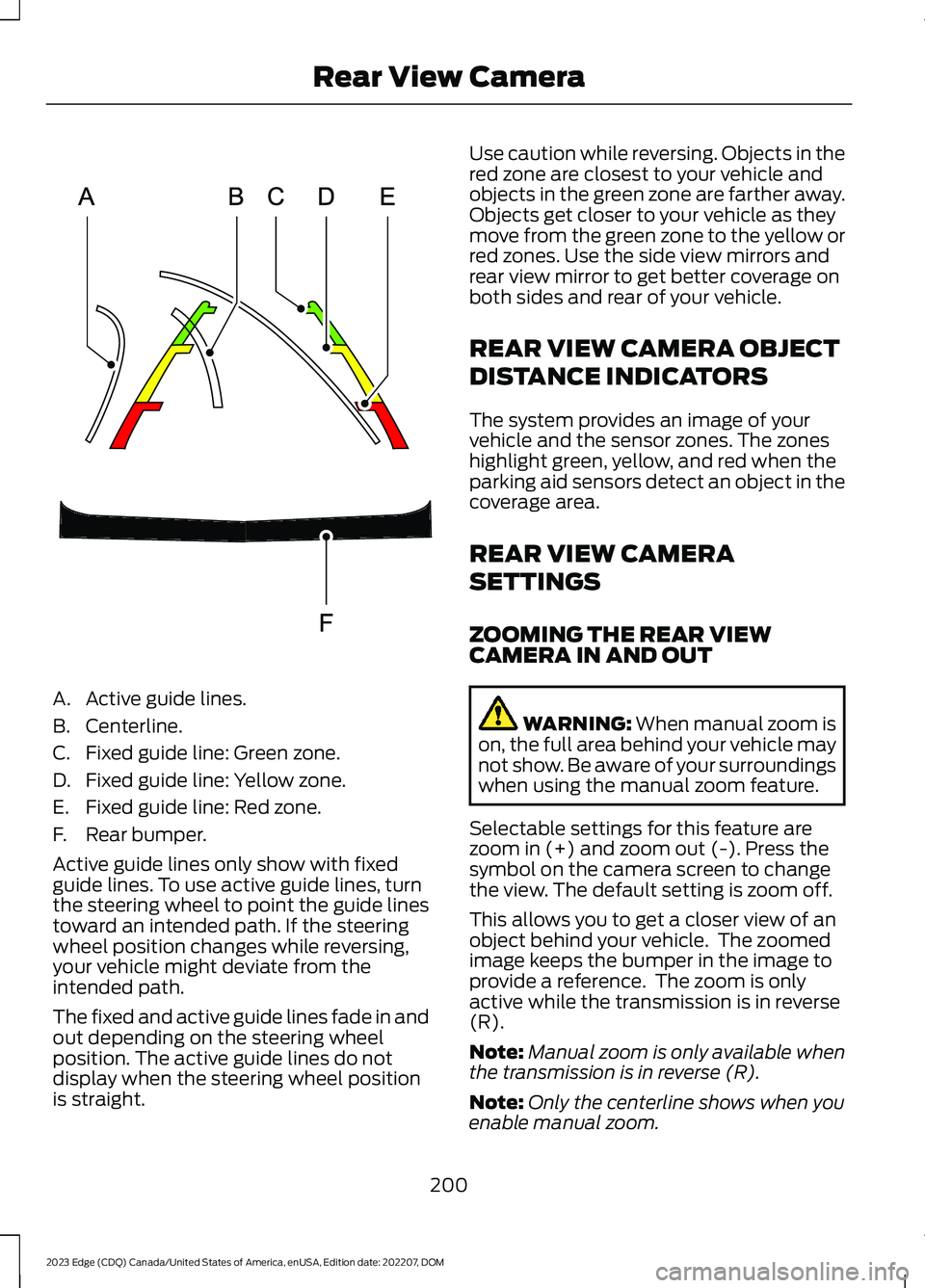
A.Active guide lines.
B.Centerline.
C.Fixed guide line: Green zone.
D.Fixed guide line: Yellow zone.
E.Fixed guide line: Red zone.
F.Rear bumper.
Active guide lines only show with fixedguide lines. To use active guide lines, turnthe steering wheel to point the guide linestoward an intended path. If the steeringwheel position changes while reversing,your vehicle might deviate from theintended path.
The fixed and active guide lines fade in andout depending on the steering wheelposition. The active guide lines do notdisplay when the steering wheel positionis straight.
Use caution while reversing. Objects in thered zone are closest to your vehicle andobjects in the green zone are farther away.Objects get closer to your vehicle as theymove from the green zone to the yellow orred zones. Use the side view mirrors andrear view mirror to get better coverage onboth sides and rear of your vehicle.
REAR VIEW CAMERA OBJECT
DISTANCE INDICATORS
The system provides an image of yourvehicle and the sensor zones. The zoneshighlight green, yellow, and red when theparking aid sensors detect an object in thecoverage area.
REAR VIEW CAMERA
SETTINGS
ZOOMING THE REAR VIEWCAMERA IN AND OUT
WARNING: When manual zoom ison, the full area behind your vehicle maynot show. Be aware of your surroundingswhen using the manual zoom feature.
Selectable settings for this feature arezoom in (+) and zoom out (-). Press thesymbol on the camera screen to changethe view. The default setting is zoom off.
This allows you to get a closer view of anobject behind your vehicle. The zoomedimage keeps the bumper in the image toprovide a reference. The zoom is onlyactive while the transmission is in reverse(R).
Note:Manual zoom is only available whenthe transmission is in reverse (R).
Note:Only the centerline shows when youenable manual zoom.
200
2023 Edge (CDQ) Canada/United States of America, enUSA, Edition date: 202207, DOMRear View CameraE306774
Page 208 of 504
WHAT IS ACTIVE PARK
ASSIST
Enhanced Active Park Assist
Assists you with parking in and out ofparking spaces.
HOW DOES ACTIVE PARK
ASSIST WORK
Active park assist uses sensors to detectparking spaces. The system controlssteering as required to maneuver into orout of a parking space.
ACTIVE PARK ASSIST
PRECAUTIONS
WARNING: You must remain inyour vehicle when the system turns on.At all times you are responsible forcontrolling your vehicle, supervising thesystem, and intervening if required.Failure to follow this instruction couldresult in the loss of control of yourvehicle, personal injury or death.
WARNING: The sensors may notdetect objects in heavy rain or otherconditions that cause interference.
WARNING: You are responsible forcontrolling your vehicle at all times. Thesystem is designed to be an aid and doesnot relieve you of your responsibility todrive with due care and attention. Failureto follow this instruction could result inthe loss of control of your vehicle,personal injury or death.
WARNING: Active park assist doesnot apply the brakes under anycircumstances.
WARNING: Do not use the systemwith accessories that extend beyond thefront or rear of your vehicle, for examplea trailer hitch or bike rack. The system isnot able to make corrections for theadditional length of the accessories.
SWITCHING ACTIVE PARK
ASSIST ON AND OFF
Press the active park assistbutton to bring up full screennotifications.
Press the soft keys on the touchscreen toswitch between parallel park in,perpendicular park in or parallel park outparking modes.
Cancelling Active Park Assist
To cancel parking assistance at any time:
•Press the active park assist buttonduring operation.
•Grab the steering wheel duringoperation.
•Drive above 22 mph (35 km/h) for ashort period of time when searching fora parking space.
•Drive above 6 mph (9 km/h) duringoperation.
•Switch traction control off.
ENTERING A PARALLEL
PARKING SPACE
1.Press the active park assist button.
2.Select parallel park.
Note:The system detects other vehiclesand curbs to find a parking space.
204
2023 Edge (CDQ) Canada/United States of America, enUSA, Edition date: 202207, DOMActive Park Assist (If Equipped)E146186
Page 209 of 504
3.Use the turn signal lever to search fora parking space on the driver orpassenger side of your vehicle.
Note:The system defaults to searching fora parking spot on the passenger side of yourvehicle if you do not use the turn signal lever.
4.Drive your vehicle approximately 3 ft(1 m) away from and parallel to theother parked vehicles when searchingfor a parking space.
Note:A tone sounds and a messageappears in the information andentertainment display when active parkassist finds a parking space.
5.Press and hold the brake pedal.
6.Release the steering wheel and shiftinto reverse (R).
7.Use the accelerator and brake tocontrol your vehicle's speed whenparking. You are responsible forstopping your vehicle.
8.Active park assist is a multi-stepprocess and requires you to shift thetransmission multiple times. Follow theonscreen instructions until parking iscomplete.
Note:You can slow down your vehicle atany time by pressing the brake pedal.
Note:When parallel parking betweenobjects, the system will park closer to theobject in front of your vehicle to allow easieraccess to the luggage compartment.
ENTERING A PERPENDICULAR
PARKING SPACE
1.Press the active park assist button.
2.Select perpendicular parking.
Note:Active park assist does not recognizeparking space lines and centers your vehiclebetween objects.
Note:Active park assist backs your vehicleinto parking spaces.
3.Use the turn signal lever to search fora parking space on the driver orpassenger side of your vehicle.
Note:The system defaults to searching fora parking spot on the passenger side of yourvehicle if you do not use the turn signal lever.
4.Drive your vehicle approximately 3 ft(1 m) away from and perpendicular tothe other parked vehicles whensearching for a parking space.
Note:A tone sounds and a messageappears in the information andentertainment display when active parkassist finds a parking space.
5.Press and hold the brake pedal.
6.Release the steering wheel and shiftinto reverse (R).
7.Use the accelerator and brake tocontrol your vehicle's speed whenparking. You are responsible forstopping your vehicle.
8.Active park assist is a multi-stepprocess and requires you to shift thetransmission multiple times. Follow theonscreen instructions until parking iscomplete.
Note:Active park assist aligns the front-endof your vehicle with the lane side of theobject next to it.
Note:When only one object is detected,the system allows enough distance to openthe door on either side.
Note:You can slow down your vehicle atany time by pressing the brake pedal.
EXITING A PARKING SPACE
Active park assist only assists leavingparallel parking spaces.
1.Press the active park assist button.
205
2023 Edge (CDQ) Canada/United States of America, enUSA, Edition date: 202207, DOMActive Park Assist (If Equipped)